Search Results: "dpk"

6 September 2013

Sylvestre Ledru: About optimization flags in software

Following a thread on the Clang mailing list, I did a quick analysis of the optimization flags used to build C or C++ code. I used a rebuild result from last mid July of all Debian native packages (meaning that I don't have the log of full Java, Python or other packages without native code) and wrote a small script to count all their occurrences.
By default, deb packages uses the command "dpkg-buildflags --get CFLAGS" which will set the optimization level to -O2. However, many packages and upstream build systems do not respect such flags. On 10320 binary-only packages (in total, Debian has around 19000), the results are the following:
Optimization levelNumber of occurrencesNumber of packages
-O35597269
-Os30849145
-O013993294
-O125494809
-O29958037685
-O3106048531
-O4140216
-O500
-O6693549
Since a graphic talks more than numbers (note that the Y axis is logarithmic):
Disclaimer:
Some packages are using several optimization flags during the same build.
Some packages are not showing the full command line (see jessie release goal: verbose build logs)
The results might be approximate since I am basically grepping "-OX " on the log files.

2 September 2013

Dmitrijs Ledkovs: My Debian Activities: Multiarch & upstart on kFreeBSD hacking

Looks like there is a recent trend to publicize one's debian activities, so I thought I should join in =) Not so sure if MDA acronym would work for these types of posts...
MultiarchI have been working on multi-arching additional libraries. In particular I am working on multiarching boost libraries. At the moment boost1.53 multiarched libraries are uploaded in the experimental, and I am still working out the quirks with those. At the same time I have submitted a patch to multiarch libicu-dev, which has been accepted by the maintainer and is currently waiting in new queue. This brings us closer to multiarching all of boost libraries. But as it has been pointed out at the Multiarch BOF at Debconf'13, one doesn't have to wait for dependencies (be it libs or lib-devs) to be Multiarched before multi-arching your own library. If you do it right (put all or arch-specifi headers in multiarch location, and place libraries in multiarch location, split utilities into a separate package), you can go and multiarch your libraries ahead of time. Maybe it's time to default to debhelper 9 in dh-make, and default to multiarch locations for all libraries?

Boost also has libraries which depend on mpi, and at the moment that's not multiarched. I'm not sure if there are additional considerations there given the support for alternative mpi implementations in Debian.

Boost also depends on libpython. At the moment it's shipping libboost_python-py2.7.so & libbost-py3.3.so, with a libboost_python.so symlink to libbost_python-py2.7.so. I do wonder if it's a sensible approach, or should the boosty_python library be simply shipped in arch specific & python implementation specific paths e.g. /usr/lib/pythonX.Y/config-X.Y$(abi_tag)-$(DEB_HOST_MULTIARCH)/ that way we'll be able to support python debug interpreter in python_boost. I guess I should seek expert opinion on other multiarch wizards.

In addition to boost, I've now started looking at qmake and how it handles multiarch. At the moment, it doesn't handle it much. All paths are statically copied around and hard-coded in each module qmake provides. I have now been working at abusing qmake's $$system to call into dpkg-architecture, and actually choose native or cross compiler & adjust settings and paths to Qt libraries. There are a couple of bugs to fix, but I should be able to propose a "debian-multiarch" qmake spec soon. Such that in calls dpkg-architecture & properly adjust compilers & locations for the DEB_HOST. qmake by the way has its quirks. For example all variable assignments seemed to default to be "by value" & not "by reference" (i.e. upon assignment all variables on the right hand side get expanded and the literal string is stored, instead of storing $(prefix)/lib/$(arch), and evaluating that later.) Hence my current qmakespec is less elegant than I hoped.
upstart on kFreeBSDFreeBSD 9.2 and up have implemented the wait6 and with it waitid is also exposed. At the moment there are some differences between glibc and FreeBSD waitid usage. I am not well versed in glibc, FreeBSD and POSIX, but the bug at hand & POSIX reference lead me to believe that POSIX is slightly ambiguous about it.

Why is waitid support is interesting? Well, kFreeBSD/libc maintainer in Debian is working on exposing it with/after (e)glibc2.18 is in Debian, which will remove one more blocker from porting Upstart to kFreeBSD. To this extend, I have in the mean time setup FreeBSD & kFreeBSD virtual machines and got libnih to compile on both (sans waitid on kFreeBSD). One of the optional upstart's features is to use inotify to spot & reload configuration files, at the moment I haven't ported that functionality to use native kevent/kqueues (EVFILT_AIO) instead I have cheated and packaged for Debian the Google Summer of Code 2011 project libinotify-kevent which provides inotify compatible API, implemented with kevent. Which is kind of the reverse strategy of libkqueue and/or libevent. It would be interesting to see kernels and/or those libraries to unify/standartise on common APIs. Unfortunately, it still seems like using native API for each kernel is best to avoid dependencies and leverage all features and semantics. Nonetheless I did package it for now. To further progress with actually porting upstart, I'd like to get my hands at (e)glibc 2.18 compiled for kFreeBSD with waitid patches. I got pointers to the patches, but I haven't yet succeeded at compiling (e)glibc with those applied. So no upstart booting kFreeBSD VM yet, but rather work in progress. It's quite fun. It's been years since I have touched a FreeBSD boxes and it's first time me using kFreeBSD. The semantics, differences and benefits of each do shine and it's a promising platform.
Multiarch on kFreeBSD?
Given the excellent multiarch implementation on Debian and sophisticated Linux Emulation Layer on FreeBSD kernel, I was half expecting the following to work:
  • on kFreeBSD enable linux i386/amd64 repository
  • apt-get install hello:i386
  • $ hello
But unfortunately this confused kFreeBSD, since it didn't find ELF tags and linker didn't seem to load the right libraries any more =( Not sure if this issue has been raised before, but I think it would be awesome if FreeBSD Linux Emulation Layer worked transparently on Debian/kFreeBSD multiarch system.

1 September 2013

Raphaël Hertzog: My Free Software Activities in August 2013

This is my monthly summary of my free software related activities. If you re among the people who made a donation to support my work (47.50 , thanks everybody!), then you can learn how I spent your money. Otherwise it s just an interesting status update on my various projects. Package Tracking System There are only 2-3 weeks left in the summer of code project dedicated to rewrite the package tracking system. We have come a long way during August check it out yourself in pts.debian.net. The rewrite doesn t have all the features of the old PTS yet, but I opted to keep some of the easy and less interesting features for others to re-implement. Instead I asked Marko to work in the coming weeks on new features that will bring more value, like the possibility to have user accounts with the possibility to easily review and tweak all your subscriptions on the web, and like the possibility to subscribe to groups of packages (i.e. those managed by a team). Our main problem right now is that exim has a pretty poor default behavior of forking hundreds of processes if you get hundreds of mails (in a batch) to an address that delivers via a pipe (postfix is saner, it serializes the deliveries on pipes). The new PTS is much more modular and its memory footprint is bigger (about 3 times more for the process that delivers mails, 30Mb instead of 10Mb), and in such a situation we managed to run out of memory for now we worked around the situation with an exim setting that queues mails once the load gets too high but it s a poor workaround IMO. We could obviously implement our own queue and a daemon but I d like to avoid this. So who knows how to tell exim to behave? :-) On the positive side, Marko has gotten some feedback from people who like the new PTS and are using it daily already. And several persons have expressed their interest to work on the new codebase already. On my side, I created a package so that it s easy to deploy for derivatives. In this process, I revamped the way we manage the Django settings (for development and for production). The package is not finished yet, but it s mostly usable already. But I still want to do some cleanup/refactoring in the models before others start deploying it. We must also enable South to make it possible to upgrade easily afterwards. DebConf 13 in Vaumarcus From August 10th to 17th, I was attending DebConf 13. It matched the only week of vacation that my wife had this summer so we went there with the whole family (that is with a 3 years old son, and 6 months old one). Thus I could not immerse myself in Debconf and missed all the nice things that happen outside of the talk rooms. I picked 3-4 interesting talks per day and I spent the rest with my family. On the positive side, I was pleased that my wife could meet (or at least see) some other Debian people. She knows quite a few (of you) by name because I have been telling her Debian stories for years now Debian France Debian France sold quite some merchandise during Debconf but I didn t take care of that. It was supervised by Sylvestre Ledru but fortunately he got the help of multiple persons, both to bring everything there, to sell it, and to bring back the rest. The good news of the month is that the upstream author of galette published a new version with all the features that we ordered him a few months ago. We send now automatic reminders to members who must renew their subscription, we have automatic update of our accounting books (in a ledger file in a git repository) when we people donate or pay their subscription via the paypal form on our website. I was so pleased to finally have this that I took some hours to finalize the packaging of galette, so that it could be uploaded to Debian. It s now waiting in the NEW queue. I also spent multiple hours to write the python script that is executed by galette and that updates the accounting files. Misc Debian stuff Debian Packaging. I did two uploads of logidee-tools to fix bugs #718671 and #718836. I created a package for Dolibarr a PHP-based CRM and ERP software (it doesn t do accounting however), it s sitting in the NEW queue for almost a month already. I forwarded #719000 to the upstream Publican developers. I filed #720393 to request a new upstream version of libphp-mailer. git-multimail. After its deployment on Alioth last month, Niels Thykier reported me a case where it lead to bounces, I filed this as a new upstream ticket and in fact I fixed it myself a few days after. I got the fixed version installed on Alioth. dpkg. I investigated why the the automatic builds of dpkg were no longer happening and asked Michael Prokop if he could install a newer version of gettext in the build chroot. He told me that he would need a backport for that so I asked Santiago Vila if he was willing to provide it and he kindly accepted. A few days after, the package was in backports and I m now again running the latest dpkg out of git thanks to the nice service provided by Michael. Misc discussions. The thread about user planets drifted into a discussion of how to avoid promotional posts on such planets and in that context someone again brought up the Debian Machine Usage Policy as a way to shut down any kind of (self-)promotional content on planet if there s money involved. This always irritates me and this time I opted to ask James Troup about the origin of that clause in the DMUP. So who is willing to work with DSA to fix the DMUP so that people stop abusing it in contexts where it doesn t make sense? I also participated in some discussions concerning dgit. I like the ideas behind the tool, but I m saddened by the behavior of Ian Jackson. I helped him to fill his gap of knowledge about new sources formats but he keeps on bashing about the 3.0 (quilt) source format both in the manual page and in the output of the program. He believes that dgit is no longer an experiment but the truth is that it s still a poorly commented Perl script doing lots of hackish things. Kali Linux Between Debconf and all, I haven t done much for Kali except a couple of fixes. There s a nice story of how I tracked a bug in live-installer on the Kali blog. That fix has been committed to Debian. I also improved live-build to include xfsprogs/jfsutils on the ISO image when you include the debian-installer (so that you don t end up in problems when you pick JFS or XFS as file systems for your installation). Thanks See you next month for a new summary of my activities.

One comment Liked this article? Click here. My blog is Flattr-enabled.

22 August 2013

Martín Ferrari: Setting up my server: re-installing on an encripted LVM

Very long post ahead (sorry for the wall of text), part of a series of posts on some sysadmin topics, see post 1 and post 2. I want to show you how I set up my tiny dedicated server to have encrypted partitions, and to reinstall it from scratch. All of this without ever accessing the actual server console.

Introduction As much as my provider may have gold standards on how to do things (they don't, there are some very bad practises in the default installation, like putting their SSH key into root's authorized_keys file), I wouldn't trust an installation done by a third party. Also, I wanted to have all my data securely encrypted. I know this is not perfect, and there are possible attacks. But I think it is a good barrier to have to deter entities without big budgets from getting my data. I have done this twice on my servers, and today I was reviewing each step as he was doing the same thing (with some slight differences) on his brand new server, so I think this is all mostly correct. Please, tell me if you find a bug in this guide. This was done on my 12 /month Kimsufi dedicated server, sold by OVH (see my previous post on why I chose it), and some things are specific to them. But you can do the same thing with any dedicated server that has a rescue netboot image. The process is to boot into the rescue image (this is of course a weak link, as the image could have a keylogger, but we have to stop the paranoia at some point), manually partition the disk, set-up encryption, and LVM; and then install a Debian system with debootstrap. To be able to unlock the encrypted disks, you will have to ssh into the server after a reboot and enter the passphrase (this is done inside the initrd phase). Once unlocked, the normal boot process continues. If anything fails, you end up with an unreachable system: it might or might have not booted, the disk might or might not be unlocked, etc. You can always go back into the rescue netboot image, but that does not allow you to see the boot process. Some providers will give you real remote console access, OVH charges you silly money for that. They used to offer a "virtual KVM", which was a bit of a kludge, but it worked: another netboot image that started a QEMU connected to a VNC server, so by connecting to the VNC server, you would be able to interact with the emulated boot process, but with a fake BIOS and a virtual network. For some unspecified reason they've stopped offering this, but there is a workaround available. The bottom line is, if you have some kind of rescue netboot image, you can just download and run QEMU on it and do the same trick.

The gritty details Start by netbooting into your rescue image. For OVH, you'd go to the control panel, in the Services/Netboot section and select "rescue pro". Then reboot your server. OVH will mail you a temporary password when it finishes rebooting. Connect to it, without saving the temporary SSH key:
$ ssh -oUserKnownHostsFile=/dev/null -oStrictHostKeyChecking=no root@$ IP 
For the rest of the text, I am assuming you have one hard drive called /dev/sda. We start by partitioning it:
# fdisk /dev/sda
Start a new partition table with o, and then create two primary partitions: a small one for /boot at the beginning (100 to 300 MB would do), and a second one with the remaining space. Set both as type 83 (Linux), and don't forget to activate the first one, as this servers refuse to boot from the hard drive without that. Create the file system for /boot, and the encrypted device:
# mkfs.ext4 /dev/sda1
# cryptsetup -s 512 -c aes-xts-plain64 luksFormat /dev/sda2
The encryption parameters are the same as the ones used by the Debian Installer by default, so don't change them unless you really know what you are doing. You will need to type a passphrase for the encrypted device, be sure not to forget it! This passphrase can later be changed (or secondary passphrases added) with the cryptsetup tool. Look up the crypt device's UUID, and save it for later:
# cryptsetup luksDump /dev/sda2   grep UUID:
UUID:           xxxxxxxx-xxxx-xxxx-xxxx-xxxxxxxxxxxx
Open the encrypted device (type the passphrase again), and set up the LVM volume group:
# cryptsetup luksOpen /dev/sda2 sda2_crypt
# pvcreate /dev/mapper/sda2_crypt
# vgcreate vg0 /dev/mapper/sda2_crypt
Create the logical volumes, this is of course a matter of personal taste and there are many possible variations. This is my current layout, note that I put most of the "big data" in /srv.
# lvcreate -L 500m -n root vg0
# lvcreate -L 1.5g -n usr vg0
# lvcreate -L 3g -n var vg0
# lvcreate -L 1g -n home vg0
# lvcreate -L 10g -n srv vg0
# lvcreate -L 500m -n swap vg0
# lvcreate -L 100m -n tmp vg0
Some possible variations:
  • You can decide to use a ramdisk for /tmp, so instead of creating a logical volume, you would add RAMTMP=yes to /etc/default/tmpfs.
  • You can merge / and /usr in one same partition, as neither of them change much.
  • You can avoid having swap if you prefer.
  • You can put /home in /srv, and bind mount it later.
Now, create the file systems, swap space, and mount them in /target. Note that I like to use human-readable labels.
# for i in home root srv tmp usr var; do 
  mkfs.ext4 -L $i /dev/mapper/vg-$i; done
# mkswap -L swap /dev/mapper/vg0-swap
# mkdir /target
# mount /dev/mapper/vg0-root /target
# mkdir /target/ boot,home,srv,tmp,usr,var 
# mount /dev/sda1 /target/boot
# for i in home srv tmp usr var; do
  mount /dev/mapper/vg-$i /target/$i; done
# swapon /dev/mapper/vg-swap
Don't forget to set the right permissions for /tmp.
# chmod 1777 /target/tmp
If you want to do the /home on /srv, you'll need to do this (and then copy to /etc/fstab):
# mkdir /target/srv/home
# mount -o bind /target/srv/home /target/home
The disk is ready now. We will use debootstrap to install the base system. The OVH image carries it, otherwise consult the relevant section in the Install manual for details. It is important that at this point you check that you have a good GPG keyring for debootstrap to verify the installation source, by comparing it to a good one (for example, the one in your machine):
# gpg /usr/share/keyrings/debian-archive-keyring.gpg
pub  4096R/B98321F9 2010-08-07 Squeeze Stable Release Key <debian-release@lists.debian.org>
pub  4096R/473041FA 2010-08-27 Debian Archive Automatic Signing Key (6.0/squeeze) <ftpmaster@debian.org>
pub  4096R/65FFB764 2012-05-08 Wheezy Stable Release Key <debian-release@lists.debian.org>
pub  4096R/46925553 2012-04-27 Debian Archive Automatic Signing Key (7.0/wheezy) <ftpmaster@debian.org>
Now, for the actual installation. You can use any Debian mirror, OVH has their own in the local network. In OVH's case it is critical to specify the architecture, as the rescue image is i386. I didn't notice that and had to painfully switch architectures in place (which was absolutely not possible a couple of years ago).
# debootstrap --arch amd64 wheezy /target http://debian.mirrors.ovh.net/debian
After a few minutes downloading and installing stuff, you almost have a Debian system ready to go. Since this is not D-I, we still need to tighten a few screws manually. Let's mount some needed file systems, and enter the brand new system with chroot:
# mount -o bind /dev /target/dev
# mount -t proc proc /target/proc
# mount -t sysfs sys /target/sys
# XTERM=xterm-color LANG=C.UTF-8 chroot /target /bin/bash
The most critical parts now are to correctly save the parameters for the encrypted device, and the partitions and logical volumes. You'll need the UUID saved before:
# echo 'sda2_crypt UUID=xxxxxxxx-xxxx-xxxx-xxxx-xxxxxxxxxxxx none luks' \
  > /etc/crypttab
Create the file systems table in /etc/fstab. Here I use labels to identify the devices:
# file system   mount point type    options             dump    pass
LABEL=root      /           ext4    errors=remount-ro   0       1
LABEL=tmp       /tmp        ext4    rw,nosuid,nodev     0       2
LABEL=var       /var        ext4    rw                  0       2
LABEL=usr       /usr        ext4    rw,nodev            0       2
LABEL=home      /home       ext4    rw,nosuid,nodev     0       2
# Alternative home in /srv:
#/srv/home      /home       auto    bind                0       0
LABEL=srv       /srv        ext4    rw,nosuid,nodev     0       2
LABEL=boot      /boot       ext4    rw,nosuid,nodev     0       2
LABEL=swap      none        swap    sw                  0       0
You can also just use the device mapper's names (/dev/mapper/<volume_group>-<logical_volume>), be sure not to use the /dev/<volume_group>/<logical_volume> naming, as there are some initrd-tools that choked on them.
# file system           mount point type    options             dump    pass
/dev/mapper/vg0-root    /           ext4    errors=remount-ro   0       1
/dev/mapper/vg0-tmp     /tmp        ext4    rw,nosuid,nodev     0       2
/dev/mapper/vg0-var     /var        ext4    rw                  0       2
/dev/mapper/vg0-usr     /usr        ext4    rw,nodev            0       2
/dev/mapper/vg0-home    /home       ext4    rw,nosuid,nodev     0       2
# Alternative home in /srv:
#/srv/home              /home       auto    bind                0   0
/dev/mapper/vg0-srv     /srv        ext4    rw,nosuid,nodev     0   2
/dev/sda1               /boot       ext4    rw,nosuid,nodev     0   2
/dev/mapper/vg0-swap    none        swap    sw                  0   0
Some tools depend on /etc/mtab, which now is just a symbolic link:
# ln -sf /proc/mounts /etc/mtab
Now configure the network. You most surely can use DHCP, but you might prefer static configuration, that's personal choice. For DHCP, it is very straightforward:
# cat >> /etc/network/interfaces
auto eth0
iface eth0 inet dhcp
For static configuration, first find the current valid addresses and routes as obtained by DHCP:
# ip address
# ip route
And then store them:
# cat >> /etc/network/interfaces
auto eth0
iface eth0 inet static
    address AAA.BBB.CCC.DDD/24
    gateway AAA.BBB.CCC.254
    pre-up /sbin/ip addr flush dev eth0   true
Note that pre-up command I added; that is to remove the configuration that is to be done by the kernel during boot (more on that later), otherwise ifupdown will complain about existing addresses. If your provider does IPv6, add it too. For OVH, the IPv6 set-up is a bit weird, so you need to add the routes in post-up. Your default gateway is going to be your /64 prefix, with the last byte replaced by ff, and then followed by :ff:ff:ff:ff. As you can see, that gateway is not in your network segment, so you need to add an explicit route to it. They have some information, but it is completely unreadable. If your IPv6 address is 2001:41D0:1234:5678::1/64, you will add:
iface eth0 inet6 static
    address 2001:41D0:1234:5678::1/64
    post-up /sbin/ip -6 route add 2001:41D0:1234:56ff:ff:ff:ff:ff dev eth0
    post-up /sbin/ip -6 route add default via 2001:41D0:1234:56ff:ff:ff:ff:ff
You probably don't want the auto-configured IPv6 addresses, so disable them via sysctl:
# cat >> /etc/sysctl.conf
# Disable IPv6 autoconf 
net.ipv6.conf.all.autoconf = 0
net.ipv6.conf.default.autoconf = 0
net.ipv6.conf.eth0.autoconf = 0
net.ipv6.conf.all.accept_ra = 0
net.ipv6.conf.default.accept_ra = 0
net.ipv6.conf.eth0.accept_ra = 0
To have a working DNS resolver, we can use the local server (OVH in this case):
# cat > /etc/resolv.conf 
search $DOMAIN
nameserver 213.186.33.99
The most important part of a new install: choose a host name (and make the system use it).
# echo $HOSTNAME > /etc/hostname
# hostname $HOSTNAME
# echo "127.0.1.1 $HOSTNAME.$DOMAIN $HOSTNAME" >> /etc/hosts
If we want to speficy the BIOS clock to use UTC:
# echo -e '0.0 0 0.0\n0\nUTC' > /etc/adjtime
Set up your time zone:
# dpkg-reconfigure tzdata
Configure APT with your preferred mirrors. I also prevent APT from installing recommends by default.
# echo deb http://ftp2.fr.debian.org/debian wheezy main contrib non-free \
  >> /etc/apt/sources.list
# echo deb http://ftp2.fr.debian.net/debian wheezy-updates main contrib non-free \
  >> /etc/apt/sources.list
# echo deb http://security.debian.org/ wheezy/updates main contrib non-free \
  >> /etc/apt/sources.list
# echo 'APT::Install-Recommends "False";' > /etc/apt/apt.conf.d/02recommends
# apt-get update
Before installing any package, let's make sure that the initial ram disk (initrd) that is going to be created will allow us to connect. There will be no chance of using the root password during boot. Your public key is usually found in $HOME/.ssh/id_rsa.pub.
# mkdir -p /etc/initramfs-tools/root/.ssh/
# echo $(YOUR_PUB_RSA_KEY) > /etc/initramfs-tools/root/.ssh/authorized_keys
If you change this, or the host key stored at /etc/dropbear/dropbear_*_host_key, the /etc/crypttab, or any other critical piece of information for the booting process, you need to run update-initramfs -u. Now we can install the missing pieces:
# apt-get install makedev cryptsetup lvm2 ssh dropbear busybox ssh \
  initramfs-tools locales linux-image-amd64 grub-pc kbd console-setup
During the installation you will have to choose where to install grub, I recommend directly on /dev/sda. Also, the magic initrd will be created. We want to double check that it has all the important pieces for a successful boot:
# zcat /boot/initrd.img-3.2.0-4-amd64   cpio -t conf/conf.d/cryptroot \
  etc/lvm/lvm.conf etc/dropbear/\* root/.ssh/authorized_keys sbin/dropbear
etc/lvm/lvm.conf
etc/dropbear/dropbear_dss_host_key
etc/dropbear/dropbear_rsa_host_key
sbin/dropbear
root/.ssh/authorized_keys
conf/conf.d/cryptroot
All these files need to be there. Most critically, we need to check that the cryptroot file has the right information to access the root file system:
# zcat /boot/initrd.img-*   cpio -i --to-stdout conf/conf.d/cryptroot
target=sda2_crypt,source=UUID=xxxxxxxx-xxxx-xxxx-xxxx-xxxxxxxxxx,key=none,rootdev,lvm=vg0-root
If all that was correct, now we need to tell the kernel to configure the network as soon as possible so we can connect to the initrd and unlock the disks. This is done by passing a command-line option though grub. This should match what was done in /etc/network/interfaces: either DHCP or static configuration. For DHCP, this line should be changed in /etc/default/grub:
GRUB_CMDLINE_LINUX="ip=:::::eth0:dhcp"
For static configuration:
GRUB_CMDLINE_LINUX="ip=MY_IP_ADDR::MY_DEFAULT_GW:MY_NETMASK::eth0:none"
It is also a good idea to disable the quiet boot and graphical boot splash, in case we need to use QEMU to fix some booting issue:
GRUB_CMDLINE_LINUX_DEFAULT=""
GRUB_TERMINAL=console
And make the changes effective:
# update-grub2
Having fsck fix problems automatically can be a life-saver too:
# echo FSCKFIX=yes >> /etc/default/rcS
Get some very useful packages:
# apt-get install vim less ntpdate sudo
Create an user for yourself, possibly make it an administrator:
# adduser tincho
# adduser tincho sudo
# adduser tincho adm
This is mostly done, exit the chroot, and unmount everything.
# exit  # the chroot.
# umount /target/ dev,proc,sys,boot,home,srv,tmp,usr,var 
# umount /target
# swapoff -a
# lvchange -an /dev/mapper/vg0-*
# cryptsetup luksClose sda2_crypt
Disable the netboot option from your administration panel, reboot, and hope it all goes well. If you followed every step carefully, a few minutes later you should be able to ping your server. Use this snippet to enter the password remotely:
$ stty -echo; ssh -o UserKnownHostsFile=$HOME/.ssh/known_hosts.initramfs \
  -o BatchMode=yes root@"$HOST" 'cat > /lib/cryptsetup/passfifo'; \
  stty echo
It is very important that you close the pipe (with control-D twice) without typing enter. For my servers, I have a script that reads the passphrase from a GPG-encrypted file and pipes it directly into the remote server. That way, I only type the GPG passphrase locally:
$ cat unlock.sh 
#!/bin/sh
BASE="$(dirname "$0")"
HOST="$1"
gpg --decrypt "$BASE"/key-"$HOST".gpg   \
    ssh -o UserKnownHostsFile="$BASE"/known_hosts.initramfs -o BatchMode=yes \
        root@"$HOST" 'cat > /lib/cryptsetup/passfifo'
It might be a good idea to create a long, impossible to guess passphrase that you can use in the GPG-encrypted file, and that you can also print and store in somewhere safe. See the luksAddKey function in the cryptsetup(8) man page. Once again, if everything went right, a few seconds later the openSSH server will replace the tiny dropbear and you will be able to access your server normally (and with the real SSH host key). Hope you find this article helpful! I would love to hear your feedback.

21 August 2013

Joey Hess: experimental multiuser git-annex repository

On the last day of DebConf 13, RichiH and Ganneff and I set up a git-annex repository that all Debian developers have automatic commit access to, and everyone can clone and browse. See the announcement email. This is an interesting repository for me for several reasons. Selfishly, I have always wanted an easy way to download lots of DebConf photos for offline viewing, and never seem to get around to downloading everything from gallery.debconf.org when I have bandwidth. I've also wanted an example repository that shows how git-annex can be used by a large group for collaboration. Finally, the way this repository is set up with an incoming queue is fairly unique. With 430 files in the repository, totaling over 3.5 gigabytes (which doesn't include all the talk videos that are #included into it), and at least 18 people having cloned the repository so far, the debconf-share repository is well on its way to being a sort of large git-annex repository. Just running git annex whereis is interesting; many of the files already have 8 copies. Some talk videos are more popular than others and you can see when they're downloaded too. But enough snooping.. ;) So far people have uploaded mostly photos and talk slides. Other places exist to store those things in the DebConf infrastructure, but it's nice to have them all available in one tree. I particularly like today's addition of chrysn's files which include the raw photos and hugin files used to produce panoramas, and then pull those together into a postcard which has all its sources available. In my corner of the debconf-share repository, I'm collecting together files regarding the possibly-historic dpkg-source-git-re-re-redesign process that would have otherwise been scattered around various places and probably not all published. This includes an hour long recording of the main design session (recorded with permissions) made by my laptop's mic, which, surprisingly, turned out to be pretty listenable. I will probably have more to say about this process later, once Ian announces dgit. So, we're still seeing how usage develops. I hope that having this available during the next DebConf, and other Debian meetings, rather than only at the end, will further facilitate file sharing and storage. Especially if a fast clone is available right on the DebConf LAN. ;)
The technical details of how the repository is put together are: I've found at least 4 bugs in git-annex as a result of this repository, which is a rather unusual use case. And fixed 2 of them so far..

19 August 2013

Gunnar Wolf: After Debian's 20th birthday, everybody's life gets back to normality...

As I slowly read my good friends wishing each other a good trip, telling they got home safely, and the IRC channels form thick drops of a bitter-sweet etheral substance, I cannot help feeling DebConf13 is over For me as well, from the distance. Many friends gave me warm greetings, and without being there, gave me that beautiful feeling of real community that Debian has given me for ten years already, since I met in real-life many of its developers at DebConf3 in Oslo. And yes, I have stated this far too many times I have attended every DebConf since (and worked organizing most of them). This year, over 300 people were gathered in Switzerland to enjoy the always most intense weeks of the year. This year, I was unable to attend due to calendar clashes. Even so, without the stress that organizers have, and thanks to the great work of the always-loved Video Team, I think I was able to be present at more sessions than at in any of the last few years. Oh, and for the readers of this blog who were not there Do you want to follow what was presented? You can download already the videos for all of the recorded presentations (that were, due to the planned coverage and the manageable size of the Video Team, about of the total scheduled sessions). And, as always, I was able to follow many very interesting talks and take part of a couple interesting meetings/BoF sessions. I still have a bit of catchup, partly due to the timezone difference (I was only at one of the sessions during the Swiss morning, at 02:30 local time, the pkg-ruby-extras team BoF). Anyway... Not being there, I surely was an avid consumer of the photos posted in the DebConf13 gallery, and will surely follow it for some more time as some of you upload your pending material. It was clear from the beginning that, no matter what your definition of consensus is, the chosen venue was beautiful. A beautiful place between the lake and the mountains where our sportiest guys had a very good share of morning runs, cycling sessions, competition sports of different types, outright plain fun for attendees of all sizes and all species... But, hey, wait! During a chat in the course of DebConf, a friend told me a bit worried that all this beauty and fun might make our dear and very important sponsors they are paying for a geek vacation, is it so? No, not at all. Not by a long stretch. And just looking at those same galleries makes it clear and obvious. After all, it's widely known that Debian is the operating system for the gurus. Simple: It's impossible to have all those geeks without getting amazing work done, in ways that even seem clich s (this last photo had Joey Hess explaining dpkg format version 3.0 (git) ideas, sketched after waking up at 3AM on the first sketching surface available to him). After all, Debian people are famous for their inclination to use any excuse to open their computers and hack away. We can find Debianers hacking in small spaces and also hacking out in the fields. But this time, people were able to hack indoors while enjoying the nature and hack outdoors under a tree. And, yes, one of the things that makes organizing DebConf worth it is, after eleven months having low-bandwidth meetings over IRC, having the opportunity to plan for the next days face to face, in a relaxed but work-full environment. Anyway, here at home I didn't sit idly just longing over them. How could I? We are just celebrating the Debian Project's 20th anniversary! http://gwolf.org/content/jonathan-host-and-organizer-rancho-electr-nico">Jonathan, a Debian enthusiast, student at my university, and collaborator for several free software-related collectives in Mexico City, invited me to the celebration at Rancho Electr nico (which I recently mentioned in this same blog). While I was unable to stay for the whole celebration, we had a very good time; I talked about some ways on how to contribute to Debian. Although I didn't have much of a presentation prepared for it, I feel it was successful and interesting for the attendees I just hope to start seeing some of them get into any of the ways for helping Debian soon. I also stayed as a listener and ocassional commenter for a talk on the Debian Project's history and goals, and to a presentation on a nifty electronic music programming tool called Supercollider (of course, available in Debian). Now, "regular" life should continue. For some value of "regular".

12 August 2013

Sylvain Le Gall: Migrating a puppet maintained computer from Squeeze to Wheezy

This blog post is a little recipe to do a Debian migration for a node using Puppet and some other good practices. We do all the following commands as root, which on of the exceptional situation where you should have a real root session (login through console, or su -). I tend to avoid using the X server while doing an upgrade, so my 'best' setup is to have a laptop to take note and check things on the internet and a session to the computer to upgrade (ssh + su - or login as root into console). In both case, I use screen during the upgrade so that I can handle disconnection. Create or update your admin-syscheck script First of all, a good practice is to have a script that runs various test on the system that checks everything is ok. This is not only for upgrade but in general. But in the case of upgrade, it can be particularly useful. I call this script admin-syscheck. This is a simple bash script. This script check various aspect of the system and serve me as my external worker to check the most advanced knowledge I have gathered about setting up a service. For example, I know that having *.bak or *.dpkg-dist in /etc/ means that something needs to be merged and a file should be deleted. Another example is about setting up the right alias for 127.0.0.1 and ::1 (which you can differentiate using getent ahostsv4 and getent ahostsv6). I have packaged this script and distributed it using a specific apt-get repository. You can just distribute it using puppet. I recommend to run it daily to track changes (e.g. after an apt-get dist-upgrade) and to check that my setup is aligned with my most up-to-date knowledge about setting up a service (i.e. this is my external worker). In our case we are interested in checking presence of old and new configuration files, before and after upgrading. Here is this specific section of my script:
if ! $IS_ROOT; then
  warning "Not trying to detect dpkg leftover file in /etc/."
else
  LEFTOVER_FILES=( $(find /etc/ \
      -name "*.dpkg-dist" -o \
      -name "*.dpkg-old" -o \
      -name "*.ucf-old" -o \
      -name "*.ucf-dist" -o \
      -name "*.bak") )
  for i in "$ LEFTOVER_FILES[@] "; do
    if [ "$i" = "/etc/hosts.deny.purge.bak" ]; then
      continue
    fi
    if $fix; then
      BASE=$ i%.* 
      cond_exec vim -d $BASE $i
      read -p "Delete $i (y/N)? " ans
      if [ "$ans" = "y" ]; then
        cond_exec rm $i
      fi
    else
       report_error "dpkg leftover file: '$i'."
    fi
  done
fi
(cond_exec allows to do a dry run, you can just remove it). Setting $fix to true will spawn a vim -d old new command where you can edit and then delete the leftover file. This is extremly handy. Upgrading to Wheezy I strongly recommend to read first the upgrade chapter of the release notes. This gives you a more complete overview of the upgrade procedure. I just go through the basic step here. 1. Update everything on the system:
$> apt-get update 
$> apt-get dist-upgrade
2. Check that the current configuration apply cleanly:
$> puppet agent --test
3. Run admin-syscheck:
$> admin-syscheck
And fix all the problems. 4. Disable puppet: I use a cronjob to run puppet, so I just comment the line for the job (/etc/cron.d/puppet-custom). You should disable puppet by stopping the daemon and preventing it to run by editing /etc/default/puppet and set START=no. 4. Fix your sources and pinning: Change squeeze to wheezy in /etc/apt/sources.list and remove useless files in /etc/apt/sources.lists.d/. (You may keep certain sources that refers to stable, like google-chrome.list).
$> rm /etc/apt/sources.list.d/* # Check if this ok to do this with your system.
Although, I tend to fully purge /etc/apt/sources.list expect for the main line (removing backports and security is fine for a short time). The first run of puppet after upgrade will anyway reset this file.
$> rm /etc/apt/preferences.d/* # (at least the ones that do pin some version)
You can although remove all pinning from /etc/apt/preferences. 5. Now you start the real upgrade:
$> apt-get update 
$> apt-get dist-upgrade
6. During the upgrade you will be asked if you want to keep old configuration files or install the newer one from the maintainer. I have always wondered what to answer to this. But here is the answer after a few major upgrade: always install configuration files from maintainer if the service has no ultra-specific settings that could break during the upgrade. The only file, that I should not upgrade on my system, is /etc/sudoers. In this very specific case, you need to make sure before the upgrade that the old and new configuration can coexist. In the squeeze to wheezy case, I have just setup a few extra augeas rules to set the secure_path before the upgrade and it was fine. This is typically the kind of situation where you are thankful to have a real root session. 7. The upgrade can be long and require various fixing to remove/re-add packages to circumvent problems. At the end you will have a set of file *.dpkg-old and *.ucf-old (and some *.dpkg-dist and *.ucf-dist). The *-old files are your old version of the file, while the corresponding files match the maintainer version of it. The *-dist files are the maintainer version of the file and the corresponding files match your old version of it. Starting from here you have 2 options: First upgrade This is the tricky part, you'll have to spend a little time on it: 1. Go over all *. ucf,dpkg - old,dist and merge them with the corresponding configuration file. Use admin-syscheck with fix=true 2. Make a copy of your /etc directory into /etc.new:
$> cp -rp /etc /etc.new
3. Run puppet again:
$> puppet agent --test
4. Disable again the automatic run of puppet, if the previous command has re-enabled it. 5. Make a diff between /etc and /etc.new. Since you have a run of puppet, you know what has changed and should not have changed.
$> diff -Nurd /etc.new /etc
Everytime you find some files that doesn't match your expectation for the upgrade with puppet, change the corresponding puppet manifest to have what you expect. For example, if this is a file:
if ($lsbdistcodename == 'wheezy')  
  file  
    "/etc/foo":
        source => "puppet:///files/foo.wheezy"
    
  else  
  file  
    "/etc/foo":
        source => "puppet:///files/foo.squeeze"
    
 
People working with augeas and puppet, will appreciate the fact that they probably have 0 changes to make for this to work (since it only does a few replacement in configuration files). 6. Once you are happy with the changes, copy back /etc.new to /etc and go to step 3 until the difference is almost 0. 7. Re-enable automatic run of puppet. Do this procedure for a least each computer category you have (e.g. Desktop and Server nodes). Once you are fully confident your new puppet setup works, you will be able to use 'further upgrade' for the other nodes. Further upgrade. This one is super easy compare to a first upgrade: 1. Re-enable puppet and have it run at least once:
$> puppet agent --test
2. Merge *. dpkg,ucf - dist,old with corresponding files (you can run admin-syscheck with fix=true). This is mostly a sanity check since you should have already solved most problem with the 'first upgrade' procedure. That's it. Enjoy your upgrade to Wheezy with puppet.

Joey Hess: good morning

panorama of sunrise Woken at 3 am by fil singing "Join Us Now And Share The Software" (all verses!) I could not get back to sleep and spent 3 hours thinking up a new take on the hopelessly blocked dpkg-source v3 (git) format. A diagram of the new plan, which should meet all ftpmaster requirements, is posted in Hacklab 1. I am looking for reviewers. A rather hard to read photo (DebConf needs mandatory whiteboards!) is available here: Fil has paid me back in full for his drunken carousing by gifting me a Rhombus-Tech system on a chip on a PCMCIA card. I've checked this new computer, which features a modern multicore ARM CPU, into my wallet. And that's 10% of what went on today at DebConf for me, and we've not even gotten to the cheese and wine party tonight.

3 August 2013

Daniel Leidert: Setting up a network buildd with pbuilder, ccache, inoticoming and NFS

I recently bought an N54L HP microserver, which shall act as a build-daemon (buildd) for Debian packaging. The idea of my workflow is the following:
  1. do the maintenance tasks locally, usually using svn-buildpackage, quilt etc.pp
  2. build a source package locally
  3. upload the source to an incoming directory on the server
  4. watch this incoming directory and start a build process as soon as a package is uploaded
  5. put the result into an accessible directory
  6. support different vendors (debian, ubuntu)
  7. support different releases (experimental, unstable, stable, oldstable)
  8. support different architectures (amd64, i386)
  9. speed up the build process
Setting up the building environmentMy first idea was to use sbuild as described in several places. However I went with pbuilder for a long time having a setup I personally like. So I decided to stay with it. I reduce the time and work to update the configure files by using
  • one central file /etc/pbuilderrc.inc defining all the common/shared settings and
  • small configure files defining vendor, release, architecture and mirrors
Here are the relevant parts of my central configure snippet:

[..]
EXTRAPACKAGES="apt-utils debconf debconf-utils libfile-fcntllock-perl"
[..]
BASETGZ="/var/cache/pbuilder/base.$DISTRIBUTION.$ARCHITECTURE.tgz"
APTCACHE="/var/cache/pbuilder/aptcache/$DISTRIBUTION/$ARCHITECTURE/"
BUILDRESULT="/var/cache/pbuilder/result/$DISTRIBUTION/$ARCHITECTURE/"
[..]
case "$VENDOR" in
ubuntu)
MIRRORSITE="http://archive.ubuntu.com/ubuntu"
COMPONENTS="main restricted universe multiverse"
OTHERMIRROR="\
deb http://de.archive.ubuntu.com/ubuntu $DISTRIBUTION main restricted universe multiverse \
deb http://archive.ubuntu.com/ubuntu $DISTRIBUTION-updates main restricted universe multiverse \
deb http://security.ubuntu.com/ubuntu $DISTRIBUTION-security main restricted universe multiverse \
"
;;
*)
MIRRORSITE="http://ftp.debian.org/debian"
COMPONENTS="main contrib non-free"
OTHERMIRROR="\
deb http://ftp.de.debian.org/debian $DISTRIBUTION main contrib non-free \
"
;;
esac
[..]
DEBBUILDOPTS="-us -uc -j2"
AUTO_DEBSIGN=no
USE_PDEBUILD_INTERNAL=yes
[..]
You get the main idea, right? Create own files and directories for each architecture, release and vendor. Further I only want to pull build related packages into the build environment, not into the server environment. So I enabled USE_PDEBUILD_INTERNAL. I don't want to sign anything on the buildd itself and use both cores. That's what DEBBUILDOPTS and AUTO_DEBSIGN are used for. Further I saw some warnings reported during build processes. I therefor install the packages mentioned in EXTRAPACKAGES to every build enviroment. The following are the configure files for the unstable amd64 (default) and the stable i386 build environments:

VENDOR="debian"
DISTRIBUTION="sid"
ARCHITECTURE="amd64"

. /etc/pbuilderrc.inc

VENDOR="debian"
DISTRIBUTION="wheezy"
ARCHITECTURE="i386"

. /etc/pbuilderrc.inc

OTHERMIRROR+="\
deb http://security.debian.org $DISTRIBUTION/updates main contrib non-free \
"
Now to not having to update all of these environments manually there is a small parallelized script /usr/local/sbin/update-pbuilder-chroots:

#!/bin/sh

t=$(tempfile -p .upc. -s .list) exit 1

cat > $t << EOF
/etc/pbuilderrc.amd64.sid
/etc/pbuilderrc.i386.sid
/etc/pbuilderrc.amd64.wheezy
/etc/pbuilderrc.i386.wheezy
/etc/pbuilderrc.amd64.squeeze
/etc/pbuilderrc.i386.squeeze
EOF

parallel /usr/sbin/pbuilder update --override-config --configfile :::: $t tee -a /var/log/pbuilder.log

rm -f $t

exit 0
The script will make sure, that every change to the configuration file(s) will be considered (--override-config) and is run once a week via cron. The default build environment is updated on a daily base without this restriction:

@reboot root rm -rf /var/cache/pbuilder/build/*/ >> /dev/null 2>&1
@daily root test -x /usr/sbin/pbuilder && /usr/sbin/pbuilder update --configfile /etc/pbuilderrc.amd64.sid tee -a /var/log/pbuilder.log >> /dev/null 2>&1
@weekly root test -x /usr/local/sbin/update-pbuilder-chroots && /usr/local/sbin/update-pbuilder-chroots >> /dev/null 2>&1
Speeding up the build processSometimes it is necessary to recompile a package. The tool to speed up this process is ccache, which can be easily integrated into pbuilder by setting CCACHEDIR in /etc/pbuilderrc.inc. It acts like a cache for compiled files and avoids recompilation in several buildd runs.

CCACHEDIR=/var/cache/pbuilder/ccache
It is also possible to use a TMPFS for BUILDPLACE to speed up the build process itself. In this case APTCACHEHARDLINK must be disabled. Well, yeah, I don't do this.Watch an incoming directory and start the build processNot much to say about this except that the user nobody is used to run the pbuilder command. Therefor it is necessary to mention this in /etc/sudoers to allow him to do this via sudo command:

Defaults env_keep = "DH_OPTIONS DH_VERBOSE DEB_BUILD_OPTIONS DH_OPTIONS MAKEFLAGS CC CXX CPP F77 F90"
[..]
nobody ALL=NOPASSWD:/usr/sbin/pbuilder
The first line is only necessary, if a pbuilder command is started with one of these environmental variables set. This can be useful when e.g. debugging a build failure with a future gcc version that is not yet the default or when debugging a clang build issue or when creating non-stripped binary packages for creating a backtrace (BTW: When there is a common repository of all debugging symbols created?).Now to start the build process, I created an incoming directory with mods 777 at /var/cache/pbuilder/incoming/ and use inoticoming to watch it. This is started during boot via cron. The following shows the entry for the default unstable amd64 build environment:

@reboot root /usr/bin/inoticoming --logfile /var/log/inoticoming.log --pid-file /var/run/inoticoming.pid /var/cache/pbuilder/incoming --chdir /var/cache/pbuilder/incoming --suffix .dsc --stderr-to-log --stdout-to-log /bin/su -c '/usr/bin/sudo /usr/sbin/pbuilder build --autocleanaptcache ' nobody \;
Done. That's how the basic buildd works.Getting the resultsThe pbuilder BUILDRESULT directory with mods 777 is shared via NFS mount to the workstation. After successfully building the package, debsign and dput can be used as usual.Setting up the workstationI use svn-buildpackage for most of my packages. Because pbuilder won't download source tarballs on demand by default (maybe via hook?), the tarball must always be included building the source package, which then gets uploaded via dput to the buildd. This is considered in the command listed in svn-builder in ~/.svn-buildpackage.conf (note, below shows my personal layout):

svn-builder=debuild --post-dpkg-buildpackage-hook=\"dput -f buildd /usr/local/src/packages/$PACKAGE/%p_%v_source.changes\" --no-lintian -d -sa -us -uc -S
svn-override=origDir=/usr/local/src/packages/$PACKAGE
svn-override=buildArea=/usr/local/src/packages/$PACKAGE
[..]
The host buildd has been added to ~/.dput.cf:

[buildd]
fqdn = mybuildd
login = mylogin
method = scp
incoming = /var/cache/pbuilder/incoming
allow_unsigned_uploads = 1
run_lintian = 0
Done. Now the svn-buildpackage command will create a source package including the source tarball and upload it to the buildd, where the package building starts right after the upload.ConclusionsThis is the main setup which works nicely for the default build environment so far. On the TODO list is to extend this setup so I can easily deal with all the architectures and releases (point 6..8 at the beginning).

2 August 2013

Rapha&#235;l Hertzog: My Free Software Activities in July 2013

This is my monthly summary of my free software related activities. If you re among the people who made a donation to support my work (167.67 , thanks everybody!), then you can learn how I spent your money. Otherwise it s just an interesting status update on my various projects. The Debian Administrator s Handbook After the successful crowdfunding campaign, I had a bunch of rewards to ship: I subcontracted most of the job but I had to take care of the books with dedication. I also dealt regularly with books/stickers coming back to the sender (due to invalid address or people not picking up their parcels in the post-office). After the rewards, we had to take care to actually finalize the liberation of the French translation. I merged the translations we had in Git and Roland updated/translated a few strings that weren t in the original book in French. Then I have put the book online. Last but not least, I started to work on updating the English book for Debian 7 (Roland started way before me) and we have put some updated chapters up for review. Debian France Elections. After Debian France s general assembly, the new board of administrators voted the officers: I have been re-elected as President, Sylvestre continues as Treasurer but we have a new Secretary in the person of Alexandre Delano . Welcome Alexandre! I did the administrative work to register the new board/officers in the Tribunal d instance and to give access to the internal git repositories to the new members. Galette. I also did a bunch of tests on Galette s new features that Debian France ordered to the upstream author. They should all land in the next upstream release due in the next weeks. \o/ Accounting. I worked on the accounting to bring it up-to-date so that Sylvestre can pick up the work from now on. We re learning how to best use ledger for our needs. PTS rewrite I continued to spend about 12 hours a week to mentor Marko Lalic who is rewriting the Package Tracking System. I m pretty happy with the results so far so I marked him as pass for the mid-term evaluation required by Google. You can have a look at the documentation and the web interface is starting to show some content. The email interface is fully working and I have configured the real PTS to forward all mails to our test instance (pts.debian.net) so that you can use the rewritten PTS for real-life work. Mail your subscription commands to control@pts.debian.net and start using it! Thanks to the test driven development methodology we re using, we re pretty confident that it works reasonably well! :-) I also packaged python-django-jsonfield (still in NEW) since Marko has been using this python module in his code, and filed bug #717900 on sqlite3 to raise a limit that we have hit with queries made by the PTS. Kali Linux I used the Calxeda Highbank node donated to Debian by Offensive Security to test the new -armmp kernel flavor on it. It seemed to work except for a missing network driver (filed in #717269). Misc Debian work Issues with social networks. With the move of identi.ca to pump.io, we don t have any possibility to auto-post status updates based on RSS feeds. Identi.ca s @debian account was also configured to push updates to the @debian account on twitter.com (and from there it was grabbed in the Debian page on Facebook). This is also gone so to limit the damage, I setup twitterfeed.com so that the twitter/facebook accounts continue to have updates). If you re looking for a development project, here s an area that is not well covered by free software! We need code to do what twitterfeed does and we need that code to also support pump.io. Dpkg work. It s been a long time since I last pushed some code to dpkg s git repository. I took care of reworking and merging a patch submitted by Steve Langasek to fix #716948 (an issue with dpkg-maintscript-helper rm_conffile messing with conffiles that the package no longer owns). Git mail notification. When I was still administrator of Alioth, I wrote git-commit-notice (a fork of Git s post-receive-email) and many packaging projects are using this hook script to send commit notices to mailing lists. This script has not been updated for multiple years and it started spewing warnings recently due to deprecated features in Wheezy s git. So I looked at updating it and while doing so I discovered a much better replacement with git-multimail. Thus I adapted git-commit-notice to work on top of this new script. The result has now been installed on git.debian.org (this is to be properly announced in the next DeveloperNews). Misc work. I packaged sql-ledger 3.0.5-1, forwarded #714739 on publican, and I participated in discussions to move the French Debian planets to planet.debian.org. Thanks See you next month for a new summary of my activities.

10 comments Liked this article? Click here. My blog is Flattr-enabled.

31 July 2013

Christoph Berg: Version Numbers

Following an idea by Ansgar Burchardt, I've done some digging on version numbers in Debian: Most common version numbers:
projectb=> select version::text, count(*) from source group by 1 order by 2 desc;
  version     count 
------------+-------
 4:4.10.5-1     131
 1.0-1          120
 1.0.0-1         95
 1.1-1           95
 1.0.1-1         93
 1.2-1           88
 1.0-2           82
 0.2-1           80
 0.3-1           79
 0.5-1           77
 0.04-1          76
 1.1.1-1         76
 0.10-1          74
 1.4-1           72
 1.1-2           71
 0.1-1           70
 0.11-1          70
Version number with the most spellings: (considered equal by the dpkg definition, implemented in the "debversion" type)
projectb=> select version::text, count(*) from source where version = '1.02-1' group by 1 order by 2 desc;
  version     count 
------------+-------
 1.2-1           88
 1.02-1          46
 1.002-1          4
 1.000002-1       1
 001.002-1        1
 1.00002-1        1
If we look at equivalent version numbers, the first table above looks entirely different:
projectb=> select version, count(*) from source group by 1 order by 2 desc limit 30;
  version     count 
------------+-------
 0.3-1          162
 1.0-1          160
 0.05-1         156
 0.04-1         154
 0.02-1         151
 1.02-1         141
 0.006-1        133
 1.001-1        131
 4:4.10.5-1     131
 0.7-1          127
(I'm also participating in the "longest version number" contest, I've just uploaded bind9 version 1:9.8.4.dfsg.P1-6+nmu2+deb7u1~bpo60+1 to backports.)

28 July 2013

Hideki Yamane: now dpkg-deb uses xz for compression by default

from dpkg 1.17.0 's changelog

 dpkg (1.17.0) unstable; urgency=low
.
[ Guillem Jover ]
(snip)
* Switch dpkg-deb default compressor from gzip to xz. Build dpkg.deb using
gzip to make debootstrap life easier on non-Debian based systems.
Hallelujah, thanks! It'll reduce archive size and cut traffic, download time, too :-)

Then, I hope that dpkg would support "package delta" feature like yum's presto.

20 July 2013

Charles Plessy: triggers in Dpkg and RPM: a comparaison.

Dpkg and RPM provide a mechanism called triggers. But are they doing the same thing? There are two different types of triggers for Dpkg: explicit and file. In the case of explicit triggers, the script of a package A will activate a package B. The file type is more frequently used. In that case, the creation, modification or deletion of a file in a path declared by a package B will activate the package B. The triggers are often used when a package A has to register an information to a package B. For instance, when a graphical application is installed, its package will add its description in the /usr/share/applications directory, which will trigger the desktop-file-utils package, which will do what is necessary to add a new menu entry in the window manager. RPM's triggers function differently. The installation, update or removal of a package A will activate a package B if this package B declares its interest for the package A in its SPEC file (with possible restrictions on package A's version). The documentation of RPM and Fedora gives a few examples of use, like the update of symbolic links when one mail server is replaced by another. Altogether, despite both mechanisms have the same name, they do not have the same goal. In the case of Dpkg, the triggers are especially useful to group similar actions. For instance, to update the list of manual pages once after installing a hundred of packages, instead of a hundred of times, after installing each package. They are also useful to transfer commands from a large number of packages to a central one, thus easing the evolution of the system. In the case of RPM, the triggers seem more specialised, as they always are about the relationship between a pair of packages.

13 July 2013

Charles Plessy: Dpkg triggers soon in Debian's policy manual.

Dpkg provides a mechanism to execute again the postint script of a package in some conditions triggered by the installation of another package. The description of this mechanism is scattered between two manual pages, dpkg-trigger (1) and deb-triggers (5), and the file /usr/share/doc/dpkg-dev/triggers.txt.gz. To provide a broader overview and to promote the use of triggers, we will add a section for them in the Debian Policy. The work is well advanced and tracked in the bug number 582109. The most recent version of the patch is available following this link. There needs only one more seconding opinion for this patch to be accepted. Seconds are not personal opinions, but are given when one thinks that a proposal reflects the consensus in Debian (see the process to change the Policy). If after inspecting this patch you feel qualified to second it, this will be welcome. Of course, other comments to improve or amend the patch are also welcome.

11 July 2013

Daniel Pocock: Using debcheckout to build strongSwan 5.0 on Debian wheezy

Normally most people try to use packages from a stable Linux distribution because of their convenience and security support. Sometimes it's necessary to use a newer version, I recently had to do this with strongSwan and I'm sharing the procedure for other people to try. These days, it is actually very very easy to build a new version of a package from source and this procedure will work for many Debian packages. Debian wheezy ships with strongSwan version 4.5 packages. These are lacking support for a couple of features I needed, including dual-stack IPv4/IPv6 virtual IPs on a single user connection and maintaining the DNS server list on road-warriors Oddly enough, for a variety of reasons, I had to rebuild strongSwan on all the platforms where I wanted to use it (not just on Debian). I recently described how to build it with ECDSA support on Fedora and also how to build it with ECDSA support on OpenWRT. Following all of these procedures you will end up with strongSwan packages on all systems that can interoperate using dual stack IPv4, IPv6 and establish connections quickly, securely and reliably using ECC certificates. Get the build dependencies Many packages require extra tools and header files when building. These are packages that are not usually installed or required when running the package. However, they are very easy to get. For strongSwan:
sudo apt-get update
sudo apt-get install devscripts fakeroot
sudo apt-get build-dep strongswan
This should download and install the necessary dependencies. Notice we also installed the devscripts package, it provides the very handy debcheckout utility. Obtain and build the package Now for the real work. Fortunately this is not too hard either:
mkdir ~/ws
cd ~/ws
debcheckout strongswan
cd strongswan
dpkg-buildpackage -rfakeroot -uc -b
Look in the directory ~/ws and you will find the .deb package files. Problems? On my own system, I observed that I could upgrade from the existing packages to the v5.0.4-6 package without any change to the configuration files. It just worked. Hopefully, these packages will eventually end up in Debian's backports catalog where you can install them without compiling. Nonetheless, problems for these packages can still be submitted through Debian's bug tracker - just make sure you clearly indicate that you built the package from source and give the git commit number (output of the command cd ~/ws/strongswan && git show head -1) Before trying the package and definitely before reporting any problem, it is worth checking the bug tracker and the Package Tracking System for known issues

3 July 2013

Petter Reinholdtsen: Fourth alpha release of Debian Edu/Skolelinux based on Debian Wheezy

The fourth wheezy based alpha release of Debian Edu was wrapped up today. This is the release announcement: New features for Debian Edu 7.1+edu0~alpha3 released 2013-07-03 These are the release notes for for Debian Edu / Skolelinux 7.1+edu0~alpha3, based on Debian with codename "Wheezy". About Debian Edu and Skolelinux Debian Edu, also known as Skolelinux, is a Linux distribution based on Debian providing an out-of-the box environment of a completely configured school network. Immediately after installation a school server running all services needed for a school network is set up just waiting for users and machines being added via GOsa , a comfortable Web-UI. A netbooting environment is prepared using PXE, so after initial installation of the main server from CD, DVD or USB stick all other machines can be installed via the network. The provided school server provides LDAP database and Kerberos authentication service, centralized home directories, DHCP server, web proxy and many other services. The desktop contains more than 60 educational software packages and more are available from the Debian archive, and schools can choose between KDE, Gnome, LXDE and Xfce desktop environment. This is the fourth test release based on Debian Wheezy. Basically this is an updated and slightly improved version compared to the Squeeze release. Software updates Other changes Known issues Where to get it To download the multiarch netinstall CD release you can use The MD5SUM of this image is: 2b161a99d2a848c376d8d04e3854e30c
The SHA1SUM of this image is: 498922e9c508c0a7ee9dbe1dfe5bf830d779c3c8 To download the multiarch USB stick ISO release you can use The MD5SUM of this image is: 25e808e403a4c15dbef1d13c37d572ac
The SHA1SUM of this image is: 15ecfc93eb6b4f453b7eb0bc04b6a279262d9721 How to report bugs http://wiki.debian.org/DebianEdu/HowTo/ReportBugs

28 June 2013

Justus Winter: Getting into the mood - my second week

tl; dr version: shutdown works, Debian GNU/Hurd booting using sysvinit:
Loading GNU Mach ...
Loading the Hurd ...
GNU Mach 1.3.99-486
AT386 boot: physical memory map from 0x0 to 0x9f400
AT386 boot: physical memory map from 0x100000 to 0x1fffe000
AT386 boot: physical memory from 0x0 to 0x1fffe000
Enabling FXSR
pcibios_init : BIOS32 Service Directory structure at 0xfcff0
pcibios_init : BIOS32 Service Directory entry at 0xfc7ba
pcibios_init : PCI BIOS revision 2.10 entry at 0xfc78c
Probing PCI hardware.
ide: Intel 82371 PIIX3 (dual FIFO) DMA Bus Mastering IDE
    Controller on PCI bus 0 function 9
ide: BM-DMA feature is not enabled (BIOS), enabling
    ide0: BM-DMA at 0xc100-0xc107
    ide1: BM-DMA at 0xc108-0xc10f
hd0: got CHS=762/128/63 CTL=c8 from BIOS
hd0: QEMU HARDDISK, 3001MB w/256kB Cache, CHS=762/128/63, DMA
hd2: QEMU DVD-ROM, ATAPI CDROM drive
ide0 at 0x1f0-0x1f7,0x3f6 on irq 14
ide1 at 0x170-0x177,0x376 on irq 15
Floppy drive(s): fd0 is 1.44M
FDC 0 is a S82078B
probing scsi 5/22: Adapteco1542FInvalidiaddresseforishpnt.with 1542.
Invalid address for shpnt with 1542.
probing scsi 18/22:AWesternxDigitalAWD-7000nFailed9initialization of WD-7000 SCSI card!
probing eata on/1f0EATA0:Daddress 0x1f04in3use, skipping probe.
probing eata on 170EATA0: address 0x170 in use, skipping probe.
probing scsi 21/22: Iomega7parport ZIP drive ppa: Version 1.42
ppa: Probing port 03bc
ppa: Probing port 0378
ppa:         SPP port present
ppa:         PS/2 bidirectional port present
ppa: Probing port 0278
done
scsi : 0 hosts.
scsi : detected total.
Partition check (DOS partitions):
 hd0: hd0s1 hd0s2 < hd0s5 >
lpr0: at atbus0, port = 378, spl = 6, pic = 7.
2omultibootxmodulesd/execl$(exec-task=task-create)ne=$ kernel-command-line  --host-priv-port=$ host-port  --device-master-port=$ device-port  --exec-server-task=$ exec-task  -T typed $ root  $(task-create) $(task-resume)               task loaded: ext2fs --readonly --multiboot-command-line=root=device:hd0s1 console=com0 --host-priv-port=1 --device-master-port=2 --exec-server-task=3 -T typed device:hd0s1
task loaded: exec /hurd/exec
start ext2fs: Hurd server bootstrap: ext2fs[device:hd0s1] exec init proc auth
INIT: version 2.88 booting
Using makefile-style concurrent boot in runlevel S.
Activating swap...done.
Checking root file system...fsck from util-linux 2.20.1
hd2 : tray open or drive not ready
end_request: I/O error, dev 02:00, sector 0
ext2fs_check_if_mount: Can't check if filesystem is mounted due to missing mtab file while determining whether /dev/hd0s1 is mounted.
/dev/hd0s1: clean, 43930/181056 files, 281248/723200 blocks
done.
Cleaning up temporary files... /tmp.
/etc/rcS.d/S06mtab.sh: 48: /etc/rcS.d/S06mtab.sh: cannot open /proc/mounts: No such file
Activating lvm and md swap...(default pager): Already paging to partition hd0s5!
done.
Checking file systems...fsck from util-linux 2.20.1
hd2 : tray open or drive not ready
end_request: I/O error, dev 02:00, sector 0
done.
Mounting local filesystems...mount: invalid option -- 'O'
Try  mount --help' or  mount --usage' for more information.
failed.
Activating swapfile swap...(default pager): Already paging to partition hd0s5!
done.
df: Warning: cannot read table of mounted file systems: No such file or directory
Cleaning up temporary files....
Configuring network interfaces...inetutils-ifconfig: invalid arguments
ifup: failed to open pid file /run/network/ifup-/dev/eth0.pid: No such file or directory
Internet Systems Consortium DHCP Client 4.2.2
Copyright 2004-2011 Internet Systems Consortium.
All rights reserved.
For info, please visit https://www.isc.org/software/dhcp/
can't create /var/lib/dhcp/dhclient./dev/eth0.leases: No such file or directory
Listening on Socket//dev/eth0
Sending on   Socket//dev/eth0
DHCPDISCOVER on /dev/eth0 to 255.255.255.255 port 67 interval 6
DHCPREQUEST on /dev/eth0 to 255.255.255.255 port 67
DHCPOFFER from 10.0.2.2
DHCPACK from 10.0.2.2
can't create /var/lib/dhcp/dhclient./dev/eth0.leases: No such file or directory
bound to 10.0.2.15 -- renewal in 38544 seconds.
done.
Cleaning up temporary files....
Setting up X socket directories... /tmp/.X11-unix /tmp/.ICE-unix.
INIT: Entering runlevel: 2
Using makefile-style concurrent boot in runlevel 2.
Starting enhanced syslogd: rsyslogd.
Starting deferred execution scheduler: atd.
Starting periodic command scheduler: cron.
Starting system message bus: dbusFailed to set socket option"/var/run/dbus/system_bus_socket": Protocol not available.
Starting OpenBSD Secure Shell server: sshd.
GNU 0.3 (debian) (console)
login:
This is the result of: This yields a surprisingly functional Debian/Hurd system with sysvinit. There are still lot's of loose ends, I populated my status page with them. I spent quite some time in #hurd on freenode and Pino Toscano offered to send me some old notes of his about the sysvinit issue. This turned out to be most helpful as his notes were about plugging sysvinits init into the boot process. This was the next logical thing to do for me, so first thing Monday morning I just put his runsystem.sysv file with some very minor tweaks (my version) into my overlay and had a working system in front of my eyes. That certainly was a nice way to start a week of work :), so many thanks again Pino! For your convenience I've created an overlay with all necessary changes and recompiled binaries. Be careful though, you might want to backup /sbin/reboot first or you won't be able to reboot your system! Of course my tool does that for you, and I've managed to create a reasonably small (253 mb) image thanks to the zerofree tool, the process of compacting images is implemented in hurdtest as the compact subcommand. I also added sysvinit specific tests. So if you want to try hurdtest, download the image and unxz it, my tool expects the image to be in the current working directory and be named image.qcow2. Download and untar an overlay and execute:
% hurdtest -logfile log -sysvinit overlay path/to/second-week-overlay
If you specify -logfile you can execute tail -f path/to/log to see what the VM is printing to the console in real time. The sysvinit specific tests demonstrate that indeed sysvinit is managing the system and that e. g. init 0 or shutdown -r now works. There are at least three major problems that I will need to tackle for this project: I think the last issue is what I'm going to look at next week. There's information about this in the Hurd wiki and I've spoken with Richard Braun about it and he drilled me to think about the hurdish way to solve this. I think I've got a pretty good picture of how to implement this in my head and am eager to give it a go. This will involve adding a function to Hurds filesystem interface that allows one to query an active translator about his mount options and "source" and about all active and passive translators that are attached to one of its nodes. This is where the fun actually begins. This is changing an integral part of an operating system, but this is okay since it is just another program written in c, operating in userspace. But hey I know that, that's just c and if something goes wrong (and it always does) I fire up gdb and have a look. And mind you, I'm running all this as an unprivileged user, no need to jeopardize the entire system for that. Besides implementing /proc/mounts I will also add -O, --test-opts to mount, and -v, --verbose to swapo n,ff . PS: My blog is still not properly registered to planet.d.o. I asked planet@ about that, but got no response. Any help? I never imagined blogging being so stressful, I care about losing potential readers :/

19 June 2013

Julien Viard de Galbert: Building a custom debian CD

The French version is available on linuxembedded.fr : Cr e un CD d installation d une debian sp cialis e The goal is to build a debian install CD suitable for the distribution of a complete system including the operating system and applications. Debian already has a tool for that purpose: simple-cdd. Simple-cdd is a set of scripts wrapping debian-cd which is the tool used to build official CDs. In our case, we will include some non-free packages (firmwares for instance) and application specific packages in the system. Using simple-cdd Simple-cdd gets some of its configuration from your host computer, so it s recommended to work on a machine similar to your target (in particular the machine should use the same architecture: i386 or amd64). All the following actions should be done in a working directory that will contain the downloads and configurations for our system. We will start by creting a configuration file my-cdd.conf stating the mirror and components to use:
debian_mirror="http://ftp2.fr.debian.org/debian/"
mirror_components="main contrib non-free"
Then we will launch the build-simple-cdd tool once. This will build a local mirror of the needed packages that we will reused later. So be patient this can be a bit long.
build-simple-cdd --conf ./my-cdd.conf
Once done, you should get a CD iso in the images subfolder. Customizing the image To customize our image we will create a profile my-profile that will define which package to install and which extra package to include on the CD (dev packages for instance). Create a profiles folder:
mkdir profiles
Selecting the packages If you ve got an already installed machine (the one you used to test your application) you can ask dpkg to list the installed packages from that machine and use that as a basis.
dpkg --get-selections >package-list
In this file only the names of packages in the install state are needed:
grep -e '\<install$' package-list   awk ' print $1 ;' >profiles/my-profile.downloads
The file my-profile.downloads is a list of packages to include on the CD-ROM. The list of program to install is my-profile.packages . The tool will resolve dependencies, so we don t need to track down all dependencies add add them to these files. Specific packages We want to add some custom packages that we built ourselves to the CD, those packages not present in the debian archive. Let s create a local_pkg folder and fill it with all of our packages. We now can update the configuration to use all those files and make the profile my-profile the default profile.
debian_mirror="http://ftp2.fr.debian.org/debian/"
mirror_components="main contrib non-free"
simple_cdd_dir=$(pwd)
profiles="my-profile"
auto_profiles="my-profile"
local_packages="$simple_cdd_dir/local_pkg/"
If you now run the tool again, you ll get a full custom install CD!
build-simple-cdd --conf ./my-cdd.conf
However you might have missed some specific packages or their dependencies, in that case they will be missing on the CD. To find this out, check the messages for a line like:
WARNING: missing optional packages from profile my-profile: libevent-2.0-5 [...]
In that case libevent from squeeze-backports was missing. Simple-cdd is not able to download packages from backports, so I just added the packages to local_pkg . Customizing the installer Simple-cdd automatically uses a default profile. This profile might not suite your needs. To override it you just have to place modified file in the profiles folder. To do so, first copy the desired file from /usr/share/simple-cdd/profiles/ and update it. For instance the default.pressed file:
cp /usr/share/simple-cdd/profiles/default.pressed profiles
Then update the wanted options in this file. For example the partitioning options. Also as we enabled contrib and non-free you should uncomment the following lines:
d-i apt-setup/non-free  boolean true
d-i apt-setup/contrib boolean true
Adding extra files to the CD Finally we want to add the documentation, sources and other files to the CD. Simple-cdd can add files to the simple-cdd folder but there is no way to add a complete directory structure. However, as we can override the profiles, we can also override some scripts, especially tools/build/debian-cd that builds the CD.
mkdir -p tools/build
cp /usr/share/simple-cdd/tools/build/debian-cd tools/build
Then add the following lines after the $extras_base_dir cleanup:
if [ -d "$cd_extras" ]; then
  mkdir -p "$extras_base_dir"
  cp -a "$cd_extras/." "$extras_base_dir"
fi
Finally let s add the cd_extras variable to our configuration file :
cd_extras="$simple_cdd_dir/local_extras/"
Be careful to not create files conflicting with the CD content, nothing would warn you about that! Conclusion We now have a way of building a debian install CD including any files we might want to deliver with our system: sources and documentation for example.

12 June 2013

Dominique Dumont: Improving error messages of Dpkg dependency parser

Hello Config::Model::Dpkg project (a Debian source package model based on Config::Model) is partly based on a ParseRec::Descent grammar. This grammar is used to parse the dependency of a Debian source package. This article will show how such a grammar is written, its limitation regarding error handling and how to improve the situation. Debian package main data is described in debian/control file. This file can feature a list of dependencies, i.e. a list of package that must be installed for the package to work. These dependencies are declared in fields like Build-Depends , or Depends as a list of package. For Dpkg model purpose, I needed only to parse one item of a dependency list at a time. This dependency item can be a simple package name: foo or a package name with a version requirement: foo ( > 1.24 ) or a package name with architectures restrictions: foo [alpha amd64 hurd-arm linux-armeb] or both: foo ( > 1.24 ) [alpha amd64 hurd-arm linux-armeb] or a list of alternate choices combining the possibilities above: foo ( > 1.24 ) bar [ linux-any] baz ( << 3.14 ) [ ! hurd-armel !hurd-armeb ] or a variable that is replaced during package build: $ perl-depends Writing a Parse::RecDescent grammar to parse this is relatively straightforward. The first production handles alternate dependencies separated by and raises an error if some text was not consumed by the dependencies:
dependency_item: depend(s /\ /) eofile  
A dependency as explained above is expressed as:
depend: pkg_dep   variable
A variable like $ foo or $ bar -1.24~ is parsed with:
variable: /\$ [\w:\-]+ [\w\.\-~+]*/
This rule handles a package name with optional version or arch restriction:
pkg_dep: pkg_name dep_version(?) arch_restriction(?) 
pkg_name: /[a-z0-9][a-z0-9\+\-\.]+/
The remaining rules are quite simple:
dep_version: '(' oper version ')' 
oper: '<<'   '<='   '='   '>='   '>>'
version: variable   /[\w\.\-~:+]+/
arch_restriction: '[' arch(s) ']'
arch:  /!?[\w-]+/
eofile: /^\Z/
The grammar above works well to parse the dependency. You can test it with this small Perl script:
#!/usr/bin/perl
use strict;
use warnings;
use 5.010 ;
use Parse::RecDescent ;
my $parser = Parse::RecDescent->new(join('',));
my $dep = shift ;
say "parsing '$dep'";
my $ret = $parser->dependency_item($dep) ;
say "result is ", $ret if $ref ;
__DATA__
# insert grammar here !!!
Unfortunately, any error in the optional parts (i.e version requirements and arch restriction) leads to an error message which is not very helpful. The error message only mention that some text could not be parsed:
parsing 'foo ( != 1.24 )   bar'
       ERROR (line 1): Invalid dependency item: Was expecting /\ / but found
                       "( != 1.24 )   bar" instead
or
parsing 'foo [ arm & armel]   bar'
       ERROR (line 1): Invalid dependency item: Was expecting /\ / but found
                       "[ arm & armel]   bar" instead
The problem comes from the fact that version requirements or arch restrictions are optional. For instance if a version requirement has a syntax error, Parse::RecDescent will try to parse it as an arch restriction. This arch restriction rule will also fail and the last terminal ( eofile ) will fail. So the error message does not hint at the actual syntax problem. To generate better error messages, I improved the suggestion made in Parse::RecDescent FAQ. Instead of calling a plain subroutine, I use a sub reference that will store the error messages in a closure. This sub ref is declared in a start-up action. Note that the sub ref explicitly returns undef. I ll explain why later.
 
    my @dep_errors ;
    my $add_error = sub  
        my ($err, $txt) = @_ ;
        push @dep_errors, "$err: '$txt'" ;
        return ;
      ;
 
The following production always fails while ensuring that the error list is reset. This production is always run at the beginning of the dependency parsing:
dependency:   @dep_errors = ();  
Here s the actual dependency production that is run when dependency method is called on the parser. It will return an array ref containing (1, data) if the dependency is valid or (0, errors) otherwise:
dependency: depend(s /\ /) eofile
   
    $return = [ 1 , @ $item[1]  ] ;


    push( @dep_errors, "Cannot parse: '$text'" ) unless @dep_errors ;
    $return =  [ 0, @dep_errors ];
   
The following productions don t change much:
depend: pkg_dep   variable
variable: /\$ [\w:\-]+ [\w\.\-~+]*/
pkg_dep: pkg_name dep_version(?) arch_restriction(?) 
dep_version: '(' oper version ')'
The first rule of this production parses the package name which must be followed by a space, end of string ( or ['. A positive look-ahead assertion is used so only the package name is consumed. If the first rule fails, the second rule provides a meaningful error message. The second rule will match anything which is not a space and create an error message. Since $add_error returns undef, the second rule returns undef and the production fails. So the text stored in the error message is not consumed:
pkg_name: /[a-z0-9][a-z0-9\+\-\.]+(?=\s \Z \( \[)/
      /\S+/   $add_error->("bad package name", $item[1]) ; 
The same trick is used with these productions:
oper: '<<'   '='   '>>'
      /\S+/   $add_error->("bad dependency version operator", $item[1]) ; 
version: variable   /[\w\.\-~:+]+(?=\s \) \Z)/
      /\S+/   $add_error->("bad dependency version", $item[1]) ; 
The action of this production is a little bit more tricky. The action ensures that '!' are either added before all arch or not at all. Otherwise an error message is generated and added to the list of errors:
arch_restriction: '[' osarch(s) ']'
     
        my $mismatch = 0;
        # $ref contains ['!',os,arch] or ['',os,arch]
        my $ref = $item[2] ;
        for (my $i = 0; $i < $#$ref -1 ; $i++ )  
            $mismatch  = ($ref->[$i][0] xor $ref->[$i+1][0]) ;
         
        my @a = map   ($_->[0]   '') . ($_->[1]   '') . $_->[2]   @$ref ;
        if ($mismatch)  
            $add_error->("some names are prepended with '!' while others aren't.", "@a") ;
         
        else  
            $return = 1 ;
         
     
The check above is possible only if the "osarch" production returns an array ref containing something like ('!','linux','any') for "!linux-any' or ('','linux','any') for "linux-any":
osarch: not(?) os(?) arch
     
        $return =  [ $item[1][0], $item[2][0], $item[3] ];
     
      /.?(?=\s \] \Z)/   $add_error->("bad arch specification: ", $item[1]) ;  
not: '!'
Here's the remaining of the grammar:
os: /(any uclibc-linux linux kfreebsd knetbsd etc...)-/
     /\w+/ '-'   $add_error->("bad os in architecture specification", $item[1]) ; 
arch: / (any  alpha amd64  arm\b  arm64  etc... )
        (?=(\]  ))
      /x
        /\w+/   $add_error->("bad arch in architecture specification", $item[1]) ; 
eofile: /^\Z/
That's all for grammar 2.0... Before someone yells: "Show me the message ! ", here are some example of bad dependencies and their error message generated by the parser:
parse 'foo ( != 1.24 )   bar'
result is: 0 bad dependency version operator: '!='
parsing 'foo [ arm & armel]   bar'
result is: 0 bad arch specification: : '&'
parsing 'foo [ arm armel ]   bar [!moo]'
result is: 0 bad arch specification: : ']' bad arch in architecture specification: 'moo'
The 2 first error messages are spot on the actual error. The second one has a false positive (']' is correct) but correctly highlights the wrong arch name ('moo'). Mission accomplished. In order to keep this post (relatively) simple, I've removed the part that actually store parsed data. They don't really matter for error handling. Nevertheless, you may see the whole grammar in Config::Model::Dpkg::Dependency module. All the best
Tagged: Config::Model, debian, dpkg, package, Parse::RecDescent, Perl

Marc 'Zugschlus' Haber: How to amd64 an i386 Debian installation with multiarch

Migrating a Debian installation between architectures has always been difficult. The recommended way to crossgrade an i386 Debian to amd64 Debian was to reinstall the system, move over data and configuration. For the more brave, in-place crossgrades usually involved chroots, rescue CDs, a lot of ar p tar xf - data.tar.gz and luck. I have never been brave when it comes to system administration, have done a lot of architecture migrations with reinstallation, and have always taken the opportunity to clear out the contamination that accumulates itself when a system is running for a long time. I would even recommend doing this to most people even now. However, I have a few very ugly systems in place that are still on i386 because I didn t dare going the reinstallation path. Doing in-place crossgrades has become a lot easier since wheezy s release, since once now can have both i386 and amd64 libraries installed in parallel, which allows to replace foo:i386 with foo:amd64 without influencing the other parts of the system. The process is still full of pitfalls: I have only tried this yet with a freshly installed minimal wheezy server system. I do not, however, expect surprises when it comes to using this process with real life systems. I will document other pitfalls I have fallen into here at a later time. My minimal wheezy system was running in a KVM VM with its virtual disk as a LVM LV in the host system. I took a snapshot before beginning and used lvconvert --merge numerous time to return my LV to the original state. Be aware that lvconvert --merge removes the snapshot after merging it, so you ll need to re-create the snapshot before trying again. During the process, I discussed things with Paul Tagliamonte, who has done this before, but on a live system and with a slightly more invasive approach. He has blogged about this. Thank you very much, your hints were very helpful. Here is a commented typescript of what I have done. Be warned: This was a lab setting with a rather minimal system. If you re going to try this with a production system, have a backup, or, if you re on snapshottable infrastructure, take snapshots and be prepared to roll back if anything goes wrong. First let s see what we have and save a list of installed packages.
mh@swivel:~$ ssh wheezyarch.zugschlus.de
$ uname -a
Linux wheezyarch 3.9.4-zgsrv2008064 #2 SMP PREEMPT Wed Jun 5 12:57:51 UTC 2013 x86_64 GNU/Linux
$ dpkg --print-architecture
i386
$ dpkg --print-foreign-architectures
$ dpkg --list   grep i386   wc -l
175
$ dpkg --list   grep amd64   wc -l
0
$ sudo dpkg --get-selections   grep install   awk  print $1    sed  s/:.*//;s/$/:amd64
install/;  > get-selections.pre
So we have an i386 system running an x86_64 kernel. Next, we add amd64 as an additional architecture which allows us to install amd64 packages. We download the amd64 packages files. Note that dpkg still considers this an i386 system with amd64 as a foreign arch.
$ sudo dpkg --add-architecture amd64
$ sudo apt-get update
Get:1 http://security.debian.org wheezy/updates Release.gpg [836 B]
( )
Fetched 6.155 kB in 4s (1.400 kB/s)
Reading package lists... Done
$ dpkg --print-architecture
i386
$ dpkg --print-foreign-architectures
amd64
$ dpkg --list   grep i386   wc -l
175
$ dpkg --list   grep amd64   wc -l
0
Next, download everything that is necessary to migrate dpkg and apt from i386 and amd64. We cannot directly apt things as the remove-install cycle used by apt will leave us without working dpkg. One could work around this by un-aring the dpkg.deb and directly forcing the amd64 files upon the system, but I think this approach is much cleaner. apt-get download will not resolve dependices while apt-get --download install does. After the download, dpkg --install the packages. dpkg is not particularly smart about installation order, so Pre-Depends may fail or not. If they fail, dpkg will give a list of deb files that were affected, which is an easy help to finish their installation. One could also choose the easy way (which I did here) and repeat the dpkg --install *.deb command. Since the Pre-Depends will already be installed, the second install run will succeed.
$ sudo apt-get --download-only install dpkg:amd64 apt:amd64
Reading package lists... Done
Building dependency tree       
Reading state information... Done
The following extra packages will be installed:
  gcc-4.7-base:amd64 libapt-pkg4.12:amd64 libbz2-1.0:amd64 libc6:amd64
  libgcc1:amd64 liblzma5:amd64 libselinux1:amd64 libstdc++6:amd64
  zlib1g:amd64
Suggested packages:
  aptitude:amd64 synaptic:amd64 wajig:amd64 dpkg-dev:amd64 apt-doc:amd64
  python-apt:amd64 glibc-doc:amd64 locales:amd64
The following packages will be REMOVED:
  apt cron-apt dpkg
The following NEW packages will be installed:
  apt:amd64 dpkg:amd64 gcc-4.7-base:amd64 libapt-pkg4.12:amd64
  libbz2-1.0:amd64 libc6:amd64 libgcc1:amd64 liblzma5:amd64 libselinux1:amd64
  libstdc++6:amd64 zlib1g:amd64
0 upgraded, 11 newly installed, 3 to remove and 0 not upgraded.
Need to get 10,0 MB of archives.
After this operation, 14,9 MB of additional disk space will be used.
Do you want to continue [Y/n]? 
Get:1 http://debian.debian.zugschlus.de/debian/ wheezy/main gcc-4.7-base amd64 4.7.2-5 [144 kB]
( )
Fetched 10,0 MB in 2s (3.535 kB/s)
Download complete and in download only mode
$ sudo dpkg --install /var/cache/apt/archives/*.deb
(Reading database ... 16586 files and directories currently installed.)
Preparing to replace apt 0.9.7.8 (using .../archives/apt_0.9.7.8_amd64.deb) ...
Unpacking replacement apt ...
dpkg: regarding .../dpkg_1.16.10_amd64.deb containing dpkg, pre-dependency problem:
 dpkg pre-depends on libbz2-1.0
dpkg: error processing /var/cache/apt/archives/dpkg_1.16.10_amd64.deb (--install):
 pre-dependency problem - not installing dpkg
Selecting previously unselected package gcc-4.7-base:amd64.
( )
Errors were encountered while processing:
 /var/cache/apt/archives/dpkg_1.16.10_amd64.deb
$ sudo dpkg --install /var/cache/apt/archives/*.deb
(Reading database ... 16905 files and directories currently installed.)
Preparing to replace apt 0.9.7.8 (using .../archives/apt_0.9.7.8_amd64.deb) ...
Unpacking replacement apt ...
( )
$
From dpkg s point of view, the system is now already amd64, with i386 being a foreign arch. However, the majory of packages is still i386.
$ dpkg --print-architecture
amd64
$ dpkg --print-foreign-architectures
i386
$ dpkg --list   grep i386   wc -l
173
$ dpkg --list   grep amd64   wc -l
11
$ 
The apt resolver is currently in a very bad broken state since the system is missing most essential packages in its native architecture. This is not easily solved by apt-get -f install, as this would zap most of the existing system . We let apt-get --download-only -f install download the packages that it wants to replace with its amd64 counterparts and their dependencies, and, again, use dpkg --install *.deb to install them.
$ sudo apt-get --download-only -f install
Reading package lists... Done
Building dependency tree       
Reading state information... Done
Correcting dependencies... Done
The following packages were automatically installed and are no longer required:
  cpio gettext-base:i386 klibc-utils libapt-inst1.5 libasprintf0c2:i386
  libcurl3-gnutls:i386 libfreetype6:i386 libfuse2:i386 libklibc
  libreadline5:i386
Use  apt-get autoremove  to remove them.
The following extra packages will be installed:
  acpid aide bsd-mailx cpio cron curl daemon dctrl-tools exim4-base
  exim4-daemon-light initscripts insserv kbd klibc-utils less libbsd0
  libcomerr2 libcurl3 libdb5.1 libexpat1 libgcrypt11 libgdbm3 libgnutls26
  libgpg-error0 libgssapi-krb5-2 libidn11 libk5crypto3 libkeyutils1 libklibc
  libkmod2 libkrb5-3 libkrb5support0 libldap-2.4-2 liblockfile1 libncursesw5
  libnewt0.52 libp11-kit0 libpam-modules libpam0g libpcre3 libpopt0
  libreadline6 librtmp0 libsasl2-2 libslang2 libsqlite3-0 libssh2-1
  libssl1.0.0 libtasn1-3 libterm-readkey-perl libtinfo5 openssl perl
  perl-base python2.7 python2.7-minimal sysvinit-utils whiptail
Suggested packages:
  libarchive1 anacron logrotate checksecurity debtags mail-reader eximon4
  exim4-doc-html exim4-doc-info spf-tools-perl swaks bootchart2 rng-tools
  krb5-doc krb5-user libpam-doc perl-doc make python2.7-doc binutils
  binfmt-support bootlogd sash
Recommended packages:
  exim4 postfix mail-transport-agent psmisc mailx ca-certificates
  krb5-locales libgpm2 libfribidi0 libsasl2-modules libpng12-0
The following packages will be REMOVED:
  acpid:i386 aide:i386 aptitude:i386 bsd-mailx:i386 cpio:i386 cron:i386
  curl:i386 daemon:i386 dctrl-tools:i386 debsecan dmsetup:i386 e2fsprogs:i386
  exim4-base:i386 exim4-daemon-light:i386 git:i386 grub-common:i386
  grub-pc:i386 grub-pc-bin:i386 grub2-common:i386 ifupdown:i386
  initramfs-tools initscripts:i386 insserv:i386 ippl:i386 jed:i386 kbd:i386
  klibc-utils:i386 less:i386 libdevmapper-event1.02.1:i386
  libdevmapper1.02.1:i386 libklibc:i386 libnewt0.52:i386
  libparted0debian1:i386 libterm-readkey-perl:i386 lsof:i386 lvm2:i386
  molly-guard ntp:i386 openssh-server:i386 openssl:i386 parted:i386 perl:i386
  perl-base:i386 procps:i386 python-apt:i386 python2.7:i386
  python2.7-minimal:i386 rsyslog:i386 sysvinit:i386 sysvinit-utils:i386
  udev:i386 util-linux:i386 whiptail:i386
The following NEW packages will be installed:
  acpid aide bsd-mailx cpio cron curl daemon dctrl-tools exim4-base
  exim4-daemon-light initscripts insserv kbd klibc-utils less libbsd0
  libcomerr2 libcurl3 libdb5.1 libexpat1 libgcrypt11 libgdbm3 libgnutls26
  libgpg-error0 libgssapi-krb5-2 libidn11 libk5crypto3 libkeyutils1 libklibc
  libkmod2 libkrb5-3 libkrb5support0 libldap-2.4-2 liblockfile1 libncursesw5
  libnewt0.52 libp11-kit0 libpam-modules libpam0g libpcre3 libpopt0
  libreadline6 librtmp0 libsasl2-2 libslang2 libsqlite3-0 libssh2-1
  libssl1.0.0 libtasn1-3 libterm-readkey-perl libtinfo5 openssl perl
  perl-base python2.7 python2.7-minimal sysvinit-utils whiptail
0 upgraded, 58 newly installed, 53 to remove and 0 not upgraded.
Need to get 23,4 MB of archives.
After this operation, 17,5 MB disk space will be freed.
Do you want to continue [Y/n]? Y
Get:1 http://security.debian.org/debian-security/ wheezy/updates/main libgnutls26 amd64 2.12.20-7 [619 kB]
( )
Fetched 23,4 MB in 11s (2.038 kB/s)                                           
Download complete and in download only mode
$ sudo dpkg --install /var/cache/apt/archives/*.deb
(Reading database ... 16905 files and directories currently installed.)
Preparing to replace acpid 1:2.0.16-1+deb7u1 (using .../acpid_1%3a2.0.16-1+deb7u1_amd64.deb) ...
( )
Selecting previously unselected package libpam-modules:amd64.
dpkg: regarding .../libpam-modules_1.1.3-7.1_amd64.deb containing libpam-modules:amd64, pre-dependency problem:
 libpam-modules pre-depends on libdb5.1
  libdb5.1:amd64 is unpacked, but has never been configured.
dpkg: error processing /var/cache/apt/archives/libpam-modules_1.1.3-7.1_amd64.deb (--install):
 pre-dependency problem - not installing libpam-modules:amd64
Selecting previously unselected package libpcre3:amd64.
Unpacking libpcre3:amd64 (from .../libpcre3_1%3a8.30-5_amd64.deb) ...
( )
Errors were encountered while processing:
 /var/cache/apt/archives/libpam-modules_1.1.3-7.1_amd64.deb
$ sudo dpkg --install /var/cache/apt/archives/libpam-modules_1.1.3-7.1_amd64.deb
(Reading database ... 17007 files and directories currently installed.)
Unpacking libpam-modules:amd64 (from .../libpam-modules_1.1.3-7.1_amd64.deb) ...
Setting up libpam-modules:amd64 (1.1.3-7.1) ...
$ sudo apt-get clean
$ dpkg --print-architecture
amd64
$ dpkg --print-foreign-architectures
i386
$ dpkg --list   grep i386   wc -l
151
$ dpkg --list   grep amd64   wc -l
66
$ 
The concluding apt-get clean prevents packages from being reinstalled again in the next dpkg --install *.deb run. Now, the apt resolver is kind of fixed, but apt will still want to remove most of the system. I haven t found a way to get out of this mess short of allowing apt to de-install those packages and to manually install their amd64 counterparts later. First, we see what apt wants to do, and paste the The following packages will be removed part of apt-get s output into a sed expression which fixes the architecture strings for us so that we can use the resulting file as input for the following installation procedure. After that, we let apt-get do what itself considers a bad thing and requires us to type a consent sentence. The key is that this deinstallation of essential packages breaks the system, but not apt and dpkg, which allows us to un-break the system afterwards.
$ sudo apt-get -f install
Reading package lists... Done
Building dependency tree       
Reading state information... Done
Correcting dependencies... Done
The following packages were automatically installed and are no longer required:
  gettext-base:i386 libapt-inst1.5 libasprintf0c2:i386 libcurl3-gnutls:i386
  libfreetype6:i386 libfuse2:i386 libreadline5:i386
Use  apt-get autoremove  to remove them.
The following extra packages will be installed:
  sysvinit-utils:i386
Suggested packages:
  bootlogd:i386 sash:i386
The following packages will be REMOVED:
  adduser aide-common aptitude:i386 bsd-mailx console-common console-data
  console-log cron curl debian-goodies debsecan dmsetup:i386 e2fsprogs:i386
  exim4-base exim4-config exim4-daemon-light git:i386 grub-common:i386
  grub-pc:i386 grub-pc-bin:i386 grub2-common:i386 ifupdown:i386
  initramfs-tools initscripts ippl:i386 jed:i386 libcurl3
  libdevmapper-event1.02.1:i386 libdevmapper1.02.1:i386 liberror-perl
  libfile-find-rule-perl libnumber-compare-perl libparted0debian1:i386
  libswitch-perl libterm-readkey-perl libterm-readline-perl-perl
  libtext-glob-perl libtimedate-perl locales lsof:i386 lvm2:i386 molly-guard
  ntp:i386 openssh-client:i386 openssh-server:i386 openssl openssl-blacklist
  openssl-blacklist-extra parted:i386 perl perl-modules procps:i386
  python-apt:i386 rsyslog:i386 stow sysv-rc sysvinit:i386 sysvinit-utils
  tzdata ucf udev:i386 util-linux:i386
The following NEW packages will be installed:
  sysvinit-utils:i386
WARNING: The following essential packages will be removed.
This should NOT be done unless you know exactly what you are doing!
  e2fsprogs:i386 util-linux:i386 (due to e2fsprogs:i386) sysvinit:i386
  sysvinit-utils tzdata (due to util-linux:i386)
0 upgraded, 1 newly installed, 62 to remove and 0 not upgraded.
Need to get 97,1 kB of archives.
After this operation, 131 MB disk space will be freed.
You are about to do something potentially harmful.
To continue type in the phrase  Yes, do as I say!  ? (abort with Ctrl-C)
$ sed  s/:i386//g  > removedpkg (paste  The following packages will be REMOVED:  stanza here and
type Ctrl-D afterwards)
  adduser aide-common aptitude:i386 bsd-mailx console-common console-data
  console-log cron curl debian-goodies debsecan dmsetup:i386 e2fsprogs:i386
  exim4-base exim4-config exim4-daemon-light git:i386 grub-common:i386
  grub-pc:i386 grub-pc-bin:i386 grub2-common:i386 ifupdown:i386
  initramfs-tools initscripts ippl:i386 jed:i386 libcurl3
  libdevmapper-event1.02.1:i386 libdevmapper1.02.1:i386 liberror-perl
  libfile-find-rule-perl libnumber-compare-perl libparted0debian1:i386
  libswitch-perl libterm-readkey-perl libterm-readline-perl-perl
  libtext-glob-perl libtimedate-perl locales lsof:i386 lvm2:i386 molly-guard
  ntp:i386 openssh-client:i386 openssh-server:i386 openssl openssl-blacklist
  openssl-blacklist-extra parted:i386 perl perl-modules procps:i386
  python-apt:i386 rsyslog:i386 stow sysv-rc sysvinit:i386 sysvinit-utils
  tzdata ucf udev:i386 util-linux:i386
$ cat removedpkg 
  adduser aide-common aptitude bsd-mailx console-common console-data
  console-log cron curl debian-goodies debsecan dmsetup e2fsprogs
  exim4-base exim4-config exim4-daemon-light git grub-common
  grub-pc grub-pc-bin grub2-common ifupdown
  initramfs-tools initscripts ippl jed libcurl3
  libdevmapper-event1.02.1 libdevmapper1.02.1 liberror-perl
  libfile-find-rule-perl libnumber-compare-perl libparted0debian1
  libswitch-perl libterm-readkey-perl libterm-readline-perl-perl
  libtext-glob-perl libtimedate-perl locales lsof lvm2 molly-guard
  ntp openssh-client openssh-server openssl openssl-blacklist
  openssl-blacklist-extra parted perl perl-modules procps
  python-apt rsyslog stow sysv-rc sysvinit sysvinit-utils
  tzdata ucf udev util-linux
$ sudo apt-get -f install
Reading package lists... Done
Building dependency tree       
Reading state information... Done
Correcting dependencies... Done
The following packages were automatically installed and are no longer required:
  gettext-base:i386 libapt-inst1.5 libasprintf0c2:i386 libcurl3-gnutls:i386
  libfreetype6:i386 libfuse2:i386 libreadline5:i386
Use  apt-get autoremove  to remove them.
The following extra packages will be installed:
  sysvinit-utils:i386
Suggested packages:
  bootlogd:i386 sash:i386
The following packages will be REMOVED:
  adduser aide-common aptitude:i386 bsd-mailx console-common console-data
  console-log cron curl debian-goodies debsecan dmsetup:i386 e2fsprogs:i386
  exim4-base exim4-config exim4-daemon-light git:i386 grub-common:i386
  grub-pc:i386 grub-pc-bin:i386 grub2-common:i386 ifupdown:i386
  initramfs-tools initscripts ippl:i386 jed:i386 libcurl3
  libdevmapper-event1.02.1:i386 libdevmapper1.02.1:i386 liberror-perl
  libfile-find-rule-perl libnumber-compare-perl libparted0debian1:i386
  libswitch-perl libterm-readkey-perl libterm-readline-perl-perl
  libtext-glob-perl libtimedate-perl locales lsof:i386 lvm2:i386 molly-guard
  ntp:i386 openssh-client:i386 openssh-server:i386 openssl openssl-blacklist
  openssl-blacklist-extra parted:i386 perl perl-modules procps:i386
  python-apt:i386 rsyslog:i386 stow sysv-rc sysvinit:i386 sysvinit-utils
  tzdata ucf udev:i386 util-linux:i386
The following NEW packages will be installed:
  sysvinit-utils:i386
WARNING: The following essential packages will be removed.
This should NOT be done unless you know exactly what you are doing!
  e2fsprogs:i386 util-linux:i386 (due to e2fsprogs:i386) sysvinit:i386
  sysvinit-utils tzdata (due to util-linux:i386)
0 upgraded, 1 newly installed, 62 to remove and 0 not upgraded.
Need to get 97,1 kB of archives.
After this operation, 131 MB disk space will be freed.
You are about to do something potentially harmful.
To continue type in the phrase  Yes, do as I say! 
 ?] Yes, do as I say! (actually type this!)
Get:1 http://debian.debian.zugschlus.de/debian/ wheezy/main sysvinit-utils i386 2.88dsf-41 [97,1 kB]
Fetched 97,1 kB in 0s (687 kB/s)    
(Reading database ... 17050 files and directories currently installed.)
Removing aide-common ...
( )
dpkg: warning: overriding problem because --force enabled:
 This is an essential package - it should not be removed.
Removing e2fsprogs ...
Removing sysv-rc ...
dpkg: warning: overriding problem because --force enabled:
 This is an essential package - it should not be removed.
Removing sysvinit ...
dpkg: warning: overriding problem because --force enabled:
 This is an essential package - it should not be removed.
Removing sysvinit-utils ...
dpkg: warning: overriding problem because --force enabled:
 This is an essential package - it should not be removed.
Removing ucf ...
dpkg: warning: overriding problem because --force enabled:
 This is an essential package - it should not be removed.
dpkg: warning: overriding problem because --force enabled:
 This is an essential package - it should not be removed.
dpkg: warning: overriding problem because --force enabled:
 This is an essential package - it should not be removed.
dpkg: warning: overriding problem because --force enabled:
 This is an essential package - it should not be removed.
dpkg: warning: overriding problem because --force enabled:
 This is an essential package - it should not be removed.
Removing libdevmapper1.02.1:i386 ...
Removing libswitch-perl ...
Removing perl ...
dpkg: warning: overriding problem because --force enabled:
 This is an essential package - it should not be removed.
Removing dmsetup ...
Removing perl-modules ...
dpkg: warning: overriding problem because --force enabled:
 This is an essential package - it should not be removed.
Removing util-linux ...
Removing tzdata ...
Processing triggers for mime-support ...
Selecting previously unselected package sysvinit-utils.
(Reading database ... 9802 files and directories currently installed.)
Unpacking sysvinit-utils (from .../sysvinit-utils_2.88dsf-41_i386.deb) ...
Setting up sysvinit-utils (2.88dsf-41) ...
$ sudo apt-get install $(cat removedpkg)
Reading package lists... Done
Building dependency tree       
Reading state information... Done
The following packages were automatically installed and are no longer required:
  libasprintf0c2:i386 libcurl3-gnutls:i386 libfreetype6:i386 libfuse2:i386
  libreadline5:i386
Use  apt-get autoremove  to remove them.
The following extra packages will be installed:
  e2fslibs gettext-base libapt-inst1.5 libasprintf0c2 libattr1 libblkid1
  libboost-iostreams1.49.0 libcap2 libcurl3-gnutls libcwidget3 libedit2
  libept1.4.12 libfreetype6 libfuse2 libgpm2 libncurses5 libopts25 libprocps0
  libreadline5 libsepol1 libsigc++-2.0-0c2a libss2 libudev0 libuuid1 libwrap0
  libxapian22 logrotate
Suggested packages:
  liblocale-gettext-perl tasksel debtags unicode-data anacron checksecurity
  popularity-contest xdg-utils zenity gpart e2fsck-static mail-reader eximon4
  exim4-doc-html exim4-doc-info spf-tools-perl swaks git-daemon-run
  git-daemon-sysvinit git-doc git-el git-arch git-cvs git-svn git-email
  git-gui gitk gitweb multiboot-doc grub-emu xorriso desktop-base
  isc-dhcp-client dhcp-client ppp rdnssd net-tools gpm libcwidget-dev fuse
  libparted0-dev libparted0-i18n xapian-tools ntp-doc ssh-askpass libpam-ssh
  keychain monkeysphere rssh ufw parted-doc perl-doc make libpod-plainer-perl
  python-apt-dbg python-gtk2 python-vte python-apt-doc rsyslog-mysql
  rsyslog-pgsql rsyslog-doc rsyslog-gnutls rsyslog-gssapi rsyslog-relp
  doc-base sysv-rc-conf bum bootlogd sash util-linux-locales dosfstools
Recommended packages:
  aptitude-doc-en aptitude-doc apt-xapian-index libparse-debianchangelog-perl
  exim4 postfix mail-transport-agent psmisc mailx patch rsync ssh-client
  os-prober busybox busybox-initramfs busybox-static ca-certificates
  uuid-runtime xauth ncurses-term iso-codes usbutils
The following packages will be REMOVED:
  gettext-base:i386 libboost-iostreams1.49.0:i386 libcwidget3:i386
  libept1.4.12:i386 libopts25:i386 libxapian22:i386 logrotate:i386
  sysvinit-utils:i386
The following NEW packages will be installed:
  adduser aide-common aptitude bsd-mailx console-common console-data
  console-log cron curl debian-goodies debsecan dmsetup e2fslibs e2fsprogs
  exim4-base exim4-config exim4-daemon-light gettext-base git grub-common
  grub-pc grub-pc-bin grub2-common ifupdown initramfs-tools initscripts ippl
  jed libapt-inst1.5 libasprintf0c2 libattr1 libblkid1
  libboost-iostreams1.49.0 libcap2 libcurl3 libcurl3-gnutls libcwidget3
  libdevmapper-event1.02.1 libdevmapper1.02.1 libedit2 libept1.4.12
  liberror-perl libfile-find-rule-perl libfreetype6 libfuse2 libgpm2
  libncurses5 libnumber-compare-perl libopts25 libparted0debian1 libprocps0
  libreadline5 libsepol1 libsigc++-2.0-0c2a libss2 libswitch-perl
  libterm-readkey-perl libterm-readline-perl-perl libtext-glob-perl
  libtimedate-perl libudev0 libuuid1 libwrap0 libxapian22 locales logrotate
  lsof lvm2 molly-guard ntp openssh-client openssh-server openssl
  openssl-blacklist openssl-blacklist-extra parted perl perl-modules procps
  python-apt rsyslog stow sysv-rc sysvinit sysvinit-utils tzdata ucf udev
  util-linux
WARNING: The following essential packages will be removed.
This should NOT be done unless you know exactly what you are doing!
  sysvinit-utils:i386
0 upgraded, 89 newly installed, 8 to remove and 0 not upgraded.
Need to get 55.3 MB of archives.
After this operation, 134 MB of additional disk space will be used.
You are about to do something potentially harmful.
To continue type in the phrase  Yes, do as I say! 
 ?] Yes, do as I say! (actually type this!)
Get:1 http://debian.debian.zugschlus.de/debian/ wheezy/main e2fslibs amd64 1.42.5-1.1 [197 kB]
( )
Fetched 55.3 MB in 20s (2648 kB/s)                                            
perl: warning: Setting locale failed.
( )
This process may re-ask some debconf questions that you have already answered during initial system setup. I find it comforting to actually see that my answers were preserved, but you can always export DEBIAN_FRONTEND=noninteractive if you want installation to be silent. If you know how this step can be done more elegantly, please comment. We now, finally, have the resolver in a consistent state.
$ sudo apt-get -f install
Reading package lists... Done
Building dependency tree       
Reading state information... Done
The following packages were automatically installed and are no longer required:
  libasprintf0c2:i386 libcurl3-gnutls:i386 libfreetype6:i386 libfuse2:i386
  libreadline5:i386
Use  apt-get autoremove  to remove them.
0 upgraded, 0 newly installed, 0 to remove and 0 not upgraded.
$ dpkg --print-architecture
amd64
$ dpkg --print-foreign-architectures
i386
$ dpkg --list   grep i386   wc -l
121
$ dpkg --list   grep amd64   wc -l
119
$ 
Now we can force-crossgrade all i386 packages that are still left on the system. Again, we use the apt-get --download install, dpkg --install stunt as coreutils gets crossgraded at this step and dpkg is less than happy if it finds itself without /bin/rm. Remember, with --download, nothing is actually removed during this step even if apt-get claims to remove things. Apt will also complain that many of these packages are already installed. Those are libs that were pulled in previously. The first dpkg --install run in this step will complain about gazillions of dependency problems, which will all be resolved in concluding apt-get -f install after the second dpkg --install run, this time a manual one.
$ sudo apt-get --download-only install $(dpkg --list   awk  if( $1 ==  ii  && $4 ==
 i386  )   print $2     sed  s/:i386// )
Reading package lists... Done
Building dependency tree       
Reading state information... Done
( )
The following packages were automatically installed and are no longer required:
  libasprintf0c2:i386 libcurl3-gnutls:i386 libfreetype6:i386 libfuse2:i386
  libreadline5:i386
Use  apt-get autoremove  to remove them.
Suggested packages:
  powermgmt-base bash-doc bzip2-doc diffutils-doc wdiff mlocate locate
  gnupg-doc xloadimage imagemagick eog libpcsclite1 iproute-doc resolvconf
  avahi-autoipd nfs-common ncompress indent
Recommended packages:
  bsdmainutils gnupg-curl libatm1
The following packages will be REMOVED:
  anacron:i386 apt-utils:i386 base-files:i386 base-passwd:i386 bash:i386
( )
The following NEW packages will be installed:
  anacron apt-utils base-files base-passwd bash bsdutils busybox bzip2
( )
0 upgraded, 56 newly installed, 49 to remove and 0 not upgraded.
Need to get 24,1 MB of archives.
After this operation, 2.030 kB of additional disk space will be used.
Do you want to continue [Y/n]? y
Get:1 http://debian.debian.zugschlus.de/debian/ wheezy/main kmod amd64 9-3 [60,5 kB]
( )
Fetched 24,1 MB in 11s (2.120 kB/s)                                           
Download complete and in download only mode
$ sudo dpkg --install /var/cache/apt/archives/*.deb
(Reading database ... 17098 files and directories currently installed.)
Preparing to replace adduser 3.113+nmu3 (using .../adduser_3.113+nmu3_all.deb) ...
Unpacking replacement adduser ...
( )
Errors were encountered while processing:
 /var/cache/apt/archives/bash_4.2+dfsg-0.1_amd64.deb
 /var/cache/apt/archives/coreutils_8.13-3.5_amd64.deb
 initscripts
 lvm2
 procps
 rsyslog
 sysvinit
 sysv-rc
 udev
 util-linux
 aide-common
 dmsetup
 e2fsprogs
 ifupdown
 initramfs-tools
 libdevmapper1.02.1:amd64
 libdevmapper-event1.02.1:amd64
 libparted0debian1:amd64
 molly-guard
 openssh-server
 parted
 grub-common
 grub-pc
 grub-pc-bin
 grub2-common
$ sudo dpkg --install /var/cache/apt/archives/bash_4.2+dfsg-0.1_amd64.deb
/var/cache/apt/archives/coreutils_8.13-3.5_amd64.deb
(Reading database ... 17129 files and directories currently installed.)
Preparing to replace bash 4.2+dfsg-0.1 (using .../bash_4.2+dfsg-0.1_amd64.deb) ...
Unpacking replacement bash ...
Preparing to replace coreutils 8.13-3.5 (using .../coreutils_8.13-3.5_amd64.deb) ...
Unpacking replacement coreutils ...
Setting up bash (4.2+dfsg-0.1) ...
update-alternatives: using /usr/share/man/man7/bash-builtins.7.gz to provide /usr/share/man/man7/builtins.7.gz
(builtins.7.gz) in auto mode
Setting up coreutils (8.13-3.5) ...
$ sudo apt-get -f install
Reading package lists... Done
Building dependency tree       
Reading state information... Done
Correcting dependencies... Done
The following packages were automatically installed and are no longer required:
  libasprintf0c2:i386 libcurl3-gnutls:i386 libfreetype6:i386 libfuse2:i386
  libreadline5:i386
Use  apt-get autoremove  to remove them.
The following extra packages will be installed:
  sysvinit-utils
Suggested packages:
  bootlogd sash
The following packages will be REMOVED:
  libslang2-modules:i386 sysvinit-utils:i386
The following NEW packages will be installed:
  sysvinit-utils
WARNING: The following essential packages will be removed.
This should NOT be done unless you know exactly what you are doing!
  sysvinit-utils:i386
0 upgraded, 1 newly installed, 2 to remove and 0 not upgraded.
23 not fully installed or removed.
Need to get 0 B/99,5 kB of archives.
After this operation, 328 kB disk space will be freed.
You are about to do something potentially harmful.
To continue type in the phrase  Yes, do as I say! 
 ?] Yes, do as I say! (actually type this!)
dpkg: warning: overriding problem because --force enabled:
 This is an essential package - it should not be removed.
(Reading database ... 17129 files and directories currently installed.)
Removing sysvinit-utils ...
Selecting previously unselected package sysvinit-utils.
(Reading database ... 17105 files and directories currently installed.)
Unpacking sysvinit-utils (from .../sysvinit-utils_2.88dsf-41_amd64.deb) ...
Setting up sysvinit-utils (2.88dsf-41) ...
Setting up sysv-rc (2.88dsf-41) ...
Setting up initscripts (2.88dsf-41) ...
Setting up util-linux (2.20.1-5.3) ...
Setting up e2fsprogs (1.42.5-1.1) ...
Setting up sysvinit (2.88dsf-41) ...
sysvinit: restarting... done.
(Reading database ... 17129 files and directories currently installed.)
Removing libslang2-modules:i386 ...
Setting up ifupdown (0.7.8) ...
Setting up procps (1:3.3.3-3) ...
[ ok ] Setting kernel variables ... /etc/sysctl.conf...done.
Setting up udev (175-7.2) ...
[ ok ] Stopping the hotplug events dispatcher: udevd.
[ ok ] Starting the hotplug events dispatcher: udevd.
update-initramfs: deferring update (trigger activated)
Setting up rsyslog (5.8.11-3) ...
[ ok ] Stopping enhanced syslogd: rsyslogd.
[ ok ] Starting enhanced syslogd: rsyslogd.
Setting up aide-common (0.15.1-8) ...
Setting up initramfs-tools (0.109.1) ...
update-initramfs: deferring update (trigger activated)
Setting up openssh-server (1:6.0p1-4) ...
[ ok ] Restarting OpenBSD Secure Shell server: sshd.
Setting up molly-guard (0.4.5-1) ...
Setting up libdevmapper1.02.1:amd64 (2:1.02.74-7) ...
Setting up libdevmapper-event1.02.1:amd64 (2:1.02.74-7) ...
Setting up libparted0debian1:amd64 (2.3-12) ...
Setting up grub-common (1.99-27+deb7u1) ...
Setting up grub2-common (1.99-27+deb7u1) ...
Setting up grub-pc-bin (1.99-27+deb7u1) ...
Setting up grub-pc (1.99-27+deb7u1) ...
Installation finished. No error reported.
Generating grub.cfg ...
Found linux image: /boot/vmlinuz-3.9.4-zgsrv2008064
Found initrd image: /boot/initrd.img-3.9.4-zgsrv2008064
done
Setting up parted (2.3-12) ...
Setting up dmsetup (2:1.02.74-7) ...
update-initramfs: deferring update (trigger activated)
Setting up lvm2 (2.02.95-7) ...
[ ok ] Setting up LVM Volume Groups...done.
update-initramfs: deferring update (trigger activated)
Processing triggers for initramfs-tools ...
update-initramfs: Generating /boot/initrd.img-3.9.4-zgsrv2008064
Found 12 processes using old versions of upgraded files
( )
$ sudo apt-get -f install
Reading package lists... Done
Building dependency tree       
Reading state information... Done
The following packages were automatically installed and are no longer required:
  libasprintf0c2:i386 libcurl3-gnutls:i386 libfreetype6:i386 libfuse2:i386
  libreadline5:i386
Use  apt-get autoremove  to remove them.
0 upgraded, 0 newly installed, 0 to remove and 0 not upgraded.
$ dpkg --print-architecture
amd64
$ dpkg --print-foreign-architectures
i386
$ dpkg --list   grep i386   wc -l
72
$ dpkg --list   grep amd64   wc -l
175
$ 
We have completed the actual crossgrade. All non-multiarch packages are now amd64. The resolver is now fine as well. At this current state, all i386 packages that are still installed should be unneeded libs. We can safely nuke them. Careful minds may inspect the list of packages to be removed for important or non-lib items. After completion of the command, a second call of the same command verifies that we were successful.
$ sudo apt-get remove $(dpkg --list   awk  if( $1 ==  ii  && $4 ==  i386  )   print $2
  )
Reading package lists... Done
Building dependency tree       
Reading state information... Done
The following packages will be REMOVED:
  e2fslibs:i386 gcc-4.7-base:i386 libacl1:i386 libapt-inst1.5:i386
  libapt-pkg4.12:i386 libasprintf0c2:i386 libattr1:i386 libblkid1:i386
  libbsd0:i386 libbz2-1.0:i386 libc6:i386 libcap2:i386 libcomerr2:i386
  libcurl3:i386 libcurl3-gnutls:i386 libdb5.1:i386 libedit2:i386
  libexpat1:i386 libfreetype6:i386 libfuse2:i386 libgcc1:i386
  libgcrypt11:i386 libgdbm3:i386 libgnutls26:i386 libgpg-error0:i386
  libgpm2:i386 libgssapi-krb5-2:i386 libidn11:i386 libk5crypto3:i386
  libkeyutils1:i386 libkmod2:i386 libkrb5-3:i386 libkrb5support0:i386
  libldap-2.4-2:i386 liblockfile1:i386 liblzma5:i386 libmagic1:i386
  libncurses5:i386 libncursesw5:i386 libp11-kit0:i386 libpam-modules:i386
  libpam0g:i386 libpci3:i386 libpcre3:i386 libpng12-0:i386 libpopt0:i386
  libprocps0:i386 libreadline5:i386 libreadline6:i386 librtmp0:i386
  libsasl2-2:i386 libselinux1:i386 libsemanage1:i386 libsepol1:i386
  libsigc++-2.0-0c2a:i386 libslang2:i386 libsqlite3-0:i386 libss2:i386
  libssh2-1:i386 libssl1.0.0:i386 libstdc++6:i386 libtasn1-3:i386
  libtinfo5:i386 libudev0:i386 libusb-0.1-4:i386 libustr-1.0-1:i386
  libuuid1:i386 libwrap0:i386 linux-image-3.9.4-zgsrv2008064:i386 zlib1g:i386
0 upgraded, 0 newly installed, 70 to remove and 0 not upgraded.
After this operation, 67,5 MB disk space will be freed.
Do you want to continue [Y/n]? y
(Reading database ... 17111 files and directories currently installed.)
Removing e2fslibs:i386 ...
( )
$ sudo apt-get remove $(dpkg --list   awk  if( $1 ==  ii  && $4 ==  i386  )   print $2
  )
Reading package lists... Done
Building dependency tree       
Reading state information... Done
0 upgraded, 0 newly installed, 0 to remove and 0 not upgraded.
$ dpkg --print-architecture
amd64
$ dpkg --print-foreign-architectures
i386
$ dpkg --list   grep i386   wc -l
70
$ dpkg --list   grep amd64   wc -l
175
$ 
To finally make the packages really vanish from the system, we purge all packages that dpkg --list still reports in state rc , which means removed, configuration still present . Thankfully, dpkg seems to handle the case where a dpkg-conffile belongs to a transitioned package gracefully.
$ sudo dpkg --purge $(dpkg --list   awk  if ($1 ==  rc )   print $2  )
(Reading database ... 15868 files and directories currently installed.)
Removing e2fslibs:i386 ...
Purging configuration files for e2fslibs:i386 ...
( )
$ dpkg --print-architecture
amd64
$ dpkg --print-foreign-architectures
i386
$ dpkg --list   grep i386   wc -l
0
$ dpkg --list   grep amd64   wc -l
175
$ 
We now verify that all packages we have are either arch all or arch amd64.
$ dpkg --list   grep -v  \(amd64 all\) 
Desired=Unknown/Install/Remove/Purge/Hold
  Status=Not/Inst/Conf-files/Unpacked/halF-conf/Half-inst/trig-aWait/Trig-pend
 / Err?=(none)/Reinst-required (Status,Err: uppercase=bad)
 / Name                            Version                   Architecture Description
+++-===============================-=========================-============-========================================================================
As I found myself suddenly without e2fsprogs during one of my experiments, I check for e2fsprogs being present. If this package is missing, you ll only find out after rebooting.
$ dpkg --list e2fsprogs
Desired=Unknown/Install/Remove/Purge/Hold
  Status=Not/Inst/Conf-files/Unpacked/halF-conf/Half-inst/trig-aWait/Trig-pend
 / Err?=(none)/Reinst-required (Status,Err: uppercase=bad)
 / Name           Version      Architecture Description
+++-==============-============-============-=================================
ii  e2fsprogs      1.42.5-1.1   amd64        ext2/ext3/ext4 file system utilit
My locally built amd64 kernel with 32 bit support was an arch i386 package as well, so it got zapped in the migration process. Replace it with a real amd64 kernel. This step will vary if you use Debian kernels. Do not forget the firmwares.
$ sudo apt-get -t wheezy-zg-experimental install kernel-image-zgserver linux-firmware-image
Reading package lists... Done
Building dependency tree       
Reading state information... Done
The following extra packages will be installed:
  cpio initramfs-tools kernel-image-zgsrv20080 klibc-utils libklibc
  linux-image-3.9.4-zgsrv20080
Suggested packages:
  libarchive1
The following NEW packages will be installed:
  cpio initramfs-tools kernel-image-zgserver kernel-image-zgsrv20080
  klibc-utils libklibc linux-firmware-image linux-image-3.9.4-zgsrv20080
0 upgraded, 8 newly installed, 0 to remove and 0 not upgraded.
Need to get 11,2 MB of archives.
After this operation, 30,5 MB of additional disk space will be used.
Do you want to continue [Y/n]? 
Get:1 http://zg20110.debian.zugschlus.de/ wheezy-zg-experimental/main linux-image-3.9.4-zgsrv20080 amd64
3.9.4.20130605.0 [10,4 MB]
( )
I now make sure that the initrd I have built contains all file system modules and is of the right architecture:
$ cd /tmp
$ < /boot/initrd.img-3.9.4-zgsrv20080 gunzip   cpio -i
32053 blocks
$ find . -name  *ext*.ko 
./lib/modules/3.9.4-zgsrv20080/kernel/fs/ext3/ext3.ko
./lib/modules/3.9.4-zgsrv20080/kernel/fs/ext2/ext2.ko
./lib/modules/3.9.4-zgsrv20080/kernel/fs/ext4/ext4.ko
$ file ./lib/modules/3.9.4-zgsrv20080/kernel/fs/ext4/ext4.ko
./lib/modules/3.9.4-zgsrv20080/kernel/fs/ext4/ext4.ko: ELF 64-bit LSB relocatable, x86-64, version 1 (SYSV),
BuildID[sha1]=0x259a642448805c9597932ee25c62c8e6a00a32ad, not stripped
$ cd
As the last step, remove i386 as an architecture and reboot into the newly migrated system. We verify that the system considers itself amd64 with no foreign architectures.
$ sudo dpkg --remove-architecture i386
$ dpkg --print-architecture
amd64
$ 
$ dpkg --print-foreign-architectures
$ dpkg --list   grep i386   wc -l
0
$ dpkg --list   grep amd64   wc -l
181
$ sudo shutdown -r now
Broadcast message from root@wheezyarch (pts/0) (Wed Jun 12 16:09:24 2013):
The system is going down for reboot NOW!
$ Connection to wheezyarch.zugschlus.de closed by remote host.
Connection to wheezyarch.zugschlus.de closed.
$ ssh wheezyarch.zugschlus.de
Linux wheezyarch 3.9.4-zgsrv20080 #2 SMP PREEMPT Wed Jun 5 13:12:04 UTC 2013 x86_64
$ dpkg --print-architecture
amd64
$
We now check whether we have lost any packages in this process:
$ sudo dpkg --get-selections   grep install   awk  print $1    sed  s/:.*//;s/$/:amd64
install/;  > get-selections.post
$ wc -l get-selections.*
  234 get-selections.post
  226 get-selections.pre
$ diff --unified=0 get-selections.pre get-selections.post 
--- get-selections.pre  2013-06-12 19:47:40.278176000 +0200
+++ get-selections.post 2013-06-12 20:28:51.389874000 +0200
@@ -22,0 +23 @@
+cpio:amd64 install
@@ -58,0 +60 @@
+initramfs-tools:amd64 install
@@ -68,0 +71,3 @@
+kernel-image-zgserver:amd64 install
+kernel-image-zgsrv20080:amd64 install
+klibc-utils:amd64 install
@@ -108,0 +114 @@
+libklibc:amd64 install
@@ -163,0 +170,2 @@
+linux-firmware-image:amd64 install
+linux-image-3.9.4-zgsrv20080:amd64 install
So we have not actually lost things, but we have gained the pure amd64 kernel and the packages that are needed to build a proper initrd. These were missing from the initial install of the i386 test VM. The downside of the process is that we have lost most of the automatically installed markers in aptitude which make sure to remove a library once nothing depends on it any more. If you make a point in having those markers correctly set, as I do, this is tedious work to set it on every package in the aptitude curses interface, making aptitude suggest removing the entire system, and then again remove it from the packages you actually intend to keep. This should not result in anything being removed, otherwise you have goofed previously. All Done! I am now off perfecting my upgrade process so that the i386 lenny and squeeze machines can first be moved to wheezy and then to amd64.
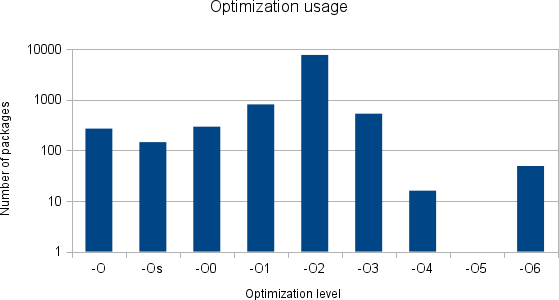
Next.

Previous.