Search Results: "Martin"

13 June 2010

Martin Michlmayr: Debian support for eSATA SheevaPlug available

The eSATA SheevaPlug is supported by the Debian installer and by Debian now. I've updated the install guide accordingly. If you're already running Debian on your eSATA SheevaPlug but you installed as a regular SheevaPlug to USB or SD and you'd like to use the eSATA, then make sure you're the latest kernel from Debian squeeze:
apt-get update
apt-get dist-upgrade
flash-kernel
Reboot and type this in u-boot:
setenv arcNumber 2678
saveenv
reset
Your machine will then be recognized as an eSATA SheevaPlug and eSATA will work. Thanks to John Holland for working on SheevaPlug eSATA support.

Martin-Éric Racine: xf86-video-geode: new contributors shake off the dust

A couple of years ago, the Geode X.org driver lost its main contributor, due to random attrition at AMD after the company experienced severe losses at the end of a quarter. Since then, yours truly and a few random contributors have been trying to keep this driver at least remotely usable, with mixed results. Over the past few weeks, the driver has seen new contributions, thanks to the addition of two engineers from AMD Taiwan who have been going through the list of outstanding bugs and learning the ropes of collaborating with the Free Software community. This, in turn, had a snowball effect and motivated old contributors from the OLPC project and from the thin client community to return to the driver. Hurray! Let's give a warm welcome to Frank Huang and Hunk Cui from AMD and, if you notice any issue with the driver that is not already reported, please file a report to help us become aware it. Cheers!

5 June 2010

Martin-Éric Racine: Correct gLabels template for VistaPrint custom business cards?

I'm currently designing myself a new business card and noticing how VistaPrint has finally established a drop point in Finland and is present in a growing number of countries, I was thinking of using their services this time. However, since they only publish ready-to-use templates for Adobe software and they won't disclose which printing products they use, I'm somewhat confused as to which of the templates offered by gLabels I ought to select. Would anybody reading this happen to know?

29 May 2010

Bernd Zeimetz: installing debian on the guruplug server plus

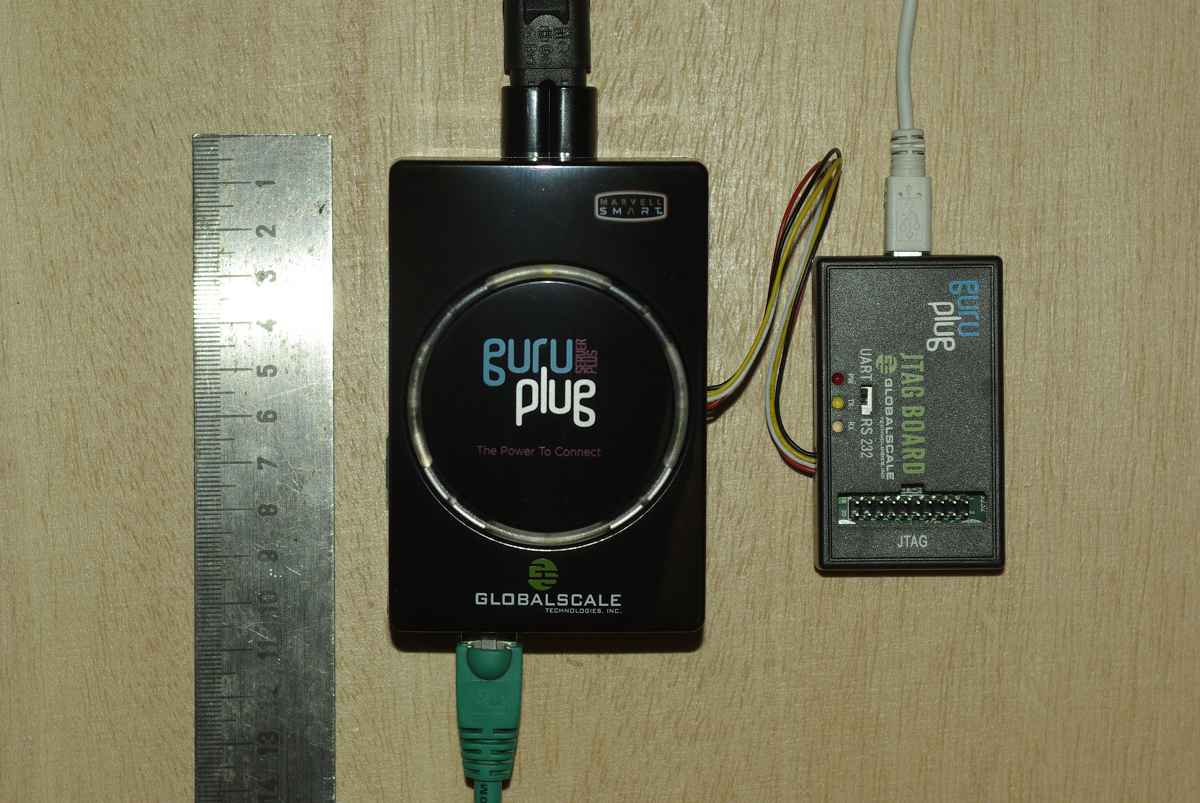
Yesterday finally my GuruPlug Server Plus arrived. Took longer than expected, but as it seems Globalscale had some issues with the power supplies and they were replaced before shipping the GuruPlugs. GuruPlug Server Plus and JTAG Board

The GuruPlug Basically the GuruPlugs are an enhanced version of the well known SheevaPlugs, the biggest difference is probably the need for an external JTAG/UART<>RS232 board to access the serial console. Good thing is that the board comes with a normal JTAG connector and an additional RS232 connector and 2.5V DC power outlet, so it will be useful for other devices, too. Globalscale could have chosen different connectors with less wiggly cables, though. As I was not able to find a useful howto about installing Debian on the Guruplug, I've written down what I did to install Debian unstable on a micro SD card using the Debian installer for the GuruPlug. I did not have a look who modified the Debian installer to work on the plug, but thanks for that! The instructions below are based on Martin Michlmayer's awesome SheevaPlug documentation, the hints from oinkzwurgl.org/guruplug and various forum posts in the plugforum.

Preparations Please note that I'm not resposible for whatever you're doing with your plug. If you follow this tutorial and end up with a brick, it is your fault, not mine. To install the GuruPlug you need the JTAG Board. Connect the UART port to the GuruPlug and the JTAG board to your computer, it should show up as FTDI (thanks for using good chips!) USB<>Serial converter. Serial port settings are 115200, 8-N-1, no hw/sw flow control. The other thing you should prepare is a working tftpd, I'm using aftpd.
apt-get install aftpd
Recent versions share files from /srv/tftp/, in case you're running Lenny /var/lib/tftpboot/ should be the place to drop your files. When everything is connected properly the boot process should show up in minicom, make sure to press some key to enter uBoot. The first thing you should do is to save the original uBoot environment in case you want to restore the factory settings later. Run
printenv
and save the output somewhere.

Upgrading uBoot Unfortunately the uBoot version on the GuruPlug is pretty old and seems to have some issues in booting from USB devices, so the first thing you should do is to upgrade it. You might want to investigate if there is even a better, more recent uBoot version available somewhere, or build one on your own, but I didn't bother and took the uBoot.guruplug.bin from here. The main issue with that is that booting from USB still seems to be buggy (even for FAT partitions) and that ext2load is still not supported. Otherwise it works well :-). I'm mainly following Martin Michlmayer's tutorial again. Download the uBoot.guruplug.bin and drop it into the tftpd directory. Make sure you always set the plug's IP address (ipaddr) and your server's IP address (serverip) properly. I'll use 192.168.121.253 for the plug and 192.168.121.2 for the server in all examples, make sure to change that for your own needs. Stop if something goes wrong, especially when the tftp download failed.
setenv ipaddr 192.168.121.253
setenv serverip 192.168.121.2
tftp 0x6400000 uBoot.guruplug.bin
nand erase 0x00000000 0x0100000
nand write 0x6400000 0x0000000 0x80000
reset
Enter uBoot again after the reset.

Preparing the installer Download uImage and uInitrd to your tftpd directory. Although I've heard that setting mainlineLinux/arcNumber in the uBoot environment is not necessary anymore for very recent kernel, lets set them to make sure the Debian kernel works:
setenv mainlineLinux yes
setenv arcNumber 2097
saveenv
reset
Again, enter uBoot after the reset.

Running the installer Run the following in the uBoot console:
setenv ipaddr 192.168.121.253
setenv serverip 192.168.121.2
tftpboot 0x01100000 uInitrd
tftpboot 0x00800000 uImage
setenv bootargs console=ttyS0,115200n8 base-installer/initramfs-tools/driver-policy=most
bootm 0x00800000 0x01100000
You should see the installer starting now. You might want to follow the following hints:
  • Before configuring the network, go back and set the debconf priority to low, Then continue. While chosing the Debian mirror, chose sid as the Debian version to install. If you don't have sid as choice, use a different mirror. The kernel in testing does not boot on the GuruPlug, you need 2.6.32-13 from sid.
  • You might want to load the 'network console' installer component and continue via ssh. Makes things fater and colourful.
  • Suggested partitioning: I've installed Debian to an 8GB micro SDcard. The SDcard reader is connected via USB and shows up as /dev/sdb (/dev/sda should be the internal NAND and not shown by the installer). I've used 150MB ext2 for /boot and the rest of the space for /, using ext4. You might want to use the noatime option on both filesystems to avoid unnecessary write access to the SDcard. You might choose to add a swap partition, but SDcards are so slow, so I've skipped that.
When you continue the installation, you will hit the following problem:
  • The installer might fail on 'Make the system bootable' (not sure if it does for you, it did so with the kernel from testing).
  • The uBoot is not able to boot from your /boot anyway. USB support is buggy and ext2load missing.
We'll work around these issues by writing the kernel and initrd into the plug's NAND. To do so, enter a shell in the installer and chroot into the install target. We'll then create the necessary uImage.bin and uInitrd and scp them to our tftpd directory:
chroot /target /bin/bash
cd /boot
mkimage -n vmlinuz -A arm -O linux -T kernel -C none -a 0x00008000 -e 0x00008000 -d /boot/vmlinuz uImage.bin
mkimage -n 'vmlinuz initrd' -A arm -O linux -T ramdisk -C gzip -d /boot/initrd.img uInitrd
scp uI* root@192.168.121.2:/srv/tftp
Now leave the shell, finish the installation and reboot, enter uBoot again.

Make the plug bootable To write kernel and initrd to the NAND memory, we have to transfer it via tftp first, then erase the NAND area we want to write to and then write it to the NAND. The values I've chosen here should be fine for the current Debian kernel, but you might need to change the necessary size for the initrd. To do so have a look at the output while transferring the initrd - the transferred bytes are displayed. They have to fit into the amount of bytes you write (the last option to nand write.e).
setenv ipaddr 192.168.121.253
setenv serverip 192.168.121.2
tftp 0x6400000 uImage.bin
nand erase 0x100000 0x400000
nand write.e 0x6400000 0x100000 0x400000
tftp 0x6400000 uInitrd
nand erase 0x500000 0x1fb00000
nand write.e 0x6400000 0x500000 0x600000
Now we need to set the necessary boot options. Make sure to change the root device if you've chosen a different layout from that I've suggested above, or if you're not using a SDcard.
setenv bootargs_debian 'console=ttyS0,115200 root=/dev/sdb2'
setenv bootcmd_nand 'nand start; nand read.e 0x00800000 0x100000 0x400000; nand read.e 0x01100000 0x500000 0x600000'
setenv bootcmd 'setenv bootargs $(bootargs_debian); run bootcmd_nand; bootm 0x00800000 0x01100000'
saveenv
run bootcmd

Finish Your GuruPlug should boot your new Debian installation now. Have fun! I'll try to keep the howto updated for changes in uBoot and the installer, but I might not have the time to so quickly. Patches and comments are welcome!.
root@guruplug:~# uname -a
Linux guruplug 2.6.32-5-kirkwood #1 Fri May 21 05:44:29 UTC 2010 armv5tel GNU/Linux
root@guruplug:~# cat /proc/cpuinfo 
Processor   : Feroceon 88FR131 rev 1 (v5l)
BogoMIPS    : 1192.75
Features    : swp half thumb fastmult edsp 
CPU implementer : 0x56
CPU architecture: 5TE
CPU variant : 0x2
CPU part    : 0x131
CPU revision    : 1
Hardware    : Marvell GuruPlug Reference Board
Revision    : 0000
Serial      : 0000000000000000
root@guruplug:~# 

Martin-&#201;ric Racine: Ubuntu building its i386 libc6 with -m686 ?

This is something that makes me deeply worried about the future of Ubuntu.

Russell Coker: Logging in as Root

Martin Meredith wrote a blog post about logging in as root and the people who so strongly advocate against it [1]. The question is whether you should ssh directly to the root account on a remote server or whether you should ssh to a non-root account and use sudo or su to gain administrative privileges. Does sudo/su make your system more secure? Some years ago the administrator of a SE Linux Play Machine used the same home directory for play users to login as for administrative logins as for his own logins he used newrole to gain administrative access (like su or sudo but for SE Linux). His machine was owned by one of his friends who created a shell function named newrole in one of his login scripts that used netcat to send the administrative password out over the net. He didn t immediately realise that this was a problem until his friend changed the password and locked him out! This is one example of a system being 0wned due to having the double-authentication of course if he had logged in directly with administrative privs while using the same home directory that the attacker could write to then he would still have lost but the attacker would have had to do a little more work. When you login you have lots of shell scripts run on your behalf which have the ability to totally control your environment, if someone has taken over those scripts then they can control everything you see, when you think you run sudo or something they can get the password. When you ssh in to a server your security relies on the security of the client end-point, the encryption of the ssh protocol (including keeping all keys secure to prevent MITM attacks), and the integrity of all the programs that are executed before you have control of the remote system. One benefit for using sshd to spawn a session without full privileges is in the case where you fear an exploit against sshd and are running SE Linux or some other security system that goes way beyond Unix permissions. It is possible to configure SE Linux in the strict configuration to deny administrative rights to any shell that is launched directly by the sshd. Therefore someone who cracks sshd could only wait until an administrator logs in and runs newrole and they wouldn t be able to immediately take over the system. If the sysadmin suspected that a sshd compromise is possible then a sysadmin could login through some other method (maybe visit the server and login at the console) to upgrade the sshd. This is however a very unusual scenario and I suspect that most people who advocate using sudo exclusively don t use a SE Linux strict configuration. Does su/sudo improve auditing? If you have multiple people with root access to one system it can be difficult to determine who did what. If you force everyone to use su or sudo then you will have a record of which Unix account was used to start the root session. Of course if multiple people start root shells via su and leave them running then it can be difficult to determine which of the people who had such shells running made the mistake but at least that reduces the list of suspects. If you put PermitUserEnvironment yes in /etc/ssh/sshd_config then you have the option of setting environment variables by ssh authorized_keys entries, so you could have an entry such as the following: environment= ORIG_USER=john@example.com ssh-rsa AAAAB3Nz[...]/w== john@example.com Then you could have the .bashrc file (or a similar file for your favorite shell) have code such as the following to log the relevant data to syslogd:
if [ "$SSH_TTY" = "" ]; then
logger -p auth.info "user $ORIG_USER ran command \"$BASH_EXECUTION_STRING\" as root"
else
logger -p auth.info "user $ORIG_USER logged in as root on tty $(tty)"
fi I think that forcing the use of su or sudo might improve the ability to track other sysadmins if the system is not well configured. But it seems obvious that the same level of tracking can be implemented in other ways with a small amount of effort. It took me about 30 minutes to devise the above shell code and configuration options, it should take people who read this blog post about 5 minutes to implement it (or maybe 10 minutes if they use a different shell or have some other combination of Bash configuration that results in non-obvious use of initialisation scripts (EG if you have a .bash_profile file then .bashrc may not be executed). Once you have the above infrastructure for logging root login sessions it wouldn t be difficult to run a little script that asks the sysadmin what is the purpose for your root login and logs what they type. If several sysadmins are logged in at the same time and one of them describes the purpose of their login as to reconfigure LDAP then you know who to talk to if your LDAP server stops working! Should you run commands with minimum privilege? It s generally regarded that running each command with the minimum privilege is a good idea. But if the only reason you login to a server is to do root tasks (restarting daemons, writing to files that are owned by root, etc) then there really isn t a lot of potential for achieving anything by doing so. If you need to use a client for a particular service (EG a web browser to test the functionality of a web server or proxy server) then you can login to a different account for that purpose the typical sysadmin desktop has a dozen xterms open at once, using one for root access to do the work and another for non-root access to do the testing is probably a good option. Can root be used for local access? Linux Journal has an article about the distribution that used to be known as Lindows (later Linspire) which used root as the default login for desktop use [2]. It suggests using a non-root account because If someone can trick you into running a program or if a virus somehow runs while you are logged in, that program then has the ability to do anything at all of course someone could trick you into running a program or virus that attempts to run sudo (to see if you enabled it without password checks) and if that doesn t work waits until you run sudo and sniffs the password (using pty interception or X event sniffing). The article does correctly note that you can easily accidentally damage your system as root. Given that the skills of typical Linux desktop users are significantly less than those of typical system administrators it seems reasonable to assume that certain risks of mistake which are significant for desktop users aren t a big deal with skilled sysadmins. I think that it was a bad decision by the Lindows people to use root for everything due to the risk of errors. If you make a mistake on a desktop system as non-root then if your home directory was backed up recently and you use IMAP or caching IMAP for email access then you probably won t lose much of note. But if you make a serious mistake as root then the minimum damage is being forced to do a complete reinstall, which is time consuming and annoying even if you have the installation media handy and your Internet connection has enough quota for the month to complete the process. Finally there are some services that seek out people who use the root account for desktop use. Debian has some support channels on IRC [3] and I decided to use the root account from my SE Linux Play Machine [4] to see how they go. #debian has banned strings matching root. #linpeople didn t like me because Deopped you on channel #linpeople because it is registered with channel services . #linuxhelp and #help let me in, but nothing seemed to be happening in those channels. Last time I tried this experiment I had a minor debate with someone who repeated a mantra about not using root and didn t show any interest in reading my explanation of why root:user_r:user_t is safe for IRC. I can t imagine that good the #debian people expect to gain from denying people the ability to access that channel with an IRC client that reports itself to be running as root. Doing so precludes the possibility of educating them if you think that they are doing something wrong (such as running a distribution like Lindows/Linspire). Conclusion I routinely ssh directly to servers as root. I ve been doing so for as long as ssh has been around and I used to telnet to systems as root before that. Logging in to a server as root without encryption is in most cases a really bad idea, but before ssh was invented it was the only option that was available. For the vast majority of server deployments I think that there is no good reason to avoid sshing directly as root.

27 May 2010

Martin Meredith: Why shouldn t I login as root?

I ve recently gotten a lot of flack from a couple of people for an innocent comment I made about logging into a machine as root.
I d like to think of myself as pretty savvy when it comes to security, and as far as I m concerned, the reasons for not logging in as root are:- Ok, so we have the reasons not to and they re good reasons. This is why, generally, I don t login to my boxes as root. However, the box in concern mitigates the above in the following ways Is there any good reason that I shouldn t be logging in as root in the above circumstances?

Rog rio Brito: Please let me zoom my documents!

It all started when I tried to typeset my documents with the Utopia typeface, which is Free Software, since Adobe liberated it to the TeX Users Group. There are some nice packages for changing fonts in LaTeX with Utopia, like mathdesign and fourier. But I wanted to play with a new toy, XeTeX. Then, seeing as small caps was missing from the fonts that Adobe donated, I tried to just fake them with a program that I had never heard of before: fontforge. My first attempt wasn t that very successful, but, after reading a little bit of the code, the reason for the problem was soon discovered. At the same time, I wanted to see what I had done with a PDF reader. The options aren t many here: xpdf was already removed from Debian s unstable (which is the distribution that I use), trying to update it proved to be unsuccessful and upstream isn t that active (which, by the way, led to the creation of the poppler project). Unfortunately, some of the Free PDF viewers seem to be limited to a maximum zoom of 400%, while some documents seem to demand more zooming (especially those with little, tiny letters, and for those people, like myself, that don t have good eyesight). Patching the programs to eliminate those hardcoded limits isn t that hard, but the results with evince and epdfview can be frightening: a very simple document, when zoomed with epdfview to, say, 1600% uses so much memory that one needs to watch out for the Out Of Memory killer and so much swapping that it is hard to believe. Don t believe my words. Just try it. But, hey, I just want to see a document without having to suffer too much. And 400% isn t enough for many documents that I have. Especially when I want to see how a given font has been rendered on a document. I have not yet investigated the real cause of the huge memory consumption, but I would trust the words of the developers, that evince does everything in a big piece of memory. On the other hand, if one compiles poppler right from the sources, its demo program for the glib backend can display files in a zippy manner, even with very large zooms. xpdf, though, works very well with higher zoom levels, without making the whole computer grind to a halt. Seeing as Martin Pitt has stripped xpdf to be able to use the poppler backend, I was animated to have the best of both worlds: the frequent updates of poppler and the lightness of xpdf. Martin s port of xpdf doesn t compile with a recent poppler, though: the library has changed a lot since 2006. And, in many respects, for good reason, since the original code is not that clean. But it makes harder for luses like me to use code based on fast-changing libraries. Well, to cut a long story short, after two afternoons hunting down a version of poppler that would allow me to compile Martin s xpdf version, I got bored and tried to attack the problem. Now I can use this alternative version of xpdf with the poppler backend, with very little dependencies and with little memory usage on my computer. I m keeping it for my private use, but if anybody else is interested, please let me know.

20 May 2010

Martin Zobel-Helas: Brainstorming for DMUP 2.0

Now that we have released the slightly updated version of Debian's Machine Usage Policy (DMUP), I am thinking about a major rework for the next version. Maybe we should even start with a completely new text for it. I am currently doing a bit of brainstorming about how the new version could look.

Here are some of my ideas (completely unsorted):


Please note that this brain dump is my very personal opinion and does not reflect the opinion of the complete DSA team.

I would like to see a discussion on what the new DMUP should look like. Even though the final decision on which paragraphs make it into DMUP should stay with DSA, I think the Debian community should be involved in the evolution of this document.

Even though i am not attending DebConf10 (actually I think no one from DSA will make it), it might be a good idea if the conference could be used to do some further brainstorming. Maybe having a BoF on DMUP 2.0 might be a good idea.

Martin Michlmayr: Debian on QNAP TS-11x/TS-21x/TS-41x users: go make a backup

I recently discovered that there are two variants of the recovery mode used on QNAP TS-11x/TS-21x (and possible TS-41x) devices and that one has a different behaviour than what my documentation claims. While this issue should hopefully affect few users (but please take a moment and check if you're affected), it has implications to all Debian users on TS-11x/TS-21x. My install guide originally told users to create backup of some mtd partitions only but from now on you need a copy of all partitions in order to use the recovery mode. Therefore, please take a moment now to create a backup of the remaining partitions:
cat /dev/mtdblock0 > mtd0
cat /dev/mtdblock4 > mtd4
cat /dev/mtdblock5 > mtd5
(You should have copies of mtd1, mtd2 and mtd3 already if you following my guide.) Make sure to copy the files to another machine and add them to your backup.

19 May 2010

Mart&iacute;n Ferrari: Je ne veux pas travailler

That's a phrase I fully adhere to (I don't want to work), but that's not the point. There's a catchy song that I like a lot, it's sung in French and sounds like an old song (most places say it's an Edith Piaf's song). The chorus goes "Je ne veux pas travailler, je ne veux pas d jeuner...", and one would imagine that that's indeed the title. But nothing of this is true, once again the Internets is full of fail. The band who performs the song is called Pink Martini, two of them are the authors of it, and they are from Oregon. It was recorded in 1997 (some audio filters did the magic), and it's called "Sympathique". It also seems that it was a big success, but probably not in my part of the world. I thought that somebody should set this straight somewhere, as I couldn't find anybody speaking of this confusion. Having settled that, I invite you to listen to this wonderful song, and sing along that you don't wanna work (forget about the rest of the lyrics, it's a love song :-)). Tags: Planet Debian, Planet Lugfi, M sica
11 May 2010

Martin Meredith: An hour in the life of my mouse

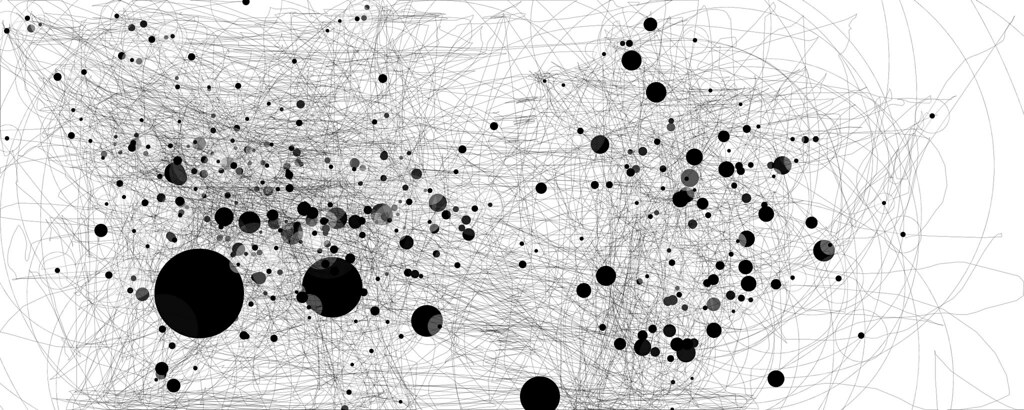
A mini-meme that has been spreading round the IT team at my workplace is IOGraph a small Java program that tracks and draws the status of your mouse over a period of time. Lines are movement, circles are places where the mouse has stopped The bigger the circle, the longer it was there. I have 2 monitors, which explains the weird dimensions! An hour in the life of my mouse

9 May 2010

Martin Michlmayr: Debian stable installer for SheevaPlug, QNAP TS-11x/TS-21x and OpenRD

We added support for Marvell's Kirkwood platform to the Debian installer a few months ago and a lot of people have installed Debian testing (squeeze) on devices such as the SheevaPlug and QNAP TS-11x/TS-21x. While this works great, some people would prefer to run Debian stable (lenny). Until recently, I thought we wouldn't be able to support lenny in the installer since the kernel in stable doesn't have support for Kirkwood. However, some work by Frans Pop showed me that it would be quite trivial to change the installer so it would install Debian stable plus the kernel from an alternative repository. So from now on, it's possible to install Debian stable (lenny) on the SheevaPlug, QNAP TS-11x/TS-21x and OpenRD. This installation mechanism uses the squeeze installer to install Debian lenny (stable) plus the kernel from a repository I maintain. This repository usually contains the kernel from Debian testing (although I sometimes add the kernel from unstable if it has some important features). Since some users might be wondering which version to install, here is an overview of the benefits and downsides of each version. Debian lenny (stable): it is the current stable version of Debian (version 5.0). Debian squeeze (testing): it is currently under development and will be the next stable version of Debian (version 6.0).

25 April 2010

Russell Coker: Links April 2010

Sam Harris gave an interesting TED talk about whether there are scientific answers to moral questions [1]. One of his insightful points was that when dealing with facts certain opinions should be excluded it would be good if journalists who report on issues of science could understand this. Another insight was that religious people most strongly agree with him regarding the issue of whether there are factual answers to moral questions but they think that God just handed the answers to their ancesters rather than making it an issue that requires consideration. He cites the issue of gay marriage as being a distraction from moral issues such as genocide and poverty. He asks how have we convinced ourself that every culture has a point of view worth considering? . He asks how the ignorance of the Taliban on the topic of physics is any less obvious than on the topic of human well-being. Dan Gilbert gave an insightful TED talk titled Why Are We Happy? [2]. One interesting fact he cites is that people who become paraplegic are no less happy in the long term than people who win the lottery. He points out that a shopping mall full of Zen monks is not going to be particularly profitable and uses this fact to explain the promotion of natural happiness over synthetic happiness in our society. Dan Barber gave an amusing and informative TED talk How I Fell in Love with a Fish [3]. He speaks about ecological fish farming and how the fish are more tasty as well as the farm being good for the environment. The farm in question is in the south-west of Spain, hopefully there will be more similar farms in other parts of the world soon. Gary Lauder gave an interesting brief TED talk about road signs [4]. His main point was to advocate a road sign saying take turns , but there are already signs in the US at freeway on-ramps saying that 1 or 2 cars may enter every time the light turns green which is a similar concept. The innovative thing he did was to estimate the amount of time and petrol wasted by stop signs, add that over a year based on the average income and then estimate that an annuity covering that ongoing expense would cost more than $2,000,000. This makes two stop signs at an intersection have an expense of $1,000,000 each. He suggests that rather than installing stop signs it would be cheaper to buy the adjacent land, chop down all trees, and then sell it again. Alan Siegel gave an insightful TED talk about simplifying legal documents [5]. He gives an example of an IRS document which was analysed with a Heat Map to show which parts confused the readers the IRS adopted a new document that his group designed which made it easier for taxpayers. He advocates legislation to make legal documents easier to understand for customers of financial services. Tim Berners Lee gave an interesting TED talk about Open Data, he illustrated it with some fantastic videos showing how mashups have been used with government data [6] and how the Open Street Map project developed over time. Martin F. Krafft gave an interesting Debconf talk about Tool Adoption Behavior in the Debian project [7]. One thing that I found particularly interesting was his description of the Delphi Method that he used to assemble a panel of experts and gather a consensus of opinion. The post-processing on this talk was very good, in some sections Martin s presentation notes are shown on screen with the video of him in the corner. As an aside, I think we really do need camera-phones. The Big Money has an interesting article comparing the Mafia Bust Out with the practices of US banks [8]. Mark Roth gave an exciting TED talk about using Hydrogen Sulphide to trigger suspended animation [9]. They are now doing human trials for suspending people who have serious injuries to reduce tissue damage during the process of surgery. Pawan Sinha gave an interesting TED talk about how brains learn to see [10]. He started by talking about curing blindness in people who have been blind since birth. But he then ended by showing some research into the correlation between visual processing and Autism, he showed that an Autistic child had significantly different visual patterns when playing Pong to an NT child. Adora Svitak gave an insightful TED talk about what adults can learn from kids [11]. She made some particularly interesting points about the education system requiring that adults respect children more and expect them to do better than their parents which is essential for all progress in society. The NY Times has an interesting article on animal homosexuality [12]. In terms of research it focusses on lesbian relationships between albatrosses. But a large part of the article is devoted to the politics of scientific research into animal sexuality. BrowserShots.org shows you what your web site looks like in different web browsers [13]. Cory Doctorow wrote an insightful article titles Can You Survive a Benevolent Dictatorship about the Apple DRM [14]. He describes the way the Apple Digital Restrictions Management (DRM) doesn t stop copyright violation but does reduce competition in the computer industry. He is not going to sell his work on the Apple store (for the iPad or iPhone etc) and suggests that customers should choose a more open platform. It s unfortunate that he didn t suggest a better platform.

20 April 2010

Matt Zimmerman: Lucid ruminations

A few months ago, I wrote about changes in our development process for Ubuntu 10.04 LTS in order to meet our goals for this long-term release. So, how has it turned out? Well, the development teams are still very busy preparing for the upcoming release, so there hasn t been too much time for retrospection yet. Here are some of my initial thoughts, though. A more complete set of retrospectives on Lucid should give us some good ideas for how to improve further in Maverick and beyond. Update: Fixed broken link.

19 April 2010

Martin F. Krafft: Orangutans at the Nestl shareholder meeting

Bravo Greenpeace Switzerland! At Nestl s annual shareholder meeting 2010 last week, you descended from the ceiling in the middle of the presentations with flyers and a banner asking for the company to take responsibility for their reckless actions in Indonesia. Thousands of square kilometres of forest are cleared every day so that companies like Nestl can make vast sums of money off consumers. Orangutans asking Nestl  for a break Meanwhile, Orangutans outside the venue were protesting Nestl and asking for a break (copying Nestl s own slogan Have a Break! Have a ). The Orang Utans are pushed towards extinction by capitalist interest. One of my closest friends was part of the act, and he recounts breaking into the ventilation system before sawing through the ceiling, and descending on a rope. The police detained them for more than 24 hours, but the message has been sent. Bravo! Read more (and watch videos of the spectacular descent) on the Greenpeace webpage, the Greenpeace press announcement and their blog (all in German), or on 24heures (in French). Planetsave has a decent coverage in English. NP: Emerson, Lake & Palmer: Brain Salad Surgery

17 April 2010

Martin F. Krafft: Planes or volcano

Via internotes.ch: Planes produce way more CO  than the volcano NP: Emerson, Lake & Palmer: Tarkus

14 April 2010

Martin Meredith: I m also a writer

For those of you who don t know, I occasionally write for Linux Format. As I ve got an article coming out in the next issue (available on April 29th), I thought I d have a check to see if the PDF s are available in the subscribers area yet. Unfortunately, they re not, however, I did notice that my first article for Linux Format has now been released to the general public. If you head on over to Issue 121, you ll find my tutorial Security: Protect your server has a Click here to read! link underneath it. One of my other articles for them, Super Snooper , has also found it s way onto TuxRadar, and, while it doesn t have the pretty artwork (or a mugshot, or any mention of me, it seems!) that the magazine does, it s still well presented on the site! Let me know in the comments if you ve any feedback to either of them! Along the same lines, I m thinking that I want to write a book (mainly so that I ll eventually come first in Google, rather than what used to be second and now for some reason seems 7th :( ). But what should I write about? I ve a few thoughts, and the one that I feel like I want to write the most is about becoming a Google Ninja (using Analytics, Website Optimiser, etc etc to their full potential) but I don t know would people be interested in buying that?


11 April 2010

Martin-&#201;ric Racine: xf86-video-geode: EXA Composite support broken on X server 1.7

Just a quick note to everyone who recently upgraded their X server to 1.7 on Geode hardware to report that changes in X server since 1.6 have exposed and escalated bugs in our Geode driver that make EXA Compositing fail, resulting in broken image support on GTK2+ applications. As a temporary work-around, add this line to /etc/X11/xorg.conf in the Devices section:
Option "EXANoComposite" "true"
On my Lucid host, this gives me the following minimalistic xorg.conf:
Section "Device"
 Identifier "Geode Video"
 Driver "geode"
 Option "EXANoComposite" "true"
EndSection
We're currently working to produce new upstream packages that default to EXANoComposite as a temporary work-around, so that the driver at least produces useful results by default, and push this to distributions ASAP, especially keeping in mind pending Squeeze and Lucid releases. Meanwhile, AMD recently assigned new engineers to contribute to the driver's development and to eventually pick up maintenance, so we should soon have a permanent solution to these recent breakages in acceleration support for both GX2 and LX chipsets.

2 April 2010

Thomas Koch: Design document for a patch management system on a DVCS

Dear friends of Debian,

this is my first post to Planet Debian. - The planet with the most geeky registration procedure in the known universe!

I proposed an alternative to topgit some days ago on the vcs-pkg.org list. Martin asked (and encouraged) me to give a better explanation of the idea, which I'll hereby try. Sorry for not giving any drawings, but I'm totally incapable of anything graphical.

Hopefully, I'll manage to come to the Debian Miniconf in Berlin. Then we could discuss the idea further and maybe even start implementing it. (Somebody would need to help me with my first steps in Perl then...)

The following text is available on github. Please help me expand it!

Design document for a patch management system on a DVCS
Requirements The system to implement manages patchsets. A patchset is a set of patches with a tree-ish dependency graph between the patches. There's one distinct root of this dependency graph. Patches are managed as branches with each branch representing a patch. Modification of a patch is done by a commit to the respective branch. A branch representing a patch as part of a patchset is called patchbranch. The patch of a patchbranch is created as the diff between the root of the patchbranch and the head. The most important management methods are:
  • Export a patchset in different formats
    • quilt
    • a merged commit of all patches
    • a line of commits with each commit representing one patch
  • Update a patchset against an updated root.
  • Copy a patchset
  • Delete a patchset from direct visibility while preserving all history about it
  • Hide and unhide a patchset from direct visibility
Additional requirements:
  • The system should be implementable on top of GIT, Mercurial and eventually Bazaar.
  • The system must easily cope with multiple different and independent patchsets.
  • All information about a patchset must be encoded in one distinct branch. Publishing this one branch must be sufficient to allow somebody else to recreate the patchset with all of its patchbranches.
  • The system should not rely on the presence of hooks.
  • The system should not require the addition of management files in patch branches (like .topmsg and .topdeps in topgit)
  • The system must be easy to understand for a regular user of the underlying DVCS.
  • The implementation may allow a patchset to depend on another patchset(s).

implementation
patchset meta branch A patchset meta branch holds all informations about one patchset. First, it holds references to the top commits of all patch branches in the form of parent references of commits. Thus pushing the patchset meta branch automatically also pushes all commits of all patch branches. Secondly, the patchset meta branch contains meta informations about the patchset. These meta informations are:
  • The names of all patch branches together with the most recent commit identifier of a particular patch branch. Let's save this information in a file called branches.
  • A message for each patch branch that explains the patch. These messages can be saved in the file tree as msg/$ PATCH-BRANCH-NAME
  • References to the dependencies of the patch (other patches of the same patchset or the root of the patchset). This is also encoded in the file branches.
Since the patchset meta branch holds all this informations, it is possible, to delete all patch branches and recreate them from this informations. Although the commits of the patchset meta branches hold references to the patch branches, its file tree does not need to contain any files from the referenced patches. This may confuse the underlying DVCS, but the patch meta branch is not ment to be directly inspected.

The branches file A branches file for a fictive patchset could look like:
# patch branches without an explicit dependency depend on the root of the
# patchset tree
# A Root can be given as either a fix commit (seen here), a branch or a tag.
# A fixed commit or tag is useful to maintain a patchset against an older
# upstream version
ROOT: 6a8589de32d490806ab86432a3181370e65953ca
# A tag as a dependency
#ROOT: upstream/0.1.2
# A branch as a dependency
#ROOT: upstream
# A regular patch with it's name and last commit
BRANCH: debian/use-debian-jars-in-build-xml 4bab542c261ff1a1ae87151c3536f19ef02d7937
# two other regular patches
BRANCH: upstream-jira/HDFS-1234 a8e4af13106582ca1bfbbcaeb0537f73faf46d87
BRANCH: upstream-jira/MAP-REDUCE-007 e3426bcbcb2537478f851edcf6eb04b34f6c7106
# This patch depends on the above two patches
# The sha1 below the dependency patches references a merge commit of the two
# dependencies
BRANCH: upstream-jira/HDFS-008 517851aa829d77e09bc5e59985fed1b0aa339cc6
DEPENDENCIES:
  upstream-jira/HDFS-1234
  upstream-jira/MAP-REDUCE-007
    cc294f2e4773c4ff71efb83648a0e16835fca841
# A patch branch that belongs to the patch branch, but won't get exported (yet)
BRANCH: upstream-jira/HDFS-9999 74257905azgsa4689bc5e59985fed1b0aa339cc6
BRANCH-FLAGS: noexport


Next.

Previous.