Search Results: "tar"

20 December 2015

Iustin Pop: Nikkor 200-500mm f5.6E ED VR tests

So, lately I've been on a telephoto lens learning curve; after the 300mm prime, I said to test a zoom lens. As I found the prime reasonably easy to adapt to (compared to shorter focal length lenses), I thought that a zoom (heavier, bigger) will be the same. Oh, I was wrong. My keeper rate for the first outdoors test was quite bad around 50% only, which (when talking only about focus/sharpness) is much below my standards. I started easy; some close or medium range shots, nothing special: Usual flower picture Lonely snag But then, moving to further distances, things became less straightforward. Shooting two pictures each time meant that usually one of them was sharp, but the other not. I got really confused at this step; the shutter speed was 1/2000s and I also had VR on; either VR was unneeded (i.e. contributing blur instead of helping) or something else was going on. After much head scratching, I think it's a combination of the following factors: So, for such style of shooting, I need to train more both photographic technique and arm strength at the gym In the meantime, it is possible to get such shots reasonably sharp, for example this picture of the (start of the) Alps taken from what is technically still Z rich city: The Alps  viewed from Z rich! I'm happy with the detail (at this distance), however I was not able to correct the colour due to the haze between me and the mountains; note that the trees on the bottom of the distance were not near me, but on the next or after-next hill. This picture confirms that with more practice things will get better. Coming back to shorter distances, and shorter focal lengths, things are looking better. We were passing somewhat near some people playing with RC-controlled planes not near enough to hear them, but near enough to see the plane quickly flying. Switched camera quickly to AF-C and Dynamic-21 focus, and - to my surprise - I was able to capture four good pictures, two so-so and four more clearly out of focus. But, for such a heavy length, hand-held and on the short notice, I was happy; the first picture is one of the so-so ones, but I kept it as I like the way the propeller is seen. All pictures at 290mm plus some cropping, 1/1250s, ISO between 900 and 1800, f/5.6 (i.e wide open): RC plane: continous focus tests RC plane #2 RC plane #3: good results! RC plane #4 RC plane #5: landing? From this exercise, the conclusion is that the lens is OK-ish for tracking, although the not-so good keeper rate tells me that I need to be careful; I'll have to see how a subject moving not left-right, but instead approaching or moving away from the camera would be tracked. But enough pictures of small planes. At 500mm, but still somewhat close, trees: Trees @ 500mm At this step I'm starting to wonder if stopping down a bit would help with the sharpness; I'll have to test that in the future. Walking some more, finally a bird in flight; one of the hopes when I took the camera/lens out was that I'll see some birds, but this was the first. 500mm, heavily cropped, but quite good result for myself (same autofocus settings as before): Bird in flight @ 500mm Bird in flight: difficult light The only problem here is, as always with crows (I think these are crows), is the black bird against the light-blue sky (not even strong blue), which means the picture has a high dynamic range; recovering the shadows on the bird is difficult. But in any case, it's clear the lens can deliver, if the photographer is good. Next, a helicopter was gracious enough to pass by (pretty close): Helicopter: close shot Two minutes later, it was quite far, but since it was going in the direction of the Alps, it gave the opportunity for a nice shot: Helicopter: flying towards the Alps This picture is less sharp, but still I like it due to composition; not successful on small screens though, only if you see it full screen. Light is very difficult though and about 10 seconds earlier would have been even better (more separation between the helicopter and the mountain). And since we're talking about planes, let's see a plane at 500m, directly overhead, and quite high: High-flying plane This picture (@500mm, cropped, 1/2000s) has the most detail of a plane flying high enough to have trails (not sure how to estimate, but at least 5km, maybe more around 7-8 I'd say) that I ever took. So yes, the lens can deliver, but it's not easy. This shot, being shot more or less straight up, had the least distance through low-altitude atmosphere, so it has less problems compared to the mountains pictures. It's still not really sharp (lens wide open), but the amount of detail I'm sold :) And to finish on a more close note: Hunting!! A long focal length lens allows one to get "close" without getting close, which means animals are not disturbed. The first picture with the cat (not shown) had the cat less alert; ears not fully up, although eyes were still seeking; this picture shows it fully alert and concentrated, like it was a wild cat hunting for its survival, and not a city cat, out just for fun. So, summary: All the best to everybody for the coming holidays, and thanks for reading.

Petter Reinholdtsen: Using appstream with isenkram to install hardware related packages in Debian

Around three years ago, I created the isenkram system to get a more practical solution in Debian for handing hardware related packages. A GUI system in the isenkram package will present a pop-up dialog when some hardware dongle supported by relevant packages in Debian is inserted into the machine. The same lookup mechanism to detect packages is available as command line tools in the isenkram-cli package. In addition to mapping hardware, it will also map kernel firmware files to packages and make it easy to install needed firmware packages automatically. The key for this system to work is a good way to map hardware to packages, in other words, allow packages to announce what hardware they will work with. I started by providing data files in the isenkram source, and adding code to download the latest version of these data files at run time, to ensure every user had the most up to date mapping available. I also added support for storing the mapping in the Packages file in the apt repositories, but did not push this approach because while I was trying to figure out how to best store hardware/package mappings, the appstream system was announced. I got in touch and suggested to add the hardware mapping into that data set to be able to use appstream as a data source, and this was accepted at least for the Debian version of appstream. A few days ago using appstream in Debian for this became possible, and today I uploaded a new version 0.20 of isenkram adding support for appstream as a data source for mapping hardware to packages. The only package so far using appstream to announce its hardware support is my pymissile package. I got help from Matthias Klumpp with figuring out how do add the required metadata in pymissile. I added a file debian/pymissile.metainfo.xml with this content:
<?xml version="1.0" encoding="UTF-8"?>
<component>
  <id>pymissile</id>
  <metadata_license>MIT</metadata_license>
  <name>pymissile</name>
  <summary>Control original Striker USB Missile Launcher</summary>
  <description>
    <p>
      Pymissile provides a curses interface to control an original
      Marks and Spencer / Striker USB Missile Launcher, as well as a
      motion control script to allow a webcamera to control the
      launcher.
    </p>
  </description>
  <provides>
    <modalias>usb:v1130p0202d*</modalias>
  </provides>
</component>
The key for isenkram is the component/provides/modalias value, which is a glob style match rule for hardware specific strings (modalias strings) provided by the Linux kernel. In this case, it will map to all USB devices with vendor code 1130 and product code 0202. Note, it is important that the license of all the metadata files are compatible to have permissions to aggregate them into archive wide appstream files. Matthias suggested to use MIT or BSD licenses for these files. A challenge is figuring out a good id for the data, as it is supposed to be globally unique and shared across distributions (in other words, best to coordinate with upstream what to use). But it can be changed later or, so we went with the package name as upstream for this project is dormant. To get the metadata file installed in the correct location for the mirror update scripts to pick it up and include its content the appstream data source, the file must be installed in the binary package under /usr/share/appdata/. I did this by adding the following line to debian/pymissile.install:
debian/pymissile.metainfo.xml usr/share/appdata
With that in place, the command line tool isenkram-lookup will list all packages useful on the current computer automatically, and the GUI pop-up handler will propose to install the package not already installed if a hardware dongle is inserted into the machine in question. Details of the modalias field in appstream is available from the DEP-11 proposal. To locate the modalias values of all hardware present in a machine, try running this command on the command line:
cat $(find /sys/devices/ grep modalias)
To learn more about the isenkram system, please check out my blog posts tagged isenkram.

19 December 2015

James McCoy: EINVAL woes with SG_IO

Dear lazyweb, TL;DR version Why does ioctl(fd, SG_IO, &sg_io_hdr) return EINVAL, but an immediate retry after reopening the /dev/sdX fd succeeds? I'm not sure if reopening the fd is relevant, but the code only holds the fd open long enough to do perform the ioctl. The frequency of EINVAL seems to increase in correlation with the number of IO threads, where none are seen with a single IO thread. Background At work, I've been adding Linux support to an internal Windows tool we use to perform data integrity testing of block storage devices. It's a heavily multi-threaded program: The user has the ability to use either SCSI pass-thru or read/write file to perform reads/writes to the LUN, as well as various other purely SCSI pass-thru commands. The IO portion of the code can be boiled down to basically the following pseudo code:
start IO thread  
    If SCSI pass-thru or command which requires SCSI pass-thru
        build sg_io_hdr_t struct
        open /dev/disk/by-path/  (O_RDWR   O_NONBLOCK)
        issue ioctl(fd, SG_IO, &sg_io_hdr)
        close fd
        return massaged ioctl status and scsi_status
     else
        open /dev/disk/by-path/  (O_RDWR   O_NONBLOCK)
        seek to LBA
        issue write/read
        close fd
        return massaged write/read status 
wait for IO thread completion  
check status and potentially retry operation
Problem As the number of target LUNs or IO threads scale, we're seeing increasing amounts of EINVAL errors when we issue the SG_IO ioctl. According to the sg documentation, there are only a couple situations where EINVAL should be seen: I wouldn't have been surprised to get EDOM (exceeding SG_MAX_QUEUE), but I'm at a loss as to where/why EINVAL is coming from. Granted, I'm opening an sd device instead of an sg device, so the error may be coming from a different layer in the stack. If you have any ideas, please let me know.

18 December 2015

Carl Chenet: My Free activities in November 2015

Personal projects: Debian : Others: That s all folks! See you next month!

17 December 2015

Iain R. Learmonth: YubiKey NEO as an OpenPGP token

I was first interested in the idea of using a smartcard to store OpenPGP subkeys when I joined the Free Software Foundation Europe as a Fellow and recieved my FSFE Fellowship Card. By performing all cryptographic operations on the smartcard it would remove almost all the routes by which the secret key material could be compromised as the host operating system never has access to that secret material. I decided that this was something I wanted to try out and I purchased two Cherry G83-6644 keyboards. One of the nice things I noticed about this product was that it was both FIPS 201 approved and GOST R approved. If both the Americans and the Russians could agree it was a good keyboard, it had a good chance of being a good keyboard. A little udev magic to handle permissions and the card worked great, but there was a problem. This was not the most friendly form-factor and a USB keyboard was a bit big to be carrying around to use the smartcard with my laptop. I intended to get a smaller reader for my laptop but never did and the Fellowship card fell into disuse. Later, I came across the YubiKey NEO. The YubiKey NEO is capable of emulating an OpenPGP smartcard, just like the Fellowship card, but in the form-factor of a USB stick. This improved form factor was enough to make me give it a go. Since August 2015 I've been using a YubiKey NEO to store my OpenPGP subkeys and, excluding some occasional udev mishaps, it's been working great. When you first get the YubiKey NEO, it does not have the OpenPGP applet enabled. You'll need to enable it yourself using the ykpersonalize tool:

sudo apt install yubikey-personalization  
sudo ykpersonalize -m 82  
Once you've enabled the OpenPGP module, the USB product ID will change, and you can now add a udev rule that will allow you to interact with the device when it's plugged in as your normal user.
/etc/udev/rules.d/99-yubikeys.rules:
------------------------------------
SUBSYSTEMS=="usb", ATTRS idVendor =="1050",ATTRS idProduct =="0111", OWNER="irl"  
This is not the correct way to do this. I've set it so that any YubiKey with the OpenPGP module inserted is set to be owned by my username (irl) when the correct way to do this would be to have it set to the current console user. I do not know enough udev magic to know how to do that. UPDATE: I recieved a lot of good feedback on this, which you can find here. Of course, for my key 0xE9846C49, this key started life as an ordinary key just stored on my laptop, so seperating subkeys onto the YubiKey has not massively increased security as an attacker that has stolen the secret key material can generate new subkeys. I would hopefully notice these new rogue subkeys (I do monitor keyservers for changes to my key regularly), but I would prefer to make the possibility of the key being compromised as low as possible. For this reason I am performing a key transition to a new key, F540ABCD, where the master key is stored offline. In my next post, hopefully within a day or so, I'll explain how I used Tails to generate a key offline and load the subkeys into the YubiKey.

Alberto Garc a: Improving disk I/O performance in QEMU 2.5 with the qcow2 L2 cache

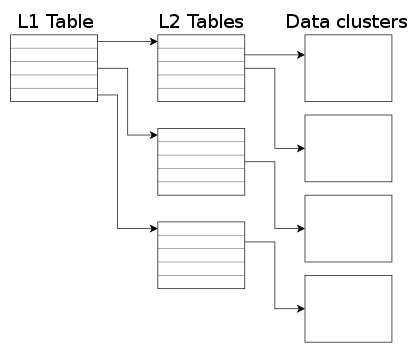
QEMU 2.5 has just been released, with a lot of new features. As with the previous release, we have also created a video changelog. I plan to write a few blog posts explaining some of the things I have been working on. In this one I m going to talk about how to control the size of the qcow2 L2 cache. But first, let s see why that cache is useful. The qcow2 file format qcow2 is the main format for disk images used by QEMU. One of the features of this format is that its size grows on demand, and the disk space is only allocated when it is actually needed by the virtual machine. A qcow2 file is organized in units of constant size called clusters. The virtual disk seen by the guest is also divided into guest clusters of the same size. QEMU defaults to 64KB clusters, but a different value can be specified when creating a new image: qemu-img create -f qcow2 -o cluster_size=128K hd.qcow2 4G In order to map the virtual disk as seen by the guest to the qcow2 image in the host, the qcow2 image contains a set of tables organized in a two-level structure. These are called the L1 and L2 tables. There is one single L1 table per disk image. This table is small and is always kept in memory. There can be many L2 tables, depending on how much space has been allocated in the image. Each table is one cluster in size. In order to read or write data to the virtual disk, QEMU needs to read its corresponding L2 table to find out where that data is located. Since reading the table for each I/O operation can be expensive, QEMU keeps a cache of L2 tables in memory to speed up disk access.
The L2 cache can have a dramatic impact on performance. As an example, here s the number of I/O operations per second that I get with random read requests in a fully populated 20GB disk image:
L2 cache size Average IOPS
1 MB 5100
1,5 MB 7300
2 MB 12700
2,5 MB 63600
If you re using an older version of QEMU you might have trouble getting the most out of the qcow2 cache because of this bug, so either upgrade to at least QEMU 2.3 or apply this patch. (in addition to the L2 cache, QEMU also keeps a refcount cache. This is used for cluster allocation and internal snapshots, but I m not covering it in this post. Please refer to the qcow2 documentation if you want to know more about refcount tables) Understanding how to choose the right cache size In order to choose the cache size we need to know how it relates to the amount of allocated space. The amount of virtual disk that can be mapped by the L2 cache (in bytes) is: disk_size = l2_cache_size * cluster_size / 8 With the default values for cluster_size (64KB) that is disk_size = l2_cache_size * 8192 So in order to have a cache that can cover n GB of disk space with the default cluster size we need l2_cache_size = disk_size_GB * 131072 QEMU has a default L2 cache of 1MB (1048576 bytes) so using the formulas we ve just seen we have 1048576 / 131072 = 8 GB of virtual disk covered by that cache. This means that if the size of your virtual disk is larger than 8 GB you can speed up disk access by increasing the size of the L2 cache. Otherwise you ll be fine with the defaults. How to configure the cache size Cache sizes can be configured using the -drive option in the command-line, or the blockdev-add QMP command. There are three options available, and all of them take bytes: There are two things that need to be taken into account:
  1. Both the L2 and refcount block caches must have a size that is a multiple of the cluster size.
  2. If you only set one of the options above, QEMU will automatically adjust the others so that the L2 cache is 4 times bigger than the refcount cache.
This means that these three options are equivalent: -drive file=hd.qcow2,l2-cache-size=2097152
-drive file=hd.qcow2,refcount-cache-size=524288
-drive file=hd.qcow2,cache-size=2621440
Although I m not covering the refcount cache here, it s worth noting that it s used much less often than the L2 cache, so it s perfectly reasonable to keep it small: -drive file=hd.qcow2,l2-cache-size=4194304,refcount-cache-size=262144 Reducing the memory usage The problem with a large cache size is that it obviously needs more memory. QEMU has a separate L2 cache for each qcow2 file, so if you re using many big images you might need a considerable amount of memory if you want to have a reasonably sized cache for each one. The problem gets worse if you add backing files and snapshots to the mix. Consider this scenario:
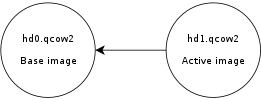
Here, hd0 is a fully populated disk image, and hd1 a freshly created image as a result of a snapshot operation. Reading data from this virtual disk will fill up the L2 cache of hd0, because that s where the actual data is read from. However hd0 itself is read-only, and if you write data to the virtual disk it will go to the active image, hd1, filling up its L2 cache as a result. At some point you ll have in memory cache entries from hd0 that you won t need anymore because all the data from those clusters is now retrieved from hd1. Let s now create a new live snapshot:
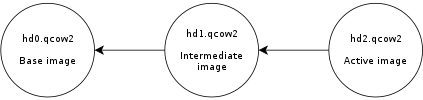
Now we have the same problem again. If we write data to the virtual disk it will go to hd2 and its L2 cache will start to fill up. At some point a significant amount of the data from the virtual disk will be in hd2, however the L2 caches of hd0 and hd1 will be full as a result of the previous operations, even if they re no longer needed. Imagine now a scenario with several virtual disks and a long chain of qcow2 images for each one of them. See the problem? I wanted to improve this a bit so I was working on a new setting that allows the user to reduce the memory usage by cleaning unused cache entries when they are not being used. This new setting is available in QEMU 2.5, and is called cache-clean-interval . It defines an interval (in seconds) after which all cache entries that haven t been accessed are removed from memory. This example removes all unused cache entries every 15 minutes: -drive file=hd.qcow2,cache-clean-interval=900 If unset, the default value for this parameter is 0 and it disables this feature. Further information In this post I only intended to give a brief summary of the qcow2 L2 cache and how to tune it in order to increase the I/O performance, but it is by no means an exhaustive description of the disk format. If you want to know more about the qcow2 format here s a few links: Acknowledgments My work in QEMU is sponsored by Outscale and has been made possible by Igalia and the invaluable help of the QEMU development team.
Enjoy QEMU 2.5!

16 December 2015

Thomas Goirand: Django upgrades area always a pain

It s been a few years that I maintain some python-django-* packages, as part of the maintenance of the OpenStack dashboard, Horizon. Currently, this consist of: python-django-appconf, python-django-babel, python-django-bootstrap-form, python-django-compressor, python-django-discover-runner, python-django-formtools, python-django-openstack-auth, python-django-overextends, python-django-pyscss. By far, Django has been one of the biggest pain point. It moves too fast, deprecating its own API from one minor version to the next, at the rate of one minor release every 6 months. As Django 1.9 was uploaded to Sid, a bunch of problems appeared. The Django 1.9 release notes explains it all: a large chunk of its API gets removed (look for Freatures removed in that page). I had to fix a few issues: the last one I fixed was #807346 (in django-openstack-auth), which needed 2 patches. Amusingly, the patch I wrote looks the same as what is currently under review, by one of the upstream authors. Though still have #807355 to fix, and that one is more complex. To fix it, I have to package the latest commit of django-compressor, and: Even after doing all of this, django-compressor still doesn t build (unit test failures) with lots of errors ending with this: File some-path/build-area/python-django-compressor-1.6+2015.12.15.git.66feba0db5/compressor/management/commands/compress.py , line 162, in compress

followlinks=options.get( followlinks , False)):
File /usr/lib/python2.7/os.py , line 278, in walk
names = listdir(top)
TypeError: coercing to Unicode: need string or buffer, Origin found I tried fixing this last one, but failed so far. (if anyone can help, please do ) This was just the upgrade from 1.8 to 1.9, and it doesn t include some of the issues fixed earlier (when Django 1.9 was only in Experimental and easy fixes were written). All this to say: Django upgrades are always painful. As I always say: the Linux kernel is so much more complex than this kind of Python modules, and yet, they don t allow themselves break the userland API. Why most Python developers believe that it s OK to do so? It isn t possible to separate private and public API clearly in python (like it is with the kernel). So it isn t uncommon that library users start using non-public functions, classes or methods. For that, it is understandable that there are breakages (when someone uses something that isn t made to be used by the library users). But that s the only case where it is, and there s no excuse to break known used public API. Django upstream authors, if you read me, please stop breaking the world every 6 months! And no, your deprecation messages are not an excuse. If you did a design mistake in the past, that s no excuse. Too bad you ll have to live with it until the end of times and find a work-around.

15 December 2015

Vasudev Kamath: Persisting resource control options for systemd-nspawn containers

In my previous post on systemd-nspawn I mentioned, I was unclear on how to persist resource control options for a container. Today I accidentally discovered how can the property be persisted across boot without modifying service file or writing custom service file for container. It is done using systemctl set-property To set CPUAccounting and CPUShares for a container we need to run following command.
systemctl set-property systemd-nspawn@container.service  CPUACCounting=1 CPUShares=200
This actually persists these settings at location, /etc/systemd/systemd-nspawn@container.service.d/ folder. So in our case there will be 2 files created under above location by name 50-CPUAccounting.conf and 50-CPUShares.conf with following contents.
# 50-CPUAccounting.conf
[Service]
CPUAccounting=yes
# 50-CPUShares.conf
[Service]
CPUShares=200
Today when I discovered this folder and saw the file contents, I became curious and started to wonder who created this folder. The look at systemctl man page made showed me this.
set-property NAME ASSIGNMENT...

Set the specified unit properties at runtime where this is supported. This allows changing configuration parameter properties such as resource control settings at runtime. Not all properties may be changed at runtime, but many resource control settings (primarily those in systemd.resource-control(5)) may. The changes are applied instantly, and stored on disk for future boots, unless --runtime is passed, in which case the settings only apply until the next reboot. The syntax of the property assignment follows closely the syntax of assignments in unit files. Example: systemctl set-property foobar.service CPUShares=777

Note that this command allows changing multiple properties at the same time, which is preferable over setting them individually. Like unit file configuration settings, assigning the empty list to list parameters will reset the list.

I did remember doing this for my container and hence it became clear these files are actually written by systemctl set-property. In case you don't want to persist the properties across boot you can simply pass --runtime switch. Basically this is not just for container, resource control can be thus applied to any running service on the system. This is actually cool.

Zlatan Todori : Just read LWN or make your news

So it has been always a pain but lately going and (yes, my mistake) reading Phoronix news is just horrible (the best word I could choose, other were much more nasty). So instead writing thousand of words I just choose to make a picture. moronix I think it's pretty much clear what it is. Instead of that people should read LWN or I should start making news because it is not hard to be waaaay much better then Phoronix guy but also news that I didn't write I will not just link to it (many times not even that) and then say how I wrote article! You know, it is fine not to understand everything and ask people questions.

Sven Hoexter: Some helpful commands from the CentOS yum and rpm world

Today I learned from my coworkers about a few helpful sub commands of yum and some other things from the rpm world. Just jotting them down here so I don't forget about them. Oh and why did we've to do it? Well CentOS 6 got a grep update from 2.6 to 2.20. That upgrade lost the --mmap option and some very old stuff started to fall apart because of the now unknown option. Update: There are some interesting issues related to this update in the RedHat Bugzilla. #1287074 #1256756 I added #1291714 just for the sake of completeness.
# yum history
ID       Login user                 Date and time      Action(s)        Altered
-------------------------------------------------------------------------------
124   xxx                        2015-12-15 11:51   Downgrade           1
123   yyy                        2015-12-15 11:02   E, O, U           244 EE
122   zzz                        2015-12-15 10:57   I, O, U           255 **
Provides an overview of the last actions done with yum. On CentOS 7 (this one is from CentOS 6) the output seems to have changed slighty and it provides the commandline instead of the username.
# yum list installed   grep epel
bash-completion.noarch             1:1.3-7.el6                      @epel-Mirror
eventlog.x86_64                    0.2.13-1.el6                     @epel-Mirror
libnet.x86_64                      1.1.6-7.el6                      @epel-Mirror
pylint.noarch                      1.3.1-1.el6                      @epel-Mirror
python-astroid.noarch              1.2.1-2.el6                      @epel-Mirror
python-logilab-common.noarch       0.62.1-2.el6                     @epel-Mirror
python-unittest2.noarch            0.5.1-3.el6                      @epel-Mirror
Helps you to find out from which repository you installed which package.
# repoquery -i grep
Name        : grep
Version     : 2.20
Release     : 3.el6_7.1
Architecture: x86_64
Size        : 1197808
Packager    : CentOS BuildSystem <http://bugs.centos.org>
Group       : Applications/Text
URL         : http://www.gnu.org/software/grep/
Repository  : update
Summary     : Pattern matching utilities
Source      : grep-2.20-3.el6_7.1.src.rpm
Description : [ ... ]
Kind of the rpm -q ... stuff on a repository level instead of the local rpm database. Update: T.P. provided a small shell snippet to show updates. Thanks.

Michal &#268;iha&#345;: Weekly phpMyAdmin contributions

It has been already one week since last report and here comes next one. This week was half focused on fixing issues with Docker container for phpMyAdmin and on code cleanups. The Docker container got support for more options, making it better suited for various use cases. I'm still thinking whether using PHP's built in server here is a good idea or we should switch to something like nginx + PHP FPM, what would make the container bigger, but it would perform better. On the code cleanup and issues side, I started to work on two issues 11741 and 11731, which both pointed me to quite some code which could be removed or improved. Many of that was to support older PHP versions, which we no longer support. Anyway the work here is still in progress and both issues will take some time to resolve.

Filed under: English phpMyAdmin 0 comments

Antoine Beaupr : Using a Yubikey NEO for SSH and OpenPGP on Debian jessie

I recently ordered two Yubikey devices from Yubico, partly because of a special offer from Github. I ordered both a Yubikey NEO and a Yubikey 4, although I am not sure I remember why I ordered two - you can see their Yubikey product comparison if you want to figure that out, but basically, the main difference is that the NEO has support for NFC while the "4" has support for larger RSA key sizes (4096). This article details my experiment on the matter. It is partly based on first hand experience, but also links to various other tutorials that helped me along the way. Especially thanks to folks on various IRC channels that really helped me out in understanding this. My objective in getting a hardware security token like this was three-fold:
  1. use 2FA on important websites like Github, to improve the security of critical infrastructure (like my Borg backup software)
  2. login to remote SSH servers without exposing my password or my private key material on third party computers
  3. store OpenPGP key material on the key securely, so that the private key material can never be compromised
To make a long story short: this article documents step 2 and implicitly step 3 (because I use OpenPGP to login to SSH servers). However it is not possible to use the key on arbitrary third party computers, given how much setup was necessary to make the thing work at all. 2FA on the Github site completely failed, but could be used on other sites, although this is not covered by this article. I have also not experimented in details the other ways the Yubikey can also be used (sorry for the acronym flood) as: Update: OATH works! It is easy to configure and i added a section below.

Not recommended After experimenting with the device and doing a little more research, I am not sure it was the right decision to buy a Yubikey. I would not recommend buying Yubikey devices because they don't allow changing the firmware, making the device basically proprietary, even in the face of an embarrassing security vulnerability on the Yubikey NEO that came out in 2015. A security device, obviously, should be as open as the protocols it uses, otherwise it's basically impossible to trust that the crypto hasn't been backdoored or compromised, or, in this case, is vulnerable to the simplest drive-by attacks. Furthermore, it turns out that the primary use case that Github was promoting is actually not working as advertised: to use the Yubikey on Github, you actually first need to configure 2FA with another tool, either with your phone's text messages (SMS) or with something like Google Authenticator. After contacting Github support, they explained that the Yubikey is seen as a "backup device", which seems really odd to me, especially considering the promotion and the fact that I don't have a "smart" (aka "Google", it seems these days) phone or the desire to share my personal phone number with Github. Finally, as I mentioned before, the fact that those devices are fairly new and the configuration necessary to make them work at all is completely obtuse, non-standardized or at least not available by default on arbitrary computers makes them basically impossible to use on other computers than your own specially crafted gems.

Plugging it in The Yubikey, when inserted into a USB port, seems to be detected properly. It shows up both as a USB keyboard and a generic device.
d c 14 17:23:26 angela kernel: input: Yubico Yubikey NEO OTP+U2F as /devices/pci0000:00/0000:00:12.0/usb3/3-2/3-2:1.0/0003:1050:0114.0016/input/input127
d c 14 17:23:26 angela kernel: hid-generic 0003:1050:0114.0016: input,hidraw3: USB HID v1.10 Keyboard [Yubico Yubikey NEO OTP+U2F] on usb-0000:00:12.0-2/input0
d c 14 17:23:26 angela kernel: hid-generic 0003:1050:0114.0017: hiddev0,hidraw4: USB HID v1.10 Device [Yubico Yubikey NEO OTP+U2F] on usb-0000:00:12.0-2/input1
We'll be changing this now - we want to to support OTP, U2F and CCID. Don't worry about those acronyms now, but U2F is for the web, CCID is for GPG/SSH, and OTP is for the One Time Passwords stuff mentionned earlier. I am using the Yubikey Personalization tool from stretch because the jessie one is too old, according to Gorzen. Indeed, I found out that the jessie version doesn't ship with the proper udev rules. Also, note that we need to run as sudo otherwise we get a permission denied:
$ sudo apt install yubikey-personalization/stretch
$ sudo ykpersonalize -m86
Firmware version 3.4.3 Touch level 1541 Program sequence 1
The USB mode will be set to: 0x86
Commit? (y/n) [n]: y
To understand better what the above does, see the NEO composite device documentation. The next step is to reconnect the key, for the udev rules to kick in. If you were like me, you enthusiastically plugged in the device before installing the yubikey-personalization package, and the udev rules were not present then.

Configuring a PIN Various operations will require you to enter a PIN when talking to the key. The default PIN is 123456 and the default admin PIN is 12345678. You will want to change that, otherwise someone that gets a hold of your key could do any operation without your consent. For this, you need to use:
$ gpg --card-edit
> passwd
> admin
> passwd
Be sure to remember those passwords! Of course, the key material on the Yubikey can be revoked when you loose the key, but only if you still have control of the master key, or if you have a OpenPGP revocation certification (which you should have).

Configuring GPG To do OpenPGP operations (like decryption, signatures and so on), or SSH operations (like authentication on a remote server), you need to talk with GPG. Yes, OpenPGP keys are RSA keys that can be used to authenticate with SSH servers, that's not new and I have already been doing this with Monkeysphere for a while. Now the challenge is how to make GPG talk with the Yubikey. So the next step is to see if gpg can see the key alright, as described in the Yubikey importing keys howto - you will need first to install scdaemon and pcscd (according to this howto) for gpg-agent to be able to talk with the key:
$ sudo apt install scdaemon gnupg-agent pcscd
$ gpg-connect-agent --hex "scd apdu 00 f1 00 00" /bye
ERR 100663404 Card error <SCD>
Well that failed. At this point, touching the key types a bunch of seemingly random characters wherever my cursor is sitting - fun but totally useless still. That was because I failed to reconnect the key: make sure the udev rules are in place and reconnect the key, the above should work:
$ gpg-connect-agent --hex "scd apdu 00 f1 00 00" /bye
D[0000]  01 00 10 90 00                                     .....
OK
This shows it is running the firmware 1.10, which is not vulnerable to the infamous security issue. (Note: I also happened to install opensc and gpgsm because of this suggestion but I am not sure they are required at all.)

Using SSH To make GPG work with SSH, you need somehow to start gpg-agent with ssh support, for example with:
gpg-agent --daemon --enable-ssh-support bash
Of course, this will work better if it's started with your Xsession. Such an agent should already be started, so you just need to add the ssh emulation to its configuration file and restart your X session.
echo 'enable-ssh-support' >> .gnupg/gpg-agent.conf
In Debian Jessie, the ssh-agent wrapper will not start if it detects that you have already one running (for example from gpg-agent) but if that fails, you can try commenting out use-ssh-agent from /etc/X11/Xsession.options to keep it from starting up in your session. (Thanks to stackexchange for that reference.) Here I assume you have already created an authentication subkey on your PGP key. If you haven't, I suggest trying out simply monkeysphere gen-subkey, which will generate an authentication subkey for you. You can also do it by hand by following one of the OpenPGP/SSH tutorials from Yubikey, especially the more complete one. If you are going to generate a completely new OpenPGP key, you may want to follow this simpler tutorial here. Then you need to move your authentication subkey to the Yubikey. For this, you need to edit the key and use the keytocard command:
$ gpg2 --edit-key anarcat@debian.org
> toggle
> key 2
> keytocard
> save
Here, we use toggle to show the OpenPGP private key material. You should see a key marked with A for Authentication. Mine was the second one so I selected it with key 2 which put a star next to it. The keytocard command moved it to the key and save ensure the key was removed from the local keyring. Obviously, backups are essential before doing this, because it's perfectly possible to loose that key in the process, for example if you destroy or lose the key or forget the password. It's probably better to create a completely different authentication subkey for just this purpose, but that may require reconfiguring all remote SSH hosts, and you may not want to do that. Then SSH should magically talk with the GPG agent and ask you for the PIN! That's pretty much all there is to it - if it doesn't, it means that gpg-agent is not your SSH agent, and obviously things will fail... Also, you should be able to see the key being loaded in the agent when it is:
$ ssh-add -l
2048 23:f3:be:bf:1e:da:e8:ad:4b:c7:f6:60:5e:03:c2:a6 cardno:000603647189 (RSA)
.. that's about it! I have yet to cover 2FA and OpenPGP support, but that got me going for a while and I'll stop geeking around with that thing for now. It was fun, for sure, but not sure it's worth it for now.

Using OATH This is pretty neat: it allows you to add two factor authentication to a lot of things. For example, PAM has such a module, which I will configure here to allow myself to login to my server from untrusted machines. While I will expose my main password to keyloggers, the OTP password will prevent that from being reused. This is a simplified version of this OATH tutorial. We install the PAM module with:
sudo apt install libpam-oath
Then, we can hook it into any PAM consumer, for example with sshd:
--- a/pam.d/sshd
+++ b/pam.d/sshd
@@ -1,5 +1,8 @@
 # PAM configuration for the Secure Shell service
+# for the yubikey
+auth required pam_oath.so usersfile=/etc/users.oath window=5 digits=8
+
 # Standard Un*x authentication.
 @include common-auth
We also needed to allow OTP passwords in sshd explicitely, with:
ChallengeResponseAuthentication yes
This will force the user to enter a valid oath token on the server. Unfortunately, this will affect all users, regardless of whether they are present in the users.oath file. I filed bug #807990 regarding this, with a patch. Also, it means the main password is still exposed on the client machine - you can use the sufficient keyword instead of required to workaround that, but then it means anyone with your key can login to your machine, which is something to keep in mind. The /etc/users.oath file needs to be created with something like:
#type   username        pin     start seed
HOTP    anarcat -   00
00 is obviously a fake, and insecure string. Generate a proper one with:
dd if=/dev/random bs=1k count=1   sha1sum # create a random secret
Then the shared secret needs to be added to the Yubikey:
ykpersonalize -1 -o oath-hotp -o oath-hotp8 -o append-cr -a
You simply paste the random secret you created above, when prompted, and that shared secret will be saved in a Yubikey slot for future use. Next time you login to the SSH server, you will be prompted for a OATH password, you just touch the button on the key and it will be pasted there:
$ ssh -o PubkeyAuthentication=no anarc.at
One-time password (OATH) for  anarcat':
Password:
[... logged in!]
Final note: the centralized file approach makes it hard, if not impossible, for users to update their own secret token.. It would be nice if there would be a user-accessible token file, maybe ~/.oath? Filed feature request #807992 about this as well.

14 December 2015

Alessio Treglia: Big Data: ask the right questions

The Big Data phenomenon has reached a reality that is often baffling to the amount of information to be managed, and what for us today is called Big it will not be anymore in 5 years, from where it will be necessary to coin other terminologies and corresponding analysis technologies . bigdata1.jpg

The scientific and technological world is thus in ferment in a general rush towards finding the most appropriate tools to get the answers to these extensive masses of data. Big Data represents a paradigm shift: from the Society of network and connection the approach is increasingly leaning towards information and database .

<Read more >

Rapha&#235;l Hertzog: Freexian s report about Debian Long Term Support, November 2015

A Debian LTS logoLike each month, here comes a report about the work of paid contributors to Debian LTS. Individual reports In November, 114.50 work hours have been dispatched among 8 paid contributors. Their reports are available: Evolution of the situation We lost one hour of funding for December due to a sponsor not renewing, and we don t have any new sponsor lined up right now. There s another sponsor who will reduce his sponsorship starting with 2016. While the situation is relatively healthy right now, we should continue the efforts to find new sponsors, both to ensure we can cover more software in wheezy and to better share the costs: having many small sponsors is more resilient than relying on a few big ones. And we still haven t reached our second goal of funding the equivalent of a full-time position. In terms of security updates waiting to be handled, the situation is close to last month: the dla-needed.txt file lists 19 packages awaiting an update (2 less than last month), the list of open vulnerabilities in Squeeze shows about 22 affected packages in total (1 less than last month). Thanks to our sponsors The new sponsors are in bold.

No comment Liked this article? Click here. My blog is Flattr-enabled.

Matthias Klumpp: AppStream/DEP-11 fully supported in Debian now!

AppStream on DebianBack in 2011, when the AppStream meeting in N rnberg had just happened, I published the DEP-11 (Debian Extension Project 11) draft together with Michael Vogt and Julian Andres Klode, as an approach to implement AppStream in Debian. Back then, the FTPMasters team rejected the suggestion to use the official XML specification, and so the DEP-11 specification was adapted to be based on YAML instead of XML. This wasn t much of a big deal, since the initial design of DEP-11 was to be a superset of the AppStream specification, so it wasn t meant to be exactly like AppStream anyway. AppStream back then was only designed for applications (as in stuff that provides a .desktop file ), but with DEP-11 we aimed for much more: DEP-11 should also describe fonts, drivers, pkg-config files and other metadata, so in the end one would be able to ask the package manager meaningful questions like is the firmware of device X installed? or request actions such as please install me the GIMP , making it unnecessary to know package names at all, and making packages a mere implementation detail. Then, GNOME-Software happened and demanded all these features. Back then, I was the de-facto maintainer of the AppStream upstream project already, but didn t feel like being the maintainer yet, so I only curated the existing specification, without extending it much. The big push forward GNOME-Software created changed that dramatically, and with me taking control of the specification and documenting it properly, the very essence of DEP-11 became AppStream (that was around the AppStream 0.6 release). So today, DEP-11 is mainly a YAML-based version of the AppStream XML specification. AppStream XML and DEP-11 YAML are implemented by two projects, GLib and Qt libraries exist to access the metadata and AppStream is used by the software centers of GNOME, KDE and Elementary. Today there are two things to celebrate for me: First of all, there is the release of AppStream 0.9 (that happened last Saturday already), which brings some nice improvements to the API for developers and some micro-optimizations to speed up Xapian database queries. Yay! The second thing is full DEP-11 support in Debian! This means that you don t need to copy metadata around manually, or install extra packages: All you need to do is to install the appstream package, everything else is done for you, and the data is kept up to date automatically. This is made possible by APT 1.1 (thanks to the whole APT team!), some dedicated support for it in AppStream directly, the work of our Sysadmin team at Debian, which set up infrastructure to build the metadata automatically, as well as our FTPMasters team where Joerg helped with the final steps of getting the metadata into the archive. That AppStream data is now in the archive doesn t mean we live in a perfect utopia yet there are still issues to be handled, but all the major work is done now and we can now gradually improve the data generator and tools and squash the remaining bugs. And another item from the good news department: It s highly likely that Ubuntu will follow Debian in AppStream/DEP-11 support with the upcoming Xenial release! But how can I make use of the new metadata? Just install the appstream package everything is done for you! Another easy way is to install GNOME-Software, which makes use of the new metadata already. KDE Discover in Debian does not enable support for AppStream yet, this will likely come later. If you prefer to use the command-line, you can now use commands like
sudo appsteamcli install org.kde.kate.desktop
This will simply install the Kate text editor. Who wants some statistics? At time the Debian Sid/Unstable suite contains 1714 valid software components. It could be even more if the errors generated during metadata extraction would be resolved. For that, the metadata generator has a nice statistics page, showing the amount of each hint type in the suite and the development of the available software components in Debian and the hint types count over time (this plot feature was just added recently, so we are still a bit low on data). For packagers and interested upstreams, the data extractor creates detailed reports for each package, explaining why data was not included and how to fix the issue (in case something is unclear, please file a bug report and/or get in contact with me). In summary Thanks to everyone who helped to make this happen! For me this project means a lot, when writing this blog post I realized that I am basically working on it for almost 5 years (!) now (and the idea is even older). Seeing it to grow to such a huge success in other distributions was a joy, but now Debian can join the game with first-class AppStream support as well, which makes me even happier. Afterall Debian is the distribution I feel most at home. There is still lots of work to do (and already a few bugs known), but the hardest part of the journey is done let s walk into a bright future with AppStream!

Guido G nther: Creating views in Jenkins using jenkins-job-builder-addons

I'm often using jenkins-job-builder to automatically create jenkins jobs since writing them in YAML is more comfortable then doing large amounts of jobs in the GUI, it serves consistency and helps automation. For views and build pipelines I so far resorted to other tools (like templates in the config management tool at use) but now there's jenkins-job-builder-addons by jimbydamonk. Creating a delivery pipeline view and the "All" view then gets as simple as:
- job:
    name: MyApp
    project-type: folder
    views:
      - delivery_pipeline:
          filter-executors: false
          filter-queue: false
          folder: true
          components:
            - name: Deploy
              first-job: app-deploy-test
          name: myapp-deploy-pipeline
          build-view-title: "MyApp Deploy Pipeline"
          number-of-pipelines: 3
          show-aggregated-pipeline: true
          number-of-columns: 1
          sorting: none
          show-avatars: false
          update-interval: 1
          allow-manual-triggers: true
          show-total-buildtime: true
          allow-rebuild: true
          allow-pipeline-start: true
      - all:
         folder: true
         name: All
This also uses the folder plugin to make sure the views end up in separate files. It currently needs a slightly patched jenkins-job-builder with this patch applied. Putting this here since I hit jenkins-job-builder-addons mostly by accident. Once jenkins-job-builder catched up I'll look into packaging this for Debian.

13 December 2015

Gregor Herrmann: RC bugs 2015/38-50

it looks like this autumn was not my best blogging time: this is the first posting in 3 months. anyway, I wanted to give a quick overview about my work on RC bugs. again nothing exciting, mostly just trying to fix the ones popping up in the pkg-perl team.

Jose M. Calhariz: at daemon now with SELinux support

Thanks to the work of Laurent Bigonville, now the at daemon have SELinux support. So here is a new release at 3.1.18. Please test it.

Chris Lamb: try.diffoscope.org

If you haven't already come across it, diffoscope is a tool that reveals what makes files or directories actually different. It recursively unpacks archives of many kinds, transforming binary formats into more human-readable forms in order to make it easier to compare them. It can compare two tarballs, ISO images, PDF, squashfs images, etc. Anyway, yesterday I hacked together try.diffoscope.org which lets anyone easily try out and share these in-depth comparisons using just a web browser. The underlying idea is not only to provide a useful service, but also that it will publicise and spread the usage of diffoscope, resulting in net improvements that will feed back into the Reproducible Builds effort. As usual, patches welcome.

Vasudev Kamath: Mount ordering and automount options in systemd

Just to give a brief recap of why I'm writing this post, I've to describe a brief encounter I had with systemd which rendered my system unbootable. I first felt its systemd's problem but later figured out it was my mistake. So below is brief story divided into 2 sections Problem and Solution. Here Problem describes issue I faced with systemd and Solution discusses the .mount and .automount suffix files used by systemd.
Problem I have several local bin folders and I don't want to modify PATH environment variable adding every other folder path. I first started using aufs as alternative to symlinks or modifying PATH variable. Recently I learnt about much more light weight union fs which is in kernel, overlayfs. And Google led me to Arch wiki article which showed me a fstab entry like below
overlay        /usr/local/bin        overlay noauto,x-systemd.automount,lowerdir=/home/vasudev/Documents/utilities/bin,upperdir=/home/vasudev/Documents/utilities/jonas-bin,workdir=/home/vasudev/Documents/utilities/bin-overlay    0       0
And after adding this entry, on next reboot systemd is not able to mount my LVM home and swap partition. It does however mount root partition. It gives me emergency target but login never returns. So without any alternative I had to reinstall the system. But funnily enough I started encountering the same issue (yeah after I had added above entry into fstab). Yeah that time I never thought that its culprit. My friend Ritesh finally got my system booting after the weird x-systemd.automount option. I never investigated further that time on why this problem occurred.
Solution After re-encounter with similar problem and some other project I read the manual on systemd.mount, systemd-fstab-generator and systemd.automount and I had some understanding of what really went wrong in my case above. So now let us see what really is happening. All the above happened because, systemd translates the /etc/fstab into .mount units at run time using systemd-fstab-generator. Every entry in fstab translates into a file named after the mount point. The / in the path of the mount point is replaced by a -. So / mount point is named as -.mount and /home is named as home.mount and /boot becomes boot.mount. All these files can be seen in directory /run/systemd/generator. And all these mount points are needed by local-fs.target , if any of these mount points fail, local-fs.target fails. And if local-fs.target fails it will invoke emergency.target. systemd-fstab-generator manual suggests the ordering information in /etc/fstab is discarded. That means if you have union mounts, bind mounts or fuse mounts in the fstab which is normally at end of fstab and uses path from /home or some other device mount points it will fail to get mounted. This happens because systemd-fstab-generator didn't consider the ordering in fstab. This is what happened in my case my overlay mount point which is usr-local-bin.mount was some how happened to be tried before home.mount because there is no explicit dependency like Requires= or After= was declared. When systemd tried to mount it the path required under /home were not really present hence failed which in return invoked emergency.target as usr-local-bin.mount is Requires= dependency for local-fs.target. Now what I didn't understand is why emregency.target never gave me the root shell after entering login information. I feel that this part is unrelated to the problem I described above and is some other bug. To over come this what we can do is provided systemd-fstab-generator some information on dependency of each mount point. systemd.mount manual page suggests several such options. One which I used in my case is x-systemd.requires which should be placed in options column of fstab and specify the mount point which is needed before it has to be mounted. So my overlay fs entry translates to something like below
overlay        /usr/local/bin        overlay noauto,x-systemd.requires=/home,x-systemd.automount,lowerdir=/home/vasudev/Documents/utilities/bin,upperdir=/home/vasudev/Documents/utilities/jonas-bin,workdir=/home/vasudev/Documents/utilities/bin-overlay   0       0
There is another special option called x-systemd.automount this will make systemd-fstab-generator to create a .automount file for this mount point. What does systemd.automount do? It achieves on-demand file mounting and parallelized file system mounting. Something similar to systemd.socket the file system will be mounted when you access the mount point for first time. So now if you try to see dependency of usr-local-bin.mount you will see following.
systemctl show -p After usr-local-bin.mount
After=-.mount systemd-journald.socket local-fs-pre.target system.slice usr-local-bin.automount
This means now usr-local-bin.mount depends on usr-local-bin.automount. And let us see what usr-local-bin.automount needs.
systemctl show -p Requires usr-local-bin.automount
Requires=-.mount home.mount
systemctl show -p After usr-local-bin.automount
After=-.mount home.mount
So clearly usr-local-bin.automount is activated after -.mount and home.mount is activated. Similar can be done for any bind mounts or fuse mounts which require other mount points before it can be mounted. Also note that x-systemd.autmount is not mandatory option for declaring dependencies, I used it just to make sure /usr/local/bin is mounted only when its really needed.
Conclusion A lot of traditional way has been changed by systemd. I never understood why my system failed to boot in first place this happened because I was not really aware of how systemd works and was trying to debug the problem with traditional approach. So there is really a learning curve involved for every sysadmin out there who is going to use systemd. Most of them will read documentation before hand but others like me will learn after having a situation like above. :-). So systemd interfering into /etc/fstab is good?. I don't know but since systemd parallelizes the boot procedure something like this is really needed. Is there a way to make systemd not touch /etc/fstab?. Yes there is you need to pass fstab=0 option in kernel command line and systemd-fstab-generator doesn't create any .mount or .swap files from your /etc/fstab. !NB Also it looks like x-systemd.requires option was introduced recently and is not available in systemd <= 215 which is default in Jessie. So how do you declare dependencies in Jessie system?. I don't have any answer!. I did read that x-systemd.automount which is available in those versions of systemd can be used, but I'm yet to experiment this. If it succeeds I will write a post on it.

Next.

Previous.