Lars Wirzenius: Obnam: Generating backup data sets
Sometimes in programming one gets to concentrate for a
bit on a single, simple, pure program. A command line
utility which is completely in batch mode, does not handle
any kind of complicated data, does not need to deal with
other programs, or the network, or anything nasty like that.
Something where one can just look at the one or two
interesting parts and not have to worry about anything else.
This is the story of one such program.
I need a program to generate test data sets for backup
performance testing. The program needs to be reasonably
efficient, since the simulated backups may be rather large. My
first attempt was not fast enough. There were two reasons
for this: the way I was generating random binary data, and
the way I was generating filenames.
The program generates random binary data to simulate
large files, such as image, audio, or video files, and thus
it needs to be uncompressible with the usual compression
algorithms.
My first attempt was to generate each output byte with
the Python pseudo-random number generator (random.randint).
This only results in about 0.1 megabyte/s (on my laptop), so
I needed to improve it. After some iteration and advice, I
landed on the following: I generate random bytes with the
Python PRNG (random.getrandbits), and feed these to an MD5
checksum. After each byte, I get the current digest and
append it to the output. This way, for each random byte, I
get 16 bytes of output. It isn't completely random, but it
satisfies the uncompressibility requirement. This resulted
in about 2.5 MB/s.
I then tweaked the code a bit, doing things like avoiding
unnecessary arithmetic. I further decided to only feed the
first few dozen bytes from the PRNG, and the rest as the
same constant byte. The initial run of randomness is enough
to make sure the output is unique for different files, so
that compression doesn't find lots of duplicates of the big
files. This resulted in a speed of about 6.6 MB/s on my laptop
and about 13 MB/s on my server.
This still didn't make the program fast enough, but the
remaining problem was not that writing the contents of one
file was too slow, but operations on directories were very,
very slow. After benchmarking with zero-byte files, turns out
that at the slowest, with file counts in the millions,
it would create only a few tens of files per second. That's
empty files, so only requiring an update of indoes and the
creation of a new directory entry. Obviously, the problem
was that I was putting too many files in directories, causing
the filesystem to spend a lot time scanning them.
I was creating up to 250 files per sub-directory, and then
creating a new sub-directory. All of these sub-directories
were going directly under the user's chosen output directory.
To measure what the optimal size of a directory was, and
whether to create two levels of sub-directories, I wrote a
little benchmark program.
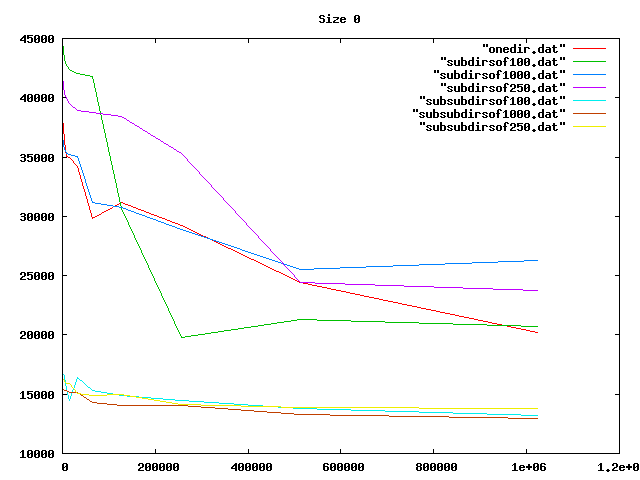
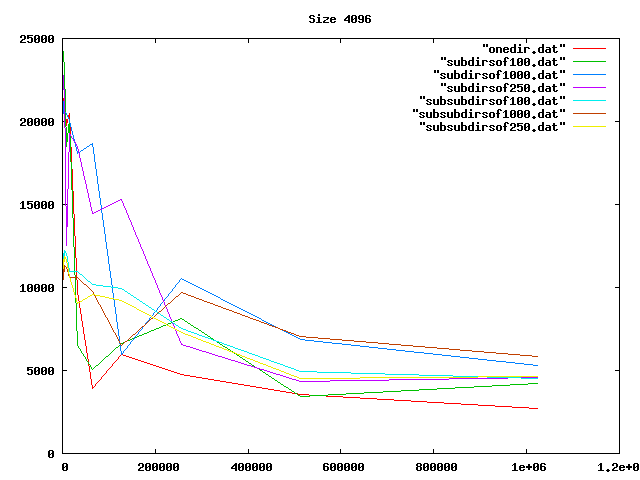
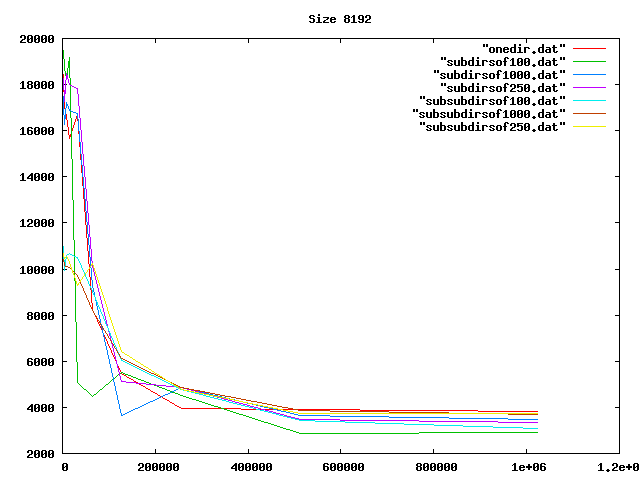
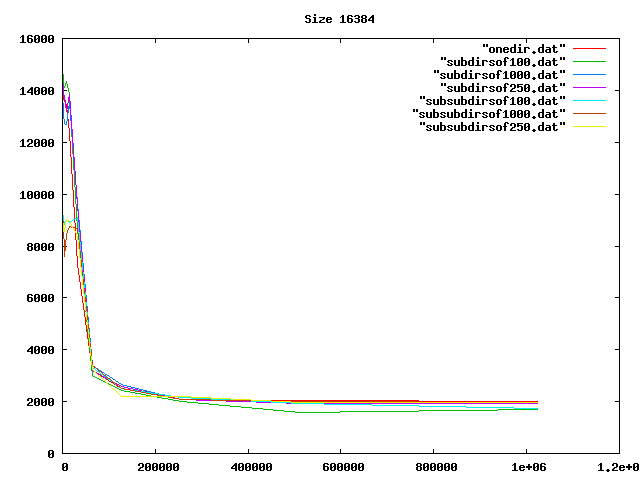 Some graphs from the benchamrks: for 0, 4, 8, and 16
KiB files, for up to one million files of each size.
onedir puts all files in the same directory,
subdirsofN puts N files per directory, and
subsubdirsofN has two levels of directories,
the leaf directories getting N files each.
From the graphs I deduced that overall, having two levels
of directories and up to 1000 files per sub-directory was the
best option of those tested.
On the other hand, the bigger the files, the less it
mattered what the directory structure was. Perhaps the obvious
reason for the slowness wasn't that, after all.
Then I realized my code was slow because I was doing an
os.listdir (listing all files in a directory) for every
directory every time I creted a file. Fixing that idiocy
made the code so fast that any overhead from the directory
operations was no longer relevant. But at least I had some
nice graphs.
On the server I will be generating my test data the
program is now happily generating just over 11 MB/s of test
data. I wouldn't mind having it be a lot faster, but it's
fast enough. It will take hours to generate hundreds of
gigabytes, but I hopefully won't need to do that very often.
Thus, further optimization isn't worth my time, right
now.
The program is genbackupdata,
in case anyone else cares about it.
Some graphs from the benchamrks: for 0, 4, 8, and 16
KiB files, for up to one million files of each size.
onedir puts all files in the same directory,
subdirsofN puts N files per directory, and
subsubdirsofN has two levels of directories,
the leaf directories getting N files each.


