Search Results: "reg"

6 May 2012

Russell Coker: A Quick Review of the Mac Mini with OS/X Lion compared to Linux

A client just lent me a new Mac Mini with OS/X Lion to play with. I think it s interesting to compare it with regular PCs running Linux. Hardware The Mac Mini is tiny. It s volume can be compared to that of a laptop. The entire outside apart from the base is made from aluminium which helps dissipate heat, it s not as effective as copper but a lot better than plastic. The ports on the system are sound input/output, 4*USB, Ethernet, Firewire, Thunderbolt (replacement for Firewire), SDXC, and HDMI. It ships with a HDMI to DVI-D adapter which is convenient if you have an older monitor (or if you have a recent monitor but no HDMI cable as I do). To open the case you unscrew the bottom, this is much like opening a watch. Also like opening a watch it s not particularly easy to screw it back on tightly, I will probably return the Mac Mini without managing to completely screw the base in. The hardware is very stylish and intricately designed, what we expect from Apple. It s also quiet. In every way it s a much better system than the workstation I m using to write this blog post. The difference of course is that this workstation was free and the Mac Mini cost just over $1000 including the RAM upgrade. A Mac Mini could be a decent Linux workstation and if I see one about to be recycled I ll be sure to grab it! Installation The Mac OS comes pre-installed so I didn t get to do a full installation. When I first booted it up it asked me if I wanted to migrate the configuration from an existing server, I don t know how well this works as I don t have a second Mac system but the concept is a good one. Maybe having full support for such a migration process would be a good release goal for a Linux distribution. After determining that the installation is a fresh one I was asked for a mac.com email address or other form of registration. I skipped this step as I don t have such an email address, but it could be useful. Red Hat has Kickstart to allow configuration of an OS install based on a file from a server (via NFS or HTTP). Debian supports preseeding to take OS configuration options from a file at install time [1] and the same option can be used for later stages of OS autoconfiguration. One thing that would be really useful is to allow the user to enter a URL for configuration data for an individual account or for all accounts, so someone with an account on one workstation could upload the configuration (which would be either encrypted or sanitised to not have secret data) and then download it when first logging in to a new system. I can easily take a tar archive of my home directory to a new system, but people like my parents don t have the skill to do that. One of the final stages of system configuration was to identify the keyboard. The system asked me to press the key to the right of the left shift key and then the key to the left of the right shift key and then offered me three choices of keyboard. That was an interesting way of reducing the list of possible keyboards offered to the user and thus preventing the user from selecting one that is grossly incorrect. Cloud Storage When first logging in I was asked for an iCloud [2] login. iCloud doesn t seem like a service that should be trusted, it s based in the US and has been designed to facilitate access by government agencies. Ubuntu One [3] is a similar service that is run by a more reputable organisation, but the data is still stored by Amazon (a US corporation) which seems like a security risk. Ubuntu One isn t in Debian (which is strange as Ubuntu is based on Debian) so it was too much effort for me to determine whether it encrypts data in a way that protects the users against US surveillance. The cost of Ubuntu One storage is $4 per month with music streaming. A better option is to use a self-hosted OwnCloud installation for a private or semi-private cloud [4]. A cheap server from someone like Hetzner (E49 per month for 3TB of RAID-1 storage) [5] is a good option for OwnCloud hosting. A cheap Hetzner server is about $US64 per month (at current conversion rates) which is equivalent to about 16 users of Ubuntu One for music streaming. So if 20 people shared a Hetzner server they could save money when compared to Ubuntu One while also getting a lot more storage. I ve got about 300G of unused disk space on the Hetzner server that hosts my blog and when the system is migrated to a newer Hetzner server with 3TB disks it will have 2.5TB of unused space, I could store a lot of cloud data in that! The main features of iCloud and Ubuntu One seem to be distribution of random data files (anything you wish), streaming music to various playing systems, and copying pictures from phones as soon as they are taken. These are all great features but it s a pity that they don t appear to support distributed document storage. Apple Pages apparently allows documents to be immediately saved to the cloud. I d like to be able to save a file with Libre Office at home and then access it from my netbook using the cloud, of course that would require encryption for secret files but that s not so hard to do. One advantage with such distributed storage is that when combined with offline-IMAP for email it would almost entirely remove the need for backups of the desktop systems I maintain for my relatives. I could have all their pictures and documents go to the cloud and all their email stay on the server so if their desktop PC dies I could just give them a new PC and get it all back from the cloud! OwnCloud supports replication, so if I got two servers I would be covered against a server failure. But I think that for a small server with less than a dozen users it s probably better to just take some down-time when things go wrong and do regular backups to an array of cheap SATA disks. App Store Apple has an App Store in the OS. The use of such a store on a desktop OS is a new thing for me. It s basically the same as the Android Market (Google Play) but on the desktop. I think that there is a real scope for an organisation such as Canonical to provide such a market service for Linux. I think that there is a lot of potential for apps to be sold for less than $10 to a reasonable number of Linux users. A small payment would be inconvenient for the seller if they have to interact with the customer in any way and also inconvenient for the buyer if they are entering all their credit card details into a web site for the sale. But for repeat sales with one company being an intermediary it would be convenient for everyone. A market program for a desktop Linux system could provide a friendly interface to selecting free apps from repositories (for Debian, Ubuntu, Fedora, or other distributions) and also have the same interface used for selecting paid applications. Conclusion This isn t much of a review of Apple OS/X or the Mac Mini. Thinking about ways of implementing the best features of Lion on Linux is a lot more interesting. I admire Apple in the same way that I admire sharks, they are really good at what they do but they don t care about my best interests any more than a hungry shark cares about me. Update I got the currency conversion wrong in the first version of this article. It seems that to save money via a shared Hetzner server instead of Ubuntu One about 20 users would be needed instead of 10. But that s still not too many and would still give a lot more storage. It would be a little more difficult to arrange though, probably anyone who is seriously into computers knows 10 people who would want to share such a service (including people like their parents who want things to just work and don t understand what s happening). But getting 20 people would be more difficult. Related posts:
  1. Xen and SE Linux EWeek review of RHEL5 The online magazine EWeek has done a review of RHEL5....
  2. Servers vs Phones Hetzner have recently updated their offerings to include servers with...
  3. Modern Laptops Suck One of the reasons why I m moving from a laptop...

Gregor Herrmann: RC bugs 2012/17-18

as I was mostly offline last week, this is a report covering two weeks. as in the week before, it's mainly a mix of build-arch & gcc 4.7 bugs.

5 May 2012

Clint Adams: IronyFest 2012

I attended a hackfest for the alleged purpose of furthering data transparency and other such entertainment. I expected a full-blown circus of idiocy based on the lead-up: instructions to sign up to websites for the purpose of Centralizing things, downloading iPhone SDKs, and other blatant evidence of Not Actually Getting It At All. Imagine my surprise when I get to the registration desk and they offer me a photography opt-out. Now everyone knows that privacy opt-outs don't work; either they're ineffective or they are effective at a cost far greater than anyone should pay, but I appreciated the gesture anyway. So I received a badge advertising my first name and the fact that I was unwilling to be photographed. Spoiler alert: I was photographed at least six times. I have now cleverly changed my hairstyle so that no one can recognize me. After people had arrived and rubbed elbows and consumed things, the grand dignitaries took the stage for spectacles of egoism so great that relativity made Dan Kaminsky look almost like a humble and reasonable human being. This was succeeded by some organizing, coding, and ridiculousness. The group I landed in contained two employees of the advertising industry and one of the U.S. government. There was also someone I refer to as "ultracompetent astronut". Some things that were apparent: people

Russell Coker: Liberty and Mobile Phones

I own two mobile phones at the moment, I use a Samsung Galaxy S running Cyanogenmod [1] (Android 2.3.7) for most things, and I have a Sony Ericsson Xperia X10 running Android 2.1 that I use for taking photos, some occasional Wifi web browsing, and using some applications. Comparing Android Hardware The hardware for the Xperia X10 is better than that of the Galaxy S in many ways. It has a slightly higher resolution (480*854 vs 480*800), a significantly better camera (8.1MP with a flash vs 5MP without), and a status LED which I find really handy (although some people don t care about it). The only benefit of the Galaxy S hardware is that it has 16G of internal storage (of which about 2G can be used for applications) and 512M of RAM while the Xperia X10 has 1G of internal storage and 384M of RAM. These are significant issues, I have had applications run out of RAM on the Xperia X10 and I have been forced to uninstall applications to make space. Overall I consider the Xperia X10 to be a significantly better piece of hardware as I am willing to trade off some RAM and internal storage to get a better resolution screen and a better camera. The problem is that Sony Ericsson have locked down their phones as much as possible and they don t even give users the option of making a useful backup they inspired my post about 5 principles of backups [2]. The fact that the Galaxy S allows installing CyanogenMod which then gives me the liberty to do whatever I want with my phone is a massive feature. It outweighs the hardware benefits of the Sony Ericsson phones over Samsung phones prior to the Galaxy Nexus and Galaxy Note. For an individual user the ability to control their own hardware is a feature. Such an ability wouldn t be much use if there wasn t a community of software developers, so if you buy an Android phone that isn t supported by CyanogenMod or another free Android distribution then whether it is locked probably won t matter to you. But for any popular Android phone that s sold on the mass market it seems that if it s not locked then it will get a binary distribution of Android in a reasonable amount of time. Comparing with Apple It seems that Apple is the benchmark for non-free computing at the moment. The iPhone is locked down and Apple takes steps to re-lock phones that can be rooted as opposed to the Android vendors who ship phones and then don t bother to update the firmware for any reason. The Apple app market is more expensive and difficult to enter and if an app isn t in the market then you have to pay if you want to install it on a small number of development/test phones. This compares to Android where the Google market is cheaper and easier to enter and anyone can distribute an app outside the market and have people use it. But for an individual this doesn t necessarily cause any problems. I have friends and clients who use iPhones and are very happy with them. In terms of software development it s a real benefit to have a large number of systems running the same software. As Apple seems to have higher margins and larger volume than any other phone vendor as well as shipping only one phone at any time (compared to every other phone vendor which seems to ship at least 3 different products for different use cases) they are in a much better economic position to get the software development right. As far as I can tell the hardware and software of the iPhone is of very high quality. The iPad (which has a similar market position) is also a quality product. The fact that the Apple app market is more difficult to enter (both in terms of Apple liking the application and the cost of entry) also has it s advantages, I get the impression that the general quality of iPhone apps is quite high as opposed to Android where there are a lot of low quality apps and many more fraudulent apps than there should be. The lack of choice in Apple hardware (one phone and one tablet) is a disadvantage for the user. There is no option for a phone with a slide-out keyboard, a large screen (for the elderly and people with fat fingers), or any of the other features that some Android phones have. The lack of a range of sizes for the iPad is also a disadvantage. But it seems that Apple has produced hardware that is good enough for most users so there aren t many complaints about a lack of choice. It seems to me that the biggest disadvantage of the closed Apple ecosystem is for society in general. Anyone who wants to write a mobile app to do something which might be considered controversial would probably think twice about whether to develop for the iPhone/iPad as Apple could remove the app at a whim which would waste all the software development work that was invested in writing the app. Google seem to have much less interest in removing apps from their store and if they do remove an app then with some inconvenience it can be distributed on the web without involving them so the work won t be wasted. How Much Freedom Should a Vendor Provide? The Apple approach of locking everything down is clearly working for them at the moment. The Samsung approach of taking the Google prescribed code and allowing users to replace it is good for the users and works well. The Sony Ericsson approach of taking the Google code, adding some proprietary code, and then locking the phone down is bad for the users and I think it will be bad for Sony Ericsson. People are more likely to tell others about negative experiences and negative reviews are more likely to be noticed than positive reviews. So while many people are reasonably happy with Sony Ericsson products (until they find themselves unable to restore from a backup) it s still not a good situation for Sony Ericsson marketing. It seems that there are benefits to hardware vendors for being really open and for locking their users in properly. But being somewhat open isn t a good choice, particularly for a vendor that ships poor quality proprietary apps such as the Sony Ericsson ones. In terms of application distribution Google isn t as nice as they appear. The Skyhook case revealed that Google will do whatever it takes to prevent apps that compete with Google apps from being installed by default [3]. Google is also trying to make money from DRM sales via Youtube which it denies to rooted phones [4]. Again it seems to me that the best options here are being more open than Google is and being as closed as Apple. Google might gain some useful benefits from applying DRM (even though everyone with technical knowledge knows that it doesn t work) but the Skyhook shenanigans have got to be costing Google more than it s worth. How to make Android devices more Free The F-droid market is an alternative to the Google App market which only has free software [5]. On it s web site there are links to download the source for the applications, including the source and binaries for old versions. In the Google App market if an upgrade breaks your system then you just lose, with F-droid you can revert to the old version. A self-hosted OwnCloud installation for a private or semi-private cloud [6] can be used as an alternative to the Google Music store as well as for hosting any other data that you want to store online. The Open Street Map for Android (Osmand) project provides an alternative to the Google Map service [7]. Osmand allows you to download all the vector data for the regions you will ever visit so it can run without Internet access. But it doesn t have the ability to search for businesses and the search for an address functionality is clunky and doesn t accept plain text, which among other things precludes pasting data that s copied from email or SMS. While Osmand provides some important features that Google Maps will probably never provide, it doesn t provide some of the most used features of Google Maps so uninstalling Google Maps isn t a good option at the moment. The K9mail project provides a nice IMAP client for Android [8]. Use K9 with a mail server that you run and you won t need to use Gmail. There are alternatives to all the Google applications. It seems that apart from the lack of commercial data and search ability in Osmand an Android device that is used for many serious purposes wouldn t lack much if it had no Google apps. Google seems to be going too far in controlling Android. Escaping from their control and helping others to do the same seems to be good for society and good for the users who don t need apps which are only available in proprietary form. Related posts:
  1. Dual SIM Phones vs Amaysim vs Contract for Mobile Phones Currently Dick Smith is offering two dual-SIM mobile phones for...
  2. My Ideal Mobile Phone Based on my experience testing the IBM Seer software on...
  3. Old Mobile Phones as Toys In the past I have had parents ask for advice...

2 May 2012

Dirk Eddelbuettel: Boston Marathon 2012

Two weeks ago I ran the 116th running of the Boston Marathon. Weather is often part of the story in Boston as e.g. my first one in 2007 happened after a storm-drenched and very wet weekend. This time, it was the opposite. Temperatures in the 60s in the morning before the start at 10:00am, which tempaeratures climbing well into the 80s for most of the race. The organizers had sent increasingly alarming email to us participants, warning about the weather conditions. And it was unpleasantly hot. Race support was great though: lots of locals had sprinklers pointed to the street; water stops were plenty and amply stocked and, being a nice summery day, lots of spectators made for lots of cheer. But heat makes for dreadful running conditions. I was pretty well trained, but I ended up running 3:43:55, or a tad slower than in Chicago 2007 (also record heat, with the race stopped around the four-hour mark) and Chicago 2009 (hot, though not that hot---but I was somewhat undertrained). Which makes this a personal worst. Oh well, stuff happens. And it was a pretty rough day---reports claimed that 2100 runners, or about 10%, were seeking some form of medical attention during or after the race which is a much higher proportion than under normal conditions. The chart below is an updated version of a chart which had appeared on my running page before. I regrouped my prior Bostons (2007, 2009 and 2010) on the left, and the Chicago runs 2007 and 2009 on the right---and each with the current Boston marathon. (Boston 2012 marathon in comparison to other Boston and Chicago marathons) So compared to the prior Boston races, I did indeed relatively poorly. Starting slower, and slowing down even more leading to about 1:45 for the first half and 1:58 for the second. Compared to the two poor Chicago races (put of the six times I have ran that race), things are not quite as bad as at least I didn't peak at over 10 min/mile. Weather will always remain a challenge. The previous marathon (which was last fall's Fox Valley 2011) was unseasonally cold and wet---making for a time fast enough to get me back to Boston. I am registered again for this one, so we will see what September brings this year.

30 April 2012

Petter Reinholdtsen: Cutting it short - and picking the right tool for the job

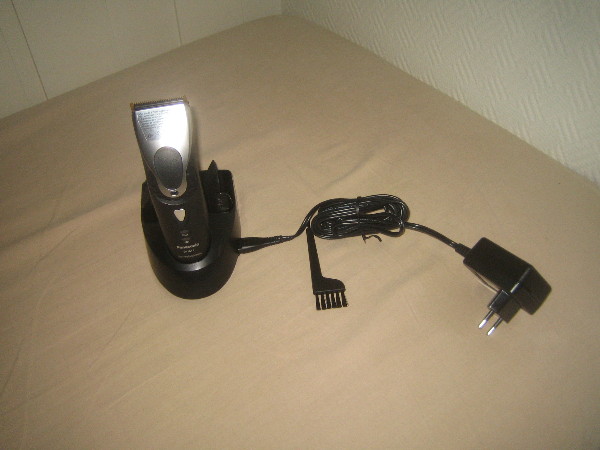
I normally cut my hair short, and my tool of choice has been a common hair/beard cutter, bought in a electrical shop here in Norway. But the last ones have not really been up to the task. My last cutter, some model from Braun, could only cut a few of my hairs at the time, and cutting my head took forever. And the one before that did not work very well either. We have looked for something better for a while, but it was not until I ended up visiting a hairdresser that we discovered that there are indeed better tools available. But these are not marketed and sold to "regular consumers". The hair saloons can get them through their suppliers, but their suppliers only sell companies. The models they sell, are very different from the ones available from Elkj p and Lefdal. The main difference is their efficiency. It would cut my hair in 5 minutes, instead of the 30-40 minutes required by my impotent Braun. The hairdresser I visited had a Panasonic ER160, which unfortunately is no longer available from the producer. But I found it had a successor, the Panasonic ER1611. The next step was to find somewhere to buy it. This was not straight forward. The list of suppliers I got from the hairdresser did not want to sell anything to me. But searching for the model on the web we found a supplier in Norway willing to sell it to us for around NOK 4000,-. This was a bit much. We kept searching and finally found a Danish supplier selling it for around NOK 1800,-. We ordered one, and it arrived a few days ago. The instructions said it had to charge for 8 hours when we started to use it, so we left it charging over night. Normally it will only need one hour to charge. The following evening we successfully tested it, and I can warmly recommend it to anyone looking for a real hair cutter. The ones we have used until now have been hair cutter toys.

John Goerzen: Review: Amateur Radio Handhelds (HTs), APRS, and Battery Tuning Tips

There are a lot of opinions about handhelds for amateur radio users (these handhelds are often known as HTs). I ve used three of them, two with APRS capability, and thought it s about time I write about them. First, I ll talk about the units in particular, then I ll get to some broader Yaesu vs. Kenwood generalizations and conclusions. Yaesu VX-7R a rugged first HT without APRS Cost: $350 as of 4/30/2012 This was the first HT I got as a ham, at the suggestion of Mike AE0MW. It truly does make a great first handheld for a ham. Radio-wise, one unique feature is a receive that s wideband enough to cover both broadcast FM and broadcast AM, the various ham bands, and plenty of others besides. The battery life quoted in the manual is 6 hours on 2m and 5.5 hours on 440 (using standard 6s TX / 6s RX / 48s squelched metric), and in my experience it seems it must be even better in some cases. The real piece of news about this unit, though, is just how rugged it is. It says submersible across the front and I absolutely believe it. I have personal experience with its ruggedness. I once was at an event and put the radio on my car roof while helping one of my children into the car. I then started driving home and forgot it there. When we got home, I realized what had happened, and also realized what that mysterious CLUNK along the busy county road was. So I drove 45 minutes back to where I heard the clunk, and found the VX-7R still lying in the roadway, where it had been for 1.5 hours on the 55 MPH road. The thing was really beat up. It had obviously been hit by numerous vehicles. The antenna was ripped off, taking the SMA mount with it. But wouldn t you know it, the darn thing still powered up. I took it to a local amateur radio shop, and about $80 later it was repaired. Incredible. The only real problem was the antenna connector. I took this radio with me on my bicycle many days, mounted on my handlebars. It got bounced around, but still worked great. Some days I listened to FM radio from it while riding my bike, monitoring a local repeater while I rode. Other days, I spent most of my ride (about an hour each way) chatting with people on the repeaters I have a mobile antenna mounted on the bike, fed to the VX-7R, and a headset. It all worked fine never a problem at all. The ruggedness has its downside. All of the connectors on the radio, except for DC in, are screw-down even the speaker/mic connector. This obviously helps keep water out, but means that it can take a lot longer than normal to do a simple thing like plug in a speaker/mic. It doesn t need any tools, but can get a little annoying. The radio physically is small (unless you install the belt clip, which has an odd peg-based mechanism that protrudes unnecessarily far and is surprisingly non-rugged). It can easily fit into a pocket. The other downsides of the VX-7R mostly surround its interface. I m not one of the Yaesu haters that seem to be so common. I find the interface usable if you read the manual; it seems a lot of people that complain about it don t. But it is quirky. The SET mode is one long menu in sort of a ring. You scroll with the knob, and when you get to the end, it repeats to the beginning. There are one or two shortcut keys to a specific setting, but overall either you use the thing so much you know exactly where you re going, or you re twisting the knob for awhile until the option you want rolls around. (I know of nobody that uses it so much they know exactly where they re going.) They do have options grouped into categories, but it doesn t help much because there s no quick way to skip between categories. The dual transceivers work less elegantly than on the TH-D72A or VX-8GR. Instead of being two equal transceivers A and B, they are main and sub . The sub transceiver is not broadband receive like the main receiver is. But there are also other limitations that have no apparent logic. For instance, you can program memory groups into the device putting, say, all the local repeaters into a certain group, or all the public safety frequencies (to use as a scanner). You can go to the special set menu, select group, then activate SCAN, and it will scan only the memories in that group. But you can t select the special group mode on the sub transceiver for no apparent reason. One other complaint is that the AC charger introduces so much noise to a transmission that you cannot really use the VX-7R to transmit while the charger is connected. Yaesu sells a programming cable that plugs into the speaker/mic port on one end, and a DB-9 serial port on the other, and includes programming software. For an incredibly high price. For far less, I found a similar cable on eBay that has a USB port on the other end (with a built-in USB/serial converter), and used VX-7R Commander though now that Chirp is available for Linux, I ll probably switch to it. I would probably continue to recommend this transceiver for a new ham. The ruggedness, plus the broadband RX, are features that should make it appealing. It is an excellent emergency preparedness/response radio due to those properties; having TX and RX on ham bands, plus RX on broadcast and public safety could be quite the asset. However, for someone that has any interest in APRS, one of the other two radios I mention is probably a better choice. At only $10 more, the VX-8GR sacrifices ruggedness and broadband receive for APRS functionality and could make a compelling alternative to the VX-7R at the same price point. The very low-power transmit at 50MHz and 220MHz on the VX-7R strikes me as a gimmick feature at best that has very little actual use. Shipped battery: FNB-80LI, 7.4V, 1400 mAh, lithium-ion Kenwood TH-D72A / D72E The Cadillac HT, with APRS and GPS Cost: $464 as of April 30, 2012 It s hard to use any word but incredible to describe this HT, though it does have its own rough edges. Starting with the basics, it has dual transceivers with full duplex (meaning you can be transmitting on one band while receiving on another). Its stored memory system and memory bank scanning system are both a lot easier and faster to use than Yaesu s, and work the same on both transceivers A and B, though perhaps offer slightly less flexibility than Yaesu s (on the VX-7R, a single memory can be a member of more than one group). The quoted operating time is 6 hours, which is probably accurate with APRS and GPS off, matching (or nearly matching) the VX-7R. The TH-D72A has the usual mic and speaker ports. Unlike Yaesu, Kenwood has used the same jack for years, so it is not necessary to purchase new accessories with each upgrade. The unit also has both serial (Kenwood connector) and standard mini USB ports, and even ships with a USB cable. The USB port is designed to interface to a PC, and the radio presents itself as a serial-over-USB device. Kenwood also includes MCP-4A, the programming software for the unit, free. This is one example of several things that Kenwood includes for free but are costly add-ons with Yaesu. Kenwood s configuration menu system is hierarchical. You can scroll through the four top-level menus (RADIO, GPS, APRS, and SKY), then navigate through sub menus. The result is that it s both faster and easier to find what you want than on the Yaesu menus. Plus, as you navigate, the radio shows you the shortcut key to get to a particular option (each level of menu is numbered starting) so, for instance, Menu-1-1-0 takes me directly to the configuration for RX battery saver interval far faster than I could get there on the VX-7R or VX-8GR. Only the APRS menu gets a bit crowded with this setup. The D72A supports Kenwood s Sky Command II an intriguing way of making it essentially a remote for a Kenwood HF rig such as the TS-2000. It works by engaging a crossband repeater for the audio, and setting up a AX.25 packet link for the control. It works, but as the response time to frequency adjustments is measured in seconds, is klunky for tuning around a HF band. A nifty, though perhaps not supremely useful, feature with some hackable potential that I haven t explored yet. The TH-D72A is one of only two shipping general-purpose amateur radios that have a built-in GPS the other is the Yaesu VX-8GR, which I ll review below. The GPS works well, and can get a fix indoors if desired. It has a system of saving waypoints, which you can then navigate back to later (using distance/bearing indicators). It also has a track log. While the track log can t be viewed on the unit, it can be downloaded with the included MCP-4A software and saved in a variety of formats including Google s KML for later importing into Google Maps or Google Earth. I enjoy this feature on trips to see where I went later on. There is also a GPS-only mode, which disables all of the other radio circuitry on the radio for very low power consumption. The GPS navigation screens all support heading-up or north-up indicators. But where this radio really shines is APRS. The D72 has all the basics you d expect sending and receiving beacons, sending and receiving messages and bulletins, etc. It has built-in support for being a digipeater in many different ways, including new-N UI-Trace. Coupled with an MFJ VHF amplifier, this could make a nice temporary (or even permanent) digi. The message interface permits sending, receiving, and shortcuts for replying to messages. Beacon transmission can be completely manual, at set intervals, or using SmartBeaconing. Outbound beacons also support proportional pathing (meaning adjusting via-path to not have wide coverage with every transmission). Also, if not using SmartBeaconing, a decay algorithm can be used to send beacons less frequently when the station s location isn t changing. An alternative tells the system to transmit a beacon every time PTT is released, subject to rate limiting by interval. So lots of choices there. For incoming beacons, there are various filters by callsign pattern, packet type, etc. that control whether they will be processed at all, and what kind of alert (visual or audible) to present. Beacons are also placed in a received beacon list, sorted with the most recent at the top (duplicates from the same station are always removed, so only the most recent is presented.) A long press of the LIST button shows time received and type of device next to the callsign. Selecting a specific beacon shows status text, comment, device type, bearing/distance (with graphical north-up or heading-up display), telemetry (weather information and the like), and a little bit of info about the via-path. Pretty nice to see weather reports from local weather stations on there. You can sort the list by received time, station call, or distance from your position but it doesn t stay sorted by anything other than received time, and takes several seconds to re-sort. Seems like a bit of an oversight there. The D72A supports QSY information in beacons. This can automatically insert the frequency of the other band on the transceiver into your transmitted beacons for you, or give you a quick way to tune to the frequency mentioned on others beacons. Either way, a nice touch. The D72 also supports query packets, such as packets asking your station to transmit its position right now. The TH-D72A can directly interface with several types of weather stations via serial link to read weather sensor information and transmit it into APRS packets directly, with no need for a PC to be in the picture at all. But if you do hook up a PC to it, there are quite a few more possibilities. You can hook it up to PC APRS software (or a hardware device such as the AVMAP) to see locations of other APRS stations on a map. It can emit APRS packets, plus even GPS sentences, down the USB port to the PC. Moreover, in PACKET mode, it acts as a full TNC, with a fairly robust TNC command set. In short, it can do more than APRS; it can also do regular AX.25 such as DX clusters, BBS, nodes, etc. As far as I know, this is the only HT that can interface with a PC in this manner, and only Kenwood s mobile D710 has the same kind of feature set at that. Kenwood includes a lot of documentation with the TH-D72A. The 51-page printed manual is a summary or introductory guide. The included CD-ROM supplies another 75 pages of detailed reference material, and the 92-page in-depth APRS manual has a level of detail that true geeks like me appreciate. I ve referred to Kenwood s documentation more than once while figuring out things about the VX-8GR (which woefully under-documents things like SmartBeaconing). That said, it appears that at least some of the documentation has been copied from the earlier TH-D7A. Page 4 of the printed book is a good example. It talks about the memory effect of the battery, and warns against unplugging and replugging the charger because the charge cycle will be reset and the battery will be over-charged (I find it hard to believe that a Li-Ion charge controller would be that stupid, and furthermore direct observation suggests that it isn t.) Parts of the in-depth APRS guide appear to have been written for the D710, but that s a really minor nit. Unlike Yaesu, Kenwood issues periodic firmware updates to the D72A, which you can apply over USB. They have fixed bugs and added features to the unit over time. Now onto the things that aren t so good about the D72A. I ll start with the battery system, since we were already discussing it. Despite shipping with a much larger battery than the VX-8GR (1800 mAh vs. 1100 mAh), it only manages roughly equal battery life with APRS and GPS engaged. (It will probably do better as a simple voice unit, however.) This has been confirmed by numerous reports on the Internet. I will discuss this topic more below. There is very little else to fault the D72A on, feature-wise. I have a minor nit in that it is impossible to cause the keylock feature to also lock PTT. It would be nice to be able to see raw APRS packets on beacons and messages. Other than that, I can t think of a feature it really lacks. Compared to the VX-7R and VX-8GR, the TH-D72A is significantly larger physically, in every dimension. It is not uncomfortably large, and still fits in my hand fine. But its size is enough different that it feels like the design is dated and could have been more compact if Kenwood would have bothered. It s a nit, sure, but a nontrivial one. With the single exception of the sturdy metal belt clip, the D72 doesn t feel nearly as rugged as the VX-7R, and not even as rugged as the VX-8GR. The keys have a squishy feel to them, the PTT button works fine but has a cheap plastic design (as opposed to the rubberized versions on Yaesu s HTs). The manual doesn t mention it, but one Kenwood brochure mentions and IP54 weatherproofing. That means it is protected against limited ingress of dust and against water sprayed from all directions limited ingress permitted. Contrast that to the VX-7R, which is rated for 30 minutes of submersion at 3ft and has a magnesium case. It seems to be specced similarly to the VX-8GR, though the VX-8GR certainly feels a lot more solid. I have no proof, as I m not about to sacrifice my HTs for science, but I doubt that the TH-D72A would have survived over an hour on a busy road as well as the VX-7R did, and probably not even as well as the VX-8GR would. The case is plastic a stout plastic, but still plastic. Like the VX-8GR, and unlike the VX-7R, the D72A does not have broadband receive. It can receive some bands adjacent to the ham bands it supports, which includes a lot of bands of interest to people with scanners, but still can t receive broadcast FM signals like the VX-7R. Shipped battery: PB-45L, 1800 mAh, lithium-ion Yaesu VX-8GR: Cheaper APRS & GPS Cost: $360 as of 4/30/2012 One could probably call this Yaesu s closest competitor to the D72A. At about $100 cheaper, it doesn t have a featureset that matches Kenwood s, but it does have a few innovations that the D72A lacks. Starting with the basics, it lacks the VX-7R s broadband receive, with the receive roughly matching the TH-D72A s. The 8GR is a dual-transceiver HT, and it works this effectively (moreso than the VX-7R). Yaesu has a bad habit of changing connectors on radios with regularity, and charging an arm and a leg for accessories to boot. Even within the VX-8 line, the 8GR uses different accessories than the 8DR, and of course has different plugs than the 7R (though it appears that the DC power plug is the same, and with some luck you might be able to use a VX-7R speaker/mic on the 8GR, though not the reverse). The menu system on the 8GR is still similar to the 7R, though Yaesu has done several things to improve it. For one, scrolling through the menu now shows several lines of context on the screen at once, making it faster to scan. Also, there are more ways to jump into the menu at a certain location than before and even a small bit of clumsily-implemented hierarchy (there are several settings on the SmartBeaconing page, for instance). The menu key now toggles between various displays: the default frequency/status display, a GPS display, an APRS staion list, and an APRS message list. Just about everything operationally takes more keypresses than the D72A. On the D72A, it s one or two keys (a physical button or F+button) to do almost everything: toggle GPS state, change TNC/APRS state (turn on or off), etc. All of that is in the scrolling menus on the 8GR. The quickest way there, which is documented in the manual, is to press MENU until a certain screen comes up, then press and hold MENU to bring up the settings (defaulting to a certain APRS-related category), then scroll and change settings. It s a pain to turn APRS on and off, because you have to do this process for both the GPS and the APRS modem. Inexplicably, there is a hotkey to change the APRS beacon method (manual, auto, or SmartBeaconing) but not to turn APRS itself on or off. (The D72A has a hotkey to toggle the beaconing, though not to change its method; though in truth, if you do it frequently, the menu shortcuts will get you there rapidly.) Physically, the VX-8GR is closer to the size of the 7R than the size of the D72A, and notably is significantly smaller than the D72A (at least with the standard battery). As noted in the D72A review, the VX-8GR feels more rugged than the D72A, though whether that is actually true or not is hard to pin down. It is definitely less rugged than the VX-7R. The keys require more pressure than the D72A, and in this they are similar to the 7R, but feel satisfyingly solid. Unlike the other radios here, the 8GR does not have a dedicated volume knob, having only one dial on the top. To adjust volume, you hold the volume button on the left while twisting the knob. In practice, this is probably not usually very annoying, but if the radio is on your belt or otherwise not in your hand, this would be a frustration. (I think it would be particularly annoying if using it with a speaker/mic). Setting 99 will let you change the key so you don t have to hold it in, which could probably go a long way to making the situation more tolerable. One unique feature of the VX-8GR, as far as I know completely unique to it, is a vibrating alert. This would most frequently be used with APRS to provide a nearly-silent alert of incoming messages and the like. The screen of the 8G, while similar in size to both the D72A and the 7R, appears to be higher-resolution (or if not, they make better use of it). More information is packed onto the screen at once, and although the D72A does have a small font, it uses it so rarely that lots of scrolling is needed. The 8GR uses a smaller font than the D72A to show content of messages and the like, which makes a much faster experience since there is a lot less scrolling. Neither radio has a setting to change this behavior, so if your eyesight isn t good, you may prefer the D72A anyhow. The VX-8GR supports a heading-up or a north-up view of the received GPS data, but strangely it does not support this when navigating to a received beacon (north-up is the only option). Unlike the TH-D72A, you can engage keylock on the 8GR while someone s beacon is on the display. Also unlike the TH-D72A, you can lock out the PTT key on the 8GR. However, the keylock feature is just a quick press of the power button, which makes me a bit nervous. And worse, if you tell it to lock the PTT key, then it also won t transmit any automatic APRS beacons! There are a lot of things the D72A supports in the APRS area that the 8GR doesn t. Here s a summary of features missing in the 8GR compared to the D72A: voice alert (can t even do it manually since tone/CTCSS are locked out in APRS mode), quick replying to messages, TNC mode (meaning you can t use it with PC-based APRS programs), full AX.25 packet mode, full PC linking, weather station inputs, built-in digipeater mode, heading-up display, GPS track logs, QSY in beacons, quick tuning to others QSY info, responding to position queries, proportional pathing, automatic decay, beaconing on PTT release, sorting of beacon list, hotkey access to many features, and I m sure the list goes on. On the flipside, the only thing feature-wise that you get on the 8GR s APRS implementation that the D72A lacks is ability to inspect raw APRS packets. The VX-8GR has the lowest-capacity battery of the three radios covered in this post, and this is an oft-cited problem for users of the unit. Yeasu does seem to do a much better job of power management than Kenwood, though, so in full APRS and GPS mode, the battery life is roughly the same, amazingly enough. It is unlikely that the talk time on the 8GR would match either the 7R or the D72A, however. Kenwood and Yaesu both have a battery saver feature which cuts power to the RX circuit except for brief checks for signals. Yaesu completely disables this while the APRS modem is on (and STILL matches Kenwood s battery life, despite the smaller battery!) Kenwood doesn t, though recommends changing the signal-check interval from 0.2s to 0.03s in order to avoid truncating APRS packets. Yaesu offers an 1800 mAh extended-life battery which should significantly exceed Kenwood s battery life. Aftermarket vendors have 2000 mAh batteries as well. Either way, expect APRS to be a drain on batteries. More on that below. Although Yaesu includes 168 pages of documentation with the 8GR, don t expect it to match the quality and detail of Kenwood s 218 pages. There are a lot of gimmicky/useless features on the 8GR (WIRES, for one) that get extensive treatment, and there is a fair bit of repetition. I particularly single out the SmartBeaconing documentation on the 8GR as being, at best, woefully incomplete and probably also inaccurate to boot. Read the D72A manuals to figure out how that feature works on your 8GR. I bought the VX-8GR intending it to be something akin to a more versatile TinyTrak. On that score, it mostly succeeds. It may be my go-to rig for use at bicycle rides, marathons, emergencies, etc., while the D72A will probably be the one that goes with me on trips. Shipped battery: FNB-101LI, 7.4V, 1100 mAh, lithium-ion Not covered: VX-8DR poor value for the dollar Cost: $434 ($550 with GPS and GPS connector) Yaesu s top-of-the-line HT is sometimes considered to be the VX-8DR. It maintains the broadband capability of the 7R, is probably almost as rugged as the 7R, and has APRS built in, like the 8GR. It even has an option to add a Bluetooth board. What is doesn t have built-in is a GPS. You can add one on for $77 for the FGPS-2 plus $39 for the CT-136 connector which connects the GPS to the unit. But then you have a unit a lot less rugged than even the D72A (that s a small connector for the GPS), a lot less small, with the same APRS featureset as the 8GR (meaning a lot less than the D72A), which costs about $100 more than the D72A. Frankly I think this makes for a poor APRS package, and would probably only be reasonable for someone that wants other 8DR features and has a desire for some very occasionaly APRS work. Battery Life and APRS One of my first surprises with APRS HTs was the poor battery life I saw. Doing my research seemed to suggest that, contrary to popular opinion, the transmitted beacons were not the culiprit, but the receive circuits were to blame. Because it is not acceptable to cut off the first 200ms of an AX.25 packet like it is with a repeater, the RX circuit is either engaged much more frequently (Kenwood) or continuously (Yaesu), putting a lot more drain on the battery. (This has also been confirmed by multiple others that have done testing) The GPS receiver also adds drain, and on the D72A, so does the TNC, which is always active when APRS is. If you don t care about received beacons, you can dramatically raise the battery life on the D72A by setting the power saver to 1 second or greater as high as 14 hours by one report. On either unit, raising the squelch should have some effect (though not as much; but in any case, weak packets won t decode anyhow, so there s no sense in letting them in.) On the 8GR, getting the extended life 1800 mAh (or aftermarket version) could produce battery life in nearly that same region, without compromising on the RX side of things. Conclusions If you want a HT capable of APRS, seriously think of the TH-D72A before anything else. It is $100 more expensive than the 8GR, but has more than $100 worth of extra features (and included things, like PC link cable and software, that are extra on the 8GR), so it has a better value. If you re particularly budget-conscious or want the most ruggedness you can find, the 7R and 8GR are solid contenders if you can sacrifice the extra APRS features. Update May 1: Clarified what the lack of TNC mode on the VX-8GR means, and also how the VX-8GR PTT keylock also locks out APRS transmissions.

Lior Kaplan: Taking a vacation from open source

In the last 6 months I ve devoted a lot of time to the open source projects I m part of. I decided to take a vacation from most of the open source stuff I do. This is mainly to balance things better and make sure I don t feel burnt out. I m not disappearing completely, but rather shifting into a lower gear and focus on the things I enjoy most regarding open source.
Filed under: Debian GNU/Linux, LibreOffice

Pietro Abate: unburden my home dir

Today I installed unburden-home-dir and I'm very please with it. It's a simple script that takes care of your temporary files to move them outside your home directory. The main reason why I installed it is to minimize the number of read/writes of iceweasel. My favorite browser is apparently the culprit of 80% of read / write operations on disk even when it is idle... Moving the cache to tmpfs, I hope to reduce the IO on disk and to extend my battery life. Using a SSD I haven't noticed any remarkable benefits regarding performances, but I hope I'll manage to squeeze a bit more from my battery. Installing and configuring unburden-home-dir is straightforward. It is packaged for debian (experimental at the time of writing), and it is very easy to configure. Remember that if you want to have your cache on tmpfs, you need to ether mount a tmpfs-enabled file system somewhere or enable RAMTMP=yes in /etc/default/rcS (default in wheezy). After installing unburden-home-dir iotop shows a delightful page full of zeros :) ps: if you use duplicity, remember to specify the option --archive-dir to move the duplicity cache somewhere else...

28 April 2012

Andrew Cater: Raspberry Pi - shipping in volume

Farnell are now shipping in volume worldwide and will shortly be relaxing the restriction to one Raspberry Pi per customer: RS are also in the process of inviting those with expressions of interest in time order.

The OS of choice is currently Debian - the developers at Broadcom in Cambridge are releasing SD card images fairly regularly at the moment.

There is a large amount of interest worldwide and this before release for education - this can only be good.

[Mine is due week beginning 28 May :) ]

Russell Coker: Nando s Voucher Interpretation

Every year my parents buy a book of vouchers for various businesses in Victoria. It s one of those deals where businesses (mostly restaurants) pay for advertising space to have their tear-off vouchers in the book (which typically allow a discount of between $5 and $30) and the customers buy the book for something like $40 (I m not really sure as I don t pay). Every year I take my pick of the vouchers that don t suit my parents, the Nando s chain of chicken and chips restaurants that specialises in Peri-Peri spicy sauce [1] is one that doesn t suit my parents (they prefer the traditional English-Australian food). The Nando s vouchers say Enjoy one complimentary 1/4 flame-grilled peri-peri chicken item when another 1/4 flame-grilled peri-peri chicken item is purchased with no explanation of exactly what an item is. Every Nando s store that I ve been to in the past has interpreted item as chicken and chips, usually they include the drink that comes with the quarter chicken meal in the item that is free. I can do without a second soda as it s really cheap from the supermarket and I m not going to drink two at one meal anyway so I m not bothered when someone interprets the voucher as not involving a free drink. But the lack of chips is annoying. At the Nando s store on Swanston St between La Trobe St and Little Lonsdale St they interpret item as being just the 1/4 chicken. I think that most people would regard this as an unusual interpretation. If the intent was to only offer 1/4 chicken then the voucher could have stated that a free 1/4 chicken was offered and removed all doubt. The fact that the voucher says a free 1/4 flame-grilled peri-peri chicken item instead of offering a free Quarter Chicken (which is the description for chicken on it s own on the Nandos menus) seems to be a reasonable indication that more than just the free chicken is offered. I won t be attending the Nandos store on Swanston St again and recommend that others avoid it too. Failing to offer the full value on the voucher is annoying, it decreases the value for money (which is a problem given how expensive Nandos is), and it makes me wonder what other cost-saving measures might be used at that store. I ve got a stack of vouchers (many of which will expire before being used) and the Melbourne CBD has many places to eat. No related posts.

27 April 2012

Russell Coker: BTRFS and ZFS as Layering Violations

LWN has an interesting article comparing recent developments in the Linux world to the Unix Wars that essentially killed every proprietary Unix system [1]. The article is really interesting and I recommend reading it, it s probably only available to subscribers at the moment but should be generally available in a week or so (I used my Debian access sponsored by HP to read it). A comment on that article cites my previous post about the reliability of RAID [2] and then goes on to disagree with my conclusion that using the filesystem for everything is the right thing to do. The Benefits of Layers I don t believe as strongly in the BTRFS/ZFS design as the commentator probably thinks. The current way my servers (and a huge number of other Linux systems) work of having RAID to form a reliable array of disks from a set of cheap disks for the purpose of reliability and often capacity or performance is a good thing. I have storage on top of the RAID array and can fix the RAID without bothering about the filesystem(s) and have done so in the past. I can also test the RAID array without involving any filesystem specific code. Then I have LVM running on top of the RAID array in exactly the same way that it runs on top of a single hard drive or SSD in the case of a laptop or netbook. So Linux on a laptop is much the same as Linux on a server in terms of storage once we get past the issue of whether a single disk or a RAID array is used for the LVM PV, among other things this means that the same code paths are used and I m less likely to encounter a bug when I install a new system. LVM provides multiple LVs which can be used for filesystems, swap, or anything else that uses storage. So if a filesystem gets badly corrupted I can umount it, create an LVM snapshot, and then take appropriate measures to try and fix it without interfering with other filesystems. When using layered storage I can easily add or change layers when it s appropriate. For example I have encryption on only some LVs on my laptop and netbook systems (there is no point encrypting the filesystem used for .iso files of Linux distributions) and on some servers I use RAID-0 for cached data. When using a filesystem like BTRFS or ZFS which includes subvolumes (similar in result to LVM in some cases) and internal RAID you can t separate the layers. So if something gets corrupted then you have to deal with all the complexity of BTRFS or ZFS instead of just fixing the one layer that has a problem. Update: One thing I forgot to mention when I first published this is the benefits of layering for some uncommon cases such as network devices. I can run an Ext4 filesystem over a RAID-1 array which has one device on NBD on another system. That s a bit unusual but it is apparently working well for some people. The internal RAID on ZFS and BTRFS doesn t support such things and using software RAID underneath ZFS or BTRFS loses some features. When using DRBD you might have two servers with local RAID arrays, DRBD on top of that, and then an Ext4 filesystem. As any form of RAID other than internal RAID loses reliability features for ZFS and BTRFS that means that no matter how you might implement those filesystems with DRBD it seems that you will lose somehow. It seems that neither BTRFS nor ZFS supports a disconnected RAID mode (like a Linux software RAID with a bitmap so it can resync only the parts that didn t change) so it s not possible to use BTRFS or ZFS RAID-1 with an NBD device. The only viable way of combining ZFS data integrity features with DRBD replication seems to be using a zvol for DRBD and then running Ext4 on top of that. The Benefits of Integration When RAID and the filesystem are separate things (with some added abstraction from LVM) it s difficult to optimise the filesystem for RAID performance at the best of times and impossible in many cases. When the filesystem manages RAID it can optimise it s operation to match the details of the RAID layout. I believe that in some situations ZFS will use mirroring instead of RAID-Z for small writes to reduce the load and that ZFS will combine writes into a single RAID-Z stripe (or set of contiguous RAID-Z stripes) to improve write performance. It would be possible to have a RAID driver that includes checksums for all blocks, it could then read from another device when a checksum fails and give some of the reliability features that ZFS and BTRFS offer. Then to provide all the reliability benefits of ZFS you would at least need a filesystem that stores multiple copies of the data which would of course need checksums (because the filesystem could be used on a less reliable block device) and therefore you would end up with two checksums on the same data. Note that if you want to have a RAID array with checksums on all blocks then ZFS has a volume management feature (which is well described by Mark Round) [3]. Such a zvol could be used for a block device in a virtual machine and in an ideal world it would be possible to use one as swap space. But the zvol is apparently managed with all the regular ZFS mechanisms so it s not a direct list of blocks on disk and thus can t be extracted if there is a problem with ZFS. Snapshots are an essential feature by today s standards. The ability to create lots of snapshots with low overhead is a significant feature of filesystems like BTRFS and ZFS. Now it is possible to run BTRFS or ZFS on top of a volume manager like LVM which does snapshots to cover the case of the filesystem getting corrupted. But again that would end up with two sets of overhead. The way that ZFS supports snapshots which inherit encryption keys is also interesting. Conclusion It s technically possible to implement some of the ZFS features as separate layers, such as a software RAID implementation that put checksums on all blocks. But it appears that there isn t much interest in developing such things. So while people would use it (and people are using ZFS ZVols as block devices for other filesystems as described in a comment on Mark Round s blog) it s probably not going to be implemented. Therefore we have a choice of all the complexity and features of BTRFS or ZFS, or the current RAID+LVM+Ext4 option. While the complexity of BTRFS and ZFS is a concern for me (particularly as BTRFS is new and ZFS is really complex and not well supported on Linux) it seems that there is no other option for certain types of large storage at the moment. ZFS on Linux isn t a great option for me, but for some of my clients it seems to be the only option. ZFS on Solaris would be a better option in some ways, but that s not possible when you have important Linux software that needs fast access to the storage. Related posts:
  1. Starting with BTRFS Based on my investigation of RAID reliability [1] I have...
  2. ZFS vs BTRFS on Cheap Dell Servers I previously wrote about my first experiences with BTRFS [1]....
  3. Reliability of RAID ZDNet has an insightful article by Robin Harris predicting the...

26 April 2012

Sylvain Le Gall: On the importance of memory buffer...

I have been working since a long time on trying to solve random crashes on the OCaml Forge. I have first suspected failing hardware to be the cause of it, but found no evidence about that. In despair of a solution, I have installed cacti to investigate the issue. The good news is that it has allowed me to catch a pretty nice graph of a crash. Load average - Crash Just before the crash the average load was 200... My conclusion was that too many processes were running at the same time. So I start to hunt processes that load the server for nothing. One of them was darcsweb. This process doesn't really create a load, but it calls darcs for various operations and most of them are quite expensive. The most expensive one is darcs diff. I first turn on the caching of darcsweb, which already reduce the number of invocation of darcs. But it doesn't make a real difference (except that the website was faster to load). I continued to investigate. In order to reduce globally the load of the server, I installed various robots.txt to prevent crawler to call diff for all VCS on the forge. Crawler traffic is 10 times the normal traffic and indexing diff in Google is not very interesting. It doesn't make a real difference. Load average - Peaks I installed a script to analyze all the peak load above 2. The peaks happen every hour and are more or less important (from 4 to 10). I discovered that this peak were related to the hourly cronjob of FusionForge that fixed repository permissions. I was pretty surprise because updating permissions should no generate this load. This morning, I had a simple idea. There are a lot of process on the server and one of them (the bzr daemon, loggerhead) eats a big chunk of memory (at least never frees it). I just had a quick at the "buffers" memory... Only 4MB ! I just restarted loggerhead. The improvement made on robots.txt makes it a lot more stable with regard to memory consumption, since we don't run bzr diff anymore. The "buffers" memory is now at 100MB and guess what ! No more peaks... Here is the result: Load average - Restart Conclusion: sometimes the cause of a high load lies in a single number...

Soeren Sonnenburg: GSoC2012 Accepted Students

Shogun has received an outstanding 9 slots in this years google summer of code. Thanks to google and the hard work of our mentors ranking and discussing with the applicants - we were able to accept 8 talented students (We had to return one slot back to the pool due to not having enough mentors for all tasks. We indicated that octave gets the slot so lets hope they got it and will spend it well :). Each of the students will work on rather challenging machine learning topics. The accepted topics and the students attacking them with the help of there mentors are We are excited to have them all in the team! Happy hacking!

25 April 2012

Vincent Bernat: XBMC Eden on Debian Wheezy

I bought some HTPC a few years ago to run XBMC, a neat media center solution. At the time, to avoid any problems, I installed it on top of a minimal Ubuntu Lucid installation with the official packages from the team XBMC. Recently, XBMC Eden has been released and XBMC has landed into Debian unstable. It was a good occasion to make the switch. Unofficial XBMC logo for Eden TL;DR: Installing XBMC on Debian Wheezy is quite easy: it almost works out of the box. The big difficulty is the configuration of the remote control: either it works as you expect or you will have to scratch your head over the pile of layers needed to work with a remote control. The configuration of my HTPC is as follows:

Installation

Installing Debian Wheezy Installing Debian Wheezy2 is pretty easy. Nowadays, getting a bootable USB key from a netinst image of Debian Installer for Wheezy is simplified:
$ sudo dd if=debian-testing-i386-netinst.iso \
>         of=/dev/disk/by-id/usb...
The installation was smooth with the exception of GRUB which was unable to install itself on the disk. This is a known bug when dealing with LVM and it comes with a simple workaround. I hope it will be corrected in time for Wheezy release. While this has little to do with the installation of XBMC, I wanted to test systemd which may become the default init in Debian (at least in Debian GNU/Linux). From README.Debian:
systemd can be installed alongside sysvinit and will not change the behaviour of the system out of the box. This is intentional. To test systemd, add init=/bin/systemd to the kernel command line and then rebooting, or install the systemd-sysv package.
The final system boots in about 15 seconds.

Configuring X Because video decoding in nouveau driver is still a work in progress, the use of the proprietary NVIDIA drivers is mandatory to be able to watch high resolution videos. Therefore, /etc/apt/sources.list should be completed with contrib and non-free repository. Then, you can install the appropriate packages: xserver-xorg-video-nvidia, nvidia-vdpau-driver and xserver-xorg. Here is my /etc/X11/xorg.conf.d/nvidia.conf:
Section "Device"
    Identifier     "NVidia ION"
    Driver         "nvidia"
    VendorName     "NVIDIA Corporation"
    Option         "HWCursor" "False"
    Option         "NoFlip" "False"
    Option         "FlatPanelProperties" "Scaling = Native"
    Option         "DynamicTwinView" "False"
    Option         "ConnectedMonitor" "DFP-1"
    Option         "CustomEDID" "DFP-1:/etc/X11/edid.bin"
    Option         "NoLogo" "True"
EndSection
Section "Extensions"
    Option "Composite" "false"
EndSection
The CustomEDID option allows the driver to get an appropriate EDID even when the AV receiver is off. You can get yours, free of charge, with get-edid from read-edid package.

Installing XBMC Thanks to the work of Andr s Mej a, XBMC is now available in Debian Wheezy. To install it, just type aptitude install xbmc. I have dropped the following xbmc.service in /etc/systemd/system directory:
[Unit]
Description = XBMC media center
After = syslog.target
[Service]
User = xbmc
Group = xbmc
Type = simple
ExecStart = /usr/bin/xinit /usr/bin/xbmc-standalone -- :0
Restart = on-failure
[Install]
WantedBy = multi-user.target
Enable this service on boot with systemctl enable xbmc.service. You need to allow xbmc user to run X. The simplest way is to run dpkg-reconfigure -plow x11-common and to allow anybody to run X. sudo may be an alternative.

Configuration

Sound While I wanted to use PulseAudio, I want the AV receiver to be able to upmix stereo streams itself. With PulseAudio, it would always receive a 6-channel signal. Therefore, I directly use ALSA. First, unmute the appropriate outputs:
$ amixer scontrols   grep IEC958
Simple mixer control 'IEC958',0
Simple mixer control 'IEC958 Default PCM',0
Simple mixer control 'IEC958',1
$ amixer sset 'IEC958',0 unmute
$ amixer sset 'IEC958 Default PCM',0 unmute
$ amixer sset 'IEC958',1 unmute
$ sudo systemctl stop alsa-utils.service
The order of channels is incorrect. With the following /etc/asound.conf, we declare a new output, hdmi2, with a different mapping:
pcm.hdmi2  
  type asym
  playback.pcm  
    type plug
    slave.pcm "remap-surround51"
   
 
pcm.!remap-surround51  
  type route
  slave.pcm "hdmi"
  ttable  
    0.0= 1
    1.1= 1
    2.4= 1
    3.5= 1
    4.2= 1
    5.3= 1
   
 
In XBMC, this output should be used instead of the default one. hdmi should still be used for passthrough. To check if each speaker is mapped correctly, one can use speaker-test -D hdmi2 -c 6.

LCD display The LCD display integrated into the SoundGraph iMON is supported by the imon kernel module and the lcdproc package. I have only modified a few lines of /etc/LCDd.conf to make it work:
[server]
Driver=imonlcd
ServerScreen=off
[imonlcd]
Protocol=1
OnExit=2
Contrast=400

Remote control This is the most difficult part. I have a Logitech Harmony remote which is a great universal remote. Its support in Linux is acceptable: you can configure through Logitech website and use congruity to push the new configuration.

Remote controls and Linux Before Linux 2.6.36, most remote controls would need LIRC to work:
  • The driver receives the signal from the IR receiver and make it available through /dev/lirc.
  • lircd, with the help of a configuration file describing the protocol used by the remote control, will read the signal and turn it into the appropriate LIRC code.
  • XBMC connects to lircd and receives incoming LIRC codes. It will translate them to an XBMC command. This translation is specified in Lircmap.xml.
  • XBMC maps each command to an action (like Play, Fullscreen, ) using a keymap. This keymap can handle commands received by a remote control, but also by a keyboard, a mouse or a joystick.
Since Linux 2.6.36, remote controls will be mapped as a generic input device (just like a keyboard):
  • The driver receives the signal from the IR receiver.
  • The signal will be handled by a decoder. The configuration of this decoder is done in userland by ir-keytable. The decoder will turn the signal into the appropriate event (usually, some keypress).
  • X will listen to those events and turn them into X key events.
  • XBMC will receive them and use the appropriate keymap to turn them into actions.
And to add more complexity to the mix, in this last case, you can still use LIRC: lircd will listen to events generated by the kernel and turn them into LIRC codes. This can be very confusing. Moreover, the SoundGraph iMON IR receiver accepts two IR protocols: the iMON protocol and the RC-6 one. The Linux driver accepts both of them but uses the first one by default. The RC-6 protocol is the protocol used by many MCE remote controls. I hope you are still with me here.

The easy way To get a reasonable configuration out of the box, here is how to configure each layer:
Logitech Harmony remote
Configure it as a Microsoft branded Media Center PC: Windows Media Center SE.
iMON IR receiver
It must use RC-6 protocol. See below for more details.
LIRC
In /etc/lirc/hardware.conf, put DEVICE=/dev/input/by-id/usb-15c2_0038-event-if00 and DRIVER=devinput. In /etc/lirc/lircd.conf, just put include "/usr/share/lirc/remotes/devinput/lircd.conf.devinput".
XBMC
With the previous bits done, it should just work out of the box.
To switch to RC-6 protocol, install the ir-keytable package and use the following commands:
$ sudo modprobe rc-imon-mce
$ sudo ir-keytable -s rc0 -p rc-6 -c -w /lib/udev/rc_keymaps/imon_mce
Read imon_mce table
Old keytable cleared
Wrote 77 keycode(s) to driver
Protocols changed to RC-6
To make the change permanent, add the rc-imon-mce module to /etc/modules and create /etc/udev/rules.d/90-imon.rules with the following content:
# Override the keytable for iMON
ACTION=="add change", SUBSYSTEM=="rc", DRV_NAME="imon", \
   RUN+="/usr/bin/ir-keytable -s $name -p rc-6 -c -w /lib/udev/rc_keymaps/imon_mce"

The hard way Now, you may want to bind custom actions to some (physical or virtual) buttons. Basically, you are left with two solutions:
  1. Start from the basic configuration with LIRC and add more buttons at each levels (there are five of them!).
  2. Remove LIRC and start with the Logitech Harmony acting as a Microsoft MCE keyboard.
The first option can be quite difficult. You need to find an unused code for the Logitech Harmony. You can try to make it learn a new code if you have some RC-6 remote control. Then, you need to ensure that this code will be present in the keytable used by ir-keytable. If not, you need to add it. That s not easy since you need a to enable some debug stuff in the kernel to find the appropriate scancode. After that, the code needs to be translated in lircd.conf. You will then have to translate it again in Lircmap.xml. At least, you need to add it to a keymap in XBMC. The other way is not ideal but seems less cumbersome. The first step is to configure the Logitech Harmony as a Microsoft MCE keyboard: it has a lot of available keys. Because of the lack of multimedia keys, let s match the keyboard configuration of XBMC:
Button Command Button Command
Channel Down PageDown Stop X
Channel Up PageUp Skip back Comma
Prev Backspace Skip forward .
Up DirectionUp Play P
Down DirectionDown Rewind R
Left DirectionLeft Fast forward F
Right DirectionRight Star Delete
OK Enter Pound W
Menu C Red F1
Exit Esc Green F2
Guide Tab Yellow F3
Info I Blue F4
Unfortunately, the keytables provided with ir-keytable are not complete enough. I have built a more complete table3. With this table and the bindings described above, most functions will work out of the box without LIRC. Additional keys can be configured in a dedicated keymap4. Here is an excerpt of mine:
<keymap>
 <global>
  <keyboard>
    <end>XBMC.ShutDown()</end>
    <f1>XBMC.ActivateWindow(MusicLibrary)</f1>
    <f2>XBMC.ActivateWindow(Videos,TvShowTitles)</f2>
    <f3>XBMC.ActivateWindow(Videos,MovieTitles)</f3>
    <f4>XBMC.ActivateWindow(Weather)</f4>
  </keyboard>
 </global>
 <FullscreenVideo>
  <keyboard>
   <opensquarebracket>SubtitleDelayMinus</opensquarebracket>
   <closesquarebracket>SubtitleDelayPlus</closesquarebracket>
   <f6>xbmc.runscript(script.xbmc.subtitles)</f6>
  </keyboard>
 </FullscreenVideo>
</keymap>

FTP Instead of using SSH, I prefer to drop new files with anonymous FTP. vsftpd fits this purpose. Here is my configuration file:
listen=YES
xferlog_enable=YES
use_localtime=YES
setproctitle_enable=YES
secure_chroot_dir=/var/run/vsftpd/empty
nopriv_user=ftp
ftpd_banner=XBMC
hide_ids=YES
ftp_username=xbmc
anon_umask=022
anon_root=/home/xbmc/media
anonymous_enable=YES
write_enable=YES
anon_upload_enable=YES
anon_world_readable_only=YES
It is currently not compatible with systemd (see bug #670308). I have removed the symlink in /etc/rc2.d and I have used the following unit file:
[Unit]
Description=Vsftpd ftp daemon
After=syslog.target network.target
[Service]
Type=simple
ExecStart=/usr/sbin/vsftpd /etc/vsftpd.conf
ExecReload=/bin/kill -HUP $MAINPID
ExecStartPre=-/bin/mkdir -p /var/run/vsftpd/empty
[Install]
WantedBy=multi-user.target

Miscellaneous
  1. In /etc/default/grub, reduce TIMEOUT to 0 to shorten the boot time.
  2. Enabling dirty regions can help speed up XBMC.
  3. aptitude install upower pm-utils to be able to shutdown/suspend from XBMC. Since XBMC was configured to be started outside any session, you need to explicitely give the appropriate rights by creating the following /var/lib/polkit-1/localauthority/50-local.d/xbmc.pkla:
    [Actions for xbmc user]
    Identity=unix-user:xbmc
    Action=org.freedesktop.upower.*;org.freedesktop.consolekit.system.*
    ResultAny=yes
    ResultInactive=yes
    ResultActive=yes
    

  1. The readibility of the LCD screen is very bad. You should look at the VFD version. The IR receiver reception is poor. The provided remote control is a joke.
  2. Debian Wheezy is not yet released. If you are unfamiliar with Debian, it may be cumbersome to maintain it until the freeze happens in a few months.
  3. Some keys are missing from the provided table. For example, there is no exclamation mark. While there is a scan code for such a key in RC-6 protocol, there is no appropriate key code to translate to: on a QWERTY keyboard, the exclamation mark is on the same key as the number 1. It is possible to map it to some other key code, but the mapping would have been difficult to use.
  4. For example, in ~/.xbmc/userdata/keymaps/harmony.xml.

Tanguy Ortolo: Debian: switch to UEFI boot

UEFI logo: a cube with u, e and fi written on each visible face For those interested, here is a way to install Debian and boot it with UEFI if you have an UEFI motherboard. Using UEFI with Debian requires expert knowledge so if you do not feel up to it, keep your BIOS system. 1 Background UEFI is a specification for motherboard's firmwares which is replacing the old BIOS. For now, UEFI motherboards still include a BIOS compatibility layer. The UEFI boot process is quite different from the BIOS one. It involves one specific piece of the motherboard's firmware, the UEFI Boot Manager, which is able to load boot loaders from FAT file systems on specially-typed partitions. It can offer a boot menu (boot: Debian from HDD, Windows from HDD, USB stick, DVD?), which can be configured from a running operating system. So, basically, to boot a system with UEFI, you need two things: 2 Installation or preparation If you are installing a new Debian system, read the first part. If you already have a BIOS-bootable Debian system installed, read the second one. In both cases you will have to use Debian testing, because stable's GRUB has problems with UEFI. You can also use Debian stable while taking only GRUB from testing though. 2.1 Installation of a new Debian system There is no installer image for UEFI, so you can either: The installer does not provide a convenient way to install an UEFI boot loader, so you are going to install a regular BIOS boot loader at first, and switch to UEFI later. Use the expert mode and format your hard drive with a GUID Partition Table (GPT). Create a small partition (1 MiB would be far enough), type it as a BIOS Boot Partition (this is the untitled flag above the bootable one in Partman), do not format it and do not mount it: this will be needed for BIOS booting. Create another small partition (same kind of size), type it as an EFI System Partition (this is the bootable flag), format it as FAT and mount it on /boot/efi: this will be needed for UEFI booting. Finish the installation as usual, installing GRUB for BIOS, and boot your new system. 2.2 Preparation of an existing Debian system for UEFI You need to use a GUID Partition Table on your hard drive. If you used an MBR, you lost; you may try to convert it to GPT using a tool such as gdisk, but that means operating without a net, loosing your current boot loader in the process. If there is no space left on your hard drive, use Debian Live to make some. Create a small partition (1 MiB would be far enough), type it as an EFI System Partition, format it as FAT and mount it (permanently, using the fstab) on /boot/efi (that directory will not exist, so create it first). 3 Switch to GRUB UEFI Install the package grub-efi-amd64. Prepare it by running the command (assuming your hard drive is /dev/sda):
# grub-install /dev/sda
That will do three things:
  1. generate a GRUB image;
  2. install it to the EFI partition at efi/debian/grubx64.efi;
  3. try to configure the UEFI Boot Manager (the motherboard's boot menu) to load it on start-up
That last step will fail. This is expected, because the UEFI Boot Manager can only be configured from an operating system that was started from UEFI. So if you stop here, you get an unbootable system. Now, copy (a symlink would be relevant here, but that cannot be done on a FAT file system!) the GRUB image to that other path on the EFI System Partition: efi/boot/bootx64.efi. This is where the UEFI firmware looks for a boot loader when it has not been configured for a specific path, typically on removable media. Reboot to check that If that trick worked, you are now on UEFI-booted system. Run grub-install again, which should now succeed to configure the UEFI Boot Manager. Reboot to check that you get a debian entry on the motherboard's boot menu, and remove efi/boot/bootx64.efi which is no longer needed.

24 April 2012

David Bremner: Free OpenCL Implementations

It's spring, and young(ish?) hackers' minds turn to OpenCL. What is the state of things? I haven't the faintest idea, but I thought I'd try to share what I find out. So far, just some links. Details to be filled in later, particularly if you, dear reader, tell them to me. Specification LLVM based front ends Mesa backend Rumours/hopes of something working in mesa 8.1? Other projects

23 April 2012

Clint Adams: Work in advertising!

The marketing industry divides itself up into a number of businesses. Some are boutique agencies, but most are owned by one of the world's four major holding companies. These conglomerates pursue an aggressive M&A strategy, snapping up smaller companies all the time. There are other sets of services, as well as variations on the above, particularly in terms of targeting certain age groups or ethnic groups, but also particular industries or sectors (movies, politics). There is direct marketing (spamming) through all the imaginable media. There is also paying people to blog about certain things without disclosing their sponsorship.

Julien Danjou: OpenStack Swift eventual consistency analysis & bottlenecks

Swift is the software behind the OpenStack Object Storage service. This service provides a simple storage service for applications using RESTful interfaces, providing maximum data availability and storage capacity. I explain here how some parts of the storage and replication in Swift works, and show some of its current limitations. If you don't know Swift and want to read a more "shallow" overview first, you can read John Dickinson's Swift Tech Overview. How Swift storage works If we refer to the CAP theorem, Swift chose availability and partition tolerance and dropped consistency. That means that you'll always get your data, they will be dispersed on many places, but you could get an old version of them (or no data at all) in some odd cases (like some server overload or failure). This compromise is made to allow maximum availability and scalability of the storage platform. But there are mechanisms built into Swift to minimize the potential data inconsistency window: they are responsible for data replication and consistency. The official Swift documentation explains the internal storage in a certain way, but I'm going to write my own explanation here about this. Consistent hashing Swift uses the principle of consistent hashing. It builds what it calls a ring. A ring represents the space of all possible computed hash values divided in equivalent parts. Each part of this space is called a partition. The following schema (stolen from the Riak project) shows the principle nicely: Consistent hashing ring In a simple world, if you wanted to store some objects and distribute them on 4 nodes, you would split your hash space in 4. You would have 4 partitions, and computing hash(object) modulo 4 would tell you where to store your object: on node 0, 1, 2 or 3. But since you want to be able to extend your storage cluster to more nodes without breaking the whole hash mapping and moving everything around, you need to build a lot more partitions. Let's say we're going to build 210 partitions. Since we have 4 nodes, each node will have 210 4 = 256 partitions. If we ever want to add a 5th node, it's easy: we just have to re-balance the partitions and move 1 4 of the partitions from each node to this 5th node. That means all our nodes will end up with 210 5 204 partitions. We can also define a weight for each node, in order for some nodes to get more partitions than others. With 210 partitions, we can have up to 210 nodes in our cluster. Yeepee. For reference, Gregory Holt, one of the Swift authors, also wrote an explanation post about the ring. Concretely, when building one Swift ring, you'll have to say how much partitions you want, and this is what this value is really about. Data duplication Now, to assure availability and partitioning (as seen in the CAP theorem) we also want to store replicas of our objects. By default, Swift stores 3 copies of every objects, but that's configurable. In that case, we need to store each partition defined above not only on 1 node, but on 2 others. So Swift adds another concept: zones. A zone is an isolated space that does not depends on other zone, so in case of an outage on a zone, the other zones are still available. Concretely, a zone is likely to be a disk, a server, or a whole cabinet, depending on the size of your cluster. It's up to you to chose anyway. Consequently, each partitions has not to be mapped to 1 host only anymore, but to N hosts. Each node will therefore store this number of partitions:
number of partition stored on one node = number of replicas   total number of partitions   number of node
Examples:
We split the ring in 210 = 1024 partitions. We have 3 nodes. We want 3 replicas of data.
Each node will store a copy of the full partition space: 3 210 3 = 210 = 1024 partitions.
We split the ring in 211 = 2048 partitions. We have 5 nodes. We want 3 replicas of data.
Each node will store 211 3 5 1129 partitions.
We split the ring in 211 = 2048 partitions. We have 6 nodes. We want 3 replicas of data.
Each node will store 211 3 6 = 1024 partitions.
Three rings to rule them all In Swift, there is 3 categories of thing to store: account, container and objects. An account is what you'd expect it to be, a user account. An account contains containers (the equivalent of Amazon S3's buckets). Each container can contains user-defined key and values (just like a hash table or a dictionary): values are what Swift call objects. Swift wants you to build 3 different and independent rings to store its 3 kind of things (accounts, containers and objects). Internally, the two first categories are stored as SQLite databases, whereas the last one is stored using regular files. Note that this 3 rings can be stored and managed on 3 completely different set of servers. Swift storage schema Data replication Now that we have our storage theory in place (accounts, containers and objects distributed into partitions, themselves stored into multiple zones), let's go the replication practice. When you put something in one of the 3 rings (being an account, a container or an object) it is uploaded into all the zones responsible for the ring partition the object belongs to. This upload into the different zones is the responsibility of the swift-proxy daemon. Swift proxy schema But if one of the zone is failing, you can't upload all your copies in all zones at the upload time. So you need a mechanism to be sure the failing zone will catch up to a correct state at some point. That's the role of the swift- container,account,object -replicator processes. This processes are running on each node part of a zone and replicates their contents to nodes of the other zones. When they run, they walk through all the contents from all the partitions on the whole file system and for each partition, issue a special REPLICATE HTTP request to all the other zones responsible for that same partition. The other zone responds with information about the local state of the partition. That allows the replicator process to decide if the remote zone has an up-to-date version of the partition. In case of account and containers, it doesn't check at the partition level, but check each account/container contained inside each partition. If something is not up-to-date, it will be pushed using rsync by the replicator process. This is why you'll read that the replication updates are "push based" in Swift documentation.
# Pseudo code describing replication process for accounts
# The principle is exactly the same for containers
for account in accounts:
    # Determine the partition used to store this account
    partition = hash(account) % number_of_partitions
    # The number of zone is the number of replicas configured
    for zone in partition.get_zones_storing_this_partition():
        # Send a HTTP REPLICATE command to the remote swift-account-server process
        version_of_account = zone.send_HTTP_REPLICATE_for(account):
        if version_of_account < account.version()
            account.sync_to(zone)
This replication process is O(number of account number of replicas). The more your number of account will increase and the more you will want replicas for your data, the more the replication time for your accounts will grow. The same rule applies for containers.
# Pseudo code describing replication process for objects
for partition in partitions_storing_objects:
    # The number of zone is the number of replicas configured
    for zone in partition.get_zones_storing_this_partition():
        # Send a HTTP REPLICATE command to the remote swift-object-server process
        verion_of_partition = zone.send_HTTP_REPLICATE_for(partition):
        if version_of_partition < partition.version()
            # Use rsync to synchronize the whole partition
            # and all its objects
            partition.rsync_to(zone)
This replication process is O(number of objects partitions number of replicas). The more your number of objects partitions will increase, and the more you will want replicas for your data, the more the replication time for your objects will grow. I think this is something important to know when deciding how to build your Swift architecture. Choose the right number the number of replicas, partitions and nodes. Replication process bottlenecks Copycat File accesses The problem, as you might have guessed, is that to replicate, it walks through every damn things, things being accounts, containers, or object's partition hash files. This means it need to open and read (part of) a every file your node stores to check that data need or not to be replicated! For accounts & containers replication, this is done every 30 seconds by default, but it will likely take more than 30 seconds as soon as you hit around 12 000 containers on a node (see measurements below). Therefore you'll end up checking consistency of accounts & containers on each all node all the time, using obviously a lot of CPU time. For reference, Alex Yang also did an analysis of that same problem. TCP connections Worst, the HTTP connections used to send the REPLICATE commands are not pooled: a new TCP connection is established each time something has to be checked against the same thing stored on a remote zone. This is why you'll see in the Swift's Deployment Guide this lines listed under "general system tuning":
# disable TIME_WAIT.. wait..
net.ipv4.tcp_tw_recycle=1
net.ipv4.tcp_tw_reuse=1
# double amount of allowed conntrack
net.ipv4.netfilter.ip_conntrack_max = 262144
In my humble opinion, this is more an ugly hack than a tuning. If you don't activate this and if you have a lot of containers on your node, you'll end up soon with thousands of connections in TIME_WAIT state, and you indeed risk to overload the IP conntrack module. Container deletion We also should talk about container deletion. When a user deletes a container from its account, the container is marked as deleted. And that's it. It's not deleted. Therefore the SQLite database file representing the container will continue to be checked for synchronization, over and over. The only way to have a container permanently deleted is to mark an account as deleted. This way the swift-account-reaper will delete all its containers and, finally, the account. Measurement On a pretty big server, I measured the replications to be done at a speed of around 350 account,container,object-partitions /second, which can be a real problem if you chose to build a lots of partition and you have a low number_of_node number_of_replicas ratio. For example, the default parameters runs the container replication every 30 seconds. To check replication status of 12 000 containers stored on one node at the speed of 350 containers/seconds, you'll need around 34 seconds to do so. In the end, you'll never stop checking replication of your containers, and the more you'll have containers, the more your inconsistency window will increase. Conclusion Until some of the code is fixed (the HTTP connection pooling probably being the "easiest" one), I warmly recommend to chose correctly the different Swift parameters for your setup. The replication process optimization consists in having the minimum amount of partitions per node, which can be done by: For very large setups, some code to speed up accounts and containers synchronization, and remove deleted containers will be required, but this does not exist yet, as far as I know.

22 April 2012

Gregor Herrmann: RC bugs 2012/16

this week I've started to look at the (not yet release critical) gcc 4.7 bugs. luckily there are still enough patches for them in the BTS but at the time of writing, at least 138 are not fixed & don't have a patch yet. so still some work ahead.

& for those who prefer to fix debian/rules files, lucas' last archive rebuild (where build-arch was used) still leaves enough work, & many bugs are not difficult to fix with a basic understanding of makefiles & debian build sytems.

Next.

Previous.