Search Results: "ag"

15 November 2020

Russ Allbery: PGP::Sign 1.04

The refactor of PGP::Sign in the 1.00 release to use IPC::Run instead of hand-rolled process management code broke signing large files, which I discovered when trying to use the new module to sign checkgroups for the Big Eight Usenet hierarchies. There were two problems: IPC::Run sets sockets to talk to the child process to non-blocking, and when you pass a scalar in as the data to pass to a child socket, IPC::Run expects to use it as a queue and thus doesn't send EOF to the child process when the input is exhausted. This release works around both problems by handling non-blocking writes to the child using select and using a socket to write the passphrase to the child process instead of a scalar variable. It also adds a test to ensure that signing long input keeps working. You can get the latest release from CPAN or from the PGP::Sign distribution page.

12 November 2020

Dirk Eddelbuettel: tidyCpp 0.0.2: More documentation and features

A first update of the still fairly new package tidyCpp is now on CRAN. The packages offers a C++ layer on top of the C API for R which aims to make its use a little easier and more consistent. The vignette has been extended with a new examples, a new section and some general editing. A few new defines have been added mostly from the Rinternals.h header. We also replaced the Shield class with a simpler yet updated version class Protect. The name better represent the core functionality of offering a simpler alternative to the PROTECT and UNPROTECT macro pairing. We also added a short discussion to the vignette of a gotcha one has to be mindful of, and that we fell for ourselves in version 0.0.1. We also added a typedef so that code using Shield can still be used. The NEWS entry follows.

Changes in tidyCpp version 0.0.2 (2020-11-12)
  • Expanded definitions in internals.h to support new example.
  • The vignette has been extended with an example based on package uchardet.
  • Class Shield has been replaced by an new class Protect; a compatibility typdef has been added.
  • The examples and vignette have been clarified with respect to proper ownership of protected objects; a new vignette section was added.

Thanks to my CRANberries, there is also a diffstat report for this release. For questions, suggestions, or issues please use the issue tracker at the GitHub repo. If you like this or other open-source work I do, you can now sponsor me at GitHub. For the first year, GitHub will match your contributions.

This post by Dirk Eddelbuettel originated on his Thinking inside the box blog. Please report excessive re-aggregation in third-party for-profit settings.

Bits from Debian: "Homeworld" will be the default theme for Debian 11

The theme "Homeworld" by Juliette Taka has been selected as default theme for Debian 11 'bullseye'. Juliette says that this theme has been inspired by the Bauhaus movement, an art style born in Germany in the 20th century. Homeworld wallpaper. Click to see the whole theme proposal Homeworld debian-installer theme. Click to see the whole theme proposal After the Debian Desktop Team made the call for proposing themes, a total of eighteen choices have been submitted. The desktop artwork poll was open to the public, and we received 5,613 responses ranking the different choices, of which Homeworld has been ranked as the winner among them. This is the third time that a submission by Juliette has won. Juliette is also the author of the lines theme that was used in Debian 8 and the softWaves theme that was used in Debian 9. We'd like to thank all the designers that have participated and have submitted their excellent work in the form of wallpapers and artwork for Debian 11. Congratulations, Juliette, and thank you very much for your contribution to Debian!

Mike Hommey: Announcing git-cinnabar 0.5.6

Please partake in the git-cinnabar survey. Git-cinnabar is a git remote helper to interact with mercurial repositories. It allows to clone, pull and push from/to mercurial remote repositories, using git. Get it on github. These release notes are also available on the git-cinnabar wiki. What s new since 0.5.5?

11 November 2020

Vincent Fourmond: Solution for QSoas quiz #1: averaging spectra

This post describes the solution to the Quiz #1, based on the files found there. The point is to produce both the average and the standard deviation of a series of spectra. Below is how the final averaged spectra shoud look like:
I will present here two different solutions. Solution 1: using the definition of standard deviation There is a simple solution using the definition of the standard deviation: $$\sigma_y = \sqrt <y^2> - <y> ^2 $$ in which \(<y^2>\) is the average of \(y^2\) (and so on). So the simplest solution is to construct datasets with an additional column that would contain \(y^2\), average these columns, and replace the average with the above formula. For that, we need first a companion script that loads a single data file and adds a column with \(y^2\). Let's call this script load-one.cmds:
load $ 1 
apply-formula y2=y**2 /extra-columns=1
flag /flags=processed
When this script is run with the name of a spectrum file as argument, it loads it (replaces $ 1 by the first argument, the file name), adds a column y2 containing the square of the y column, and flag it with the processed flag. This is not absolutely necessary, but it makes it much easier to refer to all the spectra when they are processed. Then to process all the spectra, one just has to run the following commands:
run-for-each load-one.cmds Spectrum-1.dat Spectrum-2.dat Spectrum-3.dat
average flagged:processed
apply-formula y2=(y2-y**2)**0.5
dataset-options /yerrors=y2
The run-for-each command runs the load-one.cmds script for all the spectra (one could also have used Spectra-*.dat to not have to give all the file names). Then, the average averages the values of the columns over all the datasets. To be clear, it finds all the values that have the same X (or very close X values) and average them, column by column. The result of this command is therefore a dataset with the average of the original \(y\) data as y column and the average of the original \(y^2\) data as y2 column. So now, the only thing left to do is to use the above equation, which is done by the apply-formula code. The last command, dataset-options, is not absolutely necessary but it signals to QSoas that the standard error of the y column should be found in the y2 column. This is now available as script method-one.cmds in the git repository.

Solution 2: use QSoas's knowledge of standard deviation The other method is a little more involved but it demonstrates a good approach to problem solving with QSoas. The starting point is that, in apply-formula, the value $stats.y_stddev corresponds to the standard deviation of the whole y column... Loading the spectra yields just a series of x,y datasets. We can contract them into a single dataset with one x column and several y columns:
load Spectrum-*.dat /flags=spectra
contract flagged:spectra
After these commands, the current dataset contains data in the form of:
lambda1	a1_1	a1_2	a1_3
lambda2	a2_1	a2_2	a2_3
...
in which the ai_1 come from the first file, ai_2 the second and so on. We need to use transpose to transform that dataset into:
0	a1_1	a2_1	...
1	a1_2	a2_2	...
2	a1_3	a2_3	...
In this dataset, values of the absorbance for the same wavelength for each dataset is now stored in columns. The next step is just to use expand to obtain a series of datasets with the same x column and a single y column (each corresponding to a different wavelength in the original data). The game is now to replace these datasets with something that looks like:
0	a_average
1	a_stddev
For that, one takes advantage of the $stats.y_average and $stats.y_stddev values in apply-formula, together with the i special variable that represents the index of the point:
apply-formula "if i == 0; then y=$stats.y_average; end; if i == 1; then y=$stats.y_stddev; end"
strip-if i>1
Then, all that is left is to apply this to all the datasets created by expand, which can be just made using run-for-datasets, and then, we reverse the splitting by using contract and transpose ! In summary, this looks like this. We need two files. The first, process-one.cmds contains the following code:
apply-formula "if i == 0; then y=$stats.y_average; end; if i == 1; then y=$stats.y_stddev; end"
strip-if i>1
flag /flags=processed
The main file, method-two.cmds looks like this:
load Spectrum-*.dat /flags=spectra
contract flagged:spectra
transpose
expand /flags=tmp
run-for-datasets process-one.cmds flagged:tmp
contract flagged:processed
transpose
dataset-options /yerrors=y2
Note some of the code above can be greatly simplified using new features present in the upcoming 3.0 version, but that is the topic for another post. About QSoasQSoas is a powerful open source data analysis program that focuses on flexibility and powerful fitting capacities. It is released under the GNU General Public License. It is described in Fourmond, Anal. Chem., 2016, 88 (10), pp 5050 5052. Current version is 2.2. You can download its source code and compile it yourself or buy precompiled versions for MacOS and Windows there.

Reproducible Builds: Reproducible Builds in October 2020

Welcome to the October 2020 report from the Reproducible Builds project. In our monthly reports, we outline the major things that we have been up to over the past month. As a brief reminder, the motivation behind the Reproducible Builds effort is to ensure flaws have not been introduced in the binaries we install on our systems. If you are interested in contributing to the project, please visit our main website.

General On Saturday 10th October, Morten Linderud gave a talk at Arch Conf Online 2020 on The State of Reproducible Builds in Arch. The video should be available later this month, but as a teaser:
The previous year has seen great progress in Arch Linux to get reproducible builds in the hands of the users and developers. In this talk we will explore the current tooling that allows users to reproduce packages, the rebuilder software that has been written to check packages and the current issues in this space.
During the Reproducible Builds summit in Marrakesh in 2019, developers from the GNU Guix, NixOS and Debian distributions were able to produce a bit-for-bit identical GNU Mes binary despite using three different versions of GCC. Since this summit, additional work resulted in a bit-for-bit identical Mes binary using tcc, and last month a fuller update was posted to this effect by the individuals involved. This month, however, David Wheeler updated his extensive page on Fully Countering Trusting Trust through Diverse Double-Compiling, remarking that:
GNU Mes rebuild is definitely an application of [Diverse Double-Compiling]. [..] This is an awesome application of DDC, and I believe it s the first publicly acknowledged use of DDC on a binary
There was a small, followup discussion on our mailing list. In openSUSE, Bernhard M. Wiedemann published his monthly Reproducible Builds status update. This month, the Reproducible Builds project restarted our IRC meetings, managing to convene twice: the first time on October 12th (summary & logs), and later on the 26th (logs). As mentioned in previous reports, due to the unprecedented events throughout 2020, there will be no in-person summit event this year. On our mailing list this month El as Alejandro posted a request for help with a local configuration

Software development This month, we tried to fix a large number of currently-unreproducible packages, including: Bernhard M. Wiedemann also reported three issues against bison, ibus and postgresql12.

Tools diffoscope is our in-depth and content-aware diff utility. Not only could you locate and diagnose reproducibility issues, it provides human-readable diffs of all kinds too. This month, Chris Lamb uploaded version 161 to Debian (later backported by Mattia Rizzolo), as well as made the following changes:
  • Move test_ocaml to the assert_diff helper. [ ]
  • Update tests to support OCaml version 4.11.1. Thanks to Sebastian Ramacher for the report. (#972518)
  • Bump minimum version of the Black source code formatter to 20.8b1. (#972518)
In addition, Jean-Romain Garnier temporarily updated the dependency on radare2 to ensure our test pipelines continue to work [ ], and for the GNU Guix distribution Vagrant Cascadian diffoscope to version 161 [ ]. In related development, trydiffoscope is the web-based version of diffoscope. This month, Chris Lamb made the following changes:
  • Mark a --help-only test as being a superficial test. (#971506)
  • Add a real, albeit flaky, test that interacts with the try.diffoscope.org service. [ ]
  • Bump debhelper compatibility level to 13 [ ] and bump Standards-Version to 4.5.0 [ ].
Lastly, disorderfs version 0.5.10-2 was uploaded to Debian unstable by Holger Levsen, which enabled security hardening via DEB_BUILD_MAINT_OPTIONS [ ] and dropped debian/disorderfs.lintian-overrides [ ].

Website and documentation This month, a number of updates to the main Reproducible Builds website and related documentation were made by Chris Lamb:
  • Add a citation link to the academic article regarding dettrace [ ], and added yet another supply-chain security attack publication [ ].
  • Reformatted the Jekyll s Liquid templating language and CSS formatting to be consistent [ ] as well as expand a number of tab characters [ ].
  • Used relative_url to fix missing translation icon on various pages. [ ]
  • Published two announcement blog posts regarding the restarting of our IRC meetings. [ ][ ]
  • Added an explicit note regarding the lack of an in-person summit in 2020 to our events page. [ ]

Testing framework The Reproducible Builds project operates a Jenkins-based testing framework that powers tests.reproducible-builds.org. This month, Holger Levsen made the following changes:
  • Debian-related changes:
    • Refactor and improve the Debian dashboard. [ ][ ][ ]
    • Track bugs which are usertagged as filesystem , fixfilepath , etc.. [ ][ ][ ]
    • Make a number of changes to package index pages. [ ][ ][ ]
  • System health checks:
    • Relax disk space warning levels. [ ]
    • Specifically detect build failures reported by dpkg-buildpackage. [ ]
    • Fix a regular expression to detect outdated package sets. [ ]
    • Detect Lintian issues in diffoscope. [ ]
  • Misc:
    • Make a number of updates to reflect that our sponsor Profitbricks has renamed itself to IONOS. [ ][ ][ ][ ]
    • Run a F-Droid maintenance routine twice a month to utilise its cleanup features. [ ]
    • Fix the target name in OpenWrt builds to ath79 from ath97. [ ]
    • Add a missing Postfix configuration for a node. [ ]
    • Temporarily disable Arch Linux builds until a core node is back. [ ]
    • Make a number of changes to our thanks page. [ ][ ][ ]
Build node maintenance was performed by both Holger Levsen [ ][ ] and Vagrant Cascadian [ ][ ][ ], Vagrant Cascadian also updated the page listing the variations made when testing to reflect changes for in build paths [ ] and Hans-Christoph Steiner made a number of changes for F-Droid, the free software app repository for Android devices, including:
  • Do not fail reproducibility jobs when their cleanup tasks fail. [ ]
  • Skip libvirt-related sudo command if we are not actually running libvirt. [ ]
  • Use direct URLs in order to eliminate a useless HTTP redirect. [ ]

If you are interested in contributing to the Reproducible Builds project, please visit the Contribute page on our website. However, you can also get in touch with us via:

10 November 2020

Thorsten Alteholz: My Debian Activities in October 2020

FTP master This month I accepted 208 packages and rejected 29. The overall number of packages that got accepted was 563, so yeah, I was not alone this month :-). Anyway, this month marked another milestone in my NEW package handling. My overall number of ACCEPTed package exceeded the magic number of 20000 packages. This is almost 30% of all packages accepted in Debian. I am a bit proud of this achievement. Debian LTS This was my seventy-sixth month that I did some work for the Debian LTS initiative, started by Raphael Hertzog at Freexian. This month my all in all workload has been 20.75h. During that time I did LTS uploads of: I also started to work on golang-1.7 and golang-1.8 Last but not least I did some days of frontdesk duties. Debian ELTS This month was the twenty eighth ELTS month. During my allocated time I uploaded: The first upload of python3.4, last month, did not build on armel, so I had to reupload an improved package this month. For amd64 and i386 the ELTS packages are built in native mode, whereas the packages on armel are cross-built. There is some magic in debian/rules of python to detect in which mode the package is built. This is important as some tests of the testsuite are not really working in cross-build-mode. Unfortunately I had to learn this the hard way The upload of libsndfile now aligns the number of fixed CVEs in all releases. Last but not least I did some days of frontdesk duties. Other stuff Despite my NEW-handling and LTS/ELTS stuff I hadn t much fun with Debian packages this month. Given the approaching freeze, I hope this will change again in November.

Jonathan Dowland: Borg, confidence in backups, GtkPod and software preservation

Over the summer I decided to migrate my backups from rdiff-backup to borg, which offers some significant advantages, in particular de-duplication, but comes at a cost of complexity, and a corresponding sense of unease about how sound my backup strategy might be. I've now hit the Point Of No Return: my second external backup drive is overdue being synced with my NAS, which will delete the last copy of the older rdiff-backup backups. Whilst I hesitate over this last action to commit to borg, something else happened. My wife wanted to put a copy of her iTunes music library on her new phone, and I couldn't find it: not only could I not find it on any of our computers, I also couldn't find a copy on the NAS, or in backups, or even in old DVD-Rs. This has further knocked my confidence in our family data management, and makes me even more nervous to commit to borg. I'm now wondering about stashing the contents of the second external backup disk on some cloud service as a fail-safe. There was one known-good copy of Sarah's music: on her ancient iPod Nano. Apple have gone to varying lengths to prevent you from copying music from an iPod. When Music is copied to an iPod, the files are stripped of all their metadata (artist, title, album, etc.) and renamed to something non-identifying (e.g. F01/MNRL.m4a), and the metadata (and correlation to the obscure file name) is saved in separate database files. The partition of the flash drive containing all this is also marked as "hidden" to prevent it appearing on macOS and Windows systems. We are lucky that the iPod is so old, because Apple went even further in more recent models, adding a layer of encryption. To get the music off the iPod, one has to undo all of these steps. Luckily, other fine folks have worked out reversing all these steps and implemented it in software such as libgpod and its frontend, GtkPod, which is still currently available as a Debian package. It mostly worked, and I got back 95% of the tracks. (It would have been nice if GtkPod had reported the tracks it hadn't recovered, it was aware they existed based on the errors it did print. But you can't have everything.) GtkPod is a quirky, erratic piece of software, that is only useful for old Apple equipment that is long out of production, prior to the introduction of the encryption. The upstream homepage is dead, and I suspect it is unmaintained. The Debian package is orphaned. It's been removed from testing, because it won't build with GCC 10. On the other hand, my experience shows that it worked, and was useful for a real problem that someone had today. I'm in two minds about GtkPod's fate. On the one hand, I think Debian has far too many packages, with a corresponding burden of maintenance responsibility (for the whole project, not just the individual package maintainers), and there's a quality problem: once upon a time, if software had been packaged in a distribution like Debian, that was a mark of quality, a vote of confidence, and you could have some hope that the software would work and integrate well with the rest of the system. That is no longer true, and hasn't been in my experience for many years. If we were more discerning about what software we included in the distribution, and what we kept, perhaps we could be a leaner distribution, faster to adapt to the changing needs in the world, and of a higher quality. On the other hand, this story about GtkPod is just one of many similar stories. Real problems have been solved in open source software, and computing historians, vintage computer enthusiasts, researchers etc. can still benefit from that software long into the future. Throwing out all this stuff in the name of "progress", could be misguided. I'm especially sad when I see the glee which people have expressed when ditching libraries like Qt4 from the archive. Some software will not be ported on to Qt5 (or Gtk3, Qt6, Gtk4, Qt7, etc., in perpetuity). Such software might be all of: unmaintained, "finished", and useful for some purpose (however niche), all at the same time.

9 November 2020

Joachim Breitner: Distributing Haskell programs in a multi-platform zip file

My maybe most impactful piece of code is tttool and the surrounding project, which allows you to create your own content for the Ravensburger Tiptoi platform. The program itself is a command line tool, and in this blog post I want to show how I go about building that program for Linux (both normal and static builds), Windows (cross-compiled from Linux), OSX (only on CI), all combined into and released as a single zip file. Maybe some of it is useful or inspiring to my readers, or can even serve as a template. This being a blob post, though, note that it may become obsolete or outdated.

Ingredients I am building on the these components: Without the nix build system and package manger I probably woudn t even attempt to pull of complex tasks that may, say, require a patched ghc. For many years I resisted learning about nix, but when I eventually had to, I didn t want to go back. This project provides an alternative Haskell build infrastructure for nix. While this is not crucial for tttool, it helps that they tend to have some cross-compilation-related patches more than the official nixpkgs. I also like that it more closely follows the cabal build work-flow, where cabal calculates a build plan based on your projects dependencies. It even has decent documentation (which is a new thing compared to two years ago). Niv is a neat little tool to keep track of your dependencies. You can quickly update them with, say niv update nixpkgs. But what s really great is to temporarily replace one of your dependencies with a local checkout, e.g. via NIV_OVERRIDE_haskellNix=$HOME/build/haskell/haskell.nix nix-instantiate -A osx-exe-bundle There is a Github action that will keep your niv-managed dependencies up-to-date. This service (proprietary, but free to public stuff up to 10GB) gives your project its own nix cache. This means that build artifacts can be cached between CI builds or even build steps, and your contributors. A cache like this is a must if you want to use nix in more interesting ways where you may end up using, say, a changed GHC compiler. Comes with GitHub actions integration.
  • CI via Github actions
Until recently, I was using Travis, but Github actions are just a tad easier to set up and, maybe more important here, the job times are high enough that you can rebuild GHC if you have to, and even if your build gets canceled or times out, cleanup CI steps still happen, so that any new nix build products will still reach your nix cache.

The repository setup All files discussed in the following are reflected at https://github.com/entropia/tip-toi-reveng/tree/7020cde7da103a5c33f1918f3bf59835cbc25b0c. We are starting with a fairly normal Haskell project, with a single .cabal file (but multi-package projects should work just fine). To make things more interesting, I also have a cabal.project which configures one dependency to be fetched via git from a specific fork. To start building the nix infrastructure, we can initialize niv and configure it to use the haskell.nix repo:
niv init
niv add input-output-hk/haskell.nix -n haskellNix
This creates nix/sources.json (which you can also edit by hand) and nix/sources.nix (which you can treat like a black box). Now we can start writing the all-important default.nix file, which defines almost everything of interest here. I will just go through it line by line, and explain what I am doing here.
  checkMaterialization ? false  :
This defines a flag that we can later set when using nix-build, by passing --arg checkMaterialization true, and which is off by default. I ll get to that flag later.
let
  sources = import nix/sources.nix;
  haskellNix = import sources.haskellNix  ;
This imports the sources as defined niv/sources.json, and loads the pinned revision of the haskell.nix repository.
  # windows crossbuilding with ghc-8.10 needs at least 20.09.
  # A peek at https://github.com/input-output-hk/haskell.nix/blob/master/ci.nix can help
  nixpkgsSrc = haskellNix.sources.nixpkgs-2009;
  nixpkgsArgs = haskellNix.nixpkgsArgs;
  pkgs = import nixpkgsSrc nixpkgsArgs;
Now we can define pkgs, which is our version of the nixpkgs package set, extended with the haskell.nix machinery. We rely on haskell.nix to pin of a suitable revision of the nixpkgs set (see how we are using their niv setup). Here we could our own configuration, overlays, etc to nixpkgsArgs. In fact, we do in
  pkgs-osx = import nixpkgsSrc (nixpkgsArgs //   system = "x86_64-darwin";  );
to get the nixpkgs package set of an OSX machine.
  # a nicer filterSource
  sourceByRegex =
    src: regexes: builtins.filterSource (path: type:
      let relPath = pkgs.lib.removePrefix (toString src + "/") (toString path); in
      let match = builtins.match (pkgs.lib.strings.concatStringsSep " " regexes); in
      ( type == "directory"  && match (relPath + "/") != null
        match relPath != null)) src;
Next I define a little helper that I have been copying between projects, and which allows me to define the input to a nix derivation (i.e. a nix build job) with a set of regexes. I ll use that soon.
  tttool-exe = pkgs: sha256:
    (pkgs.haskell-nix.cabalProject  
The cabalProject function takes a cabal project and turns it into a nix project, running cabal v2-configure under the hood to let cabal figure out a suitable build plan. Since we want to have multiple variants of the tttool, this is so far just a function of two arguments pkgs and sha256, which will be explained in a bit.
      src = sourceByRegex ./. [
          "cabal.project"
          "src/"
          "src/.*/"
          "src/.*.hs"
          ".*.cabal"
          "LICENSE"
        ];
The cabalProject function wants to know the source of the Haskell projects. There are different ways of specifying this; in this case I went for a simple whitelist approach. Note that cabal.project.freze (which exists in the directory) is not included.
      # Pinning the input to the constraint solver
      compiler-nix-name = "ghc8102";
The cabal solver doesn t find out which version of ghc to use, that is still my choice. I am using GHC-8.10.2 here. It may require a bit of experimentation to see which version works for your project, especially when cross-compiling to odd targets.
      index-state = "2020-11-08T00:00:00Z";
I want the build to be deterministic, and not let cabal suddenly pick different package versions just because something got uploaded. Therefore I specify which snapshot of the Hackage package index it should consider.
      plan-sha256 = sha256;
      inherit checkMaterialization;
Here we use the second parameter, but I ll defer the explanation for a bit.
      modules = [ 
        # smaller files
        packages.tttool.dontStrip = false;
       ] ++
These modules are essentially configuration data that is merged in a structural way. Here we say that we want the tttool binary to be stripped (saves a few megabyte).
      pkgs.lib.optional pkgs.hostPlatform.isMusl  
        packages.tttool.configureFlags = [ "--ghc-option=-static" ];
Also, when we are building on the musl platform, that s when we want to produce a static build, so let s pass -static to GHC. This seems to be enough in terms of flags to produce static binaries. It helps that my project is using mostly pure Haskell libraries; if you link against C libraries you might have to jump through additional hoops to get static linking going. The haskell.nix documentation has a section on static building with some flags to cargo-cult.
        # terminfo is disabled on musl by haskell.nix, but still the flag
        # is set in the package plan, so override this
        packages.haskeline.flags.terminfo = false;
       ;
This (again only used when the platform is musl) seems to be necessary to workaround what might be a big in haskell.nix.
     ).tttool.components.exes.tttool;
The cabalProject function returns a data structure with all Haskell packages of the project, and for each package the different components (libraries, tests, benchmarks and of course executables). We only care about the tttool executable, so let s project that out.
  osx-bundler = pkgs: tttool:
   pkgs.stdenv.mkDerivation  
      name = "tttool-bundle";
      buildInputs = [ pkgs.macdylibbundler ];
      builder = pkgs.writeScript "tttool-osx-bundler.sh" ''
        source $ pkgs.stdenv /setup
        mkdir -p $out/bin/osx
        cp $ tttool /bin/tttool $out/bin/osx
        chmod u+w $out/bin/osx/tttool
        dylibbundler \
          -b \
          -x $out/bin/osx/tttool \
          -d $out/bin/osx \
          -p '@executable_path' \
          -i /usr/lib/system \
          -i $ pkgs.darwin.Libsystem /lib
      '';
     ;
This function, only to be used on OSX, takes a fully build tttool, finds all the system libraries it is linking against, and copies them next to the executable, using the nice macdylibbundler. This way we can get a self-contained executable. A nix expert will notice that this probably should be written with pkgs.runCommandNoCC, but then dylibbundler fails because it lacks otool. This should work eventually, though.
in rec  
  linux-exe      = tttool-exe pkgs
     "0rnn4q0gx670nzb5zp7xpj7kmgqjmxcj2zjl9jqqz8czzlbgzmkh";
  windows-exe    = tttool-exe pkgs.pkgsCross.mingwW64
     "01js5rp6y29m7aif6bsb0qplkh2az0l15nkrrb6m3rz7jrrbcckh";
  static-exe     = tttool-exe pkgs.pkgsCross.musl64
     "0gbkyg8max4mhzzsm9yihsp8n73zw86m3pwvlw8170c75p3vbadv";
  osx-exe        = tttool-exe pkgs-osx
     "0rnn4q0gx670nzb5zp7xpj7kmgqjmxcj2zjl9jqqz8czzlbgzmkh";
Time to create the four versions of tttool. In each case we use the tttool-exe function from above, passing the package set (pkgs, ) and a SHA256 hash. The package set is either the normal one, or it is one of those configured for cross compilation, building either for Windows or for Linux using musl, or it is the OSX package set that we instantiated earlier. The SHA256 hash describes the result of the cabal plan calculation that happens as part of cabalProject. By noting down the expected result, nix can skip that calculation, or fetch it from the nix cache etc. How do we know what number to put there, and when to change it? That s when the --arg checkMaterialization true flag comes into play: When that is set, cabalProject will not blindly trust these hashes, but rather re-calculate them, and tell you when they need to be updated. We ll make sure that CI checks them.
  osx-exe-bundle = osx-bundler pkgs-osx osx-exe;
For OSX, I then run the output through osx-bundler defined above, to make it independent of any library paths in /nix/store. This is already good enough to build the tool for the various systems! The rest of the the file is related to packaging up the binaries, to tests, and various other things, but nothing too essentially. So if you got bored, you can more or less stop now.
  static-files = sourceByRegex ./. [
    "README.md"
    "Changelog.md"
    "oid-decoder.html"
    "example/.*"
    "Debug.yaml"
    "templates/"
    "templates/.*\.md"
    "templates/.*\.yaml"
    "Audio/"
    "Audio/digits/"
    "Audio/digits/.*\.ogg"
  ];
  contrib = ./contrib;
The final zip file that I want to serve to my users contains a bunch of files from throughout my repository; I collect them here.
  book =  ;
The project comes with documentation in the form of a Sphinx project, which we build here. I ll omit the details, because they are not relevant for this post (but of course you can peek if you are curious).
  os-switch = pkgs.writeScript "tttool-os-switch.sh" ''
    #!/usr/bin/env bash
    case "$OSTYPE" in
      linux*)   exec "$(dirname "''$ BASH_SOURCE[0] ")/linux/tttool" "$@" ;;
      darwin*)  exec "$(dirname "''$ BASH_SOURCE[0] ")/osx/tttool" "$@" ;;
      msys*)    exec "$(dirname "''$ BASH_SOURCE[0] ")/tttool.exe" "$@" ;;
      cygwin*)  exec "$(dirname "''$ BASH_SOURCE[0] ")/tttool.exe" "$@" ;;
      *)        echo "unsupported operating system $OSTYPE" ;;
    esac
  '';
The zipfile should provide a tttool command that works on all systems. To that end, I implement a simple platform switch using bash. I use pks.writeScript so that I can include that file directly in default.nix, but it would have been equally reasonable to just save it into nix/tttool-os-switch.sh and include it from there.
  release = pkgs.runCommandNoCC "tttool-release"  
    buildInputs = [ pkgs.perl ];
    ''
    # check version
    version=$($ static-exe /bin/tttool --help perl -ne 'print $1 if /tttool-(.*) -- The swiss army knife/')
    doc_version=$(perl -ne "print \$1 if /VERSION: '(.*)'/" $ book /book.html/_static/documentation_options.js)
    if [ "$version" != "$doc_version" ]
    then
      echo "Mismatch between tttool version \"$version\" and book version \"$doc_version\""
      exit 1
    fi
Now the derivation that builds the content of the release zip file. First I double check that the version number in the code and in the documentation matches. Note how $ static-exe refers to a path with the built static Linux build, and $ book the output of the book building process.
    mkdir -p $out/
    cp -vsr $ static-files /* $out
    mkdir $out/linux
    cp -vs $ static-exe /bin/tttool $out/linux
    cp -vs $ windows-exe /bin/* $out/
    mkdir $out/osx
    cp -vsr $ osx-exe-bundle /bin/osx/* $out/osx
    cp -vs $ os-switch  $out/tttool
    mkdir $out/contrib
    cp -vsr $ contrib /* $out/contrib/
    cp -vsr $ book /* $out
  '';
The rest of the release script just copies files from various build outputs that we have defined so far. Note that this is using both static-exe (built on Linux) and osx-exe-bundle (built on Mac)! This means you can only build the release if you either have setup a remote osx builder (a pretty nifty feature of nix, which I unfortunately can t use, since I don't have access to a Mac), or the build product must be available in a nix cache (which it is in my case, as I will explain later). The output of this derivation is a directory with all the files I want to put in the release.
  release-zip = pkgs.runCommandNoCC "tttool-release.zip"  
    buildInputs = with pkgs; [ perl zip ];
    ''
    version=$(bash $ release /tttool --help perl -ne 'print $1 if /tttool-(.*) -- The swiss army knife/')
    base="tttool-$version"
    echo "Zipping tttool version $version"
    mkdir -p $out/$base
    cd $out
    cp -r $ release /* $base/
    chmod u+w -R $base
    zip -r $base.zip $base
    rm -rf $base
  '';
And now these files are zipped up. Note that this automatically determines the right directory name and basename for the zipfile. This concludes the step necessary for a release.
  gme-downloads =  ;
  tests =  ;
These two definitions in default.nix are related to some simple testing, and again not relevant for this post.
  cabal-freeze = pkgs.stdenv.mkDerivation  
    name = "cabal-freeze";
    src = linux-exe.src;
    buildInputs = [ pkgs.cabal-install linux-exe.env ];
    buildPhase = ''
      mkdir .cabal
      touch .cabal/config
      rm cabal.project # so that cabal new-freeze does not try to use HPDF via git
      HOME=$PWD cabal new-freeze --offline --enable-tests   true
    '';
    installPhase = ''
      mkdir -p $out
      echo "-- Run nix-shell -A check-cabal-freeze to update this file" > $out/cabal.project.freeze
      cat cabal.project.freeze >> $out/cabal.project.freeze
    '';
   ;
Above I mentioned that I still would like to be able to just run cabal, and ideally it should take the same library versions that the nix-based build does. But pinning the version of ghc in cabal.project is not sufficient, I also need to pin the precise versions of the dependencies. This is best done with a cabal.project.freeze file. The above derivation runs cabal new-freeze in the environment set up by haskell.nix and grabs the resulting cabal.project.freeze. With this I can run nix-build -A cabal-freeze and fetch the file from result/cabal.project.freeze and add it to the repository.
  check-cabal-freeze = pkgs.runCommandNoCC "check-cabal-freeze"  
      nativeBuildInputs = [ pkgs.diffutils ];
      expected = cabal-freeze + /cabal.project.freeze;
      actual = ./cabal.project.freeze;
      cmd = "nix-shell -A check-cabal-freeze";
      shellHook = ''
        dest=$ toString ./cabal.project.freeze 
        rm -f $dest
        cp -v $expected $dest
        chmod u-w $dest
        exit 0
      '';
      ''
      diff -r -U 3 $actual $expected  
          echo "To update, please run"; echo "nix-shell -A check-cabal-freeze"; exit 1;  
      touch $out
    '';
But generated files in repositories are bad, so if that cannot be avoided, at least I want a CI job that checks if they are up to date. This job does that. What s more, it is set up so that if I run nix-shell -A check-cabal-freeze it will update the file in the repository automatically, which is much more convenient than manually copying. Lately, I have been using this pattern regularly when adding generated files to a repository: * Create one nix derivation that creates the files * Create a second derivation that compares the output of that derivation against the file in the repo * Create a derivation that, when run in nix-shell, updates that file. Sometimes that derivation is its own file (so that I can just run nix-shell nix/generate.nix), or it is merged into one of the other two. This concludes the tour of default.nix.

The CI setup The next interesting bit is the file .github/workflows/build.yml, which tells Github Actions what to do:
name: "Build and package"
on:
  pull_request:
  push:
Standard prelude: Run the jobs in this file upon all pushes to the repository, and also on all pull requests. Annoying downside: If you open a PR within your repository, everything gets built twice. Oh well.
jobs:
  build:
    strategy:
      fail-fast: false
      matrix:
        include:
        - target: linux-exe
          os: ubuntu-latest
        - target: windows-exe
          os: ubuntu-latest
        - target: static-exe
          os: ubuntu-latest
        - target: osx-exe-bundle
          os: macos-latest
    runs-on: $  matrix.os  
The build job is a matrix job, i.e. there are four variants, one for each of the different tttool builds, together with an indication of what kind of machine to run this on.
    - uses: actions/checkout@v2
    - uses: cachix/install-nix-action@v12
We begin by checking out the code and installing nix via the install-nix-action.
    - name: "Cachix: tttool"
      uses: cachix/cachix-action@v7
      with:
        name: tttool
        signingKey: '$  secrets.CACHIX_SIGNING_KEY  '
Then we configure our Cachix cache. This means that this job will use build products from the cache if possible, and it will also push new builds to the cache. This requires a secret key, which you get when setting up your Cachix cache. See the nix and Cachix tutorial for good instructions.
    - run: nix-build --arg checkMaterialization true -A $  matrix.target  
Now we can actually run the build. We set checkMaterialization to true so that CI will tell us if we need to update these hashes.
    # work around https://github.com/actions/upload-artifact/issues/92
    - run: cp -RvL result upload
    - uses: actions/upload-artifact@v2
      with:
        name: tttool ($  matrix.target  )
        path: upload/
For convenient access to build products, e.g. from pull requests, we store them as Github artifacts. They can then be downloaded from Github s CI status page.
  test:
    runs-on: ubuntu-latest
    needs: build
    steps:
    - uses: actions/checkout@v2
    - uses: cachix/install-nix-action@v12
    - name: "Cachix: tttool"
      uses: cachix/cachix-action@v7
      with:
        name: tttool
        signingKey: '$  secrets.CACHIX_SIGNING_KEY  '
    - run: nix-build -A tests
The next job repeats the setup, but now runs the tests. Because of needs: build it will not start before the builds job has completed. This also means that it should get the actual tttool executable to test from our nix cache.
  check-cabal-freeze:
    runs-on: ubuntu-latest
    steps:
    - uses: actions/checkout@v2
    - uses: cachix/install-nix-action@v12
    - name: "Cachix: tttool"
      uses: cachix/cachix-action@v7
      with:
        name: tttool
        signingKey: '$  secrets.CACHIX_SIGNING_KEY  '
    - run: nix-build -A check-cabal-freeze
The same, but now running the check-cabal-freeze test mentioned above. Quite annoying to repeat the setup instructions for each job
  package:
    runs-on: ubuntu-latest
    needs: build
    steps:
    - uses: actions/checkout@v2
    - uses: cachix/install-nix-action@v12
    - name: "Cachix: tttool"
      uses: cachix/cachix-action@v7
      with:
        name: tttool
        signingKey: '$  secrets.CACHIX_SIGNING_KEY  '
    - run: nix-build -A release-zip
    - run: unzip -d upload ./result/*.zip
    - uses: actions/upload-artifact@v2
      with:
        name: Release zip file
        path: upload
Finally, with the same setup, but slightly different artifact upload, we build the release zip file. Again, we wait for build to finish so that the built programs are in the nix cache. This is especially important since this runs on linux, so it cannot build the OSX binary and has to rely on the cache. Note that we don t need to checkMaterialization again. Annoyingly, the upload-artifact action insists on zipping the files you hand to it. A zip file that contains just a zipfile is kinda annoying, so I unpack the zipfile here before uploading the contents.

Conclusion With this setup, when I do a release of tttool, I just bump the version numbers, wait for CI to finish building, run nix-build -A release-zip and upload result/tttool-n.m.zip. A single file that works on all target platforms. I have not yet automated making the actual release, but with one release per year this is fine. Also, when trying out a new feature, I can easily create a branch or PR for that and grab the build products from Github s CI, or ask people to try them out (e.g. to see if they fixed their bugs). Note, though, that you have to sign into Github before being able to download these artifacts. One might think that this is a fairly hairy setup finding the right combinations of various repertories so that cross-compilation works as intended. But thanks to nix s value propositions, this does work! The setup presented here was a remake of a setup I did two years ago, with a much less mature haskell.nix. Back then, I committed a fair number of generated files to git, and juggled more complex files but once it worked, it kept working for two years. I was indeed insulated from upstream changes. I expect that this setup will also continue to work reliably, until I choose to upgrade it again. Hopefully, then things are even more simple, and require less work-around or manual intervention.

8 November 2020

Sean Whitton: Combining repeat and repeat-complex-command

In Emacs, you can use C-x z to repeat the last command you input, and subsequently you can keep tapping the z key to execute that command again and again. If the command took minibuffer input, however, you ll be asked for that input again. For example, suppose you type M-z : to delete through the next colon character. If you want to keep going and delete through the next few colons, you would need to use C-x z : z : z : etc. which is pretty inconvenient. So there s also C-x ESC ESC RET or C-x M-: RET, which will repeat the last command which took minibuffer input, as if you d given it the same minibuffer input. So you could use M-z : C-x M-: RET C-x M-: RET etc., but then you might as well just keep typing M-z : over and over. It s also quite inconvenient to have to remember whether you need to use C-x z or C-x M-: RET. I wanted to come up with a single command which would choose the correct repetition method. It turns out it s a bit involved, but here s what I came up with. You can use this under the GPL-3 or any later version published by the FSF. Assumes lexical binding is turned on for the file you have this in.
;; Adapted from  repeat-complex-command&apos as of November 2020
(autoload &aposrepeat-message "repeat")
(defun spw/repeat-complex-command-immediately (arg)
  "Like  repeat-complex-command&apos followed immediately by RET."
  (interactive "p")
  (if-let ((newcmd (nth (1- arg) command-history)))
      (progn
        (add-to-history &aposcommand-history newcmd)
        (repeat-message "Repeating %S" newcmd)
        (apply #&aposfuncall-interactively
               (car newcmd)
               (mapcar (lambda (e) (eval e t)) (cdr newcmd))))
    (if command-history
        (error "Argument %d is beyond length of command history" arg)
      (error "There are no previous complex commands to repeat"))))
(let (real-last-repeatable-command)
  (defun spw/repeat-or-repeat-complex-command-immediately ()
    "Call  repeat&apos or  spw/repeat-complex-command-immediately&apos as appropriate.

Note that no prefix argument is accepted because this has
different meanings for  repeat&apos and for
 spw/repeat-complex-command-immediately&apos, so that might cause surprises."
    (interactive)
    (if (eq last-repeatable-command this-command)
        (setq last-repeatable-command real-last-repeatable-command)
      (setq real-last-repeatable-command last-repeatable-command))
    (if (eq last-repeatable-command (caar command-history))
        (spw/repeat-complex-command-immediately 1)
      (repeat nil))))
;;  suspend-frame&apos is bound to both C-x C-z and C-z
(global-set-key "\C-z" #&aposspw/repeat-or-repeat-complex-command-immediately)

Kentaro Hayashi: debexpo: adding "Already in Debian" field for packages list

I've sent a merge request to show "Already in Debian" column in packages list on mentors.debian.net. salsa.debian.org At first, I've used Emoji, but for consistency, it has been modified to use "Yes or No". This feature is not fully merged yet, but it may be useful to distinguish "This package is already in Debian or not" for sponsor.
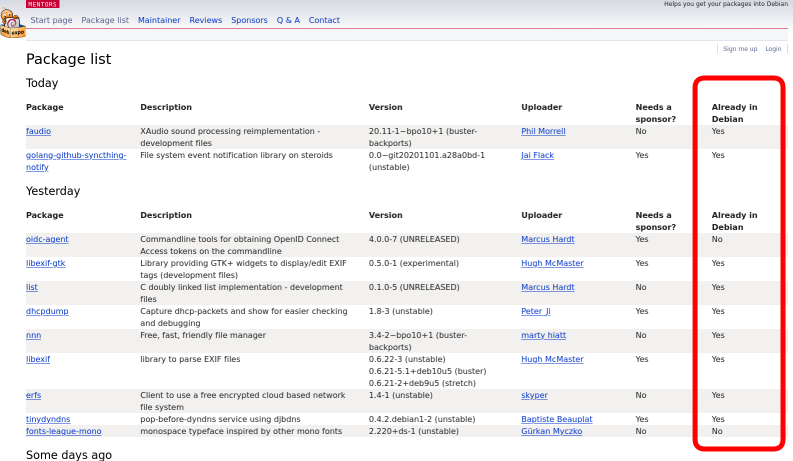
f:id:kenhys:20201108151153p:plainAready in Debian

Russell Coker: Links November 2020

KDE has a long term problem of excessive CPU time used by the screen locker [1]. Part of it is due to software GL emulation, and part of it is due to the screen locker doing things like flashing the cursor when nothing else is happening. One of my systems has an NVidia card and enabling GL would cause it to crash. So now I have kscreenlocker using 30% of a CPU core even when the screen is powered down. Informative NYT article about the latest security features for iPhones [2]. Android needs new features like this! Russ Allbery wrote an interesting review of the book Hand to Mouth by Linda Tirado [3], it s about poverty in the US and related things. Linda first became Internet famous for her essay Why I Make Terrible Decisions or Poverty Thoughts which is very insightful and well written, this is the latest iteration of that essay [4]. This YouTube video by Ruby Payne gives great insights to class based attitudes towards time and money [5]. News Week has an interesting article about chicken sashimi, apparently you can safely eat raw chicken if it s prepared well [6]. Vanity Fair has an informative article about how Qanon and Trumpism have infected the Catholic Church [7]. Some of Mel Gibson s mental illness is affecting a significant portion of the Catholic Church in the US and some parts in the rest of the world. Noema has an interesting article on toxic Internet culture, Japan s 2chan, 4chan, 8chan/8kun, and the conspiracy theories they spawned [8]. Benjamin Corey is an ex-Fundie who wrote an amusing analysis of the Biblical statements about the anti-Christ [9]. NYMag has an interesting article The Final Gasp of Donald Trump s Presidency [10]. Mother Jones has an informative article about the fact that Jim Watkins (the main person behind QAnon) has a history of hosting child porn on sites he runs [11], but we all knew QAnon was never about protecting kids. Eand has an insightful article America s Problem is That White People Want It to Be a Failed State [12].

6 November 2020

Louis-Philippe V ronneau: Book Review: Working in Public by Nadia Eghbal

I have a lot of respect for Nadia Eghbal, partly because I can't help to be jealous of her work on the economics of Free Software1. If you are not already familiar with Eghbal, she is the author of Roads and Bridges: The Unseen Labor Behind Our Digital Infrastructure, a great technical report published for the Ford Foundation in 2016. You may also have caught her excellent keynote at LCA 2017, entitled Consider the Maintainer. Her latest book, Working in Public: The Making and Maintenance of Open Source Software, published by Stripe Press a few months ago, is a great read and if this topic interests you, I highly recommend it. The book itself is simply gorgeous; bright orange, textured hardcover binding, thick paper, wonderful typesetting it has everything to please. Well, nearly everything. Sadly, it is only available on Amazon, exclusively in the United States. A real let down for a book on Free and Open Source Software. The book is divided in five chapters, namely:
  1. Github as a Platform
  2. The Structure of an Open Source Project
  3. Roles, Incentives and Relationships
  4. The Work Required by Software
  5. Managing the Costs of Production
A picture of the book cover Contrary to what I was expecting, the book feels more like an extension of the LCA keynote I previously mentioned than Roads and Bridges. Indeed, as made apparent by the following quote, Eghbal doesn't believe funding to be the primary problem of FOSS anymore:
We still don't have a common understanding about who's doing the work, why they do it, and what work needs to be done. Only when we understand the underlying behavioral dynamics of open source today, and how it differs from its early origins, can we figure out where money fits in. Otherwise, we're just flinging wet paper towels at a brick wall, hoping that something sticks. p.184
That is to say, the behavior of maintainers and the challenges they face not the eternal money problem is the real topic of this book. And it feels refreshing. When was the last time you read something on the economics of Free Software without it being mostly about what licences projects should pick and how business models can be tacked on them? I certainly can't. To be clear, I'm not sure I agree with Eghbal on this. Her having worked at Github for a few years and having interviewed mostly people in the Ruby on Rails and Javascript communities certainly shows in the form of a strong selection bias. As she herself admits, this is a book on how software on Github is produced. As much as this choice irks me (the Free Software community certainly cannot be reduced to Github), this exercise had the merit of forcing me to look at my own selection biases. As such, reading Working in Public did to me something I wasn't expecting it to do: it broke my Free Software echo chamber. Although I consider myself very familiar with the world of Free and Open Source Software, I now understand my somewhat ill-advised contempt for certain programming languages mostly JS skewed my understanding of what FOSS in 2020 really is. My Free Software world very much revolves around Debian, a project with a strong and opinionated view of Free Software, rooted in a historical and political understanding of the term. This, Eghbal argues, is not the case for a large swat of developers anymore. They are The Github Generation, people attached to Github as a platform first and foremost, and who feel "Open Source" is just a convenient way to make things. Although I could intellectualise this, before reading the book, I didn't really grok how communities akin to npm have been reshaping the modern FOSS ecosystem and how different they are from Debian itself. To be honest, I am not sure I like this tangent and it is certainly part of the reason why I had a tendency to dismiss it as a fringe movement I could safely ignore. Thanks to Nadia Eghbal, I come out of this reading more humble and certainly reminded that FOSS' heterogeneity is real and should not be idly dismissed. This book is rich in content and although I could go on (my personal notes clock-in at around 2000 words and I certainly disagree with a number of things), I'll stop here for now. Go and grab a copy already!

  1. She insists on using the term open source, but I won't :)

5 November 2020

Mike Gabriel: Welcome, Fre(i)e Software GmbH

Last week I received the official notice: There is now a German company named "Fre(i)e Software GmbH" registered with the German Trade Register. Founding a New Company Over the past months I have put my energy into founding a new company. As a freelancing IT consultant I started facing the limitation of other companies having strict policies that forbid the cooperation with one person businesses (Personengesellschaften). Thus, the requirement for setting up a GmbH business came onto my agenda. I will move some of my business activities into this new company, starting next year. Policy Ideas The "Fre(i)e Software GmbH" will be a platform to facilitate the growth and spreading of Free Software on this planet. Here are some first ideas for company policies: This is all pretty fresh. I'll be happy about hearing your feedback, ideas and worries. If you are interested in joining the company, please let me know. If you are interested in supporting a company with such values, please also let me know. light+love
Mike Gabriel (aka sunweaver)

Jonathan Dowland: PhD Year 3 progression

I'm now into my 4th calendar year of my part-time PhD, corresponding to half-way through Stage 2, or Year 2 for a full-time student. Here's a report I wrote that describes what I did last year and what I'm working on going forward. year3 progression report.pdf (223K PDF)

4 November 2020

Martin-&#201;ric Racine: Migrating to Predictable Network Interface Names

A couple of years ago, I moved into a new flat that comes with RJ45 sockets wired for 10 Gigabit (but currently offering 1 Gigabit) Ethernet.This also meant changing the settings on my router box for my new ISP.I took this opportunity to review my router's other settings too. I'll be blogging about these over the next few posts. Migrating to Predictable Network Interface Names Ever since Linus decided to flip the network interface enumeration order in the Linux kernel, I had been relying on udev's persistent network interface rules to maintain some semblance of consistency in the NIC naming scheme of my hosts. It has never been a totally satisfactory method, since it required manually editing the file to list the MAC addresses of all Ethernet cards and WiFi dongles likely to appear on that host to consistently use an easy-to-remember name that I could adopt for ifupdown configuration files. Enter predictable interface names. What started as a Linux kernel module project at Dell was eventually re-implemented in systemd. However, clear documentation on the naming scheme had been difficult to find and udev's persistent network interface rules gave me what I needed, so I postponed the transition for years. Relocating to a new flat and rethinking my home network to match gave me an opportunity to revisit the topic. The naming scheme is surprisingly simple and logical, once proper explanations have been found. The short version: The rest of the name specifies on which PCI bus and which slot the interface is found. On my old Dell laptop, it looks like this: An added bonus of the naming scheme is that it makes replacing hardware a breeze, since the naming scheme is bus and slot specific, not MAC address specific. No need to edit any configuration file. I saw this first-hand when I got around upgrading my router's network cards to Gigabit-capable ones to take advantage of my new home's broadband LAN. All it took was to power off the host, swap the Ethernet cards and power on the host. That's it. systemd took care of everything else. Still, migrating looked like a daunting task. Debian's wiki page gave me some answers, but didn't provide a systematic approach. I came up with the following shell script:
#!/bin/sh
lspci   grep -i -e ethernet -e network
sudo dmesg   grep -i renamed
for n in $(ls -X /sys/class/net/   grep -v lo);
do
  echo $n: && udevadm test-builtin net_id /sys/class/net/$n 2>/dev/null   grep NAME;
  sudo rgrep $n /etc
  sudo find /etc -name '*$n*'
done
This combined ideas found on the Debian wiki with a few of my own. Running the script before and after the migration ensured that I hadn't missed any configuration file. Once I was satisfied with that, I commented out the old udev persistent network interface rules, ran dpkg-reconfigure on all my Linux kernel images to purge the rules from the initrd images, and called it a day. ... well, not quite. It turns out that with bridge-utils, bridge_ports all no longer works. One must manually list all interfaces to be bridged. Debian bug report filed. PS: Luca Capello pointed out that Debian 10/Buster's Release Notes include migration instructions.

Jonathan Dowland: Amiga mouse pointer

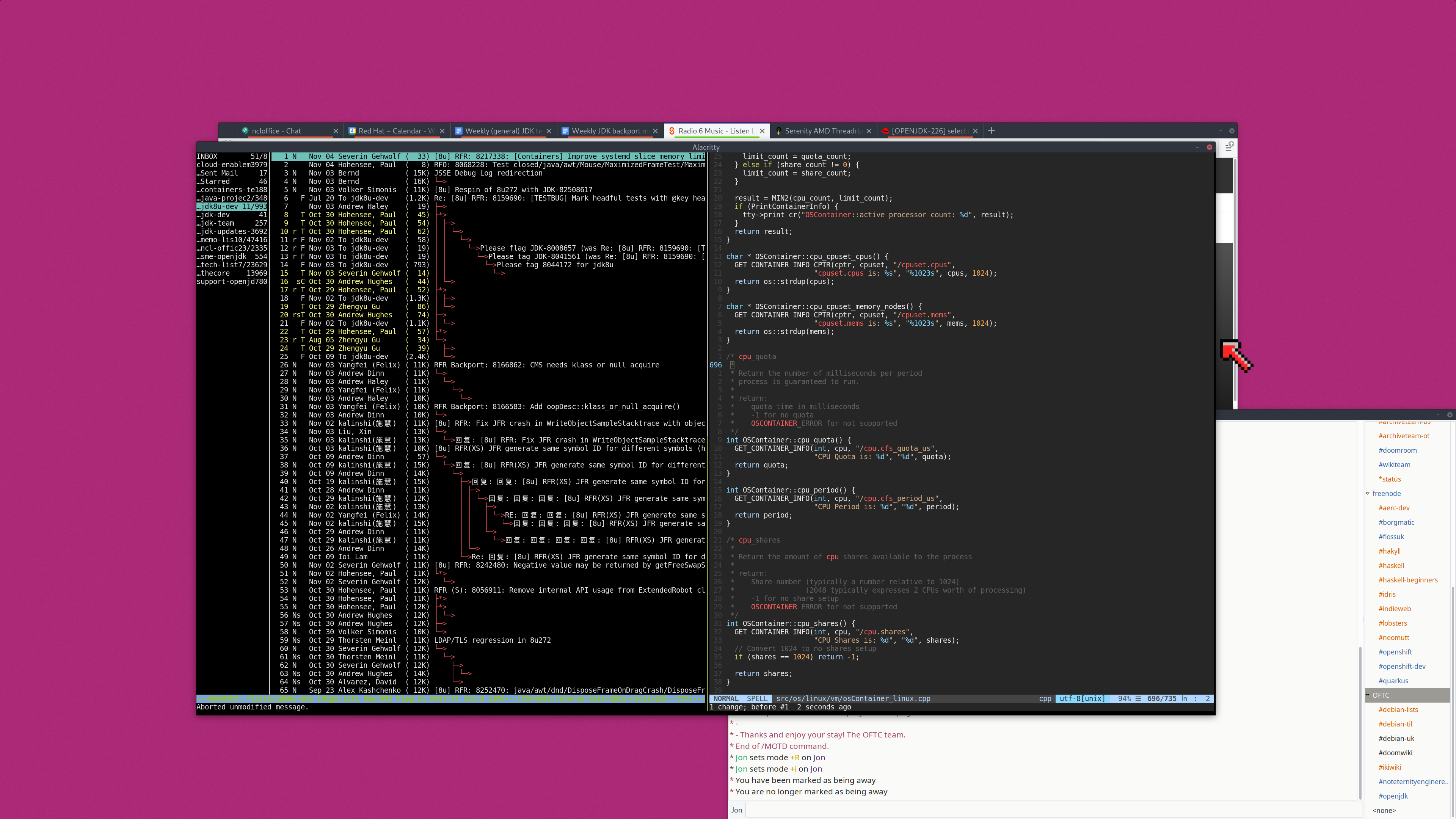
I've started struggling to see my mouse pointer on my desktop. I probably need to take an eye test and possibly buy some new glasses. In the meantime, I've changed my mouse pointer to something larger and more colourful: The Amiga Workbench 1.3 mouse pointer that I grew up with, but scaled up to 128x128 pixels (from 16x16, I think)
Desktop screenshot with Workbench 1.3 mouse pointer See if you can spot it
The X file format for mouse pointers is a bit strange but it turned out to be fairly easy to convert it over. An enormous improvement!

Christian Kastner: qemu-sbuild-utils 0.1: sbuild with QEMU

qemu-sbuild-utils, which were recently accepted into unstable, are a collection of scripts that wrap standard features of sbuild, autopkgtest-build-qemu and vmdb2 to provide a trivial interface for creating and using QEMU-based environments for package building:
  • qemu-sbuild-create creates VM images
  • qemu-sbuild-update is to VM images what sbuild-update is to chroots
  • qemu-sbuild wraps sbuild, adding all necessary (and some useful) options for autopkgtest mode.
Here's a simple two-line example for creating an image, and then using it to build a package:
$ sudo qemu-sbuild-create -o simple.img unstable http://deb.debian.org/debian

$ qemu-sbuild --image simple.img -d unstable [sbuild-options] FOO.dsc
That's it. Both qemu-sbuild-create and qemu-sbuild automate certain things, but also accept a number of options. For example, qemu-sbuild-create can install additional packages either from one of the APT sources, or .deb packages from the local filesystem. qemu-sbuild will pass on every option it does not consume itself to sbuild, so it should mostly work as a drop-in replacement for it (see the Limitations section below for where it doesn't). The created images can also be used for running autopkgtest itself, of course.
Advantages Excellent isolation. One can go nuts in an environment, change or even break things, and the VM can always simply be reset, or rolled back to an earlier state. Snapshots are just terrific for so many reasons. With KVM acceleration and a fast local APT cache, builds are really fast. There's an overhead of a few seconds for booting the VM on my end, but that overhead is negligible in comparison to the overall build time. On the upside, with everything being memory-backed, even massive dependency installations are lightning fast. With the parameters of the target environment being configurable, it's possible to test builds in various settings (for example: single-core vs. multi-core, or with memory constraints). Technically, it should be possible to emulate, on one host, any other guest architecture (even if emulation might be slow because of missing hardware acceleration). This would present an attractive alternative to (possibly distant and/or slow) porter boxes. However, support for that in qemu-sbuild-utils is not quite there yet.
Limitations The utilities are currently only available on the amd64 architecture, for building packages in amd64 and i386 VMs. There are plans to support arm64 in the near future. qemu-sbuild-create needs root, for the debootstrap stage. I'm looking into ways around this (by extending vmdb2). In any case, image updating and package building do not need privileges. autopkgtest mode does not yet support interactivity, so one cannot drop into a shell with --build-failed-commands, for example. The easy workaround is to connect to the VM with SSH. For this, the image must contain the openssh-server package.
Alternatives I looked at qemubuilder, but had troubles getting it to work. In any case, the autopkgtest chroot mode of sbuild seemed far more powerful and useful to me. vectis looks incredibly promising, but I had already written qemu-sbuild-utils by the time I stumbled over it, and as my current setup works well for me for now and is simple enough to maintain, I decided to polish and publish it. I'm also looking into Docker- and other namespace-based isolation solutions (of which there are many), which I think are the way forward for the majority of packages (those that aren't too close to the kernel and/or hardware). Rather than relying on the kernel for isolation, KVM-based solutions like Amazon's Firecracker and QEMU's microvm machine type provide minimal VMs with almost no boot overhead. Firecracker, for example, claims less than 125ms from launch to /sbin/init. Investigating these is a medium-term project for me.
Why not schroot? I have a strong aversion towards chroot-based build environments. The concept is archaic. Far superior software- and/or hardware-based technologies for process isolation have emerged in the past two decades, and I think it is high time to leave chroot-based solutions behind.
Acknowledgments These utilities are just high-level abstractions. All the heavy lifting is done by sbuild, autopkgtest, and vmdb2.

Norbert Preining: Debian KDE/Plasma Status 2020-11-04

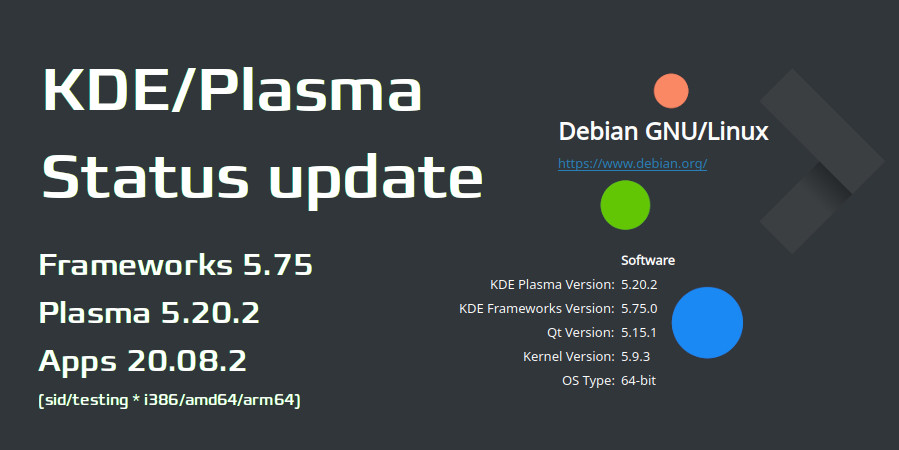
About a month worth of updates on KDE/Plasma in Debian has accumulated, so here we go. The highlights are: Plasma 5.19.5 based on Qt 5.15 is in Debian/experimental and hopefully soon in Debian/unstable, and my own builds at OBS have been updated to Plasma 5.20.2, Frameworks 5.75, Apps 20.08.2. Thanks to the dedicated work of the Qt maintainers, Qt 5.15 has finally entered Debian/unstable and we can finally target Plasma 5.20. OBS packages The OBS packages as usual follow the latest release, and currently ship KDE Frameworks 5.75, KDE Apps 20.08.2, and new, Plasma 5.20.2. The package sources are as usual (note the different path for the Plasma packages and the App packages, containing the release version!), for Debian/unstable:
deb https://download.opensuse.org/repositories/home:/npreining:/debian-kde:/frameworks/Debian_Unstable/ ./
deb https://download.opensuse.org/repositories/home:/npreining:/debian-kde:/plasma520/Debian_Unstable/ ./
deb https://download.opensuse.org/repositories/home:/npreining:/debian-kde:/apps2008/Debian_Unstable/ ./
deb https://download.opensuse.org/repositories/home:/npreining:/debian-kde:/other/Debian_Unstable/ ./
and the same with Testing instead of Unstable for Debian/testing. The update to Plasma 5.20 took a bit of time, not only because of the wait for Qt 5.15, but also because I couldn t get it running on my desktop, only in the VM. It turned out that the Plasmoid Event Calendar needed an update, and the old version crashed Plasma ( v68 and below crash in Arch after the Qt 5.15.1 update. ). After I realized that, it was only a question of updating to get Plasma 5.20 running. There are two points I have to mention (and I will fix sooner or later): As usual, let me know your experience! Debian main packages The packages in Debian/experimental are at the most current state, 5.19.5. We have waited with the upload to unstable until the Qt 5.15 transition is over, but hope to upload to unstable rather soon. After the upload is done, we will work on getting 5.20 into unstable. My aim is to get the most recent version of Plasma 5.20 into Debian Bullseye, so we need to do that before the freeze early next year. Let us hope for the best.

3 November 2020

Martin-&#201;ric Racine: Adding IPv6 support to my home LAN

A couple of year ago, I moved into a new flat that comes with RJ45 sockets wired for 10 Gigabit (but currently offering 1 Gigabit) Ethernet.This also meant changing the settings on my router box for my new ISP.I took this opportunity to review my router's other settings too. I'll be blogging about these over the next few posts. Adding IPv6 support to my home LAN I have been following the evolution of IPv6 ever since the KAME project produced the first IPv6 implementation. I have also been keeping track of the IPv4 address depletion. Around the time the IPv6 Day was organized in 2011, I started investigating the situation of IPv6 support at local ISPs. Well, never mind all those rumors about Finland being some high-tech mecca. Back then, no ISP went beyond testing their routers for IPv6 compatibility and producing white papers on what their limited test deployments accomplished. Not that it matters much, in practice. Most IPv6 documentation out there, including Debian's own, still focuses on configuring transitional mechanisms, especially how to connect to a public IPv6 tunnel broker. Relocating to a new flat and rethinking my home network to match gave me an opportunity to revisit the topic. Much to my delight, my current ISP offers native IPv6. This prompted me to go back and read up on IPv6 one more time. One important detail: IPv6 hosts are globally reachable. The implications of this don't immediately spring to mind for someone used to IPv4 network address translation (NAT): Any network service running on an IPv6 host can be reached by anyone anywhere. Contrary to IPv4, there is no division between private and public IP addresses. Whereas a device behind an IPv4 NAT essentially is shielded from the outside world, IPv6 breaks this assumption in more than one way. Not only is the host reachable from anywhere, its default IPv6 address is a mathematical conversion (EUI-64) of the network interface's MAC address, which makes every connection forensically traceable to a unique device. Basically, if you hadn't given much thought to firewalls until now, IPv6 should give you enough goose bumps to get around it. Tightening the configuration of every network service is also an absolute must. For instance, I configured sshd to only listen to private IPv4 addresses. What /etc/network/interfaces might look like on an dual-stack (IPv4 + IPv6) host:
allow-hotplug enp9s0
iface enp9s0 inet dhcp
iface enp9s0 inet6 auto
	privext 2
	dhcp 1
The auto method means that IPv6 will be auto-configured using SLAAC; privext 2 enables IPv6 privacy options and specifies that we prefer connecting via the randomly-generated IPv6 address, rather than the EUI-64 calculated MAC specific address; dhcp 1 enables passive DHCPv6 to fetch additional routing information. The above works for most desktop and laptop configurations. Where things got more complicated is on the router. I decided early on to keep NAT to provide an IPv4 route to the outside world. Now how exactly is IPv6 routing done? Every node along the line must have its own IPv6 address... including the router's LAN interface. This is accomplished using the sample script found in Debian's IPv6 prefix delegation wiki page. I modified mine as follows (the rest of the script is omitted for clarity):
#Both LAN interfaces on my private network are bridged via br0
IA_PD_IFACE="br0"
IA_PD_SERVICES="dnsmasq"
IA_PD_IPV6CALC="/usr/bin/ipv6calc"
Just put the script at the suggested location. We'll need to request a prefix on the router's outside interface to utilize it. This gives us the following interfaces file:
allow-hotplug enp2s4 enp2s8 enp2s9
auto br0
iface enp2s4 inet dhcp
iface enp2s4 inet6 auto
	request_prefix 1
	privext 2
	dhcp 1
iface enp2s8 inet manual
iface enp2s8 inet6 manual
iface enp2s9 inet manual
iface enp2s9 inet6 manual
iface br0 inet static
	bridge_ports enp2s8 enp2s9
	address 10.10.10.254
iface br0 inet6 manual
	bridge_ports enp2s8 enp2s9
	# IPv6 from /etc/dhcp/dhclient-exit-hooks.d/prefix_delegation
The IPv4 NAT and IPv6 Bridge script on my router looks as follows:
#!/bin/sh
PATH="/usr/sbin:/sbin:/usr/bin:/bin"
wan=enp2s4
lan=br0
########################################################################
# IPv4 NAT
iptables -F; iptables -t nat -F; iptables -t mangle -F
iptables -X; iptables -t nat -X; iptables -t mangle -X
iptables -Z; iptables -t nat -Z; iptables -t mangle -Z
iptables -t nat -A POSTROUTING -o $wan -j MASQUERADE
echo 1 > /proc/sys/net/ipv4/ip_forward
########################################################################
# IPv6 bridge
ip6tables -F; ip6tables -X; ip6tables -Z
# Default policy DROP
ip6tables -P FORWARD DROP
# Allow ICMPv6 forwarding
ip6tables -A FORWARD -p ipv6-icmp -j ACCEPT
# Allow established connections
ip6tables -I FORWARD -m state --state RELATED,ESTABLISHED -j ACCEPT
# Accept packets FROM LAN to everywhere
ip6tables -I FORWARD -i $lan -j ACCEPT
echo 1 > /proc/sys/net/ipv6/conf/all/forwarding
echo 1 > /proc/sys/net/ipv6/conf/default/forwarding
# IPv6 propagation via /etc/dhcp/dhclient-exit-hooks.d/prefix_delegation
The above already provided enough IPv6 connectivity to pass the IPv6 test on my desktop inside the LAN. To make things more fun, I enabled DHCPv6 support for my LAN on the router's dnsmasq by adding the last 3 lines to the configuration:
dhcp-hostsfile=/etc/dnsmasq-ethersfile
bind-interfaces
interface=br0
except-interface=enp2s4
no-dhcp-interface=enp2s4
dhcp-range=tag:br0,10.10.10.0,static,infinite
dhcp-range=tag:br0,::1,constructor:br0,ra-names,ra-stateless,infinite
enable-ra
dhcp-option=option6:dns-server,[::],[2606:4700:4700::1111],[2001:4860:4860::8888]
The 5 first lines (included here for emphasis) are extremely important: they ensure that dnsmasq won't provide any IPv4 or IPv6 service to the outside interface (enp2s4) and that DHCP will only be provided for LAN hosts whose MAC address is known. Line 6 shows how dnsmasq's DHCP service syntax differs between IPv4 and IPv6. The rest of my configuration was omitted on purpose. Enabling native IPv6 on my LAN has been an interesting experiment. I'm sure that someone could come up with even better ip6tables rules for the router or for my desktop hosts. Feel free to mention them in the blog's comment.

Next.

Previous.