Search Results: "sto"

11 February 2015

Daniel Leidert: Blogger RSS feed and category URLs with combined labels/tags

Run a blog on blogger.com? Maybe made it bilingual? Maybe blog on different topics? Wondering how the URL for an RSS feed for e.g. two labels looks like? Asking how to see all articles matching two tags (labels)? Finding a keyword under one or more labels? Many things are possible. I'll show a few examples below. Maybe that is even interesting for the planet Debian folks. I happen to blog mostly in English about Debian topics. But sometimes I also want to post something in German only (e.g. about German tax software). It is discouraged to put the latter on planet-debian. Instead it can be published in the language specific planet feed. So instead of adding new tags, one could easily combine two labels: the one for language of the feed and the one for Debian related posts (e.g. debian+english or debian+german). Therefor this post goes to the Debian planet. Search for combbined labels/tagsSay I want to view all postings related to the topics FOO and BAR. Then it is:

http://domain.tld/search/label/FOO+BAR OR
http://domain.tld/search/?q=label:FOO+label:BAR
Be aware that labels are case sensitive and that more labels can be added. The examples below will show all postings related to the topics debian and n54l and xbmc:

http://www.wgdd.de/search/label/debian+n54l+xbmc
http://www.wgdd.de/search/?q=label:debian+label:n54l+label:xbmc
It is also possible to search for all posts related to the topics FOO or BAR:

http://domain.tld/search/?q=label:FOO label:BAR
Say for example, you want to see all postings related to the topics logitech or toshiba, then it is:

http://www.wgdd.de/search/?q=label:logitech label:toshiba
Feed URLsTo get back to the first example lets say, the feed shall contain all posts related to the topics FOO and BAR. Then it is:

http://domain.tld/feeds/posts/default/-/FOO/BAR/ OR
http://domain.tld/feeds/posts/default?q=label:FOO+label:BAR
Respecitvely to show all feeds related to either of those topics use:

http://domain.tld/feeds/posts/default/?q=label:FOO label:BAR
To get a feed of the example topics as shown above then would be:

http://www.wgdd.de/feeds/posts/default/-/debian/n54l/xbmc/
http://www.wgdd.de/feeds/posts/default?q=label:debian+label:n54l+label:xbmc
http://www.wgdd.de/feeds/posts/default?q=label:logitech label:toshiba
Coming back to planet Debian, below is a solution for a multi-lingual planet contribution (if both planets would exist):

http://www.wgdd.de/feeds/posts/default?q=label:planet-debian+label:english
http://www.wgdd.de/feeds/posts/default?q=label:planet-debian+label:german
Advanced ...There is much more possible. I'll just show two more examples. AND and OR can be combined ...
http://www.wgdd.de/feeds/posts/default?q=label:debian+(label:logitech label:toshiba)
... and a keyword search can be added too:
http://www.wgdd.de/feeds/posts/default?q=stick+(label:debian+(label:logitech label:toshiba))
Links

Daniel Leidert: Issues with Server4You vServer running Debian Stable (Wheezy)

I recently acquired a vServer hosted by Server4You and decided to install a Debian Wheezy image. Usually I boot any device in backup mode and first install a fresh Debian copy using debootstrap over the provided image, to have a clean system. In this case I did not and I came across a few glitches I want to talk about. So hopefully, if you are running the same system image, it saves you some time to figure out, why the h*ll some things don't work as expected :) Cron jobs not runningI installed unattended-upgrades and adjusted all configuration files to enable unattended upgrades. But I never received any mail about an update although looking at the system, I saw updates waiting. I checked with
# run-parts --list /etc/cron.daily
and apt was not listed although /etc/cron.daily/apt was there. After spending some time to figure out, what was going on, I found the rather simple cause: Several scripts were missing the executable bit, thus did not run. So it seems, for whatever reason, the image authors have tempered with file permissions and of course, not by using dpkg-statoverride :( It was easy to fix the file permissions for everything beyond /etc/cron*, but that still leaves a very bad feeling, that there are more files that have been tempered with! I'm not speaking about customizations. That are easy to find using debsums. I'm speaking about file permissions and ownership.Now there seems no easy way to either check for changed permissions or ownership. The only solution I found is to get a list of all installed packages on the system, install them into a chroot environment and get all permission and ownership information from this very fresh system. Then compare file permissions/ownership of the installed system with this list. Not fun. init from testing / upstart on holdToday I've discovered, that apt-get wanted to update the init package. Of course I was curious, why unattended-upgrades didn't yet already do so. Turns out, init is only in testing/unstable and essential there. I purged it, but apt-get keeps bugging me to update/install this package. I really began to wonder, what is going on here, because this is a plain stable system:
  • no sources listed for backports, volatile, multimedia etc.
  • sources listed for testing and unstable
  • only packages from stable/stable-updates installed
  • sets APT::Default-Release "stable";
First I checked with aptitude:
# aptitude why init
Unable to find a reason to install init.
Ok, so why:
# apt-get dist-upgrade -u
Reading package lists... Done
Building dependency tree
Reading state information... Done
Calculating upgrade... Done
The following NEW packages will be installed:
init
0 upgraded, 1 newly installed, 0 to remove and 0 not upgraded.
Need to get 0 B/4674 B of archives.
After this operation, 29.7 kB of additional disk space will be used.
Do you want to continue [Y/n]?
JFTR: I see a stable system bugging me to install systemd for no obvious reason. The issue might be similar! I'm still investigating. (not reproducible anymore)Now I tried to debug this:
# apt-get -o  Debug::pkgProblemResolver="true" dist-upgrade -u
Reading package lists... Done
Building dependency tree
Reading state information... Done
Calculating upgrade... Starting
Starting 2
Investigating (0) upstart [ amd64 ] < 1.6.1-1 1.11-5 > ( admin )
Broken upstart:amd64 Conflicts on sysvinit [ amd64 ] < none -> 2.88dsf-41+deb7u1 2.88dsf-58 > ( admin )
Conflicts//Breaks against version 2.88dsf-58 for sysvinit but that is not InstVer, ignoring
Considering sysvinit:amd64 5102 as a solution to upstart:amd64 10102
Added sysvinit:amd64 to the remove list
Fixing upstart:amd64 via keep of sysvinit:amd64
Done
Done
The following NEW packages will be installed:
init
0 upgraded, 1 newly installed, 0 to remove and 0 not upgraded.
Need to get 0 B/4674 B of archives.
After this operation, 29.7 kB of additional disk space will be used.
Do you want to continue [Y/n]?
Eh, upstart?
# apt-cache policy upstart
upstart:
Installed: 1.6.1-1
Candidate: 1.6.1-1
Version table:
1.11-5 0
500 http://ftp.de.debian.org/debian/ testing/main amd64 Packages
500 http://ftp.de.debian.org/debian/ sid/main amd64 Packages
*** 1.6.1-1 0
990 http://ftp.de.debian.org/debian/ stable/main amd64 Packages
100 /var/lib/dpkg/status
# dpkg -l upstart
Desired=Unknown/Install/Remove/Purge/Hold
Status=Not/Inst/Conf-files/Unpacked/halF-conf/Half-inst/trig-aWait/Trig-pend
/ Err?=(none)/Reinst-required (Status,Err: uppercase=bad)
/ Name Version Architecture Description
+++-=============================-===================-===================-===============================================================
hi upstart 1.6.1-1 amd64 event-based init daemon
Ok, at least one package is at hold. This is another questionable customization, but in case easy to fix. But I still don't understand apt-get and the difference to aptitude behaviour? Can someone please enlighten me? Customized filesThis isn't really an issue, but just for completion: several files have been customized. debsums easily shows which ones:
# debsums -ac
I don't have the original list anymore - please check yourself

10 February 2015

Enrico Zini: systemd-default-rescue

seat-inspect Four months ago I wrote this somewhere:
Seeing a DD saying "this new dbus stuff scares me" would make most debian users scared. Seeing a DD who has an idea of what is going on, and who can explain it, would be an interesting and exciting experience. So, let's be exemplary, competent and patient. Or at least, competent. Some may like or not like the changes, but do we all understand what is going on? Will we all be able to support our friends and customers running jessie? I confess that although I understand the need for it, I don't feel competent enough to support systemd-based machines right now. So, are we maybe in need of help, cheat sheets, arsenals of one-liners, diagnostic tools? Maybe a round of posts on -planet like "one debian package a day" but with new features that jessie will have, and how to understand them and take advantage of them?
That was four months ago. In the meantime, I did some work, and it got better for me. Yesterday, however, I've seen an experienced Linux person frustrated because the shutdown function of the desktop was doing nothing whatsoever. Today I found John Goerzen's post on planet. I felt like some more diagnostic tools were needed, so I spent the day making seat-inspect. seat-inspect tries to make the status of the login/seat system visible, to help with understanding and troubleshooting. The intent of running the code is to have an overview of the system status, both to see what the new facilities are about, and to figure out if there is something out of place. The intent of reading the code is to have an idea of how to use these facilities: the code has been written to be straightforward and is annotated with relevant bits from the logind API documentation. seat-inspect is not a finished tool, but a starting point. I put it on github hoping that people will fork it and add their own extra sanity checks and warnings, so that it can grow into a standard thing to run if a system acts weird. As it is now, it should be able to issue warnings if some bits are missing for network-manager or shutdown functions to work correctly. I haven't really tested that, though, because I don't have a system at hand where they are currently not working fine. Another nice thing of it is that when running seat-inspect -v you get a dump of what logind/consolekit think about your system. I found it an interesting way to explore the new functionalities that we recently grew. The same can be done, and in more details, with loginctl calls, but I lacked a summary. After writing this I feel a bit more competent, probably enough to sit at somebody's computer and poke into loginctl bits. I highly recommend the experience.

Petter Reinholdtsen: Nude body scanner now present on Norwegian airport

Aftenposten, one of the largest newspapers in Norway, today report that three of the nude body scanners now is put to use at Gardermoen, the main airport in Norway. This way the travelers can have their body photographed without cloths when visiting Norway. Of course this horrible news is presented with a positive spin, stating that "now travelers can move past the security check point faster and more efficiently", but fail to mention that the machines in question take pictures of their nude bodies and store them internally in the computer, while only presenting sketch figure of the body to the public. The article is written in a way that leave the impression that the new machines do not take these nude pictures and only create the sketch figures. In reality the same nude pictures are still taken, but not presented to everyone. They are still available for the owners of the system and the people doing maintenance of the scanners, as long as they are taken and stored. Wikipedia have a more on Full body scanners, including example images and a summary of the controversy about these scanners. Personally I will decline to use these machines, as I believe strip searches of my body is a very intrusive attack on my privacy, and not something everyone should have to accept to travel.

Benjamin Mako Hill: Kuchisake-onna Decision Tree

Mika recently brought up the Japanese modern legend of Kuchisake-onna ( ). For background, I turned to the English Wikipedia article on Kuchisake-onna which had the following to say about the figure (the description matches Mika s memory):
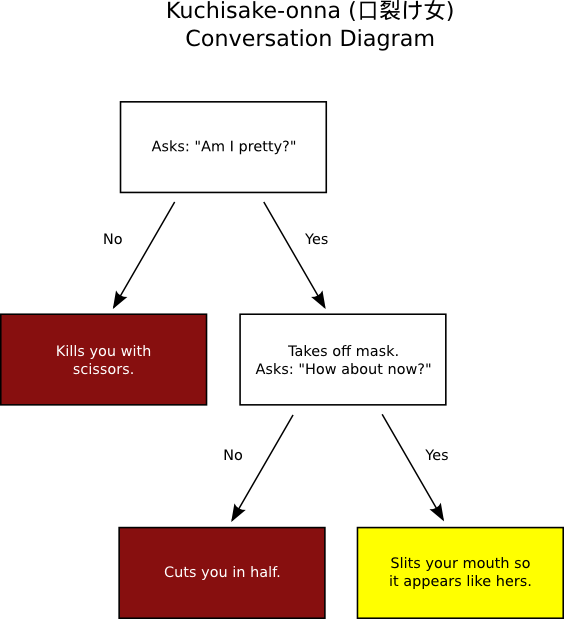
According to the legend, children walking alone at night may encounter a woman wearing a surgical mask, which is not an unusual sight in Japan as people wear them to protect others from their colds or sickness. The woman will stop the child and ask, Am I pretty? If the child answers no, the child is killed with a pair of scissors which the woman carries. If the child answers yes, the woman pulls away the mask, revealing that her mouth is slit from ear to ear, and asks How about now? If the child answers no, he/she will be cut in half. If the child answers yes, then she will slit his/her mouth like hers. It is impossible to run away from her, as she will simply reappear in front of the victim.
To help anyone who is not only frightened, but also confused, Mika and I made the following decision tree of possible conversations with Kuchisake-onna and their universally unfortunate outcomes.
Decision tree of conversations with Kuchisake-onna.Decision tree of conversations with Kuchisake-onna.
Of course, we uploaded the SVG source for the diagram to Wikimedia Commons and used the diagram to illustrate the Wikipedia article.

8 February 2015

Diego Escalante Urrelo: Link Pack #06

The story of Mel Blanc being saved by Bugs Bunny
Such a fantastic and romantic story. Mel Blanc, voice of half the Looney Tunes characters was in an car crash and hanging from a thread in a comma. And it took his characters to save him. It s a very interestingly edited podcast too:
( ) a crazy story about Mel nearly dying in a crash on Dead Man s Curve on Hollywood Boulevard and about the moment two weeks later when Bugs Bunny emerged from Mel s coma before Mel did. In fact, according to neurosurgeon Louis Conway who attended to Mel at the time, it seemed as though Bugs Bunny was trying to save his life.
The audacious rescue plan that might have saved space shuttle Columbia
This is probably the best documentary/kinda fiction article I have read in a long time. It s a long read going over the hypothetical, and nail bitting, plan to rescue the Columbia if it ever got in trouble. It s really intense, and something to sit down and read fully focused, book style.
But imagine an alternate timeline for the Columbia mission in which NASA quickly realized just how devastating the foam strike had been. Could the Columbia astronauts have been safely retrieved from orbit?
Ocean Gravity: Riding sea currents
Cool video of a sea diver running through seafloor currents, really cool and fascinating :). El chavo del ocho en el infierno
This one is in Spanish, and it s a funny take on El chavo del ocho and how it follows some classic models and myths of literature. Chespirito was very fond of classics, so this would make sense. But, of course, the whole article is written on a tongue in cheek style.
En El Chavo del Ocho, Bola os, o el Camus azteca, cre su propia versi n del mito de S sifo. El chavo y compa a est n condenados a empujar por una empinada colina todos los d as esta piedra enorme que siempre regresa, obligandolos al tormento del eterno retorno. La piedra de Quico es cuadrada, no rueda, se desliza. Es c mico, a pesar de tr gico.

Go for some more Link Pack, it s sugar free

Ian Wienand: Netgear CG3100D-2 investigation

The Netgear CG3100D-2 is the default cable-modem you get for Telstra Cable, at least at one time. Having retired it after changing service providers, I wanted to see if it was somewhat able to be re-purposed. In short it's hackability is low. First thing was to check out the Netgear Open Source page to see if the source had anything interesting. There is some source, but honestly when you dig into the platform code and see things like kernel/linux/arch/mips/bcm963xx/setup.c:
/***************************************************************************
 * C++ New and delete operator functions
 ***************************************************************************/
/* void *operator new(unsigned int sz) */
void *_Znwj(unsigned int sz)
 
    return( kmalloc(sz, GFP_KERNEL) );
 
/* void *operator new[](unsigned int sz)*/
void *_Znaj(unsigned int sz)
 
return( kmalloc(sz, GFP_KERNEL) );
 
...
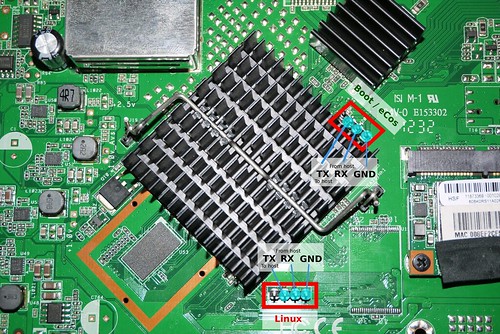
there's a bit of a red-flag that this is not the cleanest code in the world (I guess it interfaces with some sort of cross-platform SDK written in some sort of C++). So next we can open it up, where it turns out there are two separate UARTs as shown in the following image.
UART connections on Netgear CG3100D 2BPAUS
One of these is for the bootloader and eCOS environment, and the other seems to be connected to the Linux side. A copy of the boot-logs for the bootloader and eCOS and Linux don't show anything particuarly interesting. The Linux boot does identify itself as Linux version 2.6.30-V2.06.05u while the available source lists its version as 2.6.30-1.0.5.83.mp2 so it's questionable if the source matches whatever firmware has made it onto the modem. We do see that this identifies as a BCM338332 which seems to be one of the many sub-models of the BCM3383 SoC cable-modem solution. There is an OpenWrt wiki page that indicates support is limited. Both Linux and eCos boot to a login prompt where all the usual default combinations of login/passwords fail. So my next thought was to try and get to the firmware via the bootloader, which has a simple interface
BCM338332 TP0 346890
Reset Switch - Low GPIO-18 50ms
MemSize:            128 M
Chip ID:     BCM3383G-B0
BootLoader Version: 2.4.0alpha14R6T Pre-release Gnu spiboot dual-flash reduced DDR drive linux
Build Date: Mar 24 2012
Build Time: 14:04:50
SPI flash ID 0x012018, size 16MB, block size 64KB, write buffer 256, flags 0x0
Dual flash detected.  Size is 32MB.
parameter offset is 49944
Signature/PID: a0e8
Image 1 Program Header:
   Signature: a0e8
     Control: 0005
   Major Rev: 0003
   Minor Rev: 0000
  Build Time: 2013/4/18 04:01:11 Z
 File Length: 3098751 bytes
Load Address: 80004000
    Filename: CG3100D_2BPAUS_V2.06.02u_130418.bin
         HCS: 1e83
         CRC: b95f4172
Found image 1 at offset 20000
Image 2 Program Header:
   Signature: a0e8
     Control: 0005
   Major Rev: 0003
   Minor Rev: 0000
  Build Time: 2013/10/17 02:33:29 Z
 File Length: 3098198 bytes
Load Address: 80004000
    Filename: CG3100D_2BPAUS_V2.06.05u_131017.bin
         HCS: 2277
         CRC: a6c0fd23
Found image 2 at offset 800000
Image 3 Program Header:
   Signature: a0e8
     Control: 0105
   Major Rev: 0002
   Minor Rev: 0017
  Build Time: 2013/10/17 02:22:30 Z
 File Length: 8277924 bytes
Load Address: 84010000
    Filename: CG3100D_2BPAUS_K2630V2.06.05u_131017.bin
         HCS: 157e
         CRC: 57bb0175
Found image 3 at offset 1000000
Enter '1', '2', or 'p' within 2 seconds or take default...
. .
Board IP Address  [0.0.0.0]:           192.168.2.10
Board IP Mask     [255.255.255.0]:
Board IP Gateway  [0.0.0.0]:
Board MAC Address [00:10:18:ff:ff:ff]:
Internal/External phy? (e/i/a)[a]
Switch detected: 53125
ProbePhy: Found PHY 0, MDIO on MAC 0, data on MAC 0
Using GMAC0, phy 0
Enet link up: 1G full
Main Menu:
==========
  b) Boot from flash
  g) Download and run from RAM
  d) Download and save to flash
  e) Erase flash sector
  m) Set mode
  s) Store bootloader parameters to flash
  i) Re-init ethernet
  p) Print flash partition map
  r) Read memory
  w) Write memory
  j) Jump to arbitrary address
  X) Erase all of flash except the bootloader
  z) Reset
Flash Partition information:
Name           Size           Offset
=====================================
bootloader   0x00010000     0x00000000
image1       0x007d0000     0x00020000
image2       0x007c0000     0x00800000
linux        0x00800000     0x01000000
linuxapps    0x00600000     0x01800000
permnv       0x00010000     0x00010000
dhtml        0x00200000     0x01e00000
dynnv        0x00040000     0x00fc0000
vennv        0x00010000     0x007f0000
The "read memory" seems to give you one byte at a time and I'm not certain it actually works. So I think the next step is solder some leads to dump out the firmware from the flash-chip directly, which is on the underside of the board. At that point, I imagine the passwords would be easily found in the image and you might then be able to leverage this into some sort of further hackability. If you want a challenge and have a lot of time on your hands, this might be your platform but practically I think the best place for this is the recycling bin.

Dirk Eddelbuettel: drat Tutorial: First Steps towards Lightweight R Repositories

Now that drat is on CRAN and I got a bit of feedback (or typo corrections) in three issue tickets, I thought I could show how to quickly post such an interim version in a drat repository. Now, I obviously already have a checkout of drat. If you, dear reader, wanted to play along and create your own drat repository, one rather simple way would be to simply clone my repo as this gets you the desired gh-pages branch with the required src/contrib/ directories. Otherwise just do it by hand. Back to a new interim version. I just pushed commit fd06293 which bumps the version and date for the new interim release based mostly on the three tickets addresses right after the initial release 0.0.1. So by building it we get a new version 0.0.1.1:
edd@max:~/git$ R CMD build drat
* checking for file  drat/DESCRIPTION  ... OK
* preparing  drat :
* checking DESCRIPTION meta-information ... OK
* checking for LF line-endings in source and make files
* checking for empty or unneeded directories
* building  drat_0.0.1.1.tar.gz 
edd@max:~/git$ 
Because I want to use the drat repo next, I need to now switch from master to gh-pages; a step I am omitting as we can assume that your drat repo will already be on its gh-pages branch. Next we simply call the drat function to add the release:
edd@max:~/git$ r -e 'drat:::insert("drat_0.0.1.1.tar.gz")'
edd@max:~/git$ 
As expected, now have two updated PACKAGES files (compressed and plain) and a new tarball:
edd@max:~/git/drat(gh-pages)$ git status
On branch gh-pages
Your branch is up-to-date with 'origin/gh-pages'.
Changes not staged for commit:
  (use "git add <file>..." to update what will be committed)
  (use "git checkout -- <file>..." to discard changes in working directory)
        modified:   src/contrib/PACKAGES
        modified:   src/contrib/PACKAGES.gz
Untracked files:
  (use "git add <file>..." to include in what will be committed)
        src/contrib/drat_0.0.1.1.tar.gz
no changes added to commit (use "git add" and/or "git commit -a")
edd@max:~/git/drat(gh-pages)$
All is left to is to add, commit and push---either as I usually via the spectacularly useful editor mode, or on the command-line, or by simply adding commit=TRUE in the call to insert() or insertPackage(). I prefer to use littler's r for command-line work, so I am setting the desired repos in ~/.littler.r which is read on startup (since the recent littler release 0.2.2) with these two lines:

## add RStudio CRAN mirror
drat:::add("CRAN", "http://cran.rstudio.com")
## add Dirk's drat
drat:::add("eddelbuettel")
After that, repos are set as I like them (at home at least):
edd@max:~/git$ r -e'print(options("repos"))'
$repos
                                 CRAN                          eddelbuettel 
            "http://cran.rstudio.com" "http://eddelbuettel.github.io/drat/" 
edd@max:~/git$ 
And with that, we can just call update.packages() specifying the package directory to update:
edd@max:~/git$ r -e 'update.packages(ask=FALSE, lib.loc="/usr/local/lib/R/site-library")'                                                                                                                            
trying URL 'http://eddelbuettel.github.io/drat/src/contrib/drat_0.0.1.1.tar.gz'
Content type 'application/octet-stream' length 5829 bytes
opened URL
==================================================
downloaded 5829 bytes
* installing *source* package  drat  ...
** R
** inst
** preparing package for lazy loading
** help
*** installing help indices
** building package indices
** testing if installed package can be loaded
* DONE (drat)
The downloaded source packages are in
         /tmp/downloaded_packages 
edd@max:~/git$
and presto, a new version of a package we have installed (here the very drat interim release we just pushed above) is updated. Writing this up made me realize I need to update the handy update.r script (see e.g. the littler examples page for more) and it hard-wires just one repo which needs to be relaxed for drat. Maybe in install2.r which already has docopt support...

7 February 2015

Eddy Petri&#537;or: Using Gentoo to create a cross toolchain for the old NSLU2 systems (armv5te)

This is mostly written so I don't forget how to create a custom (Arm) toolchain the Gentoo way (in a Gentoo chroot).

I have been a Debian user since 2001, and I like it a lot. Yet I have had my share of problems with it, mostly because due to lack of time I have very little disposition to try to track unstable or testing, so I am forced to use stable.

This led me to be a fan of Russ Albery's backport script and to create a lot of local backports of packages that are already in unstable or testing.

But this does not help when packages are simply missing from Debian or when something like creating an arm uclibc based system that should be kept up to date, from a security PoV.

I have experience with Buildroot and I must say I like it a lot for creating custom root filesystems and even toolchains. It allows a lot of flexibility that binary distros like Debian don't offer, it does its designated work, creating root filesystems. But buildroot is not appropriate for a system that should be kept up to date, because it lacks a mechanism by which to be able to update to new versions of packages without recompiling the entire rootfs.

So I was hearing from the guys from the Linux Action Show (and Linux Unplugged - by the way, Jupiter Broadcast, why do I need scripts enabled from several sites just to see the links for the shows?) how Arch is great and all, that is a binary rolling release, and that you can customize packages by building your own packages from source using makepkg. I tried it, but Arm support is provided for some specific (modern) devices, my venerable Linksys NSLU2's (I have 2 of them) not being among them.

So I tried Arch in a chroot, then dropped it in favour of a Gentoo chroot since I was under the feeling running Arch from a chroot wasn't such a great idea and I don't want to install Arch on my SSD.

I used succesfully Gentoo in the past to create an arm-unknown-linux-gnueabi chroot back in 2008 and I always liked the idea of USE flags from Gentoo, so I knew I could do this.


So here it goes:


# create a local portage overlay - necessary for cross tools
export LP=/usr/local/portage
mkdir -p $LP/ metadata,profiles
echo 'mycross' > $LP/profiles/repo_name
echo 'masters = gentoo' > $LP/metadata/layout.conf
chown -R portage:portage $LP
echo 'PORTDIR_OVERLAY="'$LP' $ PORTDIR_OVERLAY "' >> /etc/portage/make.conf
unset LP

# install crossdev, setup for the desired target, build toolchain
emerge crossdev
crossdev --init-target -t arm-softfloat-linux-gnueabi -oO /usr/local/portage/mycross
crossdev -t arm-softfloat-linux-gnueabi


6 February 2015

Antoine Beaupr : Migrating from Drupal to Ikiwiki

TLPL; j'ai chang de logiciel pour la gestion de mon blog. TLDR; I have changed my blog from Drupal to Ikiwiki. Note: since this post uses ikiwiki syntax (i just copied it over here), you may want to read the original version instead of this one. will continue operating for a while to
give a chance to feed aggregators to catch that article. It will also
give time to the Internet archive to catchup with the static
stylesheets (it turns out it doesn't like Drupal's CSS compression at
all!) An archive will therefore continue being available on the
internet archive for people that miss the old stylesheet. Eventually, I will simply redirect the anarcat.koumbit.org URL to
the new blog location, . This will likely be my
last blog post written on Drupal, and all new content will be
available on the new URL. RSS feed URLs should not change.

Why I am migrating away from Drupal because it is basically impossible to
upgrade my blog from Drupal 6 to Drupal 7. Or if it is, I'll have to
redo the whole freaking thing again when Drupal 8 comes along. And frankly, I don't really need Drupal to run a blog. A blog was
originally a really simple thing: a web blog. A set of articles
written on the corner of a table. Now with Drupal, I can add
ecommerce, a photo gallery and whatnot to my blog, but why would I do
that? and why does it need to be a dynamic CMS at all, if I get so
little comments? So I'm switching to ikiwiki, for the following reason:
  • no upgrades necessary: well, not exactly true, i still need to
    upgrade ikiwiki, but that's covered by the Debian package
    maintenance and I only have one patch to it, and there's no data migration! (the last such migration in ikiwiki was in 2009 and was fully supported)
  • offline editing: this is a a big thing for me: i can just note
    things down and push them when I get back online
  • one place for everything: this blog is where I keep my notes, it's
    getting annoying to have to keep track of two places for that stuff
  • future-proof: extracting content from ikiwiki is amazingly
    simple. every page is a single markdown-formatted file. that's it.
Migrating will mean abandoning the
barlow theme, which was
seeing a declining usage anyways.

What So what should be exported exactly. There's a bunch of crap in the old
blog that i don't want: users, caches, logs, "modules", and the list
goes on. Maybe it's better to create a list of what I need to extract:
  • nodes
    • title ([[ikiwiki/directive/meta]] title and guid tags, guid to avoid flooding aggregators)
    • body (need to check for "break comments")
    • nid (for future reference?)
    • tags (should be added as \[[!tag foo bar baz]] at the bottom)
    • URL (to keep old addresses)
    • published date ([[ikiwiki/directive/meta]] date directive)
    • modification date ([[ikiwiki/directive/meta]] updated directive)
    • revisions?
    • attached files
  • menus
    • RSS feed
    • contact
    • search
  • comments
    • author name
    • date
    • title
    • content
  • attached files
    • thumbnails
    • links
  • tags
    • each tag should have its own RSS feed and latest posts displayed

When Some time before summer 2015.

Who Well me, who else. You probably really don't care about that, so let'S
get to the meat of it.

How How to perform this migration... There are multiple paths:
  • MySQL commandline: extracting data using the commandline mysql tool (drush sqlq ...)
  • Views export: extracting "standard format" dumps from Drupal and
    parse it (JSON, XML, CSV?)
Both approaches had issues, and I found a third way: talk directly to
mysql and generate the files directly, in a Python script. But first,
here are the two previous approaches I know of.

MySQL commandline LeLutin switched using MySQL requests,
although he doesn't specify how content itself was migrated. Comments
importing is done with that script:
echo "select n.title, concat('  [[!comment  format=mdwn  username=\"', c.name, '\"  ip=\"', c.hostname, '\"  subject=\"', c.subject, '\"  date=\"', FROM_UNIXTIME(c.created), '\"  content=\"\"\" ', b.comment_body_value, ' \"\"\"]]') from node n, comment c, field_data_comment_body b where n.nid=c.nid and c.cid=b.entity_id;"   drush sqlc   tail -n +2   while read line; do if [ -z "$i" ]; then i=0; fi; title=$(echo "$line"   sed -e 's/[    ]\+ .*//' -e 's/ /_/g' -e 's/[:(),?/+]//g'); body=$(echo "$line"   sed 's/[^ ]*  //'); mkdir -p ~/comments/$title; echo -e "$body" &gt; ~/comments/$title/comment_$i._comment; i=$((i+1)); done
Kind of ugly, but beats what i had before (which was "nothing"). I do think it is the good direction to take, to simply talk to the
MySQL database, maybe with a native Python script. I know the Drupal
database schema pretty well (still! this is D6 after all) and it's
simple enough that this should just work.

Views export [[!img 2015-02-03-233846_1440x900_scrot.png class="align-right" size="300x" align="center" alt="screenshot of views 2.x"]] mvc recommended views data export on Lelutin's
blog. Unfortunately, my experience with the views export interface has
been somewhat mediocre so far. Yet another reason why I don't like
using Drupal anymore is this kind of obtuse dialogs: I clicked through those for about an hour to get JSON output that
turned out to be provided by views bonus instead of
views_data_export. And confusingly enough, the path and
format_name fields are null in the JSON output
(whyyy!?). views_data_export unfortunately only supports XML,
which seems hardly better than SQL for structured data, especially
considering I am going to write a script for the conversion anyways. Basically, it doesn't seem like any amount of views mangling will
provide me with what i need. Nevertheless, here's the [[failed-export-view.txt]] that I was able to
come up with, may it be useful for future freedom fighters.

Python script I ended up making a fairly simple Python script to talk directly to
the MySQL database. The script exports only nodes and comments, and nothing else. It makes
a bunch of assumptions about the structure of the site, and is
probably only going to work if your site is a simple blog like mine,
but could probably be improved significantly to encompass larger and
more complex datasets. History is not preserved so no interaction is
performed with git.

Generating dump First, I imported the MySQL dump file on my local mysql server for easier
development. It is 13.9MiO!!
mysql -e 'CREATE DATABASE anarcatblogbak;'
ssh aegir.koumbit.net "cd anarcat.koumbit.org ; drush sql-dump"   pv   mysql anarcatblogbak
I decided to not import revisions. The majority (70%) of the content has
1 or 2 revisions, and those with two revisions are likely just when
the node was actually published, with minor changes. ~80% have 3
revisions or less, 90% have 5 or less, 95% 8 or less, and 98% 10 or
less. Only 5 articles have more than 10 revisions, with two having the
maximum of 15 revisions. Those stats were generated with:
SELECT title,count(vid) FROM anarcatblogbak.node_revisions group
by nid;
Then throwing the output in a CSV spreadsheet (thanks to
mysql-workbench for the easy export), adding a column numbering the
rows (B1=1,B2=B1+1), another for generating percentages
(C1=B1/count(B$2:B$218)) and generating a simple graph with
that. There were probably ways of doing that more cleanly with R,
and I broke my promise to never use a spreadsheet again, but then
again it was Gnumeric and it's just to get a rough idea. There are 196 articles to import, with 251 comments, which means an
average of 1.15 comment per article (not much!). Unpublished articles
(5!) are completely ignored. Summaries are also not imported as such (break comments are
ignored) because ikiwiki doesn't support post summaries.

Calling the conversion script The script is in [[drupal2ikiwiki.py]]. It is called with:
./drupal2ikiwiki.py -u anarcatblogbak -d anarcatblogbak blog -vv
The -n and -l1 have been used for first tests as well. Use this
command to generate HTML from the result without having to commit and
push all:
ikiwiki --plugin meta --plugin tag --plugin comments --plugin inline  . ../anarc.at.html
More plugins are of course enabled in the blog, see the setup file for
more information, or just enable plugin as you want to unbreak
things. Use the --rebuild flag on subsequent runs. The actual
invocation I use is more something like:
ikiwiki --rebuild --no-usedirs --plugin inline --plugin calendar --plugin postsparkline --plugin meta --plugin tag --plugin comments --plugin sidebar  . ../anarc.at.html
I had problems with dates, but it turns out that I wasn't setting
dates in redirects... Instead of doing that, I started adding a
"redirection" tag that gets ignored by the main page.

Files and old URLs The script should keep the same URLs, as long as pathauto is enabled
on the site. Otherwise, some logic should be easy to add to point to
node/N. To redirect to the new blog, rewrite rules, on original blog, should
be as simple as:
Redirect / http://anarc.at/blog/
When we're sure:
Redirect permanent / http://anarc.at/blog/
Now, on the new blog, some magic needs to happen for files. Both
/files and /sites/anarcat.koumbit.org/files need to resolve
properly. We can't use symlinks because
ikiwiki drops symlinks on generation. So I'll just drop the files in /blog/files directly, the actual
migration is:
cp $DRUPAL/sites/anarcat.koumbit.org/files $IKIWIKI/blog/files
rm -r .htaccess css/ js/ tmp/ languages/
rm foo/bar # wtf was that.
rmdir *
sed -i 's#/sites/anarcat.koumbit.org/files/#/blog/files/#g' blog/*.mdwn
sed -i 's#http://anarcat.koumbit.org/blog/files/#/blog/files/#g' blog/*.mdwn
chmod -R -x blog/files
sudo chmod -R +X blog/files
A few pages to test images:
  • http://anarcat.koumbit.org/node/157
  • http://anarcat.koumbit.org/node/203
There are some pretty big files in there, 10-30MB MP3s - but those are
already in this wiki! so do not import them! Running fdupes on the result helps find oddities. The meta guid directive is used to keep the aggregators from finding
duplicate feed entries. I tested it with Liferea, but it may freak out
some other sites.

Remaining issues
  • postsparkline and calendar archive disrespect meta(date)
  • merge the files in /communication with the ones in /blog/files
    before import
  • import non-published nodes
  • check nodes with a format different than markdown (only a few 3=Full
    HTML
    found so far)
  • replace links to this wiki in blog posts with internal links
More progress information in [[the script drupal2ikiwiki.py]] itself.

Daniel Pocock: Lumicall's 3rd Birthday

Today, 6 February, is the third birthday of the Lumicall app for secure SIP on Android. Happy birthday Lumicall's 1.0 tag was created in the Git repository on this day in 2012. It was released to the Google Play store, known as the Android Market back then, while I was in Brussels, the day after FOSDEM. Since then, Lumicall has also become available through the F-Droid free software marketplace for Android and this is the recommended way to download it. An international effort Most of the work on Lumicall itself has taken place in Switzerland. Many of the building blocks come from Switzerland's neighbours:
  • The ice4j ICE/STUN/TURN implementation comes from the amazing Jitsi softphone, which is developed in France.
  • The ZORG open source ZRTP stack comes from PrivateWave in Italy
  • Lumicall itself is based on the Sipdroid project that has a German influence, while Sipdroid is based on MjSIP which comes out of Italy.
  • The ENUM dialing logic uses code from ENUMdroid, published by Nominet in the UK. The UK is not exactly a neighbour of Switzerland but there is a tremendous connection between the two countries.
  • Google's libPhoneNumber has been developed by the Google team in Zurich and helps Lumicall format phone numbers for dialing through international VoIP gateways and ENUM.
Lumicall also uses the reSIProcate project for server-side infrastructure. The repro SIP proxy and TURN server run on secure and reliable Debian servers in a leading Swiss data center. An interesting three years for free communications Free communications is not just about avoiding excessive charges for phone calls. Free communications is about freedom. In the three years Lumicall has been promoting freedom, the issue of communications privacy has grabbed more headlines than I could have ever imagined. On 5 June 2013 I published a blog about the Gold Standard in Free Communications Technology. Just hours later a leading British newspaper, The Guardian, published damning revelations about the US Government spying on its own citizens. Within a week, Edward Snowden was a household name. Google's Eric Schmidt had previously told us that "If you have something that you don't want anyone to know, maybe you shouldn't be doing it in the first place.". This statement is easily debunked: as CEO of a corporation listed on a public stock exchange, Schmidt and his senior executives are under an obligation to protect commercially sensitive information that could be used for crimes such as insider trading. There is no guarantee that Lumicall will keep the most determined NSA agent out of your phone but nonetheless using a free and open source application for communications does help to avoid the defacto leakage of your conversations to a plethora of marketing and profiling companies that occurs when using a regular phone service or messaging app. How you can help free communications technology evolve As I mentioned in my previous blog on Lumicall, the best way you can help Lumicall is by helping the F-Droid team. F-Droid provides a wonderful platform for distributing free software for Android and my own life really wouldn't be the same without it. It is a privilege for Lumicall to be featured in the F-Droid eco-system. That said, if you try Lumicall and it doesn't work for you, please feel free to send details from the Android logs through the Lumicall issue tracker on Github and they will be looked at. It is impossible for Lumicall developers to test every possible phone but where errors are obvious in the logs some attempt can be made to fix them. Beyond regular SIP Another thing that has emerged in the three years since Lumicall was launched is WebRTC, browser based real-time communications and VoIP. In its present form, WebRTC provides tremendous opportunities on the desktop but it does not displace the need for dedicated VoIP apps on mobile handsets. WebRTC applications using JavaScript are a demanding solution that don't integrate as seamlessly with the Android UI as a native app and they currently tend to be more intensive users of the battery. Lumicall users can receive calls from desktop users with a WebRTC browser using the free calling from browser to mobile feature on the Lumicall web site. This service is powered by JSCommunicator and DruCall for Drupal.

Olivier Berger: Configuring the start of multiple docker container with Vagrant in a portable manner

I ve mentioned earlier the work that our students did on migrating part of the elements of the Database MOOC lab VM to docker. While docker seems quite cool, let s face it, participants to the MOOCs aren t all using Linux where docker can be available directly. Hence the need to use boot2docker, for instance on Windows. Then we re back quite close to the architecture of the Vagrang VM, which relies too on a VirtualBox VM to run a Linux machine (boot2docker does exactly that with a minimal Linux which runs docker). If VirtualBox is to be kept around, then why not stick to Vagrant also, as it offers a docker provider. This docker provider for Vagrant helps configure basic parameters of docker containers in a Vagrantfile, and basically uses the vagrant up command instead of using docker build + docker run. If on Linux, it only triggers docker, and if not, then it ll start boot2docker (or any other Linux box) in between. This somehow offers a unified invocation command, which renders a bit more portable the documentation. Now, there are some tricks when using this docker provider, in particular for debugging what s happening inside the VM. One nice feature is that you can debug on Linux what is to be executed on Windows, by explicitely requiring the start of the intermediary boot2docker VM even if it s not really needed. By using a custom secondary Vagrantfile for that VM, it is possible to tune some parameters of that VM (like its graphic memory to allow to start it with a GUI allowing to connect another alternative is to ssh -p 2222 docker@localhost once you know that its password is tcuser ). I ve committed an example of such a setup in the moocbdvm project s Git, which duplicates the docker provisioning files that our students had already published in the dedicated GitHub repo. Here s an interesting reference post about Vagrant + docker and multiple containers, btw.

5 February 2015

Daniel Pocock: Debian Maintainer Dashboard now provides iCalendar feeds

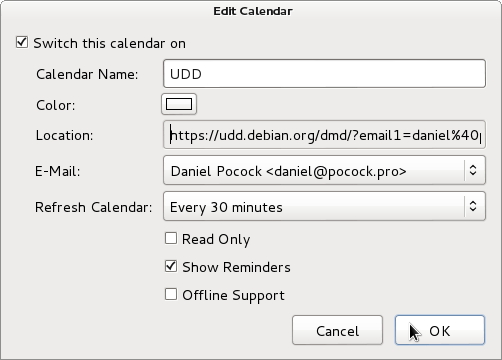
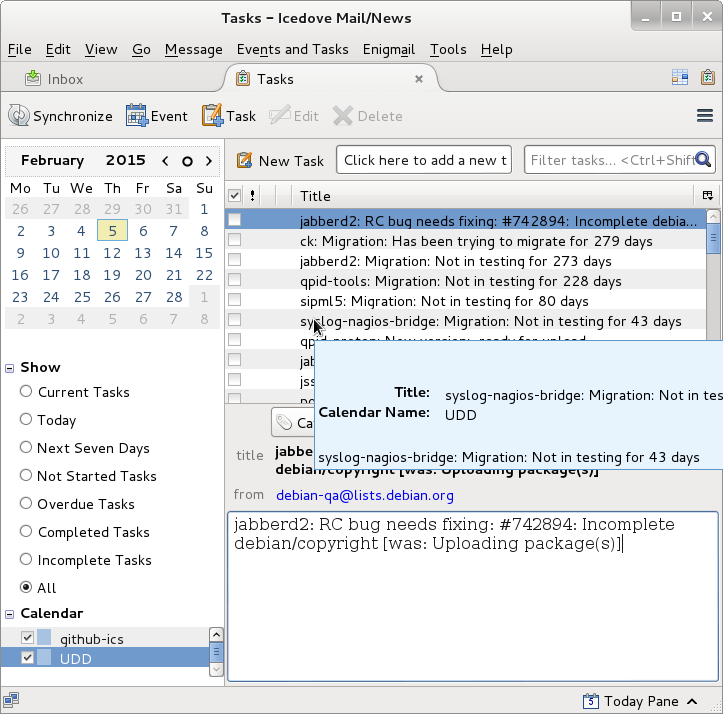
Contributors to Debian can now monitor their list of pending activities using iCalendar clients on their desktop or mobile device. Thanks to the tremendous work of the Debian QA team, the Ultimate Debian Database has been scooping up data from all around the Debian universe and storing it in a PostgreSQL back-end. The Debian Maintainer Dashboard allows developers to see a summary of outstanding issues across all their packages in a range of different formats. With today's update, an aggregated list of Debian tasks and to-dos can now be rendered in iCalendar format and loaded into a range of productivity tools. Using the iCalendar URL Many productivity tools like Mozilla Lightning (Iceowl extension on Debian) allow you to poll any calendar or task list just using a URL. For UDD iCalendar feeds, the URLs look like this:
https://udd.debian.org/dmd/?format=ics&email1=daniel%40pocock.pro
You can also get the data by visiting the Debian Maintainer Dashboard, filling out the form and selecting the iCalendar output format. Next steps Currently, the priority and deadline attributes are not set on any of the tasks in the feed. The strategy of prioritizing issues has been raised in bug #777112. iCalendar also supports other possibilities such as categories and reminders/alarms. It is likely that each developer has their own personal preferences about using these features. Giving feedback through the Debian QA mailing list or the bug tracker is welcome. Screenshots

4 February 2015

Christoph Berg: apt.postgresql.org statistics

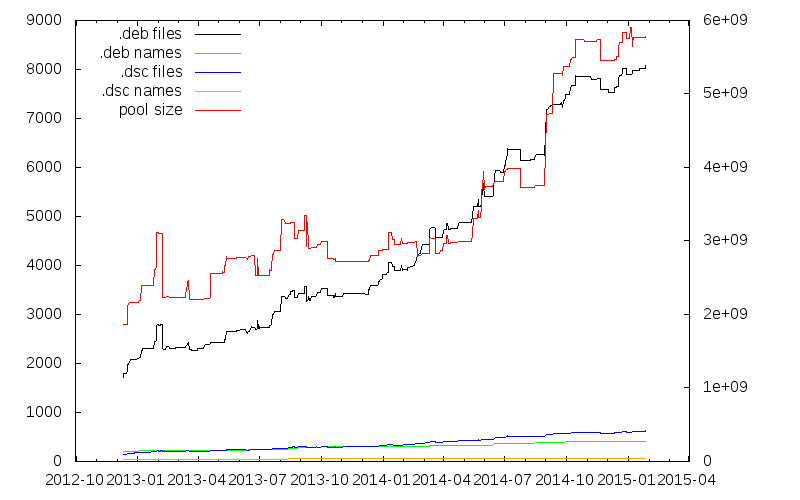
At this year's FOSDEM I gave a talk in the PostgreSQL devroom about Large Scale Quality Assurance in the PostgreSQL Ecosystem. The talk included a graph about the growth of the apt.postgresql.org repository that I want to share here as well: The yellow line at the very bottom is the number of different source package names, currently 71. From that, a somewhat larger number of actual source packages that include the "pgdgXX" version suffixes targeting the various distributions we have is built (blue). The number of different binary package names (green) is in about the same range. The dimension explosion then happens for the actual number of binary packages (black, almost 8000) targeting all distributions and architectures. The red line is the total size of the pool/ directory, currently a bit less than 6GB. (The graphs sometimes decrease when packages in the -testing distributions are promoted to the live distributions and the old live packages get removed.)

Vincent Bernat: Directory bookmarks with Zsh

There are numerous projects to implement directory bookmarks in your favorite shell. An inherent limitation of those implementations is they being only an enhanced cd command: you cannot use a bookmark in an arbitrary command. UPDATED: My initial implementation with Zsh was using dynamic named directories. I have been pointed on Twitter that there is a simpler way to implement bookmarks. The article has been updated to reflect that. As a side note, it is also possible to just use shell variables1. Zsh comes with a not well-known feature called static named directories. They are declared with the hash builtin and can be refered by prepending ~ to them:
$ hash -d -- -lldpd=/home/bernat/code/deezer/lldpd
$ echo ~-lldpd/README.md
/home/bernat/code/deezer/lldpd/README.md
$ head -n1 ~-lldpd/README.md
lldpd: implementation of IEEE 802.1ab (LLDP)
Because ~-lldpd is substituted during file name expansion, it is possible to use it in any command like a regular directory, like shown above. The - prefix is only here to avoid collision with home directories. Bookmarks are kept into a dedicated directory, $MARKPATH. Each bookmark is a symbolic link to the target directory: for example, ~-lldpd should be expanded to $MARKPATH/lldpd which points to the appropriate directory. Assuming that you have populated $MARKPATH with some links, here is how bookmarks are registered:
for link ($MARKPATH/*(N@))  
    hash -d -- -$ link:t =$ link:A 
 
You also automatically get completion and prompt expansion:
$ pwd
/home/bernat/code/deezer/lldpd/src/lib
$ echo $ (%):-%~ 
~-lldpd/src/lib
The last step is to manage bookmarks without adding or removing symbolic links manually. The following bookmark() function will display the existing bookmarks when called without arguments, will remove a bookmark when called with -d or add the current directory as a bookmark otherwise.
bookmark()  
    if (( $# == 0 )); then
        # When no arguments are provided, just display existing
        # bookmarks
        for link in $MARKPATH/*(N@); do
            local markname="$fg[green]$ link:t $reset_color"
            local markpath="$fg[blue]$ link:A $reset_color"
            printf "%-30s -> %s\n" $markname $markpath
        done
    else
        # Otherwise, we may want to add a bookmark or delete an
        # existing one.
        local -a delete
        zparseopts -D d=delete
        if (( $+delete[1] )); then
            # With  -d , we delete an existing bookmark
            command rm $MARKPATH/$1
        else
            # Otherwise, add a bookmark to the current
            # directory. The first argument is the bookmark
            # name.  .  is special and means the bookmark should
            # be named after the current directory.
            local name=$1
            [ $name == "." ] && name=$ PWD:t 
            ln -s $PWD $MARKPATH/$name
        fi
    fi
 
Find the complete version on GitHub.

Dynamic named directories Another (more complex) way to achieve the same thing is using dynamic named directories. I was initially using this solution but it is far more complex. This section is only here for historical reason. You can find the complete implementation in my GitHub repository. During file name expansion, a ~ followed by a string in square brackets is provided to the zsh_directory_name() function which will eventually reply with a directory name. This feature can be used to implement directory bookmarks:
$ cd ~[@lldpd]
$ pwd
/home/bernat/code/deezer/lldpd
$ echo ~[@lldpd]/README.md
/home/bernat/code/deezer/lldpd/README.md
$ head -n1 ~[@lldpd]/README.md
lldpd: implementation of IEEE 802.1ab (LLDP)
Like for static named directories, because ~[@lldpd] is substituted during file name expansion, it is possible to use it in any command like a regular directory.

Basic implementation Bookmarks are still kept into a dedicated directory, $MARKPATH and are still symbolic links. Here is how the core feature is implemented:
_bookmark_directory_name()  
    emulate -L zsh #  
    setopt extendedglob
    case $1 in
        n)
            [ [ $2 != ( #b)"@"(?*) ]] && return 1 #  
            typeset -ga reply
            reply=($ $ :-$MARKPATH/$match[1] :A ) #  
            return 0
            ;;
        *)
            return 1
            ;;
    esac
    return 0
 
add-zsh-hook zsh_directory_name _bookmark_directory_name
zsh_directory_name() is a function accepting hooks2: instead of defining it directly, we define another function and register it as a hook with add-zsh-hook. The hook is expected to handle different situations. The first one is to be able to transform a dynamic name into a regular directory name. In this case, the first parameter of the function is n and the second one is the dynamic name. In , the call to emulate will restore the pristine behaviour of Zsh and also ensure that any option set in the scope of the function will not have an impact outside. The function can then be reused safely in another environment. In , we check that the dynamic name starts with @ followed by at least one character. Otherwise, we declare we don t know how to handle it. Another hook will get the chance to do something. (#b) is a globbing flag. It activates backreferences for parenthesised groups. When a match is found, it is stored as an array, $match. In , we build the reply. We could have just returned $MARKPATH/$match[1] but to hide the symbolic link mechanism, we use the A modifier to ask Zsh to resolve symbolic links if possible. Zsh allows nested substitutions. It is therefore possible to use modifiers and flags on anything. $ :-$MARKPATH/$match[1] is a common trick to turn $MARKPATH/$match[1] into a parameter substitution and be able to apply the A modifier on it.

Completion Zsh is also able to ask for completion of a dynamic directory name. In this case, the completion system calls the hook function with c as the first argument.
_bookmark_directory_name()  
    # [...]
    case $1 in
        c)
            # Completion
            local expl
            local -a dirs
            dirs=($MARKPATH/*(N@:t)) #  
            dirs=("@"$ ^dirs ) #  
            _wanted dynamic-dirs expl 'bookmarked directory' compadd -S\] -a dirs
            return
            ;;
        # [...]
    esac
    # [...]
 
First, in , we create a list of possible bookmarks. In *(N@:t), N@ is a glob qualifier. N allows us to not return nothing if there is no match (otherwise, we would get an error) while @ only returns symbolic links. t is a modifier which will remove all leading pathname components. This is equivalent to use basename or $ something##*/ in POSIX shells but it plays nice with glob expressions. In , we just add @ before each bookmark name. If we have b1, b2 and b3 as bookmarks, $ ^dirs expands to b1,b2,b3 and therefore "@"$ ^dirs expands to the (@b1 @b2 @b3) array. The result is then feeded into the completion system.

Prompt expansion Many people put the name of the current directory in their prompt. It would be nice to have the bookmark name instead of the full name when we are below a bookmarked directory. That s also possible!
$ pwd
/home/bernat/code/deezer/lldpd/src/lib
$ echo $ (%):-%~ 
~[@lldpd]/src/lib
The prompt expansion system calls the hook function with d as first argument and the file name to transform.
_bookmark_directory_name()  
    # [...]
    case $1 in
        d)
            local link slink
            local -A links
            for link ($MARKPATH/*(N@))  
                links[$  #link:A $'\0'$ link:A ]=$ link:t  #  
             
            for slink ($ (@On)$ (k)links )  
                link=$ slink#*$'\0'  #  
                if [ [ $2 = ( #b)($ link )( /*) ]]; then
                    typeset -ga reply
                    reply=("@"$ links[$slink]  $(( $  #match[1]  )) )
                    return 0
                fi
             
            return 1
            ;;
        # [...]
    esac
    # [...]
 
OK. This is some black Zsh wizardry. Feel free to skip the explanation. This is a bit complex because we want to substitute the most specific bookmark, hence the need to sort bookmarks by their target lengths. In , the associative array $links is created by iterating on each symbolic link ($link) in the $MARKPATH directory. The goal is to map a target directory with the matching bookmark name. However, we need to iterate on this map from the longest to the shortest key. To achieve that, we prepend each key with its length. Remember, $ link:A is the absolute path with symbolic links resolved. So, $ #link:A is the length of this path. We concatenate the length of the target directory with the target directory name and use $'\0' as a separator because this is the only safe character for this purpose. The result is mapped to the bookmark name. The second loop is an iteration on the keys of the associative array $links (thanks to the use of the k parameter flag in $ (k)links ). Those keys are turned into an array (@ parameter flag) and sorted numerically in descending order (On parameter flag). Since the keys are directory names prefixed by their lengths, the first match will be the longest one. In , we extract the directory name from the key by removing the length and the null character at the beginning. Then, we check if the extracted directory name matches the file name we have been provided. Again, (#b) just activates backreferences. With extended globbing, we can use the or operator, . So, when either the file name matches exactly the directory name or is somewhere deeper, we create the reply which is an array whose first member is the bookmark name and the second member is the untranslated part of the file name.

Easy typing Typing ~[@ is cumbersome. Hopefully, Zsh line editor can be extended with additional bindings. The following snippet will substitute @@ (if typed without a pause) by ~[@:
vbe-insert-bookmark()  
    emulate -L zsh
    LBUFFER=$ LBUFFER "~[@"
 
zle -N vbe-insert-bookmark
bindkey '@@' vbe-insert-bookmark
In combination with the autocd option and completion, it is quite easy to jump to a bookmarked directory.

  1. For example:
    $ lldpd=/home/bernat/code/deezer/lldpd
    $ echo $lldpd/README.md
    /home/bernat/code/deezer/lldpd/README.md
    $ head -n1 $lldpd/README.md
    lldpd: implementation of IEEE 802.1ab (LLDP)
    
    The drawback is that you don t have a separate namespace for your bookmarks. You can still use a special prefix for that. Also, no prompt expansion.
  2. Other functions accepting hooks are chpwd() or precmd().

3 February 2015

Thomas Goirand: OpenStack packaging activity, November 2014 to January 2015

November 2014:
Sunday 2nd:
Travel from Moscow to Paris Monday 3rd to Sunday 8th:
Summit in Paris Monday 10th:
Uploaded python-rudolf to Sid (needed by Fuel)
Uploaded python-invoke and python-invocations (needed to run fabric s unit tests)
Uploaded python-requests-kerberos/0.5-2 fixing CVE-2014-8650: failure to handle mutual authentication. Asked the release team for unblock.
Uploaded openstack-pkg-tools version 19 fixing startup with systemd in Jessie (added RuntimeDirectory directive). Asked the release team for unblock.
Opened ticket to remove TripleO, Tuskar and Ironic packages from Jessie. I don t consider them ready for a Debian stable release, and there s no long term support from upstream.
Fixed Designate Juno dbsync process which prevented it from being installed.
Fixed Ironic Juno unowned files after purge (policy 6.8, 10.8): /var/lib/ironic/ cache, ironicdb (eg: purging these folders on purge) Thuesday 11:
Fixed nova-api CVE-2014-3708: Nova network DoS through API filtering in both the Juno and Icehouse release. Asked the release team to unblock the Icehouse version for Jessie. See: https://bugs.debian.org/769163
Uploaded Cinder with Duch debconf translation fix and pt.po
Uploaded python-django-pyscss with upstream patch for Django 1.7 support instead of the Debian one that I wrote 2 months ago. Asked the release team to unblock which they did. Wednesday 12:
Uploaded fix for horizon (see #769101) unowned files after purge (policy 6.8, 10.8). Now purging /usr/share/openstack-dashboard/openstack_dashboard on purge.
Uploaded Ironic with Duch translations of debconf
Uploaded Designate with Duch translations of Debconf screens
Uploaded openstack-trove with Duch translations of Debconf screens
Uploaded Tuskar with Duch translations of Debconf screens
Updated python-oslotest in Experimental to version 1.2.0 Thursday 13:
Uploaded new packages: python-oslo.middleware and python-oslo.concurrency.
Opened a new packaging branch for Nova Kilo, and updated (build-)depends.
Uploaded fix for Icehouse Cinder: delete volume failed due to unicode problems , and asked for unblock.
Uploaded new package: python-pygit2 and python-xmlbuilder, needed for fuel-agent-ci.
Uploaded sheepdog with Duch debconf translation.
Uploaded python-daemonize to Sid (in FTP master NEW queue).
Re-uploaded python-invoke after FTP master rejection (missing copyright information) Friday 14:
Uploaded liberasurecode & python-pyeclib to Sid, now in the FTP masters NEW queue waiting for approval. This will soon be needed by Swift. Monday 17:
Worked on the Cobbler packaging (all day long ) Tuesday 18:
Worked on backporting all of Fuel packages to Wheezy. Done with fuelclient already.
Uploaded ruby-cstruct and ruby-rethtool to Sid (needed by nailgun-agent) Wednesday 19:
Uploaded pyeclib again, with fixes for the build-depends. Package is still in the NEW queue anyway.
Built a Debian-based bootstrap hardware discovery image for Fuel, and it seems that it works already (to be checked )! \o/
To be added as packages in the ISO:
* nailgun-mcagents
* nailgun-net-check
* fuel-agent
* python-tasklib Thursday 20:
Uploaded python-tasklib to Sid (now in NEW queue )
Continued working on the discovery bootstrap ISO Friday 21:
Documented Sahara procedure in Debian in the official install-guide: https://review.openstack.org/136237
Fixed oslo.messaging so it doesn t use PROTOCOL_SSLv3 because its support has been removed from Debian (due to possible protocol downgrade attacks): https://review.openstack.org/136278 and uploaded fixed packages for Sid and Experimental.
Uploaded fixed Neutron packages for CVE-2014-7821 in both Sid and Experimental (eg: Icehouse and Juno) Monday 24:
Uploaded new package: python-os-client-config (in NEW queue)
Installed new Xen server to be used as my new Jenkins build machine
Moved the juno-wheezy VM to it
Finished to package python-pymysql and uploaded to Sid. It s now running all unit tests successfully! \o/ Tuesday 25:
Uploaded fix for openstack-debian-images to add the -o compat=1.0 option when building an image with Qemu > 1.0. Opened bug to the release team to have it unblocked.
Continued working on unit tests for fuel-nailgun. Wednesday 26:
Uploaded python-os-net-config to Sid (new package)
Worked briefly on python-cassandra-driver. It needs cassandra to be in, which is a LOT of work.
Found a (not useable) hack to run nailgun unit tests. It works, however, it doesn t seem like fuel-nailgun is designed to be able to use unix socket for the postgres connection in its unit tests.
Uploaded python-pykmip to Sid (new package)
Updated the Debian wheezy backport repository for libvirt to version 1.2.9 from official wheezy-backports. Removed policykit-1 and libusb from there too, as it broke stuff to use a backported version (X and usb were not useable on my Wheezy laptop when using it ). Thursday 27 & Friday 28:
Uploaded new Javascript packages or dependencies for Fuel: libjs-autonumeric, libjs-backbone-deep-model, libjs-backbone.stickit, libjs-cocktail, libjs-i18next, libjs-require-css, libjs-requirejs, libjs-requirejs-text Sunday 30:
Uploaded debian/copyright fixes for libjs-backbone-deep-model, libjs-backbone.stickit and libjs-cocktail after the packages were accepted by the FTP masters and they gave remarks about copyright. DECEMBER 2014 Monday 01:
Uploaded new Debian image to MOX, after I unerstood the issue was about the architecture field that I was wrongly filling. I ll be able to use that for Tempest checking on my dev account. Tuesday 02:
Uploaded python-q-text-as-data to Sid (new awesome package!)
Uploaded Horizon with some triggers mechanisms to start the compress when one of its JS depends is updated. That s very important for security!
Uploaded a fixed version of heat-cfntools to Sid (it was missing the /usr/lib/python* folder). Asked the release team for an unblock so it can reach Jessie.
Fixed unit tests in fuel-nailgun, thanks to a patch from Sebastian Kalinowski. Now all unit tests are passing but one (for which I opened a launchpad bug: tests are trying to write in /var/log/nailgun, which is impossible at package build time). Wednesday 03:
Uploaded fixed version of ruby-rethtool after FTP master s rejection and upstream correction of licensing files.
Uploaded fixed version of libjs-require-css after FTP master s rejection
Fixed (in Git only) python-sysv-ipc missing build-depends on dh-python as per bug opened by James Page (this is not so important, but I did it still).
Continued working on the tempest-ci scripts.
Added to the image-guide docs about openstack-debian-images: https://review.openstack.org/#/c/138743/ Thursday 04:
Uploaded new package: python-proliantutils. Send patch to upstream about an issue in indentation (mix-up with space and tabs) which made the package uninstallable with Python 3.4. Friday 05:
Worked on the package CI. Monday 07:
Worked on the package CI. All works now, up to all of the Tempest tests for Keystone. Now need to fix the neutron config. Thuesday 08:
Continued working on the CI. Wednesday 09:
Uploaded fix for FTBFS of python-tasklib (Closes: #772606)
Uploaded fix for libjerasure-deb missing dependency on libgf-complete-dev, package already unblocked and will migrate to Jessie.
Uploaded fix for Designate Juno fail to upgrade from Icehouse: this was due to the database_connection directive renamed to connection =.
Uploaded fix for Designate purge in Sid (Icehouse release of Designate).
Commited to git updates of the German debconf translation in both Icehouse and Juno.
Updated nova to use libvirtd as init script dependency instead of libvirt-bin (this was renamed in the libvirt-daemon-system package).
Do not touch the db connection directive if user didn t ask for db handling by the package. Thursday 10 to Saturday 13:
Finally understood the issues with systemd service files not being activated by default. Fixed openstack-pkg-tools, and uploaded version 20 to Sid, after the release team accepted the changes. Sunday 14:
Uploaded Juno 2014.2.1 to Experimental: ceilometer, cinder, glance, python-glance-store, heat, horizon, keystone Monday 15:
Finished uploading Juno 2014.2.1 to Experimental: Nova, Neutron, Sahara Tuesday 16:
Added crontab to flush tokens in Icehouse Keystone
Some more CI work Wednesday 17:
Uploaded keystone with systemd fix and crontab to flush the token table in Sid (eg: Icehouse).
Uploaded nova Icehouse with a bunch of fixes in Sid. Thursday 18:
Updated some issues in Nova Icehouse (Sid/Jessie) Friday 19:
Started building a new Jenkins instance for building Kilo packages Monday 22:
Finished building the new Jenkins instance for building Kilo packages, and rebuilt every packages there, using Jessie as a base. Tuesday 23:
Updated version for the following packages: oslo.utils, oslo.middleware, stevedore, oslo.concurency, pecan, oslo.concurrency, python-oslo.vmware, python-glance-store
Built so far: Ceilometer, Keystone, python-glanceclient, cinder, glance Wednesday 24:
Continued packaging Kilo beta 1. Updated: nova, designate, neutron
Uploaded python-tempest-lib to Debian Unstable (new package) Wednesday 31:
Continued packaging Kilo beta 1. Updated: heat JANUARY 2015 Thursday 01:
Continued packaging Kilo beta 1. Updated: ironic, openstack-trove, openstack-doc-tools, ceilometer Friday 02:
Finished packaging Kilo beta 1. Updated: Sahara, Murano, Murano-dashboard, Murano-agent Sunday 04:
Started testing Kilo beta 1. Fixed a few issues on default configuration for Ceilometer and Glance. Monday 05:
Fixed openstack-pkg-tools which failed to create PID files at boot time, Uploaded to Sid, asked the release team for unblock.
Uploaded ceilometer & cinder to Sid, rebuilt against openstack-pkg-tools 21.
Did more testing of Kilo beta 1, fixed a few more minor issues. Tuesday 06:
Uploaded glance, neutron, nova, designate, keystone, heat, trove to Sid, so that all sysv-rc init scripts are fixed with the new openstack-pkg-tools 21. Designate, heat, keystone and trove contains other minor fixes reported to the Debian BTS. Wednesday 07:
Asked the Debian release team (open bugs with debdiff as attachment) for unblocks of glance, neutron, nova, designate, keystone, heat, trove so they migrate to Jessie.
Fixed a few minor issues tracked in the Debian BTS on various packages. Thesday 08:
James Page from Canonical informed me that they are now using openstack-pkg-tools for maintaining their daemons in Nova, Cinder and Keystone in Ubuntu. That s an awesome news : more QA for both platforms.
James Page found out that dh_installinit *must* be called *after* the call of dh_systemd_enable, otherwise, daemons aren t started automatically at the first install of packages, as the unmask of systemd happens after the invoke-rc.d. Friday 09:
Did some QA checks on the latest upload. Fixed Heat which broke because using the wrong template name (glance instead of heat). Monday 12:
Started re-running the automated openstack-deploy scrip in Icehouse, Juno and Kilo. Found out the issue in Keystone wasn t fixed in Juno (but was fixed in other releases), and fixed it.
Removed the use of ssl.PROTOCOL_SSLv3 from heat (removed form Debian). Uploaded the fixed package to Sid.
All of openstack-deploy (debian/kilo branch) now works and succesfully installs OpenStack again. If dh_installinit is called before, we have:
# Automatically added by dh_installinit
if [ -x "/etc/init.d/keystone" ]; then
update-rc.d keystone defaults >/dev/null
fi
if [ -x "/etc/init.d/keystone" ]   [ -e "/etc/init/keystone.conf" ]; then
invoke-rc.d keystone start   true
fi
# End automatically added section
# Automatically added by dh_systemd_enable
# This will only remove masks created by d-s-h on package removal.
deb-systemd-helper unmask keystone.service >/dev/null   true
# was-enabled defaults to true, so new installations run enable.
if deb-systemd-helper --quiet was-enabled keystone.service; then
# Enables the unit on first installation, creates new
# symlinks on upgrades if the unit file has changed.
deb-systemd-helper enable keystone.service >/dev/null   true
else
# Update the statefile to add new symlinks (if any), which need to be
# cleaned up on purge. Also remove old symlinks.
deb-systemd-helper update-state keystone.service >/dev/null   true
fi
# End automatically added section
If it s called after dh_systemd_enable, we have:
# Automatically added by dh_systemd_enable
# This will only remove masks created by d-s-h on package removal.
deb-systemd-helper unmask keystone.service >/dev/null   true
# was-enabled defaults to true, so new installations run enable.
if deb-systemd-helper --quiet was-enabled keystone.service; then
# Enables the unit on first installation, creates new
# symlinks on upgrades if the unit file has changed.
deb-systemd-helper enable keystone.service >/dev/null   true
else
# Update the statefile to add new symlinks (if any), which need to be
# cleaned up on purge. Also remove old symlinks.
deb-systemd-helper update-state keystone.service >/dev/null   true
fi
# End automatically added section
# Automatically added by dh_installinit
if [ -x "/etc/init.d/keystone" ]; then
update-rc.d keystone defaults >/dev/null
fi
if [ -x "/etc/init.d/keystone" ]   [ -e "/etc/init/keystone.conf" ]; then
invoke-rc.d keystone start   true
fi
# End automatically added section
As a consequence, I have to re-upload version 22 of openstack-pkg-tools and also re-upload all OpenStack core packages to Debian Sid. Fixed a number of issues like:
* dbc_upgrade = true check which shouldn t have been there in postinst.
* <project>/configure_db default value is now always false
* db_sync and pkgos_dbc_postinst are now only done if <project>/configure_db is set to true.
Rebuilt all packages in Juno and Kilo with the above changes. Tuesday 13:
Opened unblock bugs for the release team to unblock all fixed packages.
Made more tests in Juno and Kilo to make sure the fixed bugs in Icehouse are fixed there too.
Fixed numerous issues in Trove (missing trove-conductor.conf, wrong trove-api init file, etc.). More work will be needed for it for both Icehouse and newer releases. Wednesday 14:
Did a doc meeting about debconf. Some doc contributors still want to kill the debconf / debian manual, and I have to not agree.
Made a new patch to better document the keystone install procedure:
Did some bug triaging in the doc about Debian.
Uploaded new versions of core packages to Experimental (eg: Juno) built against openstack-pkg-tools >= 22~, and some fixes forward ported from Icehouse: Keystone, Ceilometer, Cinder, Glance, Heat, Ironic, Murano, Neutron, Nova, Saraha and Murano-agent. All where rebuilt in Juno (Wheezy + Trusty) and Kilo (Jessie only) on my Jenkins. Thuesday 15:
Succesfully booted a live-build Debian live image containing mcollective and nailgun-agent as a Debian replacement for the hardware discovery / boostrap image of Fuel. Now, I need to find a way to use just a kernel + initramfs Friday 16 to Tuesday 20:
Worked on the packaging CI. Wednesday 21:
Fixed https://bugs.debian.org/775636 (Horizon failed to build due to a Moscow timezone change and wrong test). Uploaded to Sid, asked for unblock.
Fixed https://bugs.debian.org/775926: CVE-2015-1195: Glance still allows users to download and delete any file in glance-api server (applied upstream patch). Uploaded to Sid, asked for unblock. Uploaded Juno version to Experimental.
Uploaded openstack-trove with the remaining fixes, asked release team for unblock.
Uploaded python-glanceclient 0.15.0 (Juno) to Experimental because it fixes an issue with HTTPS. Added to it a patch from James Page not yet merged, which fixes unit test with Python 2.7.9 (7 failures otherwise).
Uploaded python-xstatic-d3 as it can t be installed anymore in Sid after a new version of d3 was uploaded. Thursday 22:
Uploaded python-xstatic-smart-table and libjs-angularjs-smart-table to Sid (new packages, now in NEW queue). Friday 23:
Ask for the removal of the below list of packages from Jessie:
python-xstatic
python-xstatic-angular
python-xstatic-angular-cookies
python-xstatic-angular-mock
python-xstatic-bootstrap-datepicker
python-xstatic-bootstrap-scss
python-xstatic-d3
python-xstatic-font-awesome
python-xstatic-hogan
python-xstatic-jasmine
python-xstatic-jquery
python-xstatic-jquery-migrate
python-xstatic-jquery-ui
python-xstatic-jquery.bootstrap.wizard
python-xstatic-jquery.quicksearch
python-xstatic-jquery.tablesorter
python-xstatic-jsencrypt
python-xstatic-qunit
python-xstatic-rickshaw
python-xstatic-spin
libjs-jsencrypt
libjs-spin.js
libjs-twitter-bootstrap-datepicker
libjs-twitter-bootstrap-wizard They are used only in OpenStack Horizon starting on 2014.2 (aka Juno), and Jessie is shipped with Icehouse, so it s IMO best to not carry the burden of maintaining these packages for the life of Jessie. Monday 26:
Enhanced and review requested changes for https://review.openstack.org/147296 (ie: Keystone install with more details about what the package does).
Finished testing network on the CI install. Now need to automate all. Tuesday 27:
Closed all bugs on the rabbitmq-server package (2 correction, one bug triage).
Uploaded a fix for the missing conntrack dependency in neutron-l3-agent.
Restarted working on CI setup of Juno after success with manual install in a Xen domU.
Uploaded fix to make sheepdog build reproducible (patch from the Debian BTS). Thursday 28:
Fixed and uploaded to Sid openstack-debian-images 2 bugs reported by Steve McIntire. Official Debian images for OpenStack are now available at:
http://cdimage.debian.org/cdimage/openstack/ \o/
Note that this is the weekly build of testing. We wont get Debian Stable images before Jessie is out.
Documented the new image thing here: http://docs.openstack.org/image-guide/content/ch_obtaining_images.html#debian-images as a new patch: https://review.openstack.org/#/c/151015/
Fixed my patch for keystone debconf doc at: https://review.openstack.org/#/c/147296/ Wednesday 29:
Continued working on packaging CI Thursday 30:
Fixed CVE on Neutron (Juno): L3 agent denial of service with radvd 2.0+
Fixed CVE on Glance (Icehouse + Juno): Glance user storage quota bypass. Asked release team for unblock.
Fixed the image-guide patch after review (ie: https://review.openstack.org/151015)

1 February 2015

Iustin Pop: Morning snow

Woke up on Sunday morning to see snow! It snowed during the night, such that there were around 5 or 6 centimetres of snow on the ground. The second surprise was that, from my window at least, it seemed the snow on the street and sidewalks was still there! To see snow, uncleaned, after eight in the morning, is a welcome surprise in Switzerland! So I wanted to quickly dress and go for a short run, but I was delayed by a page from work (oncall this weekend) it became a race between me solving the page and the people who ruin the snow by making it safe to walk. So I had to work fast, skip breakfast (I like running on an empty stomach), and a while later I was finally outside, and started my run. The snow right outside was pristine, untouched by anything. Further on, some signs of cleaning (and some people busy at work with shovels). Half of the sidewalks were already cleared, but the other half was mighty fun to run in - reasonably dry snow, and soft, not at all like running on pavement. By the time I was inside, the big and "serious" cleaning machines were out on the streets, ensuring the snow doesn't endanger cars. Sigh, living in a city. But all in all, a good Sunday morning start!

31 January 2015

John Goerzen: Home Automation, part 2: Z-Wave and ISY programming

In my part 1 post yesterday, I wrote about the start of the home automation project. I mentioned that I was using Insteon switches, and they mostly were working well (I forgot to mention an annoyance: you can dim, but not totally shut off, their LED status light.) Anyhow, the Insteon battery-operated sensors seem to not be as good as their Z-Wave competition. Setting up Z-Wave Z-Wave devices get joined to the Z-Wave network in much the same way Bluetooth devices get paired with each other. The first time you use a Z-Wave device, you join it to the controller. The controller assigns it an ID on your network, and both devices discover the best route to communicate with each other. I discovered that the Z-Wave module on the ISY-994i has particularly poor reception. Combined with the generally short range of battery-operated Z-wave devices, this meant that my sensors didn t work reliably. As with Insteon, AC-powered Z-wave devices tend to be repeaters, but I didn t have any AC-powered Z-wave devices. I went looking for Z-wave repeaters, and found some. But then I discovered that a Z-wave relay-based appliance switch was actually $5 cheaper, acted as a repeater, and could be used as a switch down the road if needed. A couple of those solved my communications issues. You join them to the network as usual, but then either re-join the battery-powered sensors (so they see the new route) or do a network heal (every device on the network re-learns about its neighbors and routes to the other devices) so they see the new route. Z-Wave Motion / Occupancy Sensors If you have been in new buildings, chances are you have seen light switches with built-in occupancy sensors. My doctor s office has these. They are typically the same size as a regular light switch, but with a passive infrared (PIR) motion sensor used to automatically turn the lights off after a timeout (or even on, when someone walks into the room.) These work fine for small rooms, but if you ve ever been in a bathroom with a PIR lightswitch that goes off while you re still in the room, you are aware of their faults for larger rooms! Most of the time, when you read about occupancy sensors , it s really a PIR sensor, and the term is used interchangeably with motion detector. Motion detectors in home automation systems are commonly used for a number of purposes: detecting occuption of rooms for automatic control of lighting or HVAC systems, triggering alerts, or even locking or unlocking doors. My friend told me he had poor luck with the Insteon PIR sensors, so I tried two different Z-Wave models: the $48 Aeon/Aeotec multi-sensor and the $30 Ecolink PIRZWAVE2-ECO. The Aeon device is clearly the more capable; it can be used indoors or out, and has a lot of options that can be configured by Z-Wave configuration parameters. It also has a ball/socket mount, so it can be easily aimed in different directions. It can draw power from 4 AAA batteries, or a mini USB cable (cable, but not power supply, included). The Aeon multi-sensor also has a temperature, humidity, and illumination (lux) sensor but, as you ll see, they have some drawbacks. The Ecolink device is more basic; it has a few settings that can be altered via jumpers, but none that can be altered via Z-Wave configuration commands. That makes it a bit of a hassle, since you have to open it up to change, and when you do, it triggers a tamper alarm that is both undocumented and never seems to go away. It is powered by a single CR123A 3V Lithium battery, which are about $2 each on Amazon. Both units have a default PIR timeout of 4 minutes. That means that after sensing motion, they will transmit the on signal (meaning motion detected) and then transmit no further signals for at least 4 minutes. This is because operating the radio consumes far more battery power than simply monitoring the PIR sensor, and it cuts down on repeated on/off transmissions. In this configuration, both units should have battery life of 6 months to a year, I figure, with an edge for the Ecolink, perhaps. Both can also be configured to transmit more frequently; the Ecolink has a jumper that can change its timeout to 10 seconds, whereas the Aeon can be configured over Z-Wave for any timeout between 10 seconds and 65535 seconds (values above 4 minutes are rounded to the nearest minute, for some reason.) Both also have adjustable sensitivity; on the Aeon this is via an adjustment knob, and on the Ecolink it s via jumpers. And both can report their battery level to enable software alerts when it s getting low. The Aeon ships with its temperature, humidity, battery, and lux sensors disabled. This appears to be the cause of much confusion online, as they send one transmission and then no more. Sadly, one has to resort to the hard-to-find but very helpful MultiSensor engineering spec document to figure out the way to enable those sensors and set their interval. (It must be said, however, that I doubt most consumers will understand how to set bitfields, and this is either not covered or covered incorrectly in their other manuals.) This can be a real power drain, so I just set it to report battery level every 6 hours (so I can alert myself if it gets low) and leave it at that. The Ecolink manual claims a detection radius of 39 feet and a total angle of 90deg (45deg left or right from center) and a 3-year battery life (I m skeptical). It also is rated for indoor use only. Aeotec claims a detection radius of 16 feet and a total angle of 120 deg. Be skeptical of all these figures. Once set up with good reception, both devices have been working fine. Programming the controller The ISY-994i-Zw Pro controller I mentioned in Part 1 has its own sort of programming language. It s a lot better than the sort of GUI clicky mess that is found in most of these things, but it still has a sort of annoying Java-based editor where you select keywords from a menu and such. Although you can backup and restore the device, and import and export the programs, the file formats are XML and not really suitable for hand-editing. Sigh. The language is limited, but gets the job done. Here is a simple program that turns off the fan in a bathroom 30 minutes after the light was turned off:
If
        Status  '1st Floor / Bathroom + Laundry / Main Bath Fan' is On
    And Status  '1st Floor / Bathroom + Laundry / Main Bath Light' is Off
 
Then
        Wait  30 minutes 
        Set '1st Floor / Bathroom + Laundry / Main Bath Fan' Off
 
Else
   - No Actions - (To add one, press 'Action')
The if/then/else clauses should probably be more properly called when/do/finally. The if clauses are evaluated whenever a relevant event occurs. If the If evaluates to true, if executes the Then section. The program in Then is uninterruptible except for wait and repeat statements. So in this case, the program begins, and if the light stays off and the fan stays on, 30 minutes later it turns off the fan. But if the light comes back on, the program aborts (since there is nothing in else ). Similarly, if the fan goes off, the program aborts. A more complicated example: motion-activated lamp There is a table lamp in our living room controlled by Insteon. By adding a motion sensor in that room, it can be automatically turned on by someone walking through the room. Now, to be useful, I don t want it to turn on during the day. I also don t want it to turn on or adjust itself if other lights are on in the room, or if I turned it on myself; that could cause it to go on and off while I m watching TV, for instance. It s just to be helpful at night. Because the ISY-994i is pretty limited, having almost no control flow operations, this as with many tasks requires several programs . First, here s my main :
If
        Status  '1st Floor / Living + Dining Room / LR Table Lamp' is Off
    And $LR_Lamp_Lockout is 0
    And Status  '1st Floor / Living + Dining Room / ZW 005 Binary Sensor' is On
    And From    Sunset 
        To      Sunrise (next day)
    And $LR_Lamp_Motion_Working is not 0
    And Status  '1st Floor / Living + Dining Room / LR Floor Lamp' is Off
    And Status  '1st Floor / Living + Dining Room / Dining Light' is Off
    And Status  '1st Floor / Living + Dining Room / LR Light' is Off
 
Then
        Set '1st Floor / Living + Dining Room / LR Table Lamp' 22%
        Set '1st Floor / Living + Dining Room / LR S Remote (Table Lamp)' 22%
 
Else
   - No Actions - (To add one, press 'Action')
So, let s look at the conditions. This program triggers if the lamp is off, the sensor is on, the time is between sunset and sunrise, and three other lights are off. (I will explain the lockout and motion_working variables later). If this is the case, it sets the lamp to 22% (and also informs the wall switch for it that the lamp is at 22%). I pick this precise value because it is unlikely I would manually set it via the wall switch, and therefore lamp is 22% bright doubles as a lamp was turned on by this program flag. So this is the turning the lamp on bit. Let s look at the program that turns it back off later:
If
        Status  '1st Floor / Living + Dining Room / LR Table Lamp' is 22%
    And (
             Status  '1st Floor / Living + Dining Room / ZW 005 Binary Sensor' is Off
          Or $LR_Lamp_Motion_Working is 0
          Or Status  '1st Floor / Living + Dining Room / LR Light' is not Off
          Or Status  '1st Floor / Living + Dining Room / LR Floor Lamp' is not Off
          Or Status  '1st Floor / Living + Dining Room / Dining Light' is not Off
        )
 
Then
        Wait  15 seconds
        Set '1st Floor / Living + Dining Room / LR S Remote (Table Lamp)' Off
        Set '1st Floor / Living + Dining Room / LR Table Lamp' Off
 
Else
   - No Actions - (To add one, press 'Action')
 
This is using a sensor with a 4-minute timeout, so the lamp will always be on for at least 4 minutes and 15 seconds. This program runs if the lamp is still at the program-set level (so if, for instance, I turned the lamp full on, the program does nothing to override my setting.) Then, it looks for a condition to trigger turning the lamp off, which could be any of the sensor indicating no more motion, another program detecting it s lost communication with the sensor, or somebody turning on one of the bigger lights in the room. Then it simply sets the light (and the wall switch controlling it) to off. There are a couple more bits to this puzzle. What if the system turned the lamp on, but I really want it off? If I walked up to the wall switch and pushed off , the lamp would go off. And then, a couple seconds later, come back on, since the state of the system met the conditions for the lamp-on program. So we need a lockout that prevents this from happening. Here s my trigger lockout program:
If
        Control '1st Floor / Living + Dining Room / LR Table Lamp' is switched Off
     Or Control '1st Floor / Living + Dining Room / LR Table Lamp' is switched Fast Off
     Or Control '1st Floor / Living + Dining Room / LR S Remote (Table Lamp)' is switched Fast Off
     Or Control '1st Floor / Living + Dining Room / LR S Remote (Table Lamp)' is switched Off
 
Then
        $LR_Lamp_Lockout += 1
        Run Program 'LR Lamp Clear Lockout' (If)
 
Else
   - No Actions - (To add one, press 'Action') 
So if someone pushes the off button at the lamp switch box at the outlet it s plugged into (unlikely), or at the wall switch, it increments the lockout variable and runs another program. This other program is unique in that it is flagged disabled , meaning it is never run automatically by the system, only when called by another program. Here s the clear lockout program:
If
        $LR_Lamp_Lockout > 0
 
Then
        Wait  5 minutes 
        $LR_Lamp_Lockout  = 0
 
Else
   - No Actions - (To add one, press 'Action')
Thus by pushing the off button on the switch, the motion-triggered program won t turn the lamp back on for at least 5 minutes. Before I had reliable Z-Wave communication to the device, I had some times where it would simply drop off the Z-Wave network until a reboot. This was particularly annoying if it occured after having detected motion, since the state of the sensor in the ISY controller is simply whatever state it last received. Therefore, I wrote this program to check if it believes the motion sensor is working:
If
        Status  '1st Floor / Living + Dining Room / ZW 005 Binary Sensor' is On
 
Then
        $LR_Lamp_Motion_Working  = 1
        Wait  1 hour 
        $LR_Lamp_Motion_Working  = 0
 
Else
        $LR_Lamp_Motion_Working  = 1
We don t really care if the motion sensor is broken when the status is off; all that happens then is no lamp turns on. So this program activates when the status is set to on. It flips the working flag to true, then waits for an hour. If the sensor shows no motion within that hour, the program skips to the else (keeping the flag true). But if it is still on after an hour, it decides it must not be working and sets the working flag to false. You can see that flag used in the other programs logic. But because of the Else, which is run whenever the conditions that caused the Then clause to run become false, as soon as the system receives no motion , it will flag the sensor as working again. The final piece to this puzzle is a program flagged to run at boot time of the controller:
If
   - No Conditions - (To add one, press 'Schedule' or 'Condition')
 
Then
        $LR_Lamp_Motion_Working  = 1
 
Else
   - No Actions - (To add one, press 'Action')
This simply initializes the motion working variable to a known state. Keypads The Insteon KeypadLinc is a nice device. It can control a single load directly, but all 8 buttons are fully responsive in the Insteon system. They each also have individually-addressible LED backlights. They are commonly used to do things like ALL OFF , TV (to set lights for watching TV), AWAY (to set the system for everyone being out of the house for awhile), etc. They are the size of a regular Decora switch, and I have installed one already, but haven t programmed much of it yet. REST API The ISY has an extensive REST API, which I ve used to integrate it a bit with my Debian systems. More on that another time. Mobile app Mobile apps are a common thing people look for in these systems. You can t use the Insteon app with the ISY, but they recommend Mobilinc Pro. It does the job. Mobilinc tries to sell a $10/mo connection service, which is totally unnecessary if you can figure out SSL, and has on-screen buttons to bypass, but judging by the Google Play reviews, a lot of people thought they had to pay for that and uninstalled it afterwards. Future directions Many people put in electronic door locks. I don t plan to do that. I do plan to have the house systems be aware of the general state of things (is the house empty? is everyone asleep?) and do appropriate things with lighting and HVAC. I don t really expect the savings in power for lighting control to pay for the system anytime soon. However, if it can achieve some savings in heating and cooling, it may well be able to pay for itself in a few years. So my big next step is thermostats that can integrate with all this. I have had a water mess in my basement before, and water leak sensors are a very common item people deploy in these setups. I certainly plan to add a few of them. Door-open sensors are also useful; they trigger more instantly and reliably than motion detectors and can be used in some nice ways (is it after dark and the door is opening when the house is vacant? If so, turn on the light nearby in case their hands are full.) Issues Some issues I ran into so far are already discussed above. One other major one involves SSL on the ISY-994i Pro. The method for adding SSL keys is cumbersome, but the processor on the device which appears to run some sort of Java is just not up to working with SSL. Apparently they only recently got it fast enough to work with 2048-bit keys. This is rather undocumented, though, so I obtained a cert for a 4096-bit key, my usual. Attempting to connect to the box with SSL appeared to hang not just that but confuse a lot of other things on it as well. Turned out it wasn t hung; it just too a minute and 45 seconds to complete the SSL handshake. Moral of the story: use 2048-bit keys, or stunnel4 or some such to re-wrap the SSL communications with a stronger key. The KeypadLinc backlights can be completely shut off, and both their on and off levels can be customized. I have it set to shut off the backlight during the day and turn it on at night. The wall switches, however, can t have their brightness status LED bar entirely shut off. They can be made dim, but don t ever go away. That s rather annoying. Also annoying is that Insteon doesn t make switches in the traditional toggle switch style in colors other than white. As our house had mostly black switches, I was forced into the Decora style. Overall thoughts This has been a great learning experience for me in a number of ways. I have only begun to tap what the system can do, and the real benefits will probably come once I get the heating and cooling into the mix. It s quite a nice way for a geek to go, and the improvements in lighting have also been popular with everyone else in the house.

30 January 2015

Manuel A. Fernandez Montecelo: Hallo, Planet Debian!

Hi! I just created this blog and asked to get it aggregated to the Debian Planet, so first things first -- in the initial post I wanted to say Hallooooo! to the people in the community and to talk about my work and interests in Debian. Probably most of you never interacted with or even heard of me before. I am contributor/Maintainer since ~2010 and Developer only for ~2 years, and most of the things that I worked in or packages that I maintain are "low profile" or unintrusive, except perhaps for work in aptitude and SDL libraries, if you happen to be interested in these packages or others that I [co-]maintain. More recently, during 2014, I was helping to bootstrap and bring to life a new architecture, OpenRISC or1k. Perhaps I should devote a future post to explain a bit more about the history, status and news --or, lately, lack thereof-- about this port. This is one of the main reasons why I thought that it would be useful to have a blog -- to register activities for which it is difficult to get information by other means. Apart from or1k, as it often happens with porting efforts in Debian, the work done also helped indirectly other architectures added last year (mips64el, arm64, ppc64el). Additionally, a few of my NMUs were directly targetted to help ppc64el to get ready in time for the architecture evaluation. None of the porters working in ppc64el were Debian Maintainers/Developers and some of the patches that they created did not benefit directly the other ports, so in the packages without active maintainers, the requests were not getting much attention in the crucial time before the evaluation. In some cases, these packages were in the critical path to build many other packages or support important user-case scenarios. So I was very pleased when I learnt that arm64 and ppc64el will be in the next stable release --Jessie-- as officially supported architectures. They came without much noise or ceremonious celebrations, but I think that this is a great success story for these architectures and for Debian, and even for the computing world in general. Time will tell. In the meantime, congratulations to all people involved! In addition to porting packages within Debian, I also sent some patches upstream to get the packages that I maintain compiling in the new architectures, and sent upstream patches needed to support or1k specifically (jemalloc, nspr, libgc, cmake, components of X.org...). Enough for the first post. Just to finish, let me say that after about a decade without a personal website or blog (the previous ones not about Debian or even computing), here I am again. Let's see how it goes and I hope to have enough interesting things to tell you to keep the blog alive. Or, in other words... To infinity and beyond!

Rapha&#235;l Hertzog: My Free Software Activities for January 2015

My monthly report covers a large part of what I have been doing in the free software world. I write it for my donators (thanks to them!) but also for the wider Debian community because it can give ideas to newcomers and it s one of the best ways to find volunteers to work with me on projects that matter to me. Debian LTS This month I have been paid to work 12 hours on Debian LTS. I did the following tasks: I want to expand on two cases that I stumbled upon in my CVE triage work and that took quite long to investigate each. While my after-the-fact description is rather straightforward, the real process involved more iterations and data gathering that I do not mention here. First I was investigating CVE-2012-6685 on libnokogiri-ruby and the upstream bug discussion revealed that libxml2 could also be part of the problem. Using the tests cases submitted there, I confirmed that libxml2 was also affected by an issue of its own then I started to analyze the history of CVE of libxml2 to find out whether that issue got a CVE assigned: yes, that was CVE-2014-0191 (although the CVE description is unrelated). But this CVE was marked as fixed in all releases. Why? It turns out that the upstream fix for this CVE is just the complement of another commit that was merged way earlier (and that was used as a basis for the commit as the copy/paste of the comment shows). When the security teams integrated the upstream patch in wheezy/squeeze, they were probably not aware that a full fix required to also include something else. In the end, I thus reopened CVE-2014-0191 on our tracker (commit here). The second problematic case was pound. Thijs Kinkhorst added pound related data on the multiple (high profile) SSL related issues. So it appeared on my radar of new vulnerable package in Squeeze because it was marked that CVE-2009-3555 was fixed in version 2.6-2 while Squeeze has 2.5-1. There was no bug reference in the security tracker and the Debian changelog for that version only mentioned an anti_beast patch which is yet another issue (CVE-2011-3389). I had to dig a bit deeper in the end I discovered that the above patch also has provisions for the CVE that was of interest to me, except that Brian May recently reported in #765649 that the package was still vulnerable to this issue I tried to understand where the above patch was failing and thus submitted my findings to the bug. And I updated the tracker data with my newly gained knowledge (commit 31751 and 31752). Tryton For me, January is always the month where I try to close the accounting books of Freexian. This year is no exception except that it s the first year where I do this with Tryton. I first upgraded to Tryton 3.4 to have the latest version. Despite this I discovered multiple problems while doing so since I don t want to have those problems next year, I reported them and prepared fixes for those related to the French chart of accounts: Saltstack I mentioned this idea last month setting up and maintaining a lot of sbuild chroots can be tiresome so I wanted to automate this as much as possible. To achieve this I created three Salt formulas and got them added to the official Saltstack repository: Each one builds on top of the former. debootstrap-formula creates chroots with debootstrap or cdebootstrap. schroot-formula does the same and registers those chroots in schroot. And sbuild-formula does the same as schroot-formula but with different defaults that are more suited to sbuild chroots (and obviously ensures that sbuild is installed and that generated chroots are buildd chroots). With the sbuild formula I can put this in pillar data:
sbuild:
  chroots:
    wheezy:
      architectures: [amd64, i386]
      extra_dists:
        - wheezy-backports
        - wheezy-security
      extra_aliases:
        - wheezy-backports
        - stable-security
        - wheezy-security
    jessie:
    [...]
And then a simple salt-call state.highstate (I m running in standalone mode) will ensure that I have all the chroots properly setup. Misc packaging I packaged new upstream releases of Django in experimental and opened a pre-approval request to get the latest 1.7.x in jessie (#775892). It seems to be a difficult sell for the release team, which is a pity because we have active Debian developers, active upstream developers, and everybody is well aware of the no-new features rule to avoid regressions. Where is the risk? I also filed an unblock request for Dolibarr (on the request of the security team which wants to see the CVE fix reach Jessie). I did small contributions to two bugs that were of special interest to some of my donators (#751339 and #774811), they were not under my responsibility but I tried to get them moving by pinging the relevant people. I prepared a security upload for Django in Wheezy (python-django_1.4.5-1+deb7u9) and sent it to the security team. While doing this I discovered a small problem in their backported patch that I reported upstream in Django s ticket #24239. Debian France With the new year, it s again time to organize a general assembly with the election of a third of its board. So we solicited candidacies among the members and I m pleased to see that we got 6 candidacies for the 3 seats. It s a good sign that we still have enough persons caring about the association. One of them is even speaking of Debconf 17 in France great plans! On my side, I announced that I would not candidate to be president for the next year. I will stay on the board though to ensure we have a smooth transition. Thanks See you next month for a new summary of my activities.

One comment Liked this article? Click here. My blog is Flattr-enabled.

Next.

Previous.