Tiago Bortoletto Vaz: c3video for debconf #2
This is a follow-up to my previous post related the DebConf videoteam using a
new software stack for the next conferences:
http://acaia.ca/~tiago/posts/c3video-for-dc-take-1/.
Installing C3TT scripts
There's a video (in German) which gives an idea about how the C3TT works:
https://www.youtube.com/watch?v=K-KHbAcTo9I
It basically gives the volunteers a web interface to cut and review the
recordings, wich communicates with a set of scripts running in background which
will automate some tasks.
"Installing" the set of scripts is just a matter of placing them in a common
directory and installing some Perl dependencies, mostly which are already
packaged for Debian.
First check it out from the svn repository (fun fact: the web interface is
coded in php in a git repository, the scripts are mostly written in perl with a
little of bash, in a subversion repository. Both the conference and media
system is are in ruby :)
 In a next post I'll try to explain a bit of how the web system work together
with the scripts and how to do a basic setup for a real conference. I hope to
get there soon!
$ svn co https://subversion.fem.tu-ilmenau.de/repository/cccongress
$ mkdir /opt/crs; mv cccongress/trunk/tools /opt/crs/
A few libraries required:
$ apt-get install libboolean-perl libmath-round-perl libdatetime-perl libwww-curl-perl libconfig-inifiles-perl libxml-simple-perl
$ perl -MCPAN -e 'install XML::RPC::Fast'
In the web tracker create a project, go to all projects => workers and create a worker (I'll try to explain it later). Go edit the worker and we'll see the token and secret that should be used in the scripts to talk to the interface.
cd /opt/crs/tools/tracker3.0Create a file tracker-profile.sh with the follow lines (using our correct values):
export CRS_TRACKER=http://localhost/rpc
export CRS_TOKEN=2q24M7LW4Rk31YNW4tWKv8koNvyM3V4s
export CRS_SECRET=5j8SyCS35W2SBk2XIM4IWeDUqF9agG1x
We also need to build and install the fuse-vdv package from trunk/tools (if working with dv files, otherwise fuse-ts package). Next step is run the scripts. Fortunatelly a nice UI has been done using screen with multiple tabs, which can be alternated using a <Ctrl+a> <number> combination.
cd /opt/crs/tools/tracker3.0 && /start-screenrc-dv.shWe'll get the following:
Screen tabs from C3TT
 Last year at
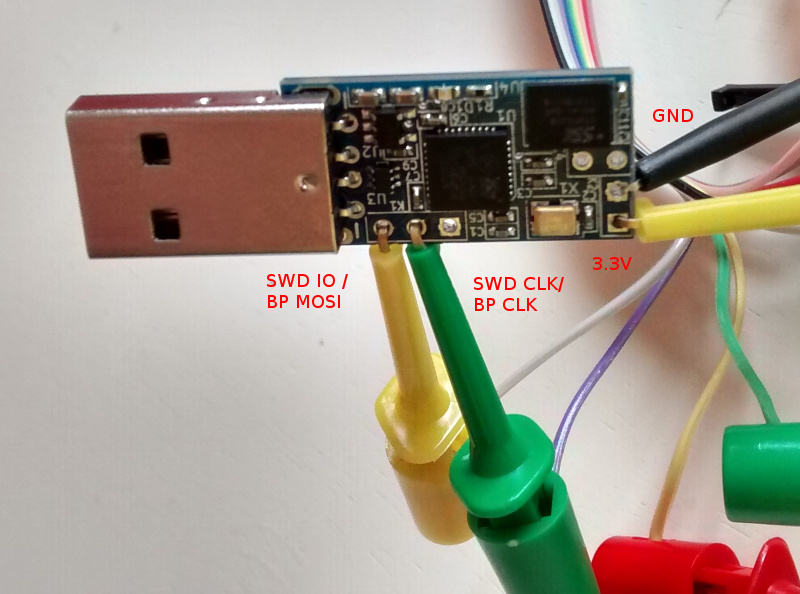 That s BP MOSI (grey) to SWD IO, BP CLK (purple) to SWD CLK, BP 3.3V (red) to FST-01 PWR and BP GND (brown) to FST-01 GND. Once that was done I fired up OpenOCD in one terminal and did the following in another:



 Maybe setting up a BOF would also be a good idea.
 Ok, I have to admit, I still have Windows on my laptop. I do about 90% of my work on the Linux (Debian) side, but there are some applications where I don t have an alternative: Word (yes, I know LibreOffice, but it is still not capable enough to handle Japanese forms without breaking the layout), and much more,
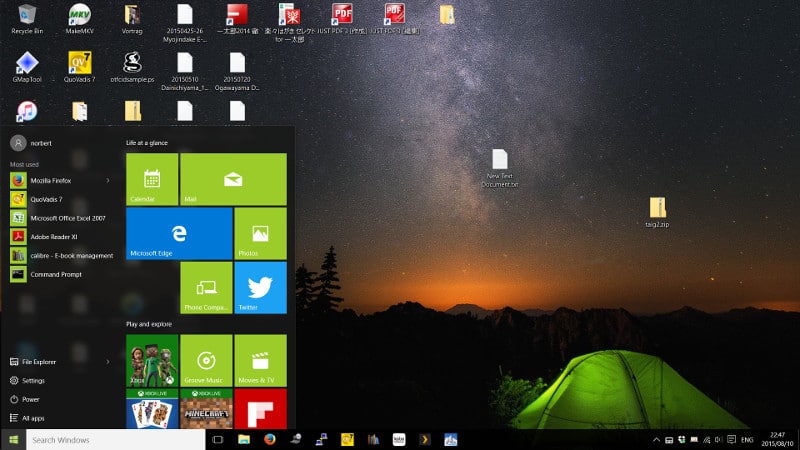 The machine is a Sony Vaio I have reported already many times, see the posts of the




 From the long list of changes let me pick one update and one new package:
 .
Squeeze LTS
This was my thirteens month that I did some work for the
 .
 So, everybody knows that WPS (Wi-Fi Protected Setup) is broken. But sometimes, you don't own the access point, and you'd just want the wireless to work. That happens for example when you're a guest in some place using an Orange Livebox and you don't have the WPA passphrase (usually because it's written somewhere you don't have access too, or because someone forgot to tell you).
Liveboxes WPS is the press button thing: you press a button on the front for one second, then any device can connect in the next two minutes. That works fine with Android devices, for example, but it didn't work with my laptop and NetworkManager, which doesn't support WPS at all.
Fortunately, the underlying piece of software (wpa_supplicant) does support WPS, and even the push button style. And you can nicely ask it to reveal the passphrase to you with the following trick.
 After less than a week of complaints, the
 The problem
One problem to solve when doing web authentication has always been one
identity provider, so you don't have to remember which username (or
email address) you used for that bugtracker you used three years ago
or that website. And tie it to one login ideally. Five years ago this
problem seemed to be basically solved. There was OpenID and while it
may not have been great it worked. You could have your own provider,
your institution (university, company, foss project, ..) could have
one and you could use your university-provided ID for all university
stuff.
Today's state
Looking at the problem again today and the situation seems to have
changed. To the worse. A lot. People are actively removing OpenID
support. There seemed to be a replacement with, at least, proper
design goals: Mozilla's persona. However this seems to be a dead end,
no-one (almost) actually supports it.
Then there is what people call OAuth2. However there does not seem to
be such a thing as OAuth2 at all, at least not for logging into
websites. So for example
 The tape archiver, better known as
 Till now I have used
 There is only one caveat: Syncing with Kobo will re-download the original dictionary and overwrite the enhanced one. There is at least one solution here, which I am employing, see

