Search Results: "ag"

17 December 2020

Bits from Debian: The Debian web updates its homepage and prepares for a major renewal

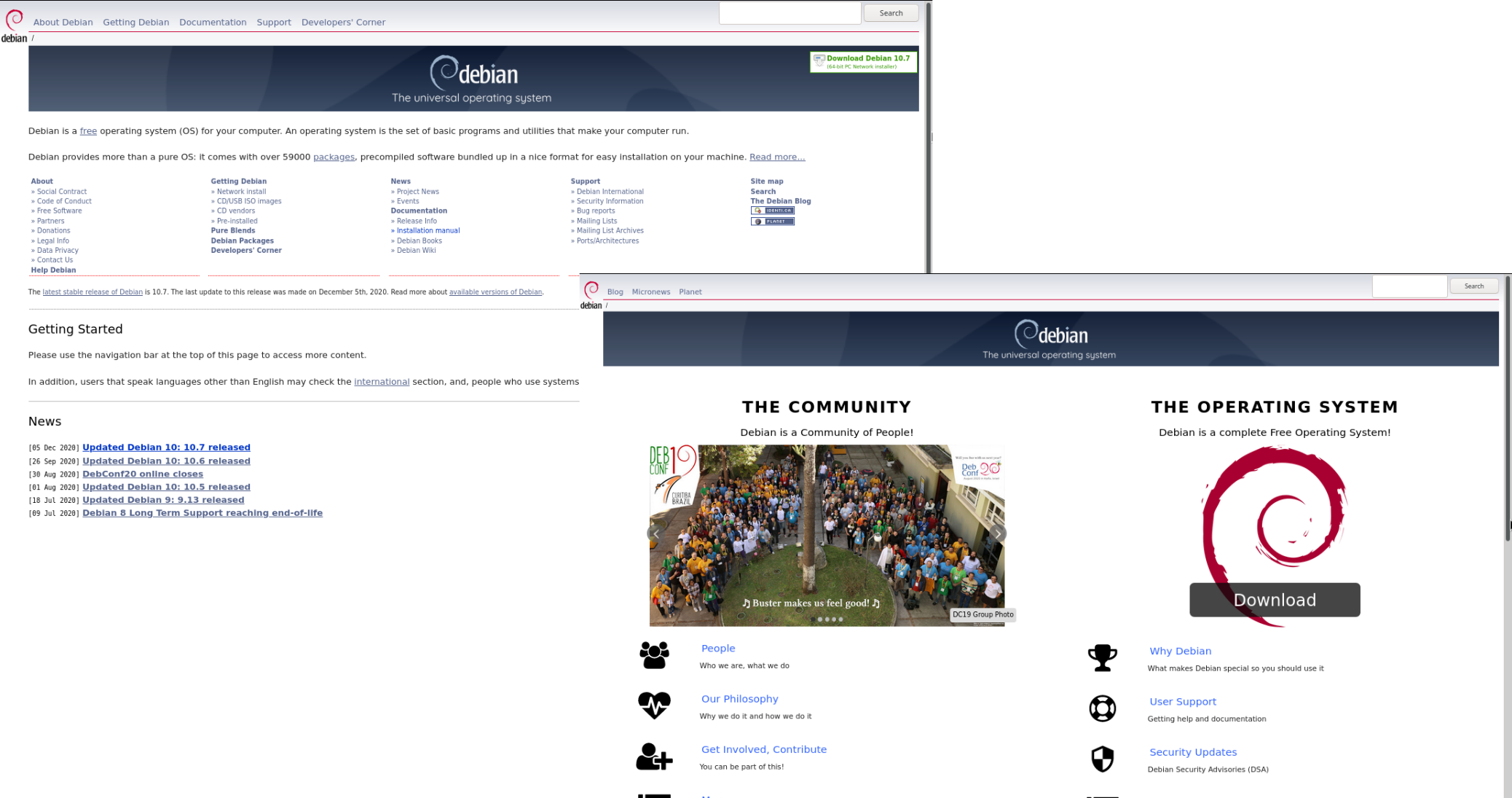
Today, the Debian website displays a new homepage. Since the most recent web team sprint in March 2019, we have been working on renewing the structure, content, layout and scripts that build the site. There has been work mainly in two areas: removing or updating obsolete content, and creating a new homepage which is more attractive to newcomers, and which also highlights the social aspect of the Debian project in addition to the operating system we develop. Debian website: part of the old homepage (back) and the new one (front) Although this took longer than we would have liked, and we don't consider this new homepage final, we think it's a good first step towards a much better web site. The web team will continue to work on restructuring the Debian website. We would like to appeal to the community for help, and are also considering external assistance, since we're a small group, whose members are also involved in other Debian teams. Some of the next steps we expect to walk are improve the CSS, icons, and layout in general, and review of the content, to have a better structure. If you would like to help, contact us. You can reply to the version of this article (with some more details) published in our public mailing list or chat with us in the #debian-www IRC channel (at irc.debian.org).

Elana Hashman: Easy risotto

I have a secret: risotto doesn't have to involve standing over a pot, stirring for 30 minutes. There is a better way. I've made risotto using the "stir 5ever" method and frankly this one is half the work and just as good. I took inspiration from Kenji Lopez-Alt, who describes how you can make risotto with only a few minutes of stirring at the end! Yes, this is a secret too good to keep to myself. The linked recipe is too rich for a weeknight dinner, at least for my tastes, so I've included my typical modifications below, which omits the heavy cream. I usually make mushroom risotto, because all the ingredients are long-lived pantry ingredients, which means I can make this on a whim without having to grocery shop! Mushroom risotto Serves 3 as a main course. Active time: 25m. Total time: 45m. Ingredients: Recipe:
  1. Leave mushrooms to rehydrate in 1 cup of hot water for at least 10 minutes.
  2. Set a wide saucepan (about 3.5qts) or skillet on medium heat.
  3. Mix stock and wine for a total of 4 cups. You can used homemade stock (the best), boxed, or reconstitute from bouillon (my usual). If you use bouillon, I find you get the best flavour if you use a mix, so I tend to use half "no-chicken" and half "organic chicken" of the Better than Bouillon brand. Let this cool if you used boiling water; you don't want it to be too hot.
  4. Mix the rice and stock in a large bowl, agitating it to release the starch. Reserve stock and set the rice in a strainer to drain.
  5. Small dice an onion. Add olive oil and butter to the pan, and then add the onion. Cook the onion until it's translucent, but don't brown it.
  6. Increase the heat to high and add the rice to the pan to toast until it becomes a little bit brown, stirring occasionally, about 3-4 minutes. Set a timer so it doesn't burn
  7. Meanwhile, drain the mushrooms, making sure you reserve the broth. Chop mushrooms and mince the garlic. Once the rice is toasted, add mushrooms and garlic and stir.
  8. Stir the reserved stock. Add all of the mushroom liquid and all but 1 cup of the starchy stock to the pan. Bring to a boil.
  9. Once it has reached a boil, cover, reduce to the lowest heat, and allow the rice to simmer undisturbed for 10 minutes. In the meantime, you can grate the cheese.
  10. After 10 minutes, stir the rice once, shake the pan to ensure it is level, and return to the heat for 10 more minutes. Sit back, relax, and bask in the very little stirring you are doing.
  11. At this point, the rice should be nearly cooked. Give it a stir, and add the remaining cup of broth. Stir until fully incorporated, turn the heat up to high, and cook until the risotto reaches your preferred consistency. I like mine rather thick.
  12. Once the rice is fully cooked, turn off the heat and stir in the grated cheese a bit at a time, reserving some for garnish. Taste, and season with salt and pepper.
  13. Garnish with the grated cheese, and perhaps some herbs. Serve and enjoy!
Variations No mushrooms: Okay, okay, you hate mushrooms! Sorry! You can leave them out. Don't bother with the mushrooms, and add broth to make up for the lost liquid. Mushroom lover: Alternatively, if you love mushrooms and you have fresh ones available, use &frac13 to a pound (150-225g) chopped fresh mushrooms instead of dried. Add them at the same time you add the onions to ensure all the liquid cooks off. Milanese, with stuff: One of my favourite variations on this dish is a version with shrimp, asparagus, and saffron. Leave the mushrooms out, increase the wine to or even 1 cup (seafood likes a little extra acidity), ensure you have a total of 5 cups of broth, and add a few strands of saffron. Chop asparagus and shrimp, season with salt and pepper, saut them with some butter or olive oil in a separate pan so they don't overcook, and fold them in at the very end, after you've added the cheese. I MUST SUFFER: This was too easy? Want to stir more??? Fine, have it your $*!#ing way. I'm sure you can be creative and come up with something on your own...

16 December 2020

John Goerzen: Non-Creepy Technology Purchasing & Gifting Guides

This time of year, a lot of people are thinking of buying gadgets and phones as gifts. But there are a lot of tech companies that have unethical practices, from terrible working conditions in their factories to spying on their users. Here are some buying guides to help you find gadgets that are fun and not creepy. The Free Software Foundation s Ethical Tech Giving Guide is a fantastic resource from what s probably the pickiest organization out there when it comes to tech. Not only do they highlight good devices, they also explain why and why you should, for instance, avoid the iPhone (their history of silencing political activists and spying on users). The FSF also has a Guide to DRM-Free Living talks about books, video, audio, and software that respects your freedom by letting you make your own backups, move it to other devices, and continue to use your purchases even if you have no Internet or the company you bought them from goes bankrupt. This is a fantastic and HUGE resource; there are hundreds of organizations out there that provide content in a way that respects your rights and many of them do it for free, legally, as well. PrivacyTools has a fantastic series of guides on everything from email providers to operating systems, as well as links to a number of other guides. The DeGoogle wiki on Reddit (as well as the sidebar) has a lot of fantastic alternatives to things like Chromebooks, Chrome, Gmail, etc. Related resources Here are some resources for education (what the issues are) and information about what companies and products to avoid. In addition to the FSF s other fantastic resources above, they also have a list of proprietary malware. It lists things, practices, and companies to avoid, and talks about the reasons why. Their addictions page is particularly good and relevant to my recent post on the problems of the attention economy. The Surveillance Self-Defense site from the Electronic Frontier Foundation is a fantastic introduction into how corporate surveillance works and how to defend against it. Use with a grain of salt: Mozilla, the people behind Firefox, have a site called Privacy Not Included that rates products by how creepy they are. They focus more narrowly on privacy than the more expansive set of freedoms the FSF considers (privacy is one of a number of things the FSF looks at), and in some cases I would say Mozilla is too generous (eg, with the Amazon Kindle, a number of their data points are just incorrect.)

Jonathan McDowell: DeskPi Pro + 8GB Pi 4

DeskPi Pro Raspberry Pi case Despite having worked on a number of ARM platforms I ve never actually had an ARM based development box at home. I have a Raspberry Pi B Classic (the original 256MB rev 0002 variant) a coworker gave me some years ago, but it s not what you d choose for a build machine and generally gets used as a self contained TFTP/console server for hooking up to devices under test. Mostly I ve been able to do kernel development with the cross compilers already built as part of Debian, and either use pre-built images or Debian directly when I need userland pieces. At a previous job I had a Marvell MACCHIATObin available to me, which works out as a nice platform - quad core A72 @ 2GHz with 16GB RAM, proper SATA and a PCIe slot. However they re still a bit pricey for a casual home machine. I really like the look of the HoneyComb LX2 - 16 A72 cores, up to 64GB RAM - but it s even more expensive. So when I saw the existence of the 8GB Raspberry Pi 4 I was interested. Firstly, the Pi 4 is a proper 64 bit device (my existing Pi B is ARMv6 which means it needs to run Raspbian instead of native Debian armhf), capable of running an upstream kernel and unmodified Debian userspace. Secondly the Pi 4 has a USB 3 controller sitting on a PCIe bus rather than just the limited SoC USB 2 controller. It s not SATA, but it s still a fairly decent method of attaching some storage that s faster/more reliable than an SD card. Finally 8GB RAM is starting to get to a decent amount - for a headless build box 4GB is probably generally enough, but I wanted some headroom. The Pi comes as a bare board, so I needed a case. Ideally I wanted something self contained that could take the Pi, provide a USB/SATA adaptor and take the drive too. I came across the pre-order for the DeskPi Pro, decided it was the sort of thing I was after, and ordered one towards the end of September. It finally arrived at the start of December, at which point I got round to ordering a Pi 4 from CPC. Total cost ~ 120 for the case + Pi.

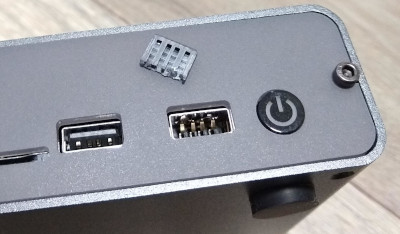
The Bad First, let s get the bad parts out of the way. Broken USB port (right) I managed to break a USB port on the Desk Pi. It has a pair of forward facing ports, I plugged my wireless keyboard dongle into it and when trying to remove it the solid spacer bit in the socket broke off. I ve never had this happen to me before and I ve been using USB devices for 20 years, so I m putting the blame on a shoddy socket. The first drive I tried was an old Crucial M500 mSATA device. I have an adaptor that makes it look like a normal 2.5 drive so I used that. Unfortunately it resulted in a boot loop; the Pi would boot its initial firmware, try to talk to the drive and then reboot before even loading Linux. The DeskPi Pro comes with an m2 adaptor and I had a spare m2 drive, so I tried that and it all worked fine. This might just be power issues, but it was an unfortunate experience especially after the USB port had broken off. (Given I ended up using an M.2 drive another case option would have been the Argon ONE M.2, which is a bit more compact.)

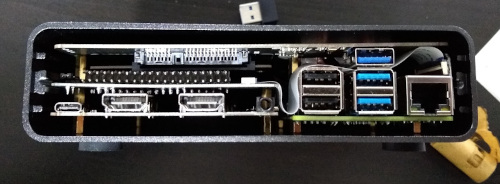
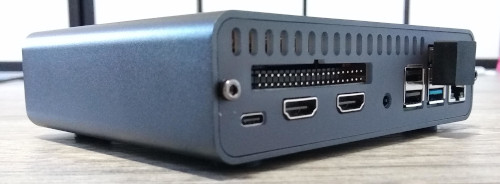
The Annoying DeskPi Pro without rear bezel The case is a little snug; I was worried I was going to damage things as I slid it in. Additionally the construction process is a little involved. There s a good set of instructions, but there are a lot of pieces and screws involved. This includes a couple of FFC cables to join things up. I think this is because they ve attempted to make a compact case rather than allowing a little extra room, and it does have the advantage that once assembled it feels robust without anything loose in it. DeskPi Pro with rear bezel and USB3 dongle I hate the need for an external USB3 dongle to bridge from the Pi to the USB/SATA adaptor. All the cases I ve seen with an internal drive bay have to do this, because the USB3 isn t brought out internally by the Pi, but it just looks ugly to me. It s hidden at the back, but meh. Fan control is via a USB/serial device, which is fine, but it attaches to the USB C power port which defaults to being a USB peripheral. Raspbian based kernels support device tree overlays which allows easy reconfiguration to host mode, but for a Debian based system I ended up rolling my own dtb file. I changed
#include "bcm283x-rpi-usb-peripheral.dtsi"
to
#include "bcm283x-rpi-usb-host.dtsi"
in arch/arm/boot/dts/bcm2711-rpi-4-b.dts and then I did:
cpp -nostdinc -I include -I arch -undef -x assembler-with-cpp \
    arch/arm/boot/dts/bcm2711-rpi-4-b.dts > rpi4.preprocessed
dtc -I dts -O dtb rpi4.preprocessed -o bcm2711-rpi-4-b.dtb
and the resulting bcm2711-rpi-4-b.dtb file replaced the one in /boot/firmware. This isn t a necessary step if you don t want to use the cooling fan in the case, or the front USB ports, and it s not really anyone s fault, but it was an annoying extra step to have to figure out. The DeskPi came with a microSD card that was supposed to have RaspiOS already on it. It didn t, it was blank. In my case that was fine, because I wanted to use Debian, but it was a minor niggle.

The Good I used Gunnar s pre-built Pi Debian image and it Just Worked; I dd d it to the microSD as instructed and the Pi 4 came up with working wifi, video and USB enabling me to get it configured for my network. I did an apt upgrade and got updated to the Buster 10.7 release, as well as the latest 5.9 backport kernel, and everything came back without effort after a reboot. It s lovely to be able to run Debian on this device without having to futz around with self-compiled kernels. The DeskPi makes a lot of effort to route things externally. The SD slot is brought out to the front, making it easy to fiddle with the card contents without having to open the case to replace it. All the important ports are brought out to the back either through orientation of the Pi, or extenders in the case. That means the built in Pi USB ports, the HDMI sockets (conveniently converted to full size internally), an audio jack and a USB-C power port. The aforementioned USB3 dongle for the bridge to the drive is the only external thing that s annoying. Thermally things seem good too. I haven t done a full torture test yet, but with the fan off the system is sitting at about 40 C while fairly idle. Some loops in bash that push load up to above 2 get the temperature up to 46 C or so, and turning the fan on brings it down to 40 C again. It s audible, but quieter than my laptop and not annoying. I liked the way the case came with everything I needed other than the Pi 4 and a suitable disk drive. There was an included PSU (a proper USB-C PD device, UK plug), the heatsink/fan is there, the USB/SATA converter is there and even an SD card is provided (though that s just because I had a pre-order). Speaking of the SD, I only needed it for initial setup. Recent Pi 4 bootloaders are capable of booting directly from USB mass storage devices. So I upgraded using the RPi EEPROM Recovery image (which just needs extracted to the SD FAT partition, no need for anything complicated - boot with it and the screen goes all green and you know it s ok), then created a FAT partition at the start of the drive for the kernel / bootloader config and a regular EXT4 partition for root. Copies everything over, updated paths, took out the SD and it all just works happily.

Summary My main complaint is the broken USB port, which feels like the result of a cheap connector. For a front facing port expected to see more use than the rear ports I think there s a reasonable expectation of robustness. However I m an early adopter and maybe future runs will be better. Other than that I m pretty happy. The case is exactly the sort of thing I wanted; I was looking for something that would turn the Pi into a box that can sit on my desk on the network and that I don t have to worry about knocking wires out of or lots of cables hooking bits up. Everything being included made it very convenient to get up and running. I still haven t poked the Pi that hard, but first impressions are looking good for it being a trouble free ARM64 dev box in the corner, until I can justify a HoneyComb.

John Goerzen: How To Join the Fediverse and Cast Off the Attention Economy

In a recent post, I wrote about how the attention economy in use at big social networks hurts you. In this post, I m going to suggest what to do about it. Mastodon and the Fediverse When you use email, you can send a message from an account at Google to one at Yahoo, Microsoft, or any of millions of businesses and organizations running their own mail server. Unlike, say, Facebook, email isn t a single service, but rather a whole bunch of independent systems that can communicate (or federate) with each other. The Fediverse is similar, and the most advanced Fediverse client is Mastodon. Mastodon: It s easy to get started! Head over to joinmastodon.org and click Get Started . Pick a community don t worry, this isn t a hugely consequential decision, as you can always move or change later. You can browse activity from across the Fediverse, or just on your local community, so if you find a community with similar interests, it can be a neat way to find others to follow. If you re looking for more details, mastodon.help has a nice guide. Defeating the Attention Economy So, why does Mastodon make a difference? First of all, you get to pick your host (and even software). With Twitter, you pretty much are using Twitter (yes, I know of things like Hootsuite, but for the vast majority of people, it s twitter.com only). With Mastodon, you have choice. Pick the host that runs the software and has the kind of moderation you like. Secondly, Mastodon is not for profit. There is no money to be made in keeping you on the site. Almost all Mastodon instances are ad-free. And Mastodon s completely open protocols make it easy to go elsewhere if you like. It s Not Just Mastodon! There are plenty of other programs in the Fediverse. And, this is really key, they all interact with each other. You can share photos in Pixelfed (sort of like a federated Instagram) and see them and comment in Mastodon! Some things to point out: And there are many others. This blog, for instance, runs WordPress and uses an ActivityPub connector; comments from the Fediverse integrate here. Find me in the Fediverse You can look me up: just type in @jgoerzen@floss.social in the search box of any Mastodon instance and click Follow. You can also follow this blog at @jgoerzen@changelog.complete.org.

Dirk Eddelbuettel: RcppAnnoy 0.0.18: Tweaks

annoy image A new maintenance release, now at version 0.0.18, of RcppAnnoy is now on CRAN. RcppAnnoy is the Rcpp-based R integration of the nifty Annoy library by Erik Bernhardsson. Annoy is a small and lightweight C++ template header library for very fast approximate nearest neighbours originally developed to drive the famous Spotify music discovery algorithm. This release is follow-up to release 0.0.17 which was made four weeks ago, and which brought the new upstream release 1.17 of Annoy. We now have an updated upstream with a PR by Aaron aiming for improved control of RNG seeding to ensure better reproducibility, along with extended tests and new helpers for RcppAnnoy and Annoy version numbers. The release was once again coordinated with Annoy and James whose BiocNeighbors and uwot packages both consume the Annoy header library shipped here. Detailed changes follow below.

Changes in version 0.0.18 (2020-12-15)
  • Small tweaks to threading policy header defines (Dirk closing #65)
  • Vignette code is again compiled during testing (Aaron Lum and Dirk in #66 addressing #64)
  • Upstream code (with Aaron's PR) was synchronized once more (Dirk in #67)
  • A new helper function was added to report the Annoy version (Aaron in #68)

Courtesy of my CRANberries, there is also a diffstat report for this release. If you like this or other open-source work I do, you can sponsor me at GitHub.

This post by Dirk Eddelbuettel originated on his Thinking inside the box blog. Please report excessive re-aggregation in third-party for-profit settings.

15 December 2020

Hideki Yamane: 2020/12/20 Tokyo Debian Meeting online: Make legacy .deb package modern (live demo)

Time flies, I'm still busy, but I'll give a talk at Tokyo Debian Meeting online about "Make legacy .deb package modern (live demo)" Why live demo? Because I'm busy and don't have a time to prepare docs for it... ;-)

Kentaro Hayashi: Say Good-Bye and Thanks hal-flash

Today, hal-flash package was removed from Debian unstable. hal-flash is wrapper library for HAL which is not used nowadays. At that time, HAL was required because Adobe Primetime DRM uses libadobecp, but HAL was already replaced to udev or udisks. So we need emulation layer for HAL. hal-flash was it for such a purpose. (At least, hal-flash is required to play hulu.jp movies which uses Adobe DRM) hal-flash package was already orphaned years ago, and removed from unstable now. O: hal-flash -- Compatibility library to allow playback of Flash DRM content Thanks hal-flash package!

Russell Coker: Phone Plan Comparison 2020

It s been over 6 years since my last post comparing 3G data plans in Australia. I m currently using Aldi Mobile [1]. They have a $15 package which gives 3G of data and unlimited calls and SMS in Australia for 30 days, and a $25 package that gives 20G of data and unlimited international calls to 15 unspecified countries (presumably the US and much of the EU). It s on the Telstra network so has good access all around Australia. I m on the grandfathered $20 per 30 days plan which gives me more than 3G of data (not sure how much but I need more than 3G) while costing less than the current offer of $25.
Telco Cost Data Network Calling
Aldi $15/30 days 3G Telstra Unlimited National
Aldi $25/30 days 20G Telstra Unlimited International
Dodo [2] $5/month none Optus Unlimited National + Unlimited International SMS
Moose [3] $8.80/month 1G Optus 300min national calls + Unlimited National SMS
AmaySIM [4] $10/month 2G Optus Unlimited National
Kogan [5] $135/year 100G Vodafone Unlimited National
Kogan $180/year 180G Vodafone Unlimited National
Dodo $20/month 12G Optus Unlimited National + Unlimited International SMS + 100mins International talk
In the above table I put Aldi at the top because Telstra has the best network. If you want to use a mobile phone anywhere in Australia then Telstra is the best choice. If you only care about city areas then the other networks are usually good enough. The rest of the services are in order of price, cheapest first. For every service I only mentioned the offerings that are price competitive. I didn t list the offerings that are larger than these. There are offerings of 300G/year or more, but most people don t need them. Every service in this table has more expensive offerings with more data. Please inform me in the comments of any services I missed.

14 December 2020

Raphaël Hertzog: Funding Debian development projects with Freexian, first project received!

After an unexpectedly short discussion on debian-project, we re moving forward with this new initiative. The Debian security team submitted a project proposal requesting some improvements to tracker.debian.org, and since nobody of the security team wants to be paid to implement the project, we have opened a request for bids to find someone to implement this on a contractor basis. If you can code in Python following test-driven development and know the Django framework, feel free to submit a bid! Ideally you have some experience with the security tracker too but that s not a strong requirement. About the project If you haven t read the discussion on debian-project, Freexian is putting aside part of the money collected for Debian LTS to use it to fund generic Debian development projects. The goal is two-fold:
  1. First, the LTS work necessarily had an impact on other Debian teams that made the project possible (security team, DSA, buildd, ftpmasters, debian-www mainly) and we wanted to be able to give back to those teams by funding improvements to their infrastructure.
  2. We have always allowed paid contributors to go beyond just preparing security updates for the LTS release. They can pick tasks that improve the LTS project at large (we try to collect such tasks here: https://salsa.debian.org/lts-team/lts-extra-tasks/-/issues) but they should not go over 25% of their allocated monthly hours so this limits their ability to tackle bigger projects and we would like to be able to tackle bigger projects that can have a meaningful impact on the LTS project and/or Debian in general.
We have tried to formalize a process to follow from project submission up to its implementation in this salsa project:
https://salsa.debian.org/freexian-team/project-funding
https://salsa.debian.org/freexian-team/project-funding/-/blob/master/Rules-LTS.md We highly encourage the above-mentioned Debian teams to make proposals. A member of those teams can implement the project and be paid for it. Or they can decide to let someone else implement it (we expect some of the paid LTS contributors to be willing to implement such projects), and just play the reviewer role driving the person doing the work in the right direction. Contrary to Google s Summer of code and other similar projects, we put the focus on the results (and not in recruiting new volunteers), so we expect to work with experienced persons to implement the project. But if the reviewer is happy to be a mentor and spend more time, then it s OK for us too. The reviewer is (usually) not a paid position. If you re not among those teams, but if you have a project that can have a positive impact on Debian LTS (even if only indirectly in the distant future), feel free to try your chance and to submit a proposal.

No comment Liked this article? Click here. My blog is Flattr-enabled.

Jonathan Dowland: git rebasing and lab books

For my PhD work, I've been working on preparing an experimental branch of StrIoT for merging down to the main branch. This has been a long-lived branch (a year!) within which I've been exploring some ideas. Some of the code I want to keep, and some I don't. The history of the experimental branch is consequently messy. Looking it over and considering what a reviewer needs to see, there's a lot of things that are irrelevant and potentially distracting. And so, I've been going through an iterative process of steadily whittling down the history to the stuff that matters: some strings of commits are dropped, others squashed together, and others re-ordered. The resulting branch is a historic fiction. This is common practice. Joey Hess ruminated about it 5 years ago in "our beautiful fake histories", pointing out that the real history is also useful, and perhaps worth preserving. After a recent conversation with my supervisor I realised the situation was analagous to writing a research paper (or a thesis): the process of getting to the conclusion which the thesis documents is messy, with false starts, wrong directions, and plenty of roads-not-travelled. The eventual write-up focusses on the path that lead to the conclusion, and a lot of the side-quest stuff disappears. The "true history" then, is captured elsewhere: in lab books, diaries and the like, and these have their own value. So do my messy exploratory branches, before they've been cleaned up for merging.

Vincent Fourmond: Version 3.0 of QSoas is out

After almost two years of development, version 3.0 of QSoas is finally out ! It brings in a number of new features. An expert mode for fitting Undoubtedly the most important feature in the new version is a complete upgrade of the fit system, which now features an expert mode, turned on by using the /expert=true option with the fit commands. The expert mode features a command prompt that looks like the normal command prompt, in which it is possible: The latter feature is very important when running fits with many parameters. In that case, there are a number of local minima, and it is necessary to try a number of different starting parameters to really find the best parameters. The new parameter space exploration feature makes it much easier than before, with an interface that allows easily finding the best parameters tried so far and reuse them.
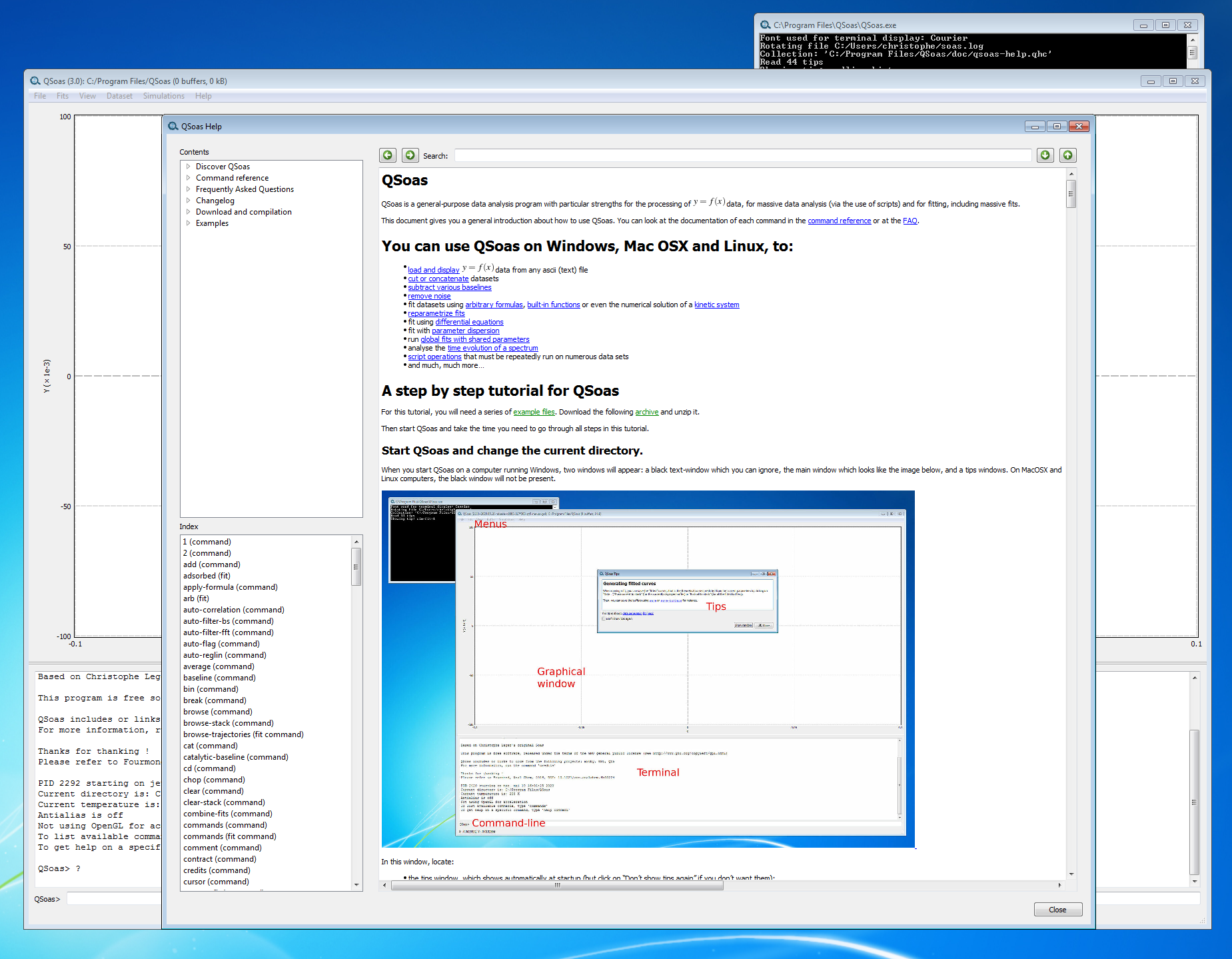
A new documentation system Another very important update is the inclusion of a new, offline, documentation system. The documentation features browsing via table of contents, a command index and text search. It also features the possibility to copy commands from the help to the command prompt, or even run them directly. To top it all, it comes with a series of startup tips that might teach you a thing or two about QSoas (try hitting Show random to learn new tricks !).
Many other features For the full list of changes, please see the changelog. Apart from the changes described above, these are my favorites:
To get the new version, you can just download the source code from the downloads page, where you can also purchase precompiled versions for Windows and MacOS. You can also clone the source from the GitHub repository. About QSoasQSoas is a powerful open source data analysis program that focuses on flexibility and powerful fitting capacities. It is released under the GNU General Public License. It is described in Fourmond, Anal. Chem., 2016, 88 (10), pp 5050 5052. Current version is 3.0. You can download its source code there (or clone from the GitHub repository) and compile it yourself, or buy precompiled versions for MacOS and Windows there.

Russ Allbery: remctl 3.17

remctl is a simple GSS-API-based RPC system designed to be as trivial to deploy as possible for sites already using Kerberos. I owe various people deeper reviews of remctl feature changes, but alas this release is not that. This is a bit of a stopgap maintenance release primarily to fix a testing problem on Debian that booted remctl out of testing. The basic problem is that a lot of test machinery assumes that every system will have an IPv4 address available, but this is not necessarily true on modern systems. This release only fixes the tests that don't use Kerberos. The tests that require Kerberos have much deeper assumptions that the IPv4 loopback will be available, and will require later work (hampered by the fact that I personally don't have such an environment readily available that also has access to a KDC and need to construct something in Docker or some similar container system). This release also adds support for PHP 8 in anticipation of a possible Debian migration (some minor C source cleanup was required, nothing major), fixes some Python build system problems, and incorporates the changes from rra-c-util 8.4. For future releases, I am considering removing the language bindings from the remctl distribution and distributing them separately as stand-alone tarballs. The primary reason for this is to more easily upload those packages to the respective repositories for those languages (particularly Perl and Python; I don't know how the Ruby and PHP ones work and would need to find out), thus making them available to tools like cpanm and pip as long as the C libraries were already installed. The cost is that someone who wants the C libraries and the extensions will have to download multiple tarballs, and someone (not me) will have to create separate Red hat spec files for the various language bindings. If this would cause problems for you, let me know. It's not likely to happen soon since it would require some major reworking of my web page publication software, but once I finish the prerequisites, I'm likely to adopt this approach unless there are objections. You can get the latest release from the remctl distribution page.

Russ Allbery: rra-c-util 8.4

I've released a new version of my collection of utility libraries, Autoconf macros, and similar support infrastructure, primarily to include changes in the upcoming remctl and INN releases. Highlights: The general support policy for rra-c-util is now that I will drop support for systems older than fifteen years if it becomes annoying to support them. That's still extremely conservative, but may let me drop some more support code that is essentially never used. The replacements for missing IPv6 functions are probably next on the chopping block. Thanks to Julien LIE and Bo Lindbergh for their contributions to this release. You can get the latest release from the rra-c-util distribution page.

13 December 2020

Jan Wagner: Monitoring Plugins 2.3 released

While our last release has matured for quite a little time, there raised demands within our community for a new release. The development has settled this fall and @sni was already using master for a while in production, so we thought about to release. Anyway Debian Freeze is coming, let's cut a new upstream release! The last question was: Who should cut the release? The last releases was done by @JeremyHolger, but these days everybody is short on time. Fortunately Holger has documented the whole release process very well, so I jumped on the band wagon and slipped into the release wizard role.
Surprisingly it seems I was able to fix all faults I've done in the release process (beside using the 2.2 link in the release announcement mail) and kicked the release of monitoring-plugins 2.3 successfully. Grab the new Monitoring Plugins release while it's hot (and give the new check_curl a try)!
Hopefully monitoring-plugins 2.3 will hit Debian experimental soon.

Russ Allbery: Review: Because Internet

Review: Because Internet, by Gretchen McCulloch
Publisher: Riverhead Books
Copyright: 2019
ISBN: 0-7352-1095-0
Format: Kindle
Pages: 276
If you're familiar with linguistics as a field of scientific study (as opposed to the tool-based fields of grammar or writing advice), you'll be familiar with the dichotomy between written and spoken language. We may spend more time thinking about written language since it is central to most types of education and carries much of the intellectual and social weight of society. Linguists, however, see spoken language as more fundamental, since speech is wired into our brains and universal in human societies. Written language is a recent and somewhat artificial invention. One also learns from linguistics that spoken language does not follow many of the rules of written language that we painstakingly memorized in school. In casual speech, people split infinitives, speak in partial and run-on sentences, ignore nit-picking pronoun case rules, and rarely notice or care about the difference between less and fewer. Spoken language does have rules, but they're more subtle and nuanced than the grammar rules we learn in school. (I think the real fun of linguistics is separating the rules that native speakers follow effortlessly from the artificial rules used as education markers.) This is, in part, because nearly all spoken language is informal, whereas nearly all written language is formal. Enter the Internet, and enter this book. For the first time in human history we have both an explosion of informal writing and easy availability of that writing to linguists for study. Informal writing is not entirely new, of course. We've had personal letters for nearly as long as we've had writing, not to mention private notes, diaries, and other writing intended for tiny audiences. But consider who wrote private letters and, on top of that historical filter, whose private letters were preserved for linguistic research. Until relatively recently, only the upper classes were literate and had access to the infrastructure to write and send letters. Someone's letters or private notes were unlikely to be preserved unless they were someone famous and important, and thus often well-educated and more likely to take a more formal tone in writing. If you compare this to the Internet-driven blizzard of work and personal email, SMS conversations, chatrooms, and social media posts, the difference is obvious in both volume and level of informality. We're all on the Internet, we all read and write with a frequency that would be staggering to the average person from even fifty years ago, and while one may take a bit of additional care with a tricky email to one's manager, the SMS message to one's friend is as informal of a use of language as a conversation over coffee. Gretchen McCulloch is a professional linguist and Because Internet is about exactly this phenomenon: the new conventions of informal writing, how it has changed and evolved, and the new subtleties and shortcuts we've invented to make written communication easier. That goes beyond words and grammar to encompass punctuation, emoji and emoticons, memes and reaction gifs, and even the subtleties of timing, whitespace, and the construction of virtual places via our choices in how and where we write. This topic is my catnip, so it's not surprising I love this book. I've been heavily involved with online communities that communicate in writing since 1993 (making me, in McCulloch's classification, an Old Internet Person; each wave of introduction to the Internet has its own conventions that can be in conflict with later waves). I've now spent more than half my life carrying out most of my social activity and most of my closest friendships primarily in writing, so I found a lot of satisfaction in a linguistic study that takes that seriously rather than treating it as a curiosity. But, even better, I was amazed at how much I didn't know, in part because I am from a specific wave. I have a deep intuition for the Usenet conventions, but not as good of an understanding of the ones from AIM and LiveJournal one wave later (the Full Internet People). And I had a lot to learn about the conventions of the Instagram and Snapchat cluster (the Post Internet People, who have never known life without the Internet). One of the things that struck me while reading this book is how most of the language innovations that McCulloch describes are addressing the old complaint that written communication is inferior to face-to-face conversation because it lacks emotional nuance. My knee-jerk reply is that, no, written communication is full of emotional nuance and the complainer is just bad at reading it, but that's somewhat unfair. A better statement of the problem is that there is not a standardized language for emotional nuance in written communication, in part because it's so new in human history. Most humans are extremely good at reading facial expressions and body language for emotional cues, and those physical expressions are largely subconscious, reliable, and similar among different people (particularly within a culture; one can get in trouble with body language variations across cultures). This is not true of writing. With friends I've talked to over chat for twenty-five years, I can read volumes about their emotional state in a couple of short lines of text. But with strangers, despite decades of Internet communications, I will still misread cues and misinterpret simple intentions. The other standard response to this complaint is that it is possible to put extensive emotional nuance into formal writing. Just get better at writing! This is true, but unhelpful. There's a reason why we give book contracts to people who are very good at investing formal writing with emotional nuance. It's difficult, time-consuming, and requires a great deal of practice. That may be appropriate for formal, paid writing, but it won't do for informal writing, which by definition needs to be as effortless as possible. It's therefore unsurprising that once millions of people were using the Internet regularly for informal writing, they started adding new mechanisms, shortcuts, and conventions for emotional nuance. The standardization is growing, but conventions still vary widely between waves of Internet users. One of the most fascinating parts of this book for me was McCulloch's explanation of why periods (and, to a lesser extent, capital letters) in short chat messages are perceived by younger users as harsh or passive-aggressive. I still have the formal writing mindset of treating proper capitalization and punctuation as a point of pride, but McCulloch makes an excellent argument for letting go of my biases and understanding how and why language is changing. The realization I had while reading this is that many of the changes that look like sloppiness or laziness to someone trained in formal writing have the effect of giving language greater dynamic range. If one always uses periods uniformly, the period becomes meaningless except as a sentence boundary (which is redundant with newlines in most short informal chat messages). If one normally doesn't use it, and then suddenly starts using it, the period can carry semantic weight. It can convey a snippy tone of voice, a note of annoyance, or other subtle shades of meaning. I still use periods in most of my Slack messages because habits are hard to break, but I'm remembering to leave them off some of the time and paying more attention to what emotional weight they're carrying when present. Because Internet is therefore the rare book that meets the bar of changing my day-to-day behavior. "lol" is another excellent example that McCulloch spends some time on. It started life as LOL, an abbreviation for "laughing out loud," and that's still how it's stuck in my head. But, as McCulloch explains, it no longer means that to newer waves of Internet users. It now carries a far more complicated and nuanced meaning that has very little to do with physical laughter and that doesn't easily translate to a single word or sentence. I went from being mildly irritated by and mildly superior towards the ubiquitous "lol" to realizing that it's a fascinating new word that carries primarily emotional nuance and that I don't understand well enough to read or use properly (yet). One more example of the type of analysis McCulloch brings to this book: emoji. The tendency when talking about emoji is to treat them as rebuses (pictures that stand in for a word, or at least a specific concept). They are sometimes used that way, but McCulloch argues that they more often function in the same role that gestures play in informal speech, including the gestures that have no simple name and no independent meaning outside of the context of the words being said at the same time. This seems obvious in retrospect, but before reading Because Internet I had never thought about what a gesture is, what function it plays in speech, and how that could be translated into informal written communication. If you're as interested in this area as I am, this is great stuff. I'd seen several mentions of this book go past on Twitter and kept holding off because I had lots of things to read and was worried it would only cover the superficial things I already knew as a long-time Internet user who has listened to a few lectures on linguistics. That was not the case at all. I learned so much from this book and had a delightful time reading it. If you're also interested in these topics, recommended. Rating: 9 out of 10

12 December 2020

Russell Coker: Electromagnetic Space Launch

The G-Force Wikipedia page says that humans can survive 20G horizontally eyes in for up to 10 seconds and 10G for 1 minute. An accelerator of 14G for 10 seconds (well below the level that s unsafe) gives a speed of mach 4 and an acceleration distance of just under 7km. Launching a 100 metric ton spacecraft in that way would require 14MW at the end of the launch path plus some extra for the weight of the part that contains magnets which would be retrieved by parachute. 14MW is a small fraction of the power used by a train or tram network and brown-outs of the transit network is something that they deal with so such a launch could be powered by diverting power from a transit network. The Rocky Mountains in the US peak at 4.4KM above sea level, so a magnetic launch that starts 2.6KM below sea level and extends the height of the Rocky Mountains would do. A speed of mach 4 vertically would get a height of 96Km if we disregard drag, that s almost 1/4 of the orbital altitude of the ISS. This seems like a more practical way to launch humans into space than a space elevator. The Mass Driver page on Wikipedia documents some of the past research on launching satellites that way, with shorter launch hardware and significantly higher G forces.

11 December 2020

Dirk Eddelbuettel: RcppSpdlog 0.0.4: New upstream

Not quite two months after the last release, we are happy to announce version 0.0.4 of RcppSpdlog. It contains release 1.8.2 of spdlog made today, along with version 7.1.3 of fmt. RcppSpdlog bundles spdlog, a wonderful header-only C++ logging library with all the bells and whistles you would want that was written by Gabi Melman, and also includes fmt by Victor Zverovich. The NEWS entry for this release follows.

Changes in RcppSpdlog version 0.0.4 (2020-12-11)
  • Upgraded to upstream release spdlog 1.8.2
  • Added GitHub Actions CI using run.sh from r-ci

Courtesy of my CRANberries, there is also a diffstat report. More detailed information is on the RcppSpdlog page. If you like this or other open-source work I do, you can sponsor me at GitHub.

This post by Dirk Eddelbuettel originated on his Thinking inside the box blog. Please report excessive re-aggregation in third-party for-profit settings.

Evgeni Golov: systemd + SELinux =

Okay, getting a title that will ensure clicks for this post was easy. Now comes the hard part: content! When you deploy The Foreman, you want a secure setup by default. That's why we ship (and enable) a SELinux policy which allows you to run the involved daemons in confined mode. We have recently switched our default Ruby application server from Passenger (running via mod_passenger inside Apache httpd) to Puma (running standalone and Apache just being a reverse proxy). While doing so, we initially deployed Puma listening on localhost:3000 and while localhost is pretty safe, a local user could still turn out evil and talk directly to Puma, pretending to be authenticated by Apache (think Kerberos or X.509 cert auth). Obviously, this is not optimal, so the next task was to switch Puma to listen on an UNIX socket and only allow Apache to talk to said socket. This doesn't sound overly complicated, and indeed it wasn't. The most time/thought was spent on doing that in a way that doesn't break existing setups and still allows binding to a TCP socket for setups where users explicitly want that. We also made a change to the SELinux policy to properly label the newly created socket and allow httpd to access it. The whole change was carefully tested on CentOS 7 and worked like a charm. So we merged it, and it broke. Only on CentOS 8, but broken is broken, right? This is the start of my Thanksgiving story "learn how to debug SELinux issues" ;) From the logs of our integration test I knew the issue was Apache not being able to talk to that new socket (we archive sos reports as part of the tests, and those clearly had it in the auditd logs). But I also knew we did prepare our policy for that change, so either our preparation was not sufficient or the policy wasn't properly loaded. The same sos report also contained the output of semanage fcontext --list which stated that all regular files called /run/foreman.sock would get the foreman_var_run_t type assigned. Wait a moment, all regular files?! A socket is not a regular file! Let's quickly make that truly all files. That clearly changed the semanage fcontext --list output, but the socket was still created as var_run_t?! It was time to actually boot a CentOS 8 VM and try more things out. Interestingly, you actually can't add a rule for /run/something, as /run is an alias (equivalency in SELinux speak) for /var/run:
# semanage fcontext --add -t foreman_var_run_t /run/foreman.sock
ValueError: File spec /run/foreman.sock conflicts with equivalency rule '/run /var/run'; Try adding '/var/run/foreman.sock' instead
I have no idea how the list output in the report got that /run rule, but okay, let's match /var/run/foreman.sock. Did that solve the issue? Of course not! And you knew it, as I didn't get to the juciest part of the headline yet: systemd! We use systemd to create the socket, as it is both convenient and useful (no more clients connecting before Rails has finished booting). But why is it wrongly labeling our freshly created socket?! A quick check with touch shows that the policy is correct now, the touched file gets the right type assigned. So it must be something with systemd A bit of poking (and good guesswork based on prior experience with a similar issue in Puppet: PUP-2169 and PUP-10548) led to the realization that a systemctl daemon-reexec after adding the file context rule "fixes" the issue. Moving the poking to Google, you quickly end up at systemd issue #9997 which is fixed in v245, but that's in no EL release yet. And indeed, the issue seems fixed on my Fedora 33 with systemd 246, but I still need it to work on CentOS 7 and 8 Well, maybe that reexec isn't that bad after all? At least the socket is now properly labeled and httpd can connect to it on CentOS 8. Btw, no idea why the connection worked on CentOS 7, as there the socket was also wrongly labeled, but SELinux didn't deny httpd to open it. Big shout out to lzap and ewoud for helping me with this beast!

Markus Koschany: My Free Software Activities in November 2020

Welcome to gambaru.de. Here is my monthly report (+ the first week in December) that covers what I have been doing for Debian. If you re interested in Java, Games and LTS topics, this might be interesting for you. Debian Games

Debian Java Misc Debian LTS This was my 57. month as a paid contributor and I have been paid to work 12 hours on Debian LTS, a project started by Rapha l Hertzog. In that time I did the following: ELTS Extended Long Term Support (ELTS) is a project led by Freexian to further extend the lifetime of Debian releases. It is not an official Debian project but all Debian users benefit from it without cost. The current ELTS release is Debian 8 Jessie . This was my 30. month and I have been paid to work 15 hours on ELTS. Thanks for reading and see you next time.

Next.

Previous.