The last two major autopkgtest releases (3.18 from November, and 3.19 fresh from yesterday) bring some new features that are worth spreading.
New LXD virtualization backend
3.19 debuts the new adt-virt-lxd virtualization backend. In case you missed it, LXD is an API/CLI layer on top of LXC which introduces proper image management, seamlessly use images and containers on remote locations, intelligently caching them locally, automatically configure performant storage backends like zfs or btrfs, and just generally feels really clean and much simpler to use than the classic LXC.
Setting it up is not complicated at all. Install the lxd package (possibly from the backports PPA if you are on 14.04 LTS), and add your user to the lxd group. Then you can add the standard LXD image server with
lxc remote add lco https://images.linuxcontainers.org:8443and use the image to run e. g. the libpng test from the archive:
adt-run libpng --- lxd lco:ubuntu/trusty/i386 adt-run libpng --- lxd lco:debian/sid/amd64The adt-virt-lxd.1 manpage explains this in more detail, also how to use this to run tests in a container on a remote host (how cool is that!), and how to build local images with the usual autopkgtest customizations/optimizations using adt-build-lxd. I have btrfs running on my laptop, and LXD/autopkgtest automatically use that, so the performance really rocks. Kudos to St phane, Serge, Tycho, and the other LXD authors! The motivation for writing this was to make it possible to move our armhf testing into the cloud (which for $REASONS requires remote containers), but I now have a feeling that soon this will completely replace the existing adt-virt-lxc virt backend, as its much nicer to use. It is covered by the same regression tests as the LXC runner, and from the perspective of package tests that you run in it it should behave very similar to LXC. The one problem I m aware of is that
autopkgtest-reboot-prepare is broken, but hardly anything is using that yet. This is a bit complicated to fix, but I expect it will be in the next few weeks.
MaaS setup script
While most tests are not particularly sensitive about which kind of hardware/platform they run on, low-level software like the Linux kernel, GL libraries, X.org drivers, or Mir very much are. There is a plan for extending our automatic tests to real hardware for these packages, and being able to run autopkgtests on real iron is one important piece of that puzzle.
MaaS (Metal as a Service) provides just that it manages a set of machines and provides an API for installing, talking to, and releasing them. The new maas autopkgtest ssh setup script (for the adt-virt-ssh backend) brings together autopkgtest and real hardware. Once you have a MaaS setup, get your API key from the web UI, then you can run a test like this:
adt-run libpng --- ssh -s maas -- \
--acquire "arch=amd64 tags=touchscreen" -r wily \
http://my.maas.server/MAAS 123DEADBEEF:APIkey
The required arguments are the MaaS URL and the API key. Without any further options you will get any available machine installed with the default release. But usually you want to select a particular one by architecture and/or tags, and install a particular distro release, which you can do with the -r/--release and --acquire options.
Note that this is not wired into Ubuntu s production CI environment, but it will be.
Selectively using packages from -proposed
Up until a few weeks ago, autopkgtest runs in the CI environment were always seeing/using the entirety of -proposed. This often led to lockups where an application foo and one of its dependencies libbar got a new version in -proposed at the same time, and on test regressions it was not clear at all whose fault it was. This often led to perfectly good packages being stuck in -proposed for a long time, and a lot of manual investigation about root causes.
.
These days we are using a more fine-grained approach: A test run is now specific for a trigger , that is, the new package in -proposed (e. g. a new version of libbar) that caused the test (e. g. for foo ) to run. autopkgtest sets up apt pinning so that only the binary packages for the trigger come from -proposed, the rest from -release. This provides much better isolation between the mush of often hundreds of packages that get synced or uploaded every day.
This new behaviour is controlled by an extension of the --apt-pocket option. So you can say
adt-run --apt-pocket=proposed=src:foo,libbar1,libbar-data ...and then only the binaries from the
foo source, libbar1, and libbar-data will come from -proposed, everything else from -release.
Caveat:Unfortunately apt s pinning is rather limited. As soon as any of the explicitly listed packages depends on a package or version that is only available in -proposed, apt falls over and refuses the installation instead of taking the required dependencies from -proposed as well. In that case, adt-run falls back to the previous behaviour of using no pinning at all. (This unfortunately got worse with apt 1.1, bug report to be done). But it s still helpful in many cases that don t involve library transitions or other package sets that need to land in lockstep.
Unified testbed setup script
There is a number of changes that need to be made to testbeds so that tests can run with maximum performance (like running dpkg through eatmydata, disabling apt translations, or automatically using the host s apt-cacher-ng), reliable apt sources, and in a minimal environment (to detect missing dependencies and avoid interference from unrelated services these days the standard cloud images have a lot of unnecessary fat). There is also a choice whether to apply these only once (every day) to an autopkgtest specific base image, or on the fly to the current ephemeral testbed for every test run (via --setup-commands). Over time this led to quite a lot of code duplication between adt-setup-vm, adt-build-lxc, the new adt-build-lxd, cloud-vm-setup, and create-nova-image-new-release.
I now cleaned this up, and there is now just a single setup-commands/setup-testbed script which works for all kinds of testbeds (LXC, LXD, QEMU images, cloud instances) and both for preparing an image with adt-buildvm-ubuntu-cloud, adt-build-lx[cd] or nova, and with preparing just the current ephemeral testbed via --setup-commands.
While this is mostly an internal refactorization, it does impact users who previously used the adt-setup-vm script for e. g. building Debian images with vmdebootstrap. This script is now gone, and the generic setup-testbed entirely replaces it.
Misc
Aside from the above, every new version has a handful of bug fixes and minor improvements, see the git log for details. As always, if you are interested in helping out or contributing a new feature, don t hesitate to contact me or file a bug report.
I was first interested in the idea of using a smartcard to store OpenPGP subkeys when I joined the Free Software Foundation Europe as a Fellow and recieved my FSFE Fellowship Card. By performing all cryptographic operations on the smartcard it would remove almost all the routes by which the secret key material could be compromised as the host operating system never has access to that secret material.

I decided that this was something I wanted to try out and I purchased two Cherry G83-6644 keyboards. One of the nice things I noticed about this product was that it was both FIPS 201 approved and GOST R approved. If both the Americans and the Russians could agree it was a good keyboard, it had a good chance of being a good keyboard.
A little udev magic to handle permissions and the card worked great, but there was a problem. This was not the most friendly form-factor and a USB keyboard was a bit big to be carrying around to use the smartcard with my laptop. I intended to get a smaller reader for my laptop but never did and the Fellowship card fell into disuse.
Later, I came across the YubiKey NEO. The YubiKey NEO is capable of emulating an OpenPGP smartcard, just like the Fellowship card, but in the form-factor of a USB stick. This improved form factor was enough to make me give it a go.
Since August 2015 I've been using a YubiKey NEO to store my OpenPGP subkeys and, excluding some occasional udev mishaps, it's been working great.
When you first get the YubiKey NEO, it does not have the OpenPGP applet enabled. You'll need to enable it yourself using the ykpersonalize tool:
sudo apt install yubikey-personalization
sudo ykpersonalize -m 82
Once you've enabled the OpenPGP module, the USB product ID will change, and you can now add a udev rule that will allow you to interact with the device when it's plugged in as your normal user.
/etc/udev/rules.d/99-yubikeys.rules:
------------------------------------
SUBSYSTEMS=="usb", ATTRS idVendor =="1050",ATTRS idProduct =="0111", OWNER="irl"
This is not the correct way to do this. I've set it so that any YubiKey with the OpenPGP module inserted is set to be owned by my username (irl) when the correct way to do this would be to have it set to the current console user. I do not know enough udev magic to know how to do that.
UPDATE: I recieved a lot of good feedback on this, which you can find here.
Of course, for my key 0xE9846C49, this key started life as an ordinary key just stored on my laptop, so seperating subkeys onto the YubiKey has not massively increased security as an attacker that has stolen the secret key material can generate new subkeys.
I would hopefully notice these new rogue subkeys (I do monitor keyservers for changes to my key regularly), but I would prefer to make the possibility of the key being compromised as low as possible.
For this reason I am performing a key transition to a new key, F540ABCD, where the master key is stored offline. In my next post, hopefully within a day or so, I'll explain how I used Tails to generate a key offline and load the subkeys into the YubiKey.
QEMU 2.5 has just been released, with a lot of new features. As with the previous release, we have also created a video changelog.
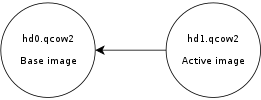
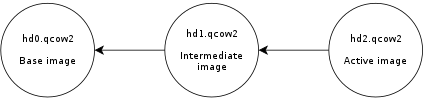
I plan to write a few blog posts explaining some of the things I have been working on. In this one I m going to talk about how to control the size of the qcow2 L2 cache. But first, let s see why that cache is useful.
The qcow2 file format
qcow2 is the main format for disk images used by QEMU. One of the features of this format is that its size grows on demand, and the disk space is only allocated when it is actually needed by the virtual machine.
A qcow2 file is organized in units of constant size called clusters. The virtual disk seen by the guest is also divided into guest clusters of the same size. QEMU defaults to 64KB clusters, but a different value can be specified when creating a new image:
qemu-img create -f qcow2 -o cluster_size=128K hd.qcow2 4G
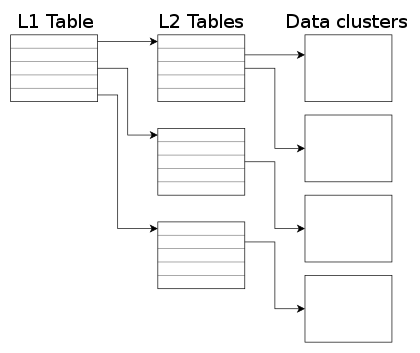
In order to map the virtual disk as seen by the guest to the qcow2 image in the host, the qcow2 image contains a set of tables organized in a two-level structure. These are called the L1 and L2 tables.
There is one single L1 table per disk image. This table is small and is always kept in memory.
There can be many L2 tables, depending on how much space has been allocated in the image. Each table is one cluster in size. In order to read or write data to the virtual disk, QEMU needs to read its corresponding L2 table to find out where that data is located. Since reading the table for each I/O operation can be expensive, QEMU keeps a cache of L2 tables in memory to speed up disk access.
![]() |
| L2 cache size | Average IOPS |
|---|---|
| 1 MB | 5100 |
| 1,5 MB | 7300 |
| 2 MB | 12700 |
| 2,5 MB | 63600 |
![]() |
![]() |
![]() |
Timothy Peake boarded the International Space Station a few hours ago becoming the United Kingdom's first official astronaut. It has become headline news, dominating the day's news cycle.
But whilst Peake left our pale blue dot with only the humble honorific "Mister", he has subsequently been awarded the dubious appellation of "British Astronaut".
Now, I'm no open-borders pan-nationalist and nor do I in any wish to detract or denigrate Peake's accomplishments indeed, it is only out of a genuine respect of "our Tim's" achievements that I pen this in the first place but are we still clinging to the idea that an extraordinary effort by a co-member of our species requires a nationalistic qualifier?
How much do we really have in common with our "fellow countrymen"? This is, after all, the International Space Station, to which Peake was elevated from Kazakhstan on the back of a Russian rocket, in order that he may peacefully collaborate with an American, a Ukrainian, etc.
I encountered the rebuttal that support of this nature is inspirational and incentive to others, but is it really motivating to know that if you toil to achieve greatness in this life then your accomplishments will be cheaply co-opted by mediocrities who only share the same colour passport as you? In this sense, isn't national pride really a form of national insecurity?
A "Briton" in space: if space travel can teach us anything, it's that broadcasting the specific patch of ground you were born in is an outdated, tribalistic contrivance and should be assigned to the dustbin of history.
OpenStack Mitaka beta 1 Debian packages available
I didn t find the time to announce it until today, though I have finished last Friday to package Mitaka Beta 1. It is available, as usual, on the Jenkins server Debian repository:
deb http://mitaka-jessie.pkgs.mirantis.com/debian jessie-mitaka-backports main

In my previous post on systemd-nspawn I

mentioned, I was unclear on how to persist resource control options
for a container. Today I accidentally discovered how can the property
be persisted across boot without modifying service file or writing
custom service file for container. It is done using systemctl
set-property
To set CPUAccounting and CPUShares for a container we need to run
following command.
systemctl set-property systemd-nspawn@container.service CPUACCounting=1 CPUShares=200
# 50-CPUAccounting.conf
[Service]
CPUAccounting=yes
# 50-CPUShares.conf
[Service]
CPUShares=200
I did remember doing this for my container and hence it became clear these files are actually written by systemctl set-property. In case you don't want to persist the properties across boot you can simply pass --runtime switch. Basically this is not just for container, resource control can be thus applied to any running service on the system. This is actually cool.
- set-property NAME ASSIGNMENT...
Set the specified unit properties at runtime where this is supported. This allows changing configuration parameter properties such as resource control settings at runtime. Not all properties may be changed at runtime, but many resource control settings (primarily those in systemd.resource-control(5)) may. The changes are applied instantly, and stored on disk for future boots, unless --runtime is passed, in which case the settings only apply until the next reboot. The syntax of the property assignment follows closely the syntax of assignments in unit files. Example: systemctl set-property foobar.service CPUShares=777
Note that this command allows changing multiple properties at the same time, which is preferable over setting them individually. Like unit file configuration settings, assigning the empty list to list parameters will reset the list.
I think it's pretty much clear what it is. Instead of that people should read LWN or I should start making news because it is not hard to be waaaay much better then Phoronix guy but also news that I didn't write I will not just link to it (many times not even that) and then say how I wrote article! You know, it is fine not to understand everything and ask people questions.
It has been already one week since last report and here comes next one. This week was half focused on fixing issues with Docker container for phpMyAdmin and on code cleanups.

The Docker container got support for more options, making it better suited for various use cases. I'm still thinking whether using PHP's built in server here is a good idea or we should switch to something like nginx + PHP FPM, what would make the container bigger, but it would perform better.
On the code cleanup and issues side, I started to work on two issues 11741 and 11731, which both pointed me to quite some code which could be removed or improved. Many of that was to support older PHP versions, which we no longer support. Anyway the work here is still in progress and both issues will take some time to resolve.
Filed under: English phpMyAdmin 0 comments
d c 14 17:23:26 angela kernel: input: Yubico Yubikey NEO OTP+U2F as /devices/pci0000:00/0000:00:12.0/usb3/3-2/3-2:1.0/0003:1050:0114.0016/input/input127
d c 14 17:23:26 angela kernel: hid-generic 0003:1050:0114.0016: input,hidraw3: USB HID v1.10 Keyboard [Yubico Yubikey NEO OTP+U2F] on usb-0000:00:12.0-2/input0
d c 14 17:23:26 angela kernel: hid-generic 0003:1050:0114.0017: hiddev0,hidraw4: USB HID v1.10 Device [Yubico Yubikey NEO OTP+U2F] on usb-0000:00:12.0-2/input1
We'll be changing this now - we want to to support OTP, U2F and
CCID. Don't worry about those acronyms now, but U2F is for the web,
CCID is for GPG/SSH, and OTP is for the One Time Passwords stuff
mentionned earlier.
I am using the Yubikey Personalization tool from stretch because
the jessie one is too old, according to Gorzen. Indeed, I found
out that the jessie version doesn't ship with the proper udev
rules. Also, note that we need to run as sudo otherwise we get a
permission denied:
$ sudo apt install yubikey-personalization/stretch
$ sudo ykpersonalize -m86
Firmware version 3.4.3 Touch level 1541 Program sequence 1
The USB mode will be set to: 0x86
Commit? (y/n) [n]: y
To understand better what the above does, see the
NEO composite device documentation.
The next step is to reconnect the key, for the udev rules to kick
in. If you were like me, you enthusiastically plugged in the device
before installing the yubikey-personalization package, and the
udev rules were not present then.
$ gpg --card-edit
> passwd
> admin
> passwd
Be sure to remember those passwords! Of course, the key material on
the Yubikey can be revoked when you loose the key, but only if you
still have control of the master key, or if you have a OpenPGP
revocation certification (which you should have).
gpg can see the key alright, as
described in the Yubikey importing keys howto - you will need first
to install scdaemon and pcscd (according to this howto) for
gpg-agent to be able to talk with the key:
$ sudo apt install scdaemon gnupg-agent pcscd
$ gpg-connect-agent --hex "scd apdu 00 f1 00 00" /bye
ERR 100663404 Card error <SCD>
Well that failed. At this point, touching the key types a bunch of
seemingly random characters wherever my cursor is sitting - fun but
totally useless still. That was because I failed to reconnect the key:
make sure the udev rules are in place and reconnect the key, the above
should work:
$ gpg-connect-agent --hex "scd apdu 00 f1 00 00" /bye
D[0000] 01 00 10 90 00 .....
OK
This shows it is running the firmware 1.10, which is not vulnerable to
the infamous security issue.
(Note: I also happened to install opensc and gpgsm because of
this suggestion but I am not sure they are required at all.)
gpg-agent with
ssh support, for example with:
gpg-agent --daemon --enable-ssh-support bash
Of course, this will work better if it's started with your Xsession.
Such an agent should already be started, so you just need to add the ssh
emulation to its configuration file and restart your X session.
echo 'enable-ssh-support' >> .gnupg/gpg-agent.conf
In Debian Jessie, the ssh-agent wrapper will not start if it
detects that you have already one running (for example from
gpg-agent) but if that fails, you can try commenting out
use-ssh-agent from /etc/X11/Xsession.options to keep it from
starting up in your session. (Thanks to
stackexchange for that reference.)
Here I assume you have already created an authentication subkey on
your PGP key. If you haven't, I suggest trying out simply
monkeysphere gen-subkey, which will generate an authentication
subkey for you. You can also do it by hand by following one of the
OpenPGP/SSH tutorials from Yubikey, especially the
more complete one. If you are going to generate a completely new
OpenPGP key, you may want to follow this simpler tutorial here.
Then you need to move your authentication subkey to the Yubikey. For
this, you need to edit the key and use the keytocard command:
$ gpg2 --edit-key anarcat@debian.org
> toggle
> key 2
> keytocard
> save
Here, we use toggle to show the OpenPGP private key material. You
should see a key marked with A for Authentication. Mine was the
second one so I selected it with key 2 which put a star next to
it. The keytocard command moved it to the key and save ensure the
key was removed from the local keyring.
Obviously, backups are essential before doing this, because it's
perfectly possible to loose that key in the process, for example if
you destroy or lose the key or forget the password. It's probably
better to create a completely different authentication subkey for just
this purpose, but that may require reconfiguring all remote SSH hosts,
and you may not want to do that.
Then SSH should magically talk with the GPG agent and ask you for the
PIN! That's pretty much all there is to it - if it doesn't, it means
that gpg-agent is not your SSH agent, and obviously things will fail...
Also, you should be able to see the key being loaded in the agent when
it is:
$ ssh-add -l
2048 23:f3:be:bf:1e:da:e8:ad:4b:c7:f6:60:5e:03:c2:a6 cardno:000603647189 (RSA)
.. that's about it! I have yet to cover 2FA and OpenPGP support,
but that got me going for a while and I'll stop geeking around with
that thing for now. It was fun, for sure, but not sure it's worth it
for now.
sudo apt install libpam-oath
Then, we can hook it into any PAM consumer, for example with sshd:
--- a/pam.d/sshd
+++ b/pam.d/sshd
@@ -1,5 +1,8 @@
# PAM configuration for the Secure Shell service
+# for the yubikey
+auth required pam_oath.so usersfile=/etc/users.oath window=5 digits=8
+
# Standard Un*x authentication.
@include common-auth
We also needed to allow OTP passwords in sshd explicitely, with:
ChallengeResponseAuthentication yes
This will force the user to enter a valid oath token on the server. Unfortunately, this will affect all users, regardless of whether they are present in the users.oath file. I filed bug #807990 regarding this, with a patch.
Also, it means the main password is still exposed on the client machine - you can use the sufficient keyword instead of required to workaround that, but then it means anyone with your key can login to your machine, which is something to keep in mind.
The /etc/users.oath file needs to be created with something like:
#type username pin start seed
HOTP anarcat - 00
00 is obviously a fake, and insecure string. Generate a proper one with:
dd if=/dev/random bs=1k count=1 sha1sum # create a random secret
Then the shared secret needs to be added to the Yubikey:
ykpersonalize -1 -o oath-hotp -o oath-hotp8 -o append-cr -a
You simply paste the random secret you created above, when prompted, and that shared secret will be saved in a Yubikey slot for future use. Next time you login to the SSH server, you will be prompted for a OATH password, you just touch the button on the key and it will be pasted there:
$ ssh -o PubkeyAuthentication=no anarc.at
One-time password (OATH) for anarcat':
Password:
[... logged in!]
Final note: the centralized file approach makes it hard, if not impossible, for users to update their own secret token.. It would be nice if there would be a user-accessible token file, maybe ~/.oath? Filed feature request #807992 about this as well.
The Big Data phenomenon has reached a reality that is often baffling to the amount of information to be managed, and what for us today is called Big it will not be anymore in 5 years, from where it will be necessary to coin other terminologies and corresponding analysis technologies .
The scientific and technological world is thus in ferment in a general rush towards finding the most appropriate tools to get the answers to these extensive masses of data. Big Data represents a paradigm shift: from the Society of network and connection the approach is increasingly leaning towards information and database .
<Read more >
In the previous post I had
mentioned that I didn't figure out how to add dependency on mount
points so as to achieve correct ordering of mount points. After a lot
of search today I finally figured it out thanks to the bug report and the patch
which adds x-systemd.requires and other option to systemd.
So basically you can add additional ordering information to the
.mount files generated by systemd-fstab-generator by adding a
ordering.conf file to path
/etc/systemd/system/usr-local-bin.mount.d/ path with following
contents.
[Unit]
After=home.mount
Like each month, here comes a report about the work of paid contributors to Debian LTS.
Individual reports
In November, 114.50 work hours have been dispatched among 8 paid contributors. Their reports are available:
No comment Liked this article? Click here. My blog is Flattr-enabled.
Back in 2011, when the AppStream meeting in N rnberg had just happened, I published the DEP-11 (Debian Extension Project 11) draft together with Michael Vogt and Julian Andres Klode, as an approach to implement AppStream in Debian.
Back then, the FTPMasters team rejected the suggestion to use the official XML specification, and so the DEP-11 specification was adapted to be based on YAML instead of XML. This wasn t much of a big deal, since the initial design of DEP-11 was to be a superset of the AppStream specification, so it wasn t meant to be exactly like AppStream anyway. AppStream back then was only designed for applications (as in stuff that provides a .desktop file ), but with DEP-11 we aimed for much more: DEP-11 should also describe fonts, drivers, pkg-config files and other metadata, so in the end one would be able to ask the package manager meaningful questions like is the firmware of device X installed? or request actions such as please install me the GIMP , making it unnecessary to know package names at all, and making packages a mere implementation detail.
Then, GNOME-Software happened and demanded all these features. Back then, I was the de-facto maintainer of the AppStream upstream project already, but didn t feel like being the maintainer yet, so I only curated the existing specification, without extending it much. The big push forward GNOME-Software created changed that dramatically, and with me taking control of the specification and documenting it properly, the very essence of DEP-11 became AppStream (that was around the AppStream 0.6 release). So today, DEP-11 is mainly a YAML-based version of the AppStream XML specification.
AppStream XML and DEP-11 YAML are implemented by two projects, GLib and Qt libraries exist to access the metadata and AppStream is used by the software centers of GNOME, KDE and Elementary.
Today there are two things to celebrate for me: First of all, there is the release of AppStream 0.9 (that happened last Saturday already), which brings some nice improvements to the API for developers and some micro-optimizations to speed up Xapian database queries. Yay!
The second thing is full DEP-11 support in Debian! This means that you don t need to copy metadata around manually, or install extra packages: All you need to do is to install the appstream package, everything else is done for you, and the data is kept up to date automatically.
This is made possible by APT 1.1 (thanks to the whole APT team!), some dedicated support for it in AppStream directly, the work of our Sysadmin team at Debian, which set up infrastructure to build the metadata automatically, as well as our FTPMasters team where Joerg helped with the final steps of getting the metadata into the archive.
That AppStream data is now in the archive doesn t mean we live in a perfect utopia yet there are still issues to be handled, but all the major work is done now and we can now gradually improve the data generator and tools and squash the remaining bugs.
And another item from the good news department: It s highly likely that Ubuntu will follow Debian in AppStream/DEP-11 support with the upcoming Xenial release!
But how can I make use of the new metadata?
Just install the appstream package everything is done for you! Another easy way is to install GNOME-Software, which makes use of the new metadata already. KDE Discover in Debian does not enable support for AppStream yet, this will likely come later.
If you prefer to use the command-line, you can now use commands like
sudo appsteamcli install org.kde.kate.desktopThis will simply install the Kate text editor. Who wants some statistics? At time the Debian Sid/Unstable suite contains 1714 valid software components. It could be even more if the errors generated during metadata extraction would be resolved. For that, the metadata generator has a nice statistics page, showing the amount of each hint type in the suite and the development of the available software components in Debian and the hint types count over time (this plot feature was just added recently, so we are still a bit low on data). For packagers and interested upstreams, the data extractor creates detailed reports for each package, explaining why data was not included and how to fix the issue (in case something is unclear, please file a bug report and/or get in contact with me). In summary Thanks to everyone who helped to make this happen! For me this project means a lot, when writing this blog post I realized that I am basically working on it for almost 5 years (!) now (and the idea is even older). Seeing it to grow to such a huge success in other distributions was a joy, but now Debian can join the game with first-class AppStream support as well, which makes me even happier. Afterall Debian is the distribution I feel most at home. There is still lots of work to do (and already a few bugs known), but the hardest part of the journey is done let s walk into a bright future with AppStream!
If you haven't already come across it, diffoscope is a tool that reveals what makes files or directories actually different. It recursively unpacks archives of many kinds, transforming binary formats into more human-readable forms in order to make it easier to compare them. It can compare two tarballs, ISO images, PDF, squashfs images, etc.
Anyway, yesterday I hacked together try.diffoscope.org which lets anyone easily try out and share these in-depth comparisons using just a web browser.
The underlying idea is not only to provide a useful service, but also that it will publicise and spread the usage of diffoscope, resulting in net improvements that will feed back into the Reproducible Builds effort.
As usual, patches welcome.
Just to give a brief recap of why I'm writing this post, I've to
describe a brief encounter I had with systemd which rendered my system
unbootable. I first felt its systemd's problem but later figured out
it was my mistake. So below is brief story divided into 2 sections
Problem and Solution. Here Problem describes issue I faced with
systemd and Solution discusses the .mount and .automount suffix
files used by systemd.
overlay /usr/local/bin overlay noauto,x-systemd.automount,lowerdir=/home/vasudev/Documents/utilities/bin,upperdir=/home/vasudev/Documents/utilities/jonas-bin,workdir=/home/vasudev/Documents/utilities/bin-overlay 0 0
overlay /usr/local/bin overlay noauto,x-systemd.requires=/home,x-systemd.automount,lowerdir=/home/vasudev/Documents/utilities/bin,upperdir=/home/vasudev/Documents/utilities/jonas-bin,workdir=/home/vasudev/Documents/utilities/bin-overlay 0 0
systemctl show -p After usr-local-bin.mount
After=-.mount systemd-journald.socket local-fs-pre.target system.slice usr-local-bin.automount
systemctl show -p Requires usr-local-bin.automount
Requires=-.mount home.mount
systemctl show -p After usr-local-bin.automount
After=-.mount home.mount
It is time again for another Tanglu blogpost (to be honest, this article is pretty much overdue
). I want to shine a spotlight on the work that s done in Tanglu, be it ongoing or past work done for the new release.
Why is the new release taking longer than usual?
As you might have noticed, usually a new Tanglu release (Tanglu 4 Dasyatis ) should be released this month. We decided a while ago, however, to defer the release and are now aiming for an release in February / March 2016.
Reason for this change in schedule is the GCC 5 transition (and more importantly the huge amount of follow-up transitions) as well as some other major infrastructure tasks, which we would like to complete and give them a good amount of testing before releasing. Also, some issues with our build system, and generally less build power than in previous releases is a problem (At least the Debile build-system issues could be worked around or solved). The hard disk crash in the forum and bugtracking server also delayed the start of the Tanglu 4 development process a lot.
In all of these tasks, manpower is of course the main problem
Software Tasks
General infrastructure tasks
Improvements on Synchrotron
Synchrotron, the software which is synchronizing the Tanglu archive with the Debian archive, received a few tweaks to make it more robust and detect installability of packages more reliably. We also run it more often now.
Rapidumo improvements
Rapidumo is a software written to complement dak (the Debian Archive Kit) in managing the Tanglu archive. It performs automatic QA tasks on the archive and provides a collection of tools to perform various tasks (like triggering package rebuilds).
For Tanglu 4, we sometimes drop broken packages from the archive now, to speed up transitions and to remove packages which got uninstallable more quickly. Packages removed from the release suite still have a chance to enter it again, but they need to go through Tanglu s staging area again first. The removal process is currently semiautomatic, to avoid unneccessary removals and breakage.
Rapidumo could benefit from some improvements and an interactive web interface (as opposed to static HTML pages) would be nice. Some early work on this is done, but not completed (and has a very low priority at the moment).
DEP-11 integration
There will be a bigger announcement on AppStream and DEP-11 in the next days, so I keep this terse: Tanglu will go for full AppStream integration with the next release, which means no more packaged metadata, but data placed directly in the archive. Work on this has started in Tanglu, but I needed to get back to the drawing board with it, to incorporate some new ideas for using synergies with Debian on generating the DEP-11 metadata.
Phabricator
Phabricator has been integrated well into our infrastructure, but there are still some pending tasks. E.g. we need subprojects in Phabricator, and a more powerful Conduit interface. Those are upstream bugs on Phabricator, and are actively being worked on.
As soon as the missing features are available in Phabricator, we will also pursue the integration of Tanglu bug information with the Debian DistroTracker, which was discussed at DebConf this summer.
UEFI support
UEFI support is a tricky beast. Full UEFI support is a release-goal for Tanglu 4 (so we won t release without it). At time, our Live-CDs start on pure EFI systems, but there are several reported issues with the Calamares live-installer as well as Debian-Installer, which fails to install GRUB correctly.
Work on resolving these problems is ongoing.
Major LiveCD rework
Tanglu 4 will ship with improved live-cds, which e.g. allow selecting the preferred locale early in the bootloader. We switched from live-boot to manage our live sessions to casper, the same tool which is also used in Ubuntu. Casper fixed a few issues we had, and brought some new, but overall using it was a good choice and work on making top-notch live-cds is progressing well.
KDE Plasma
Integration of the latest Plasma release is progressing, but its speed has slowed down since fewer people are working on it. If you want to help Tanglu s KDE Workspace integration, please help!
For the upcoming release, the Plasma 5 packages which we created based on a collaboration with Kubuntu for the previous Tanglu 3 release have been merged with their Debian counterparts. This action fortunately was possible without major problems. Now Tanglu is (mostly) using the same Plasma 5 packages as Debian again (lots of Kudos go the the Kubuntu and Debian Qt/KDE packagers!).
GNOME
The same re-merge with Debian has been done on Tanglu s GNOME flavor (Tanglu also shipped with a more recent GNOME release than Debian in Tanglu 3). So Tanglu 4 GNOME and Debian Testing GNOME are at (almost) the same level.
Unfortunately, the GNOME team is heavily understaffed a GNOME team member left at the beginning of the year for personal reasons, and the team now only has one semi-active member and me.
Other
An fvwm-nightshade spin is being worked on
. Apart from that, there are no teams maintaining other flavors in Tanglu.
Security & Stable maintenance
Thanks to several awesome people, the current Tanglu Stable release (Tanglu 3 Chromodoris ) receives regular updates, even for many packages which are not in the fully supported set.
Tangluverse Tasks
Tasks (not) done in the global Tanglu universe.
HTTPS for community sites
Thanks to our participation in the Let s Encrypt closed beta program, Tanglu websites like the user forums and bugtracker have been fully encrypted for a while, which should make submitting data to these sites much more secure. So far, we didn t encounter issues, which means that we will likely aim for getting HTTPS encryption enabled on every Tanglu website.

Tanglu.org website
The Tanglu main website didn t receive much love at all. It could use a facelift and more importantly updated content about Tanglu.
So far, nobody volunteered to update the website, so this task is still open. It is, however, a high-priority task to increase our public visibility as a project, so updating the website is definitely something which will be done soon.
Promotion
It doesn t hurt to think about how to sell Tanglu as brand : What is Tanglu? Our motivation, our goals? What is our slogan? How can we communicate all of this to new users, without having them to read long explanations? (e.g. the Fedora Project has this nicely covered on their main website, and their slogan Freedom, Friends, Features, First immediately communicates the project s key values)
Those are issues engineers don t think about often, still it is important to present Tanglu in a way that is easy to grasp for people hearing about it for the first time. So far, no people are working on this task specifically, although it regularly comes up on IRC.
Sponsoring & Government
Tanglu is by design not backed by any corporation. However, we still need to get our servers paid. Currently, Tanglu is supported by three sponsors, which basically provide the majority of our infrastructure. Also, developers provide additional machines to get Tanglu running and/or packages built.
Still, this dependency on very few sponsors paying the majority of the costs is very bad, since it makes Tanglu vulnerable in case one sponsor decides to end sponsorship. We have no financial backing to be able to e.g. continue to pay an important server in case it s sponsor decides to drop sponsorship.
Also, since Tanglu is no legal entity, accepting donations is hard for us at time, since a private person would need to accept the money on behalf of Tanglu. So we can t easily make donating to Tanglu possible (at least not in the way we want donations to be).
These issues are currently being worked on, there are a couple of possible solutions on the table. I will write about details as soon as it makes sense to go public with them.
In general, I am very happy with the Tanglu community: The developer community is a pleasure to work with, and interactions with our users on the forums or via the bugtracker are highly productive and friendly. Although the development speed has slowed down a bit, Tanglu is still an active and awesome project, and I am looking forward to the cool stuff we will do in future!
The first reproducible world
summit was held in
Athens, Greece, from December 1st-3rd with the support of the
Linux Foundation, the Open Tech Fund, and Google. Faidon Liambotis has been an
amazing help to sort out all local details. People at ImpactHub
Athens have been perfect hosts.
.buildinfo with different environment information can attest to the
same exact binary artifact..buildinfo files can coexist for the same .deb as long as the listed
checksums match the source and binary package in the archive..buildinfo can be signed in-line to certify where a build comes from.metview script.SOURCE_DATE_EPOCH in grub image generator (#787795).
reproducible.debian.net
An issue with some armhf build nodes was tracked down to a bad interaction between uname26 personality and new glibc (Vagrant Cascadian).
A Debian package was created for koji, the RPM building and tracking system used by Fedora amongst others. It is currently waiting for review in the NEW queue. (Ximin Luo, Marek Marczykowski-G recki)
diffoscope development
diffoscope now has a dedicated mailing list to better accommodate its growing user and developer base.
Going through diffoscope's guts together enabled several new contributors. Baptiste Daroussin, Ed Maste, Clemens Lang, Mike McQuaid, Joachim Breitner all contributed their first patches to improve portability or add new features. Regular contributors Chris Lamb, Reiner Herrmann, and Levente Polyak also submitted improvements.
The next release should support more operating systems, filesystem image comparison via libguestfs, HTML reports with on-demand loading, and parallel processing for the most noticeable improvements.
Package reviews
27 reviews have been removed, 17 added and 14 updated in the previous week.
Chris Lamb and Val Lorentz filed 4 new FTBFS reports.
Misc.
Baptiste Daroussin has started to implement support for SOURCE_DATE_EPOCH in FreeBSD in libpkg and the ports tree.
Thanks Joachim Breitner and h01ger for the pictures.
I've now been working on Debian LTS for a full year, so I'm going to
stop counting months.
In November, I carried over 5 hours from October and was assigned
another 15 hours of work
by Freexian's
Debian LTS initiative. However, I spent much of the month on
sick leave, so I only worked 5 billable hours on Debian LTS plus
some unbilled time while on leave.
I had another week in the front desk role, and triaged about 20
new issues. Less than half actually affected packages supported in
squeeze-lts, and only about 5 were important.
CVE-2015-5309
in putty had a patch that was fairly easy to backport, so I did
that, uploaded and sent
DLA
347-1.
I backported several security fixes to linux-2.6 and sent some of
those we had already released to Willy Tarreau for inclusion in
Linux 2.6.32-longterm. At the end of the month, I reviewed Linux
2.6.32.69-rc1 and found a couple of bugs, leading to an -rc2. I
applied that to the linux-2.6 packaging branch for squeeze-lts and
spent a little time testing it, thankfully not hitting any
regressions.
Next.