Daniel Pocock: Interrupt-free computing

On debian-devel, there has been a discussion about the security issues of "spontaneously" appearing popups demanding the root password to make immediate security updates.
There is a much more general issue related to this: computing without interruptions.
Most of us have probably seen some friend or acquaintance with a (usually non-Linux) PC that is constantly beeping and flashing with chat notifications, new email popups, Adobe update this, Java update that, etc. In one recent case I came across somebody who had experienced a dramatic drop in his productivity as a consequence - giving him a laptop with a freshly installed copy of Linux made a dramatic difference to his work.
I can already hear people insisting that security trumps everything (which isn't an original argument either) and that popups can't be avoided.
A search on the web for "computing without interruptions" reveals users have a particular distaste for these things appearing while watching a video. Websites responding to that complaint fill the search results. With many types of interactive real-time content (video, WebRTC phone/video calls and so on) deployed within browsers, it is even more important for UI designers to contemplate when it is not appropriate to interrupt a user and to do everything possible to avoid interrupting the user.
Preparing for disaster
On the other hand, just ignoring security updates and not telling the user their disk is filling until 0 bytes remain available could only shift the problem down the road (from constant annoyance to periodic crisis).
That said, sometimes you can still fill the disk very suddenly (especially with fast SSDs) and rather than relying on popups to keep users away from the precipice, applications (particularly the core desktop and daemon processes) could be tested more regularly to ensure they remain resilient in full disk situations.
Managing information overload
Popups are just part of a wider problem of information overload. There are emails too: some applications, such as Drupal, will send daily or weekly emails to a user if their system is not up to date. For many virtual-hosted sites, this starts to resemble a small flood. There is a flaw in this design: applications are competing for attention by sending more and more emails and popups or making them more annoying (e.g. the security updates in Debian 6 were ignorable popups in the top right-hand corner of the screen, Debian 7's Gnome Classic mode displays a big password prompt in the middle of the screen).
The solution would be to develop a mechanism for unifying, de-duplicating and then prioritising these information/event flows. Some fault alerting systems already do this for their own events - these are niche solutions that aren't always applicable to the average PC-owner, although the principles are well tested. Some email organisation tools have similar features, but only for email. I'm not currently aware of any solution that synthesizes such an experience for all possible information sources.
Setting priorities
One well-read work on this subject in the business world is The 7 Habits of Highly Effective People (Stephen R. Covey, 1989). Of particular interest for the problem at hand is the priority matrix (borrowed from the Eisenhower Method):
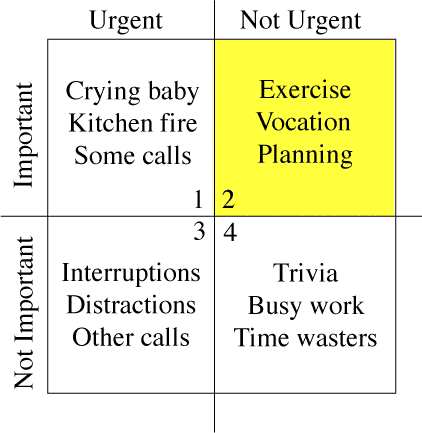 The left column, Urgent items, typically must be executed by a certain date (e.g. buying a gift before a birthday or installing a new SSL certificate before the old one expires). A security update or Acrobat reader update does not have this same characteristic. Under this model:
Covey even released an Outlook plugin, Plan Plus to help people organise their tasks (and their lives) using his methodology. Unfortunately it is closed-source software with a terrible set of ratings on Amazon - this review from a customer stands out:
"My take is that Franklin does not consider robust software nor customer support to be either Urgent or Important."
Could this be replicated more successfully with an open-source plugin for Mozilla Lightning or a similar productivity tool, and could the concept be extended across the range of data sources, including email, calendar items, system notifications and more to provide a unified approach to both the computing platform and general productivity (real-life) time management?
Would this help solve the same problem in a more effective manner? In other words, would such an effort to help users integrate the demands of technology with the other demands of life make them more likely to keep their systems up to date?
The wider community experience
Going beyond the desktop/user experience, could this model be extended to automatically integrate external tasks, such as handling bug reports, moderating mailing lists and other slightly tedious things that have to be given regular attention to keep the free-software world moving along smoothly?
Managing down-time
For people who work in computing, there is almost no down-time any more. Even when on holiday, checking in for a flight might involve navigating through a buggy wifi access control system and an annoying set of advertisements from your low-cost airline as you try to print a boarding pass. These things often trigger thoughts about similar issues on client projects. Glancing at your email to find the booking number could awaken thoughts of a whole lot of projects you had tried to put out of your mind for a week.
This is another area where excessive popups and emails can only compound the problem. Who really wants to download and install security updates while on holiday using an intermittent wifi connection?
Managing all these events through a common mechanism may also finally make it possible to have an "ordinary user" experience with your PC. In practice, this might mean being able to view information/events through a time-of-day filter or "holiday mode" - and only on demand.
A worthy design goal?
Would any free software operating system make it a design goal to give their users a 100% interrupt-free experience?
Of course there would still be things like chat notifications - but those would only be possible when a user has signed-in to a chat application. The distinction for the interrupt-free experience would only need to apply to default system behavior and not to every application.
The left column, Urgent items, typically must be executed by a certain date (e.g. buying a gift before a birthday or installing a new SSL certificate before the old one expires). A security update or Acrobat reader update does not have this same characteristic. Under this model:
| Urgent | Non-urgent | |
|---|---|---|
| Important | Replace SSL certificate Buy birthday gift |
Security update Run backup job |
| Not important | Register for conference before deadline for free gift | Non-security update for Acrobat reader |
 The easiest way of using git locally to commit to a CVS repository is to
have both a git clone of the CVS repository and a CVS checkout of your
repository.
Initial steps that Work for Me (TM)
 Over my time working with Debian packages, I've always been concerned that
I have been missing catchable mistakes by not running all the static checking
tools I could run. As a result, I've been interested in writing some code that
automates this process, a place where I can push a package and come back a few
hours later to check on the results. This is great, since it provides a slightly
less scary interface to new packagers, and helps avoid thinking they've
just been told off by a Developer.
I've spent the time to actually write this code, and I've called it
 Recently I wanted to cleanup my "main" remote machine. It is a system I've had for many years, which started off as a i386 KVM-guest and was later


 A
 The task: reliably synchronize my local MailDir with several remote IMAP
mailboxes with IDLE support so that there is no need to poll with small time
intervals to get new email immediately.
Most graphical mail clients like icedove/thunderbird or evolution have IDLE
support which means that their users get notified about new email as soon as it
arrives. I prefer to handle email fetching/reading/sending using separate
programs so after having used icedove for a long time, I switched to a
 Completing the DRI3 Extension
This week marks a pretty significant milestone for the glorious
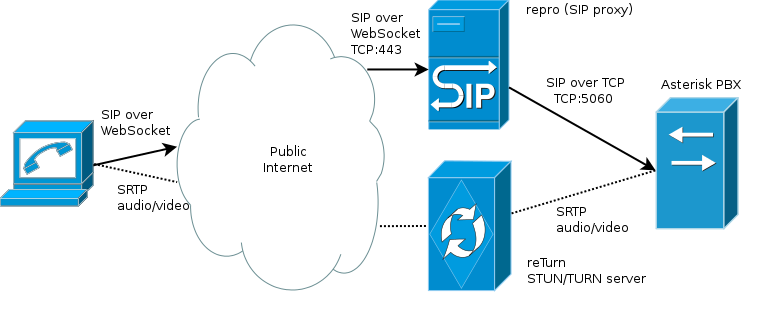 Notice that the SIP messages are accepted over

 This is my monthly summary of my free software related activities. If you re among the people who


 Since I wrote



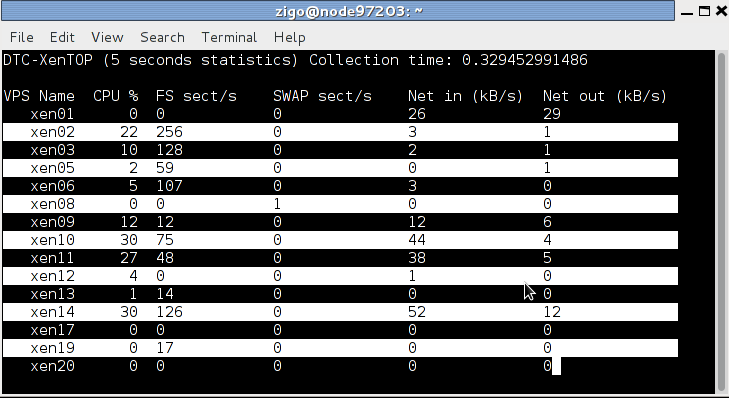
 What has always been annoying me with Xen, is that xentop is well a piece of shit! It just displays the current numbers of sectors or network bytes read / write. But as an administrator, what you care about, is to know which of your VM is taking all the resources, making your whole server starve. The number of sectors read/write since the VM has started is of very low importance. What you care about is to have an idea of the current transfer rate. And the same apply for networking.
So, tonight, within few hours, I hacked a small python shell script using ncurses to do what I needed, which tells how much resources have been used over the last 5 seconds (and not since the VM started). This way, it is easy to know which VM is killing your server.
 There is still a lot of things going on inside me and turning, and I'd like to share two words that I grow attached to, one a fair amount longer now than the other, but both are terms that I seem to had lacking in my vocabulary which I tried to explain in a different way. After finding out about them, I noticed that both what I felt and believed were actual things that were not totally uncommon concepts, even though most people wouldn't know about them.
The first term that I stumbled upon years ago was the term of
 Yesterday, the first milestone of the Havana developement branch of
Ceilometer has been released and is now available for testing and download.
This means the first quarter of the OpenStack Havana development has
passed!
New features
Ten blueprints have been implemented as you can see on the


