Search Results: "cas"

13 January 2013

Thorsten Glaser: PSA: Unicode codepoints, referring to

PSA: Referring to Unicode codepoints. If your Unicode codepoint is, numerically, between 0 and 65533, inclusive, convert it to hexadecimal and zero-pad it to four nibbles. For example, the Euro sign is Unicode codepoint #8364 which is 20AC hex; the Eszett is 223 which is DF hex, padded 00DF.
Then write an uppercase U , a plus sign + , and the four nibbles: U+20AC U+00DF
In mksh, JSON, etc. it s a backslash \ , a lower-case u and four nibbles. Otherwise, your Unicode codepoint will be, numerically, between 65536 and 1114111, inclusive, that is hex 10000 to 10FFFF. (There s nothing on 65534 and 65535, nor above these figures.) In this case, convert it to hex, zero-pad it to eight nibbles and write it as an uppercase U , a hyphen-minus - and the eight nibbles. In C-like escapes for environments supporting the Unicode SMP, that s a backslash \ , an upper-case U and eight nibbles. Do not, in either case, use less (or more) hex digits than specified here. For example, there s a famous Unicode codepoint U-0001F4A9 PILE OF POO . That s not the same as U+1F4A9. The latter reads as U+1F4A GREEK CAPITAL LETTER OMICRON WITH PSILI AND VARIA and a digit 9 ( 9). Be educated.

Russell Coker: Android Multitasking

My new Samsung Galaxy S3 has support for Multi Window Mode , here is a video which shows how to use this, Multi Window Mode starts at about 2:30 [1]. A common complaint about Android is the lack of multitasking, which is partly true and only slightly alleviated by Multi Window Mode. Running Multiple Programs Traditionally Android has multitasked with a similar ability to a Unix shell session, you can have applications running in the background and switch between them but you can t see multiple applications running at the same time (apart from seeing notification messages at the top of the screen). The new Multi Window Mode allows two or more applications to share a screen. But it only applies to a small number of applications which support it, on my phone that is applications shipped by Samsung and Google Chrome. Also I can t have multiple copies of Chrome open at the same time which means I can t do the things that I do on every PC that runs Chromium (the non-Google build of Chrome). I have not yet found a situation where Multi Window Mode has been useful to me, the applications I use for most tasks don t support it. So while Android being based on Linux does multitask really well in the technical computer-science definition it doesn t do so well in the user-centric definition. In practice Android multitasking is mostly about task switching and doing things like checking email in the background. Having multiple programs running at once is particularly difficult due to the Android model of applications sometimes terminating when they aren t visible. A common task is to view a message in a MUA and switch between that and another window (EG a web browser). K9 is my preferred MUA for Android which seems to have no option to switch back and still be viewing the same message as before the task switch so at least three actions need to be taken to get back to the same message after I resume K9. One major feature to make multitasking on Android more usable would be a way of rapidly switching between two applications and being certain that each one would be in the same state when the user switches back to it. Copy and Paste Another problem with Android multitasking is the difficulty in copying and pasting text. While copy/paste is not strictly required for multitasking it is a logical requirement when you have multiple applications running on behalf of a single user. For PCs everyone knows that you select text by holding down the SHIFT key while using the cursor control keys or by holding down the mouse button and swiping the mouse cursor over the text and you then use CTRL-C or the Edit menu to copy text. On Android it s a long press to select text which then gives you markers for the start and end, you drag those markers around and then select that you want to copy the text. This is at best a lot more inconvenient than using a high resolution input device like a mouse to select text. At worst it doesn t seem particularly reliable, K9 Mail for example won t let me copy text from a message for unknown reasons on a desktop OS such problems are vanishingly rare such that I can t think of an example of it happening. IO and Multitasking Multitasking for a user (as opposed to the multitasking needed to host dozens or hundreds of concurrent users) on Unix servers was very limited in the days of VT100 terminals and similar devices. Programs such as GNU Screen [2] allowed a text display to perform windowing functions that are similar to a modern GUI. But generally it seems that the ability for a user to run multiple programs at once is largely limited by their ability to see the output and to rapidly switch between programs or sessions. As a keyboard with ~100 keys and a text display with 80*25 characters is a major limitation it s obviously going to be a comparable (and often greater) limitation to have an on-screen keyboard that takes half the screen space, a single program taking all the screen, and a drop-down status bar that might be useful for multitasking. With Android 4.0 and above you can activate a task switcher by holding down the home button for two seconds [3]. There are also a variety of third party task switching programs on the Google Play store which all seem to start by holding down the home button. One problem with these options is that they require an extended press of the home button where the ideal is something that is as quick as ALT-TAB or a single mouse movement on a desktop system. One possible input action would be to switch between the most recent tasks with a palm swipe on the screen an operation that is quick and easy. Currently a palm swipe is used for a screen capture, but as there are four possible directions for swiping the screen one of them could be used for screen capture and another two for task switching. But this wouldn t do a lot of good without the ability to switch tasks without losing the context that either requires Android application changes or having the OS not tell an application that it was occluded. The iPaQ had interesting capabilities for input, it had a main button on the front that could be pushed in four directions (usually for cursor control) as well as being pushed in, four extra buttons on the front, and a button on the side [4]. I don t recall the methods that Familiar Linux on the iPaQ [5] used for task switching, but it was less of an issue as the iPaQ had less RAM, no Internet access and no telephony functions. I think that adding a bunch of extra buttons to an Android phone would make it a lot more useful. The iPaQ method of cursor control is one that could be considered (it could alleviate the copy/paste problems among other things). As an aside in two years of using Android phones I ve done less serious writing on Android than I did in my first two years of using Familiar on the iPaQ largely due to the lack of keys and a stylus on my Android phones. The screen size on Android phones is also a limit for multitasking. The earlier/cheaper phones that have small screens with resolutions such as 320*480 have very limited ability to display two programs at once. The 720*1280 display in the Galaxy S3 has a lot more potential in this regard and the Galaxy Note 2 and the HTC J Butterfly AKA Droid DNA have even more potential. In the future it seems that screen size limitations on phone multitasking will be a solved problem for everyone who can afford one of the high end phones which incidentally are much cheaper than the iPaQ was 10 years ago. Conclusion Checking email in the background etc is very useful on Android systems. But in terms of the user running two programs at once it seems very limited, and that situation seems likely to remain until the vendors adopt multi-window support. This could be difficult given that Google applied a lot of pressure to CyanogenMod to stop them from doing it [6]. Even when a system with a large display (particularly a tablet) runs a version of Android that supports multi-window mode that still won t entirely solve the problem. No matter how big your display is there are occasions when you need to use it all for a single application while still having the ability to rapidly switch to another application. User interface tweaks to allow rapid task switching without losing application context are necessary. Finally for the past two years that I ve been using Android devices I have been disappointed in the ways that they compare poorly to the iPaQ running Familiar I used 10 years ago. I once wrote a feature article for a magazine on an iPaQ while so far I haven t even written a blog post on an Android device. I think that some of the earlier Android devices might have been better in some ways, the trackball on the HTC Nexus One might have made it more suitable for writing long articles than more recent Android devices.

12 January 2013

Russ Allbery: Review: Asimov's, April/May 2011

Review: Asimov's Science Fiction, April/May 2011
Editor: Sheila Williams
Issue: Volume 35, No. 4 & 5
ISSN: 1065-2698
Pages: 192
Williams's editorial this issue is about the tendency of SF to take a rose-colored view of the world, which on the surface seems odd given the tendency of recent SF towards dystopia. But she makes a good point that the portrayal of the past is rose-colored, linking that into the current steampunk trend. She doesn't take the argument quite as far as I'd like, but I'm glad to see editorials raising points like this. I'm inclined to think that a lot of the rose-colored frame of the past is because few of us want to read about real historic conditions at any length, even for edification, because the stench and discomfort isn't fun to read about. Silverberg's column is another discussion of programmatic plot generators, which mostly makes the point that plot ideas are the easy part of writing. James Gunn contributes an extended biography of Isaac Asimov that probably won't be new to long-time genre readers but may fill in some details (although it politely sticks to mostly flattering material). Spinrad's book review column is one of his better ones; it looks at two novels by China Mi ville and two by Ian McDonald and explores differences in world-building. Spinrad predictably makes the case in favor of science fiction with rules and against the New Weird, but the discussion along the way was worth reading. "The Day the Wires Came Down" by Alexander Jablokov: Speaking of steampunk, here's an example. There is even an airship, although the primary technological focus is suspended street cars. Jablokov postulates a city-wide transportation network of suspended carriages called telpher cars, along with a city built around the telpher cables: stores on roofs, windows displaying merchandise to passing cars, and even a history of heated competition and dirty tricks between competing telpher networks. The story is set, as the title would indicate, on the last day of the network. It's being shut down for cost, with some hints that progress is destroying something precious. There is a plot here, revolving around some mysteries of the history of the telpher network and the roles of several people in that history. But the story is primarily a celebration of old technology. It's a rail fan's story recast with a steampunk technology, featuring the same mix of fascination with mechanics and a sense that the intricate details are falling out of common knowledge (and perhaps usefulness). As a story, it's a bit slow-moving, but I enjoyed the elegiac tone. (7) "An Empty House with Many Doors" by Michael Swanwick: This is a very short story, more of an emotional profile, involving a man's reaction to the death of his wife. Oh, and parallel universes. It's sort of the inverse of Niven's classic "All the Myriad Ways." Similar to Niven's story, I found the idea vaguely interesting but the conclusion and emotional reaction unbelievable and alien. (5) "The Homecoming" by Mike Resnick: Resnick tends to yank on the heart-strings rather sharply in his stories, so I knew roughly what to expect when a father comes home to find his son is visiting. A son who, rather against his father's wishes, has been significantly altered to be able to live with aliens. Throw in a mother with serious dementia, and you can probably predict what Resnick does with this. Still, most of the story is a two-sided conversation, and I thought he succeeded in doing justice to both sides, even though one of them was destined to lose. (6) "North Shore Friday" by Nick Mamatas: Illegal Greek immigrants, a family-run system for getting them married off before the INS catch them, government psi probes and eavesdropping on thoughts, joint projects between computer and religion departments, secret government experiments, and even ghosts... this story is a complex mess, with numerous thoughts stuck into small boxes and scattered through the surface story. It's one of those stories where figuring out what's going on, and even how to read the story in a sensible way, is much of the fun. If you find that fun, that is; if not, it will probably be frustrating. I wished there was a bit more plot, but there's something delightful about how much stuff Mamatas packs into it. (6) "Clockworks" by William Preston: This is a prequel to Preston's earlier "Helping Them Take the Old Man Down". Like that story, it's primarily a pulp adventure, but layered with another level of analysis and thoughtfulness that tries to embed the pulp adventure in our understanding of human behavior and the nature of the world, although this one stays a bit more pulp than its predecessor. As with Preston's other story, we don't get directly in the head of the Old Man (here, just called the man, but identifiable from clues in both stories as Doc Savage); instead, the protagonist is a former villain named Simon Lukic who the man hopes to have fixed by operating on his brain. The undercurrent that lies beneath a more typical pulp adventure is the question of whether Lukic is actually healed. I think there was a bit too much daring-do and human perfection, but it's a perfectly servicable pulp story with some depth. (6) "The Fnoor Hen" by Rudy Rucker: If you've read any of Rucker's work before, you probably know what to expect: a mind-boggling blizzard of mathematically-inspired technobabble that turns into vaguely coherent surrealism. (You can probably tell that I'm not much of a fan, although the clear good humor in these stories makes it hard to dislike them too much.) There's a mutated chicken and some sort of alternate mathematical space and then something that seems like magic... I'd be lying if I said that I followed this story. If you like Rucker, this seems like the sort of thing that you'd like. (4) "Smoke City" by Christopher Barzak: At the start of this story, I thought it was going to be an emotional parable about immigration. The progatonist lives two lives: one in our world, and one in the Smoke City of industry, a world of hard labor, pollution, and little reward, with families in both. But nearly all of the story is set within Smoke City, and the parable turns out to be a caustic indictment of industry and its exploitation of labor. I kind of wish Barzak hadn't used rape as a metaphor, but when the captains of industry show up, I can't argue with how deeply and accurately the story shoves in the knife. There isn't much subtlety here, but it's still one of the better stories in this issue. (7) "A Response from EST17" by Tom Purdom: I'm very happy to see Purdom's writing appearing regularly. His stories are always quiet and matter-of-fact, and at first seem to miss emotional zest, but they almost always grow on me. He lets the reader fill in their own emotional reactions to events, and there's always a lot going on. This story is a first-contact story, except that the "humans" here are not human at all. They're automated probes sent by two separate human civilizations, with different programming and different governance algorithms, and they quickly start competing negotiations. The aliens they've discovered similarly have factions, who start talking to the different probes in an elaborate dance of gathering information without giving too much away. The twist is that this pattern has replayed itself many times in the past, and information itself can be a weapon. I enjoyed this one from start to finish. (7) "The One That Got Away" by Esther M. Friesner: Friesner is best known, at least to me, for humorous fantasy, and this story is advertised as such from early on. The first-person protagonist is a prostitute in a seaside town. She's bemused to finally be invited over by a sailor who's been eyeing her all evening, but that sailor has something else in mind than normal business. For much of this story, the fantasy element is unclear; when it finally comes, it was an amusing twist. (7) "The Flow and Dream" by Jack Skillingstead: This is a mildly interesting variation on the old SF story of hibernating humans (on a generation ship or elsewhere) waking up to a transformed world. Here, it's not a ship, it's a planet, and the hiberation was to wait for terraforming rather than for transit. The twist comes from an excessively literal computer and the fun of putting together the pieces. Sadly, the story trails off at the end without much new to say. (5) "Becalmed" by Kristine Kathryn Rusch: "Becalmed" takes place immediately before "Becoming One with the Ghosts" and explains the incident that created the situation explored in that story. The first-person protagonist of "Becalmed" is a linguist, an expert in learning alien languages so that the Fleet can understand the civilizations that it runs across. But something went horribly wrong at their last stop, something that she's largely suppressed, and now she's confined to quarters and possibly in deep trouble. As is the ship; they're in foldspace, and they have been for days. "Becalmed" is structed like a mystery, centered around recovering the protagonist's memories. It's also a bit of a legal procedural; the ship is trying to determine what to do with her and to what degree she's responsible. But the heart of the story is a linguistic and cultural puzzle. This is another great SF story from Rusch, whose name on a cover will make me eager to start reading a new magazine. I love both angles on the universe she's built, but I think I like the Fleet even better than the divers. The Fleet captures some of the magic of the original Star Trek, but with much more mature characters, more believable situations, and a more sensible and nuanced version of the Prime Directive. Rusch writes substantial, interesting plots that hold my interest. I'd love to see more like this. (8) Rating: 7 out of 10

11 January 2013

Neil Williams: perl-cross-debian updates

Working with perl upstream, we're getting closer to a fully cross-built upstream perl without needing the external perl installation. The branch (which is also available here with a few of my changes) now builds a host miniperl, cross-builds the rest of perl and almost gets through the rest of the build by using the host miniperl to handle the extensions up as far as XS::Typemap:

make[1]: Leaving directory /home/neil/code/debian/src/perl/cross/git/perl/ext/XS-APItest'
./miniperl -Ilib make_ext.pl lib/auto/XS/Typemap/Typemap.so MAKE=make LIBPERL_A=libperl.a LINKTYPE=dynamic
Making XS::Typemap (all)
make[1]: Entering directory /home/neil/code/debian/src/perl/cross/git/perl/ext/XS-Typemap'
make[1]: Leaving directory /home/neil/code/debian/src/perl/cross/git/perl/ext/XS-Typemap'
Making all in ext/XS-Typemap
make all PERL_CORE=1 LIBPERL_A=libperl.a LINKTYPE=dynamic
make[1]: Entering directory /home/neil/code/debian/src/perl/cross/git/perl/ext/XS-Typemap'
make[1]: Leaving directory /home/neil/code/debian/src/perl/cross/git/perl/ext/XS-Typemap'
./perl -f -Ilib pod/buildtoc -q
Can't load module Digest::MD5, dynamic loading not available in this perl.
(You may need to build a new perl executable which either supports
dynamic loading or has the Digest::MD5 module statically linked into it.)
at Porting/pod_lib.pl line 4.
Compilation failed in require at Porting/pod_lib.pl line 4.
BEGIN failed--compilation aborted at Porting/pod_lib.pl line 4.
Compilation failed in require at pod/buildtoc line 17.
BEGIN failed--compilation aborted at pod/buildtoc line 18.
make: *** [pod/perltoc.pod] Error 2

Note the change from ./miniperl (which is itself a bug as it should be ./host/miniperl) to ./perl which is, naturally, an armel binary. It's also copied into the local directory, replacing the system perl if I copy it in.

So, more to do, but at least it gets this far.

Improved support for the extensions should also make it easier to clean up the current Debian cross-build diff which is the remaining bit of awkwardness / kludge.

Julien Danjou: Overriding cl-json object encoding

CL-JSON provides an encoder for Lisp data structures and objects to JSON format. Unfortunately, in some case, its default encoding mechanism for CLOS objects isn't exactly doing the right thing. I'll show you how Common Lisp makes it easy to change that. Identifying the problem CL-JSON & CLOS CL-JSON mechanism encoding CLOS object is really neat. Let's see how it works for a simple case:
(defclass kitten ()
((tail :initarg :tail)))

(json:encode-json-to-string (make-instance 'kitten :tail 'black))

will produce:
 "tail":"black" 

Still using CL-JSON, we can also decode the JSON object to a CLOS object:
(slot-value
(json:with-decoder-simple-clos-semantics
(json:decode-json-from-string " \"tail\":\"black\" "))
:tail)

That code will return "black". Note that it's also possible to specify which class should be used when decoding objects, but that's beyond the purpose of this article. Postmodern Now, let's introduce Postmodern, a wonderful Common Lisp system providing access to the wonderful PostgreSQL database. It also provides a simple system to map rows in a database to CLOS classes, called DAO for Database access objects. With this, we can easily store our kitten into a table.
(defclass kitten ()
((tail :initarg :tail))
(:metaclass postmodern:dao-class))

If we try to encode this to JSON, it will produce the exact same result seen previously. The problem is what happens when one of our column has a NULL value. Postmodern encodes this using the :null symbol. So this code:
(defclass kitten ()
((tail :initarg :tail :col-type (or s-sql:db-null text)))
(:metaclass postmodern:dao-class))

(postmodern:deftable kitten
(postmodern:!dao-def))

(postmodern:connect-toplevel )

(postmodern:create-table 'kitten)

(json:encode-json-to-string
(postmodern:make-dao 'kitten))

will return:
" "tail":"null" "

Fail! The fact that the column is NULL is represented by the :null symbol. And CL-JSON encodes all symbols as string. This is not at all what we want here! Overriding encode-json CL-JSON provides and uses the encode-json method to encode all kind of object. It is defined as a generic function, and a lot of different methods are implemented to handle the different standard Common Lisp types. The one used for standard-object is defined liked that:
(defmethod encode-json ((o standard-object)
&optional (stream *json-output*))
"Write the JSON representation (Object) of the CLOS object O to
STREAM (or to *JSON-OUTPUT*)."
(with-object (stream)
(map-slots (stream-object-member-encoder stream) o)))

All we need to do here, is to create a new method for our kitten objects, that handles correctly the :null case.
(defclass kitten ()
((tail :initarg :tail :col-type (or s-sql:db-null text)))
(:metaclass postmodern:dao-class))

(export 'kitten)

;; Switch package just to define the new method
(in-package :json)
(defmethod encode-json ((o cl-user:kitten)
&optional (stream json:*json-output*))
"Write the JSON representation (Object) of the postmodern DAO CLOS object
O to STREAM (or to *JSON-OUTPUT*)."
(with-object (stream)
(map-slots (lambda (key value)
(as-object-member (key stream)
(encode-json (if (eq value :null) nil value) stream)))
o)))

;; Go back into our package
(in-package :cl-user)

(postmodern:deftable kitten
(postmodern:!dao-def))

(postmodern:connect-toplevel )

(postmodern:create-table 'kitten)

(json:encode-json-to-string
(postmodern:make-dao 'kitten))

With that new method, as soon as we encounter a :null symbol as a value for an object's slot, we replace it by nil. Now if we try to encode another kitten, we'll get:
 "tail":null 

which is far better for our JavaScript data consumers! In the end, I think that this kind of trick is feasible that easily because of the way CLOS provides its generic method implementation. The fact that methods don't belong to any class makes the extension of every program, library and class so much easier. Doing this in another language like Java would likely by impossible, and in Python it would unlikely be as clean as it is done in Common Lisp. The ability to teach any library about how it should handle your class just by defining a new method is really handy!

10 January 2013

Vincent Fourmond: Introducing dvdcopy, an error-resistant command-line DVD copier

My wife likes watching DVDs a lot, which is why she borrows many from the public library. The problem is that many of those were handled by people who have no clue whatsoever about the proper handling of DVDs, which means that they are in a state ranging from moderately scratched in the best cases to properly scarred in the worst ones... xine or VLC fail miserably to read such DVDs. What's worse is that failures happen right in the middle of DVDs, which is quite frustrating !That's why I've started quite some time ago to write a small C wrapper around libdvdread to first copy the DVD files onto the disk and then read them from there. It was also an easy solution to copy files to a driveless netbook to watch the DVD there. With time, this project evolved into a neat C++ command-line utility that's able to keep track of badly read sectors and come back to them later.Today is the 0.0 release of dvdcopy. You can get the tarball there. It follows the standard autoconf dance:
~ ./configure
~ make
~ make install
Using it is as simple as running:
~ dvdcopy /dev/dvd MyMovieDirectory
If everything went fine, you're set, and you can open the directory created with vlc or xine:
~ xine dvd:// pwd /MyMovieDirectory
(yes, xine needs the full path, I haven't checked with VLC, but from what I remember, you can open DVD directories directly from a menu).If you're not that lucky and dvdcopy found some bad sectors, try reading again using
~ dvdcopy --second-pass /dev/dvd MyMovieDirectory
I found that in many cases, one or two second passes get all the sectors back. While that wasn't really the intended purpose, the fact that most copy protection schemes (in addition to CSS) are implemented using bad sectors make dvdcopy quite resistant to them.I have no plan of making a Debian package for it at the time being, but if there is demand for that, I may reconsider. Enjoy !

Debian Med: Bits from Debian Med team (Posted by Andreas Tille)

This are the new years bits from Debian Med team. We try to make the wishes for a healthy new year becoming true with Free Software. :-)
Debian Med Bug Squashing Advent Calendar 2012 As last year the Debian Med team did some advent calendar bug squashing. The summary states 15 bugs from Debian Med scope which is less than last year but Debian Med team members also did some general bug squashing to help the Wheezy release. Finally this makes a lot of sense also for Debian Med if we can speed up the release. When counting the additional 12 RC bugs fixed in the advent calendar effort we again managed to fix more than one bug per day. Please keep on squashing RC bugs for Wheezy!
Mentoring of Month Last year Andreas Tille started the Mentoring of Month effort to lower the entrance barrier for newcomers. There was no student for every month and not each package was uploaded at end of month but expecting such a high number of newcomers would be unrealistic anyway. So I'd like to draw some positive conclusion that we now have some newcomers friendly invited to the project and some packages uploaded or at least prepared which would not be there without the MoM project. Finally all MoM students liked the project and we will continue it in the future and would like to recommend other teams to do something similar.
Planed Debian Med sprint in Kiel The next Debian Med sprint for real life meeting of Debian Med developers and users will happen in Kiel 23rd/24th of February. All interested people are invited to join to continue the success of the past two sprints. We are currently in the planing phase but there are just some hot topics which are workflows, licensing (specifically bug #694908), cooperation with Ubuntu and BioLinux and other things.
Metapackages targeting at Wheezy Currently Debian Med metapackages version 1.13.2 are in unstable and once the unblock request is accepted by Debian release team this version will target at Wheezy. This means your very last chance to influence the metapackage content regarding some missing dependencies is defacto over now. Please closely observe our web sentinel in case you are interested in the work of Debian Med and tell us if packages are missing from our focus.

Kind regards and see you at Debian Med sprint
Andreas.

9 January 2013

Daniel Kahn Gillmor: universally accessible storage for the wary user

A friend wrote me a simple question today. My response turned out to be longer than i expected, but i hope it's useful (and maybe other people will have better suggestions) so i thought i'd share it here too: Angela Starita wrote:
I'd like to save my work in a location where I can access it from any computer. I'm wary of using the mechanisms provided by Google and Apple. Can you suggest another service?
Here's my reply: I think you're right to be wary of the big cloud providers, who have a tendency to inspect your data to profile you, to participate in arbitrary surveillance regimes, and to try to sell your eyeballs to advertisers. Caveat: You have to trust the client machine too But it's also worth remembering that the network service provider is not the only source of risk. If you really mean "accessing your data from any computer", that means the computer you're using to access the data can do whatever it wants with it. That is, you need to trust both the operator of these "cloud" services, *and* the administrator/operating system of the client computer you're using to access your data. For example, if you log into any "secure" account from a terminal in a web caf , that leaves you vulnerable to the admins of the web caf (and, in the rather-common case of sloppily-administered web terminals, vulnerable to the previous user(s) of the terminal as well). Option 0: Portable physical storage One way to have your data so that you can access it from "any computer" is to not rely on the network at all, but rather to carry a high-capacity MicroSD card (and USB adapter) around with you (you'll probably want to format the card with a widely-understood filesystem like FAT32 instead of NTFS or HFS+ or ext4, which are only understood by some of the major operating systems, but not all). Here is some example hardware: Almost every computer these days has either a microSD slot or a USB port, while some computers are not connected to the network. This also means that you don't have to rely on someone else to manage servers that keep your data available all the time. Note that going the microSD route doesn't remove the caveat about needing to trust the client workstation you're using, and it has another consideration: You'd be responsible for your own backup in the case of hardware failure. You're responsible for your own backup in the case of online storage too, of course -- but the better online companies are probably better equipped than most of us to deal with hardware failure. OTOH, they're also susceptible to some data loss scenarios that we aren't as individual humans (e.g. the company might go bankrupt, or get bought by a competitor who wants to terminate the service, or have a malicious employee who decides to take revenge). Backup of a MicroSD card isn't particularly hard, though: just get a USB stick that's the same size, and regularly duplicate the contents of the MicroSD card to the USB stick. One last consideration is storage size -- MicroSD cards are currently limited to 32GB or 64GB. If you have significantly more data than that, this approach might not be possible, or you might need to switch to a USB hard disk, which would limit your ability to use the data on computers that don't have a USB port (such as some smartphones). Option 1: Proprietary service providers If you don't think this portable physical storage option is the right choice for you, here are a couple proprietary service providers who offer some flavor of "cloud" storage while claiming to not look at the contents of your data: I'm not particularly happy with either of those, though, in part because the local client software they want you to run is proprietary, so there's no way to verify that they are actually unable to access the contents of your data. But i'd be a lot happier with either wuala or spideroak than i would be with google drive, dropbox, or iCloud. Option 2: What i really want I'm much more excited about the network-accessible, free-software, privacy-sensitive network-based storage tool known as git-annex assistant. The project is spearheaded by Joey Hess, who is one of the most skilled and thoughtful software developers i know of. "assistant" (and git-annex, from which it derives) has the advantage of being pretty agnostic about the backend service (many plugins for many different cloud providers) and allows you to encrypt your data locally before sending it to the remote provider. This also means you can put your encrypted data in more than one provider, so that if one of the providers fails for some reason, you can be relatively sure that you have another copy available. But "assistant" won't be ready for Windows or Android for several months (builds are available for Linux and Mac OS X now), so i don't know if it meets the criterion for "accessible from any computer". And, of course, even with the encryption capabilities, the old caveat about needing to trust the local client machine still applies.

8 January 2013

Russell Coker: The Death of the Netbook

The Age has an interesting article about how Apple supposedly killed the Netbook [1]. It s one of many articles with a similar spin on the news that the last two companies making Netbooks are going to cease production. The main point of these articles is that Apple decided that Netbooks were crap and killed the market for them by producing tablets and light laptops that squeeze them out of the market. Is the Macbook Air a Netbook? According to the Wikipedia page the Macbook Air [2] weighs 1080g for the 11 version and 1340g for the 13 version. According to Wikipedia the EeePC 701 (the first EeePC) weighs 922g and the last EeePC weighs 1460g [3]. The last EeePC produced is heavier than ANY Macbook Air while the first (and lightest) EeePC is only 158g lighter than the 11 Macbook Air. The 11 Macbook Air is 300*192*17mm (979cm^3) in size while the EeePC 701 is 225*165*35mm (1299cm^3) and the biggest EeePC was 266*191*38mm (1931cm^3). So the 11 Macbook Air is 13% wider than the widest EeePC but takes less volume than any EeePC. The 13 Macbook Air is 325*227*17mm (1254cm^3) which is still less volume than any EeePC. The Wikipedia page about Netbooks defines them as being small, lightweight, legacy-free (in terms of hardware not software) and cheap [4]. The Macbook Air clearly meets all the criteria apart from price. The Apple US web site offers the version of the 11 Macbook Air with 64G of storage for $999 with free shipping, for comparison the EeePC 701 was on sale in stores for $500 in 2008. The CPI adjusted price for the EeePC 701 would be at least $550 in today s money. The Macbook is a bit less than twice as expensive as the EeePC was, but that s more of an issue of Apple being expensive a few years ago companies like HP were also selling Netbooks that were more expensive than the EeePC. Unless having an awful keyboard is a criteria for being a Netbook I think that the Macbook Air meets the criteria. As an aside, a relative recently asked me for advice on a device that is like a Macbook Air but cheaper. Does anyone know of a good option? Is Netbook Production Ceasing? Officeworks currently sells an ASUS Notebook that has a 11.6 display and weighs 1.3kg for $398, it s got a metal body that looks a bit like a Macbook Air (which is the latest fashion and is good for heat dissipation). That s not advertised as a Netbook or a Eee product but it s cheap, lighter than the heaviest EeePC, and not much bigger than an EeePC. It seems that the general prices of laptops other than Apple products (which have always had higher prices) have been dropping a lot recently. There are lots of good options if you want a laptop that costs $500 or less. Even Thinkpads (one of the most expensive and best designed ranges of laptops) are well below $1000. Do the Articles about Netbooks Make Sense? The claims being made are that Apple skipped Netbooks because they couldn t make a good profit. This disregards the fact that the iPhone and iPad (which are very profitable) are in the high end of the price range that was occupied by Netbooks. While Apple does make a good deal of money from the iPhone App Market it would be possible to make a Netbook with a lower production price than an iPhone because making things smaller requires more engineering work and often more expensive parts. This also disregards the fact that there are a range devices which work as an iPad case with keyboard, an iPad with such a keyboard meets most criteria for being a Netbook, so Apple is one iPad keyboard device away from selling Netbooks. It s interesting to note that I haven t yet seen an article about the profits from Netbooks which didn t make an issue of the MS-Windows license fees. The first Netbooks only ran Linux but later on they switched to Windows, that had to make a big impact on profits. An article about Netbooks which just assumes that everyone has to pay a MS license fee is missing too much of the Netbook history to be useful. I wonder if anyone could make products that are as profitable as the iPhone and Macbook Air if they had to pay for MS license fees and design their hardware to work with MS software (as opposed to Apple who can change their software to allow a cheaper hardware design). The articles also claim that Netbooks give a bad user experience. When I bought my EeePC 701 it was the fastest system I owned for loading OpenOffice, SSD random read speeds were really good (writes sucked but that didn t matter so much). The keyboard on an EeePC 701 is not nearly as good as a full size laptop but it is also a lot better than using a tablet, I ve used both a 10 Android tablet and an EeePC as a ssh client and there is no comparison. When I m going somewhere that requires random sysadmin work (or other serious typing) and I can t carry much weight then I still take my EeePC 701 and I don t consider taking a tablet. The low resolution of the screen is a major issue, but it s about the same as a Macbook Air so that s not an advantage for Apple. I knew some people who used an EeePC 701 for the majority of their work, I couldn t do that but obviously some people have different requirements. I now use my phone for many tasks that I used to do on my EeePC (even light sysadmin work) so my EeePC sometimes goes unused for months. But it s still an important part of my collection of computers. It works well for what it does and I don t feel any need to buy a replacement. When it wears out I ll probably buy something similar to an 11 Macbook Air to replace it unless there s a good option of a tablet with a detachable keyboard. My plans for computer ownership for the near future are based on a reasonably large Android phone (currently a Samsung Galaxy S3 but maybe a Galaxy Note 2 or similar next year), a small laptop or large tablet with hardware keyboard (currently an EeePC 701), a large laptop (currently a Thinkpad T61), and a workstation (currently a NEC system with an Intel E4600 CPU and a Dell U2711 27 monitor). A reasonably small and light system with a hardware keyboard and solid state storage is an important part of my computer needs. If tablet computers with hardware keyboards replace traditional Netbooks that s not really killing Netbooks but introducing a new version of the same thing. But a good way of getting web hits on an article is to claim that a once popular product is dead.

Russ Allbery: Term::ANSIColor 4.02

The previous release of my module to handle terminal escape sequences for text attributes and color worked fine on every version of Perl except for 5.6.2. This is the sort of thing that bothers me, since I'm trying to support every version of Perl from 5.6 on, but I don't have that old of a version around to test with any more. Thankfully, David Cantrell (who ran a CPAN tester on that version) was kind enough to investigate further and found that the Exporter in that version requires any tags be listed before functions. After that tweak to one of the test cases, it appears to work properly (so the module itself was fine). This release also adds the minimum Perl version to the module metadata. You can get the latest version from the Term::ANSIColor distribution page.

7 January 2013

Russ Allbery: faq2html 1.31 and VCS migrations

faq2html is my version of that script that so many different people have written: a tool to convert text files into HTML for the web. This script is specifically tuned to the way that I format text files and has a lot of special logic to deal with my eccentricities, so I have no idea how well it would work for anyone else. This release adds a new -l option, which says to add a subheading to the HTML output giving the last modified date based on the file modification timestamp. Previously, these subheadings were only added in some situations and based on RCS/CVS-style Id keywords in the file. Since I'm converting my personal repositories to Git, that was going to stop working. You can get the current version of faq2html from my web tools distribution page. With this update, I was able to convert my FAQs repository from Subversion to Git, which means that I only have one personal repository left in Subversion (PGP::Sign, which I will probably convert to Git shortly). That leaves a few CVS repositories, and therein lies a problem. There are a few places where I'm still using CVS for a conventional package or for some random files, and those can move to Git without much trouble whenever I get around to it. But most of my remaining use of CVS is for storing individual scripts that, if I distribute them at all, I distribute individually. And, for that, CVS seems to have a lot of advantages that are hard to implement with Git: I'm not at all sure what I'm going to do about this. Some of my scripts currently maintained in CVS, such as all the AFS tools, should move into larger packages that are more conventionally distributed, with a separate README file and similar machinery, and I'm slowly in the process of doing that. But many of my scripts are small programs that don't fit into any larger whole and don't warrant that sort of treatment. Honestly, I'm moderately tempted to just keep using CVS for scripts, since everything newer goes to repository-wide instead of per-file version numbers (for exceptionally good reasons when working on a unified piece of software, rather than a conglomeration of individual scripts), and I'm unenthused about writing my own machinery using Git hooks and smart Git log and diff parsing. But the CVS command-line interface is awful and the CVS repository format is even worse. If there are any brilliant ideas that I'm missing, I'd be interested in hearing about them in email (or other blog posts on Planet Debian or somewhere else I read). If I come up with some solution or get any great advice, I'll post a follow-up.

5 January 2013

Ian Wienand: Position Independent Code and x86-64 libraries

A comment pointed out that the original article from 2008 made a few simplifications that were a bit misleading, so I have taken some time to update this. Thanks for the feedback. If you've ever tried to link non-position independent code into a shared library on x86-64, you should have seen a fairly cryptic error about invalid relocations and missing symbols. Hopefully this will clear it up a little. Let's start with a small program to illustrate.
int global = 100;
int function(int i)  
    return i + global;
 
Firstly, inspect the disassembley of this function:
$gcc -c function.c
$objdump --disassemble function.o
0000000000000000 <function>:
   0:   55                      push   %rbp
   1:   48 89 e5                mov    %rsp,%rbp
   4:   89 7d fc                mov    %edi,-0x4(%rbp)
   7:   8b 05 00 00 00 00       mov    0x0(%rip),%eax        # d <function+0xd>
   d:   03 45 fc                add    -0x4(%rbp),%eax
  10:   c9                      leaveq
  11:   c3                      retq
Lets just go through that for clarity: The IP relative move is really the trick here. We know from the code that it has to move the value of the global variable here. The zero value is simply a place holder - the compiler currently does not determine the required address (i.e. how far away from the instruction pointer the memory holding the global variable is). It leaves behind a relocation -- a note that says to the linker "you should determine the correct address of foo (global in our case), and then patch this bit of the code to point to that addresss". Relocations with addend The top portion of the image above gives some idea of how it works. We can examine relocations in binaries with the readelf tool.
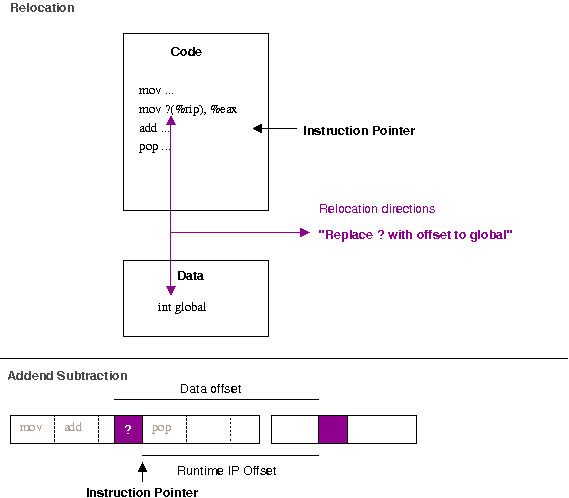
$ readelf --relocs ./function.o
Relocation section '.rela.text' at offset 0x518 contains 1 entries:
  Offset          Info           Type           Sym. Value    Sym. Name + Addend
000000000009  000800000002 R_X86_64_PC32     0000000000000000 global + fffffffffffffffc
There are many different types of relocations for different situations; the exact rules for different relocation types are described in the ABI documentation for the architecture. The R_X86_64_PC32 relocation is defined as "the base of the section the symbol is within, plus the symbol value, plus the addend". The addend makes it look more tricky than it is; remember that when an instruction is executing the instruction pointer points to the next instruction to be executed. Therefore, to correctly find the data relative to the instruction pointer, we need to subtract the extra. This can be seen more clearly when layed out in a linear fashion (as in the bottom of the above diagram). If you try and build a shared object (dynamic library) with an object file with this type of relocation, you should get something like:
$ gcc -shared function.c
/usr/bin/ld: /tmp/ccQ2ttcT.o: relocation R_X86_64_32 against  a local symbol' can not be used when making a shared object; recompile with -fPIC
/tmp/ccQ2ttcT.o: could not read symbols: Bad value
collect2: ld returned 1 exit status
If you look back at the disassembly, we notice that the R_X86_64_32 relocation has left only 4-bytes (32-bits) of space left for the relocation entry (the zeros in 7: 8b 15 00 00 00 00). So why does this matter when you're creating a shared library? The first thing to remember is that in a shared library situation, we can not depend on the local value of global actually being the one we want. Consider the following example, where we override the value of global with a LD_PRELOAD library.
$ cat function.c
int global = 100;
int function(int i)  
    return i + global;
 
$ gcc -fPIC -shared -o libfunction.so function.c
$ cat preload.c
int global = 200;
$ gcc -shared preload.c -o libpreload.so
$ cat program.c
#include <stdio.h>
int function(int i);
int main(void)  
   printf("%d\n", function(10));
 
$ gcc -L. -lfunction program.c -o program
$ LD_LIBRARY_PATH=. ./program
110
$ LD_PRELOAD=libpreload.so LD_LIBRARY_PATH=. ./program
210
If the code in libfunction.so were to have a fixed offset into its own data section, it will not be able to be overridden at run-time by the value provided by libpreload.so. Additionally, there are only 4-bytes available to patch in for the address of global -- since a shared library could conceivably be loaded anywhere in the 64-bit (8-byte) address space we therefore need 8-bytes of space to cover ourselves for all possible addresses global might turn up at. The two basic possibilities for an object file are to be either linked into an executable or linked into a shared-library. In the executable case, the value of global will be in the exectuable's data section, which should definitely be reachable with a 32-bit offset of the current instruction-pointer. The instruction-pointer relative address can simply be patched in and the executable is finalised. But what about the shared-library case, where we know the value of global could essentially be anywhere within the 64-bit address space? It is possible to leave 8-bytes of space for the address of global, by telling gcc to use the large-code model. e.g.
$ gcc -c -mcmodel=large function.c
$ objdump --disassemble ./function.o
./function.o:     file format elf64-x86-64
Disassembly of section .text:
0000000000000000 <function>:
   0:  55                      push   %rbp
   1:  48 89 e5                mov    %rsp,%rbp
   4:  89 7d fc                mov    %edi,-0x4(%rbp)
   7:  48 b8 00 00 00 00 00    movabs $0x0,%rax
   e:  00 00 00
  11:  8b 10                   mov    (%rax),%edx
  13:  8b 45 fc                mov    -0x4(%rbp),%eax
  16:  01 d0                   add    %edx,%eax
  18:  5d                      pop    %rbp
  19:  c3                      retq
However, this creates a problem if you really want to share this code. By having to patch in an address of global directly, this means the run-time code above does not remain unchanged. Two separate processes therefore can't share this code -- they each need separate copies that are identical but for their own addresses of global patched into it. By enabling Position Independent Code (PIC, with the flag -fPIC) you can ensure the code remains share-able. PIC means that the output binary does not expect to be loaded at a particular base address, but is happy being put anywhere in memory (compare the output of readelf --segments on a binary such as /bin/ls to that of any shared library). This is obviously critical for implementing lazy-loading (i.e. only loaded when required) shared-libraries, where you may have many libraries loaded in essentially any order at any location. Of course, any problem in computer science can be solved with a layer of abstraction and that is essentially what is done when compiling with -fPIC. To examine this case, let's see what happens with PIC turned on.
$ gcc -fPIC -shared -c  function.c
$ objdump --disassemble ./function.o
./function.o:     file format elf64-x86-64
Disassembly of section .text:
0000000000000000 <function>:
   0:   55                      push   %rbp
   1:   48 89 e5                mov    %rsp,%rbp
   4:   89 7d fc                mov    %edi,-0x4(%rbp)
   7:   48 8b 05 00 00 00 00    mov    0x0(%rip),%rax        # e <function+0xe>
   e:   8b 00                   mov    (%rax),%eax
  10:   03 45 fc                add    -0x4(%rbp),%eax
  13:   c9                      leaveq
  14:   c3                      retq
It's almost the same! We setup the frame pointer with the first two instructions as before. We push the first argument into memory in the pre-allocated "red-zone" as before. Then, however, we do an IP relative load of an address into rax. Next we de-reference this into eax (e.g. eax = *rax in C) before adding the incoming argument to it and returning.
$ readelf --relocs ./function.o
Relocation section '.rela.text' at offset 0x550 contains 1 entries:
  Offset          Info           Type           Sym. Value    Sym. Name + Addend
00000000000a  000800000009 R_X86_64_GOTPCREL 0000000000000000 global + fffffffffffffffc
The magic here is again in the relocations. Notice this time we have a P_X86_64_GOTPCREL relocation. This says "replace the data at offset 0xa with the global offset table (GOT) entry of global. Global Offset Table operation with data variables As shown above, the GOT ensures the abstraction required so symbols can be diverted as expected. Each entry is essentially a pointer to the real data (hence the extra dereference in the code above). Since we can assume the GOT is at a fixed offset from the program code within plus or minus 2Gib, the code can use a 32-bit IP relative address to gain access to the table entries. So, taking a look a the final shared-library binary we see a final offset hard-coded
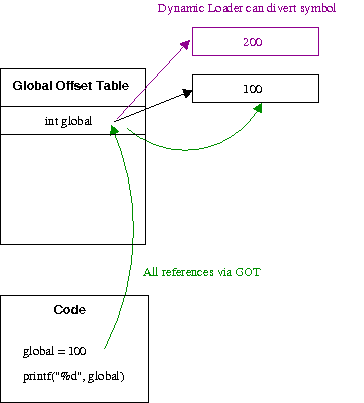
$ gcc -shared -fPIC -o libfunction.so function.c
$ objdump --disassemble ./libfunction.so
00000000000006b0 <function>:
 6b0:  55                      push   %rbp
 6b1:  48 89 e5                mov    %rsp,%rbp
 6b4:  89 7d fc                mov    %edi,-0x4(%rbp)
 6b7:  48 8b 05 8a 02 20 00    mov    0x20028a(%rip),%rax        # 200948 <_DYNAMIC+0x1d8>
 6be:  8b 10                   mov    (%rax),%edx
 6c0:  8b 45 fc                mov    -0x4(%rbp),%eax
 6c3:  01 d0                   add    %edx,%eax
 6c5:  5d                      pop    %rbp
 6c6:  c3                      retq
 6c7:  90                      nop
Every process who wants to share this code just needs to make sure they have their unique address of global at 0x20028a(%rip). Since each process has a separate address-space, this means they can all have different values for global but share the same code! Thus the default of the small-code model is sensible. It is exceedingly rare for an executable to need more than 4-byte offsets for a relative access to a variable in it's data region, so using a full 8-byte value would just be a waste of space. Although leaving 8-bytes would allow access to the variable anywhere in the 64-bit address space; when building a shared library, you really want to use -fPIC to ensure the library can actually be shared, which introduces a different relocation and access to data via the GOT. This should explain why gcc -shared function.c works on x86-32, but does not work on x86-64. Inspecting the code reveals why:
$ objdump --disassemble ./function.o
00000000 <function>:
   0:   55                      push   %ebp
   1:   89 e5                   mov    %esp,%ebp
   3:   a1 00 00 00 00          mov    0x0,%eax
   8:   03 45 08                add    0x8(%ebp),%eax
   b:   5d                      pop    %ebp
   c:   c3                      ret
$ readelf --relocs ./function.o
Relocation section '.rel.text' at offset 0x2ec contains 1 entries:
 Offset     Info    Type            Sym.Value  Sym. Name
00000004  00000701 R_386_32          00000000   global
We start out the same, with the first two instructions setting up the frame pointer. However, next we load a memory value into eax -- as we can see from the relocation information, the address of global. Next we add the incoming argument from the stack (0x8(%ebp)) to the value in this memory location; implicitly dereferencing it. But since we only have a 32-bit address-space, the 4-bytes allocated is enough to access any possible address. So while this can work, you're not creating position-independent code and hence not enabling code-sharing. The disadvantage of PIC code is that you require "bouncing" through the GOT, which requires more loads and reads to find an address than directly referencing it. However, if your program is at the point that this is becoming a performance issue you're probably not reading this blog! Hopefully, this helps clear up that possibly cryptic error message. Further searches around position-independent code, global-offset tables and code-sharing should also yield you more information if it remains unclear.

Jan Wagner: Brainfucked intellectual property rights

This issue is about a bit specific situation in Germany and it's (mainly tax-financed) public service broadcasting. If you think you are not interested, please skip this entry. :) Just beginning from scratch... In Germany we have (like most european countries) a public service broadcasting. Starting with 2013 the system collecting the funding of the public service broadcasting changed from GEZ to Beitragsservice.
To make it short (and a bit simplified) ... it changed from "most 'families' have to pay" to "every menage has to pay". This means, even if you don't have any device to use the service of the german public service broadcasting but are a menage, you have to pay for it. This sitiation is even more worse than pay-TV. Don't get me wrong ... I'm neither against public service broadcasting nor against paying for it in principle. In the rare cases I'm watching TV, this is most likely a channel of the public service broadcasting. Same counts for the rest of my small family. Mostly we are watching news and documentations ... also some movies are watched. The kids are watching KiKA, which we like cause it's Ads-free and it's not just some cartoons with hidden violence. So we most likely benefit from public service broadcasting. Anyways ... in common we are not using "TV" as most of the others may do. We still like some sort of the broadcast, but we are missing it cause various reasons. For our luck there is a service called 'Mediathek' provided by the most german public service broadcasting channels. If you missed a broadcast or are prevented for any reason, you may watch the broadcast there. Unfortunately the timeframe you can access the broadcast is very short, in most cases 7 days. This is manifested in the so called Rundfunkstaatsvertrag, more precisely in the 12. Rundfunk nderungsstaatsvertrag. The 'Tagesschau' has a good explanation about the issue. This means, in simple words, the tax payed broadcasts needs to be deleted after a (in my eyes) short time. WTF?!? Why do we wipe work we all payed for it? Guess what ... it was implemented by lobbying from commercial print media and private (e.g. ads-financed) TV-channels. A comment about a related problem, which I agree, can be found here. Another challenge ... How do you know there is a broadcasting your are interested in? How do you know when it is broadcasted? I remember, my parents was subscribed to a daily newspaper, which included an additional TV paper, my parents-in-law bought also one.
As we are neither subscribed to a daily newspaper nor buying a TV paper, we have to solve that differently (beside that a printed paper won't help us I think). When we use the opportunity to watch TV at the evening, I just use an electronical TV paper (-app). If we find something which fits, we are fine .. if not, we do other things. This sounds a bit like an old school behaviour and it is not, how I would like to use a media today. I like using a feedreader. You can subscribe differnt 'channels' of information feeds and it is a way I would love to use TV. In the past I used a tool called 'Mediathek', which is a tool for Mac OSX. With this tool it was easily possible to find broadcasts, you could subscribe to so called 'channels', which means broadcasts of a same series for example. You could also mark them as "unread" und "read" .. something like a feedreader.
On the other way, it was also possible to list recent broadcast per genres and popular broadcast of the recent and the last week. This was very comfortable as this was working for several mediathek sites for german public service broadcasting channels in one central place. For every broadcast you could just view it or download it to view it later. You could even download subscribed channels automatically. After using the Mediathek-App and being satisfied by the Mediathek sites of the german public service broadcasting channels for several years, this week the server(s) behind the App was shut down. What the f....?!? On Twitter the author stated that the shutdown was cause by problems with the copyright law. Das Erste, ZDF and WDR denied that they has anything todo with this recent issue. The question is ... what is the direct cause for shutting down such a good service. This smells a bit like the PirateBay issue, but in this case the content which is Mediathek providing access to isn't pirated, but legal hosted. So where is the real issue? In my mind, the german citizen has payed to produce this content and should have the right to access the content is an usable way. The Mediathek App did provide such a way and it is really pissing me off that this access isn't available anymore, at least for this reason. Actually I don't see any solution to access our payed content in a decent way. Footnote: I think it's obscenely, that publishing houses and commercial broadcaster trying to gain their turnover at the expense of the german citizen by forcing the german legislature to implement Depublication,.

Ian Campbell: Debugging Initramfs Issues With No Console

The QNAP TS-XXX NAS boxes are nice little systems but one thing I really miss is a console. Martin Michlmayr has some instructions (TS-119, TS-219, TS-41x) on his excellent Debian On QNAP pages on how to build a suitable adaptor but sadly even though I've managed to get all the parts I've been too lazy to actually solder the thing together (it doesn't help that I nearly always burn myself when I use a soldering iron!). This became more pressing when someone reported that Debian bug #693263 in qcontrol was not fixed in Wheezy since the issue appeared to be in the initramfs hook. Worse it seemed like something in my proposed fix was causing the system to not boot at all! Having finally found the hardware needed to reproduce the issue my first thought was to try netconsole. To do this I edited /etc/initramfs-tools/modules to add:
      mv643xx_eth
      netconsole netconsole=@<IP>/eth0,@<DST-IP>/<DST-MAC>
The option syntax is described in netconsole.txt but briefly: <IP> is the address of the TS-419P II I'm debugging on, and <DST-IP> and <DST-MAC> are the IP and MAC address of another machine on the network. Having done that, running update-initramfs -u and rebooting I can use netcat -u -l -p 6666 on the other machine to see all the kernel messages. So far so good but this doesn't get me any debugging from the userspace portions of the initramfs. To get those we have to get a bit hacky by editing /usr/share/initramfs-tools/init, first to change:

     # Parse command line options
    -for x in $(cat /proc/cmdline); do
    +for x in $(cat /proc/cmdline) debug; do
            case $x in
and secondly:

             debug)
                     debug=y
                     quiet=n
    -                exec >/run/initramfs/initramfs.debug 2>&1
    +                exec >/dev/kmsg 2>&1
                     set -x
                     ;;
The first of these simulates adding debug to the kernel command line (which can't otherwise easily be edited on these systems) and the second redirects the initramfs process's output to the kernel log. The overall effect is that the output of the initramfs processes appears over netcat.

Tanguy Ortolo: rlwrap: give readline super powers to any command line tool

Did you ever use a tool such as netcat, which has no history and does not allow you to edit the line you are typing?
% nc localhost smtp
220 cocorico.example.com ESMTP Postfix
HELO localhost
250 cocorico.example.com
MAIL FROM: <tanguy@localhost>
250 2.1.0 Ok
RCTP TO: <tanguy@localhost>
502 5.5.2 Error: command not recognized
^[[A Sh*t, line recall does not work!
502 5.5.2 Error: command not recognized
Here comes rlwrap: it is a small and useful tool that wraps any command line-oriented tool using readline to provide you a history allow you to edit each line before you send it:
% rlwrap nc localhost smtp
220 cocorico.example.com ESMTP Postfix
HELO localhost
250 cocorico.example.com
MAIL FROM: <tanguy@localhost>
250 2.1.0 Ok
RCTP TO: <tanguy@localhost>
502 5.5.2 Error: command not recognized
  RCTP TO: <tanguy@localhost>  
rlwrap's effect is hard to describe with a transcript, so here are two screencasts, with and without it. If you often use tools such as netcat, try it!
<video alt="SMTP session with netcat" controls="controls" src="http://tanguy.ortolo.eu/blog/data/images/screenshots/smtp-session.webm">Sorry your browser does not support videos, you may want to try another one.</video>

SMTP session without rlwrap

<video alt="SMTP session with netcat and rlwrap" controls="controls" src="http://tanguy.ortolo.eu/blog/data/images/screenshots/smtp-session-rlwrap.webm">Sorry your browser does not support videos, you may want to try another one.</video>

SMTP session with rlwrap

Olly Betts: Empty Strings in C++

Gaurav (one of Xapian's GSoC students this year) queried my advice that it's better not to explicitly initialise a std::string in C++ like this:
std::string s = "";
but instead to write:
std::string s;
It could be argued that the former makes it clearer that the string is initialised (since C++ does inherit C's behaviour of not implicitly initialising variables of fundamental types, such as int and double). But objects aren't left uninitialised - the default constructor gets called (or if there isn't one, the code won't compile). The downside is that you get quite a lot more code from the first version than the second. Perhaps compilers will grow smarter and in future both the above will compile to the same code, but that's not true today. Here's a simple bit of test code:
#include <string>
std::string f()  
#ifdef EXPLICIT_INIT
    std::string s = "";
#else
    std::string s;
#endif
    return s;
 
And I'll compile it with GCC (g++ (Debian 4.7.2-4) 4.7.2) on x86-64 to produce assembler output:
$ g++ -O2 -S s.cc -o s1.s
$ g++ -DEXPLICIT_INIT -O2 -S s.cc -o s2.s
$ diff s1.s s2.s
1a2,4
>   .section        .rodata.str1.1,"aMS",@progbits,1
> .LC0:
>   .string ""
9,10c12,25
<   movq    %rdi, %rax
<   movq    $_ZNSs4_Rep20_S_empty_rep_storageE+24, (%rdi)
---
>   pushq   %rbx
>   .cfi_def_cfa_offset 16
>   .cfi_offset 3, -16
>   movl    $.LC0, %esi
>   movq    %rdi, %rbx
>   subq    $16, %rsp
>   .cfi_def_cfa_offset 32
>   leaq    15(%rsp), %rdx
>   call    _ZNSsC1EPKcRKSaIcE
>   addq    $16, %rsp
>   .cfi_def_cfa_offset 16
>   movq    %rbx, %rax
>   popq    %rbx
>   .cfi_def_cfa_offset 8
(As an aside, I wouldn't recommend spending a lot of time digging into the assembler your compiler produces, but if there's more than one equivalent way to write code for a common case (as here) and you want to know which is most efficient, it can be informative to see what code is produced for each). You don't really need to know x86-64 assembler to grasp what's happening above, which is lucky, since I don't really know x86-64 assembler. In the first hunk, we get an empty literal string being added to the rodata (read-only data) section; and in the second, instead of two instructions which copy a standard empty string representation, we get much more elaborate code, including a function call to _ZNSsC1EPKcRKSaIcE - the C++ mangled name for the std::string from const char * constructor:
$ c++filt _ZNSsC1EPKcRKSaIcE
std::basic_string<char, std::char_traits<char>, std::allocator<char> >::basic_string(char const*, std::allocator<char> const&)
I also tested the example above with clang (Debian clang version 3.0-6 (tags/RELEASE_30/final) (based on LLVM 3.0)) and the resultant code is fairly similar for each case. The overhead for doing this once isn't going to matter, but if it happens every time you declare a std::string variable, the cumulative effects may be measurable. And as well as taking longer to execute, the larger code will cause greater CPU cache pressure.

Russ Allbery: Automated Perl testing

I started several coding projects today, but none of them reached an announcable conclusion, so this seems like a good day to write up my current discoveries in automated Perl testing modules. This post isn't about test frameworks like Test::More and friends, or even about helper modules (although I do recommend Test::Warn if you want to test warning code in your modules). It's not about writing functionality tests. Rather, it's about various CPAN modules that can be used almost identically in just about every Perl module distribution (and in some other places, like Perl scripts inside a larger package written in another language). You can drop a small driver script into your t directory and (mostly) run make test with no further customization. If you want to see the driver scripts for all of the below that I'm currently using, see the t directory of the Term::ANSIColor distribution. They'll slowly make their way into my other modules, and probably, despite the name of the package, rra-c-util, since that's my equivalent of gnulib and I have tools to synchronize shared code from that package. The driver script generally tests whether the module is installed, skips the test if not, and otherwise dispatches to the "test everything" routine in the module. Test::MinimumVersion: This tests that you're not accidentally using a newer Perl feature than you were expecting. It's very handy if you want to support backward compatibility to a particular version of Perl. It knows about features as far back as 5.004_05. It won't be able to catch everything, but it will catch some of the most obvious things. Test::Perl::Critic: This is sort of the thousand-pound gorilla. Test::Perl::Critic runs all of your code through perlcritic and reports any errors. You will probably need to combine this with a perlcriticrc file in your distribution that you configure it to use, since otherwise the person running the tests may have customized perlcritic. If you let it run perltidy to check for formatting problems, you'll also want a perltidyrc. See the driver script mentioned above for how I set that up. I usually configure this test to only run for me (by checking an environment variable) since the results vary a lot depending on what version of perlcritic is installed, and it's likely new versions will cause the test to start failing. If you use this, expect to need to add ## no critic annotations to your code. Test::Pod: Checks for syntax errors in your POD documentation so that you won't have those embarassing POD ERRORS sections. Note that the latest version of podlators turns syntax errors into fatal errors, so soon you won't have to worry as much about this. But if you'd been using this module all along, you wouldn't have to worry about the fact that pod2man may start faliing due to syntax errors you never fixed! Test::Pod::Coverage: Only of interest to module distributions, not ramdom scripts, this checks that every sub provided by your module has POD documentation. It understands various subs that don't need to be documented (such as the ones you provide to implement a tied class) and lets you mark some subs as not requiring documentation. Test::Pod::Spelling: Checks your POD documentation for spelling mistakes with a spell checker. (Note that perlcritic, and hence Test::Perl::Critic, can also do this, but I use this module separately since I think the output is more readable.) You will almost certainly want to make this test maintainer-only, since spell checkers and spelling dictionaries vary a lot. But it prevents a lot of embarassment when you read your documentation on search.cpan.org and find that obvious spelling error you never saw before. Test::Strict: Checks all Perl code to ensure that it compiles, checks whether it has use strict, and optionally checks whether it has use warnings. This is great; I use this even with packages that just have a few Perl utility scripts in a package otherwise written in C, since I previously kept releasing packages with helper scripts with obvious syntax errors since I didn't run them much. Another place it's useful is if you have internal Debian packages that wrap up Perl utility scripts; just create a small test suite with this module and run it from override_dh_auto_check and you won't ever release a package with scripts that won't run. You can also do test suite coverage testing with this module (and Devel::Cover), but that you'll want to mark maintainer-only since it takes a while. Test::Synopsis: Checks the code in the SYNOPSIS section of any POD documentation to ensure that it compiles. No more syntax errors in your example code in the documentation! All of these modules are, of course, packaged for Debian (thanks largely to the wonderful Perl packaging team!), and otherwise available on CPAN. There are a variety of others, of course; these are just the main ones that I've found personally useful. One final whine, however: all this wonderful Perl testing infrastructure desperately needs a common module and a common interface for providing a list of files to check. Every one of these modules reinvents that wheel, and most of them do it a slightly different way than all the others. Most of them check in either blib or lib (or sometimes both). Most of them also add t. Most of them don't include Makefile.PL, but some of them do. Almost none of them look in examples. Some have a simple way to add more files or directories; some don't. Some can be run from the t directory and still find things, but most of them can't. And of course the syntax is different in every case! Most of the work in my driver scripts is finding the right way to add a few additional directories to the scope of the testing, and in one annoying case (Test::Synopsis), I actually had to use Perl::Critic::Utils (for lack of a better module) to build a list of files to check instead of using the build-in file list, since the build-in file list required all module code be in lib. A module to abstract out all of this and provide a common interface would be easy to write. Most of the work would involve talking to all the authors of all these different modules and asking them to use it. If someone in the Perl community felt like doing that, it would make life so much easier for everyone.

4 January 2013

David Welton: The Software Millionaire Next Door

I've been reading "The Millionaire Next Door" and have so far found it to be a pleasant book with a good message: don't waste your money on silly things and appearance (fancy suits, fancy cars, expensive boats, etc...), save what you do earn consistently and constantly, invest wisely, and so on. Wikipedia has a good summary:
http://en.wikipedia.org/wiki/The_Millionaire_Next_Door
One of the things I like about it is that it focuses on "ordinary" wealthy people, those with a million or more in the bank, but not the Warren Buffets or Bill Gates types that are extreme statistical outliers. There are plenty of people in the US who have done well by themselves by slowly but surely putting together enough money to be financially independent, without, however, being in the spotlight. As the book says, these are the kind of people who maybe own a local chain of businesses doing something fairly ordinary, but doing it well enough to succeed. They may very well not live in a fancy house, nor drive an expensive car, or otherwise outwardly draw much attention to themselves. The world of software does not revolve around "dressing for success" (you noticed?), but we do tend to focus on the "big winners". Gates, Jobs, Zuckerberg, Larry & Sergey, Larry Ellison, and so on are the stars of the show. Of course, the economics of software being what they are, instances of winner-take-all markets with one big fish and a lot of also-rans are not uncommon. However, that is not the only story, and I think it'd be interesting to know more about those in our industry who have accumulated significant wealth, yet are not the guys with more money than they could possibly ever spend on things that aren't, say, country-sized chunks of real-estate. I'm guessing they'd fall into these categories: It'd be very interesting to gather some actual data on this, although I'm not in a position to do so myself - I wouldn't even really know where to start. As I age, I think the third category has begun to seem appealing in many ways - I'm simply not cut out for the Big Company life, and I'm not interested in living in Silicon Valley and going "all in" on the latest startup - I already did that, and while it was fun and I don't regret it, it's not the kind of thing I'd want to do now that I'm married and have kids. Incidentally, this more relaxed, under the radar approach is exactly what is expoused in one of my favorite books of the past few years, Start Small, Stay Small. Edit : I finished reading the book and reviewed it here: http://davids-book-reviews.blogspot.com/

Stefano Zacchiroli: bits from the DPL for December 2012

Happy new year, Debian! To celebrate, here are some freshly posted, bits from the DPL for December 2012.
Dear Project Members, happy new year! Here goes another report of DPL activities, this time for December 2012. This issue of the DPL-monthly is skinnier than usual: during the past month I've been struck by the catastrophe also known as "family holiday season", enjoying a solid 10 day break from computer-related activities. Talks Assets DPL helpers Collaboration with the outer world That's all for last year, enjoy the new one, which will soon see a new Debian release out of the door. And to make it happen sooner, let's go back fix RC bugs! Cheers.
PS the day-to-day activity log for December 2012 is available at the usual place master:/srv/leader/news/bits-from-the-DPL.txt.201212

Russell Coker: Links January 2013

AreWomenHuman has an interesting article about ViolentAcrez and the wide support for trolling (including by media corporations) [1]. Chrys Stevenson wrote an important article for the ABC about the fundamentalist Christians who are trying to take over the Australian education system [2]. Tavi Gevinson gave an interesting TED talk titled A teen just trying to figure it out about her work starting Rookie magazine and her ideas about feminism [3]. Burt Rutan gave an interesting and inspiring TED talk about the future of space expploration [4]. One of his interesting points is that fun really is defendable in regard to tourism paying for the development of other space industries. Stephen Petranek gave an interesting TED talk about how to prepare for some disasters that could kill a significant portion of the world s population [5]. Some of these are risks of human extinction, we really need to spend some money on it. John Wilbanks gave an intresting TED talk about the way that current informed consent laws prevent large-scale medical research [6]. He says I live in a web world where when you share things beautiful stuff happens, not bad stuff . Joey Hess was interviewed for The Setup and the interview sparked a very interesting Hacker News discussion about workflow for software development [7]. Like most developers I prefer large screens with high resolution, I have an EeePC 701 which works reasonably well for an ultra-portable system but I largely don t use it now I have an Android phone (extremely portable and totally awful input usually beats moderately portable and mostly awful input for me). But Joey s methods are interesting and it seems that for some people different systems give the best result. Jeff Masters gave an insightful TED talk about the weather disasters that may seriously impact the US in the next 30 years [8]. Governments really need to start preparing for such things, some of them are really cheap to mitigate if work is started early. Bryan Stevenson gave an inspiring TED talk about the lack of justice in the US justice system [9]. Wouter Verhelst wrote an insightful article about some of the criticisms of Linux from Windows users [10]. He references a slightly satirical post he previously wrote about why Windows isn t ready for desktop use. Paul Carr wrote an interesting article comparing disruptive business practices of dot-com companies to the more extreme aspects of Ayn Rand s doctrine [11]. In reading some of the links from that article I discovered that Ayn Rand was even more of a sociopath than I had previously realised. Lindy West gave an amazing Back Fence PDX talk about dealing with nasty blog comments from the PUA/MRA communities [12]. After investigating them she just feels sorry for the trolls who s lives suck. Hang from the Vlogbrothers explains gender, sex, sexual orientation, etc [13]. Rick Falkvinge wrote an interesting article about recent political news from Brazil, they had a proposed law that was very positive for liberty on the Internet but it was sabotaged by the media and telcos [14]. We should try to avoid paying any money to the media industry so that they can go away sooner. Amy Cuddy gave an interesting TED talk about body language, power, and the imposter syndrome [15]. Caleb Chung gave an interesting TED talk about toy design which focussed on Pleo a robotic dinosaur with a SD card and USB socket to allow easy reprogramming by the user [16].

Next.

Previous.