Search Results: "ag"

27 December 2020

John Goerzen: See The World Through the Eyes of a Child, and You Are Free

Because we see things so often, we see them less and less. Those who live in thanksgiving daily, however, have a way of opening their eyes and seeing the wonders and beauties of this world as though seeing them for the first time. Joseph Wirthlin
Today is about dirt. I had to learn about it, again, from my 2-year-old last week. She and I were playing outside something we have more time to do right now. She started to roll around in the grass, and asked me to play in the grass, too. As I got close to the ground, I inhaled the wonderfully sweet and earthy scent of spring soil. I hadn t smelled that in a long time. What an unexpected gift. This photo is of a child, having a fantastic time with dirt and water. The more bits of Kansas he had on him, the more shrieks of laughter I heard. It think most adults keep forgetting the joys of simple things like dirt. I am lucky to have children around to remind me. This week, I also had the opportunity to teach my 2-year-old the joys of making big splashes in mud puddles, so maybe I can also remind them on occasion.
See the world as if for the first time; see it through the eyes of a child, and you will suddenly find that you are free. Deepak Chopra
Rural Kansas, 2016 (I originally wrote this on March 31, and am sharing it on my blog for the first time today.)

Russ Allbery: Review: King of the Murgos

Review: King of the Murgos, by David Eddings
Series: The Malloreon #2
Publisher: Del Rey
Copyright: April 1988
Printing: November 1991
ISBN: 0-345-35880-5
Format: Mass market
Pages: 403
This is the second book of the Malloreon, which in turn is a sequel trilogy to The Belgariad. You could start here, since Eddings does a good job at summarizing previous volumes, but I'm not sure why you'd want to. This is the sort of book that gives epic fantasy series a bad name. After a lot of action in Guardians of the West, our band of heroes has been mostly assembled. They set out after the villain through the novel strategy of exploring the parts of the world map we have not yet seen. By the end of 400 pages of traveling they... are on the trail of the villain while exploring parts of the world map we have not yet seen. What I'm saying is that you'd better be really enjoying Silk's nose twitching and Belgarath being grumpy at Polgara, because that's about all you get. The protagonists collect a few important plot coupons and set up some emotional conflicts whose resolutions are already telegraphed, and that's about it. After wasting a bunch of time getting to and wandering around Nyissa, all of which felt pointless except for one moment of Errand doing something nifty (often the best parts of this series), the band of heroes ventures into enemy territory as foreshadowed by the title. The structure of Eddings's series is basically Suikoden (collect all the protagonists), so as one might expect the point of this excursion is to pick up another protagonist. In the process, we get to see a bit more of the Murgos than we have before. I've commented before that Eddings takes racial essentialism to such an absurd degree that these books start feeling like animal fairy tales, which is why I'm willing to tolerate all of the stereotyping. It's Planet of Hats except with fantasy countries. That tolerance is stretched rather thin when it comes to the bad guys, since the congruence with real-life racism and dehumanization of enemies is a bit too strong. Eddings dodges this mostly by not putting many of the bad guys in the page, but in King of the Murgos he has a golden opportunity to undercut his racial structure and surprise the reader. What if one of the Murgos is a protagonist and is vital to the series plot? I won't spoil what Eddings actually does, but if you imagine the stupidest and most obvious way to avoid having to acknowledge his fantasy races are not uniform, you probably just guessed the big reveal in this book. It's sadly not surprising, since Eddings is all in on his racial construction of this fantasy world, but it's still disgusting. The main reason why I decided to re-read this series, which is notorious for being a re-run of the Belgariad, is because I think what Eddings does here with prophecy, the voice in Garion's head, and the meddling of the seers is hilarious. The plot is openly on rails to the point that the characters actively grumble about it. I find that oddly entertaining, a bit like watching a Twitch streamer play an RPG. In this installment, Errand does something random in the middle of a Murgo temple, Garion gets a level-up chime, the prophecy gets very smug about how well things are going, and no one knows why. It's an absolute delight, and I don't know of any other series that isn't pure parody that would be willing to use that as a plot element. Sadly, King of the Murgos has only one or two enjoyable moments like that, a whole lot of frankly boring map exploration, some truly egregious racist claptrap, and no plot development worth speaking of. I probably should have skipped this one when re-reading this series. Followed by Demon Lord of Karanda. Rating: 4 out of 10

John Goerzen: Asynchronous Email: Exim over NNCP (or UUCP)

Following up to yesterday s article about how NNCP rehabilitates asynchronous communication with modern encryption and onion routing, here is the first of my posts showing how to put it into action. Email is a natural fit for async; in fact, much of early email was carried by UUCP. It is useful for an airgapped machine to be able to send back messages; errors from cron, results of handling incoming data, disk space alerts, etc. (Of course, this would apply to a non-airgapped machine also). The NNCP documentation already describes how to do this for Postfix. Here I will show how to do it for Exim. A quick detour to UUCP land When you encounter a system such as email that has instructions for doing something via UUCP, that should be an alert to you that here is some very relevant information for doing this same thing via NNCP. The syntax is different, but broadly, here s a table of similar NNCP commands:
Purpose UUCP NNCP
Connect to remote system uucico -s, uupoll nncp-call, nncp-caller
Receive connection (pipe, daemon, etc) uucico (-l or similar) nncp-daemon
Request remote execution, stdin piped in uux nncp-exec
Copy file to remote machine uucp nncp-file
Copy file from remote machine uucp nncp-freq
Process received requests uuxqt nncp-toss
Move outbound requests to dir (for USB stick, airgap, etc) N/A nncp-xfer
Create streaming package of outbound requests N/A nncp-bundle
If you used UUCP back in the day, you surely remember bang paths. I will not be using those here. NNCP handles routing itself, rather than making the MTA be aware of the network topology, so this simplifies things considerably. Sending from Exim to a smarthost One common use for async email is from a satellite system: one that doesn t receive mail, or have local mailboxes, but just needs to get email out to the Internet. This is a common situation even for conventionally-connected systems; in Exim speak, this is a satellite system that routes mail via a smarthost. That is, every outbound message goes to a specific target, which then is responsible for eventual delivery (over the Internet, LAN, whatever). This is fairly simple in Exim. We actually have two choices for how to do this: bsmtp or rmail mode. bsmtp (batch SMTP) is the more modern way, and is essentially a derivative of SMTP that explicitly can be queued asynchronously. Basically it s a set of SMTP commands that can be saved in a file. The alternative is rmail (which is just an alias for sendmail these days), where the data is piped to rmail/sendmail with the recipients given on the command line. Both can work with Exim and NNCP, but because we re doing shiny new things, we ll use bsmtp. These instructions are loosely based on the Using outgoing BSMTP with Exim HOWTO. Some of these may assume Debianness in the configuration, but should be easily enough extrapolated to other configs as well. First, configure Exim to use satellite mode with minimal DNS lookups (assuming that you may not have working DNS anyhow). Then, in the Exim primary router section for smarthost (router/200_exim4-config_primary in Debian split configurations), just change transport = remote_smtp_smarthost to transport = nncp. Now, define the NNCP transport. If you are on Debian, you might name this transports/40_exim4-config_local_nncp:
nncp:
  debug_print = "T: nncp transport for $local_part@$domain"
  driver = pipe
  user = nncp
  batch_max = 100
  use_bsmtp
  command = /usr/local/nncp/bin/nncp-exec -noprogress -quiet hostname_goes_here rsmtp
.ifdef REMOTE_SMTP_HEADERS_REWRITE
  headers_rewrite = REMOTE_SMTP_HEADERS_REWRITE
.endif
.ifdef REMOTE_SMTP_RETURN_PATH
  return_path = REMOTE_SMTP_RETURN_PATH
.endif
This is pretty straightforward. We pipe to nncp-exec, run it as the nncp user. nncp-exec sends it to a target node and runs whatever that node has called rsmtp (the command to receive bsmtp data). When the target node processes the request, it will run the configured command and pipe the data in to it. More complicated: Routing to various NNCP nodes Perhaps you would like to be able to send mail directly to various NNCP nodes. There are a lot of ways to do that. Fundamentally, you will need a setup similar to the UUCP example in Exim s manualroute manual, which lets you define how to reach various hosts via UUCP/NNCP. Perhaps you have a star topology (every NNCP node exchanges email with a central hub). In the NNCP world, you have two choices of how you do this. You could, at the Exim level, make the central hub the smarthost for all the side nodes, and let it redistribute mail. That would work, but requires decrypting messages at the hub to let Exim process. The other alternative is to configure NNCP to just send to the destinations via the central hub; that takes advantage of onion routing and doesn t require any Exim processing at the central hub at all. Receiving mail from NNCP On the receiving side, first you need to configure NNCP to authorize the execution of a mail program. In the section of your receiving host where you set the permissions for the client, include something like this:
      exec:  
        rsmtp: ["/usr/sbin/sendmail", "-bS"]
       
The -bS option is what tells Exim to receive BSMTP on stdin. Now, you need to tell Exim that nncp is a trusted user (able to set From headers arbitrarily). Assuming you are running NNCP as the nncp user, then add MAIN_TRUSTED_USERS = nncp to a file such as /etc/exim4/conf.d/main/01_exim4-config_local-nncp. That s it! Some hosts, of course, both send and receive mail via NNCP and will need configurations for both.

26 December 2020

Sandro Tosi: Gmail and tracker.debian.org: add a label to team emails

Recently the Python Team started the migration from Alioth mailing list to a tracker.debian.org team.Alioth mailing list, being a real ml, included a List-Id header, which is handled by Gmail natively and which you can use to create a filter based on it.Tracker.d.o instead uses a custom header, X-Distro-Tracker-Team, and Gmail doesn't allow to create filters on custom headers. But there's a solution: Google Apps Scripts.

1. Apps script and its configuration

To create a new apps script, click "New project" from the scripts dashboard: this will open a code editor, so now cut and paste this code (change the label name to match the one you want to use, and the header too if you're going to use this for another team):

function tagPythonTeamEmails()  

// search for all recent threads (hours is the smallest interval searchable)
var threads = GmailApp.search("newer_than:1h");
// this is the label i want to apply to the messages
var label = GmailApp.getUserLabelByName("Debian_Python_Pkgs"); // <-- EDIT THIS

for (var i = 0; i < threads.length; i++)

// get all messages in a given thread
var messages = threads[i].getMessages();

// for each message in the thread
for (var j = 0; j < messages.length; j++)
var message = messages[j];
// needed to have access to the full email: headers + body
var email = message.getRawContent();
// this is the header i want to check for: if present, add label and archive
if (email.indexOf("X-Distro-Tracker-Team: python") > -1) // <-- EDIT THIS
threads[i].addLabel(label);
threads[i].moveToArchive();


(This code is largely inspired by this StackOverflow answer.)

Given we're going to perform changes to the emails, we need to add extra permissions to the script; first we need to toggle the option "View > Show manifest file" which will show the appsscript.json file. Once done, edit it and update the scope of the script to include:

  "oauthScopes": [
...
"https://www.googleapis.com/auth/gmail.readonly",
"https://www.googleapis.com/auth/gmail.modify"
],

These new permission will be granted when we deploy the script, which we can actually do right now: from the editor window click on "Publish > Deploy from manifest..." and then "Install add-on"; it will make the app script available to operate on Gmail by opening the usual Google grants authorization popup.

2. Schedule the app script execution

Unlike filters defined on the web UI, apps scripts are not triggered every time a mail is received (there's a pub-sub mechanism, but it doesn't look like it would work for this), so if we want to execute periodically the new script, we need to create a time-driven trigger.

The simplest way is probably from the script editor (but you can also follow this doc): "View > Current project's triggers" and then "Add trigger" from there. For my specific use-case i set:

  • event source = time-driven
  • type of time based trigger = minutes timer
  • minute interval = 5 minutes
  • Failure notification settings = notify me immediately
it's not great that you have to wait 5 minutes for getting proper labels, and while it's true you can schedule the trigger for every minute, there are further considerations for that, discussed below.

3. Additional information

Be aware of quotas and limitations for Apps scripts; in particular the "Triggers total runtime" set to "90 min / day" is what led me to set the trigger every 510 mins.

Use the scripts dashboard (doc) to monitor the script execution logs, in the "My Executions" section, and specifically the "Duration" column: the script execution time depends exclusively on the number of emails to process at every execution, so fine-tune the trigger time to stay within your quota.

The newer_than search operator doesn't allow a granularity smaller than hours (although that's not even documented), so that means we're going to scan multiple times the same emails.

UPDATE (2020-12-26): I've already had to bump from every 5 to every 10 minutes, as otherwise i'd get Exception: Service invoked too many times for one day: gmail. (remember the quota!)

Sandro Tosi: QNAP firmware 4.5.1.1465: disable ssh management menu

as a good boy i just upgraded my QNAP NAS to the latest available firmware, 4.5.1.1465, but after the reboot there's an ugly surprise awaiting for meonce i ssh'd into the box to do my stuff, instead of a familiar bash prompt i'm greeted by a management menu that allows me to perform some basic management tasks or quit it and go back to the shell. i dont really need this menu (in particular because i have automations that regularly ssh into the box and they are not meant to be interactive).to disable it: edit /etc/profile and comment the line "[[ "admin" = "$USER" ]] && /sbin/qts-console-mgmt -f" (you can judge me later for sshing as root)UPDATE (2020-12-26): as pointed out in the comments, and discovered now after an upgrade, the menu comes back up after because /etc/profile is a system file for QNAP so gets replaced/updated by them often

Paul Tagliamonte: Reverse Engineering my Christmas Tree

Over the course of the last year and a half, I ve been doing some self-directed learning on how radios work. I ve gone from a very basic understanding of wireless communications (there s usually some sort of antenna, I guess?) all the way through the process of learning about and implementing a set of libraries to modulate and demodulate data using my now formidable stash of SDRs. I ve been implementing all of the RF processing code from first principals and purely based on other primitives I ve written myself to prove to myself that I understand each concept before moving on. I figured that there was a fun capstone to be done here - the blind reverse engineering and implementation of the protocol my cheep Amazon power switch uses to turn on and off my Christmas Tree. All the work described in this post was done over the course of a few hours thanks to help during the demodulation from Tom Bereknyei and hlieberman.

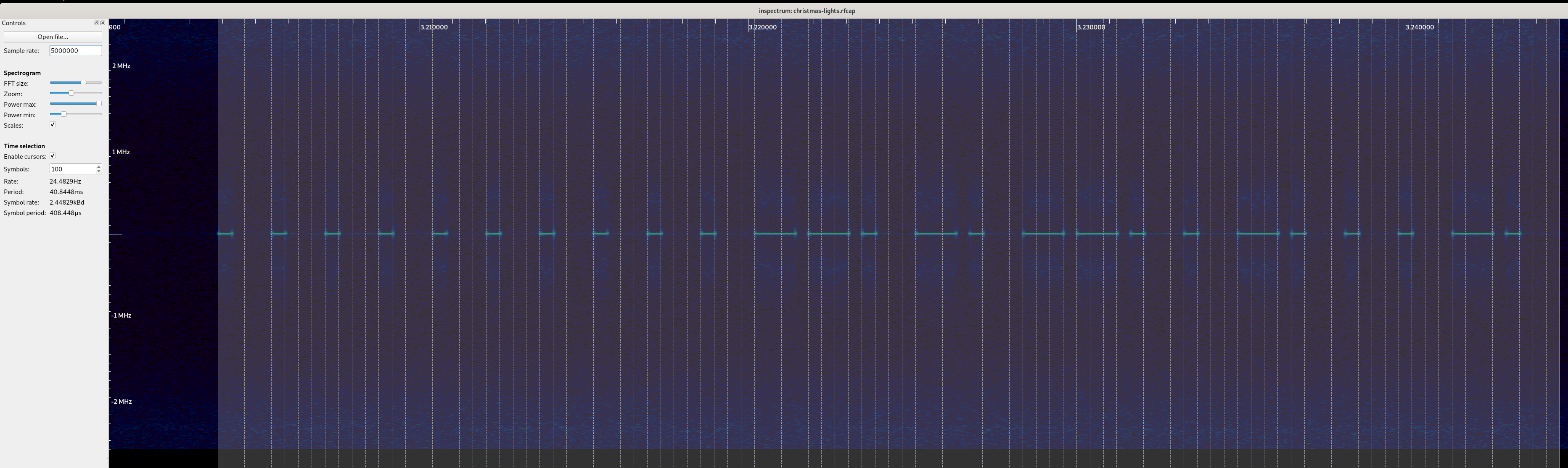
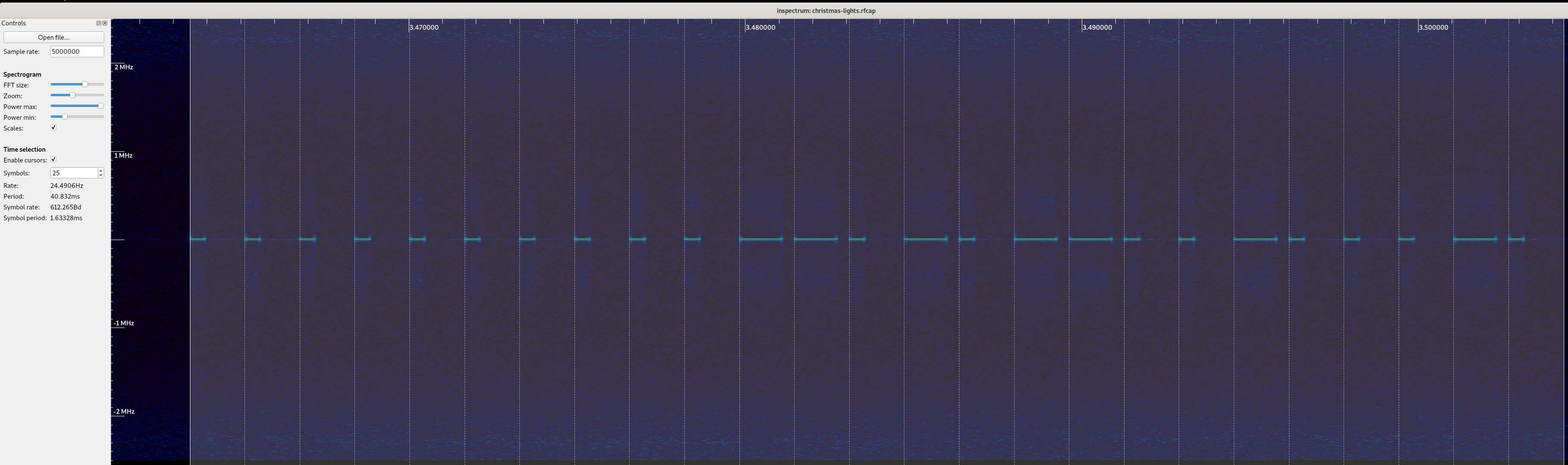
Going in blind When I first got my switch, I checked it for any FCC markings in order to look up the FCC filings to determine the operational frequency of the device, and maybe some other information such as declared modulation or maybe even part numbers and/or diagrams. However, beyond a few regulatory stickers, there were no FCC ids or other distinguishing IDs on the device. Worse yet, it appeared to be a whitelabeled version of another product, so searching Google for the product name was very unhelpful. Since operation of this device is unlicensed, I figured I d start looking in the ISM band. The most common band used that I ve seen is the band starting at 433.05MHz up to 434.79MHz. I fired up my trusty waterfall tuned to a center frequency of 433.92MHz (since it s right in the middle of the band, and it let me see far enough up and down the band to spot the remote) and pressed a few buttons. Imagine my surprise when I realize the operational frequency of this device is 433.920MHz, exactly dead center. Weird, but lucky! After taking a capture, I started to look at understanding what the modulation type of the signal was, and how I may go about demodulating it. Using inspectrum, I was able to clearly see the signal in the capture, and it immediately stuck out to my eye to be encoded using OOK / ASK. Next, I started to measure the smallest pulse, and see if I could infer the symbols per second, and try to decode it by hand. These types of signals are generally pretty easy to decode by eye. This wound up giving me symbol rate of 2.2 Ksym/s, which is a lot faster than I expected. While I was working by hand, Tom demodulated a few messages in Python, and noticed that if you grouped the bits into groups of 4, you either had a 1000 or a 1110 which caused me to realize this was encoded using something I saw documented elsewhere, where the 0 is a short pulse, and a 1 is a long pulse, not unlike morse code, but where each symbol takes up a fixed length of time (monospace morse code?). Working on that assumption, I changed my inspectrum symbol width, and demodulated a few more by hand. This wound up demodulating nicely (and the preamble / clock sync could be represented as repeating 0s, which is handy!) and gave us a symbol rate of 612(ish) symbols per second a lot closer to what I was expecting. If we take the code for on in the inspectrum capture above and demodulate it by hand, we get 0000000000110101100100010 (treat a short pulse as a 0, and a long pulse as a 1). If you re interested in following along at home, click on the inspectrum image, and write down the bits you see, and compare it to what I have! Right, so it looks like from what we can tell so far that the packet looks something like this:
preamble / sync
stuff
Next, I took a capture of all the button presses and demodulated them by hand, and put them into a table to try and understand the format of the messages:
Button Demod'd Bits
On 0000000000110101100100010
Off 00000000001101011001010000
Dim Up 0000000000110101100110100
Dim Down 0000000000110101100100100
Timer 1h 0000000000110101100110010
Timer 2h 0000000000110101100100110
Timer 4h 0000000000110101100100000
Dim 100% 0000000000110101000101010
Dim 75% 00000000001101010001001100
Dim 50% 00000000001101010001001000
Dim 25% 0000000000110101000100000
Great! So, this is enough to attempt to control the tree with, I think so I wrote a simple modulator. My approach was to use the fact that I can break down a single symbol into 4 sub-symbol components which is to say, go back to representing a 1 as 1110, and a 0 as 1000. This let me allocate IQ space for the symbol, break the bit into 4 symbols, and if that symbol is 1, write out values from a carrier wave (cos in the real values, and sin in the imaginary values) to the buffer. Now that I can go from bits to IQ data, I can transmit that IQ data using my PlutoSDR or HackRF and try and control my tree. I gave it a try, and the tree blinked off! Success! But wait that s not enough for me I know I can t just demodulate bits and try and replay the bits forever there s stuff like addresses and keys and stuff, and I want to get a second one of these working. Let s take a look at the bits to see if we spot anything fun & interesting. At first glance, a few things jumped out at me as being weird? First is that the preamble is 10 bits long (fine, let s move along - maybe it just needs 8 in a row and there s two to ensure clocks sync?). Next is that the messages are not all the same length. I double (and triple!) checked the messages, and it s true, the messages are not all the same length. Adding an extra bit at the end didn t break anything, but I wonder if that s just due to the implementation rather than the protocol. But, good news, it looks like we have a stable prefix to the messages from the remote must be my device s address! The stable 6 bits that jump out right away are 110101. Something seems weird, though, 6 bits is a bit awkward, even for a bit limited embedded device. Why 6? But hey, wait, we had 10 bits in the preamble, what if we have an 8 bit address meaning my device is 00110101, and the preamble is 8 0 symbols! Those are numbers that someone working on an 8 bit aligned platform would pick! To test this, I added a 0 to the preamble to see if the message starts at the first 1, or if it requires all the bits to be fully decoded, and lo and behold, the tree did not turn on or off. This would seem to me to confirm that the 0s are part of the address, and I can assume we have two 8 bit aligned bytes in the prefix of the message.
preamble / sync
address
stuff
Now, when we go through the 9-10 bits of stuff , we see all sorts of weird bits floating all over the place. The first 4 bits look like it s either 1001 or 0001, but other than that, there s a lot of chaos. This is where things get really squishy. I needed more information to try and figure this out, but no matter how many times I sent a command it was always the same bits (so, no counters), and things feel very opaque still. The only way I was going to make any progress is to get another switch and see how the messages from the remote change. Off to Amazon I went, and ordered another switch from the same page, and eagerly waited its arrival.

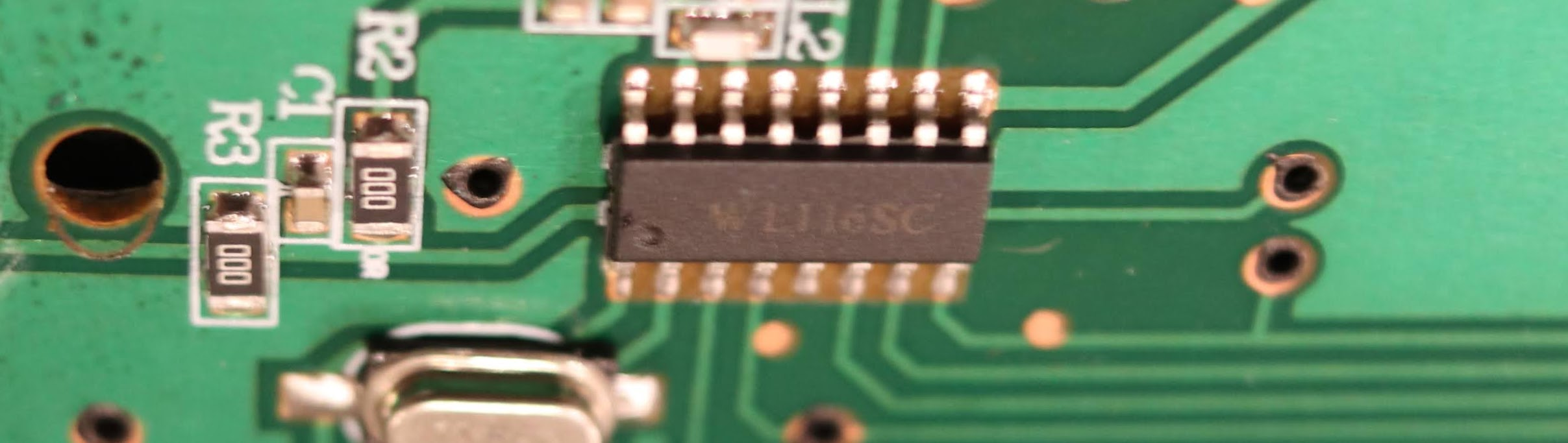
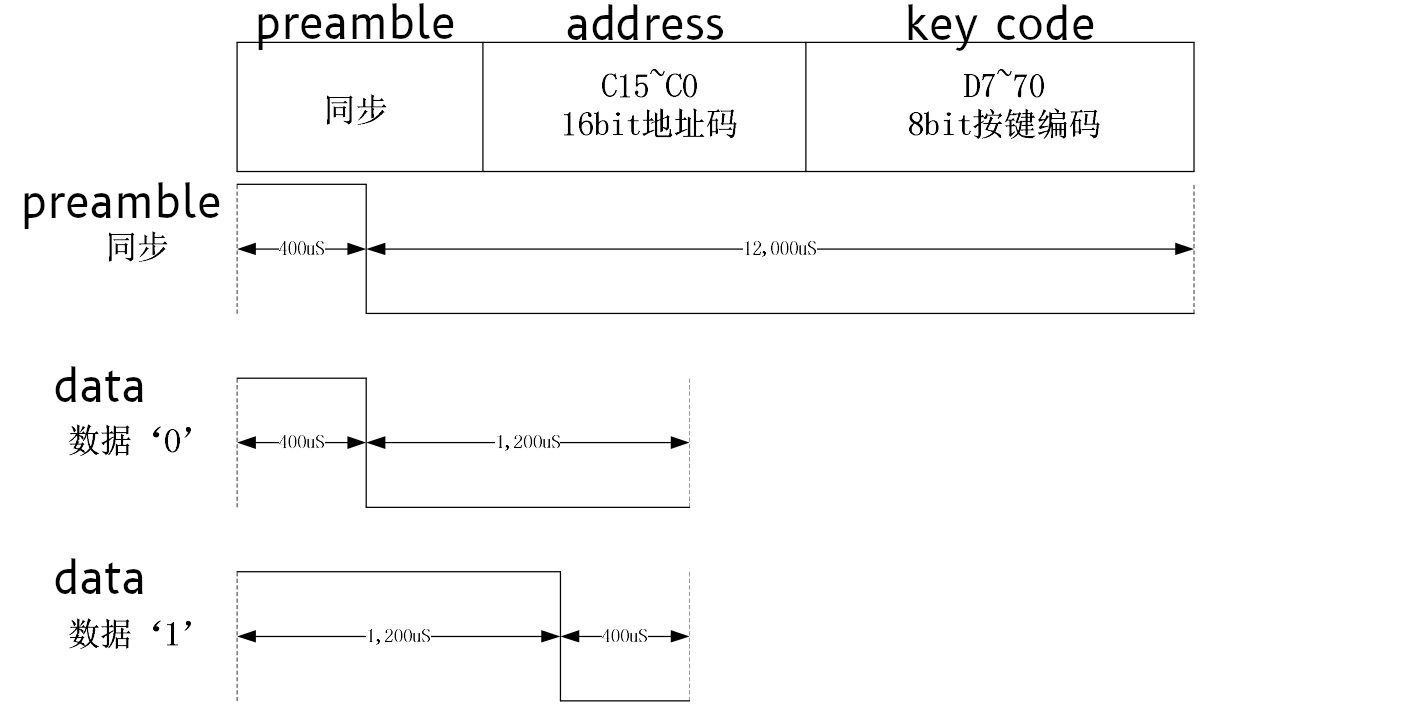
Switch #2 The second switch showed up, and I hurriedly unboxed the kit, put batteries into the remote, and fired up my SDR to take a capture. After I captured the first button ( Off ), my heart sunk as I saw my lights connected to Switch #1 flicker off. Apparently the new switch and the old switch have the same exact address. To be sure, I demodulated the messages as before, and came out with the exact same bit pattern. This is a setback and letdown I was hoping to independently control my switches, but it also means I got no additional information about the address or button format. The upside to all of this, though, is that because the switches are controlled by either remote, I only needed one remote, so why not pull it apart and see if I can figure out what components it s using to transmit, and find any datasheets I can. The PCB was super simple, and I wound up finding a WL116SC IC on the PCB. After some googling, I found a single lone datasheet, entirely in Chinese. Thankfully, Google Translate seems to have worked well enough on technical words, and I was able to put together at least a little bit of understanding based on the documentation that was made available. I took a few screenshots below - I put the google translated text above the hanzi. From that sheet, we can see we got the basics of the 1 and 0 symbol encoding right (I was halfway expecting the bits to be flipped), and a huge find by way of a description of the bits in the message! It s a bummer that we missed the clock sync / preamble pulse before the data message, but that s OK somehow. It also turns out that 8 or 10 bit series of of 0"s wasn t clock sync at all - it was part of the address! Since it also turns out that all devices made by this manufacturer have the hardcoded address of []byte 0x00, 0x35 , that means that the vast majority of bits sent are always going to be the same for any button press on any remote made by this vendor. Seems like a waste of bits to me, but hey, what do I know. Additionally, this also tells us the trailing zeros are not part of the data encoding scheme, which is progress!
address
keycode
Now, working on the assumptions validated by the datasheet, here s the updated list of scancodes we ve found:
Button Scancode Bits Integer
On 10010001 145 / 0x91
Off 10010100 148 / 0x94
Dim Up 10011010 154 / 0x9A
Dim Down 10010010 146 / 0x92
Timer 1h 10011001 154 / 0x99
Timer 2h 10010011 147 / 0x93
Timer 4h 10010000 144 / 0x90
Dim 100% 00010101 21 / 0x15
Dim 75% 00010011 19 / 0x13
Dim 50% 00010010 18 / 0x12
Dim 25% 00010000 16 / 0x10
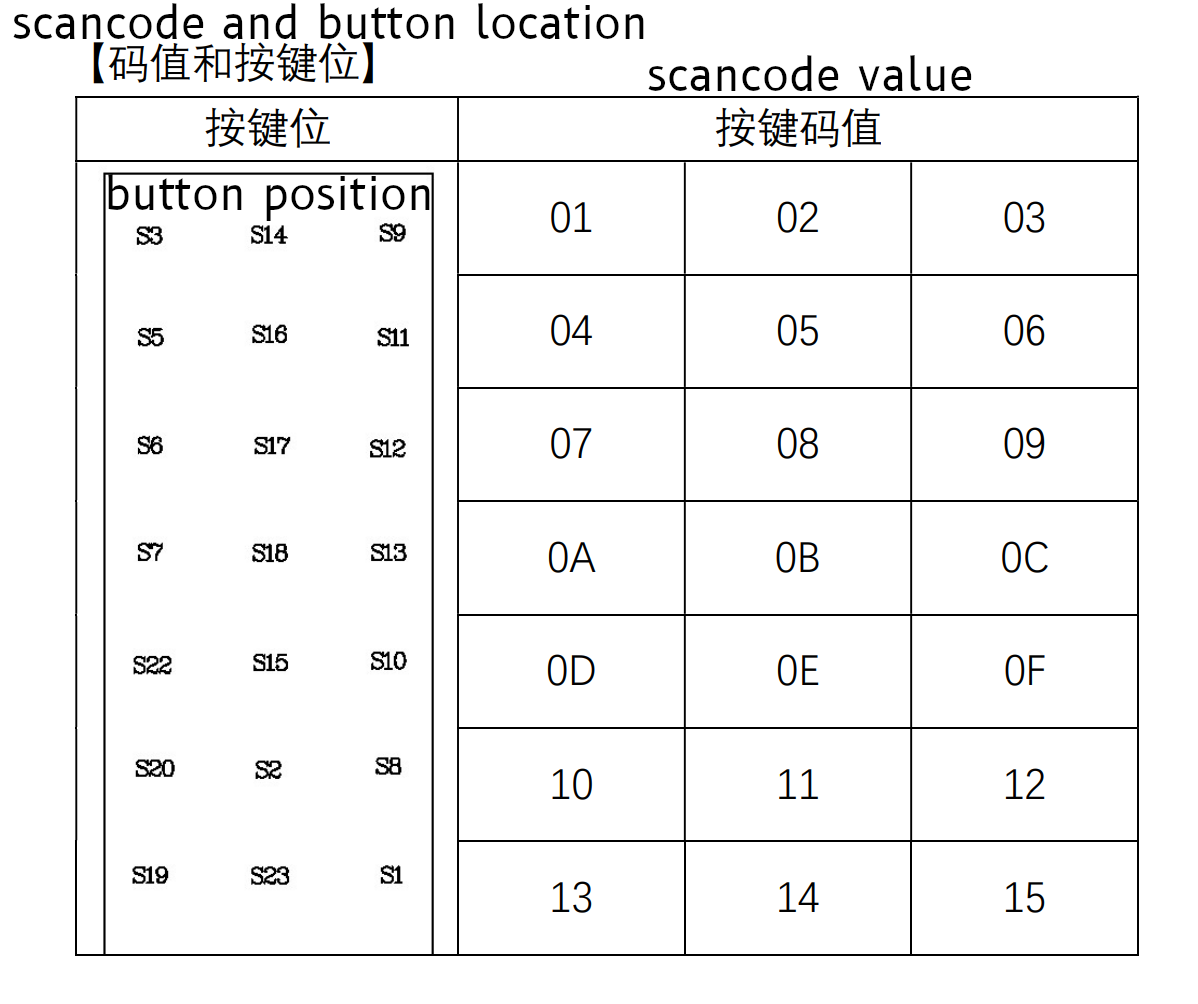
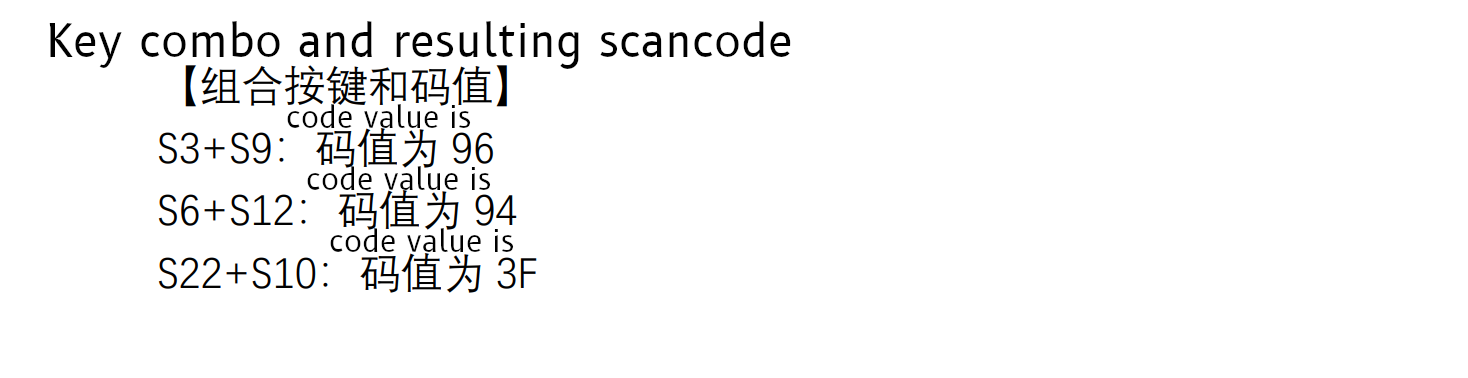
Interestingly, I think the Dim keys may have a confirmation that we have a good demod the codes on the bottom are missing the most significant bit, and when I look back at the scancode table in the datasheet, they make an interesting pattern the bottom two rows, right and left side values match up! If you take a look, Dim 100% is S1 , Dim 75% is S19 , Dim 50% is S8 , and Dim 25% is S20 . Cool! Since none of the other codes line up, I am willing to bet the most significant bit is a Combo indicator, and not part of the button (leaving 7 bits for the keycode). And even more interestingly, one of our scancodes ( Off , which is 0x94) shows up just below this table, in the examples. Over all, I think this tells us we have the right bits to look at for determining the scan code! Great news there!

Back to the modulation! So, armed with this knowledge, I was able to refactor my code to match the timings and understanding outlined by the datasheet and ensure things still work. The switch itself has a high degree of tolerance, so being wildly off frequency or a wildly wrong symbol rate may actually still work. It s hard to know if this is more or less correct, but matching documentation seems like a more stable foundation if nothing else. This code has been really reliable, and tends to work just as well as the remote from what I ve been able to determine. I ve been using incredibly low power to avoid any interference, and it s been very robust - a testament to the engineering that went into the outlet hardware, even though it cost less than of a lot of other switches! I have a lot of respect for the folks who built this device - it s incredibly simple, reliable and my guess is this thing will keep working even in some fairly harsh RF environments. The only downside is the fact the manufacturer used the same address for all their devices, rather than programming a unique address for each outlet and remote when the underlying WL116SC chip supports it. I m sure this was done to avoid complexity in assembly (e.g. pairing the remote and outlet, and having to keep those two items together during assembly), but it s still a bummer. I took apart the switch to see if I could dump an EEPROM and change the address in ROM, but the entire thing was potted in waterproof epoxy, which is a very nice feature if this was ever used outdoors. Not good news for tinkering, though!

Unsolved Mysteries At this point, even though I understand the protocol enough to control the device, it still feels like I hit a dead end in my understanding. I m not able to figure out how exactly the scancodes are implemented, and break them down into more specific parts. They are stable and based on the physical wiring of the remote, so I think I m going to leave it a magic number. I have what I was looking for, and these magic constants appear to be the right one to use, even if I did understand how to create the codes itself. This does leave us with a few bits we never resolved, which I ll memorialize below just to be sure I don t forget about them. Question #1: According to the datasheet there should be a preamble. Why do I not see one leading the first message? My hunch is that the trailing 0 at the end of the payload is actually just the preamble for the next message (always rendering the first message invalid?). This would let us claim there s an engineering reason why we are ignoring the weird bit, and also explain away something from the documentation. It s just weird that it wouldn t be present on the first message. This theory is mostly confirmed by measuring the timing and comparing it to the datasheet, but it s not exactly in line with the datasheet timings either (specifically, it s off by 200 s, which is kinda a lot for a system using 400 s timings). I think I could go either way on the last 0 being the preamble for the next message. It could be that the first message is technically invalid, or it could also be that this was not implemented or actively disabled by the vendor for this specific application / device. It s really hard to know without getting the source code for the WL116SC chip in this specific remote or the source in the outlet itself. Question #2: Why are some keycodes 8 bits and others 9 bits? I still have no idea why there sometimes 8 bits (for instance, On ) and other times there are 9 bits (for instance, Off ) in the 8 bit keycode field. I spent some time playing with the trailing zeros, when I try and send an Off with the most significant 8 bits (without the least significant / last 9th bit, which is a 0 ), it does not turn the tree off. If I send an On with 9 bits (an additional 0 after the least significant bit), it does work, but both On and Off work when I send 10, 11 or 12 bits padded with trailing zeros. I suspect my outlet will ignore data after the switch is done reading bits regardless of trailing zeros. The docs tell me there should only be 8 bits, but it won t work unless I send 9 bits for some commands. There s something fishy going on here, and the datasheet isn t exactly right either way. Question #3: How in the heck do those scancodes work? This one drove me nuts. I ve spent countless hours on trying to figure this out, including emailing the company that makes the WL116SC (they re really nice!), and even though they were super kind and generous with documentation and example source, I m still having a hard time lining up their documentation and examples with what I see from my remote. I think the manufacturer of my remote and switch has modified the protocol enough to where there s actually something different going on here. Bummer. I wound up in my place of last resort asking friends over Signal to try and see if they could find a pattern, as well as making multiple pleas to the twittersphere, to no avail (but thank you to Ben Hilburn, devnulling, Andreas Bombe and Larme for your repiles, help and advice!) I still don t understand how they assemble the scan code for instance, if you merely add, you won t know if a key press of 0x05 is 0x03 + 0x02 or if it s 0x01 + 0x04. On the other hand, treating it as two 4-bit integers won t work for 0x10 to 0x15 (since they need 5 bits to represent). It s also likely the most significant bit is a combo indicator, which only leaves 7 bits for the actual keypress data. Stuffing 10 bits of data into 7 bits is likely resulting in some really intricate bit work. On a last ditch whim, I tried to XOR the math into working, but some initial brute forcing to make the math work given the provided examples did not result in anything. It could be a bitpacked field that I don t understand, but I don t think I can make progress on that without inside knowledge and much more work. Here s the table containing the numbers I was working off of:
Keys Key Codes Scancode
S3 + S9 0x01 + 0x03 0x96
S6 + S12 0x07 + 0x09 0x94
S22 + S10 0x0D + 0x0F 0x3F
If anyone has thoughts on how these codes work, I d love to hear about it! Send me an email or a tweet or something - I m a bit stumped. There s some trick here that is being used to encode the combo key in a way that is decodeable. If it s actually not decodeable (which is a real possibility!), this may act as a unique button combo hash which allows the receiver to not actually determine which keys are pressed, but have a unique button that gets sent when a combo is used. I m not sure I know enough to have a theory as to which it may be.

John Goerzen: When You Think You re At the End, You re At the Beginning

Often when you think you re at the end of something, you re at the beginning of something else. Fred Rogers
This is sunrise over Kansas. Or maybe sunset. I m not going to tell you this time, because it doesn t matter all that much. I love that it (if you don t over-analyze it) could be either, and also that it looks like the land in the distance fades to a blue ocean. Is it sunrise or sunset? What is at the horizon? I don t think it really matters, in the presence of such natural beauty. Rural Kansas, 2015

Russ Allbery: Review: The Biggest Bluff

Review: The Biggest Bluff, by Maria Konnikova
Publisher: Penguin Press
Copyright: 2020
ISBN: 0-525-52263-8
Format: Kindle
Pages: 335
After a particularly unlucky year for her family, Maria Konnikova was reading about the balance between luck and control in life and discovered, to her surprise, that John von Neumann, one of the foundational thinkers of computer science, was fascinated by poker. He found most card games boring because they relied on luck. Poker, however, he thought was the perfect balance between luck and skill: enough skill to make its effect undeniable, but enough luck that one could not control the game fully regardless of skill. Konnikova decided on a research project: spend one year learning No Limit Texas Hold'em from one of the best poker players in the world, with a goal of competing in the World Series of Poker. She had studied the description-experience gap during her doctoral research in psychology and wanted to see if the experience of randomness in poker would teach her something the description of the randomness of life could not. Before starting this project, she didn't know the basic rules and had never watched a game. Erik Seidel agreed to mentor her, and The Biggest Bluff is her account of that experience. This book is simultaneously frustrating and fascinating in ways that I don't think can be untangled without making it a far different book. Fitting, I suppose, for a book about how our brains entangle luck and skill. First, if you're looking for a book about poker play, this is not one. Konnikova rarely talks about specific hands or tournaments in more detail than her overall trajectory. That was a disappointment. In the few places she does describe some of her betting decisions, analysis of the other players, and tournament strategy, her accounts are engrossing and suspenseful. I would have happily read a book chronicling her poker tournaments and the decisions she made, but this is not that book. What The Biggest Bluff is instead is a psychological and philosophical examination of the process of learning poker. Konnikova uses her experiences as launching points into philosophical digressions. Even the lessons that have limited surface utility outside of poker, such as learning to suppress body language to avoid giving away information, turn into digressions about interpersonal dynamics and personality types. There are interesting tidbits here, but I've read a lot of popular psychology and was more interested in the poker. My frequent reading experience was impatiently waiting for Konnikova to finish lecturing and get back to her narrative. What Konnikova does do though, at a level that I haven't seen before before in a book of this type, is be brutally honest about her mistakes and her learning process. And I do mean brutally: The book opens with her throwing up in a casino bathroom. (This is not a fun book to read if you don't like reading about stress reactions and medical problems. There aren't many of them, but they're... memorable.) Konnikova knows and can explain the psychological state she's trying to reach, but still finds it hard to do in the moment. Correctly reacting to probabilities, cutting losses, and neither being too over-confident or too scared is very hard. Most books of this type elide over the repeated failures in a sort of training montage, which makes the process look easier than it feels. Konnikova tries to realistically show the setbacks and failures, and I think succeeds. That relentless introspection and critical honesty is the best part of this book, but I think it's also behind the stream of consciousness digressions about psychology and philosophy. It's a true portrayal of how Konnikova makes sense of the world. A more polished and streamlined book about the poker would have been more dramatically engrossing, but it might have lost the deep examination of how she combines poker with her knowledge of psychology to change her thinking. The one place where I think that self-reflection may fall a bit short, which I want to mention because I thought it was a missed opportunity, is around knowledge of hand probabilities. Konnikova makes a point, early in the book, of not approaching poker through the memorization and mathematics route and instead trying to find a play style that focuses on analyzing the other players and controlling her own emotions. This is a good hook, but by the end of the book it's not entirely true. The point that I think she was trying to make is that her edge against other poker players at her same level comes more from psychology than from calculation of precise odds in rare situations. This is true. But by the time she reaches high levels of play, she is using statistical simulators, practice tools, and intensive study just like any professional poker player. There is a minimum level of pure knowledge and memorization required that cannot be avoided. It's clear from the few things she says about this that those tools became more interesting to her as she became better at poker, and I wish she would have dug more into why and how that happened. How much of her newfound ability to make decisions and stick to a plan comes from emotional changes, and how much from that background store of confident knowledge? Or maybe those are different ways of looking at the same change? I did appreciate Konnikova's explicit acknowledgment at the end of the book that poker did not, in the end, provide some deep insight into the balance of luck and skill in real life. Learning poker instead gave Konnikova more personal ability to make a plan for the things that she can control and let go of the things she can't. I'm glad that worked for her, but since reading this book I have noticed former poker players who think life is more knowable than it is. Poker combines random chance with psychological play against other people, but it does so in a way and to an extent that is quantifiable. You can make the correct play and still lose a hand, but you can also know when this has happened. When you're used to analyzing the world through that frame and real life fails to provide that certainty, it's tempting to impose it anyway and insist your simplified models are more accurate because they're more comprehensible. But poker is a game, not a model; being more predictable and more constrained than real life is part of what makes it fun. The skill that Konnikova learned from it has a potential downside that she doesn't talk about. I'm not sure how to sum up this book. Konnikova's internal analysis and honesty is truly admirable and illuminating, but it left me wanting to read a different book that was more focused on poker narration. I know there are lots of those books out there, but I doubt they would be written with Konnikova's self-awareness and lack of ego. However, they would probably also lack the moments that made me cringe or that were deeply uncomfortable to read. My feelings are mixed. But if you want popular psychology wrapped around a deeply honest account of the process of learning poker, I suspect this book is one of a kind. Rating: 7 out of 10

John Goerzen: Rehabilitating Asynchronous Communication with NNCP: A Cross Between Tor, ssh, and UUCP

Have you ever been traveling, shot a ton of photos and videos, but were annoyed to find it was saturating the terrible wifi you had access to? Maybe you d wish the upload to pause until you get somewhere else, but then pausing syncing on your Nextcloud/Syncthing/Dropbox would also pause other syncing you didn t want to pause. Or you have trouble backing up your laptop when not at home, in a way that won t accidentaly eat up your cell phone data. There are ways to help with this: asynchronous transfer. Here s a lot of background. If you want to see how encrypted, onion-routed UUCP looks, skip ahead to the NNCP section! There is an old saying: When all you have is a hammer, every problem looks like a nail. We have this wonderful tool called ssh available, and it is pervasive and well-understood, so we tend to use it. But we ve missed out on some benefits of asynchronous processing that we actually used to have more frequently. Of course, we are all used to some asynchronous services in our lives. Email is a popular example: most mail clients work offline and will transmit stored messages when the mail server becomes reachable. Mail servers themselves work that way, too. Many instant messaging platforms do as well. Even some backup systems do. Bacula/Bareos, for instance, spools all backup data to disk on the system connected to the tape drive, and from there to the tape itself. They do this for several reasons, but primarily the fact that if tape drives are not fed with data at their design speed, it can cause physical damage to the tape or even the drive. It causes the drive to have to pause, and seek backwards to reposition for the next write. This creates excessive travel of the tape over the write heads, causing a condition known as tape shine where the tape is damaged prematurely. Here are some problems people often run into when sending data across a network (or the Internet) synchronously: Of course, there are plenty of situations where synchronous communication is a must. For instance: I suspect that the reason we don t do more asynchronous processing these days, despite it being strong in the Unix heritage, is the lack of modern tools to do it. Let s explore some more. Some of my use cases I run ZFS on all my systems that support it: file server, laptops, workstations, etc. It is only natural to use ZFS send/receive to do backups, and I do. However, when I am traveling, my laptop never gets backed up, because the backups are pulled from the backup system. Sure, there are ways around that; a VPN, for instance. But then we have the situation where sometimes I do not want to send the backup even if I have a working Internet connection: perhaps I m tethered to a mobile connection and it would be expensive to do so, or I m on hotel Wifi that is flaky and slow and I don t want to give up any of its meager bandwidth. I have another backup-related problem. I have a remote server, which until recently was using extremely slow disks. If I made significant changes, the backup would take the better part of a day. That s annoying when I try to back up hourly. So of course I had to implement locking, but then that means none of my other machines would back up that day either. Once I needed to transmit about 2TB of data. My home Internet connection was terribly slow, and I calculated it would take multiple months to do this. So I took to manually copying parts of the data to my laptop, and whenever I d find an airport or coffee shop with faster Internet than at home, I d send off those bits from it. But it took a ton of work. The bespoke asynchronous problem And that ton of work is perhaps why we aren t doing more of this. There s been no great standard solution, so it s all roll your own when you need to. So we just use ssh, because it s easier and usually good enough . But as I wrote in my recent article on airgapped backups, there are reasons to go async. Solutions Wouldn t it be great to be able to queue up data for a machine, and let it get there in whatever way it can? Maybe a fast Internet connection is found, or via Tor, or via copying to a USB stick, or via radio broadcast? It would make many of these scenarios a lot easier. And there are ways for this now, with modern security! We have some tools on Linux for this: git-annex for storage and migration, syrep for synchronization, and NNCP for file transfer and remote execution (could be combined with some of these other tools). Let s dive in to NNCP. NNCP If you already know UUCP, think of NNCP as UUCP brought into the modern era, with modern security and tools. Basically, NNCP permits you to send files to a remote system, request files from a remote system, and pipe data to an NNCP command that requests execution remotely. So you could, say, pipe a zfs send to NNCP which sends it to the remote and pipes it to zfs receive when it gets there. NNCP has a delay-tolerant, resumable protocol that can run over just about any reliable connection: TCP, serial, Tor, radios of various kinds, you name it. But that s not all; it also can dump its queue onto something like a USB stick for transport, or even make a tar-style stream that could be munged however you like. If you want to get fancy, you can assign priorities to data packets, so that, for instance, outbound email will always get sent before that 1TB file you ve got to send also. You can also configure it so that certain carriers handle certain priorities of data; your cell phone would only handle the most urgent, but a USB stick would take anything. NNCP is source-routed; you can tell it that the way that Bob reaches Alice is via Carl, then Betty. Bob can generate a message that will be sent along that route, fully encrypted and authenticated at each step of the way; Carl can t see the content of the message or even anything about it other than its next hop. How this helps Let s revisit some of my scnearios with NNCP. For the laptop being backed up, while traveling it can queue up its backups, or photos, or videos, or whatever. They could be triggered by a command when on a good connection, or automatically. The data could be copied to USB and given to a friend to transmit; perfectly safe due to encryption. Or it could all wait until arriving at home, safely out of your other syncing directories. The NNCP documentation has an example of this. For the server being backed up slowly, that s easily solved; the slow backup would simply be queued up, and transmitted and processed when it s ready. This wouldn t interrupt other backups. How about the 2TB transmission problem? That s also made a lot easier. A command could be run to fill up a USB stick with parts of the queue, then that USB stick plugged in and transmitted whenever at a fast location. Repeat as needed while the slow system continues its upload of the remaining bits. NNCP has a lot of interesting use cases documented as well. If you are already familiar with how public keys work in SSH, then NNCP should be immediately familiar as well. It is a similar concept (though arguably somewhat easier to set up). I am working on setting up a NNCP network, and will have more posts on how to do so once I ve got it going. In the meantime, the documentation for the project is also pretty good.

25 December 2020

Russ Allbery: DocKnot 4.00

This release of my static site generator and software release management tool is finally at a point where I'm happy with some of the interface and think that piece may be stable for a while. This release converts the package metadata format from JSON to YAML and cleans up a bunch of organizational errors I made when I designed it originally. That also means that the entire metadata is now in a single file, docs/docknot.yaml by convention, instead of needing a whole directory of files. (This comes with the minor drawback that one edits Markdown in text blocks in YAML, which has somewhat less editor support, but it works fine for me.) There's a whole other blog post in how I've now tried many different markup formats, including TOML, and have decided YAML is the best one around if you want humans to be able to write it. (JSON or Protobuf is probably best if you only care about information exchange between software.) The short version is that YAML is way too large of a language and very painful to fully implement, but everything else fails to deal with one or more hard problems: nested structure, multi-line text, comments, or not requiring tedious quoting of everything. I'll be converting other software I maintain over to YAML with time. This release also drops support for pointing the bug reporting address at the CPAN RT instance, since that's going away early in 2021. I will need to do new releases of all my Perl modules to point them at a different bug tracker. Also in this release are some fixes for word wrapping and verbatim paragraph detection, some improved markup in generated README.md files, and other minor fixes. As of this release, I'm now uploading the Debian packages to Debian proper as well. I'm not sure if anyone else will ever use this software, but since I'm going to be doing more automatic generation of files in source releases using it, it's properly part of the build toolchain for the software I maintain. You can get the latest version from the DocKnot distribution page.

John Goerzen: So Many Caring People In This World

When I was a boy and I would see scary things in the news, my mother would say to me, Look for the helpers. You will always find people who are helping. To this day, especially in times of disaster, I remember my mother s words and I am always comforted by realizing that there are still so many helpers so many caring people in this world. Fred Rogers
This photo doesn t have amazing lighting or fantastic composition. In fact, it looks ordinary. It s only when you know its story that the beauty shines through. In 2019, Fremont, NE had been cut off by flooding. People were trying to get in and out of the town, and couldn t. The only way in or out was from the small airport. About 50 pilots from Nebraska and Iowa (and me from Kansas) came over to help. Every plane you see here and more that I couldn t fit in the frame was at Millard Airport, Omaha, flying people and supplies into and out of Fremont. Estimates are that we flew over 1000 people and tons of supplies that weekend. All safely. I remember flying the family with a 1-week-old baby that had gone to Omaha for a doctor appointment and then couldn t get home for three days. I remember the elderly couple and their dog that I flew out of Fremont, the former Marine riding in the co-pilot seat next to me, cracking jokes with me as we went. I remember the group of ladies that were laughing as I gave them the required seat belt briefing, the mom with her kids, the man that had to get to work, and packed a few day s supplies in his backpack, unsure when he d be able to get back home. It was the first some had ever been in a plane. There were so many helpers. People all over Omaha brought supplies to Millard airport. Others had just shown up at both airports to help organize and make lists of passengers and match them up with different size planes. Someone at Millard had a trailer and golf cart for supplies. When I d land at Fremont, before I was even out of the plane, highschoolers had already swarmed it and were helping to unload supplies or help passengers out. One time when I got back to Millard, I found lunch: a pizza place had donated pizza for the pilots, and then a restaurant in Fremont did too. With so many extra planes in the sky, Omaha ATC was slammed and still did a fantastic job. I of course took no photos of the people I carried, but I have thought of them often in the last year. This photo is of Millard airport, Omaha, loading up supplies. Look at all these helpers. I think it s one of the most beautiful sights I ve ever seen. Today there are billions of helpers in this world. The obvious ones: the truck drivers, the health care workers, the grocery store workers. And also the non-obvious ones: all the people that are wearing masks, practicing social distancing, forgoing Christmas gatherings, for the good of others, despite the hardship and heartbreak it may cause. If you didn t know the story of this photo, you wouldn t know these planes were all helpers in time of disaster. We don t know the story of all the people we see in our world today, but chances are good that many of them are helpers also. When you know their story, the beauty shines through. May we all be able to see the beauty that still surrounds us this Christmas.

Jonathan Dowland: My favourite Christmas song

picture of a vinyl record

Jonathan Dowland: Season's Greetings!

picture of a vinyl record

Niels Thykier: Improvements to IntelliJ/PyCharm support for Debian packaging files

I have updated my debpkg plugin for IDEA (e.g. IntelliJ, PyCharm, Android Studios) to v0.0.8. Here are some of the changes since last time I wrote about the plugin. New file types supported Links for URLs and bug closes There are often links in deb822 files or the debian/changelog and as of v0.0.8, the plugin will now highlight them and able you to easily open them via your browser. In the deb822 case, they generally appear in the Homepage field, the Vcs-* fields or the Format field of the debian/copyright field. For the changelog file, they often appear in the form of bug Closes statements such as the #123456 in Closes: #123456 , which is a reference to https://bugs.debian.org/123456. Improvements to debian/control The dependency validator now has per-field knowledge. This enables it to flag dependency relations in the Provides field that uses operators other than = (which is the only operator that is supported in that field). It also knows which fields support build-profile restrictions. It in theory also do Architecture restrictions, but I have not added it among other because it gets a bit spicy around binary packages. (Fun fact, you can have Depends: foo [amd64] but only for arch:any packages.) The plugin now suggests adding a Rules-Requires-Root field to the Source stanza along with a quick fix for adding the field. Admittedly, it was mostly done as exercise for me to learn how to do that kind of feature. Support for machine-readable debian/copyright The plugin now has a dedicated file type for debian/copyright that follows the machine-readable format. It should auto-detect it automatically based on the presence of the Format field being set to https://www.debian.org/doc/packaging-manuals/copyright-format/1.0. Sadly, I have not found the detection reliable in all cases, so you may have to apply it manually. With the copyright format, the plugin now scans the Files fields for common issues like pointing on non-existing paths and invalid escape sequences. When the plugin discovers a path that does not match anything, it highlights the part of the path that cannot be found. As an example, consider the pattern src/foo/data.c and that src/foo exist but data.c does not exist, then the plugin will only flag the data.c part of src/foo/data.c as invalid. The plugin will also suggest a quick fix if you a directory into the Files field to replace it with a directory wildcard (e.g. src/foo -> src/foo/* ), which is how the spec wants you to reference every file beneath a given directory. Finally, when the plugin can identify part of the path, then it will turn it into a link (reference in IDEA lingo). This means that you can CTRL + click on it to jump to the file. As a side-effect, it also provides refactoring assistance for renaming files, where renaming a file will often be automatically reflected in debian/copyright. This use case is admittedly mostly relevant people, who are both upstream and downstream maintainer. Folding support improvement for .dsc/.changes/.buildinfo files The new field types appeared with two cases, where I decided to improve the folding support logic. The first was the GPG signature (if present), which consists of two parts. The top part with is mostly a single line marker but often followed by a GPG armor header (e.g. Hash: SHA512 ) and then the signature blob with related marker lines around it. Both cases are folded into a single marker line by default to reduce their impact on content in the editor view. The second case was the following special-case pattern:
Files:
 <md5> <size> filename
Checksums-Sha256:
 <sha256> <size> filename
In the above example, where there is exactly on file name, those fields will by default now be folded into:
Files: <md5> <size> filename
Checksums-Sha256: <sha256> <size> filename
For all other multi-line fields, the plugin still falls back to a list of known fields to fold by default as in previous versions. Spellchecking improvements The plugin already supported selective spell checking in v0.0.3, where it often omitted spell checking for fields (in deb822 files) where it did not make sense. The spell check feature has been improved by providing a list of known packaging terms/jargo used by many contributors (so autopkgtests is no longer considered a typo). This applies to all file types (probably also those not handled by the plugin as it is just a dictionary). Furthermore, the plugin also attempts discover common patterns (e.g. file names or command arguments) and exempt these from spell checking in the debian/changelog. This also includes manpage references such as foo.1 or foo(1) . It is far from perfect and relies on common patterns to exclude spell checking. Nonetheless, it should reduce the number of false positive considerably. Feedback welcome Please let me know if you run into bugs or would like a particular feature implemented. You can submit bug reports and feature requests in the issue tracker on github.

24 December 2020

Russ Allbery: control-archive 1.9.0

This is the software used to manage the archive of control messages and the Netnews active and newsgroups files at ftp.isc.org. This release switches to gpg1 in order to support older keys and produces better diagnostics when the X-PGP-Sig header is invalid because it's missing the useless version field. It also includes various hierarchy metadata updates, including adding rocksolid.*, removing dictator.* at its maintainer's request, and updating the fr.* key. You can get the latest release from the control-archive distribution page.

John Goerzen: Joyful is the Dark

Joyful is the dark
coolness of the tomb,
waiting for the wonder
of the morning. Never was that midnight
touched by dread and gloom;
darkness was the cradle
of the dawning. Brian Wren
Most of us are not personally experiencing symptoms of a pandemic virus, but with all the changes around us, with all the worries within us, many of us have been touched by dread and gloom. I can find many layers of meaning in this poem. Today I think this poem excerpt reminds us to find the joy where we are, in the moment we are. Are we just waiting for the morning? Or do we take advantage of this pause to gaze up at the beautiful colors of the night? Are we defined by this moment, or do we define it? We are OK right now, so let this time be the cradle of something beautiful. If you haven t noticed the moon in this photo, zoom in. I don t see dread and gloom in this photo. I see color, and hope, and beauty. Rural Kansas, 2017

23 December 2020

Sven Hoexter: Jenkins dynamically parameterized pipelins for terraform execution

Jenkins in the Ops space is in general already painful. Lately the deprecation of the multiple-scms plugin caused some headache, becaue we relied heavily on it to generate pipelines in a Seedjob based on structure inside secondary repositories. We kind of started from scratch now and ship parameterized pipelines defined in Jenkinsfiles in those secondary repositories. Basically that is the way it should be, you store the pipeline definition along with code you'd like to execute. In our case that is mostly terraform and ansible. Problem Directory structure is roughly "stage" -> "project" -> "service". We'd like to have one job pipeline per project, which dynamically reads all service folder names and offers those as available parameters. A service folder is the smallest entity we manage with terraform in a separate state file. Now Jenkins pipelines are by intention limited, but you can add some groovy at will if you whitelist the usage in Jenkins. You have to click through some security though to make it work. Jenkinsfile This is basically a commented version of the Jenkinsfile we copy now around as a template, to be manually adjusted per project.
// Syntax: https://jenkins.io/doc/book/pipeline/syntax/
// project name as we use it in the folder structure and job name
def TfProject = "myproject-I-dev"
// directory relative to the repo checkout inside the jenkins workspace
def jobDirectory = "terraform/dev/$ TfProject "
// informational string to describe the stage or project
def stageEnvDescription = "DEV"
/* Attention please if you rebuild the Jenkins instance consider the following:
- You've to run this job at least *thrice*. It first has to checkout the
repository, then you've to add permisions for the groovy part, and on
the third run you can gather the list of available terraform folder.
- As a safeguard the first first folder name is always the invalid string
"choose-one". That prevents accidential execution of a random project.
- If you add new terraform folder you've to run the "choose-one" dummy rollout so
the dynamic parameters pick up the new folder. */
/* Here we hardcode the path to the correct job workspace on the jenkins host, and
   discover the service folder list. We have to filter it slightly to avoid temporary folders created by Jenkins (like @tmp folders). */
List tffolder = new File("/var/lib/jenkins/jobs/terraform $ TfProject /workspace/$ jobDirectory ").listFiles().findAll   it.isDirectory() && it.name ==~ /(?i)[a-z0-9_-]+/  .sort()
/* ensure the "choose-one" dummy entry is always the first in the list, otherwise
   initial executions might execute something. By default the first parameter is
   used if none is selected */
tffolder.add(0,"choose-one")
pipeline  
    agent any
    /* Show a choice parameter with the service directory list we stored
       above in the variable tffolder */
    parameters  
        choice(name: "TFFOLDER", choices: tffolder)
     
    // Configure logrotation and coloring.
    options  
        buildDiscarder(logRotator(daysToKeepStr: "30", numToKeepStr: "100"))
        ansiColor("xterm")
     
    // Set some variables for terraform to pick up the right service account.
    environment  
        GOOGLE_CLOUD_KEYFILE_JSON = '/var/lib/jenkins/cicd.json'
        GOOGLE_APPLICATION_CREDENTIALS = '/var/lib/jenkins/cicd.json'
     
stages  
    stage('TF Plan')  
    /* Make sure on every stage that we only execute if the
       choice parameter is not the dummy one. Ensures we
       can run the pipeline smoothly for re-reading the
       service directories. */
    when   expression   params.TFFOLDER != "choose-one"    
    steps  
        /* Initialize terraform and generate a plan in the selected
           service folder. */
        dir("$ params.TFFOLDER ")  
        sh 'terraform init -no-color -upgrade=true'
        sh 'terraform plan -no-color -out myplan'
         
        // Read in the repo name we act on for informational output.
        script  
            remoteRepo = sh(returnStdout: true, script: 'git remote get-url origin').trim()
         
        echo "INFO: job *$ JOB_NAME * in *$ params.TFFOLDER * on branch *$ GIT_BRANCH * of repo *$ remoteRepo *"
     
     
    stage('TF Apply')  
    /* Run terraform apply only after manual acknowledgement, we have to
       make sure that the when     condition is actually evaluated before
       the input. Default is input before when. */
    when  
        beforeInput true
        expression   params.TFFOLDER != "choose-one"  
     
    input  
        message "Cowboy would you really like to run **$ JOB_NAME ** in **$ params.TFFOLDER **"
        ok "Apply $ JOB_NAME  to $ stageEnvDescription "
     
    steps  
        dir("$ params.TFFOLDER ")  
        sh 'terraform apply -no-color -input=false myplan'


    post  
            failure  
                // You can also alert to noisy chat platforms on failures if you like.
                echo "job failed"
             
         
job-dsl side of the story Having all those when conditions in the pipeline stages above allows us to create a dependency between successful Seedjob executions and just let that trigger the execution of the pipeline jobs. This is important because the Seedjob execution itself will reset all pipeline jobs, so your dynamic parameters are gone. By making sure we can re-execute the job, and doing that automatically, we still have up to date parameterized pipelines, whenever the Seedjob ran successfully. The job-dsl script looks like this:
import javaposse.jobdsl.dsl.DslScriptLoader;
import javaposse.jobdsl.plugin.JenkinsJobManagement;
import javaposse.jobdsl.plugin.ExecuteDslScripts;
def params = [
    // Defaults are repo: mycorp/admin, branch: master, jenkinsFilename: Jenkinsfile
    pipelineJobs: [
        [name: 'terraform myproject-I-dev', jenkinsFilename: 'terraform/dev/myproject-I-dev/Jenkinsfile', upstream: 'Seedjob'],
        [name: 'terraform myproject-I-prod', jenkinsFilename: 'terraform/prod/myproject-I-prod/Jenkinsfile', upstream: 'Seedjob'],
    ],
]
params.pipelineJobs.each   job ->
    pipelineJob(job.name)  
        definition  
            cpsScm  
                // assume admin and branch master as a default, look for Jenkinsfile
                def repo = job.repo ?: 'mycorp/admin'
                def branch = job.branch ?: 'master'
                def jenkinsFilename = job.jenkinsFilename ?: 'Jenkinsfile'
                scm  
                    git("ssh://git@github.com/$ repo .git", branch)
                 
                scriptPath(jenkinsFilename)
             
         
        properties  
            pipelineTriggers  
                triggers  
                    if(job.upstream)  
                        upstream  
                            upstreamProjects("$ job.upstream ")
                            threshold('SUCCESS')


Disadvantages There are still a bunch of disadvantages you've to consider Jenkins Rebuilds are Painful In general we rebuild our Jenkins instances quite frequently. With the approach outlined here in place, you've to allow the groovy script execution after the first Seedjob execution, and then go through at least another round of run the job, allow permissions, run the job, until it's finally all up and running. Copy around Jenkinsfile Whenever you create a new project you've to copy around Jenkinsfiles for each and every stage and modify the variables at the top accordingly. Keep the Seedjob definitions and Jenkinsfile in Sync You not only have to copy the Jenkinsfile around, but you also have to keep the variables and names in sync with what you define for the Seedjob. Sadly the pipeline env-vars are not available outside of the pipeline when we execute the groovy parts. Kudos This setup was crafted with a lot of help by Michael and Eric.

John Goerzen: O, Sunlight!

O, Sunlight! The most precious gold to be found on Earth. Roman Payne
There is much beauty in this world, much hope, much life. All we need to do is pause, breathe, and take a moment to see it. It might be as simple as the gift of sunlight. I hope you all have moments of sunlight and delight each day. Marion County, KS, April 2013

Jonathan McDowell: Rooting the Tesco Hudl

Tesco Hudl I have an original Tesco Hudl - a Rockchip RK3188 based Android tablet. It s somewhat long in the tooth and mine is running Android 4.2.2 (Jelly Bean). As a first step in trying to get it updated a bit I decided to root it and have a poke about. There are plenty of guides for this, but they mostly involve downloading Android apps that look dodgy or don t exist any more. Thankfully the bootloader is unlocked, so I did it the hard (manual) way from a Debian 10 (Buster) box. I doubt this is useful to many folk, but I thought I d write it up. As you d expect follow this at your own risk; there is the potential to brick the Hudl. First, enable developer mode on the Hudl (so we can adb in). Open the Settings app, scroll down to the bottom and click About Tablet , scroll down to the bottom and tap Build number 7 times, at which point it will tell you You are now a developer! . Go back to the main settings menu and just above About Tablet there will now be a Developer options entry. Click it, then make sure the box beside USB debugging is ticked. Now you need to install the appropriate tools on your Debian box. That should be:
$ sudo apt install adb rkflashtool
We also need to download a suitable su tool. I lazily went for the prebuilt SuperSU Root:
$ mkdir hudl-root
$ cd hudl-root
$ wget https://supersuroot.org/downloads/SuperSU-v2.79-201612051815.zip
$ unzip SuperSU-v2.79-201612051815.zip
2.82 is the latest version but has problems on Jelly Bean; the device will end up not properly booting. Hook the Hudl up to your machine with a suitable USB cable and you ll now be able to get a shell on it:
$ adb shell
* daemon not running; starting now at tcp:5037
* daemon started successfully
shell@android:/ $
Ctrl-D will quit the shell and return you back to the local prompt. Next step is to reboot into the Rockchip bootloader, and use that to download the system partition (just over 1G in size)
$ adb reboot bootloader
$ sudo rkflashtool r system > system.img
rkflashtool: info: rkflashtool v5.2
rkflashtool: info: Detected RK3188...
rkflashtool: info: interface claimed
rkflashtool: info: working with partition: system
rkflashtool: info: found offset: 0x00142000
rkflashtool: info: found size: 0x00200000
rkflashtool: info: reading flash memory at offset 0x00341fe0... Done!
We now have a system.img file which represents the system partition of the device. We can mount that and copy over the su binary and SuperSU apk.
$ sudo mount -o loop system.img /mnt
$ sudo cp common/Superuser.apk /mnt/app/
$ sudo cp armv7/su /mnt/xbin/
$ sudo chmod +sx /mnt/xbin/su
$ sudo umount /mnt
Finally we can write this image back to the device, reboot and once the reboot has completed use adb to connect and su to root. SuperSU might pop up a dialog on the tablet asking you to ok the action (and possibly indicate it needs to do a fixup of the installation):
$ sudo rkflashtool w system < system.img
$ sudo rkflashtool b
$ adb shell
shell@android:/ $ su -
root@android:/ #

John Goerzen: How & Why To Use Airgapped Backups

A good backup strategy needs to consider various threats to the integrity of data. For instance: It s that last one that is of particular interest today. A lot of backup strategies are such that if a user (or administrator) has their local account or network compromised, their backups could very well be destroyed as well. For instance, do you ssh from the account being backed up to the system holding the backups? Or rsync using a keypair stored on it? Or access S3 buckets, etc? It is trivially easy in many of these schemes to totally ruin cloud-based backups, or even some other schemes. rsync can be run with delete (and often is, to prune remotes), S3 buckets can be deleted, etc. And even if you try to lock down an over-network backup to be append-only, still there are vectors for attack (ssh credentials, OpenSSL bugs, etc). In this post, I try to explore how we can protect against them and still retain some modern conveniences. A backup scheme also needs to make a balance between: My story so far About 20 years ago, I had an Exabyte tape drive, with the amazing capacity of 7GB per tape! Eventually as disk prices fell, I had external disks plugged in to a server, and would periodically rotate them offsite. I ve also had various combinations of partial or complete offsite copies over the Internet as well. I have around 6TB of data to back up (after compression), a figure that is growing somewhat rapidly as I digitize some old family recordings and videos. Since I last wrote about backups 5 years ago, my scheme has been largely unchanged; at present I use ZFS for local and to-disk backups and borg for the copies over the Internet. Let s take a look at some options that could make this better. Tape The original airgapped backup. You back up to a tape, then you take the (fairly cheap) tape out of the drive and put in another one. In cost per GB, tape is probably the cheapest medium out there. But of course it has its drawbacks. Let s start with cost. To get a drive that can handle capacities of what I d be needing, at least LTO-6 (2.5TB per tape) would be needed, if not LTO-7 (6TB). New, these drives cost several thousand dollars, plus they need LVD SCSI or Fibre Channel cards. You re not going to be hanging one off a Raspberry Pi; these things need a real server with enterprise-style connectivity. If you re particularly lucky, you might find an LTO-6 drive for as low as $500 on eBay. Then there are tapes. A 10-pack of LTO-6 tapes runs more than $200, and provides a total capacity of 25TB sufficient for these needs (note that, of course, you need to have at least double the actual space of the data, to account for multiple full backups in a set). A 5-pack of LTO-7 tapes is a little more expensive, while providing more storage. So all-in, this is going to be in the best possible scenario nearly $1000, and possibly a lot more. For a large company with many TB of storage, the initial costs can be defrayed due to the cheaper media, but for a home user, not so much. Consider that 8TB hard drives can be found for $150 $200. A pair of them (for redundancy) would run $300-400, and then you have all the other benefits of disk (quicker access, etc.) Plus they can be driven by something as cheap as a Raspberry Pi. Fancier tape setups involve auto-changers, but then you re not really airgapped, are you? (If you leave all your tapes in the changer, they can generally be selected and overwritten, barring things like hardware WORM). As useful as tape is, for this project, it would simply be way more expensive than disk-based options. Fundamentals of disk-based airgapping The fundamental thing we need to address with disk-based airgapping is that the machines being backed up have no real-time contact with the backup storage system. This rules out most solutions out there, that want to sync by comparing local state with remote state. If one is willing to throw storage efficiency out the window maybe practical for very small data sets one could just send a full backup daily. But in reality, what is more likely needed is a way to store a local proxy for the remote state. Then a runner device (a USB stick, disk, etc) could be plugged into the network, filled with queued data, then plugged into the backup system to have the data dequeued and processed. Some may be tempted to short-circuit this and just plug external disks into a backup system. I ve done that for a long time. This is, however, a risk, because it makes those disks vulnerable to whatever may be attacking the local system (anything from lightning to ransomware). ZFS ZFS is, it should be no surprise, particularly well suited for this. zfs send/receive can send an incremental stream that represents a delta between two checkpoints (snapshots or bookmarks) on a filesystem. It can do this very efficiently, much more so than walking an entire filesystem tree. Additionally, with the recent addition of ZFS crypto to ZFS on Linux, the replication stream can optionally reflect the encrypted data. Yes, as long as you don t need to mount them, you can mostly work with ZFS datasets on an encrypted basis, and can directly tell zfs send to just send the encrypted data instead of the decrypted data. The downside of ZFS is the resource requirements at the destination, which in terms of RAM are higher than most of the older Raspberry Pi-style devices. Still, one could perhaps just save off zfs send streams and restore them later if need be, but that implies a periodic resend of a full stream, an inefficient operation. dedpulicating software such as borg could be used on those streams (though with less effectiveness if they re encrypted). Tar Perhaps surprisingly, tar in listed incremental mode can solve this problem for non-ZFS users. It will keep a local cache of the state of the filesystem as of the time of the last run of tar, and can generate new tarballs that reflect the changes since the previous run (even deletions). This can achieve a similar result to the ZFS send/receive, though in a much less elegant way. Bacula / Bareos Bacula (and its fork Bareos) both have support for a FIFO destination. Theoretically this could be used to queue of data for transfer to the airgapped machine. This support is very poorly documented in both and is rumored to have bitrotted, however. rdiff and xdelta rdiff and xdelta can be used as sort of a non-real-time rsync, at least on a per-file basis. Theoretically, one could generate a full backup (with tar, ZFS send, or whatever), take an rdiff signature, and send over the file while keeping the signature. On the next run, another full backup is piped into rdiff, and on the basis of the signature file of the old and the new data, it produces a binary patch that can be queued for the backup target to update its stored copy of the file. This leaves history preservation as an exercise to be undertaken on the backup target. It may not necessarily be easy and may not be efficient. rsync batches rsync can be used to compute a delta between two directory trees and express this as a single-file batch that can be processed by a remote rsync. Unfortunately this implies the sender must always keep an old tree around (barring a solution such as ZFS snapshots) in order to compute the delta, and of course it still implies the need for history processing on the remote. Getting the Data There OK, so you ve got an airgapped system, some sort of runner device for your sneakernet (USB stick, hard drive, etc). Now what? Obviously you could just copy data on the runner and move it back off at the backup target. But a tool like NNCP (sort of a modernized UUCP) offer a lot of help in automating the process, returning error reports, etc. NNCP can be used online over TCP, over reliable serial links, over ssh, with offline onion routing via intermediaries or directly, etc. Imagine having an airgapped machine at a different location you go to frequently (workplace, friend, etc). Before leaving, you put a USB stick in your pocket. When you get there, you pop it in. It s despooled and processed while you want, and return emails or whatever are queued up to be sent when you get back home. Not bad, eh? Future installment I m going to try some of these approaches and report back on my experiences in the next few weeks.

Next.

Previous.