Search Results: "ean"

19 July 2013

Justus Winter: A story about virtualization

I'm sure you all will be a bit disappointed (I know I am) that there are no ascii screenshots in this weeks report. But let me make it up to you by telling you a story. I was at the FOSDEM in the year 2012 and I went to a nice workshop on sunday afternoon in the Virtualization Devroom. Renzo Davoli was the host of this workshop and he started with a little introductory talk to get everyone to agree on a common terminology first. He began by asking the question, what virtualization meant in the most general way. He defined the ability to virtualize a resource as the ability to freely and transparently control how someone (say a process) is interacting with said resource. So for example if you LD_PRELOAD a library to impersonate fopen(3) and friends, you have virtualized the filesystem (for some small values of virtualized). He then went on to discuss various methods of virtualization that are commonly available on Linux, not only full system virtualization solutions, but also all kinds of methods allowing a more fine-grained control over what resources are virtualized. Of course every method had its strengths and its weaknesses. Having seen Samuels talk about all the awesome things Hurd can do for virtualization I approached him with a question in the free discussion part of his workshop. I asked whether he would agree that once a resource is moved from the kernel to the userspace, the problem of virtualizing that resource is almost trivially solved, and he agreed. So I said that this was awesome, because then the trivial and elegant solution for all his virtualization (and tracing) needs are micro kernel operating systems, and he also agreed to that but (as far as I can recall) he mentioned that there is none that would meet his needs (I believe he is a computer science professor and heavily relies on virtualization techniques for his lab and for teaching purposes). And even though a microkernel operating systems has a cost (message passing instead of function calls for example) it also has its merits such as scaling better from a development point of view. Also, many cool features can emerge just from the design. For example think about the container support in Linux and how painfully long it took to make all the resources namespace aware (with one of the most critical, the user namespace being the most difficult one). On Hurd you get the same functionality for free. If you are curious, read Samuels awesome slides. So what have I done this week? Next week I'm going to work on the two remaining sysvinit related issues. These are the only ones preventing me to come up with a clean patch series against the sysvinit package and I figured that it would be nice to propose such a series rather sooner than later so that I will have plenty of time to discuss any issues with the sysvinit maintainers. See you next week :)

Michal Čihař: Speed improvements in Weblate

Yesterday, I've spent some time trying to improve speed of translation import in Weblate. It got annoyingly slow while adding new features and I felt there has to be some area for improvements even with all the features. I was testing on development server with debug stuff enabled (what slows down things quite a lot already) and first import took about 30 seconds. Quick look revealed that for linked repositories, the link lookup happens too often, so some caching could be used. This has saved about 3 seconds... With offloaded indexing (what is anyway only useful setup for production use), every reindex request was checking whether there is already one before creating new one. In most cases there is none before, so it's simply faster to try to create one and ignore error in case it is already there. We're now 5 seconds faster. Another big resource consumer are quality checks. They provide useful feedback to translators, but it means that quite a lot of code needs to be executed for every single string. First thing I've realized is that unit check state is recalculated everytime regardless the fact whether there was any change, what was easy to fix. The other speed issue is in consistency check - it does too complex SQL query, which usually does not match anything. Converting this to much simpler one (which will in most cases still have no results) improves performance for usual path while having minimal impact for the real checking. Another 4 seconds down on my test import. Last thing which I changed is way how per translation statistics are updated. In past this required quite a lot of queries, but yesterday I've realized this can be much reduced. During test suite run on PostgreSQL, I saw that it's not that easy - PostgreSQL does not allow to sum boolean fields, but fortunately this can be fixed as well. This has saved about 2 seconds. In the end the tested import took 16 seconds instead of original 30 and issued 2500 SQL queries instead of 5000 at the beginning. I hope you will enjoy regained speed of imports :-).

Filed under: English Weblate 0 comments Flattr this!

18 July 2013

Steve Kemp: There must be a name for bugs you only find post-release

This week I made two releases of my mail client. Immediately after both releases I found bugs. Despite having been using the github source tree on my box for reading mail for days. There must be a name for bugs that come up immediately after you've just made a release. I'm torn between wanting to make a new release right now to fix the thing I spotted, or wait a few more days to fix a few other niggles. Still I did write some cool code today:
  1. If a mail is received on the list debian.security-announce
  2. And the package in the Subject: is not installed on the current machine.
  3. The mail is marked as read.
Sure this means that a package on my webserver won't be visible to me, but my upgrade tool will see that. It just decreases the odds I read about an update that doesn't apply to me. ObQuote: "don't pay heed to temptation
for his hands are so cold"

15 July 2013

Matthew Garrett: How XMir and Mir fit together

Mir is Canonical's new display server. It fulfils a broadly similar role to Wayland and Android's Surfaceflinger, in that it takes final responsibility for getting pixels onto the screen. XMir is an X server that runs on top of Mir. It permits applications that know how to speak the X protocol but don't know how to speak to Mir (ie, approximately all of them at present) to run in a Mir-based environment.

For Ubuntu 13.10, Canonical are proposing to use Mir by default. This doesn't mean that most applications will be using Mir, though - instead, the default session will run XMir as a full-screen client and a normal X environment will be run on that. This lets Canonical deploy Mir without forcing anyone to update their applications, allowing them to take a gradual approach. By 14.10, Canonical expect the default Unity session to be a Mir client rather than an X client. In theory it will then be possible to run an Ubuntu system without any X applications at all, leaving XMir to do nothing other than run legacy applications.

Of course, this requires a certain amount of replumbing. X would normally be responsible for doing things like setting up the screen and pushing the pixels out to the hardware, but this is now handled by Mir instead. Where a native X server would allocate a framebuffer in video memory and render into it, XMir asks Mir for a window corresponding to the size of the screen and renders into that and then simply asks Mir to display it. This step is actually more interesting than it sounds.

Unless you're willing to throw lots of CPU at them, unaccelerated graphics are slow. Even if you are, you're going to end up consuming more power for the same performance, so XMir would be impractical if it didn't provide access to accelerated hardware graphics functions. It makes use of the existing Xorg accelerated X drivers to do this, which is as simple as telling the drivers to render into the window that XMir requested from Mir rather than into the video framebuffer directly. In other words, when displaying through XMir, you're using exactly the same display driver stack as you would be if you were using Xorg. In theory you'd expect identical performance - in practice there's a 10-20% performance hit right now, but that's being actively worked on. Fullscreen 3D apps will also currently take a hit due to there being no support for skipping compositing, which is being fixed. XMir should certainly be capable of performing around as well as native X, but there's no reason for it to be any faster.

The output drivers aren't the only part of the stack. XMir still needs some way to get input events. You might naively expect that Mir would forward input events to XMir, but the current state of affairs is that XMir loads the existing X input drivers which in turn open the input devices themselves. This explains why XMir currently shows two cursors[1] - the first cursor is the Mir cursor that's being driven by the input events Mir is receiving, while the second is the cursor being drawn by XMir in response to the input events that it's receiving[2].

The final main piece of duplicated functionality is output management. In the case where X is its own display server, it can simply ask the kernel to program the outputs. XMir can't do that, so would have to ask Mir to do it instead. Sadly, that functionality's not implemented yet. Running xrandr on Xmir gives:
Screen 0: minimum 320 x 320, current 1366 x 768, maximum 8192 x 8192
XMIR-1 connected primary 1366x768+0+0 (normal left inverted right x axis y axis) 0mm x 0mm
   XMIR mode of death[3]   60.0*+
which translates as "I have a screen that can be any size from 320x320 to 8192x8192, and have one output of unknown physical size that can only display 1366x768 at 60Hz". Other than the 1366x768, the result will be identical no matter how many outputs you have - XMir currently has no support for configuring multiple displays, and will always report 60Hz. It also has no support for placing monitors into any kind of DPMS state.

Obviously, this is still software under active development. There's three months from now until until Ubuntu is due to release with this functionality enabled by default, and the only significant missing features are xrandr and DPMS support. As long as Mir exposes interfaces for controlling those, they shouldn't be a problem to implement. To most users, the transition from native Xorg to XMir should be completely invisible.

Which is kind of the problem. What benefits does the user gain from using XMir on Mir rather than native Xorg?

Features? XMir is a total of around 1000 lines of code on top of Xorg. It implements no functionality that isn't present in Xorg.

Performance? XMir effectively is Xorg - it's the same code running the same drivers. It's not going to be any faster. At the moment it's actually slower, but that's probably fixable.

Security? Again, XMir is effectively Xorg. It still runs as root. It has the same privileges. There's no security benefit to using XMir instead of Xorg.

Like I said, the transition should be completely invisible - no drawbacks, but no benefits. What it does do is get Mir deployed on a larger number of systems, which means Canonical can both get wider testing of the basic Mir functionality and argue that the number of deployed Mir systems means hardware vendors should support it. Users won't see any of the benefits until Unity transitions to being a native Mir client, which is slated for 14.10 next year.

As a PR move, it's pretty great. The public perception is that Mir has gone from not existing to being sufficient to run a full desktop environment in very little time, and it's natural to compare it to Wayland which has been in development for longer and still isn't running a fully featured desktop session. The problem with that perception is that Mir is doing very little at the moment. It's setting an output mode (by asking the kernel to), allocating a window for XMir to draw into and then pushing that window onto the screen whenever XMir tells it that it's changed. This isn't advanced display server functionality, it's the bare minimum that a display server could possibly do[4]. Which is a shame, because Mir is significantly more functional than that, it's just not being used to do anything we couldn't already do.

In summary: XMir on Mir in Ubuntu provides no user benefits and isn't a compelling technology demo. Mir itself will permit a range of additional features, but isn't slated to be running a user session itself until 14.10. The only obvious benefit to Canonical in shipping XMir on Mir is to gain additional testing, which makes using it in 14.04, a supposedly stable and long term release, a somewhat surprising choice.

[1] Although this is in the process of being fixed
[2] This also explains why, on systems with a trackpoint and a touchpad, only the trackpoint moves the Mir cursor while both move the XMir cursor. The X touchpad driver has put the touchpad in absolute mode, which means it's now reporting events that Mir currently ignores.
[3] "XMIR mode of death" is hardcoded into XMir. I'm really hoping it's a Regular Show reference.
[4] So why hasn't anyone done this with Wayland? Mostly because, as described above, there's no technical benefit in doing so. Wayland does have an X server for compatibility purposes, and if you wanted you could run it as a full screen client and run an entire session underneath it. But you'd gain nothing by doing so. The Wayland X server is intended for running individual clients rather than an entire X session. Run an X client under Wayland and it'll pop up in its own individual window and managed by your Wayland session's window manager, just like it would under X. XMir currently has no support for this "rootless" mode - right now if you want to run X apps under Mir, you'll need to launch an entire X session with its own window manager.

comment count unavailable comments

14 July 2013

Nicolas Dandrimont: Bootstrapping fedmsg for Debian

As you might (or might not) know, this summer, I have taken on mentoring of a GSoC project by Simon Chopin (a.k.a. laarmen) which goal is to bring fedmsg, the Fedora Infrastructure message bus, to Debian. Most of the work I ll be talking about here is Simon s work, please send all the praise towards him (I can take the blame, though). What is this about? As the project proposal states, the idea is to provide Debian with a unified, real-time, and open mechanism of communication between its services. This communication bus would allow anyone, anywhere, to start consuming messages and reacting to events happening in Debian s infrastructure: When we told upstream about our plan of adapting fedmsg to work on Debian, they were thrilled. And they have been very supportive of the project. How is the project going? Are you excited? I know I m excited. yep, he's excited too Well, the general idea was easy enough, but the task at hand is a challenge. First of all, fedmsg has a lot of (smallish) dependencies, most of them new to Debian. Thanks to Simon s work during the bonding period, and thanks to paultag s careful reviews, the first batch of packages (the first dependency level, comprising kitchen, bunch, m2ext, grapefruit, txws, txzmq and stomper) is currently sitting in the NEW queue. The four remaining packages (fabulous, moksha.common, moksha.hub and fedmsg proper) are mostly ready, waiting in the Debian Python Module Team SVN repository for a review and sponsorship. While we re waiting for the packages to trickle into Debian, Simon is not twiddling his thumbs. Work has taken place on a few fronts: fedmsging mentors.debian.net Package backports mentors.debian.net was chosen because I m an admin and could do the integration quickly. That involved backporting the eleven aforementioned packages, plus zeromq3 and python-zmq (that only have TCP_KEEPALIVE on recent versions), to wheezy, as that s what the mentors.d.n host is running. (Also, python-zmq needs a new-ish cython to build so I had to backport that too). Thankfully, those were no-changes backports, that were easily scripted, using a pbuilder hook to allow the packages to depend on previously built packages. I have made a wheezy package repository available here. It s signed with my GnuPG key, ID 0xB8E5087766475AAF, which should be fairly well connected. Code changes After Simon s initial setup of debexpo (which is not an easy task), the code changes have been fairly simple (yes, this is just a proof of concept). You can see them on top of the live branch on debexpo s sources. I finally had the time to make them live earlier this week, and mentors.debian.net has been sending messages on Debian s fedmsg bus ever since. Deployment mentors.d.n sends its messages on five endpoints, tcp://mentors.debian.net:3000 through tcp://mentors.debian.net:3004. That is one endpoint per WSGI worker, plus one for the importer process(es). You can tap in directly, by following the instructions below. debmessenger Debmessenger is the stop-gap email-to-fedmsg bridge that Simon is developing. The goal is to create some activity on the bus without disrupting or modifying any infrastructure service. It s written in hy, and it leverages the existing Debian-related python modules to do its work, using inotify to react when a mail gets dropped in a Maildir. Right now, it s supposed to understand changes mails (received from debian-devel-changes) and bugs mail (from debian-bugs-dist). I ll work on deploying an instance of debmessenger this weekend, to create some more traffic on the bus. Reliability of the bus I suggested using fedmsg as this was something that already existed, and that solved a problem identical to the one we wanted to tackle (open interconnection of a distribution s infrastructure services). Reusing a piece of infrastructure that already works in another distro means that we can share tools, share ideas, and come up with solutions that we might not have considered when working alone. The drawback is that we have to either adapt to the tool s idiosyncrasies, or to adapt the tool to our way of working. One of the main points raised by DSA when the idea of using fedmsg was brought up, was that of reliability. Debian s infrastructure is spread in datacenters (and basements :D ) all over the world, and thus faces different challenges than Fedora s infrastructure, which is more tightly integrated. Therefore, we have to ensure that a critical consumer (say, a buildd) doesn t miss any message it would need for its operation (say, that a package got accepted). There has been work upstream, to ensure that fedmsg doesn t lose messages, but we need to take extra steps to make sure that a given consumer can replay the messages it has missed, should the need arise. Simon has started a discussion on the upstream mailing list, and is working on a prototype replay mechanism. Obviously, we need to test scenarios of endpoints dropping off the grid, hence the work on getting some activity on the bus. How can I take a look? a.k.a. Another one rides the bus A parisian bus built in 1932 (Picture Yves-Laurent Allaert, CC-By-SA v2.5 / GFDL v1.2 license) So, the bus is pretty quiet right now, as only two kinds of events are triggering messages: a new upload to mentors.debian.net, and a new comment on a package there. Don t expect a lot of traffic. However, generating some traffic is easy enough: just login to mentors.d.n, pick a package of mine (not much choice there), or a real package you want to review, and leave a comment. poof, a message appears. For the lazy Join #debian-fedmsg on OFTC, and look for messages from the debmsg bot. Current example output:

01:30:25 <debmsg> debexpo.voms-api-java.upload (unsigned) --
02:03:16 <debmsg> debexpo.ocamlbricks.comment (unsigned) --
(definitely needs some work, but it s a start) Listening in by yourself You need to setup fedmsg. I have a repository of wheezy packages and one of sid packages, signed with my GnuPG key, ID 0xB8E5087766475AAF. You can add them to a file in /etc/apt/sources.list.d like this:
deb http://perso.crans.org/dandrimont/fedmsg-<sid wheezy>/ ./
Then, import my GnuPG key into apt (apt-key add), update your sources (apt-get update), and install fedmsg (apt-get install python-fedmsg). The versions are << to anything real, so you should get the real thing as soon as it hits the archive. Finally, in /etc/fedmsg.d/endpoints.py, you can comment-out the Fedora entries, and add a Debian entry like this:
    "debian": [
        "tcp://fedmsg.olasd.eu:9940",
    ],
fedmsg.olasd.eu runs a fedmsg gateway connected to the mentors.d.n endpoints, and thus forwards all the mentors messages. It ll be connected to debmessenger as soon as it s running too. To actually see mesages, disable validate_signatures in /etc/fedmsg.d/ssl.py, setting it to False. The Debian messages aren t signed yet (it s on the roadmap), and we don t ship the Fedora certificates so we can t authenticate their messages either. Finally, you can run fedmsg-tail --really-pretty in a terminal. As soon as there s some activity, you should get that kind of output (color omitted):
 
  "i": 1, 
  "msg":  
    "version": "2.0.9-1.1", 
    "uploader": "Emmanuel Bourg <ebourg@apache.org>"
   , 
  "topic": "org.debian.dev.debexpo.voms-api-java.upload", 
  "username": "expo", 
  "timestamp": 1373758221.491809
 
Enjoy real-time updates from your favorite piece of infrastructure! What s next? While Simon continues working on reliability, and gets started on message signing according to his schedule, I ll take a look at deploying the debmessenger bridge, and making the pretty-printer outputs useful for our topics. There will likely be some changes to the messages sent by debexpo, as we got some feedback from the upstream developers about making them work in the fedmsg tool ecosystem (datanommer and datagrepper come to mind). You can tune in to Simon s weekly reports on the soc-coordination list, and look at the discussions with upstream on the fedora messaging-sig list. You can also catch us on IRC, #debian-soc on OFTC. We re also hanging out on the upstream channel, #fedora-apps on freenode.

13 July 2013

Michael Stapelberg: Survey answers part 3: systemd is not portable and what this means for our ports

This blog post is the third of a series of posts dealing with the results of the Debian systemd survey. I intend to give a presentation at DebConf 2013, too, so you could either read my posts, or watch the talk, or both :-). The second-biggest concern in the survey results was that systemd is not portable to non-Linux systems, for example Debian GNU/kFreeBSD or Debian GNU/HURD. For convenience, I will from now on write kFreeBSD when I really mean all non-Linux ports. systemd not being portable is not an arbitrary decision Some people seem to think that the systemd upstream is just hostile to users of other operating systems when they hear that systemd is not portable. However, keep in mind that Lennart, Kay and other contributors have considerable experience with writing portable software such as Avahi and PulseAudio. The decision to only support Linux in systemd was thus not taken lightly. systemd s design requires many kernel features and certain semantics (e.g. procfs is not enough, /proc/$PID/exe needs to be supported), which are currently only available on Linux. Point 15 of Lennart s blog post 0pointer.de/blog/projects/the-biggest-myths.html contains an incomplete list of these features. Maintaining portable code increases complexity Since systemd is written in C, the canonical way to write portable code is by using conditional compilation, for example with ifdef statements. That makes the code harder to understand and reason about, but more importantly it blows up the test matrix. It also requires any new change to be tested on all supported systems, which is not feasible for most contributors. I think everybody agrees keeping complexity low is a good thing. What are the implications for our non-Linux ports? We, the Debian project, have two realistic options in my point of view:
  1. We stay with sysvinit, the least common denominator, forever.
  2. We use a modern init system such as systemd on Debian GNU/Linux.
In case we go with the first option, Debian will diverge more and more from virtually every other Linux distribution. This also means we are stuck with the limited features and capabilities that sysvinit has. A modern operating system needs to be able to adapt to a changing environment and the once static world in which sysvinit was developed has become much more dynamic. In our opinion, the only reasonable choice is the latter option: use systemd on Debian GNU/Linux. How will this work? For individual maintainers, this means they need to support two init systems. Luckily, systemd service files are usually really simple, but there still is additional maintenance work such as testing whether your service actually starts when using systemd. We think this maintenance overhead is justified due to the advantages a modern init system brings. Of course, not every maintainer can arrange it to install systemd and test his/her package. You are invited to contact us at pkg-systemd-maintainers@lists.alioth.debian.org at any time and we can help you out. Furthermore, automation can be introduced (and we have a proof of concept) to make it easier to spot mistakes and perform some simple tests, such as whether the service can be started. A concern that was voiced is that as sysvinit usage decreases, the init scripts would bit-rot and stop working at some point. If that happens, we rely on the users to file appropriate bug reports. This is no different from the situation today it is not feasible for maintainers to test every single combination of features all the time. Ports are different and that diversity is good The FreeBSD kernel and the Linux kernel are different, and each kernel provides distinct features that the other kernel does not have. As an example, Linux provides cgroups, which are heavily used by systemd. The FreeBSD kernel in turn offers the packet filter pf , which is not available on Linux. There certainly is value in having common infrastructure. But there also is value in providing the best features that each platform has to offer in case of Linux, that is clearly systemd as an init system IMO. Conclusion systemd is not portable because it relies on features only the Linux kernel provides an example is cgroups, which systemd uses to track processes in a reliable way. Not embracing these features and staying with sysvinit indefinitely is not a viable option if Debian wants to remain relevant for today s demands. In the short term, the migration to systemd will cause additional maintenance effort for individual package maintainers, but it will pay off in the long term.

12 July 2013

Justus Winter: Hi, I'm the one who wrote umount...

Everyone enjoys ASCII screenshots as much as I do, right? So here is the Hurd booting with my mtab-prototype bound to /run/mtab:
INIT: version 2.88 booting
Using makefile-style concurrent boot in runlevel S.
Activating swap...done.
Checking root file system...fsck from util-linux 2.20.1
hd2 : tray open or drive not ready
end_request: I/O error, dev 02:00, sector 0
/dev/hd0s1: clean, 44292/181056 files, 287759/723200 blocks
done.
Activating lvm and md swap...(default pager): Already paging to partition hd0s5!
done.
Checking file systems...fsck from util-linux 2.20.1
hd2 : tray open or drive not ready
end_request: I/O error, dev 02:00, sector 0
done.
Cleaning up temporary files... /tmp.
Mounting local filesystems...done.
Activating swapfile swap...(default pager): Already paging to partition hd0s5!
done.
Cleaning up temporary files....
Configuring network interfaces...inetutils-ifconfig: invalid arguments
ifup: failed to open pid file /run/network/ifup-/dev/eth0.pid: No such file or directory
Internet Systems Consortium DHCP Client 4.2.2
Copyright 2004-2011 Internet Systems Consortium.
All rights reserved.
For info, please visit https://www.isc.org/software/dhcp/
can't create /var/lib/dhcp/dhclient./dev/eth0.leases: No such file or directory
Listening on Socket//dev/eth0
Sending on   Socket//dev/eth0
DHCPDISCOVER on /dev/eth0 to 255.255.255.255 port 67 interval 4
DHCPREQUEST on /dev/eth0 to 255.255.255.255 port 67
DHCPOFFER from 10.0.2.2
DHCPACK from 10.0.2.2
can't create /var/lib/dhcp/dhclient./dev/eth0.leases: No such file or directory
bound to 10.0.2.15 -- renewal in 42550 seconds.
done.
Cleaning up temporary files....
Setting up X socket directories... /tmp/.X11-unix /tmp/.ICE-unix.
INIT: Entering runlevel: 2
Using makefile-style concurrent boot in runlevel 2.
Starting enhanced syslogd: rsyslogd.
Starting deferred execution scheduler: atd.
Starting periodic command scheduler: cron.
Starting system message bus: dbusFailed to set socket option"/var/run/dbus/system_bus_socket": Protocol not available.
Starting OpenBSD Secure Shell server: sshd.
GNU 0.3 (debian) (console)
login:
As you can see, the boot process looks quite clean. In particular, there are no issues left with Debians initscripts. The remaining noise comes from: This is accomplished by my mtab translator prototype. It's work in progress, but I have reworked and broken up my initial prototype. My initial prototype only patched libdiskfs, one of three libraries translator authors can use to write filesystem-like translators. I have made the necessary changes to the other two libraries and patched up any loose ends. This is the translator in action:
% fsysopts /run/mtab
/hurd/mtab /
% cat /run/mtab
/dev/hd0s1 / ext2fs writable,no-inherit-dir-group,store-type=typed 0 0
none /dev/ttyp0 /hurd/term name,/dev/ptyp0,type,pty-master 0 0
none /run /hurd/tmpfs writable,no-suid,no-exec,no-inherit-dir-group,no-sync,size=80484K 0 0
none /run/lock /hurd/tmpfs writable,no-suid,no-exec,no-inherit-dir-group,no-sync,size=5M 0 0
none /run/shm /hurd/tmpfs writable,no-suid,no-exec,no-inherit-dir-group,no-sync,size=259480K 0 0
I also patched the sysvinit package. My version includes and switches to runsystem.sysv that uses /sbin/init to start the system. It also carries all the necessary workarounds for the remaining sysvinit related issues. The resulting Debian/Hurd system is very nice, it is getting more and more similar to what a Debian user would expect: I have rebuild the hurd and sysvinit package and uploaded them into an apt repository:
deb http://teythoon.cryptobitch.de/gsoc/heap/debian unstable main
Please use unstable for now. Also make sure that you have a recovery plan for your Debian/Hurd installation if anything goes wrong. For your convenience there's a seed tarball containing packages with the appropriate sources.list.d snippets and the repository key: https://teythoon.cryptobitch.de/gsoc/heap/debian/seed.tar Currently /hurd/console is not started (I'll add a init script for that later), but for now you have to start a getty on the console. Make sure that your /etc/inittab contains a line like this:
7:2345:respawn:/sbin/getty 38400 console
The patched initscripts package contains the runsystem.sysv file and uses the Debian alternatives system to replace the runsystem.gnu variant. It also switches to the appropriate halt and reboot utilities. If you install the package, you must use halt-hurd or reboot-hurd to halt or reboot the system. Running halt or reboot is not harmful though, it just doesn't work. So here I am. I've been coding for the Hurd for four weeks now, and suddenly I'm the guy who wrote umount. My point is, if you ever wanted to work on an operating system, you might want to consider working on the Hurd. It the Debian/Hurd port is very decent and (according to #debian-hurds "Debian GNU/Hurd Doomsday-o-meter") 78.44% of all Debian packages are available, so you've got a familiar environment. Also, if your solution is right and your code is reasonably clean, it is not that hard to get your changes accepted. The list of open issues is long and might contain something that interests you. You could be the one implementing a read-ahead solution to massively improve Hurds overall performance. Also since Hurd is just a Hird of Unix replacing daemons running on-top the GNU Mach microkernel, most of the functionality lies within userspace processes. This makes the whole system very extensible and quite easy to work with. For an overview over the Hurd, see this page. Next week I'll focus on improving my mtab prototype, improving the sysvinit patches and upstreaming the ones that are ready. As always, in case I run out of stuff to do, I'll pick something from my list of issues, most likely the network related issues. In completely unrelated news, my Debian/Linux workstation died with a kernel panic while I was writing this blog entry. It's a good thing Emacs honors "save early, save often". M-x insert-monolithic-kernel-rant-here. This is it for this week, thanks for your attention :)

Niels Thykier: Britney excuses age

Every package maintainer has probably looked at the Testing migration section of their package s PTS page and wondered: Okay? What the hell does that mean? . Or perhaps Is that something I should do something about? . Lets have a look at an example excuse (from the PTS)[1]:
excuses:
*  Maintainer: Debian Python Modules Team
*  Too young, only 8 of 10 days old
*  Updating python-scipy fixes old bugs: #691254, #707315
*  Not considered
The first thing to look for is the phrase Valid candidate . If that appears, Britney will attempt to migrate your package to testing. Note the migration may fail, but we can come back to that (in a) later (post). On the other hand, if Not considered appears, then Britney believes your package is not ready to migrate yet. At this point, the excuse will contain 1 or more reasons explaining why Britney thinks your package should not migrate. The most common problem is probably age . In the example above, that is indeed the problem denoted by the Too young, only 8 of 10 days old . Age is incremented on the evening run (i.e. the 10 pm UTC run). The excuse of that run will include the up to date age. So when you see:
  Too young, only 9 of 10 days old
It means that the age criteria will be satisfied in the next evening run . If the age requirement is satisfied, the entry will look like:
    11 days old (needed 10 days)
If there is a Not considered , it means there is something else you need to fix to make your package migrate. Note that the age is based on the day the package was uploaded to sid. If the package migrates to testing and is later removed from testing again, the age will usually be ridiculously high. This is because all the days spent the package spent in testing is also included in the age. [1] It looks similar on the real excuses page, except the excuses: header is actually the name of the source. Is also includes information about the versions involved (i.e. [from-version] to [to-version] ).

Daniel Pocock: Practical VPNs with strongSwan, Shorewall, Linux firewalls and OpenWRT routers

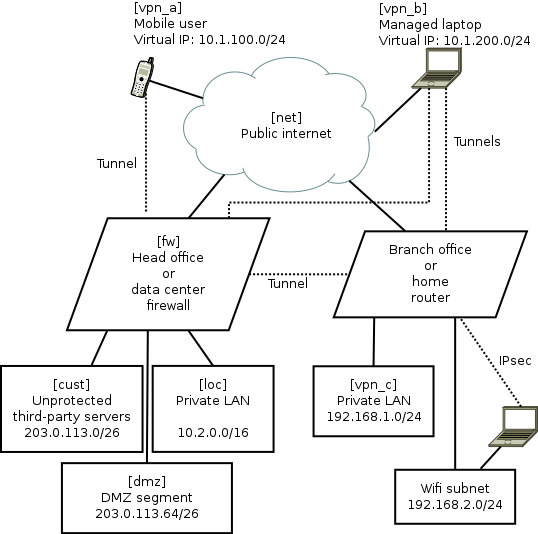
There is intense interest in communications privacy at the moment thanks to the Snowden scandal. Open source software has offered credible solutions for privacy and encryption for many years. Sadly, making these solutions work together is not always plug-and-play. In fact, secure networking, like VoIP, has been plagued by problems with interoperability and firewall/filtering issues although now the solutions are starting to become apparent. Here I will look at some of them, such as the use of firewall zones to simplify management or the use of ECDSA certificates to avoid UDP fragmentation problems. I've drawn together a lot of essential tips from different documents and mailing list discussions to demonstrate how to solve a real-world networking problem. A typical network scenario and requirements Here is a diagram of the network that will be used to help us examine the capabilities of these open source solutions. Some comments about the diagram:
  • The names in square brackets are the zones for Shorewall, they are explained later.
  • The dotted lines are IPsec tunnels over the untrusted Internet.
  • The road-warrior users (mobiles and laptops) get virtual IP addresses from the VPN gateway. The branch offices/home routers do not use virtual IPs.
  • The mobile phones are largely untrusted: easily lost or stolen, many apps have malware, they can only tunnel to the central VPN and only access a very limited range of services.
  • The laptops are managed devices so they are trusted with access to more services. For efficiency they can connect directly to branch office/home VPNs as well as the central server.
  • Smart-phone user browsing habits are systematically monitored by mobile companies with insidious links into mass-media and advertising. Road-warriors sometimes plug-in at client sites or hotels where IT staff may monitor their browsing. Therefore, all these users want to tunnel all their browsing through the VPN.
  • The central VPN gateway/firewall is running strongSwan VPN and Shorewall firewall on Linux. It could be Debian, Fedora or Ubuntu. Other open source platforms such as OpenBSD are also very well respected for building firewall and VPN solutions, but Shorewall, which is one of the key ingredients in this recipe, only works on Linux at present.
  • The branch office/home network could be another strongSwan/Shorewall server or it could also be an OpenWRT router
  • The default configuration for most wifi routers creates a bridge joining wifi users with wired LAN users. Not here, it has been deliberately configured as an independent network. Road-warriors who attach to the wifi must use VPN tunnelling to access the local wired network. In OpenWRT, it is relatively easy to make the Wifi network an independent subnet. This is an essential security precaution because wifi passwords should not be considered secure: they are often transmitted to third parties, for example, by the cloud backup service in many newer smart phones.
Package mayhem The major components are packaged on all the major Linux distributions. Nonetheless, in every case, I found that it is necessary to re-compile fresh strongSwan packages from sources. It is not so hard to do but it is necessary and worth the effort. Here are related blog entries where I provide the details about how to re-build fresh versions of the official packages with all necessary features enabled: Using X.509 certificates as a standard feature of the VPN For convenience, many people building a point-to-point VPN start with passwords (sometimes referred to as pre-shared keys (PSK)) as a security mechanism. As the VPN grows, passwords become unmanageable. In this solution, we only look at how to build a VPN secured by X.509 certificates. The certificate concept is not hard. In this scenario, there are a few things that make it particularly easy to work with certificates:
  • strongSwan comes with a convenient command line tool, ipsec pki. Many of it's functions are equivalent to things you can do with OpenSSL or GnuTLS. However, the ipsec pki syntax is much more lightweight and simply provides a convenient way to do the things you need to do when maintaining a VPN.
  • Many of the routine activities involved in certificate maintainence can be scripted. My recent blog about using Android clients with strongSwan gives a sample script demonstrating how ipsec pki commands can be used to prepare a PKCS#12 (.p12) file that can be easily loaded into an Android device using the SD-card.
  • For building a VPN, there is no need to use a public certificate authority such as Verisign. Consequently, there is no need to fill in all their forms or make any payments for each device/certificate. Some larger organisations do choose to outsource their certificate management to such firms. For smaller organisations, an effective and sometimes better solution can be achieved by maintaining the process in-house with a private root CA.
UDP fragmentation during IPsec IKEv2 key exchange and ECDSA A common problem for IPsec VPNs using X.509 certificates is the fragmentation of key exchange datagrams during session setup. Sometimes it works, sometimes it doesn't. Various workarounds exist, such as keeping copies of all certificates from potential peers on every host. As the network grows, this becomes inconvenient to maintain and to some extent it eliminates the benefits of using PKI. Fortunately, there is a solution: Elliptic Curve Cryptography (ECC). Many people currently use RSA key-pairs. Best practice suggests using RSA keys of at least 2048 bits and often 4096 bits. Using ECC with a smaller 384-bit key is considered to be equivalent to a 7680 bit RSA key pair. Consequently, ECDSA certificates are much smaller than RSA certificates. Furthermore, at these key sizes, the key exchange packets are almost always smaller than the typical 1500 byte MTU. A further demand for ECDSA is arising due to the use of ECC within smart cards. Many smartcards don't support any RSA key larger than 2048 bits. The highly secure 384-bit ECC key is implemented in quite a few common smart cards. Smart card vendors have shown a preference for the ECC keys due to the US Government's preference for ECC and the lower computational overheads make them more suitable for constrained execution environments. Anyone who wants to use smart cards as part of their VPN or general IT security now, or in the future, needs to consider ECC/ECDSA. Making the network simple with Shorewall zones For this example, we are not just taking some easy point-to-point example. We have a real-world, multi-site, multi-device network with road warriors. Simplifying this architecture is important to help us understand and secure it. The solution? Each of these is abstracted to a "zone" in Shorewall. In the diagram above, the zone names are in square brackets. The purpose of each zone is described below:
Zone name Description
loc This is the private LAN and contains servers like databases, private source code respositories and NFS file servers
dmz This is the DMZ and contains web servers that are accessible from the public internet. Some of these servers talk to databases or message queues in the LAN network loc
vpn_a These are road warriors that are not very trustworthy, such as mobile devices. They are occasionally stolen and usually full of spyware (referred to by users as "apps"). They have limited access to ports on some DMZ servers, e.g. for sending and receiving mail using SMTP and IMAP (those ports are not exposed to the public Internet at large). They use the VPN tunnel for general internet access/browsing, to avoid surveillance by their mobile carrier.
vpn_b These are managed laptops that have a low probability of malware infection. They may well be using smart cards for access control. Consequently, they are more trusted than the vpn_a users and have access to some extra intranet pages and file servers. Like the smart-phone users, they use the VPN tunnel for general internet access/browsing, to avoid surveillance by third-party wifi hotspot operators.
vpn_c This firewall zone represents remote sites with managed hardware, such as branch offices or home networks with IPsec routers running OpenWRT.
cust These are servers hosted for third-parties or collaborative testing/development purposes. They have their own firewall arrangements if necessary.
net This zone represents traffic from the public Internet.
A practical Shorewall configuration Shorewall is chosen to manage the iptables and ip6tables firewall rules. Shorewall provides a level of abstraction that makes netfilter much more manageable than manual iptables scripting. The Shorewall concept of zones is very similar to the zones implemented in OpenWRT and this is an extremely useful paradigm for firewall management. Practical configuration of Shorewall is very well explained in the Shorewall quick start. The one thing that is not immediately obvious is a strategy for planning the contents of the /etc/shorewall/policy and /etc/shorewall/rules files. The exact details for making it work effectively with a modern IPsec VPN are not explained in a single document, so I've gathered those details below as well. An effective way to plan the Shorewall zone configuration is with a table like this:
Destination zone
loc dmz vpn_a vpn_b vpn_c cust net
Source zone loc \
dmz ? \ X X X
vpn_a ? ? \ X X
vpn_b ? ? X \ X
vpn_c X \
cust X ? X X X \
net X ? X X X \
The symbols in the table are defined:
Symbol Meaning
ACCEPT in policy file
X REJECT or DROP in policy file
? REJECT or DROP in policy file, but ACCEPT some specific ports in the rules file
Naturally, this modelling technique is valid for both IPv4 and IPv6 firewalling (with Shorewall6) Looking at the diagram in two dimensions, it is easy to spot patterns. Each pattern can be condensed into a single entry in the rules file. For example, it is clear from the first row that the loc zone can access all other zones. That can be expressed very concisely with a single line in the policy file:
loc all ACCEPT
Specific Shorewall tips for use with IPsec VPNs and strongSwan Shorewall has several web pages dedicated to VPNs, including the IPsec specific documentation.. Personally, I found that I had to gather a few details from several of these pages to make an optimal solution. Here are those tips:
  • Ignore everything about the /etc/shorewall/tunnels file. It is not needed and not used any more
  • Name the VPN zones (we call them vpn_a, vpn_b and vpn_c) in the zones file but there is no need to put them in the /etc/shorewall/interfaces file.
  • The /etc/shorewall/hosts file is not just for hosts and can be used to specify network ranges, such as those associated with the VPN virtual IP addresses. The ranges you put in this file should match the rightsourceip pool assignments in strongSwan's /etc/ipsec.conf
  • One of the examples suggests using mss=1400 in the /etc/shorewall/zones file. I found that is too big and leads to packets being dropped in some situations. To start with, try a small value such as 1024 and then try larger values later after you prove everything works. Setting mss for IPsec appears to be essential.
  • Do not use the routefilter feature in the /etc/shorewall/interfaces file as it is not compatible with IPsec
Otherwise, just follow the typical examples from the Shorewall quick start guide and configure it to work the way you want. Here is an example /etc/shorewall/zones file:
fw firewall
net ipv4
dmz ipv4
loc ipv4
cust ipv4
vpn_a ipsec mode=tunnel mss=1024
vpn_b ipsec mode=tunnel mss=1024
vpn_c ipsec mode=tunnel mss=1024
Here is an example /etc/shorewall/hosts file describing the VPN ranges from the diagram:
vpn_a eth0:10.1.100.0/24 ipsec
vpn_b eth0:10.1.200.0/24 ipsec
vpn_c eth0:192.168.1.0/24 ipsec
Here is an example /etc/shorewall/policy file based on the table above:
loc all ACCEPT
vpn_c all ACCEPT
cust net ACCEPT
net cust ACCEPT
all all REJECT
Here is an example /etc/shorewall/rules file based on the network:
SECTION ALL
# allow connections to the firewall itself to start VPNs:
# Rule  source    dest    protocol/port details
ACCEPT   all       fw                ah
ACCEPT   all       fw                esp
ACCEPT   all       fw                udp 500
ACCEPT   all       fw                udp 4500
# allow access to HTTP servers in DMZ:
ACCEPT   all       dmz               tcp 80
# allow connections from HTTP servers to MySQL database in private LAN:
ACCEPT   dmz       loc:10.2.0.43     tcp 3306
# allow connections from all VPN users to IMAPS server in private LAN:
ACCEPT vpn_a,vpn_b,vpn_c loc:10.2.0.58 tcp 993
# allow VPN users (but not the smartphones in vpn_a) to the
# PostgresQL database for PostBooks accounting system:
ACCEPT vpn_b,vpn_c loc:10.2.0.48      tcp 5432
SECTION ESTABLISHED
ACCEPT   all       all
SECTION RELATED
ACCEPT   all       all
Once the files are created, Shorewall can be easily activated with:
# shorewall compile && shorewall restart
strongSwan IPsec VPN setup Like Shorewall, strongSwan is also very well documented and I'm just going to focus on those specific areas that are relevant to this type of VPN project.
  • Allow the road-warriors to send all browsing traffic over the VPN means including leftsubnet=0.0.0.0/0 in the VPN server's /etc/ipsec.conf file. Be wary though: sometimes the road-warriors start sending the DHCP renewal over the tunnel instead of to their local DHCP server.
  • As we are using Shorewall zones for firewalling, you must set the options leftfirewall=no and lefthostaccess=no in ipsec.conf. Shorewall already knows about the remote networks as they are defined in the /etc/shorewall/hosts file and so firewall rules don't need to be manipulated each time a tunnel goes up or down.
  • As discussed above, X.509 certificates are used for peer authentication. In the certificate Distinguished Name (DN), store the zone name in the Organizational Unit (OU) component, for example, OU=vpn_c, CN=gw.branch1.example.org
  • In the ipsec.conf file, match the users to connections using wildcard specifications such as rightid="OU=vpn_a, CN=*"
  • Put a subjectAltName with hostname in every certificate. The --san option to the ipsec pki commands adds the subjectAltName.
  • Keep the certificate distinguished names (DN) short, this makes the certificate smaller and reduces the risk of fragmented authentication packets. Many examples show a long and verbose DN such as C=GB, O=Acme World Wide Widget Corporation, OU=Engineering, CN=laptop1.eng.acme.example.org. On a private VPN, it is rarely necessary to have all that in the DN, just include OU for the zone name and CN for the host name.
  • As discussed above, use the ECDSA scheme for keypairs (not RSA) to ensure that the key exchange datagrams don't suffer from fragmentation problems. For example, generate a keypair with the command ipsec pki --gen --type ecdsa --size 384 > user1Key.der
  • Road warriors should have leftid=%fromcert in their ipsec.conf file. This forces them to use the Distinguished Name and not the subjectAltName (SAN) to identify themselves.
  • For road warriors who require virtual tunnel IPs, configure them to request both IPv4 and IPv6 addresses (dual stack) with leftsourceip=%config4,%config6 and on the VPN gateway, configure the ranges as arguments to rightsourceip
  • To ensure that roadwarriors query the LAN DNS, add the DNS settings to strongswan.conf and make sure road warriors are using a more recent strongSwan version that can dynamically update /etc/resolv.conf. Protecting DNS traffic is important for privacy reasons. It also makes sure that the road-warriors can discover servers that are not advertised in public DNS records.
Central firewall/VPN gateway configuration Although they are not present in the diagram, IPv6 networks are also configured in these strongSwan examples. It is very easy to combine IPv4 and IPv6 into a single /etc/ipsec.conf file. As long as the road-warriors have leftsourceip=%config4,%config6 in their own configurations, they will operate dual-stack IPv4/IPv6 whenver they connect to the VPN. Here is an example /etc/ipsec.conf for the central VPN gateway:
config setup
        charonstart=yes
        charondebug=all
        plutostart=no
conn %default
        ikelifetime=60m
        keylife=20m
        rekeymargin=3m
        keyingtries=1
        keyexchange=ikev2
conn branch1
        left=198.51.100.1
        leftsubnet=203.0.113.0/24,10.0.0.0/8,2001:DB8:12:80:/64
        leftcert=fw1Cert.der
        leftid=@fw1.example.org
        leftfirewall=no
        lefthostaccess=no
        right=%any
        rightid=@branch1-fw.example.org
        rightsubnet=192.168.1.0/24
        auto=add
conn rw_vpn_a
        left=198.51.100.1
        leftsubnet=0.0.0.0/0,::0/0
        leftcert=fw1Cert.der
        leftid=@fw1.example.org
        leftfirewall=no
        lefthostaccess=no
        right=%any
        rightid="OU=vpn_a, CN=*"
        rightsourceip=10.1.100.0/24,2001:DB8:1000:100::/64
        auto=add
conn rw_vpn_b
        left=198.51.100.1
        leftsubnet=0.0.0.0/0,::0/0
        leftcert=fw1Cert.der
        leftid=@fw1.example.org
        leftfirewall=no
        lefthostaccess=no
        right=%any
        rightid="OU=vpn_b, CN=*"
        rightsourceip=10.1.200.0/24,2001:DB8:1000:200::/64
        auto=add
Sample branch office or home router VPN configuration Here is an example /etc/ipsec.conf for the Linux server or OpenWRT VPN at the branch office or home:
conn head_office
        left=%defaultroute
        leftid=@branch1-fw.example.org
        leftcert=branch1-fwCert.der
        leftsubnet=192.168.1.0/24,2001:DB8:12:80:/64
        leftfirewall=no
        lefthostaccess=no
        right=fw1.example.org
        rightid=@fw1.example.org
        rightsubnet=203.0.113.0/24,10.0.0.0/8,2001:DB8:1000::/52
        auto=start
# notice we only allow vpn_b users, not vpn_a
# these users are given virtual IPs from our own
# 192.168.1.0 subnet
conn rw_vpn_b
        left=branch1-fw.example.org
        leftsubnet=192.168.1.0/24,2001:DB8:12:80:/64
        leftcert=branch1-fwCert.der
        leftid=@branch1-fw.example.org
        leftfirewall=no
        lefthostaccess=no
        right=%any
        rightid="OU=vpn_b, CN=*"
        rightsourceip=192.168.1.160/27,2001:DB8:12:80::8000/116
        auto=add
Further topics Shorewall and Shorewall6 don't currently support a unified configuration. This can make it slightly tedious to duplicate rules between the two IP variations. However, the syntax for IPv4 and IPv6 configuration is virtually identical. Shorewall only currently supports Linux netfilter rules. In theory it could be extended to support other types of firewall API, such as pf used by OpenBSD and the related BSD family of systems. A more advanced architecture would split the single firewall into multiple firewall hosts, like the inner and outer walls of a large castle. The VPN gateway would also become a standalone host in the DMZ. This would require more complex routing table entries. Smart cards with PIN numbers provide an effective form of two-factor authentication that can protect certificates for remote users. Smart cards are documented well by strongSwan already so I haven't repeated any of that material in this article. Managing a private X.509 certificate authority in practice may require slightly more effort than I've described, especially when an organisation grows. Small networks and home users don't need to worry about these details too much, but for most deployments it is necessary to consider things like certificate revocation lists and special schemes to protect the root certificate's private key. EJBCA is one open source project that might help. Some users may want to consider ways to prevent the road-warriors from accidentally browsing the Internet when the IPsec tunnel is not active. Such policies could be implemented with some basic iptables firewalls rules in the road-warrior devices. Summary Using these strategies and configuration tips, planning and building a VPN will hopefully be much simpler. Please feel free to ask questions on the mailing lists for any of the projects discussed in this blog.

Keith Packard: Present

The Present Extension I ve finally gotten an initial implementation of the Present extension written and running and thought I should write up the current design and status. Present Design The current Present extension consists of two requests:
  1. PresentRegion. Puts new bits from a pixmap in a window.
  2. PresentSelectInput. Asks for Present events to be delivered.
PresentRegion This request takes a pile of arguments:
 
    PresentRegion
    window: WINDOW
    pixmap: PIXMAP
    valid-area: REGION or None
    update-area: REGION or None
    x-off, y-off: INT16
    target-msc: CARD64
    divisor: CARD64
    remainder: CARD64
    idle-fence: FENCE
 
Errors: Drawable, Pixmap, Match
Provides new content for the specified window, to be made visible at the specified time (defined by target-msc , divisor and remainder ). update-area defines the subset of the window to be updated, or None if the whole window is to be updated. valid-area defines the portion of pixmap which contains valid window contents, or None if the pixmap contains valid contents for the whole window. PresentRegion may use any region of pixmap which contains update-area and which is contained by valid-area . In other words, areas inside update-area will be presented from pixmap , areas outside valid-area will not be presented from pixmap and areas inside valid-area but outside update-area may or may not be presented at the discretion of the X server. x-off and y-off define the location in the window where the 0,0 location of the pixmap will be presented. valid-area and update-area are relative to the pixmap. If target-msc is greater than the current msc for window , the presentation will occur at (or after) the target-msc field. Otherwise, the presentation will occur after the next field where msc % divisor == remainder . If divisor is zero, then the presentation will occur after the current field. idle-fence is triggered when pixmap is no longer in use. This may be at any time following the PresentRegion request, the contents may be immediately copied to another buffer, copied just in time for the vblank interrupt or the pixmap may be used directly for display, in which case it will be busy until some future PresentRegion operation. If window is destroyed before the presentation occurs, then the presentation action will not be completed. PresentRegion holds a reference to pixmap until the presentation occurs, so pixmap may be immediately freed after the request executes, even if that is before the presentation occurs. If idle-fence is destroyed before the presentation occurs, then idle-fence will not be signaled but the presentation will occur normally. PresentSelectInput
 
    PresentSelectInput
    event-id: PRESENTEVENTID
    window: WINDOW
    eventMask: SETofPRESENTEVENT
 
Errors: Window, Value, Match, IDchoice, Access
Selects the set of Present events to be delivered for the specified window and event context. PresentSelectInput can create, modify or delete event contexts. An event context is associated with a specific window; using an existing event context with a different window generates a Match error. If eventContext specifies an existing event context, then if eventMask is empty, PresentSelectInput deletes the specified context, otherwise the specified event context is changed to select a different set of events. If eventContext is an unused XID, then if eventMask is empty no operation is performed. Otherwise, a new event context is created selecting the specified events. Present Extension Events There are three different events for the Present extension:
  1. PresentConfigureNotify
  2. PresentCompleteNotify
  3. PresentRedirectNotify
PresentConfigureNotify This event is moving from the DRI3 extension where it doesn t belong.
 
    PresentConfigureNotify
    type: CARD8         XGE event type (35)
    extension: CARD8        Present extension request number
    length: CARD16          2
    evtype: CARD16          Present_ConfigureNotify
    eventID: PRESENTEVENTID
    window: WINDOW
    x: INT16
    y: INT16
    width: CARD16
    height: CARD16
    off_x: INT16
    off_y: INT16
    pixmap_width: CARD16
    pixmap_height: CARD16
    pixmap_flags: CARD32
 
PresentConfigureNotify events are sent when the window configuration changes if PresentSelectInput has requested it. PresentConfigureNotify events are XGE events and so do not have a unique event type. x and y are the parent-relative location of window . PresentCompleteNotify
 
    PresentCompleteNotify
    type: CARD8         XGE event type (35)
    extension: CARD8        Present extension request number
    length: CARD16          2
    evtype: CARD16          Present_CompleteNotify
    eventID: PRESENTEVENTID
    window: WINDOW
    ust: CARD64
    msc: CARD64
    sbc: CARD64
 
Notify events are delivered when a PresentRegion operation has completed and the specified contents are being displayed. sbc, msc and ust indicate the swap count, frame count and system time of the related PresentRegion request. PresentRedirectNotify This one is not specified yet, but the intent is for it to contain sufficient information for the compositing manager to be able to construct a suitable screen update that includes an application window update. Finishing GLXOMLsync_control At this point, Mesa only exposes the old swapinterval configuration value, it doesn t provide any of the GLXOMLsynccontrol APIs. However, the Present protocol does have the bits necessary to support glXSwapBuffersMscOML in the PresentRegion request. Let s see how the remaining APIs in this GL extension will be supported. glXGetSyncValuesOML This one is easy; it only needs to return the UST/MSC/SBC values from the most recent SwapBuffers request. Those are returned in the PresentCompleteNotify event, so Mesa just needs to capture that event and save the values away for return to the application. We don t need any new Present protocol for this. glXGetMscRateOML This returns the refresh rate of the monitor associated with the specified drawable. RandR exposes all of the necessary data for each monitor, but the monitor each window is going to be synchronized against isn t exposed anywhere, and is effectively implementation-dependent. So, I think the easy thing to do here is to have a Present request which reports which RandR output a window will be synchronized with. glXSwapBuffersMscOML This is the one API which is already directly supported by the Present extension. glXWaitForMscOML This is effectively the same as glXSwapBuffersMscOML, except that it doesn t actually perform a swap. For this, I think we want a new request that generates an X event when the target values are reached, and then have the client block until that event is received. This will avoid blocking other threads using the same X connection. glXWaitForSbcOML Like glXWaitForMscOML, this just needs to trigger an event to be delivered at the right time. Presentation Redirection I m focusing on finishing the above stuff before I start writing the redirection spec and code, but I ve been thinking a bit about it. What we want is for applications that are presenting a new frame within a redirected window to have that presentation delivered directly to the compositing manager instead of having the bits copied to the redirected buffer and have the compositing manager only learn about this when the damage event is received from copying the bits. Once the compositing manager receives notification that there are new bits available for a portion of a window, it can then get those bits onto the screen in one of two ways:
  1. Copy them to the back buffer for the whole screen and then present that back buffer to the screen.
  2. Present them directly to the screen, bypassing the compositing manager s back buffer entirely.
The first option is what you d do if there were more updates than just a single window; it would update the whole screen at the same time. The second option is what you d do if there was only the one window update to act on, and this would automatically take advantage of page flipping to avoid copying data at all. No need to un-redirect windows for the page flip to work. In both cases, we need to inform the original application both when its pixmap is idle and when the swap actually hits the screen. And we need to make sure the final swap happens when the application requested. For the pixmap idle notification, the current PresentRegion idlefence argument should suffice; we just need to pass the idlefence XID along in the redirection event. Simple. For completion notification, we need to make sure the SBC value for the original window gets incremented and that a PresentCompleteNotify event is delivered. I think that means we want to append a chunk of data to the PresentRegion request so that suitable events can be delivered when the compositing manager PresentRegion occur. I think that just needs to be the window of that original window. To make sure the swap happens at the right time, we just need to have the targetmsc value provided to the compositing manager. I m hoping that having this all event driven is that when a later PresentRegion is redirected that has an *earlier* targetmsc, we can simply queue that as well and things should just work . Current Status I ve got the protocol definitions (both X server and XCB) done, and libxcb supporting the extension. I ve got the X server bits working, but the actual updates are not synchronized to the monitor; they re using OS timers and CopyArea for now, mostly so I can test things without also hacking drivers. Mesa is using the extension, but it only provides the swapinterval value and is not yet supporting the full GLXOMLsynccontrol extension. I ve also got a simple 2D core X application using the extension which is in the shmfd repository in my home directory on freedesktop.org. Availability As always, these bits are already published in my home directory on freedesktop.org in various git repositories.

11 July 2013

Michal &#268;iha&#345;: New tools for generating StarDict dictionaries

For quite some time, I maintain set of few scripts to generate dictionaries for StarDict. The generated dictionaries are quite popular, but the scripts become quite horrible over the time. Now I finally found time to cleanup and refactoring, so that they share as much code as possible. As the duplication was quite massive, I was able to reduce code size to 60%, while adding new features and doing better error handling. Also now it should be pretty easy to add support for additional resources, so contributions are welcome :-). The code can be found on GitHub.

Filed under: English Stardict 0 comments Flattr this!

Matt Zimmerman: Scaling Human Systems: From individual achievement to teamwork

This is part 4 in a series on organizational design and growth. What it means

Getting things done together, as a team, achieving more than the sum of our individual efforts. Why it s important

Once a company reaches a certain size, perhaps with a substantial customer base and ambitious goals for the future, it takes a lot more momentum to move it forward. No one person can do it alone. From product delivery, to strategic decision making, to customer service, no single individual has all of the knowledge, skills or time necessary to perform these functions at the scale and velocity necessary to make real progress. Cooperation is not just a good idea: it s essential to success.

The most important system we re building is the company itself: a system of people working together to achieve common goals. Old status quo

In a startup, everyone embodies the spirit of the pioneer: passion, fortitude, individualism, daring, and the willingness to do whatever it takes to reach the goal. Individuals wear many hats: engineering, product management, marketing, customer support. We often don t even think of them as distinct disciplines. Projects often depend on the resoluteness of a single Jill-of-all-trades to drive them to completion, and the culture may reward this kind of heroism. Thanks to the relatively small scale of the company and its customer base, one person working independently can effect significant change without much risk. If what was delivered wasn t good enough, it could be discarded with no great loss. New status quo

In a growing company, we still need a variety of different disciplines in order to reach our goals, in fact more than ever. A successful product needs to be conceived, validated, designed, built, documented, adopted, supported, and we need to confirm that it satisfies customers over time. These elements are all essential, and each requires deep knowledge, expertise and practice. Good engineering + mediocre product management + inept marketing = total failure. It s not realistic to expect one person to do all of these things and deliver consistently good results, but consistently good results are exactly what we need. The solution is to organize for individuals to do what they do best, and cooperate effectively together. We also need to manage risk more carefully: our customers are depending on us. We have a lot more to lose now, and need to learn how to maintain forward progress while continuing to meet our customers expectations. Delivering sub-par products would damage our reputation and erode their trust. Most of all, we need to be getting better at all of this over time, faster than our competition. Behaviors that help

Obstacles that get in the way

10 July 2013

Russell Coker: Samsung Galaxy Note 2

A few weeks ago I bought a new Samsung Galaxy Note 2 Android phone. As I predicted in my post about Phone and Tablet Sizes [1] the Note 2 with a 5.55 display is a bit too big for me to have an ideal single handed side grasp (I estimate that about 5.2 would be ideal). But I can stretch a bit and move it around in my hand to touch all parts of the screen with my thumb. Although when doing that I don t have a tight grip, with my previous phone the Samsung Galaxy S3 [2] I could properly wrap my hand around it to grip it tightly while using it with one hand. The Note 2 will be easier for me to drop or for a thief to snatch it from me. While the big screen makes the phone difficult to use with one hand it does allow viewing more data. The ConnectBot SSH client (Play Store link) [3] (F-Droid repository link) [4] works a lot better on a larger screen I ve also discovered that the volume control buttons can be used to change the font size in ConnectBot which is handy as the default is really tiny. Also Klaus Weidner s Hacker s Keyboard (Play Store link) [5] (F-Droid repository link) [6] works a lot better with a larger screen. When I tested the Hacker s keyboard on a smaller phone I found the 5 row layout too difficult to use, but on the Note 2 it works well. As an aside I wish I could quickly and easily toggle between 4 row mode (good for SMS) and 5 row mode (good for sysadmin work) in the Hackers Keyboard. For less serious use the large screen on the Note 2 is good for watching TV. I ve got a collection of mp4s of TV shows that I ve been meaning to watch, now I watch them in bed on my phone. Another advantage of the Note 2 is the battery life. When playing Ingress and doing all the usual email checks etc my Note 2 will last about as long as my wife s Galaxy S3 with it s power case. So without any extra batteries a Note 2 will probably last about twice as long as a Galaxy S3. The Note 2 has more RAM than the S3 I used to use (I had the S3 with 1G of RAM) and it also apparently has a faster CPU. The CPU speed hasn t been an issue for me but the extra RAM is a real benefit, it means that I can usually switch between Ingress and other programs without having to restart Ingress each time. As an aside I think that Google and LG should release a Nexus Ingress 4 phone or some other device that s optimised for Ingress, I m sure it would sell well. Some people make a big deal about the stylus that comes with the Note 2. It is a neat feature to have the device know when the stylus tip is hovering over the screen but it s not very useful for me. If I was going to create art work on a phone (as some people do) then it would interest me, but I m more interested in email and ssh for fine input and my fingers are generally good enough for those tasks. I have got thin fingers, so I think that people with thicker fingers could really benefit from the stylus. I recently bought a batch of stylus pens from Kogan which have a pen at one end and a rubber stylus tip at the other for fat fingered people I know who need to use an Android phone but can t afford a Note or Note 2. I also like the software build on it which is almost the same as that on the Galaxy S3. It seems that many people prefer the apparently stock features on the Nexus 4 but I like the way Samsung does things. Conclusion I m very happy with my new phone. The bigger screen allows me to see things more clearly, this is good for web browsing, reading email, and now that I can use the Hackers Keyboard I can type more effectively. The longer battery life is really good too, although I think that Samsung could have done better if the phone was 3mm thicker then it could have a much bigger battery and have a larger CCD for the camera. I don t think that the phone is really different, at least not for my use. Samsung has promoted it for artistic use and I ve seen evidence to support their claims. But for most people it ll just be a phone with a larger screen and a bigger battery. Some people criticise it for being too big, but it s still smaller than the handsets on most desk phones so it s not big by the standards of old fashioned phones. The increased size has not only allowed me to do the same things more effectively but also allowed me to do things I hadn t tried doing on a phone before such as watching TV. This isn t because of the phone being particularly special in any way, it s just that the change in size gives more possibilities for ways of using it. The Samsung Galaxy Mega is the largest smart phone. The 5.8 version of the Mega has a resolution of only 960*540 (less than the Note and Note 2 not good enough IMHO) and the 6.3 version has the same resolution as the Note 2 of 1280*720. I think that both Mega variants are too big for me, I need to be able to use a phone with one hand. So it seems that the Note 2 is probably the best phone for me right now.

9 July 2013

Wouter Verhelst: Mark groet 's morgens de dingen

Or, Mark greeting the things in the morning
Dag ventje met de fiets op de vaas met de bloem Hi little guy with the bike on the vase with the flower
ploem ploem ploum ploum
Dag stoel naast de tafel Hi chair besides the table
Dag brood op de tafel Hi bread on the table
Dag visserke-vis met de pijp Hi fishery-man with the pipe
en and
Dag visserke-vis met de pet Hi fishery-man with the hat
goeiendag good day
Daa-ag vis Bye-ee fish
Dag lieve vis Bye dear fish
Dag klein visselijn mijn Bye my little fishery-fish
The above is one of Paul van Ostaijen's poems, and is, in my opinion, one of his finest. I tried translating it to English so that my non-Dutch-speaking readers could appreciate it (Dutch-speaking readers will most likely already know it anyway), but it's almost impossible to properly translate it. In this poem, van Ostaijen invents a few words that aren't part of the Dutch language proper. A good example is 'visserke-vis'. The first part, 'visserke', is (now) a dialect diminutive of 'visser', which translates to "fisherman" (though it is likely that in Van Ostaijen's days, 'visserke' wasn't considered to be a dialect word). The second part, 'vis', is just Dutch for 'fish'. A literal translation would thus be 'fishereman-fish' On the other hand, given the relative similarity of both words, it is conceivable that Van Ostaijen is just playing with the sound of those words here (he does that later in the poem, anyway), and as such, it's not entirely clear whether he's talking about a fish with a pipe and a had, or about a fisherman with a pipe and a hat. It could be both. His use of the word 'Dag' adds to confusion. In Dutch, the word 'Dag' can be used as a greeting when seeing people for the first time in the morning, but it can also be used as a greeting when leaving people in the evening. Since this is used near the end of the poem, I translated it by using its second meaning; but it's also possible that Van Ostaijen is just playing with us. Of that final line, I should add that the size of the letters is not my doing; Van Ostaijen's original version contained this. In fact, he is known for his expressionistic way of using letters, and some of his other poems go into extremes with that; his wikipedia entry has a nice example. The final verse of the poem sounds pretty well, but defies all grammar. In proper grammar, the verse would read "Dag mijn klein visje". Van Ostaijen turns 'visje' into 'visselijn' so that it rhymes on 'mijn', and puts 'mijn' at the end. Whereas it's still possible to figure out a meaning of the first part of 'visserke-vis', this certainly isn't possible with 'visselijn'. It just isn't a word; all you can make of it is that he's talking about a fish. This certainly contradicts the idea that he was talking about a fisherman earlier. All in all, "Mark groet 's morgens de dingen" is a very funny poem; it describes a man or a boy who does nothing else than say hello to objects when he gets up in the morning; and though it's necessary to explain the language if you don't speak Dutch to fully appreciate it, the idea that there's much more to be found behind the words is most likely wrong. This is just silly amusement.

Raphael Geissert: Explaining segmentation fault errors

Want to fix that segfault you keep hitting or was reported to you? The first step is to understand the error message you get.

So you have a message like the following:
segfault at bfea3fec ip 080ee07e sp bfea3fa0 error 6

You might already know that ip means instruction pointer and sp means stack pointer and as such the addresses that follow them are the values in those registers. But what does the error number mean?

The error number, or code, actually gives you a better explanation of what the cause of the segfault is. The number's bits are flags describing the error and are architecture-dependent. For x86/x86_64 I just wrote an online converter/decoder that you can use to explain the segfault error code.

As an example, the above error code is explained as:
The cause was a user-mode write resulting in no page being found.

And the common error 4:
The cause was a user-mode read resulting in no page being found.
(also known as a null pointer dereference).

Enjoy.

7 July 2013

Sylvain Beucler: Invitation to the GNU Hackers Meeting 2013

Here's a WebGL-powered invitation to the GNU Hackers Meeting 2013, which is taking place in Paris on August 22-25 :) http://www.beuc.net/demo-ghm/v1/ Free, hardware-accelerated WebGL support is recent under GNU/Linux, you'll need Mesa/Mesa-DRI 9 and Linux kernel 3.6 from Debian sid plus a recent Firefox, though a Mesa-software fallback is usually available in earlier versions. Meanwhile, here's a WebM capture: <video controls="true" src="http://www.beuc.net/demo-ghm/v1/sylvain/output.webm"> Your browser doesn't support WebM video or you've disabled GIF images </video> (Curious about the capture process?) Work is underway on an extended version of this invitation/demo, peek here :) http://www.beuc.net/demo-ghm/v2/

Sylvestre Ledru: LLVM toolchain packages

In parallel of my work on the LLVM Debian/Ubuntu nightly packages, I uploaded a couple months ago the same packages for the stable releases of the LLVM toolchain. By toolchain, this means LLVM + Clang + Clang extra tools + compiler-rt + polly + LLDB.
Previously, they were packaged as separate source packages. Making the maintenance harder and, especially, limiting the packaging of LLDB and polly. Currently, we have in the archive: For the 3.2 release, I am planning to focus on RC bug fixes.
The 3.3 and snapshot releases will get the feature improvements.
llvm-default will point to the 3.3 release once it builds on all architectures and it reached testing aka Jessie (probably during summer).

6 July 2013

Sylvestre Ledru: Automatic scan-build on the LLVM toolchain

After setting an automatic code coverage tool, I just plugged an automatic scan-build on the LLVM toolchain trunk: http://buildd-clang.debian.net/scan-build/ Note that: This work is done through the Debian/LLVM jenkins instance.
The report is updated twice a day.
The scan-build/clang used to produce the report is the one published on http://llvm.org/apt/. That means that a new feature/fix done on scan-build will appear only about a day after on report. As a side effect, it tests automatically the packages distributed on llvm.org/apt/. For a project of this size, the number of reported errors / warnings is pretty low. At time of writing, only 329 errors are reported and many of them are in generated code (AttrDump.inc and LLDBWrapPython.cpp for example) or in unit tests. [1]
/tmp/buildd/llvm-toolchain-snapshot-3.4~svn185728/build-llvm/Release/bin/clang -fno-exceptions -fPIC -funwind-tables -I/tmp/buildd/llvm-toolchain-snapshot-3.4~svn185728/projects/compiler-rt/lib -I/tmp/buildd/llvm-toolchain-snapshot-3.4~svn185728/projects/compiler-rt/include -Wall -Werror -O3 -fomit-frame-pointer -m64 -fPIE -fno-builtin -gline-tables-only -fno-rtti -DASAN_FLEXIBLE_MAPPING_AND_OFFSET=1 -c -o /tmp/buildd/llvm-toolchain-snapshot-3.4~svn185728/build-llvm/tools/clang/runtime/compiler-rt/clang_linux/asan-x86_64/x86_64/SubDir.lib__sanitizer_common/sanitizer_symbolizer_itanium.o /tmp/buildd/llvm-toolchain-snapshot-3.4~svn185728/projects/compiler-rt/lib/sanitizer_common/sanitizer_symbolizer_itanium.cc

Yves-Alexis Perez: Xfce 4.10, final part

Someone recently asked me about the Debian Xfce 4.10 status, as apparently I forgot to update this post series. So, as you might have noticed, the full Xfce 4.10 desktop environment is currently in Debian Jessie (current name for testing). All in all, the transition went well and smooth. One of the most regular question I get about Xfce 4.10 is the panel behavior when it comes to the task bar expansion. In xfce4-panel 4.8, when people wanted to have a full side panel with a task bar plugin inside, they added a Windows buttons plugin and configured the panel to 100% length. Then the Windows buttons would expand to occupy all the free space on the panel. It was a special case plugins, as usually other plugins only used a fixed space. Now, in 4.10, this is not the case anymore. Windows button uses a fixed size. And the plugins are left-aligned, which means usually people end up with some space at the far right of the panel. To restore the previous behavior back (which is actually the pre-4.8 behavior, 4.8 was an exception by itself), one needs to add a Separator plugin, then configure it to expand (and optionnally select a transparent handle). Then move it next right to the Windows buttons plugin. Another thing which might be a bit surprising for upgrading users is the change in the Action buttons plugin, which people usually use to logout. In 4.8, by default, it's set to run the logout dialog. In 4.10, by default, it's set to logout directly (but with a confirmation dialog). If you prefer the previous behavior, you can just configure the Action buttons plugin and select the Log out item instead of the Log out one (I know, it's a bit confusing). If you have any question, don't hesitate to reach us by mail or on irc (#debian-xfce on Freenode). Other than that remember that Xfce really needs you help, both in Debian and upstream (and at that point, I'd say *especially* upstream). There's a lot of unmaintained project under the Xfce umbrella, some of them part of the core (like xfce4-power-manager), so if you have some spare time and some C/GTK+ knowledge, feel free to contact the Xfce team on the mailing list.

5 July 2013

Niels Thykier: Dealing with a bottleneck, wasted inodes and reducing memory usage

We finally managed to deal with one of the major runtime bottlenecks in Lintian. Previously, our usage of file(1) would sometimes spend a long time classifying various text files. In Lintian 2.5.14, we applied a series of patches that allowed us to disable file(1) s ascii test. This means that Lintian will now see all text files as data , which is somewhat uninformative. However, it turns
N: [...] file-info for source:linux/3.2.20-1 done (120.350s)
into
N: [...] file-info for source:linux/3.2.20-1 done (20.984s)
In the same version, we also had Lintian create fewer empty files and directories in its laboratory. For the normal user, this change has hardly any practical effect. But for lintian.d.o, this reduces the minimum inodes consumed for binary entries with 8 or so. For Lintian 2.5.15, we have may end up reducing the memory requirements of Lintian a bit. So far, we got two changes applied that is taking out at least 12MB of RAM usage on the linux source package and 21 of its binaries. Furthermore, Lintian will (if Devel::Size is available) be able to tell how much memory it is using for its caches when run with -dddd .

Next.

Previous.