Search Results: "dpk"

1 March 2014

Michael Prokop: Jenkins on-demand slave selection through labels

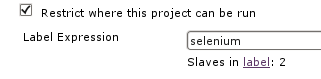
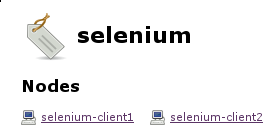
Problem description: One of my customers had a problem with their Selenium tests in the Jenkins continuous integration system. While Perl s Test::WebDriver still worked just fine the Selenium tests using Ruby s selenium-webdriver suddenly reported failures. The problem was caused by Debian wheezy s upgrade of the Iceweasel web browser. Debian originally shipped Iceweasel version 17.0.10esr-1~deb7u1 in wheezy, but during a security-update version 24.3.0esr-1~deb7u1 was brought in through the wheezy-security channel. Because the selenium tests are used in an automated fashion in a quite large and long-running build pipeline we immediately rolled back to Iceweasel version 17.0.10esr-1~deb7u1 so everything can continue as expected. Of course we wanted to get the new Iceweasel version up and running, but we didn t want to break the existing workflow while working on it. This is where on-demand slave selection through labels comes in. Basics: As soon as you re using Jenkins slaves you can instruct Jenkins to run a specific project on a particular (slave) node. By attaching labels to your slaves you can also use a label instead of a specific node name, providing more flexibility and scalability (to e.g. avoid problems if a specific node is down or you want to scale to more systems). Then Jenkins decides which of the nodes providing the according label should be considered for job execution. In the following screenshot a job uses the selenium label to restrict its execution to the slaves providing selenium and currently there are two nodes available providing this label: TIP 1: Visiting $JENKINS_SERVER/label/$label/ provides a list of slaves that provide that given $label (as well as list of projects that use $label in their configuration), like:

TIP 2: Execute the following script on $JENKINS_SERVER/script to get a list of available labels of your Jenkins system:
import hudson.model.*
labels = Hudson.instance.getLabels()
labels.each  label -> println label.name  
Solution: In the according customer setup we re using the swarm plugin (with automated Debian deployment through Grml s netscript boot option, grml-debootstrap + Puppet) to automatically connect our Jenkins slaves to Jenkins master without any manual intervention. The swarm plugin allows you to define the labels through the -labels command line option. By using the NodeLabel Parameter plugin we can configure additional parameters in Jenkins jobs: node and label . The label parameter allows us to execute the jobs on the nodes providing the requested label: This is what we can use to gradually upgrade from the old Iceweasel version to the new one by keeping a given set of slaves at the old Iceweasel version while we re upgrading other nodes to the new Iceweasel version (same for the selenium-server version which we want to also control). We can include the version number of the Iceweasel and selenium-server packages inside the labels we announce through the swarm slaves, with something like:
if [ -r /etc/init.d/selenium-server ] ; then
  FLAGS="selenium"
  ICEWEASEL_VERSION="$(dpkg-query --show --showformat='$ Version ' iceweasel)"
  if [ -n "$ICEWEASEL_VERSION" ] ; then
    ICEWEASEL_FLAG="iceweasel-$ ICEWEASEL_VERSION%%.* "
    EXTRA_FLAGS="$EXTRA_FLAGS $ICEWEASEL_FLAG"
  fi
  SELENIUM_VERSION="$(dpkg-query --show --showformat='$ Version ' selenium-server)"
  if [ -n "$SELENIUM_VERSION" ] ; then
    SELENIUM_FLAG="selenium-$ SELENIUM_VERSION%-* "
    EXTRA_FLAGS="$EXTRA_FLAGS $SELENIUM_FLAG"
  fi
fi
Then by using -labels $FLAGS EXTRA_FLAGS in the swarm invocation script we end up with labels like selenium iceweasel-24 selenium-2.40.0 for the slaves providing the Iceweasel v24 and selenium v2.40.0 Debian packages and selenium iceweasel-17 selenium-2.40.0 for the slaves providing Iceweasel v17 and selenium v2.40.0. This is perfect for our needs, because instead of using the selenium label (which is still there) we can configure the selenium jobs that should continue to work as usual to default to the slaves with the iceweasel-17 label now. The development related jobs though can use label iceweasel-24 and fail as often as needed without interrupting the build pipeline used for production. To illustrate this here we have slave selenium-client2 providing Iceweasel v17 with selenium-server v2.40. When triggering the production selenium job it will get executed on selenium-client2, because that s the slave providing the requested labels: Whereas the development selenium job can point to the slaves providing Iceweasel v24, so it will be executed on slave selenium-client1 here: This setup allowed us to work on the selenium Ruby tests while not conflicting with any production build pipeline. By the time I m writing about this setup we ve already finished the migration to support Iceweasel v24 and the infrastructure is ready for further Iceweasel and selenium-server upgrades.

9 February 2014

Neil Williams: Debian ARMMP in LAVA using iMX53

The home lab is my LAVA development environment and I ve recently got two iMX53 Quick Start Boards working with a typical LAVA master image based on a Linaro build of Linux 3.1.0 for mx5 with a Ubuntu Oneiric Ocelot 11.10 rootfs:
 3.1.0-1002-linaro-lt-mx5 (buildd@hubbard) (gcc version 4.6.1 (Ubuntu/Linaro 4.6.1-9ubuntu3) ) #13-Ubuntu PREEMPT Fri Dec 16 01:21:07 UTC 2011
As part of my Debian work, it was clearly time to look at a current, Debian, kernel and rootfs and as I m developing and testing on Debian unstable, this would necessarily mean testing the Debian ARMMP (multi-platform) kernel which replaces the mx5 build used in Wheezy.
Linux version 3.12-1-armmp (debian-kernel@lists.debian.org) (gcc version 4.8.2 (Debian 4.8.2-10) ) #1 SMP Debian 3.12.9-1 (2014-02-01)
I will be scripting the creation of a suitable image for these tests and there are other changes planned in LAVA to make it easier to build suitable images, but it is useful to document just how I worked out how to build the first image. Manual build steps First, I ve already discovered that the u-boot on the iMX53 doesn t like ext4, so the first step was to prepare an ext3 filesystem for the image. With a SATA drive attached, it was also much better to use that than the SD card, at least for generating the image. I m also doing this natively, so I am working inside the booted master image. This is fine as the master is designed to manipulate test images, so the only package I needed to install on the LAVA master image was debootstrap. I had an empty SATA drive to play with for these tests, so first prepare an ext3 filesystem:
# mkfs.ext3 /dev/sda1
# mkdir /mnt/sata
# mount /dev/sda1 /mnt/sata
# mkdir /mnt/sata/chroots/
Start the debootstrap:
# apt-get update
# apt-get install debootstrap
# debootstrap --arch=armhf --include=linux-image-armmp \
 --verbose unstable \
 /mnt/sata/chroots/unstable-armhf http://ftp.uk.debian.org/debian
Various actions in this chroot will need proc, so mount it here:
# chroot /mnt/sata/chroots/unstable-armhf
# mount proc -t proc /proc
# mount devpts -t devpts /dev/pts
# exit
You may also have to edit the apt sources the LAVA master image doesn t have editors installed, so either use echo or download an edited file. I m using:
deb http://ftp.uk.debian.org/debian sid main
flash-kernel needs changes For the initial tests, I ve got to get this image to boot directly from u-boot, so flash-kernel is going to be needed inside the chroot and to get the iMX53 to work with the ARMMP kernel and Device Tree, flash-kernel will need an update which will mean a patch:
# chroot /mnt/sata/chroots/unstable-armhf
# apt-get update
# apt-get install patch flash-kernel
# cp /usr/share/flash-kernel/db/all.db /home
# cd /home
# patch -p2
The patch itself goes through a couple of iterations. Initially, it is enough to use:
 Machine: Freescale MX53 LOCO Board
-Kernel-Flavors: mx5
+Kernel-Flavors: armmp
+DTB-Id: imx53-qsb.dtb
+DTB-Append: yes
Later, once the device has booted with the ARMMP kernel, the Machine Id can be updated to distinguish it from the mx5 flavour (from /proc/cpuinfo) and use the model name from the Device Tree (/proc/device-tree/model):
diff --git a/db/all.db b/db/all.db
index fab3407..41f6c78 100644
--- a/db/all.db
+++ b/db/all.db
@@ -62,6 +62,18 @@ U-Boot-Initrd-Address: 0x00800000
 Required-Packages: u-boot-tools
 Bootloader-Sets-Incorrect-Root: yes
 
+Machine: Freescale i.MX53 Quick Start Board
+Kernel-Flavors: armmp
+DTB-Id: imx53-qsb.dtb
+DTB-Append-From: 3.12
+Boot-DTB-Path: /boot/dtb
+U-Boot-Kernel-Address: 0x70008000
+U-Boot-Initrd-Address: 0x0
+Boot-Kernel-Path: /boot/uImage
+Boot-Initrd-Path: /boot/uInitrd
+Required-Packages: u-boot-tools
+Bootloader-Sets-Incorrect-Root: no
+
 Machine: Freescale MX53 LOCO Board
 Kernel-Flavors: mx5
 U-Boot-Kernel-Address: 0x70008000
(I will be filing this patch in a bug report against flash-kernel soon.) With that patched, update and run flash-kernel:
# mv all.db /usr/share/flash-kernel/db/all.db
# flash-kernel
flash-kernel: installing version 3.12-1-armmp
Generating kernel u-boot image... done.
Taking backup of uImage.
Installing new uImage.
Generating initramfs u-boot image... done.
Taking backup of uInitrd.
Installing new uInitrd.
Installing new dtb.
# exit
LAVA overlays This will be a LAVA test image and it needs an overlay if you want a vanilla image, set up a passwd inside the chroot instead.
# cd /mnt/sata/chroots/unstable-armhf/
# wget --no-check-certificate https://launchpad.net/~linaro-maintainers/+archive/overlay/+files/linaro-overlay-minimal_1112.2_all.deb
# wget --no-check-certificate https://launchpad.net/~linaro-maintainers/+archive/overlay/+files/linaro-overlay_1112.2_all.deb
# chroot /mnt/sata/chroots/unstable-armhf/
# dpkg -i linaro-overlay-minimal_1112.2_all.deb linaro-overlay_1112.2_all.deb
# rm linaro-overlay-minimal_1112.2_all.deb linaro-overlay_1112.2_all.deb
# exit
Changes to allow the chroot to boot Now the chroot needs setting up as a boot image:
# chroot /mnt/sata/chroots/unstable-armhf/
# echo T0:23:respawn:/sbin/getty -L ttymxc0 115200 vt102 >> ./etc/inittab
# echo auto lo eth0 > ./etc/network/interfaces.d/mx53loco
# echo iface lo inet loopback >> ./etc/network/interfaces.d/mx53loco
# echo iface eth0 inet dhcp >> ./etc/network/interfaces.d/mx53loco
# apt-get clean
# umount /dev/pts
# umount /proc
# exit
Partitioning as a LAVA test image This would be enough as a single partition test image but, currently, LAVA expects a much more hard-wired image. Depending on the history of the device and the need for LAVA to be able to put fresh kernel builds together with a known rootfs, LAVA has used a separate /boot and / partition in the test image for nearly all boards. Standard LAVA test images for many boards (like the iMX53) also have a small unallocated space at the start of the SD card, so until I can get LAVA upstream to handle test images of arbitrary design, I m adapting the image to suit the expectations inside LAVA. Yes, I know but it s better to get something working before spending time fixing things to make it work better. It will be fixed, in time. So I needed to separate out the /boot contents from the rest of the rootfs whilst keeping the chroot itself in a state which I can easily update and use to create other images.
# cd /mnt/sata/chroots/unstable-armhf/boot/
# tar -czf ../../boot.tar.gz ./*
# cd ..
# tar -czf ../root.tar.gz ./*
Now the test image file and its partitions:
# dd if=/dev/zero of=/mnt/sata/images/empty/debian.img bs=1M count=1024
# cp /mnt/sata/images/empty/debian.img /mnt/sata/images/debian-unstable-armhf-armmp.img
# losetup /dev/loop0 /mnt/sata/images/debian-unstable-armhf-armmp.img
# parted /dev/loop0 -s unit mb mktable msdos
# parted /dev/loop0 -s unit mb mkpart primary 1 10
# parted /dev/loop0 -s unit mb mkpart primary 11 110
# parted /dev/loop0 -s unit mb mkpart primary 111 1024
I did make the mistake of using kpartx at this stage but there are many areas of confusion when translating the kpartx output to offsets for mount when parted is easier:
# parted /dev/loop0 unit B -s print
Model:  (file)
Disk /dev/loop0: 1073741824B
Sector size (logical/physical): 512B/512B
Partition Table: msdos
Number  Start       End          Size        Type     File system  Flags
 1      1048576B    10485759B    9437184B    primary
 2      10485760B   110100479B   99614720B   primary
 3      110100480B  1024458751B  914358272B  primary
Use the Start numbers and use losetup to create the loop devices for each
partition
# losetup -o 10485760 /dev/loop1 /dev/loop0
# losetup -o 110100480 /dev/loop2 /dev/loop0
# mkfs.vfat /dev/loop1
# mkfs.ext3 /dev/loop2
Now clean up the loop mountpoints:
# losetup -d /dev/loop2
# losetup -d /dev/loop1
# losetup -d /dev/loop0
# losetup -a
losetup -a should return nothing. If it doesn t, investigate the contents of /dev/mapper and use dmsetup remove until losetup -a does report empty. Otherwise the subsequent stages will fail. Now deploy the /boot contents into the empty image:
# mount -oloop,offset=10485760 /mnt/sata/images/debian-unstable-armhf-armmp.img /mnt/boot/
# pushd /mnt/boot/
# tar -xzf /mnt/sata/chroots/boot.tar.gz
# popd
# sync
# umount /mnt/boot/
and the / contents (removing the duplicate ./boot contents)
# mount -oloop,offset=110100480 /mnt/sata/images/debian-unstable-armhf-armmp.img /mnt/root/
# pushd /mnt/root
# tar -xzf /mnt/sata/chroots/root.tar.gz
# rm ./boot/*
# popd
# sync
# umount /mnt/root
Check the image
# mount -oloop,offset=10485760 debian-unstable-armhf-armmp.img /mnt/boot
# ls /mnt/boot
config-3.12-1-armmp  initrd.img-3.12-1-armmp  System.map-3.12-1-armmp  uImage  uInitrd  vmlinuz-3.12-1-armmp
# umount /mnt/boot
# mount -oloop,offset=110100480 debian-unstable-armhf-armmp.img /mnt/root
# ls /mnt/root
bin  boot  dev  etc  home  initrd.img  lib  lost+found  media  mnt  opt  proc  root  run  sbin  srv  sys  tmp  usr  var  vmlinuz
# ls /mnt/root/bin/auto-serial-console
/mnt/root/bin/auto-serial-console
# umount /mnt/root
# md5sum debian-unstable-armhf-armmp.img
Downloads Yes, I have put that file online, if you are interested. Do read the readme first though. Getting the image off the device
# ip a
# python -m SimpleHTTPServer 80 2>/dev/null
then wget (just http://, IP address / and the filename), md5sum , finish with Ctrl-C. Depending on setup, it may be quicker to transfer the uncompressed
file over a LAN than to let the device compress it. Your main machine
will do the compression much faster, even with a larger download. (It also helps to not compress the image on the device, you can
test the mount offsets more easily and do check that the image
can be mounted with the offsets from parted.) Results
# cat /proc/cpuinfo
processor	: 0
model name	: ARMv7 Processor rev 5 (v7l)
Features	: swp half thumb fastmult vfp edsp thumbee neon vfpv3 tls vfpd32 
CPU implementer	: 0x41
CPU architecture: 7
CPU variant	: 0x2
CPU part	: 0xc08
CPU revision	: 5
Hardware	: Freescale i.MX53 (Device Tree Support)
Revision	: 0000
Serial		: 0000000000000000
# uname -a
Linux imx53-02 3.12-1-armmp #1 SMP Debian 3.12.9-1 (2014-02-01) armv7l GNU/Linux
# lsb_release -a
No LSB modules are available.
Distributor ID:	Debian
Description:	Debian GNU/Linux unstable (sid)
Release:	unstable
Codename:	sid
Next! Yes, there is a lot to do from here on. Then there is the whole issue of actually making this multi-platform. After all, it is far from ideal that a multi-platform kernel package has to have platform-specific operations using flash-kernel at each update. So Grub on ARM is going to be on the list of things to investigate .

6 February 2014

Johannes Schauer: botch updates

My last update about ongoing development of botch, the bootstrap/build ordering tool chain, was three months ago with the announcement of bootstrap.debian.net. Since then a number of things happened, so I thought an update was due.

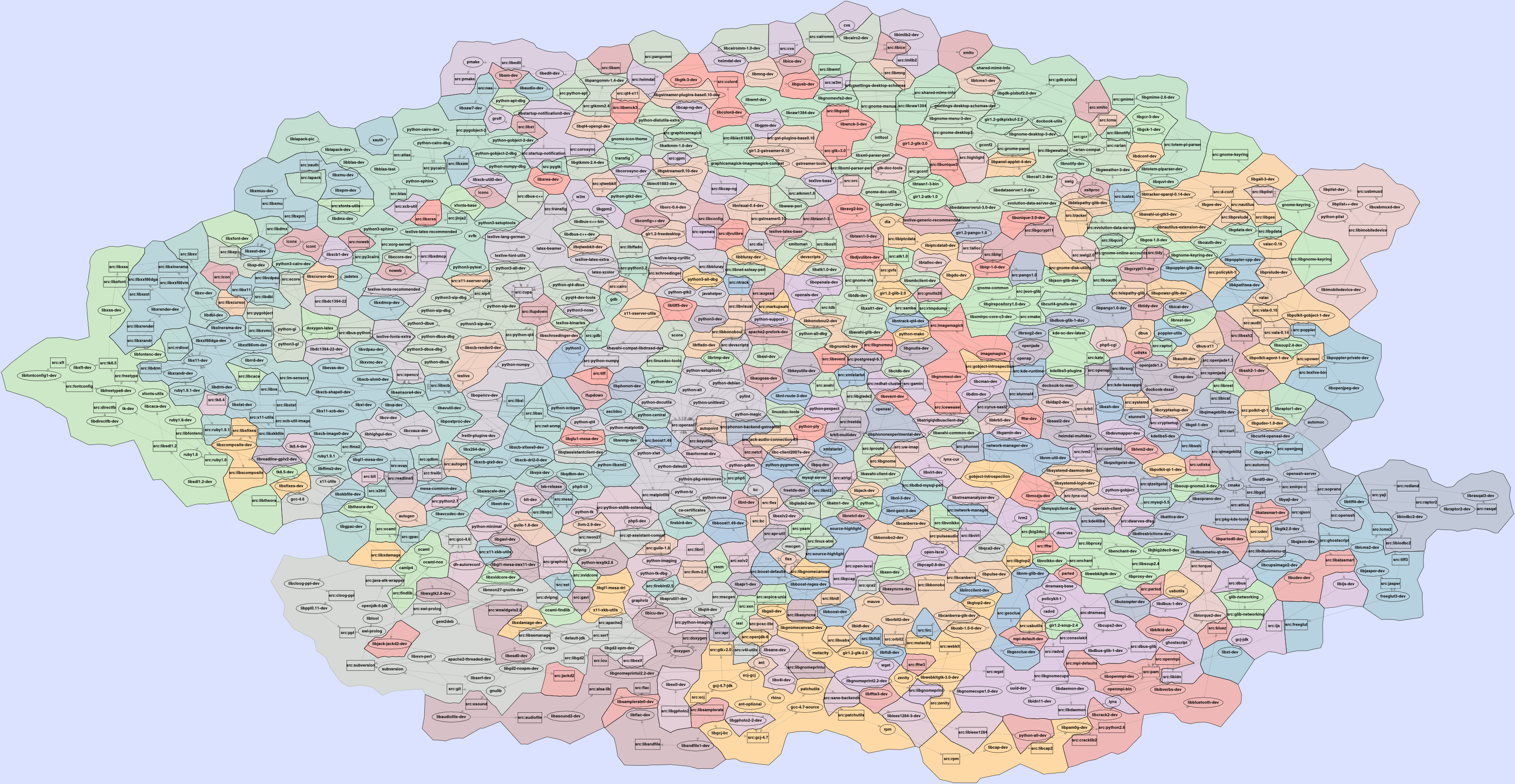
New graphs for port metrics By default, a dependency graph is created by arbitrarily choosing an installation set for binary package installation or source package compilation. Installation set vertices and source vertices are connected according to this arbitrary selection. Niels Thykier approached me at Debconf13 about the possibility of using this graph to create a metric which would be able to tell for each source package, how many other source packages would become uncompilable or how many binary packages would become uninstallable, if that source package was removed from the archive. This could help deciding about the importance of packages. More about this can be found at the thread on debian-devel. For botch, this meant that two new graph graphs can now be generated. Instead of picking an arbitrary installation set for compiling a source package or installing a binary package, botch can now create a minimum graph which is created by letting dose3 calculate strong dependencies and a maximum graph by using the dependency closure.

Build profile syntax in dpkg With dpkg 1.17.2 we now have experimental build profile support in unstable. The syntax which ended up being added was:
Build-Depends: large (>= 1.0), small <!profile.stage1>
But until packages with that syntax can hit the archive, a few more tools need to understand the syntax. The patch we have for sbuild is very simple because sbuild relies on libdpkg for dependency parsing. We have a patch for apt too, but we have to rebase it for the current apt version and have to adapt it so that it works exactly like the functionality dpkg implements. But before we can do that we have to decide how to handle mixed positive and negative qualifiers or whether to remove this feature altogether because it causes too much confusion. The relevant thread on debian-dpkg starts here.

Update to latest dose3 git Botch heavily depends on libdose3 and unfortunately requires features which are only available in the current git HEAD. The latest version packaged in Debian is 3.1.3 from October 2012. Unfortunately the current dose3 git HEAD also relies on unreleased features from libcudf. On top of that, the GraphML output of the latest ocamlgraph version (1.8.3) is also broken and only fixed in the git. For now everything is set up as git submodules but this is the major blocker preventing any packaging of botch as a Debian package. Hopefully new releases will be done soon for all involved components.

Writing and reading GraphML Botch is a collection of several utilities which are connected together in a shell script. The advantage of this is, that one does not need to understand or hack the OCaml code to use botch for different purposes. In theory it also allows to insert 3rd party tools into a pipe to further modify the data. Until recently this ability was seriously hampered by the fact that many botch tools communicated with each other through marshaled OCaml binary files which prevent everything which is not written in OCaml from modifying them. The data that was passed around like this were the dependency graphs and I initially implemented it like that because I didnt want to write a GraphML parser. I now ended up writing an xmlm based GraphML parser so as of now, botch only reads and writes ASCII text files in XML (for the graphs) and in rfc822 packages format (for Packages and Sources files) which can both easily be modified by 3rd party tools. The ./tools directory contains many Python scripts using the networkx module to modify GraphML and the apt_pkg module to modify rfc822 files.

Splitting of tools To further increase the ability to modify program execution without having to know OCaml, I split up some big tools into multiple smaller ones. Some of the smaller tools are now even written in Python which is probably much more hackable for the general crowd. I converted those tools to Python which did not need any dose3 functionality and which were simple enough so that writing them didnt take much time. I could convert more tools but that might introduce bugs and takes time which I currently dont have much of (who does?).

Gzip instead of bz2 Since around January 14, snapshot.debian.org doesnt offer bzip2 compressed Packages and Sources files anymore but uses xz instead. This is awesome for must purposes but unfortunately I had to discover that there exist no OCaml bindings for libxz. Thus, botch is now using gzip instead of bz2 until either myself or anybody else finds some time to write a libxz OCaml binding.

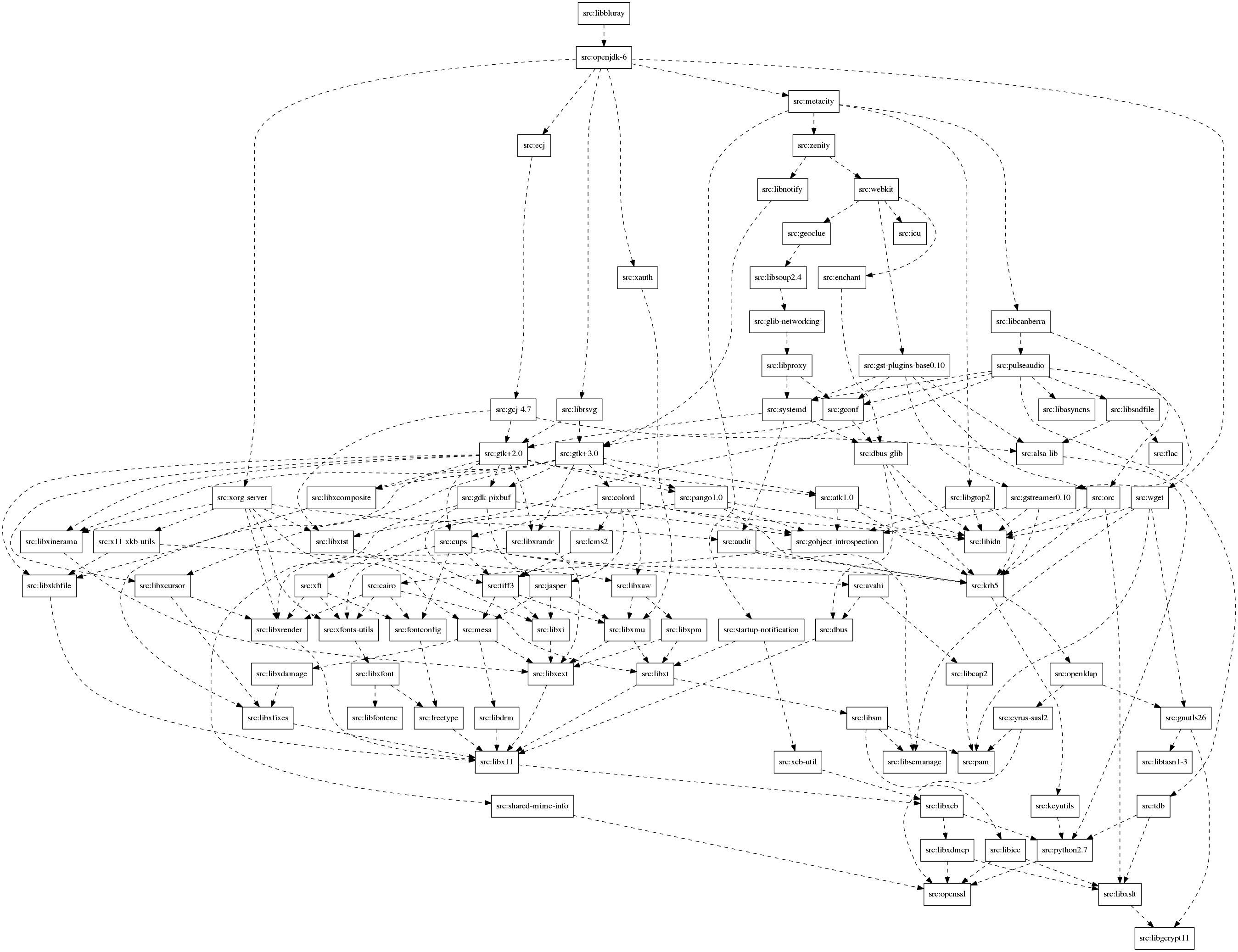
Self hosting Fedora Paul Wise made me aware of Harald Hoyer's attempts to bootstrap Fedora. I reproduced his steps for the Debian dependency graph and it turns out that they are a little bit bigger. I'm exchanging emails with Harald Hoyer because it might not be too hard to use botch for rpm based distributions as well because dose3 supports rpm. The article also made me aware of the tred tool which is part of graphviz and allows to calculate the transitive reduction of a graph. This can help making horrible situations much better.

Dose3 bugs I planned to generate such simplified graphs for the neighborhood of each source package on bootstrap.debian.net but then binutils stopped building binutils-gold and instead provided binutils-gold while libc6-dev breaks binutils-gold (<< 2.20.1-11). This unfortunately triggered a dose3 bug and thus bootstrap.debian.net will not generate any new results until this is fixed in dose3. Another dose3 bug affects packages which Conflicts/Replaces/Provides:bar while bar is fully virtual and are Multi-Arch:same. Binaries of different architecture with this property can currently not be co-installed with dose3. Unfortunately linux-libc-dev has this property and thus botch cannot be used to analyze cross builds until that bug is fixed in dose3. I hope I get some free time soon to be able to look at these dose3 issues myself.

More documentation Since I started to like the current set of tools and how they work together I ended up writing over 2600 words of documentation in the past few days. You can start setting up and running botch by reading the first steps and get more detailed information by reading about the 28 tools that botch makes use of as of now. All existing articles, thesis and talks are linked from the wiki home.

3 February 2014

Kees Cook: compiler hardening in Ubuntu and Debian

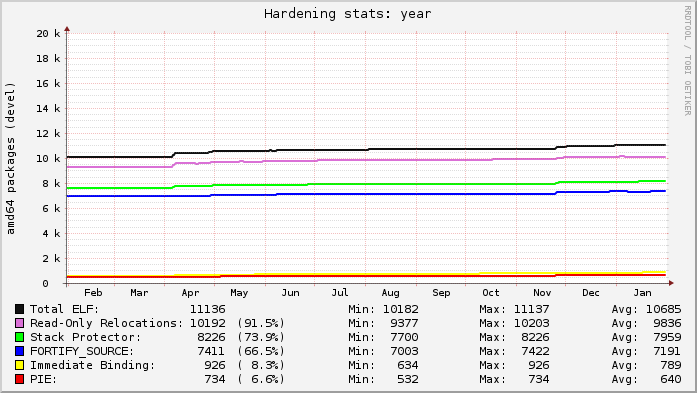
Back in 2006, the compiler in Ubuntu was patched to enable most build-time security-hardening features (relro, stack protector, fortify source). I wasn t able to convince Debian to do the same, so Debian went the route of other distributions, adding security hardening flags during package builds only. I remain disappointed in this approach, because it means that someone who builds software without using the packaging tools on a non-Ubuntu system won t get those hardening features. Think of a sysadmin trying the latest nginx, or a vendor like Valve building games for distribution. On Ubuntu, when you do that ./configure && make you ll get the features automatically. Debian, at the time, didn t have a good way forward even for package builds since it lacked a concept of global package build flags . Happily, a solution (via dh) was developed about 2 years ago, and Debian package maintainers have been working to adopt it ever since. So, while I don t think any distro can match Ubuntu s method of security hardening compiler defaults, it is valuable to see the results of global package build flags in Debian on the package archive. I ve had an on-going graph of the state of build hardening on both Ubuntu and Debian for a while, but only recently did I put together a comparison of a default install. Very few people have all the packages in the archive installed, so it s a bit silly to only look at the archive statistics. But let s start there, just to describe what s being measured. Here s today s snapshot of Ubuntu s development archive for the past year (you can see development opening after a release every 6 months with an influx of new packages):
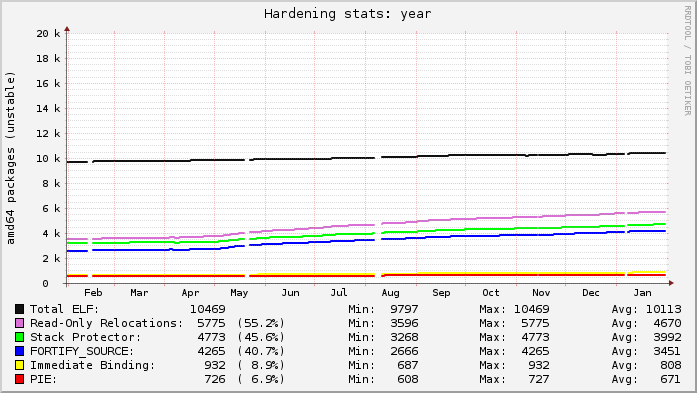
Here s today s snapshot of Debian s unstable archive for the past year (at the start of May you can see the archive unfreezing after the Wheezy release; the gaps were my analysis tool failing):
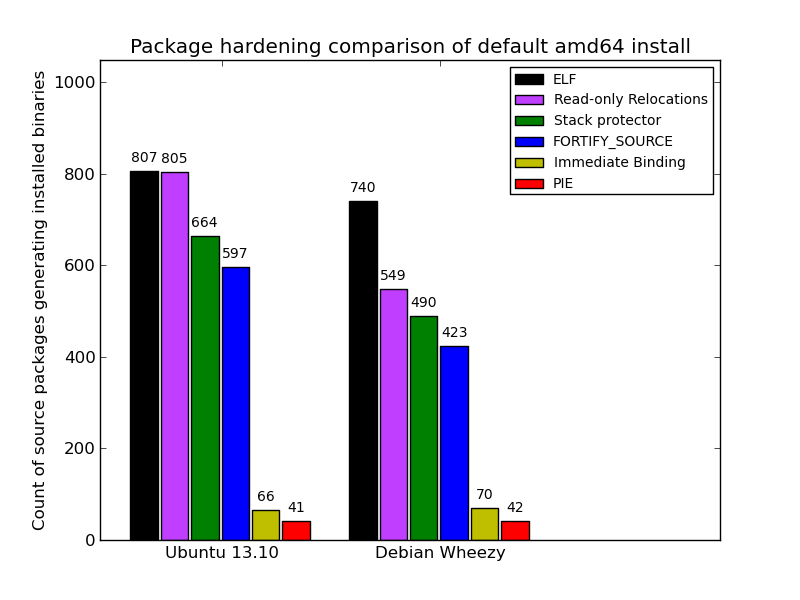
Ubuntu s lines are relatively flat because everything that can be built with hardening already is. Debian s graph is on a slow upward trend as more packages get migrated to dh to gain knowledge of the global flags. Each line in the graphs represents the count of source packages that contain binary packages that have at least 1 hit for a given category. ELF is just that: a source package that ultimately produces at least 1 binary package with at least 1 ELF binary in it (i.e. produces a compiled output). The Read-only Relocations ( relro ) hardening feature is almost always done for an ELF, excepting uncommon situations. As a result, the count of ELF and relro are close on Ubuntu. In fact, examining relro is a good indication of whether or not a source package got built with hardening of any kind. So, in Ubuntu, 91.5% of the archive is built with hardening, with Debian at 55.2%. The stack protector and fortify source features depend on characteristics of the source itself, and may not always be present in package s binaries even when hardening is enabled for the build (e.g. no functions got selected for stack protection, or no fortified glibc functions were used). Really these lines mostly indicate the count of packages that have a sufficiently high level of complexity that would trigger such protections. The PIE and immediate binding ( bind_now ) features are specifically enabled by a package maintainer. PIE can have a noticeable performance impact on CPU-register-starved architectures like i386 (ia32), so it is neither patched on in Ubuntu, nor part of the default flags in Debian. (And bind_now doesn t make much sense without PIE, so they usually go together.) It s worth noting, however, that it probably should be the default on amd64 (x86_64), which has plenty of available registers. Here is a comparison of default installed packages between the most recent stable releases of Ubuntu (13.10) and Debian (Wheezy). It s clear that what the average user gets with a default fresh install is better than what the archive-to-archive comparison shows. Debian s showing is better (74% built with hardening), though it is still clearly lagging behind Ubuntu (99%):

2014, Kees Cook. This work is licensed under a Creative Commons Attribution-ShareAlike 3.0 License.
Creative Commons License

26 January 2014

Daniel Pocock: Beyond init systems: other opportunities for simplification

One thing that everybody agrees on in the debate about Debian's init system replacement is that the manifests used by most of the new schemes are far more concise than traditional init scripts. Simplification need not stop there however. Another opportunity for simplification exists in the creation of users at package installation. Every packaging tool has a different approach and all of them involve multiple lines of boilerplate script code duplicated between hundreds of packages that all need exactly the same thing. What is worse, embedding this logic into the postinst scripts on Debian or %post logic of an RPM makes it far more awkard for a system administrator to audit the user account requirements of packages (when installing many of them in a hurry) or to customise the logic for a whole site without rebuilding the whole packages. Potential improvement How to improve this? Well, packages (on any distribution) could be invited to declare the user and group accounts they depend on. A central configuration parameter in /etc/dpkg/dpkg.cfg or /etc/rpm would then control how the package manager behaves, with several possible options:
  • Create users/groups on demand without prompting
  • Abort installation/configuration of any package if the pre-requisite users do not exist on the system
  • Prompt: at the beginning of any package install, ask the administrator to create the users himself before proceeding, with an option to abort and potentially displaying some convenient LDIF fragments and other samples that the administrator can cut and paste.
Running a command like apt-get --simulate would give a system administrator an immediate view of all users/groups required by the packages they propose to install.

11 January 2014

Johannes Schauer: Why do I need superuser privileges when I just want to write to a regular file

I have written a number of scripts to create Debian foreign architecture (mostly armel and armhf) rootfs images for SD cards or NAND flashing. I started with putting Debian on my Openmoko gta01 and gta02 and continued with devices like the qi nanonote, a marvel kirkwood based device, the Always Innovating Touchbook (close to the Beagleboard), the Notion Ink Adam and most recently the Golden Delicious gta04. Once it has been manufactured, I will surely also get my hands dirty with the Neo900 whose creators are currently looking for potential donors/customers to increase the size of the first batch and get the price per unit further down. Creating a Debian rootfs disk image for all these devices basically follows the same steps:
  1. create an disk image file, partition it, format the partitions and mount the / partition into a directory
  2. use debootstrap or multistrap to extract a selection of armel or armhf packages into the directory
  3. copy over /usr/bin/qemu-arm-static for qemu user mode emulation
  4. chroot into the directory to execute package maintainer scripts with dpkg --configure -a
  5. copy the disk image onto the sd card
It was not long until I started wondering why I had to run all of the above steps with superuser privileges even though everything except the final step (which I will not cover here) was in principle nothing else than writing some magic bytes to files I had write access to (the disk image file) in some more or less fancy ways. So I tried using fakeroot+fakechroot and after some initial troubles I managed to build a foreign architecture rootfs without needing root priviliges for steps two, three and four. I wrote about my solution which still included some workarounds in another article here. These workarounds were soon not needed anymore as upstream fixed the outstanding issues. As a result I wrote the polystrap tool which combines multistrap, fakeroot, fakechroot and qemu user mode emulation. Recently I managed to integrate proot support in a separate branch of polystrap. Last year I got the LEGO ev3 robot for christmas and since it runs Linux I also wanted to put Debian on it by following the instructions given by the ev3dev project. Even though ev3dev calls itself a "distribution" it only deviates from pure Debian by its kernel, some configuration options and its initial package selection. Otherwise it's vanilla Debian. The project also supplies some multistrap based scripts which create the rootfs and then partition and populate an SD card. All of this is of course done as the superuser. While the creation of the file/directory structure of the foreign Debian armel rootfs can by now easily be done without superuser priviliges by running multistrap under fakeroot/fakechroot/proot, creating the SD card image still seems to be a bit more tricky. While it is no problem to write a partition table to a regular file, it turned out to be tricky to mount these partition because tools like kpartx and losetup require superuser permissions. Tools like mkfs.ext3 and fuse-ext2 which otherwise would be able to work on a regular file without superuser privileges do not seem to allow to specify the required offsets that the partitions have within the disk image. With fuseloop there exists a tool which allows to "loop-mount" parts of a file in userspace to a new file and thus allows tools like mkfs.ext3 and fuse-ext2 to work as they normally do. But fuseloop is not packaged for Debian yet and thus also not in the current Debian stable. An obvious workaround would be to create and fill each partition in a separate file and concatenate them together. But why do I have to write my data twice just because I do not want to become the superuser? Even worse: because parted refuses to write a partition table to a file which is too small to hold the specified partitions, one spends twice the disk space of the final image: the image with the partition table plus the image with the main partition's content. So lets summarize: a bootable foreign architecture SD card disk image is nothing else than a regular file representing the contents of the SD card as a block device. This disk image is created in my home directory and given enough free disk space there is nothing stopping me from writing any possible permutation of bits to that file. Obviously I'm interested in a permutation representing a valid partition table and file systems with sensible content. Why do I need superuser privileges to generate such a sensible permutation of bits? Gladly it seems that the (at least in my opinion) hardest part of faking chroot and executing foreign architecture package maintainer scripts is already possible without superuser privileges by using fakeroot and fakechroot or proot together with qemu user mode emulation. But then there is still the blocker of creating the disk image itself through some user mode loop mounting of a filesystem occupying a virtual "partition" in the disk image. Why has all this only become available so very recently and still requires a number of workarounds to fully work in userspace? There exists a surprising amount of scripts which wrap debootstrap/multistrap. Most of them require superuser privileges. Does everybody just accept that they have to put a sudo in front of every invocation and hope for the best? While this might be okay for well tested code like debootstrap and multistrap the countless wrapper scripts might accidentally (be it a bug in the code or a typo in the given command line arguments) write to your primary hard disk instead of your SD card. Such behavior can easily be mitigated by not executing any such script with superuser privileges in the first place. Operations like loop mounting affect the whole system. Why do I have to touch anything outside of my home directory (/dev/loop in this case) to populate a file in it with some meaningful bits? Virtualization is no option because every virtualization solution again requires root privileges. One might argue that a number of solutions just require some initial setup by root to then later be used by a regular user (for example /etc/fstab configuration or the schroot approach). But then again: why do I have to write anything outside of my home directory (even if it is only once) to be able to write something meaningful to a file in it? The latter approach also does not work if one cannot become root in the first place or is limited by a virtualized environment. Imagine you are trying to build a Debian rootfs on a machine where you just have a regular user account. Or a situation I was recently in: I had a virtual server which denied me operations like loop mounting. Given all these downsides, why is it still so common to just assume that one is able and willing to use sudo and be done with it in most cases? I really wonder why technologies like fakeroot and fakechroot have only been developed this late. Has this problem not been around since the earliest days of Linux/Unix? Am I missing something and rambling around for nothing? Is this idea a lost cause or something that is worth spending time and energy on to extend and fix the required tools?

6 January 2014

Rapha&#235;l Hertzog: My Free Software Activities in December 2013

This is my monthly summary of my free software related activities. If you re among the people who made a donation to support my work (147.56 , thanks everybody!), then you can learn how I spent your money. Otherwise it s just an interesting status update on my various projects. The Debian Administrator s Handbook Cover of the Debian Administrator's Handbook (Wheezy edition)I spent a good chunk of December on the book. First finalizing the English version and getting it out (BTW, just for the launch, there s a 10% discount on the paperback that lasts only until January 9th!). Then working on updating the French translation. Eyrolles will publish a new edition of the French book based on this translation. Expect some further news about this during January! Debian France I contributed to many discussions within Debian France. Starting with a complaint that most events are organized in Paris, I proposed to map the location of Debian France members. We added new fields in the membership management page so that members can add their GPS coordinates and Fr d ric Decou made some experiments with Openstreetmap. Someone else (Kiriarat) volunteered to write the required glue code. A manual map is currently maintained on the website. Sample logo receivedIn the discussions about the setup of the Debian France shop, I suggested to update our logo with a nicer looking one. We got a few suggestions and after further discussions with Alexandre Delano and Sylvestre Ledru, we organized a small contest to entice designers to submit a logo proposal to us (the winner earns a set of Debian goodies). We got 46 proposals (see my favorite on the right)! The board is currently pre-selecting the logos and setting up the final vote for our members. The winner shall be announced at the end of the upcoming mini-debconf in Paris. I also continued the work to finalize new bylaws and new internal rules. They shall be adopted during the next general assembly which will happen during the mini-debconf. Misc Debian Work WordPress maintenance. I mentored Pablo Vasquez to do his first small contribution to the WordPress packaging. I really appreciate this but he s not yet ready to assume maintenance of a big package like WordPress on his own. I got multiple other offers of help and pinged them all while filing #733726 to coordinate the work on the new upstream version. But I got no reply :-( Handing over packages to new maintainers is hard Init system discussion. The technical committee has the hard task of picking the default init system that will replace the traditional System V init (see #727708). I followed this huge discussion closely and contributed a bit where I add something meaningful to say. Final decision is expected sometimes in January. FWIW, I share entirely Russ Allbery s point of view in those discussions. I have been running systemd on some of my computers for a few months already. Fixing lxc in stable. The lxc package in stable has a non-working debian template. I really dislike documenting that things are broken so instead of doing that in the Debian Administrator s Handbook, I opted to do something about it. I prepared a non maintainer upload for stable (see #680469 for the problem and #732358 for the stable update request). Misc stuff. I sponsored a tcpdf upload. I filed an enhancement request on Publican to have it keep processing instructions present in translations. I uploaded new versions of publican-librement and debian-handbook. I filed #732678 against git-buildpackage because it failed to properly call lintian when given the -A dpkg-buildpackage argument. Thanks See you next month for a new summary of my activities.

No comment Liked this article? Click here. My blog is Flattr-enabled.

29 December 2013

Hideki Yamane: kernel.org stops using bz2

Many upstream provides their source as tar.xz format, and kernel.org also throw bz2 away - "Happy new year and good-bye bzip2".

Debian package (dpkg-deb) uses xz as default since 1.17.0 as I mentioned. If your package uses bz2, now it's a time to switch. And maybe it's good to ask upstream to switch from bzip2 to xz, too.

1 December 2013

Rapha&#235;l Hertzog: My Free Software Activities in November 2013

This is my monthly summary of my free software related activities. If you re among the people who made a donation to support my work (44.52 , thanks everybody!), then you can learn how I spent your money. Otherwise it s just an interesting status update on my various projects. The Debian Administrator s Handbook Wheezy update completed. Roland and I completed the update of the Debian Administrator s Handbook for Debian 7 Wheezy. We still have some proofreading work to do but you can already enjoy the result here: http://debian-handbook.info/browse/wheezy/ Feel free to report back any problem that you discover. You can also submit us patches ready to apply if you want to go one step further. Publican contributions. The book is generated with publican and I maintain its Debian package. This month I got a release critical bug because it stopped working it turns out that the problem lied in libxml-treebuilder-perl and I thus reassigned #728885 while providing a tentative patch to the upstream author. After a few days without action from the pkg-perl team, and after having received a FTBFS bug on debian-handbook (of course publican was broken in unstable!), I prepared a fixed package myself and I uploaded it (I m still part of the pkg-perl team although I m inactive). Since I used publican heavily this month, I filed two tickets in its bugzilla. I requested a new feature in #1034836 (the possibility to keep around the former string for fuzzy strings to update), and I reported a problem with the handling of \n in PO files in #1036150. Debian France Galette update. I updated the galette package and its paypal plugin, and I deployed those on france.debian.net. It had some fixes for the reminder mails sent to members. Bylaws update. I also resumed my work on preparing new bylaws for Debian France. Sylvestre Ledru came up with a draft (with the help of a lawyer) a few months ago and I m reviewing/improving them now. The main goal is to clarify that Debian France is meant to be a Trusted Organization for the Debian project. Debian France Shop. We had the idea since a few months already but Sylvestre did the leg work to open a Debian France shop with the help of EnVenteLibre. I asked our members to prepare some CSS that better match the Debian colors and this should be fixed in a few days. The first goodies will also start to appear shortly, just in time for Christmas! Misc Debian work Distro Tracker. In the continuation of the Google Summer of Code, I asked the DSA team to setup a new virtual machine to host tracker.debian.org, an instance of Distro Tracker, the rewritten Package Tracking System. They have done their part of the job (except the mail setup), it s now waiting on me to find some time to complete some cleanups and deploy the thing. WordPress. I packaged wordpress 3.7.1 and sent a call for help on debian-mentors. I got 3 replies, I gave them some initial direction but I haven t heard back anything since. WordPress 3.8 is expected in a few days, hopefully one of the new volunteers will take care of preparing the next update. Dpkg regressions. I haven t done anything for multiple months but at least I keep running the git version of dpkg and I detected two regressions. Good to have them squashed before the upcoming 1.17.2 upload to unstable. PTS fix. I fixed some warnings that the PTS code started generating since the upgrade of its host to wheezy. They were generating some annoying backscatter mails to users of the pts@qa.debian.org bot. Ruby security update. I helped the ruby team to prepare the required security updates of ruby1.8 and ruby1.9.1 (see #730178 and #730189). This work was sponsored by Kali/Offensive Security. Smartcard setup. I bought 2 OpenPGP smartcards with a reader and I moved all my private keys on those devices (one card with the master key for signature/certification to be kept at home, one card for daily/mobile usage with the subkeys for encryption/signature/authentication). My laptop s harddrive doesn t contain any private key anymore. I have kept the required offline backup in a safe place, but in the end, my private keys are much harder to steal. I should write down my findings in another article Thanks See you next month for a new summary of my activities.

2 comments Liked this article? Click here. My blog is Flattr-enabled.

Marco d'Itri: Easily installing Debian on a Cubieboard

I recently bought a Cubieboard to replace my old Sheevaplug which has finally blown a power supply capacitor (this appears to be a common defect of Sheevaplugs), so I am publishing these instructions which show how to install Debian on sunxi systems (i.e. based on the Allwinner A10 SoC or one of its newer versions) with no need for cross compilers, emulators or ugly FAT partitions. This should work on any sunxi system as long as U-Boot is at least version 2012.10. The first step is to erase the beginning of SD card to remove anything in the unpartitioned space which may confuse U-Boot, partition and format it as desired. The first partition must begin at 1MB (1024*1024/512=2048 sectors) because the leading unpartitioned space is used by the boot loaders.
dd if=/dev/zero of=/dev/mmcblk0 bs=1M count=1
parted /dev/mmcblk0
  mklabel msdos
  mkpart primary ext4 2048s 15G
  unit s
  print
  mkpart primary linux-swap ... -1
mkfs.ext4 -L root /dev/mmcblk0p1
mkswap --label swap /dev/mmcblk0p2
Download the boot loaders and an initial kernel and install them:
tar xf cubieboard_hwpack.tar.xz
dd if=bootloader/sunxi-spl.bin of=/dev/mmcblk0 bs=1024 seek=8
dd if=bootloader/u-boot.bin of=/dev/mmcblk0 bs=1024 seek=32
mount /dev/mmcblk0p1 /mnt
mkdir /mnt/boot/
cp kernel/script.bin kernel/uImage /mnt/boot/
script.bin is Allwinner's proprietary equivalent of the device tree: it will be needed until sunxi support will be fully merged in mainline kernels. U-Boot needs to be configured to load the kernel from the ext4 file system (join the lines at \\, this is not a supported syntax!):
cat << END > /mnt/boot/uEnv.txt
# kernel=uImage
root=/dev/mmcblk0p1 rootwait
boot_mmc=ext4load mmc 0:1 0x43000000 boot/script.bin && ext4load mmc 0:1 0x48000000 boot/$ kernel  \\
  && watchdog 0 && bootm 0x48000000
END
Now the system is bootable: add your own root file system or build one with debootstrap. My old Sheevaplug tutorial shows how to do this without a working ARM system or emulator (beware: the other parts are quite obsolete and should not be trusted blindly). If you have an old armel install around it will work as well, and you can easily cross-grade it to armhf as long as it is up to date to at least wheezy (the newer, the better). You can also just use busybox for a quick test:
mkdir /mnt/bin/
dpkg-deb -x .../busybox-static_1.21.0-1_armhf.deb .
cp bin/busybox /mnt/bin/
ln -s busybox /mnt/bin/sh
After booting the busybox root file system you can run busybox --install /bin/ to install links for all the supported commands. Until Debian kernels will support sunxi (do not hold your breath: there are still many parts which are not yet in mainline) I recommend to install one of Roman's kernels:
dpkg -i linux-image-3.4.67-r0-s-rm2+_3.4.67-r0-s-rm2+-10.00.Custom_armhf.deb
mkimage -A arm -O linux -T kernel -C none -a 40008000 -e 40008000 \
  -n uImage -d /boot/vmlinuz-3.4.67-r0-s-rm2+ /boot/uImage-3.4.67-r0-s-rm2+
It is not needed with these kernels for most setups, but an initramfs can be created with:
update-initramfs -c -k 3.4.67-r0-s-rm2+
mkimage -A arm -T ramdisk -C none -n uInitrd \
  -d /boot/initrd.img-3.4.67-r0-s-rm2+ /boot/uInitrd-3.4.67-r0-s-rm2+
/boot/uEnv.txt will have to be updated to load the initramfs. Since the Cubieboard lacks a factory-burned MAC address you should either configure one in script.bin or (much easier) add it to /etc/network/interfaces:
iface eth0 inet dhcp
        hwaddress ether xx:xx:xx:xx:xx:xx
To learn more about the Allwinner SoCs boot process you can consult 1 and 2.

28 November 2013

Debian Med: Bits from Debian Med team (by Andreas Tille)

Some of these bits are a bit outdated but there is no point in hiding this information just because it is old. FOSDEM talkAndreas Tille had a talk at FOSDEM which is also Video recorded. A quite similar but updated talk was held at DebConf 13 (see below). Jabber interview by reporter from IndiaThere was an interesting interview between Rajeev Nair and Andreas Tille at So, 17.02.2013 Rajeev Nair is Business head of an health care journal in India held via jabber. Since this might serve as some nice FAQ about Debian Med here is a complete log of this interview (permission to publish it was granted). Article about Debian MedAs a consequence of the interview above the Debian Med team has assembled an article which was originally intended to be published in the Health Cafe journal but somehow this never happened. So we ended up with a nice article targeting at interested readers about Free Software in medicine with not necessarily informatics background. Since the article is considered to be of good quality and has consumed some time of several team members we are seeking for ideas for relevant places where to publish it. It is available as PDFas well as in SVN. Yearly sprint of Debian Med teamThis year we had our third sprint of the Debian Med team and all participants consider it a great success again. The sprint was in end of February and the individual reports are linked from the according wiki page. Since Andreas Tille was able to prove the nice effect of having face to face meetings in Debian teams in the team metrics graphs presented in his talks at DebConf (see below) we will keep on with this good tradition. The next sprint is scheduled for Friday 31st January until Sunday 2nd February in Stonehaven near Aberdeen. If you are interested to meet the people behind Debian Med and want to join us in developing packages which are helpful in health care and bioinformatics you are invited to join us. DebConf 13 in VaumarcusAndreas Tille had two talks with specific influence to Debian Med development(Debian Med as a success story for other Blends, How to attract new developers for your team (MoM, SoB). For those who want to read a full (and lengthy) report about DebConf 13 by Andreas Tille this is online in this blog article. Codefest of the Open Bioinformatics FoundationIvo Maintz and Steffen M ller organised the Codefest of the Open Bioinformatics Foundation in Berlin. About 40 contributors from all over the world attended, connecting the Debian community strongly with upstream. The event triggered a joint paper of participants to Sprints, Codefests and Hackathons alike, presented at the Nettab conference on Semantic, Social, and Mobile Applications for Bioinformatics and Biomedical Laboratories in Venice. Reupload unattended packagesAndreas Tille has mentored the GSoC student Emmanouil Kiagias and as a byproduct some Blends metadata were now kept in UDD. This has inspired some new tools and one of this was an UDD query to return all packages in the interest of the Blend ordered by date when they were uploaded. It has shown that there were packages hanging around in the package pool since five years. So some effort was done to check those packages which were not necessarily "buggy" according to BTS entries and so we were able to fix the following issues in about 20-30 packages: Since it was impressive how many things that deserve fixing are hidden in such long unattended packages it is recommended also to other teams to spend some time into these. The UDD query can be easily tweaked for a team maintainer address. Debian Med Bug Squashing Advent Calendar 2013The Debian Med team will again do the Bug Squashing Advent Calendar. Feel free to join us in our bug squashing effort where we close bugs while other people are opening doors. :-) Kind regards and see you at Debian Med sprint
Andreas.

26 November 2013

Axel Beckert: Showing packages newer than in archive with aptitude

I happens quite often that I install a manually built, newer version of some package on a machine. Occassionally I forget to remove it or to downgrade it to the version in the APT repo.
$ apt-show-versions   fgrep newer
easily finds those packages. But usually when doing such a check, I want this list of packages in my aptitude TUI to have a look at the other versions of that package and to take actions. And I don t want to manually search for each of the package manually. This can be done with the following one-liner :
# aptitude -o "Aptitude::Pkg-Display-Limit=(  apt-show-versions   fgrep newer   awk -F '[ :]' ' printf "~n ^"$1"$   " '   sed -e 's/  *$//'  )"
It uses apt-show-version s output, searches for the right packages, takes the first column and transforms it into an aptitude search pattern matching all packages whose name is exactly one of the listed packages. But this solution is quite ugly and slow. So I wondered if this is also doable with pure aptitude search patterns which likely would also be faster. And after some playing around I found the following working aptitude search term:
~i ?any-version(!~O.) !~U !~o
This matches all packages which which are installed and which have a version which has no origin, i.e. no associated APT repository. Since this also matches all hold packages as well as all packages not available in any archive, I use !~U !~o to exclude those packages from that list again. Since nobody can remember that nor wants to type that everytime needed, I added the following alias to my setup:
alias aptitude-newer-than-in-archive='aptitude -o "Aptitude::Pkg-Display-Limit=~i ?any-version(!~O.) !~U !~o"'
Only caveat so far: It seems to also match packages from APT repos which haven t set an Origin . This should not happen with any Debian or Ubuntu APT repository, but seems to happen occasionally with privately run APT repositories. And using ~A instead of ~O, i.e. ~i ?any-version(!~A.), does not work for this case either, despite it matches installed packages of which versions not in any available archive exist. But unfortunately aptitude seems to remember in some way if a package was in some archive in the past, so this only shows packages installed with dpkg -i, but not packages removed from e.g. unstable but with older versions still being available in stable.

17 November 2013

Charles Plessy: The source of a package developed in a Git repository is that repository.

In his blog, Lars puts words on my feelings of weariness in these situations where we are asked much efforts to make our packages modifiable by contributors who can not or want not to use Git. Most of the core Debian tools, dpkg, debhelper, litnian, debian-installer and many others are developed in Git repositories. Somebody serious about contributing to Debian can hardly avoid Git. It is time for our tools and methods to evolve and take advantage of Git. This requires to say no thank you to contributions based on source packages downloaded from our FTP server, instead of being cloned from the Git repository where the package is actually developed, and this calls the question of what is the real source of the binary packages, but this is a question that is becoming unavoidable.

16 November 2013

Lars Wirzenius: Debian: developing it wrong

This is an essay form of a talk I have given today at the Cambridge Mini-debconf. The talk was videoed, so will presumably show up in the Debconf video archive eventually. Abstract Debian has a long and illustrious history. However, some of the things we do perhaps no longer make as much sense as they used to do. It's a new millennium, and we might find better ways of doing things. Things that used to be difficult might now be easy, if we dare look at things from a fresh perspective. I have been doing that at work, for the Baserock project, and this talk is a compilation of observations based on what I've learnt, concentrating on things that affect the development workflow of package maintainers. Introduction and background I have been a Debian developer since August, 1996 (modulo a couple of retirements), and have used it a little bit longer. I have done a variety of things for Debian, from maintaining PGP 2 packages to writing piuparts to blathering excessively on the mailing lists. My day job is to develop the Baserock system at Codethink. Baserock is a set of tools and workflows for developing embedded and appliance Linux systems. If you squint, it looks a bit like a source-based Linux distribution. I have worked on Baserock since September, 2011. Some of Baserock's design has been influenced by my experience with Debian. With Baserock I have the chance to fix all the things that are wrong in Debian, and this talk is me giving back to Debian by pointing out some the things I feel should be fixed. I don't have solutions for these problems: this is a bug report, not a patch. It's also perhaps a bit of a rant. I am specifically concentrating here on technical and tooling issues that affect the development process of Debian. I excluding social issues. I am also not trying to get Debian to switch to Baserock. Baserock is targeting embedded and appliance systems, and makes simplifying assumptions based on those targets, which Debian does not get to do. I am pointing out problems, and I am outlining solutions as implemented in Baserock, when I think the concept carries over well to Debian. Build tools should be intelligent, packaging should be dumb In Debian, the fundamental tool for compiling the upstream code and assembling a binary package is dpkg-buildpackage. It uses debian/rules, which is a Makefile with targets with specific names and semantics. By executing the right targets in the right order, dpkg-buildpackage tells the source package to build the binary package. On the one hand, this is a nice design, because it abstracts away the large variety of upstream build systems into one API for dpkg-buildpackage to use. On the other hand, it puts all the intelligence for how packages are built into the packages. Making packaging intelligent, rather than the build tool, means packagers need to do more work, and there's more work to do when, say, the Debian policy changes, or when there are other changes that affect a large number of packages. If packaging is intelligent, then every package needs changes. If the build tool is intelligent, then you change the build tool and re-build everything. In Baserock we put as much intelligence as we can into the Morph tool, which drives the build process. It turns out that today, unlike in 1995, most upstream projects use one of a handful well-known build systems: autotools, cpan, cmake, Python distutils, etc. With just a little extra logic in Morph we avoid having any delta against upstream in Baserock. This doesn't work for quite all upstream projects, of course, but we've spent the 2% (two, not twenty) of effort that solves 80% of the problem. In recent years, the dh approach to packaging has made a lot of packages be able to have only a minimal, 3-line debian/rules file. This is excellent. Wouldn't it be nice if even that wasn't needed? It'd save thousands of files in source packages across the archive, at least. It would be easy to: if the file is missing, have dpkg-buildpackage assume the 3-line version by default. Getting rid of a single file is, of course, not a particularly big win. The big win is the change in mindset: rather than dealing with all new issues in development by adding yet more fields to debian/control and more optional, competing tooling outside the core toolset, if you improve the tools everyone uses, then everyone's packages gets better. The goal should, in my opinion, be that for the large number of packages where upstream uses a well-known, well-behaved build system, and uses it in a reasonably sensible way, the Debian source package should not require anything added to make the package build. There will still be a need to add some stuff, such as the debian/copyright file, to make a good Debian package, but just getting the package to build should require nothing extra. (Side note: wouldn't it be nice if there was a well-known, widely used way to mark up copyright information so that debian/copyright could be constructed and updated automatically?) Configuration file handling on upgrades: add ucf to dpkg already In the 1990s, dpkg had excellent handling of configuration files and merging local changes with changes from the new package version, but it was excellent only because it tried to do that at all, and mostly nothing else did. It hasn't changed much, since, and it's not excellent on any absolute scale. We have the ucf tool, which can do a better job, but requires to be added to each package wanting to use it. Why don't we make dpkg smarter, instead? If ucf is not not good enough to be merged wholesale into dpkg, let's write something better. Making every package maintainer use ucf manually is just wasteful. This is not the kind of thing that should be done for each package separately: the package manager should be smart so that packaging can be stupid. The goal should be that dpkg is smart enough in its configuration file handling that having the package do it is a very rare special case. Clean building shouldn't be hard The basic tool for building a package is dpkg-buildpackage. It is ever so slightly cumbersome to use, so there are some wrappers, most importantly debuild. However, if you're making a build intended to be uploaded to the Debian archive, you should be doing a clean build. This means having to learn, configure, and use yet more tools. A clean build is important: security updates, development, debugging, quality control, porting, and user support become more difficult if we don't know how a package was built, and can't reproduce the build. It gets harder to keep build dependencies correct, making it harder for everyone to build things. Luckily, Debian has solved the clean build problem. Unluckily, it has solved it multiple times, creating the problem of having to choose the clean building approach you want to use. The default way of building is not clean, so then you have to remember to use the non-standard way. You also get to spend time maintaining the clean build environments yourself, since that doesn't seem to be fully automated. None of this is hard, as such, but it's extra friction in the development workflow. The primary approaches for clean building in Debian seem to be pbuilder, cowbuilder, and sbuild. I happen to use pbuilder myself, because it's what's been around the longest, but I make no claim of having made an informed choice. That is part of the problem here: why should I have to spend the effort to become informed to make a choice well? Why is the default way of building not clean? Don't say performance: Morph sets up a clean staging area in seconds, and does not offer you a choice of not doing so. It's a chroot, with everything but the build tree hardlinked from cached, unpacked build dependencies, and protected using read-only bind mounts. What's more, this approach avoids having to maintain the pbuilder base tarballs or sbuild chroots manually. It's all automatic, and up to date, for every build. Furthermore, the staging area contains only the specified build dependencies, and not anything else, meaning a build fails if a build dependency is missing, rather than succeeding because it happens to be in the default set of packages the build tool installs. Mass building shouldn't be hard Suppose you want to try out a large-scale change in Debian. It might be trying out a new version of GCC, or using llvm's clang as the default C compiler, or updating glibc, or doing a large library transition such as a new version of GTK+, or trying a new dpkg version, or even something more exploratory such as changing the default optimisation flags for all packages to see what breaks. All of these will require you to at least rebuild all affected packages. Ideally you'd test the built packages as well, but let's concentrate on the building for now. Here's what you do. You make the changes you want to try out, and build those packages. You create a dedicated APT repository, and upload your packages there. You configure your build environment to favour that APT repository. You make a list of all reverse build dependencies of the packages you changed. You write a script to build all of those, preferably so that if you change A, and rebuild B, then you also rebuild C which build depends on B. Each rebuilt package you also upload to your APT repository. You keep track of the build log, and success or failure, of each build. The people in Debian who do this kind of stuff regularly presumably have tools for doing it. It shouldn't be a rare, special thing, though. If my package has reverse build dependencies, I should at least consider testing building when I'm making changes. Otherwise, it might take years until the reverse build dependencies are rebuilt, and the problem is only found then, making it harder to fix. To be fair, building a lot of packages takes a lot of resources. It's not feasible to rebuild everything in Debian every time there's any change to, say, eglibc. However, it's feasible to do it, for large subsets of the archive, without huge hardware investments. One VCS to rule them all In 1995 there was really only one relevant version control system: CVS. It was not a great tool. In 2000, another contender existed: Subversion. It fixed some problems in CVS, but still wasn't a great tool. In 2005, there was a great upheaval and distributed version control systems started to become mainstream. There were a large handful of them. In 2010, it was becoming pretty clear that git had won. It's ugly, but it's powerful. I'm not going to debate the relative merits of different version control systems. Until recently, I was a Bazaar boy, and all of my personal projects were kept in Bazaar. (I have recently switched everything to git.) There are, however, strong benefits from everyone using the same system. Developers don't need to learn a dozen version control systems. Tools that operate on many repositories are easier to write and maintain. Workflows become simpler if one system can be assumed. Debian has a strong historical tendency to choose every option. This is sometimes a good thing, and sometimes a bad thing. For keeping source packages in version control I believe it is to be a bad thing. The status quo is that a Debian source package may not be in version control at all, or it might be in any version control system. This is acceptable when everyone only ever needs to maintain their own packages. However, in a distribution the size of Debian, that is not the case. NMUs, security support, archive wide transitions, and other situations arise when I might need to change yours, or you might need to change mine. We try to work around this by having a complicated source package format, using quilt to maintain patches to upstream semi-manually in a debian/patches directory. This is an awkward workflow. It's a workflow that trips up those that are not used to it. (I know quilt is a patch management system, not a version control system. I think git does it much better anyway.) It would be oh so much easier if everyone kept their source packages in the same, real version control system. I don't even care what it is, as long as it is powerful enough to handle the use cases we have. Imagine a world where every Debian source package is kept, for argument's sake, git, and everyone also uses the same layout and roughly the same workflow to maintain it. What would this mean? It would mean that if you want to inspect the history of your package, you know how to do that. If you want to merge in some bugfix from upstream code, you know how to do that, without having to figure out which of the several source package formats are in use. It would make feasible the development of more powerful, more higher level tooling. For example, it would allow Debian to have what we call system branches in Baserock. In Debian we have stable, testing, unstable, and experimental. We may get something like Ubuntu's PPAs, or perhaps an improved version of those. These are very poor versions of system branches, just like quilt is a poor way to manage patches and deltas against upstream. For example, you can upload an experimental version of gccto experimental, but then nobody else can upload another experimental version. You can set up your own PPA for this, but you'll still be affected by all the uploads to unstable while you're working. A Baserock system branch is a branch of the entire system, or the entire distribution in the case of Debian. It is isolated from other system branches. In branch in an individual repository is a well-known concept. A system branch is conceptually like branching every repository in the distribution at once. The actual implementation is more efficient, of course. This would be possible to implement without standardising on one version control system, but it would be much harder to implement, and would have to live with the lowest common denominator for features. CVS and Subversion, for example, don't really to merges, where Bazaar, Mercurial, and git do. Possible does not mean feasible. Any work you do in a system branch is isolated. Your work doesn't affect others, and theirs doesn't affect yours, until a merge happens. This is a simple, but very powerful tool. Cheap system branches, and powerful merging, makes it possible to do experiments safely, with little fuss. Combine that with being able to build everything cleanly and quickly, and get into a situation where there's no need to have make technical decisions based on arguments on mailing lists, and instead they can be done by choosing by looking at working code. I don't know how this could be implemented in Debian, but think about it. If Debian could have this, it might many archive-scale changes easier. debian/rules clean: really? One of the silliest things we require of packages is that they have a debian/rules clean rule that cleans up after a build perfectly so that we can do repeated builds in the same source tree. Let's just use git clean -fdx instead. This is a problem that is superbly well suited for automation. There is no point whatsover making packagers do any manual work for this. Large scale semi-mechanical changes require too much effort About a decade ago, we decided to follow a new version of the Filesystem Hierarchy Standard and transition from /usr/doc to /usr/share/doc. This was an almost entirely mechanical change: in many cases, a mere rebuild would fix it, and in almost every other case it was just a minor tweak to the packaging. A one-line change. It took us seven years to do this. Seven years. Think about it. In a recent discussion about building R binary data files from source at package build time it was suggested that we take 2-3 release cycles to get this done. That's four to six years. Think about it. These are not isolated cases. Every time we need to make a change that affects more than a small handful of packages, it becomes a major undertaking. Most of the time all the people involved in this are agreeable to the change, and welcome it. The change takes long because it requires co-ordinating a large number of people. Sometimes people are just busy. Sometimes they've left the project, but haven't properly orphaned their packages. Waiting for a timeout for answers about packages drags the process longer. Mechanical changes, or semi-mechanical ones, which are very easy and very quick to do should not take years. They should take an evening, no more. There's no end of changes we might want to do like this. In 2005 and 2006 I filed a few hundred bugs from failed piuparts runs. They're still being fixed, even when the fix is simple, such as adding a postrm script to remove, when the package is purged, a configuration file created by postinst, or starting the service with invoke-rc.d rather than running an init.d script directly. Mostly one-line changes. There's more mechanical changes that might happen. For example, changing the value of the VCS-Browser field when the Debian version control server changes domain names. It's not just about simple, mechanical changes, either. Transitions of important library packages, for example, which require changes to reverse dependencies due to a changed API are another source of pain. What should be a few evenings of build fixes can drag out to months of co-ordination. This is caused partly by technical issues, and partly due to social issues. The main social issue is that we have quite a strong ownership of packages, and NMUs are to be done carefully, and only in some cases. This is both good and bad, and I won't discuss that aspect now. The technical issues are that our tools are primarily intended for maintaining individual packages, rather than all of them together, making it harder to make even simple changes in large number of packages. In addition to easy mass building and system branches, as outlined above, large-scale changes would require testing tools so that you don't build the new package versions, but also test things automatically. Essentially, CI at the distribution level. Conclusion I've listed above a small variety of problems I see in the Debian development processes and tools. They're not the important part of this talk. The important part is that it we, the Debian developers, should look at our tools, and workflows, critically, and improve them when we can. Even small improvements are very useful, when they affect each of our twenty thousand source packages. The important change I argue for here is one in mindset, rather than any specific problem in any tool. We need a mindset of constant, incremental improvement for our tools.

10 November 2013

Sylvain Le Gall: opam2debian, a tool to create Debian binary package out of OPAM

One week ago, a thread in opam-devel mailing list started about the possibility to create binary snapshot to distribute OPAM packages. Distributing binary packages with everything already compiled is pretty useful when you want to make sure that everyone has the same version of packages installed and you don't want to spend time configuring all the computer of your colleague. As a matter of fact I was also interested to see that happening. I have several computers where I want to install a set of packages and I want to snapshot OPAM archives when I am ready for an upgrade. I have tested for a long time another source distribution: GODI. I even wrote a puppet module to drive it. This was a fun experience, but as with any source only distribution, there are some drawbacks. Especially even if it is fully automated, you get a lot of errors and timeout when trying to build automatically from source. This is how opam2debian has started. I wanted a replacement for puppet-godi that takes advantage of OPAM and the possibility to distribute my set of packages everywhere quickly. The goals of this project are:
  1. generate a Debian binary package with all the dependencies set on external packages (like libpcre)
  2. use OPAM to build everything
  3. use standard Debian process to build package
  4. create snapshot of OPAM repository that allow to rebuild exactly the same thing on different arches
The real challenge behind opam2debian was to be able to use standard Debian process to create package to get all the power of dependencies computation provided by the Debian maintainer scripts. My great achievement on this topic was to find a tool called proot that allows you to bind mount a directory as a user. This is an achievement because it allows to create a package using a directory where you are not allowed to write (i.e. /opt/opam2debian directory which is owned by root). This is a way to do it on any Jenkins builder without root access and a standard way for Debian to build packages. Usage example I need to compile a set of package to install on all my Jenkins builder. Here is the list of packages I need and I also want to use the latest OCaml version. I want to build a Debian package for Debian Wheezy which has only OCaml 3.12.1. Building the package:
$ opam2debian create --build --name opam2debian-test2 --compiler 4.01.0 \
 ocamlfind fileutils ocaml-data-notation ocaml-expect ounit \
 ocamlmod ocamlify oasis yojson sexplib extlib pcre-ocaml \
 calendar ocaml-inifiles ocamlnet ocurl gettext inotify ocaml-sqlexpr \
 ocamlrss ocaml-xdg-basedir
Getting the package list right can be tricky because the process will stop at the first error -- and if it is because the last package fails to build it can be long. I have implemented a --keep-build-dir in case you want to tune the package list live. The program will build everything and it can takes quite a while. At the end you get a file opam2debian-test2_20131105_amd64.deb which has a reasonable size of 232MB. That is big, but it looks like the biggest directory is $OPAMROOT/4.01.0/build, I am not sure if I can remove it but we may save some space here (the build directory represents 50% of the package size). Then you can just do a standard Debian installation:
$ sudo dpkg -i opam2debian-test2_20131105_amd64.deb
And you can use it:
$ eval $(opam config env --root /opt/opam2debian/opam2debian-test2/)
$ which ocamlfind
 /opt/opam2debian/opam2debian-test2/4.01.0/bin/ocamlfind
$ ocamlfind list
 [...]
 stdlib              (version: [distributed with Ocaml])
 str                 (version: [distributed with Ocaml])
 threads             (version: [distributed with Ocaml])
 threads.posix       (version: [internal])
 threads.vm          (version: [internal])
 type_conv           (version: 109.41.00)
 unidiff             (version: 0.0.2)
 unix                (version: [distributed with Ocaml])
 userconf            (version: 0.3.1)
 xdg-basedir         (version: 0.0.3)
 xmlm                (version: 1.1.1)
 yojson              (version: 1.1.5)
A nice thing to note, is that it is a standard OPAM install. You can install, update and upgrade OPAM from there, as root. However, I would recommend not to do it, and just rebuild a newer Debian package to upgrade. Install You will need the opam and proot Debian package available in Debian jessie and sid. You will also need various OCaml libraries (cmdliner, calendar, fileutils and jingoo). Download the opam2debian tarball on the forge, build and install it. The project is hosted on github. Open issues On the initial list of goals of the project. Not everything is completed. I have still several open issues. In particular 4. (create snapshot of OPAM repository) was blocked by a bug in opam-mk-repo, that prevents snapshots (see my pull-request to solve it). Another issues is about licenses of the included files. I should list them all and I need to figure out a way to extract every licences. Submit bugs directly to github.

27 October 2013

Gregor Herrmann: RC bugs 2013/41-43

after a bit of a break I try to get back into regular RC bug fixing. here's what I've done recently:

15 October 2013

Francois Marier: The Perils of RAID and Full Disk Encryption on Ubuntu 12.04

I've been using disk encryption (via LUKS and cryptsetup) on Debian and Ubuntu for quite some time and it has worked well for me. However, while setting up full disk encryption for a new computer on a RAID1 partition, I discovered that there are a few major problems with RAID on Ubuntu.

My Setup: RAID and LUKS Since I was setting up a new machine on Ubuntu 12.04 LTS (Precise Pangolin), I used the alternate CD (I burned ubuntu-12.04.3-alternate-amd64+mac.iso to a blank DVD) to get access to the full disk encryption options. First, I created a RAID1 array to mirror the data on the two hard disks. Then, I used the partition manager built into the installer to setup an unencrypted boot partition (/dev/md0 mounted as /boot) and an encrypted root partition (/dev/md1 mounted as /) on the RAID1 array. While I had done full disk encryption and mirrored drives before, I had never done them at the same time on Ubuntu or Debian.

The problem: cannot boot an encrypted degraded RAID After setting up the RAID, I decided to test it by booting from each drive with the other one unplugged. The first step was to ensure that the system is configured (via dpkg-reconfigure mdadm) to boot in "degraded mode". When I rebooted with a single disk though, I received a evms_activate is not available error message instead of the usual cryptsetup password prompt. The exact problem I ran into is best described in this comment (see this bug for context). It turns out that booting degraded RAID arrays has been plagued with several problems.

My solution: an extra initramfs boot script to start the RAID array The underlying problem is that the RAID1 array is not started automatically when it's missing a disk and so cryptsetup cannot find the UUID of the drive to decrypt (as configured in /etc/crypttab). My fix, based on a script I was lucky enough to stumble on, lives in /etc/initramfs-tools/scripts/local-top/cryptraid:
#!/bin/sh
PREREQ="mdadm"
prereqs()
 
     echo "$PREREQ"
 
case $1 in
prereqs)
     prereqs
     exit 0
     ;;
esac
cat /proc/mdstat
mdadm --run /dev/md1
cat /proc/mdstat
After creating that file, remember to:
  1. make the script executable (using chmod a+x) and
  2. regenerate the initramfs (using dpkg-reconfigure linux-image-KERNELVERSION).
To make sure that the script is doing the right thing:
  1. press "Shift" while booting to bring up the Grub menu
  2. then press "e" to edit the default boot line
  3. remove the "quiet" and "splash" options from the kernel arguments
  4. press F10 to boot with maximum console output
You should see the RAID array stopped (look for the output of the first cat /proc/mdstat call) and then you should see output from a running degraded RAID array.

Backing up the old initramfs If you want to be extra safe while testing this new initramfs, make sure you only reconfigure one kernel at a time (no update-initramfs -u -k all) and make a copy of the initramfs before you reconfigure the kernel:
cp /boot/initrd.img-KERNELVERSION-generic /boot/initrd.img-KERNELVERSION-generic.original
Then if you run into problems, you can go into the Grub menu, edit the default boot option and make it load the .original initramfs.

12 October 2013

Michael Vogt: apt 0.9.12

The recently released apt 0.9.12 contains a bunch of good stuff, bugfixes and cleanups. But there are two new feature I particularly like. The first is the new parameter with-new-pkgs for the upgrade
command:
# apt-get upgrade --with-new-pkgs
that will install new dependencies on the upgrade but never remove
packages. A typical use-case is a stable system that gets a kernel
with a new kernel ABI package. The second is show-progress for
install/remove/upgrade/dist-upgrade which will show inline progress
when dpkg is running to indicate the global progress.
# apt-get install --show-progress tea
...
Selecting previously unselected package tea-data.
(Reading database ... 380116 files and directories currently installed.)
Unpacking tea-data (from .../tea-data_33.1.0-1_all.deb) ...
Progress: [ 10%]
Progress: [ 20%]
Progress: [ 30%]
Selecting previously unselected package tea.
Unpacking tea (from .../tea_33.1.0-1_amd64.deb) ...
Progress: [ 40%]
Progress: [ 50%]
Progress: [ 60%]
Processing triggers for doc-base ...
Processing 2 added doc-base files...
Registering documents with scrollkeeper...
...
Processing triggers for man-db ...
Setting up tea-data (33.1.0-1) ...
Progress: [ 70%]
Progress: [ 80%]
Setting up tea (33.1.0-1) ...
Progress: [ 90%]
Progress: [100%]
For the install progress, there is also a new experimental option
Dpkg::Progress-Fancy . It will display a persistent progress status bar in the last terminal line. This works like this:
# apt-get -o Dpkg::Progress-Fancy=true install tea
apt-install-fancy-progress This kind of information is obviously most useful on complex operations like big installs or (release) upgrades.

22 September 2013

Paul Tagliamonte: Musings about Debian and Python

On a regular basis, I find myself the odd-man-out when it comes to talking about how to work with Python on Debian systems. I'm going to write this and post it so that I might be able to point people at my thoughts without having to write the same email in response to each thread that pops up. Turns out I don't fit in with the Debian hardliners (which is to say, the mindset that pip sucks and shouldn't exist), nor do I fit in with the Python hardliners (which is to say apt and dpkg are out of date, and neither have a place on a Development machine). I think our discourse on this topic has become petty and stupid in general. Let's all try to step back and drop a bit of the attitude. pip doesn't suck, and neither does apt. The truth is, both sides are wrong. As with any subject, the real answer here is much more nuanced than either side presents it. I'm going to try and present my opinion on this, in the way that both my Pythonista self and my Debianite self see the issue. Hopefully I can keep this short, to the point, and caked with logic. The case for dpkg (the Debianite in me) In defense of dpkg and apt, imagine having to install python-gnome2 on all your systems when you install. It'd be hell on earth. Imagine having a user try to do this. It's insane to assume that end-users will be using pip for this purpose. pip is fun and all, but it's also installing 100% untrusted code to your system (perhaps as root, if you're using pip with sudo for some reason), and hasn't been reviewed for software freeness, which is something Debian (and Debian users) take seriously. This isn't even to mention the hell that pip wreaks on dpkg controlled files / packages. Try to remember how much of your system running (yes, right now) is running because of Python or Python modules. Try to imagine how much of a pain in the ass it'd be if you couldn't boot into GNOME to use nm-applet to connect to wifi to pip install something. I'm sure even the most extreme pip'er understands the need for Operating System level package management. Debian also has a bigger problem scope - we're not maintaining a library in Debian for kicks, we're maintaining it so that end user applications may use the library. When we update something like Django, we have to make sure that we don't break anything using it (although, to be honest, the fact that we package webapps is an entire rant for later) before we get to update it to the newest release. Hell, with a few coffees, I could automate the process of releasing a .deb with a new upstream release, 100% unattended. I won't, however, since this is an insane idea. Let's go over a brief list of things I do before uploading a new package:
  1. Review the entire codebase for simple mistakes.
  2. Review the entire codebase for license issues.
  3. Review the entire codebase for files without source, and track down (and include source for) any sourceless files (such as pickle files, etc).
  4. Get to know the upstream, get to know open bugs, write something using the lib, in case I need to debug later.
  5. Install the package.
  6. Test the package.
  7. Work out any Debian package issues (this is easy).
Now, a brief list of things I do before I update a package:
  1. Review the changes between the last uploaded version (in diff format, if it's sane, otherwise get the VCS and review), ensure all the above are still OK.
  2. Review for Debian-local issues (such as how it will upgrade, using piuparts, and adequate, etc).
  3. Check to make sure it won't break any reverse dependencies.
  4. Review for bugfixes that I might need to bring back to the stable release.
  5. Figure out if I should (or even can) backport the package, if API is stable.
  6. Review for bugs (upstream or in Debian) that I need to mention in the debian/changelog.
Clearly, this isn't a quick-and-dirty task. It's not a matter of getting a package updated (technically), it's a much more detailed process than that. This is also why Debian is so highly regarded for its technical virtuosity, and why the ISS decided to deploy Debian in space, despite other commercial distros such as Red Hat, or Ubuntu, and community distros, such as Fedora or Arch. It's also not Debian's job to package the world in the archive. This is an insane task, and it's not Debian's place to do it. We introduce libraries as things need them, not because we wrote some new library that someone may find slightly useful at some point in the future. maybe. Upstream developers and language communities (not only Python here) tend to lose sight of why we're doing this in the first place, which is our users. This isn't some sort of technical pissing contest to see who can distribute the software in the best way. Debian-folk always keep end users as our highest priority. I quote the Debian Social Contract, when I say that Our priorities are our users and free software. No one's trying to get developers to use dpkg to create software. In fact, as you'll see below, I actively discourage using system modules for development. The case for pip (the Pythonista in me) In defense of pip, the idea that Debian will keep the latest versions of packages is insane. The idea that we can keep pace with upstream releases is nuts, and the idea that every upstream release on pypi is ready to ship is bananas. b-a-n-a-n-a-annas. As a developer, I don't want to support every release, and I surely don't want other people depending on some random snapshot. Often times, I'll put stuff up on pypi as a preview, or to release often, and solicit feedback without having to give out instructions on using a git checkout (it's also easier to have them try a version from pypi so I can cross-ref the git tag to reproduce issues when they file them) pypi is easy, ubiquitous and works regardless of the platform, which means less of my development time is spent packaging stuff up for platforms I don't really care about (Arch, Fedora, OSX, Windows), even though I value feedback from users on those systems. The effort it takes to release something is limited to python setup.py sdist upload, and it's in a place (and in a shape) that anyone can use it without having 10 sets of platform-local instructions. Even ignoring all the above, when I'm writing a new app or bit of code, I want to be sure I'm targeting the latest version of the code I depend on, so that future changes to API won't hit me as hard. By following along with my dependencies' development, I can be sure that my code breaks early, and breaks in development, not production. Upstreams also tend to not like bug reports against old branches, so ensuring I have the latest code from pypi means I can properly file bugs. Lastly, I prefer virtualenv based setups for development, since I'm usually working on many things at once. This often means version mismatches in libraries, which brings in API changes (another whole rant here as well). I don't want to keep installing and uninstalling packages to switch between the two projects, and using a chroot(8) means a lot of overhead and that it's disconnected from my development environment / filesystem, so I resort to virtualenv to isolate my Development environment. Final notes I don't want to keep arguing about this. Just accept that the world's a big place and that there exist use-cases that both apt and pip need to exist and work in the way they're working now. At the very least, try and understand there exist smart people on both sides, and no one is trying to screw anyone over or keep their own little private club to themselves. Hopefully, going forward, we can make sure that the integration between these two tools gets better, not worse. Help make this dream a reality. Contribute to a productive tone, not a destructive one. In short:

9 September 2013

Joey Hess: a rope ladder to the dgit treehouse

Ian has said something along the lines of dgit being a private club; if you're not in the club the strange git-centric views of its members don't affect you. With that said, dgit is now a quite usable and nice tool and we would like more people in the club. To that end, here's one way to get into our little world where the Debian source repository is really a collection of git repositories. I recently made a new package and added it to Debian, and here is every command I typed to do it (other than vim, lintian, and dpkg -i). As you read through, notice that every command has to do with git in one way or another. git clone https://github.com/blake2-ppc/git-remote-gcrypt This software makes git be able to push to encrypted git remotes. Very neat stuff. git archive --format=tar origin/master -o gzip > ../git-remote-gcrypt_0.20130908.orig.tar.gz Like most software on github, this one has no upstream tarball; its git repository is its native source format. Needing to manually generate this tarball appendix is the only unpleasant part of the process. git add debian
git commit -m debianization Had to write 48 lines of control file and stuff to make the package build. dgit build -tc This just runs dpkg-buildpackage. But you need to commit all files before running it. dgit push --new The --new is needed because this is a new package. This created the git repository for the package on alioth and pushed my changes and the upstream history to it, as well as uploadng the package to incoming.

Next.

Previous.