Search Results: "cas"

13 February 2013

Raphael Geissert: A bashism a week: negative matches

Probably due to the popular way of expressing the negation of a character class in regular expressions, it is common to see negative patterns such as [^b] in shell scripts.

However, using an expression such as [^b] where the shell is the one processing the pattern will cause trouble with shells that don't support that extension. The right way to express the negation is using an exclamation mark, as in: [!b]

Big fat note: this only applies to patterns that the shell is responsible for processing. Some of such cases are:

case foo in
[!m]oo)
echo bar
;;
esac
and
# everything but backups:
for file in documents/*[!~]; do
echo doing something with "$file" ...
done

If the pattern is processed by another program, beware that most won't interpret the exclamation the way the shell does. E.g.

$ printf "foo\nbar\nbaz\n"   grep '^[^b]'
foo
$ printf "foo\nbar\nbaz\n" grep '^[!b]'
bar
baz

12 February 2013

Martin Pitt: umockdev: record and mock hardware for debugging and testing

What is this? umockdev is a set of tools and a library to mock hardware devices for programs that handle Linux hardware devices. It also provides tools to record the properties and behaviour of particular devices, and to run a program or test suite under a test bed with the previously recorded devices loaded. This allows developers of software like gphoto or libmtp to receive these records in bug reports and recreate the problem on their system without having access to the affected hardware, as well as writing regression tests for those that do not need any particular privileges and thus are capable of running in standard make check. After working on it for several weeks and lots of rumbling on G+, it s now useful and documented enough for the first release 0.1! Component overview umockdev consists of the following parts: Example: Record and replay PtP/MTP USB devices So how do you use umockdev? For the debug a problem use case you usually don t want to write a program that uses libumockdev, but just use the command line tools. Let s capture some runs from libmtp tools, and replay them in a mock environment: Example: using the library to fake a battery If you want to write regression tests, it s usually more flexible to use the library instead of calling everything through umockdev-run. As a simple example, let s pretend we want to write tests for upower. Batteries, and power supplies in general, are simple devices in the sense that userspace programs such as upower only communicate with them through sysfs and uevents. No /dev nor ioctls are necessary. docs/examples/ has two example programs how to use libumockdev to create a fake battery device, change it to low charge, sending an uevent, and running upower on a local test system D-BUS in the testbed, with watching what happens with upower --monitor-detail. battery.c shows how to do that with plain GObject in C, battery.py is the equivalent program in Python that uses the GI binding. You can just run the latter like this:
  umockdev-wrapper python3 docs/examples/battery.py
and you will see that upowerd (which runs on a temporary local system D-BUS in the test bed) will report a single battery with 75% charge, which gets down to 2.5% a second later. The gist of it is that you create a test bed with
  UMockdevTestbed *testbed = umockdev_testbed_new ();
and add a device with certain sysfs attributes and udev properties with
    gchar *sys_bat = umockdev_testbed_add_device (
            testbed, "power_supply", "fakeBAT0", NULL,
            /* attributes */
            "type", "Battery",
            "present", "1",
            "status", "Discharging",
            "energy_full", "60000000",
            "energy_full_design", "80000000",
            "energy_now", "48000000",
            "voltage_now", "12000000",
            NULL,
            /* properties */
            "POWER_SUPPLY_ONLINE", "1",
            NULL);
You can then e. g. change an attribute and synthesize a change uevent with
  umockdev_testbed_set_attribute (testbed, sys_bat, "energy_now", "1500000");
  umockdev_testbed_uevent (testbed, sys_bat, "change");
With Python or other introspected languages, or in Vala it works the same way, except that it looks a bit leaner due to proper object semantics. Packages I have a packaging branch for Ubuntu and a recipe to do daily builds with the latest upstream code into my daily builds PPA (for 12.10 and raring). I will soon upload it to Raring proper, too. What s next? The current set of features should already get you quite far for a range of devices. I d love to get feedback from you if you use this for anything useful, in particular how to improve the API, the command line tools, or the text dump format. I m not really happy with the split between umockdev (sys/dev) and ioctl files and the relatively complicated CLI syntax of umockdev-record, so any suggestion is welcome. One use case that I have for myself is to extend the coverage of ioctls for input devices such as touch screens and wacom tablets, so that we can write some tests for gnome-settings-daemon plugins. I also want to find a way to pass ioctls back to the test suite/calling program instead of having to handle them all in the preload library, which would make it a lot more flexible. However, due to the nature of the ioctl ABI this is not easy. Where to go to The code is hosted on github in the umockdev project; this started out as a systemd branch to add this functionality to libudev, but after a discussion with Kay we decided to keep it separate. But I kept it in git anyway, given how popular it is today. For the bzr lovers, Launchpad has an import at lp:umockdev. Release tarballs will be on Launchpad as well. Please file bugs and enhancement requests in the git hub tracker. Finally, if you have questions or want to discuss something, you can always find me on IRC (pitti on Freenode or GNOME). Thanks for your attention and happy testing!

11 February 2013

Vasudev Kamath: CDBS Packaging : copyright file support

One of the thing CDBS provides is support for verifying / generating debian/copyright file. This feature will be help full if new files show up in newer releases. It can also be helpful to generate the first version of copyright file. But don't blindly follow this feature, you need to cross verify the things it generates. To use this feature add the following line to your debian/rules file first
include /usr/share/cdbs/1/rules/utils.mk 
 
Now create a file called debian/copyright_hints using touch command
touch debian/copyright_hints
Now run the following command to allow CDBS to do its magic and generate a new file called debian/copyright_newhints
DEB_MAINTAINER_MODE=1 fakeroot debian/rules build
As you see we set the variable DEB_MAINTAINER_MODE which means this is feature to help the maintainer rather than targeted for automatic builds. So if there is no new things added to the new release you should see something like this in the build log.
Scanning upstream source for new/changed copyright notices...
licensecheck -c '.*' -r --copyright -i '^debian/(changelog copyright( _hints _newhints))' -l '99999' *   /usr/lib/cdbs/licensecheck2dep5 > debian/co$
yright_newhints
19 combinations of copyright and licensing found.
No new copyright notices found - assuming no news is good news...
In case there are new files added you should get output similar to below
Scanning upstream source for new/changed copyright notices...
licensecheck -c '.*' -r --copyright -i '^debian/(changelog copyright( _hints _newhints))' -l '99999' *   /usr/lib/cdbs/licensecheck2dep5 > debian/co$
yright_newhints
0 combinations of copyright and licensing found.
Format: http://www.debian.org/doc/packaging-manuals/ 
Upstream-Name: FIXME
Upstream-Contact: FIXME
Source: FIXME
Disclaimer: Autogenerated by CDBS
...
To fix the situation please do the following:
  1) Fully compare debian/copyright_hints with debian/copyright_newhints
  2) Update debian/copyright as needed
  3) Replace debian/copyright_hints with debian/copyright_newhints
So as the last 3 points says you need to compare your copyright_hints and the newly generated file by CDBS copyright_newhints for difference and update the debian/copyright as required and replace the existing debian/copyright_hints with debian/copyright_newhints. Tips
  1. This feature can be used to generate the copyright file for the first time you need a copyright file with only debian/* copyright in it.
  2. If you are using it to generate copyright file for the first time be sure to cross verify the things mentioned in the file than just blindly copy pasting.
  3. If there are binary files like images are involved in your project be sure to clean up those from your copyright_hints before trying to build the package. Because of too much of binary cruft in any files means dpkg-source will be angry at you :-).
Last but not the least, I know CDBS provides some really cool features which we will explore with next few posts but always keep in mind this quote by Jonas. (Of course don't ask me to prove that Jonas did say it as there is no pgp signature of him with quote to verify ;-) )
CDBS is tool to help packagers and does not involve any magic.

Russell Coker: Phone/Tablet Sizes

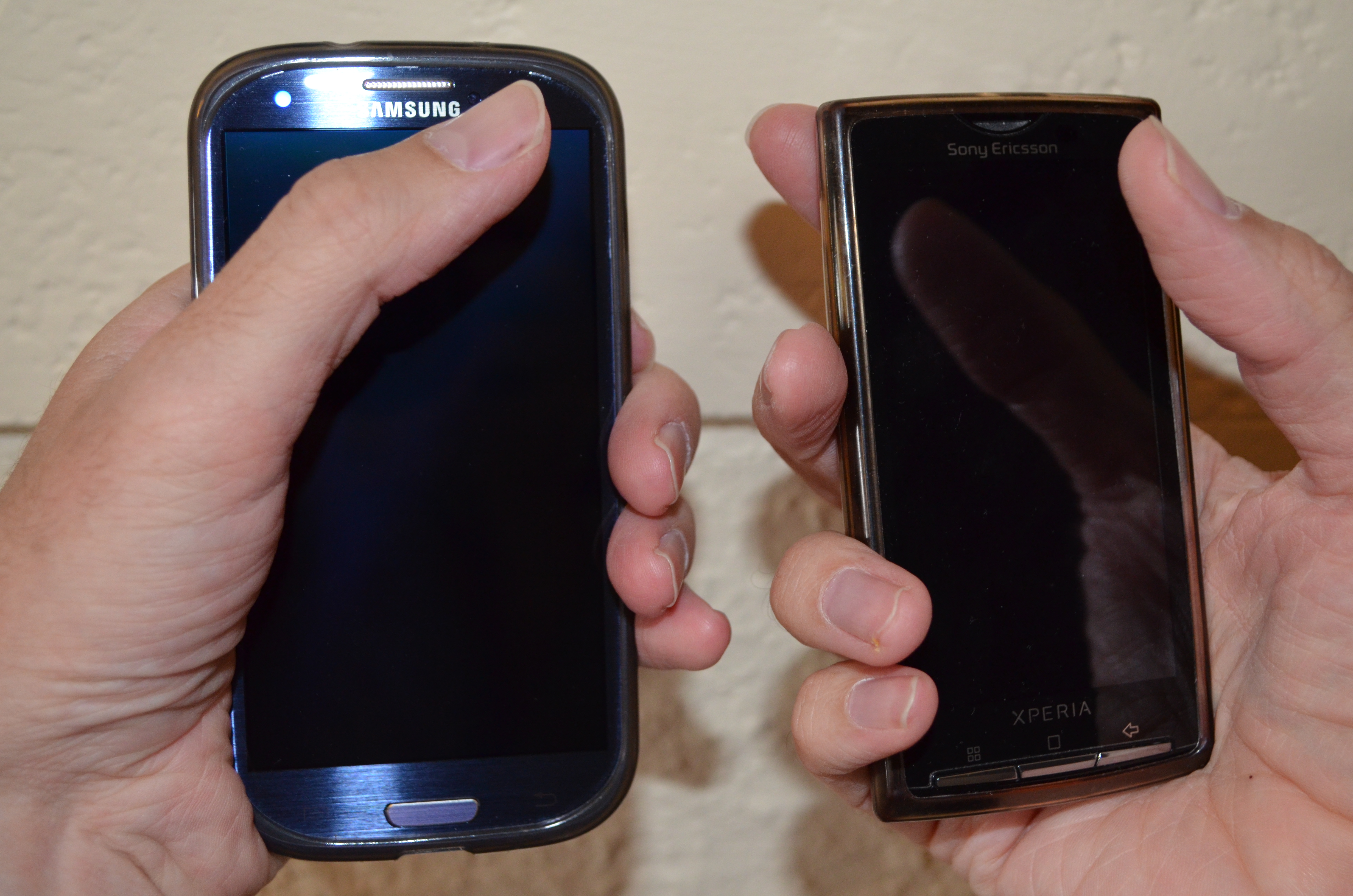
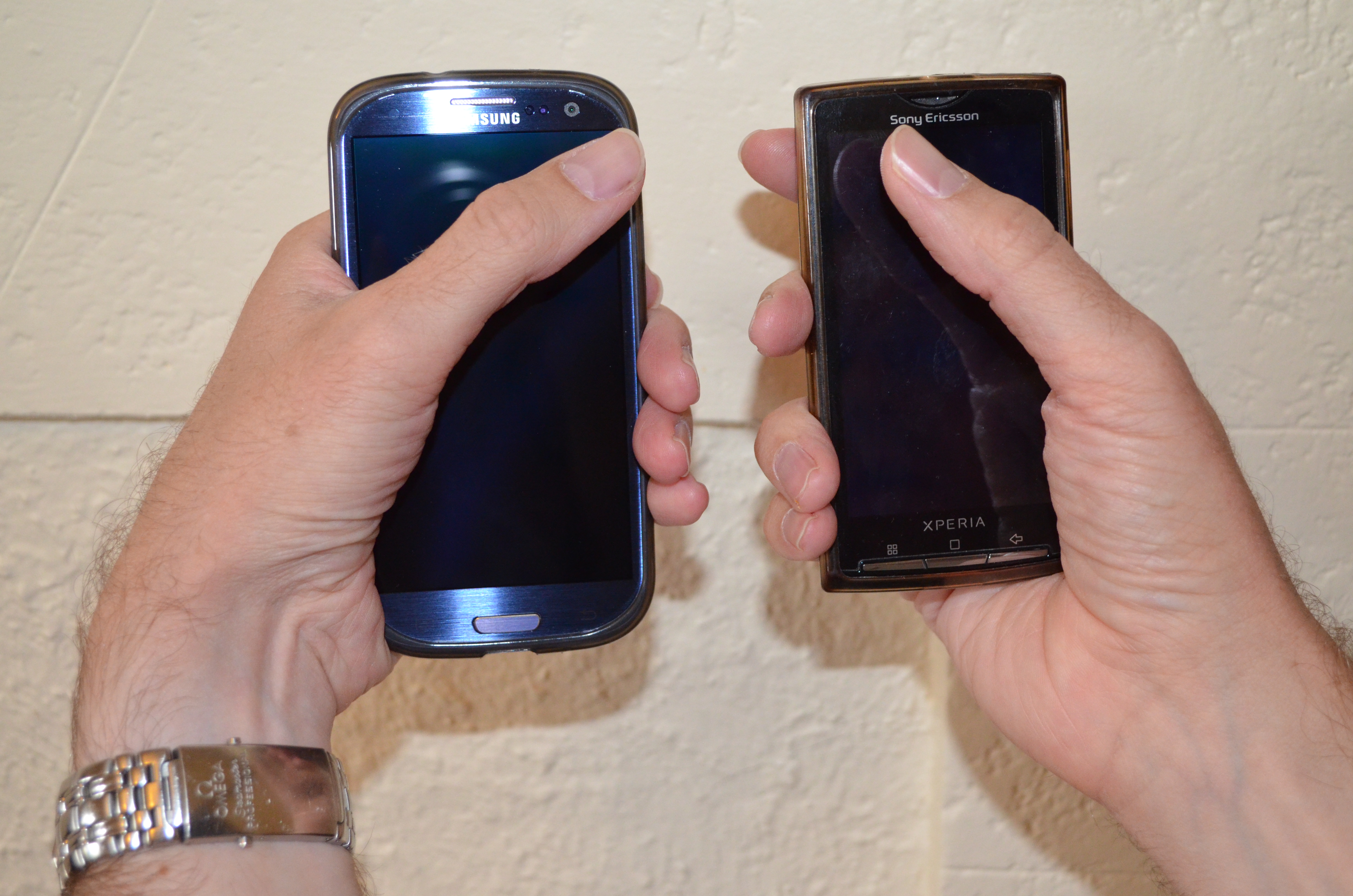
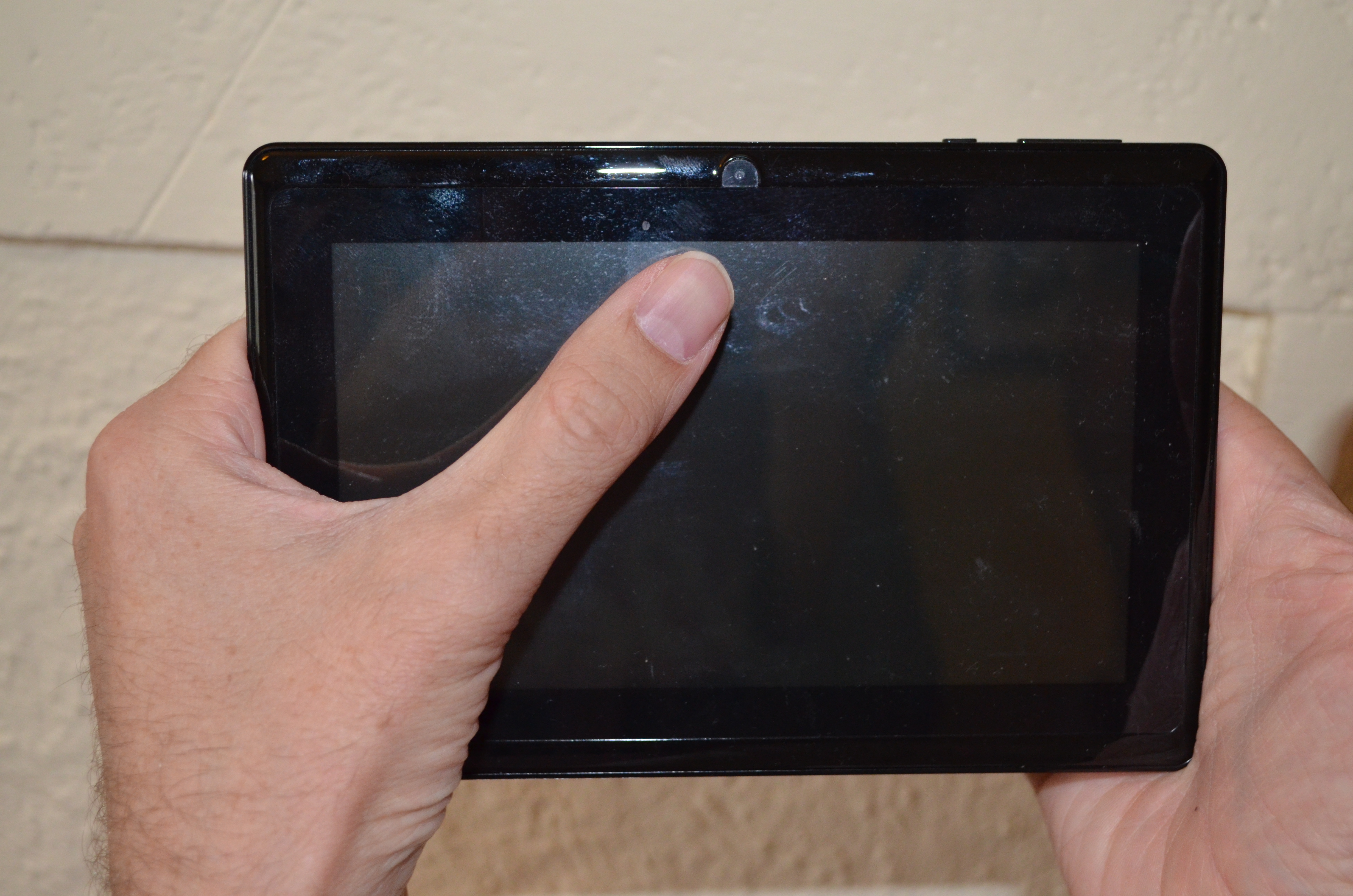
Galaxy S3 vs Xperia X10 1/2Galaxy S3 vs Xperia X10 2/2 The above two pictures show me holding a Samsung Galaxy S3 which has a 4.8 display in my left hand and a Sony Ericsson Xperia X10 which has a 4.0 display in my right hand. I am holding both phones in a manner that allows me to touch the top opposite corner with my thumb the position I need for one-handed phone use. The Xperia X10 can be completely enclosed by my hand, when I have a bottom corner resting in my palm it won t slide down while the Galaxy S3 can slide. Also one thing I didn t realise before having the pictures taken is that my posture is quite different when using the two phones. With the Galaxy S3 my wrist is clearly bent and this seems more likely to cause me to have more problems with Carpal Tunnel Syndrome [1]. I haven t had any serious problems with CTS for the last 2.5 years but I have had minor problems that suggest that I will have to be careful about my posture for the rest of my life. So it seems that a 4.8 phone is just too big for ideal one-handed use (grasping the vertical phone from the bottom). As I had CTS problems with my left hand I will try to use my new phone with my right hand as much as possible. Also I can reach further than the width of the phone screen when I grasp it from the side, so for me a size of about 5.2 would be better than the 4.8 of the Galaxy S3. It s quite likely that the Samsung Galaxy Note with it s 5.3 screen would be a better device for me to grasp from the side. But the Galaxy Note 2 might be a little too large for me. Note that I am only considering ways of holding the device that permit full operation. Anything that involves changing position for different uses or occasionally using two hands for a mostly one-hand operation doesn t count. 7 inch tablet The above picture is of me holding a 7 Android tablet (which I have just returned to Aldi [2]). When holding it from the sides I can reach more than half the screen with one hand so it seems that the ideal size for a tablet to be held in two hands for me would be 8 or even a little larger. A tablet larger than that could only be properly used if resting on my lap or a desk so for me 8 is the size that differentiates things which can be strictly used as tablets (holding with two hands and using thumbs for input) and things which are more like Netbooks (on desk typing). Ideal Device Sizes for people based on Height I am about 190cm tall. If we assume that height and hand size are strongly correlated then we can look at median heights of various age groups and determine what might be a good device size. I am also assuming that everyone wants to have the largest possible device, but some people have other criteria such as the size of their pockets. For me it s 8 tablet, 5.2 side-grip phone, and 4 bottom-grip phone. I used data from a chart of the average heights of American boys [3] and a chart of the average heights of American girls [4] to determine what size devices might suit children of various ages. Note that before the age of 12 the height of boys and girls is near enough to identical.
Device Two Hand Tablet Use Phone Grasp from Side Phone Grasp from Below
7 tablet 14yo boy or 17yo girl noone noone
Galaxy Note 5.3 10yo 95th percentile 17yo boy noone
Galaxy S3 4.8 6yo 17yo boy or 95th percentile 17yo girl almost noone
Galaxy S and iPhone 5 4.0 3yo 10yo 95th percentile 17yo boy
iPhone 4 3.5 noone 8yo 14yo boy or 16yo girl
One thing that particularly interests me is the educational use of Android devices for children. As few people buy new phones and tablets for young children that largely means that children borrow devices from their parents or are given older phones when relatives no longer need them. So it seems that if all other things are equal then an adult might choose a phone with a 4.8 display to allow it to be used as a tablet by children in the 6-10 age range. Conclusion It seems that the iPhone 4 is a good size for one-handed use by women of average height. By the standards of the people who don t regard gripping a phone from below as a significant feature the iPhone 4 would be designed for the hand of an 8yo. By any standards all iPhones other than the iPhone 5 were not the ideal size for most adults to use maybe they are well designed to fit in a pocket while unused. Charles Stross criticised the iPhone because it s too small to be seen well by people with poor vision [5], he also makes many other interesting points about the use of phones and I recommend reading his article (and the rest of his blog). The common tablet size of 7 seems like it might be ideal for women to hold with both hands, but for men of average height a 7.5 tablet might be better suited, it sounds like a small difference but it changes button size (good for people with thicker fingers) and allows displaying more data at once (15% greater screen area). Of course if you want to use a tablet on a desk then something much bigger would be better, maybe 12 or 14 . I think that there is a real market for 14 tablets that are designed to be carried around the home or office and then used on a table or lap which differs from the tablets that are designed to be more portable. There is also the use case of holding the phone in one hand while typing with the other which I haven t considered in this post. I don t think it s interesting because in that case almost everyone will find that the limitation is the size of their pockets and the size of an object that can be held to one s face for a phone call not the size of their hands. I ve previously written about my search for Geeky jeans and the ability to put a 7 tablet in my jeans pocket [6]. So I think that pocket size isn t a phone selection issue for men. The fact that women s clothing tends to have tiny pockets is another issue, if someone knows of a good analysis of phone size vs pockets in women s clothes then please let me know.

10 February 2013

Matthew Garrett: Linux Foundation Secure Boot support released - what does it mean?

The UEFI bootloader that the Linux Foundation have been working on has just been released. That means we now have two signed bootloaders available - this one and shim.
Does this mean Linux distributions can now support Secure Boot?They've actually been able to for a while. Ubuntu shipped with Secure Boot support last October, and Fedora shipped with Secure Boot support in January. Both used Shim rather than the Linux Foundation loader, and Shim's also being used by a variety of smaller distributions. The LF loader is a different solution to the same problem.
Is the Linux Foundation the preferred loader for distributions?Probably not in most cases. One of the primary functional differences between Shim and the LF loader is that the LF loader is based around cryptographic hashes rather than signing keys. This means that the user has to explicitly add a hash to the list of permitted binaries whenever a distribution updates their bootloader or kernel. Doing that involves being physically present at the machine, so it's kind of a pain.
Why use it at all, then?Being hash based means that you don't need to maintain any signing infrastructure. This means that distributions can support Secure Boot without having to change their build process at all. Shim already supports this use case (and some distributions are using it), but the LF loader has nicer UI for managing it.
Any other reasons?Actually, yes. Shim implements Secure Boot loading in a less than entirely ideal way - it duplicates the firmware's entire binary loading, validation, relocation and execution code. This is necessary because the UEFI specification doesn't provide any mechanism for adding additional authentication mechanisms. The main downside of this is that the standard UEFI LoadImage() and StartImage() calls don't work under Shim. The LF loader hooks into the low-level security architecture and installs its own handlers, which means the standard UEFI interfaces work. The upshot is that you can use bootloaders like Gummiboot or efilinux without having to modify them to call out to Shim.
Why doesn't Shim do the same?The UEFI architecture is slightly complicated. The UEFI specification itself defines the upper layers of the firmware, basically covering everything that UEFI applications and operating systems need. It doesn't define the lower layers of a UEFI implementation. Those are contained in the UEFI Platform Initialization spec, and that's what defines the security architecture interfaces that the LF loader hooks into. The problem is that it's completely valid to implement the UEFI specification without implementing the Platform Initialization specification, and if anyone does that then the LF loader will fail.
Can't you try both approaches?Yes, and that's actually pretty much the plan now. I'm working on integrating the LF loader's UI and security code into Shim with the aim of producing one loader that'll satisfy the full set of use cases, and James is happy with this.
Which should I use?Depends. If you want to support gummiboot (and aren't willing to patch it to call out to Shim), you'll need to use the LF loader. If you want to use key-based signing setups to avoid forcing re-enrolment on updates, you'll need to use Shim. If you're somewhere in the middle, you can probably use either. Once we've got the code merged, you won't have to make a choice.

comment count unavailable comments

Bernhard R. Link: Debian version strings

As I did not find a nice explanation of Debian version numbers to point people at, here some random collection of information about: All our packages have a version. For the package managers to know which to replace with which, those versions needs an ordering. As version orderings are like opinions (everyone has one), none of them would match any single one chosen for our tools to implement. So maintainers of Debian packages sometimes have to translate those versions into something the Debian tools understand. But first let's start with some basics: A Debian version string is of the form: [Epoch:]Upstream-Version[-Debian-Revision] To make this form unique, the Upstream-Version may not contain an colon if there is no epoch and not contain a minus, if there is no Debian-Revision. The Epoch must be an integer (so no colons allowed). And the Debian-Revision may not contain a minus sign (so the Debian-Revision is everything right of the right-most minus sign, or empty if there is no such sign). Two versions are compared by comparing all three parts. If the epochs differ, the biggest epoch wins. With same epochs, the biggest upstream version wins. With same epochs and same upstream versions, the biggest revision wins. Comparing first the upstream version and then the revision is the only sensible thing to do, but it can have counter-intuitive effects if you try to compare versions with minus signs as Debian versions:
$ dpkg --compare-versions '1-2' '<<' '1-1-1' && echo true   echo false
true
$ dpkg --compare-versions '1-2-1' '<<' '1-1-1-1' && echo true   echo false
false
To compare two version parts (Upstream-Version or Debian-Revision), the string is split into pairs of digits and non digits. Consecutive digits are treated as a number and compared numerrically. Non-digit parts are compared just like ASCII strings with the exception that letters are sorted before non-letters and the tilde is treated specially (see below). So 3pl12 and 3pl3s are slit into (3, 'pl', 12, '') and (3, 'pl', 3, 's') and the first is the larger version. Comparing digits as characters makes not sense at least at the beginning of the string (otherweise version 10.1 would be smaller than 9.3). For digits later in the string there are two different version schemes competing here: There is GNU style 0.9.0 followed by 0.10.0 and decimal fractions like 0.11 < 0.9. Here a version comparison algorithm has to choose one and the one chosen by dpkg is both the one supporting the GNU numbering and also the one easier supporting the other scheme: Imagine one software going 0.8 0.9 0.10 and one going 1.1 1.15 1.2. With out versioning scheme the first just works, while the second has to be translated into 1.1 1.15 1.20 to still be monotonic. The other way around, we would have to translate the first form to 0.08 0.09 0.10, or better 0.008 0.009 0.010 as we do not know how big those numbers will be, i.e. one would have to know beforehand where the numbers will end up, while adding zeros as needed for our scheme can be done with only knowing the previous numbers. Another decision to be taken is how to treat non-numbers. The way dpkg did this was assuming adding stuff to the end increases numbers. This has the advantage to not needing to special case dots, as say 0.9.6.9 will be bigger than 0.9.6 naturally. I think back then this decision was also easier as usually anything attached was making the version bigger and one often saw versions like 3.3.bl.3 to denote some patches done atop of 3.3 in the 3th revision. But this scheme has the disadvantage that version schemes like 1.0rc1 1.0rc2 1.0 do not map naturally. The classic way to work arround this is to translate that into 1.0rc1 1.0rc2 1.0.0 which works because the dot is a non-letter (it also works with 1.0-rc1 and 1.0+rc1 as the dot has a bigger ASCII number than minus or plus). The new way is the specially treated tilde character. This character was added some years ago to sort before anything else, including an empty string. This means that 1.0~rc1 is less than 1.0:
dpkg --compare-versions '1.0~rc1-1' '<<' '1.0-1' && echo true   echo false
This scheme is especially useful if you want to create a package sorting before a package already there, as you for example do want with backports (as a user having a backport installed upgrading to the next distribution should get the backport replaced with the actual package). That's why backport usually having versions like 1.0-2~bpo60+1. Here 1.0-2 is the version of the un-backported version; bpo60 is a note that this is backported to Debian 6 (AKA squeeze) and the +1 is the number of the backport in case there are multiple tries necessary. (Note the use of the plus sign as the minus sign is not allowed in revisions and would make the part before a part of the upstream version). Now, when to use which technique? Some common examples:

9 February 2013

Matthew Garrett: Samsung laptop bug is not Linux specific

I bricked a Samsung laptop today. Unlike most of the reported cases of Samsung laptops refusing to boot, I never booted Linux on it - all experimentation was performed under Windows. It seems that the bug we've been seeing is simultaneously simpler in some ways and more complicated in others than we'd previously realised.

So, some background. The original belief was that the samsung-laptop driver was doing something that caused the system to stop working. This driver was coded to a Samsung specification in order to support certain laptop features that weren't accessible via any standardised mechanism. It works by searching a specific area of memory for a Samsung-specific signature. If it finds it, it follows a pointer to a table that contains various magic values that need to be written in order to trigger some system management code that actually performs the requested change. This is unusual in this day and age, but not unique. The problem is that the magic signature is still present on UEFI systems, but attempting to use the data contained in the table causes problems.

We're not quite sure what those problems are yet. Originally we assumed that the magic values we wrote were causing the problem, so the samsung-laptop driver was patched to disable it on UEFI systems. Unfortunately, this doesn't actually fix the problem - it just avoids the easiest way of triggering it. It turns out that it wasn't the writes that caused the problem, it was what happened next. Performing the writes triggered a hardware error of some description. The Linux kernel caught and logged this. In the old days, people would often never see these logs - the system would then be frozen and it would be impossible to access the hard drive, so they never got written to disk. There's code in the kernel to make this easier on UEFI systems. Whenever a severe error is encountered, the kernel copies recent messages to the UEFI variable storage space. They're then available to userspace after a reboot, allowing more accurate diagnostics of what caused the crash.

That crash dump takes about 10K of UEFI storage space. Microsoft require that Windows 8 systems have at least 64K of storage space available. We only keep one crash dump - if the system crashes again it'll simply overwrite the existing one rather than creating another. This is all completely compatible with the UEFI specification, and Apple actually do something very similar on their hardware. Unfortunately, it turns out that some Samsung laptops will fail to boot if too much of the variable storage space is used. We don't know what "too much" is yet, but writing a bunch of variables from Windows is enough to trigger it. I put some sample code here - it writes out 36 variables each containing a kilobyte of random data. I ran this as an administrator under Windows and then rebooted the system. It never came back.

This is pretty obviously a firmware bug. Writing UEFI variables is expressly permitted by the specification, and there should never be a situation in which an OS can fill the variable store in such a way that the firmware refuses to boot the system. We've seen similar bugs in Intel's reference code in the past, but they were all fixed early last year. For now the safest thing to do is not to use UEFI on any Samsung laptops. Unfortunately, if you're using Windows, that'll require you to reinstall it from scratch.

comment count unavailable comments

8 February 2013

Philipp Kern: Mozilla's direction

Am I the only one who's disappointed with the route Mozilla's taking and left wondering what the direction is? First they killed off the development of Thunderbird because, as we all know, people mainly use webmail these days. Then they presented us their view that the big Certificate Authorities are too big to fail, as CAs gravely violated our trust (c.f. Trustwave and their MitM authority). And "now" they're also blocking the introduction of new formats into their browser because they cannot be the one who innovates. Instead Microsoft and Apple obviously need to take the lead in introducing a format into their browsers because otherwise it wouldn't be useful. Even though it's safe to say that Chrome and Firefox make up for more than half of the desktop browser market share. It might be that Chrome's nibbling from Firefox's, still IE seems to be in decline and Safari is rather a further mention than something many people would care strongly about.

There were of course some valid reasons for not supporting WebP yet. But most of them got fixed in the meantime and all we hear is the referal to proprietary vendors who need to move first. If I'd want to depend on such vendors I'd go with proprietary operating systems. (Having to deal with hardware products of proprietary vendors at $dayjob is enough.) So what's up Mozilla? The solution is to ignore your users and tag bugs with patches wontfix?

The only real advantage of Firefox over Chromium these days is the vast amount of plugins and extensions (e.g. Pentadactyl, for which there is no real equivalent available). Another sad fact is that you need to pull Firefox from a 3rd party repository (even though packages are coming from the 2nd party) to get a current version onto your Debian system to work with the web. But then it's not Mozilla who's to blame here. Maybe we should've introduced one Iceweasel version that's allowed to have reverse-dependencies and one that cannot.

(This post might contain hyberboles, which should be considered as such.)

Olivier Berger: RDF development in PHP with a PostGreSQL triple store thanks to the LibRDF OO wrapper for redland/librdf

Redland/librdf offers powerful features like being able to persist an RDF model to a relational database (only PostGreSQL seems to work on my setup with 1.0.16, but I may have misconfigured it). You can then do SPARQL queries over the model, and lots of other nice things. Unfortunately, the default PHP bindings are not really object-oriented, so the code isn t looking so good. But thanks to a gentleman named David Shea, there is an object-oriented library named LibRDF (case is sensitive), that helps write nice looking PHP. I discovered it via the blog post of Felix Ostrowski, who took over the maintenance of the LibRDF library (still the docs live on the original author s site). In his post, Felix illustrates how you may use it to parse Richard Cyganiak s FOAF profile. But the examples he gives don t illustrate the full potential of persistence of the RDF graph into the DB. Here s my contribution in 2 examples that will hopefully help : first, one that load Richard s FOAF to the DB, and one, that later retrieve the saved model and perform the same query (both pushed to my github clone of the library). There may be some problems with the use of librdf, including its availability, as it is not full PHP of course and I ve heard of memory management problems, but, depening on your needs, this may be quite handy for writing Linked Data applications.

7 February 2013

Ian Wienand: Shared libraries and execute permissions

In the few discussions you can find on the web about shared-libraries and execute-permissions, you can find a range of various opinions but not a lot about what goes when you execute a library. The first thing to consider is how the execute-permission interacts with the dynamic loader. When mapping a library, the dynamic-loader doesn't care about file-permissions; it cares about mapping specific internal parts of the .so. Specifically, it wants to map the PT_LOAD segments as-per the permissions specified by the program-header. A random example:
 $ readelf --segments /usr/lib/x86_64-linux-gnu/libcrypto.so.1.0.0
Elf file type is DYN (Shared object file)
Entry point 0x77c00
There are 7 program headers, starting at offset 64
Program Headers:
  Type           Offset             VirtAddr           PhysAddr
                 FileSiz            MemSiz              Flags  Align
  LOAD           0x0000000000000000 0x0000000000000000 0x0000000000000000
                 0x00000000001b5ea4 0x00000000001b5ea4  R E    200000
  LOAD           0x00000000001b6b60 0x00000000003b6b60 0x00000000003b6b60
                 0x0000000000028dc4 0x000000000002c998  RW     200000
The permissions to load the code and data segments are given the Flags output. Code has execute-permissions, and data has write-permissions. These flags are mapped into flags for the mmap call, which the loader then uses to map the various segments of the file into memory. So, do you actually need execute-permissions on the underlying file to mmap that segment as executable? No, because you can read it. If I can read it, then I can copy the segment to another area of memory I have already mapped with PROT_EXEC and execute it there anyway. Googling suggests that some systems do require execute-permissions on a file if you want to directly mmap pages from it with PROT_EXEC (and if you dig into the kernel source, there's an ancient system call uselib that looks like it comes from a.out days, given it talks about loading libraries at fixed addresses, that also wants this). This doesn't sound like a terrible hardening step; I wouldn't be surprised if some hardening patches require it. Maximum compatability and historical-features such as a.out also probably explains why gcc creates shared libraries with execute permissions by default. Thus, should you feel like it, you can run a shared-library. Something trivial will suffice:
int function(void)  
      return 100;
 
$ gcc -fPIC -shared -o libfoo.so foo.c
$ ./libfoo.so
Segmentation fault
This is a little more interesting (to me anyway) to dig into. At a first pass, why does this even vaguely work? That's easy -- an ELF file is an ELF file, and the kernel is happy to map those PT_LOAD segments in and jump to the entry point for you:
$ readelf --segments ./libfoo.so
Elf file type is DYN (Shared object file)
Entry point 0x570
There are 6 program headers, starting at offset 64
Program Headers:
  Type           Offset             VirtAddr           PhysAddr
                 FileSiz            MemSiz              Flags  Align
  LOAD           0x0000000000000000 0x0000000000000000 0x0000000000000000
                 0x000000000000070c 0x000000000000070c  R E    200000
  LOAD           0x0000000000000710 0x0000000000200710 0x0000000000200710
                 0x0000000000000238 0x0000000000000240  RW     200000
What's interesting here is that the shared-library has an entry point (e_entry) at all. ELF defines it as:
This member gives the virtual address to which the system first transfers control, thus starting the process. If the file has no associated entry point, this member holds zero.
First things first, where did that entry point come from? The ld manual tells us that the linker will set the entry point based upon the following hierarchy:
  • the -e entry command-line option;
  • the ENTRY(symbol) command in a linker script;
  • the value of a target specific symbol
  • the address of the first byte of the .text section, if present;
  • The address 0.
We know we're not specifying an entry point. The ENTRY command is interesting; we can check our default-link script to see if that is specified:
$ ld --verbose   grep ENTRY
ENTRY(_start)
Interesting. Obviously we didn't specify a _start; so do we have one? A bit of digging leads to the crt files, for C Run-Time. These are little object files automatically linked in by gcc that actually do the support-work to get a program to the point that main is ready to run. So, if we go and check out the crt files, one can find a definition of _start in crt1.o
$ nm /usr/lib/x86_64-linux-gnu/crt1.o
crt1.o:
0000000000000000 R _IO_stdin_used
0000000000000000 D __data_start
                 U __libc_csu_fini
                 U __libc_csu_init
                 U __libc_start_main
0000000000000000 T _start
0000000000000000 W data_start
                 U main
But do we have that for our little shared-library? We can get a feel for what gcc is linking in by examining the output of -dumpspecs. Remembering gcc is mostly just a driver that calls out to other things, a specs file is what gcc uses to determine which arguments pass around to various stages of a compile:
$ gcc -dumpspecs
...
*startfile:
% !shared: % pg p profile:gcrt1.o%s;pie:Scrt1.o%s;:crt1.o%s 
 crti.o%s % static:crtbeginT.o%s;shared pie:crtbeginS.o%s;:crtbegin.o%s 
The format isn't really important here (of course you can read about it); but the gist is that various flags, such as -static or -pie get passed different run-time initailisation helpers to link-in. But we can see that if we're creating a shared library we won't be getting crt1.o. We can double-confirm this by checking the output of gcc -v (cut down for clarity).
$ gcc -v -fPIC -shared -o libfoo.so foo.c
Using built-in specs.
 ...
/usr/lib/gcc/x86_64-linux-gnu/4.4.5/collect2 -shared -o libfoo.so
/usr/lib/gcc/x86_64-linux-gnu/4.4.5/../../../../lib/crti.o
/usr/lib/gcc/x86_64-linux-gnu/4.4.5/crtbeginS.o
/tmp/ccRpsQU3.o
/usr/lib/gcc/x86_64-linux-gnu/4.4.5/crtendS.o
/usr/lib/gcc/x86_64-linux-gnu/4.4.5/../../../../lib/crtn.o
So this takes us further down ld's entry-point logic to pointing to the first bytes of .text, which is where the entry-point comes from. So that solves the riddle of the entry point. There's one more weird thing you notice when you run the library, which is the faulting address in kern.log:
libfoo.so[8682]: segfault at 1 ip 0000000000000001 sp 00007fffcd63ec48 error 14 in libfoo.so[7f54c51fa000+1000]
The first thing is decoding error; 14 doesn't seem to have any relation to anything. Of course everyone has the Intel 64 Architecture Manual (or mm/fault.c that also mentions the flags) to decode this into 1110 which means "no page found for a user-mode write access with reserved-bits found to be set" (there's another post in all that someday!). So why did we segfault at 0x1, which is an odd address to turn up? Let's disassemble what actually happens when this starts.
00000000000004a0 <call_gmon_start>:
 4a0:   48 83 ec 08             sub    $0x8,%rsp
 4a4:   48 8b 05 2d 03 20 00    mov    0x20032d(%rip),%rax        # 2007d8 <_DYNAMIC+0x190>
 4ab:   48 85 c0                test   %rax,%rax
 4ae:   74 02                   je     4b2 <call_gmon_start+0x12>
 4b0:   ff d0                   callq  *%rax
 4b2:   48 83 c4 08             add    $0x8,%rsp
 4b6:   c3                      retq
We're moving something in rax and testing it; if true we call that value, otherwise skip and retq. In this case, objdump is getting a bit confused telling us that 2007d8 is related to _DYNAMIC; in fact we can check the relocations to see it's really the value of __gmon_start__:
$ readelf --relocs ./libfoo.so
Relocation section '.rela.dyn' at offset 0x3f0 contains 4 entries:
  Offset          Info           Type           Sym. Value    Sym. Name + Addend
000000200810  000000000008 R_X86_64_RELATIVE                    0000000000200810
0000002007d8  000200000006 R_X86_64_GLOB_DAT 0000000000000000 __gmon_start__ + 0
0000002007e0  000300000006 R_X86_64_GLOB_DAT 0000000000000000 _Jv_RegisterClasses + 0
0000002007e8  000400000006 R_X86_64_GLOB_DAT 0000000000000000 __cxa_finalize + 0
Relocation section '.rela.plt' at offset 0x450 contains 1 entries:
  Offset          Info           Type           Sym. Value    Sym. Name + Addend
000000200808  000400000007 R_X86_64_JUMP_SLO 0000000000000000 __cxa_finalize + 0
Thus call_gmon_start, rather unsurprisingly, checks the value of __gmon_start__ and calls it if it is set. Presumably this is set as part of profiling and called during library initialisation -- but it is clearly not an initialiser by itself. The retq ends up popping a value off the stack and jumping to it, which in this case just happens to be 0x1 -- which we can confirm with gdb by putting a breakpoint on the first text address and examining the stack-pointer:
(gdb) x/2g $rsp
0x7fffffffe7d8:        0x0000000000000000      0x0000000000000001
So that gives us our ultimate failure. Of course, if you're clever, you can get around this and initalise yourself correctly and actually make your shared-library do something when executed. The canonical example of this is libc.so itself:
$ /lib/x86_64-linux-gnu/libc-2.13.so
GNU C Library (Debian EGLIBC 2.13-37) stable release version 2.13, by Roland McGrath et al.
Copyright (C) 2011 Free Software Foundation, Inc.
This is free software; see the source for copying conditions.
...
You can trace through how this actually does work in the same way as we traced through why the trivial example doesn't work. If you wondering my opinion on executable-bits for shared-libraries; I would not give them execute permissions. I can't see it does anything but open the door to confusion. However, understanding exactly why the library segfaults the way it does actually ends up being a fun little tour around various parts of the toolchain!

Craig Sanders: Dead Can Dance

I saw Dead Can Dance at the Palais in St Kilda last night their first tour back in Australia in over 20 years. I ve wanted to see them perform live since I first discovered their music in the dim dark past bought the tickets as soon as the tour was announced last year and have been waiting impatiently ever since. The first act was percussionist David Kuckhermann who played solo and then joined DCD for the main act. He mostly played the handpan, which looks a lot like an upside-down wok with dimples on it. His tambourine solo was oustanding. Overall, a great start to the evening. I hadn t heard of him before, but I think I ll be ordering some of his CDs. Lisa Gerrard s voice was, as always, trance-inducingly sublime and Brendan Perry with a fine voice of his own really shines in a live performance. Definitely not a disappointment around three hours of amazing performance, old favourites and new, and the discovery (for me) of a new performer. If I have one (minor) complaint, it s that the volume was a little too loud, causing occasional distortion and difficulty distinguishing the lyrics on some of Brendan Perry s singing. Lisa Gerrard sings without words glossolalia and much higher than Perry so wasn t affected as much. If you haven t heard DCD or Lisa Gerrard s solo albums before, do so you re in for a treat labelled as world fusion , they re impossible to describe accurately while they started out as Dark Wave or as-goth-as-it-gets in the early 80s, they play across many genres and have strong influences from Middle Eastern, Mediaeval, world music, ambient, and more, they re in a genre of their own. You can t even say they re a bit like so-and-so because they aren t. Dead Can Dance is a post from: Errata

6 February 2013

Michael Stapelberg: RC bugs

I recently worked on the following RC bugs: By the way, in case anyone needs to reproduce an armhf bug and wants to do so in a chroot with qemu, here are the steps I used:
sudo qemu-debootstrap --arch=armhf --foreign wheezy armhf http://ftp.de.debian.org/debian
sudo LC_ALL=C chroot armhf /bin/bash
echo 'deb http://ftp.de.debian.org/debian wheezy main' > /etc/apt/sources.list
echo 'nameserver 8.8.8.8' > /etc/resolv.conf
apt-get update
apt-get install clang
Also, here are UDD queries which I prefer to those posted by RichiH. Note that they don t display all bugs, but ignore those which were created in the last 7 days.

Biella Coleman: Edward Tufte was a phreak

It has been so very long since I have left a trace here. I guess moving to two new countries (Canada and Quebec), starting a new job, working on Anonymous, and finishing my first book was a bit much. I miss this space, not so much because what I write here is any good. But it a handy way for me to keep track of time and what I do and even think. My life feels like a blur at times and hopefully here I can see its rhythms and changes a little more clearly if I occasionally jot things down here. So I thought it would nice to start with something that I found surprising: famed information designer, Edward Tufte, a professor emeritus at Yale was a phone phreak (and there is a stellar new book on the topic by former phreak Phil Lapsley. He spoke about his technological exploration during a sad event, a memorial service in NYC which I attended for the hacker and activist Aaron Swartz. I had my wonderful RA transcribe the speech, so here it is [we may not have the right spelling for some of the individuals so please let us know of any mistakes]:
Edward Tufte s Speech From Aaron Swartz s Memorial
Speech starts 41:00 [video cuts out in beginning]
We would then meet over the years for a long talk every now and then, and my responsibility was to provide him with a reading list, a reading list for life and then about two years ago Quinn had Aaron come to Connecticut and he told me about the four and a half million downloads of scholarly articles and my first question is, Why isn t MIT celebrating this? .
[Video cuts out again]
Obviously helpful in my career there, he then became president of the Mellon foundation, he then retired from the Mellon foundation, but he was asked by the Mellon foundation to handle the problem of JSTOR and Aaron. So I wrote Bill Bullen(sp?) an email about it, I said first that Aaron was a treasure and then I told a personal story about how I had done some illegal hacking and been caught at it and what happened. In 1962, my housemate and I invented the first blue box, that s a device that allows for free, undetectable, unbillable long distance telephone calls. And we got this up and played around with it and the end of our research came when we concluded what was the longest long distance call ever made, which was from Palo Alto to New York time-of-day via Hawaii, well during our experimentation, AT&T, on the second day it turned out, had tapped our phone and uh but it wasn t until about 6 months later when I got a call from the gentleman, AJ Dodge, senior security person at AT&T and I said, I know what you re calling about. and so we met and he said You what you are doing is a crime that would , you know all that. But I knew it wasn t serious because he actually cared about the kind of engineering stuff and complained that the tone signals we were generating were not the standard because they record them and play them back in the network to see what numbers they we were that you were trying to reach, but they couldn t break though the noise of our signal. The upshot of it was that uh oh and he asked why we went off the air after about 3 months, because this was to make long distance telephone calls for free and I said this was because we regarded it as an engineering problem and we made the longest long distance call and so that was it. So the deal was, as I explained in my email to Bill Bullen, that we wouldn t try to sell this and we were told, I was told that crime significance would pay a great deal for this, we wouldn t do any more of it and that we would turn our equipment over to AT&T, and so they got a complete vacuum tube isolator kit for making long distance phone calls. But I was grateful for AJ Dodge and I must say, AT&T that they decided not to wreck my life. And so I told Bill Bullen that he had a great opportunity here, to not wreck somebody s life, course he thankfully did the right thing.
Aaron s unique quality was that he was marvelously and vigorously different. There is a scarcity of that. Perhaps we can be all a little more different too.
Thank you very much.

Vincent Sanders: Recommending a 3D printer

In a previous entry I wrote about the technology of additive manufacture and the use in printing three dimensional objects.

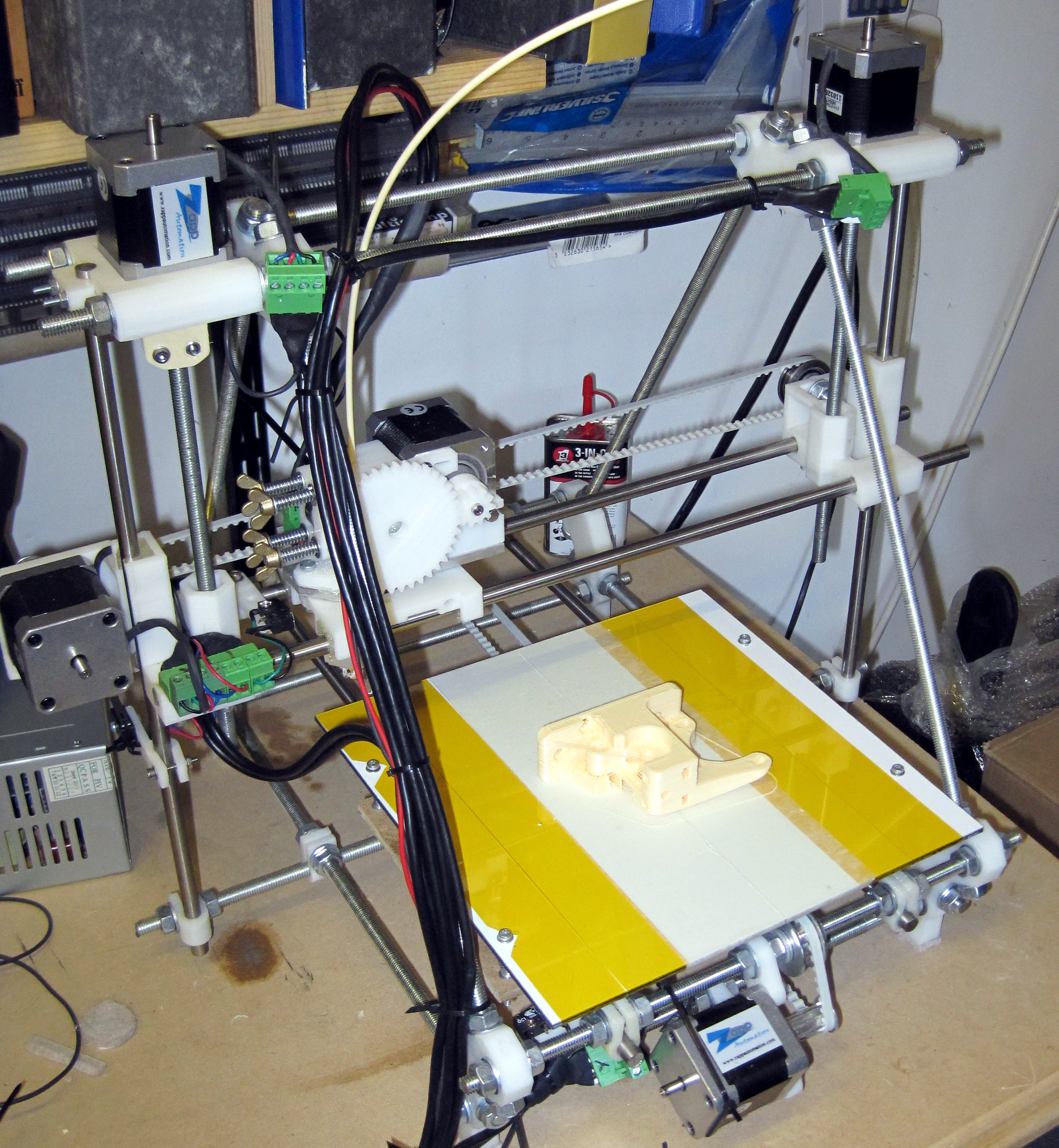
My Prusa Reprap printer, not recommended for new builds
It is now almost two years since I built my own 3D printer and I keep getting asked by colleagues and friends about the technology and often what printer to buy.

I will answer the purchase question first and then describe my experiences which have lead to the conclusion in another post. This may seem a bit backwards but the explanation is long and is not necessary if you are happy to learn from my mistakes.

Of all the options available right now, and there are many, I would choose a Mendal90 kit from Chris Palmer. The complete kit including everything to build the machine is 499 plus shipping. If I could afford it this is what I would buy myself to replace my current machine.

This is a Fused deposition modelling (FDM) printer similar to my Prusa Reprap but better engineered to produce repeatable results without the numerous issues of the other models. In Europe I would also recommend faberdashery as a materials source as their product is first rate every time.

Yes the kit requires some assembly but the commonly available commercial printers either cost many times more to deliver equivalent results, use an SLS or other print strategy requiring very expensive consumables or are from a company with dubious track record with the community.

If forced to recommend one, the 3DTouch from Bits From Bytes is not awful, but really do not be afraid of the kit, you will learn more about how it all fits together and save lots of money for your materials.

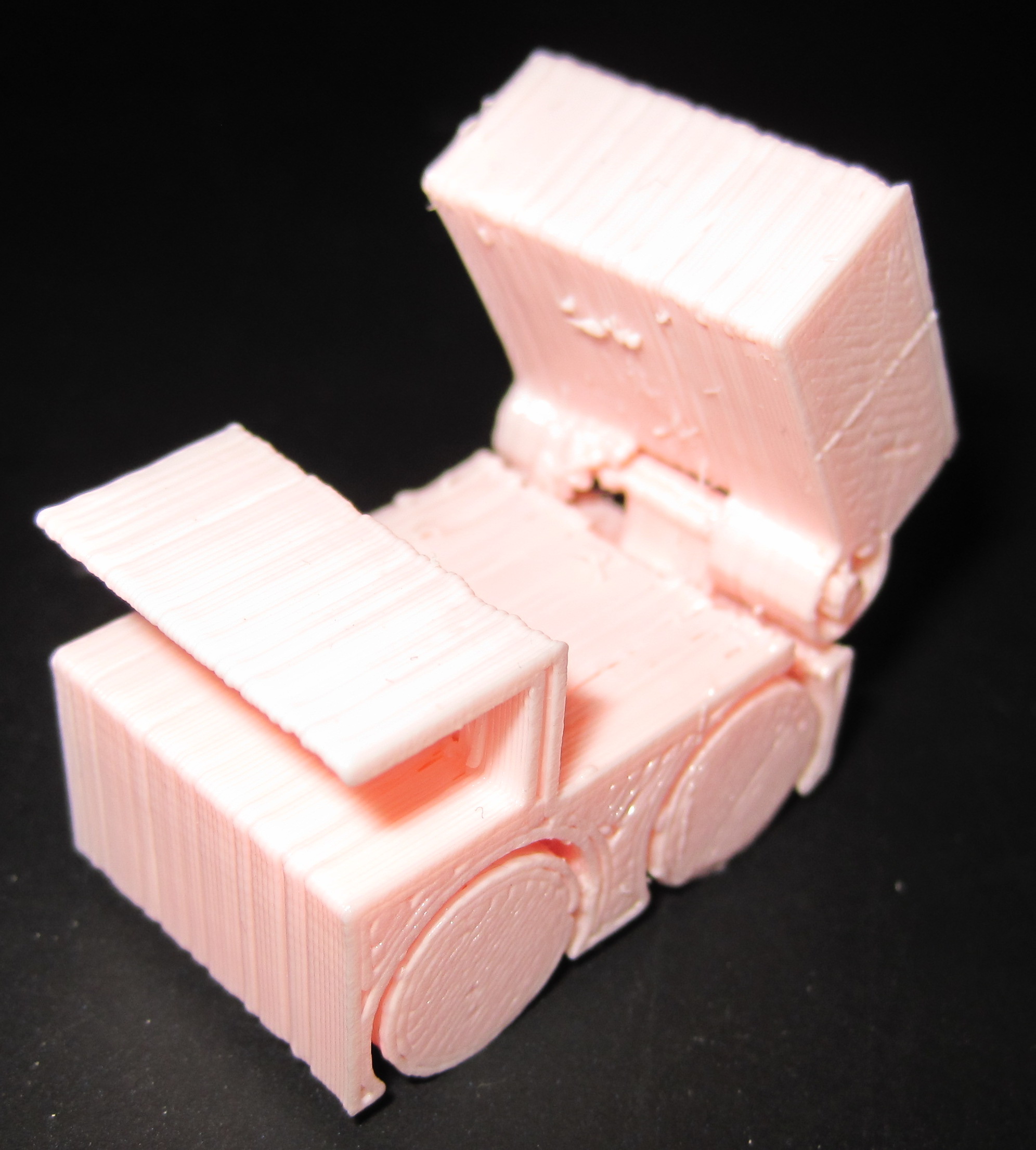
A 20mm high pink dump truck toy
One thing anyone buying a 3D printer right now should understand is that this technology is nowhere near as polished as the 2D equivalent. With the exception of the SLS systems like shapeways and the like use (and have price tags to match) The output will have clear "layering" and some objects simply cannot be created using the FDM process.

I guess what I am saying is do not expect a thousand pound machine to produce output that looks like that of a hundred thousand pound printer. To be clear you will not be printing complex moving machines on an FDM process more simple things that need assembly.

Having said that I have some pretty good results my favourite has to be the working recorder though, I might have said the whistles except my sons have them and they are way too loud.

You will spend a lot of time designing your things in 3D CAD packages and fair warning they all SUCK and I mean really, really badly. Add to that all the rest of the tools in the workflow are also iffy and I do wonder how anyone every gets anything printed.

My (open source) workflow is:


Which is probably a case of "least bad" tool selection though I warn you now that OpenSCAD is effectively a bad editor (I wish I could use emacs) for a 3D solid macro language with visualisation attached and definitely not a graphical tool.


5 February 2013

Wouter Verhelst: Transcoding videos

Since some people asked for it, and since it's (unfortunately) fairly nontrivial, here is the script that I'm using currently to transcode a .dv file into webm:
#!/bin/bash
set -e
newfile=$(basename $1 .dv).webm
wavfile=$(basename $1 .dv).wav
normalfile=$(basename $1 .dv)-normal.wav
normalfile=$(readlink -f $normalfile)
oldfile=$(readlink -f $1)
echo "Audio split"
gst-launch-0.10 uridecodebin uri=file://$oldfile ! progressreport ! audioconvert ! audiorate ! wavenc ! filesink location=$wavfile
echo "Audio normalize"
sox --norm $wavfile $normalfile
echo "Pass 1"
gst-launch-0.10 webmmux name=mux ! fakesink \
  uridecodebin uri=file://$oldfile name=demux \
  demux. ! ffmpegcolorspace ! deinterlace ! vp8enc multipass-cache-file=/tmp/vp8-multipass multipass-mode=1 threads=2 ! queue ! mux.video_0 \
  demux. ! progressreport ! audioconvert ! audiorate ! vorbisenc ! queue ! mux.audio_0
echo "Pass 2"
gst-launch-0.10 webmmux name=mux ! filesink location=$newfile \
  uridecodebin uri=file://$oldfile name=video \
  uridecodebin uri=file://$normalfile name=audio \
  video. ! ffmpegcolorspace ! deinterlace ! vp8enc multipass-cache-file=/tmp/vp8-multipass multipass-mode=2 threads=2 ! queue ! mux.video_0 \
  audio. ! progressreport ! audioconvert ! audiorate ! vorbisenc ! queue ! mux.audio_0
rm $wavfile $normalfile
It's fairly non-optimal, because many of these command-line A/V tools are either fairly badly documented, or have a horrific interface, or something similar. avconv is supposed to be able to do audio normalisation, but I haven't been able to figure out exactly how it's done. The options that are specified in the manpage seemingly have no effect. gstreamer has a 'ReplayGain' plugin which can do audio normalisation. Audio normalisation requires two passes; I could in theory just add the element in the gstreamer first-pass pipeline, add a '-t' to the gst-launch-0.10 invocation, and parse out the required gain value that I can then add to the second-pass pipeline. However, the elements that I can then pass that gain value to either have a different range for the gain (rgvolume's fallback-gain parameter) or expect a completely different unit of values with no obvious way to translate between the two (the 'volume' element's 'volume' parameter expects a multiplier, the replaygain plugin produces a dB value; a simple conversion seems wrong as it produces a value way out of range). The 'volume' element reportedly has an interface that takes a dB value, except you can't reach it from gst-launch-0.10. Bummer. So instead we split out the audio, do normalisation in sox, and mux that back in during the second pass of the video transcoding. Sox is good. Sox is easy. If all A/V command-line tools were like sox, I would be smiling now. What's missing from the above script is how to throw away the start or end of a file in case there's several minutes of uninterestingness there. This is easiest (in my experience) with avconv's -t and -ss options. I suspect gstreamer is capable of doing that, too; but I haven't figured out how, and this works. You may want to play with some of options of the vp8enc element. For instance, the threads= value can be increased (or decreased) depending on how many cores your transcoding machine has. You could probably also add a "target-bitrate" value if you find the quality is too low or the system uses too much diskspace. VP8 has several more options; the documentation lists them all. If you've done video recordings for a devroom at FOSDEM outside of the FOSDEM video team, note that FOSDEM is more than willing to host the videos. To do so, the easiest way is if the videos are online somewhere (this does not have to be a public system) that we can wget or scp them from; if you've done that, contact me with the location to the files and we'll put them on the FOSDEM video server.

Wouter Verhelst: Video at FOSDEM 2013

For the second year in a row, I've led the team that organized video at FOSDEM. This year, most things went pretty smoothly; more so than last year. We definitely learned from some of our mistakes, and although I can't say that everything went better than it did last year, after having done a first look at things I can certainly say that overall, the result is better now than it was last year. Our setup was very similar to what it was last year. However, there were some key differences: Unfortunately, that didn't mean all was well. The internal server would transcode the DV stream into WebM, which was then sent on to the Flumotion platform where it was going to be transcoded to Ogg Theora, before being streamed in both formats. Due to an issue which we could not track down (possibly something incorrect in my configuration), the transcoding into Ogg Theora did not work smoothly, and even had the unwanted effect of disrupting the WebM streaming. Since this made it difficult to debug without disrupting service, eventually we decided to give up on Ogg Theora and only provide WebM streams; I considered that to be a better solution than no streaming at all. In addition, apparently in the year since FOSDEM 2012, libav and gstreamer have changed significantly enough that the scripts that I used then had to be somewhat revisited in order to be able to transcode the existing recordings into WebM ready for video.fosdem.org. Oh well, I had to add in normalisation anyway; only it would've been nice if I didn't have to revisit it from scratch. Meh. At any rate, our streams seem to have been very popular. Some statistics:
Saturday

Sunday

Served traffic by country (over the whole weekend)
Served sessions by country (over the whole weekend)
As you can see from these graphs, watching the streams from Belgium seems to be happening fairly often; I suspect much of that is people at the conference watching a stream in a different room. Additionally, we peaked at 212 viewers, which is slightly more than the peak of 206 that we had last year. The final conclusion we can take home from these statistics is that the most popular talk on Saturday (at least according to people watching the streams) was the eudev one in the cross-distro room (with 68 viewers); on sunday, the talks in Janson were all fairly equally popular. The peak of 102 viewers was reached around 15:45. Overall, I'm quite happy with the result. Yesterday, Thomas Eug ne of NamurLUG (who used to do video for several years before I took over last year) helped me do the first review. What's left now is to do some transcoding and uploading; this will happen over the next few days and weeks.

Joey Hess: LCA2013 wrapup

After 27 hours of travel, I'm finally back from my first Linux.conf.au. This was a great conference! Some of my favorite highlights:
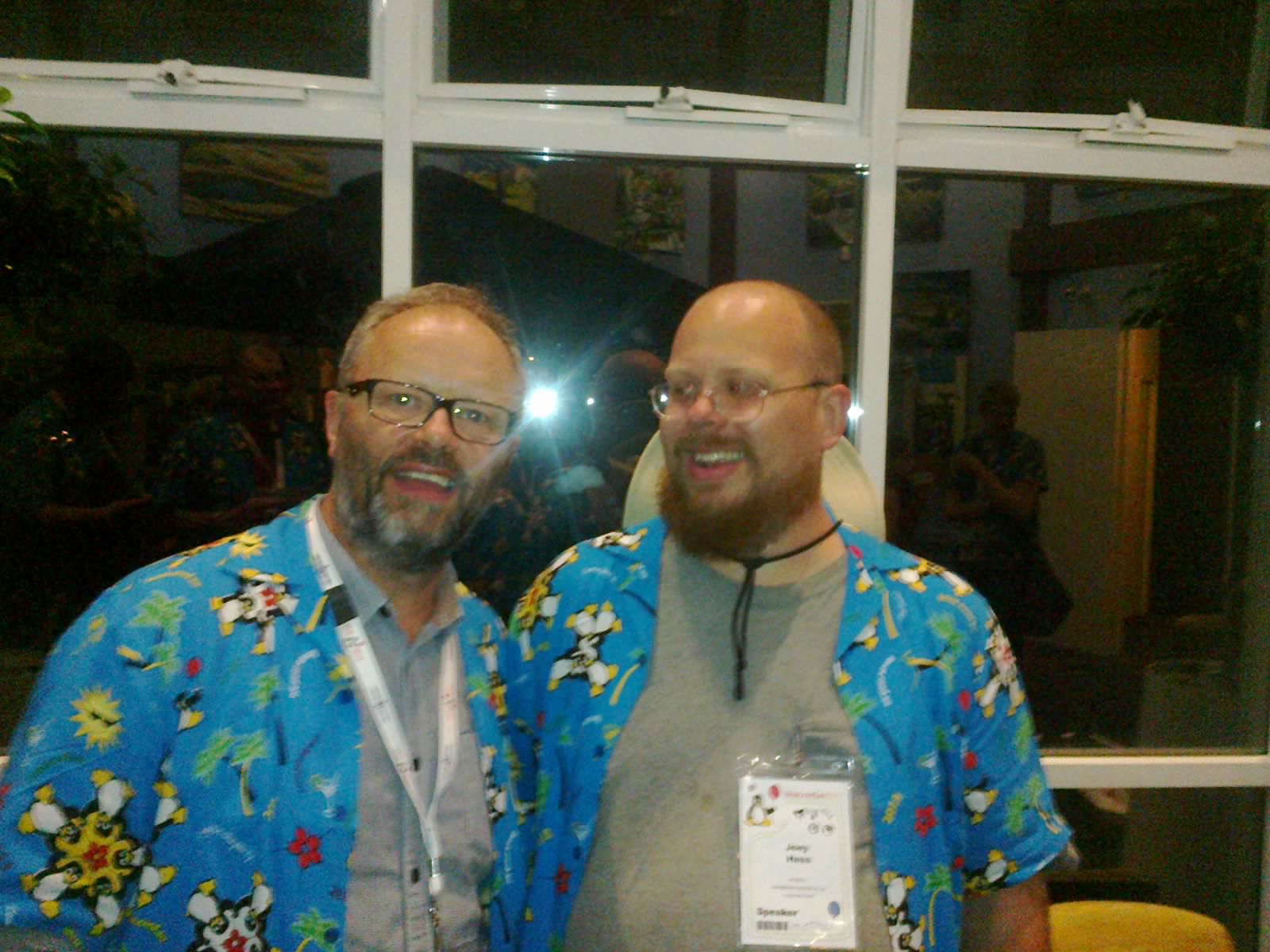
My git-annex talk went ok, despite technical problems with the video output, which the video team did a great job of working around. The first demo went well, and the Q&A was excellent. The demo of the git-annex assistant webapp was marred by, apparently, a bad build of the webapp -- which I ironically used rather than my usual development build because I assumed it'd be less likely to fail. At least I may have a way to reproduce that hang somewhat reliably now, so I can get on with debugging it. I will be redoing a demo of the webapp as a screencast.
Here are some of the best talks I attended. (I have quite a lot more queued up to watch still, and had to cut several due to space.) Click titles for videos, or browse all the videos.

Paul Tagliamonte: Hy: The Next Generation

As many of you know, I ve been spending some time hacking on a Lisp variant that s fully hosted in Python. If you want to read more about it, check out the slides I prepared for Boston Python s meetup in particular, pay attention to the magic REPL . I ve been pondering what to do next, and the natural instinct is for me to take a step back, and properly implement a few things I ve forgotten. Namely: Macros. Yes. Macros. It s a Lisp without Macros. I ve hit a few stumbling blocks in it s implementation, and it s been holding me up. I m mostly concerned with how Hy should treat quoted forms, in particular I m concerned about loosing the distinction between a vector and a list, since both convert into Python lists. There is of course the option to encode Lists as:
 (list foo bar baz)
but that seems wrong. I ve also got some concerns about derefing values in a quoted form I think this is just going to result in a lot of special casing for Macros. More to come soon.

4 February 2013

Antoine Beaupr : Live radio streaming with MPD, part 2: multicast RTP

The previous article was introducing basic streaming principles based on Icecast. The issue with this, of course, is lag and overhead of HTTP-based connexions. In this article we introduce RTP-based streaming system, (unfortunately) based on Pulseaudio and multicast. (Update: there was a rant here about Pulseaudio (PA) that I have moved out of this post because it's not what I was aiming to talk about. Those wanting to answer that troll are welcome to join the flamewar here.)

A word on multicast I took the opportunity of trying out Multicast (it's actually IP multicast, to be more precise), since I wanted to have only minimal configuration to perform on the client side. Plus, since the RTP frames are raw 44khz 16 bit audio, the traffic is actually quite heavy, 1.4mbps, to be more precise (punch in 44kHz * 16bit/Hz * 2 in the excellent Qalculate to see why), so I didn't want bandwidth to explode as more listeners joined in. As a comparison, also note that the Icecast Vorbis stream is around 64 or 128kbps depending on quality. Multicast allows packets to be sent only once for multiple listeners on the same network. It's actually quite cool, but doesn't work very well over the wider internet, for reasons that are still unclear to me. I presume that the fact there is virtual monopoly over traditional broadcasting systems (e.g. television and radio) means that multicast hasn't really kicked in yet... I hope this will make sense over the Montreal mesh, although the quality would probably need to be dialed down, or the audio streamed encoded instead of be sent as raw samples.

So why PA? VLC/pipe failures That aside, it seems that to stream through RTP, I have no choice. I have tried to use VLC as a pipe to stream data out of MPD as RTP, but somehow this config snippet just failed:
audio_output  
   type            "pipe"
   name            "RTP"
   command         "cvlc -q - --sout '#rtp dst=239.72.72.144,port=5004 '"
   encoder         "vorbis"                # optional, vorbis or lame
   format          "44100:16:2"
 
I don't know why - the multicast port wouldn't open properly and MPD would even hang when restarting. It seems the pipe plugin is somewhat broken. Note that the vlc command above actually works fine to stream audio content out through multicast, which is a good way to test if multicast works in the first place...

Shoving PA down MPD's throat Instead, I had to go to the clunky PA-way (also know as "my way or the highway"). The first step was to configure the default.pa to enable RTP streaming. I copied over the default /etc/pulse/default.pa file into ~mpd/.pulse/default.pa and uncommented the following lines:
# just to get the PA announced
load-module module-zeroconf-publish
# we need a null sink, no clue why, but without this glue, it fails
load-module module-null-sink sink_name=rtp format=s16be channels=2 rate=44100 sink_properties="device.description='RTP Multicast Sink'"
# port is specified otherwise it is random (?!)
# loop=1 is to broadcast locally too
# other useful setting: destination (defaults to 224.0.0.56)
load-module module-rtp-send source=rtp.monitor port=5004 loop=1
See the rtp-send module documentation for more information here. Then we need MPD to connect to that sink:
audio_output  
    type            "pulse"
    name            "Pulsaudio RTP"
    sink            "rtp"
 
Also, now that we got into the PA kitchen sink, we are kind of forced to use it for the local sound card output too, so we'll add this as a sink to:
audio_output  
    type            "pulse"
    name            "Pulseaudio sound card"
    sink            "alsa_output.pci-0000_00_1b.0.analog-stereo"
 
(Take a moment to admire the nice sink name. Yours may be different, have fun finding it in the output of pacmd list-sinks, but that works only once PA is started!) So now you need to restart MPD for those changes to take effect. Note that if the mpd user has already started PA, you're in luck: it won't restart it by itself, and you need to:
service mpd stop
killall pulseaudio
service mpd start
... yep. Basically because pulseaudio just detaches completely from the parent process when spawned automatically. Lots of fun.

Testing and listening Of course, you can listen to the stream using... Pulseaudio. I assume this would magically show up on the network thanks to avahi, if you run Pulseaudio on (say) your laptop. Since I still want to stay away from it, I would rather use a straight commandline tool to listen to the stream. According to this page, there aren't that many clients that could listen to such a funky stream. I chose VLC, since its commandline options actually make sense. Here's the magic mantra to repeat every night before you go to bed:
cvlc rtp://@224.0.0.56:5004
Yes, that's all. Drop the c if you want a GUI. With mplayer, it's more complicated - you need to specify a bitmask using a hexadecimal string (fun stuff):
mplayer -demuxer rawaudio -rawaudio format=0x20776172 rtp://224.0.0.56:5004
Yes, good old 0x20776172...

Results! We want results! All this work reduced the lag from 15 seconds to around 1 second. It's still present, and confusing to listen to, but maybe more acceptable. It seems most of the lag is in the vlc client buffering, when I enable debugging, I see:
[0x963c7bc] main input debug: Stream buffering done (1001 ms in 976 ms)
I was able to reduce that delay significantly by using the --rtp-caching option of vlc, as such:
cvlc --rtp-caching=48  rtp://@224.0.0.56:5004
The value is in miliseconds. Anything below 48ms introduces audible artifacts (probably buffer underruns). With that setting, there's still a noticeable delay, especially with isolated sounds that are naturally more noticeable. With more harmonious music, it sounds more like an echo. I have also tried to fiddle with similar settings with mplayer and simply failed to get any results. --no-cache simply drops samples like crazy. --cache 64 is the lowest I could push it down to, and it still has noticeable delay, which I couldn't measure, but I would assume would be around 400ms at least. Also note that contrarily to the previous setup I had, based on Icecast, VLC will automatically resume streaming from the RTP stream as it is stopped or started, which is also very nice - as it allows me to disable remote RTP streams easily and harmlessly.

Troubled areas Speaking of insane nonsense, here are a few pitfalls to avoid. Take care to disable the ALSA output, if it's not yet commented out, because MPD will freak out with the following error message:
Feb 03 20:25 : output: "Sound card" [alsa] failed to play: Resource temporarily unavailable
I have not been able to find a way to make PA let go of the audio sound card. I would have prefered MPD to open ALSA directly if PA wasn't needed (I need it only for RTP streaming), but it seems that PA assumes you'll want to play stuff locally. I have tried commenting out the following in default.pa:
load-module module-udev-detect
Seems like it's not enough. Also note that PA is designed with "dumb users" in mind (read: you need a GUI to operate it), so in the context of MPD, it's really annoying to debug things unless you can actually fire up a X11 session as the MPD user (which strikes me as a crazy idea) to configure PA properly with paprefs and all the graphical gizmos. I just gave up and went with PA all the way, and just added the RTP sink through the commandlines. Other guides can show you screenshots to clikety your way through inane graphical interfaces to do the above, if you are into that kind of stuff. With PA, you will want to get familiar with the pacmd and pactl commands. Why there are two different commands to basically do the same thing is completely beyond me.

Reference and more reading I got a lot of information in the Pulseaudio MPD wiki page and the Pulseaudio user documentation. The VLC manual about RTP streaming (server) (client) was also useful for debugging. The Pulseaudio Network documentation has a set of recipes for using pulseaudio for everything. This Ask Ubuntu question explains how to clikety your way through paprefs to essentially do the above.

Antoine Beaupr : Live radio streaming with MPD, part 1: basic setup

I have been using MPD for a good while as my media player, in conjunction with gmpc as a graphical interface (since MPD is just a server). It's really cute, works reasonably well, and is one of the only software that can handle my huge music collection gracefully. The cool thing with the setup is that, because MPD is a network-transparent server, I can control (and listen to!) my music remotely.

Basic HTTP / Icecast streaming For a while, I have also been streaming my music through Icecast so that I can basically listen to my music from anywhere there is an internet connection with sufficient bandwidth. This configuration is simple enough:
audio_output  
    type            "shout"
    name            "Currently listening to..."
    host            "localhost"
    port            "8000"
    mount           "/radio.ogg"
    password        "hackme"
    quality         "4.0"
    format          "44100:16:2"
    description     "My playlist of the day. High quality (4) OGG/Vorbis stream."
 
This will make a stream available at http://radio.example.com:8000/radio.ogg, provided Icecast is configured properly. That setup is a bit more complicated than necessary, because it needs an icecast server to be installed (which is just apt-get install icecast on Debian, but still). So an alternative, simpler setup, but which may not scale as well to many listeners, is:
audio_output  
   type            "httpd"
   name            "My HTTP Stream"
   encoder         "vorbis"                # optional, vorbis or lame
   port            "8000"
   quality         "5.0"                   # do not define if bitrate is defined
   bitrate         "128"                   # do not define if quality is defined
   format          "44100:16:1"
 
I haven't played around too much with that plugin, so I don't know how well it works - I am using the Icecast plugin instead.

Always on radio Another cool thing is that I have actually two MPD daemons running at the same time - one is my regular player, but the other is the "shuffle" player. The basic idea is that when the regular player stops, the shuffle starts, and vice versa, so there is always something playing on the stream. The shuffle, by default, doesn't play on the local sound card so that even though the radio stream is up, it doesn't blast random music through my living room speakers all day (and night!). This trick is accomplished through a hook in the Icecast daemon:
<mount>
    <mount-name>/radio.ogg</mount-name>
    <fallback-mount>/random.ogg</fallback-mount>
    <!-- when I listen to my radio, I turn off the random MPD stream to save CPU -->
    <on-connect>/home/anarcat/bin/mpd-stop-random</on-connect>
    <!-- ... and when I stop listening, the other stream just kicks in -->
    <on-disconnect>/home/anarcat/bin/mpd-start-random</on-disconnect>
    <!-- i put those here to try to display something on the stats page when there's no client, but it's not working -->
    <stream-name>Currently listening to...</stream-name>
    <stream-description>My playlist of the day. High quality (5) OGG/Vorbis stream. If I'm not listening to anything, you'll be redirected to the random playlist.</stream-description>
</mount>
<!-- final fallback: the random radio, which is started when the above playlist disconnects -->
<mount>
    <mount-name>/random.ogg</mount-name>
    <stream-name>Random!</stream-name>
    <stream-description>Random songs from a 33 days playlist</stream-description>
</mount>
The mpd-start-random script is rather idiotic:
#!/bin/sh
export MPD_HOST=hackme@radio.anarcat.ath.cx
export MPD_PORT=6601
mpc play
You can guess what the mpd-stop-random script does (hint: the opposite of play is pause). So that's the old way of doing things. The one problem I found with this setup is when I want to setup another listener in the same house - the problem is that the Icecast stream has significant delay: a good 14 seconds here, with ogg123 as a client. Here's the special configuration for the mpd-slave daemon that runs the random playlist:
# same as main player
music_directory         "/var/lib/mpd/music"
playlist_directory      "/var/lib/mpd/playlists"
# those need to be different
db_file                 "/var/lib/mpd-slave/tag_cache"
log_file                "/var/log/mpd/mpd-slave.log"
pid_file                "/var/run/mpd/slave.pid"
state_file         "/var/lib/mpd-slave/state"
# avoids having to update the database by hand all the time
auto_update    "yes"
# disabled by hand after daemon is started    
audio_output  
    type            "alsa"
    name            "Sound card"
 
# main icecast stream
audio_output  
    type            "shout"
    name            "Random!"
    host            "localhost"
    port            "8000"
    mount           "/random.ogg"
    password        "hackme"
    quality         "4.0"
    format          "44100:16:2"
    description     "Random songs from a 33 days playlist"
 
# another player for low bandwidth situations, disabled
audio_output  
    type            "shout"
    name            "Random! (lowfi)"
    host            "localhost"
    port            "8000"
    mount           "/random.ogg"
    password        "hackme"
    quality         "0.0"
    format          "44100:16:2"
    description     "Random songs from a 33 days playlist"
 
filesystem_charset "UTF-8"
user               "mpd"
default_permissions     "read"
port    "6601"
mixer_type                      "software"
volume_normalization            "yes"
The random playlist is done by simply adding the whole library to the playlist. MPD chokes a little the first time you do that, but it's surprisingly fast. I also went through the playlist to remove spoken words and other stuff I don't want to stumble upon, and after I shuffled the playlist.

Final notes Otherwise, this is a fairly standard MPD setup, although there are some special configuration that vary from the upstream default:
# this needs to be commented out for the server to be accessible from everywhere
#bind_to_address                "localhost"
# setup a password for remote access
password                "hackme@read,add,control"
# make sure the mixer controls don't affect the local hardware mixer
mixer_type                      "software"
# we are beyond the ASCII world, but MPD doesn't know
filesystem_charset              "UTF-8"
id3v1_encoding                  "UTF-8"
This is the first part of a series of articles I intend to write about my MPD configuration, next ones detail the configuration of a dumb player and RTP streaming.

Next.

Previous.