memtest86+ did not work on my machine.
Looking at the changelog the version was last updated in 2014.
Checked their website and apparently
there was a new version last year. Might be worth a try.
I saw at least some code to handle memory modules with memory more than 32GB.
In April I wrote about releasing Otter, which has been one of my main personal projects during the pandemic.
Uploadable game materials
Otter comes with playing cards and a chess set, and some ancillary bits and bobs. Until now, if you wanted to play with something else, the only way was to read some rather frightening build instructions to add your pieces to Otter itself, or to dump a complicated structure of extra files into the server install.
Now that I have released Otter 0.6.0, you can upload a zipfile to the server. The format of the zipfile is even documented!
Otter development - I still love Rust
Working on Otter has been great fun, partly because it has involved learning lots of new stuff, and partly because it's mosty written in Rust. I love Rust; one of my favourite aspects is the way it's possible to design a program so that most of your mistakes become compile errors. This means you spend more time dealing with compiler errors and less time peering at a debugger trying to figure out why it has gone wrong.
Future plans - help wanted!
So far, Otter has been mostly a one-person project. I would love to have some help. There are two main areas where I think improvement is very important:
I want it to be much easier to set up an Otter server yourself, for you and your friends. Currently there are complete build instructions, but nowadays these things can be automated. Ideally it would be possible to set up an instance by button pushing and the payment of a modest sum to a cloud hosting provider.
Right now, the only way to set up a game, manage the players in it, reset the gaming table, and so on, is using the otter command line tool. It's not so bad a tool, but having something pointy clicky would make the system much more accessible. But GUIs of this kind are a lot of work.
If you think you could help with these, and playing around with a game server sounds fun, do get in touch.
For now, next on my todo list is to provide a nicely cooked git-forge-style ssh transport facility, so that you don't need a shell account on the server but can run the otter command line client tool locally.
Last weekend I had Debian meeting. I presented how Golang packages work. I don't really know how they work and I learnt how they work along with preparation for the material.
I noticed that I couldn't present a window from Chrome browser.
After playing around a little bit more Filed a
bug, seems like
unable to capture the display or the wayland window, only
X11 windows, but I wonder what will come out of it. I have
issues with IME keybindings not reliably working, and
this. Wayland is not dependable for me yet.
LCD PanelMost (if not all) QNAP models come with an LCD display, in my model i got a 2 lines by 16 characters each. The tool to control the panel is:
/sbin/lcd_tool
but sometimes it's a bit stubborn in executing the commands, so as mentioned here you may want to killall -9 lcdmond and then issue the command you want; this is the snippet i'm using:
# print a msg on the panel
killall -9 lcdmond
/sbin/lcd_tool -1 "$LINE1" -2 "$LINE2"
sleep 5
# turn off screen light
killall -9 lcdmond
/sbin/lcd_tool -f
it ain't pretty, but it gets the job done.
Speaker / BuzzerIf you look for how to make your system beep, you may find these commands:
/sbin/pic_raw 80    Beep short
/sbin/pic_raw 81    Beep long
but they no longer work. So keep looking, i stumbled upon this post, mentioning hal_app, and that indeed works, but with a different syntax than the one presented at that link.In order to use hal_app to make a beep sound, the syntax that worked for me is:
/sbin/hal_app --se_buzzer enc_id=0,mode=XXX
If you remove entirely mode=XXX, it produces a short beep, but here is the list of all the modes available and their results (found out via exhaustive search):
code
output
0
short beep (0.5 secs)
1
long beep (1 sec)
2
3x short beeps (0.5 secs), long pause (1 sec)
3-7, 10, 15, 16, 17, 18, 19, 20
2x long beeps (1 sec), very long pause (2 secs)
8, 9
3x long beeps (1 sec), very long pauses (2 secs)
12, 13
long beep, 2x very short pause (0.25) very short beep (0.25)
14
3x very short beep (0.25) very short pause (0.25)
(you can prepend as many 0 to the mode strings as you wish, so 000 is equivalent to 0, 000018 is equivalent to 18, and so on).PS: this article is based on my system, TVS-473 running firmware 4.5.3.1652PPS: friendlyreminder that this is how you edit the crontab on a QNAP machine.
As a person who prefers full access to data in the simplest format, while at the same time having it useful with latest technologies, my quest for trying things out is an ongoing activity.
Earlier, I blogged about my needs of collating news feeds in a simple format, readily accessible offline, while still being useful and aligned with the modern paradigm.
In today s age, the other common aspect of our life, is digitization of moments. With the advent of great technology and affordable economics, the world now has access to great devices to capture moments in digital form. Most people, these days, are equipped with smart devices, like mobile phones, that come with pretty good image capturing devices. Our lives, our societies, how we interact; a lot of it is now built around the assumption of smart devices and digital services.
A lot of good things have happened of it. We are now able to send messages to people, securely, in a matter of seconds. We are now able to capture moments, which otherwise we d often miss; all thanks to devices like smart mobile phones that most of all carry almost all along with us.
In this regard, we are quite indebted to the technology revolution that has improved life styles all over. Of course, like every coin has a flip side, thus too, too much of obsession with digital life, also has its drawbacks. A simple reminder to self should always be about what a human life is designed for and try to live by its rules.
Moments
Given the tools general availability, we are all more used to capturing moments. Once upon a time, taking a photo meant going to a photo studio.
Then came a generation where we d have personal devices with roll films, to which we captured the moments. And then get it processed from a photo developing service provider. And that is when we d know which all moments came out correct and which ones were spoilt. In such cases, there s always the wish I could have that moment again.
Thankfully, now, in our current generation, we have the liberty to take pictures and validate them almost immediately. We also have the flexibility to take multiple shots of the moment and do the filtering later. There s also many intelligent and invasive services, all mostly provided free, to help you organize these moments; at a small cost of keeping an eye on your life activity.
In a summary, mankind, now, generates lots and lots of data. So much lot that now even mammoths like Google are forced to make a call whether it is more profitable to sniff user activity while providing them a service for free, or ask people to pay otherwise too.
Privacy
Many of us are wary of the amount of personal data we generate, which is our asset; and how the big tech giants want a piece of it in the name of free services. And in such quest, free aside, there s always a lookout for privacy savvy tools that can help us draw a bold line in between Public and Private
Google Photos
Google Photos has been a great tool. The way it organizes, siphons and present your data is simply amazing. No good would have been the photos taken, if they weren t easily searchable, organized, annotated, and presented.
But Google Photos is proprietary and invasive. The amount of information they have access to should be a concern to all people. For services that invade so much, the world needs Free Services.
PhotoPrism
I only came across this project around a month ago, while the project has been around since 2019. So far, in my exploration, this is one of the best Free Software tools to manage and organize my digital photos. The other favorite tool that I regularly depend on is Digikam and it still is a gem.
In a gist, PhotoPrism aims to be the equivalent of Google Photos, for the privacy savvy people.
As of date, it has a decent list of features available. And for some of the missing ones, I ve come up with a fairly okay workflow with other tools, which is one of the reasons of this blog post.
PhotoPrism is a web app, written in the Go Programming Language. Its layout and workflow as a Photo Management application is similar to Google Photos. It is very performant compared to other applications. Since it is a Progressive Web App, access through a Laptop, Tablet or Mobile is almost the same. It uses Google TensorFlow for some of its features and thus you feel like using Google Photos in some regard.
Some shortcomings and workarounds
Facial Recognition: To date, facial recognition is a planned feature. But this was easy to tackle given that Digikam has pretty solid facial recognition. So I use Digikam to detect, recognize and annotate faces. And then PhotoPrism is happy enough to use those annotations and present relevant data.
HTTP Web App: The upstream project has done a good job of making use of Docker container technology in presenting this web app solution. A software solution, the equivalent of a Google Photos, does need a heavyweight config. In free software, it is all about reusing available tools. PhotoPrism makes use of tools like MySQL, Vue.js, TensorFlow, GoLang, GoLibs and strives to provide a single package solution, all thanks to Docker containers.
In its current offering, PhotoPrism is run as a HTTP Web App. I wanted to have an added layer of security on top of it. And thus run an nginx reverse proxy on top of it. Along with it, I run the proxy service on HTTPS, thus making all traffic from clients to the proxy encrypted. I also wanted an added layer of HTTP AUTH on top, so I explored some options and finally settled down with http-auth-digest
Also, in the current implementation, PhotoPrism doesn t have a strong notion of normal and private photos in its data organization. I wanted normal photos available under a standard auth realm and private photos under a different realm. And along with a different realm, I also wanted some added security directives for it. So far, it looks like I ve put together a decent solution with the help of nginx.
First of all, since the port from the host is forwarded to the docker instance, that needed to be controlled. Instead of the default of listening on all interfaces, I changed it to loopback only. Because my primary and only interface is going to be the nginx reverse proxy
Setup nginx with a self-signed certificate to have all communication encrypted.
Setup nginx as a reverse proxy to talk to PhotoPrism.
nginx packaging: I was so happy to see the simplicity of the nginx packaging in Debian. Becuase http-auth-digest is not upstream, it needs to be pulled in separately and compiled. I was happy to see how simple the packaging structure of nginx in Debian is. It was just a matter of putting in the module in the right modules location, which as structured such in the packaging falls under the debian/ packaging sub-folder, that any future upgrades will be quite easy to manage.
http-auth-digest: I d love to see http-auth-digest module be part of the upstream package. While I m a web n00b, I felt this module perfect for my use case. From what I ve understood, set up and tested so far, this module fills in all my requirements; which is more of like a session management.
With the combined setup in place, https://host is authenticated with a different set of credentials. On the other hand, https://host/discover and /private get covered with a different set of credentials and policies. While, this will continue to be an ongoing effort and audit of the services that I build, so far now, I feel this is in decent shape that I can use it as my daily driver.
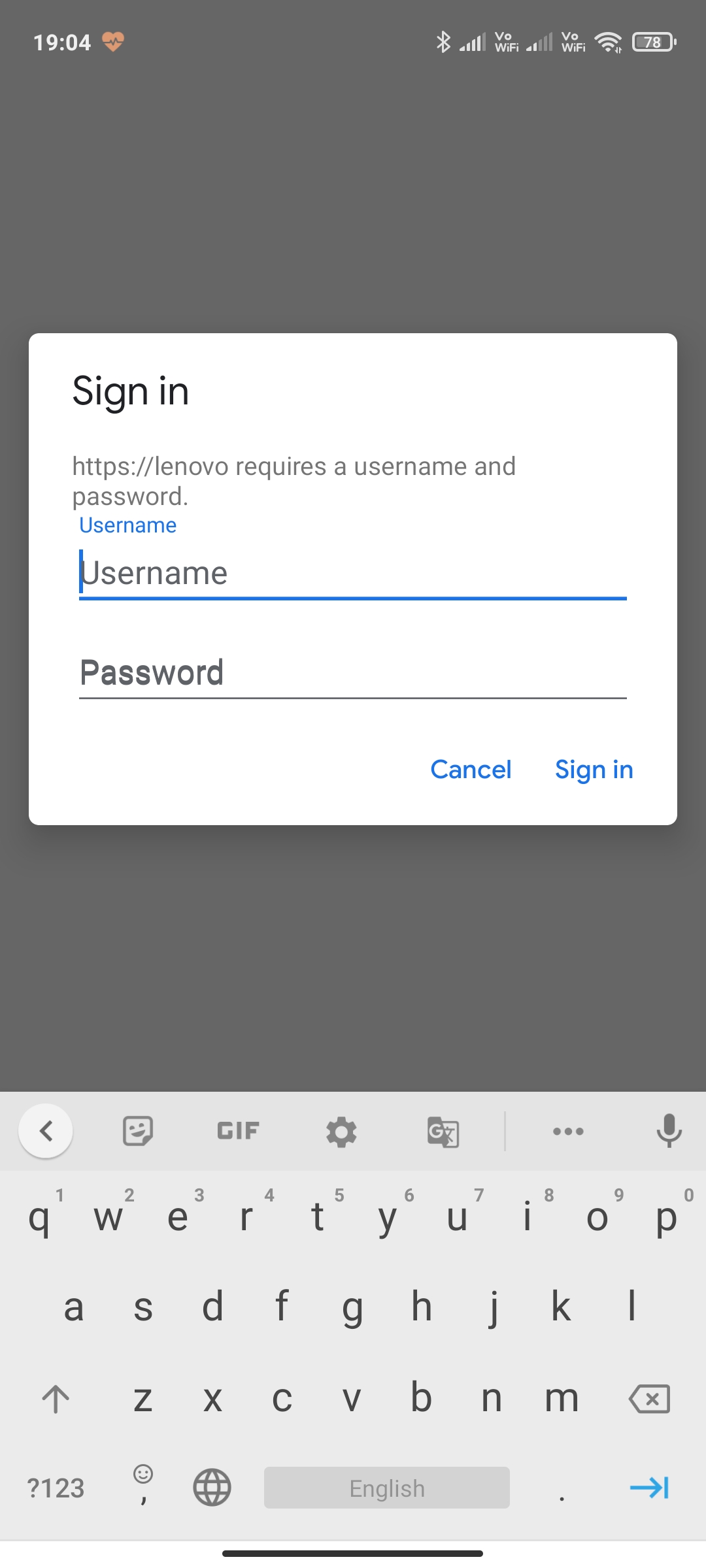
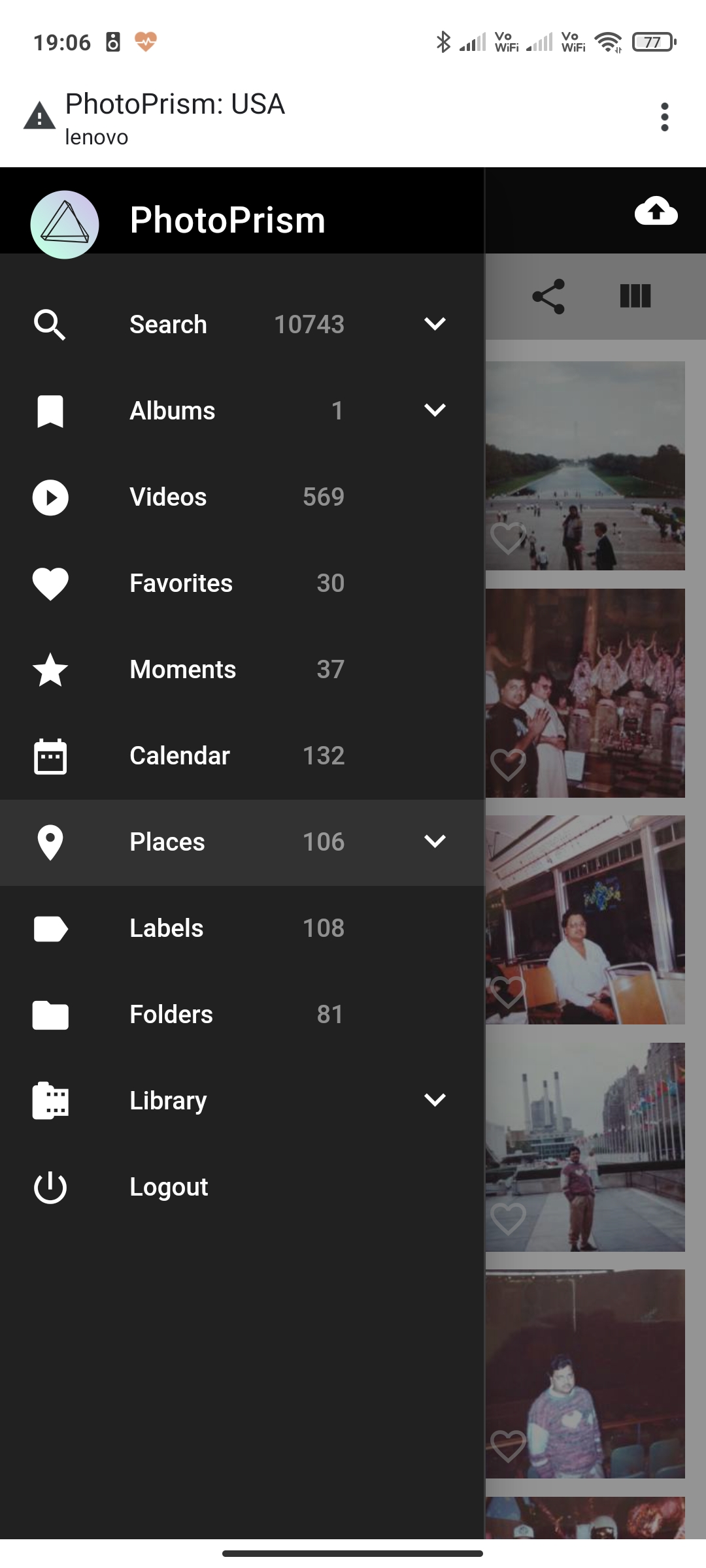
The end result is:
It is is now fair to say that Google is big enough to rewrite all the standards. Or at least break them. Or best, their arrogance of it. This bug report is a fine example of what other ways it could have been dealt.
Recently, Raphael Hertzog published ideas [1] about how to make Debian more attractive for big enterprises. One missing key stone here is the possibility to sign up for an enterprise support subscription scheme. Another question tackles how to provide such a support scheme within Debian, without disturbing the current flow of how Debian is developed these days.
And, there are likely more questions to asks, riddles to solve, and hurdles to overcome.
We want to discuss this topic, brainstorm on it, collect new ideas and also hear your concerns on a public channel. Over the past weeks there already have been mail exchanges off-list.
We want to reboot this privately started discussion now in public (as that's where it belongs) starting +/- at the end of the coming week via the currently quite inactive Debian mailing list 'debian-enterprise' [2]. Please join the discussion (and the mailing list) [3] if interested in this topic.
light & love
Mike (aka sunweaver)
[1] https://raphaelhertzog.com/2021/03/30/challenging-times-for-freexian-1/
(also read parts 2-4)
[2] debian-enterprise@lists.debian.org
[3] https://lists.debian.org/debian-enterprise
Kubernetes is about giving up control. As someone who likes to understand what s going on that s made it hard for me to embrace it. I ve also mostly been able to ignore it, which has helped. However I m aware it s incredibly popular, and there s some infrastructure at work that uses it. While it s not my responsibility I always find having an actual implementation of something is useful in understanding it generally, so I decided it was time to dig in and learn something new.
First up, I should say I understand the trade-off here about handing a bunch of decisions off to Kubernetes about the underlying platform allowing development/deployment to concentrate on a nice consistent environment. I get the analogy with the shipping container model where you can abstract out both sides knowing all you have to do is conform to the TEU API. In terms of the underlying concepts I ve got some virtualisation and container experience, so I m not coming at this as a complete newcomer. And I understand multi-site dynamically routed networks.
That said, let s start with a basic goal. I d like to understand k8s (see, I can be cool and use the short name) enough to be comfortable with what s going on under the hood and be able to examine a running instance safely (i.e. enough confidence about pulling logs, probing state etc without fearing I might modify state). That ll mean when I come across such infrastructure I have enough tools to be able to hopefully learn from it.
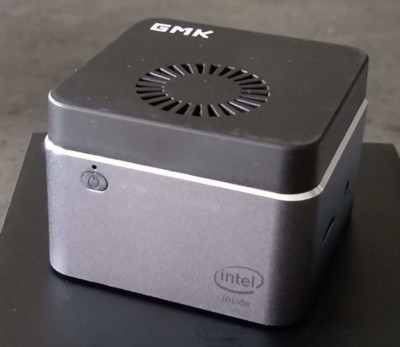
To do this I figure I ll need to build myself a cluster and deploy some things on it, then poke it. I ll start by doing so on bare metal; that removes variables around cloud providers and virtualisation and gives me an environment I know is isolated from everything else. I happen to have a GMK NucBox available, so I ll use that.
As a first step I m aiming to get a single node cluster deployed running some sort of web accessible service that is visible from the rest of my network. That should mean I ve covered the basics of a Kubernetes install, a running service and actually making it accessible.
Of course I m running Debian. I ve got a Bullseye (Debian 11) install - not yet released as stable, but in freeze and therefore not a moving target. I wanted to use packages from Debian as much as possible but it seems that the bits of Kubernetes available in main are mostly just building blocks and not a great starting point for someone new to Kubernetes. So to do the initial install I did the following:
# Install docker + nftables from Debian
apt install docker.io nftables
# Add the Kubernetes repo and signing key
curl -s https://packages.cloud.google.com/apt/doc/apt-key.gpg > /etc/apt/k8s.gpg
cat > /etc/apt/sources.list.d/kubernetes.list <<EOF
deb [signed-by=/etc/apt/k8s.gpg] https://apt.kubernetes.io/ kubernetes-xenial main
EOF
apt update
apt install kubelet kubeadm kubectl
That resulted in a 1.21.1-00 install, which is current at the time of writing. I then used kubeadm to create the cluster:
The extra parameters were to make the API server externally accessible from the host. I don t know if that was a good idea or not at this stage
kubeadm spat out a bunch of instructions but the key piece was about copying the credentials to my user account. So I did:
noodles@udon:~$ kubectl get nodes
NAME   STATUS     ROLES                  AGE     VERSION
udon   NotReady   control-plane,master   4m31s   v1.21.1
Ooooh. But why s it NotReady? Seems like it s a networking issue and I need to install a networking provider. The documentation on this is appalling. Flannel gets recommended as a simple option but then turns out to need a --pod-network-cidr option passed to kubeadm and I didn t feel like cleaning up and running again (I ve omitted all the false starts it took me to get to this point). Another pointer was to Weave so I decided to try that with the following magic runes:
(I believe what that s doing is the first 3 lines create a password and store it into the internal Kubernetes config so the weave pod can retrieve it. The final line then grabs a YAML config from Weaveworks to configure up weave. My intention is to delve deeper into what s going on here later; for now the primary purpose is to get up and running.)
As I m running a single node cluster I then had to untaint my control node so I could use it as a worker node too:
These are all things I m going to have to learn about, but for now I ll nod and smile and pretend I understand.
Now I want to actually deploy something to the cluster. I ended up with a simple HTTP echoserver (though it s not entirely clear that s actually the source for what I ended up pulling):
$ kubectl create deployment hello-node --image=k8s.gcr.io/echoserver:1.10
deployment.apps/hello-node created
$ kubectl get pod
NAME                          READY   STATUS    RESTARTS   AGE
hello-node-59bffcc9fd-8hkgb   1/1     Running   0          36s
$ kubectl expose deployment hello-node --type=NodePort --port=8080
$ kubectl get services
NAME         TYPE        CLUSTER-IP      EXTERNAL-IP   PORT(S)          AGE
hello-node   NodePort    10.107.66.138   <none>        8080:31529/TCP   1m
Looks good. And to test locally:
curl http://10.107.66.138:8080/
Hostname: hello-node-59bffcc9fd-8hkgb
Pod Information:
	-no pod information available-
Server values:
	server_version=nginx: 1.13.3 - lua: 10008
Request Information:
	client_address=192.168.53.147
	method=GET
	real path=/
	query=
	request_version=1.1
	request_scheme=http
	request_uri=http://10.107.66.138:8080/
Request Headers:
	accept=*/*
	host=10.107.66.138:8080
	user-agent=curl/7.74.0
Request Body:
	-no body in request-
Neat. But my external network is 192.168.53.0/24 and that s a 10.* address so how do I actually make it visible to other hosts?
What I seem to need is an Ingress Controller which provide some sort of proxy between the outside world and pods within the cluster. Let s pick nginx because at least I have some vague familiarity with that and it seems like it should be able to do a bunch of HTTP redirection to different pods depending on the incoming request.
i.e. incoming requests to http://udon.mynetwork/ should go to the hello-node on port 8080. I applied this:
$ kubectl apply -f hello-ingress.yaml
ingress.networking.k8s.io/example-ingress created
$ kubectl get ingress
NAME              CLASS    HOSTS            ADDRESS   PORTS   AGE
example-ingress   <none>   udon.mynetwork             80      3m8s
No address? What have I missed? Let s check the nginx service, which apparently lives in the ingress-nginx namespace:
noodles@udon:~$ kubectl get services -n ingress-nginx
NAME                                 TYPE           CLUSTER-IP      EXTERNAL-IP   PORT(S)                    AGE
ingress-nginx-controller             LoadBalancer   10.96.9.41      <pending>     80:32740/TCP,443:30894/TCP 13h
ingress-nginx-controller-admission   ClusterIP      10.111.16.129   <none>        443/TCP                    13h
<pending> does not seem like something I want. Digging around it seems I need to configure the external IP. So I do:
noodles@udon:~$ kubectl get services -n ingress-nginx
NAME                                 TYPE           CLUSTER-IP      EXTERNAL-IP      PORT(S)                 AGE
ingress-nginx-controller             LoadBalancer   10.96.9.41      192.168.53.147   80:32740/TCP,443:30894/TCP   14h
ingress-nginx-controller-admission   ClusterIP      10.111.16.129   <none>           443/TCP                 14h
noodles@udon:~$ kubectl get ingress
NAME              CLASS    HOSTS           ADDRESS          PORTS   AGE
example-ingress   <none>   udon.mynetwork  192.168.53.147   80      14h
Let s try a curl from a remote host:
curl http://udon.mynetwork/
Hostname: hello-node-59bffcc9fd-8hkgb
Pod Information:
	-no pod information available-
Server values:
	server_version=nginx: 1.13.3 - lua: 10008
Request Information:
	client_address=192.168.0.5
	method=GET
	real path=/
	query=
	request_version=1.1
	request_scheme=http
	request_uri=http://udon.mynetwork:8080/
Request Headers:
	accept=*/*
	host=udon.mynetwork
	user-agent=curl/7.64.0
	x-forwarded-for=192.168.53.136
	x-forwarded-host=udon.mynetwork
	x-forwarded-port=80
	x-forwarded-proto=http
	x-real-ip=192.168.53.136
	x-request-id=6aaef8feaaa4c7d07c60b2d05c45f75c
	x-scheme=http
Request Body:
	-no body in request-
Ok, so that seems like success. I ve got a single node cluster running a single actual application pod (the echoserver) and exporting it to the outside world. That s enough to start poking under the hood. Which is for another post, as this one is already getting longer than I d like. I ll just leave some final thoughts of things I need to work out:
What s going on with the networking?
Where s the IPv6 (the host in question has native IPv6 routing)?
How do I deploy my own application pod?
I should look at a multiple host setup (i.e. a real cluster).
How much of this goes away if I use a cloud provider like AWS to run the cluster?
Can I do this with the Debian Kubernetes packages?
Dino, packaged as dino-im in Debian, is an XMPP chat client. Thanks to the hard work of its developers, Dino has been making progress on supporting video and audio calls.
Building on the work of my co-maintainer, I've packaged the latest commits to dino-im in Debian experimental. Adapting to the changes in how Dino is built since the last release took a bit of effort, but I'm glad to say that experimental now has support for video calls in dino-im, and that they work quite well! I was able to test video calling for multiple hours, and while there were clearly still a few issues, the entire experience felt quite... comfortable. I'm confident that video calling will be in great shape for bookworm!
RcppDate wraps the featureful date library written by Howard Hinnant for use with R. This header-only modern C++ library has been in pretty wide-spread use for a while now, and adds to C++11/C++14/C++17 what will be (with minor modifications) the date library in C++20.
Our previous 0.0.2 release already contained date version 3.0.0 from last year plus some of changes accumulated since then. Now that date 3.0.1 was just released, we are providing a quick sync with this version.
Changes in version 0.0.3 (2021-05-19)
Updated to upstream version 3.0.1
If you like this or other open-source work I do, you can now sponsor me at GitHub.
Having to participate in many online events since the COVID crisis started, I've come to notice that few of the online clients work properly on the current Firefox ESR found in Debian. A quick visit at WebRTC Test confirmed that none of the tests in the Network and Connectivity section pass. Meanwhile, a Windows 10 laptop running Edge via the same network works just fine, so I have to assume that either a Firefox or Debian packaging issue is to blame, but I wouldn't know where to start. Any help? Thanks!
As it is now known, the freenode IRC network has been taken over by a Trumpian wannabe korean royalty bitcoins millionaire. To make a long story short, the former freenode head of staff secretly "sold" the network to this person even if it was not hers to sell, and our lawyers have advised us that there is not much that we can do about it without some of us risking financial ruin. Fuck you Christel, lilo's life work did not deserve this.
What you knew as freenode after 12:00 UTC of May 19 will be managed by different people.
As I have no desire to volunteer under the new regime, this marks the end of my involvement with freenode. It had started in 1999 when I encouraged the good parts of #linux-it to leave ircnet, and soon after I became senior staff. Even if I have not been very active recently, at this point I was the longest-serving freenode staff member and now I expect that I will hold this record forever.
The people that I have met on IRC, on freenode and other networks, have been and still are a very important part of my life, second only to the ones that I have known thanks to Usenet. I am not fine, but I know that the communities which I have been a part of are not defined by a domain name and will regroup somewhere else.
The current freenode staff members have resigned with me, these are some of their farewell messages:
A new release of the inline package got to CRAN today. inline facilitates writing code in-line in simple string expressions or short files. The package was used quite extensively by Rcpp in the days before Rcpp Attributes arrived on the scene proving an even better alternative for its use cases. inline is still used by rstan and a number of other packages.
Johannes Ranke, who uses and stresses inline via his package mkin, updated the loading/unloading of DLLs which, following updates in R-devel, was failing some tests. As luck will have it, this new version appears to still fail on two of the platforms we do not actually have easy access to so another version may be coming shortly .
See below for a detailed list of changes extracted from the NEWS file.
Changes in inline version 0.3.18 (2021-05-17)
The moveDLL code and tests were updated for changed in R-devel (Johannes in #22 fixing #21).
The new release of Config::Model::OpenSsh fixes a bugs that impacted experienced users: the order of Hosts or Match sections is now preserved when writing back ~/.ssh/config file.
Why does this matter ?
Well, the beginning of ssh_config man page mentions that For each parameter, the first obtained value will be used. and Since the first obtained value for each parameter is used, more host-specific declarations should be given near the beginning of the file, and general defaults at the end. .
Looks like I missed these statements when I designed the model for OpenSsh configuration: the Host section was written back in a neat, but wrong, alphabetical order.
This does not matter except when there an overlap between the specifications of the Host (or Match) sections like in the example below:
Host foo.company.com
Port 22
Host *.company.com
Port 10022
With this example, ssh connection to foo.company.com is done using port 22 and connection to bar.company.com with port 10022.
If the Host sections are written back in reverse order:
Host *.company.com
Port 10022
Host foo.company.com
Port 22
Then, ssh would be happy to use the first matching section for foo.company.com , i.e. *.company.com and would use the wrong port (10022)
This is now fixed with Config::Model::OpenSsh 2.8.4.3 which is available on cpan and in Debian/experimental.
While I was at it, I ve also updated Managing OpenSsh configuration with cme wiki page.
All the best
My newsletter Le Courrier du hacker (3,800 subscribers, 176 issues) is 3 years old and Mailchimp costs were becoming unbearable for a small project ($50 a month, $600 a year), with still limited revenues nowadays. Switching to the Open Source Mailtrain plugged to the AWS Simple Email Service (SES) will dramatically reduce the associated costs.
First things first, thanks a lot to Pierre-Gilles Leymarie for his own article about switching to Mailtrain/SES. I owe him (and soon you too) so much. This article will be a step-by-step about how to set up Mailtrain/SES on a dedicated server running Linux.
What s the purpose of this article?
Mailchimp is more and more expensive following the growth of your newsletter subscribers and you need to leave it. You can use Mailtrain, a web app running on your own server and use the AWS SES service to send emails in an efficient way, avoiding to be flagged as a spammer by the other SMTP servers (very very common, you can try but you have been warned against
Prerequisites
You will need the following prerequisites :
An AWS account with admin rights
Full control over the domain name you use to send your newsletter
A baremetal or virtual Linux Debian server you have the root access to
NodeJS installed (8x and 10x are ok with Mailtrain)
A MySQL/MariaDB instance with the root access to
Redis 3x (not 5) if you want to use Redis (not mandatory)
Steps
This is a fairly straightforward setup if you know what you re doing. In the other case, you may need the help of a professional sysadmin.
You will need to complete the following steps in order to complete your setup:
Configure AWS SES
Configure your server by:
configuring your database
install Mailtrain
configuring your web server
Configure your Mailtrain setup
Configure AWS SES
Verify your domain
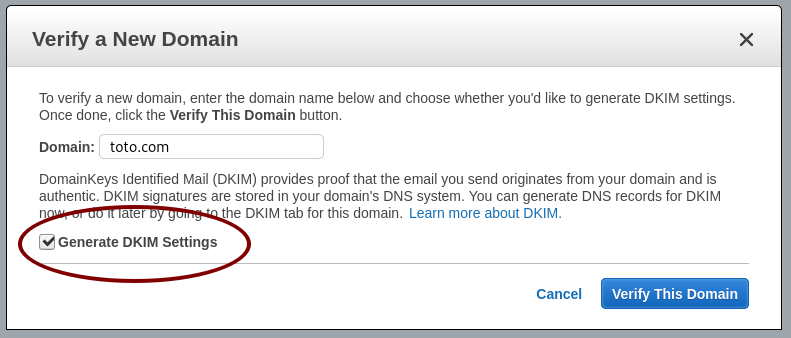
You need to configure the DKIM to certify that the emails sent are indeed from your own domain. DKIM is mandatory, it s the de-facto standard in the mail industry.
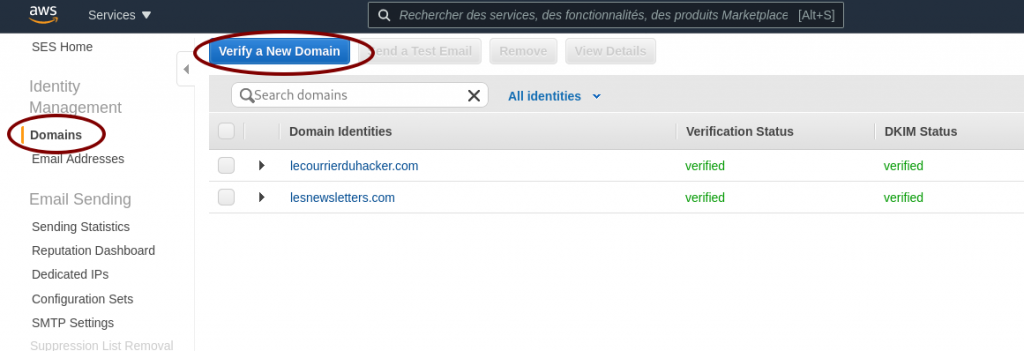
Ask to verify your domain
Ask AWS SES to verify a domain
Generate the DKIM settings
Generate the DKIM settings
Use the DKIM settings
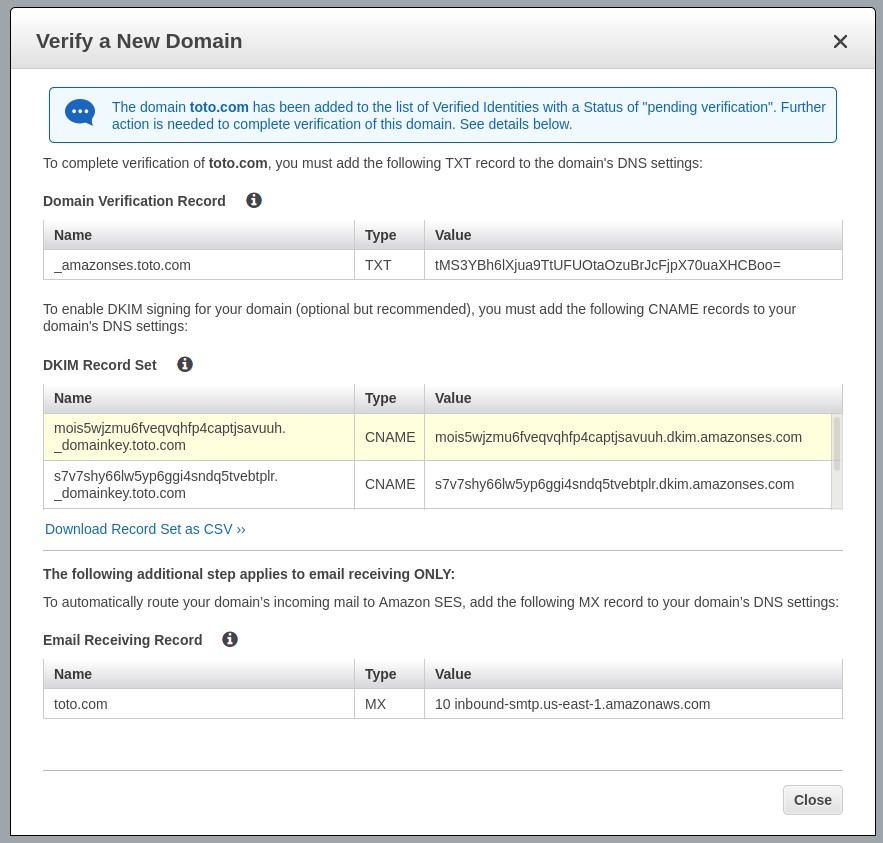
Now you have your DKIM settings and Amazon AWS is waiting for finding the TXT field in your DNS zone.
Configure your DNS zone to include DKIM settings
I can t be too specific for this section because it varies A LOT depending on your DNS provider. The keys is: as indicated by the previous image you have to create one TXT record and two CNAME records in your DNS zone. The names, the types and the values are indicated by AWS SES.
If you don t understand what s going here, there is a high probabiliy you ll need a system administrator to apply these modifications and the next ones in this article.
Am I okay for AWS SES ?
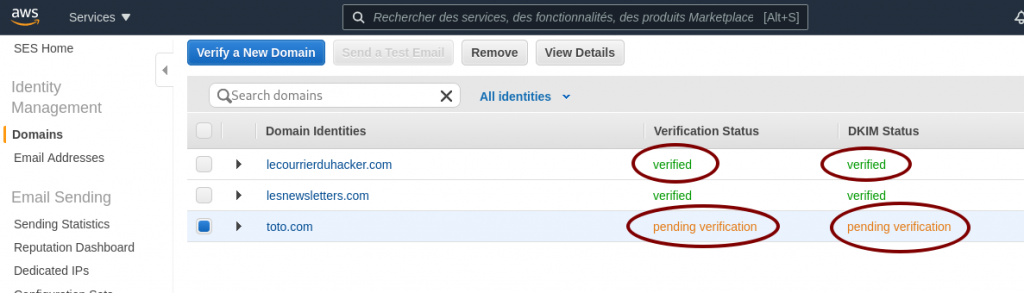
As long as the word verified does not appear for your domain, as shown in the image below, something is wrong. Don t wait too long, you have a misconfiguration somewhere.
AWS SES pending verification
When your domain is verified, you ll also receive an email to inform you about the successful verification.
SMTP settings
The last step is generating your credentials to use the AWS SES SMTP server. IT is really straightforward, providing the STMP address to use, the port, and a pair of username/password credentials.
AWS SES SMTP settings and credentials
Just click on Create My SMTP Credentials and follow the instructions. Write the SMTP server address somewhere and store the file with credentials on your computer, we ll need them below.
Configure your server
As we said before, we need a baremetal server or a virtual machine running a recent Linux.
Configure your MySQL/MariaDB database
We create a user mailtrain having all rights on a new database mailtrain.
MariaDB [(none)]> create database mailtrain;
Query OK, 1 row affected (0.00 sec)
MariaDB [(none)]> CREATE USER 'mailtrain' IDENTIFIED BY 'V3rYD1fF1cUlTP4sSW0rd!';
Query OK, 0 rows affected (0.01 sec)
MariaDB [(none)]> GRANT ALL PRIVILEGES ON mailtrain.* TO 'mailtrain'@localhost IDENTIFIED BY 'V3rYD1fF1cUlTP4sSW0rd!';
Query OK, 0 rows affected (0.00 sec)
MariaDB [(none)]> FLUSH PRIVILEGES;
Query OK, 0 rows affected (0.00 sec)
MariaDB [(none)]> show databases;
+--------------------+
  Database
+--------------------+
  information_schema
  mailtrain
  mysql
  performance_schema
+--------------------+
6 rows in set (0.00 sec)
MariaDB [(none)]> Bye
Configure your web server
I use Nginx and I ll give you the complete setup for it, including generating Let s Encrypt.
Configure Let s Encrypt
You need to stop Nginx as root:
systemctl stop nginx
Then get the certificate only, I ll give the Nginx Vhost configuration:
certbot certonly -d mailtrain.toto.com
Install Mailtrain
On your server create the following directory:
mkdir -p /var/www/
cd /var/www
wget https://github.com/Mailtrain-org/mailtrain/archive/refs/tags/v1.24.1.tar.gz
tar zxvf v1.24.1.tar.gz
Modify the file /var/www/mailtrain/config/production.toml to use the MySQL settings:
Now Mailtrain is launched and should be running. Yeah I know it s ugly to launch like this (root process in a screen, etc) you can improve security with the following commands:
To register the following systemd unit and to launch the new Mailtrain daemon, use the following commands (do not forget to kill your screen session if you used it before):
Now Mailtrain is running under the classic user mailtrain of the mailtrain system group.
Configure the Nginx Vhost configuration for your domain
Here is my configuration for the Mailtrain Nginx Vhost:
This Nginx vhost will redirect all http requests coming to the Mailtrain process running on the 3000 port. Now it s time to setup Mailtrain!
Setup Mailtrain
You should be able to access your Mailtrain at https://mailtrain.toto.com
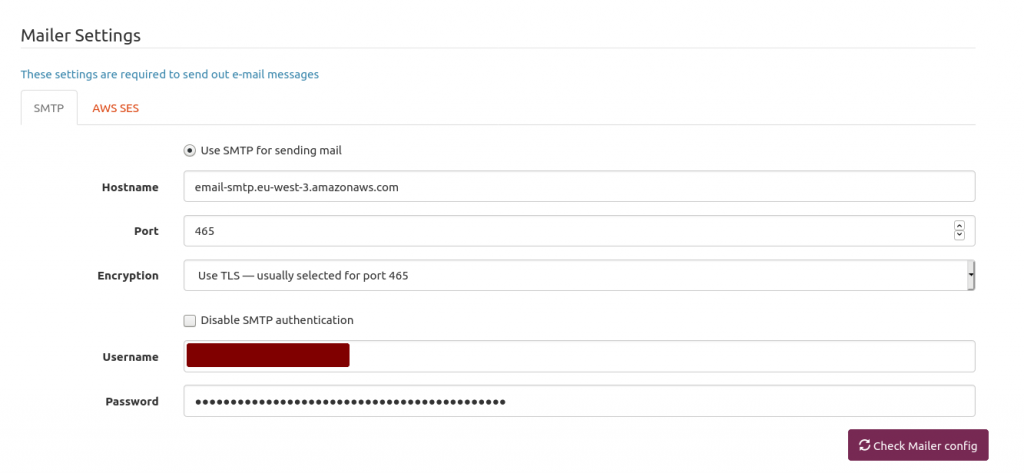
Mailtrain is quite simple to configure, Here is my mailer setup. Mailtrain just forwards emails to AWS SES. We only have to plug Mailtrain to AWS SES.
Mailtrain mailer setup
The hostname is provided by AWS SES in the STMP Settings section. Use the 465 port and USE TLS option. Next is providing your AWS SES username and password you generated above and stored somewhere on your computer.
One of the issues I encountered is the AWS SES rate limit. Send too many emails too fast will get you flagged as a spammer.
So I had to throttle Mailtrain. Because I m a lazy man, I asked Pierre-Gilles Leymarie his setup. Quite easier than determining myself the good one. Here is my setup. Works fine for my soon-to-be 4k subscribers. The idea is: if your AWS SES lets you know you send too fast then just slow down.
Mailtrain to throttle sending emails to AWS SES
Conclusion
That s it! You re ready! Almost. You need an HTML template for your newsletter and a list of subscribers. Buf if you re not new in the newsletter field, fleeing Mailchimp because of their expensive prices, you should have them both already.
After sending almost ten issues with this setup, I m really happy with it. Open/click rates are the same.
When leaving Mailchimp, do not leave any list of subscribers because they ll charge you $8 for a 0 to 500 contacts, that s crazy expensive!
About the author
Redox-dependent inactivations are actually rather common in the field of metalloenzymes, and electrochemistry can be an extremely powerful tool to study them, providing one can analyze the data quantitatively. The point of this point is to teach the reader how to do so using QSoas. For more general information about redox inactivations and how to study them using electrochemical techniques, the reader is invited to read the review del Barrio and Fourmond, ChemElectroChem 2019.
This post is a tutorial to learn the analysis of data coming from the study of the redox-dependent substrate inhibition of periplasmic nitrate reductase NapAB, which has the advantage of being relatively simple. The whole processed is discussed in Jacques et al, BBA, 2014. What you need to know in order to follow this tutorial is the following:
the whole inactivation/reactivation process can be modelled by a simple reversible reaction:
$$ \mathrm A \rightleftharpoons \mathrm I $$
A is the active form, I the inactive form;
the forward rate constant is \(k_i(E)\) (dependent on potential) and the backward rate constant is \(k_a(E)\), also dependent on potential;
the experiment is done in a series of 5 steps at 3 different potentials: \(E_0\) then \(E_1\) then \(E_2\) then \(E_1\) then, finally, \(E_0\);
the enzyme is assumed to be fully active at the beginning of the first step;
a single experiment is used to obtain the values of \(k_i\) and \(k_a\) for the three potentials (although not reliably for the value at \(E_0\)
the current given by the active species depends on potential (and it is negative because the enzyme catalyzes a reduction), and the inactive species gives no current;
in addition to the reversible reaction above, there is an irreversible, potential-dependent loss.
You can download the data files from the GitHub repository. Before fitting the data to determine the values of the rate constants at the potentials of the experiment, we will first subtract the background current, assuming that the respective contributions of faradaic and non-faradaic currents is additive. Start QSoas, go to the directory where you saved the files, and load both the data file and the blank file thus:
QSoas> cd
QSoas> load 27.oxw
QSoas> load 27-blanc.oxw
QSoas> S 1 0
(after the first command, you have to manually select the directory in which you downloaded the data files). The S 1 0 command just subtracts the dataset 1 (the first loaded) from the dataset 0 (the last loaded), see more there. blanc is the French for blank...
Then, we remove a bit of the beginning and the end of the data, corresponding to one half of the steps at \(E_0\), which we don't exploit much here (they are essentially only used to make sure that the irreversible loss is taken care of properly). This is done using strip-if:
QSoas> strip-if x<30 x>300
Then, we can fit ! The fit used is called fit-linear-kinetic-system, which is used to fit kinetic models with only linear reactions (like here) and steps which change the values of the rate constants but do not instantly change the concentrations. The specific command to fit the data is:
The /species=2 indicates that there are two species (A and I). The /steps=0,1,2,1,0 indicates that there are 5 steps, with three different conditions (0 to 2) in order 0,1,2,1,0. This fits needs a bit of setup before getting started. The species are numbered, 1 and 2, and the conditions (potentials) are indicated by #0, #1 and #2 suffixes.
The I_1 and I_2 are the currents for the species 1 and 2, so something for 1 (active form) and 0 for 2 (inactive form).
Moreover, the parameters I_2_#0 (and _#1, _#2) should be fixed and not free (since we don't need to adjust a current for the inactive form).
The k_11 and k_22 correspond to species-specific irreversible loss. It is generally best to leave them fixed to 0.
k_12 is the formation of 2 (I) from 1 (A), and k_21 is the formation of A from I. Their values will be determined for the three conditions. The default values should work here.
The k_loss parameters are the rates of irreversible loss that apply indiscriminately on all species (unlike k_11 and k_22). They are adjusted and ther default values should work too.
alpha_1_0 and alpha_2_0 are the initial concentrations of species 1 and 2, so they should be fixed to 1 and 0.
Last, the xstart_a and (_b, _c, _d and _e) correspond to the starting times for the steps, here, 0, 60, 120, 210 and 270.
For the sake of simplicity, you can also simply load the starting-parameters.params parameters to have all setup the correct way. Then, just hit Fit, enjoy this moment when QSoas works and you don't have to... The screen should now look like this:
Now, it's done ! The fit is actually pretty good, and you can read the values of the inactivation and reactivation rate constants from the fit parameters.
You can train also on the 21.oxw and 21-blanc.oxw files. Usually, re-loading the best fit parameters from other potentials as starting parameters work really well. Gathering the results of several fits into a real curve of rate constants as a function of potentials is left as an exercise for the reader (or maybe a later post), although you may find these series of posts useful in this context !
About QSoas
QSoas is a powerful open source data analysis program that focuses on flexibility and powerful fitting capacities. It is released under the GNU General Public License. It is described in Fourmond, Anal. Chem., 2016, 88 (10), pp 5050 5052. Current version is 3.0. You can download its source code there (or clone from the GitHub repository) and compile it yourself, or buy precompiled versions for MacOS and Windows there.
Review: A Desolation Called Peace, by Arkady Martine
Series:
Teixcalaan #2
Publisher:
Tor
Copyright:
2021
ISBN:
1-250-18648-X
Format:
Kindle
Pages:
496
A Desolation Called Peace is a direct sequel to
A Memory Called Empire and picks up
shortly after that book's ending. It would completely spoil the first
book and builds heavily on previous events. This is not a series to read
out of order.
It's nearly impossible to discuss anything about the plot of this book
without at least minor spoilers for the previous book, so beware. If
you've not read A Memory Called Empire, I highly recommend it, and
you may want to skip this review until you have.
Mahit Dzmare has returned to Lsel Station and escaped, mostly, the pull of
the Teixcalaan Empire in all its seductive arrogance. That doesn't mean
Lsel Station is happy to see her. The maneuverings of the station council
were only a distant part of the complex political situation she was
navigating at the Teixcalaanli capital. Now home, it is far harder to
ignore powerful councilors who would be appalled by the decisions she
made. The ambassador to a hated foreign empire does not have many allies.
Yaotlek Nine Hibiscus, the empire's newest commander of
commanders, is the spear the empire has thrust towards a newly-discovered
alien threat. The aliens have already slaughtered all the inhabitants of
a mining outpost for no obvious reason, and their captured communications
are so strange as to provoke nausea in humans. Their cloaking technology
makes the outcome of pitched warfare dangerously uncertain. Nine Hibiscus
needs someone who can talk to aliens without mouths, and that means the
Information Ministry.
The Information Ministry means a newly promoted Three Seagrass, who is
suffering from insomnia, desperately bored, and missing Mahit
Dzmare. And who sees in Nine Hibiscus's summons an opportunity to address
several of those problems at once.
A Memory Called Empire had an SFnal premise and triggering plot
machinery, but it was primarily a city political thriller. A
Desolation Called Peace moves onto the more familiar SF ground of first
contact with a very alien species, but Martine makes the unusual choice of
revealing one of the secrets of the aliens to the reader at the start of
the book. This keeps the reader's focus more on the political maneuvering
than on the mystery, but with a classic first-contact communication
problem as the motivating backdrop.
That's only one of the threads of this book, though. Another is the
unfinished business between Three Seagrass and Mahit Dzmare, and between
Mahit Dzmare and the all-consuming culture of Teixcalaan. A third is the
political education of a very exceptional boy, whose mere existence is a
spoiler for A Memory Called Empire and therefore not something I
will discuss in detail. And then there are the internal politics of Lsel
Station, although I thought that was the least effective part of the book
and never reached a satisfying conclusion.
This is a lot to balance, and I think that's one of the reasons why
A Desolation Called Peace doesn't replicate the magic that made me
love A Memory Called Empire so much. Full-steam-ahead pacing with
characters who are thinking on their feet and taking desperate risks has a
glorious momentum. Here, there's too much going on (not to mention four
major viewpoint characters) to maintain the same pace. Once Mahit and
Three Seagrass get into the same room, there are moments that are as good
as the highlights of A Memory Called Empire, but it's not as
sustained as I was hoping for.
This book also spends more time on Mahit and Three Seagrass's
relationship, and despite liking both of the characters, this didn't
entirely work for me. Martine uses them to make a subtle and powerful
point about relationships across power gradients and the hurt that comes
from someone trivializing a conflict that is central to your identity. It
took me a while to understand the strength of Mahit's reaction, but it
eventually felt right. But that fight wasn't what I was looking for in
the book, and there was a bit too much of both of them failing (or
refusing) to communicate for my taste. I appreciated what Martine was
exploring, but personally I wanted a different sort of catharsis.
That said, this is still a highly enjoyable book. Nine Hibiscus is a
solid military SF character who is a good counterweight to the more
devious approaches of the other characters. I enjoyed the subplot of the
kid in the Teixcalaanli capital more than I expected, although it felt
more like setup for future novels than critical to the plot of this one.
And then there's Three Seagrass.
Three Seagrass always made decisions wholly and entire. All at once.
choosing information as her aptitudes. Choosing the position of
cultural liaison to the Lsel Ambassador. Choosing to trust her.
choosing to come here, to take this assignment entirely, completely,
and without pausing to look to see how deep the water was that she was
leaping into.
Every word of this is true, and it's so much fun to read. Three Seagrass
was a bit overshadowed in A Memory Called Empire, a supporting
character in someone else's story. Here, she has moments where she can
take the lead, and she's so delightfully different than Mahit. I loved
every moment of her viewpoint.
A Desolation Called Peace isn't as taut or as coherent as A
Memory Called Empire. The plot sags in a few places, and I think there
was a bit too much hopeless Lsel politics, nebulous alien horror, and
injured silence between characters. But the high points are nearly as
good as the high points of A Memory Called Empire and I adore these
characters. If you liked the first book, I think you'll like this one
too.
More, please!
Rating: 8 out of 10
Memo on using a KVM switch with my Debian desktop and ChromeBox.
KVM these days mean Kernel virtualization things but before it used to mean KVM switch; where PS/2 and DSUB15 pin was a popular interface. These days it's USB + HDMI; USB-C with dP alt mode would make connections simpler including power supply, but that doesn't exist as much.
This ends up 3 cables each for PC and display, with 2 USB cables and 1 HDMI cable per endpoint.
I bought a cheap manual switcher.
Automatic switcher can be annoying especially when
suspend-resume case, there's no rational behavior,
especially when I want to wake devices through keyboard.
Having a wired remote control was good because although the
device itself is compact, the 9 or so cables running out of
it is bulky and I moved it under my desk to hide it from my
view.
Sometimes suspending / resume causes issues with the USB
hub, it's recognized as SuperTop USB Hub, and from Linux
kernel it seems like hub is disconnected and reconnected,
however on reinitialization sometimes USB hub fails to be
initialized.
That results in keyboard not working, but re-connecting the
USB cable fixes the issue.
Sound is recorded via USB mixer, and played back via HDMI
audio, video is recorded via USB camera. These things didn't
exist back in the old KVM days, maybe they used audio
cables.
Today marks the 90th day of me joining Canonical to work on Ubuntu full-time! So since
it s been a while already, this blog post is long due. :)
The News
I joined Canonical, this February, to work on Ubuntu full-time! \o/
Those who know, they know that this is really very exciting for me because Canonical has
been a dream company for me, for real (more about this below!). And hey, this is my first
job, ever, so all the more reason to be psyched about, isn t it? ^_^
P.S. Keep reading and we ll meet my squad really sooon!
The Story
Being an undergrad student (batch 2017-2021), I ve been slightly worried during my last
two semesters, naturally, thinking about how s it all gonna pan out and what will I be doing,
et al, because I ve been seeing all my friends and batchmates getting placed in companies
or going for masters or at least having some sort of plans for their future and I, on the
other hand, was hopelessly clueless. :D
Well, to be fair, I did Google Summer of Code twice,
in 2019 and
2020, became a
Debian Developer in 2019, been a part of
GCI and Outreachy, contributed
to over dozens of open-source projects, et al, et al. So I wasn t all completely hopeless
but for sure was completely clueless , heh.
And for full disclosure, I was only slightly panicking because firstly, I did get placed
in several companies and secondly, I didn t really need a job immediately since I was already
getting paid to work on Debian stuff by Freexian, which was good enough. :)
(and honestly, Freexian has my whole heart! - more on that later sometime.)
But that s not the point. I was still confused and worried and my mom & dad, more so than
anyone. Ugh. We were all figuring out and she asked me places that I was interested to work
in. And whilst I wasn t clear about things I wanted to do (and still am!) but I was (very)
clear about this and so I told her about Canonical and also did tell her that it s a bit too
ambitious for me to think about it now so I ll probably apply after some experience or something.
and as they say, the world works in mysterious ways and well, it did for me! So back during
the Ruby sprints (Feb 20), Kanashiro, the guy ( ), mentioned that his team was hiring and
has a vacant position but I won t be eligible since I was still in my junior year. It was
since then I ve been actively praying for Cronus, the god of time, to wave his magic wand and
align it in such a way that the next opening should be somewhere near my graduation. And guess
what? IT HAPPENED!
9 months later, in November 20, Kanashiro told me his team is hiring yet again and that I
could apply this time! Without much (since there was some ) delay, I applied and started
asking all sorts of questions to Kanashiro. No words are enough for him, he literally helped
me throughout the process; from referring me to answering all sorts of doubts I had!
And roughly after 2 months of interviewing, et al, my ambitious dream did come true and I
finalyyyy signed my contract! \o/
(the interview process and what went on during those 10 weeks is a story for later ;))
The Server Team! \o
This position, which I didn t mention earlier, was for the Server Team which is a team of
15 people, working to make Ubuntu server the best! And as I
tweeted sometime back, the team
is absolutely lovely, super kind, and consists of the best of teammates one could possibly
ask for!
Here s a quick sneak peek into our weekly team meeting. Thanks to
Rafael for taking such a lovely picture. And yes,
the cat Luna is a part of our squad!
And oh, did I mention that we re completely remote and distributed?
FUN FACT: Our team covers all the TZs, that is, at any point of time (during weekdays),
you ll find someone or the other from the team around! \o/
Anyway, our squad, managed by Rick is divided into two halves: Squeaky Wheels and
Table Flip. Cool names, right?
Squeaky Wheels does the distro side of stuff and consists of Christian, Andreas, Rafael, Robie,
Bryce, Sergio, Kanashiro, Athos, and now myself as well! And OTOH, Table Flip consists of Dan,
Chad, Paride, Lucas, James, and Grant.
Even though I interact w/ Squeaky Wheels more (basically daily), each of my teammates is
absolutely lovely and equally awesome!
Whilst I ll talk more about things here in the upcoming months, this is it for now! If there s
anything, in particular, you d like to know more about, let me know!
And lastly, here s us vibing our way through, making Ubuntu server better, cause that s how
we roll!
Until next time. :wq for today.
Waiting for network to be up from a service on Debian.
I've noticed that when I observed in journalctl that many
services were starting before dhclient started running and
configured DHCP. They are waiting for
network-online.target, however network-online.target seems
to be triggered before networking is available.
After a few internet searches, ifupdown is the default network manager for Debian, and it seems like there's a specific systemd target for ifupdown.
/usr/lib/systemd/system/ifupdown-wait-online.service contains that service.
So, I could do this to fix the situation. Now, should this have been the default?
filed a bug: 988533.
I recently bought a Pinebook Pro. This was mainly out of general interest,
but also because I wanted to have a spare portable computer. When I was
recently having some difficulty with my laptop not charging, I realised that I
am dependent on having access to Emacs, notmuch.el and my usual git
repositories in the way that most people are dependent on their smartphones
all the info I need to get things done is in there, and it s very disabling
not to have it. So, good to have a spare.
I decided to get the machine running the hard way, and have been working to
add a facility to install the device-specific bootloader to
Consfigurator. It has been good to learn about
how ARM machines boot. The only really hard part turned out to be coming up
with the right abstractions within Consfigurator, thanks to the hard work of
the Debian U-Boot maintainers. This left me with a chroot and a corresponding
disk image, properly partitioned and with the bootloader installed. It was
only then that the difficulties began: getting a kernel and initrd combination
which can output to the Pinebook Pro s screen and take input from its keyboard
is not really straightforward yet, but that s required for inputting disk
encryption passwords, which are required on portable devices. I don t have
the right hardware to make a serial connection to the machine, so all this
took a lot of trial and error. I ve ended up using Manjaro s patched upstream
kernel build for now, because that compiles in the right drivers, and
debugging an initrd without a serial connection is far too inefficient.
What I keep having to remind myself is that this device isn t really a laptop
in the usual sense it s a single board computer that s powering several
pieces of hardware which together roughly constitute a laptop. I think
something which epitomises this is how the power light doesn t come on when
you hit the power button, but only when the bootloader or operating system
kernel thinks to turn on the LED. You start up this SBC and it loads up some
software and then once it has got itself going several seconds later
that software starts turning on the screen, keyboard, power LEDs etc. Whereas
on an ordinary laptop it s more than you turn on the keyboard, screen, power
LEDs etc. all at once, and then /they/ go off and load some software. Of
course this description is nothing like what s actually going on, but it s my
attempt to capture how it feels as a user, who is installing operating
systems, but otherwise treating the laptop s hardware, including things like
boot ROMs, as a black box. There are tangible differences between what it is
like to do that with an ordinary laptop and with the Pinebook Pro.
Thanks to Vagrant Cascadian for all the work on U-Boot in Debian and for help
on IRC, Cyril Brulebois for help with crossbuilding, and Birger Schacht for a
useful blog
post.
 memtest86+ did not work on my machine.
Looking at the changelog the version was last updated in 2014.
Checked their website and apparently
there was a new version last year. Might be worth a try.
I saw at least some code to handle memory modules with memory more than 32GB.
 As a person who prefers full access to data in the simplest format, while at the same time having it useful with latest technologies, my quest for trying things out is an ongoing activity.
Earlier, I

 Recently, Raphael Hertzog published ideas [1] about how to make Debian more attractive for big enterprises. One missing key stone here is the possibility to sign up for an enterprise support subscription scheme. Another question tackles how to provide such a support scheme within Debian, without disturbing the current flow of how Debian is developed these days.
And, there are likely more questions to asks, riddles to solve, and hurdles to overcome.
We want to discuss this topic, brainstorm on it, collect new ideas and also hear your concerns on a public channel. Over the past weeks there already have been mail exchanges off-list.
We want to reboot this privately started discussion now in public (as that's where it belongs) starting +/- at the end of the coming week via the currently quite inactive Debian mailing list 'debian-enterprise' [2]. Please join the discussion (and the mailing list) [3] if interested in this topic.
light & love

 Dino, packaged as dino-im in Debian, is an

 Having to participate in many online events since the COVID crisis started, I've come to notice that few of the online clients work properly on the current Firefox ESR found in Debian. A quick visit at
 As it is now known, the freenode IRC network has been taken over by a Trumpian wannabe korean royalty bitcoins millionaire. To make a long story short, the former freenode head of staff secretly "sold" the network to this person even if it was not hers to sell, and our lawyers have advised us that there is not much that we can do about it without some of us risking financial ruin. Fuck you Christel, lilo's life work did not deserve this.
What you knew as freenode after 12:00 UTC of May 19 will be managed by different people.
As I have no desire to volunteer under the new regime, this marks the end of my involvement with freenode. It had started in 1999 when I encouraged the good parts of
 Prerequisites
You will need the following prerequisites :
 Ask AWS SES to verify a domain
 Generate the DKIM settings
 AWS SES pending verification
 AWS SES SMTP settings and credentials
 Mailtrain mailer setup
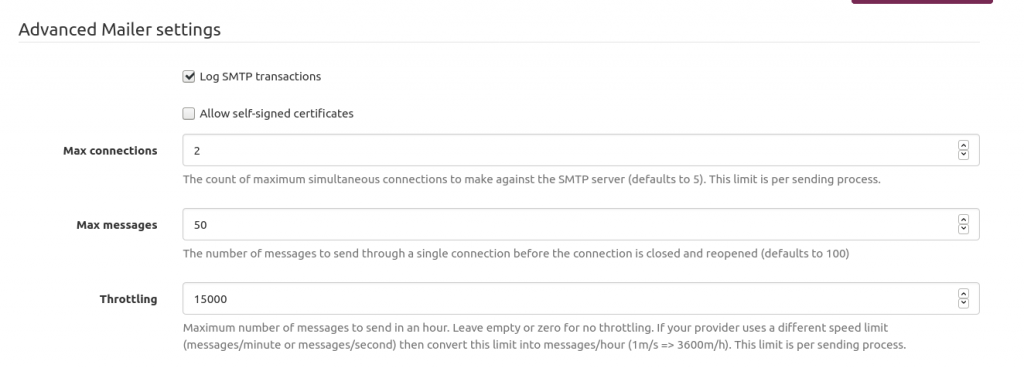 Mailtrain to throttle sending emails to AWS SES


 And oh, did I mention that we re completely remote and distributed?

 I recently bought a Pinebook Pro. This was mainly out of general interest,
but also because I wanted to have a spare portable computer. When I was
recently having some difficulty with my laptop not charging, I realised that I
am dependent on having access to Emacs, notmuch.el and my usual git
repositories in the way that most people are dependent on their smartphones
all the info I need to get things done is in there, and it s very disabling
not to have it. So, good to have a spare.
I decided to get the machine running the hard way, and have been working to
add a facility to install the device-specific bootloader to