Search Results: "nic"

3 February 2014

Wouter Verhelst: Waking up

Today is the monday after FOSDEM 2014, and I'm slowly waking up. Being in charge of the video team, and after having spent a whole week preparing followed by a whole weekend stressing about, today is a day of slowly waking up from hibernation and returning gear to various rental companies. At FOSDEM 2013, we had recorded five rooms. Even though we did lose a few talks, I felt pretty good about the whole thing, and I think we did pretty well then. It had been my plan to increase the number of rooms to be recorded from 5 to a reasonably higher number say, 10 or so but someone convinced me to do all of them. I'll readily admit I was afraid. Scratch that, I was terrified. Petrified, that we wouldn't be able to pull it off. For previous editions, we'd kept the number conservative, since video work is a high-risk business: if something goes wrong with volunteers work (say, the heralding volunteer doesn't show up), you find a replacement, or you have a staff member introduce a speaker, and the show will go on. Not so with video work: if something minor goes wrong, you will most likely lose content. If something minor goes wrong in one devroom, I'll deal with it. If something minor goes wrong in 20% of devrooms, that's 4 to 5 devrooms, and I can't deal with it. Moreover, finding enough volunteers to manage the video for five rooms was a challenge last year; I couldn't even begin to imagine how to do so for 22 of them. We did work out a way that didn't seem too far-fetched, and that might work: why not look for volunteers from the devrooms themselves? But then, they couldn't be expected to have the required experience, so we'd have to do a lot of handholding. The week before FOSDEM, four of us sat down in an office in Mechelen, and started preparing. We had a lot to do; and when you do, more jobs keep being added to the pile; TODO lists tend to grow longer, not shorter. Installing servers, testing cameras, setting twinpact dipswitches, configuring laptops. Changing a few tests in the config management system, and having to go over the laptops again. Buying extra gear. Buying yet more extra gear, several times. Buying cardboard boxes when it appeared that the plastic foldable ones we'd ordered wouldn't make it in time, and unloading the pallet of them when it did, after all, so we could load them into the van with all of the other gear. Laminating instruction sheets. Receiving shipments of rented gear. Calling another supplier last minute when one of our other suppliers had contacted us to let us know one of their cameras that they'd promised us had broken down, and couldn't be repaired in time. Calling that last-minute supplier again when we found out that some of the cameras we'd rented could do HDV only (and not DV), and we needed to find more than the ones we'd already asked for. Discovering that his cameras were of the same problematic model and so also couldn't be used. The feeling of relief when he called me a few hours later and told me he'd managed to scrounge up enough cameras to help us out after all. And then it was time to go to the ULB and start setting up everything. On friday, we had a little bit of help, but did have to do most of it ourselves. After setting up everything in every room and testing as much as possible within the time constraints that we had, we picked up the most expensive bits of the gear, brought it down to a safe place, and went home. On saturday and sunday, for me it was mostly a matter of handing out gear to various devrooms, running around to fix various issues, and then in the evening receiving boxes back, using a checklist to ensure everything expected was in the box (and that things not needed would remain in the room, or be sent back). It was exhausting, to the extent that on saturday afternoon, I had to take a bit of time off so I could go and rest. I think it's safe to say that something like this hasn't been done before. FOSDEM is a huge conference; most conferences with multiple rooms don't have more somewhere between 5 and 10 of them. The fact that we have so many more, and the fact that we record all of them, puts FOSDEM video work in a class of its own, to the extent that the professional cameramen I talked to in order to get the right cameras would incredulously ask "what do you need that for?" when I gave them the numbers we needed. As such, I didn't expect, nor was aiming for, perfection. Unfortunately, with video work it is close to impossible to attain perfection; I have told multiple people during the event that I would be happy if we reached 85% of talks recorded at acceptable quality; and though it is much too soon to say for certain, my gut feeling tells m that we've probably achieved that. One thing we hadn't planned for was streaming. During the past three years, FOSDEM enlisted the help and sponsorship of flumotion to get streaming going. Unfortunately, that did not work out this year; and since we already had far too much on our plates with everything else, we decided to forego streaming and focus on recording, only. A few days before the event, however, Steinar Gunderson took it upon himself to fix that. While we couldn't support him a great deal, we could give him access to the secondary laptops (which weren't otherwise doing much anyway) on which he could then do his thing. This was mostly transparent to us; we did communicate to some extent (e.g., when a machine that had been down had fixed and was working again), but he mostly did his thing while we did ours. Full details, for those who want it, in the linked blog post. Today, then, I spent most of my time handling hardware: waiting for other members of FOSDEM to drive the van up to my office; waiting for the laptop rental company to retrieve most of the laptops; waiting for two of the camera rental companies to retrieve their cameras and tripods; driving over to the final camera rental company to return their cameras and tripods; and finally, driving up to the ULB to retrieve the last laptops who had been copying files all night. As I write this, some video files have already been uploaded to the FOSDEM video archive. However, these are extremely low-quality renditions of video snippets that need to be reviewed; they are not ready yet for public consumption. When those files exist, expect an announcement through the main FOSDEM website.

Andrew Pollock: [geek] Yep, I'm still a geek

I did some soldering tonight, and it felt good. I haven't really done much soldering since I built my cat water bowl monitor, and that's going back to the last decade. My apartment building has an intercom-triggered release to the common front door, and the latch has been sticking a bit lately. It stuck today when Megan's Dad came to pick her up, and it stuck when Sarah came to pick up Zoe. It's annoying to have to trek all the way downstairs to let them in and then walk back up again. I decided I'd try and look into what the problem was today after everyone left. A visual inspection of the latch showed nothing obvious, and no one else was home to push the door unlock button for me while I was at the front door, so I decided to have a look at how it worked from within my apartment. I pulled the intercom phone off the wall and identified the two wires that got shorted when you pressed the unlock button, and shorted them by hand with a wire, and sure enough, I could hear the door solenoid releasing. I was thinking to myself, "if only there was a way to trigger this with my phone". I have a RaspberryPi and an Arduino board at my disposal, but I didn't really want to risk frying either of them. Then I remembered that I had a BoArduino that I'd bought at the Maker Faire years ago, but never assembled. I figured it'd make a good sacrificial lamb. So I rummaged around and found it, and busted out the 240v soldering iron I bought recently, but haven't used yet, and set about slapping it together. Man, it was fun. I had it half built before yoga, and finished it off when I got home. It even worked first go. I felt such a sense of accomplishment. The problem is, my general electronics fu is so weak, I'm not sure where to go from here, and my multimeter needs a new battery. I think the voltage on the wire for the intercom is higher than the BoArduino likes. I'd naively thought I could just connect the two wires of interest, one to ground and the other to one of the digital I/O pins, and have the BoArduino act as a switch, but that's not working. If I wire it one way, it unlocks the door instantly, even with the board powered off, and if I wire it the other way, it seems to half power up the board just using the power of the intercom system. So I'm obviously doing something wrong. My plan is to just have the BoArduino simulate pressing the button for 5 seconds at a time, every 10 seconds or so. Then I can be downstairs wiggling the latch to see what's up with it. Or I could just place a maintenance request with the Body Corporate. At least I had fun assembling the BoArduino, and now I have a spare one. It was nice to be able to go from problem to idea to execution in one night, even if the execution failed.

Andrew Pollock: [life] Day 7, Kindergarten again

Today was a pretty quiet day, because Zoe had Kindergarten again. Nominally, I'm supposed to be doing Debian stuff today, but I had some work presentations I wanted to watch while I still had the chance, so I mostly watched them for four hours while blowing the cobwebs out of my development environment. Zoe slept well last night and slept in a little bit to a whopping 6:30am. We got out the door at about 8:05am and by the time I'd got the bike trailer on the bike and made it to Kindergarten it was about 8:30am. Drop off went pretty smoothly. I decided to go for a run after I got back home, so I banged out 5km. My running fitness has been a bit off of late, partially because of the heat, and partially because I just haven't been doing it enough. I need to get back up to 10km as soon as possible so I can try increasing the distance. Both of Megan's parents work, and so I'm helping them out with picking her up on Mondays and Wednesdays. Today was the day of doing that. It was certainly an interesting experience having to wrangle two kids instead of one. Megan's a good kid, so it was no trouble. To kill time, we went to the car wash, where I bought the girls babyccinos while we waited, and then we headed into the Valley so I could check my post office box. After we got home, I attempted to do something I'd seen on Mister Maker. He basically squirted some PVA glue, some paint and some detergent into a cup and then mixed it all up and then blew into it with a straw until the bubbles rose over the top of the cup and pressed down on it with some paper. I used bubble mix instead of detergent because I figured it would have to be as good, but only Zoe's cup really worked as intended. Then, despite much discussion about it, Zoe decided to suck on the straw instead of blow it and so I had to race her off to the bathroom to rinse her mouth out. After that the girls played a bit more on their own, then Zoe wanted to watch TV but Megan didn't, so we painted a butterfly together and then Megan's Dad arrived to pick her up, and Sarah arrived not long after that. I killed some time doing a spontaneous electronics project before yoga and that was my day.

2 February 2014

Gunnar Wolf: CuBox-i4Pro

CuBox-i4Pro
Somewhere back in August or September, I pre-ordered a CuBox-i A nicely finished, completely hackable, and reasonably powerful ARM system, nicely packaged and meant to be used to hack on. A sweet deal! There are four models (you can see the different models' specs here) I went for the top one, and bought a CuBox-i4Pro. That means, I have a US$130 nice little box, with 4 ARM7 cores, 2GB RAM, WiFi, and... well, all of its basic goodies and features. For some more details, look at the CuBox-i block diagram. I got it delivered by early January, and (with no real ARM experience on my side) I finally got to a point where I can, I believe, contribute something to its adoption/usage: How to get a basic Debian system installed and running in it. The ARM world is quite different to the x86 one: Compatibility is much harder, the computing platform does not self-describe properly, and a kernel must first understand how a specific subarchitecture is before being able to boot on it. Somewhere in the CuBox forums (or was it the IRC channel?) I learnt that the upstream Linux kernel does not yet boot on the i.MX6 chip (although support is rumored to be merged for the 3.14 release), so I am using both a kernel and an uBoot bootloader not built for (or by) Debian people. Besides that, the result I will describe is a kosher Debian install. Yes, I know that my orthodox friends and family will say that 99% kosher is taref... But remember I'm never ever that dogmatic. (yeah, right!) Note that there is a prebuilt image you can run if you are so inclined: In the CuBox-i forums and wiki, you will find links to a pre-installed Debian image you can use... But I cannot advise to do so. First, it is IMO quite bloated (you need a 4GB card for a very basic Debian install? Seriously?) Second, it has a whole desktop environment (LXDE, if I recall correctly) and a whole set of packages I will probably not use in this little box. Third, there is a preinstalled user, and that's a no-no (user: debian, password: debian). But, most importantly, fourth: It is a nightly build of the Testing (Jessie) suite... Built back in December. So no, as a Debian Developer, it's not something we should recommend our users to run! So, in the end and after quite a bit of frustration due to my lack of knowledge, here goes the list of steps I followed:
Using the CuBox
On the i2 and i4 models, you can use it either with a USB keyboard and a HDMI monitor, or by a serial consoles (smaller models do not have a serial console). I don't have a HDMI monitor handy (only a projector), so I prefer to use the serial terminal. Important details to avoid frustration: The USB keyboard has to be connected to the lower USB port, or it will be ignored during the boot process. And make sure your serial terminal is configured not to use hardware flow control. Minicom is configured by default to use hardware flow control, so it was not sending any characters to the CuBox. ^A-O gets you to the Minicom configuration, select Serial port setup, and disable it.
Set up the SD card
I created a 2GB partition, but much less can suffice; I'd leave it at least to 1GB to do the base install, although it can be less once the system is set up (more on this later). Partition and format using your usual tools (fdisk+mke2fs, or gparted, or whatever suits your style).
Install the bootloader
I followed up the instructions on this CuBox-i forums thread to get the SPL and uBoot bootloader running. In short, from this Google Drive folder, download the SPL-U-Boot.img.xz file, uncompress it (xz --decompress SPL-U-Boot.img.xz), and write it to the SD card just after the partition map: As root,
# dd if=SPL-U-Boot.img of=/dev/mmcblk0 bs=1024 seek=1.
Actually, to be honest: As I wanted something basic to be able to debug from, I downloaded (from the same Google Drive) the busybox.img.gz file. That's a bit easier to install from: xz --decompress busybox.img.xz, and just dump it into the SD from the beginning (as it does already include a partition table):
# dd if=busybox.img of=/dev/mmcblk0
This card is already bootable and minimal, and allows to debug some bits from the CuBox-i itself (as we will see shortly).
After this step, I created a second partition, as I said earlier. So, my mmcblk0p1 partition holds Busybox, and the second will hold Debian. We are still working from the x86 system, so we mount the SD card in /media/mmcblk0p2
Installing the base system
Without debian-installer to do the heavy lifting, I went for debootstrap. As I ran it from my PC, debootstrap's role will be for this first stage only to download and do a very initial pre-unpacking of the files: Bootstrapping a foreign architecture implies, right, using the --foreign switch:
debootstrap --foreign --arch=armhf wheezy /media/mmcblk0p2 http://http.debian.net/debian
You can add some packages you often use by specifying --include=foo,bar,baz
So, take note notes: This board is capable of running the armhf architecture (HF for Hardware Float). It can also run armel, but I understand it is way slower.
First boot (with busybox)
So, once debootstrap finishes, you are good to go to the real hardware! Unmount the SD card, put it in the little guy, plug your favorite console in (I'm using the serial port), and plug the power in! You should immediately see something like:
  1. U-Boot SPL 2013.10-rc4-gd05c5c7-dirty (Jan 12 2014 - 02:18:28)
  2. Boot Device: SD1
  3. reading u-boot.img
  4. Load image from RAW...
  5. U-Boot 2013.10-rc4-gd05c5c7-dirty (Jan 12 2014 - 02:18:28)
  6. CPU: Freescale i.MX6Q rev1.2 at 792 MHz
  7. Reset cause: POR
  8. Board: MX6-CuBox-i
  9. DRAM: 2 GiB
  10. MMC: FSL_SDHC: 0
  11. In: serial
  12. Out: vga
  13. Err: vga
  14. Net: phydev = 0x0
  15. Phy not found
  16. PHY reset timed out
  17. FEC
  18. (Re)start USB...
  19. USB0: USB EHCI 1.00
  20. scanning bus 0 for devices... 1 USB Device(s) found
  21. scanning usb for storage devices... 0 Storage Device(s) found
  22. scanning usb for ethernet devices... 0 Ethernet Device(s) found
  23. Hit any key to stop autoboot: 3

Let it boot (that means, don't stop autoboot), and you will soon see a familiar #, showing you are root in the busybox environment. Great! Now, mount the Debian partition:
# mount /dev/mmcblk0p2 /mnt
Finishing debootstrap's task
With everything in place, it's time for debootstrap to work. Chroot into the Debian partition:
# chroot /mnt
And ask Debootstrap to finish what it started:
# debootstrap --second-stage
Be patient, as this step takes quite a bit to be finished.
Some extra touches...
After this is done, your Debian system is almost ready to be booted into. Why almost? Because it still does not have any users, does not know its own name nor knows I want to use it via a serial terminal. Three very simple tasks to fix. First two:
  1. # passwd
  2. Enter new UNIX password:
  3. Retype new UNIX password:
  4. passwd: password updated successfully
  5. # echo cubox-i.gwolf.org > /etc/hostname

For the second one, add a line to /etc/inittab specifying the details of the serial console. You can just do this:
# echo 'T0:23:respawn:/sbin/getty -L ttymxc0 115200 vt100' >> /etc/inittab
Boot into Debian!
So, ready to boot Debian? Ok, first exit the chroot shell, to go back to the Busybox shell, unmount the Debian partition, and set the root partition read-only:
  1. # exit
  2. # umount /mnt
  3. # mount / -o remount,ro

Disconnect and connect power, and now, do interrupt the boot process when you see the Hit any key to stop automount prompt. To see the configuration of uboot, you can type printenv We will only modify the parameters given to the kernel:
  1. CuBox-i U-Boot > setenv root /dev/mmcblk0p2 rootfstype=ext3 ro rootwait
  2. CuBox-i U-Boot > boot

So, the kernel will load, and a minimal Debian system will be initialized. In my case, I get the following output:
  1. ** File not found /boot/busyEnv.txt **
  2. 4703740 bytes read in 390 ms (11.5 MiB/s)
  3. ## Booting kernel from Legacy Image at 10000000 ...
  4. Image Name: Linux-3.0.35-8
  5. Image Type: ARM Linux Kernel Image (uncompressed)
  6. Data Size: 4703676 Bytes = 4.5 MiB
  7. Load Address: 10008000
  8. Entry Point: 10008000
  9. Verifying Checksum ... OK
  10. Loading Kernel Image ... OK
  11. Starting kernel ...
  12. Unable to get enet.0 clock
  13. pwm-backlight pwm-backlight.0: unable to request PWM for backlight
  14. pwm-backlight pwm-backlight.1: unable to request PWM for backlight
  15. _regulator_get: get() with no identifier
  16. mxc_sdc_fb mxc_sdc_fb.2: NO mxc display driver found!
  17. INIT: version 2.88 booting
  18. [info] Using makefile-style concurrent boot in runlevel S.
  19. [....] Starting the hotplug events dispatcher: udevd. ok
  20. [....] Synthesizing the initial hotplug events...done.
  21. [....] Waiting for /dev to be fully populated...done.
  22. [....] Activating swap...done.
  23. [....] Cleaning up temporary files... /tmp. ok
  24. [....] Activating lvm and md swap...done.
  25. [....] Checking file systems...fsck from util-linux 2.20.1
  26. done.
  27. [....] Mounting local filesystems...done.
  28. [....] Activating swapfile swap...done.
  29. [....] Cleaning up temporary files.... ok
  30. [....] Setting kernel variables ...done.
  31. [....] Configuring network interfaces...done.
  32. [....] Cleaning up temporary files.... ok
  33. [....] Setting up X socket directories... /tmp/.X11-unix /tmp/.ICE-unix. ok
  34. INIT: Entering runlevel: 2
  35. [info] Using makefile-style concurrent boot in runlevel 2.
  36. [....] Starting enhanced syslogd: rsyslogd. ok
  37. [....] Starting periodic command scheduler: cron. ok
  38. Debian GNU/Linux 7 cubox-i.gwolf.org ttymxc0
  39. cubox-i login:

And that's it, the system is live and ready for my commands!
So, how big is this minimal Debian installed system? I cheated a bit on this, as I had already added emacs and screen to the system, so yours will be a small bit smaller. But anyway Lets clear our cache of downloaded packages, and see the disk usage information:
  1. root@cubox-i:~# apt-get clean
  2. root@cubox-i:~# df -h
  3. Filesystem Size Used Avail Use% Mounted on
  4. rootfs 1008M 347M 611M 37% /
  5. /dev/root 1008M 347M 611M 37% /
  6. devtmpfs 881M 0 881M 0% /dev
  7. tmpfs 177M 132K 177M 1% /run
  8. tmpfs 5.0M 0 5.0M 0% /run/lock
  9. tmpfs 353M 0 353M 0% /run/shm

So, instead of a 4GB install, we have a 350MB one. Great improvement! Now, lets get it to do something useful, in a most Debianic way!

Vasudev Kamath: Moving weblog from Jekyll to Pelican

Its been a while and I was not actively blogging. I wanted to start blogging again but I was for some reason not happy with Jekyll static site generator which was powering my previous site. So I took this chance to explore other static site generators and redesign my blog. I explored a bit of Pelican, Nikola and Frog. I didn't feel comfortable with Nikola. Frog is a static site generator written using *Racket* and since I'm learning Scheme using racket I was leaning towards using it but at the last moment I decided to settle with Pelican. The main reason for not using Frog was that I just wanted to get my site up rather than waiting for me to complete learning racket and use Frog. My feeling about Pelican is that its a nice tool and is simple and gives all basic things like generating RSS/ATOM feeds and nice theming support. In case of Jekyll I had to write custom page for creating RSS feed and had pain in creating my first theme (yeah I'm not a designer). But now things might have changed in Jekyll land but anyway I don't care anymore. New design uses pelican-bootstrap3 theme and there is no comment facility available. If you want to comment or suggesting things on my post consider writing mail to me :-). So what happened to older entries? Moving the old entries from Jekyll format to Pelican was real PITA so I just renamed my old site to blog-archive. So this is a from scratch site and will contain only new entries. So how do you like my new blog design? :-)

31 January 2014

Daniel Pocock: If you thought systemd proponents were bad....

Just imagine for a moment if something like the iPhone App Store approval process was applied to every application for a domain name. Delays and unexplained rejections killing many great ideas before they even get off the ground. In the worse cases, like that of Greg Hughes, the great firewall of the app store has been used to quash ideas that it appears Apple may have been planning to compete with or copy. If domain applicants had to go through such a process or if other core technologies fell into a rut like that then it would throw Charles Darwin's long established theory of evolution out the window and society would end up eating each other. Once companies had established their position and were happily making money they would do everything possible to stomp out any innovation that may undermine them. This is exactly the kind of non-evolution that has plagued the telecoms sector for many years now. You don't have to look past the price of a simple SMS to see the truth of this situation. Your 160 bytes can cost anywhere between $US0.10 - $US0.50 throughout the western world, even on a network that is otherwise charging maybe $10 per 1MiB (the equivalent of 6,000 text messages) when roaming. One of the compelling features of free software is that it empowers innovation and efficiency. Telecoms executives may argue that by charging you these extortionate fees, they are keeping spam out of your phone. Think again: technologies like XMPP and SIP are doing that even more effectively and without any price to pay. Software for managing buddy lists and algorithms for spam detection put those telecoms executives out of a job. If SIP, XMPP or both become dominant, evolution may succeed yet. Despite having these great technologies available for messaging and multimedia communications and despite having a range of free software success stories in products such as Firefox or whole distributions like Fedora, Debian and its derivatives like Ubuntu, non-free communications solutions like Skype and Viber continue to run rampant in the voice and video domain. As it turns out, this is a very dangerous area for the free software community to neglect. How many people know somebody who tried running Linux but went back to a proprietary solution so they could use a non-free softphone? In these cases, it is not the phone software itself that appeals to the user: it is the people that software lets them communicate with, their friends, family, professional community and beyond. For people who don't truly perceive the benefits of free software or those who don't have the confidence or experience to defend those benefits, the power of Metcalfe's law hits them like a tsunami and violently sweeps away all the rest of the free software they had started to use. While Skype is currently available for some distributions of Linux, it is not free software: amongst other things, there is no published source code and no independent review of the code has been possible. Leveraging the power of Metcalfe's law, the publisher of that software gains significant power over those who choose to install it. Any day now, they could even use it to offer users a one-click "free trial" upgrade to some "Windows Lite" or install other components that obstruct effective upgrades to newer versions of the free operating system. To make an analogy, the potential for dirty tricks in this area is far more scary than the things systemd proponents have been accused of. For those with an interest in solving these problems or at least giving free real-time communications software a try, On the init system issue itself Note: the reference to systemd is not itself an opinion for or against any particular init system in Debian nor is it a suggestion that any one side is badder than any other.

Andrew Pollock: [life] Day 4, Brazilian jiu jitsu, Science Friday and the Lunar New Year

I want Zoe to do one "extra curricular" activity per term this year. Something dance-related, something gymnastics-related and maybe some other form of sport (I'm thinking soccer). My girlfriend and I were wandering through Westfield Carindale on Saturday, and we happened upon a guy from Infinity Martial Arts touting his wares. I thought I'd suss it out, and they had an introductory offer where the sign-up fee and uniform fee were significantly reduced, and they had a pretty flexible timetable. They were just starting up their East Brisbane location, and the close proximity to home along with the reduced price sealed the deal. Long-term, I'd like for Zoe to learn Tae Kwon Do, for self-defense, but BJJ seemed as good as anything to get her introduced to the idea of martial arts. The class for 2-4 year olds was billed as "Fun and Fitness 4 Kids" so it's really a combination of listening to the instructor, some basic gymnastics-style stuff and a little bit of martial arts. We biked over this morning (going up Hawthorne Road is a slog) and got there in about 15 minutes via the direct route. It's in the upstairs of a gym in the middle of an industrial area, but it was pretty easily accessible by bike. They're still waiting on some of the equipment, so the space was a little spartan. It was just Zoe and I and a mother of two not quite 2 year old twin girls taking a trial class. First up, we got her uniform, and she looked so cute. There were pants and a jacket and a belt. I'm going to have to video the instructor tying up the belt next week so I can learn how to do it the right way. The class started with the kids standing on these flat coloured circles ("mushrooms") and effectively playing "Simon Says" ("instructor says") without being caught out. It was a pretty sneaky way of doing a bunch of warm up exercises like rotating the knees and ankles. Zoe did very well, but there were a few that she just point blank refused to do. Next the instructor set up a bunch of "stations" around the room. The first station involved me crouching in a fetal position with a football and Zoe had to try and tip me over to get the football. That was a load of fun. The next station was a few steps and foam-filled vinyl ramp, and Zoe just had to do a somersault down that. The next station was pretty much the same but taller, and Zoe had to do a "sausage roll" on her side down that. The next station was just a small exercise ball and Zoe had to do some "donkey kicks" on it. The final station involved me waving a couple of cut-off pool noodles at arm's length, and Zoe had to run in covering her head and give me a bear hug. We did a few rotations of these stations. It was heaps of fun. Next, the instructor got a whole bunch of ball pit balls of different colours, and scattered them over the floor, and put a basket at each end of the room. The kids were then instructed to retrieve specific colours as fast as possible. Zoe started out trying to get as many as possible in her arms before returning to the basket, but the idea was to do it one ball at a time. A lot of running back and forth. Finally, we did some actual BJJ (I think). It was called the "sleeping crocodile hold" or something like that. I had to lie on my back, and Zoe had to sneak up to me from my side and grapple me with one arm behind my head and the other around my waist and a knee in my side. I have no interest in Zoe learning mixed martial arts, but this class was so much fun. I was feeling a bit tired this morning before we headed out, but by the end of it I was so pumped. It was just the right combination of daddy/daughter rough and tumble, with a bit of gymnastics and following instruction. I'm pretty certain Zoe enjoyed it. I liked that the instructor stopped for a water break between each activity, so the kids were kept well hydrated throughout. We took the "scenic route" home, because we had no particular time constraints. It was more like 25 minutes and involved the Norman Park Greenway. I was so glad we went that way. It was a beautiful ride that I didn't know existed. Very indirect, it involved going through Woolloongabba, Coorparoo and Norman Park, around the back of Coorparoo State High School along the side of Norman Creek. It was semi-wetland conditions.The only part that was a bit annoying was where Norman Avenue met Wynnum Road. It was quite steep and the green light didn't last very long. I had wanted to do story time at Bulimba Library at 10:30am on Fridays, but I'd rather bike home via the Norman Park Greenway instead, because it's a nice ride. I've since decided that I'll just use the story time at the library during wet weather, when we'd be driving to BJJ anyway, and be able to make it to the library in time after class. I've also got to figure out where I'm going to fit doing some Science into the schedule. Fridays are going to be busy I think. I managed to get Zoe down for a nap by a bit after 12:30pm today. She was pretty knackered after the class (as was I from biking home) so I let her watch a bit of TV while I prepared lunch. She was funny, she saw how sweaty I was when we got home, and suggested I take a shower while she watch some TV. I was a bit unprepared for my first Science Friday, though. I'd been considering going to the Sir Thomas Brisbane Planetarium after BJJ, but I discovered it's closed until February 7 for maintenance and an upgrade, so that cunning plan was thwarted. I used her nap time to order 365 Science Experiments and 50 Dangerous Things (you Should Let Your Children Do). I should get plenty of inspiration out of those two. After she woke up, we did the old "vinegar and sodium bicarbonate" trick as our science experiment. I've finally got a use for my Google Labs Founders' Award lab coat. I need to try and find some child-sized safety glasses. The adult ones barely stay on her little nose. After that, we went for a walk to our local toy store to see if they sold child-sized safety glasses (they didn't) and then Zoe watched a little bit of TV and then we walked to the CityCat to go to Teneriffe to catch a bus to Chinatown. I couldn't have timed it better if I tried. Just as we got to Chinatown, they started doing a thing with the Chinese dragons, and I hoisted Zoe up on my shoulders so she could watch. I wasn't sure how she was going to take it, with all the noise from the drums and the dragons themselves, but she was enthralled. We watched other acts and then my girlfriend joined us, and we went to a Chinese restaurant for dinner. I bought Zoe these training chopsticks a while ago, and she's taken to them like a duck to water. I brought them with us so she could use them at the restaurant, and she ate the biggest dinner I've ever seen her eat. After dinner, we caught the tail end of a procession and had some ice cream. We were starting to leave, and there was another dragon, and Zoe was brave enough to go and touch it on her own, for good luck. We then made our way back to the bus. By the time the bus arrived and got us back to Teneriffe, and a CityCat finally arrived, it was very late, but Zoe was pretty good the whole time. It was probably the latest night she's ever had with me while we've been out on the go, and she only got a bit ratty once we were home. It didn't help that she'd forgotten that she'd put Cowie in a cupboard this morning and we burned some more time tracking her down. Today was a fantastic (and very full) day. I enjoyed it a lot, and I think Zoe did too. Fortunately, Fridays won't always be this full on.

30 January 2014

Rudy Godoy: What have we done?

Couple of weeks ago I was in the situation of having to setup up a new laptop. I decided to go with wheezy s DVD installer. So far so good. I didn t expect (somewhere in the lies-I-tell-myself dept.) to have GNOME as the default Debian desktop. However after install I ve figured it was the new GNOME3 everybody was talking about. Before that I ve seen it in Ubuntu systems used by my classmates. I thought yeah, OK GNOME3, I think that s fine for them as a Linux desktop. Turns out that I ve started using the Debian desktop aka GNOME3 and noticed that it was not as bloated as the Ubuntu desktop I ve seen before looked, so I sticked with it, (I thought for a while). Turns out that I did like this new so called GNOME3, the non-window based but an application-based system (that is something that sticks in my head). I liked the way it makes sense as a desktop system, like when you look for applications, documents, connect to networks, use pluggable devices or just configure stuff every time with less and less effort. Good practices and concepts learned from Mac OS X-like environments and for sure taking advantage of the new features the Linux kernel and user-space environment got over the years. So, like one month later I stick with it and it makes sense for me to keep it. I had no chance to try the latest XFCE or KDE, my default choices before this experience. Kudos GNOME team, even after the depictions you guys had on GNOME Shell; as I learned. This whole situation got me into some pondering about the past of the Linux user experience and how we in the community lead people into joining. I remember that when I guy asked: how do I configure this new monitor/VGA card/network card/Etc? the answer was in the lines of: what is the exact chipset model and specific whole product code number that your device has? Putting myself in the shoes of such people or today s people I d say: what are you talking about? what it is a chipset? I mean, like it was too technical that only one guy with more than average knowledge could grasp. From a product perspective this is similar for a car manufacturer tell to a customer to look for the exact layout or design your car s engine has, so that they are able to tell whether is the 82 s model A or 83 s model C. Simplicity on naming and identification was not in the mindset of most of us. This is funny because as technology advances it also becomes more transparent to the customer. So, for instance, today s kids can become really power users of any new technology as if they had, indeed, many pre-set chipsets in their brain. But when going into the details we had to grasp few years ago they have some hard time figuring out the complexity of the product that presents itself on this clean and simple interface. New times, interesting times. Always good to look back. No, I m not getting old.

Andrew Pollock: [life] Day 3, Playgroup

Today was our first expedition to the local Playgroup at the Bulimba Senior Citizen's Centre, an easy 5 minute bike ride from our place. I told Zoe we were going to Playgroup when Sarah dropped her around this morning, and she got very excited and jumped up and down. When Sarah asked her if she knew what Playgroup was, she said "no!" while continuing to jump up and down excitedly. We all laughed. I must have put this on my calendar when I was in Sydney last week, because I had it down for 8:30am, and we rocked up and there wasn't anyone there. A lady arrived to set up for a music class, and she said that the Playgroup didn't usually start until much later, so I figured I'd had a timezone fail and we went for a little bike ride around Bulimba while we waited. The lady who was running the Playgroup arrived at about 9:15am, and so we helped with the set up. Basically lots of toys, a couple of slides and some basic craft stuff. Heaps of the little IKEA round plastic stools. Parents (almost exclusively mothers) started trickling in from 9:30am. I've got a total name overload. We need name tags. Most of the girls seemed to be about 2 and a half, and a lot of the mothers had very young second children. Apparently a mother's group had joined en masse because they all had second children who were crawling, and so meeting in a park wasn't practical any more. Structurally, the first hour or so was just a free for all, and the last half an hour was some songs, a story and some playing under and on a parachute. All in all it was a good morning's activity, and at $20 for the term, nice and cheap. Apparently you're supposed to join Playgroup Queensland as well, for $40, but that takes care of liability insurance and whatnot. If only their website used SSL. Zoe mostly just wanted to play with me. We did a lot of role playing with some dolls, and she checked out the various toys. She loved that there was a stage, and took it upon herself to give an impromptu dance performance for a bit. We also did a little craft activity. She seemed more interested in helping flap the parachute than going under it, but enjoyed having a ride on it when the time came. I've just finished reading How Not to F*** Them Up by Oliver James. It was quite an interesting read, although not particularly applicable for my situation, as it more dealt with the first three years. It was interesting observing a whole bunch of different mothering techniques in action, both in dealing with their toddler children, and how they responded to their second infants. After Playgroup, we biked over to the local toy shop around the corner from home, and grabbed some birthday presents for the birthday party on Saturday and came home for lunch. Chicken quesadillas and some mango (I hadn't realised how much I've missed Queensland mangoes until we moved back, and I'm glad Zoe loves them as well). I got her down for a nap earlier today, and after she woke up, I asked Zoe if she wanted to write on the birthday cards we'd bought for the twins' birthday presents. She said she didn't know how to write her name (which isn't true) and wanted to paint them instead, so we compromised and used some sponge letters to stamp "Z O E" on the cards in paint. Zoe said that Eva's favourite colour was purple and Layla's was pink (or it may have been the other way around), so we stamped one with purple paint and mixed red and white to make something that looked more orange than pink and stamped the other one. Then Zoe wanted to glue the two paper plates together that we'd been using to hold the paint, so we did that, and then she wanted to "hand paint" a cardboard tube, which seemed to involve me directly squirting various colours into her hands and then her "painting" the tube with what was in her hands. The tube quickly ended up a brown/grey colour. All in all, it was a fabulous mess, and fortunately no walls or doors copped any paint on the way to the bathroom to clean up. After that, we cleaned up Zoe's room a bit, which resulted in her going off and playing with her Magna Doodle with Smudge for a bit, and then we played Doctor with her doctor set and then we did some baking. It was a good afternoon, and she only asked to watch TV once, when she first woke up from her nap, and we managed to successfully divert to other much more fun stuff.

Rog rio Brito: Trivial fact #2: Harmonic Numbers

I don't know how Debian planet deals with MathJax (it seems to become illegible), but I will try to post this, anyway.
Fact: Since the harmonic numbers can be approximated by the natural logarithm, that is, !!mathjaxbegin-i!! SF9uIFxzaW1lcSBcbG4gbg== !!mathjaxend-i!!, we can clearly see that !!mathjaxbegin-d!! CiBcZnJhY3sxfXtpKzF9ICsgXGNkb3RzICsgXGZyYWN7MX17bn0gPSBIX24gLSBIX2kgXHNpbWVx IFxsbiBuIC0gXGxuIGkgPSBcbG4gXGZyYWN7bn17aX0sCg== !!mathjaxend-d!! which is a trivial approximation that may be handy sometimes. If you spot any errors on this, please let me know.

Russell Coker: The Movie Experience

Phandroid has one of many articles about a man being detained for wearing Google Glass in a cinema [1]. The article states as a fact that it s probably not smart to bring a recording device into a movie theater which is totally bogus. I ve visited a government office where recording devices were prohibited, they provided a locker for me to store everything that could be used for electronic storage outside their main security zone, that s what you do when you ban recording devices. Any place that doesn t have such facilities really isn t banning recording. The Gadgeteer has the original story with more detail with an update showing that the Department of Homeland Security were responsible for detaining the victim [2]. There are lots of issues here with DHS continuing to do nothing good and more bad things than most people suspect and with the music and film industry organisations attacking innocent people. But one thing that seems to be ignored is that movies are a recreational activity, so it s an experience that they are selling not just a movie. Any organisation that wants to make money out of movies really should be trying to make movies fun. The movie experience has always involved queuing, paying a lot of money for tickets ($20 per seat seems common), buying expensive drinks/snacks, and having to waste time on anti-piracy adverts. Now they are adding the risk of assault, false-arrest, and harassment under color of law to the down-sides of watching a movie. Downloading a movie via Bittorrent takes between 20 minutes and a few hours (depending on size and internet connectivity). Sometimes it can be quicker to download a movie than to drive to a cinema and if you are organising a group to watch a movie it will definitely be easier to download it. When you watch a movie at home you can pause it for a toilet break and consume alcoholic drinks while watching (I miss the Dutch cinemas where an intermission and a bar were standard features). It s just a better experience to download a movie via Bittorrent. I ve previously written about the way that downloading movies is better than buying a DVD [3], now they are making the cinema a worse experience too. I sometimes wonder if groups like the MPAA are actually trying to make money from movies or whether they just want to oppress their audiences for fun or psychological research. I could imagine someone like the young Phillip Zimbardo working for the MPAA and doing experiments to determine how badly movie industry employees can treat their customers before the customers revolt. Anyone who watches a Jack Ryan movie (or any movie with a Marty-Stu/Gary-Stu character) obviously doesn t even want to experience the stress of an unhappy ending to a movie. It seems obvious that such people won t want the stress of potentially being assaulted in the cinema. In terms of economics it seems a bad idea to do anything about recording in the cinema. When I was 11 I was offered the opportunity to watch a movie that had been recorded by a video camera in the US before it was released in Australia, I wasn t interested because watching a low quality recording wouldn t be fun. It seems to me that if The Pirate Bay (the main site for Bittorrent downloads of movies) [4] was filled with awful camera recordings of movies then it would discourage people from using it. A quick search shows some camera recordings on The Pirate Bay, it seems that if you want to download a movie of reasonable quality then you have to read the Wikipedia page about Pirated Movie Release Types [5] to make sure that you get a good quality download. But if you buy a DVD in a store or visit a cinema then you are assured of image and sound quality. If the movie industry were smarter they would start uploading camera recordings of movies described as Blue-Ray rips to mess with Bittorrent users and put newbies off downloading movies.

29 January 2014

Daniel Pocock: Lumicall: giving you choice when you dial

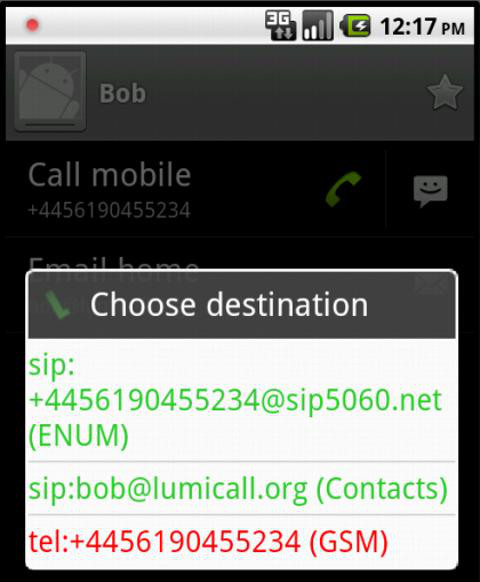
One of the distinguishing features of Lumicall, the free and open SIP/VoIP app for Android, is the unique dialing experience. In fact, even regular softphones for the desktop/laptop don't currently offer the same power when you want to make a call. In my previous blog, I looked at the ENUM technology that underpins part of this compelling new user experience. Here we can step back and look at the bigger picture. Choice is important, sneak preview of Sunday's talk at FOSDEM The fundamental reason for the dialing popup is to give the user choice. Choice is important. With that in mind, one of the key revelations that I will discuss during my talk about Lumicall this Sunday at FOSDEM is that I would like to give users the opportunity to use the Lumicall dialer with other VoIP apps, including Jitsi for Android and CSipSimple. To facilitate this, I hope to separate the dialing logic from the app and make it available as a standalone app or library module that can be used in any free communications software. Users expect convenience, Lumicall tries to deliver Have you noticed how many people will pick up their mobile phone to make a call even when they have a regular phone within reach? Have you found yourself calling your friends' mobile numbers even though you have their home and office numbers in your address book too? These mobile network calls are often at least ten times more expensive than landline calls and by definition they are infinitely more expensive than free calls made over the Internet. So why do people behave this way? The answer is simple: convenience. The caller does not want to make multiple efforts to dial, nor does he want to lose one or two minutes speaking to a secretary, colleague or spouse of the person he is trying to call. Dialing from the address book in his own mobile phone and calling the mobile number of the person he wants to speak with is the shortest path to success. It is efficient, it is compelling and it is what users expect. Free software products wanting to make an impact need to carefully align themselves with these user expectations and that is exactly what Lumicall tries to do. Choose your own adventure: dial the digits, use the address book or surf your call history Any of these everyday dialing practices triggers the Lumicall dialer. In this example, the user is trying to call Bob from the address book: While the user may have simply pressed the "call" button, Lumicall alerts them to several ways that they may proceed:

  • The first choice is a SIP address found in the ENUM directory, sip:+4456190455234@sip5060.net. Lumicall will take all the phone numbers associated with Bob in the address book and report any ENUM results associated with them. Here, just a single ENUM result is display.
  • The second choice is a SIP address constructed from Bob's email address. Lumicall found the email address in the address book entry and discovered that Bob's domain, lumicall.org, has a NAPTR record for SIP. Based on this discovery, Lumicall feels there is a good probability the email address is also a SIP address. If multiple email addresses are in the address book, they will all be checked for NAPTR.
  • (Not shown in the picture) if Lumicall has been configured to use a SIP-to-PSTN gateway account, it will display the option to call Bob's number through the gateway in blue
  • Finally, at the bottom of the list, Lumicall offers the option to call Bob's number in the normal manner, through the GSM network. This option is colour-coded in red to emphasize that it is usually the most expensive.
The tip of the iceberg This experience is a big improvement over the experience of the old rotary dial but it could also be taken even further. People don't always respond to their SIP address, especially if they live in a country where mobile data is not yet the norm. These are areas where Lumicall could be improved. For example, we could use SIP presence to make sure that Bob really is online before displaying the SIP option. This would reduce frustration and boost confidence in SIP. We could even go beyond that: Bob could use the SIP presence mechanism to advertise whether or not he is on a slow mobile data network or a fast network like 4G or wifi. You may choose to defer your call to Bob until he enters wifi coverage where the call quality is likely to be better and maybe video will be possible. This latter opportunity also has privacy implications: Bob may only choose to share that live insight into his network coverage with contacts he trusts. Try it at FOSDEM I will spend some time around the real-time lounge at FOSDEM and would be delighted to get feedback from users who are trying Lumicall, FreePhoneBox.net, JSCommunicator, DruCall or the new Debian SIP service.

Emanuele Rocca: Antifeatures and Antibugs

Software Engineering distinguishes between software features and software bugs. It is usually understood that features are positive, expected characteristics of a computer program. Features make users happy by allowing them to do something useful, interesting, or fun. Something good, anyways. Bugs are instead undesirable and annoying. You're sitting there at your computer writing a long email and the software crashes right before your email is sent. Bad stuff. Features are generally implemented by programmers on purpose, whereas bugs are purely unintentional. They are mistakes. You don't make a mistake on purpose. We might at this point be inclined to think that: i) what is good for users is done on purpose by software manufacturers; ii) what is bad for users was not meant to be. It happened by mistake. Here is a handy table to visualize this idea:
On purpose By mistake
Good Feature
Bad Bug
It seems to make a lot of sense. But you might have noticed that two cells of the table are empty. Right! In a great talk titled When Free Software isn't better, Benjamin Mako Hill mentions the concept of antifeatures, and how they relate to Free Software. Antifeatures are features that make the software do something users will hate. Something they will hate so much they would pay to have those features removed, if that's an option. Microsoft Windows 7 is used in the talk to provide some examples of software antifeatures: the Starter Edition does not allow users to change their background image. Also, it limits the amount of usable memory on the computer to 2GBs, regardless of how much memory the system actually has. Two antifeatures engineered to afflict users to the point that they will purchase a more expensive version of the software, if they have the means to do that. I have another nice example. The Spotify music streaming service plays advertisements between songs every now and then. To make sure users are annoyed as much as possible, Spotify automatically pauses an advertisement if it detects that the volume is being lowered. A poor Spotify user even tried to report the bug on The Spotify Community forum, only to find out that what she naively considered as a software error was "intentional behavior". A spectacular antifeature indeed. Whenever a piece of technology does something you most definitely do not want it to do, such as allowing the NSA to take complete control of your Apple iPhone, including turning on its microphone and camera against your will, that's an antifeature.
On purpose By mistake
Good Feature
Bad Antifeature Bug
Both bugs and antifeatures are bad for users. The difference between them is that antifeatures are engineered. Time and money are spent to make sure the goal is reached. A testing methodology is followed. "Are we really sure customers cannot change their wallpaper even if they try very very hard?" Engineering processes, of course, can fail. If the poor devils at Microsoft who implemented those harassments would have made a mistake that allows users to somehow change their wallpaper on Windows Starter... Well, I would call that a glorious antibug.
On purpose By mistake
Good Feature Antibug
Bad Antifeature Bug
There is no place for antifeatures in Free and Open Source Software. Free Software gives users control over what their software does. Imagine Mozilla adding a feature to Firefox that sets your speakers volume to 11 and starts playing a random song from the black metal artist Burzum every time you add a bookmark, unless you pay for Mozilla Firefox Premium Edition. The source code for Firefox is available under a free license. People who are not into Burzum's music would immediately remove this neat antifeature. I have spent many years of my life advocating Free and Open Source Software, perhaps using the wrong arguments. Mako's talk made me think about all this (thanks mate!). All these years I've been preaching about the technical superiority of Free Software, despite evidence of thousands of bugs and usability issues in the very programs I am using, and contributing to develop. Free Software is not better than Proprietary Software per se. Sometimes it is, sometimes it's not. But it gives you control, and freedom. When it annoys you, when it doesn't do what you expect and want, you can be sure it's not on purpose. And we can fix it together.

Petter Reinholdtsen: A fist full of non-anonymous Bitcoins

Bitcoin is a incredible use of peer to peer communication and encryption, allowing direct and immediate money transfer without any central control. It is sometimes claimed to be ideal for illegal activity, which I believe is quite a long way from the truth. At least I would not conduct illegal money transfers using a system where the details of every transaction are kept forever. This point is investigated in USENIX ;login: from December 2013, in the article "A Fistful of Bitcoins - Characterizing Payments Among Men with No Names" by Sarah Meiklejohn, Marjori Pomarole,Grant Jordan, Kirill Levchenko, Damon McCoy, Geoffrey M. Voelker, and Stefan Savage. They analyse the transaction log in the Bitcoin system, using it to find addresses belong to individuals and organisations and follow the flow of money from both Bitcoin theft and trades on Silk Road to where the money end up. This is how they wrap up their article:
"To demonstrate the usefulness of this type of analysis, we turned our attention to criminal activity. In the Bitcoin economy, criminal activity can appear in a number of forms, such as dealing drugs on Silk Road or simply stealing someone else s bitcoins. We followed the flow of bitcoins out of Silk Road (in particular, from one notorious address) and from a number of highly publicized thefts to see whether we could track the bitcoins to known services. Although some of the thieves attempted to use sophisticated mixing techniques (or possibly mix services) to obscure the flow of bitcoins, for the most part tracking the bitcoins was quite straightforward, and we ultimately saw large quantities of bitcoins flow to a variety of exchanges directly from the point of theft (or the withdrawal from Silk Road). As acknowledged above, following stolen bitcoins to the point at which they are deposited into an exchange does not in itself identify the thief; however, it does enable further de-anonymization in the case in which certain agencies can determine (through, for example, subpoena power) the real-world owner of the account into which the stolen bitcoins were deposited. Because such exchanges seem to serve as chokepoints into and out of the Bitcoin economy (i.e., there are few alternative ways to cash out), we conclude that using Bitcoin for money laundering or other illicit purposes does not (at least at present) seem to be particularly attractive."
These researches are not the first to analyse the Bitcoin transaction log. The 2011 paper "An Analysis of Anonymity in the Bitcoin System" by Fergal Reid and Martin Harrigan is summarized like this:
"Anonymity in Bitcoin, a peer-to-peer electronic currency system, is a complicated issue. Within the system, users are identified by public-keys only. An attacker wishing to de-anonymize its users will attempt to construct the one-to-many mapping between users and public-keys and associate information external to the system with the users. Bitcoin tries to prevent this attack by storing the mapping of a user to his or her public-keys on that user's node only and by allowing each user to generate as many public-keys as required. In this chapter we consider the topological structure of two networks derived from Bitcoin's public transaction history. We show that the two networks have a non-trivial topological structure, provide complementary views of the Bitcoin system and have implications for anonymity. We combine these structures with external information and techniques such as context discovery and flow analysis to investigate an alleged theft of Bitcoins, which, at the time of the theft, had a market value of approximately half a million U.S. dollars."
I hope these references can help kill the urban myth that Bitcoin is anonymous. It isn't really a good fit for illegal activites. Use cash if you need to stay anonymous, at least until regular DNA sampling of notes and coins become the norm. :) As usual, if you use Bitcoin and want to show your support of my activities, please send Bitcoin donations to my address 15oWEoG9dUPovwmUL9KWAnYRtNJEkP1u1b.

Alexander Wirt: everything comes to an end

I was a member of the credativ family for almost 10 years. It was a great and and demanding time where I did things I never imagined I would have to do them :). I started as an apprentice and finished as a technical lead. In the last summer one of my best friends - if not my best - and I developed the idea of me joining his company hs42 as their new Head of IT. The whole concept is interesting, most time I ll do home-office and for ~ 1 week in a month I ll join the company in Oldenburg. After a lot of thinking I accepted that offer. That means that I left credativ in December. Being an open source consultant is interesting on the one hand, but somewhat annoying on the other hand. You will always do new things, but often you are not in the position of designing, deciding or even running them. I was always something that is nowadays known as a devop - a long time before this was getting hip . Now I have the opportunity to design, develop and run my own systems. That also means a little bit windows, but opsi exists :). Running systems on your own is different from the usual consultant work. Being a consultant often means that you design and implement something and after it works you have to give your baby into the hands of someone else. Running them on your own also means you can do constant improvement to something, not only when its broken. The job should give me more time for open source and my family, which is a good thing. It is still a little bit odd to work from home, but being together with your family most of the time is a great thing - and I don t want to miss it. The new job also allows me to work as consultant on my own, so if you need a Debian, E-Mail, Linux or whatever guy that helps you in doing things - get in touch with me. The time at credativ was a great one and I look back with a smile to all the good things. If you need Open Source Support they are the people you should ask. I will stay connected with credativ in many ways.

28 January 2014

Bits from Debian: Debian.org enabled for SIP federation and WebRTC, XMPP/Jabber to follow

Debian System Administrators working in conjunction with pkg-voip team member Daniel Pocock have set up a SIP proxy and TURN server for debian.org. Specifically, the SIP proxy provides a way for Debian Developers to use their Debian email ID as a SIP address for making calls to other project members and exchanging calls with any other domain that is enabled for SIP. The repro SIP proxy from reSIProcate has been chosen for this project. The TURN server provides a mechanism for users of SIP or XMPP (Jabber) to relay audio and video streams through a public IP address when necessary, eliminating many of the quality issues that arise when NAT devices block the media streams in one or both directions. The service allows the users to connect directly with the SIP device or softphone of their choosing, including many of those packaged in Debian such as Jitsi and Empathy or third party solutions like Lumicall or CSipSimple on Android. The SIP proxy also includes a WebRTC interface, allowing Debian Developers to immediately try WebRTC voice and video calls without installing or configuring any software of their own other than a web browser. A second stage of the project involves providing an XMPP (Jabber) server with similar capabilities for federated communications between debian.org users and other domains. Further details will be announced in the weeks ahead. It is a significant feature of the Debian Project philosophy that we can operate the entire project using free software, specifically, using software available in Debian packages running on our own infrastructure and without a dependency on third party cloud solutions.These new services for project members fulfill those expectations. It is particularly relevant for situations where real-time communication (voice or video) collaboration takes place with third parties such as applicants for Google Summer of Code, Outreach Program for Women, sponsors, media and other free software projects. Project specific details and a user guide are available now on the Debian Wiki at http://wiki.debian.org/UnifiedCommunications/DebianDevelopers

Andrew Pollock: [life] Day 2, first day of "daddy daycare"

Today was the first weekday of me taking care of Zoe. We got things started more or less on the same routine that we used to do when she had day care, so we were dressed and ready to roll by about 8am. We baked a batch of mini cornbread muffins, and had them ready by the time my 9:30am chiropractic appointment rolled around, so we took a few with us for morning tea for my chiropractor and his receptionist. I've taken Zoe with me on a few occasions, and speak of her often to my chiropractor. He's a dad himself, and the first few times I brought her in, he juggled for her, so she thinks he's pretty cool. Last night, Zoe had expressed a desire to go to Southbank today. It was initially looking like it'd be too rainy, but by the time I was done with the chiropractor, it looked safe enough to venture out, so we went back home, and I prepared a picnic lunch for us, and we caught a bus over to Southbank. We had a bit of a splash around in the water and then ate lunch. Zoe had a great time alternating between feeding and chasing seagulls, crows, and an ibis. My girlfriend, who works in South Brisbane, walked over and joined us briefly and then we all walked back towards the bus and parted ways. Southbank mid-week is pretty nice. Not too busy. It was a slow walk home from the bus, but the reward of a My Little Pony biscuit was enough to get her racing ahead of me from the corner. After a biscuit and some quiet time, she fell asleep and I've had a couple of hours to read and write blog posts, as well as plan future activities. I'm hoping that we'll have enough time to go birthday present shopping for a 4th birthday party (for twins from Zoe's old day care) that we're going to on Saturday morning after swim class, before Sarah arrives to pick her up, but I'm dubious we'll get time. Zoe's still asleep as I write. There's always tomorrow. We might be best off just baking the second batch of cornbread muffins.

27 January 2014

Richard Hartmann: Conference proceedings

Seems I had exactly the same idea two years ago, down to choosing exactly the same name and directory structure... In case anyone finds it useful, there's Conference proceedings: a public git-annex repository which contains videos from various conferences. As of right now, it contains only FOSDEM up to 2008 and last year's Chaos Communication Congress, 30c3. I expect to add more and more conferences over time and patches are always welcome. Just try and make sure you don't include location data about your own repository in said commits. But there's already something in the works to fix that problem.

Daniel Pocock: A quick look at ENUM mapping telephone numbers to DNS

With my talk about Lumicall at FOSDEM coming this Sunday, I'm going to have a quick look at some of the technologies used in Lumicall over this week. The first is ENUM Introduction to ENUM ENUM, as defined by the IETF, is a convenient and powerful way to map telephone numbers to the latest communications technologies such as SIP, XMPP (Jabber) and web sites. ENUM resolution operates much like reverse DNS lookup:
  • Take the number you want to call and normalize it into E.164 format - in other words, by removing any leading zero and punctuation and adding the country code. For example, for a British number "020 7123 4567", the country code is 44 and so the normalized form of the number is +442071234567
  • Remove the leading plus symbol, reverse the digits and insert a dot between each digit. For our sample number +442071234567, it becomes 7.6.5.4.3.2.1.7.0.2.4.4
  • Choose the ENUM suffix. The official ENUM tree defined by the IETF uses the e164.arpa ENUM suffix. There are several third-party suffixes as well, such as e164.org and for the sip5060.net service, use the suffix e164-addr.sip5060.net. For our example, the full string, with suffix, is 7.6.5.4.3.2.1.7.0.2.4.4.e164.arpa
  • Perform a DNS lookup, typically looking for NAPTR records
Here is an example using dig. The subject number we are looking up is 01865 332244 from the Nominet contact page:
$ dig -t naptr 4.4.2.2.3.3.5.6.8.1.4.4.e164.arpa ; > DiG 9.8.4-rpz2+rl005.12-P1 > -t naptr 4.4.2.2.3.3.5.6.8.1.4.4.e164.arpa
;; global options: +cmd
;; Got answer:
;; ->>HEADER ;; flags: qr rd ra; QUERY: 1, ANSWER: 2, AUTHORITY: 3, ADDITIONAL: 4 ;; QUESTION SECTION:
;4.4.2.2.3.3.5.6.8.1.4.4.e164.arpa. IN NAPTR ;; ANSWER SECTION:
4.4.2.2.3.3.5.6.8.1.4.4.e164.arpa. 86400 IN NAPTR 100 20 "u" "E2U+pstn:tel" "!^(.*)$!tel:\\1!" .
4.4.2.2.3.3.5.6.8.1.4.4.e164.arpa. 86400 IN NAPTR 100 10 "u" "E2U+sip" "!^\\+441865332(.*)$!sip:\\1@nominet.org.uk!" . Ready to use today dlz-ldap-enum is a plugin for bind9 nameservers that can read telephone numbers from LDAP and make them available in real time for DNS lookup Most SIP proxies and related products like Asterisk also support ENUM lookups during the process of routing a call. ENUM dialing from Lumicall When dialing any number from your address book on Android, Lumicall can perform an ENUM lookup against the public ENUM tree and any private ENUM trees you configure. This blog is based on a page I published at sip5060.net

25 January 2014

Ben Hutchings: Looking back on my time at Solarflare, part 1

Friday was my last day at Solarflare Communications, which I joined in 2006 (originally as Level 5 Networks). When I started, Level 5 Networks (L5N) had a 2-port gigabit Ethernet controller called EF1 and a user-level network stack called EtherFabric which ran on Linux. It had nearly completed the Falcon project to develop a 10-gigabit controller (also supporing a 2-port gigabit mode) and was porting EtherFabric to Windows. Later that year, however, L5N merged with Solarflare Communications (SF), which was developing a 10GBASE-T PHY (for 10-gigabit Ethernet over twisted-pair cables). The investors and management saw the opportunity to create an integrated 10GBASE-T LAN-on-motherboard chip that would be attractive to OEMs and so had the potential for mass sales. EtherFabric was put on the back-burner, but regular net drivers for Linux, Windows and other operating systems became more important. In a change from my previous jobs, my initial role at L5N was to maintain and extend the in-house test automation software, Runbench, written in Python. I worked with Dickon Reed who had written most of Runbench up to then. One of my first major tasks was to extend it to cover DUTs running Windows. Aside from changing Runbench itself, I wrote a simple SSH server to be installed on DUTs, using the Twisted.Python framework. (Cygwin's port of OpenSSH wasn't suitable for running a lot of native Windows commands.) I rewrote the test-installation script for the Windows driver itself, converting it to Python (with a C extension to get around the WOW64 nonsense). As Windows does not allow loading a driver just once (like insmod in Linux), except by using the kernel debugger, I added a time check in the driver so the test-installation script can make it fail early when reloaded after a reboot, so that a crasher bug in the probe path would usually be recoverable. In 2007 I persuaded management in Cambridge to loan several older servers to DebConf. I took them there and back by car, and they were used to convert video for live streams and recordings. (This was repeated in 2009.) I was also asked to work on other small development tasks, including some cleanup on the Linux net driver (sfc). In mid-2007, when SF decided it was time to get sfc upstream (in-tree), I joined Steve Hodgson and Robert Stonehouse in working on that. Out-of-tree (separately distributed) drivers for Linux normally need a large number of preprocessor conditions for compatibility with Linux's kernel module API across a range of supported versions. They may also implement some features with a driver-specific interface that should be replaced with a standard interface (possibly including the work to define that standard). They may not comply with the kernel coding style or unwritten conventions for kernel code. All of these problems were present and had to be dealt with. As part of this work, I extended unifdef so that it could be used to remove all of the backward-compatibility and not-for-upstream code without introducing extra blank lines. I could then export the out-of-tree driver from CVS(!) into a kernel source tree automatically and turn it into a patch or patch series that would stand a chance of being acceptable upstream. Our first few attempts got little response, but eventually we newbies got the message that the driver was simply too big for a single submission and that putting patches on a web site because they're too big for the list was not a solution. In the next week, I removed about half of the code (on a git branch), resulting in a relatively lean driver that could be sent to the netdev list. And finally the 9th (I think) submission was accepted. Following this, I continued to work on sfc but was also brought into the Siena project. Siena (SFL9021) was the LAN-on-motherboard chip that had been planned following the merger. It combined a dual-port controller based on Falcon with a 10GBASE-T PHY and a management controller (MC) to support Lights-Out Management (LOM). (Since 10GBASE-T has not taken off, it is now mostly sold as the SFC9020 variant in which the PHY is disabled.) I worked on some of the test framework and test cases for validating the controller design in software simulation and FPGA. In the course of this I learned to read and (somewhat) understand the chip design written in Verilog, but only made a single trivial fix to it. In August 2009, the first Siena ASICs came back from the fab. There were a few ASIC-specific bugs but all of them were quickly worked around in firmware, so it would soon be ready for production. But there was much work still to be done on the driver and firmware. The firmware had until then been running in a smaller block of RAM with no peripherals to manage, while sfc had earlier been modified just enough to configure a sim or FPGA for running a userland test application. sfc now had many special cases scattered around it, and would tell the MC firmware to peek and poke registers that were no longer directly accessible from the host. The software and firmware developers had agreed that, in order to support LOM, the MC would be responsible for managing the ports and all peripherals and drivers would send higher-level requests to the MC. As a bonus, this removed the need for the driver to know the details of each new board, so that it would not be necessary to backport sfc into distribution kernels very often. Over the next few months, the firmware team did an excellent job of defining and implementing those operations, including writing the driver-side functions to invoke them. Meanwhile, Steve and I concentrated on refactoring sfc so most of the Falcon/Siena differences could be abstracted through a few structures with function pointers. The refactoring and new code for Siena were completed and submitted upstream in several large patch series in October and November. In fact, there were so many patches that Solarflare appeared in LWN's table of who wrote Linux 2.6.33 (as did I, thanks also to another patch series adding firmware metadata to many drivers). Sadly we had missed Linux 2.6.32 which was a longterm stable branch and used in many distributions, but I was able to get this version backported into all the major distributions over the next year. (To be continued.)

Next.

Previous.

