Search Results: "ina"

12 June 2016

Mario Lang: A Raspberry Pi Zero in a Handy Tech Active Star 40 Braille Display

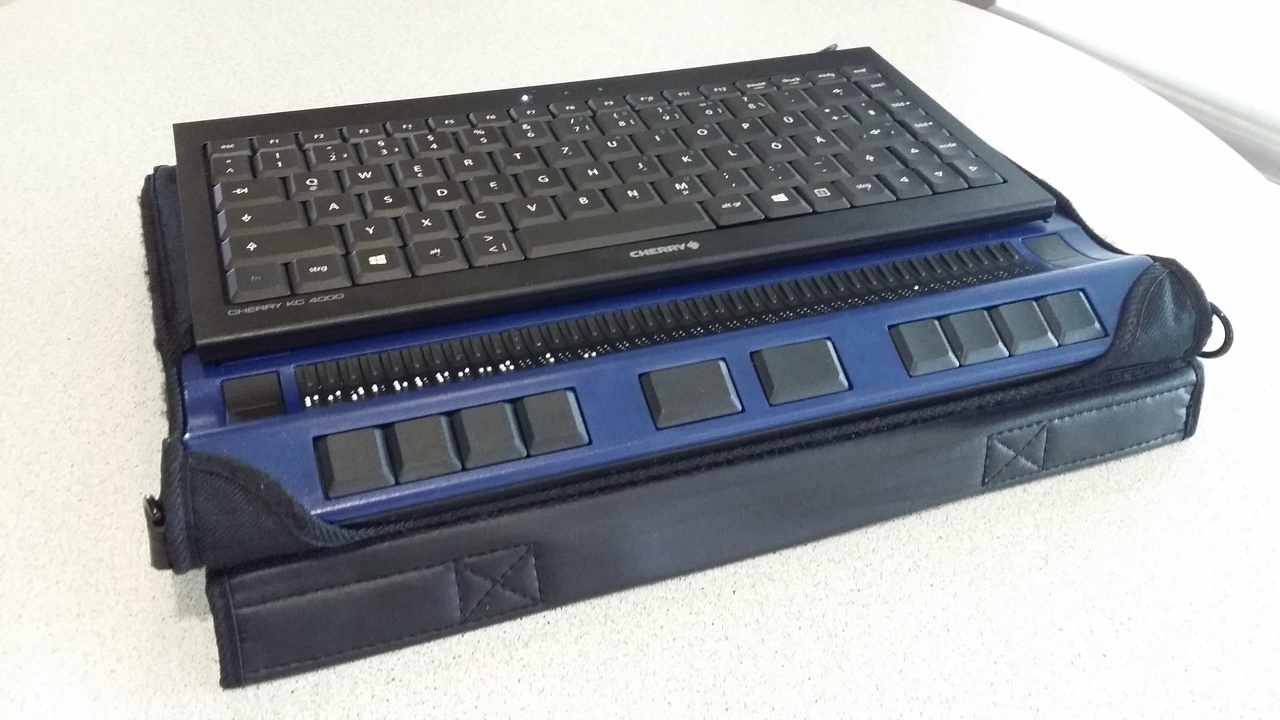
TL;DR: I put a $5 Raspberry Pi Zero, a Bluetooth USB dongle, and the required adapter cable into my new Handy Tech Active Star 40 braille display. An internal USB port provides the power. This has transformed my braille display into an ARM-based, monitorless, Linux laptop that has a keyboard and a braille display. It can be charged/powered via USB so it can also be run from a power bank or a solar charger, thus potentially being able to run for days, rather than just hours, without needing a standard wall-jack. [picture: a Raspberry Pi Zero embedded within an Active Star 40] [picture: a braille display with a keyboard on top and a Raspberry Pi Zero inside]
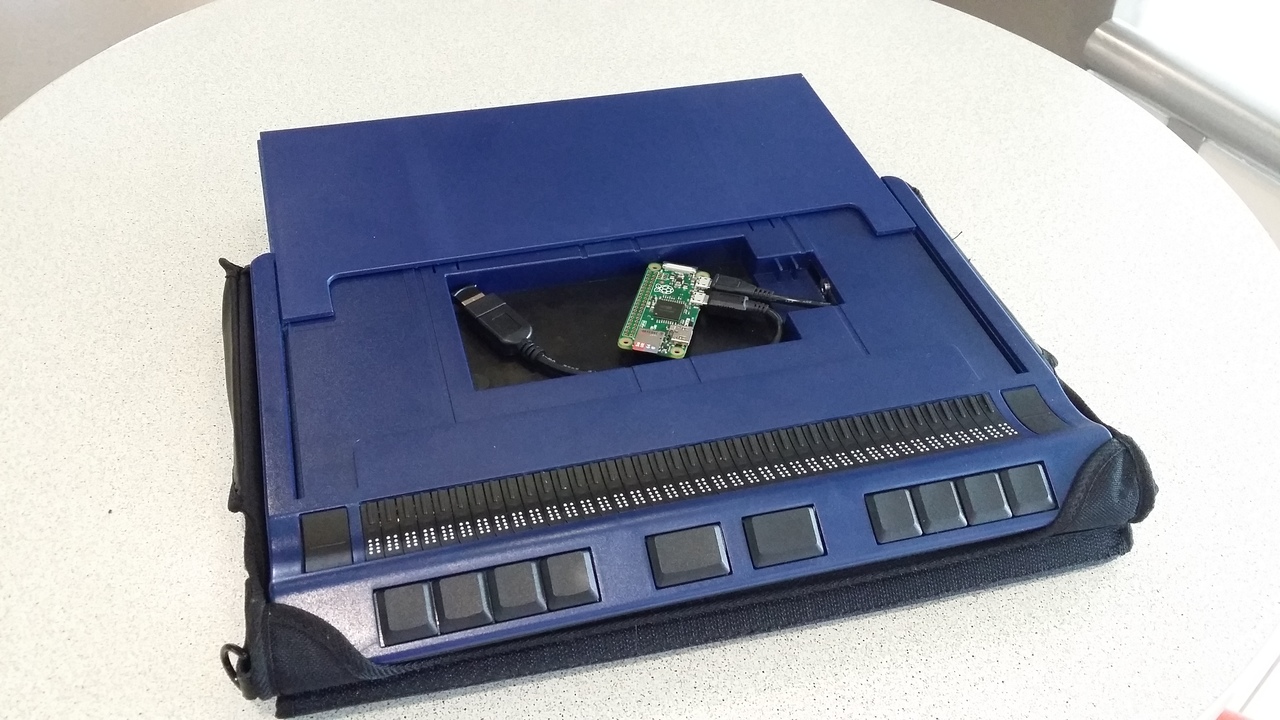
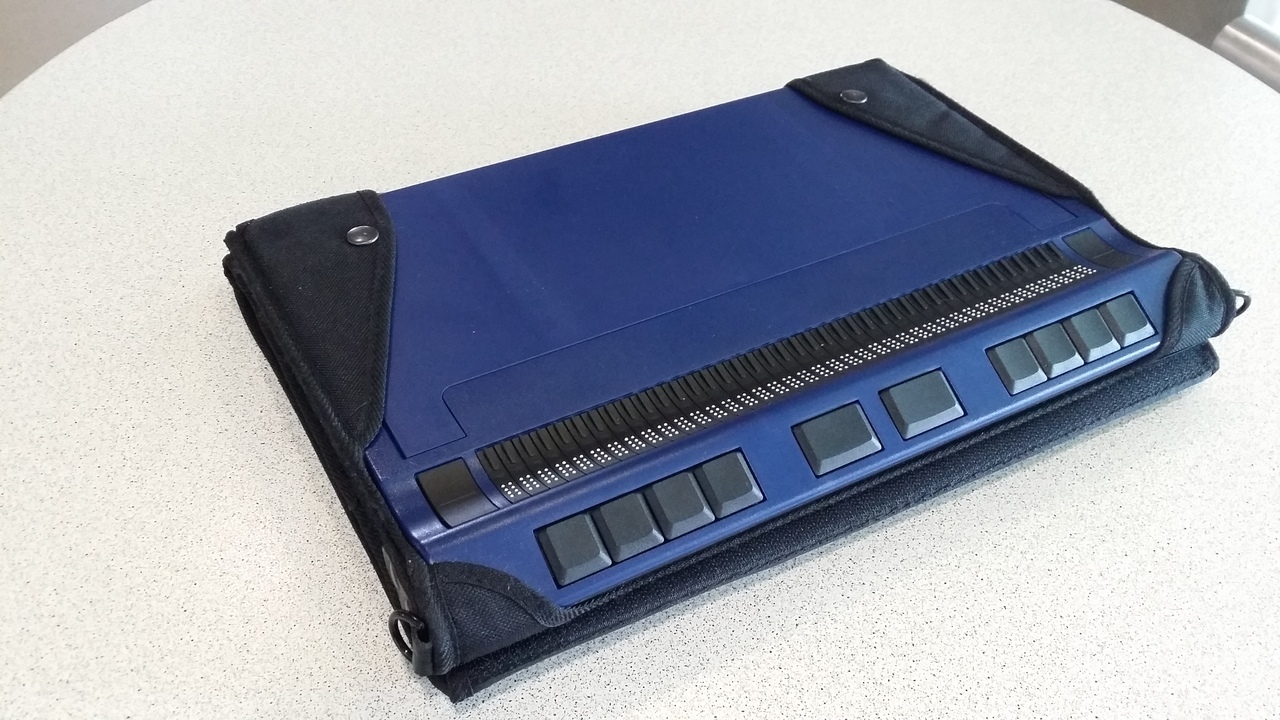
Some Background on Braille Display Form Factors Braille displays come in various sizes. There are models tailored for desktop use (with 60 cells or more), models tailored for portable use with a laptop (usually with 40 cells), and, nowadays, there are even models tailored for on-the-go use with a smartphone or similar (with something like 14 or 18 cells). Back in the old days, braille displays were rather massive. A 40-cell braille display was typically about the size of a 13" laptop. In modern times, manufacturers have managed to reduce the size of the internals such that a 40-cell display can be placed in front of a laptop or keyboard instead of placing the laptop on top of the braille display. While this is a nice achievement, I personally haven't found it to be very convenient because you now have to place two physically separate devices on your lap. It's OK if you have a real desk, but, at least in my opinion, if you try to use your laptop as its name suggests, it's actually inconvenient to use a small form factor, 40-cell display. For this reason, I've been waiting for a long-promised new model in the Handy Tech Star series. In 2002, they released the Handy Tech Braille Star 40, which is a 40-cell braille display with enough space to put a laptop directly on top of it. To accommodate larger laptop models, they even built in a little platform at the back that can be pulled out to effectively enlarge the top surface. Handy Tech has now released a new model, the Active Star 40, that has essentially the same layout but modernized internals. [picture: a plain Active Star 40] You can still pull out the little platform to increase the space that can be used to put something on top. [picture: an Active Star 40 with extended platform and a laptop on top] But, most conveniently, they've designed in an empty compartment, roughly the size of a modern smartphone, beneath the platform. The original idea was to actually put a smartphone inside, but this has turned out (at least to me) to not be very feasible. Fortunately, they thought about the need for electricity and added a Micro USB cable terminating within the newly created, empty compartment. My first idea was to put a conventional Raspberry Pi inside. When I received the braille display, however, we immediately noticed that a standard-sized rpi is roughly 3mm too high to fit into the empty compartment. Fortunately, though, a co-worker noticed that the Raspberry Pi Zero was available for order. The Raspberry Pi Zero is a lot thinner, and fits perfectly inside (actually, I think there's enough space for two, or even three, of them). So we ordered one, along with some accessories like a 64GB SDHC card, a Bluetooth dongle, and a Micro USB adapter cable. The hardware arrived a few days later, and was immediately bootstrapped with the assistance of very helpful friends. It works like a charm!

Technical Details The backside of the Handy Tech Active Star 40 features two USB host ports that can be used to connect devices such as a keyboard. A small form-factor, USB keyboard with a magnetic clip-on is included. When a USB keyboard is connected, and when the display is used via Bluetooth, the braille display firmware additionally offers the Bluetooth HID profile, and key press/release events received via the USB port are passed through to it. I use the Bluetooth dongle for all my communication needs. Most importantly, BRLTTY is used as a console screen reader. It talks to the braille display via Bluetooth (more precisely, via an RFCOMM channel). The keyboard connects through to Linux via the Bluetooth HID profile. Now, all that is left is network connectivity. To keep the energy consumption as low as possible, I decided to go for Bluetooth PAN. It appears that the tethering mode of my mobile phone works (albeit with a quirk), so I can actually access the internet as long as I have cell phone reception. Additionally, I configured a Bluetooth PAN access point on my desktop machines at home and at work, so I can easily (and somewhat more reliably) get IP connectivity for the rpi when I'm near one of these machines. I plan to configure a classic Raspberry Pi as a mobile Bluetooth access point. It would essentially function as a Bluetooth to ethernet adapter, and should allow me to have network connectivity in places where I don't want to use my phone.
BlueZ 5 and PAN It was a bit challenging to figure out how to actually configure Bluetooth PAN with BlueZ 5. I found the bt-pan python script (see below) to be the only way so far to configure PAN without a GUI. It handles both ends of a PAN network, configuring a server and a client. Once instructed to do so (via D-Bus) in client mode, BlueZ will create a new network device - bnep0 - once a connection to a server has been established. Typically, DHCP is used to assign IP addresses for these interfaces. In server mode, BlueZ needs to know the name of a bridge device to which it can add a slave device for each incoming client connection. Configuring an address for the bridge device, as well as running a DHCP server + IP Masquerading on the bridge, is usually all you need to do.
A Bluetooth PAN Access Point with Systemd I'm using systemd-networkd to configure the bridge device. /etc/systemd/network/pan.netdev:
[NetDev]
Name=pan
Kind=bridge
ForwardDelaySec=0
/etc/systemd/network/pan.network:
[Match]
Name=pan
[Network]
Address=0.0.0.0/24
DHCPServer=yes
IPMasquerade=yes
Now, BlueZ needs to be told to configure a NAP profile. To my surprise, there seems to be no way to do this with stock BlueZ 5.36 utilities. Please correct me if I'm wrong. Luckily, I found a very nice blog post, as well as an accommodating Python script that performs the required D-Bus calls. For convenience, I use a Systemd service to invoke the script and to ensure that its dependencies are met. /etc/systemd/system/pan.service:
[Unit]
Description=Bluetooth Personal Area Network
After=bluetooth.service systemd-networkd.service
Requires=systemd-networkd.service
PartOf=bluetooth.service
[Service]
Type=notify
ExecStart=/usr/local/sbin/pan
[Install]
WantedBy=bluetooth.target
/usr/local/sbin/pan:
#!/bin/sh
# Ugly hack to work around #787480
iptables -F
iptables -t nat -F
iptables -t mangle -F
iptables -t nat -A POSTROUTING -o eth0 -j MASQUERADE
exec /usr/local/sbin/bt-pan --systemd --debug server pan
This last file wouldn't be necessary if IPMasquerade= were supported in Debian right now (see #787480). After the obligatory systemctl daemon-reload and systemctl restart systemd-networkd, you can start your Bluetooth Personal Area Network with systemctl start pan.
Bluetooth PAN Client with Systemd Configuring the client is also quite easy to do with Systemd. /etc/systemd/network/pan-client.network:
[Match]
Name=bnep*
[Network]
DHCP=yes
/etc/systemd/system/pan@.service:
[Unit]
Description=Bluetooth Personal Area Network client
[Service]
Type=notify
ExecStart=/usr/local/sbin/bt-pan --debug --systemd client %I --wait
Now, after the usual configuration reloading, you should be able to connect to a specific Bluetooth access point with:
systemctl start pan@00:11:22:33:44:55
Pairing via the Command Line Of course, the server and client-side service configuration require a pre-existing pairing between the server and each of its clients. On the server, start bluetoothctl and issue the following commands:
power on
agent on
default-agent
scan on
scan off
pair XX:XX:XX:XX:XX:XX
trust XX:XX:XX:XX:XX:XX
Once you've set scan mode to on, wait a few seconds until you see the device you're looking for scroll by. Note its device address, and use it for the pair and (optional) trust commands. On the client, the sequence is essentially the same except that you don't need to issue the trust command. The server needs to trust a client in order to accept NAP profile connections from it without waiting for manual confirmation by the user. I'm actually not sure if this is the optimal sequence of commands. It might be enough to just pair the client with the server and issue the trust command on the server, but I haven't tried this yet.
Enabling Use of the Bluetooth HID Profile Essentially the same as above also needs to be done in order to use the Bluetooth HID profile of the Active Star 40 on Linux. However, instead of agent on, you need to issue the command agent KeyboardOnly. This explicitly tells bluetoothctl that you're specifically looking for a HID profile.
Configuring Bluetooth via the Command Line Feels Vague While I'm very happy that I actually managed to set all of this up, I must admit that the command-line interface to BlueZ feels a bit incomplete and confusing. I initially thought that agents were only for PIN code entry. Now that I've discovered that "agent KeyboardOnly" is used to enable the HID profile, I'm not sure anymore. I'm surprised that I needed to grab a script from a random git repository in order to be able to set up PAN. I remember, with earlier version of BlueZ, that there was a tool called pand that you could use to do all of this from the command-line. I don't seem to see anything like that for BlueZ 5 anymore. Maybe I'm missing something obvious?
Performance The data rate is roughly 120kB/s, which I consider acceptable for such a low power solution. The 1GHz ARM CPU actually feels sufficiently fast for a console/text-mode person like me. I'll rarely be using much more than ssh and emacs on it anyway.
Console fonts and screen dimensions The default dimensions of the framebuffer on the Raspberry Pi Zero are a bit unexpectedly strange. fbset reports that the screen dimension is 656x416 pixels (of course, no monitor connected). With a typical console font of 8x16, I got 82 columns and 26 lines. With a 40 cell braille display, the 82 columns are very inconvenient. Additionally, as a braille user, I would like to be able to view Unicode braille characters in addition to the normal charset on the console. Fortunately, Linux supports 512 glyphs, while most console fonts do only provide 256. console-setup can load and combine two 256-glyph fonts at once. So I added the following to /etc/default/console-setup to make the text console a lot more friendly to braille users:
SCREEN_WIDTH=80
SCREEN_HEIGHT=25
FONT="Lat15-Terminus16.psf.gz brl-16x8.psf"

Note

You need console-braille installed for brl-16x8.psf to be available.

Further Projects There's a 3.5mm audio jack inside the braille display as well. Unfortunately, there are no converters from Mini-HDMI to 3.5mm audio that I know of. It would be very nice to be able to use the sound card that is already built into the Raspberry Pi Zero, but, unfortunately, this doesn't seem possible at the moment. Alternatively, I'm looking at using a Micro USB OTG hub and an additional USB audio adapter to get sound from the Raspberry Pi Zero to the braille display's speakers. Unfortunately, the two USB audio adapters I've tried so far have run hot for some unknown reason. So I have to find some other chipset to see if the problem goes away. A little nuisance, currently, is that you need to manually power off the Raspberry, wait a few seconds, and then power down the braille display. Turning the braille display off cuts power delivery via the internal USB port. If this is accidentally done too soon then the Raspberry Pi Zero is shut down ungracefully (which is probably not the best way to do it). We're looking into connecting a small, buffering battery to the GPIO pins of the rpi, and into notifying the rpi when external power has dropped. A graceful, software-initiated shutdown can then be performed. You can think of it as being like a mini UPS for Micro USB.
The image If you are a happy owner of a Handy Tech Active Star 40 and would like to do something similar, I am happy to share my current (Raspbian Stretch based) image. In fact, if there is enough interest by other blind users, we might even consider putting a kit together that makes it as easy as possible for you to get started. Let me know if this could be of interest to you.
Thanks Thanks to Dave Mielke for reviewing the text of this posting. Thanks to Simon Kainz for making the photos for this article. And I owe a big thank you to my co-workers at Graz University of Technology who have helped me a lot to bootstrap really quickly into the rpi world.
P.S. My first tweet about this topic is just five days ago, and apart from the soundcard not working yet, I feel like the project is already almost complete! By the way, I am editing the final version of this blog posting from my newly created monitorless ARM-based Linux laptop via an ssh connection to my home machine.

11 June 2016

Simon D saulniers: [GSOC] Week 1 - Report

I have been working on writing serializable structure for remote filtering of values on the distributed hash table OpenDHT. This structure is called Query.

What s done The implementation of the base design with other changes have been made. You can see evolution on the matter here; Changes allow to create a Query with a SQL-ish statement like the following
Query q("SELECT * WHERE id=5");
You can then use this query like so
get(hash, getcb, donecb, filter, "SELECT * WHERE id=5");
I verified the working state of the code with the dhtnode. I have also done some tests using our python benchmark scripts.

What s next
  • Value pagination;
  • Optimization of put operations with query for ids before put, hence avoiding potential useless traffic.

Thoughts The Query is the key part for optimizing my initial work on data persistence on the DHT. It will enhance the DHT on more than one aspects. I have to point out it would not have been possible to do that before our major refactoring we introduced in 0.6.0.

Shirish Agarwal: The road to debconf 2016, tourism and arts.

A longish blog post, please bear, a second part of the blog post would be published in few days from now. My fixed visa finally arrived, yeah:) But this story doesn t start here, it starts about a year back. While I have been contributing to Debian in my free time over the years, and sometimes paid time as well, I had never thought of going overseas as the experiences I knew from friends and relatives, it isn t easy to get all the permissions and paperwork done to say the least (bureaucracy @ work). But last year, when Debconf 15 was being launched, there are/were 2-3 friends of mine who are studying, doing their Ph.D. in some computer/web stuff, living in Germany currently that they goaded me to apply. The first few times I gave some standard excuses, but when they kept on for a while, just to shut them up I applied to the debconf team applying for food, accommodation and travel sponsorship. I didn t have high hopes as there obviously are many more talented peers around me who understand FOSS and Debian at a much more fundamental, philosophical as well as technical level than me. Much to my surprise though, about a month (and around two or three weeks just before the event was about to take place) I got the bursary/sponsorships for food, accommodation as well as travel. I was unsure that the remaining time was enough to get a visa hence declined that time around. That whole episode gave me the confidence that perhaps my application would be accepted if I applied again. Using my previous years understanding, decided to give it a shot again as this would also enable me to get a feel of visa bureaucracy as well as gain a bit of novice understanding about what factors go in choosing a flight and believe me the latter part proved to be pretty confusing. While the visa business seems easy, the form at least is easy and what they ask, it can be troublesome as far as visa-processing process is concerned. It took a better part of the month to get the visa which I needed. The in-between time is and can be a bit stressful as you have committed funds for travel i.e. the airline tickets and are in a limbo as you didn t know that if the visa is cancelled for some reason, your tickets would be refunded or not. A little history is needed and hopefully is helpful for anybody who s applying for a short-stay Visa in South Africa. Exactly, A month and day back I had applied for visa. The visa I had applied for is 17 days as the flights within my budget was for those days only. The visa I got was for 10 days only which was ending in the middle of the conference. I tried many avenues to get information and was told that I needed to write a correction letter telling/sharing the information about the correct time period and dates in BOLD with a heavier weight/point which is what I did and gave to VFS office without any further payment on my part. It took a bit more time than the first time around but the consulate co-operated. While I can understand the oversight as they probably get more visas requests along with special and urgent requests so such occurrences can happen. I am and was happy that there was a recourse rather than starting from scratch which probably would have made me more anxious due to the first experience . Apparently I was lucky that I had done with Qatar Airways as later came to know that there are other airways which don t refund money even after visa rejection . This information I got to know pretty late in the game otherwise I wouldn t have been much stressed. As had committed knew had to go the whole hog and whatever barriers are there, have overcome at least as far as the visa part/process is concerned. Now after few days, will probably start to worry about the actual travel, part nervousness, part excitement, nervousness as it will be an alien land, am obese so traveling economy on 787-8 and 777-300 ER will be tricky. The 787-8 will probably be a rough ride as it s a 9 hr. journey and the seat are a mere 18 , the cattle class as shared by one of our esteemed politicians. This blame has to do with Boeing 787 rather than anybody else. Hopefully, if there is a next time, would make better choices. Anyways,have selected an aisle seat so that will be able to walk every hr. or so to get the circulation in legs going as leg room in economy is not much from my domestic air travel experiences. If I do survive the travel, then will see South Africa and try to get some free time and explore South Africa and try to figure out how are they able to get one and half time tourists while we get around half figure for a whole year even though we are bigger (area-wise) to South Africa. I did find something positive for us as well, it s not all doldrums all around. Now, I had been thinking about if I know any South African music and movies. I had explored djembe while growing up in teens but other than that, not much. The only music I have heard is Harry Belafonte . So I hope to bring some Indian movies and music with me so that people if they have not explored Bollywood as well as Indian classical music could explore some of it, of course it will be pale imitation of what Sawai Gandharva Music Festival for instance gives. I also hope to hear and get some music and movies to learn more about South Africa.
Filed under: Miscellenous Tagged: #bollywood, #Debconf Germany 2015, #Debconf South Africa 2016, #Debconf15, #Debconf16, #djembe, #South-African consulate, music, tourism, visa

Paul Tagliamonte: It's all relative

As nearly anyone who's worked with me will attest to, I've long since touted nedbat's talk Pragmatic Unicode, or, How do I stop the pain? as one of the most foundational talks, and required watching for all programmers. The reason is because netbat hits on something bigger - something more fundamental than how to handle Unicode -- it's how to handle data which is relative. For those who want the TL;DR, the argument is as follows: Facts of Life:
  1. Computers work with Bytes. Bytes go in, Bytes go out.
  2. The world needs more than 256 symbols.
  3. You need both Bytes and Unicode
  4. You cannot infer the encoding of bytes.
  5. Declared encodings can be Wrong
Now, to fix it, the following protips:
  1. Unicode sandwich
  2. Know what you have
  3. TEST
Relative Data I've started to think more about why we do the things we do when we write code, and one thing that continues to be a source of morbid schadenfreude is watching code break by failing to handle Unicode right. It's hard! However, watching what breaks lets you gain a bit of insight into how the author thinks, and what assumptions they make. When you send someone Unicode, there are a lot of assumptions that have to be made. Your computer has to trust what you (yes, you!) entered into your web browser, your web browser has to pass that on over the network (most of the time without encoding information), to a server which reads that bytestream, and makes a wild guess at what it should be. That server might save it to a database, and interpolate it into an HTML template in a different encoding (called Mojibake), resulting in a bad time for everyone involved. Everything's awful, and the fact our computers can continue to display text to us is a goddamn miracle. Never forget that. When it comes down to it, when I see a byte sitting on a page, I don't know (and can't know!) if it's Windows-1252, UTF-8, Latin-1, or EBCDIC. What's a poem to me is terminal garbage to you. Over the years, hacks have evolved. We have magic numbers, and plain ole' hacks to just guess based on the content. Of course, like all good computer programs, this has lead to its fair share of hilarious bugs, and there's nothing stopping files from (validly!) being multiple things at the same time. Like many things, it's all in the eye of the beholder. Timezones Just like Unicode, this is a word that can put your friendly neighborhood programmer into a series of profanity laden tirades. Go find one in the wild, and ask them about what they think about timezone handling bugs they've seen. I'll wait. Go ahead. Rants are funny things. They're fun to watch. Hilarious to give. Sometimes just getting it all out can help. They can tell you a lot about the true nature of problems. It's funny to consider the isomorphic nature of Unicode rants and Timezone rants. I don't think this is an accident. U n i c o d e timezone Sandwich Ned's Unicode Sandwich applies -- As early as we can, in the lowest level we can (reading from the database, filesystem, wherever!), all datetimes must be timezone qualified with their correct timezone. Always. If you mean UTC, say it's in UTC. Treat any unqualified datetimes as "bytes". They're not to be trusted. Never, never, never trust 'em. Don't process any datetimes until you're sure they're in the right timezone. This lets the delicious inside of your datetime sandwich handle timezones with grace, and finally, as late as you can, turn it back into bytes (if at all!). Treat locations as tzdb entries, and qualify datetime objects into their absolute timezone (EST, EDT, PST, PDT) It's not until you want to show the datetime to the user again should you consider how to re-encode your datetime to bytes. You should think about what flavor of bytes, what encoding -- what timezone -- should I be encoding into? TEST Just like Unicode, testing that your code works with datetimes is important. Every time I think about how to go about doing this, I think about that one time that mjg59 couldn't book a flight starting Tuesday from AKL, landing in HNL on Monday night, because United couldn't book the last leg to SFO. Do you ever assume dates only go forward as time goes on? Remember timezones. Construct test data, make sure someone in New Zealand's +13:45 can correctly talk with their friends in Baker Island's -12:00, and that the events sort right. Just because it's Noon on New Years Eve in England doesn't mean it's not 1 AM the next year in New Zealand. Places a few miles apart may go on Daylight savings different days. Indian Standard Time is not even aligned on the hour to GMT (+05:30)! Test early, and test often. Memorize a few timezones, and challenge your assumptions when writing code that has to do with time. Don't use wall clocks to mean monotonic time. Remember there's a whole world out there, and we only deal with part of it. It's also worth remembering, as Andrew Pendleton pointed out to me, that it's possible that a datetime isn't even unique for a place, since you can never know if 2016-11-06 01:00:00 in America/New_York (in the tzdb) is the first one, or second one. Storing EST or EDT along with your datetime may help, though! Pitfalls Improper handling of timezones can lead to some interesting things, and failing to be explicit (or at least, very rigid) in what you expect will lead to an unholy class of bugs we've all come to hate. At best, you have confused users doing math, at worst, someone misses a critical event, or our security code fails. I recently found what I regard to be a pretty bad bug in apt (which David has prepared a fix for and is pending upload, yay! Thank you!), which boiled down to documentation and code expecting datetimes in a timezone, but accepting any timezone, and silently treating it as UTC. The solution is to hard-fail, which is an interesting choice to me (as a vocal fan of timezone aware code), but at the least it won't fail by misunderstanding what the server is trying to communicate, and I do understand and empathize with the situation the apt maintainers are in. Final Thoughts Overall, my main point is although most modern developers know how to deal with Unicode pain, I think there is a more general lesson to learn -- namely, you should always know what data you have, and always remember what it is. Understand assumptions as early as you can, and always store them with the data.

10 June 2016

Valerie Young: Week 1 on Reproducible Builds

In this post I m reviewing what I ve done the last 6 days of Outreachy-funded reproducible builds work, outline what I plan to do the next two weeks, and speculate on long term goals. For those of you involved in the Debian reproducible builds project, please provide feedback about future plans and work! Week One review One week of Outreachy completed! What have I done? The change that broke everything was the addition of a directory: tests.reproducible-builds.org/debian The directory was added to contain all Debian-specific pages, in line with the other project s reproducible builds status pages: arch linux, fedora, coreboot, etcs. Previously, all Debian pages we simply served directly out of the DocumentRoot. To fix all the broken things, I m pretty sure I had to find, inspect, and add /debian or change global variables within every file pointer in the entire tests website. Sometime tedious, but chasing down bugs and complaints was mostly fun  I also learned (everything I now know) about Apache websites, redirects, the website/navigation/directory structure of tests.reproducible-builds.org, and the roles of many of the reproducible scripts in jenkins.debian.net/bin. Week Two plan What will or should I do next? In the short term, over the next two weeks, I hope to make useful improvements to the tests website and backend while continuing to get up to speed (as well as learn Python). Have other thoughts about minor improvements to tests.reproducible-builds.org? Please let me know! The above list is not internally prioritized, feel free to ask for things to be bubbled up. Longer-term goals My long term summer goal is to make the Debian test code more easily extensible to show the reproducible results from other projects. This will lower the barrier for new projects to keep track of the reproducibility of their code, for great good. This starts with the reproducible.db database, which presently only tracks reproducible testing results for the Debian project. The reproducible builds project s needs have outgrown the original SQLight database, so this redesigning includes a migration to Postgre. Goals of the redesign include ease of querying/comparing packages across distributions, as well as generalization to include results from projects other than Debian. I ll start on this work in two weeks, when I get to DebCamp!  Redesigning the database will also lead to updating the python script which use that data to produce the Debian tests website. Other project scripts (like Fedora, RedHat and Coreboot) can then be updated to track results in the database as well, instead simply directly producing their own test websites. update: as an intermediate step before redesigned the reproducible.db database to handle multiple projects h01ger recommended I help the FreeBSD project recorded tests to a FreeBSD specific database.

9 June 2016

Martin Pitt: autopkgtest 4.0: Simplified CLI, deprecating adt

Historically, the adt-run command line has allowed multiple tests; as a consequence, arguments like --binary or --override-control were position dependent, which confused users a lot (#795274, #785068, #795274, LP #1453509). On the other hand I don t know anyone or any CI system which actually makes use of the multiple tests on a single command line feature. The command line also was a bit confusing in other ways, like the explicit --built-tree vs. --unbuilt-tree and the magic / vs. // suffixes, or option vs. positional arguments to specify tests. The other long-standing confusion is the pervasive adt acronym, which is still from the very early times when autopkgtest was called autodebtest (this was changed one month after autodebtest s inception, in 2006!). Thus in some recent night/weekend hack sessions I ve worked on a new command line interface and consistent naming. This is now available in autopkgtest 4.0 in Debian unstable and Ubuntu Yakkety. You can download and use the deb package on Debian jessie and Ubuntu 14.04 LTS as well. (I will provide official backports after the first bug fix release after this got some field testing.) New autopkgtest command The adt-run program is now superseded by autopkgtest: README.running-tests got updated to the new CLI, as usual you can also read the HTML online. The old adt-run CLI is still available with unchanged behaviour, so it is safe to upgrade existing CI systems to that version. Image build tools All adt-build* tools got renamed to autopkgtest-build*, and got changed to build images prefixed with autopkgtest instead of adt . For example, adt-build-lxc ubuntu xenial now produces an autopkgtest-xenial container instead of adt-xenial. In order to not break existing CI systems, the new autopkgtest package contains symlinks to the old adt-build* commands, and when being called through them, also produce images with the old adt- prefix. Environment variables in tests Finally there is a set of environment variables that are exported by autopkgtest for using in tests and image customization tools, which now got renamed from ADT_* to AUTOPKGTEST_*: As these are being used in existing tests and tools, autopkgtest also exports/checks those under their old ADT_* name. So tests can be converted gradually over time (this might take several years). Feedback As usual, if you find a bug or have a suggestion how to improve the CLI, please file a bug in Debian or in Launchpad. The new CLI is recent enough that we still have some liberty to change it. Happy testing!

Patrick Schoenfeld: Ansible: Indenting in Templates

When using ansible to configure systems and services, templates can reach a significant complexity. Proper indenting can help to improve the readability of the templates, which is very important for further maintenance. Unfortunately the default settings for the jinja2 template engine in ansible do enable trim_blocks only, while a combination with lstrip_blocks would be better. But here comes the good news: It s possible to enable that setting on a per-template base. The secret is to add a special comment to the very first line of a template:
#jinja2: lstrip_blocks: True
This setting does the following: If enabled, leading spaces and tabs are stripped from the start of a line to a block . So a resulting template could look like this:
global
 % for setting in global_settings % 
     % if setting ... % 
    option   setting  
     % endif % 
 % endfor % 
Unfortunately (or fortunately, if you want to see it this way  this does not strip leading spaces and tabs where the indentation is followed by pure text, e.g. the whitespaces in line 4 are preserved. So as a matter of fact, if you care for the indentation in the resulting target file, you need to indent those lines according to the indentation wanted in the target file instead, like it is done in the example. In less simple cases, with more deep nesting, this may seem odd, but hey: it s the best compromise between a good, readable template and a consistently indented output file.

NOKUBI Takatsugu: Recurrent Convolutional Neural Networks for Text Classification

I made a simple implementation of text classification with Recurrent CNN. https://github.com/knok/rcnn-text-classification It uses chainer, a Deep Learning framework. Recurrent convolutional neural networks for text classification
Siwei Lai, Liheng Xu, Kang Liu, Jun Zhao, Chinese Academy of Sciences, China
AAAI. 2015.

8 June 2016

Daniel Pocock: Working to pass GSoC

GSoC students have officially been coding since 23 May (about 2.5 weeks) and are almost half-way to the mid-summer evaluation (20 - 27 June). Students who haven't completed some meaningful work before that deadline don't receive payment and in such a large program, there is no possibility to give students extensions or let them try and catch up later. Every project and every student are different, some are still getting to know their environment while others have already done enough to pass the mid-summer evaluation. I'd like to share a few tips to help students ensure they don't inadvertently fail the mid-summer evaluation Kill electronic distractions As a developer of real-time communications projects, many people will find it ironic or hypocritical that this is at the top of my list. Switch off the mobile phone or put it in silent mode so it doesn't even vibrate. Research has suggested that physically turning it off and putting it out of sight has significant benefits. Disabling the voicemail service can be an effective way of making sure no time is lost listening to a bunch of messages later. Some people may grumble at first but if they respect you, they'll get into the habit of emailing you and waiting for you to respond when you are not working. Get out a piece of paper and make a list of all the desktop notifications on your computer, whether they are from incoming emails, social media, automatic updates, security alerts or whatever else. Then figure out how to disable them all one-by-one. Use email to schedule fixed times for meetings with mentors. Some teams/projects also have fixed daily or weekly times for IRC chat. For a development project like GSoC, it is not necessary or productive to be constantly on call for 3 straight months. Commit every day Habits are a powerful thing. Successful students have a habit of making at least one commit every day. The "C" in GSoC is for Code and commits are a good way to prove that coding is taking place. GSoC is not a job, it is like a freelance project. There is no safety-net for students who get sick or have an accident and mentors are not bosses, each student is expected to be their own boss. Although Google has started recommending students work full time, 40 hours per week, it is unlikely any mentors have any way to validate these hours. Mentors can look for a commit log, however, and simply won't be able to pass a student if there isn't code. There may be one day per week where a student writes a blog or investigates a particularly difficult bug and puts a detailed report in the bug tracker but by the time we reach the second or third week of GSoC, most students are making at least one commit in 3 days out of every 5. Consider working away from home/family/friends Can you work without anybody interrupting you for at least five or six hours every day? Do you feel pressure to help with housework, cooking, siblings or other relatives? Even if there is no pressure to do these things, do you find yourself wandering away from the computer to deal with them anyway? Do family, friends or housemates engage in social activities, games or other things in close proximity to where you work? All these things can make a difference between passing and failing. Maybe these things were tolerable during high school or university. GSoC, however, is a stepping stone into professional life and that means making a conscious decision to shut those things out and focus. Some students have the ability to manage these distractions well, but it is not for everybody. Think about how leading sports stars or musicians find a time and space to be "in the zone" when training or rehearsing, this is where great developers need to be too. Some students find the right space in a public library or campus computer lab. Some students have been working in hacker spaces or at empty desks in local IT companies. These environments can also provide great networking opportunities. Managing another summer job concurrently with GSoC It is no secret that some GSoC students have another job as well. Sometimes the mentor is aware of it, sometimes it has not been disclosed. The fact is, some students have passed GSoC while doing a summer job or internship concurrently but some have also failed badly in both GSoC and their summer job. Choosing one or the other is the best way to succeed, get the best results and maximize the quality of learning and community interaction. For students in this situation, now it is not too late to make the decision to withdraw from GSoC or the other job. If doing a summer job concurrently with GSoC is unavoidable, the chance of success can be greatly increased by doing the GSoC work in the mornings, before starting the other job. Some students have found that they actually finish more quickly and produce better work when GSoC is constrained to a period of 4 or 5 hours each morning and their other job is only in the afternoon. On the other hand, if a student doesn't have the motivation or energy to get up and work on GSoC before the other job then this is a strong sign that it is better to withdraw from GSoC now.

Reproducible builds folks: Reproducible builds: week 58 in Stretch cycle

What happened in the Reproducible Builds effort between May 29th and June 4th 2016: Media coverage Ed Maste will present Reproducible Builds in FreeBSD at BDSCan 2016 in Ottawa, Canada on June 11th. GSoC and Outreachy updates Toolchain fixes Other upstream fixes Packages fixed The following 53 packages have become reproducible due to changes in their build-dependencies: angband blktrace code-saturne coinor-symphony device-tree-compiler mpich rtslib ruby-bcrypt ruby-bson-ext ruby-byebug ruby-cairo ruby-charlock-holmes ruby-curb ruby-dataobjects-sqlite3 ruby-escape-utils ruby-ferret ruby-ffi ruby-fusefs ruby-github-markdown ruby-god ruby-gsl ruby-hdfeos5 ruby-hiredis ruby-hitimes ruby-hpricot ruby-kgio ruby-lapack ruby-ldap ruby-libvirt ruby-libxml ruby-msgpack ruby-ncurses ruby-nfc ruby-nio4r ruby-nokogiri ruby-odbc ruby-oj ruby-ox ruby-raindrops ruby-rdiscount ruby-redcarpet ruby-redcloth ruby-rinku ruby-rjb ruby-rmagick ruby-rugged ruby-sdl ruby-serialport ruby-sqlite3 ruby-unicode ruby-yajl ruby-zoom thin The following packages have become reproducible after being fixed: Some uploads have addressed some reproducibility issues, but not all of them: Uploads with an unknown result because they fail to build: Patches submitted that have not made their way to the archive yet: Package reviews 45 reviews have been added, 25 have been updated and 25 have been removed in this week. 12 FTBFS bugs have been reported by Chris Lamb and Niko Tyni. diffoscope development strip-nondeterminism development Mattia uploaded strip-nondeterminism 0.018-1 which improved support for *.epub files. tests.reproducible-builds.org Misc. Last week we also learned about progress of reproducible builds in FreeBSD. Ed Maste announced a change to record the build timestamp during ports building, which is required for later reproduction. This week's edition was written by Reiner Herrman, Holger Levsen and Chris Lamb and reviewed by a bunch of Reproducible builds folks on IRC.

Jonathan Dowland: Some tools for working with Docker images

For developing complex, real-world Docker images, there are a number of tools that can make life easier. The first thing to realise is that the Dockerfile format is severely limited. At work, we have eventually outgrown it and it has been replaced with a structured YAML document that is processed into a Dockerfile by a tool called dogen. There are several advantages to this, but I'll point out two: firstly, having data about the image available in a structured format makes automatically deriving technical documentation very easy. Secondly, some of the quirks of Dockerfiles, such as the ADD command respecting the environment's umask, are worked around in the dogen tool. We have a large suite of integration tests that we run against images to make sure that we haven't introduced regressions during their development. The core of this is the Container Testing Framework, which makes use of the Behave system. Each command that is run in a Dockerfile generates a new docker image layer. In practice, this can mean a real-world image has a great number of layers underneath it. Docker-dot-com have resisted introducing layer squashing into their tools, but with both hard limits for layers in some of the storage backends, and performance issues for most of the rest, this is a very real issue. Marek Goldmann wrote a squashing tool that we use to control the number of intermediate layers that are introduced by our images. Finally, even with tools like dogen and ctf, we would like to be able to have more sophisticated tools than shell scripts for configuring images, both at image build time and container run time. We want to do this without introducing extra dependencies inside the images which will not otherwise be used for their operation. Ansible could be a solution for this, but there are practical issues with relying on it for runtime configuration in our situation. For that reason David Becvarik is designing and implementing Container Configuration Tool, or cct, a framework for performing configuration of containers written in Python.

Russell Coker: Sysadmin Skills and University Degrees

I think that a major deficiency in Computer Science degrees is the lack of sysadmin training. Version Control The first thing that needs to be added is the basics of version control. CVS (which is now regarded as obsolete) was initially released when I was in the first year of university. But SCCS and RCS had been in use for some time. I think that the people who designed my course were remiss in not adding any mention of version control (not even strategies for saving old versions of your work), one could say that they taught us about version control by letting us accidentally delete our assignments. :-# If a course is aimed at just teaching programmers (as most CS degrees are) then version control for group assignments should be a standard part of the course. Having some marks allocated for the quality of comments in the commit log would also be good. A modern CS degree should cover distributed version control, that means covering Git as it s the most popular distributed version control system nowadays. For people who want to work as sysadmins (as opposed to developers who run their own PCs) a course should have an optional subject for version control of an entire system. That includes tools like etckeeper for version control of system configuration and tools like Puppet for automated configuration and system maintenance. Dependencies It s quite reasonable for a CS degree to provide simplified problems for the students to solve so they can concentrate on one task. But in the real world the problems are more complex. One of the more difficult parts of managing real systems is dependencies. You have issues of header files etc at compile time and library versions at deployment. Often you need a program to run on systems with different versions of the OS which means making it compile for both and deal with differences in behaviour. There are lots of hacky things that people do to deal with dependencies in systems. People link compiled programs statically, install custom versions of interpreters in user home directories or /usr/local for daemons, and do many other things. These things can have bad consequences including data loss, system downtime, and security problems. It s not always wrong to do such things, but it s something that should only be done with knowledge of the potential consequences and a plan for mitigating them. A CS degree should teach the potential advantages and disadvantages of these options to allow graduates to make informed decisions. Backups I ve met many people who call themselves computer professionals and think that backups aren t needed. I ve seen production systems that were designed in a way that backups were impossible. The lack of backups is a serious problem for the entire industry. Some lectures about backups could be part of a version control subject in a general CS degree. For a degree that majors in Sysadmin at least one subject about backups is appropriate. For any backup (even backing up your home PC) you should have offsite backups to deal with fire damage, multiple backups of different ages (especially important now that encryption malware is a serious threat), and a plan for how fast you can restore things. The most common use of backups is to deal with the case of deleting the wrong file. Unfortunately this case seems to be the most rarely mentioned. Another common situation that should be covered is a configuration error that results in a system that won t boot correctly. It s a very common problem and one that can be solved quickly if you are prepared but which can take a long time if you aren t. For a Sysadmin course it is important to cover backups of systems in remote datacenters. Hardware A good CS degree should cover the process of selecting suitable hardware. Programmers often get to advise on the hardware used to run their code, especially at smaller companies. Reliability features such as RAID, ECC RAM, and clustering should be covered. Planning for upgrades is a very important part of this which is usually not taught. Not only do you need to plan for an upgrade without much downtime or cost but you also need to plan for what upgrades are possible. Next year will your system require hardware that is more powerful than you can buy next year? If so you need to plan for a cluster now. For a Sysadmin course some training about selecting cloud providers and remote datacenter hosting should be provided. There are many complex issues that determine whether it s most appropriate to use a cloud service, hosted virtual machines, hosted physical servers managed by the ISP, hosted physical servers purchased by the client, or on-site servers. Often a large system will involve 2 or more of those options, even some small companies use 3 or more of those options to try and provide the performance and reliability they need at a price they can afford. We Need Sysadmin Degrees Covering the basic coding skills takes a lot of time. I don t think we can reasonably expect a CS degree to cover all that and also give good coverage to sysadmin work. While some basic sysadmin skills are needed by every programmer I think we need to have separate majors for people who want a career in system administration. Sysadmins need some programming skills, but that s mostly scripting and basic debugging. Someone who s main job is as a sysadmin can probably expect to never make any significant change to a program that s more than 10,000 lines long. A large amount of the programming in a CS degree can be replaced by file a bug report for a sysadmin degree. This doesn t mean that sysadmins shouldn t be doing software development or that they aren t good at it. One noteworthy fact is that it appears that the most common job among developers of the Debian distribution of Linux is System Administration. Developing an OS involves some of the most intensive and demanding programming. But I think that more than a few people who do such work would have skipped a couple of programming subjects in favour of sysadmin subjects if they were given a choice. Suggestions Did I miss anything? What other sysadmin skills should be taught in a CS degree? Do any universities teach these things now? If so please name them in the comments, it is good to help people find universities that teach them what they want to learn and help them in their career.

6 June 2016

Reproducible builds folks: Reprotest has a preliminary CLI and configuration file handling

Author: ceridwen This is the first draft of reprotest's interface, and I welcome comments on how to improve it. At the moment, reprotest's CLI takes two mandatory arguments, the build command to run and the build artifact file to test after running the build. If the build command or build artifact have spaces, they have to be passed as strings, e.g. "debuild -b -uc -us". For optional arguments, it has --variations, which accepts a list of possible build variations to test, one or more of 'captures_environment', 'domain_host', 'filesystem', 'home', 'kernel', 'locales', 'path', 'shell', 'time', 'timezone', 'umask', and 'user_group' (see variations for more information); --dont_vary, which makes reprotest not test any variations in the given list (the default is to run all variations); --source_root, which accepts a directory to run the build command in and defaults to the current working directory; and --verbose, which will eventually enable more detailed logging. To get help for the CLI, run reprotest -h or reprotest --help. The config file has one section, basics, and the same options as the CLI, except there's no dont_vary option, and there are build_command and artifact options. If build_command and/or artifact are set in the config file, reprotest can be run without passing those as command-line arguments. Command-line arguments always override config file options. Reprotest currently searches the working directory for the config file, but it will also eventually search the user's home directory. A sample config file is below.
[basics]
build_command = setup.py sdist
artifact = dist/reprotest-0.1.tar.gz
source_root = reprotest/
variations =
  captures_environment
  domain_host
  filesystem
  home
  host
  kernel
  locales
  path
  shell
  time
  timezone
  umask
  user_group
At the moment, the only build variations that reprotest actually tests are the environment variable variations: captures_environment, home, locales, and timezone. Over the next week, I plan to add the rest of the basic variations and accompanying tests. I also need to write tests for the CLI and the configuration file. After that, I intend to work on getting (s)chroot communication working, which will involve integrating autopkgtest code. Some of the variations require specific other packages to be installed: for instance, the locales variation currently requires the fr_CH.UTF-8 locale. Locales are a particular problem because I don't know of a way in Debian to specify that a given locale must be installed. For other packages, it's unclear to me whether I should specify them as depends or recommends: they aren't dependencies in a strict sense, but marking them as dependencies will make it easier to install a fully-functional reprotest. When reprotest runs with variations enabled that it can't test because it doesn't have the correct packages installed, I intend to have it print a warning but continue to run. tests.reproducible-builds.org also has different settings, such as different locales, for different architectures. I'm not clear on why this is. I'd prefer to avoid having to generate a giant list of variations based on architecture, but if necessary, I can do that. The prebuilder script contains variations specific to Linux, to Debian, and to pbuilder/cowbuilder. I'm not including Debian-specific variations until I get much more of the basic functionality implemented, and I'm not sure I'm going to include pbuilder-specific variations ever, because it's probably better for extensibility to other OSes, e.g. BSD, to add support for plugins or more complicated configurations. I implemented the variations by creating a function for each variation. Each function takes as input two build commands, two source trees, and two sets of environment variables and returns the same. At the moment, I'm using dictionaries for the environment variables, mutating them in-place and passing the references forward. I'm probably going to replace those at some point with an immutable mapping. While at the moment, reprotest only builds on the existing system, when I start extending it to other build environments, this will require double-dispatch, because the code that needs to be executed will depend on both the variation to be tested and the environment being built on. At the moment, I'm probably going to implement this with a dictionary with tuple keys of (build_environment, variation) or nested dictionaries. If it's necessary for code to depend on OS or architecture, too, this could end up becoming a triple or quadruple dispatch.

John Goerzen: How git-annex replaces Dropbox + encfs with untrusted providers

git-annex has been around for a long time, but I just recently stumbled across some of the work Joey has been doing to it. This post isn t about it s traditional roots in git or all the features it has for partial copies of large data sets, but rather for its live syncing capabilities like Dropbox. It takes a bit to wrap your head around, because git-annex is just a little different from everything else. It s sort of like a different-colored smell. The git-annex wiki has a lot of great information both low-level reference and a high-level 10-minute screencast showing how easy it is to set up. I found I had to sort of piece together the architecture between those levels, so I m writing this all down hoping it will benefit others that are curious. Ir you just want to use it, you don t need to know all this. But I like to understand how my tools work. Overview git-annex lets you set up a live syncing solution that requires no central provider at all, or can be used with a completely untrusted central provider. Depending on your usage pattern, this central provider could require only a few MBs of space even for repositories containing gigabytes or terabytes of data that is kept in sync. Let s take a look at the high-level architecture of the tool. Then I ll illustrate how it works with some scenarios. Three Layers Fundamentally, git-annex takes layers that are all combined in Dropbox and separates them out. There is the storage layer, which stores the literal data bytes that you are interested in. git-annex indexes the data in storage by a hash. There is metadata, which is for things like a filename-to-hash mapping and revision history. And then there is an optional layer, which is live signaling used to drive the real-time syncing. git-annex has several modes of operation, and the one that enables live syncing is called the git-annex assistant. It runs as a daemon, and is available for Linux/POSIX platforms, Windows, Mac, and Android. I ll be covering it here. The storage layer The storage layer simply is blobs of data. These blobs are indexed by a hash, and can be optionally encrypted at rest at remote backends. git-annex has a large number of storage backends; some examples include rsync, a remote machine with git-annex on it that has ssh installed, WebDAV, S3, Amazon Glacier, removable USB drive, etc. There s a huge list. One of the git-annex features is that each client knows the state of each storage repository, as well as the capability set of each storage repository. So let s say you have a workstation at home and a laptop you take with you to work or the coffee shop. You d like changes on one to be instantly recognized on another. With something like Dropbox or OwnCloud, every file in the set you want synchronized has to reside on a server in the cloud. With git-annex, it can be configured such that the server in the cloud only contains a copy of a file until every client has synced it up, at which point it gets removed. Think about it that is often what you want anyhow, so why maintain an unnecessary copy after it s synced everywhere? (This behavior is, of course, configurable.) git-annex can also avoid storing in the cloud entirely if the machines are able to reach each other directly at least some of the time. The metadata layer Metadata about your files includes a mapping from the file names to the storage location (based on hashes), change history, and information about the status of each machine that participates in the syncing. On your clients, git-annex stores this using git. This detail is very useful to some, and irrelevant to others. Some of the git-annex storage backends can support only storage (S3, for instance). Some can support both storage and metadata (rsync, ssh, local drives, etc.) You can even configure a backend to support only metadata (more on why that may be useful in a bit). When you are working with a git-backed repository for git-annex, it can hold data, metadata, or both. So, to have a working sync system, you must have a way to transport both the data and the metadata. The transport for the metadata is generally rsync or git, but it can also be XMPP in which Git changesets are basically wrapped up in XMPP presence messages. Joey says, however, that there are some known issues with XMPP servers sometimes dropping or reordering some XMPP messages, so he doesn t encourage that method currently. The live signaling layer So once you have your data and metadata, you can already do syncs via git annex sync --contents. But the real killer feature here will be automatic detection of changes, both on the local and the remote. To do that, you need some way of live signaling. git-annex supports two methods. The first requires ssh access to a remote machine where git-annex is installed. In this mode of operation, when the git-annex assistant fires up, it opens up a persistent ssh connection to the remote and runs the git-annex-shell over there, which notifies it of changes to the git metadata repository. When a change is detected, a sync is initiated. This is considered ideal. A substitute can be XMPP, and git-annex actually converts git commits into a form that can be sent over XMPP. As I mentioned above, there are some known reliability issues with this and it is not the recommended option. Encryption When it comes to encryption, you generally are concerned about all three layers. In an ideal scenario, the encryption and decryption happens entirely on the client side, so no service provider ever has any details about your data. The live signaling layer is encrypted pretty trivially; the ssh sessions are, of course, encrypted and TLS support in XMPP is pervasive these days. However, this is not end-to-end encryption; those messages are decrypted by the service provider, so a service provider could theoretically spy on metadata, which may include change times and filenames, though not the contents of files themselves. The data layer also can be encrypted very trivially. In the case of the dumb backends like S3, git-annex can use symmetric encryption or a gpg keypair and all that ever shows up on the server are arbitrarily-named buckets. You can also use a gcrypt-based git repository. This can cover both data and metadata and, if the target also has git-annex installed, the live signalling layer. Using a gcrypt-based git repository for the metadata and live signalling is the only way to accomplish live syncing with 100% client-side encryption. All of these methods are implemented in terms of gpg, and can support symmetric of public-key encryption. It should be noted here that the current release versions of git-annex need a one-character patch in order to fix live syncing with a remote using gcrypt. For those of you running jessie, I recommend the version in jessie-backports, which is presently 5.20151208. For your convenience, I have compiled an amd64 binary that can drop in over /usr/bin/git-annex if you have this version. You can download it and a gpg signature for it. Note that you only need this binary on the clients; the server can use the version from jessie-backports without issue. Putting the pieces together: some scenarios Now that I ve explained the layers, let s look at how they fit together. Scenario 1: Central server In this scenario, you might have a workstation and a laptop that sync up with each other by way of a central server that also has a full copy of the data. This is the scenario that most closely resembles Dropbox, box, or OwnCloud. Here you would basically follow the steps in the git-assistant screencast: install git-annex on a server somewhere, and point your clients to it. If you want full end-to-end encryption, I would recommend letting git-annex generate a gpg keypair for you, which you would then need to copy to both your laptop and workstation (but not the server). Every change you make locally will be synced to the server, and then from the server to your other PC. All three systems would be configured in the client transfer group. Scenario 1a: Central server without a full copy of the data In this scenario, everything is configured the same except the central server is configured with the transfer transfer group. This means that the actual data synced to it is deleted after it has been propagated to all clients. Since git-annex can verify which repository has received a copy of which data, it can easily enough delete the actual file content from the central server after it has been copied to all the clients. Many people use something like Dropbox or OwnCloud as a multi-PC syncing solution anyhow, so once the files have been synced everywhere, it makes sense to remove them from the central server. This is often a good ideal for people. There are some obvious downsides that are sometimes relevant. For instance, to add a third sync client, it must be able to initially copy down from one of the existing clients. Or, if you intend to access the data from a device such as a cell phone where you don t intend for it to have a copy of all data all the time, you won t have as convenient way to download your data. Scenario 1b: Split data/metadata central servers Imagine that you have a shell or rsync account on some remote system where you can run git-annex, but don t have much storage space. Maybe you have a cheap VPS or shell account somewhere, but it s just not big enough to hold your data. The answer to this would be to use this shell or rsync account for the metadata, but put the data elsewhere. You could, for instance, store the data in Amazon S3 or Amazon Glacier. These backends aren t capable of storing the git-annex metadata, so all you need is a shell or rsync account somewhere to sync up the metadata. (Or, as below, you might even combine a fully distributed approach with this.) Then you can have your encrypted data pushed up to S3 or some such service, which presumably will grow to whatever size you need. Scenario 2: Fully distributed Like git itself, git-annex does not actually need a central server at all. If your different clients can reach each other directly at least some of the time, that is good enough. Of course, a given client will not be able to do fully automatic live sync unless it can reach at least one other client, so changes may not propagate as quickly. You can simply set this up by making ssh connections available between your clients. git-annex assistant can automatically generate appropriate ~/.ssh/authorized_keys entries for you. Scenario 2a: Fully distributed with multiple disconnected branches You can even have a graph of connections available. For instance, you might have a couple machines at home and a couple machines at work with no ability to have a direct connection between them (due to, say, firewalls). The two machines at home could sync with each other in real-time, as could the two machines at work. git-annex also supports things like USB drives as a transport mechanism, so you could throw a USB drive in your pocket each morning, pop it in to one client at work, and poof both clients are synced up over there. Repeat when you get home in the evening, and you re synced there. The USB drive s repository can, of course, be of the transport type so data is automatically deleted from it once it s been synced everywhere. Scenario 3: Hybrid git-annex can support LAN sync even if you have a central server. If your laptop, say, travels around but is sometimes on the same LAN as your PC, git-annex can easily sync directly between the two when they are reachable, saving a round-trip to the server. You can assign a cost to each remote, and git-annex will always try to sync first to the lowest-cost path that is available. Drawbacks of git-annex There are some scenarios where git-annex with the assistant won t be as useful as one of the more traditional instant-sync systems. The first and most obvious one is if you want to access the files without the git-annex client. For instance, many of the other tools let you generate a URL that you can email to people, and then they can download files without any special client software. This is not directly possible with git-annex. You could, of course, make something like a public_html directory be managed with git-annex, but it wouldn t provide things like obfuscated URLs, password-protected sharing, time-limited sharing, etc. that you get with other systems. While you can share your repositories with others that have git-annex, you can t share individual subdirectories; for a given repository, it is all or nothing. The Android client for git-annex is a pretty interesting thing: it is mostly a small POSIX environment, providing a terminal, git, gpg, and the same web interface that you get on a standalone machine. This means that the git-annex Android client is fully functional compared to a desktop one. It also has a quick setup process for syncing off your photos/videos. On the other hand, the integration with the Android ecosystem is poor compared to most other tools. Other git-annex features git-annex has a lot to offer besides the git-annex assistant. Besides the things I ve already mentioned, any given git-annex repository including your client repository can have a partial copy of the full content. Say, for instance, that you set up a git-annex repository for your music collection, which is quite large. You want some music on your netbook, but don t have room for it all. You can tell git-annex to get or drop files from the netbook s repository without deleting them remotely. git-annex has quite a few ways to automate and configure this, including making sure that at least a certain number of copies of a file exist in your git-annex ecosystem. Conclusion I initially started looking at git-annex due to the security issues with encfs, and the difficulty with setting up ecryptfs in this way. (I had been layering encfs atop OwnCloud). git-annex certainly ticks the box for me security-wise, and obviously anything encrypted with encfs wasn t going to be shared with others anyhow. I ll be using git-annex more in the future, I m sure.

Alessio Treglia: Why children can use their imagination better than we do?

Children can use their imagination better than us because they are (still) immediately in contact with the Whole and they represent the most pristine prototype of the human being. From birth and for the first years of life, the child is the mirror of our species, who carries in himself the primary elements and the roots of evolution, without conditions or interference.

When then education begins, especially school, his imagination is restrained and limited, everything is being done to concentrate his interests only for what is real and to let him leave the world of fantasy. In the first drawing exercises to which the children are subjected at school, their imagination or the appearance of how they perceive some elements of nature are discarded; the drawing that best fit to a photographic vision of reality is rewarded, inhibiting their own imaginative potential from the very beginning, in favour of a more reassuring homologation <Read More [by Fabio Marzocca]>

Norbert Preining: TeX Live 2016 released

After long months of testing and waiting for the DVD production, we have released TeX Live 2016 today! texlive2016 Detailed changes can be found here, the most important ones are: CTAN mirrors are working on getting the latest releases, but in a day or two all the servers should be updated. Thanks to all the developers, package writers, documentation writers, testers, and especially Karl Berry for his perfect organization. Now get the champagne and write some nice documents!

Scarlett Clark: Debian: Reproducible builds Week 2

This was a holiday week for me, so my time was rather crammed into a short space.
I still managed to make progress though. kapptemplate:
https://bugs.kde.org/show_bug.cgi?id=363448
I was given the green light to push this upstream. So this will eventually trickle down and all will benefit, not just debian.
I will leave bug open though as it will need to be applied to all the releases I expect.
https://bugs.debian.org/cgi-bin/bugreport.cgi?bug=825122 choqok:
https://bugs.debian.org/cgi-bin/bugreport.cgi?bug=825322
For this I was able to come up with a patch for kconfig_compiler to encode generated files to utf-8.
Review request is here:
https://git.reviewboard.kde.org/r/128102/ kxmlgui:
WIP this has been a steep learning curve, according to the notes it was an easy embedded kernel version, that was not the case! After grueling hours of
trying to sort out randomness in debug output I finally narrowed it down to cases where QStringLiteral was used and there were non letter characters eg. ( <") These were causing debug symbols to generate with ( lambda() ) which caused unreproducible symbol/debug files. It is now a case of fixing all of these in the code to use QString::fromUtf8 seems to fix this. I am working on a mega patch for upstream and it should be ready early in the week. Other items were minor and not notable enough to blog about  Have a great day.

5 June 2016

Ingo Juergensmann: Request for Adoption: Buildd.Net project

I've been running Buildd.Net for quite a long time. Buildd.Net is a project that focusses on the autobuilders, not the packages. It started back then when the m68k port had a small website running on kullervo, a m68k buildd. Kullervo was too loaded to deal with the increased load of that website, so together with Stephen Marenka we moved the page from kullervo to my server under the domain m68k.bluespice.org. Over time I got many requests if that page could do the same for other archs as well, so I started to hack the code to be able to deal with different archs: Buildd.Net was born. Since then many years passed by and Buildd.Net evolved into a rather complex project, being capable to deal with different archs and different releases, such as unstable, backports, non-free, etc. Sadly the wanna-build output changed over the years as well, but I didn't have the time anymore to keep up with the changes. Buildd.Net is based on:
  • some Bash scripts
  • some Python scripts
  • a PostgreSQL database
  • gnuplot for some graphs
  • some small Perl scripts
  • ... and maybe more...
As long as I was more deeply involved with the m68k autobuilders and others, I found Buildd.Net quite informative as I could get a quick overview how all of the buildds were performing. Based on the PostgreSQL database we could easily spot if a package was stuck on one of the buildds without directly watching the buildd logs. Storing the information from the buildds about the built packages in a SQL database can give you some benefit. Originally my plan was to use that kind of information for a better autobuilder setup. In the past it happened that large packages were built by buildds with, let's say, 64 MB of RAM and smaller packages were built on the buildds with 128 MB of RAM. Eventually this led to failed builds or excessive build times. Or m68k buildds like Apple Centris boxes or so suffered from slow disk I/O, while some Amiga buildds had reasonable disk speeds (consider 160 kB/s vs. 2 MB/s). As you can see there is/was a lot room for optimization of how packages can be distributed between buildds. This could have been done by analyzing the statistics and some scripting, but was never implemented because of missing skills and time on my side. The lack of time to keep up with the changes of the official wanna-build output (like new package states) is the main reason why I want to give Buildd.Net into good hands. If you are interested in this project, please contact me! I still believe that Buildd.Net can be beneficial to the Debian project. :-)
Kategorie:

Iustin Pop: Short trip to Opio en Provence

Short trip to Opio en Provence I had a short work-related trip this week to Opio en Provence. It was not a working trip, but rather a team event, which means almost a vacation! Getting there and back I dislike taking the plane for very short flights (and Z rich-Nice is indeed only around one hour), as that means you're spending 3 as much going to the airport, at the airport, waiting to take off, waiting to get off the plane, and then going from the airport to the actual destination. So I took the opportunity to drive there, since I've never driven that way, and on the map the route seemed reasonably interesting. Not that it's a shorter trip by any measure, but seemed more interesting. Leaving Z rich I went over San Bernardino pass, as I never did that before. On the north side, the pass is actually much less suited to traffic than the Gotthard pass (also on the north side), as you basically climb around 300m in a very short distance, with very sharp hairpins. There was still snow on the top, and the small lake had lots of slush/ice floating on it. As to the south side, it looked much more driveable, but I'm not sure as I made the mistake of re-joining the highway, so instead of driving reasonably nice on the empty pass road, I spent half an hour in a slow moving line. Lesson learned Entering Italy was the usual Como-Milan route, but as opposed to my other trips, this time it was around Milan on the west (A50) and then south on the A7 until it meets the A26 and then down to the coast. From here, along the E80 (Italian A10, French A8) until somewhere near Nice, and then exiting the highway system to get on the small local roads towards Opio. What I read in advance on the internet was that the coastal highway is very nice, and has better views of the sea than the actual seaside drive (which goes through towns and is much slower). I should know better than trust the internet , and I should read maps instead, which would have shown me the fact that the Alps are reaching to the sea in this region, so The road was OK, but it definitely didn't feel like a highway: maximum allowed speed was usually either 90km/h or 110km/h, and half the time you're in a short tunnel, so it's sun, tunnel/dark, sun, dark, and you're eyes get quite tired from this continuous switching. The few glimpses of the sea were nice, but the road required enough concentration (both due to traffic and the amount of curves) that one couldn't look left or right. So that was that a semi-failure; I expected a nice drive, but instead it was a challenge drive If I had even more time to spend, going back via the Rhone valley (Grenoble, Geneva, Z rich) would have been a more interesting alternative. France Going to France always feels strange for me. I learned (some) French way before German, so the French language feels much more familiar to me, even without never actually having used it on a day-to-day basis; so going to France feels like getting back to somewhere where I never lived. Somewhat similar with Italian due to the language closeness between Romanian and Italian, but not the same feeling as I didn't actually hear or learn Italian in the childhood. So I go to France, and I start partially understand what I hear, and I can somewhat talk/communicate. Very weird, while I still struggle with German in my daily life in Z rich. For example, I would hesitate before asking for directions in German, but not so in French, unrelated to my actual understanding of either language. The brain is funny The hotel We stayed at Club Med Opio-en-Provence, which was interesting. Much bigger than I thought from quick looks on the internet (this internet seems quite unreliable), but also better than I expected from a family-oriented, all-inclusive hotel. The biggest problem was the food - French P tisserie is one of my weaknesses, and I failed to resist. I mean, it was much better than I expected, and I indulged a bit too much. I'll have to pay that back on the bike or running :-P The other interesting part of the hotel was the wide range of activities. Again, this being a family hotel, I thought the organised activities would be pretty mild; but at least for our group, they weren't. The mountain bike ride included an easy single-trail section, but while easy it was single-trail and rocky, so complete beginners might have had a small surprise. Overall it was about 50 minutes, 13.5km, with 230m altitude gain, which again for sedentary people might be unusual. I probably spent during the ride one of the deserts I ate later that day ;-) The "hike" they organised for another sub-group was also interesting, involving going through old tunnels and something with broken water pipes that caused people to either get their feet wet or monkey-spidering along the walls. Fun! After the bike ride, on the same afternoon, while walking around the hotel, we found the Ecole de Trap ze volant open, which looked way to exciting not to try it. Try and fail to do things right, but nevertheless it was excellent and unexpected fun. I'll have to do that again some day when I'll be more fit! Plus that the hotel itself had a very nice location and olive garden, so short runs in the morning were very pleasant. Only one cookie though each Back home and then it was over; short, but quite good. The Provence area is nice, and I'd like to be back again someday, for a proper vacation longer and more relaxed. And do the trap ze thing again, properly this time.

Jamie McClelland: Signal and Mobile XMPP Update

First, many thanks to Planet Debian readers for your thoughtful and constructive feedback to my Signal and Mobile Instant Messaging blogs. I learned a lot. Particularly useful was the comment directing me to Daniel Gultsch's The State of Mobile in 2016 post. I had previously listed the outstanding technical challenges as: I am now fairly convined that both problems are well-solved on Android via the Conversations app and a well-tuned XMPP server (I had no idea how easy it was to install your own Prosody modulues -- the client state indicator module is only 22 lines of lua code!) I think the current technical challenges could be better summarized as: adding iOS (iPhone) support. Both end-to-end encryption and receiving messages consistently seem to be hurdles. However, it seems that Chris Ballinger and the Chat Secure team are well on their way toward solving the push issue and facing funder skittishness on the encryption front. Nonetheless, but seem to be progressing. With the obvious technical hurdles in progress, we have the luxury of talking about the less obvious ones - particularly the ones requiring trade-offs. In particular: Signal replaces your SMS client. It looks and feels like an SMS client and automatically sends un-encrypted messages to everyone your address book that is not on signal and sends encrypted messages to those that are on signal. The significance of this feature is hard to over-state. It differentiates tools by and for technically minded people and those designed for a mass audience. When I convince people to use Conversations, in contrast, I have to teach them to: For most people who don't (yet) have their friends XMPP addresses or for people who don't have any friends who use XMPP, it means that they will install it, send me a few messages and then never use it again. The price Signal pays for this convenience is steep: Signal seems to synchronize your entire address book to their servers so they can keep a map of cell phone numbers to signal users. It's not only creepy (I get a text message everytime someone in my address book joins Signal) but it's flies in the face of expectations for a privacy-minded application. How could we take advantage of this feature, without the privacy problems? What if... The main downside (which Signal faces as well) is that you have to contend with the complexities of sending SMS messages on top of the work needed to write a well-functioning XMPP client. As I mentioned in my Signal blog, there are no shortage of MMS bugs against Signal. Nobody wants that head-ache. Additinally, we would still lose one Signal feature: with Signal, when a user joins, everyone automatically sends them encrypted messages. With this proposed app, each user would have to manually add the XMPP address and have no way of knowing when one of their friends gets an XMPP address. Any other ideas?

Next.

Previous.