Search Results: "spa"

14 July 2013

Lisandro Damián Nicanor Pérez Meyer: My experiences with KMail2 in Debian

Thanks to the Qt/KDE team, specially to Maxy who has done most of the packaging and uploading, sid users are now enjoying KDE 4.10.5, including the new KDE PIM stuff that we have held out for the Wheezy release.

I started using KMail2 (inside Kontact) a few days after Wheezy's release, getting it from experimental. And I have to admit that I really like it, just like with KMail1.

But my upgrade did have some bumps on the road, so I'm sharing them here so you can now how I solved them.

Mail import worked as we were waiting: it did work. So it was really useful to hold back Kmail1 until this really worked.

Now, I had a problem with my hard disk: whenever KMail started, it would start accessing it without pause. There where two reasons (for what I could test, I haven't looked at the source to really see if there was some other oddity) for this: I had a nepomuk/virtuoso DB created quite some time ago and initial mail indexing.

The initial mail indexing takes lots of time. For 1GB of DIMAP I had to wait like 5 hours (yes, 5 hours) on a 5600 rpm disk to let it fully finish. My desktop machine, with a faster hard drive, took a little less.

As far as people told me, that should have been enough, but my disk kept crawling. So I remembered someone from the team saying something about people with early-created nepomuk/virtuoso databases will have some speed issues. Mine where more than that, buy trying was worth the shot.

I had nepomuk disabled since I tried it the first version due to this exact problem. So I closed my KDE session and removed the nepomuk/virtuoso data:

rm -r ~/.kde/share/apps/nepomuk/

Then I logged back in KDE and waited (again) the 5 hours to let nepomuk re index my mail, this time totally finishing after 5 hours. Starting from that point, I get some one or two minutes of disk trashing some times I log in (not always), but it's actually not that bad. And I heard that in KDE 4.11 this has been improved a lot, so I should see a better behavior from that point on.

Please understand that this was my trial-and-error fix, it may be possible that someone comes with a better solution :-)

Nicolas Dandrimont: Bootstrapping fedmsg for Debian

As you might (or might not) know, this summer, I have taken on mentoring of a GSoC project by Simon Chopin (a.k.a. laarmen) which goal is to bring fedmsg, the Fedora Infrastructure message bus, to Debian. Most of the work I ll be talking about here is Simon s work, please send all the praise towards him (I can take the blame, though). What is this about? As the project proposal states, the idea is to provide Debian with a unified, real-time, and open mechanism of communication between its services. This communication bus would allow anyone, anywhere, to start consuming messages and reacting to events happening in Debian s infrastructure: When we told upstream about our plan of adapting fedmsg to work on Debian, they were thrilled. And they have been very supportive of the project. How is the project going? Are you excited? I know I m excited. yep, he's excited too Well, the general idea was easy enough, but the task at hand is a challenge. First of all, fedmsg has a lot of (smallish) dependencies, most of them new to Debian. Thanks to Simon s work during the bonding period, and thanks to paultag s careful reviews, the first batch of packages (the first dependency level, comprising kitchen, bunch, m2ext, grapefruit, txws, txzmq and stomper) is currently sitting in the NEW queue. The four remaining packages (fabulous, moksha.common, moksha.hub and fedmsg proper) are mostly ready, waiting in the Debian Python Module Team SVN repository for a review and sponsorship. While we re waiting for the packages to trickle into Debian, Simon is not twiddling his thumbs. Work has taken place on a few fronts: fedmsging mentors.debian.net Package backports mentors.debian.net was chosen because I m an admin and could do the integration quickly. That involved backporting the eleven aforementioned packages, plus zeromq3 and python-zmq (that only have TCP_KEEPALIVE on recent versions), to wheezy, as that s what the mentors.d.n host is running. (Also, python-zmq needs a new-ish cython to build so I had to backport that too). Thankfully, those were no-changes backports, that were easily scripted, using a pbuilder hook to allow the packages to depend on previously built packages. I have made a wheezy package repository available here. It s signed with my GnuPG key, ID 0xB8E5087766475AAF, which should be fairly well connected. Code changes After Simon s initial setup of debexpo (which is not an easy task), the code changes have been fairly simple (yes, this is just a proof of concept). You can see them on top of the live branch on debexpo s sources. I finally had the time to make them live earlier this week, and mentors.debian.net has been sending messages on Debian s fedmsg bus ever since. Deployment mentors.d.n sends its messages on five endpoints, tcp://mentors.debian.net:3000 through tcp://mentors.debian.net:3004. That is one endpoint per WSGI worker, plus one for the importer process(es). You can tap in directly, by following the instructions below. debmessenger Debmessenger is the stop-gap email-to-fedmsg bridge that Simon is developing. The goal is to create some activity on the bus without disrupting or modifying any infrastructure service. It s written in hy, and it leverages the existing Debian-related python modules to do its work, using inotify to react when a mail gets dropped in a Maildir. Right now, it s supposed to understand changes mails (received from debian-devel-changes) and bugs mail (from debian-bugs-dist). I ll work on deploying an instance of debmessenger this weekend, to create some more traffic on the bus. Reliability of the bus I suggested using fedmsg as this was something that already existed, and that solved a problem identical to the one we wanted to tackle (open interconnection of a distribution s infrastructure services). Reusing a piece of infrastructure that already works in another distro means that we can share tools, share ideas, and come up with solutions that we might not have considered when working alone. The drawback is that we have to either adapt to the tool s idiosyncrasies, or to adapt the tool to our way of working. One of the main points raised by DSA when the idea of using fedmsg was brought up, was that of reliability. Debian s infrastructure is spread in datacenters (and basements :D ) all over the world, and thus faces different challenges than Fedora s infrastructure, which is more tightly integrated. Therefore, we have to ensure that a critical consumer (say, a buildd) doesn t miss any message it would need for its operation (say, that a package got accepted). There has been work upstream, to ensure that fedmsg doesn t lose messages, but we need to take extra steps to make sure that a given consumer can replay the messages it has missed, should the need arise. Simon has started a discussion on the upstream mailing list, and is working on a prototype replay mechanism. Obviously, we need to test scenarios of endpoints dropping off the grid, hence the work on getting some activity on the bus. How can I take a look? a.k.a. Another one rides the bus A parisian bus built in 1932 (Picture Yves-Laurent Allaert, CC-By-SA v2.5 / GFDL v1.2 license) So, the bus is pretty quiet right now, as only two kinds of events are triggering messages: a new upload to mentors.debian.net, and a new comment on a package there. Don t expect a lot of traffic. However, generating some traffic is easy enough: just login to mentors.d.n, pick a package of mine (not much choice there), or a real package you want to review, and leave a comment. poof, a message appears. For the lazy Join #debian-fedmsg on OFTC, and look for messages from the debmsg bot. Current example output:

01:30:25 <debmsg> debexpo.voms-api-java.upload (unsigned) --
02:03:16 <debmsg> debexpo.ocamlbricks.comment (unsigned) --
(definitely needs some work, but it s a start) Listening in by yourself You need to setup fedmsg. I have a repository of wheezy packages and one of sid packages, signed with my GnuPG key, ID 0xB8E5087766475AAF. You can add them to a file in /etc/apt/sources.list.d like this:
deb http://perso.crans.org/dandrimont/fedmsg-<sid wheezy>/ ./
Then, import my GnuPG key into apt (apt-key add), update your sources (apt-get update), and install fedmsg (apt-get install python-fedmsg). The versions are << to anything real, so you should get the real thing as soon as it hits the archive. Finally, in /etc/fedmsg.d/endpoints.py, you can comment-out the Fedora entries, and add a Debian entry like this:
    "debian": [
        "tcp://fedmsg.olasd.eu:9940",
    ],
fedmsg.olasd.eu runs a fedmsg gateway connected to the mentors.d.n endpoints, and thus forwards all the mentors messages. It ll be connected to debmessenger as soon as it s running too. To actually see mesages, disable validate_signatures in /etc/fedmsg.d/ssl.py, setting it to False. The Debian messages aren t signed yet (it s on the roadmap), and we don t ship the Fedora certificates so we can t authenticate their messages either. Finally, you can run fedmsg-tail --really-pretty in a terminal. As soon as there s some activity, you should get that kind of output (color omitted):
 
  "i": 1, 
  "msg":  
    "version": "2.0.9-1.1", 
    "uploader": "Emmanuel Bourg <ebourg@apache.org>"
   , 
  "topic": "org.debian.dev.debexpo.voms-api-java.upload", 
  "username": "expo", 
  "timestamp": 1373758221.491809
 
Enjoy real-time updates from your favorite piece of infrastructure! What s next? While Simon continues working on reliability, and gets started on message signing according to his schedule, I ll take a look at deploying the debmessenger bridge, and making the pretty-printer outputs useful for our topics. There will likely be some changes to the messages sent by debexpo, as we got some feedback from the upstream developers about making them work in the fedmsg tool ecosystem (datanommer and datagrepper come to mind). You can tune in to Simon s weekly reports on the soc-coordination list, and look at the discussions with upstream on the fedora messaging-sig list. You can also catch us on IRC, #debian-soc on OFTC. We re also hanging out on the upstream channel, #fedora-apps on freenode.

12 July 2013

Justus Winter: Hi, I'm the one who wrote umount...

Everyone enjoys ASCII screenshots as much as I do, right? So here is the Hurd booting with my mtab-prototype bound to /run/mtab:
INIT: version 2.88 booting
Using makefile-style concurrent boot in runlevel S.
Activating swap...done.
Checking root file system...fsck from util-linux 2.20.1
hd2 : tray open or drive not ready
end_request: I/O error, dev 02:00, sector 0
/dev/hd0s1: clean, 44292/181056 files, 287759/723200 blocks
done.
Activating lvm and md swap...(default pager): Already paging to partition hd0s5!
done.
Checking file systems...fsck from util-linux 2.20.1
hd2 : tray open or drive not ready
end_request: I/O error, dev 02:00, sector 0
done.
Cleaning up temporary files... /tmp.
Mounting local filesystems...done.
Activating swapfile swap...(default pager): Already paging to partition hd0s5!
done.
Cleaning up temporary files....
Configuring network interfaces...inetutils-ifconfig: invalid arguments
ifup: failed to open pid file /run/network/ifup-/dev/eth0.pid: No such file or directory
Internet Systems Consortium DHCP Client 4.2.2
Copyright 2004-2011 Internet Systems Consortium.
All rights reserved.
For info, please visit https://www.isc.org/software/dhcp/
can't create /var/lib/dhcp/dhclient./dev/eth0.leases: No such file or directory
Listening on Socket//dev/eth0
Sending on   Socket//dev/eth0
DHCPDISCOVER on /dev/eth0 to 255.255.255.255 port 67 interval 4
DHCPREQUEST on /dev/eth0 to 255.255.255.255 port 67
DHCPOFFER from 10.0.2.2
DHCPACK from 10.0.2.2
can't create /var/lib/dhcp/dhclient./dev/eth0.leases: No such file or directory
bound to 10.0.2.15 -- renewal in 42550 seconds.
done.
Cleaning up temporary files....
Setting up X socket directories... /tmp/.X11-unix /tmp/.ICE-unix.
INIT: Entering runlevel: 2
Using makefile-style concurrent boot in runlevel 2.
Starting enhanced syslogd: rsyslogd.
Starting deferred execution scheduler: atd.
Starting periodic command scheduler: cron.
Starting system message bus: dbusFailed to set socket option"/var/run/dbus/system_bus_socket": Protocol not available.
Starting OpenBSD Secure Shell server: sshd.
GNU 0.3 (debian) (console)
login:
As you can see, the boot process looks quite clean. In particular, there are no issues left with Debians initscripts. The remaining noise comes from: This is accomplished by my mtab translator prototype. It's work in progress, but I have reworked and broken up my initial prototype. My initial prototype only patched libdiskfs, one of three libraries translator authors can use to write filesystem-like translators. I have made the necessary changes to the other two libraries and patched up any loose ends. This is the translator in action:
% fsysopts /run/mtab
/hurd/mtab /
% cat /run/mtab
/dev/hd0s1 / ext2fs writable,no-inherit-dir-group,store-type=typed 0 0
none /dev/ttyp0 /hurd/term name,/dev/ptyp0,type,pty-master 0 0
none /run /hurd/tmpfs writable,no-suid,no-exec,no-inherit-dir-group,no-sync,size=80484K 0 0
none /run/lock /hurd/tmpfs writable,no-suid,no-exec,no-inherit-dir-group,no-sync,size=5M 0 0
none /run/shm /hurd/tmpfs writable,no-suid,no-exec,no-inherit-dir-group,no-sync,size=259480K 0 0
I also patched the sysvinit package. My version includes and switches to runsystem.sysv that uses /sbin/init to start the system. It also carries all the necessary workarounds for the remaining sysvinit related issues. The resulting Debian/Hurd system is very nice, it is getting more and more similar to what a Debian user would expect: I have rebuild the hurd and sysvinit package and uploaded them into an apt repository:
deb http://teythoon.cryptobitch.de/gsoc/heap/debian unstable main
Please use unstable for now. Also make sure that you have a recovery plan for your Debian/Hurd installation if anything goes wrong. For your convenience there's a seed tarball containing packages with the appropriate sources.list.d snippets and the repository key: https://teythoon.cryptobitch.de/gsoc/heap/debian/seed.tar Currently /hurd/console is not started (I'll add a init script for that later), but for now you have to start a getty on the console. Make sure that your /etc/inittab contains a line like this:
7:2345:respawn:/sbin/getty 38400 console
The patched initscripts package contains the runsystem.sysv file and uses the Debian alternatives system to replace the runsystem.gnu variant. It also switches to the appropriate halt and reboot utilities. If you install the package, you must use halt-hurd or reboot-hurd to halt or reboot the system. Running halt or reboot is not harmful though, it just doesn't work. So here I am. I've been coding for the Hurd for four weeks now, and suddenly I'm the guy who wrote umount. My point is, if you ever wanted to work on an operating system, you might want to consider working on the Hurd. It the Debian/Hurd port is very decent and (according to #debian-hurds "Debian GNU/Hurd Doomsday-o-meter") 78.44% of all Debian packages are available, so you've got a familiar environment. Also, if your solution is right and your code is reasonably clean, it is not that hard to get your changes accepted. The list of open issues is long and might contain something that interests you. You could be the one implementing a read-ahead solution to massively improve Hurds overall performance. Also since Hurd is just a Hird of Unix replacing daemons running on-top the GNU Mach microkernel, most of the functionality lies within userspace processes. This makes the whole system very extensible and quite easy to work with. For an overview over the Hurd, see this page. Next week I'll focus on improving my mtab prototype, improving the sysvinit patches and upstreaming the ones that are ready. As always, in case I run out of stuff to do, I'll pick something from my list of issues, most likely the network related issues. In completely unrelated news, my Debian/Linux workstation died with a kernel panic while I was writing this blog entry. It's a good thing Emacs honors "save early, save often". M-x insert-monolithic-kernel-rant-here. This is it for this week, thanks for your attention :)

Daniel Pocock: Practical VPNs with strongSwan, Shorewall, Linux firewalls and OpenWRT routers

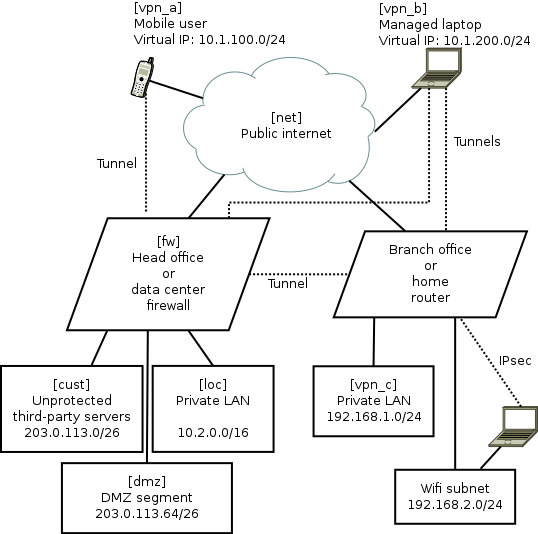
There is intense interest in communications privacy at the moment thanks to the Snowden scandal. Open source software has offered credible solutions for privacy and encryption for many years. Sadly, making these solutions work together is not always plug-and-play. In fact, secure networking, like VoIP, has been plagued by problems with interoperability and firewall/filtering issues although now the solutions are starting to become apparent. Here I will look at some of them, such as the use of firewall zones to simplify management or the use of ECDSA certificates to avoid UDP fragmentation problems. I've drawn together a lot of essential tips from different documents and mailing list discussions to demonstrate how to solve a real-world networking problem. A typical network scenario and requirements Here is a diagram of the network that will be used to help us examine the capabilities of these open source solutions. Some comments about the diagram:
  • The names in square brackets are the zones for Shorewall, they are explained later.
  • The dotted lines are IPsec tunnels over the untrusted Internet.
  • The road-warrior users (mobiles and laptops) get virtual IP addresses from the VPN gateway. The branch offices/home routers do not use virtual IPs.
  • The mobile phones are largely untrusted: easily lost or stolen, many apps have malware, they can only tunnel to the central VPN and only access a very limited range of services.
  • The laptops are managed devices so they are trusted with access to more services. For efficiency they can connect directly to branch office/home VPNs as well as the central server.
  • Smart-phone user browsing habits are systematically monitored by mobile companies with insidious links into mass-media and advertising. Road-warriors sometimes plug-in at client sites or hotels where IT staff may monitor their browsing. Therefore, all these users want to tunnel all their browsing through the VPN.
  • The central VPN gateway/firewall is running strongSwan VPN and Shorewall firewall on Linux. It could be Debian, Fedora or Ubuntu. Other open source platforms such as OpenBSD are also very well respected for building firewall and VPN solutions, but Shorewall, which is one of the key ingredients in this recipe, only works on Linux at present.
  • The branch office/home network could be another strongSwan/Shorewall server or it could also be an OpenWRT router
  • The default configuration for most wifi routers creates a bridge joining wifi users with wired LAN users. Not here, it has been deliberately configured as an independent network. Road-warriors who attach to the wifi must use VPN tunnelling to access the local wired network. In OpenWRT, it is relatively easy to make the Wifi network an independent subnet. This is an essential security precaution because wifi passwords should not be considered secure: they are often transmitted to third parties, for example, by the cloud backup service in many newer smart phones.
Package mayhem The major components are packaged on all the major Linux distributions. Nonetheless, in every case, I found that it is necessary to re-compile fresh strongSwan packages from sources. It is not so hard to do but it is necessary and worth the effort. Here are related blog entries where I provide the details about how to re-build fresh versions of the official packages with all necessary features enabled: Using X.509 certificates as a standard feature of the VPN For convenience, many people building a point-to-point VPN start with passwords (sometimes referred to as pre-shared keys (PSK)) as a security mechanism. As the VPN grows, passwords become unmanageable. In this solution, we only look at how to build a VPN secured by X.509 certificates. The certificate concept is not hard. In this scenario, there are a few things that make it particularly easy to work with certificates:
  • strongSwan comes with a convenient command line tool, ipsec pki. Many of it's functions are equivalent to things you can do with OpenSSL or GnuTLS. However, the ipsec pki syntax is much more lightweight and simply provides a convenient way to do the things you need to do when maintaining a VPN.
  • Many of the routine activities involved in certificate maintainence can be scripted. My recent blog about using Android clients with strongSwan gives a sample script demonstrating how ipsec pki commands can be used to prepare a PKCS#12 (.p12) file that can be easily loaded into an Android device using the SD-card.
  • For building a VPN, there is no need to use a public certificate authority such as Verisign. Consequently, there is no need to fill in all their forms or make any payments for each device/certificate. Some larger organisations do choose to outsource their certificate management to such firms. For smaller organisations, an effective and sometimes better solution can be achieved by maintaining the process in-house with a private root CA.
UDP fragmentation during IPsec IKEv2 key exchange and ECDSA A common problem for IPsec VPNs using X.509 certificates is the fragmentation of key exchange datagrams during session setup. Sometimes it works, sometimes it doesn't. Various workarounds exist, such as keeping copies of all certificates from potential peers on every host. As the network grows, this becomes inconvenient to maintain and to some extent it eliminates the benefits of using PKI. Fortunately, there is a solution: Elliptic Curve Cryptography (ECC). Many people currently use RSA key-pairs. Best practice suggests using RSA keys of at least 2048 bits and often 4096 bits. Using ECC with a smaller 384-bit key is considered to be equivalent to a 7680 bit RSA key pair. Consequently, ECDSA certificates are much smaller than RSA certificates. Furthermore, at these key sizes, the key exchange packets are almost always smaller than the typical 1500 byte MTU. A further demand for ECDSA is arising due to the use of ECC within smart cards. Many smartcards don't support any RSA key larger than 2048 bits. The highly secure 384-bit ECC key is implemented in quite a few common smart cards. Smart card vendors have shown a preference for the ECC keys due to the US Government's preference for ECC and the lower computational overheads make them more suitable for constrained execution environments. Anyone who wants to use smart cards as part of their VPN or general IT security now, or in the future, needs to consider ECC/ECDSA. Making the network simple with Shorewall zones For this example, we are not just taking some easy point-to-point example. We have a real-world, multi-site, multi-device network with road warriors. Simplifying this architecture is important to help us understand and secure it. The solution? Each of these is abstracted to a "zone" in Shorewall. In the diagram above, the zone names are in square brackets. The purpose of each zone is described below:
Zone name Description
loc This is the private LAN and contains servers like databases, private source code respositories and NFS file servers
dmz This is the DMZ and contains web servers that are accessible from the public internet. Some of these servers talk to databases or message queues in the LAN network loc
vpn_a These are road warriors that are not very trustworthy, such as mobile devices. They are occasionally stolen and usually full of spyware (referred to by users as "apps"). They have limited access to ports on some DMZ servers, e.g. for sending and receiving mail using SMTP and IMAP (those ports are not exposed to the public Internet at large). They use the VPN tunnel for general internet access/browsing, to avoid surveillance by their mobile carrier.
vpn_b These are managed laptops that have a low probability of malware infection. They may well be using smart cards for access control. Consequently, they are more trusted than the vpn_a users and have access to some extra intranet pages and file servers. Like the smart-phone users, they use the VPN tunnel for general internet access/browsing, to avoid surveillance by third-party wifi hotspot operators.
vpn_c This firewall zone represents remote sites with managed hardware, such as branch offices or home networks with IPsec routers running OpenWRT.
cust These are servers hosted for third-parties or collaborative testing/development purposes. They have their own firewall arrangements if necessary.
net This zone represents traffic from the public Internet.
A practical Shorewall configuration Shorewall is chosen to manage the iptables and ip6tables firewall rules. Shorewall provides a level of abstraction that makes netfilter much more manageable than manual iptables scripting. The Shorewall concept of zones is very similar to the zones implemented in OpenWRT and this is an extremely useful paradigm for firewall management. Practical configuration of Shorewall is very well explained in the Shorewall quick start. The one thing that is not immediately obvious is a strategy for planning the contents of the /etc/shorewall/policy and /etc/shorewall/rules files. The exact details for making it work effectively with a modern IPsec VPN are not explained in a single document, so I've gathered those details below as well. An effective way to plan the Shorewall zone configuration is with a table like this:
Destination zone
loc dmz vpn_a vpn_b vpn_c cust net
Source zone loc \
dmz ? \ X X X
vpn_a ? ? \ X X
vpn_b ? ? X \ X
vpn_c X \
cust X ? X X X \
net X ? X X X \
The symbols in the table are defined:
Symbol Meaning
ACCEPT in policy file
X REJECT or DROP in policy file
? REJECT or DROP in policy file, but ACCEPT some specific ports in the rules file
Naturally, this modelling technique is valid for both IPv4 and IPv6 firewalling (with Shorewall6) Looking at the diagram in two dimensions, it is easy to spot patterns. Each pattern can be condensed into a single entry in the rules file. For example, it is clear from the first row that the loc zone can access all other zones. That can be expressed very concisely with a single line in the policy file:
loc all ACCEPT
Specific Shorewall tips for use with IPsec VPNs and strongSwan Shorewall has several web pages dedicated to VPNs, including the IPsec specific documentation.. Personally, I found that I had to gather a few details from several of these pages to make an optimal solution. Here are those tips:
  • Ignore everything about the /etc/shorewall/tunnels file. It is not needed and not used any more
  • Name the VPN zones (we call them vpn_a, vpn_b and vpn_c) in the zones file but there is no need to put them in the /etc/shorewall/interfaces file.
  • The /etc/shorewall/hosts file is not just for hosts and can be used to specify network ranges, such as those associated with the VPN virtual IP addresses. The ranges you put in this file should match the rightsourceip pool assignments in strongSwan's /etc/ipsec.conf
  • One of the examples suggests using mss=1400 in the /etc/shorewall/zones file. I found that is too big and leads to packets being dropped in some situations. To start with, try a small value such as 1024 and then try larger values later after you prove everything works. Setting mss for IPsec appears to be essential.
  • Do not use the routefilter feature in the /etc/shorewall/interfaces file as it is not compatible with IPsec
Otherwise, just follow the typical examples from the Shorewall quick start guide and configure it to work the way you want. Here is an example /etc/shorewall/zones file:
fw firewall
net ipv4
dmz ipv4
loc ipv4
cust ipv4
vpn_a ipsec mode=tunnel mss=1024
vpn_b ipsec mode=tunnel mss=1024
vpn_c ipsec mode=tunnel mss=1024
Here is an example /etc/shorewall/hosts file describing the VPN ranges from the diagram:
vpn_a eth0:10.1.100.0/24 ipsec
vpn_b eth0:10.1.200.0/24 ipsec
vpn_c eth0:192.168.1.0/24 ipsec
Here is an example /etc/shorewall/policy file based on the table above:
loc all ACCEPT
vpn_c all ACCEPT
cust net ACCEPT
net cust ACCEPT
all all REJECT
Here is an example /etc/shorewall/rules file based on the network:
SECTION ALL
# allow connections to the firewall itself to start VPNs:
# Rule  source    dest    protocol/port details
ACCEPT   all       fw                ah
ACCEPT   all       fw                esp
ACCEPT   all       fw                udp 500
ACCEPT   all       fw                udp 4500
# allow access to HTTP servers in DMZ:
ACCEPT   all       dmz               tcp 80
# allow connections from HTTP servers to MySQL database in private LAN:
ACCEPT   dmz       loc:10.2.0.43     tcp 3306
# allow connections from all VPN users to IMAPS server in private LAN:
ACCEPT vpn_a,vpn_b,vpn_c loc:10.2.0.58 tcp 993
# allow VPN users (but not the smartphones in vpn_a) to the
# PostgresQL database for PostBooks accounting system:
ACCEPT vpn_b,vpn_c loc:10.2.0.48      tcp 5432
SECTION ESTABLISHED
ACCEPT   all       all
SECTION RELATED
ACCEPT   all       all
Once the files are created, Shorewall can be easily activated with:
# shorewall compile && shorewall restart
strongSwan IPsec VPN setup Like Shorewall, strongSwan is also very well documented and I'm just going to focus on those specific areas that are relevant to this type of VPN project.
  • Allow the road-warriors to send all browsing traffic over the VPN means including leftsubnet=0.0.0.0/0 in the VPN server's /etc/ipsec.conf file. Be wary though: sometimes the road-warriors start sending the DHCP renewal over the tunnel instead of to their local DHCP server.
  • As we are using Shorewall zones for firewalling, you must set the options leftfirewall=no and lefthostaccess=no in ipsec.conf. Shorewall already knows about the remote networks as they are defined in the /etc/shorewall/hosts file and so firewall rules don't need to be manipulated each time a tunnel goes up or down.
  • As discussed above, X.509 certificates are used for peer authentication. In the certificate Distinguished Name (DN), store the zone name in the Organizational Unit (OU) component, for example, OU=vpn_c, CN=gw.branch1.example.org
  • In the ipsec.conf file, match the users to connections using wildcard specifications such as rightid="OU=vpn_a, CN=*"
  • Put a subjectAltName with hostname in every certificate. The --san option to the ipsec pki commands adds the subjectAltName.
  • Keep the certificate distinguished names (DN) short, this makes the certificate smaller and reduces the risk of fragmented authentication packets. Many examples show a long and verbose DN such as C=GB, O=Acme World Wide Widget Corporation, OU=Engineering, CN=laptop1.eng.acme.example.org. On a private VPN, it is rarely necessary to have all that in the DN, just include OU for the zone name and CN for the host name.
  • As discussed above, use the ECDSA scheme for keypairs (not RSA) to ensure that the key exchange datagrams don't suffer from fragmentation problems. For example, generate a keypair with the command ipsec pki --gen --type ecdsa --size 384 > user1Key.der
  • Road warriors should have leftid=%fromcert in their ipsec.conf file. This forces them to use the Distinguished Name and not the subjectAltName (SAN) to identify themselves.
  • For road warriors who require virtual tunnel IPs, configure them to request both IPv4 and IPv6 addresses (dual stack) with leftsourceip=%config4,%config6 and on the VPN gateway, configure the ranges as arguments to rightsourceip
  • To ensure that roadwarriors query the LAN DNS, add the DNS settings to strongswan.conf and make sure road warriors are using a more recent strongSwan version that can dynamically update /etc/resolv.conf. Protecting DNS traffic is important for privacy reasons. It also makes sure that the road-warriors can discover servers that are not advertised in public DNS records.
Central firewall/VPN gateway configuration Although they are not present in the diagram, IPv6 networks are also configured in these strongSwan examples. It is very easy to combine IPv4 and IPv6 into a single /etc/ipsec.conf file. As long as the road-warriors have leftsourceip=%config4,%config6 in their own configurations, they will operate dual-stack IPv4/IPv6 whenver they connect to the VPN. Here is an example /etc/ipsec.conf for the central VPN gateway:
config setup
        charonstart=yes
        charondebug=all
        plutostart=no
conn %default
        ikelifetime=60m
        keylife=20m
        rekeymargin=3m
        keyingtries=1
        keyexchange=ikev2
conn branch1
        left=198.51.100.1
        leftsubnet=203.0.113.0/24,10.0.0.0/8,2001:DB8:12:80:/64
        leftcert=fw1Cert.der
        leftid=@fw1.example.org
        leftfirewall=no
        lefthostaccess=no
        right=%any
        rightid=@branch1-fw.example.org
        rightsubnet=192.168.1.0/24
        auto=add
conn rw_vpn_a
        left=198.51.100.1
        leftsubnet=0.0.0.0/0,::0/0
        leftcert=fw1Cert.der
        leftid=@fw1.example.org
        leftfirewall=no
        lefthostaccess=no
        right=%any
        rightid="OU=vpn_a, CN=*"
        rightsourceip=10.1.100.0/24,2001:DB8:1000:100::/64
        auto=add
conn rw_vpn_b
        left=198.51.100.1
        leftsubnet=0.0.0.0/0,::0/0
        leftcert=fw1Cert.der
        leftid=@fw1.example.org
        leftfirewall=no
        lefthostaccess=no
        right=%any
        rightid="OU=vpn_b, CN=*"
        rightsourceip=10.1.200.0/24,2001:DB8:1000:200::/64
        auto=add
Sample branch office or home router VPN configuration Here is an example /etc/ipsec.conf for the Linux server or OpenWRT VPN at the branch office or home:
conn head_office
        left=%defaultroute
        leftid=@branch1-fw.example.org
        leftcert=branch1-fwCert.der
        leftsubnet=192.168.1.0/24,2001:DB8:12:80:/64
        leftfirewall=no
        lefthostaccess=no
        right=fw1.example.org
        rightid=@fw1.example.org
        rightsubnet=203.0.113.0/24,10.0.0.0/8,2001:DB8:1000::/52
        auto=start
# notice we only allow vpn_b users, not vpn_a
# these users are given virtual IPs from our own
# 192.168.1.0 subnet
conn rw_vpn_b
        left=branch1-fw.example.org
        leftsubnet=192.168.1.0/24,2001:DB8:12:80:/64
        leftcert=branch1-fwCert.der
        leftid=@branch1-fw.example.org
        leftfirewall=no
        lefthostaccess=no
        right=%any
        rightid="OU=vpn_b, CN=*"
        rightsourceip=192.168.1.160/27,2001:DB8:12:80::8000/116
        auto=add
Further topics Shorewall and Shorewall6 don't currently support a unified configuration. This can make it slightly tedious to duplicate rules between the two IP variations. However, the syntax for IPv4 and IPv6 configuration is virtually identical. Shorewall only currently supports Linux netfilter rules. In theory it could be extended to support other types of firewall API, such as pf used by OpenBSD and the related BSD family of systems. A more advanced architecture would split the single firewall into multiple firewall hosts, like the inner and outer walls of a large castle. The VPN gateway would also become a standalone host in the DMZ. This would require more complex routing table entries. Smart cards with PIN numbers provide an effective form of two-factor authentication that can protect certificates for remote users. Smart cards are documented well by strongSwan already so I haven't repeated any of that material in this article. Managing a private X.509 certificate authority in practice may require slightly more effort than I've described, especially when an organisation grows. Small networks and home users don't need to worry about these details too much, but for most deployments it is necessary to consider things like certificate revocation lists and special schemes to protect the root certificate's private key. EJBCA is one open source project that might help. Some users may want to consider ways to prevent the road-warriors from accidentally browsing the Internet when the IPsec tunnel is not active. Such policies could be implemented with some basic iptables firewalls rules in the road-warrior devices. Summary Using these strategies and configuration tips, planning and building a VPN will hopefully be much simpler. Please feel free to ask questions on the mailing lists for any of the projects discussed in this blog.

11 July 2013

Matt Zimmerman: Scaling Human Systems: From individual achievement to teamwork

This is part 4 in a series on organizational design and growth. What it means

Getting things done together, as a team, achieving more than the sum of our individual efforts. Why it s important

Once a company reaches a certain size, perhaps with a substantial customer base and ambitious goals for the future, it takes a lot more momentum to move it forward. No one person can do it alone. From product delivery, to strategic decision making, to customer service, no single individual has all of the knowledge, skills or time necessary to perform these functions at the scale and velocity necessary to make real progress. Cooperation is not just a good idea: it s essential to success.

The most important system we re building is the company itself: a system of people working together to achieve common goals. Old status quo

In a startup, everyone embodies the spirit of the pioneer: passion, fortitude, individualism, daring, and the willingness to do whatever it takes to reach the goal. Individuals wear many hats: engineering, product management, marketing, customer support. We often don t even think of them as distinct disciplines. Projects often depend on the resoluteness of a single Jill-of-all-trades to drive them to completion, and the culture may reward this kind of heroism. Thanks to the relatively small scale of the company and its customer base, one person working independently can effect significant change without much risk. If what was delivered wasn t good enough, it could be discarded with no great loss. New status quo

In a growing company, we still need a variety of different disciplines in order to reach our goals, in fact more than ever. A successful product needs to be conceived, validated, designed, built, documented, adopted, supported, and we need to confirm that it satisfies customers over time. These elements are all essential, and each requires deep knowledge, expertise and practice. Good engineering + mediocre product management + inept marketing = total failure. It s not realistic to expect one person to do all of these things and deliver consistently good results, but consistently good results are exactly what we need. The solution is to organize for individuals to do what they do best, and cooperate effectively together. We also need to manage risk more carefully: our customers are depending on us. We have a lot more to lose now, and need to learn how to maintain forward progress while continuing to meet our customers expectations. Delivering sub-par products would damage our reputation and erode their trust. Most of all, we need to be getting better at all of this over time, faster than our competition. Behaviors that help

Obstacles that get in the way

9 July 2013

Wouter Verhelst: Mark groet 's morgens de dingen

Or, Mark greeting the things in the morning
Dag ventje met de fiets op de vaas met de bloem Hi little guy with the bike on the vase with the flower
ploem ploem ploum ploum
Dag stoel naast de tafel Hi chair besides the table
Dag brood op de tafel Hi bread on the table
Dag visserke-vis met de pijp Hi fishery-man with the pipe
en and
Dag visserke-vis met de pet Hi fishery-man with the hat
goeiendag good day
Daa-ag vis Bye-ee fish
Dag lieve vis Bye dear fish
Dag klein visselijn mijn Bye my little fishery-fish
The above is one of Paul van Ostaijen's poems, and is, in my opinion, one of his finest. I tried translating it to English so that my non-Dutch-speaking readers could appreciate it (Dutch-speaking readers will most likely already know it anyway), but it's almost impossible to properly translate it. In this poem, van Ostaijen invents a few words that aren't part of the Dutch language proper. A good example is 'visserke-vis'. The first part, 'visserke', is (now) a dialect diminutive of 'visser', which translates to "fisherman" (though it is likely that in Van Ostaijen's days, 'visserke' wasn't considered to be a dialect word). The second part, 'vis', is just Dutch for 'fish'. A literal translation would thus be 'fishereman-fish' On the other hand, given the relative similarity of both words, it is conceivable that Van Ostaijen is just playing with the sound of those words here (he does that later in the poem, anyway), and as such, it's not entirely clear whether he's talking about a fish with a pipe and a had, or about a fisherman with a pipe and a hat. It could be both. His use of the word 'Dag' adds to confusion. In Dutch, the word 'Dag' can be used as a greeting when seeing people for the first time in the morning, but it can also be used as a greeting when leaving people in the evening. Since this is used near the end of the poem, I translated it by using its second meaning; but it's also possible that Van Ostaijen is just playing with us. Of that final line, I should add that the size of the letters is not my doing; Van Ostaijen's original version contained this. In fact, he is known for his expressionistic way of using letters, and some of his other poems go into extremes with that; his wikipedia entry has a nice example. The final verse of the poem sounds pretty well, but defies all grammar. In proper grammar, the verse would read "Dag mijn klein visje". Van Ostaijen turns 'visje' into 'visselijn' so that it rhymes on 'mijn', and puts 'mijn' at the end. Whereas it's still possible to figure out a meaning of the first part of 'visserke-vis', this certainly isn't possible with 'visselijn'. It just isn't a word; all you can make of it is that he's talking about a fish. This certainly contradicts the idea that he was talking about a fisherman earlier. All in all, "Mark groet 's morgens de dingen" is a very funny poem; it describes a man or a boy who does nothing else than say hello to objects when he gets up in the morning; and though it's necessary to explain the language if you don't speak Dutch to fully appreciate it, the idea that there's much more to be found behind the words is most likely wrong. This is just silly amusement.

Petter Reinholdtsen: July 13th: Debian/Ubuntu BSP and Skolelinux/Debian Edu developer gathering in Oslo

The upcoming Saturday, 2013-07-13, we are organising a combined Debian Edu developer gathering and Debian and Ubuntu bug squashing party in Oslo. It is organised by the member assosiation NUUG and the Debian Edu / Skolelinux project together with the hack space Bitraf. It starts 10:00 and continue until late evening. Everyone is welcome, and there is no fee to participate. There is on the other hand limited space, and only room for 30 people. Please put your name on the event wiki page if you plan to join us.

Raphael Geissert: Explaining segmentation fault errors

Want to fix that segfault you keep hitting or was reported to you? The first step is to understand the error message you get.

So you have a message like the following:
segfault at bfea3fec ip 080ee07e sp bfea3fa0 error 6

You might already know that ip means instruction pointer and sp means stack pointer and as such the addresses that follow them are the values in those registers. But what does the error number mean?

The error number, or code, actually gives you a better explanation of what the cause of the segfault is. The number's bits are flags describing the error and are architecture-dependent. For x86/x86_64 I just wrote an online converter/decoder that you can use to explain the segfault error code.

As an example, the above error code is explained as:
The cause was a user-mode write resulting in no page being found.

And the common error 4:
The cause was a user-mode read resulting in no page being found.
(also known as a null pointer dereference).

Enjoy.

8 July 2013

Olivier Berger: Experimenting with Linked Open Data about FLOSS projects : matching Debian upstream projects

I ve been experimenting with Linked Open Data about FLOSS projects harvested from different sources of DOAP or ADMS.SW descriptions. I ve tried and match upstream projects of Debian packages with upstream projects hosted at Apache, Gnome, or Alioth.debian.org, or catalogued on Pypi. I m matching them on identical values of the Homepage field (comparing the Homepage Control field set by Debian packagers with the doap:homepage meta-data in the RDF documents harvested from the upstream project catalogues). Here are initial results of my little experiment, for number of matched projects, and results on project name s similarity :
Upstream catalogue Total matching projs Exact same project name Same project name (case independant)
apache 31 0 (0 %) 0 (0 %)
alioth 16 13 (81 %) 13 (81 %)
pypi 439 217 (49 %) 273 (62 %)
gnome 21 0 (0 %) 7 (33 %)
Total 507 230 (45%) 293 (58 %)
The data set contains tens of thousands of projects, with probably many duplicates, but from all of these, only 507 have common homepages. As you can see, in some cases, the Debian source package names match the upstream project name (sometimes with lower/upper case variants), but in general, the project names aren t identical, so it is interesting to try and match them by homepage. For the curious ones, the Apache, Gnome and Pypi project catalogues use to provide RDF meta-data for quite some time. More recently have we introduced ADMS.SW meta-data for Debian source packages, and even more recently for the Alioth projects (through the ADMS.SW exporter plugin for FusionForge). There are still some ways for improvements, for instance to normalize homepage URLs which tend to vary (trailing slashes, or different HTTP/HTTPS schemes). Stay tuned for more details.

7 July 2013

Raphael Geissert: Dealing with bashisms in proprietary software

Sometimes it happens that for one reason or another there's a need to use a proprietary application (read: can not be modified due to its licence) that contains bashisms. Since the application can not be modified and it might not be desirable to change the default /bin/sh, dealing with such applications can be a pain. Or not.

The switchsh program (available in Debian) by Marco d'Itri can be used to execute said application under a namespace where bash is bind-mounted on /bin/sh. The result:

$ sh --help
sh: Illegal option --
$ switchsh sh --help head -n1
GNU bash, version 4.1.5(1)-release-(i486-pc-linux-gnu)

Simple, yet handy.

Daniel Pocock: Melbourne and Detroit emergency call centers simultaneously fail

A co-incidence that caught my eye this week was the failure of emergency call centers in Melbourne, Australia and Detroit, USA. Melbourne's system failed at 19:00 local time on Friday, 5 July. Detroit's communications meltdown started at 05:00 local time on the same day. 19:00 - 05:00 = 14:00 hours, which is, co-incidentally, the difference in timezones between the two cities Detroit's failure was slashdotted, Melbourne's was not. Were there other cities that experienced this same outage on Friday? Just what could be going on then? Are they running their systems on a common cloud infrastructure that is not completely under the control of local technical staff? Was there an expired SSL certificate embedded in the application software, much like the certificate expiry that recently caused failure in Microsoft Azure? Using free and open source software is a life or death issue Are these systems based on free and open source software? Can the local authorities, their technical experts and auditors inspect the software to detect such issues ahead of time? Closed, proprietary outsourced solutions often take significant control away from the users of technology.

6 July 2013

Steve Kemp: This weekend I will be mostly upgrading to wheezy

Having migrated my websites away from my ssh/mail box I'm going to upgrade that this weekend. I've got my new mail client, lumail, working well enough to use exclusively, so the upgrade should be nice and simple. I spent a few hours last night removing packages from my ssh/mail box to trim it down. Removing a bunch of Perl modules I used in my CGI coding, removing services such as nfs-common, portmapper, etc. Today I'll have a stab at the upgrade. The only thing I have to be careful of is my backported/tweaked qpsmptd packages. I'll try the native wheezy version now it has caught up. (I don't use any of the standard qpsmtpd plugins at all. Instead I have a separate tree of my own custom anti-spam and virtual-hosting aware plugins. They all work in a unified fashion. Using these plugins against a new version of qpsmtpd should be just fine. But obviously I need to test that.) Work on Lumail is probably going to slow down now it is genuinely in use, but I'll keep an eye out for feature requests and missing primitives. Annoyingly I wasted 30 minutes just now implementing a plugin I'd already written: lumail issue #51. I also need to step-back this weekend and reassess my hosting. When I was tweaking my slaughter setup I recently realized I have more hosts than I thought: Total: 13 virtual machines. (+ one kvm-host)

Yves-Alexis Perez: Xfce 4.10, final part

Someone recently asked me about the Debian Xfce 4.10 status, as apparently I forgot to update this post series. So, as you might have noticed, the full Xfce 4.10 desktop environment is currently in Debian Jessie (current name for testing). All in all, the transition went well and smooth. One of the most regular question I get about Xfce 4.10 is the panel behavior when it comes to the task bar expansion. In xfce4-panel 4.8, when people wanted to have a full side panel with a task bar plugin inside, they added a Windows buttons plugin and configured the panel to 100% length. Then the Windows buttons would expand to occupy all the free space on the panel. It was a special case plugins, as usually other plugins only used a fixed space. Now, in 4.10, this is not the case anymore. Windows button uses a fixed size. And the plugins are left-aligned, which means usually people end up with some space at the far right of the panel. To restore the previous behavior back (which is actually the pre-4.8 behavior, 4.8 was an exception by itself), one needs to add a Separator plugin, then configure it to expand (and optionnally select a transparent handle). Then move it next right to the Windows buttons plugin. Another thing which might be a bit surprising for upgrading users is the change in the Action buttons plugin, which people usually use to logout. In 4.8, by default, it's set to run the logout dialog. In 4.10, by default, it's set to logout directly (but with a confirmation dialog). If you prefer the previous behavior, you can just configure the Action buttons plugin and select the Log out item instead of the Log out one (I know, it's a bit confusing). If you have any question, don't hesitate to reach us by mail or on irc (#debian-xfce on Freenode). Other than that remember that Xfce really needs you help, both in Debian and upstream (and at that point, I'd say *especially* upstream). There's a lot of unmaintained project under the Xfce umbrella, some of them part of the core (like xfce4-power-manager), so if you have some spare time and some C/GTK+ knowledge, feel free to contact the Xfce team on the mailing list.

5 July 2013

Francesca Ciceri: #debcraft: DIY projects to show your Debian love

The next August 16th, Debian will turn 20.
What are you planning to do to to celebrate?
Being a DIY geek, I decided to create some craft projects dedicated to the Universal Operating System. I'll publish them, one per week, on this blog with a detailed tutorial, released under a CC:BY-SA 3.0 license. If you have an original project dedicated to Debian (from cookies and cakes to knitted socks, from beaded earrings to handpainted mugs, from plushies to pottery, from glass arts to lettering and so on) join me!
Post a tutorial about your project on your blog (or if you don't have one, send me a mail and you'll publish it here as guest post) with the hashtag #debcraft and a free (as in freedom) license. Bonus points for project using recycled material :). Ready to start? Below my first one: swirl charms from plastic bottles.
please, do try this at home a couple of finished swirl This is a little tutorial on how to create swirl charms for keyrings from plastic bottles.
The project is really easy and quick to realize, the materials very common and the result quite pretty.
I found out that there are tons of tutorial in the Internet about how to make jewelry from PET bottles, and I'll surely give them a try (earrings, in particular, seem a good idea).
If you want some inspiration, I suggest you to check out the amazing work of Turkish artist Gulnur Ozdaglar who creates ethereal jewelry and everyday objects from plastic bottles.
"What is PET bottle?
A domesticated bottle kept for companionship or amusement."
Gulnur Ozdaglar
What you will need tools and materials needed In the pic there's also a soda can, because I thought it could be a good material too.
After some tests, I decided that soda cans would probably need some resin to make the edges less sharp and avoid cuts, so I think I'll experiment a bit more with them. Step 1 step 1: cut the swirl from plastic First of all, you'll need to cut out the swirl from the bottle.
I cut it in the upper part of the bottle, using a paper swirl as guide to cut the swirl shape as regular as I could. Step 2 step 2: melt the edges As the edges of the cut are a bit raw, I decided to lightly melt them with the lighter: be careful as if the plastic melt too much it will ruin our nice swirl. Also, remember to open a window while doing it: it's not a lot of melting but better safe than sorry. Step 3 step 3: punch a hole for the jumpring With a pin or a needle punch a hole in the upper part of the swirl, where the jumpring will be set to connect the swirl with the keychain ring. Now you need to decide which type of swirl do: for the painted one, follow step 4a; for the transparent one with the red embroidery, follow step 4b. Step 4a step 4a: paint the swirl Paint your swirl red, or of your favourite colour (I experimented a bit here, having lots of nail polish, and made also a purple one). Step 4b step 4b: punch more holes and sew with red thread With a pin or a needle, punch a series of holes, in the middle of the swirl, following the swirl shape.
Then embroider it using backstitch. Step 5 step 5: add the jumpring Add the jumpring, if you have a ready made one.
If not, use a pair of cutters to cut a little bit of metal wire and the pliers to create a ring with it, insert in the hole and close it. Step 6 step 6: add the metal keyring Connect the jumpring and the metal keyring. Congratulations: you now have a swirl shaped keycharm!

4 July 2013

Emanuele Rocca: Useful tools for Python developers

Python is a great language with an impressive number of tools designed to make developers' life easier. Sometimes, however, the problem is getting to know that these tools exist in the first place. By contributing to projects like OpenStack's Nova client and Falcon, I have recently come across some useful tools that can seriously improve the quality of your code. The first one is called pyflakes, a passive checker of Python programs developed by Phil Frost. What it does is parsing your source files and checking for possible errors such as undefined names and unused imports. Let's consider the following example: <figure class="code">
1
2
3
4
import urllib

print "pyflakes example"
urlib.urlopen('http://www.linux.it')
</figure>The code above contains a typo, we have misspelled urllib. Here is what pyflakes thinks about our program:
$ pyflakes example.py
example.py:1: 'urllib' imported but unused
example.py:4: undefined name 'urlib'
On line 4 we try to use urlib which is not defined. Also, we import urllib on line 1 and we do nothing with it. Our typo has been spotted! Notice that, even though our program contains a print statement, 'pyflakes example' has not been printed. That is because pyflakes parses the source files it checks, without importing them, making it safe to use on modules with side effects. pyflakes can be installed with pip or apt-get. The second tool I want to talk about is Ned Batchelder's coverage.py. No doubt you write unit tests for your programs. Right? Good. coverage.py is out there to help you checking how much of your program is actually covered. Let's use as an example codicefiscale, a Python project of mine. First we install coverage:
pip install coverage
Then we run our unit tests:
$ coverage run --source=codicefiscale tests.py
.......
----------------------------------------------------------------------
Ran 7 tests in 0.003s
We pass the module we want to test with --source=codicefiscale so that coverage will only report information about that specific module. Now that our tests have been performed successfully it is time to check how much of our code is covered by unit tests:
$ coverage report -m
Name            Stmts   Miss  Cover   Missing
---------------------------------------------
codicefiscale      73      4    95%   61, 67, 95, 100
Not bad, 95% of our module is covered! Still, coverage let us know that 4 lines have not been touched by the unit tests. With this information, we can go write some meaningful test cases that will also cover the missing lines.

Julien Danjou: OpenStack meets Lisp: cl-openstack-client

A month ago, a mail hit the OpenStack mailing list entitled "The OpenStack Community Welcomes Developers in All Programming Languages". You may know that OpenStack is essentially built using Python, and therefore it is the reference language for the client libraries implementations. As a Lisp and OpenStack practitioner, I used this excuse to build a challenge for myself: let's prove this point by bringing Lisp into OpenStack!
Welcome cl-openstack-client, the OpenStack client library for Common Lisp! The project is hosted on the classic OpenStack infrastructure for third party project, StackForge. It provides the continuous integration system based on Jenkins and the Gerrit infrastructure used to review contributions. How the tests works OpenStack projects ran a fabulous contribution workflow, which I already talked about, based on tools like Gerrit and Jenkins. OpenStack Python projects are used to run tox, to build a virtual environment and run test inside. We don't have such thing in Common Lisp as far as I know, so I had to build it myself. Fortunately, using Quicklisp, the fabulous equivalent of Python's PyPI, it has been a breeze to set this up. cl-openstack-client just includes a basic shell script that does the following: I just run the test using SBCL, though adding more compiler on the table would be a really good plan in the future, and should be straightforward. You can admire a log from a successful test run done when I proposed a patch via Gerrit, to check what it looks like. Implementation status For the curious, here's an example of how it works:
* (require 'cl-openstack-client)
* (use-package 'cl-keystone-client)
* (defvar k (make-instance 'connection-v2 :username "demo" :password "somepassword" :tenant-name "demo" :url "http://devstack:5000"))

K

* (authenticate k)

((:ISSUED--AT . "2013-07-04T05:59:55.454226")
(:EXPIRES . "2013-07-05T05:59:55Z")
(:ID
. "wNFQwNzo1OTo1NS40NTQyMthisisaverylongtokenwNFQwNzo1OTo1NS40NTQyM")
(:TENANT (:DESCRIPTION) (:ENABLED . T)
(:ID . "1774fd545df4400380eb2b4f4985b3be") (:NAME . "demo")))

* (connection-token-id k)

"wNFQwNzo1OTo1NS40NTQyMthisisaverylongtokenwNFQwNzo1OTo1NS40NTQyM"

Unfortunately, the implementation is far from being complete. It only implements for now the Keystone token retrieval. I've actually started this project to build an already working starting point. With this, future potential contributors will be able to spend efforts on writing code, and not on setting up the basic continuous integration system or module infrastructure. If you wish to help me and contribute, just follow the OpenStack Gerrit workflow howto or feel free to come by me and ask any question (I'm hanging out on #lisp on Freenode too). See you soon, hopping to bring more Lisp into OpenStack!

Julien Danjou: OpenStack meets Lisp: cl-openstack-client

A month ago, a mail hit the OpenStack mailing list entitled "The OpenStack Community Welcomes Developers in All Programming Languages". You may know that OpenStack is essentially built using Python, and therefore it is the reference language for the client libraries implementations. As a Lisp and OpenStack practitioner, I used this excuse to build a challenge for myself: let's prove this point by bringing Lisp into OpenStack!

Welcome cl-openstack-client, the OpenStack client library for Common Lisp! The project is hosted on the classic OpenStack infrastructure for third party project, StackForge. It provides the continuous integration system based on Jenkins and the Gerrit infrastructure used to review contributions. How the tests works OpenStack projects ran a fabulous contribution workflow, which I already talked about, based on tools like Gerrit and Jenkins. OpenStack Python projects are used to run tox, to build a virtual environment and run test inside. We don't have such thing in Common Lisp as far as I know, so I had to build it myself. Fortunately, using Quicklisp, the fabulous equivalent of Python's PyPI, it has been a breeze to set this up. cl-openstack-client just includes a basic shell script that does the following: I just run the test using SBCL, though adding more compiler on the table would be a really good plan in the future, and should be straightforward. You can admire a log from a successful test run done when I proposed a patch via Gerrit, to check what it looks like. Implementation status For the curious, here's an example of how it works:
* (require 'cl-openstack-client)
* (use-package 'cl-keystone-client)
* (defvar k (make-instance 'connection-v2 :username "demo" :password "somepassword" :tenant-name "demo" :url "http://devstack:5000"))

K

* (authenticate k)

((:ISSUED--AT . "2013-07-04T05:59:55.454226")
(:EXPIRES . "2013-07-05T05:59:55Z")
(:ID
. "wNFQwNzo1OTo1NS40NTQyMthisisaverylongtokenwNFQwNzo1OTo1NS40NTQyM")
(:TENANT (:DESCRIPTION) (:ENABLED . T)
(:ID . "1774fd545df4400380eb2b4f4985b3be") (:NAME . "demo")))

* (connection-token-id k)

"wNFQwNzo1OTo1NS40NTQyMthisisaverylongtokenwNFQwNzo1OTo1NS40NTQyM"

Unfortunately, the implementation is far from being complete. It only implements for now the Keystone token retrieval. I've actually started this project to build an already working starting point. With this, future potential contributors will be able to spend efforts on writing code, and not on setting up the basic continuous integration system or module infrastructure. If you wish to help me and contribute, just follow the OpenStack Gerrit workflow howto or feel free to come by me and ask any question (I'm hanging out on #lisp on Freenode too). See you soon, hopping to bring more Lisp into OpenStack!

3 July 2013

Matthew Garrett: Explaining Intel Rapid Start Technology

Recent Intel-based systems often implement something called Intel Rapid Start Technology. Like many things with the word "Technology" in the name, there's a large part of this that's marketing. The relatively small amount of technical documentation available implies that it's tied to your motherboard chipset and CPU, but as far as I can tell it's entirely implemented in firmware and could work just as well on, say, a Cyrix on a circa 1996 SIS-based motherboard if someone wrote the BIOS code[1]. But since nobody has, we're stuck with the vendors who've met Intel's requirements and licensed the code.

The concept of IRST is pretty simple. There's a firmware mechanism for setting a sleep timeout. If you suspend your computer and this timeout expires, it'll resume. However, instead of handing control back to the OS, the firmware just copies the entire contents of RAM to a special partition and turns the computer off. Next time you hit the power button, the firmware dumps the partition contents back into RAM and resumes as if nothing had changed. This takes a few seconds longer than resume from S3 but is far faster than resume from hibernation since it starts the moment the system gets power.

At a more technical level, it's a little more complicated. The first thing to know about this feature is that it's entirely invisible unless your hard drive is set up correctly. There needs to be a partition that's at least the size of your system's physical RAM. For GPT systems, this needs to have a type GUID of D3BFE2DE-3DAF-11DF-BA-40-E3A556D89593. For MBR systems, you need a partition type of 0x84[2]. If the firmware doesn't find an appropriate partition then the OS will get no indication that the firmware supports it. Boo.

(The second thing is that it seems like it really does have to be on an SSD, and if you try to do this on spinning media your firmware will ignore it anyway)

If all the prerequisites are in place, an ACPI device with an HID of INT3392 will exist. It has four methods associated with it: GFFS, SFFS, GFTV and SFTV. GFFS returns an integer representing the events that will cause the system to wake up from S3 and suspend to SSD. The system will wake after the timeout expires if bit 0 is set, and will wake when the battery becomes critically low if bit 1 is set. The other bits appear to be unused at the moment[3]. SFFS sets the wakeup events, using the same bit values as GFFS. GFTV returns an integer containing the current wakeup timeout in minutes. SFTV sets it. Values above 1440 (ie, 24 hours) seem to be considered invalid - if I set them the value instead ends up as 10 and the timeout flag gets cleared from the wakeup events field.

I've submitted a patch that adds a sysfs interface for setting these values, and unless anyone objects it'll probably end up in 3.11. There's still the remaining question of how userspace should make use of these, and also how installers should behave when it comes to systems that support IRST. As previously mentioned, there's no obvious indication to the OS that the feature is supported unless the appropriate partition already exists. The easiest way to deal with this is for installers to default to retaining any partitions with the magic IDs, but I'm still looking into whether it's possible to get the firmware to cough up some more information so it can be created automatically even if the drive's entirely blank.

And now, having got this working on a test machine, I just need to split my Thinkpad's swap partition in half and make sure it works here as well. Woo.

[1] Note: I am not going to do this.
[2] Conveniently, the same as the partition type that APM systems used for suspend to disk back when dubstep hadn't been invented yet
[3] At least, if you attempt to set them they get ignored.

comment count unavailable comments

2 July 2013

Ond&#345;ej &#268;ert&iacute;k: My impressions from the SciPy 2013 conference

I have attended the SciPy 2013 conference in Austin, Texas. Here are my impressions.

Number one is the fact that the IPython notebook was used by pretty much everyone. I use it a lot myself, but I didn't realize how ubiquitous it has become. It is quickly becoming the standard now. The IPython notebook is using Markdown and in fact it is better than Rest. The way to remember the "[]()" syntax for links is that in regular text you put links into () parentheses, so you do the same in Markdown, and append [] for the text of the link. The other way to remember is that [] feel more serious and thus are used for the text of the link. I stressed several times to +Fernando Perez and +Brian Granger how awesome it would be to have interactive widgets in the notebook. Fortunately that was pretty much preaching to the choir, as that's one of the first things they plan to implement good foundations for and I just can't wait to use that.

It is now clear, that the IPython notebook is the way to store computations that I want to share with other people, or to use it as a "lab notebook" for myself, so that I can remember what exactly I did to obtain the results (for example how exactly I obtained some figures from raw data). In other words --- instead of having sets of scripts and manual bash commands that have to be executed in particular order to do what I want, just use IPython notebook and put everything in there.

Number two is that how big the conference has become since the last time I attended (couple years ago), yet it still has the friendly feeling. Unfortunately, I had to miss a lot of talks, due to scheduling conflicts (there were three parallel sessions), so I look forward to seeing them on video.

+Aaron Meurer and I have done the SymPy tutorial (see the link for videos and other tutorial materials). It's been nice to finally meet +Matthew Rocklin (very active SymPy contributor) in person. He also had an interesting presentation
about symbolic matrices + Lapack code generation. +Jason Moore presented PyDy.
It's been a great pleasure for us to invite +David Li (still a high school student) to attend the conference and give a presentation about his work on sympygamma.com and live.sympy.org.

It was nice to meet the Julia guys, +Jeff Bezanson and +Stefan Karpinski. I contributed the Fortran benchmarks on the Julia's website some time ago, but I had the feeling that a lot of them are quite artificial and not very meaningful. I think Jeff and Stefan confirmed my feeling. Julia seems to have quite interesting type system and multiple dispatch, that SymPy should learn from.

I met the VTK guys +Matthew McCormick and +Pat Marion. One of the keynotes was given by +Will Schroeder from Kitware about publishing. I remember him stressing to manage dependencies well as well as to use BSD like license (as opposed to viral licenses like GPL or LGPL). That opensource has pretty much won (i.e. it is now clear that that is the way to go).

I had great discussions with +Francesc Alted, +Andy Terrel, +Brett Murphy, +Jonathan Rocher, +Eric Jones, +Travis Oliphant, +Mark Wiebe, +Ilan Schnell, +St fan van der Walt, +David Cournapeau, +Anthony Scopatz, +Paul Ivanov, +Michael Droettboom, +Wes McKinney, +Jake Vanderplas, +Kurt Smith, +Aron Ahmadia, +Kyle Mandli, +Benjamin Root and others.


It's also been nice to have a chat with +Jason Vertrees and other guys from Schr dinger.

One other thing that I realized last week at the conference is that pretty much everyone agreed on the fact that NumPy should act as the default way to represent memory (no matter if the array was created in Fortran or other code) and allow manipulations on it. Faster libraries like Blaze or ODIN should then hook themselves up into NumPy using multiple dispatch. Also SymPy would then hook itself up so that it can be used with array operations natively. Currently SymPy does work with NumPy (see our tests for some examples what works), but the solution is a bit fragile (it is not possible to override NumPy behavior, but because NumPy supports general objects, we simply give it SymPy objects and things mostly work).

Similar to this, I would like to create multiple dispatch in SymPy core itself, so that other (faster) libraries for symbolic manipulation can hook themselves up, so that their own (faster) multiplication, expansion or series expansion would get called instead of the SymPy default one implemented in pure Python.

Other blog posts from the conference:

Bits from Debian: all Debian source are belong to us

This is a verbatim repost from Stefano Zacchiroli's post TL;DR: go to http://sources.debian.net and enjoy.
Debsources is a new toy I've been working on at IRILL together with Matthieu Caneill. In essence, debsources is a simple web application that allows to publish an unpacked Debian source mirror on the Web. You can deploy Debsources where you please, but there is a main instance at http://sources.debian.net (sources.d.n for short) that you will probably find interesting. sources.d.n follows closely the Debian archive in two ways:
  1. it is updated 4 times a day to reflect the content of the Debian archive
  2. it contains sources coming from official Debian suites: the usual ones (from oldstable to experimental), *-updates (ex volatile), *-proposed-updates, and *-backports (from Wheezy on)
Via sources.d.n you can therefore browse the content of Debian source packages with usual code viewing features like syntax highlighting. More interestingly, you can search through the source code (of unstable only, though) via integration with http://codesearch.debian.net. You can also use sources.d.n programmatically to query available versions or link to specific lines, with the possibility of adding contextual pop-up messages (example). In fact, you might have stumbled upon sources.d.n already in the past few days, via other popular Debian services where it has already been integrated. In particular: codesearch.d.n now defaults to show results via sources.d.n, and the PTS has grown new "browse source code" hyperlinks that point to it. If you've ideas of other Debian services where sources.d.n should be integrated, please let me know. I find Debsources and sources.d.n already quite useful but, as it often happens, there is still a lot TODO. Obviously, it is all Free Software (released under GNU AGPLv3). Do not hesitate to report new bugs and, better, to submit patches for the outstanding ones. Acknowledgements PS in case you were wondering: at present sources.d.n requires ~381 GB of disk space to hold all uncompressed source packages, plus ~83 GB for the local (compressed) source mirror

Next.

Previous.