Search Results: "ema"

3 May 2012

Gintautas Miliauskas: Online Haskell typechecker

Last weekend I put up haskellonline.org, which is basically a thin web frontend over ghc, the Haskell compiler. It is limited to one Haskell module, but it makes the experience of studying Haskell much more pleasurable by running the typechecker in the background as you type. Plus, it is web-based - no local installation necessary!

The thing about Haskell is that it has a fabulous type system which can weed out a broad class of bugs at compile time. However, the usual interfaces with the compiler leave a lot to be desired. Vim + ghci in a terminal of course works, but I have already been spoilt by IDEs, and the "Alt-Tab; Up; Enter; wait; Alt-Tab + jump to line manually" dance does not appeal to me at all. Emacs integration might be better, but I do not know emacs well, and it is never a good idea to start learning two things at the same time.

Note: I suspect that many of the problems I encountered were due to the fact that I use MacOSX.

I have looked a few of the existing IDEs, but that did not go well. EclipseFP did not offer any benefits over a text editor at all. I found a blog post saying that implied that it would work better with a newer version of GHC. Cue a few hours of reinstalling GHC and compiling Haskell packages, and I got the system set up, but that made the situation even worse. Eclipse would simply crash on startup every time until I wiped the configuration directory clean. So much for EclipseFP.

I also tried Leksah. At least it did not crash, nevertheless, I found it quite unwieldy, especially for learning purposes. The autocompletion is broken in annoying ways. For example, if you type "f a = a<enter>", Leksah will autocomplete the second "a" into "as". It took me a while to discover an error in my program that was due to this autocorrection mechanism.

Leksah does have a "compile in background" mode, which was admittedly a source of inspiration for haskellonline.org, but the implementation is subpar. It simply invokes the compiler and simply redirects the output to a display pane on the window. As you write code, the text in the pane constantly scrolls, which is very distracting. The implementation is also buggy. Occasionally errors are interleaved with status output:


There is also tryhaskell.org, but it does not work not nearly as well for Haskell as its cousins trypython.org and tryruby.org do for Python and Ruby, respectively. All are limited to evaluating expressions, but in Python/Ruby that actually gets you a long way, while nontrivial Haskell programs are complex static structures that are unwieldy without a persistent text editor.

Despite all the trouble, which, again, probably has to do with my choice of MacOSX, these issues do not detract from the beauty of Haskell as a language. If you are interested, I can heartily recommend learnyouahaskell.com as very good reading material, and Tony Morris's course exercises (in combination with haskellonline.org) for practice.

Rudy Godoy: FLISOL Puno

Past Saturday April 28 I attended to the FLISOL 2012 Puno hosted at the Casa de la Cultura in downtown Puno. It was a great experience to deliver a talk after a while, the second speech since I enrolled into the UCSP s Computer and Engineering Faculty to get my Computer Science BS degree. Puno is really a nice city with a great landscape for those like me who enjoy the sun, lakes, wonderful mountains and, as it s name says, the Andes plane 3860m above sea level. Pretty high and very cold at night indeed but a lovely place. FLISOL is short for Latin American Free Software Installation Festival that just aged 12 this year. In my talk I wanted to describe the motivations behind the Free Software movement origins. I specially remarked the fact that the movement doesn t look for technical excellence, even though this is something we thrive for, rather than preserving a common set of guidelines for protecting assets we do value such software and freedom. Later I discussed about how Debian have become a key actor in the free software ecosystem. Primarily as a huge software library, second as a building block for specialized distributions (such as Ubuntu) and third, but not the last, as a facilitator for new developments and contributions to the ecosystem, and I mentioned here the Debian GNU/Hurd project. Through such topics I explained what we do, why we do it and why they may want to contribute. There was a good reception from the audience and there were many questions on the subjects I elaborated on. I was impressed to see many Debian users, some of them power users , and even tried to help one to configure his obscure Xorg settings on his laptop (didn t succeed because lack of connectivity, will send him testing CDs eventually). I d like to thank to the organization who made a great job. The team, nearly 30 students from Universidad Nacional del Altiplano plus local activists, started working in February collecting funds and managed to gather more than 330 attendees during the almost 10 hours of the event. Also special thanks for the coffee machine that was available!

2 May 2012

Matthew Garrett: Anatomy of a Fedora 17 ISO image

My spare time has been limited lately, so progress on producing Mac-bootable Fedora install images has been a bit slow. Thankfully it looks like everything's gong to land in time for Fedora 17[1] so hurrah for that - all that's missing right now are the last couple of patches that make sure the boot picker displays useful labels on the drives.

So how is this accomplished? Here's a hex dump of the first few K of the image.
00000000  45 52 08 00 00 00 90 90  00 00 00 00 00 00 00 00   ER.............. 
00000010  00 00 00 00 00 00 00 00  00 00 00 00 00 00 00 00   ................ 
00000020  33 ed fa 8e d5 bc 00 7c  fb fc 66 31 db 66 31 c9   3...... ..f1.f1. 
00000030  66 53 66 51 06 57 8e dd  8e c5 52 be 00 7c bf 00   fSfQ.W....R.. .. 
00000040  06 b9 00 01 f3 a5 ea 4b  06 00 00 52 b4 41 bb aa   .......K...R.A.. 
00000050  55 31 c9 30 f6 f9 cd 13  72 16 81 fb 55 aa 75 10   U1.0....r...U.u. 
00000060  83 e1 01 74 0b 66 c7 06  f1 06 b4 42 eb 15 eb 00   ...t.f.....B.... 
00000070  5a 51 b4 08 cd 13 83 e1  3f 5b 51 0f b6 c6 40 50   ZQ......?[Q...@P 
00000080  f7 e1 53 52 50 bb 00 7c  b9 04 00 66 a1 b0 07 e8   ..SRP.. ...f.... 
00000090  44 00 0f 82 80 00 66 40  80 c7 02 e2 f2 66 81 3e   D.....f@.....f.> 
000000a0  40 7c fb c0 78 70 75 09  fa bc ec 7b ea 44 7c 00   @ ..xpu.... .D . 
000000b0  00 e8 83 00 69 73 6f 6c  69 6e 75 78 2e 62 69 6e   ....isolinux.bin 
000000c0  20 6d 69 73 73 69 6e 67  20 6f 72 20 63 6f 72 72    missing or corr 
000000d0  75 70 74 2e 0d 0a 66 60  66 31 d2 66 03 06 f8 7b   upt...f f1.f... 
000000e0  66 13 16 fc 7b 66 52 66  50 06 53 6a 01 6a 10 89   f... fRfP.Sj.j.. 
000000f0  e6 66 f7 36 e8 7b c0 e4  06 88 e1 88 c5 92 f6 36   .f.6. .........6 
00000100  ee 7b 88 c6 08 e1 41 b8  01 02 8a 16 f2 7b cd 13   . ....A...... .. 
00000110  8d 64 10 66 61 c3 e8 1e  00 4f 70 65 72 61 74 69   .d.fa....Operati 
00000120  6e 67 20 73 79 73 74 65  6d 20 6c 6f 61 64 20 65   ng system load e 
00000130  72 72 6f 72 2e 0d 0a 5e  ac b4 0e 8a 3e 62 04 b3   rror...^....>b.. 
00000140  07 cd 10 3c 0a 75 f1 cd  18 f4 eb fd 00 00 00 00   ...<.u.......... 
00000150  00 00 00 00 00 00 00 00  00 00 00 00 00 00 00 00   ................ 
This is the boot sector. One of the fun things about ISO9660 is that it doesn't have a boot sector in the usual x86 sense - firmwares are expected to read enough of the filesystem that they can find the bootloader in it and run it directly. x86 isn't really smart enough to manage that, so it uses something called El Torito[2]. In any case, this is usually empty space on an x86 CD. But with an increasing number of systems shipping without optical drives, real CD installs are decreasing in popularity. We use a piece of software called isohybrid that allows the building of ISO9660 images that can be written directly onto a USB stick. Asking a machine to boot off them will execute the boot sector located here, which then loads a real bootloader that's capable of reading ISO and booting the OS. It'll just be ignored when it's on a real CD.

There's one difference here, though. The isohybrid bootsector has been modified so that the first 32 bytes are just noops, and this has been inserted:
00000000  45 52 08 00 00 00 90 90  00 00 00 00 00 00 00 00   ER.............. 
45 52 ("ER") indicates the presence of an Apple partition map. This will become important later. 0800 indicates that it's using 2048-byte sectors. The 9090 is a lie to convince the firmware that it's not a zero-sized disk without representing dangerous code. We need an Apple partition map because some older Macs won't boot off CD unless the CD has one. But it's sitting right at the start of the boot sector, and this code is going to be executed. Thankfully, the entire Apple header decodes to
00000000  45                inc bp
00000001  52                push dx
00000002  0800              or [bx+si],al
00000004  0000              add [bx+si],al
00000006  90                nop
00000007  90                nop
00000008  0000              add [bx+si],al
0000000A  0000              add [bx+si],al
0000000C  0000              add [bx+si],al
0000000E  0000              add [bx+si],al
00000010  0000              add [bx+si],al
00000012  0000              add [bx+si],al
00000014  0000              add [bx+si],al
00000016  0000              add [bx+si],al
00000018  0000              add [bx+si],al
0000001A  0000              add [bx+si],al
0000001C  0000              add [bx+si],al
0000001E  0000              add [bx+si],al
which is completely harmless - we can execute all these instructions without any interesting changes in state. They'll all be undone by the rest of the boot sector.
000001b0  14 05 00 00 00 00 00 00  4c 1e ed 76 00 00 80 00   ........L..v.... 
000001c0  01 00 00 3f a0 89 00 00  00 00 00 50 14 00 00 fe   ...?.......P.... 
000001d0  ff ff ef fe ff ff a4 00  00 00 70 04 00 00 00 fe   ..........p..... 
000001e0  ff ff 00 fe ff ff 44 05  00 00 c0 08 00 00 00 00   ......D......... 
000001f0  00 00 00 00 00 00 00 00  00 00 00 00 00 00 55 aa   ..............U. 
This is the MBR partition table. The aim here was to produce media that would boot via BIOS just as well as it does via EFI, and it turns out that there are some systems that refuse to BIOS-boot off GPT media. So we need an MBR partition map. The first entry covers the entire disk and is of type 0. This is important, because some EFI implementations are strict about MBR parsing - if there's an MBR with overlapping partitions, the entire MBR will be ignored. Inconvenient. Fortunately, we've got the source code to this code, and it turns out that partitions of type 0 are ignored when performing this check. So, there's a partition of type 0.

Why does it cover the entire disk? Once we've booted the OS, we need to be able to read the ISO image contained on the USB stick. That means the kernel needs to be able to mount it, which means we need a partition entry that covers the entire disk. Linux is perfectly happy mounting a filesystem from a partition of type 0.

So, the next partition. This is an EFI boot partition that points at the embedded VFAT El-Torito image. Some firmware will decide that we've got an MBR and so will only boot off a partition that exists in it. So, here's an MBR partition to keep them happy.

The final partition covers the embedded HFS+ image. It's there purely for convenience - it means we can access it under Linux in order to update its contents for testing purposes.
00000200  45 46 49 20 50 41 52 54  00 00 01 00 5c 00 00 00   EFI PART....\... 
00000210  09 27 93 7e 00 00 00 00  01 00 00 00 00 00 00 00   .'.~............ 
00000220  fe 4f 14 00 00 00 00 00  30 00 00 00 00 00 00 00   .O......0....... 
00000230  de 4f 14 00 00 00 00 00  2a 26 0f 37 23 c9 7f 4f   .O......*&.7#..O 
00000240  90 df 5e fe 0a 60 1c b0  10 00 00 00 00 00 00 00   ..^.. .......... 
00000250  80 00 00 00 80 00 00 00  ec 70 63 c1 00 00 00 00   .........pc..... 
00000260  00 00 00 00 00 00 00 00  00 00 00 00 00 00 00 00   ................ 
And here we have the GPT header. Nothing complicated here, other than it indicates that the first partition descriptor is at LBA 0x10, ie byte 0x2000 - that's further into the disk than normal. That leaves us enough space to fit the Apple partition entries.

Why have a GPT at all? The EFI spec says that machines should boot fine from an MBR partition. Sadly, not all seem to. It also lets us represent the HFS+ partition in a way that makes the Mac firmware happy.
00000800  50 4d 00 00 00 00 00 03  00 00 00 01 00 00 00 10   PM.............. 
00000810  41 70 70 6c 65 00 00 00  00 00 00 00 00 00 00 00   Apple........... 
00000820  00 00 00 00 00 00 00 00  00 00 00 00 00 00 00 00   ................ 
00000830  41 70 70 6c 65 5f 70 61  72 74 69 74 69 6f 6e 5f   Apple_partition_ 
00000840  6d 61 70 00 00 00 00 00  00 00 00 00 00 00 00 00   map............. 
00000850  00 00 00 00 00 00 00 0a  00 00 00 03 00 00 00 00   ................ 
00000860  00 00 00 00 00 00 00 00  00 00 00 00 00 00 00 00   ................ 
2K into the disk, here's an Apple partition map. It's 2K into the disk because we set the sector size to 2K in the partition map header. Why did we do that? Because the default is 512 bytes, and if we'd put the partition map at 512 bytes it would have been on top of the GPT header. Why 2K rather than 1K? A couple of reasons. First, the Apple partition map is only used when we boot off an actual CD, and the CD sector size is genuinely 2K. Secondly, because CDs have a sector size of 2K, 2K is a value that's actually been tested in the real world. It's nice to avoid tempting fate.
00001000  50 4d 00 00 00 00 00 03  00 00 00 29 00 00 04 70   PM.........)...p 
00001010  45 46 49 00 00 00 00 00  00 00 00 00 00 00 00 00   EFI............. 
00001020  00 00 00 00 00 00 00 00  00 00 00 00 00 00 00 00   ................ 
00001030  41 70 70 6c 65 5f 48 46  53 00 00 00 00 00 00 00   Apple_HFS....... 
00001040  00 00 00 00 00 00 00 00  00 00 00 00 00 00 00 00   ................ 
00001050  00 00 00 00 00 00 04 70  00 00 00 33 00 00 00 00   .......p...3.... 
00001060  00 00 00 00 00 00 00 00  00 00 00 00 00 00 00 00   ................ 
*
00001800  50 4d 00 00 00 00 00 03  00 00 01 51 00 00 08 c0   PM.........Q.... 
00001810  45 46 49 00 00 00 00 00  00 00 00 00 00 00 00 00   EFI............. 
00001820  00 00 00 00 00 00 00 00  00 00 00 00 00 00 00 00   ................ 
00001830  41 70 70 6c 65 5f 48 46  53 00 00 00 00 00 00 00   Apple_HFS....... 
00001840  00 00 00 00 00 00 00 00  00 00 00 00 00 00 00 00   ................ 
00001850  00 00 00 00 00 00 08 c0  00 00 00 33 00 00 00 00   ...........3.... 
00001860  00 00 00 00 00 00 00 00  00 00 00 00 00 00 00 00   ................ 
The Apple partition map entries. One partition covers the entire disk, the other the embedded HFS+ filesystem. Why do this? Because not all Macs understand EFI El Torito, so won't EFI boot a CD unless there's an Apple partition map. Why have an HFS+ partition at all? Because the same Macs won't boot off FAT.
00002000  a2 a0 d0 eb e5 b9 33 44  87 c0 68 b6 b7 26 99 c7   ......3D..h..&.. 
00002010  d0 84 a5 d4 aa 89 e0 40  81 f9 fc e4 04 e9 c2 99   .......@........ 
00002020  00 00 00 00 00 00 00 00  10 4b 14 00 00 00 00 00   .........K...... 
00002030  00 00 00 00 00 00 00 00  49 53 4f 48 79 62 72 69   ........ISOHybri 
00002040  64 20 49 53 4f 00 49 53  4f 48 79 62 72 69 64 00   d ISO.ISOHybrid. 
00002050  41 70 70 6c 00 00 00 00  00 00 00 00 00 00 00 00   Appl............ 
00002060  00 00 00 00 00 00 00 00  00 00 00 00 00 00 00 00   ................ 
*
00002080  a2 a0 d0 eb e5 b9 33 44  87 c0 68 b6 b7 26 99 c7   ......3D..h..&.. 
00002090  68 d5 e0 27 72 83 c6 4c  a7 ae 92 dd ed 6c 89 71   h..'r..L.....l.q 
000020a0  a4 00 00 00 00 00 00 00  13 05 00 00 00 00 00 00   ................ 
000020b0  00 00 00 00 00 00 00 00  49 53 4f 48 79 62 72 69   ........ISOHybri 
000020c0  64 00 41 70 70 6c 65 00  41 70 70 6c 00 00 00 00   d.Apple.Appl.... 
000020d0  00 00 00 00 00 00 00 00  00 00 00 00 00 00 00 00   ................ 
*
00002100  00 53 46 48 00 00 aa 11  aa 11 00 30 65 43 ec ac   .SFH.......0eC.. 
00002110  68 d5 e0 27 72 83 c6 4c  a7 ae 92 dd ed 6c 89 71   h..'r..L.....l.q 
00002120  44 05 00 00 00 00 00 00  03 0e 00 00 00 00 00 00   D............... 
00002130  00 00 00 00 00 00 00 00  49 53 4f 48 79 62 72 69   ........ISOHybri 
00002140  64 00 41 70 70 6c 65 00  41 70 70 6c 00 00 00 00   d.Apple.Appl.... 
00002150  00 00 00 00 00 00 00 00  00 00 00 00 00 00 00 00   ................ 
Three GPT entries - one covers the entire CD, one covers the embedded FAT filesystem, one covers the embedded EFI filesystem. That ensures that they're all accessible to the firmware.
00008000  01 43 44 30 30 31 01 00  4c 49 4e 55 58 20 20 20   .CD001..LINUX    
00008010  20 20 20 20 20 20 20 20  20 20 20 20 20 20 20 20                    
00008020  20 20 20 20 20 20 20 20  46 65 64 6f 72 61 2d 4c           Fedora-L 
00008030  69 76 65 43 44 20 20 20  20 20 20 20 20 20 20 20   iveCD            
00008040  20 20 20 20 20 20 20 20  00 00 00 00 00 00 00 00           ........ 
00008050  c4 12 05 00 00 05 12 c4  00 00 00 00 00 00 00 00   ................ 
00008060  00 00 00 00 00 00 00 00  00 00 00 00 00 00 00 00   ................ 
00008070  00 00 00 00 00 00 00 00  01 00 00 01 01 00 00 01   ................ 
00008080  00 08 08 00 40 00 00 00  00 00 00 40 15 00 00 00   ....@......@.... 
00008090  00 00 00 00 00 00 00 17  00 00 00 00 22 00 1d 00   ............"... 
000080a0  00 00 00 00 00 1d 00 08  00 00 00 00 08 00 70 05   ..............p. 
000080b0  01 09 30 36 f0 02 00 00  01 00 00 01 01 00 20 20   ..06..........   
000080c0  20 20 20 20 20 20 20 20  20 20 20 20 20 20 20 20                    
The ISO9660 superblock. This is completely standard. From here on there's nothing terribly surprising - the CD filesystem itself is entirely normal. The only slight oddity is that we have three embedded El Torito images. The first of these is a BIOS-bootable disk image. That'll be executed whenever the CD is put in a non-EFI machine. The second is a VFAT EFI boot image. That's used for the majority of EFI systems. The third is an HFS+ EFI boot image. There's no strict requirement for the HFS+ one to be an El Torito image - CD booting on Macs is already handled by the Apple partition map. Storing it as an El Torito is purely for convenience, since it guarantees correct alignment and avoids us having to parse the entire ISO9660 image to find its location when generating the partition maps.

In summary: Three partition maps, three bootable images, support for BIOS, UEFI and Mac platforms, works whether it's burned to a CD or written directly to a USB stick. I'm pretty pleased with that.

[1] Other than an awkward bug where something goes horribly wrong during Radeon graphics init, so Radeon-based Macs aren't working too well at the moment. We're working on it.

[2] The world decided that writing a real ISO9660 driver for BIOS was hard, so came up with El Torito. El Torito is a spec for embedding disk images inside ISO9660. There's a pointer to the disk image in the Cd header, so the BIOS simply reads a few blocks off CD, finds that pointer and then sets up a bunch of disk i/o interrupts to point at the embedded filesystem rather than a real disk. From that point on, the El Torito image simply behaves like a floppy or hard drive. This was a reasonable compromise given how resource limited older BIOS implementations were.

For reasons that aren't entirely clear, UEFI doesn't mandate that implementations support ISO9660. So even though our firmware is now sufficiently capable that the only thing standing between it and emacs is someone being sufficiently bored, we still use El Torito. Fortunately the spec allows multiple El Torito images to be embedded, so we can include one that's bootable by BIOS systems and another that's bootable by UEFI systems.

comment count unavailable comments

Dirk Eddelbuettel: Boston Marathon 2012

Two weeks ago I ran the 116th running of the Boston Marathon. Weather is often part of the story in Boston as e.g. my first one in 2007 happened after a storm-drenched and very wet weekend. This time, it was the opposite. Temperatures in the 60s in the morning before the start at 10:00am, which tempaeratures climbing well into the 80s for most of the race. The organizers had sent increasingly alarming email to us participants, warning about the weather conditions. And it was unpleasantly hot. Race support was great though: lots of locals had sprinklers pointed to the street; water stops were plenty and amply stocked and, being a nice summery day, lots of spectators made for lots of cheer. But heat makes for dreadful running conditions. I was pretty well trained, but I ended up running 3:43:55, or a tad slower than in Chicago 2007 (also record heat, with the race stopped around the four-hour mark) and Chicago 2009 (hot, though not that hot---but I was somewhat undertrained). Which makes this a personal worst. Oh well, stuff happens. And it was a pretty rough day---reports claimed that 2100 runners, or about 10%, were seeking some form of medical attention during or after the race which is a much higher proportion than under normal conditions. The chart below is an updated version of a chart which had appeared on my running page before. I regrouped my prior Bostons (2007, 2009 and 2010) on the left, and the Chicago runs 2007 and 2009 on the right---and each with the current Boston marathon. (Boston 2012 marathon in comparison to other Boston and Chicago marathons) So compared to the prior Boston races, I did indeed relatively poorly. Starting slower, and slowing down even more leading to about 1:45 for the first half and 1:58 for the second. Compared to the two poor Chicago races (put of the six times I have ran that race), things are not quite as bad as at least I didn't peak at over 10 min/mile. Weather will always remain a challenge. The previous marathon (which was last fall's Fox Valley 2011) was unseasonally cold and wet---making for a time fast enough to get me back to Boston. I am registered again for this one, so we will see what September brings this year.

30 April 2012

Russ Allbery: Debian private repositories

Earlier this year, I switched Stanford's internal repositories from an old debarchiver setup that didn't do repository signing to something more modern and secure built on top of reprepro. While we're not doing anything particularly exciting at a technical level, I thought it might be interesting for people to see how a large site with heavy Debian usage divides up and manages its internal repositories. I put up a first draft of a writeup at Debian private repositories. This is currently fairly incomplete. One obvious thing that's missing is a pointer to the wrapper script that we use, but I know there's more. I'm happy to prioritize additional documentation based on what people would find interesting. Send me email (or mention on debian-enterprise, to which I'll also send a pointer to this) if there's anything in particular you want to hear about.

Lars Wirzenius: Obnam 0.27 released (backup software)

I've just released version 0.27 of Obnam, my backup application. The relevant part of NEWS:

Pietro Abate: unburden my home dir

Today I installed unburden-home-dir and I'm very please with it. It's a simple script that takes care of your temporary files to move them outside your home directory. The main reason why I installed it is to minimize the number of read/writes of iceweasel. My favorite browser is apparently the culprit of 80% of read / write operations on disk even when it is idle... Moving the cache to tmpfs, I hope to reduce the IO on disk and to extend my battery life. Using a SSD I haven't noticed any remarkable benefits regarding performances, but I hope I'll manage to squeeze a bit more from my battery. Installing and configuring unburden-home-dir is straightforward. It is packaged for debian (experimental at the time of writing), and it is very easy to configure. Remember that if you want to have your cache on tmpfs, you need to ether mount a tmpfs-enabled file system somewhere or enable RAMTMP=yes in /etc/default/rcS (default in wheezy). After installing unburden-home-dir iotop shows a delightful page full of zeros :) ps: if you use duplicity, remember to specify the option --archive-dir to move the duplicity cache somewhere else...

27 April 2012

Ana Beatriz Guerrero Lopez: Debian in the Google Summer of Code 2012

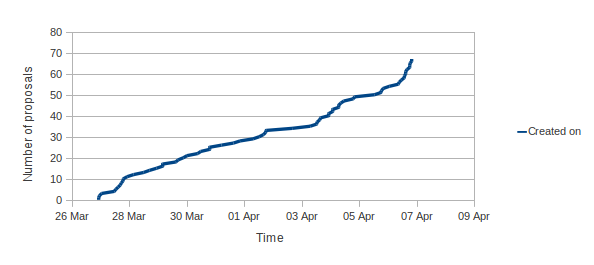
This year our efforts have paid off and despite there being more mentoring organizations than there were in 2011 (175 in 2011 and 180 in 2012), this year in Debian we got 81 submissions versus 43 submissions in 2011.
You can see here the graphs of applications against time from this year: 2012 The result is this year we ll have 15 students in Debian versus 9 students last year! Without further ado, here is the list of projects and student who will be working with us this summer: If you want to know more about these projects, follow the links and ask the students (and mentors)!

26 April 2012

Olly Betts: Xapian GSoC 2012 Projects

At the end of the previous episode, you may remember our gallant heroes had a pile of 30 proposals to review. We soon spotted one more to mark as invalid (just a paste with our ideas list plus a some biographical details), and another got withdrawn by the student without explanation (but was low quality anyway), so that left us with 28. We had six volunteers for mentoring, and in the initial allocation we received five student slots from Google, but we asked nicely if we could have an extra one, and were lucky enough to get it. Last year we had four students, so that's a 50% increase. Here's those 28, broken down by the project idea:
  • 8 - Weighting Schemes
  • 6 - Learning to Rank
  • 3 - Dynamic Snippets
  • 2 - Lucene Backend
  • 2 - QueryParser improvements
  • 1 - Erlang Bindings
  • 1 - Improve C# and Java bindings
  • 1 - Improve PHP Bindings
  • 1 - Improve Python Bindings
  • 1 - Improving Japanese Support
  • 1 - Node.js Bindings
  • 1 - Postlist encodings
I find it interesting that the most popular three ideas have closer connections to Information Retrieval theory than most - probably these appeal to students who have taken IR courses and already have an interest and some knowledge of the project area. I think we should aim to get more ideas like these on the list in future years. It's worth noting that in several cases students had taken an idea in sufficiently different directions that there wasn't much overlap, so we didn't just pick the best proposal for each project idea to narrow things down. Also, the proposal isn't the only factor - we like to see applicants work on patch, and to interact with us on IRC and/or email. But in the end it happens we ended up with proposals which were all from different ideas - here are those we selected:
My congratulations to the lucky six, and my commiserations to those we weren't able to select. It wasn't an easy selection to make, and we truly appreciate the time you spent writing your proposal, working on patches, and on the rest of the application process. We'd encourage you to remain involved with Xapian, and to apply to us again next year if you're still eligible for GSoC.

Paul Wise: What happens when a Debian derivative shuts down?

Over the past months we have seen the end of two Debian derivatives. In January the news came that Junta de Extremadura (Spain) were abandoning the development of LinEx and switching to Debian itself. Early in March the Debian derivatives census scripts noted that the Vanillux apt repository was down. Fabrice Quenneville then confirmed that he had to put a hold on the Vanillux project due to the cost of bandwidth and servers. In addition the future of StormOS is in doubt after Illumian was created. StormOS is a port of Debian to the OpenSolaris kernel and Illumian is similar but uses only apt/dpkg and repackages everything else. The LinEx page in the Debian derivatives census did not reveal much information about the project that would have been useful to Debian, in particular it does not list any apt repositories. As a result it is quite hard to say what has potentially been lost. Two mails from people close to or involved in the project indicate that much of the LinEx distribution was already merged into Debian. It is probably safe to say that everything of value has been merged into Debian, including at least one of the developers involved in LinEx. Vanillux was a small distribution with few developers according to the Google caches of their website. If we look at the patches created by the derivatives census scripts, we can see that the 5 source packages that were possibly derived from Debian source packages were simply imported from Christian Marillat's repository of non-free, patented, legally restricted and multimedia-related packages. The patches indicate that 3 source packages were forked from Debian and that 2 source packages were done from scratch. The forked packages seem to be mainly about enabling support for proprietary and patented codecs in several programs. This is a surprisingly small number of altered/differing packages, so what else could Vanillux folks have been working on? It appears that there were 12 new source packages that were not derived from Debian source packages. These appear to be mainly multimedia-related packages, one font imported from an Ubuntu PPA, some syslinux themes and a metapackage. The multimedia packages are all from Christian Marillat's repository. The Debian multimedia team is working hard on bringing multimedia related software to Debian and welcomes help with that. The font (Cantarell) is now in Debian under a different source package name. The metapackage appears to be very similar to from the ubuntu-meta source package from Ubuntu that uses germinate. So at first glance, the contribution of Vanillux to the world of Linux distributions appears to be in the area of artwork and package selection. The artwork produced is basically Vanillux branding and is thus not usable by Debian, although we would like more artists involved in Debian. The meta-package is not easily useful to Debian since we use a different mechanism for our task packages and our task packages have already been updated for the GNOME 3 transition. Still, the amount of difference between to source packages is relatively small. So, what else? Perusing the diff between the list of source packages exposed by the Packages and Sources files, I noted that a number of binary packages in the Packages files reference source packages not listed in the Sources files. When I saw picasa in that list, it occurred to me that Vanillux might have directly imported some binary packages without their corresponding source packages. Perusing their apt metadata confirms that they have imported some binary packages of non-free software directly from vendors. These include Google Desktop, Opera, Picasa and VirtualBox 3.2. The rest of the packages in the diff appear to be caused by some sort of issue with the import process from Debian and other apt repos. Most of the above could be achieved by adding some external commerical repositories to a normal Debian system or by merging some of those repositories (such as the Opera one) into Debian. The interesting thing about the Debian derivatives census is that it allows us to perform analyses like these and figure out what patches and packages we might like to integrate into Debian. In this way we can salvage some of the value of our derivatives if they abandon ship. If you have any ideas or code for improving the census or are running a Debian derivative, please join us at the Debian derivatives frontdesk.

25 April 2012

Vincent Bernat: XBMC Eden on Debian Wheezy

I bought some HTPC a few years ago to run XBMC, a neat media center solution. At the time, to avoid any problems, I installed it on top of a minimal Ubuntu Lucid installation with the official packages from the team XBMC. Recently, XBMC Eden has been released and XBMC has landed into Debian unstable. It was a good occasion to make the switch. Unofficial XBMC logo for Eden TL;DR: Installing XBMC on Debian Wheezy is quite easy: it almost works out of the box. The big difficulty is the configuration of the remote control: either it works as you expect or you will have to scratch your head over the pile of layers needed to work with a remote control. The configuration of my HTPC is as follows:

Installation

Installing Debian Wheezy Installing Debian Wheezy2 is pretty easy. Nowadays, getting a bootable USB key from a netinst image of Debian Installer for Wheezy is simplified:
$ sudo dd if=debian-testing-i386-netinst.iso \
>         of=/dev/disk/by-id/usb...
The installation was smooth with the exception of GRUB which was unable to install itself on the disk. This is a known bug when dealing with LVM and it comes with a simple workaround. I hope it will be corrected in time for Wheezy release. While this has little to do with the installation of XBMC, I wanted to test systemd which may become the default init in Debian (at least in Debian GNU/Linux). From README.Debian:
systemd can be installed alongside sysvinit and will not change the behaviour of the system out of the box. This is intentional. To test systemd, add init=/bin/systemd to the kernel command line and then rebooting, or install the systemd-sysv package.
The final system boots in about 15 seconds.

Configuring X Because video decoding in nouveau driver is still a work in progress, the use of the proprietary NVIDIA drivers is mandatory to be able to watch high resolution videos. Therefore, /etc/apt/sources.list should be completed with contrib and non-free repository. Then, you can install the appropriate packages: xserver-xorg-video-nvidia, nvidia-vdpau-driver and xserver-xorg. Here is my /etc/X11/xorg.conf.d/nvidia.conf:
Section "Device"
    Identifier     "NVidia ION"
    Driver         "nvidia"
    VendorName     "NVIDIA Corporation"
    Option         "HWCursor" "False"
    Option         "NoFlip" "False"
    Option         "FlatPanelProperties" "Scaling = Native"
    Option         "DynamicTwinView" "False"
    Option         "ConnectedMonitor" "DFP-1"
    Option         "CustomEDID" "DFP-1:/etc/X11/edid.bin"
    Option         "NoLogo" "True"
EndSection
Section "Extensions"
    Option "Composite" "false"
EndSection
The CustomEDID option allows the driver to get an appropriate EDID even when the AV receiver is off. You can get yours, free of charge, with get-edid from read-edid package.

Installing XBMC Thanks to the work of Andr s Mej a, XBMC is now available in Debian Wheezy. To install it, just type aptitude install xbmc. I have dropped the following xbmc.service in /etc/systemd/system directory:
[Unit]
Description = XBMC media center
After = syslog.target
[Service]
User = xbmc
Group = xbmc
Type = simple
ExecStart = /usr/bin/xinit /usr/bin/xbmc-standalone -- :0
Restart = on-failure
[Install]
WantedBy = multi-user.target
Enable this service on boot with systemctl enable xbmc.service. You need to allow xbmc user to run X. The simplest way is to run dpkg-reconfigure -plow x11-common and to allow anybody to run X. sudo may be an alternative.

Configuration

Sound While I wanted to use PulseAudio, I want the AV receiver to be able to upmix stereo streams itself. With PulseAudio, it would always receive a 6-channel signal. Therefore, I directly use ALSA. First, unmute the appropriate outputs:
$ amixer scontrols   grep IEC958
Simple mixer control 'IEC958',0
Simple mixer control 'IEC958 Default PCM',0
Simple mixer control 'IEC958',1
$ amixer sset 'IEC958',0 unmute
$ amixer sset 'IEC958 Default PCM',0 unmute
$ amixer sset 'IEC958',1 unmute
$ sudo systemctl stop alsa-utils.service
The order of channels is incorrect. With the following /etc/asound.conf, we declare a new output, hdmi2, with a different mapping:
pcm.hdmi2  
  type asym
  playback.pcm  
    type plug
    slave.pcm "remap-surround51"
   
 
pcm.!remap-surround51  
  type route
  slave.pcm "hdmi"
  ttable  
    0.0= 1
    1.1= 1
    2.4= 1
    3.5= 1
    4.2= 1
    5.3= 1
   
 
In XBMC, this output should be used instead of the default one. hdmi should still be used for passthrough. To check if each speaker is mapped correctly, one can use speaker-test -D hdmi2 -c 6.

LCD display The LCD display integrated into the SoundGraph iMON is supported by the imon kernel module and the lcdproc package. I have only modified a few lines of /etc/LCDd.conf to make it work:
[server]
Driver=imonlcd
ServerScreen=off
[imonlcd]
Protocol=1
OnExit=2
Contrast=400

Remote control This is the most difficult part. I have a Logitech Harmony remote which is a great universal remote. Its support in Linux is acceptable: you can configure through Logitech website and use congruity to push the new configuration.

Remote controls and Linux Before Linux 2.6.36, most remote controls would need LIRC to work:
  • The driver receives the signal from the IR receiver and make it available through /dev/lirc.
  • lircd, with the help of a configuration file describing the protocol used by the remote control, will read the signal and turn it into the appropriate LIRC code.
  • XBMC connects to lircd and receives incoming LIRC codes. It will translate them to an XBMC command. This translation is specified in Lircmap.xml.
  • XBMC maps each command to an action (like Play, Fullscreen, ) using a keymap. This keymap can handle commands received by a remote control, but also by a keyboard, a mouse or a joystick.
Since Linux 2.6.36, remote controls will be mapped as a generic input device (just like a keyboard):
  • The driver receives the signal from the IR receiver.
  • The signal will be handled by a decoder. The configuration of this decoder is done in userland by ir-keytable. The decoder will turn the signal into the appropriate event (usually, some keypress).
  • X will listen to those events and turn them into X key events.
  • XBMC will receive them and use the appropriate keymap to turn them into actions.
And to add more complexity to the mix, in this last case, you can still use LIRC: lircd will listen to events generated by the kernel and turn them into LIRC codes. This can be very confusing. Moreover, the SoundGraph iMON IR receiver accepts two IR protocols: the iMON protocol and the RC-6 one. The Linux driver accepts both of them but uses the first one by default. The RC-6 protocol is the protocol used by many MCE remote controls. I hope you are still with me here.

The easy way To get a reasonable configuration out of the box, here is how to configure each layer:
Logitech Harmony remote
Configure it as a Microsoft branded Media Center PC: Windows Media Center SE.
iMON IR receiver
It must use RC-6 protocol. See below for more details.
LIRC
In /etc/lirc/hardware.conf, put DEVICE=/dev/input/by-id/usb-15c2_0038-event-if00 and DRIVER=devinput. In /etc/lirc/lircd.conf, just put include "/usr/share/lirc/remotes/devinput/lircd.conf.devinput".
XBMC
With the previous bits done, it should just work out of the box.
To switch to RC-6 protocol, install the ir-keytable package and use the following commands:
$ sudo modprobe rc-imon-mce
$ sudo ir-keytable -s rc0 -p rc-6 -c -w /lib/udev/rc_keymaps/imon_mce
Read imon_mce table
Old keytable cleared
Wrote 77 keycode(s) to driver
Protocols changed to RC-6
To make the change permanent, add the rc-imon-mce module to /etc/modules and create /etc/udev/rules.d/90-imon.rules with the following content:
# Override the keytable for iMON
ACTION=="add change", SUBSYSTEM=="rc", DRV_NAME="imon", \
   RUN+="/usr/bin/ir-keytable -s $name -p rc-6 -c -w /lib/udev/rc_keymaps/imon_mce"

The hard way Now, you may want to bind custom actions to some (physical or virtual) buttons. Basically, you are left with two solutions:
  1. Start from the basic configuration with LIRC and add more buttons at each levels (there are five of them!).
  2. Remove LIRC and start with the Logitech Harmony acting as a Microsoft MCE keyboard.
The first option can be quite difficult. You need to find an unused code for the Logitech Harmony. You can try to make it learn a new code if you have some RC-6 remote control. Then, you need to ensure that this code will be present in the keytable used by ir-keytable. If not, you need to add it. That s not easy since you need a to enable some debug stuff in the kernel to find the appropriate scancode. After that, the code needs to be translated in lircd.conf. You will then have to translate it again in Lircmap.xml. At least, you need to add it to a keymap in XBMC. The other way is not ideal but seems less cumbersome. The first step is to configure the Logitech Harmony as a Microsoft MCE keyboard: it has a lot of available keys. Because of the lack of multimedia keys, let s match the keyboard configuration of XBMC:
Button Command Button Command
Channel Down PageDown Stop X
Channel Up PageUp Skip back Comma
Prev Backspace Skip forward .
Up DirectionUp Play P
Down DirectionDown Rewind R
Left DirectionLeft Fast forward F
Right DirectionRight Star Delete
OK Enter Pound W
Menu C Red F1
Exit Esc Green F2
Guide Tab Yellow F3
Info I Blue F4
Unfortunately, the keytables provided with ir-keytable are not complete enough. I have built a more complete table3. With this table and the bindings described above, most functions will work out of the box without LIRC. Additional keys can be configured in a dedicated keymap4. Here is an excerpt of mine:
<keymap>
 <global>
  <keyboard>
    <end>XBMC.ShutDown()</end>
    <f1>XBMC.ActivateWindow(MusicLibrary)</f1>
    <f2>XBMC.ActivateWindow(Videos,TvShowTitles)</f2>
    <f3>XBMC.ActivateWindow(Videos,MovieTitles)</f3>
    <f4>XBMC.ActivateWindow(Weather)</f4>
  </keyboard>
 </global>
 <FullscreenVideo>
  <keyboard>
   <opensquarebracket>SubtitleDelayMinus</opensquarebracket>
   <closesquarebracket>SubtitleDelayPlus</closesquarebracket>
   <f6>xbmc.runscript(script.xbmc.subtitles)</f6>
  </keyboard>
 </FullscreenVideo>
</keymap>

FTP Instead of using SSH, I prefer to drop new files with anonymous FTP. vsftpd fits this purpose. Here is my configuration file:
listen=YES
xferlog_enable=YES
use_localtime=YES
setproctitle_enable=YES
secure_chroot_dir=/var/run/vsftpd/empty
nopriv_user=ftp
ftpd_banner=XBMC
hide_ids=YES
ftp_username=xbmc
anon_umask=022
anon_root=/home/xbmc/media
anonymous_enable=YES
write_enable=YES
anon_upload_enable=YES
anon_world_readable_only=YES
It is currently not compatible with systemd (see bug #670308). I have removed the symlink in /etc/rc2.d and I have used the following unit file:
[Unit]
Description=Vsftpd ftp daemon
After=syslog.target network.target
[Service]
Type=simple
ExecStart=/usr/sbin/vsftpd /etc/vsftpd.conf
ExecReload=/bin/kill -HUP $MAINPID
ExecStartPre=-/bin/mkdir -p /var/run/vsftpd/empty
[Install]
WantedBy=multi-user.target

Miscellaneous
  1. In /etc/default/grub, reduce TIMEOUT to 0 to shorten the boot time.
  2. Enabling dirty regions can help speed up XBMC.
  3. aptitude install upower pm-utils to be able to shutdown/suspend from XBMC. Since XBMC was configured to be started outside any session, you need to explicitely give the appropriate rights by creating the following /var/lib/polkit-1/localauthority/50-local.d/xbmc.pkla:
    [Actions for xbmc user]
    Identity=unix-user:xbmc
    Action=org.freedesktop.upower.*;org.freedesktop.consolekit.system.*
    ResultAny=yes
    ResultInactive=yes
    ResultActive=yes
    

  1. The readibility of the LCD screen is very bad. You should look at the VFD version. The IR receiver reception is poor. The provided remote control is a joke.
  2. Debian Wheezy is not yet released. If you are unfamiliar with Debian, it may be cumbersome to maintain it until the freeze happens in a few months.
  3. Some keys are missing from the provided table. For example, there is no exclamation mark. While there is a scan code for such a key in RC-6 protocol, there is no appropriate key code to translate to: on a QWERTY keyboard, the exclamation mark is on the same key as the number 1. It is possible to map it to some other key code, but the mapping would have been difficult to use.
  4. For example, in ~/.xbmc/userdata/keymaps/harmony.xml.

24 April 2012

M nica Ram rez Arceda: Debian talk at Institut usias March

Last Friday (2012-04-20) I gave a talk about Debian at Institut usias March. This talk was inside Jornades t cniques d'FP 2012, a conference organized by different schools around Catalonia. I tried to explain to about 60 students the essence of Debian Project I hope they enjoyed the talk! To prepare the slides, I played a little bit with impress.js. I don't think I'm a great artist but I enjoyed using this nice tool. Here you have the slides I used for the talk: Talk: Debian. El sistema operatiu lliure creat per la comunitat. They are in Catalan but, although you don't understand this language, I encourage you to go until the last slide stars always have something to tell you ;)

Jonathan McDowell: The future is here again

Back in 2004 when Simon and I went full time with Black Cat one of the first things I did was sort out an ADSL offering, including native IPv6. We were one of the first UK ISPs to offer this (possibly the first; I know A&A had been doing tunneled IPv6 for a lot longer, but I'm not sure exactly when they enabled IPv6 on the PPP session. Also Bogons were fairly quick to enable it as well). By the middle of 2004 I was fully IPv6 enabled; my colo box had a native connection, my entire home network (a /64 for the wired, a /64 for the wireless) was configured, BCN had multiple native IPv6 connections to other ISPs (such as peering over LoNAP). By and large it just worked; I remember at one point looking at a traffic graph link from someone in Australia and them indicating surprise that I'd come in over v6. I hadn't noticed anything different than normal, which is exactly how it should be. When we sold BCN in 2007 unfortunately one of the casualties was the v6 support. The ISP that took over the ADSL wasn't setup to be able to continue the v6 support, nor were RapidSwitch, who took over most of the hosting (I note with sadness that RapidSwitch still don't seem to be offering v6, though they keep saying it's a work in progress). So I stopped having any v6 for some time, refusing to slum it with a tunnel. This changed at the start of last year, when I sought out new hosting for the. I ended up selecting Bytemark, partly because I knew of their commitment to v6. I'd chosen Sonic as my US access ISP, again partly because they offered an IPv6 tunnel service (while not as nice as native v6 over the DSL I felt that a tunnel provided by the DSL ISP was acceptable for access). However a combination of not having a machine that was always on at home, and a dynamic IP on my connection, meant that I never got round to configuring anything permanent up. Recently I got around to buying a little low powered box to be always-on and this week I finally looked at configuring it up as the tunnel endpoint, planning to do some sort of screen scraping of the web interface to automatically update the tunnel broker information for the rare occurrences when my IP changes. The first nice surprise was that Sonic are now doing static IPs for free (previously you could only have a block of 8 for $20/month extra). That makes things a lot easier. So tonight I configured up the little server as the tunnel endpoint, installing radvd and some basic v6 firewalling. As expected my laptop sees the RAs, automatically configures everything up and my ssh sessions start to go over IPv6 instead. Looks like my phone also does the same. I'm not entirely sure what the NAT on the ADSL router is doing and if inbound connections will fail if there's nothing outbound holding the translation entry active, but I'm sure I can work around that if it turns out to be a problem. I care more about access than hosting anything on the end of my DSL anyway. This means I'm finally almost back to where I was nearly 8 years ago, just in time for World IPv6 Launch day.

23 April 2012

Clint Adams: Work in advertising!

The marketing industry divides itself up into a number of businesses. Some are boutique agencies, but most are owned by one of the world's four major holding companies. These conglomerates pursue an aggressive M&A strategy, snapping up smaller companies all the time. There are other sets of services, as well as variations on the above, particularly in terms of targeting certain age groups or ethnic groups, but also particular industries or sectors (movies, politics). There is direct marketing (spamming) through all the imaginable media. There is also paying people to blog about certain things without disclosing their sponsorship.

Julien Danjou: OpenStack Swift eventual consistency analysis & bottlenecks

Swift is the software behind the OpenStack Object Storage service. This service provides a simple storage service for applications using RESTful interfaces, providing maximum data availability and storage capacity. I explain here how some parts of the storage and replication in Swift works, and show some of its current limitations. If you don't know Swift and want to read a more "shallow" overview first, you can read John Dickinson's Swift Tech Overview. How Swift storage works If we refer to the CAP theorem, Swift chose availability and partition tolerance and dropped consistency. That means that you'll always get your data, they will be dispersed on many places, but you could get an old version of them (or no data at all) in some odd cases (like some server overload or failure). This compromise is made to allow maximum availability and scalability of the storage platform. But there are mechanisms built into Swift to minimize the potential data inconsistency window: they are responsible for data replication and consistency. The official Swift documentation explains the internal storage in a certain way, but I'm going to write my own explanation here about this. Consistent hashing Swift uses the principle of consistent hashing. It builds what it calls a ring. A ring represents the space of all possible computed hash values divided in equivalent parts. Each part of this space is called a partition. The following schema (stolen from the Riak project) shows the principle nicely: Consistent hashing ring In a simple world, if you wanted to store some objects and distribute them on 4 nodes, you would split your hash space in 4. You would have 4 partitions, and computing hash(object) modulo 4 would tell you where to store your object: on node 0, 1, 2 or 3. But since you want to be able to extend your storage cluster to more nodes without breaking the whole hash mapping and moving everything around, you need to build a lot more partitions. Let's say we're going to build 210 partitions. Since we have 4 nodes, each node will have 210 4 = 256 partitions. If we ever want to add a 5th node, it's easy: we just have to re-balance the partitions and move 1 4 of the partitions from each node to this 5th node. That means all our nodes will end up with 210 5 204 partitions. We can also define a weight for each node, in order for some nodes to get more partitions than others. With 210 partitions, we can have up to 210 nodes in our cluster. Yeepee. For reference, Gregory Holt, one of the Swift authors, also wrote an explanation post about the ring. Concretely, when building one Swift ring, you'll have to say how much partitions you want, and this is what this value is really about. Data duplication Now, to assure availability and partitioning (as seen in the CAP theorem) we also want to store replicas of our objects. By default, Swift stores 3 copies of every objects, but that's configurable. In that case, we need to store each partition defined above not only on 1 node, but on 2 others. So Swift adds another concept: zones. A zone is an isolated space that does not depends on other zone, so in case of an outage on a zone, the other zones are still available. Concretely, a zone is likely to be a disk, a server, or a whole cabinet, depending on the size of your cluster. It's up to you to chose anyway. Consequently, each partitions has not to be mapped to 1 host only anymore, but to N hosts. Each node will therefore store this number of partitions:
number of partition stored on one node = number of replicas   total number of partitions   number of node
Examples:
We split the ring in 210 = 1024 partitions. We have 3 nodes. We want 3 replicas of data.
Each node will store a copy of the full partition space: 3 210 3 = 210 = 1024 partitions.
We split the ring in 211 = 2048 partitions. We have 5 nodes. We want 3 replicas of data.
Each node will store 211 3 5 1129 partitions.
We split the ring in 211 = 2048 partitions. We have 6 nodes. We want 3 replicas of data.
Each node will store 211 3 6 = 1024 partitions.
Three rings to rule them all In Swift, there is 3 categories of thing to store: account, container and objects. An account is what you'd expect it to be, a user account. An account contains containers (the equivalent of Amazon S3's buckets). Each container can contains user-defined key and values (just like a hash table or a dictionary): values are what Swift call objects. Swift wants you to build 3 different and independent rings to store its 3 kind of things (accounts, containers and objects). Internally, the two first categories are stored as SQLite databases, whereas the last one is stored using regular files. Note that this 3 rings can be stored and managed on 3 completely different set of servers. Swift storage schema Data replication Now that we have our storage theory in place (accounts, containers and objects distributed into partitions, themselves stored into multiple zones), let's go the replication practice. When you put something in one of the 3 rings (being an account, a container or an object) it is uploaded into all the zones responsible for the ring partition the object belongs to. This upload into the different zones is the responsibility of the swift-proxy daemon. Swift proxy schema But if one of the zone is failing, you can't upload all your copies in all zones at the upload time. So you need a mechanism to be sure the failing zone will catch up to a correct state at some point. That's the role of the swift- container,account,object -replicator processes. This processes are running on each node part of a zone and replicates their contents to nodes of the other zones. When they run, they walk through all the contents from all the partitions on the whole file system and for each partition, issue a special REPLICATE HTTP request to all the other zones responsible for that same partition. The other zone responds with information about the local state of the partition. That allows the replicator process to decide if the remote zone has an up-to-date version of the partition. In case of account and containers, it doesn't check at the partition level, but check each account/container contained inside each partition. If something is not up-to-date, it will be pushed using rsync by the replicator process. This is why you'll read that the replication updates are "push based" in Swift documentation.
# Pseudo code describing replication process for accounts
# The principle is exactly the same for containers
for account in accounts:
    # Determine the partition used to store this account
    partition = hash(account) % number_of_partitions
    # The number of zone is the number of replicas configured
    for zone in partition.get_zones_storing_this_partition():
        # Send a HTTP REPLICATE command to the remote swift-account-server process
        version_of_account = zone.send_HTTP_REPLICATE_for(account):
        if version_of_account < account.version()
            account.sync_to(zone)
This replication process is O(number of account number of replicas). The more your number of account will increase and the more you will want replicas for your data, the more the replication time for your accounts will grow. The same rule applies for containers.
# Pseudo code describing replication process for objects
for partition in partitions_storing_objects:
    # The number of zone is the number of replicas configured
    for zone in partition.get_zones_storing_this_partition():
        # Send a HTTP REPLICATE command to the remote swift-object-server process
        verion_of_partition = zone.send_HTTP_REPLICATE_for(partition):
        if version_of_partition < partition.version()
            # Use rsync to synchronize the whole partition
            # and all its objects
            partition.rsync_to(zone)
This replication process is O(number of objects partitions number of replicas). The more your number of objects partitions will increase, and the more you will want replicas for your data, the more the replication time for your objects will grow. I think this is something important to know when deciding how to build your Swift architecture. Choose the right number the number of replicas, partitions and nodes. Replication process bottlenecks Copycat File accesses The problem, as you might have guessed, is that to replicate, it walks through every damn things, things being accounts, containers, or object's partition hash files. This means it need to open and read (part of) a every file your node stores to check that data need or not to be replicated! For accounts & containers replication, this is done every 30 seconds by default, but it will likely take more than 30 seconds as soon as you hit around 12 000 containers on a node (see measurements below). Therefore you'll end up checking consistency of accounts & containers on each all node all the time, using obviously a lot of CPU time. For reference, Alex Yang also did an analysis of that same problem. TCP connections Worst, the HTTP connections used to send the REPLICATE commands are not pooled: a new TCP connection is established each time something has to be checked against the same thing stored on a remote zone. This is why you'll see in the Swift's Deployment Guide this lines listed under "general system tuning":
# disable TIME_WAIT.. wait..
net.ipv4.tcp_tw_recycle=1
net.ipv4.tcp_tw_reuse=1
# double amount of allowed conntrack
net.ipv4.netfilter.ip_conntrack_max = 262144
In my humble opinion, this is more an ugly hack than a tuning. If you don't activate this and if you have a lot of containers on your node, you'll end up soon with thousands of connections in TIME_WAIT state, and you indeed risk to overload the IP conntrack module. Container deletion We also should talk about container deletion. When a user deletes a container from its account, the container is marked as deleted. And that's it. It's not deleted. Therefore the SQLite database file representing the container will continue to be checked for synchronization, over and over. The only way to have a container permanently deleted is to mark an account as deleted. This way the swift-account-reaper will delete all its containers and, finally, the account. Measurement On a pretty big server, I measured the replications to be done at a speed of around 350 account,container,object-partitions /second, which can be a real problem if you chose to build a lots of partition and you have a low number_of_node number_of_replicas ratio. For example, the default parameters runs the container replication every 30 seconds. To check replication status of 12 000 containers stored on one node at the speed of 350 containers/seconds, you'll need around 34 seconds to do so. In the end, you'll never stop checking replication of your containers, and the more you'll have containers, the more your inconsistency window will increase. Conclusion Until some of the code is fixed (the HTTP connection pooling probably being the "easiest" one), I warmly recommend to chose correctly the different Swift parameters for your setup. The replication process optimization consists in having the minimum amount of partitions per node, which can be done by: For very large setups, some code to speed up accounts and containers synchronization, and remove deleted containers will be required, but this does not exist yet, as far as I know.

22 April 2012

Joey Hess: moving my email archives and packages to git-annex

I've recently been moving some important data into git-annex, and finding it simplifies things while also increasing my flexability. email archives I've kept my email archives in git for years. This works ok, just choose the right file format (compressed mbox) and number of files (one archive per mailbox per month or so) and git can handle this well enough, as email is not really large. But, email is not really small either. Keeping my email repository checked out on my netbook consumes 2 gigabytes of its 30 gigabyte SSD, half of which is duplication in .git. Also, I have only kept it at 2 gigabytes through careful selection of what classes of mail I archive. That made sense when archival disk was more expensive, but what makes sense these days is to archive everything. For a while I've wanted to have a "raw" archive, that includes all email I receive. (Even spam.) This protects against various disasters in mail filtering or reading. Setting that up was my impetus for switching my mail archives to git-annex today. The new system I've settled on is to first copy all incoming mail into a "raw" maildir folder. Then mailfilter sorts it into the folders I sync (with offlineimap) and read. Each day, the "raw" folder is moved into a mbox archive, and that's added to the git annex. Each month, the mail I've read is moved into a monthly archives, and added to the git annex. A simple script does the work. I counted the number of copies that existed of my mail when it was stored in git, and found 7 copies spread amoung just 3 drives. I decided to slim that back, and configured git-annex to require only 5 copies. But those 5 copies will spread amoung more drives, including several offline archival drives, so it will be more robust overall. My netbook will have an incomplete checkout of my mail, omitting the "raw" archive. If I need to peek inside a spam folder for a lost mail, I can quickly pull it down; if I need to free up space I can quickly drop older archives. This is the flexability that git-annex fans love. :) By the way, this also makes it easier to permanantly delete mail, when you really need to (ie, for contractual reasons). Before, I'd have to do a painful git-filter-branch if I needed to get rid of eg, mail for old jobs. Now I can git annex drop --force. Pro Tip: If you're doing this kind of migration to git-annex, you can save bandwidth by not re-transferring files to machines that already have a copy. I ran this command on my netbook to inject the archives it had in the old repository into the new repository, verifying checksums as it goes:
cd ~/mail/archive; find -type l -exec git annex reinject ~/mail.old/archive/    \;
Note on mairix compatability: I use mairix to index and search my mail. But it refuses to follow git-annex's symlinks to the content. So I have to point it at .git/annex/objects/. I also configured annex.backend to SHA256E, which keeps the extensions on my compressed mailbox files, which is necessary for mairix to realize they're compressed. debian packages I'd evolved a complex and fragile chain of personal apt repositories to hold Debian packages I've released. I recently got rid of the mess, which looked like this: dput local mini-dinstall repo dput&rarr;mini-dinstallrepo on my server &rarr;dput Debian The point of all that was that I could "upload" a package locally while offline and batch transfer it later. And I had a local and a public apt repository of just the packages I've uploaded. But these days, packages uploaded to Debian are available nearly immediately, so there's not much reason to do that. My old system also had a problem: It only kept the most recent single copy of each package. Again, disk is cheap, so I'd rather have archives of everything I have uploaded. Again I switched to git-annex. My new system is simplicity itself. I release a package by checking it into a "toupload" directory in my git annex repository on my netbook. Items in that directory are dput to Debian and moved to "released". I have various other clones of that repository, which I git annex move packages to periodically to free up SSD space. In the rare cases when I build a package on a server, I check it into the clone on the server, and again rely on git-annex to copy it around. Now, does anyone know a good way to download a copy of every package you're ever released from archive.debian.org? (Ideally as a list of urls I can feed to git annex addurl.) conclusion My email and Debian packages were the last large files I was not storing in git-annex. Even backups of my backups end up checked into git-annex and archived away. Now that I'm using git-annex in every place I can, my goal with it is to make it as easy as possible for as many of you to use it as possible, too. I have some inotify tricks up my sleeve that seem promising. Kickstarter may be involved. Watch this space!

Steve Kemp: Work on my bathroom continues

Work on my bathroom continues. I had expected it to be complete on Friday but it lookse like the new completion date will be Tuesday or Wednesday. It will be very nice to have a working shower, and a toilet I don't need to "flush" with a bucket. The only interesting thing I've been doing is planning on a kernel to support long-term for some poor unfortunate souls who cannot use Debian-based kernels. I know building, supporting, and maintaining a kernel will be a pain. But at the moment it looks like a valid thing to be suggesting. Otherwise life goes on. I've been hit by the DIY bug, largely as the result of seeing all the bathroom work going on, and figuring I was going to live with dust/mess anyway - so I've erected some more book-shelves, and ordered a pair of ceiling fans. The only other thing to report is that I've started deleting emails. (shock!) I look after a few machines for myself, friends and so on. Each one will send me automated emails at times. I've got them going back years - but no longer:
#
#  Prune old mailboxes.
#
for maildir in .Automated.backups .machines.spotlight .machines.skx; do
   nrecent --keep=150 $HOME/Maildir/$ maildir /cur
done
Another new use for my nrecent tool. (Note: Only delete files from ./cur, to avoid deleting messages I've not read. Maildir is your friend!) ObQuote: "I'm sorry I'm sweating on you... " - Knocked Up.

Stefano Zacchiroli: deferred bits from the DPL for March 2012

Posted a week ago, already deferred back then, this report is even more deferred now! But as there are people interest in knowing what the "DPL job" is about even among non debian-devel-announce subscribers, here is a blog-conveyed reproduction, for the records.
Dear project members,
here is my monthly DPL activity report, this time for last March. It is delayed by a couple of weeks because, myself being both incumbent and candidate DPL, I preferred not to use d-d-a during the voting period unless really needed. Apologies for the delay (or the unneeded paranoia, you name it). As a side effect of the delay, the results of the DPL election are now known. I'd like to thank all the people who took part in the elections: voters, people who asked questions on -vote, the secretary, and obviously Gergely and Wouter, without whom the campaign wouldn't have allowed to discuss relevant aspects of Debian "politics". Thanks for your trust. I'll do my best to match your expectations. ... and just to remind you what you've just asked for, here goes the BigMonthlyBlurb! Highlight: long-term hardware replacement planning The highlight for this month is long term planning of hardware replacement. It's something I've been discussing with DSA for quite a while and on which DSA has worked hard during the recent sprint. As a result, we now have a quite ambitious 5-year hardware replacement plan that will guarantee that all machines in production are under warranty at any given time (with the nice side effect of generally better performances, as they go hand in hand with newer hardware). The current estimated cost per year is 29'000 USD. That does not yet include buildds and porter-boxes, so it is expected to increase a bit to cover all our hardware needs. But we expect it not increase too much, as we tend to get explicit hardware donations to cover arch-specific needs. Given the current state of Debian finances and donation trends, the plan looks sustainable for at least 2-3 years. But this assessment still needs to be refined as soon as, together with the auditors, we'll manage to obtain the history of past Debian transactions, in particular from SPI. We've been waiting for this for about 5 months now, but I'm positive it could become a reality in the next weeks. In the meantime, it is surely safe to start with the plan for the next 1-1.5 years, so I'll give green light to DSA for the first acquisitions as soon as they're ready for it. When implemented, this plan will increase our ability to rely on hardware. But it also means we will need to become a bit more organized about fund-raising. The discussion started with the sprint report has some insights about how to do that. As part of this, we'll also need to share resources (e.g. contact databases, people, etc.) among the yearly DebConf fund-raising initiatives and the initiatives mentioned in the aforementioned discussion. Ongoing discussions Summer of Code Debian has been accepted as an organization for the Google Summer of Code. At the time these bits go out, the student application deadline has also elapsed. In March I've contributed a few project ideas and chased potential mentors for them, when I thought the project could be important for Debian and the prospective student. I'm happy that one (a dak building block needed for the implementation of PPAs and more) has found both mentors and students. We'll see if any of the corresponding student proposal is retained and how it goes. Communication I've given an interview, about Debian and Free Software in general, to La Repubblica, one of the major newspapers in Italy. The interview is available online, but only in Italian. If some kind (and Italian-speaking) soul would like to translate it into English, I'll be happy to publish the translation as well. (update 22/04/2012: Matteo Cortese has contributed an English translation of the interview, which I'll make available shortly) Legal stuff In order to transfer ownership of the Debian trademark in Japan to SPI, I've contacted the current owners (all Japanese Debian Developers or contributors) to do the needed paperwork. I've been blessed by the help of Kenshi Muto that has taken the matter in his hands. He is now navigating through Japanese trademark procedures, a subject neither myself nor SPI lawyers were familiar with. Thanks also to Jonathan McDowell who has done the needed paperwork, SPI-side. Sprints Plenty of sprints and sprint reports in March!: Debian Med, DSA, DAM/FrontDesk. Everything should also be available from the wiki sprint page where you can find info to organize your team sprint. Assets miscellanea Cheers.
PS the boring day-to-day activity log for March is available at master:/srv/leader/news/bits-from-the-DPL.txt.201203

20 April 2012

Keith Packard: fireworks

LED Fireworks. Or, parent helpers go overboard My friend, Mike Ward, and I help out at our kids school by teaching 5th and 6th graders programming in conjunction with a Lego class. For several years, I was teaching Logo on ancient Apple II machines. The teacher had a great curriculum and the kids learned a lot, but this year we decided to switch things around and try them out on Arduinos. This spring, the kids are building a Lego display centered around a birthday party theme for the star elephant at the Oregon Zoo (Packy), who turned 50 last weekend. In a moment of fun, I suggested that perhaps we should have some fireworks, along with the presents and birthday cake. How hard could it be to wire up a couple of LEDs to an Arduino to make something that looked like fireworks? Selecting parts. Mike and I sat down to order some parts from Digikey. We found these nice, cheap, LED drivers from Sharp. Then we found a selection of LEDs from Cree along with current-programming resistors (12.7k ) to drive the LEDs at 20mA, and some bypass caps (0.1 F) to keep the parts happy. The LED drivers are simple shift registers, with separate clock and data. They have both input and output pins, so you can daisy chain them and drive as many as you like from a single pair of CPU pins. We figured 160 LEDs would be plenty, so we ordered 10 chips. The LED drivers came in a through-hole, DIP package; it seemed like we d be able to just stuff them into a breadboard and quickly wire things up. Prototyping the design The LED driver chips turn out to use a much finer pitch package than the usual 0.1 spacing. There s no way we could stuff them into a breadboard and quickly wire things up. Obviously, a bit more care while ordering would have uncovered this, but my experience with through-hole parts is limited to parts from the mid 1970s I soldered extension wires onto one chip to test the circuit, and managed to get one chip talking to an Arduino. Here s a short movie of that in action: You can see the LED driver chip sitting on a set of extension leads plugged into the breadboard. It s hooked to the SPI port on the Arduino board, with the clock set as fast as it will go. If you watch the video, you can see that the LEDs actually vary in brightness. They re actually being pulse-width modulated. Clocked at 2MHz, there s enough bandwidth in the SPI bus to drive 160 LEDs with 127 discrete pulse widths at nearly 100Hz (100 * 127 * 160 = 2032000). Is bread boarding practical? With the chip propped up on its extension wires, and the LEDs plugged in, the whole setup was not surprisingly fragile. Getting five of these chips wired up and running for the length of the Lego show (one day at school and two days at the zoo) seemed unlikely. So, we decided to build some custom circuit boards. Using the GEDA tools to make circuit boards My business partner, Bdale Garbee, and I build rocketry electronics through Altus Metrum. He s the hardware guy and I spend my weekends writing firmware for various micro-controllers. Of course, I use free software tools for the firmware, and Bdale uses the free gEDA tools for the hardware. I ve gotten vaguely familiar with those by helping Bdale review circuit diagrams and PC board layout over the years. So I figured I d be able to learn a bit more about them and come up with some designs. I decided to stick two LED drivers on each board. As the chips can drive each LED with up to 50mA of current, each board could potentially consume 1.6A at 5V. Sticking a linear regulator on each board capable of supplying that much current would have required a hefty heat sink. Instead, I decided to stick a mini USB connector on the board and use some cheap USB power supplies. Of course, there wasn t a pre-packaged schematic symbol or footprint for the LED driver, so I first had to construct those. But, with symbols for all of the parts I used available, I drew this circuit: Wiring up 32 LEDs It s really easy to draw wires showing 32 LEDs hooked up to each board. Actually selecting connectors that can be easily hooked up took a bit more time. The idea of crimping individual two-pin connectors for 160 LEDs didn t seem like fun, plus individual connectors were going to cost a small fortune (the best option I found would have cost about $0.40 per LED). Bdale suggested using ribbon cable with a crimp-on connector crimp a connector across the whole cable and then split out two-wire sets for each LED. I d still have to individually solder each LED to the wire, but on the board end, all I d have to do is crimp the connector on to the cable. Designing the circuit boards The gEDA tools separate schematic design and PCB layout into two separate tools; the schematic program, gschem, exports a netlist and set of components which the schematic program, PCB, can import. This sounded a bit clunky to me, as you have to re-export and re-import the schematic data into the PCB each time you make changes, but it seems to work reasonably well in practice. The first time the schematic data is imported to the PCB tool, all of the component footprints are simply stacked on top of one another. With those moved to sensible locations, the tool will show rats for each netlist. Having drawn the schematic with symbols that strongly resembled the actual components, it was pretty easy to work through the rats one at a time by painting copper on the board. I d noticed that all of the signals could easily be routed on one side of the board, so I flooded the back side with a ground plane to keep things quiet. The final circuit board design looks like this: Circuit boards. All Altus Metrum products are manufactured by Advanced Circuits, and we ve been quite happy with them. They offer a cheap and fast prototyping service through their barebonespcb.com site. These boards are two layers with no silk screen or solder mask. I uploaded my design and in a couple of days I got back some shiny circuit boards: The footprint I designed for the LED drivers turned out to have a very small gap between the pads for each pin and the ground plane. This lead to a couple of shorted pins in the five boards, which were pretty easy to diagnose as the LED driven by that pin would be stuck on. Here s another picture with the ribbon cable connected and an LED lit up: Mounting the LEDs I started by writing a small nickle program to simulate the trajectory of a ballistic fireworks shell followed by an explosion at apogee and subsequent ballistic tracks for the resulting pieces. I made the initial conditions of the launch somewhat random, and Mike and I sat and watched that draw things until we saw a couple that looked good . The output from that was a series of X/Y locations spaced uniformly in time. Mike used those to drill holes in a piece of acrylic from TAP plastics. He glued the LEDs into that with some white glue (so that we have a chance of getting them back out): A custom maple box? I spent last weekend visiting my father for his birthday. Meanwhile, Mike was busy back home building a case for the project. I got home and found that he had fabricated a solid maple case. It s beautiful, and holds all of the LEDs, boards, wires and a couple of 4-outlet USB power supplies. Here s a picture of the joint he made in the box corners: The finished product Here s the inside of the box: And here s a movie of the whole thing in action. It s missing 8 white LEDs; I hadn t ordered enough from Digikey. Downloading schematics and PCB artwork The hardware design is licensed under the TAPR Open Hardware License. It s all stored in git (of course):
git://keithp.com/git/hw/fireworks
All of the symbols I created are also available through git:
git://keithp.com/git/hw/keithp
Things I d do differently One of the frustrating things about moving atoms around instead of just bits is that once you ve got a physical artifact, it s really expensive to change it. There are a couple of minor things I would change if I were going to build more of these: Things that worked well There were a couple of things that went better than I had expected:

19 April 2012

Rapha&#235;l Hertzog: People behind Debian: Samuel Thibault, working on accessibility and the Hurd

Samuel Thibault is a French guy like me, but it took years until we met. He tends to keep a low profile, even though he s doing lots of good work that deserves to be mentioned. He focuses on improving Debian s accessibility and contributes to the Hurd. Who said he s a dreamer? :-) Checkout his interview to have some news of Wheezy s status on those topics. Raphael: Who are you? Samuel: I am 30 years old, and live in Bordeaux, France. During the workday, I teach Computer Science (Architecture, Networking, Operating Systems, and Parallel Programming, roughly) at the University of Bordeaux, and conduct researches in heterogeneous parallel computing. During the evening, I play the drums and the trombone in various orchestra (harmonic/symphonic/banda/brass). During the night, I hack on whatever fun things I can find, mainly accessibility and the Hurd at the moment, but also miscellaneous bits such as the Linux console support. I am also involved in the development of Aquilenet, an associative ISP around Bordeaux, and getting involved in the development of the network infrastructure in Bordeaux. I am not practicing Judo any more, but I roller-skate to work, and I like hiking in the mountains. I also read quite a few mangas. Saturday mornings do not exist in my schedule (Sunday mornings do, it s Brass Band rehearsal :) ). Raphael: How did you start contributing to Debian? Samuel: Bit by bit. I have been hacking around GNU/Linux since around 1998. I installed my first Debian system around 2000, as a replacement for my old Mandrake installation (which after all my tinkering was actually no longer looking like a Mandrake system any more!). That was Potato at the time, which somebody offered me through a set of CDs (downloading packages over the Internet was unthinkable at the time with the old modems). I have been happily reading and hacking around documentation, source code, etc. provided on them. Contribution things really started to take off when I went to the ENS Lyon high school in 2001: broadband Internet access in one s own student room! Since sending a mail was then really free, I started submitting bugs against various packages I was using. Right after that I started submitting patches along them, and then patches to other bugs. I did that for a long time actually. I had very little knowledge of all packaging details at the time, I was just a happy hacker submitting reports and patches against the upstream source code. At ENS Lyon, I met a blind colleague with very similar hacking tastes (of course we got friends) and he proposed me, for our student project, to work on a brlnet project (now called brlapi), a client/server protocol that lets applications render text on braille devices themselves. Along the way, I got to learn in details how a blind person can use a Unix system and the principles that should be followed when developing Accessibility. That is how I got involved in it. We presented our project at JDLL, and the Hurd booth happened to be next to our table, so I discussed with the Hurd people there about how the Hurd console could be used through braille. That is how I got into the Hurd too. From then on, I progressively contributed more and more to the upstream parts of both accessibility software and the Hurd. And then to the packaging part of them. Through patches in bug reports first, as usual, as well as through discussions on the mailing lists. But quickly enough people gave me commit access so I could just throw the code in. I was also given control over the Hurd buildds to keep them running. It was all good at that stage: I could contribute in all the parts I was caring about. People however started telling me that I should just apply for being a Debian Developer; both from accessibility and Hurd sides. I had also seen a bunch of my friends going through the process. I was however a bit scared (or probably it was just an excuse) by having to manage a gpg key, it seemed like a quite dangerous tool to me (even if I already had commit access to glibc at the time anyway ). I eventually applied for DM in 2008 so as to at least be able to upload some packages to help the little manpower of the Accessibility and Hurd teams. Henceforth I had already a gpg key, thus no excuse any more. And having it in the DM keyring was not enough for e.g. signing the hurd-i386 buildd packages. So I ended up going through NM in 2009, which went very fast, since I had already been contributing to Debian and learning all the needed stuff for almost 10 years! I now have around 50 packages in my QA page, and being a DD is actually useful for my work, to easily push our software to the masses :) So to sum it up, the Debian project is very easy to contribute to and open to new people. It was used during discussions at the GNU Hackers Meeting 2011 as an example of a very open community with public mailing lists and discussions. The mere fact that anybody can take the initiative of manipulating the BTS (if not scared by the commands) without having to ask anybody is an excellent thing to welcome contributions; it is notable tha the GNU project migrated to the Debbugs BTS. More generally, I don t really see the DD status as a must, especially now that we have the DM status (which is still a very good way to drag people into becoming DDs). For instance, I gave a talk at FOSDEM 2008 about the state of accessibility in Debian. People did not care whom I was, they cared that there was important stuff going on and somebody talking about it. More generally, decisions that are made through a vote are actually very rare. Most of the time, things just happen on the mailing lists or IRC channels where anybody can join the discussion. So I would recommend beginners to first use the software, then start reporting bugs, then start digging in the software to try fix the bugs by oneself, eventually propose patches, get them reviewed. At some point the submitted patches will be correct already most of the time. That s when the maintainers will start getting bored of just applying the patches, and simply provide with commit access, and voil , one has become a main contributor. Raphael: You re one of the main contributors to the Debian GNU/Hurd port. What motivates you in this project? Samuel: As I mentioned above, I first got real contact with the Hurd from the accessibility point of view. That initially brought me into the Hurd console, which uses a flexible design and nice interfaces to interact with it. The Hurd driver for console accessibility is actually very straightforward, way simpler than the Windows or Linux drivers. That is what caught me initially. I have continued working on it for several reasons. First, the design is really interesting for users. There are many things that are natural in the Hurd while Linux is still struggling to achieve them, such as UID isolation, recently mentioned in LWN. What I really like in the Hurd is that it excels at providing users with the same features as the administrator s. For instance, I find it annoying that I still can not mount an ISO image that I build on e.g. ries.debian.org. Linux now has FUSE which is supposed to permit that, but I have never seen it enabled on an ssh-accessible machine, only on desktop machines, and usually just because the administrator happens to be the user of the machine (who could as well just have used sudo ) For me, it is actually Freedom #0 of Free Software: let the user run programs for any purpose, that is, combining things together all the possible ways, and not being prevented from doing some things just because the design does not permit to achieve them securely. I had the chance to give a Hurd talk to explain that at GHM 2011, whose main topic was extensibility , I called it GNU/Hurd AKA Extensibility from the Ground, because the design of the Hurd is basically meant for extensibility, and does not care whether it is done by root or a mere user. All the tools that root uses to build a GNU/Hurd system can be used by the user to build its own GNU/Hurd environment. That is guaranteed by the design itself: the libc asks for things not to the kernel, but to servers (called translators), which can be provided by root, or by the user. It is interesting to see that it is actually also tried with varying success in GNU/Linux, through gvfs or Plash. An example of things I love being able to do is: $ zgrep foo ~/ftp://cdn.debian.net/debian/dists/sid/main/Contents-*.gz On my Hurd box, the ~/ftp: directory is indeed actually served by an ftpfs translator, run under my user uid, which is thus completely harmless to the system. Secondly and not the least, the Hurd provides me with interesting yet not too hard challenges. LWN confirmed several times that the Linux kernel has become very difficult to significantly contribute to, so it is no real hacking fun any more. I have notably implemented TLS support in the Hurd and the Xen and 64bit support in the GNU Mach kernel used by the Hurd. All three were very interesting to do, but were already done for Linux (at least for all the architectures which I actually know a bit and own). It happens that both TLS and Xen hacking experience became actually useful later on: I implemented TLS in the threading library of our research team, and the Xen port was a quite interesting line on my CV for getting a postdoc position at XenSource :) Lastly, I would say that I am used to lost causes :) My work on accessibility is sometimes a real struggle, so the Hurd is almost a kind of relief. It is famous for his vapourware reputation anyway, and so it is fun to just try to contribute to it nevertheless. An interesting thing is that the opinion of people on the Hurd is often quite extreme, and only rarely neutral. Some will say it is pure vapourware, while others will say that it is the hope of humanity (yes we do see those coming to #hurd, and they are not always just trolls!). When I published a 0.401 version on 2011 April 1st, the comments of people were very diverse, and some even went as far as saying that it was horrible of us to make a joke about the promised software :) Raphael: The FTPmasters want to demote the Hurd port to the debian-ports.org archive if it doesn t manage a stable release with wheezy. We re now at 2 months of the freeze. How far are you from being releasable ? Samuel: Of course, I can not speak for the Debian Release team. The current progress is however encouraging. During Debconf11, Michael Banck and I discussed with a few Debian Release team members about the kind of goals that should be achieved, and we are near completion of that part. The Debian GNU/Hurd port can almost completely be installed from the official mirrors, using the standard Debian Installer. Some patches need some polishing, but others are just waiting for being uploaded Debian GNU/Hurd can start a graphical desktop and run office tools such as gnumeric, as well as the iceweasel graphical web browser, KDE applications thanks to Pino Toscano s care, and GNOME application thanks to Emilio Pozuelo Monfort s care. Of course, general textmode hacking with gcc/make/gdb/etc. just works smoothly. Thanks to recent work on ghc and ada by Svante Signell, the archive coverage has passed 76%. There was a concern about network board driver support: until recently, the GNU Mach kernel was indeed still using a glue layer to embed the Linux 2.2 or even 2.0 drivers (!). Finding a network board supported by such drivers had of course become a real challenge. Thanks to the GSoC work of Zheng Da, the DDE layer can now be used to embed Linux 2.6.32 drivers in userland translators, which was recently ACCEPTed into the archive, and thus brings way larger support for network boards. It also pushes yet more toward the Hurd design: network drivers as userland process rather than kernel modules. That said, the freeze itself is not the final deadline. Actually, freeze periods are rests for porters, because maintainers stop bringing newer upstream versions which of course break on peculiar architectures. That will probably be helpful to continue improving the archive coverage. Raphael: The kfreebsd port brought into light all the packages which were not portable between different kernels. Did that help the Hurd port or are the problems too different to expect any mutual benefit? Samuel: The two ports have clearly helped each other in many aspects. The hurd-i386 port is the only non-Linux one that has been kept working (at least basically) for the past decade. That helped to make sure that all tools (dpkg, apt, toolchain, etc.) were able to cope with non-Linux ports, and keep that odd-but-why-not goal around, and evidently-enough achievable. In return, the kFreeBSD port managed to show that it was actually releasable, at least as a technological preview, thus making an example. In the daily work, we have sometimes worked hand in hand. The recent porting efforts of the Debian Installer happened roughly at the same time. When fixing some piece of code for one, the switch-case would be left for the other. When some code could be reused by the other, a mail would be sent to advise doing so, etc. In the packaging effort, it also made a lot of difference that a non-Linux port is exposed as released architecture: people attempted by themselves to fix code that is Linuxish for no real reason. The presence of the kFreeBSD is however also sometimes a difficulty for the Hurd: in the discussions, it sometimes tends to become a target to be reached, even if the systems are not really comparable. I do not need to detail the long history of the FreeBSD kernel and the amount of people hacking on it, some of them full-time, while the Hurd has only a small handful of free-time hackers. The FreeBSD kernel stability has already seen long-term polishing, and a fair amount of the Debian software was actually already ported to the FreeBSD kernel, thanks to the big existing pure-FreeBSD hackerbase. These do not hold for the GNU/Hurd port, so the expectations should go along. Raphael: You re also very much involved in the Debian Accessibility team. What are the responsibilities of this team and what are you doing there? Samuel: As you would expect it, the Debian Accessibility team works on packaging accessibility-related packages, and helping users with them; I thus do both. But the goal is way beyond just that. Actual accessibility requires integration. Ideally enough, a blind user should be able to just come to a Debian desktop system, plug his braille device, or press a shortcut to enable speech synthesis, and just use the damn computer, without having to ask the administrator to install some oddly-named package and whatnot. Just like any sighted user would do. He should be able to diagnose why his system does not boot, and at worse be able to reinstall his computer all by himself (typically at 2am ). And that is hard to achieve, because it means discussing about integration by default of accessibility features. For instance, the Debian CD images now beep during at the boot menu. That is a precious feature that has been discussed between debian-boot and debian-accessibility for a few weeks before agreeing on how to do it without too much disturbance. Similarly, my proposition of installing the desktop accessibility engines has been discussed for some time before being commited. What was however surprisingly great is that when somebody brought the topic back for discussion, non-debian-accessibility people answered themselves. This is reassuring, because it means things can be done durably in Debian. On the installation side, our current status is that the stable Debian installer has a high contrast color theme, and several years ago, I have pushed toward making standard CD images automatically detect braille devices, which permits standalone installation. I have added to the Wheezy installer some software speech synthesis (which again brought discussion about size increase vs versatility etc.) for blind people who do not have a braille device. I find it interesting to work on such topic in Debian rather than another distribution, because Debian is an upstream for a lot of distributions. Hopefully they just inherit our accessibility work. It at least worked for the text installer of Ubuntu. Of course, the Accessibility team is looking for help, to maintain our current packages, but also introduce new packages from the TODO list or create some backports. One does not need to be an expert in accessibility: tools can usually be tested, at least basically, by anybody, without particular hardware (I do not own any, I contributed virtual ones to qemu). For new developments and ideas, it is strongly recommended to come and discuss on debian-accessibility, because it is easy to get on a wrong track that does not bring actual accessibility. We still have several goals to achieve: the closest one is to just fix the transition to gnome3, which has been quite bad for accessibility so far :/ On the longer run, we should ideally reach the scenario I have detailed above: desktop accessibility available and ready to be enabled easily by default. Raphael: What s the biggest problem of Debian? Samuel: Debian is famous for its heated debian-devel discussions. And some people eventually say this no fun any more . That is exemplified in a less extreme way in the debian-boot/accessibility discussions that I have mentioned above. Sometimes, one needs to have a real stubborn thick head to continue the discussion until finding a compromise that will be accepted for commit. That is a problem because people do not necessarily have so much patience, and will thus prefer to contribute to a project with easier acceptance. But it is also a quality: as I explained above, once it is there, it is apparently for good. The Ubuntu support of accessibility in its installer has been very diverse, in part due to quite changing codebase. The Debian Installer codebase is more in a convergence process. Its base will have almost not changed between squeeze and wheezy. That allowed the Debian Accessibility team to continue improving its accessibility support, and not have to re-do it. A wiki page explains how to test its accessibility features, and some non-debian-accessibility people do go through it. A problem I am much more frightened by is the manpower in some core teams. The Debian Installer, grub, glibc, Xorg, gcc, mozilla derivatives, When reading the changelogs of these, we essentially keep seeing the same very few names over and over. And when one core developer leaves, it is very often still the same names which appear again to do the work. It is hard to believe that there are a thousand DDs working on Debian. I fear that Debian does not manage to get people to work on core things. I often hear people saying that they do not even dare thinking about putting their hands inside Xorg, for instance. Xorg is complex, but it seems to me that it tends to be overrated, and a lot of people could actually help there, as well as all the teams mentioned above. And if nobody does it, who will? Raphael: Do you have wishes for Debian Wheezy? Samuel: That is an easy one :) Of course I wish that we manage to release the hurd-i386 port. I also wish that accessibility of gnome3 gets fixed enough to become usable again. The current state is worrying: so much has changed that the transition will be difficult for users already, the current bugs will clearly not help. I also hope to find the time to fix the qt-at-spi bridge, which should (at last!) bring complete KDE accessibility. Raphael: Is there someone in Debian that you admire for their contributions? Samuel: Given the concerns I expressed above, I admire all the people who do spend time on core packages, even when that is really not fun everyday. Just to alphabetically name a few people I have seen so often here and there in the areas I have touched in the last few years: Aur lien Jarno, Bastian Blank, Christian Perrier, Colin Watson, Cyril Brulebois, Frans Pop, J rg Jaspert, Joey Hess, Josselin Mouette, Julien Cristau, Matthias Klose, Mike Hommey, Otavio Salvador, Petr Salinger, Robert Millan, Steve Langasek. Man, so many things that each of them works on! Of course this list is biased towards the parts that I touched, but people working in others core areas also deserve the same admiration.
Thank you to Samuel for the time spent answering my questions. I hope you enjoyed reading his answers as I did. Note that older interviews are indexed on wiki.debian.org/PeopleBehindDebian.

Subscribe to my newsletter to get my monthly summary of the Debian/Ubuntu news and to not miss further interviews. You can also follow along on Identi.ca, Google+, Twitter and Facebook.

3 comments Liked this article? Click here. My blog is Flattr-enabled.

Next.

Previous.