Search Results: "cas"

9 April 2013

Michal Čihař: phpMyAdmin at GSoC 2013

phpMyAdmin has been accepted for Google Summer of Code 2013. So if you are a student and thinking about how to spend this summer, you might want to join us. This year we will have fresh mentor blood and we have prepared dozen of ideas, so in case you are interested, it's really the time to start to work on your application. We require you to contribute before GSoC, so that we can see you can handle the code and our tools. All details you might need are available in our applicant guide. Our requirements might sound strict, but without them, we would drown in hundredths of applications with no clue how to decide, so do your homework and prepare perfect application. If you have any questions, get in touch with us on mailing list and get ready for April 22th, when you can submit the application.


Filed under: English Phpmyadmin 0 comments Flattr this!

Russ Allbery: Review: Judge Sn Goes Golfing

Review: Judge Sn Goes Golfing, by John Scalzi
Artist: Gahan Wilson
Publisher: Subterranean
Copyright: 2009
Printing: 2012
ISBN: 1-59606-479-X
Format: Kindle
Pages: 32
As you may have guessed, this is yet another short story by Scalzi that was rolled into the Subterranean Scalzi Super Bundle. This one is a bit longer than the ones I've previously reviewed, and is also illustrationed. Unlike some of the others, it's not available on-line for free... as a written work at least. There's an abridged audio version available for free from Subterranean Press's web site, though. Like the other stories I've reviewed so far, it's humor, but I think it's a bit more successful and substantial than the previous short stories. Judge Bufan Nigun Sn is an extremely foul-tempered alien judge who loves to golf, despite being terrible at it. He's a sort of circuit court judge for a larger galactic civilization, of which Earth is now part. (There's a smattering of background world-building, but it's not the core of the story.) Golf is his passion, in several senses of the word: his habit of getting into nasty fights with his fellow players and otherwise making public and occasionally injurious scenes has gotten him banned from every course in the Washington DC area, both public and private. Except, that is, for Dulles Woods, a dire, badly-maintained course designed via nepotism and theft whose business model is primarily based on letting the people banned from every other course golf there. And charging them extra to let caddies accompany them. The plot of this story is about a particular game of golf, dramatically foreshadowed by the opening sentence. But the story is really about Judge Sn's relationship to golfing and to the notorious Dulles Woods. It's one of the better jobs I've seen of writing a thoroughly unlikable person into a gloriously foul-tempered charm. It's also a story about a golf course and golfer who thoroughly deserve each other, and about how it feels to suddenly have something go right after grinding out hours and hours of work on a hobby that is supposed to be fun but manages to fall into some horribly compelling middle ground between enjoyment and rage-inducing frustration. Speaking as someone who is known to grind out video game completions while swearing at the television, I can sympathize. I got thoroughly hooked by Scalzi's descriptions of Judge Sn's mental state and enjoyed this story far more than I expected to. Sadly, when the plot does finally arrive, I thought it was a letdown. Scalzi throws in a highly improbable coincidence to create action, and while that's a legitimate plot technique (particularly in humor), it works best when the author goes back afterwards and fills in the back story of the coincidence. Pratchett does this extremely well. Scalzi, alas, doesn't really bother, and while suspension of disbelief isn't as relevant for this sort of story, I thought it was a missed opportunity. The ending seemed to be missing some sort of punch or background twist. That said, I really liked the character study and I think the story is well worth the 99 cents it's still selling for on the Kindle (and quite possibly other platforms; I haven't checked). If buying short stories on the Kindle is something you want to do, I recommend this one to your attention. Rating: 7 out of 10

8 April 2013

Soeren Sonnenburg: Shogun got accepted at Google Summer of Code 2013

We are happy to announce that the shogun machine learning toolbox will participate in this years google summer of code :-) SHOGUN is designed for unified large-scale learning for a broad range of feature types and learning settings, like classification, regression, or exploratory data analysis. In case you are a talented student interested in implementing and learning about machine learning algorithms - we are looking for you! We have collected a number of ideas [1] that we consider worthwhile implementing. And don't forget to apply [2]!

[1] http://shogun-toolbox.org/page/Events/gsoc2013_ideas

[2] http://google-melange.appspot.com/gsoc/org/google/gsoc2013/shogun

Daniel Pocock: Google Summer of Code, tips for students

I've had quite a few queries about the project ideas for Google Summer of Code on the Lumicall and Debian project pages and I'm publishing some notes here to help people get the best chance of participating, while also helping people's expectations. Firstly, Google is responsible for administering the program and payments, they have the last word on which projects and students participate and free software developers like myself have no direct control over this. In other words, while I would encourage students to make contributions to free software projects to familiarize themselves with the way we work, I can not promise that this will automatically lead to selection. If you are a student, do go ahead and feel free to comment on or make contributions to projects, this helps mentors to see your capabilities very quickly, but don't do any more than you would have done if the GSoC program didn't exist. In any case, building up a portfolio of work that is visible on sites like github does help your employment prospects in the long run. If a development manager is looking at 100 CVs for a job vacancy, and one of them has a strong portfolio on github or Debian, there is a good chance that one person will get an interview - although it doesn't guarantee they get the job. Where to start? If you are a student and you are already heavily involved in some free software project then you probably don't need to read the rest of this. The reality is that GSoC is meant to help bring more people into the free software community and this means we need to help people get their foot in the door. That is what I am addressing here, with examples from my own possible projects. When I went through university in the 90s, there was a very strong UNIX culture in our computer science department and the wider engineering faculty. There were also winds of change, for example, a new dean who wanted to change everything to Windows and a central IT management agenda to abolish campus computers and force students to carry and maintain their own laptops. Around the world, every campus has a different approach. I was fortunate to have UNIX topics like the vi text editor, shell programming and even LaTeX taught as a formal part of the course, students coming after me may have missed those opportunities. I understand that some students have not encountered these concepts at all today. That said, most mentors have a fairly wide tolerance for these things: it is not expected that students know these things, rather, it is an opportunity for you to start learning them whether it is part of your course or not. The key concept here is to be a self-starter: it is not what you know, but your enthusiasm to go and try the things you don't know. That is the very thing you can start doing now, even before the program commences. Doing this will definitely help you identity the areas of free software and Debian that you are most likely to get excited about, and that will lead to a successful project. Some general ideas to get started
  • If your campus hasn't taught UNIX in a formal sense, please familiarise yourself with the basics. While some companies do have more jobs working with other platforms, and some campuses have sadly tried to adapt their courses to prepare students for that limited subset of companies, all the best jobs I've had involve UNIX or Linux. I've never worked for a hedge fund that didn't use Linux. Hollywood uses Linux, NASA does too, but learning Linux is not rocket science. Basic things to understand include the vi text editor, shell scripts and using a command line tool for version control, preferably git. As you will be the system administrator of your own desktop or laptop, it's essential to understand some basic concepts like volume management too.
  • If you need to run some Windows software (some courses do require that), use VirtualBox or a similar solution to run both Windows and Linux on your computer or laptop. The VirtualBox documentation is very good and will help you start quickly. My own laptop runs Debian 7 (wheezy) as the main operating system, and I have Windows and Solaris in VirtualBox for some business applications.
  • My own course included a project that involved downloading the open source GNU make program, writing a patch and testing it. If you've never done something like that, please try. Instead of downloading a project tarball, these days you will typically clone the project's git repository. Even if you only make some trivial change that you will never share, it is good to prove that you can compile and successfully execute something like this.
Some specific ideas for my own projects
  • For Lumicall or Android development, just work your way through the build instructions that are published for all contributors. Trying the f-droid build instructions is also a good way to start.
  • For any of the Debian projects, please make sure you have installed Debian 7 (wheezy) on a desktop, laptop or virtual machine. Just follow the installation guide
  • Once you have installed Debian, try installing whichever one of my packages interests you. Try to configure and use it. Prove that the package works in a normal installation. Look at the log files. Run the test cases.
  • Next, try obtaining the source code and building the package. Debian makes it very easy. Here is an example for reSIProcate, the same works for any other package. As root:
    # apt-get update
    # apt-get build-dep resiprocate
    
    will obtain all the necessary build tools. Then, as a normal user:
    $ mkdir ~/src/resiprocate
    $ cd ~/src/resiprocate
    $ apt-get source resiprocate
    $ cd resiprocate
    $ dpkg-buildpackage -rfakeroot -j12
    
    In a few minutes, you should find the packages (*.deb files) are created.
  • Now, you could try making some small change to the package and compiling it again. Verify that your change works.
If you've successfully got to this point, then there is every chance you will be able to successfully complete a GSoC project. If you struggled along the way, that is OK too, the important thing to do is to engage with the community and learn how to ask for help. The Debian GSoC wiki provides some excellent ideas about engaging with the project using IRC chat and mailing lists. It is also very worthwhile trying to find a local group or a free software event that Debian is attending near you and spending a few hours with people who can look at any problems you have and give you quick solutions.

Bits from Debian: Debian joins Free & Open Source Software Outreach Program for Women

The GNOME Foundation started the Free & Open Source Software Outreach Program for Women, OPW, in 2010. In the January-April 2013 round, many other FOSS organizations joined the program. We are happy to announce that Debian will also join in the next round from June-September and we'll offer one internship. You can find more details about Debian's participation in the program at Debian OPW page. Call for mentors and projects OPW allows applicants to work on any kind of project, including coding, design, marketing, web development... The Debian Google Summer of Code projects will be offered also as possible projects for OPW, but GSoC only allows coding projects. If you have any idea of a non-coding project and you want to mentor it, please contact us in the soc-coordination mailing list adding [OPW] in subject. OPW works in the same way as GSoC except Google doesn't play a part here. The same advice that is provided for GSoC mentors works for OPW mentors. Call for participants The main goal of this program is to increase the number of women in FOSS, so all women who are not yet a Debian Developer or a Debian Maintainer are encouraged to apply. There are no age restrictions and applicants don't need to be a student. If you want to apply, you must follow three steps:
  1. Choose a project from this list. There are two lists, one for GSoC and another with non-coding tasks that can be only offered by the OPW. Those lists may change and add or remove more projects in the next few weeks.
  2. Make a small contribution to Debian. Projects will add a task the applicant must complete as part of the pre-selection process. If no task is provided, you are welcome to ask the mentors of the project. You can also make a different extra task of the one listed to show your skills and interest.
  3. Create a page in the Debian wiki with your application. You can do so under pseudonym, but in that case, please give us information about yourself privately by email to the coordinators listed in the Debian OPW page!

7 April 2013

Raphaël Hertzog: My Free Software Activities in March 2013

This is my monthly summary of my free software related activities. If you re among the people who made a donation to support my work (114.19 , thanks everybody!), then you can learn how I spent your money. Otherwise it s just an interesting status update on my various projects. Simple-CDD and debian-cd I tried to use wheezy s version of debian-cd and simple-cdd to generate an automatic installer. In this process, I filed a couple of bugs on simple-cdd (#701963: type-handling package is gone and should not be listed in default.downloads, and #701998: the --keyboard parameter is not working with wheezy s debian-installer) and I commited fixes for a few issues in debian-cd: Debian France I completed the new website for Debian France and I put it online. Later I merged some supplementary enhancements prepared by Tanguy Ortolo (and I gave him commits rights at the same time). I tried to update our Galette installation to the latest upstream version but I reverted to the former version after having encountered two problems (filed here and here). In the process, I created a Debian package for galette (you can grab it on git.debian.org). I also suggested an idea of improvement for Galette s paypal plugin and it has been quickly implemented. Thus I updated the plugin installed on france.debian.net. Kali related work It s been a few months that I have been helping the Kali team to prepare this new Debian derivative. Now that the derivative has gone public, I can attribute some of my Debian work to my collaboration with the Kali team. This month I contributed a few features and fixes to debian-installer and live-build: After the launch, we registered Kali in the derivative census. Paul Wise quickly reported some misfiled bugs from early Kali users and I discovered that reportbug was not behaving properly even though we correctly updated base-files (see #703678 on reportbug and #703677 on lsb-release). Misc packaging work DPL election I also spent quite some time to read and participate to the discussions on debian-vote since it was campaigning time for the DPL candidates Thanks This was a rather active month if you take into account the fact that I got a second son Lucas on March 6th. See you next month for a new summary of my activities.

4 comments Liked this article? Click here. My blog is Flattr-enabled.

Olivier Berger: Migrating picture tags from KPhotoAlbum to digiKam (or others) through IPTC

I've occasionally used KPhotoAlbum for a few years and eventually added many tags to the pictures. But I've decided I wanted to try other tools, and digiKam seems to be the best option from the many reviews I've read. Still, there's apparently no automatic feature to import into digiKam the tags set in KPhotoAlbum. Fortunately, some smart people have implemented Perl tools allowing to overcome this issue. The process involves modifying the pictures to save the tags inside the files, using the IPTC standard. Then, digiKam will be able to load the tags from the modified files. Here's a copy of the (translated) kphotoalbum2iptc.pl script (the original as in french) I copied from this blog post (in french too). I've been able to generate .deb packages for the required 2 perl libs dependencies using the method described in the referenced post , with : dh-make-perl --build --cpan Image::Kimdaba and dh-make-perl --build --cpan Image::IPTCInfo

Thanks to Pierre Doucet and Bruno Adele for sharing this. Hope this helps.

6 April 2013

Chris Lamb: Thames Turbo Sprint Triathlon 2013 Race 1

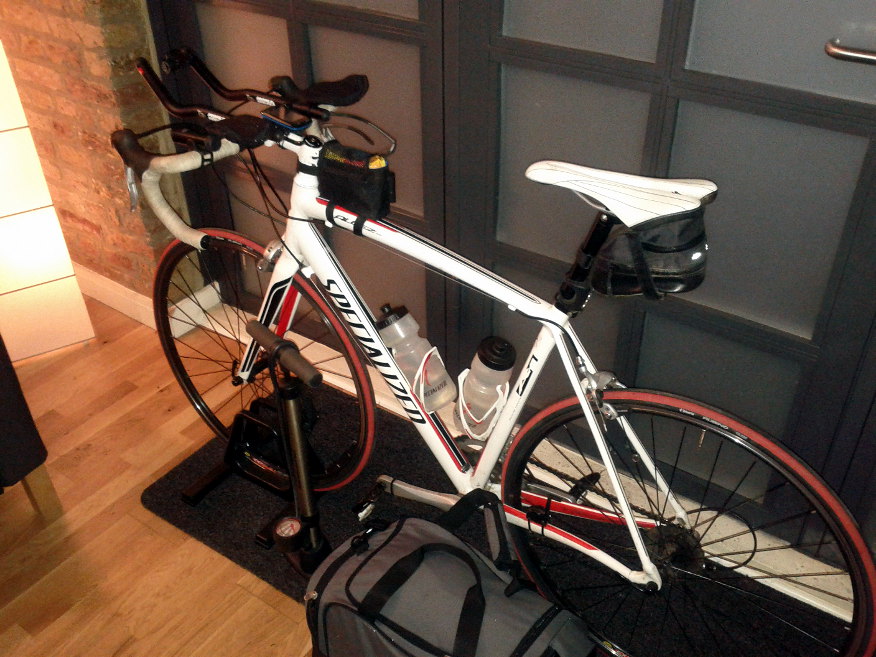
/wp-content/2013/hampton_wick_pool.jpg /wp-content/2013/bike_tt_01.jpg On Monday I took part in my first triathlon, a "sprint" distance race organised by Thames Turbo Triathlon Club.
Swim
Distance
428m (+ pool exit chute)
Time
10:23 (2:26/100m)
I was glad to be given a low race number as it would reduce the time standing around 0 C in swimming gear. The 28 C heated pool was a welcome relief and I was quickly on my way, although perhaps overcooking it in the first half. Overall, I was quite pleased with my swim time as I had cut it by well over 50% during March; there are perhaps 1-2 minutes of fairly easy gains still to be made as well.
T1 (time: 5:32) Due to the cold temperature and forecast for snow, the race director insisted that competitors added extra layers covering their arms and torso on the bike. An additional "free" 5 minutes was also granted for T1 in order that clothing was not skipped in expense of time. I eventually wore a long-sleeve base layer, tights, a short-sleeved jersey, arm warmers and two pairs of gloves.
Bike
Distance
13.8 miles (+ mounting/demounting chutes)
Time
39:59 (19.5 mph)
I overtook 10-15 riders in the first half of the bike leg, a couple of them even seeking me out to later to congratulate me on looking so fast. I was thus more than a little disappointed when I discovered my final bike split as I was hoping for at least a sub-39 minute time. Analysing my GPS later I can see my average speed was over 1.5mph slower in the second half, yet I cannot recall being limited by fatigue or headwind in the last 6 miles. I was either overly reliant on other riders to "reel in" during the first half (but had run out of people to catch in the latter stage) or I simply was not giving 100%.
T2 (time: 3:30) Leaving T2 I failed to start both my GPS and stopwatch correctly so I do not have splits of my time. I also did not pick up my running gloves resulting in distractingly cold hands in Bushy Park.
Run
Distance
5k
Time
24:21 (4:52/km)
Throughout the first kilometer my legs were extremely sluggish and I simply could not get them to do what I wanted - typical triathlon "brick legs". I did not know it at the time but I was also running up a slight but extended incline. I struggled to get to the 1k marker and briefly stopped to mentally regroup. I joined another runner a few moments later and we ran the rest of the 5k at a fairly easy pace. It's clear that the lack of serious brick workouts compromised my run time, as well as my inability to dial down the pace once it was clearly too optimistic. Knowing the elevation profile of the run should have adjusted my expectations too, leading to a better overall time.
Overall
Total time
1:18:44
Position
127/261
Position male
109/202
Position 25-29 male
16/25
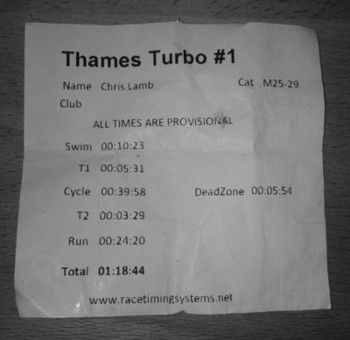
Despite finishing just to the left of the overall bell curve, it is difficult avoid feeling disappointed with my time as it was hindered by well-documented and avoidable errors. The sub-optimal pacing throughout meant I still had something left "in the tank" at the end, adding to a general feeling of under-achieving on the way home. Preperation was also less than ideal - two days before the race I had twinged my back in a 70-mile reconnaissance ride (!) by overusing my clip-on bars although this only affected me mentally in the race. I additionally ate too much before and during the race in retrospect. Nevertheless, there must be some value in learning these lessons first-hand and and early on. /wp-content/2013/tt_1_times.jpg (Full results)

5 April 2013

Lior Kaplan: The commit police: reference you bugs properly

Besides my RTL work on Libreoffice, every once in a while I just go over the regular commit log to see what have changed. I don t necessary understand each line in the commit, but do get the general idea from the commit message. Being more dependent on the commit messages makes me review them more thoroughly (hence the topic of this post). As many projects, Libreoffice has notifications of commits related to bugs reports when the bug number is properly mentioned in the commit message. This is very useful for other developers and also for QA people. After verification of a bug is fixed, I often use the commits listed on the bug report to cherry pick them to an older branch. Going to search for an unreferenced commit isn t much fun. One of the things I notice is different ways people reference bugs from not referencing them at all to referencing them in various ways like linking to the bugs system, just writing the number (without the fdo# prefix) and other creative ways This is also true for first time contributors, which might not know the standards or the rules . When I see such a case I usually put a manual notification in the bug report, and mail the author of doing so. For new or sporadic contributors this is also an opportunity to welcome and thank them for the commit and even encourage future contributions. I have been asked why aren t that info on the wiki, so I went looking and found out the info is in the right place under the Development/GetInvolved page. The relevant part is:
When you type a commit message:
  • start the first line with a bug reference like fdo#12345, if you have one for your commit (see details below)
  • use the rest of the first line as a concise summary of your changes
  • the 2nd line remains empty
  • and starting on the 3rd line you can explain how and what changes have been made for what reasons.
Thanks in advance and happy coding (:
Filed under: LibreOffice

Matthew Garrett: Leaked UEFI signing keys

(See here for an update to this)

A hardware vendor apparently had a copy of an AMI private key on a public FTP site. This is concerning, but it's not immediately obvious how dangerous this is for a few reasons. The first is that this is apparently the firmware signing key, not any of the Secure Boot keys. That means it can't be used to sign a UEFI executable or bootloader, so can't be used to sidestep Secure Boot directly. The second is that it's AMI's key, not a board vendor - we don't (yet) know if this key is used to sign any actual shipping firmware images, or whether it's effectively a reference key. And, thirdly, the code apparently dates from early 2012 - even if it was an actual signing key, it may have been replaced before any firmware based on this code shipped.

But there's still the worst case scenario that this key is used to sign most (or all) AMI-based vendor firmware. Can this be used to subvert Secure Boot? Plausibly. The attack would involve producing a new, signed firmware image with Secure Boot either disabled or with an additional key installed, and then to reflash that firmware. Firmware images are very board-specific, so unless you're engaging in a very targeted attack you either need a large repository of firmware for every board you want to attack, or you need to perform in-place modification.

Taking a look at the firmware update tool used for AMI systems, the latter might be possible. It seems that the AMI firmware driver allows you to dump the existing ROM to a file. It'd then be a matter of pulling apart the firmware image, modifying the key database, putting it back together, signing it and flashing it. It looks like doing this does require that the user enter the firmware password if one's set, so the simplest mitigation strategy would be to do that.

So. If this key is used by most vendors shipping AMI-based firmware, and if it's a current (rather than test) key, then it may well be possible for it to be deployed in an automated malware attack that subverts the Secure Boot trust model on systems running AMI-based firmware. The obvious lesson here is that handing out your private keys to third parties that you don't trust is a pretty bad idea, as is including them in source repositories.

(Wow, was this really as long ago as 2004? How little things change)

comment count unavailable comments

Daniel Pocock: Quickstart: Integrating SIP support into any application with reSIProcate

Today's applications are more dynamic and interactive than ever before, typically offering the user many ways to collaborate or get live data about their community or environment as they need it. Two open standards exist with a broad focus on real-time messaging and session control, SIP and XMPP (Jabber). Both of them have been supercharged by the development of technologies like WebRTC that makes every browser into a communications endpoint. Here, we look at integrating SIP into any C++ application (either client or server). We use the industry standard SIP stack reSIProcate. The quickest way to get started is with a Debian, Ubuntu or Fedora development environment. reSIProcate is conveniently packaged on all those platforms (for Fedora, it is not yet in yum and must be built from the tarball using rpmbuild). Getting the environment set up Once you have Debian or Ubuntu installed, just do:
# apt-get build-dep resiprocate
# apt-get install libresiprocate-1.8-dev
This will install all the necessary tools, libraries and header files. Headers are under /usr/include/resip Writing some code The object orientated nature of C++ is heavily leveraged by reSIProcate, and this makes it easy to code. The stack is based on a callback paradigm: you create some objects based on well-defined interfaces, give your objects to the stack, and put the stack into a loop. The stack will call your object when some event occurs (e.g. new incoming call, new text message) The easiest way to see this in practice is to browse the test cases. The test cases under the resip/dum(mirrored on github) section of the source tree provide good high-level examples of the type of code an application writes when using reSIProcate in an existing application. Sending a SIP text message Based on the basicMessage test case, I've created a trivial piece of code below to send a text message over SIP. The whole demo project is uploaded into github, see the README for instructions on how to build and run. Here, we have a quick look at the one object in the demo, it is notified on the progress of the SIP text message:
class ClientMessageHandler : public ClientPagerMessageHandler  
public:
   ClientMessageHandler()
      : finished(false),
        successful(false)
    
    ;
   virtual void onSuccess(ClientPagerMessageHandle, const SipMessage& status)
    
      InfoLog(<<"ClientMessageHandler::onSuccess\n");
      successful = true;
      finished = true;
    
   virtual void onFailure(ClientPagerMessageHandle, const SipMessage& status, std::auto_ptr<contents> contents)
    
      ErrLog(<<"ClientMessageHandler::onFailure\n");
      successful = false;
      finished = true;
    
   bool isFinished()   return finished;  ;
   bool isSuccessful()   return successful;  ;
private:
   bool finished;
   bool successful;
 ;
int main(int argc, char *argv[])
 
   // boilerplate initialisation code...
...
   NameAddr naTo(to.c_str());
   ClientPagerMessageHandle cpmh = clientDum.makePagerMessage(naTo);
   Data messageBody("Hello world!");
   auto_ptr<contents> content(new PlainContents(messageBody));
   cpmh.get()->page(content);
...
 
</contents></contents>
Going further with reSIProcate

4 April 2013

Jon Dowland: awk

Recently, I've been using awk in shell scripts more and more often. When I saw Thomas' Blog I reeled a bit from of the make/shell quoted within. (Sorry Thomas! It's still a thought provoking blog post):
DEBVERS         ?= $(shell dpkg-parsechangelog   sed -n -e 's/^Version: //p')
VERSION         ?= $(shell echo '$(DEBVERS)'   sed -e 's/^[\[:digit:]]*://' -e 's/[-].*//')
DEBFLAVOR       ?= $(shell dpkg-parsechangelog   grep -E ^Distribution:   cut -d" " -f2)
DEBPKGNAME      ?= $(shell dpkg-parsechangelog   grep -E ^Source:   cut -d" " -f2)
DEBIAN_BRANCH   ?= $(shell cat debian/gbp.conf   grep debian-branch   cut -d'=' -f2   awk ' print $1 ')
GIT_TAG         ?= $(shell echo '$(VERSION)'   sed -e 's/~/_/')
I couldn't help but re-write it to be more efficient (and in the case of DEBIAN_BRANCH, more correct):
DEBVERS        := $(shell dpkg-parsechangelog   awk '/^Version:/  print $$2 ')
VERSION        := $(shell echo '$(DEBVERS)'   sed -e 's/^[0-9]*://' -e 's/-.*//')
DEBFLAVOR      := $(shell dpkg-parsechangelog   awk '/^Distribution:/  print $$2 ')
DEBPKGNAME     := $(shell dpkg-parsechangelog   awk '/^Source:/  print $$2 ')
DEBIAN_BRANCH  := $(shell awk 'BEGIN FS="[= ]+"  /debian-branch/  print $$2 ' debian/gbp.conf)
GIT_TAG        := $(subst ~,_,$(VERSION))

Andrew Pollock: [life/repatexpat] Day #4 of repatriation -- delivery central

Today was spent at my apartment with Zoe. Harvey Norman were scheduled to deliver the fridge, washing machine and TV. Someone from Telstra was scheduled to come out and monkey with the MDF to get the naked ADSL happening, and my desk was scheduled to be delivered. My parents drove us over in the morning, with some of our suitcases. Zoe was very happy with her new room and bed. I was going to get a 1 hour advance warning of Harvey Norman coming, so we all went for a little walk around the neighbourhood to explore. It turns out there's a convenience store right next door, which is, well extremely convenient. I won't need to even hop in the car to get last minute bread or milk or anything like that. Very happy about that. There's also a really gorgeous little boutique deli/gourmet grocery that is easily within walking distance. The neighbourhood is indeed very nice. Mid-morning, Brent dropped around with his daughter to say hi. Zoe had a good time playing with her as well, and we went out for lunch at the Hawthorne Garage. At the end of lunch, Harvey Norman called to say they'd be an hour away, which was well timed. Zoe declined to nap again, so we just hung out waiting for the delivery. In the middle of them delivering, the desk delivery happened as well, and then as Brent was leaving, the Telstra guy turned up, so it all happened at once. I set up the TV and DVD player and Zoe happily christened it all by watching some Play School DVDs, and then my Dad came back and picked us up. So the apartment is now almost habitable. I just need my bed. That's scheduled for Saturday. I'm planning on sleeping there on Saturday night. In the furniture department, I'm still lacking a sofa, a dining table and something to put the TV on. Leah has volunteered to help me shop tomorrow, but I'm starting to think I should focus on resolving the lack of a car, then I can do any further shopping myself. Nick had set me up with a car wholesaler who was going to search for a used Subaru Forester for me, but so far he hasn't turned anything up, so I'm thinking I need to widen my net a little and use some other avenues as well. I'd really wanted for the car finding to be outsourced as much as possible so I could focus on other things, but it's not looking like that's going to be the case, and I really need mobility. I got a notification from Internode after I'd left today that the Internet should now be working, so I need to configure the ADSL router when I next get a chance and confirm that's the case, then I'm all sorted for being technologically able to work from home.

3 April 2013

Sylvain Le Gall: Sekred a password helper for puppet.

Puppet is a nice tool but it has a significant problem with passwords: This lead to complex situation and various workaround that more or less work: Most of these workarounds are complex, don't allow you to share the password you have set easily and most of the time are stored in another place than the target node. So I have decided to create my own solution: sekred (LGPL-2.1). The idea of sekred is to generate the password on the target node and made it available to the user that needs it. Then the user just have to ssh into the host and get the password. Pro: Cons: Let see some concrete examples. Setting mysql root password This is a very simple problem. When you first install mysql on Debian Squeeze, the root password is not set. That's bad. Let set it using sekred and puppet.
node "mysqlserver"  
  package  
    ["mysql-server",
     "mysql-client",
     "sekred"]:
      ensure => installed;
   
  service  
    "mysqld":
      name => "mysql",
      ensure => running,
      hasrestart => true,
      hasstatus => true;
   
  exec  
    "mysql-set-root-password":
      command => "mysqladmin -u root password $(sekred get root@mysql)",
      onlyif => "mysql -u root",  # Trigger only if password-less root account.
      require => [Service["mysqld"], Package["mysql-client", "sekred"]];
   
 
And to get the root password for mysql, just login into the node "mysqlserver":
$> sekred get root@mysql
Cie8ieza
Setting password for SSH-only user This example is quite typical of the broken fully automated scenario with passwords: - you setup a remote host only accessible through SSH - you create a user and set its SSH public key to authorize access - your user cannot access its account because SSH prevent password-less account login! In other word, you need to login into the node, set a password for the user and mail him back.... That defeats a little bit the "automation" provided by puppet. Here is what I do with sekred:
define user::template ()  
  user  
    $name:
      ensure => present,
      membership => minimum,
      shell => "/bin/bash",
      ....
   
  include "ssh_keys::$name"
  # Check password less account and set one, if required.
  $user_passwd="$(sekred get --uid $name $name@login)"
  exec  
    "user-set-default-password-$name":
      command => "echo $name:$user_passwd   chpasswd",
      onlyif => "test \"$(getent shadow $name   cut -f2 -d:)\" = \"!\"",
      require => [User[$name], Package["sekred"]];
   
 
So the command "test \"$(getent shadow $name cut -f2 -d:)\" = \"!\"" test for a password-less account. If this is the case, it creates a password using sekred get --uid $name $name@login and set it through chpasswd. Note that $user_passwd use a shell expansion that will be evaluated when running the command only, on the host. The --uid flag of sekred assign the ownership of the password to the given user id. So now the user (foo) can login into the node and retrieve its password using sekred get foo@login. Try it! Sekred was a very short project but I am pretty happy with it. It solves a long standing problem and helps to cover an extra mile of automation when setting up new nodes. The homepage is here and you can download it here. Feel free to send patches, bugs and feature requests (here, login required).

Jon Dowland: UKUUG and FLOSS UK

Last year, I failed to write and mention that I'd joined the Council of the Free/Libre Open-Source Software UK group FLOSS UK, formerly known as the UK UNIX User's Group (UKUUG). As a council-member, I helped to organise the recent Large Installation Systems Administration conference that took place in my native Newcastle, UK. Five years ago I gave a talk at the (then) UKUUG Linux conference in Manchester, 2008, about documentation for sysadmins, using ikiwiki. I recently noticed that I hadn't put the abstract or slides up here, so now I have.

2 April 2013

Jonathan McDowell: Building a new house server

I've moved (only a couple of blocks from where I was before), and as the new place has Webpass I've reluctantly given up my Sonic.net connection, along with its static IPv4 address and ISP IPv6 tunnel. Hard to resist a 200Mb/s ethernet connection for the same price I was paying for 18Mb/s ADSL2 though. However that leaves my DGN3500 router somewhat inappropriate for providing my net connection. Freed from the need for an ADSL/cable router I decided it was time to build an all in one house server (I'm a believer in as few always on boxes as possible). I already had a nettop acting as a media box, but wanted to build something that would handle: Probably in that order if it turns out I'm asking too much. The intention is the box is the only one that always needs to be on, so I wanted it to be low power consumption. I also wanted the option of hooking it up to the TV if it turned out to have enough grunt, so the case needed to be something suitable for the living room. I like Intel's approach to graphics drivers, in particular the existence of Free video acceleration support, so I went with an Intel Core i3-3220T as the processor. It's a 35W Ivybridge processor with HD 2500 graphics, plus I got it for a decent price. For the case I chose a CFI A2059. There's a local supplier I was able to pick it up from, it has a couple of large fans which helps keeps the noise down while keeping things cool and as I was aiming for backup / file sharing being more important than a media box the 2 hot swap bays tipped the balance away from an AV style case. The small case limits the motherboard options. I wanted twin GigE ports so the external was entirely separate from the internal (my switch does VLANs so I could have made do with a single port, but with a 200Mb/s connection I didn't really want to share the port). The Gigabyte GA-H77N-WIFI seemed to fit the bill, with the added advantage of a built in WiFi card (an Intel 2230 in a mini PCI-E slot) which leaves the PCI-E slot free for either a TV tuner or a second WiFi card to cover 5GHz. I maxed out the board with 2 8G G.SKILL DDR3-1600 DIMMs. I normally go Crucial because I've found them reliable, but these were slightly cheaper and available from the same place as the motherboard. Finally I added a Seagate ST4000DM000 for storage. It actually came from a Backup Plus that Costco were selling for about $20 less than the bare drive sells for. The plan is to add at least another 1T drive to RAID1 the most important bits (or possibly a 2T - it depends which of my existing drives I can tidy stuff off most easily). Of course it's running Debian and I took the opportunity to try out the RC1 Wheezy image. For extra giggles I did an EFI install; this all worked fine except I didn't end up with grub-efi installed at the end, instead I had grub-pc. I booted with legacy BIOS enabled and followed Tanguy's switch to UEFI boot instructions. Further notes on software setup to follow...

1 April 2013

Andrew Pollock: [life/repatexpat] On Queensland electricity retailers

So one of the first things I need to do when I get my apartment today is get the electricity on. I've actually already ordered ADSL, which shows you what I think is more important, but without electricity, there is no Internet... It would appear that in 2007, Queensland opened up its electricity and gas markets to "full retail competition". According to Energex, they do the generation, distribution, and the retailer handles connections, disconnections, billing and green energy. I still need to deal directly with Energex for power outages, reporting faulty street lights, requesting a tree that's near power lines be trimmed, and so on. So if the retailers have no say in what price they're paying for the electricity that's being generated by Energex, I'm struggling to see what their point is. I guess they get to differentiate on customer service, but really, that's it? It was also really hard to find a canonical list of retailers to choose from. I would have thought that'd be linked off Energex's "Choosing your electricity retailer" page, but no, it's buried in the FAQ. Now it comes down to a case of doing a comparison between 11 retailers and trying to choose one. Or just going with the first one on the list. It's just electricity, people. It's a utility. I do not want to expend as much time on choosing an electricity retailer as I would my ISP (interestingly, it looks like Dodo has gotten in on the electricity retailing act). But one could say that an upside of having jet lag and being awake since 3am, is that one has time to comparison shop the 11 electricity retailers, except I won't. I'll just write this blog post instead. I have heard of one horror story, where a homeowner returned to living in his house, and had a nightmare time with one retailer because the previous occupants had an outstanding debt with that retailer, and he was trying to get a connection going with a different retailer, and lots of hilarity ensued. Except it wasn't hilarious. So I'll have to keep an eye on that. My current thought is to go with AGL, because What's pretty crazy is that at no point from quickly skimming AGL's landing page for Queensland pricing is there any indication of kWh or an actual price for anything. There's lots of noise about discounts, and flexibility, and other nonsense, but it seems like the actual cost of energy is so buried, it's incredible. It seems to be all about locking in on a contract, which is somewhat amazing. This is just electricity, but they seem to have turned this into a mobile phone plan type of situation. Amazing. After more digging, it looks like I can pay 5.5 cents per kWh for 100% green energy. Maybe.

Francois Marier: Poor man's RAID1 between an SSD and a hard drive

After moving from a hard drive to an SSD on my work laptop, I decided to keep the hard drive spinning and use it as a backup for the SSD. With the following setup, I can pull the SSD out of my laptop and it should still boot up normally with all of my data on the hard drive.

Manually setting up an encrypted root partition Before setting up the synchronization between the two drives, I had to replicate the partition setup. I used fdisk, cfdisk and gparted to create the following partitions:
   Device Boot      Start         End      Blocks   Id  System
/dev/sdb1   *        2048      499711      248832   83  Linux
/dev/sdb2          501760   500117503   249807872    5  Extended
/dev/sdb5          503808   500117503   249806848   83  Linux
and then loosely followed these instructions to create an encrypted root partition on /dev/sdb5:
$ cryptsetup luksFormat /dev/sdb5
$ cryptsetup luksOpen /dev/sdb5 sdb5_crypt
$ pvcreate /dev/mapper/sdb5_crypt
$ vgcreate akranes2 /dev/mapper/sdb5_crypt
$ vgchange -a y akranes2
$ lvcreate -L247329718272B -nroot akranes2
$ lvcreate -L8468299776B -nswap_1 akranes2
$ mkfs.ext4 /dev/akranes2/root
Finally, I added the new encrypted partition to the list of drives to bring up at boot time by looking up its UUID:
$ cryptsetup luksUUID sdb5_crypt
and creating a new entry for it in /etc/crypttab.

Copying the boot partition Setting up the boot partition was much easier because it's not encrypted. All that was needed was to format it and then copy the files over:
$ mkfs.ext2 /dev/sdb1
$ mount /dev/sdb1 /mnt/boot
$ cp -a /boot/* /mnt/boot/
The only other thing to remember is to install grub on the boot loader of that drive. On modern Debian systems, that's usually just a matter of running dpkg-reconfigure grub-pc and adding the second drive (/dev/sdb in my case) to the list of drives to install grub on.

Sync scripts To keep the contents of the SSD and the hard drive in sync, I set up a regular rsync of the root and boot partitions using the following mount points (as defined in /etc/fstab):
/dev/mapper/akranes-root /           ext4    noatime,discard,errors=remount-ro 0       1
/dev/mapper/akranes2-root /mnt/root  ext4    noatime,errors=remount-ro         0       2
UUID=0b9109d0-... /boot              ext2    defaults                          0       2
UUID=6e6f05fb-... /mnt/boot          ext2    defaults                          0       2
I use this script (/usr/local/sbin/ssd_boot_backup) for syncing the boot partition:
#!/bin/sh
if [ ! -e /mnt/boot/hdd.mounted ] ; then
    echo "The rotating hard drive is not mounted in /mnt/boot."
    exit 1
fi
if [ ! -e /boot/ssd.mounted ] ; then
    echo "The ssd is not the boot partition"
    exit 1
fi
nice ionice -c3 rsync -aHx --delete --exclude=/ssd.mounted --exclude=/lost+found/* /boot/* /mnt/boot/
and a similar one (/usr/local/sbin/ssd_root_backup) for the root partition:
#!/bin/sh
if [ ! -e /mnt/root/hdd.mounted ] ; then
    echo "The rotating hard drive is not mounted in /mnt/root."
    exit 1
fi
if [ ! -e /ssd.mounted ] ; then
    echo "The ssd is not the root partition"
    exit 1
fi
nice ionice -c3 rsync -aHx --delete --exclude=/dev/* --exclude=/proc/* --exclude=/sys/* --exclude=/tmp/* --exclude=/boot/* --exclude=/mnt/* --exclude=/lost+found/* --exclude=/media/* --exclude=/var/tmp/* --exclude=/ssd.mounted --exclude=/var/lib/lightdm/.gvfs --exclude=/home/francois/.gvfs /* /mnt/root/
To ensure that each drive is properly mounted before the scripts run, I created empty ssd.mounted files in the root directory of each of the partitions on the SSD, and empty hdd.mounted files in the root directory of the hard drive partitions.

Cron jobs The sync scripts are run every couple of hours through this crontab:
10 */4 * * *                root    /usr/local/sbin/ssd_boot_backup
20 0,4,8,12,16,20 * * *     root    /usr/local/sbin/ssd_root_backup
20 2,6,10,14,18,22 * * *    root    /usr/bin/on_ac_power && /usr/local/sbin/ssd_root_backup
which includes a reduced frequency while running on battery to avoid spinning the hard drive up too much.

30 March 2013

Lucas Nussbaum: Debian releases used by popcon participants

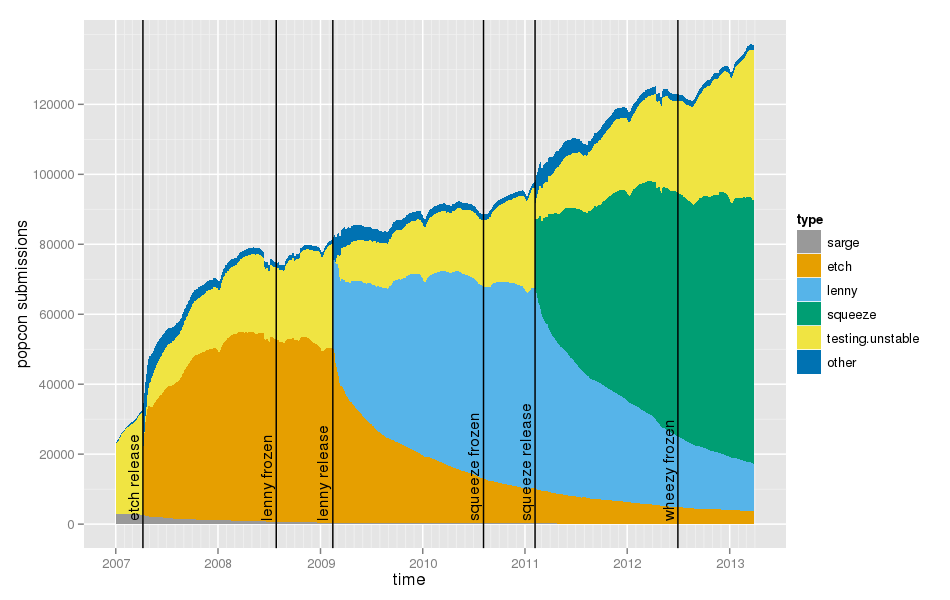
The graph below is generated from popcon submissions. Since they include the version of the popularity-contest package, one can determine the Debian release that was used by the submitter (a new version of the popularity-contest package is generally uploaded just after the release to make that tracking possible). The graph is similar to the one found on popcon, except that versions newer than the latest stable release are aggregated as testing/unstable . Comments: Scripts are available on git.debian.org.

Evgeni Golov: Opera, standards and why I should have stayed in my cave

So you probably heard that I have that little new project of mine: QiFi the pure JavaScript WiFi QR Code Generator. It s been running pretty well and people even seem to like it. One of its (unannounced) features is a pretty clean stylesheet that is used for printing. When you print the result will be just the SSID and the QR code, so you can put that piece of paper everywhere you like. That works (I tested!) fine on Iceweasel/Firefox 10.0.12 and Chromium 25.0. Today I tried to do the same in Opera 12.14 and it failed terribly: the SSID was there, the QR code not. And here my journey begins First I suspected the CSS I used was fishy, so I kicked all the CSS involved and retried: still no QR code in the print-out. So maybe it s the QR code library I use that produces a weird canvas? Nope, the examples on http://diveintohtml5.info/canvas.html and http://devfiles.myopera.com/articles/649/example5.html don t print either. Uhm, let s Google for opera canvas print And oh boy I should not have done that. It seems it s a bug in Opera. And the proposed solution is to use canvas.toDataURL() to render the canvas as an image and load the image instead of the canvas. I almost went that way. But I felt that urge need to read the docs before. So I opened http://www.w3.org/html/wg/drafts/html/master/embedded-content-0.html#dom-canvas-todataurl and https://developer.mozilla.org/en-US/docs/DOM/HTMLCanvasElement and started puking:
When trying to use types other than image/png , authors can check if the image was really returned in the requested format by checking to see if the returned string starts with one of the exact strings data:image/png, or data:image/png; . If it does, the image is PNG, and thus the requested type was not supported. (The one exception to this is if the canvas has either no height or no width, in which case the result might simply be data:, .)
If the type requested is not image/png, and the returned value starts with data:image/png, then the requested type is not supported.
Really? I have to check the returned STRING to know if there was an error? Go home HTML5, you re drunk! Okay, okay. No canvas rendered to images then. Let s just render the QR code as a <table> instead of a <canvas> when the browser looks like Opera. There is nothing one could do wrong with tables, right? But let s test with the basic example first: Yes, this is 2013. Yes, this is Opera 12.14. Yes, the rendering of a fucking HTML table is wrong. Needles to say, Iceweasel and Chromium render the example just fine. I bet even a recent Internet Explorer would That said, there is no bugfixworkaround for Opera I want to implement. If you use Opera, I feel sorry for you. But that s all. Update: before someone cries ZOMG! BUG PLZ!!! , I filled this as DSK-383716 at Opera.

Next.

Previous.