Search Results: "spa"

22 August 2013

Matthew Garrett: Re: Default offerings, target audiences, and the future of Fedora

Eric (a fellow Fedora board member) has a post describing his vision for what Fedora as an end goal should look like. It's essentially an assertion that since we have no idea who our users are or what they want, we should offer them everything on an equal footing.

Shockingly enough, I disagree.

At the most basic level, the output of different Special Interest Groups is not all equal. We've had issues over the past few releases where various spins have shipped in a broken state, because the SIG responsible for producing them doesn't have the resources to actually test them. We're potentially going to end up shipping F20 with old Bluetooth code because the smaller desktops aren't able to port to the new API in time[1]. Promoting these equally implies that they're equal, and doing so when we know it isn't the case is a disservice to our users.

But it's not just about our users. Before I joined the Fedora project, I'd worked on both Debian and Ubuntu. Debian is broadly similar to the current state of Fedora - no strong idea about what is actually being produced, and a desire among many developers to cater to every user's requirements. Ubuntu's pretty much the direct opposite, with a strongly defined goal and a willingness to sacrifice some use cases in order to achieve that goal.

This leads to an interestingly different social dynamic. Ubuntu contributors know what they're working on. If a change furthers the well-defined aim of the project, that change happens. Moving from Ubuntu to Fedora was a shock to me - there were several rough edges in Fedora that simply couldn't be smoothed out because fixing them for one use case would compromise another use case, and nobody could decide which was more important[2]. It's basically unthinkable that such a situation could arise in Ubuntu, not just because there was a self appointed dictator but because there was an explicit goal and people could prioritise based on that[3].

Bluntly, if you have a well-defined goal, people are more likely to either work towards that goal or go and do something else. If you don't, people will just do whatever they want. The risk of defining that goal is that you'll lose some of your existing contributors, but the benefit is that the existing contributors will be more likely to work together rather than heading off in several different directions.

But perhaps more importantly, having a goal can attract people. Ubuntu's Bug #1 was a solid statement of intent. Being freer than Microsoft wasn't enough. Ubuntu had to be better than Microsoft products on every axis, and joining Ubuntu meant that you were going to be part of that. Now it's been closed and Ubuntu's wandered off into convergence land, and signing up to spend your free time on producing something to help someone sell phones is much less compelling than doing it to produce a product you can give to your friends.

Fedora should be the obvious replacement, but it's not because it's unclear to a casual observer what Fedora actually is. The website proudly leads with a description of Fedora as a fast, stable and powerful operating system, but it's obvious that many of the community don't think of Fedora that way - instead it's a playground to produce a range of niche derivatives, with little consideration as to whether contributing to Fedora in that way benefits the project as a whole. Codifying that would actively harm our ability to produce a compelling product, and in turn reduce our ability to attract new contributors even further.

Which is why I think the current proposal to produce three first-class products is exciting. Offering several different desktops on the download page is confusing. Offering distinct desktop, server and cloud products isn't. It makes it clear to our users what we care about, and in turn that makes it easier for users to be excited about contributing to Fedora. Let's not make the mistake of trying to be all things to all people.

[1] Although clearly in this case the absence of a stable ABI in BlueZ despite it having had a dbus interface for the best part of a decade is a pretty fundamental problem.
[2] See the multi-year argument over default firewall rules and the resulting lack of working SMB browsing or mDNS resolving
[3] To be fair, one of the reasons I was happy to jump ship was because of the increasingly autocratic way Ubuntu was being run. By the end of my involvement, significant technical decisions were being made in internal IRC channels - despite being on the project's Technical Board, I had no idea how or why some significant technical changes were being made. I don't think this is a fundamental outcome of having a well-defined goal, though. A goal defined by the community (or their elected representatives) should function just as well.

comment count unavailable comments

Martín Ferrari: Setting up my server: re-installing on an encripted LVM

Very long post ahead (sorry for the wall of text), part of a series of posts on some sysadmin topics, see post 1 and post 2. I want to show you how I set up my tiny dedicated server to have encrypted partitions, and to reinstall it from scratch. All of this without ever accessing the actual server console.

Introduction As much as my provider may have gold standards on how to do things (they don't, there are some very bad practises in the default installation, like putting their SSH key into root's authorized_keys file), I wouldn't trust an installation done by a third party. Also, I wanted to have all my data securely encrypted. I know this is not perfect, and there are possible attacks. But I think it is a good barrier to have to deter entities without big budgets from getting my data. I have done this twice on my servers, and today I was reviewing each step as he was doing the same thing (with some slight differences) on his brand new server, so I think this is all mostly correct. Please, tell me if you find a bug in this guide. This was done on my 12 /month Kimsufi dedicated server, sold by OVH (see my previous post on why I chose it), and some things are specific to them. But you can do the same thing with any dedicated server that has a rescue netboot image. The process is to boot into the rescue image (this is of course a weak link, as the image could have a keylogger, but we have to stop the paranoia at some point), manually partition the disk, set-up encryption, and LVM; and then install a Debian system with debootstrap. To be able to unlock the encrypted disks, you will have to ssh into the server after a reboot and enter the passphrase (this is done inside the initrd phase). Once unlocked, the normal boot process continues. If anything fails, you end up with an unreachable system: it might or might have not booted, the disk might or might not be unlocked, etc. You can always go back into the rescue netboot image, but that does not allow you to see the boot process. Some providers will give you real remote console access, OVH charges you silly money for that. They used to offer a "virtual KVM", which was a bit of a kludge, but it worked: another netboot image that started a QEMU connected to a VNC server, so by connecting to the VNC server, you would be able to interact with the emulated boot process, but with a fake BIOS and a virtual network. For some unspecified reason they've stopped offering this, but there is a workaround available. The bottom line is, if you have some kind of rescue netboot image, you can just download and run QEMU on it and do the same trick.

The gritty details Start by netbooting into your rescue image. For OVH, you'd go to the control panel, in the Services/Netboot section and select "rescue pro". Then reboot your server. OVH will mail you a temporary password when it finishes rebooting. Connect to it, without saving the temporary SSH key:
$ ssh -oUserKnownHostsFile=/dev/null -oStrictHostKeyChecking=no root@$ IP 
For the rest of the text, I am assuming you have one hard drive called /dev/sda. We start by partitioning it:
# fdisk /dev/sda
Start a new partition table with o, and then create two primary partitions: a small one for /boot at the beginning (100 to 300 MB would do), and a second one with the remaining space. Set both as type 83 (Linux), and don't forget to activate the first one, as this servers refuse to boot from the hard drive without that. Create the file system for /boot, and the encrypted device:
# mkfs.ext4 /dev/sda1
# cryptsetup -s 512 -c aes-xts-plain64 luksFormat /dev/sda2
The encryption parameters are the same as the ones used by the Debian Installer by default, so don't change them unless you really know what you are doing. You will need to type a passphrase for the encrypted device, be sure not to forget it! This passphrase can later be changed (or secondary passphrases added) with the cryptsetup tool. Look up the crypt device's UUID, and save it for later:
# cryptsetup luksDump /dev/sda2   grep UUID:
UUID:           xxxxxxxx-xxxx-xxxx-xxxx-xxxxxxxxxxxx
Open the encrypted device (type the passphrase again), and set up the LVM volume group:
# cryptsetup luksOpen /dev/sda2 sda2_crypt
# pvcreate /dev/mapper/sda2_crypt
# vgcreate vg0 /dev/mapper/sda2_crypt
Create the logical volumes, this is of course a matter of personal taste and there are many possible variations. This is my current layout, note that I put most of the "big data" in /srv.
# lvcreate -L 500m -n root vg0
# lvcreate -L 1.5g -n usr vg0
# lvcreate -L 3g -n var vg0
# lvcreate -L 1g -n home vg0
# lvcreate -L 10g -n srv vg0
# lvcreate -L 500m -n swap vg0
# lvcreate -L 100m -n tmp vg0
Some possible variations:
  • You can decide to use a ramdisk for /tmp, so instead of creating a logical volume, you would add RAMTMP=yes to /etc/default/tmpfs.
  • You can merge / and /usr in one same partition, as neither of them change much.
  • You can avoid having swap if you prefer.
  • You can put /home in /srv, and bind mount it later.
Now, create the file systems, swap space, and mount them in /target. Note that I like to use human-readable labels.
# for i in home root srv tmp usr var; do 
  mkfs.ext4 -L $i /dev/mapper/vg-$i; done
# mkswap -L swap /dev/mapper/vg0-swap
# mkdir /target
# mount /dev/mapper/vg0-root /target
# mkdir /target/ boot,home,srv,tmp,usr,var 
# mount /dev/sda1 /target/boot
# for i in home srv tmp usr var; do
  mount /dev/mapper/vg-$i /target/$i; done
# swapon /dev/mapper/vg-swap
Don't forget to set the right permissions for /tmp.
# chmod 1777 /target/tmp
If you want to do the /home on /srv, you'll need to do this (and then copy to /etc/fstab):
# mkdir /target/srv/home
# mount -o bind /target/srv/home /target/home
The disk is ready now. We will use debootstrap to install the base system. The OVH image carries it, otherwise consult the relevant section in the Install manual for details. It is important that at this point you check that you have a good GPG keyring for debootstrap to verify the installation source, by comparing it to a good one (for example, the one in your machine):
# gpg /usr/share/keyrings/debian-archive-keyring.gpg
pub  4096R/B98321F9 2010-08-07 Squeeze Stable Release Key <debian-release@lists.debian.org>
pub  4096R/473041FA 2010-08-27 Debian Archive Automatic Signing Key (6.0/squeeze) <ftpmaster@debian.org>
pub  4096R/65FFB764 2012-05-08 Wheezy Stable Release Key <debian-release@lists.debian.org>
pub  4096R/46925553 2012-04-27 Debian Archive Automatic Signing Key (7.0/wheezy) <ftpmaster@debian.org>
Now, for the actual installation. You can use any Debian mirror, OVH has their own in the local network. In OVH's case it is critical to specify the architecture, as the rescue image is i386. I didn't notice that and had to painfully switch architectures in place (which was absolutely not possible a couple of years ago).
# debootstrap --arch amd64 wheezy /target http://debian.mirrors.ovh.net/debian
After a few minutes downloading and installing stuff, you almost have a Debian system ready to go. Since this is not D-I, we still need to tighten a few screws manually. Let's mount some needed file systems, and enter the brand new system with chroot:
# mount -o bind /dev /target/dev
# mount -t proc proc /target/proc
# mount -t sysfs sys /target/sys
# XTERM=xterm-color LANG=C.UTF-8 chroot /target /bin/bash
The most critical parts now are to correctly save the parameters for the encrypted device, and the partitions and logical volumes. You'll need the UUID saved before:
# echo 'sda2_crypt UUID=xxxxxxxx-xxxx-xxxx-xxxx-xxxxxxxxxxxx none luks' \
  > /etc/crypttab
Create the file systems table in /etc/fstab. Here I use labels to identify the devices:
# file system   mount point type    options             dump    pass
LABEL=root      /           ext4    errors=remount-ro   0       1
LABEL=tmp       /tmp        ext4    rw,nosuid,nodev     0       2
LABEL=var       /var        ext4    rw                  0       2
LABEL=usr       /usr        ext4    rw,nodev            0       2
LABEL=home      /home       ext4    rw,nosuid,nodev     0       2
# Alternative home in /srv:
#/srv/home      /home       auto    bind                0       0
LABEL=srv       /srv        ext4    rw,nosuid,nodev     0       2
LABEL=boot      /boot       ext4    rw,nosuid,nodev     0       2
LABEL=swap      none        swap    sw                  0       0
You can also just use the device mapper's names (/dev/mapper/<volume_group>-<logical_volume>), be sure not to use the /dev/<volume_group>/<logical_volume> naming, as there are some initrd-tools that choked on them.
# file system           mount point type    options             dump    pass
/dev/mapper/vg0-root    /           ext4    errors=remount-ro   0       1
/dev/mapper/vg0-tmp     /tmp        ext4    rw,nosuid,nodev     0       2
/dev/mapper/vg0-var     /var        ext4    rw                  0       2
/dev/mapper/vg0-usr     /usr        ext4    rw,nodev            0       2
/dev/mapper/vg0-home    /home       ext4    rw,nosuid,nodev     0       2
# Alternative home in /srv:
#/srv/home              /home       auto    bind                0   0
/dev/mapper/vg0-srv     /srv        ext4    rw,nosuid,nodev     0   2
/dev/sda1               /boot       ext4    rw,nosuid,nodev     0   2
/dev/mapper/vg0-swap    none        swap    sw                  0   0
Some tools depend on /etc/mtab, which now is just a symbolic link:
# ln -sf /proc/mounts /etc/mtab
Now configure the network. You most surely can use DHCP, but you might prefer static configuration, that's personal choice. For DHCP, it is very straightforward:
# cat >> /etc/network/interfaces
auto eth0
iface eth0 inet dhcp
For static configuration, first find the current valid addresses and routes as obtained by DHCP:
# ip address
# ip route
And then store them:
# cat >> /etc/network/interfaces
auto eth0
iface eth0 inet static
    address AAA.BBB.CCC.DDD/24
    gateway AAA.BBB.CCC.254
    pre-up /sbin/ip addr flush dev eth0   true
Note that pre-up command I added; that is to remove the configuration that is to be done by the kernel during boot (more on that later), otherwise ifupdown will complain about existing addresses. If your provider does IPv6, add it too. For OVH, the IPv6 set-up is a bit weird, so you need to add the routes in post-up. Your default gateway is going to be your /64 prefix, with the last byte replaced by ff, and then followed by :ff:ff:ff:ff. As you can see, that gateway is not in your network segment, so you need to add an explicit route to it. They have some information, but it is completely unreadable. If your IPv6 address is 2001:41D0:1234:5678::1/64, you will add:
iface eth0 inet6 static
    address 2001:41D0:1234:5678::1/64
    post-up /sbin/ip -6 route add 2001:41D0:1234:56ff:ff:ff:ff:ff dev eth0
    post-up /sbin/ip -6 route add default via 2001:41D0:1234:56ff:ff:ff:ff:ff
You probably don't want the auto-configured IPv6 addresses, so disable them via sysctl:
# cat >> /etc/sysctl.conf
# Disable IPv6 autoconf 
net.ipv6.conf.all.autoconf = 0
net.ipv6.conf.default.autoconf = 0
net.ipv6.conf.eth0.autoconf = 0
net.ipv6.conf.all.accept_ra = 0
net.ipv6.conf.default.accept_ra = 0
net.ipv6.conf.eth0.accept_ra = 0
To have a working DNS resolver, we can use the local server (OVH in this case):
# cat > /etc/resolv.conf 
search $DOMAIN
nameserver 213.186.33.99
The most important part of a new install: choose a host name (and make the system use it).
# echo $HOSTNAME > /etc/hostname
# hostname $HOSTNAME
# echo "127.0.1.1 $HOSTNAME.$DOMAIN $HOSTNAME" >> /etc/hosts
If we want to speficy the BIOS clock to use UTC:
# echo -e '0.0 0 0.0\n0\nUTC' > /etc/adjtime
Set up your time zone:
# dpkg-reconfigure tzdata
Configure APT with your preferred mirrors. I also prevent APT from installing recommends by default.
# echo deb http://ftp2.fr.debian.org/debian wheezy main contrib non-free \
  >> /etc/apt/sources.list
# echo deb http://ftp2.fr.debian.net/debian wheezy-updates main contrib non-free \
  >> /etc/apt/sources.list
# echo deb http://security.debian.org/ wheezy/updates main contrib non-free \
  >> /etc/apt/sources.list
# echo 'APT::Install-Recommends "False";' > /etc/apt/apt.conf.d/02recommends
# apt-get update
Before installing any package, let's make sure that the initial ram disk (initrd) that is going to be created will allow us to connect. There will be no chance of using the root password during boot. Your public key is usually found in $HOME/.ssh/id_rsa.pub.
# mkdir -p /etc/initramfs-tools/root/.ssh/
# echo $(YOUR_PUB_RSA_KEY) > /etc/initramfs-tools/root/.ssh/authorized_keys
If you change this, or the host key stored at /etc/dropbear/dropbear_*_host_key, the /etc/crypttab, or any other critical piece of information for the booting process, you need to run update-initramfs -u. Now we can install the missing pieces:
# apt-get install makedev cryptsetup lvm2 ssh dropbear busybox ssh \
  initramfs-tools locales linux-image-amd64 grub-pc kbd console-setup
During the installation you will have to choose where to install grub, I recommend directly on /dev/sda. Also, the magic initrd will be created. We want to double check that it has all the important pieces for a successful boot:
# zcat /boot/initrd.img-3.2.0-4-amd64   cpio -t conf/conf.d/cryptroot \
  etc/lvm/lvm.conf etc/dropbear/\* root/.ssh/authorized_keys sbin/dropbear
etc/lvm/lvm.conf
etc/dropbear/dropbear_dss_host_key
etc/dropbear/dropbear_rsa_host_key
sbin/dropbear
root/.ssh/authorized_keys
conf/conf.d/cryptroot
All these files need to be there. Most critically, we need to check that the cryptroot file has the right information to access the root file system:
# zcat /boot/initrd.img-*   cpio -i --to-stdout conf/conf.d/cryptroot
target=sda2_crypt,source=UUID=xxxxxxxx-xxxx-xxxx-xxxx-xxxxxxxxxx,key=none,rootdev,lvm=vg0-root
If all that was correct, now we need to tell the kernel to configure the network as soon as possible so we can connect to the initrd and unlock the disks. This is done by passing a command-line option though grub. This should match what was done in /etc/network/interfaces: either DHCP or static configuration. For DHCP, this line should be changed in /etc/default/grub:
GRUB_CMDLINE_LINUX="ip=:::::eth0:dhcp"
For static configuration:
GRUB_CMDLINE_LINUX="ip=MY_IP_ADDR::MY_DEFAULT_GW:MY_NETMASK::eth0:none"
It is also a good idea to disable the quiet boot and graphical boot splash, in case we need to use QEMU to fix some booting issue:
GRUB_CMDLINE_LINUX_DEFAULT=""
GRUB_TERMINAL=console
And make the changes effective:
# update-grub2
Having fsck fix problems automatically can be a life-saver too:
# echo FSCKFIX=yes >> /etc/default/rcS
Get some very useful packages:
# apt-get install vim less ntpdate sudo
Create an user for yourself, possibly make it an administrator:
# adduser tincho
# adduser tincho sudo
# adduser tincho adm
This is mostly done, exit the chroot, and unmount everything.
# exit  # the chroot.
# umount /target/ dev,proc,sys,boot,home,srv,tmp,usr,var 
# umount /target
# swapoff -a
# lvchange -an /dev/mapper/vg0-*
# cryptsetup luksClose sda2_crypt
Disable the netboot option from your administration panel, reboot, and hope it all goes well. If you followed every step carefully, a few minutes later you should be able to ping your server. Use this snippet to enter the password remotely:
$ stty -echo; ssh -o UserKnownHostsFile=$HOME/.ssh/known_hosts.initramfs \
  -o BatchMode=yes root@"$HOST" 'cat > /lib/cryptsetup/passfifo'; \
  stty echo
It is very important that you close the pipe (with control-D twice) without typing enter. For my servers, I have a script that reads the passphrase from a GPG-encrypted file and pipes it directly into the remote server. That way, I only type the GPG passphrase locally:
$ cat unlock.sh 
#!/bin/sh
BASE="$(dirname "$0")"
HOST="$1"
gpg --decrypt "$BASE"/key-"$HOST".gpg   \
    ssh -o UserKnownHostsFile="$BASE"/known_hosts.initramfs -o BatchMode=yes \
        root@"$HOST" 'cat > /lib/cryptsetup/passfifo'
It might be a good idea to create a long, impossible to guess passphrase that you can use in the GPG-encrypted file, and that you can also print and store in somewhere safe. See the luksAddKey function in the cryptsetup(8) man page. Once again, if everything went right, a few seconds later the openSSH server will replace the tiny dropbear and you will be able to access your server normally (and with the real SSH host key). Hope you find this article helpful! I would love to hear your feedback.

20 August 2013

Maximilian Attems: Mapping the research literature

Paperscape visualizes all the arXiv papers. The arXiv is a pioneer in Open Data publishing from 1991 and started by Paul Ginsparg for high energy physicists (hep). It soon extended to most physicists. According to it's importance (citation) each paper has a certain radius and the citations also link the papers to their position in the map. In addition there are helpful overall topics and one can click once zoomed in on each paper to know all the authors and the title. The colors correspond to each arXiv section.

19 August 2013

Gunnar Wolf: After Debian's 20th birthday, everybody's life gets back to normality...

As I slowly read my good friends wishing each other a good trip, telling they got home safely, and the IRC channels form thick drops of a bitter-sweet etheral substance, I cannot help feeling DebConf13 is over For me as well, from the distance. Many friends gave me warm greetings, and without being there, gave me that beautiful feeling of real community that Debian has given me for ten years already, since I met in real-life many of its developers at DebConf3 in Oslo. And yes, I have stated this far too many times I have attended every DebConf since (and worked organizing most of them). This year, over 300 people were gathered in Switzerland to enjoy the always most intense weeks of the year. This year, I was unable to attend due to calendar clashes. Even so, without the stress that organizers have, and thanks to the great work of the always-loved Video Team, I think I was able to be present at more sessions than at in any of the last few years. Oh, and for the readers of this blog who were not there Do you want to follow what was presented? You can download already the videos for all of the recorded presentations (that were, due to the planned coverage and the manageable size of the Video Team, about of the total scheduled sessions). And, as always, I was able to follow many very interesting talks and take part of a couple interesting meetings/BoF sessions. I still have a bit of catchup, partly due to the timezone difference (I was only at one of the sessions during the Swiss morning, at 02:30 local time, the pkg-ruby-extras team BoF). Anyway... Not being there, I surely was an avid consumer of the photos posted in the DebConf13 gallery, and will surely follow it for some more time as some of you upload your pending material. It was clear from the beginning that, no matter what your definition of consensus is, the chosen venue was beautiful. A beautiful place between the lake and the mountains where our sportiest guys had a very good share of morning runs, cycling sessions, competition sports of different types, outright plain fun for attendees of all sizes and all species... But, hey, wait! During a chat in the course of DebConf, a friend told me a bit worried that all this beauty and fun might make our dear and very important sponsors they are paying for a geek vacation, is it so? No, not at all. Not by a long stretch. And just looking at those same galleries makes it clear and obvious. After all, it's widely known that Debian is the operating system for the gurus. Simple: It's impossible to have all those geeks without getting amazing work done, in ways that even seem clich s (this last photo had Joey Hess explaining dpkg format version 3.0 (git) ideas, sketched after waking up at 3AM on the first sketching surface available to him). After all, Debian people are famous for their inclination to use any excuse to open their computers and hack away. We can find Debianers hacking in small spaces and also hacking out in the fields. But this time, people were able to hack indoors while enjoying the nature and hack outdoors under a tree. And, yes, one of the things that makes organizing DebConf worth it is, after eleven months having low-bandwidth meetings over IRC, having the opportunity to plan for the next days face to face, in a relaxed but work-full environment. Anyway, here at home I didn't sit idly just longing over them. How could I? We are just celebrating the Debian Project's 20th anniversary! http://gwolf.org/content/jonathan-host-and-organizer-rancho-electr-nico">Jonathan, a Debian enthusiast, student at my university, and collaborator for several free software-related collectives in Mexico City, invited me to the celebration at Rancho Electr nico (which I recently mentioned in this same blog). While I was unable to stay for the whole celebration, we had a very good time; I talked about some ways on how to contribute to Debian. Although I didn't have much of a presentation prepared for it, I feel it was successful and interesting for the attendees I just hope to start seeing some of them get into any of the ways for helping Debian soon. I also stayed as a listener and ocassional commenter for a talk on the Debian Project's history and goals, and to a presentation on a nifty electronic music programming tool called Supercollider (of course, available in Debian). Now, "regular" life should continue. For some value of "regular".

18 August 2013

DebConf team: DebConf13 is now over (Posted by Didier Raboud)

Main talks building Copyright 2004 - 2013 Michal iha .

Petter Reinholdtsen: Intel 180 SSD disk with Lenovo firmware can not use Intel firmware

Earlier, I reported about my problems using an Intel SSD 520 Series 180 GB disk. Friday I was told by IBM that the original disk should be thrown away. And as there no longer was a problem if I bricked the firmware, I decided today to try to install Intel firmware to replace the Lenovo firmware currently on the disk. I searched the Intel site for firmware, and found issdfut_2.0.4.iso (aka Intel SATA Solid-State Drive Firmware Update Tool) which according to the site should contain the latest firmware for SSD disks. I inserted the broken disk in one of my spare laptops and booted the ISO from a USB stick. The disk was recognized, but the program claimed the newest firmware already were installed and refused to insert any Intel firmware. So no change, and the disk is still unable to handle write load. :( I guess the only way to get them working would be if Lenovo releases new firmware. No idea how likely that is. Anyway, just blogging about this test for completeness. I got a working Samsung disk, and see no point in spending more time on the broken disks.

17 August 2013

Christian Perrier: More French pages than English pages on Debian web site

As of today, thanks to the tremendous work of the French localization team in Debian, there are more web pages in French than there are in English, on Debian web site. How can this happen? Indeed, the Debian web site is not always made of pages primarily written in English. There are some French, Spanish, Chinese pages. These are not translated into English because.....there is no translation team for English (the debian-l10n-english mailing list more acts as a review board). So, given that French translators nearly translated ALL English web pages and because there are quite a few French pages, we currently have 5802 web pages in French, while there are only 5801 in English. The French Cabal definitely reached its goal: we have the DPL, we have the web site. Toutes vos possessions nous appartiennent d sormais. I'm now preparing a GR in order to turn French into the official communication language in Debian. PS: merci Thomas Vincent qui a largement contribu ce succ s ces derniers jours !

Paul Tagliamonte: debile (formerly debuild.me)

Due to the extremely righteous contributions of Leo and Sylvestre, we ve opted to make the name more generic (and hilarious), to make sure people understand that this will be a more general purpose tool. Cutting edge code is currently living at debile.debian.net - my debuild.me instance will soon follow when I ve got a chance to sit down with it :) Wish I was at DebConf, have a great DC, everyone!

16 August 2013

Joey Hess: Debian at 20

RichiH used flint and steel to light the bonfire. We carefully fed it up from those sparks to a blaze. Put on the biggest logs we could find to make it last. Now I'm sitting on the hill above it watching folks gathered around. A poem is being read, in Hindi, then translated for us to English. Others have shared songs and poems in a dozen languages, both classics and their own. Out below the darkness of the lake. This is Debian at 20. At the start of this DebConf, I gave a talk on "Debian Cosmology. In that (and a later "dh_busfactor" talk) I shared my hopes and my fears. I was conflicted about giving the this talk, worked on it for weeks, felt it might not work, or be depressing. I've had nothing but good comments about it. 20 years is ages in internet time and technical projects ossify over time. The last session I was in this afternoon was a presentation of a new tool, which I hope & feel has the potential to fundamentally change an important and suboptimal part of Debian. Then I walked outside to a rainbow over crystal clear Swiss alps on the horizon. How encouraging, and what a nice story that will be around some future campfire.

Justus Winter: All the important bits are there - please test and review :)

Finally, more bootlog-pr0n:
start ext2fs: Hurd server bootstrap: ext2fs[device:hd0s1] exec init proc auth
INIT: version 2.88 booting
Using makefile-style concurrent boot in runlevel S.
Activating swap...done.
Checking root file system...fsck from util-linux 2.20.1
hd2 : tray open or drive not ready
end_request: I/O error, dev 02:00, sector 0
/dev/hd0s1: clean, 44680/181056 files, 292234/723200 blocks
done.
Activating lvm and md swap...(default pager): Already paging to partition hd0s5!
done.
Checking file systems...fsck from util-linux 2.20.1
hd2 : tray open or drive not ready
end_request: I/O error, dev 02:00, sector 0
done.
Cleaning up temporary files... /tmp.
Mounting local filesystems...done.
Activating swapfile swap...(default pager): Already paging to partition hd0s5!
done.
df: Warning: cannot read table of mounted file systems: No such file or directory
Cleaning up temporary files....
Configuring network interfaces...inetutils-ifconfig: invalid arguments
ifup: failed to open pid file /run/network/ifup-/dev/eth0.pid: No such file or directory
Internet Systems Consortium DHCP Client 4.2.2
Copyright 2004-2011 Internet Systems Consortium.
All rights reserved.
For info, please visit https://www.isc.org/software/dhcp/
can't create /var/lib/dhcp/dhclient./dev/eth0.leases: No such file or directory
Listening on Socket//dev/eth0
Sending on   Socket//dev/eth0
DHCPDISCOVER on /dev/eth0 to 255.255.255.255 port 67 interval 8
DHCPREQUEST on /dev/eth0 to 255.255.255.255 port 67
DHCPOFFER from 10.0.2.2
DHCPACK from 10.0.2.2
can't create /var/lib/dhcp/dhclient./dev/eth0.leases: No such file or directory
bound to 10.0.2.15 -- renewal in 34744 seconds.
done.
Cleaning up temporary files....
Setting up X socket directories... /tmp/.X11-unix /tmp/.ICE-unix.
INIT: Entering runlevel: 2
Using makefile-style concurrent boot in runlevel 2.
Starting enhanced syslogd: rsyslogd.
Starting deferred execution scheduler: atd.
Starting periodic command scheduler: cron.
Starting system message bus: dbusFailed to set socket option"/var/run/dbus/system_bus_socket": Protocol not available.
Starting OpenBSD Secure Shell server: sshd.
unexpected ACK from keyboard
GNU 0.3 (debian) (console)
login: root
root@debian:~# shutdown -h now
Broadcast message from root@debian (console) (Fri Aug 16 20:02:47 2013):
The system is going down for system halt NOW!
INIT: Switching to runlevel: 0root@debian:~#
INIT: Sending processes the TERM signal
INIT: Sending processes the KILL signal
Using makefile-style concurrent boot in runlevel 0.
Stopping deferred execution scheduler: atd.
task c10f72a8 deallocating an invalid port 2098928, most probably a bug.
Asking all remaining processes to terminate...done.
All processes ended within 1 seconds...done.
Stopping enhanced syslogd: rsyslogd.
Deconfiguring network interfaces...ifdown: failed to open pid file /run/network/ifdown-/dev/eth0.pid: No such file or directory
Internet Systems Consortium DHCP Client 4.2.2
Copyright 2004-2011 Internet Systems Consortium.
All rights reserved.
For info, please visit https://www.isc.org/software/dhcp/
can't create /var/lib/dhcp/dhclient./dev/eth0.leases: No such file or directory
Listening on Socket//dev/eth0
Sending on   Socket//dev/eth0
/bin/sh: 1: ifconfig: not found
done.
Deactivating swap...swapoff: /dev/hd0s5: 177152k swap space
done.
Unmounting weak filesystems...umount: /etc/mtab: Warning: duplicate entry for device /dev/hd0s1 (/dev/cons)
umount: could not find entry for: /dev/cons
done.
Unmounting local filesystems...done.
mount: cannot remount /: Device or resource busy
Will now halt.
init: notifying pfinet of shutdown...init: notifying tmpfs swap of shutdown...init: notifying tmpfs swap of shutdown...init: notifying tmpfs swap of shutdown...init: notifying ext2fs device:hd0s1 of shutdown...init: halting Mach (flags 0x8)...
In tight loop: hit ctl-alt-del to reboot
(You might note that df complains about not being able to read the mtab file. That is because it has been built with _PATH_MOUNTED being /var/run/mtab. This will correct itself when the coreutils package is being rebuilt against a patched libc.) I spent my last two weeks with polishing my patch series, that meant a lot of package rebuilds and that means a lot of waiting (even more so on the Hurd, short version: fakeroot-hurd could be fast but is not yet working properly, fakeroot-tcp is slow) and thus some frustration ;) Also I had to pay special attention so that the upgraded packages could be installed without accidentally breaking anything in the process. Making sysvinit pid 1 is surprisingly tricky in this regard since it breaks the ABI and requires a libc fix that also worked with the current Hurd servers. Here are the patches: So I had some spare time on my hand while waiting for numerous package rebuilds and I took this as an opportunity to read papers about Mach and to familiarize myself with mig, the Mach Interface Generator. While I have used it in the past, I had not yet looked at its implementation. And I had to patch the exec server, and there was both code implementing a questionable feature (on-demand unzipping of binaries) and code that was not even compiled (courtesy of the preprocessor) and had probably bit-rot by now. So I figured I could spend my time doing some cleanups: I have rebuild all the necessary packages and uploaded them into an apt repository:
deb http://teythoon.cryptobitch.de/gsoc/heap/debian unstable main
Please use unstable for now. Also make sure that you have a recovery plan for your Debian/Hurd installation if anything goes wrong. For your convenience there's a seed tarball containing packages with the appropriate sources.list.d snippets and the repository key: https://teythoon.cryptobitch.de/gsoc/heap/debian/seed.tar If you want to switch to the new runsystem.sysv, do:
# update-alternatives --config runsystem
Whenever you switch runsystems, please use reboot-hurd to reboot the system. This is the most robust way. Known issues: Next week I will address the network related issues. By now they are the source of most of the error messages in the bootlog.

Dirk Eddelbuettel: RcppArmadillo 0.3.910.0

A new minor release 3.910.0 of Armadillo came out a few days ago. A new RcppArmadillo release 0.3.910.0 was provided rightaway, and after a brief back-and-forth with CRAN (mostly having to do with the non-standard vignette corresponding to our CSDA paper and its use of LaTeX minted) is now on CRAN and also in Debian. Conrad made some standard cross-products faster, and added vectorise(), any() and all() functions. We also added an extension header for more automated conversion of sparse matrices (which is already used by a post on the Rcpp Gallery). The complete list of changes is below.
Changes in RcppArmadillo version 0.3.910.0 (2013-08-12)
  • Upgraded to Armadillo release Version 3.910.0 (Pyrenees)
    • faster multiplication of a matrix with a transpose of itself, ie. X*X.t() and X.t()*X
    • added vectorise() for reshaping matrices into vectors
    • added all() and any() for indicating presence of elements satisfying a relational condition
  • Added conversion support for sparse matrices (of type double) created by the Matrix package as class dgCMatrix
  • Moved vignette sources from inst/doc to vignettes; set BuildVignettes: FALSE as the minted mode for LaTeX upsets the CRAN builders.
Courtesy of CRANberries, there is also a diffstat report for the most recent release As always, more detailed information is on the RcppArmadillo page. Questions, comments etc should go to the rcpp-devel mailing list off the R-Forge page.

15 August 2013

Bits from Debian: Happy 20th birthday Debian!

Today is Debian's 20 anniversary. This anniversary would have been impossible without a strong community of users and developers. That's why for its commemoration, we asked the Debian community what Debian meant to them. Below you have a selection of the answers we got.
Since I run Debian on my computers, I do not play anymore to 3D shooting games, not because of the lack of Free 3D drivers, but because developing Debian is more fun and addictive. Debian is a truly community based distro which is devoted to FOSS ideas and standards. It perfectly works on high variety of hardware. Users from all over the world have been using Debian and contributing to it during 20 years. And I am proud to be one of them. Happy Birthday, Debian! When I considered switching to Linux I asked friends which distribution to choose. I was told skip other distributions that were considered more newbie-friendly at the time and go straight to Debian instead. It might be more work initially, they said, but it would save me the hassle of switching to Debian later on, which I would inevitably do. Turns out they were right. I started my Linux experience more than ten years ago with Debian and have yet to see a better Linux distribution. [...] You are a worldwide community of volunteers working together for 20 years now. To me this is an encouraging example and, given the sorry state of the world we live in, more important than the technical quality of the operating system. I wish you another successful twenty years and to stay as independent as you are. I initially started in Debian as it was an interesting technical challenge. Over the years the community and having good standards around what Free Software is has become more important. As a user of Debian for 14 years, and a former Debian Developer for 10, I would like to wish a happy birthday to the best project on the internet, and the best Linux distribution ever. Thanks for all of your support over the years! "Rock Solid Stability and Absolute Freedom" Thats what Debian means to me. Debian gives me a feeling that I am using the best linux has to offer. You know your machine is in safe hands. As a long time Debian user and sometimes supporter [...] I wish Debian all the best for next 20 years and beyond! Debian is the universal operating system. And it's free (and not just as in beer ;-) Debian is an awesome combination of obsessive high quality software and software freedom. It's a pleasure to be able to use and contribute to this project. Thanks to all for their excellent work! Cheers to 2**20 years more! [...] I am so very thankful to all of the people who have contributed to and continue to contribute to such a wonderful ecosystem of tools. I love the commitment to the long term goals of security, freedom and transparency with respect to the computer systems that we all use and rely upon and the information that we store on them. Debian is the operating system that makes me free. Debian is a family gathered around great idea. Its pure love.

13 August 2013

R&#233;mi Vanicat: Git annex and Calibre

The debconf BoF about gitify all things make we to want to report some of my git-annex use cases. The problem Calibre is a ebook manager that is available in debian. I use it to maintain my library, but also to dowload every day an epub version of a French newspaper and then put it on my kobo. Configuring git annex for this I wanted to use git-annex, so
    $ git init
    $ git annex init "some useful name"
But I don't want every thing in annex, because Calibre use some text file to save some metadata, so I used:
    $ git config annex.largefiles "include=* exclude=*.opf exclude=*.json"
then lets add everything
    $ git annex add *
    $ git add *
    $ git commit -m "first commit"
Calibre need read and write access on the its database, so let unlock it:
    $ git annex unlock metadata.db
On my other computer I only need to do
    $ git clone $user@$host:Calibre\ library
    $ cd Calibre\ library
    $ git annex init "another useful name"
    $ git annex get .
    $ git annex unlock metadata.db
The problem is that every time you will git annex sync, git annex will lock again the metadata.db, so lets unlock it automatically. I use git hooks, in .git/hooks/post-commit I have
    #!/bin/bash
    git annex edit metadata.db
don't forget to make this file executable
    $ chmod a+x .git/hooks/post-commit
Day to day operation
    $ git annex add .
Will put new file into the annex
    $ git add .
Will take care of the files that should no go into annex
    $ git annex sync
Will make the repositories exchange informations about all this, and make remote change local
    $ git annex get .
Will make remote book locally available Merge conflict You should not run calibre on the two computer simultaneously, or without syncing before it. If you do, you will have a conflict that git-annex will automatically solve by rename both of the file. You can then either: Checking the library You can use calibredb check_library to check you library is correct. If you use git for it, it will always tell you that it is not correct: there is this author ".git" it doesn't know about. Just don't care about it. Maybe this can be solved by using vcsh but apparently vcsh+git annex it not well tested yet. Automatic stuff I use mr to automatically run all this, but some config could be done (I believe) to have git annex copy --auto do what it should. There are also the git annex assistant for this kind of automatic synchronizations of contents, but I don't know if my automatic unlocking of one file will break this. It might be interesting to find someway to unlock and lock the library only when running calibre, a simple script to launch calibre will do that. Note that each time you will lock and unlock, you will have a new commit in git.

Wouter Verhelst: Bloody spammers

2013-08-13 14:51:38 H=<censored>.hinet.net (ylmf-pc) [<also censored>] rejected AUTH LOGIN: Please use encryption for authentication!
2013-08-13 14:51:44 H=<censored>.hinet.net (ylmf-pc) [<also censored>] rejected AUTH LOGIN: Please use encryption for authentication!
2013-08-13 14:51:51 H=<censored>.hinet.net (ylmf-pc) [<also censored>] rejected AUTH LOGIN: Please use encryption for authentication!
2013-08-13 14:51:58 H=<censored>.hinet.net (ylmf-pc) [<also censored>] rejected AUTH LOGIN: Please use encryption for authentication!
2013-08-13 14:52:04 H=<censored>.hinet.net (ylmf-pc) [<also censored>] rejected AUTH LOGIN: Please use encryption for authentication!
2013-08-13 14:52:11 H=<censored>.hinet.net (ylmf-pc) [<also censored>] rejected AUTH LOGIN: Please use encryption for authentication!
2013-08-13 14:52:18 H=<censored>.hinet.net (ylmf-pc) [<also censored>] rejected AUTH LOGIN: Please use encryption for authentication!
2013-08-13 14:52:25 H=<censored>.hinet.net (ylmf-pc) [<also censored>] rejected AUTH LOGIN: Please use encryption for authentication!
2013-08-13 14:52:32 H=<censored>.hinet.net (ylmf-pc) [<also censored>] rejected AUTH LOGIN: Please use encryption for authentication!
Thank god for firewalls.

Russell Coker: Nexus 4 Ringke Fusion Case

LG Nexus 4 phone with Ringke Fusion case I ve been using Android phones for 2.5 years and for all my phones (Sony-Ericsson Xperia X10, Samsung Galaxy S, Samsung Galaxy S3, and LG Nexus 4) I ve bought gel cases. The gel cases are made of soft rubber which allows phones to bounce rather than break if dropped and also provide better grip (both for holding the phone and for resting it on a vibrating surface such as a tray in a car or plane). The cases have cost me between $12.50 and $15, I haven t felt inclined to pay any more because a case has always seemed like a needless expense, something that merely compensates for deficiencies in phone design. There are some problems with the gel cases, the first one is that they are rather ugly, while I m not really interested in decorating my phones it seems a waste to have a nice phone like the Nexus 4 which has a neat sparkling pattern on the back and then use a case that entirely covers it. The next problem is the fact that the gel cases tend to restrict access to the buttons on the outside of the case. I have been given a Rearth Ringke Fusion case for my Nexus 4 by MobileZap (this is a link for the Nexus 4 cases they sell) [1]. The case features a transparent layer of plastic at the back which protects the phone against having the rear glass of the case break (a known risk with the Nexus 4) while still allowing the user to admire it. With good lighting the sparkling pattern on the back of the phone can still be enjoyed, unfortunately this doesn t show up at all in my photo. It s impossible for a photo to capture a shimmering effect although other photographers have done a better job at showing off a Nexus 4. Also the transparent back to the case gives the option of putting any form of decoration between the phone and the case, for example one could print the logo of their Ingress team and put it between the phone and the case. One thing that is visible in the photo is the feet on the back of the case. With small feet at the corners the transparent back usually won t touch a surface that it rests on, this should prevent unsightly scratches to the back of the case. Also the feet can get some grip on the surface that it rests on, my car has a tray suitable for resting a phone which has a pattern of dimples that catch the feet of the Ringke case and prevent it from sliding. Finally the external buttons for power and volume control are not obstructed in any way. After using 7 phones of 4 different models with gel cases I ve become accustomed to buttons either being difficult to press or easy to press accidentally. The Ringke case allows the buttons to be pressed easily when needed but doesn t seem prone to accidental presses. I m not about to buy a new case for my Galaxy Note 2 (my main phone at the moment) because I don t like paying to replace something that works. But next time I buy a case I ll look for something better than a plain gel case, it s worth paying an extra $9 to get a good case for a phone that costs $350 (the current discount rate for a Nexus 4) or more. I definitely recommend the Ringke case for a Nexus 4.

12 August 2013

Sylvain Le Gall: Migrating a puppet maintained computer from Squeeze to Wheezy

This blog post is a little recipe to do a Debian migration for a node using Puppet and some other good practices. We do all the following commands as root, which on of the exceptional situation where you should have a real root session (login through console, or su -). I tend to avoid using the X server while doing an upgrade, so my 'best' setup is to have a laptop to take note and check things on the internet and a session to the computer to upgrade (ssh + su - or login as root into console). In both case, I use screen during the upgrade so that I can handle disconnection. Create or update your admin-syscheck script First of all, a good practice is to have a script that runs various test on the system that checks everything is ok. This is not only for upgrade but in general. But in the case of upgrade, it can be particularly useful. I call this script admin-syscheck. This is a simple bash script. This script check various aspect of the system and serve me as my external worker to check the most advanced knowledge I have gathered about setting up a service. For example, I know that having *.bak or *.dpkg-dist in /etc/ means that something needs to be merged and a file should be deleted. Another example is about setting up the right alias for 127.0.0.1 and ::1 (which you can differentiate using getent ahostsv4 and getent ahostsv6). I have packaged this script and distributed it using a specific apt-get repository. You can just distribute it using puppet. I recommend to run it daily to track changes (e.g. after an apt-get dist-upgrade) and to check that my setup is aligned with my most up-to-date knowledge about setting up a service (i.e. this is my external worker). In our case we are interested in checking presence of old and new configuration files, before and after upgrading. Here is this specific section of my script:
if ! $IS_ROOT; then
  warning "Not trying to detect dpkg leftover file in /etc/."
else
  LEFTOVER_FILES=( $(find /etc/ \
      -name "*.dpkg-dist" -o \
      -name "*.dpkg-old" -o \
      -name "*.ucf-old" -o \
      -name "*.ucf-dist" -o \
      -name "*.bak") )
  for i in "$ LEFTOVER_FILES[@] "; do
    if [ "$i" = "/etc/hosts.deny.purge.bak" ]; then
      continue
    fi
    if $fix; then
      BASE=$ i%.* 
      cond_exec vim -d $BASE $i
      read -p "Delete $i (y/N)? " ans
      if [ "$ans" = "y" ]; then
        cond_exec rm $i
      fi
    else
       report_error "dpkg leftover file: '$i'."
    fi
  done
fi
(cond_exec allows to do a dry run, you can just remove it). Setting $fix to true will spawn a vim -d old new command where you can edit and then delete the leftover file. This is extremly handy. Upgrading to Wheezy I strongly recommend to read first the upgrade chapter of the release notes. This gives you a more complete overview of the upgrade procedure. I just go through the basic step here. 1. Update everything on the system:
$> apt-get update 
$> apt-get dist-upgrade
2. Check that the current configuration apply cleanly:
$> puppet agent --test
3. Run admin-syscheck:
$> admin-syscheck
And fix all the problems. 4. Disable puppet: I use a cronjob to run puppet, so I just comment the line for the job (/etc/cron.d/puppet-custom). You should disable puppet by stopping the daemon and preventing it to run by editing /etc/default/puppet and set START=no. 4. Fix your sources and pinning: Change squeeze to wheezy in /etc/apt/sources.list and remove useless files in /etc/apt/sources.lists.d/. (You may keep certain sources that refers to stable, like google-chrome.list).
$> rm /etc/apt/sources.list.d/* # Check if this ok to do this with your system.
Although, I tend to fully purge /etc/apt/sources.list expect for the main line (removing backports and security is fine for a short time). The first run of puppet after upgrade will anyway reset this file.
$> rm /etc/apt/preferences.d/* # (at least the ones that do pin some version)
You can although remove all pinning from /etc/apt/preferences. 5. Now you start the real upgrade:
$> apt-get update 
$> apt-get dist-upgrade
6. During the upgrade you will be asked if you want to keep old configuration files or install the newer one from the maintainer. I have always wondered what to answer to this. But here is the answer after a few major upgrade: always install configuration files from maintainer if the service has no ultra-specific settings that could break during the upgrade. The only file, that I should not upgrade on my system, is /etc/sudoers. In this very specific case, you need to make sure before the upgrade that the old and new configuration can coexist. In the squeeze to wheezy case, I have just setup a few extra augeas rules to set the secure_path before the upgrade and it was fine. This is typically the kind of situation where you are thankful to have a real root session. 7. The upgrade can be long and require various fixing to remove/re-add packages to circumvent problems. At the end you will have a set of file *.dpkg-old and *.ucf-old (and some *.dpkg-dist and *.ucf-dist). The *-old files are your old version of the file, while the corresponding files match the maintainer version of it. The *-dist files are the maintainer version of the file and the corresponding files match your old version of it. Starting from here you have 2 options: First upgrade This is the tricky part, you'll have to spend a little time on it: 1. Go over all *. ucf,dpkg - old,dist and merge them with the corresponding configuration file. Use admin-syscheck with fix=true 2. Make a copy of your /etc directory into /etc.new:
$> cp -rp /etc /etc.new
3. Run puppet again:
$> puppet agent --test
4. Disable again the automatic run of puppet, if the previous command has re-enabled it. 5. Make a diff between /etc and /etc.new. Since you have a run of puppet, you know what has changed and should not have changed.
$> diff -Nurd /etc.new /etc
Everytime you find some files that doesn't match your expectation for the upgrade with puppet, change the corresponding puppet manifest to have what you expect. For example, if this is a file:
if ($lsbdistcodename == 'wheezy')  
  file  
    "/etc/foo":
        source => "puppet:///files/foo.wheezy"
    
  else  
  file  
    "/etc/foo":
        source => "puppet:///files/foo.squeeze"
    
 
People working with augeas and puppet, will appreciate the fact that they probably have 0 changes to make for this to work (since it only does a few replacement in configuration files). 6. Once you are happy with the changes, copy back /etc.new to /etc and go to step 3 until the difference is almost 0. 7. Re-enable automatic run of puppet. Do this procedure for a least each computer category you have (e.g. Desktop and Server nodes). Once you are fully confident your new puppet setup works, you will be able to use 'further upgrade' for the other nodes. Further upgrade. This one is super easy compare to a first upgrade: 1. Re-enable puppet and have it run at least once:
$> puppet agent --test
2. Merge *. dpkg,ucf - dist,old with corresponding files (you can run admin-syscheck with fix=true). This is mostly a sanity check since you should have already solved most problem with the 'first upgrade' procedure. That's it. Enjoy your upgrade to Wheezy with puppet.

Richard Hartmann: DebConf13 I

DebConf! The venue here at Le Camp is pretty much perfect. Short walking distances, organic layout of the buildings, and a stunning view of the lake. I would be hard pressed to think of other venues which could be as nice... After arriving Fri/Sat night at 0330, Saturday was spent setting up the Access points: Me prior to pull-ups on the roof beams Access Point in pillow cases This little green valve caused a power outage in the server room, messing with servers, and resetting several switches to old configs. Xtaran had a lot of fun as a result of this. The valve of evil. And water. The ikiwiki BoF on sunday was rather interesting. I will try to publish some notes from this BoF and the other Git-related ones towards the end of the week. The Gitify ALL the things BoF managed to fill the room from "full-ish" over "good thing we don't need the beamer and can use the space in front of the whitescreen" over "out of chairs" over "the chairs from other rooms won't fit any more" to the final state of "people stand around near the walls and in the doors". At a total of 54 people, turnout has been... unexpectedly high.. The BoF started at 1130 and usually, slots are 45 minutes long. We extended our BoF into lunch time (I chose the slot just prior to lunch for precisely that reason) and finally finished at around 1245, i.e. 30 minutes late. After a quick show of hands on if there's interest in another BoF, I applied for and got the next slot, tomorrow at 11:30, once again in BoF room 1 and just before lunch. It's called Gitify EVEN MORE of the things and will expand on use cases and best practices. At a guess, we will focus on managing configurations and photos in default and complex situations. Sadly, neither of those BoF are taped. Afterwards, I had a chance to sit down with Lucas Nussbaum to talk over some points regarding the Debian Trademark Team. Finally, during Why Debian should (or should not) make systemd the default (it probably should not, but that's a different story), my kernel panicked. 3.9 and 3.10 have been less than ideal on my new X1 Carbon, but this was the first panic. I was not even done cussing and Ben Hutchings suddenly appeared on my side, telling me that yes, this particular module (mei) has been causing issues recently. Kernel panic As a closing note, I am really enjoying my first DebConf. Great venue, great people, great content, winebeer and cheese party tonight, and I found out that we have a fire place and fire wood...

11 August 2013

Gregor Herrmann: DebCamp 2013

[no pictures here, just a short report]. Today DebConf, this year's edition of the annual Debian developer conference, started with two inspiring talks about Debian proper, one by Lucas Nussbaum, the other by Joey Hess. This also means that yesterday DebCamp ended, the period preceeding DebConf and dedicated to working on Debian together with others. Here's a short report from my point of view: I arrived here on Tuesday, the first day of DebCamp. I immediately fell in love with the venue, & despite the early stage of setup, everything I needed was working fine for me from the very start. Like in previous years, I used the time to do work in the Debian Perl Group, especially taking advantage of the presence of other team members. That's the great thing about DebCamp & DebConf: collaborating in real-life & real-time, from quickly asking a question over sitting together to think about solutions for a problem to "just" chatting & thereby developping ideas for the future. In the previous days I I really enjoy my time here, & I'm especially happy to meet some people for the first time in meat space. This is only possible due to the generous support of the DebConf sponsors & the immense efforts of the DebConf team. Thank you!

10 August 2013

Kurt Roeckx: Anti-piracy and privacy

In the Dutch language area (Netherlands and Flanders) most e-book publishers changed from using DRM to using a watermark since February. It's now something like 62% with watermark, 24% with DRM and 14% without either. I was hoping that more with move to the watermark, but it doesn't seem to change much. The watermark in the e-books are used to find the original buyer in case of piracy. The information in the e-book does not itself identify the buyer, it just some random ID. That ID can then be used to trace back to buyer. We work with a 3rd party to deliver the e-books to our consumers. They get a random string from us that we can use to trace back the order, and from there we can trace back who bought it. The 3rd party than generates their own random string and puts that in the e-book. They only only keep those 2 random strings, and so have no way to trace this back to the buyer, we are the only one that known who bought it. And I think this is how it should work. I think this is also what the privacy laws require us to do. But now we got a new contract that states that we must directly give information about the buyer if some anti-piracy agency (BREIN) finds an e-book file online. We must keep the information about the buyer for minimum of 2 years and maximum of 5 years. And if we don't sign the contract we won't be allowed to sell e-books with watermark anymore. So this means that they want to bypass the normal judicial system, and probably contact those buyers they accuse of piracy directly. I questioned that this was legal. They say that it is legal according to the Dutch privacy law, but I have a hard time interpreting any of the options in article 8 as that we can give that information without the explicit consent of the person. I guess you can interpret option f in several ways, and that their lawyers do it differently than me. This will probably remain unclear until some court decides on it.

9 August 2013

Gunnar Wolf: Not in Switzerland But still, cheering for Debian's 20th anniversary!

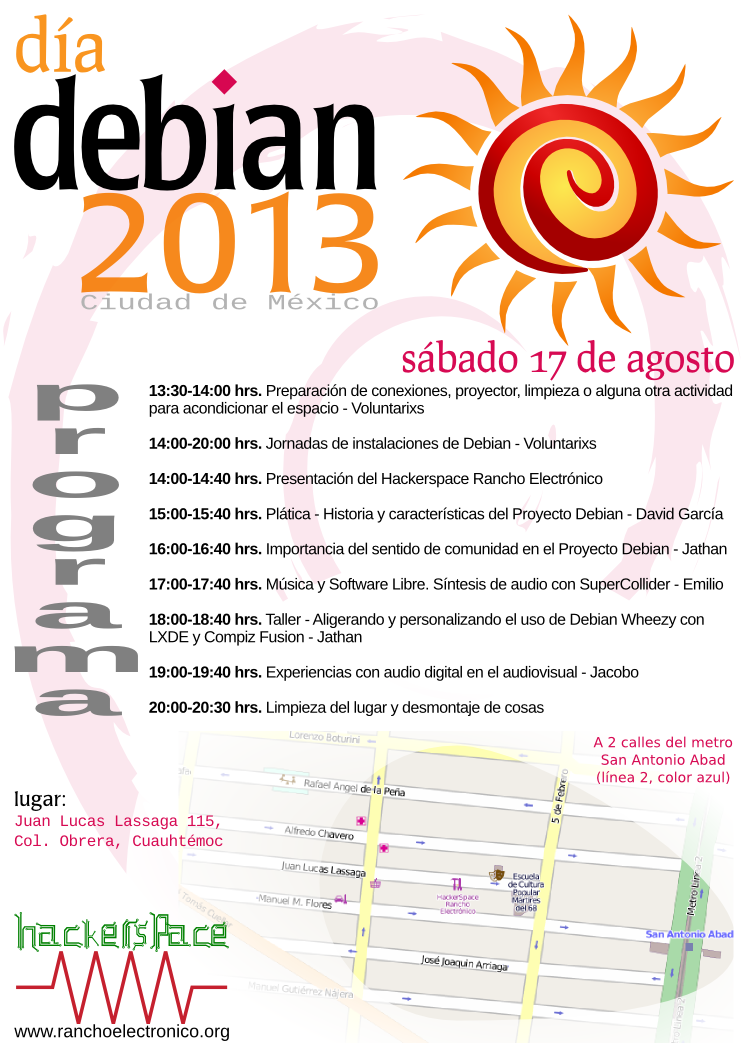
So... Well, contrary to the popular sentiment in Planet Debian, this year I'm very sorry to inform that... -( This is the first DebConf I miss in ten years, so... Yes, it's a big bummer for me. I'm not attending because this year, DebC(amp onf) coincide with the two first weeks of classes at my university And as a new teacher, I cannot afford to miss it! Anyway, but that should not stand in the way to attend a nice Debian 20th anniversary party! Parties will be held around the world. (Didn't find your city? Plan something and add it *now!*). In Mexico City, the nice guys at the very interesting Rancho Electr nico hackerspace took the lead, and organized the following activities: Debian Day 2013 Mexico City program Don't you yet know the hackerspace? You should go there! It's in a very centric location, just two blocks West from Metro San Antonio Abad (Juan Lucas Lassaga 114, col. Obrera). And the only two times I have been there, it has been good fun. Surely this Saturday we can have a nice party as well! The planned activities are from 13:30 to 20:30. See you there!
Next.

Previous.