Search Results: "nic"

10 March 2014

Andrew Pollock: [life] Day 41, Running, Kindergarten, baking

I got up not as early as I'd have liked, and did the first 10km run I've done for a while, with my new shoes and the orthotics in them. It was a bit cooler, and despite not being particularly well hydrated, I lasted the distance, and managed to complete it in under an hour. I'm a long way off my best time at the moment, but I'm hoping as it cools down my running fitness will improve. I ended up doing a bunch of startup-related stuff today, instead of Debian stuff. It felt good to make some vaguely forward progress, even if it was just business operations planning stuff. I picked up Zoe from Kindergarten by bike. We'd both confirmed with her several times since Friday as to which mode of transport she wanted to use to come home, and she'd indicated the bike. Zoe was asleep as usual, but woke up pretty easily. The Kindergarten has indicated that they want everyone out of the centre by 2:30pm, which makes it a bit of a challenge to rouse a deeply sleeping child and exit the centre in 10 minutes. I managed to sunscreen her while she was still horizontal, so that sped things up, and it helped greatly that she didn't have a post-nap meltdown. One of her class mates and her mother were hanging around waiting for her big brother to finish school, and the bike trailer tends to be a good conversation starter, so we chatted for a little bit before leaving. It was nice to properly meet another parent, and I'm glad to see Zoe's started learning some of her class mates names. I had a kale, carrot and apple juice for lunch today, and as I hate wasting the pulp out of the juicer, I'd previously found a nice muffin recipe that I could use the kale and carrot pulp in. I'd previously baked a batch of mini muffins for Zoe's lunches, and was pleased that she liked them. We were getting a bit low, so I thought we'd bake another batch this afternoon, so that's what we did after we got home. Once they were in the oven, Zoe went off to watch TV and I made a start on dinner. Bedtime went nice and smoothly tonight.

9 March 2014

Lisandro Damián Nicanor Pérez Meyer: Porting Qt 4 apps to Qt 5: an example with QAntenna

As a followup for my previous blog post, I decided to port QAntenna to Qt 5. Here's my experience.

First of all, I ran Qt 5's qmake:

qmake -qt5

Then I just ran make:

make

The first error that appeared was that QFileDialog does not has a setFilters() method. I couldn't find this on on the C++ API change page but looking at the class' documentation I found it was renamed to setSectionsMovable(). Fine, let's just change that and continue compiling.

The next errors came all from the same class QHeaderView. This time the changes are documented in the above linked page, so it was a matter to replace setMovable() with setSectionsMovable() and setResizeMode() with setSectionResizeMode(). Fixed, let's continue.

The following error turned out to be the last one: toAscii() has been deprecated in favor of toLatin1(). Once this was fixed voil , QAntenna is running with Qt 5.

Easy, wasn't it?

I have just pushed the new version to Debian unstable.

8 March 2014

Lisandro Damián Nicanor Pérez Meyer: Does your app use Qt4? You better start porting it to Qt5

As you might know, Qt 4 is now in bug-fixes-only maintenance mode. This means that only bug fixes are allowed to be pushed to Qt 4's repository, but no new features.

On the other hand, Qt 5 is already here. Porting existing apps from Qt 4 to Qt 5 is actually easier than it was to port Qt 3 stuff to Qt 4. Take a look at this Qt project's wiki page for more info. Also pay attention at the links at the bottom of it under "Recommended Reading".

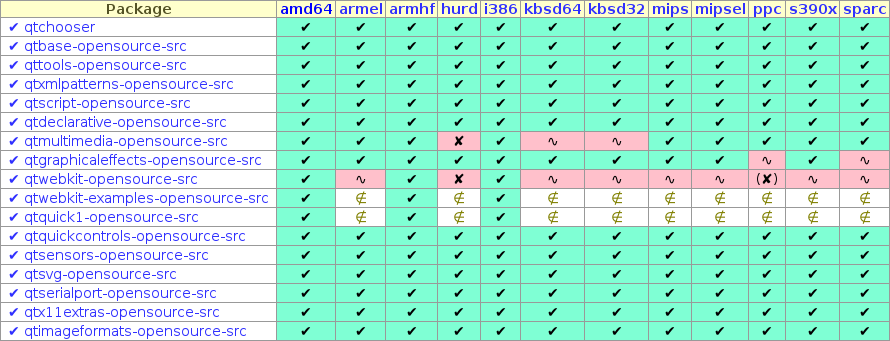
Some time ago I blogged about the 5.2.0 status in Debian experimental. We currently have it in testing with a much better status:


And we also have 5.2.1 in experimental with an even better status:

Note: qttools is FTBFS in armhf just because of some symbols changes, it will be fixed on the next upload.
Don't be afraid of getting it from experimental! Take a look at this blog post to know how to compile with Qt 5 in Debian.

BonusI have also uploaded Qt Creator built against Qt 5 to experimental. I plan to push it to unstable with Qt 5.2.1.

Paul Tagliamonte: Donate to MediaGoblin!

If you re the sort that cares about federation, the MediaGoblin project is for you!

MediaGoblin is a media hosting platform, where you can post all sorts of things, like video, images or even 3d models. It s a nice replacement for things like Flickr, and YouTube, and super easy to set up.

If I wasn t such a lazy person, I d have uploaded it to Debian, but alas. Soon. Soon!

It s an official GNU project, and it s maintainer, Chris is a totally awesome guy, and MediaGoblin is really important work.


If you feel the urge to support federation on the web, Support MediaGoblin! Help us take back the net!

Russell Coker: Less Work

I previously wrote about the idea of a Basic Income for Australia [1], that post was mainly to show how it could be introduced with little real change. That is not because I don t think that we need real changes, but because we should consider the various changes separately as much as possible. In terms of how society works I think that we need to move from the current model where most people are expected to work most of the time and the people who don t work are treated badly to encourage them to work for low wages. I think that we should aim as a society to have less time spent doing paid work which means more people working part time (maybe 6 months a year, 3 or 4 days a week, or other ways of doing less than 40 hours a week * ~45 weeks) and more people who aren t doing paid work. The idea of 100% employment is the cause of many jokes about the Soviet Union. I don t know how much truth is behind the jokes about needless work being done to fulfill Soviet plans, but regardless of the accuracy I think we should take such things as an idea of what not to do in our society. The Broken Window Fallacy is an example of the Soviet production problem in supposedly capitalist societies. Here are some of my ideas for decreasing the amount of needless work without decreasing anyone s quality of life in fact most of these make things better for most people. The War on Drugs The easiest way to reduce needless employees is to end the war on drugs . During the course of the war the drug use has steadily increased and the amount of law enforcement energy devoted to it has also increased. Some estimates claim that 50% of law enforcement is devoted to it. Also some of the hospital budget is related to drug use. I think that we should allow adults to consume any drug that they wish (not just tobacco, alcohol, caffeine, and other popular drugs) and apply the same laws regarding product quality to all of them. That will reduce the violence related to drugs, reduce the health impact (it s usually poor quality control that causes medical problems), and allow law enforcement to concentrate on crimes that hurt other people. Treating drug addiction as a medical problem has been shown to be the most effective way of reducing drug use, reducing violent crime, and reducing the health impact of drug use. Other Crime Issues Gary Slutkin s TED talk about treating violence as a contagious disease has some interesting ideas for reducing violence in the community [2]. Implementing those ideas on a wide scale seems to have the potential for reducing law enforcement and medical work. Generally I think we should aim to have as few laws as possible. Whenever adults want to do things that don t hurt other people they should be permitted to do so. There should also be an aim for laws to be consistent and easy to understand. Ideally there would be a single database with all laws in some form of hypertext (maybe some type of Wiki) so that any citizen can discover all implications of the laws that affect them. Health More money should be spent on preventing people getting sick. One problem we have in recent times is silly people refusing to get their children vaccinated because they take medical advice from a playboy model instead of doctors. I think that as a society we need to do more to protect children from stupid things that their parents do and that reducing the amount of medical work is the least of the reasons for doing so. Another problem is the quality of food. The big supermarket chains are pushing prices down which reduces food quality. The excessive use of anti-biotics is a serious threat to world health that is driven by the low price of meat. Robots Rodney Brooks gave an interesting TED talk about robotics [2]. He showed how robots can be programmed/trained and talked about the factory workers who want their children to do anything other than factory work. Work that can be done by robots should be done by robots so that people can do better things. Travel One problem that we have in Australia is rent-seeking companies being permitted to establish toll roads. To make such toll roads profitable (which is guaranteed by corrupt politicians) they close roads that might be used to bypass the toll roads. This creates needless traffic congestion (wasted work time driving). Also running toll roads involves employing people to collect the tolls and take legal action against people who don t pay. I believe that toll roads shouldn t exist, this will reduce the number of needless workers and make everything more efficient. Also as a matter of principle I believe that the government should own and control every monopoly in the country. Currently in Australia most adults own cars, this involves a lot of work in car maintenance. Even when not being used a car needs to be maintained for safety. When people drive to work instead of using public transport their travel time counts as work. While time spent on a train, tram, or bus isn t leisure time it s a lesser degree of work than driving a car. You can read a book, play phone games, or do other recreational activities when on public transport. Car sharing companies are taking off in urban areas, this allows some people to avoid owning a car and some families to own fewer cars. We also need more government investment in public transport including more routes, greater passenger capacity, and more service late at night. We also need to encourage companies not to have employees working from 9 to 5 to reduce the peak demand for public transport. A short term tax incentive would do some good in this regard, if companies were to encourage their employees to work different hours for a year then it might change the norms for work enough to permanently break the 9-5 concept. I believe that all land-based mass public transport (buses, trams, and trains) should be free. That would remove the need to pay people to collect fares and fine people who don t have tickets, and also remove the work time involved in buying tickets. Not requiring tickets would also decrease the time needed to get on and off public transport which would improve the speed of public transport and reduce disruption to traffic. One simulation of traffic in New York City showed that collecting fares on buses slowed down traffic enough to impose costs on all workers that were greater than the fares collected so it would be cheaper overall for people in NYC to have free buses paid by the government. I don t think that Melbourne has congestion similar to NYC and even Sydney might not have the same economic issues. But I still think that we should have free transport for the convenience of everyone. Google has been doing some interesting research into cars that are driven by computer, their prototypes have been shown to work well in practice but have not been approved for real use. Trains and trams are easier to drive because there is no steering so it seems that they would be good options for the first implementation of computer driven public transport. Robot trams would allow more regular service late at night and thus make the network more useful. Stop Buying Rubbish A significant waste of resources is the commercial events of Christmas, Valentine s day, and Easter. A lot of marketing money is spent to encourage people to buy rubbish for other people in celebration of such events. I think that Christmas presents for children are a good thing and that even the trivial things (crackers and party hats) are OK, but adults don t need it. Valentine s day is OK for people who are in relationships, but coercing single people to rush to find someone so that they aren t single on that day is bad for everyone. Most Easter and Valentine s chocolate is rubbish, cheap and nasty chocolate in fancy wrappings. Buy a small quantity of good chocolate instead of a large quantity of rubbish. There s a big market for knick-nacks for adults outside of those holidays too. Stands at trade shows usually give away junk to delegates, some of it has enough value to be taken home but really it s mostly rubbish. If you can t sell your stuff without giving away freebies then giving away plastic toys or cheap chocolate isn t going to make it sell. Any Other Ideas? Does anyone have other ideas about how to reduce the amount of work required to sustain our society? Suggestions for improvements that suit other countries are welcome too, while I m mostly thinking about Australia while writing this I m interested in ways of making things better all around the world.

Andrew Pollock: [life] Day 38, BJJ, Science Friday and a play date

Zoe wound up in my bed at some ungodly hour, but then we both slept in until 7am, which was nice. Mum and Dad were coming around at 8:30am to come watch Zoe's Brazilian Jiu-Jitsu class, so we got up, made some porridge in the Thermomix and got ready. Zoe decided she didn't feel like going to BJJ class by bike, so we all piled into our car and drove over. Zoe had a good class, and Mum took her uniform home afterwards to take up the legs a bit, which will be good. They stayed for lunch, and we reviewed photos from our Coochie and Melbourne trips, and I made some fresh guacamole in Thermomix to go with the chicken quesadillas I made for lunch. After lunch they went home, and Zoe declined to take a nap, so we read some stories in the hammock, and then we did our Science Friday experiment, one that was suggested to me by a friend on Facebook. It was nice and easy, just put some milk in a tray, drop in a few drops of food colouring and then touch them with a cotton bud soaked in detergent. The detergent breaks up the fat in the milk and the colour drops go flying all over the place. Zoe really enjoyed swirling all the colours around with the cotton buds and we repeated the experiment a few times. She then wanted to see what would happen if we put some glue in, so wanting to encourage her scientific curiosity, we tried it, and nothing interesting happened. Zoe had a play date at her friend Mackensie's house, which was just down the road in Balmoral. We biked over to her place and the girls had a lovely afternoon playing. Sarah came and picked up Zoe from there. I dropped in on some former neighbours who happened to move two doors down from Mackensie, and had just had a second child, and then headed home to prepare for a dinner and board game night with my girlfriend and some of my neighbours.

6 March 2014

Andrew Pollock: [life] Day 37, Playgroup, bubble tea, and Android phones

Today was Playgroup. We had a pretty early start to the day, and Zoe wanted porridge for breakfast, so we made that together in the Thermomix, and she got dressed while it cooked. After a bit of TV, we biked over. I got to witness semi-firsthand my first mother-to-mother altercation. I said hi to a mother I'd met a previous week, and asked her how she was, and got "Pissed off" as the response. Apparently a reasonably large boy (I'd put him at about the 4 mark) had been in the face of her daughter, and distressed her daughter a bit, so she'd apparently politely told the boy to back off, and then been revved by the mother of the boy for talking to her son. The boy continued hanging around her daughter, and she left Playgroup not long after telling me all about it. I worked out later on that the mother of the boy was one of the women who helped run the Playgroup. Fun times. He was a bit out of control. He full on screamed at me at the end of Playgroup for no reason. His mother did make him apologise to me for that, without me requesting it. There were some dress ups (mostly skirts) today, so Zoe had a fabulous time cavorting around on the stage in a big pink lacy skirt, doing "ballet". She dragged me up on stage with her, and we danced around for a bit. It was quite fun. She was very helpful at pack up time, and was bringing a lot of equipment back to the storage room at the back of the hall. I was helping load stuff into the large crate in the storage room. After parachute time, I lost sight of her briefly, and after a quick search, deduced that she must have gotten herself locked in the storage room. Sure enough, that's where she was. She was only missing for as long as it took me to notice and search in all the other possible places, so she wasn't particularly distressed. Poor thing. After Playgroup, we biked back home, and I had another photo I wanted to print out, so we drove over to Officeworks and had a sausage sizzle after we got the photo printed out, and then drove back home. Zoe had a pretty good bedtime last night, so I decided to try skipping her nap today. I wanted to get the 5-8 player extension pack for Settlers of Catan, which Mind Games in the Myer Centre had, so we hopped on a bus to the city. When we've been on longer public transport rides, Zoe's asked me if she can play games on my phone. This of course keeps her amused, but leaves me with nothing to amuse myself (I need to remember to bring a book). I have this cupboard full of old Android phones, so I decided to blow the dust off my old Nexus S and make it a dedicated games phone for her when we're on public transport. This worked pretty well today. She also decided to bring her handbag, which was convenient. I think she was pretty excited at the idea of her "own phone", even if it lacked a SIM card. After we'd bought the extension pack, I thought we could do something slightly more fun than just traipse into the city and traipse back out again. I've been meaning to introduce her to bubble tea for a while, so took this opportunity to track some down in the Myer Centre. We settled on some honeydew milk tea. She liked the honeydew, but after a couple of mouth fulls, was over the tapioca balls. She was a good sport and gave them a good college try though. It was fun watching her play around with the phone on the way home, and just fumbling her way around the user interface. She found the alarm setting UI, and was having a great old time creating alarms. (I'm glad I cleared them all out when we got home, there was at least one set for 4am). She had fun exploring all the ring tones. Towards the end of the journey home she figured out the camera, and was having a fabulous time taking snaps out the bus window. She still needs to work on keeping her hands and fingers away from the lens. She watched some TV while I made dinner and then I joined her on the couch for a cuddle while I flicked through my copy of 50 Dangerous Things (you should let your children do) and 365 Science Experiments. My cousin Renata came around for dinner with us tonight. Zoe didn't have a particularly great dinner, but she did go to bed nice and easily. I'm not sure how she'll sleep tonight. I've gone back to having a light-weight doona on her, as it's possible last night's wake up was temperature-related.

5 March 2014

Andrew Pollock: [life] Day 36, Kindergarten, cleaning and pee pee accidents in hardware stores

Today was my "clean the house" day. I made a start, then went for my chiropractic assessment and adjustment. I now only need to see him fortnightly, which is nice. I knocked out most of the cleaning, and then went for a massage and had some lunch. The next thing I knew it was about time to pick up Zoe. I biked to Kindergarten, and she was asleep again. She woke up reasonably easily, but was grumpy not long after that. She was very uncooperative, and didn't want to go home on the bike, and wouldn't let me put sunscreen on her. After a bit of work, I managed to extract from her that she didn't like my "sweaty hands" from riding the bike there, so I washed my hands and then she let me sunscreen her up. I'll try doing pick ups in the car next week I think. We got home, and I needed to get some more kitty litter, so we went out to Pet Barn. Zoe had a great time checking out all the fish, and also playing with aquarium decor. It got me thinking that maybe an aquarium might be a good birthday present for her, if not this year, maybe next year. It turns out that fish aren't particularly expensive, so they'd make for easy presents for people. After that, we popped across to Bunnings, because I needed a couple of things. While we were there, Zoe announced she wanted to go to the toilet, so we started trekking off to where I thought the toilets were. Turned out I was wrong, and they were at the opposite end of the building, so we had to trek all the way back again. Zoe got all the way into the ladies bathroom and failed to make it onto the toilet in time, so that concluded our visit to Bunnings. We got home and she got changed, and I started making dinner. While dinner was cooking, Zoe watched a bit of TV, and then I decided to try making some lunch box pies, essentially a piece of buttered bread jammed into a muffin tray with some creamed corn and bacon in the bottom and beaten egg on top, thrown in the oven. Zoe helped sample the bacon and cracked the eggs for me, while I buttered bread and cut the crusts off and jammed slices into muffin trays. Bedtime was remarkably uneventful for a change.

4 March 2014

Mario Lang: Personal mail server

I used to use Fetchmail and Gnus with its mail splitting capabilites and nnml backend to handle my private mail setup for many years. This worked pretty fine since I am used to accessing my home server through SSH. I have Gnus running inside of a GNU screen session. So I can check mail from remote by using a SSH terminal. This works fine as long as I have a good SSH terminal on a desktop or laptop computer. However, it does not work very well on tablets or smaller mobile devices. Additionally, mail splitting has become a performance burden over the years. I do not want to wait for Gnus to sort incoming mail into different folders while checking for new mail. That is something which should have been done in the background already, and thats what we are going to cover with the setup described below. So I had to change my simple setup to accomodate for the new trends in mobile computing. The obvious core of such a setup is an IMAP server which receives and stores your mail such that different clients can access it. So the time of my Gnus nnml storage are definitely over. Mail is no longer stored in and by my mail client.
Dovecot While there are several IMAP server solutions out there, I find Dovecot fits my needs quite nicely. I've decided to store my mail in Maildir format in ~/Maildir. I prefer storing data like that in the home directory to avoid having to backup separate files from /var/. Maildir also features some index files which should help performance in the long run. Incoming mail will solely be delivered by fetchmail and should be checked for spam. While I can probably configure Exim to run SpamAssassin on mails before delivering them to Dovecot, there is a much more elegant solution: the dovecot local delivery agent (LDA). /usr/lib/dovecot/deliver takes mail from standard input and performs Sieve filtering and updates the mail indexes. We will call this executable more or less directly from fetchmail. Incoming mail from mailing lists will be sorted into different folders using Sieve. Dovecot needs to be told to enable the sieve plugin and to create new folders on demand. /etc/dovecot/local.conf:
disable_plaintext_auth = yes
mail_location = maildir:~/Maildir
lda_mailbox_autocreate = yes
lda_mailbox_autosubscribe = yes
protocol lda  
  mail_plugins = sieve
 
Sieve scripts are actually quite intuitive once you have a template to start from. ~/.dovecot.sieve:
require "fileinto";
if exists "X-Spam-Flag"  
  # Store spam tagged by SpamAssassin into dedicated Spam folder
  if header :contains "X-Spam-Flag" "YES"  
    fileinto "Spam";
   
  elsif exists "X-Cron-Env"  
  # Store mails from Cron daemon in dedicated folder
  fileinto "cron";
  elsif exists "List-Id"  
  # File list-mail into dedicated folders, matching on List-Id
  if header :contains "List-Id" "boost-users.lists.boost.org"  
    fileinto "boost-users";
    elsif header :contains "List-Id" "brltty.mielke.cc"  
    fileinto "brltty";
    elsif header :contains "List-Id" "debian-accessibility.lists.debian.org"  
    fileinto "debian-accessibility";
    elsif header :contains "List-Id" "debian-devel-announce.lists.debian.org"  
    fileinto "debian-devel-announce";
    elsif header :contains "List-Id" "debian-devel.lists.debian.org"  
    fileinto "debian-devel";
    elsif header :contains "List-Id" "spirit-general.lists.sourceforge.net"  
    fileinto "spirit-general";
   
  # ...
 
SpamAssassin Since I want automatic classification of spam messages, I use SpamAssassin. Just install spamassasin and enable spamd in /etc/default/spamassassin:
ENABLE=1
We will use spamc in the Fetchmail configuration.
Fetchmail My ~/.fetchmailrc is a straightforward list of some mailboxes to fetch mail from. I use the mda directive to skip the MTA and send mail through SpamAssassin and deliver it to Dovecot via its LDA mechanism. ~/.fetchmailrc:
set daemon 1200 # Poll at 10 minute intervals
poll blind.guru protocol IMAP: ssl;
# ... add more sources here ...
mda "/usr/bin/spamc -u %T -e /usr/lib/dovecot/deliver -d %T"
To avoid spreading access information in too many configuration files I am using the ability of Fetchmail to use netrc to retrieve account passwords. ~/.netrc:
machine blind.guru login mlang password <hidden>
Gnus I am using Gnus to read mail, newsgroups and RSS feeds since many years now. It would be quite a mouthful to explain all the customizations I am using by now. But there is one very important bit in the context of this article: How to access the IMAP server? In my setup, Emacs and therefore Gnus is running on the same machine as the IMAP server. So I can avoid authentication at all. This configuration will avoid unnecessary password prompts or caching. In ~/.emacs or ~/.gnus:
(setq gnus-secondary-select-methods '((nnimap "localhost"
                                       (nnimap-stream shell)))
      nnimap-shell-program "/usr/lib/dovecot/imap")
With this you should be able to subscribe to your IMAP folders from within Gnus with ease. Sorting incoming mails into folders is now performed by the IMAP server through Sieve scripts. Instead of changing Gnus' configuration I now edit ~/.dovecot.sieve when I subscribe to a new mailing list. If you add a new Sieve rule for a mailing list and the associated folder does not exist yet, Dovecot will autocreate it, very convenient.
Mobile devices Now all that is left is a way for your mobile devices to read and eventually send mail. This is very much dependant on your network setup, so I am not going to go into any detail here. If you are accessing your mail setup from a tablet in your local network you might get away without tinkering with your router configuration. If you want to read/send mail on the go you need some way to get to your external IP. Either it is stable enough or you need some dynamic DNS service. You will definitely want to forward IMAP and maybe SMTP ports from your router to your home server. If you don't have an existing SMTP server for your mobile device that accepts your outgoing mails you can also set one up yourself and deliver outgoing mails from your mobile device to the world with Exim or qmail. I am personally using Exim since I am going with the default MTA for Debian. Configuring Exim to take mail from iOS devices was as simple as enabling an appropriate authentication method and adding an account to /etc/exim4/passwd. I have to admit though that I don't particularily like Exim's configuration files. That is why I ended up using dovecot's LDA in the first place.

3 March 2014

Rog rio Brito: More completed MOOCs

This weekend I received my 17th certification (or Statement of Accomplishment) for MOOCs. In particular, this last MOOC that I took was Creative, Serious and Playful Science of Android Apps, offered by Lawrence Angrave of University of Illinois at Urbana-Champaign. While I certainly knew that the course was an Introduction to Programming, the reasons I took it were twofold:
  1. For the "novelty" (for me, at least) of writing some Android Apps
  2. To reacquaint myself with Java, which I have not touched since 1999, when I wrote a compiler, in the ages of JDK 1.0 being transitioned to JDK 1.1.
I think that the time the course took (and which I invested in) was really well spent. In fact, I learned some nice things which I would not have touched otherwise. For instance, I made the conscious effort to use an IDE (Eclipse), despite being a person that would do most of the things inside Emacs and compile the programs with command-line tools. Despite being huge, Eclipse has some really nice features and the auto-completion is amazing. Since Java is so strongly typed and Eclipse knows Java pretty well, it almost completely writes your programs for you. :) Of course, my interest also made me want to streamline the build process and use the command line tools (with ant, another tool that was "alien" to me, having used makefiles for everything that I needed). The use of Eclipse (and the Android development environment in general) in my Debian unstable computers was not without problems, but after spending more time trying to fix Eclipse than really doing the homework (and pulling the little hair that I still have left), one really helpful post nailed it. (Yes, I had to remove other packages like gimp, but such is life). While playing with the Android side of things, I put one badly written (and not really "android-ish") app in a github repository (which I think is aptly named "Toy Android Apps"), which served me the purpose of learning some Android-specific concepts. But the course was helpful not only to get in touch with the tools (Eclipse, ant, running Android virtual machines with the help of kvm), but also on the Java side. I lost a bit of the prejudice against it (even though I still think it is a verbose language, especially when compared to, say Python), and I, also intend to contribute to one apache project or another that have low-hanging fruits. Actually, I have signed their Contributor License Agreement and I even had my first patch accepted! Aside: Well, sadly SVN doesn't support different committer and author fields like git does and it seems that doing many small commits may not be the Apache way of doing things but the important part of all this is that the code is there and there is so much more to be done. Aside #2: After a lot of time spent converting the repository to git (which is, after all, what I use), I put a mirror of Apache's the commons graph project.

Andrew Pollock: [life] Day 34, Kindergarten, recovery, carpentry

I was pretty knackered today. I should have done some Debian stuff, but I just didn't have it in me, and I had a backlog of household stuff to get done. Zoe woke up at 4am, and I didn't have the energy to try and get her to go back to sleep in her bed, so I just let her sleep in my bed. We both slept in until 7am, which was nice. As a result, we didn't have as much time to have a slow start, and Zoe was a bit grumpy and uncooperative as a result. I think there was at least one meltdown before breakfast. It conveniently rained around the time we were ready to leave, so we drove to Kindergarten. Drop off was super smooth. She pretty much waved me off as soon as we got there. I picked up a couple of packages from the post office on the way home, and then started hanging out the washing before I had to go back to see the podiatrist to get my orthotics fitted in my new running shoes. I finished hanging out the washing and putting away stuff from the Coochie trip and Melbourne trip and had some lunch. After lunch I started work on making a little step for Zoe so she can turn the light off in her bedroom. I had enough material left over from the clothes lines I made for her to make a really dodgy little "stool". It rained again around pick up time, so I drove to Kindergarten again, and picked up Zoe. She'd just woken up from a nap before I got there and was in a good mood. Megan's Dad was picking up Megan on foot, and they were going to have a coffee at the local coffee shop, so we joined them. After that, we went to the post office to check my post office box. I had a cheque that needed to be banked, so we went to the bank and the supermarket, and by then it was pretty much time for Sarah to pick up Zoe from me. I did a bit more carpentry before I lost the light, and went to yoga.

2 March 2014

Daniel Pocock: Google Summer of Code opportunities in JavaScript, HTML5, jQuery and WebRTC

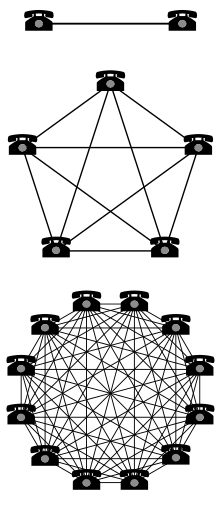
WebRTC is one of the highlights of HTML5. The latest stable releases of Google Chrome (including the free Chromium browser) and Firefox include support for this technology and although the specifications are still being finalized, this is the time when developers can start preparing the first generation of web-apps that will define the future of this technology. The JSCommunicator project aims to make it easy to integrate WebRTC into existing web applications. It provides a high-level API on top of the popular JsSIP SIP stack for JavaScript. The JSCommunicator API provides basic dialing and call control features, allowing you to focus on the application level rather than the SIP level. The configuration file suggests many possible ways it can be deployed and customized without any coding at all. The popular DruCall module for the Drupal CMS provides a practical demonstration of how JSCommunicator can be embedded in other products, multiplying the power of WebRTC for millions of other web developers, bloggers, online shops and other sites. This part of the DruCall source code provides a practical demonstration of how JSCommunicator integrates with PHP and this demonstrates how we extract the parameters from PHP in the JavaScript and convert them to the JSCommunicator configuration object. Practical deployments of WebRTC today The student selected for this GSoC project will focus on two practical, real-world deployments of JSCommunicator: It is particularly important to think about ways to make this technology useful for the Debian Developer community in the pursuit of Debian's work. Not just for Debian A communication product is not much use if there is nobody to talk to. The optimal outcome of this project may involve helping two or three additional free software communities to build portals similar to https://rtc.debian.org so that they can interact with Debian and each other using Federated SIP. As Metcalfe's Law explains, this outcome would be a win-win situation for everybody. Metcalfe's Law - Network effect Mentors needed too The more diverse the mentoring community, the more positive outcomes we can achieve with this project. If you would like to be part of a mentoring team for this project, please email me and subscribe to the Debian SOC co-ordination email list. There is no strict requirement for all mentors in the team to be full Debian Developers and emerging technology like this clearly needs people with strengths in a range of different areas. Get started now For general ideas about getting selected for Google Summer of Code, please see the comments at the bottom of my earlier blog post about Ganglia projects For this project in WebRTC in particular, please:
  • Review the project brief on the Debian wiki
  • Discuss your ideas on the JsSIP Google group
  • Send an email to introduce yourself on the Debian SOC co-ordination email list and give a link to your post on the JsSIP list
  • You must complete a coding test. Please see the open bug list for JSCommunicator, complete one of these tasks and submit a pull request on Github. Please send an email to the JsSIP Google group to discuss your pull request.
  • Explain what features you would create during the summer
  • Explain which other tools or libraries you would like to use
  • Give examples of previous work you have done with HTML and JavaScript
  • Explain how your participation will benefit Debian, free software and the wider world. Give some practical examples.
  • If you are interested in other JavaScript and jQuery opportunities for GSoC 2014, please also read more about the web components in the Ganglia project - if you apply for both Debian and Ganglia, you only have to complete one coding test as part of your application.

1 March 2014

Francois Marier: Using vnc to do remote tech support over high-latency networks

If you ever find yourself doing a bit of technical support for relatives over the phone, there's nothing like actually seeing what they are doing on their computer. One of the best tools for such remote desktop sharing is vnc. Here's the best setup I have come up with so far. If you have any suggestions, please leave a comment!

Basic vnc configuration First off, you need two things: a vnc server on your relative's machine and a vnc client on yours. Thanks to vnc being an open protocol, there are many choices for both. I eventually settled on x11vnc for the server and ssvnc for the client. They are both available in the standard Debian and Ubuntu repositories. Since I have ssh access on the machine that needs to run the server, I simply login and then run x11vnc. Here's what ~/.x11vnrc contains:
noxdamage
That option appears to be necessary when the desktop to share is running gnome-shell / compiz. Afterwards, I start the client on my laptop with the following command:
ssvncviewer -encodings zrle -scale 1280x775 localhost
The scaling factor is simply the resolution of the client minus any window decorations.

ssh configuration As you can see above, the client is not connecting directly to the server. Instead it's connecting to its own vnc port (localhost:5900). That's because I'm tunelling the traffic through the ssh connection in order to avoid relying on vnc extensions for authentication and encryption. Here's what the client's ~/.ssh/config needs for that simple use case:
Host server.example.com:
  LocalForward 5900 127.0.0.1:5900
If the remote host (which has an internal IP address of 192.168.1.2 in this example) is not connected directly to the outside world and instead goes through a gateway, then your ~/.ssh/config will look like this:
Host gateway.example.com:
  ForwardAgent yes
  LocalForward 5900 192.168.1.2:5900
Host server.example.com:
  ProxyCommand ssh -q -a gateway.example.com nc -q0 %h 22
and the remote host will need to open up a port on its firewall for the gateway (internal IP address of 192.168.1.1 here):
iptables -A INPUT -p tcp --dport 5900 -s 192.168.1.1/32 -j ACCEPT

Optimizing for high-latency networks Since I do most of my tech support over a very high latency network, I tweaked the default vnc settings to reduce the amount of network traffic. I added this to ~/.x11vncrc on the vnc server:
ncache 10
ncache_cr
and changed the client command line to this:
ssvncviewer -compresslevel 9 -quality 3 -bgr233 -encodings zrle -use64 -scale 1280x775 -ycrop 1024 localhost
This decreases image quality (and required bandwidth) and enables client-side caching. The magic 1024 number is simply the full vertical resolution of the remote machine, which sports a vintage 1280x1024 LCD monitor.

Sune Vuorela: Diploma thesis about media choice and usage in Free Software communities: I need your help

My hard-working KDE friend Mario asked me to help him to get Debian people to help him with his thesis. Here is what he writes: Dear Free Software contributor* I m currently in the process of writing my diploma thesis. I ve worked hard during the last few weeks and months on a questionnaire which shall collect some data for my thesis. Furthermore the data of this survey will be interesting for the Free Software communities as well. So please take some time or add it to your todo list or, even better, go directly to my questionnaire and help me make a great diploma thesis and improve the Free Software community in some ways. The questionnaire takes some 20 to 30 minutes. At the end of the questionnaire you ll find a way to participate in a draw where you can even win something nice. In a first round I got the feedback that the length of the questionnaire and that some questions (mostly the ones at the beginning of the questionnaire about the 12 different tasks) are quite abstract and difficult. But please try it, try your best and take the time and brain power. The remaining part of the questionnaire [1] (after these two pages with the tasks questions) is quite
easy and quickly done. And you have the possibility to come back to where you
have left filling in the questionnaire after a shorter or longer break. And if there are any questions, feedback or you need help don t hesitate a moment to write me an email or ping me on IRC (freenode.net and oftc.net) as unormal. This survey will be open till Sunday, the 9th of March 2014, 23.59 UTC. Thanks to all for reading and helping and towards the summer of 2014 you can read here what all the data you gave me showed us and where we can learn and improve. Thanks in advance and best regards
Mario Fux * By contributor I mean not just developers but translators, artist, usability
people, documentation writers and many more. Everybody who contributes in one
way or the other to Free Software.

Vasudev Kamath: Installing and Configuring NetBSD on Qemu in Debian

First step will be getting a NetBSD ISO image for installation purpose. It can be downloaded from here. Next step will be creating a disk image for installing NetBSD. This is done using qemu-img tool like below
$ qemu-img create -f raw netbsd-disk.img 10G
Image format used is raw and size is specified as last arugment. Tune the size as per your need. To start the installation run the following command
$ qemu-system-x86_64 -m 256M -hda netbsd-disk.img -cdrom \
             NetBSD-6.1.3-amd64.iso -display curses -boot d \
             -net nic -net user
So this is using user mode networking so you won't be able to have internet access during installation. I couldn't figure out on how to get network working during installation so I configured network after installation. Once you run above command you will be given with 4 options as follows.
  1. install netbsd
  2. install netbsd with ACPI disabled
  3. install netbsd with ACPI and SMP disabled
  4. drop to boot shell
Even though I first installed using the option 1 I couldn't get it boot after installation so had to reinstall with option 2 and it works fine. I'm not gonna explain each step of installation here because the installer is really simple and straight forward! I guess the NetBSD installer is the first simplest installer I have encountered from the day I started with Linux. Its simple but powerful and gets job done very easily, and I didn't read manual for installation before using it.
Enabling Networking This section involves mixture of configuration in Debian host and inside NetBSD to get the network working. The wiki page of Debian on Qemu. helped me here. To share the network with Qemu there are 2 possiblities
  1. Bridged networking between host and guest using bridge-utils
  2. Using VDE (Virtual Distributed Ethernet)
The option 1 which is explained in wiki linked above didn't work for me as I use CDC Ether based datacard for connecting to Internet which gets detected as eth1 on my machine. When bridging happens between tap0 and eth1 I end up loosing Internet on my host machine. So I selected to use VDE instead. First install packages vde2 and uml-utilities once done edit the /etc/network/interfaces file and add following lines:
auto vdetap
iface vdetap inet static
   address 192.168.2.1
   netmask 255.255.255.0
   vde2-switch -t vdetap
We can use dnsmasq as a DHCP server for the vdetap interface, but I'm not gonna explain the configuration of dnsmasq here. Run the below command to get vdetap up
modprobe tun
ifup vdetap
/etc/init.d/dnsmasq restart
newgrp vde2-net # run as user starting Qemu VM's
I couldn't get successful output for newgrp command, I was getting some crypt: Invalid argument output. But I could still get network working on NetBSD so I considered to ignore that for now. Now start the NetBSD qemu instance running using following command
$ qemu-system-x86_64 -m 256M -hda \
             /mnt/kailash/BSDWorld/netbsd-disk.img \
             -net nic -net vde,sock=/var/run/vde2/vdetap.ctl -display curses
Once the system is up login using root user, NetBSD will warn you for this and suggest to create another user but for now ignore it. To find the network interface in NetBSD just run the usual ifconfig command. In my case interface is named wm0. First step will be configuring the IP address for your interface and setting up the gateway route. Run the below command for this purpose
# ifconfig wm0 192.168.2.2 netmask 255.255.255.0
# route add default 192.168.2.1
Note that I added gateway as IP address of vdetap on my host machine. Now try pinging the host and even you can try ssh to host system. But note that this is not persistent over the reboots and for some reason I didn't yet figure out how to make NetBSD get address over DHCP from my host machine. I will update once I figure it out. Now to make the connection address persistent over reboots you need to create a file by name /etc/ifconfg.<interface>. Replace interface with a proper interface on your running NetBSD. In my case this file is /etc/ifconfig.wm0 and has following content.:
192.168.2.2 netmask 0xffffff00 media autoselect
Set the DNS server as host by adding file /etc/resolv.conf with following content.:
nameserver 192.168.2.1
After this you need to do NAT/masquerading using iptables. Just copy following script to a file and execute it as root
#!/bin/sh
# Restart the dnsmasq
/etc/init.d/dnsmasq restart
# Set nat rules in iptables
iptables --flush
iptables --table nat --flush
iptables --delete-chain
iptables --table nat --delete-chain
# Replace accordingly usb0 with ppp0 for 3G
iptables --table nat --append POSTROUTING --out-interface eth1 -j MASQUERADE
iptables --append FORWARD --in-interface vdetap -j ACCEPT
# Enable IP forwarding in Kernel
sysctl -w net.ipv4.ip_forward=1
With the above setup you will be able to get DNS resolution even after you reboot the Qemu instance but Internet connection will not work untill you run the route command I mentioned above. I still didn't figure out how to persist route but I will update it here once I figure it out.
Note that you won't be able to SSH as root to NetBSD (may be its configured to not allow by default), so you would need to create a normal user before trying to SSH from host to guest. Also make sure you add the user to wheel group to allow him execute su command.
So now I've NetBSD running on my laptop with mere 256M ram and its amazingly fast even at such low RAM. I've created a new user and can SSH into it from host machine and use it just like I use a server!. I will put up the notes of my BSD adventure here periodically. The feeling of using a BSD is amazing :-)
Update: I forgot to add masquerading step, I've added it now.

Russ Allbery: Review: Air Apparent

Review: Air Apparent, by Mark Monmonier
Publisher: University of Chicago
Copyright: 1999
Printing: 2000
ISBN: 0-226-53423-5
Format: Trade paperback
Pages: 232
Subtitled "how meteorologists learned to map, predict, and dramatize the weather," Air Apparent is a history of weather maps. Mapping the weather is a surprisingly new field, dating only from the early 19th century when a combination of scientific understanding and the ability to combine scattered observations made it practical. They're also a particularly tricky problem since weather is inherently three-dimensional, and even to the present day nearly all of our maps are two-dimensional. Monmonier starts with the earliest observational maps and the attempts to use them for prediction and tracks developments up to the late 1990s, with TV weathermen and (simple) interactive web data viewers. I got a copy of this book after Paul Krugman mentioned it. I don't know a lot about weather forecasting or weather maps, but I remembered finding the science of weather fronts and maps of them fascinating in high school, and I hoped I'd get the same feeling from this. Unfortunately, I probably need to stop reading Monmonier's books; they always sound interesting, but I don't enjoy reading them. One thing that's important to know is that this is not a history of meteorology. One can't hold that against the book, of course, because it never claimed to be. But it has just enough of a history of meteorology mixed into its history of map-making to make at least this reader wish he were reading that other book. I like maps, I really do, but I was hoping for either a book that melded a history of the science of weather forecasting with the maps that were used in that science, or a book that dove deep into the effective and ineffective ways to make weather maps (ideally, Edward R. Tufte for maps). This is neither; it's little more or less than a detailed history of the making of weather maps. Each time it gets close to a clear explanation of the underlying meteorology, it finds a map to examine and skips the rest of the explanation. I kept almost understanding the underlying science, but not enough to really understand the goals of the map makers, or why one presentation was better than another, or how those presentations were used to make forecasts or track weather data. I think I would have found this book more interesting in conjunction with a full history of meteorology, but I suspect that a history of meteorology would include enough about the maps to render this book largely redundant for the casual reader. The other problem I had with this book is that it's very dry. Monmonier is clearly trying, and clearly cares a lot about his topic, but the book has no flow. I kept getting lost in the barrage of names, arguments over technique, and struggles for government funding. It's hard to put a finger on why the book didn't grab me; the closest I can come is that it's a book stuffed full of facts. Monmonier did exhaustive historical research on weather map making, saved numerous quotes from original documents, and laid it all out chronologically. That's fine if you just want the information, but I was looking to be entertained in the process, and that didn't happen. I think the problems get worse in the second half of the book, when weather satellites and computers enter the picture and the laborious, manual map-making fall out, although maybe I was just exhausted with the book by then. The early history of weather maps at least has the benefit of showing the logistical struggles behind creating an effective weather service: insufficient observation points, slow communication methods, and the need for skilled map-makers to turn measurements into visual representations. Once computers and satellite photography enter the picture, the science matters even more, and I think the reader needs a better understanding of the underlying science to make sense of the results. Air Apparent has a tendency to provide a brief introduction to the type of data, a detailed chronological history, and then a discussion of the ways of presenting and representing that data, without ever getting the reader to care about the data itself or see how it ties into forecasting. Part of the problem, I suspect, is that the history of meteorology seems to be full of sensible, careful people who largely did sensible, careful things with the data they had available at the time. This is great for the advancement of science, and not so helpful at making a history engrossing. I wish I could say that I was glad I read this book for the information, if not the presentation, but unfortunately I didn't retain much. I needed some sort of structure or frame on which to hang all of the specifics, some sense of story or controversy or at least scientific understanding, and I didn't get it. It took me a couple of months to finish this book because I kept setting it down to read other things, and I only finished it out of a combination of stubbornness and knowledge that other people liked it. If the topic sounds interesting, well, this book exists, and it's gotten several good reviews. But I'm afraid I can't recommend it. Rating: 4 out of 10

28 February 2014

Andrew Pollock: [life] Day 31, Coochiemudlo Island to Melbourne in one day

Wow, today was pretty crazy in terms of the travel we managed to pack into one day. This morning, Zoe woke up at about 5:30am and jumped into bed with me for a snuggle and another half hour nap. After that we got up. Zoe had been eyeing off the egg cups in the house, and so I'd wanted to do soft-boiled eggs for breakfast. So we doused ourselves in mosquito repellent and raided the chicken coop. I don't think I've ever cooked soft-boiled eggs in my entire adult life, and today wasn't an exception. They came out hard-boiled. Zoe still ate them anyway, she just couldn't do the toast soldier thing. I need to buy some egg cups for home and we can try again. I hear the Thermomix can do boiled eggs. After breakfast and a shower, I got stuck into packing up and cleaning the house, and Zoe watched TV. At 8am she turned off the TV and declared she wanted to play in the yard. It was nice to see that she wanted to do something more than just veg out in front of the TV, without prompting. I had us all packed up by about 8:30am and we were only 5 minutes from where the barge docked, so we drove over to the other end of the island to take a look at the place at high tide. It was quite different from the two days before in the afternoon at low tide. The stick that we'd walked out to was barely above the waterline. Then we drove back to wait in the queue for the barge. The barge journey back was uneventful and we made it back home by 10am, which was about the time I was expecting, and rendezvoused with my girlfriend, and did a fast unpack and repack. We then headed to the airport, arriving comfortably with enough time to check our luggage and get some lunch to take onto the plane. Zoe was great for the flight down. She watched Brave on the in-flight WiFi entertainment on my phone, and got to fit the whole movie in before we landed, but this meant she skipped a nap. By the time we got to Melbourne Airport, she was in the post-tired manic state, but we weren't in any particular rush, so we had a very roundabout trip to baggage claim, and then after we'd acquired some Myki cards, caught a taxi to our accommodation in South Melbourne. After we'd unpacked and settled in, and I'd gotten some supplies from the local convenience store, we caught a tram into Bourke Street to go to Chinatown for dinner, after checking out the view from the observation deck on the 28th floor. We found a great dumpling place, and Zoe really enjoyed the pork dumpling and noodle soup that I ordered for her. She kept alternating between eating the noodles with her training chopsticks and the broth with one of the big spoons. She was getting really over-tired and over-stimulated by this point, so it was quite a bit of cat-herding to get to Chinatown, and more so getting back to a tram to come back. We got home, Zoe had a quick shower and went to bed without a peep. Her room is nice and dark, so I'm hoping that she'll have a bit of a sleep in tomorrow. (Wishful thinking). I'm really quite pleased with how smoothly today's travel went. Everything went off without a hitch.

Rog rio Brito: Paco de Lucia

I was super sad to know that Paco de Lucia passed a few days ago. It was shocking to know that he was so young (only 66 year old, if I am not mistaken). To share some of his fine work with his frequent collaborators John McLaughlin and Al Di Meola to people that may not otherwise know him or his work, I offered on a Facebook post to upload a bootleg of a show of the Guitar Trio (John McLaughlin, Paco De Lucia and Al Di Meola) with the entire performance (possibly out of order, as that is a bootleg, after all) ripped from a broadcast to Dutch TV station. This performance includes the exceptional Paco de Lucia prominently and the show has many songs from the "Friday Night in San Francisco" record, including the magnificent (IMVHO) "Mediterranean Sundance". The credits of the video are, of course, of the musicians. I only ripped, deinterlaced (remember, analog TV it was interlaced), denoised, encoded, and uploaded the video to youtube.

27 February 2014

Simon Josefsson: Replicant 4.2 on Samsung S3

Since November 2013 I have been using Replicant on my Samsung S3 as an alternative OS. The experience has been good for everyday use. The limits (due to non-free software components) compared to a normal S3 (running vendor ROM or CyanogenMod) is lack of GPS/wifi/bluetooth/NFC/frontcamera functionality although it is easy to get some of that working again, including GPS, which is nice for my geocaching hobby. The Replicant software is stable for being an Android platform; better than my Nexus 7 (2nd generation) tablet which I got around the same time that runs an unmodified version of Android. The S3 has crashed around ten times in these four months. I ve lost track of the number of N7 crashes, especially after the upgrade to Android 4.4. I use the N7 significantly less than the S3, reinforcing my impression that Replicant is a stable Android. I have not had any other problem that I couldn t explain, and have rarely had to reboot the device. The Replicant project recently released version 4.2 and while I don t expect the release to resolve any problem for me, I decided it was time to upgrade and learn something new. I initially tried the official ROM images, and later migrated to using my own build of the software (for no particular reason other than that I could). Before the installation, I wanted to have a full backup of the phone to avoid losing data. I use SMS Backup+ to keep a backup of my call log, SMS and MMS on my own IMAP server. I use oandbackup to take a backup of all software and settings on the phone. I use DAVDroid for my contacts and calendar (using a Radicale server), and reluctantly still use aCal in order to access my Google Calendar (because Google does not implement RFC 5397 properly so it doesn t work with DAVDroid). Alas all that software is not sufficient for backup purposes, for example photos are still not copied elsewhere. In order to have a complete backup of the phone, I m using rsync over the android debug bridge (adb). More precisely, I connect the phone using a USB cable, push a rsyncd configuration file, start the rsync daemon on the phone, forward the TCP/IP port, and then launch rsync locally. The following commands are used: jas@latte:~$ cat rsyncd.conf
address 127.0.0.1
uid = root
gid = root
[root]
path = /
jas@latte:~$ adb push rsyncd.conf /extSdCard/rsyncd.conf
* daemon not running. starting it now on port 5037 *
* daemon started successfully *
0 KB/s (57 bytes in 0.059s)
jas@latte:~$ adb root
jas@latte:~$ adb shell rsync --daemon --no-detach --config=/extSdCard/rsyncd.conf &
jas@latte:~$ adb forward tcp:6010 tcp:873
jas@latte:~$ sudo rsync -av --delete --exclude /dev --exclude /acct --exclude /sys --exclude /proc rsync://localhost:6010/root/ /root/s3-bup/
...
Now feeling safe that I would not lose any data, I remove the SIM card from my phone (to avoid having calls, SMS or cell data interrupt during the installation) and follow the Replicant Samsung S3 installation documentation. Installation was straightforward. I booted up the newly installed ROM and familiarized myself with it. My first reaction was that the graphics felt a bit slower compared to Replicant 4.0, but it is hard to tell for certain. After installation, I took a quick rsync backup of the freshly installed phone, to have a starting point for future backups. Since my IMAP and CardDav/CalDav servers use certificates signed by CACert I first had to install the CACert trust anchors, to get SMS Backup+ and DAVDroid to connect. For some reason it was not sufficient to add only the root CACert certificate, so I had to add the intermediate CA cert as well. To load the certs, I invoke the following commands, selecting Install from SD Card when the menu is invoked (twice). adb push root.crt /sdcard/
adb shell am start -n "com.android.settings/.Settings\"\$\"SecuritySettingsActivity"
adb push class3.crt /sdcard/
adb shell am start -n "com.android.settings/.Settings\"\$\"SecuritySettingsActivity"
I restore apps with oandbackup, and I select a set of important apps that I want restored with settings preserved, including aCal, K9, Xabber, c:geo, OsmAnd~, NewsBlur, Google Authenticator. I install SMS Backup+ from FDroid separately and configure it, SMS Backup+ doesn t seem to want to restore anything if the app was restored with settings using oandbackup. I install and configure the DAVdroid account with the server URL, and watch it populate my address book and calendar with information. After organizing the icons on the launcher screen, and changing the wallpaper, I m up and running with Replicant 4.2. This upgrade effort took me around two evenings to complete, with around half of the time consumed by exploring different ways to do the rsync backup before I settled on the rsync daemon approach. Compared to the last time, when I spent almost two weeks researching various options and preparing for the install, this felt like a swift process.
I spent some time researching how to get the various non-free components running. This is of course sub-optimal, and the Replicant project does not endorse non-free software. Alas there aren t any devices out there that meets my requirements and use only free software. Personally, I feel using a free core OS like Replicant and then adding some non-free components back is a better approach than using CyanogenMod directly, or (horror) the stock ROM. Even better is of course to not add these components back, but you have to decide for yourselves which trade-offs you want to make. The Replicant wiki has a somewhat outdated page on Samsung S3 firmware. Below are my notes for each component, which applies to Replicant 4.2 0001. You need to first prepare your device a bit using these commands, and it is a good idea to reboot the device after installing the files. adb root
adb shell mount -o rw,remount /system
adb shell mkdir /system/vendor/firmware
adb shell chmod 755 /system/vendor/firmware
GPS: The required files are the same as for Replicant 4.0, and using the files from CyanogenMod 10.1.3 works fine. The following commands load them onto the device. Note that this will load code that will execute on your main CPU which is particularly bothersome. There seems to exist a number of different versions of these files, CyanogenMod have the same gpsd and gps.exynos4.so in version 10.1.3 and 10.2 but the libsecril-client.so differs between 10.1.3 and 10.2. All files differ from the files I got with my stock Samsung ROM on this device (MD5 checksums in my previous blog). I have not investigated how these versions differs or which of them should be recommended. I use the files from CyanogenMod 10.1.3 because it matches the Android version and because the files are easily available. adb push cm-10.1.3-i9300/system/bin/gpsd /system/bin/gpsd
adb shell chmod 755 /system/bin/gpsd
adb push cm-10.1.3-i9300/system/lib/hw/gps.exynos4.so /system/lib/hw/gps.exynos4.so
adb push cm-10.1.3-i9300/system/lib/libsecril-client.so /system/lib/libsecril-client.so
adb shell chmod 644 /system/lib/hw/gps.exynos4.so /system/lib/libsecril-client.so
Bluetooth: Only one file has to be installed, apparently firmware loaded onto the Bluetooth chip. Cyanogenmod 10.1.3 and 10.2 contains identical files, which has a string in it BCM4334B0 37.4MHz Class1.5 Samsung D2 . The file I got with my stock ROM has a string in it BCM4334B0 37.4MHz Class1.5 Samsung M0 . I don t know the difference, although I have seen that D2 sometimes refers to the US version of a Samsung device. My device is the international version, but it seems to work anyway. adb push cm-10.1.3-i9300/system/bin/bcm4334.hcd /system/vendor/firmware/bcm4334.hcd
adb shell chmod 644 /system/vendor/firmware/bcm4334.hcd
Front Camera: Two files has to be installed, apparently firmware loaded onto the Camera chip. CyanogenMod 10.1.3 and 10.2 contains identical files, which has a string in it [E4412 520-2012/08/30 17:35:56]OABH30 . The file I got with my stock ROM has a string in it [E4412 533-2012/10/06 14:38:46]OABJ06 . I don t know the difference. adb push cm-10.1.3-i9300/system/vendor/firmware/fimc_is_fw.bin /system/vendor/firmware/fimc_is_fw.bin
adb push cm-10.1.3-i9300/system/vendor/firmware/setfile.bin /system/vendor/firmware/setfile.bin
adb shell chmod 644 /system/vendor/firmware/fimc_is_fw.bin /system/vendor/firmware/setfile.bin
NFC: I m happy that I got NFC to work, this was one of my main issues with Replicant 4.0 (see my earlier blog post). Only one file is needed, however CyanogenMod does not seem to distribute it so you have to get it from your stock ROM or elsewhere. The md5 of the file I have is b9364ba59de1947d4588f588229bae20 (and no I will not send it to you). I have tested it with the YubiKey NEO and the Yubico Authenticator app. adb push clockworkmod/blobs/ee6/7188ca465cf01dd355a92685a42361e113f886ef44e96d371fdaebf57acae /system/vendor/firmware/libpn544_fw.so
adb shell chmod 644 /system/vendor/firmware/libpn544_fw.so
Wifi: I haven t gotten wifi to work, although I have not tried very hard. Loading the CyanogenMod firmwares makes my device find wireless networks, but when I try to authenticate (WPA-PSK2), I get failures. Possibly some other files has to be loaded as well. Update: This blog post has been updated since initial posting to use rsync over adb instead of USB tethering, and to mention that I got the ROM building to work. flattr this!

26 February 2014

Vincent Sanders: There are only two hard things in Computer Science: cache invalidation and naming things.

It is the first of these which I have recently been attempting and I think Phil Karlton might have a good point.
What are we talking about?Web browsers are pretty complex beasties but the basic concept is pretty easy to understand. They fetch a bunch of files that make up a web page and render those source files into something suitable for human consumption.

It is also intuitive that fetching all the files that make up a web page, every time you browse to a new page, might be wasteful, especially if most of the files had not changed from the previous page.

In order to address this browsers hang onto copies of these files in case your browsing needs them again, this is known as a source file cache. Caches are a widely used technique throughout many aspects of computer technology but the basic idea is that they trade one resource for another.

In this case we are trading local storage space (memory or disc) for access time. This type of trade may give large benefits due to the large differences in access times (sometimes known as latency) between local and network resources.

For example, if the source files that make up a web page are a Megabyte in size accessed with a 2013 era PC with a 10Mbit connection to the Internet:
From this example it becomes startlingly obvious why a source cache is so desirable. I have greatly simplified the browsers operation here as they usually implement many layers of additional caching in other areas to make the browsing experience subjectively smoother.

And before the observant reader suggests that we could just make the network faster it ought to be mentioned that due to fundamental physical constraints, like the speed of light, it would be unlikely that the average practical network reply will ever drop much below 150,000 s [1] or some 40 times slower than disc. Still a worthwhile gain.
Knowing the cost of everything and the value of nothingHaving shown the benefits it might be nice to think there are no downsides to caching, this is not the case, as I mentioned we are trading storage for time and as in any trade one must expect there to be overheads.

In the case of a browser we face several obstacles. Firstly not every file that goes to make up a web page can be cached. The HTTP specification contains an entire section on caching which contains numerous rules and operations to ensure that only objects that should be cached are and determines for how long they can be kept before going "stale".

A great deal of this complexity comes from just how desirable caching is to network providers. Many ISPs will have web proxy servers to cache requests for all users to reduce their bandwidth usage, or increasingly, to implement content filtering according to the local government censorship rules. The browsers cache must know how to interact with these proxies without getting erroneous results.

Then comes the problem alluded to in the section title. A browsers cache cannot grow indefinitely. Eventually a system would run out of memory and disc if a browser kept every file. To deal with this the cache is limited sometimes by the number of files it holds, but more commonly by size both in memory and on disc.

The caching structure used by a web browser is hierarchical in that it will first evict (move) files from memory to a backing store (disc) and when the disc cache size limit is exceeded files are evicted to the next tier. Which in this case, will involve deleting the local copy (invalidating) and requiring performing a fetch from the network if the file is needed again.

Tardis at the Beeb by Sarah G from flikrWhen the cache size is exceeded the decision is made about what to remove from the cache using a cache strategy or algorithm. The aim of this decision is to discard the data that will not be required again for the longest time.

If we had a blue box with a madman inside, who we could persuade to bring our browsing history back from the future, implementing b l dy's algorithm might be possible. Failing a perfect solution we are reduced to making a judgement based on the information available to us.

This involves computing a cost for replacing each entry in the cache and evicting those with the lowest values. The selected algorithm has a large impact on the effectiveness of the cache and often needs fine tuning for the task at hand.
Never has so little been measured so muchHaving established that caching is useful and that we need to make decisions on what to keep it follows that those decisions must be based on information. This information consists of two main groups:
Maintaining all of this information is a significant part of the overheads involved with caching and a compromise must be struck between having the necessary information to make good caching choices and the cost maintaining that data.
Cache metricsMost cache implementations maintain at least some basic metrics, at the very least how much storage is being used so a decision on if evicting entries from the cache to reclaim space is necessary.

It is also common to keep a record of how well the cache is performing. The cache efficiency (the hit rate) is usually measured as the ratio of successful accesses provided from the cache (a cache hit) to the total number of requests to the cache.

A perfect cache would have all hits and no misses (a hit rate of 1) while using as little storage as possible (but as already noted that requires a special madman). The hit rate can be used to automatically change the behaviour of the eviction algorithm, perhaps using more storage if the hit rate drops too low or changing the eviction frequency.
MetadataEach object must carry with it the data necessary to regain its state when retrieved from the cache. This information is essential for the correct operation of the cache but in of itself provides no direct value.

In the case of browser source data this includes all the headers sent in the original network fetch. These headers are themselves just metadata sent along with the object by the web server which must be preserved.

Two particularly useful value for making a good eviction decision are how long it has been since the object was last used and how many times it has been used. This is because an object that was cached a long time ago and then never used again is much less valuable than one that has recently been repeatedly used.
An ImplementationIt is all very well talking about the general solution but a full understanding can only be gained by examining a real implementation. The NetSurf cache was chosen as it is a suitably small amount of code but still demonstrates all the major design features.
InterfaceThe cache deals with all source data and provides the browser with a single unified object request interface regardless of if the source data can be cached or not. This is useful to hide the implementation details allowing for changes without affecting the rest of the browsers code.

The implementation effectively consists of two lists of objects, those that can be cached and those that cannot. Each object on these lists is reference counted against one or more users and while there is at least one user the source data is maintained in memory.

Objects determined to be non cached are always directly fetched from their source and are immediately released once they have no users remaining.

For cacheable objects an attempt is made to fulfil the request in descending order:
  1. from objects already in memory.
  2. from the backing store.
  3. from a network fetch.
Irrespective of the source of the data the remaining operations on the object (determining freshness etc.) are exactly as if the request had been fulfilled from the network. This approach means the use of the cache is transparent to the object users.
WriteoutObjects are placed in the backing store asynchronously to any other operations. When an object has been fetched from the network a background task is scheduled for when the browser is otherwise idle.

This writeout task constructs a list of all cacheable objects not yet in the backing store, associates a cost value with each object and then proceeds to write those objects to the backing store in highest to lowest value order.
CleaningA periodically scheduled task deals with ensuring the cache is cleaned. This consists of destroying stale objects and arranging fresh objects are not using more memory than the configuration permits.

Memory usage is reduced within the cleaning task by discarding the source data for objects already held in the backing store (where the data can be retrieved relatively cheaply)

Additional memory may be recovered by simply discarding unused objects held only in memory. These objects are usually those which have only recently become unused otherwise the writeout task would have committed them to the backing store.

The most recently used objects are statistically likely to be used again soon, because of this there is a high risk of a cache miss associated with discarding these objects. In order to mitigate this undesirable effect the cleaning heuristic favours using more memory than configured for short periods rather than discarding from memory.
Backing storeThe backing store is a simple key-value database. Each source data object and its metadata (its headers etc.) is associated with a unique key (the URL used to fetch it). The backing store is simply required to store and retrieve the object data associated with the given URL.

The backing store implementation in NetSurf is pluggable, this flexibility is required for dealing with the greatly varying capabilities and limits of the various systems the browser is required to execute on.

A novel aspect of this backing store interface is that if an implementation returns the wrong object it is not considered an error and is simply treated as a cache miss. This is possible because the metadata contains the URL of the stored object enabling object verification.

This behaviour is permitted because techniques which significantly improve key-value store performance (principally key hashing) become available if they are not required to always give the correct answer.

The backing store is also required to manage its size within the configured limits and deal with any filesystem behaviour details.

The reference backing store is trivial in that it performs a hash operation on the input URL, encodes the result with base64url encoding and uses that as the object filename. The length of the hash can be configured allowing use of the reference implementation in any situation where using the filesystem as a database is acceptable.

The reference backing store default hash is SHA-1 yielding almost unique [2] 160 bit key values stored in much the same way as the git DVCS. Note we are not using this hash for its cryptographic properties and at worst a collision will result in the cache being a tiny amount less efficient.
ConclusionHopefully this has shown what a browser source file cache is, why it is useful and a basic understanding of how they are implemented.

I will admit I have glossed over some of the more challenging aspects especially in relation to actually implementing the cache strategy but I hope that the reader will forgive those omissions of detail in a quest for a little more clarity of the general principles.

I would like to thank John-Mark Bell for implementing the NetSurf cache and to Melodie Parry for proof reading and providing feedback.

[1] Speed of light is 3x10^8m/s earth circumference is 4x10^7m, divide circumference by speed gives 133,000 s which gives longest round trip time from anywhere on surface of earth to point furthest from. So assuming a whole megabyte can be transferred in one round trip and allowing for some overhead the lower bound estimate of 150,000 s looks reasonable.

[2] Mathematically speaking this hash would allow us to say that with the current estimated 1x10^11 URLs on the internet the likelihood of a collision is still vanishingly small (at least 1x10^-15)

Next.

Previous.