John Goerzen: How To Think About Compression
and the case against bzip2
Compression is with us all the time. I want to talk about general-purpose lossless compression here.
There is a lot of agonizing over compression ratios: the size of output for various sizes of input. For some situations, this is of course the single most important factor. For instance, if you re Linus Torvalds putting your code out there for millions of people to download, the benefit of saving even a few percent of file size is well worth the cost of perhaps 50% worse compression performance. He compresses a source tarball once a month maybe, and we are all downloading it thousands of times a day.
On the other hand, when you re doing backups, the calculation is different. Your storage media costs money, but so does your CPU. If you have a large photo collection or edit digital video, you may create 50GB of new data in a day. If you use a compression algorithm that s too slow, your backup for one day may not complete before your backup for the next day starts. This is even more significant a problem when you consider enterprises backing up terabytes of data each day.
So I want to think of compression both in terms of resulting size and performance. Onward
Starting Point
I started by looking at the practical compression test, which has some very useful charts. He has charted savings vs. runtime for a number of different compressors, and with the range of different settings for each.
If you look at his first chart, you ll notice several interesting things:
I wanted to try something a bit more interesting. I made an uncompressed tar file of /usr on my workstation, which comes to 6GB of data. My /usr contains highly compressible data such as header files and source code, ELF binaries and libraries, already-compressed documentation files, small icons, and the like. It is a large, real-world mix of data. In fact, every compression comparison I saw was using data sets less than 1GB in size hardly representative of backup workloads. Let s start with the numbers:
In the MB saved column, higher numbers are better; in all other columns, lower numbers are better. I m using clock seconds here on a dual-core machine. The cost column is clock seconds per MB saved.
What does this tell us?
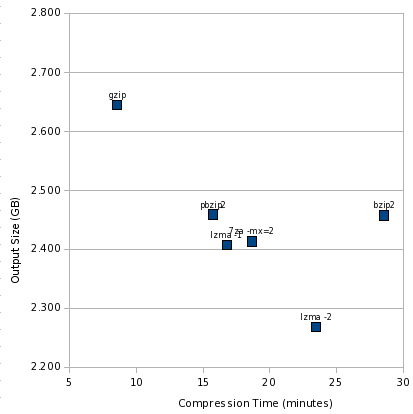 Like the other charts, the best area is the lower left, and worst is upper right. It s clear we have two outliers: gzip and bzip2. And a cluster of pretty similar performers.
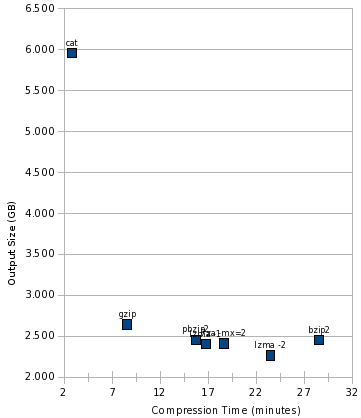
This view somewhat magnifies the differences, though. Let s add cat to the mix:
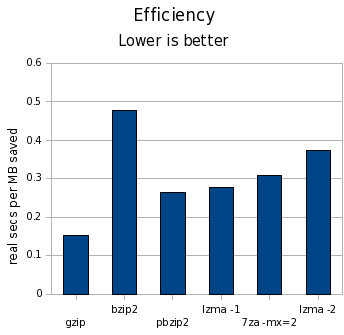
 And finally, look at the cost:
 Conclusions
First off, the difference in time is far larger than the difference in space. We re talking a difference of 15% at the most in terms of space, but orders of magnitude for time.
I think this pretty definitively is a death knell for bzip2. lzma -1 can achieve better compression in significantly less time, and lzma -2 can achieve significantly better compression in a little less time.
pbzip2 can help even that out in terms of clock time on multicore machines, but 7za already has a parallel LZMA implementation, and it seems only a matter of time before /usr/bin/lzma gets it too. Also, if I were to chart CPU time, the numbers would be even less kind to pbzip2 than to bzip2.
bzip2 does have some interesting properties, such as resetting everything every 900K, which could provide marginally better safety than any other compressor here though I don t know if lzma provides similar properties, or could.
I think a strong argument remains that gzip is most suitable for backups in the general case. lzma -1 makes a good contender when space is at more of a premium. bzip2 doesn t seem to make a good contender at all now that we have lzma.
I have also made my spreadsheet (OpenOffice format) containing the raw numbers and charts available for those interested.
Update
Part 2 of this story is now available, which considers more compression tools, and looks at performance compressing files individually rather than the large tar file.
- gzip performance flattens at about -5 or -6, right where the manpage tells us it will, and in line with its defaults.
- 7za -2 (the LZMA algorithm used in 7-Zip and p7zip) is both faster and smaller than any possible bzip2 combination. 7za -3 gets much slower.
- bzip2 s performance is more tightly clustered than the others, both in terms of speed and space. bzip2 -3 is about the same speed as -1, but gains some space.
I wanted to try something a bit more interesting. I made an uncompressed tar file of /usr on my workstation, which comes to 6GB of data. My /usr contains highly compressible data such as header files and source code, ELF binaries and libraries, already-compressed documentation files, small icons, and the like. It is a large, real-world mix of data. In fact, every compression comparison I saw was using data sets less than 1GB in size hardly representative of backup workloads. Let s start with the numbers:
| Tool | MB saved | Space vs. gzip | Time vs. gzip | Cost |
|---|---|---|---|---|
| gzip | 3398 | 100.00% | 100.00% | 0.15 |
| bzip2 | 3590 | 92.91% | 333.05% | 0.48 |
| pbzip2 | 3587 | 92.99% | 183.77% | 0.26 |
| lzma -1 | 3641 | 91.01% | 195.58% | 0.28 |
| lzma -2 | 3783 | 85.76% | 273.83% | 0.37 |
- bzip2 can do roughly 7% better than gzip, at a cost of a compression time more than 3 times as long.
- lzma -1 compresses better than bzip2 -9 in less than twice the time of gzip. That is, it is significantly faster and marginally smaller than bzip2.
- lzma -2 is significantly smaller and still somewhat faster than bzip2.
- pbzip2 achieves better wall clock performance, though not better CPU time performance, than bzip2 though even then, it is only marginally better than lzma -1 on a dual-core machine.
Like the other charts, the best area is the lower left, and worst is upper right. It s clear we have two outliers: gzip and bzip2. And a cluster of pretty similar performers.
This view somewhat magnifies the differences, though. Let s add cat to the mix:
And finally, look at the cost:
Conclusions
First off, the difference in time is far larger than the difference in space. We re talking a difference of 15% at the most in terms of space, but orders of magnitude for time.
I think this pretty definitively is a death knell for bzip2. lzma -1 can achieve better compression in significantly less time, and lzma -2 can achieve significantly better compression in a little less time.
pbzip2 can help even that out in terms of clock time on multicore machines, but 7za already has a parallel LZMA implementation, and it seems only a matter of time before /usr/bin/lzma gets it too. Also, if I were to chart CPU time, the numbers would be even less kind to pbzip2 than to bzip2.
bzip2 does have some interesting properties, such as resetting everything every 900K, which could provide marginally better safety than any other compressor here though I don t know if lzma provides similar properties, or could.
I think a strong argument remains that gzip is most suitable for backups in the general case. lzma -1 makes a good contender when space is at more of a premium. bzip2 doesn t seem to make a good contender at all now that we have lzma.
I have also made my spreadsheet (OpenOffice format) containing the raw numbers and charts available for those interested.
Update
Part 2 of this story is now available, which considers more compression tools, and looks at performance compressing files individually rather than the large tar file.
 Alright, Debian GNU/Linux 5.0 AKA as Lenny
 What does the new stable release bring for system administrators? I ll give an overview what news you might expect when upgrading from Debian GNU/Linux 4.0, codename Etch (released on 8th April 2007) to the current version Debian GNU/Linux 5.0, codename


 From tomorrow, if you start seeing bugs or getting email about your packages where the version string ends in em[0-9], or where dependencies mentioned by reportbug include such a version suffix, the user is running one of the two Emdebian distributions to be released alongside lenny (and based on lenny packages). You might also see Emdebian in the output of 'apt-cache policy' if your bug reports request or supply such data.
 Just saw
 Another Monday, start of the working week and I m thinking about business again. Ian Lynch of


 My home file server,
 It has become a hidden tradition for me to watch Superbowl every year, despite disappointment in the game and coverage quality in the years before. It started as before: pre-game show, pre-pre-game show, coin toss show and kick-off show It is clear that the show is planned by and for advertisers and not for the viewers. That is a shame and a disgrace - the viewer must be the master of the TV programming and NOT the advertisers. In soccer the program starts, you see the captains exchange a handshake, you see the referee throw a coin and 10-15 seconds later the game is going full steam. Why do you need 3 ad breaks and 2 songs before the game is beyond me - get to the game!
The camera work and NBC commentary is MUCH better than last year - stable shots with good close-ups and explanations that actually make sense even to people that are not American football experts. Oh and they actually use units - saying they won x out of y games this season and not they are x in y this season , mostly at least.
The game had more fun than usual in the beginning, but the legal things slow it up again - it is weird that a guy got over the line but was called beck because of the knee touching and then a penalty for a false start ? Too much rules and regulations. Soon you ll have a team of lawyers on the sidelines and lawyer drafts will be more important than player drafts. And then again holding and chopping - isn t that what the blockers are supposed to do? Is that some kind of sissy sport?
Maybe not. 100 yard interception return run I am speechless. Now that was a great, great play. That episode alone made watchig this thing worth it. Not the best sport thing I ve seen, but the best American football moment for sure.
I like the basis of the game, it is a good game, but there is way too much fluff on it. That game needs to be cut down - less rules, less breaks, less interruption, less advertisements, less time to think and relax for the players. 10 seconds of play and 5 minutes of players chatting is not a sport, even curling has more action. The whole Superbowl should be over in 1 hour real time. If the TV transmission starts at 17:00, it should be done before 18:00. There is no content there to justify anything longer than that.
Why is there a limited number of challenges? Do the referees make only a limited number of mistakes per game? No. Illogical.
And when I though it was done and sealed, Arizona does a great drive and get a great touchdown. One more drive like that and the game could go either way. Now that is a good game. But again penalties spoil the whole game Fitsgerald gets a touchdown, another great play to turn the game around, but only because of the holding penalty giving Arizona safety score. Not deserving in my opinion. And the Steelers drive back AMAZING game! Now this is actually close to the best sports game that I have ever seen. I sure was not expecting that. And Arizona tries to drive back again. I was sleepy when I started to watch this, no sleep now. That was a great game. Despite all the commercialization, it is still a great game and it is very watchable if you download it from the Internet or watch it with TiVo and can skip the adds and the slow parts.