Search Results: "ina"

20 July 2016

Daniel Stender: Theano in Debian: maintenance, BLAS and CUDA

I'm glad to announce that we have the current release of Theano (0.8.2) in Debian unstable now, it's on its way into the testing branch and the Debian derivatives, heading for Debian 9. The Debian package is maintained in behalf of the Debian Science Team. We have a binary package with the modules in the Python 2.7 import path (python-theano), if you want or need to stick to that branch a little longer (as a matter of fact, in the current popcon stats it's the most installed package), and a package running on the default Python 3 version (python3-theano). The comprehensive documentation is available for offline usage in another binary package (theano-doc). Although Theano builds its extensions on run time and therefore all binary packages contain the same code, the source package generates arch specific packages1 for the reason that the exhaustive test suite could run over all the architectures to detect if there are problems somewhere (#824116). what's this? In a nutshell, Theano is a computer algebra system (CAS) and expression compiler, which is implemented in Python as a library. It is named after a Classical Greek female mathematician and it's developed at the LISA lab (located at MILA, the Montreal Institute for Learning Algorithms) at the Universit de Montr al. Theano tightly integrates multi-dimensional arrays (N-dimensional, ND-array) from NumPy (numpy.ndarray), which are broadly used in Scientific Python for the representation of numeric data. It features a declarative Python based language with symbolic operations for the functional definition of mathematical expressions, which allows to create functions that compute values for them. Internally the expressions are represented as directed graphs with nodes for variables and operations. The internal compiler then optimizes those graphs for stability and speed and then generates high-performance native machine code to evaluate resp. compute these mathematical expressions2. One of the main features of Theano is that it's capable to compute also on GPU processors (graphical processor unit), like on custom graphic cards (e.g. the developers are using a GeForce GTX Titan X for benchmarks). Today's GPUs became very powerful parallel floating point devices which can be employed also for scientific computations instead of 3D video games3. The acronym "GPGPU" (general purpose graphical processor unit) refers to special cards like NVIDIA's Tesla4, which could be used alike (more on that below). Thus, Theano is a high-performance number cruncher with an own computing engine which could be used for large-scale scientific computations. If you haven't came across Theano as a Pythonistic professional mathematician, it's also one of the most prevalent frameworks for implementing deep learning applications (training multi-layered, "deep" artificial neural networks, DNN) around5, and has been developed with a focus on machine learning from the ground up. There are several higher level user interfaces build in the top of Theano (for DNN, Keras, Lasagne, Blocks, and others, or for Python probalistic programming, PyMC3). I'll seek for some of them also becoming available in Debian, too. helper scripts Both binary packages ship three convenience scripts, theano-cache, theano-test, and theano-nose. Instead of them being copied into /usr/bin, which would result into a binaries-have-conflict violation, the scripts are to be found in /usr/share/python-theano (python3-theano respectively), so that both module packages of Theano can be installed at the same time. The scripts could be run directly from these folders, e.g. do $ python /usr/share/python-theano/theano-nose to achieve that. If you're going to heavy use them, you could add the directory of the flavour you prefer (Python 2 or Python 3) to the $PATH environment variable manually by either typing e.g. $ export PATH=/usr/share/python-theano:$PATH on the prompt, or save that line into ~/.bashrc. Manpages aren't available for these little helper scripts6, but you could always get info on what they do and which arguments they accept by invoking them with the -h (for theano-nose) resp. help flag (for theano-cache). running the tests On some occasions you might want to run the testsuite of the installed library, like to check over if everything runs fine on your GPU hardware. There are two different ways to run the tests (anyway you need to have python ,3 -nose installed). One is, you could launch the test suite by doing $ python -c 'import theano; theano.test() (or the same with python3 to test the other flavour), that's the same what the helper script theano-test does. However, by doing it that way some particular tests might fail by raising errors also for the group of known failures. Known failures are excluded from being errors if you run the tests by theano-nose, which is a wrapper around nosetests, so this might be always the better choice. You can run this convenience script with the option --theano on the installed library, or from the source package root, which you could pull by $ sudo apt-get source theano (there you have also the option to use bin/theano-nose). The script accept options for nosetests, so you might run it with -v to increase verbosity. For the tests the configuration switch config.device must be set to cpu. This will also include the GPU tests when a proper accessible device is detected, so that's a little misleading in the sense of it doesn't mean "run everything on the CPU". You're on the safe side if you run it always like this: $ THEANO_FLAGS=device=cpu theano-nose, if you've set config.device to gpu in your ~/.theanorc. Depending on the available hardware and the used BLAS implementation (see below) it could take quite a long time to run the whole test suite through, on the Core-i5 in my laptop that takes around an hour even excluded the GPU related tests (which perform pretty fast, though). Theano features a couple of switches to manipulate the default configuration for optimization and compilation. There is a rivalry between optimization and compilation costs against performance of the test suite, and it turned out the test suite performs a quicker with lesser graph optimization. There are two different switches available to control config.optimizer, the fast_run toggles maximal optimization, while fast_compile runs only a minimal set of graph optimization features. These settings are used by the general mode switches for config.mode, which is either FAST_RUN by default, or FAST_COMPILE. The default mode FAST_RUN (optimizer=fast_run, linker=cvm) needs around 72 minutes on my lower mid-level machine (on un-optimized BLAS). To set mode=FAST_COMPILE (optimizer=fast_compile, linker=py) brings some boost for the performance of the test suite because it runs the whole suite in 46 minutes. The downside of that is that C code compilation is disabled in this mode by using the linker py, and also the GPU related tests are not included. I've played around with using the optimizer fast_compile with some of the other linkers (c py and cvm, and their versions without garbage collection) as alternative to FAST_COMPILE with minimal optimization but also machine code compilation incl. GPU testing. But to my experience, fast_compile without another than the linker py results in some new errors and failures of some tests on amd64, and this might the case also on other architectures, too. By the way, another useful feature is DebugMode for config.mode, which verifies the correctness of all optimizations and compares the C to Python results. If you want to have detailed info on the configuration settings of Theano, do $ python -c 'import theano; print theano.config' less, and check out the chapter config in the library documentation in the documentation. cache maintenance Theano isn't a JIT (just-in-time) compiler like Numba, which generates native machine code in the memory and executes it immediately, but it saves the generated native machine code into compiledirs. The reason for doing it that way is quite practical like the docs explain, the persistent cache on disk makes it possible to avoid generating code for the same operation, and to avoid compiling again when different operations generate the same code. The compiledirs by default are located within $(HOME)/.theano/. After some time the folder becomes quite large, and might look something like this:
$ ls ~/.theano
compiledir_Linux-4.5--amd64-x86_64-with-debian-stretch-sid--2.7.11+-64
compiledir_Linux-4.5--amd64-x86_64-with-debian-stretch-sid--2.7.12-64
compiledir_Linux-4.5--amd64-x86_64-with-debian-stretch-sid--2.7.12rc1-64
compiledir_Linux-4.5--amd64-x86_64-with-debian-stretch-sid--3.5.1+-64
compiledir_Linux-4.5--amd64-x86_64-with-debian-stretch-sid--3.5.2-64
compiledir_Linux-4.5--amd64-x86_64-with-debian-stretch-sid--3.5.2rc1-64
If the used Python version changed like in this example you might to want to purge obsolete cache. For working with the cache resp. the compiledirs, the helper theano-cache comes in handy. If you invoke it without any arguments the current cache location is put out like ~/.theano/compiledir_Linux-4.5--amd64-x86_64-with-debian-stretch-sid--2.7.12-64 (the script is run from /usr/share/python-theano). So, the compiledirs for the old Python versions in this example (11+ and 12rc1) can be removed to free the space they occupy. All compiledirs resp. cache directories meaning the whole cache could be erased by $ theano-cache basecompiledir purge, the effect is the same as by performing $ rm -rf ~/.theano. You might want to do that e.g. if you're using different hardware, like when you got yourself another graphics card. Or habitual from time to time when the compiledirs fill up so much that it slows down processing with the harddisk being very busy all the time, if you don't have an SSD drive available. For example, the disk space of build chroots carrying (mainly) the tests completely compiled through on default Python 2 and Python 3 consumes around 1.3 GB (see here). BLAS implementations Theano needs a level 3 implementation of BLAS (Basic Linear Algebra Subprograms) for operations between vectors (one-dimensional mathematical objects) and matrices (two-dimensional objects) carried out on the CPU. NumPy is already build on BLAS and pulls the standard implementation (libblas3, soure package: lapack), but Theano links directly to it instead of using NumPy as intermediate layer to reduce the computational overhead. For this, Theano needs development headers and the binary packages pull libblas-dev by default, if any other development package of another BLAS implementation (like OpenBLAS or ATLAS) isn't already installed, or pulled with them (providing the virtual package libblas.so). The linker flags could be manipulated directly through the configuration switch config.blas.ldflags, which is by default set to -L/usr/lib -lblas -lblas. By the way, if you set it to an empty value, Theano falls back to using BLAS through NumPy, if you want to have that for some reason. On Debian, there is a very convenient way to switch between BLAS implementations by the alternatives mechanism. If you have several alternative implementations installed at the same time, you can switch from one to another easily by just doing:
$ sudo update-alternatives --config libblas.so
There are 3 choices for the alternative libblas.so (providing /usr/lib/libblas.so).
  Selection    Path                                  Priority   Status
------------------------------------------------------------
* 0            /usr/lib/openblas-base/libblas.so      40        auto mode
  1            /usr/lib/atlas-base/atlas/libblas.so   35        manual mode
  2            /usr/lib/libblas/libblas.so            10        manual mode
  3            /usr/lib/openblas-base/libblas.so      40        manual mode
Press <enter> to keep the current choice[*], or type selection number:
The implementations are performing differently on different hardware, so you might want to take the time to compare which one does it best on your processor (the other packages are libatlas-base-dev and libopenblas-dev), and choose that to optimize your system. If you want to squeeze out all which is in there for carrying out Theano's computations on the CPU, another option is to compile an optimized version of a BLAS library especially for your processor. I'm going to write another blog posting on this issue. The binary packages of Theano ship the script check_blas.py to check over how well a BLAS implementation performs with it, and if everything works right. That script is located in the misc subfolder of the library, you could locate it by doing $ dpkg -L python-theano grep check_blas (or for the package python3-theano accordingly), and run it with the Python interpreter. By default the scripts puts out a lot of info like a huge perfomance comparison reference table, the current setting of blas.ldflags, the compiledir, the setting of floatX, OS information, the GCC version, the current NumPy config towards BLAS, NumPy location and version, if Theano linked directly or has used the NumPy binding, and finally and most important, the execution time. If just the execution time for quick perfomance comparisons is needed this script could be invoked with -q. Theano on CUDA The function compiler of Theano works with alternative backends to carry out the computations, like the ones for graphics cards. Currently, there are two different backends for GPU processing available, one docks onto NVIDIA's CUDA (Compute Unified Device Architecture) technology7, and another one for libgpuarray, which is also developed by the Theano developers in parallel. The libgpuarray library is an interesting alternative for Theano, it's a GPU tensor (multi-dimensional mathematical object) array written in C with Python bindings based on Cython, which has the advantage of running also on OpenCL8. OpenCL, unlike CUDA9, is full free software, vendor neutral and overcomes the limitation of the CUDA toolkit being only available for amd64 and the ppc64el port (see here). I've opened an ITP on libgpuarray and we'll see if and how this works out. Another reason for it would be great to have it available is that it looks like CUDA currently runs into problems with GCC 610. More on that, soon. Here's a litle checklist for setting up your CUDA device so that you don't have to experience something like this:
$ THEANO_FLAGS=device=gpu,floatX=float32 python ./cat_dog_classifier.py 
WARNING (theano.sandbox.cuda): CUDA is installed, but device gpu is not available (error: Unable to get the number of gpus available: no CUDA-capable device is detected)
hardware check For running Theano on CUDA you need an NVIDIA graphics card which is capable of doing that. You can recheck if your device is supported by CUDA here. When the hardware isn't too old (CUDA support started with GeForce 8 and Quadro X series) or too strange I think it isn't working only in exceptional cases. You can check your model and if the device is present in the system on the bare hardware level by doing this:
$ lspci   grep -i nvidia
04:00.0 3D controller: NVIDIA Corporation GM108M [GeForce 940M] (rev a2)
If a line like this doesn't get returned, your device most probably is broken, or not properly connected (ouch). If rev ff appears at the end of the line that means the device is off meaning powered down. This might be happening if you have a laptop with Optimus graphics hardware, and the related drivers have switched off the unoccupied device to safe energy11. kernel module Running CUDA applications requires the proprietary NVIDIA driver kernel module to be loaded into the kernel and working. If you haven't already installed it for another purpose, the NVIDIA driver and the CUDA toolkit are both in the non-free section of the Debian archive, which is not enabled by default. To get non-free packages you have to add non-free (and it's better to do so, also contrib) to your package source in /etc/apt/sources.list, which might then look like this:
deb http://httpredir.debian.org/debian/ testing main contrib non-free
After doing that, perform $ apt-cache update to update the package lists, and there you go with the non-free packages. The headers of the running kernel are needed to compile modules, you can get them together with the NVIDIA kernel module package by running:
$ sudo apt-get install linux-headers-$(uname -r) nvidia-kernel-dkms build-essential
DKMS will then build the NVIDIA module for the kernel and does some other things on the system. When the installation has finished, it's generally advised to reboot the system completely. troubleshooting If you have problems with the CUDA device, it's advised to verify if the following things concerning the NVIDIA driver resp. kernel module are in order: blacklist nouveau Check if the default Nouveau kernel module driver (which blocks the NVIDIA module) for some reason still gets loaded by doing $ lsmod grep nouveau. If nothing gets returned, that's right. If it's still in the kernel, just add blacklist nouveau to /etc/modprobe.d/blacklist.conf, and update the booting ramdisk with sudo update-initramfs -u afterwards. Then reboot once more, this shouldn't be the case then anymore. rebuild kernel module To fix it when the module haven't been properly compiled for some reason you could trigger a rebuild of the NVIDIA kernel module with $ sudo dpkg-reconfigure nvidia-kernel-dkms. When you're about to send your hardware in to repair because everything looks all right but the device just isn't working, that really could help (own experience). After the rebuild of the module or modules (if you have a few kernel packages installed) has completed, you could recheck if the module really is available by running:
$ sudo modinfo nvidia-current
filename:       /lib/modules/4.4.0-1-amd64/updates/dkms/nvidia-current.ko
alias:          char-major-195-*
version:        352.79
supported:      external
license:        NVIDIA
alias:          pci:v000010DEd00000E00sv*sd*bc04sc80i00*
alias:          pci:v000010DEd*sv*sd*bc03sc02i00*
alias:          pci:v000010DEd*sv*sd*bc03sc00i00*
depends:        drm
vermagic:       4.4.0-1-amd64 SMP mod_unload modversions 
parm:           NVreg_Mobile:int
It should be something similiar to this when everything is all right. reload kernel module When there are problems with the GPU, maybe the kernel module isn't properly loaded. You could recheck if the module has been properly loaded by doing
$ lsmod   grep nvidia
nvidia_uvm             73728  0
nvidia               8540160  1 nvidia_uvm
drm                   356352  7 i915,drm_kms_helper,nvidia
The kernel module could be loaded resp. reloaded with $ sudo nvidia-modprobe (that tool is from the package nvidia-modprobe). unsupported graphics card Be sure that you graphics cards is supported by the current driver kernel module. If you have bought new hardware, that's quite possible to come out being a problem. You can get the version of the current NVIDIA driver with:
$ cat /proc/driver/nvidia/version 
NVRM version: NVIDIA UNIX x86_64 Kernel Module 352.79  Wed Jan 13 16:17:53 PST 2016
GCC version:  gcc version 5.3.1 20160528 (Debian 5.3.1-21)
Then, google the version number like nvidia 352.79, this should get you onto an official driver download page like this. There, check for what's to be found under "Supported Products". I you're stuck with that there are two options, to wait until the driver in Debian got updated, or replace it with the latest driver package from NVIDIA. That's possible to do, but something more for experienced users. occupied graphics card The CUDA driver cannot work while the graphical interface is busy like by processing the graphical display of your X.Org server. Which kernel driver actually is used to process the desktop could be examined by this command:12
$ grep '(II).*([0-9]):' /var/log/Xorg.0.log
[    37.700] (II) intel(0): Using Kernel Mode Setting driver: i915, version 1.6.0 20150522
[    37.700] (II) intel(0): SNA compiled: xserver-xorg-video-intel 2:2.99.917-2 (Vincent Cheng <vcheng@debian.org>)
 ... 
[    39.808] (II) intel(0): switch to mode 1920x1080@60.0 on eDP1 using pipe 0, position (0, 0), rotation normal, reflection none
[    39.810] (II) intel(0): Setting screen physical size to 508 x 285
[    67.576] (II) intel(0): EDID vendor "CMN", prod id 5941
[    67.576] (II) intel(0): Printing DDC gathered Modelines:
[    67.576] (II) intel(0): Modeline "1920x1080"x0.0  152.84  1920 1968 2000 2250  1080 1083 1088 1132 -hsync -vsync (67.9 kHz eP)
This example shows that the rendering of the desktop is performed by the graphical device of the Intel CPU, which is just like it's needed for running CUDA applications on your NVIDIA graphics card, if you don't have another one. nvidia-cuda-toolkit With the Debian package of the CUDA toolkit everything pretty much runs out of the box for Theano. Just install it with apt-get, and you're ready to go, the CUDA backend is the default one. Pycuda is also a suggested dependency of the binary packages, it could be pulled together with the CUDA toolkit. The up-to-date CUDA release 7.5 is of course available, with that you have Maxwell architecture support so that you can run Theano on e.g. a GeForce GTX Titan X with 6,2 TFLOPS on single precision13 at an affordable price. CUDA 814 is around the corner with support for the new Pascal architecture15. Like the GeForce GTX 1080 high-end gaming graphics card already has 8,23 TFLOPS16. When it comes to professional GPGPU hardware like the Tesla P100 there is much more computational power available, scalable by multiplication of cores resp. cards up to genuine little supercomputers which fit on a desk, like the DGX-117. Theano can use multiple GPUs for calculations to work with highly scaled hardware, I'll write another blog post on this issue. Theano on the GPU It's not difficult to run Theano on the GPU. Only single precision floating point numbers (float32) are supported on the GPU, but that is sufficient for deep learning applications. Theano uses double precision floats (float64) by default, so you have to set the configuration variable config.floatX to float32, like written on above, either with the THEANO_FLAGS environment variable or better in your .theanorc file, if you're going to use the GPU a lot. Switching to the GPU actually happens with the config.device configuration variable, which must be set to either gpu or gpu0, gpu1 etc., to choose a particular one if multiple devices are available. Here's is a little test script check1.py, it's taken from the docs and slightly altered. You can run that script either with python or python3 (there was a single test failure on the Python 3 package, so the Python 2 library might be a little more stable currently). For comparison, here's an example on how it perfoms on my hardware, one time on the CPU, one more time on the GPU:
$ THEANO_FLAGS=floatX=float32 python ./check1.py 
[Elemwise exp,no_inplace (<TensorType(float32, vector)>)]
Looping 1000 times took 4.481719 seconds
Result is [ 1.23178029  1.61879337  1.52278066 ...,  2.20771813  2.29967761
  1.62323284]
Used the cpu
$ THEANO_FLAGS=floatX=float32,device=gpu python ./check1.py 
Using gpu device 0: GeForce 940M (CNMeM is disabled, cuDNN not available)
[GpuElemwise exp,no_inplace (<CudaNdarrayType(float32, vector)>), HostFromGpu(GpuElemwise exp,no_inplace .0)]
Looping 1000 times took 1.164906 seconds
Result is [ 1.23178029  1.61879349  1.52278066 ...,  2.20771813  2.29967761
  1.62323296]
Used the gpu
If you got a result like this you're ready to go with Theano on Debian, training computer vision classifiers or whatever you want to do with it. I'll write more on for what Theano could be used, soon.

  1. Some ports are disabled because they are currently not supported by Theano. There are NotImplementedErrors and other errors in the tests on the numpy.ndarray object being not aligned. The developers commented on that, see here. And on some ports the build flags -m32 resp. -m64 of Theano aren't supported by g++, the build flags can't be manipulated easily.
  2. Theano Development Team: "Theano: a Python framework for fast computation of mathematical expressions"
  3. Marc Couture: "Today's high-powered GPUs: strong for graphics and for maths". In: RTC magazine June 2015, pp. 22 25
  4. Ogier Maitre: "Understanding NVIDIA GPGPU hardware". In: Tsutsui/Collet (eds.): Massively parallel evolutionary computation on GPGPUs. Berlin, Heidelberg: Springer 2013, pp. 15-34
  5. Geoffrey French: "Deep learing tutorial: advanved techniques". PyData London 2016 presentation
  6. Like the description of the Lintian tag binary-without-manpage says, that's not needed for them being in /usr/share.
  7. Tom. R. Halfhill: "Parallel processing with CUDA: Nvidia's high-performance computing platform uses massive multithreading". In: Microprocessor Report January 28, 2008
  8. Faber et.al: "Parallelwelten: GPU-Programmierung mit OpenCL". In: C't 26/2014, pp. 160-165
  9. For comparison, see: Valentine Sinitsyn: "Feel the taste of GPU programming". In: Linux Voice February 2015, pp. 106-109
  10. https://lists.debian.org/debian-devel/2016/07/msg00004.html
  11. If Optimus (hybrid) graphics hardware is present (like commonly today on PC laptops), Debian launches the X-server on the graphics processing unit of the CPU, which is ideal for CUDA. The problem with Optimus actually is the graphics processing on the dedicated GPU. If you are using Bumblebee, the Python interpreter which you want to run Theano on has be to be started with the launcher primusrun, because Bumblebee powers the GPU down with the tool bbswitch every time it isn't used, and I think also the kernel module of the driver is dynamically loaded.
  12. Thorsten Leemhuis: "Treiberreviere. Probleme mit Grafiktreibern f r Linux l sen": In: C't Nr.2/2013, pp. 156-161
  13. Martin Fischer: "4K-Rakete: Die schnellste Single-GPU-Grafikkarte der Welt". In C't 13/2015, pp. 60-61
  14. http://www.heise.de/developer/meldung/Nvidia-CUDA-8-bringt-Optimierungen-fuer-die-Pascal-Architektur-3164254.html
  15. Martin Fischer: "All In: Nvidia enth llt die GPU-Architektur 'Pascal'". In: C't 9/2016, pp. 30-31
  16. Martin Fischer: "Turbo-Pascal: High-End-Grafikkarte f r Spieler: GeForce GTX 1080". In: C't 13/2016, pp. 100-103
  17. http://www.golem.de/news/dgx-1-nvidias-supercomputerchen-mit-8x-tesla-p100-1604-120155.html

19 July 2016

Michael Prokop: DebConf16 in Capetown/South Africa: Lessons learnt

DebConf 16 in Capetown/South Africa was fantastic for many reasons. My Capetown/South Africa/Culture/Flight related lessons: My technical lessons from DebConf16: BTW, thanks to the video team the recordings from the sessions are available online.

Dirk Eddelbuettel: Rcpp 0.12.6: Rolling on

The sixth update in the 0.12.* series of Rcpp has arrived on the CRAN network for GNU R a few hours ago, and was just pushed to Debian. This 0.12.6 release follows the 0.12.0 release from late July, the 0.12.1 release in September, the 0.12.2 release in November, the 0.12.3 release in January, the 0.12.4 release in March, and the 0.12.5 release in May --- making it the tenth release at the steady bi-montly release frequency. Just like the previous release, this one is once again more of a refining maintenance release which addresses small bugs, nuisances or documentation issues without adding any major new features. That said, some nice features (such as caching support for sourceCpp() and friends) were added. Rcpp has become the most popular way of enhancing GNU R with C or C++ code. As of today, 703 packages on CRAN depend on Rcpp for making analytical code go faster and further. That is up by about fourty packages from the last release in May! Similar to the previous releases, we have contributions from first-time committers. Artem Klevtsov made na_omit run faster on vectors without NA values. Otherwise, we had many contributions from "regulars" like Kirill Mueller, James "coatless" Balamuta and Dan Dillon as well as from fellow Rcpp Core contributors. Some noteworthy highlights are encoding and string fixes, generally more robust builds, a new iterator-based approach for vectorized programming, the aforementioned caching for sourceCpp(), and several documentation enhancements. More details are below.
Changes in Rcpp version 0.12.6 (2016-07-18)
  • Changes in Rcpp API:
    • The long long data type is used only if it is available, to avoid compiler warnings (Kirill M ller in #488).
    • The compiler is made aware that stop() never returns, to improve code path analysis (Kirill M ller in #487 addressing issue #486).
    • String replacement was corrected (Qiang in #479 following mailing list bug report by Masaki Tsuda)
    • Allow for UTF-8 encoding in error messages via RCPP_USING_UTF8_ERROR_STRING macro (Qin Wenfeng in #493)
    • The R function Rf_warningcall is now provided as well (as usual without leading Rf_) (#497 fixing #495)
  • Changes in Rcpp Sugar:
    • Const-ness of min and max functions has been corrected. (Dan Dillon in PR #478 fixing issue #477).
    • Ambiguities for matrix/vector and scalar operations have been fixed (Dan Dillon in PR #476 fixing issue #475).
    • New algorithm header using iterator-based approach for vectorized functions (Dan in PR #481 revisiting PR #428 and addressing issue #426, with futher work by Kirill in PR #488 and Nathan in #503 fixing issue #502).
    • The na_omit() function is now faster for vectors without NA values (Artem Klevtsov in PR #492)
  • Changes in Rcpp Attributes:
    • Add cacheDir argument to sourceCpp() to enable caching of shared libraries across R sessions (JJ in #504).
    • Code generation now deals correctly which packages containing a dot in their name (Qiang in #501 fixing #500).
  • Changes in Rcpp Documentation:
    • A section on default parameters was added to the Rcpp FAQ vignette (James Balamuta in #505 fixing #418).
    • The Rcpp-attributes vignette is now mentioned more prominently in question one of the Rcpp FAQ vignette.
    • The Rcpp Quick Reference vignette received a facelift with new sections on Rcpp attributes and plugins begin added. (James Balamuta in #509 fixing #484).
    • The bib file was updated with respect to the recent JSS publication for RProtoBuf.
Thanks to CRANberries, you can also look at a diff to the previous release. As always, even fuller details are on the Rcpp Changelog page and the Rcpp page which also leads to the downloads page, the browseable doxygen docs and zip files of doxygen output for the standard formats. A local directory has source and documentation too. Questions, comments etc should go to the rcpp-devel mailing list off the R-Forge page.

This post by Dirk Eddelbuettel originated on his Thinking inside the box blog. Please report excessive re-aggregation in third-party for-profit settings.

18 July 2016

Reproducible builds folks: Preparing for the second release of reprotest

Author: ceridwen I now have working test environments set up for null (no container, build on the host system), schroot, and qemu. After fixing some bugs, null and qemu now pass all their tests! schroot still has a permission error related to disorderfs. Since the same code works for null and qemu and for schroot when disorderfs is disabled, it's something specific to disorderfs and/or its combination with schroot. The following is debug output that shows ls for the build directory on the testbed before and after the mock build, and stat for both the build directory and the mock build artifact itself. The first control run, without disorderfs, succeeds:
test.py: DBG: testbed command ['ls', '-l', '/tmp/autopkgtest.5oMipL/control/'], kind short, sout raw, serr raw, env []
total 20
drwxr-xr-x 2 user user 4096 Jul 15 23:43 __pycache__
-rwxr--r-- 1 user user 2340 Jun 28 18:43 mock_build.py
-rwxr--r-- 1 user user  175 Jun  3 15:42 mock_failure.py
-rw-r--r-- 1 user user  252 Jun 14 16:06 template.ini
-rwxr-xr-x 1 user user 1600 Jul 15 23:18 tests.py
test.py: DBG: testbed command exited with code 0
test.py: DBG: testbed command ['sh', '-ec', 'cd /tmp/autopkgtest.5oMipL/control/ ;\n python3 mock_build.py ;\n'], kind short, sout raw, serr pipe, env ['LANG=en_US.UTF-8', 'HOME=/nonexistent/first-build', 'VIRTUAL_ENV=~/code/reprotest/.tox/py35', 'PATH=~/code/reprotest/.tox/py35/bin:/usr/local/sbin:/usr/local/bin:/usr/sbin:/usr/bin:/sbin:/bin:/usr/games:/usr/local/games:/snap/bin', 'PYTHONHASHSEED=559200286', 'TZ=GMT+12']
test.py: DBG: testbed command exited with code 0
test.py: DBG: testbed command ['ls', '-l', '/tmp/autopkgtest.5oMipL/control/'], kind short, sout raw, serr raw, env []
total 20
drwxr-xr-x 2 user user 4096 Jul 15 23:43 __pycache__
-rw-r--r-- 1 root root    0 Jul 18 15:06 artifact
-rwxr--r-- 1 user user 2340 Jun 28 18:43 mock_build.py
-rwxr--r-- 1 user user  175 Jun  3 15:42 mock_failure.py
-rw-r--r-- 1 user user  252 Jun 14 16:06 template.ini
-rwxr-xr-x 1 user user 1600 Jul 15 23:18 tests.py
test.py: DBG: testbed command exited with code 0
test.py: DBG: testbed command ['stat', '/tmp/autopkgtest.5oMipL/control/'], kind short, sout raw, serr raw, env []
  File: '/tmp/autopkgtest.5oMipL/control/'
  Size: 4096        Blocks: 8          IO Block: 4096   directory
Device: 56h/86d Inode: 1351634     Links: 3
Access: (0755/drwxr-xr-x)  Uid: ( 1000/    user)   Gid: ( 1000/    user)
Access: 2016-07-18 15:06:31.105915342 -0400
Modify: 2016-07-18 15:06:31.089915352 -0400
Change: 2016-07-18 15:06:31.089915352 -0400
 Birth: -
test.py: DBG: testbed command exited with code 0
test.py: DBG: testbed command ['stat', '/tmp/autopkgtest.5oMipL/control/artifact'], kind short, sout raw, serr raw, env []
  File: '/tmp/autopkgtest.5oMipL/control/artifact'
  Size: 0           Blocks: 0          IO Block: 4096   regular empty file
Device: fc01h/64513d    Inode: 40767795    Links: 1
Access: (0644/-rw-r--r--)  Uid: (    0/    root)   Gid: (    0/    root)
Access: 2016-07-18 15:06:31.089915352 -0400
Modify: 2016-07-18 15:06:31.089915352 -0400
Change: 2016-07-18 15:06:31.089915352 -0400
 Birth: -
test.py: DBG: testbed command exited with code 0
test.py: DBG: sending command to testbed: copyup /tmp/autopkgtest.5oMipL/control/artifact /tmp/tmpw_mwks82/control_artifact
schroot: DBG: executing copyup /tmp/autopkgtest.5oMipL/control/artifact /tmp/tmpw_mwks82/control_artifact
schroot: DBG: copyup_shareddir: tb /tmp/autopkgtest.5oMipL/control/artifact host /tmp/tmpw_mwks82/control_artifact is_dir False downtmp_host /var/lib/schroot/mount/jessie-amd64-ac94881d-ae71-4f24-a004-1847889d5d52//tmp/autopkgtest.5oMipL
schroot: DBG: copyup_shareddir: tb(host) /var/lib/schroot/mount/jessie-amd64-ac94881d-ae71-4f24-a004-1847889d5d52/tmp/autopkgtest.5oMipL/control/artifact is not already at destination /tmp/tmpw_mwks82/control_artifact, copying
test.py: DBG: got reply from testbed: ok
That last bit indicates that copy command for the build artifact from the testbed to a temporary directory on the host succeeded. This is the debug output from the second run, with disorderfs enabled:
test.py: DBG: testbed command ['ls', '-l', '/tmp/autopkgtest.5oMipL/disorderfs/'], kind short, sout raw, serr raw, env []
total 20
drwxr-xr-x 2 user user 4096 Jul 15 23:43 __pycache__
-rwxr--r-- 1 user user 2340 Jun 28 18:43 mock_build.py
-rwxr--r-- 1 user user  175 Jun  3 15:42 mock_failure.py
-rw-r--r-- 1 user user  252 Jun 14 16:06 template.ini
-rwxr-xr-x 1 user user 1600 Jul 15 23:18 tests.py
test.py: DBG: testbed command exited with code 0
test.py: DBG: testbed command ['sh', '-ec', 'cd /tmp/autopkgtest.5oMipL/disorderfs/ ;\n umask 0002 ;\n linux64 --uname-2.6 python3 mock_build.py ;\n'], kind short, sout raw, serr pipe, env ['LC_ALL=fr_CH.UTF-8', 'CAPTURE_ENVIRONMENT=i_capture_the_environment', 'HOME=/nonexistent/second-build', 'VIRTUAL_ENV=~/code/reprotest/.tox/py35', 'PATH=~/code/reprotest/.tox/py35/bin:/usr/local/sbin:/usr/local/bin:/usr/sbin:/usr/bin:/sbin:/bin:/usr/games:/usr/local/games:/snap/bin/i_capture_the_path', 'LANG=fr_CH.UTF-8', 'PYTHONHASHSEED=559200286', 'TZ=GMT-14']
test.py: DBG: testbed command exited with code 0
test.py: DBG: testbed command ['ls', '-l', '/tmp/autopkgtest.5oMipL/disorderfs/'], kind short, sout raw, serr raw, env []
total 20
drwxr-xr-x 2 user user 4096 Jul 15 23:43 __pycache__
-rw-r--r-- 1 root root    0 Jul 18 15:06 artifact
-rwxr--r-- 1 user user 2340 Jun 28 18:43 mock_build.py
-rwxr--r-- 1 user user  175 Jun  3 15:42 mock_failure.py
-rw-r--r-- 1 user user  252 Jun 14 16:06 template.ini
-rwxr-xr-x 1 user user 1600 Jul 15 23:18 tests.py
test.py: DBG: testbed command exited with code 0
test.py: DBG: testbed command ['stat', '/tmp/autopkgtest.5oMipL/disorderfs/'], kind short, sout raw, serr raw, env []
  File: '/tmp/autopkgtest.5oMipL/disorderfs/'
  Size: 4096        Blocks: 8          IO Block: 4096   directory
Device: 58h/88d Inode: 1           Links: 3
Access: (0755/drwxr-xr-x)  Uid: ( 1000/    user)   Gid: ( 1000/    user)
Access: 2016-07-18 15:06:31.201915291 -0400
Modify: 2016-07-18 15:06:31.185915299 -0400
Change: 2016-07-18 15:06:31.185915299 -0400
 Birth: -
test.py: DBG: testbed command exited with code 0
test.py: DBG: testbed command ['stat', '/tmp/autopkgtest.5oMipL/disorderfs/artifact'], kind short, sout raw, serr raw, env []
  File: '/tmp/autopkgtest.5oMipL/disorderfs/artifact'
  Size: 0           Blocks: 0          IO Block: 4096   regular empty file
Device: 58h/88d Inode: 7           Links: 1
Access: (0644/-rw-r--r--)  Uid: (    0/    root)   Gid: (    0/    root)
Access: 2016-07-18 15:06:31.185915299 -0400
Modify: 2016-07-18 15:06:31.185915299 -0400
Change: 2016-07-18 15:06:31.185915299 -0400
 Birth: -
test.py: DBG: testbed command exited with code 0
test.py: DBG: sending command to testbed: copyup /tmp/autopkgtest.5oMipL/disorderfs/artifact /tmp/tmpw_mwks82/experiment_artifact
schroot: DBG: executing copyup /tmp/autopkgtest.5oMipL/disorderfs/artifact /tmp/tmpw_mwks82/experiment_artifact
schroot: DBG: copyup_shareddir: tb /tmp/autopkgtest.5oMipL/disorderfs/artifact host /tmp/tmpw_mwks82/experiment_artifact is_dir False downtmp_host /var/lib/schroot/mount/jessie-amd64-ac94881d-ae71-4f24-a004-1847889d5d52//tmp/autopkgtest.5oMipL
schroot: DBG: copyup_shareddir: tb(host) /var/lib/schroot/mount/jessie-amd64-ac94881d-ae71-4f24-a004-1847889d5d52/tmp/autopkgtest.5oMipL/disorderfs/artifact is not already at destination /tmp/tmpw_mwks82/experiment_artifact, copying
schroot: DBG: cleanup...
schroot: DBG: execute-timeout: schroot --run-session --quiet --directory=/ --chroot jessie-amd64-ac94881d-ae71-4f24-a004-1847889d5d52 --user=root -- rm -rf -- /tmp/autopkgtest.5oMipL
rm: cannot remove '/tmp/autopkgtest.5oMipL/disorderfs': Device or resource busy
schroot: DBG: execute-timeout: schroot --quiet --end-session --chroot jessie-amd64-ac94881d-ae71-4f24-a004-1847889d5d52
Unexpected error:
Traceback (most recent call last):
  File "~/code/reprotest/reprotest/lib/VirtSubproc.py", line 708, in mainloop
    command()
  File "~/code/reprotest/reprotest/lib/VirtSubproc.py", line 646, in command
    r = f(c, ce)
  File "~/code/reprotest/reprotest/lib/VirtSubproc.py", line 584, in cmd_copyup
    copyupdown(c, ce, True)
  File "~/code/reprotest/reprotest/lib/VirtSubproc.py", line 469, in copyupdown
    copyupdown_internal(ce[0], c[1:], upp)
  File "~/code/reprotest/reprotest/lib/VirtSubproc.py", line 494, in copyupdown_internal
    copyup_shareddir(sd[0], sd[1], dirsp, downtmp_host)
  File "~/code/reprotest/reprotest/lib/VirtSubproc.py", line 408, in copyup_shareddir
    shutil.copy(tb, host)
  File "/usr/lib/python3.5/shutil.py", line 235, in copy
    copyfile(src, dst, follow_symlinks=follow_symlinks)
  File "/usr/lib/python3.5/shutil.py", line 114, in copyfile
    with open(src, 'rb') as fsrc:
PermissionError: [Errno 13] Permission denied: '/var/lib/schroot/mount/jessie-amd64-ac94881d-ae71-4f24-a004-1847889d5d52/tmp/autopkgtest.5oMipL/disorderfs/artifact'
ls shows that the artifact is created in the right place. However, when reprotest tries to copy it from the testbed to the host, it gets a permission error. The traceback is coming from virt/schroot, and it's a Python open() call that's failing. Note that the permissions are wrong for the second run, but that's expected because my schroot is stable so the umask bug isn't fixed yet; and that the rm error from disorderfs not being unmounted early enough (see below). I expect to see the umask test fail, though, not a crash in every test where the build succeeds. After a great deal of effort, I isolated the bug that was causing the process to hang not to my code or autopkgtest's code, but to CPython and contextlib. It's supposed to be fixed in CPython 3.5.3, but for now I've worked around the problem by monkey-patching the patch provided in the latter issue onto contextlib. Here is my current to-do list: And here are the questions I'd like to resolve before the second release:

17 July 2016

Iustin Pop: Energy bar restored!

So, I've been sick. Quite sick, as for the past ~2 weeks I wasn't able to bike, run, work or do much beside watch movies, look at photos and play some light games (ARPGs rule in this case, all you need to do is keep the left mouse button pressed). It was supposed to be only a light viral infection, but it took longer to clear out than I expected, probably due to it happening right after my dental procedure (and possibly me wanting to restart exercise too soon, to fast). Not fun, it felt like the thing that refills your energy/mana bar in games broke. I simply didn't feel restored, despite sleeping a lot; 2-3 naps per day sound good as long as they are restorative, if they're not, sleeping is just a chore. The funny thing is that recovery happened so slow, that when I finally had energy it took me by surprise. It was like oh, wait, I can actually stand and walk without feeling dizzy! Wohoo! As such, yesterday was a glorious Saturday I was therefore able to walk a bit outside the house this weekend and feel like having a normal cold, not like being under a cursed: -4 vitality spell. I expect the final symptoms to clear out soon, and that I can very slowly start doing some light exercise again. Not tomorrow, though In the meantime, I'm sharing a picture from earlier this year that I found while looking through my stash. Was walking in the forest in Pontresina on a beatiful sunny day, when a sudden gust of wind caused a lot of the snow on the trees to fly around and make it look a bit magical (photo is unprocessed beside conversion from raw to jpeg, this is how it was straight out of the camera): Winter in the forest Why a winter photo? Because that's exactly how cold I felt the previous weekend: 30 C outside, but I was going to the doctor in jeans and hoodie and cap, shivering

Vasudev Kamath: Switching from approx to apt-cacher-ng

After a long ~5 years (from 2011) journey with approx I finally wanted to switch to something new like apt-cacher-ng. And after a bit of changes I finally managed to get apt-cacher-ng into my work flow.
Bit of History I should first give you a brief on how I started using approx. It all started in MiniDebconf 2011 which I organized at my Alma-mater. I met Jonas Smedegaard here and from him I learned about approx. Jonas has a bunch of machines at his home and he was active user of approx and he showed it to me while explaining the Boxer project. I was quite impressed with approx. Back then I was using a 230kbps slow INTERNET connection and I was also maintaining a couple of packages in Debian. Updating the pbuilder chroots was time consuming task for me as I had to download multiple times over slow net. And approx largely solved this problem and I started using it. 5 years fast forward I now have quite fast INTERNET with good FUP. (About 50GB a month), but I still tend to use approx which makes building packages quite faster. I also use couple of containers on my laptop which all use my laptop as approx cache.
Why switch? So why change to apt-cacher-ng?. Approx is a simple tool, it runs mainly with inetd and sits between apt and the repository on INTERNET. Where as apt-cacher-ng provides a lot of features. Below are some listed from the apt-cacher-ng manual.
  • use of TLS/SSL repositories (may be possible with approx but I'm notsure how to do it)
  • Access control of who can access caching server
  • Integration with debdelta (I've not tried, approx also supports debdelta)
  • Avoiding use of apt-cacher-ng for some hosts
  • Avoiding caching of some file types
  • Partial mirroring for offline usage.
  • Selection of ipv4 or ipv6 for connections.
The biggest change I see is the speed difference between approx and apt-cacher-ng. I think this is mainly because apt-cacher-ng is threaded where as approx runs using inetd. I do not want all features of apt-cacher-ng at the moment, but who knows in future I might need some features and hence I decided to switch to apt-cacher-ng over approx.
Transition Transition from approx to apt-cacher-ng was smoother than I expected. There are 2 approaches you can use one is explicit routing another is transparent routing. I prefer transparent routing and I only had to change my /etc/apt/sources.list to use the actual repository URL.
deb http://deb.debian.org/debian unstable main contrib non-free
deb-src http://deb.debian.org/debian unstable main
deb http://deb.debian.org/debian experimental main contrib non-free
deb-src http://deb.debian.org/debian experimental main
After above change I had to add a 01proxy configuration file to /etc/apt/apt.conf.d/ with following content.
Acquire::http::Proxy "http://localhost:3142/"
I use explicit routing only when using apt-cacher-ng with pbuilder and debootstrap. Following snippet shows explicit routing through /etc/apt/sources.list.
deb http://localhost:3142/deb.debian.org/debian unstable main
Usage with pbuilder and friends To use apt-cacher-ng with pbuilder you need to modify /etc/pbuilderrc to contain following line
MIRRORSITE=http://localhost:3142/deb.debian.org/debian
Usage with debootstrap To use apt-cacher-ng with debootstrap, pass MIRROR argument of debootstrap as http://localhost:3142/deb.debian.org/debian.
Conclusion I've now completed full transition of my work flow to apt-cacher-ng and purged approx and its cache.
Though it works fine I feel that there will be 2 caches created when you use transparent and explicit proxy using localhost:3142 URL. I'm sure it is possible to configure this to avoid duplication, but I've not yet figured it. If you know how to fix this do let me know.
Update Jonas told me that its not 2 caches but 2 routing paths, one for transparent routing and another for explicit routing. So I guess there is nothing here to fix :-).

Neil Williams: Deprecating dpkg-cross

Deprecating the dpkg-cross binary After a discussion in the cross-toolchain BoF at DebConf16, the gross hack which is packaged as the dpkg-cross binary package and supporting perl module have finally been deprecated, long after multiarch was actually delivered. Various reasons have complicated the final steps for dpkg-cross and there remains one use for some of the files within the package although not the dpkg-cross binary itself. 2.6.14 has now been uploaded to unstable and introduces a new binary package cross-config, so will spend a time in NEW. The changes are summarised in the NEWS entry for 2.6.14.
The cross architecture configuration files have moved to the new cross-config package and the older dpkg-cross binary with supporting perl module are now deprecated. Future uploads will only include the cross-config package. Use cross-config to retain support for autotools and CMake cross-building configuration. If you use the deprecated dpkg-cross binary, now is the time to migrate away from these path changes. The dpkg-cross binary and the supporting perl module should NOT be expected to be part of Debian by the time of the Stretch release.
2.6.14 also marks the end of my involvement with dpkg-cross. The Uploaders list has been shortened but I'm still listed to be able to get 2.6.14 into NEW. A future release will drop the perl module and the dpkg-cross binary, retaining just the new cross-config package.

Valerie Young: Work after DebConf

First week after DebCamp and DebConf! Both were incredible the debian project and it s contributors never fail to impress and delight me. None the less it felt great to have a few quiet, peaceful days of uninterrupted programming. Notes about last week: 1. Finished Mattia s final suggestions for the conversion of the package set pages script to python. Hopefully it will be deployed soon, awaiting final approval  2. Replace the bash code that produced the left navigation on the home page (and most other pages) with the mustache template the python scripts use. Previously, html was constructed and spat out from both a python and shell script now we have a single, DRY mustache template. (At the top of the bash function that produced the navigation html, you will find the comment: this is really quite incomprehensible and should be killed, the solution is to write all html pages with python . Turns out the intermediate solution is to use templates  ) 3. Thought hard about navigation of the test website, and redesigned (by rearranging) links in the left hand navigation. After code review, you will see these changes as well! Things to look forward to include:

A link to the Debian dashboard on the top left of every page (except the package specific pages).
The title of each page (except the package pages) stretches across the whole page (instead of being squashed into the top left).
Hover text has been added to most links in the left navigation.
Links in left navigation have been reordered, and headers added. Once you see the changes, please let me know if you think anything is unintuitive or confusion, everything can be easily changed! 4. Cross suite and architecture navigation enabled for most pages. For most pages, you will be one click away from seeing the same statistics for a different suite or architecture! Whoo! Notes about next week: Last week I got carried away imagining minor improvements that can be made to the test websites UI, and I now have a backlog of ideas I d like to implement. I ve begun editing the script that makes most of the pages with statistics or package list (for example, all packages with notes, or all recently tested packages) to use templates and contain a bit more descriptive text. I d also like to do a some revamping of the package set pages I converted. These addition UI changes will be my first tasks for the coming week since they are fresh on my mind and I m quite excited about them. The following week I d like to get back to extensibility and database issues mentioned previously!

15 July 2016

Ritesh Raj Sarraf: Fully SSL for my website

I finally made full switch to SSL for my website. Thanks to this simple howto on Let's Encrypt. I had to use the upstream git repo though. The Debian packaged tool, letsencrypt.sh, did not have enough documentation/pointers in place. And finally, thanks to the Let's Encrypt project as a whole. PS: http is now redirected to https. I hope nothing really breaks externally.

Categories:

Keywords:

Like:

Kevin Avignon: Baby steps with GPGPU programming with F#

14 July 2016

Steve Kemp: Adding lua to all the things!

Recently Antirez made a post documenting a simple editor in 1k of pure C, the post was interesting in itself, and the editor is a cute toy because it doesn't use curses - instead using escape sequences. The github project became very popular and much interesting discussion took place on hacker news. My interest was piqued because I've obviously spent a few months working on my own console based program, and so I had to read the code, see what I could learn, and generally have some fun. As expected Salvatore's code is refreshingly simple, neat in some areas, terse in others, but always a pleasure to read. Also, as expected, a number of forks appeared adding various features. I figured I could do the same, so I did the obvious thing in adding Lua scripting support to the project. In my fork the core of the editor is mostly left alone, instead code was moved out of it into an external lua script. The highlight of my lua code is this magic:
  --
  -- Keymap of bound keys
  --
  local keymap =  
  --
  --  Default bindings
  --
  keymap['^A']        = sol
  keymap['^D']        = function() insert( os.date() ) end
  keymap['^E']        = eol
  keymap['^H']        = delete
  keymap['^L']        = eval
  keymap['^M']        = function() insert("\n") end
I wrote a function invoked on every key-press, and use that to lookup key-bindings. By adding a bunch of primitives to export/manipulate the core of the editor from Lua I simplified the editor's core logic, and allowed interesting facilities: All in all I had fun, and I continue to think a Lua-scripted editor would be a neat project - I'm just not sure there's a "market" for another editor. View my fork here, and see the sample kilo.lua config file.

Kevin Avignon: The easy way to learn F# ABC s

13 July 2016

Steinar H. Gunderson: Cubemap 1.3.0 released

I just released version 1.3.0 of Cubemap, my high-performance video reflector. For a change, both new features are from (indirect) user requests; someone wanted support for raw TS inputs and it was easy enough to add. And then I heard a rumor that people had found Cubemap useless because it was logging so much . Namely, if you have a stream that's down, Cubemap will connect to it every 200 ms, and log two lines for every failed connection attempt. Now, why people discard software on ~50 MB/day of logs (more like 50 kB/day after compression) on a broken setup (if you have a stream that's not working, why not just remove it from the config file and reload?) instead of just asking the author is beyond me, but hey, eventually it reached my ears, and after a grand half hour of programming, there's rate-limiting of logging failed connection attempts. :-) The new version hasn't hit Debian unstable yet, but I'm sure it will very soon.

Niels Thykier: Selecting key packages via UDD

Thanks to Lucas Nussbaum, we now have a UDD script to filter/select key packages. Some example use cases: Which key packages used compat 4?
# Data file compat-4-packages (one *source* package per line)
$ curl --silent --data-binary @compat-4-packages \
  https://udd.debian.org/cgi-bin/select-key-packages.cgi
alsamixergui
apg
[...]
sgml-base
wwwconfig-common
Also useful for things like bug#830997, which was my excuse for requesting this.:) Is package foo a key package (yet)?
$ is-key-pkg()   
 RES=$(echo "$1"   curl --silent --data-binary @- \
    https://udd.debian.org/cgi-bin/select-key-packages.cgi)
 if [ "$RES" ]; then
   echo yes
 else
   echo no
 fi
 
$ is-key-pkg bash
yes
$ is-key-pkg mscgen
no
$ is-key-pkg NotAPackage
no
Above shell snippets might need tweaking for better error handling, etc. Once again, thanks to Lucas for the server-side UDD script.:)
Filed under: Debian

Reproducible builds folks: Reprotest containers are (probably) working, finally

Author: ceridwen After testing and looking at the code for Plumbum, I decided that it wouldn't work for my purposes. When a command is created by something like remote['ls'], it actually looks up which ls executable will be run and uses in the command object an internal representation of a path like /bin/ls. To make it work with autopkgtest's code would have required writing some kind of middle layer that would take all of the Plumbum code that makes subprocess calls, does path lookups, or uses the Python standard library to access OS functions and convert them into shell scripts. Another similar library, sh, has the same problems. I think there's a strong argument that something like Plumbum's or sh's API would be much easier to work with than adt_testbed, and I may take steps to improve it at some point, but for the moment I've focused on getting reprotest working with the existing autopkgtest/adt_testbed API. To do this, I created a minimalistic shell AST library in _shell_ast.py using the POSIX shell grammar. I omitted a lot of functionality that wasn't immediately relevant for reprotest and simplified the AST in some places to make it easier to work. Using this, it generates a shell script and runs it with adt_testbed.Testbed.execute(). With these pieces in place, the tests succeed for both null and schroot! I haven't tested the rest of the containers, but barring further issues with autopkgtest, I expect they should work. At this point, my goal is to push the next release out by next week, though as usual it will depend on how many snags I hit in the process. I see the following as the remaining blockers:

Norbert Preining: Jonas Jonasson The Girl Who Saved the King of Sweden

Just finished my first book of Jonas Jonasson, a Swedish journalist and author. Most famous for his book The Hundred-Year-Old Man Who Climbed Out the Window and Disappeared, but author of two others. The one I read was The Girl Who Saved the King of Sweden, which strange enough became in German Die Analphabetin die rechnen konnte (The analphabet who could compute). Jonas Jonasson - Die Analphabetin, die rechnen konnte The story recounts the countless turns the life of Nombeko Mayeki, a black girl born in Soweto as latrine cleaner, who manages to save the Swedish king as well as most of the world from an atomic desaster by first getting driven over by a drunkard of South African nuclear bomb engineer, then meeting a clique of three Chinese sisters excelling in faking antiquities, and two Mossad agents. With the (unwilling) help of those agents she escapes to Sweden (including the atomic bomb) where she meets twins of a psychotic father who brought them up as one child so that the spare one can eradicate the Swedish monarchy. After many twists and setbacks, including several meetings with the Chinese premier Hu Jintao, she finally manages to get rid of the atomic bomb, get her undercover twin a real identity, and set up a proper life ah, and not to forget, save the King of Sweden! A fast paced, surprisingly funny and lovely story about how little things can change our lives completely.

12 July 2016

Steinar H. Gunderson: Cisco WLC SNMP password reset

If you have a Cisco wireless controller whose admin password you don't know, and you don't have the right serial cable, you can still reset it over SNMP if you forgot to disable the default read/write community:
snmpset -Os -v 2c -c private 192.168.1.1 1.3.6.1.4.1.14179.2.5.5.1.3.5.97.100.109.105.110 s foobarbaz
Thought you'd like to know. :-P (There are other SNMP-based variants out there that rely on the CISCO-CONFIG-COPY-MIB, but older versions of the WLc software doesn't suppport it.)

Norbert Preining: Michael K hlmeier: Zwei Herren am Strand

This recent book of the Austrian author Michael K hlmeier, Zwei Herren am Strand (Hanser Verlag), spins a story about an imaginative friendship between Charlie Chaplin and Winston Churchill. While there might not as be more different people than these two, in the book they are connected by a common fight the fight against their own depression, explicitly as well as implicitly by fighting Nazi Germany. Zwei Herren am Strand_ Roman - Michael Koehlmeier Michael K hlmeier s recently released book Zwei Herren am Strand tells the fictive story of Charlie Chaplin and Winston Churchill meeting and becoming friends, helping each other fighting depression and suicide thoughts. Based on a bunch of (fictive) letters of a (fictive) private secretary of Churchill, as well as (fictive) book on Chaplin, the first person narrator dives into the interesting time of the mid-20ies to about the Second World War. churchill-chaplinChaplin is having a hard time after the divorce from his wife Rita, paired with the difficulties at the production of The Circus, and is contemplating suicide. He is conveying this fact to Churchill during a walk on the beach. Churchill is reminded of his own depressions he suffers from early age on. The two of them agree to make a pact fighting the Black Dog inside. Later Churchill asks Chaplin about his method to overcome the phases of depression, and Chaplin explains him the Method of the Clown : Put a huge page of paper on the floor, lie yourself facing down onto the paper and start writing a letter to yourself while rotating clockwise and creating a spiral inward. According to Chaplin, he took this method from Buster Keaton and Harold Lloyd (hard to verify), and it works by making oneself ridiculous, so that one part of oneself can laugh about the other part. The story continues into the early stages of the world war, with both sides fighting Hitler, one politically, one by comedy. The story finishes somewhere in the middle when the two meet while Chaplin is in a deep depression during cutting his movie
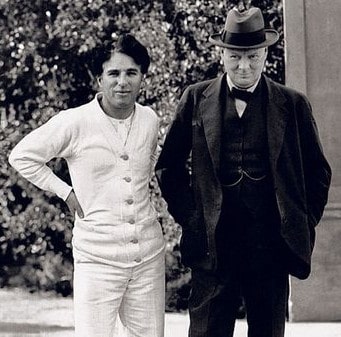
The great dictator, and together to manage once more to overcome the black dog .
The book is pure fiction, and K hlmeier dives into a debaucherous story telling, jumping back and forth between several strands of narration lines. An entertaining and very enjoyable book if you are the type of reader that enjoys story telling. For me this book is in best tradition of Michael K hlmeier, whom I consider an excellent story teller. I loved his (unfinished trilogy of) books on Greek mythology (Telemach and Calypso), but found that after these books he got lost too much in radio programs of story telling. While in itself good, I preferred his novels. Thus, I have to admit that I have forgotten about K hlmeier for some years, until recently I found this little book, which reminded me of him and his excellent stories. A book that is if you are versed in German well worth enjoying, especially if one likes funny and a bit queer stories.

Dirk Eddelbuettel: RProtoBuf 0.4.4, and new JSS paper

A new release 0.4.4 of RProtoBuf is now on CRAN, and corresponds to the source archive for the Journal of Statistical Software paper about RProtoBuf as JSS vol71 issue 02. The paper is also included as a pre-print in the updated package. RProtoBuf provides R bindings for the Google Protocol Buffers ("Protobuf") data encoding library used and released by Google, and deployed as a language and operating-system agnostic protocol by numerous projects. This release brings small cleanups as well as build-system updates for the updated R 3.3.0 infrastructure based on g++ 4.9.*.
Changes in RProtoBuf version 0.4.4 (2016-07-10)
  • New vignette based on our brand-new JSS publication (v71 i02)
  • Some documentation enhancements were made, as well as other minor cleanups to file modes and operations
  • Unit-test vignette no longer writes to /tmp per CRAN request
  • The new Windows toolchain (based on g++ 4.9.*) is supported
CRANberries also provides a diff to the previous release. The RProtoBuf page has an older package vignette, a 'quick' overview vignette, a unit test summary vignette, and the pre-print for the JSS paper. Questions, comments etc should go to the GitHub issue tracker off the GitHub repo.

This post by Dirk Eddelbuettel originated on his Thinking inside the box blog. Please report excessive re-aggregation in third-party for-profit settings.

Kevin Avignon: Create a quick shooter game with Urho3D

Next.

Previous.