Search Results: "zed"

20 December 2023

Melissa Wen: The Rainbow Treasure Map Talk: Advanced color management on Linux with AMD/Steam Deck.

Last week marked a major milestone for me: the AMD driver-specific color management properties reached the upstream linux-next! And to celebrate, I m happy to share the slides notes from my 2023 XDC talk, The Rainbow Treasure Map along with the individual recording that just dropped last week on youtube talk about happy coincidences!

Steam Deck Rainbow: Treasure Map & Magic Frogs While I may be bubbly and chatty in everyday life, the stage isn t exactly my comfort zone (hallway talks are more my speed). But the journey of developing the AMD color management properties was so full of discoveries that I simply had to share the experience. Witnessing the fantastic work of Jeremy and Joshua bring it all to life on the Steam Deck OLED was like uncovering magical ingredients and whipping up something truly enchanting. For XDC 2023, we split our Rainbow journey into two talks. My focus, The Rainbow Treasure Map, explored the new color features we added to the Linux kernel driver, diving deep into the hardware capabilities of AMD/Steam Deck. Joshua then followed with The Rainbow Frogs and showed the breathtaking color magic released on Gamescope thanks to the power unlocked by the kernel driver s Steam Deck color properties.

Packing a Rainbow into 15 Minutes I had so much to tell, but a half-slot talk meant crafting a concise presentation. To squeeze everything into 15 minutes (and calm my pre-talk jitters a bit!), I drafted and practiced those slides and notes countless times. So grab your map, and let s embark on the Rainbow journey together! Slide 1: The Rainbow Treasure Map - Advanced Color Management on Linux with AMD/SteamDeck Intro: Hi, I m Melissa from Igalia and welcome to the Rainbow Treasure Map, a talk about advanced color management on Linux with AMD/SteamDeck. Slide 2: List useful links for this technical talk Useful links: First of all, if you are not used to the topic, you may find these links useful.
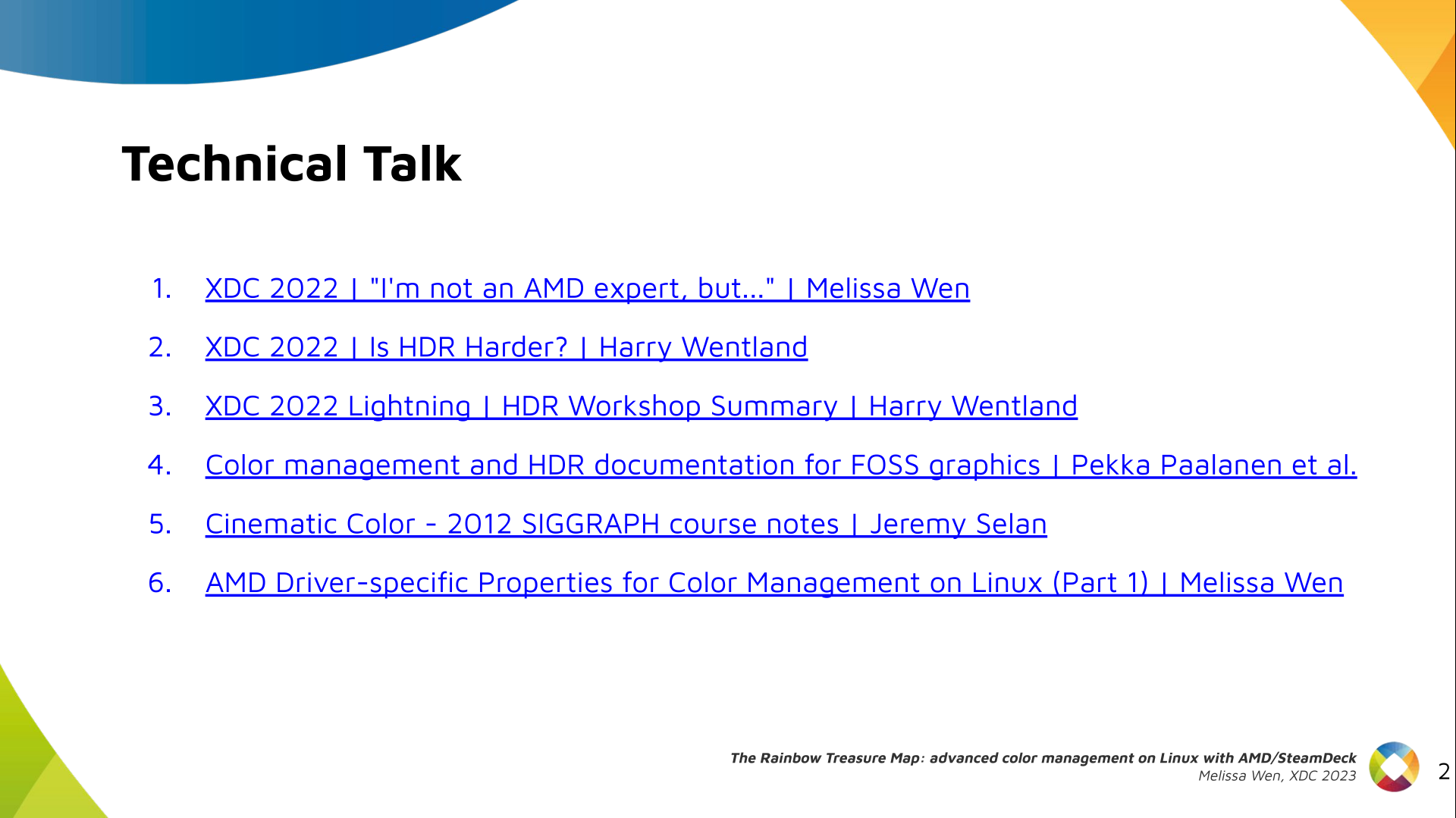
  1. XDC 2022 - I m not an AMD expert, but - Melissa Wen
  2. XDC 2022 - Is HDR Harder? - Harry Wentland
  3. XDC 2022 Lightning - HDR Workshop Summary - Harry Wentland
  4. Color management and HDR documentation for FOSS graphics - Pekka Paalanen et al.
  5. Cinematic Color - 2012 SIGGRAPH course notes - Jeremy Selan
  6. AMD Driver-specific Properties for Color Management on Linux (Part 1) - Melissa Wen
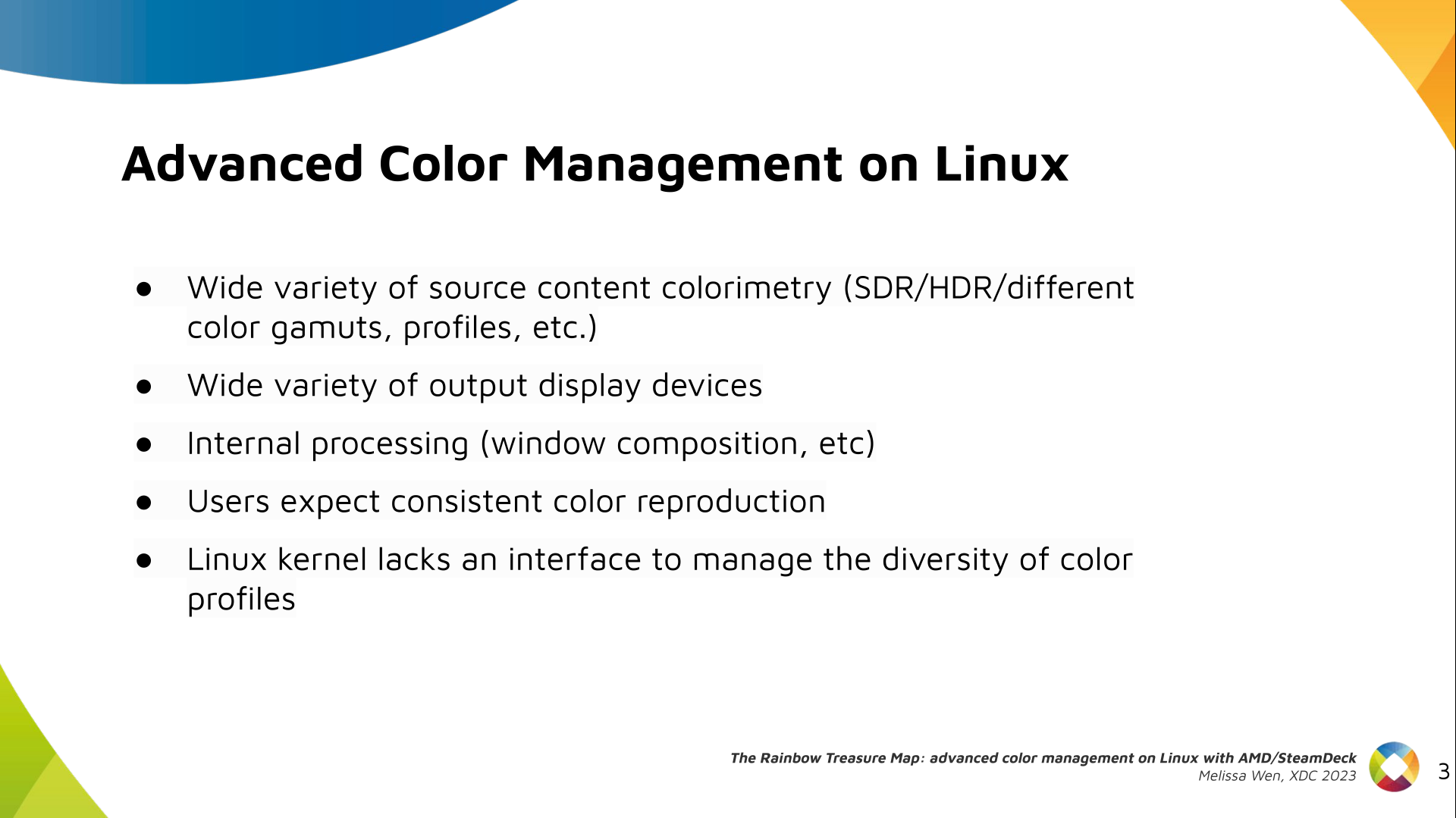
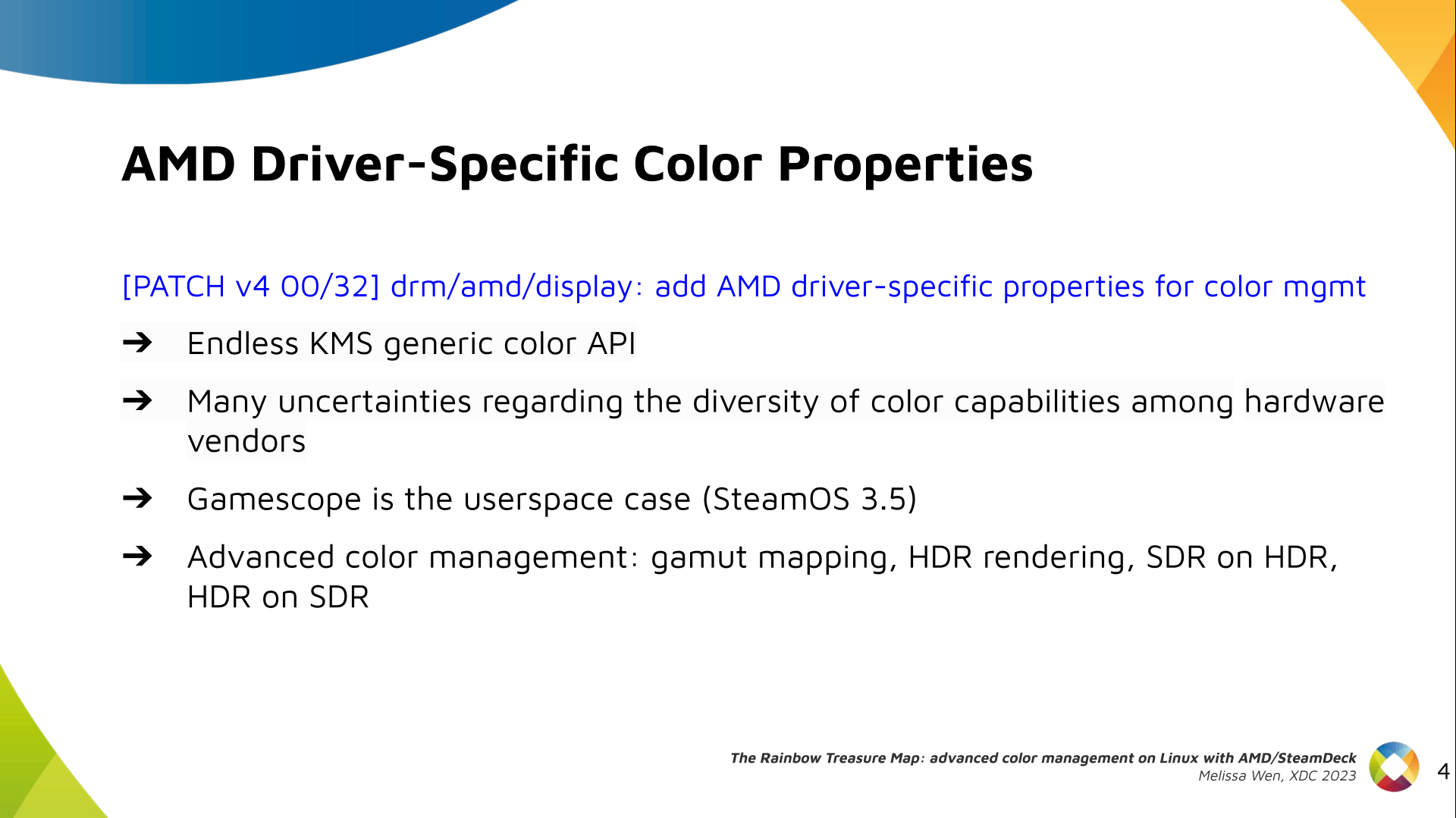
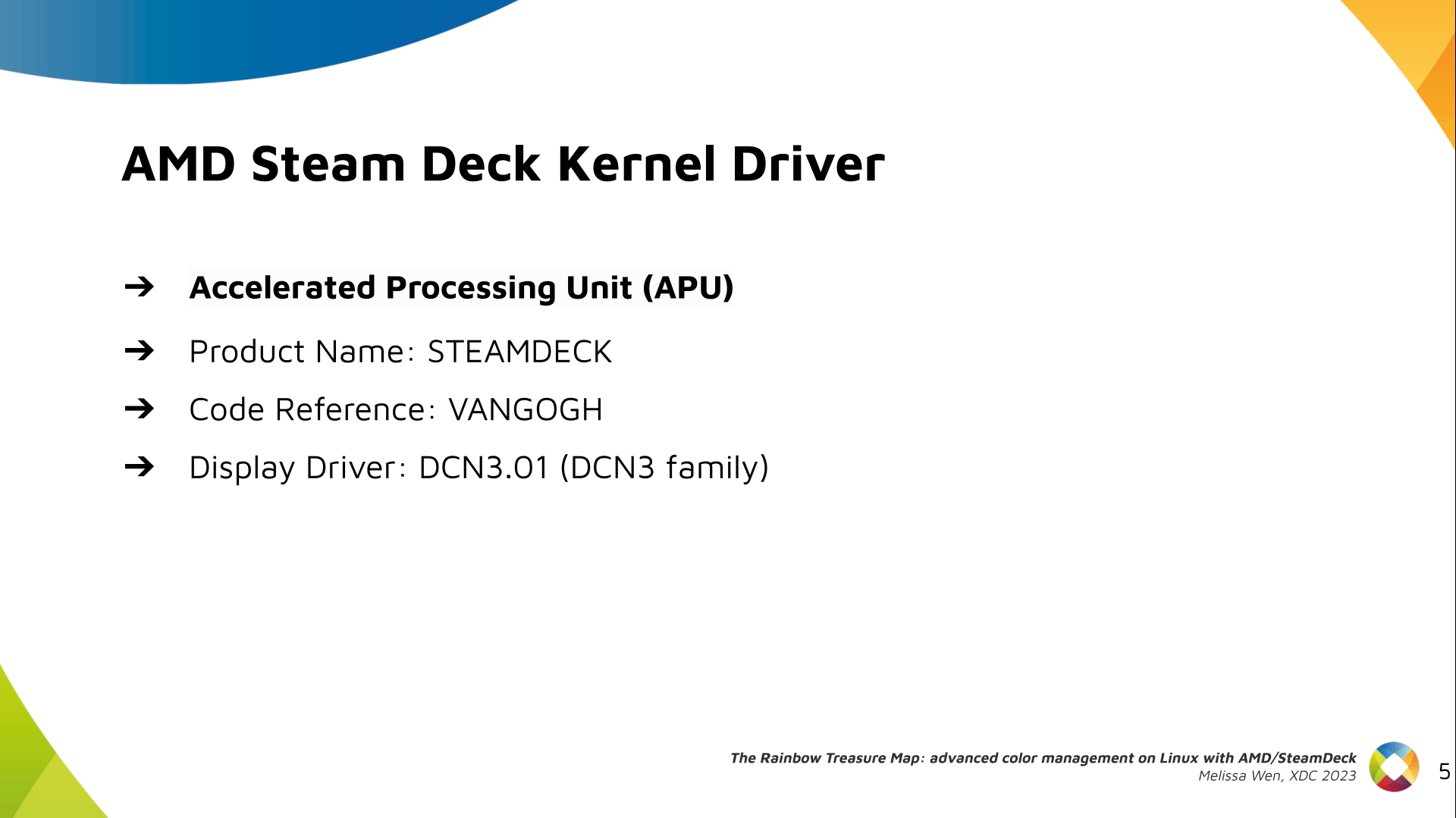
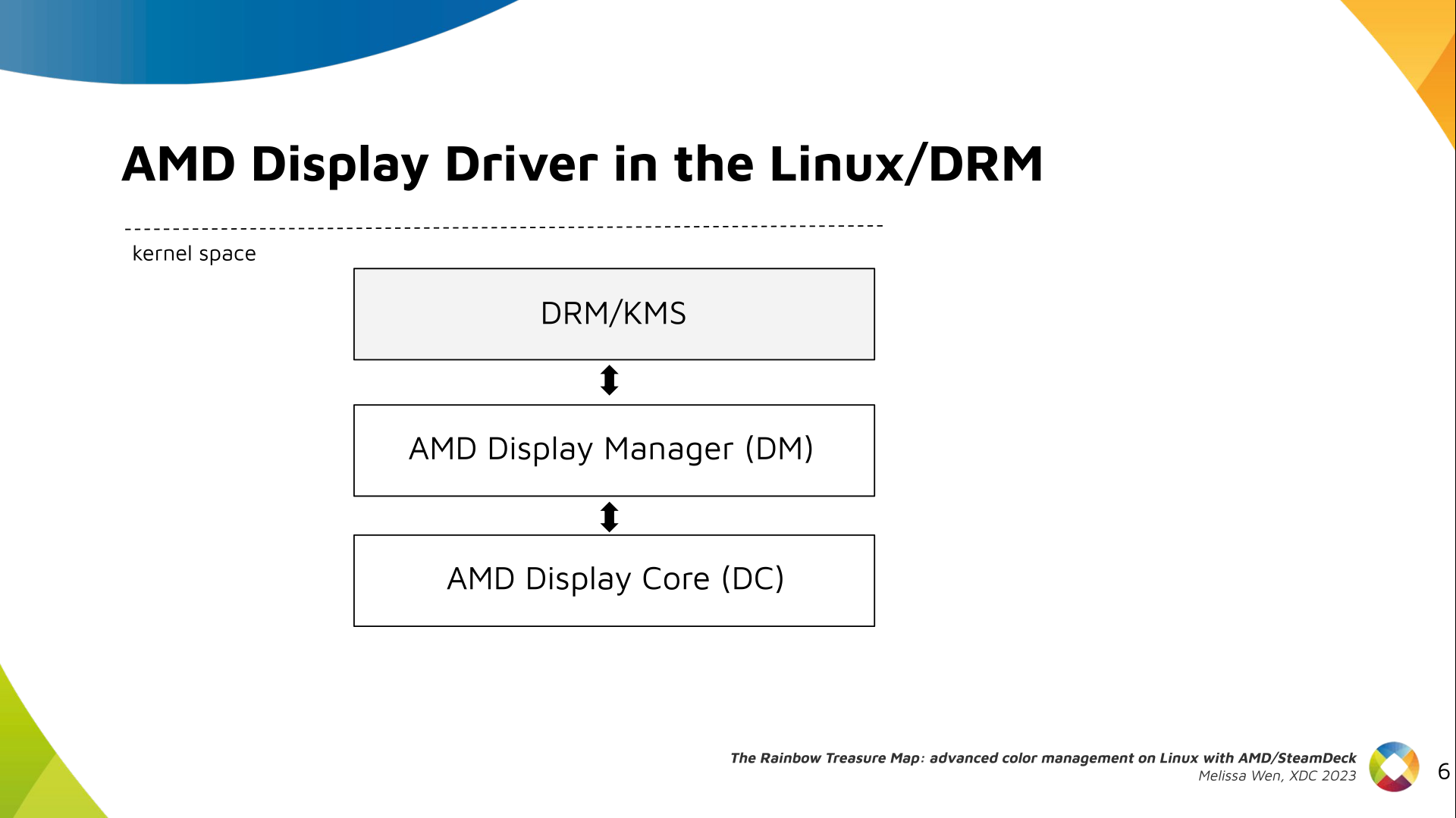
Slide 3: Why do we need advanced color management on Linux? Context: When we talk about colors in the graphics chain, we should keep in mind that we have a wide variety of source content colorimetry, a variety of output display devices and also the internal processing. Users expect consistent color reproduction across all these devices. The userspace can use GPU-accelerated color management to get it. But this also requires an interface with display kernel drivers that is currently missing from the DRM/KMS framework. Slide 4: Describe our work on AMD driver-specific color properties Since April, I ve been bothering the DRM community by sending patchsets from the work of me and Joshua to add driver-specific color properties to the AMD display driver. In parallel, discussions on defining a generic color management interface are still ongoing in the community. Moreover, we are still not clear about the diversity of color capabilities among hardware vendors. To bridge this gap, we defined a color pipeline for Gamescope that fits the latest versions of AMD hardware. It delivers advanced color management features for gamut mapping, HDR rendering, SDR on HDR, and HDR on SDR. Slide 5: Describe the AMD/SteamDeck - our hardware AMD/Steam Deck hardware: AMD frequently releases new GPU and APU generations. Each generation comes with a DCN version with display hardware improvements. Therefore, keep in mind that this work uses the AMD Steam Deck hardware and its kernel driver. The Steam Deck is an APU with a DCN3.01 display driver, a DCN3 family. It s important to have this information since newer AMD DCN drivers inherit implementations from previous families but aldo each generation of AMD hardware may introduce new color capabilities. Therefore I recommend you to familiarize yourself with the hardware you are working on. Slide 6: Diagram with the three layers of the AMD display driver on Linux The AMD display driver in the kernel space: It consists of three layers, (1) the DRM/KMS framework, (2) the AMD Display Manager, and (3) the AMD Display Core. We extended the color interface exposed to userspace by leveraging existing DRM resources and connecting them using driver-specific functions for color property management. Slide 7: Three-layers diagram highlighting AMD Display Manager, DM - the layer that connects DC and DRM Bridging DC color capabilities and the DRM API required significant changes in the color management of AMD Display Manager - the Linux-dependent part that connects the AMD DC interface to the DRM/KMS framework. Slide 8: Three-layers diagram highlighting AMD Display Core, DC - the shared code The AMD DC is the OS-agnostic layer. Its code is shared between platforms and DCN versions. Examining this part helps us understand the AMD color pipeline and hardware capabilities, since the machinery for hardware settings and resource management are already there. Slide 9: Diagram of the AMD Display Core Next architecture with main elements and data flow The newest architecture for AMD display hardware is the AMD Display Core Next. Slide 10: Diagram of the AMD Display Core Next where only DPP and MPC blocks are highlighted In this architecture, two blocks have the capability to manage colors:
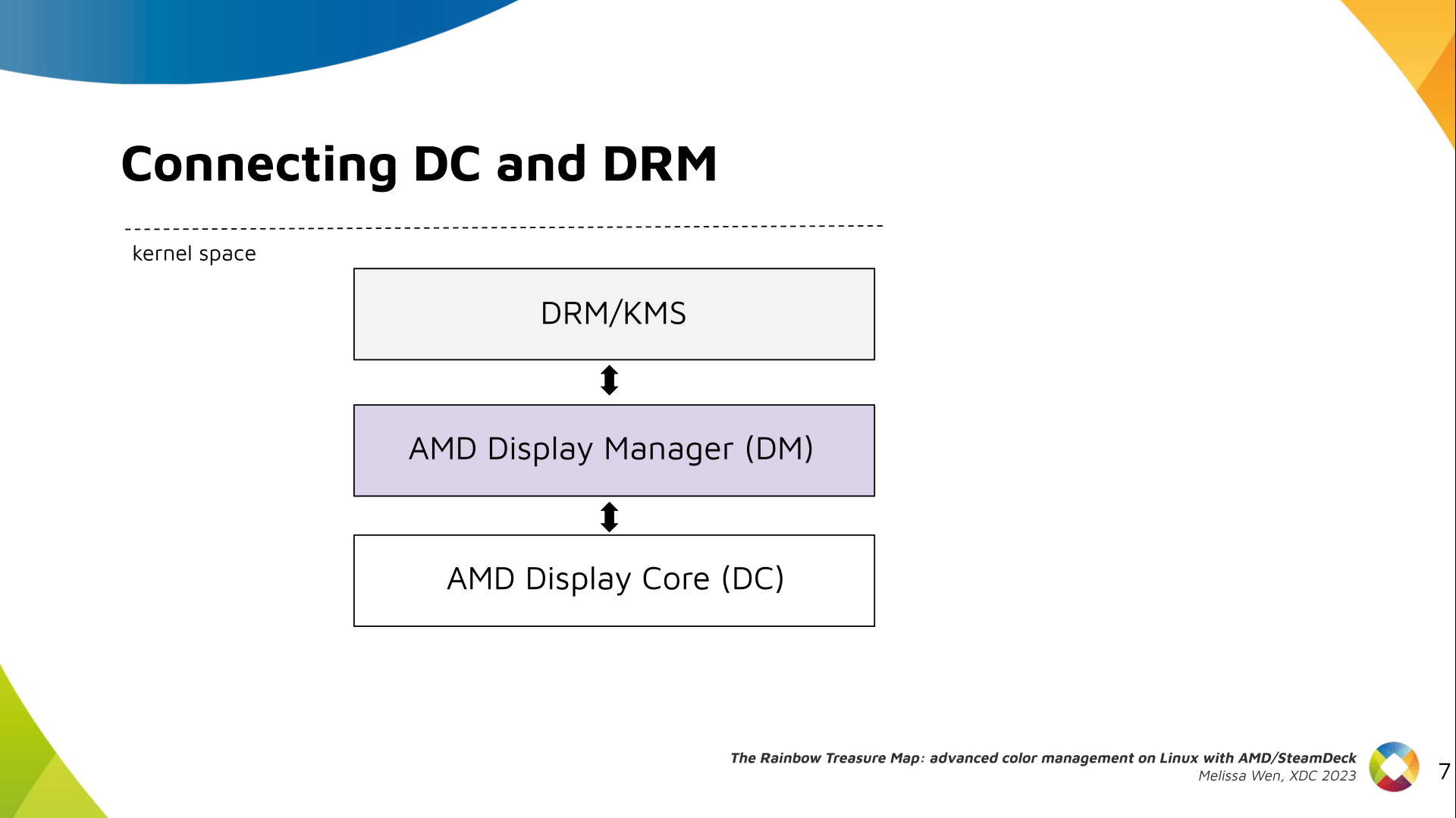
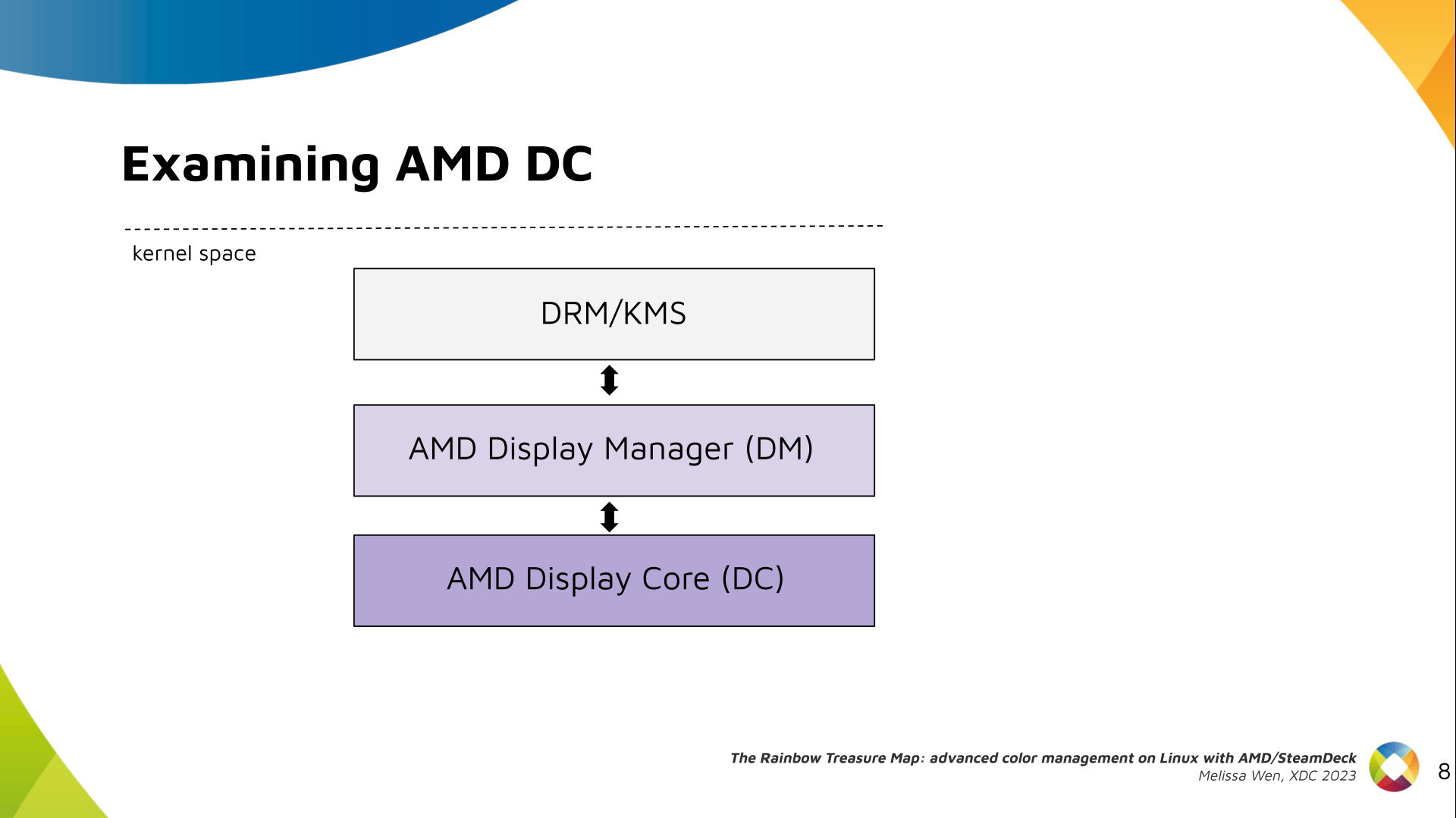
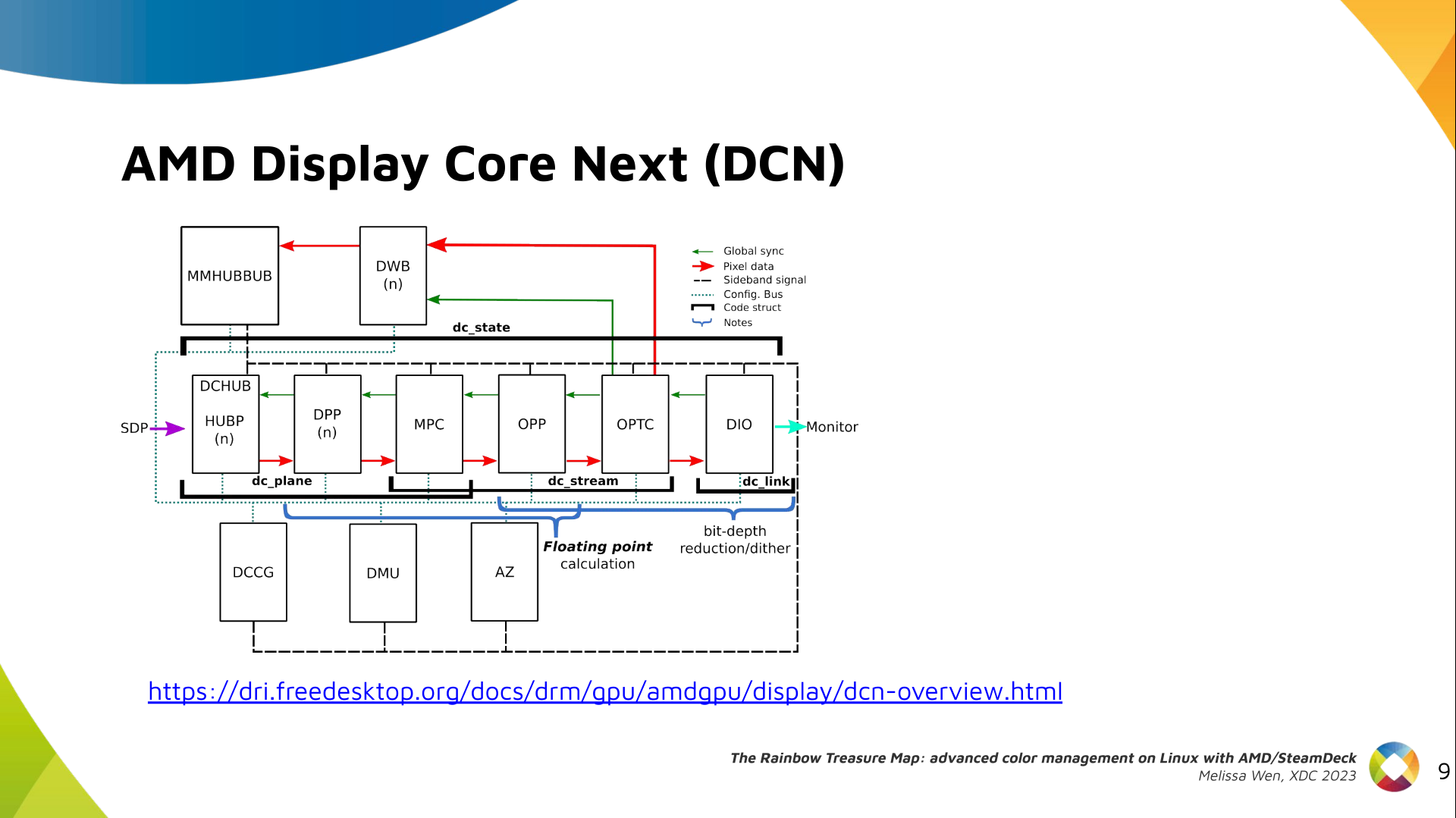
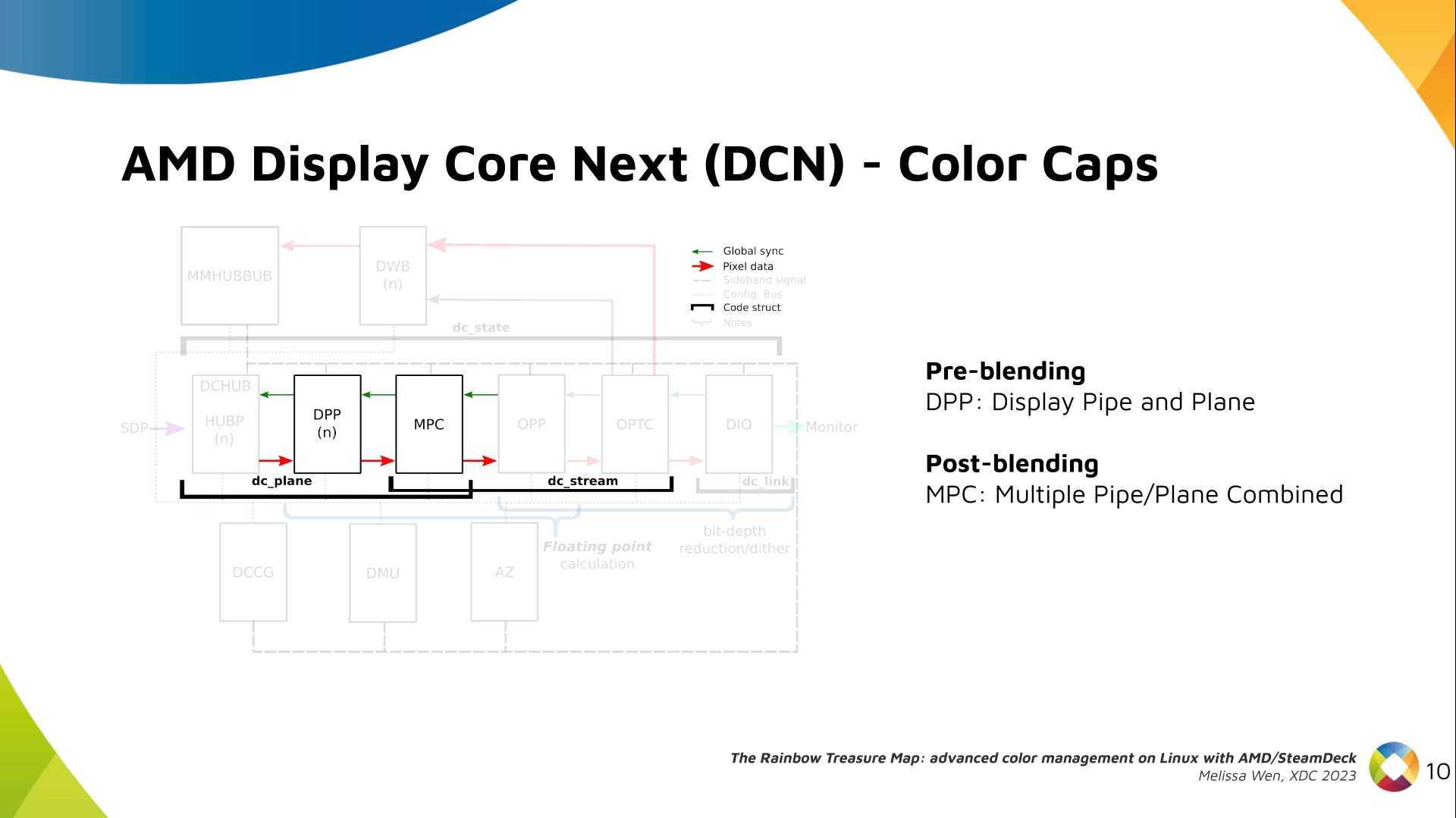
  • Display Pipe and Plane (DPP) - for pre-blending adjustments;
  • Multiple Pipe/Plane Combined (MPC) - for post-blending color transformations.
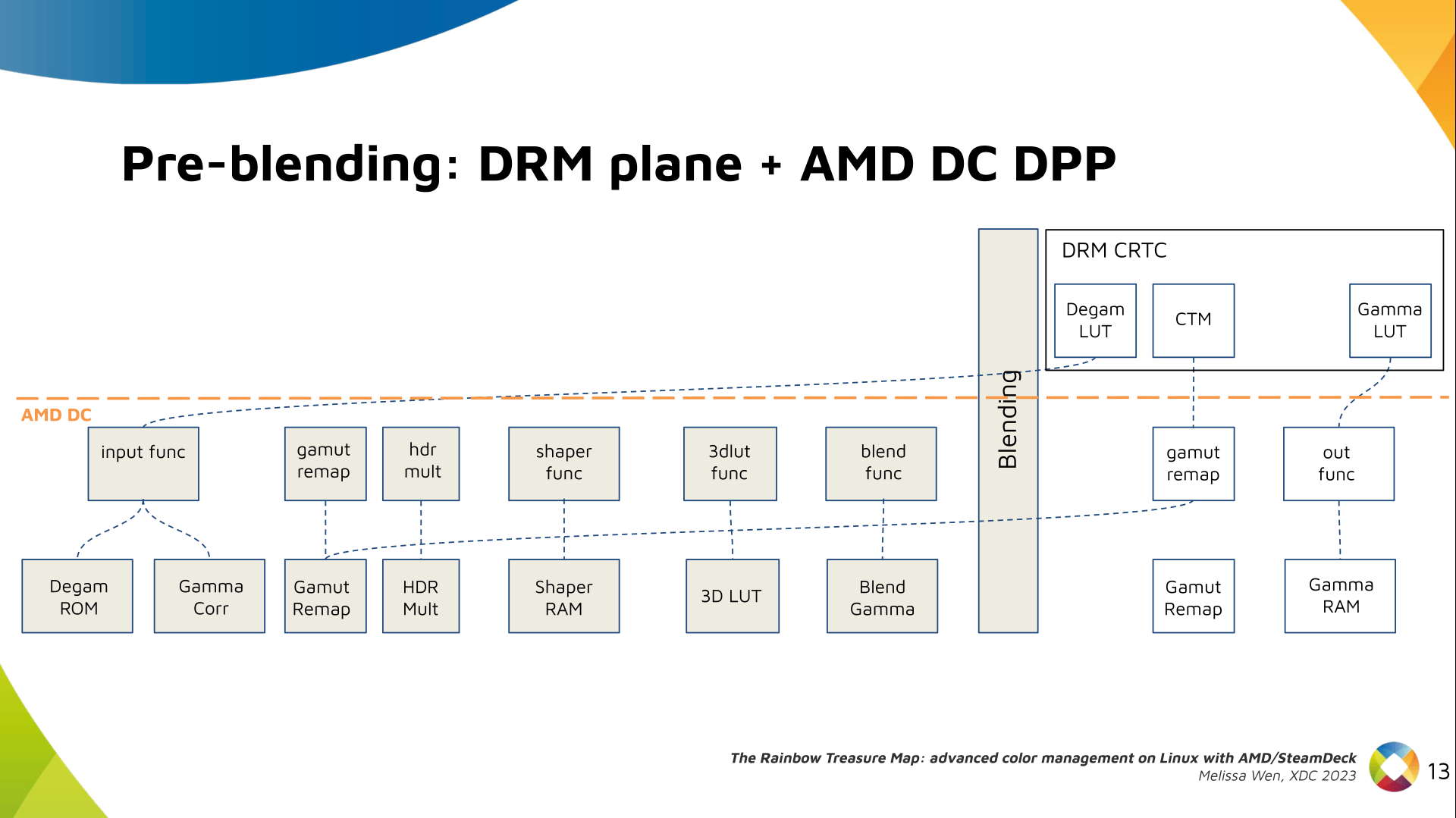
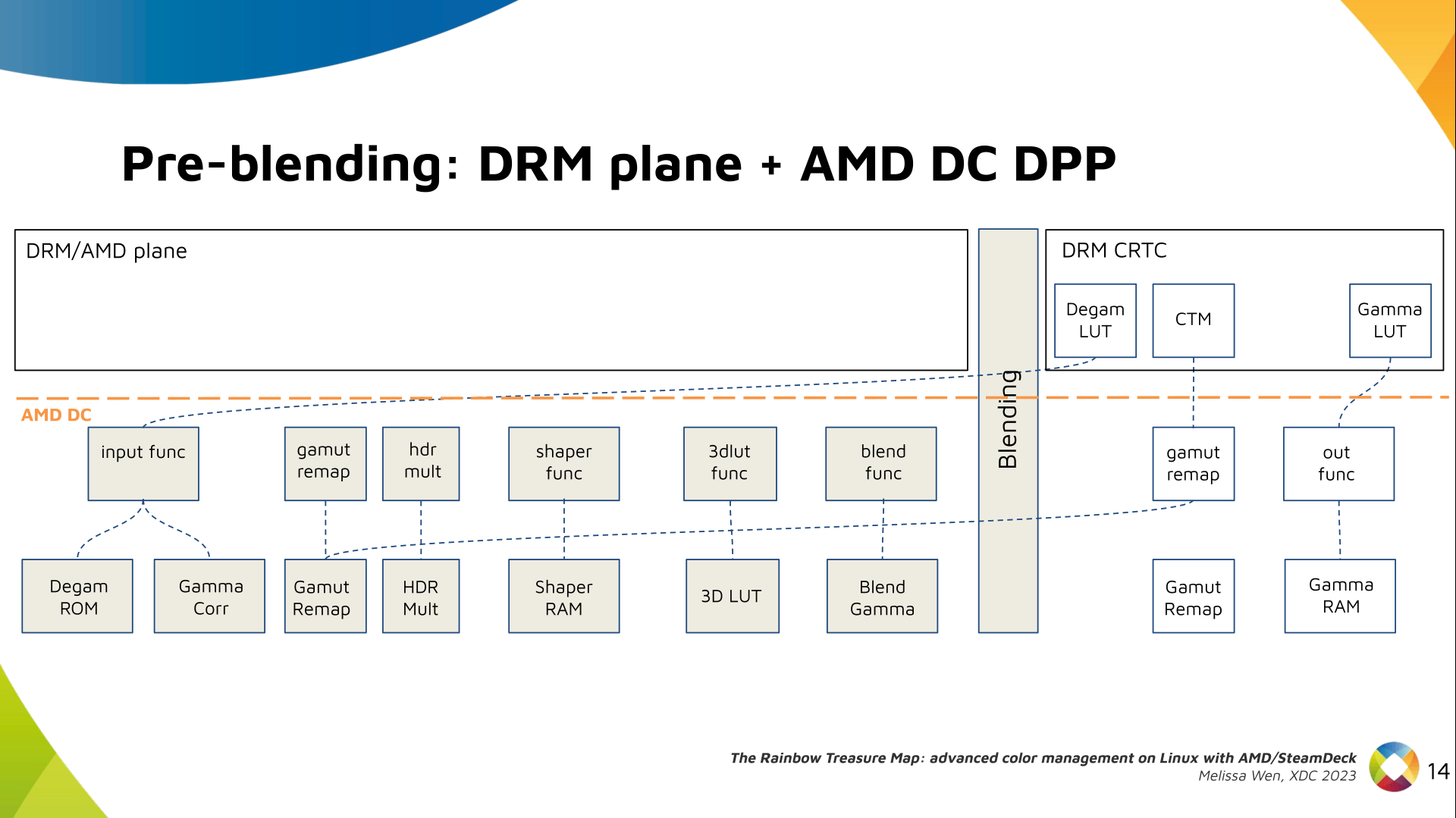
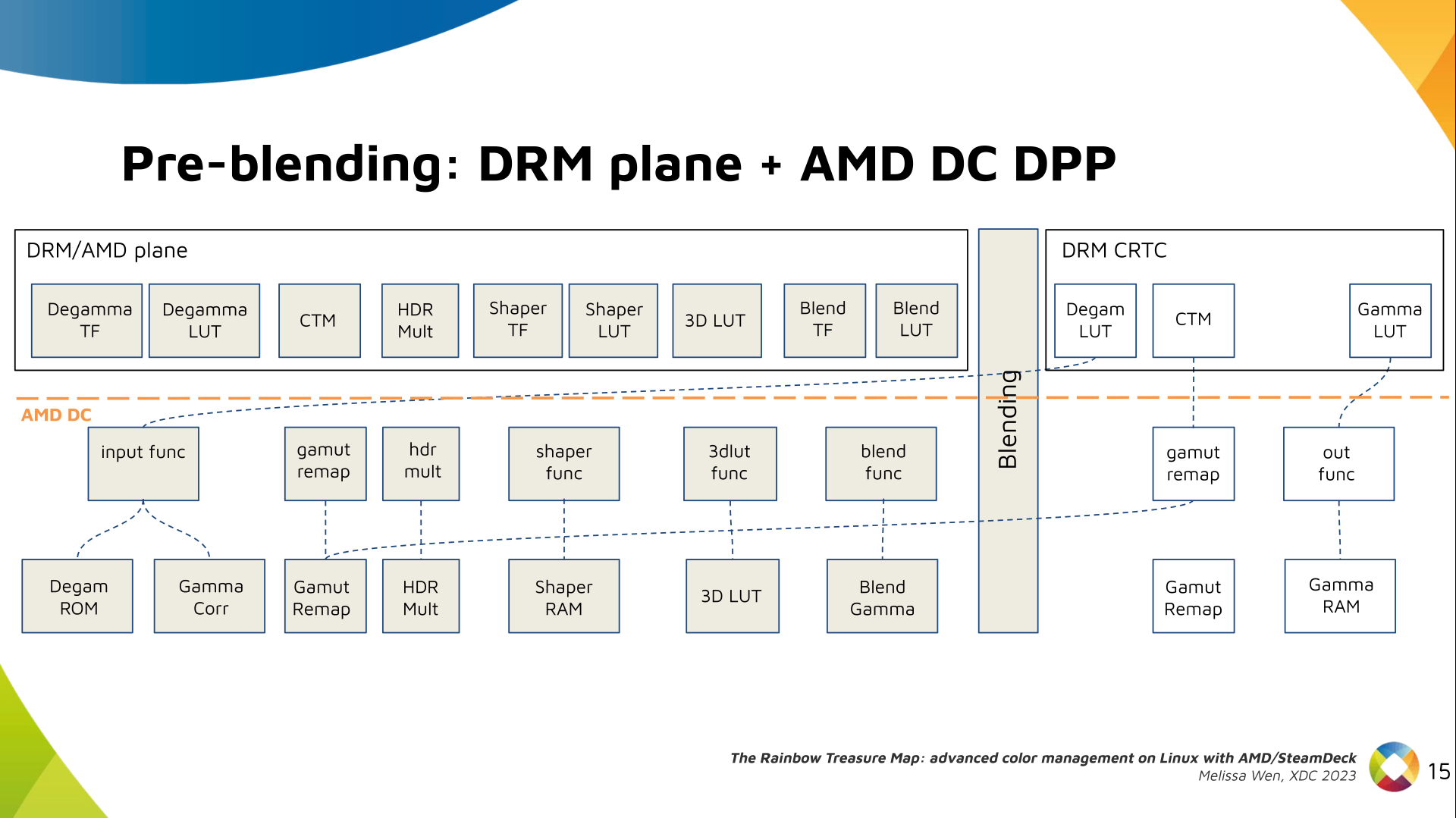
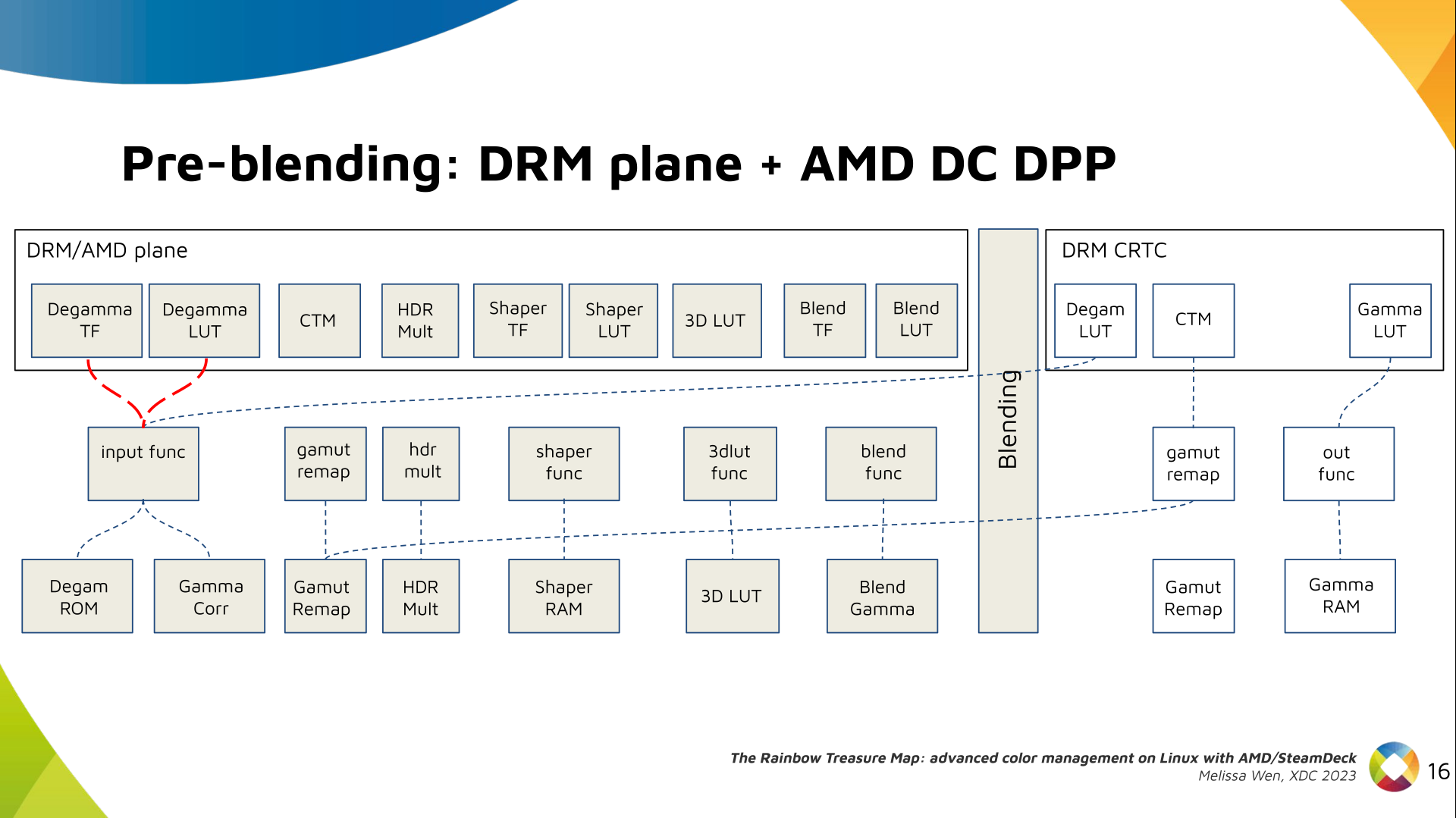
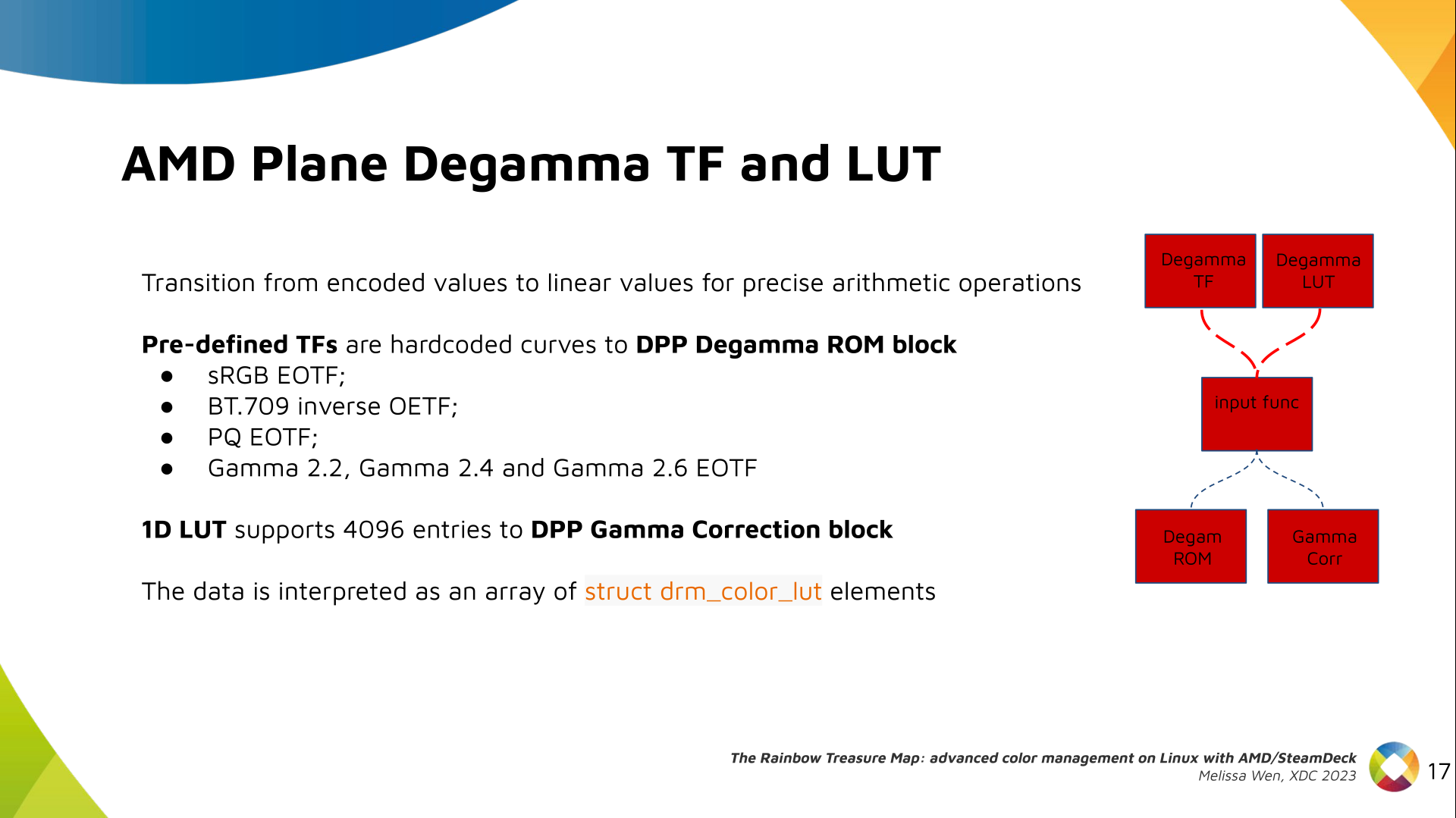
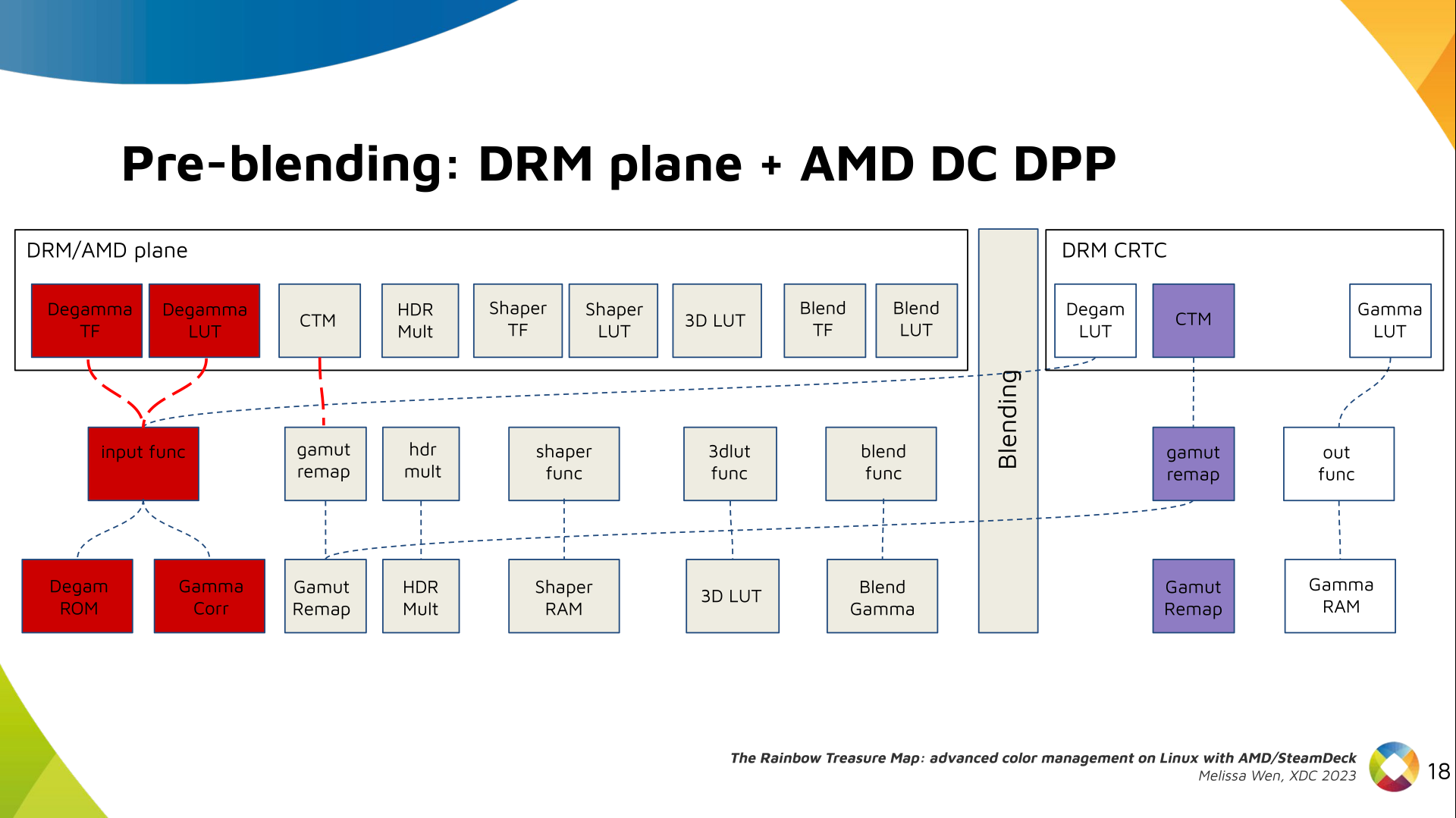
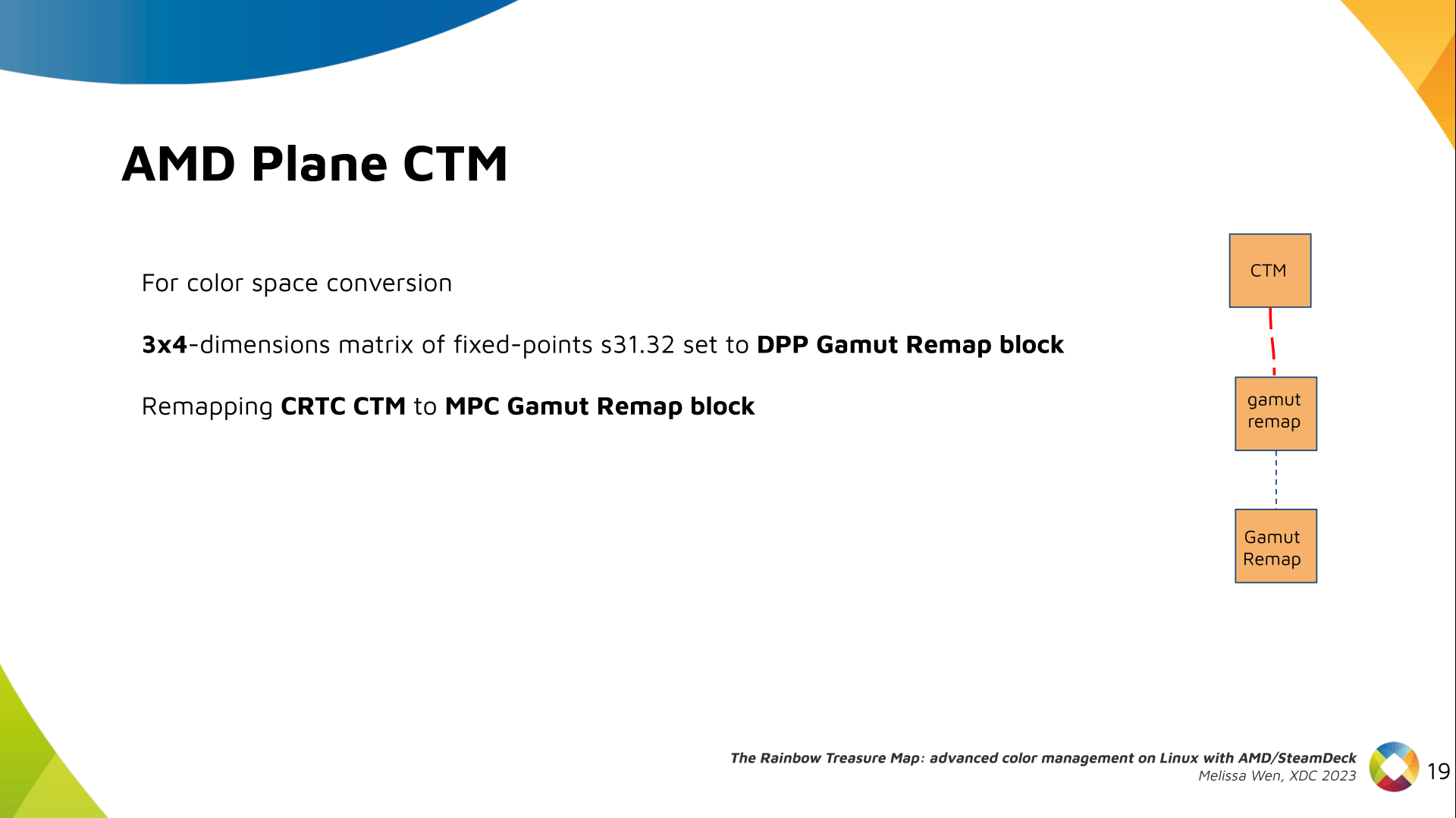
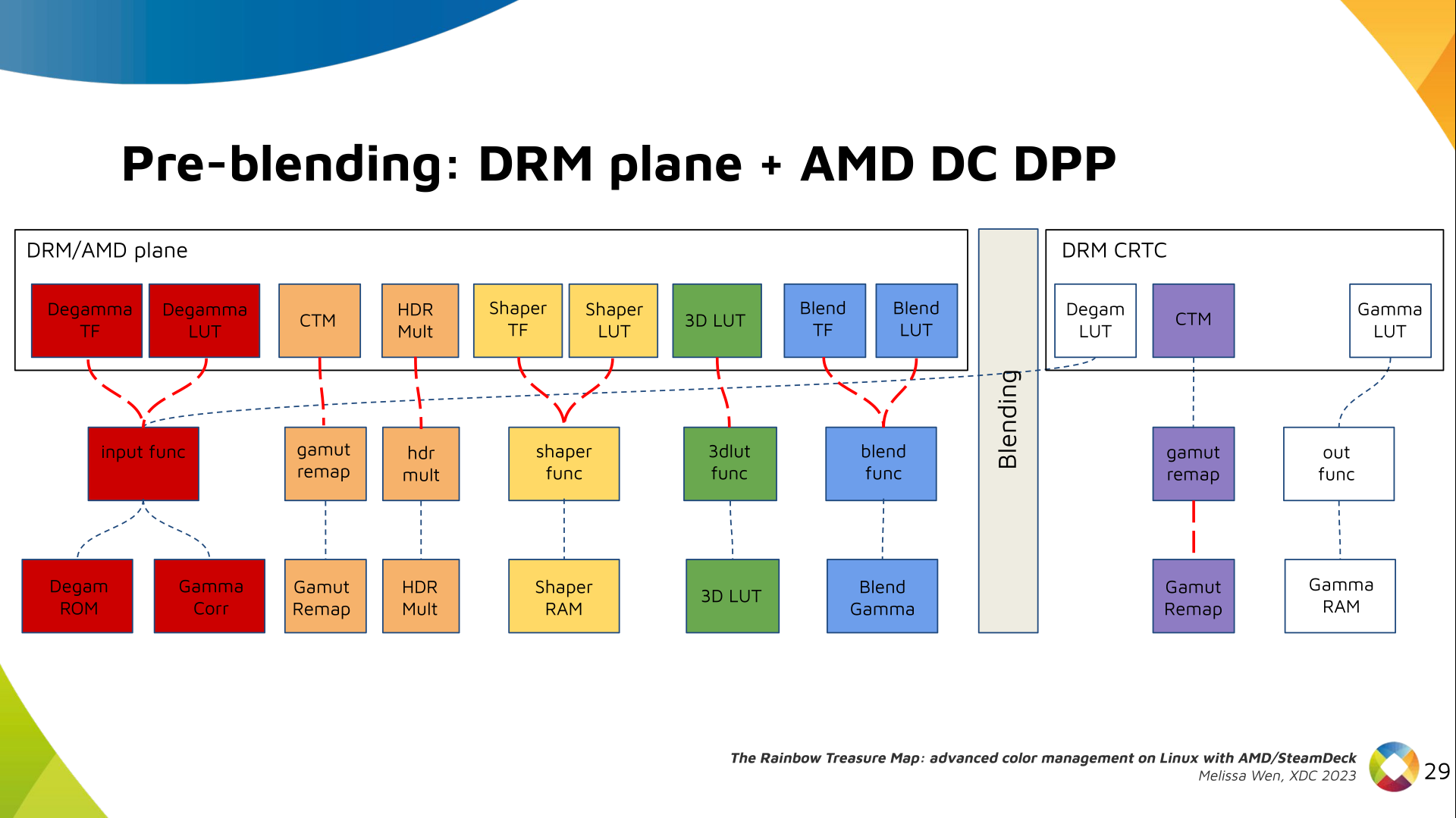
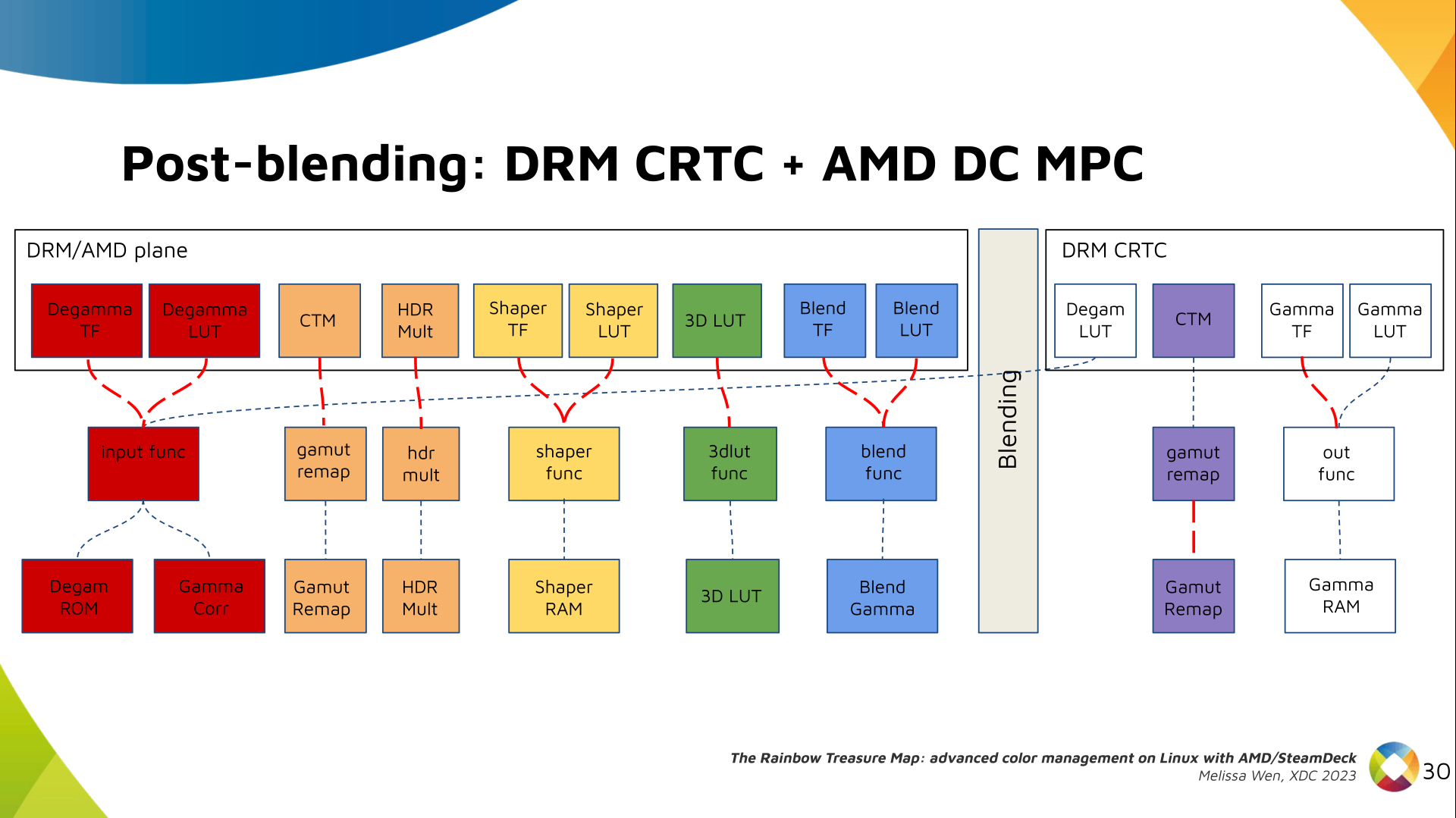
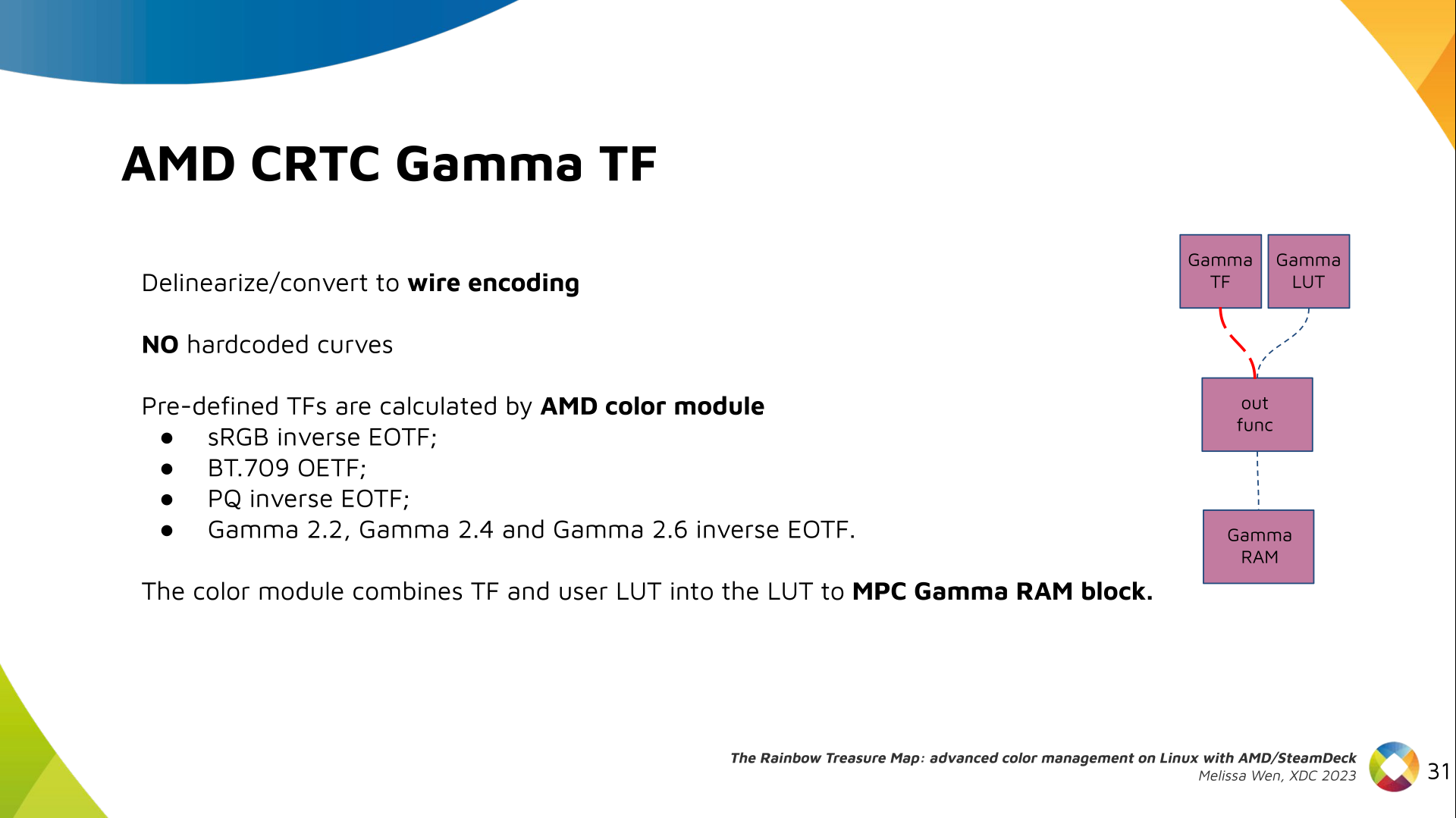
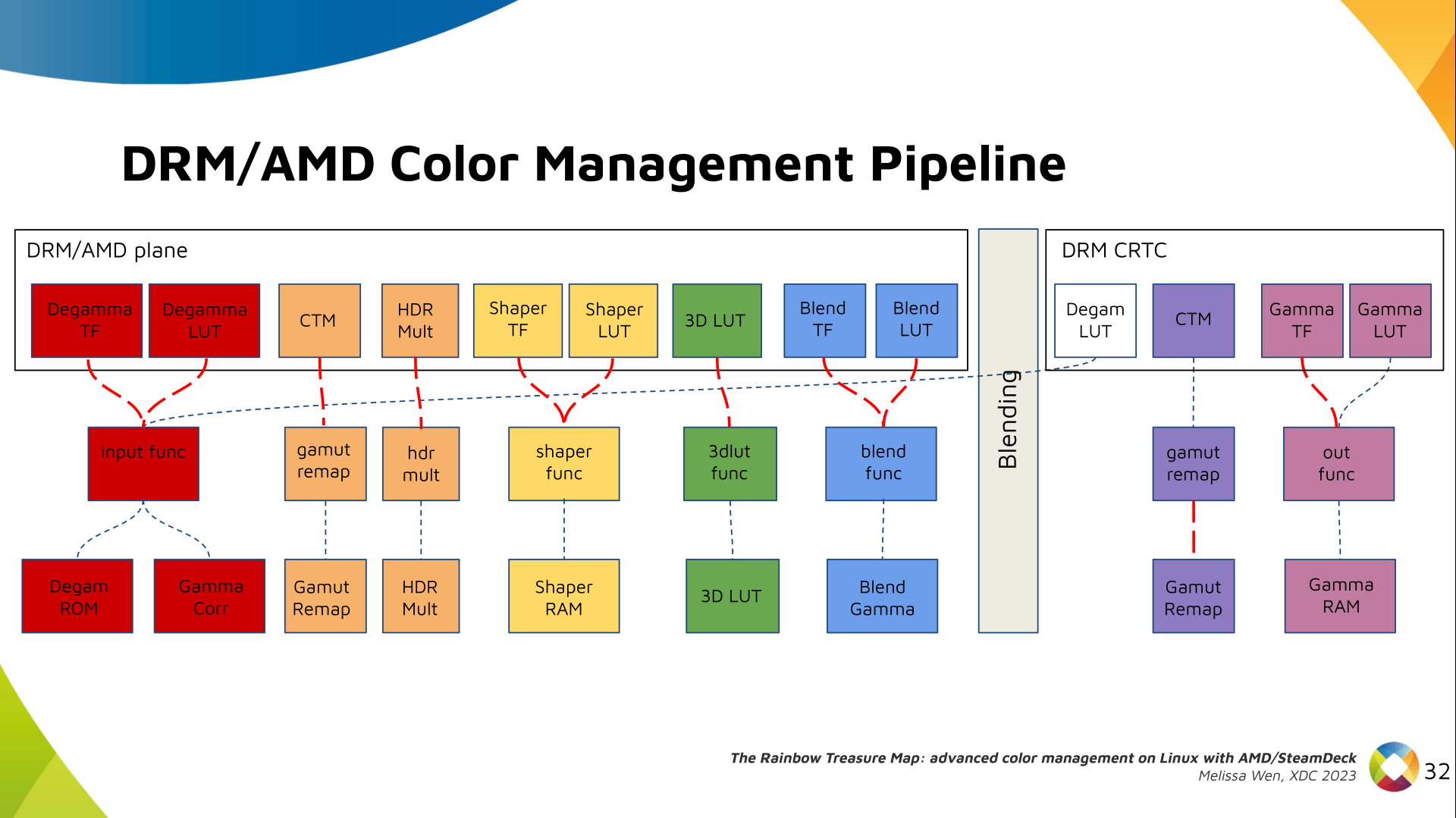
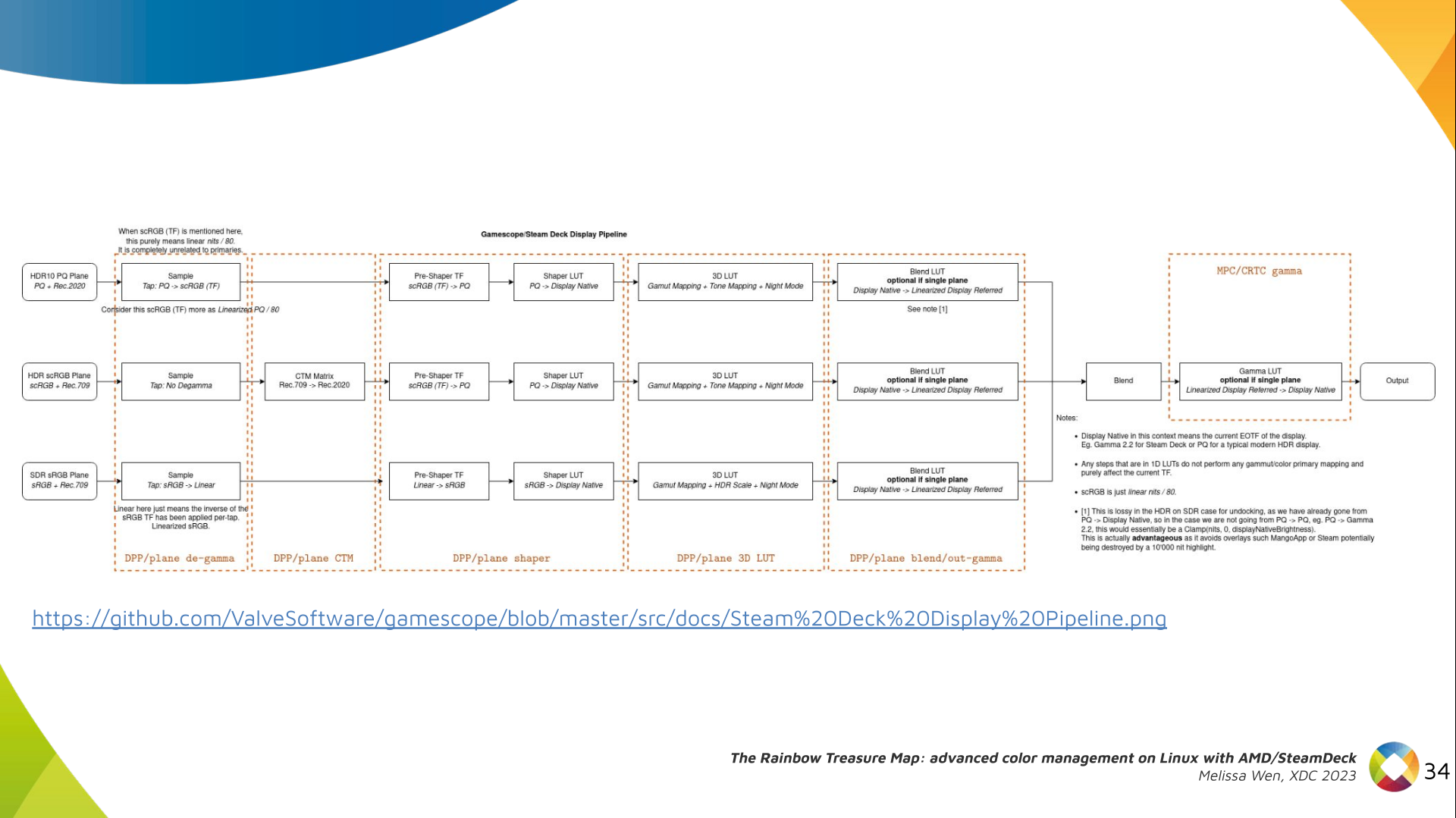
Let s see what we have in the DRM API for pre-blending color management. Slide 11: Blank slide with no content only a title 'Pre-blending: DRM plane' DRM plane color properties: This is the DRM color management API before blending. Nothing! Except two basic DRM plane properties: color_encoding and color_range for the input colorspace conversion, that is not covered by this work. Slide 12: Diagram with color capabilities and structures in AMD DC layer without any DRM plane color interface (before blending), only the DRM CRTC color interface for post blending In case you re not familiar with AMD shared code, what we need to do is basically draw a map and navigate there! We have some DRM color properties after blending, but nothing before blending yet. But much of the hardware programming was already implemented in the AMD DC layer, thanks to the shared code. Slide 13: Previous Diagram with a rectangle to highlight the empty space in the DRM plane interface that will be filled by AMD plane properties Still both the DRM interface and its connection to the shared code were missing. That s when the search begins! Slide 14: Color Pipeline Diagram with the plane color interface filled by AMD plane properties but without connections to AMD DC resources AMD driver-specific color pipeline: Looking at the color capabilities of the hardware, we arrive at this initial set of properties. The path wasn t exactly like that. We had many iterations and discoveries until reached to this pipeline. Slide 15: Color Pipeline Diagram connecting AMD plane degamma properties, LUT and TF, to AMD DC resources The Plane Degamma is our first driver-specific property before blending. It s used to linearize the color space from encoded values to light linear values. Slide 16: Describe plane degamma properties and hardware capabilities We can use a pre-defined transfer function or a user lookup table (in short, LUT) to linearize the color space. Pre-defined transfer functions for plane degamma are hardcoded curves that go to a specific hardware block called DPP Degamma ROM. It supports the following transfer functions: sRGB EOTF, BT.709 inverse OETF, PQ EOTF, and pure power curves Gamma 2.2, Gamma 2.4 and Gamma 2.6. We also have a one-dimensional LUT. This 1D LUT has four thousand ninety six (4096) entries, the usual 1D LUT size in the DRM/KMS. It s an array of drm_color_lut that goes to the DPP Gamma Correction block. Slide 17: Color Pipeline Diagram connecting AMD plane CTM property to AMD DC resources We also have now a color transformation matrix (CTM) for color space conversion. Slide 18: Describe plane CTM property and hardware capabilities It s a 3x4 matrix of fixed points that goes to the DPP Gamut Remap Block. Both pre- and post-blending matrices were previously gone to the same color block. We worked on detaching them to clear both paths. Now each CTM goes on its own way. Slide 19: Color Pipeline Diagram connecting AMD plane HDR multiplier property to AMD DC resources Next, the HDR Multiplier. HDR Multiplier is a factor applied to the color values of an image to increase their overall brightness. Slide 20: Describe plane HDR mult property and hardware capabilities This is useful for converting images from a standard dynamic range (SDR) to a high dynamic range (HDR). As it can range beyond [0.0, 1.0] subsequent transforms need to use the PQ(HDR) transfer functions. Slide 21: Color Pipeline Diagram connecting AMD plane shaper properties, LUT and TF, to AMD DC resources And we need a 3D LUT. But 3D LUT has a limited number of entries in each dimension, so we want to use it in a colorspace that is optimized for human vision. It means in a non-linear space. To deliver it, userspace may need one 1D LUT before 3D LUT to delinearize content and another one after to linearize content again for blending. Slide 22: Describe plane shaper properties and hardware capabilities The pre-3D-LUT curve is called Shaper curve. Unlike Degamma TF, there are no hardcoded curves for shaper TF, but we can use the AMD color module in the driver to build the following shaper curves from pre-defined coefficients. The color module combines the TF and the user LUT values into the LUT that goes to the DPP Shaper RAM block. Slide 23: Color Pipeline Diagram connecting AMD plane 3D LUT property to AMD DC resources Finally, our rockstar, the 3D LUT. 3D LUT is perfect for complex color transformations and adjustments between color channels. Slide 24: Describe plane 3D LUT property and hardware capabilities 3D LUT is also more complex to manage and requires more computational resources, as a consequence, its number of entries is usually limited. To overcome this restriction, the array contains samples from the approximated function and values between samples are estimated by tetrahedral interpolation. AMD supports 17 and 9 as the size of a single-dimension. Blue is the outermost dimension, red the innermost. Slide 25: Color Pipeline Diagram connecting AMD plane blend properties, LUT and TF, to AMD DC resources As mentioned, we need a post-3D-LUT curve to linearize the color space before blending. This is done by Blend TF and LUT. Slide 26: Describe plane blend properties and hardware capabilities Similar to shaper TF, there are no hardcoded curves for Blend TF. The pre-defined curves are the same as the Degamma block, but calculated by the color module. The resulting LUT goes to the DPP Blend RAM block. Slide 27: Color Pipeline Diagram  with all AMD plane color properties connect to AMD DC resources and links showing the conflict between plane and CRTC degamma Now we have everything connected before blending. As a conflict between plane and CRTC Degamma was inevitable, our approach doesn t accept that both are set at the same time. Slide 28: Color Pipeline Diagram connecting AMD CRTC gamma TF property to AMD DC resources We also optimized the conversion of the framebuffer to wire encoding by adding support to pre-defined CRTC Gamma TF. Slide 29: Describe CRTC gamma TF property and hardware capabilities Again, there are no hardcoded curves and TF and LUT are combined by the AMD color module. The same types of shaper curves are supported. The resulting LUT goes to the MPC Gamma RAM block. Slide 30: Color Pipeline Diagram with all AMD driver-specific color properties connect to AMD DC resources Finally, we arrived in the final version of DRM/AMD driver-specific color management pipeline. With this knowledge, you re ready to better enjoy the rainbow treasure of AMD display hardware and the world of graphics computing. Slide 31: SteamDeck/Gamescope Color Pipeline Diagram with rectangles labeling each block of the pipeline with the related AMD color property With this work, Gamescope/Steam Deck embraces the color capabilities of the AMD GPU. We highlight here how we map the Gamescope color pipeline to each AMD color block. Slide 32: Final slide. Thank you! Future works: The search for the rainbow treasure is not over! The Linux DRM subsystem contains many hidden treasures from different vendors. We want more complex color transformations and adjustments available on Linux. We also want to expose all GPU color capabilities from all hardware vendors to the Linux userspace. Thanks Joshua and Harry for this joint work and the Linux DRI community for all feedback and reviews. The amazing part of this work comes in the next talk with Joshua and The Rainbow Frogs! Any questions?
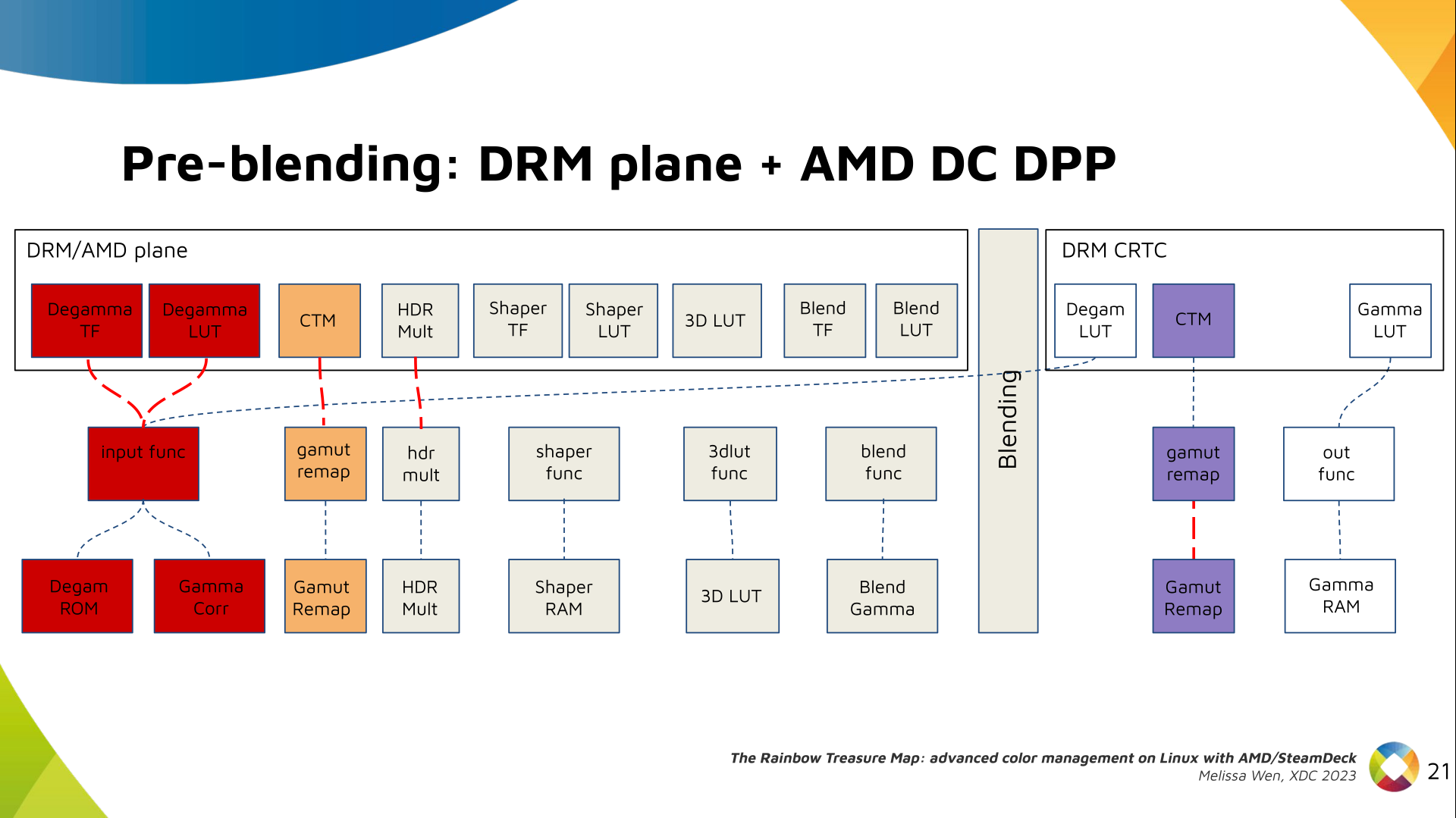
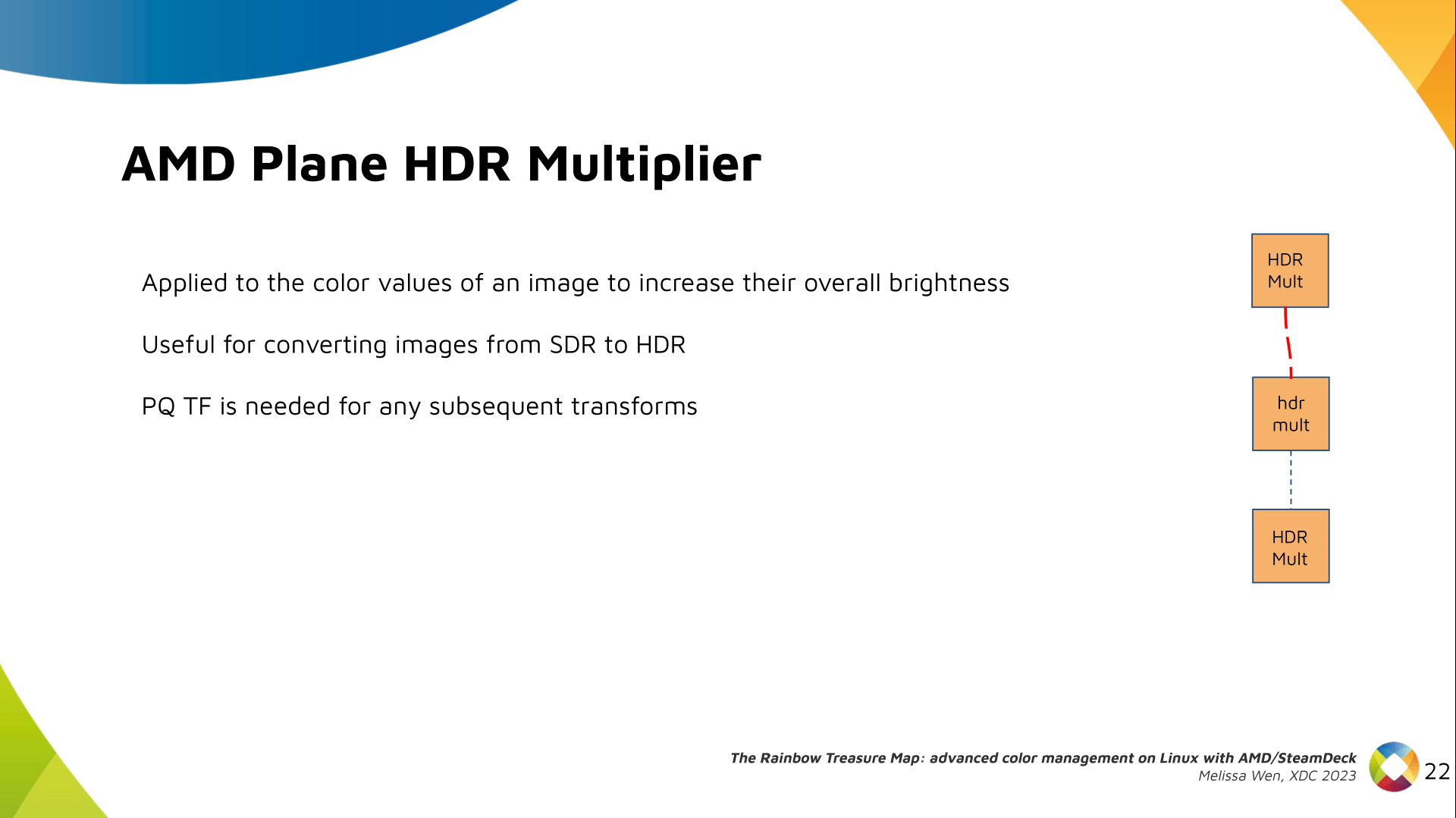
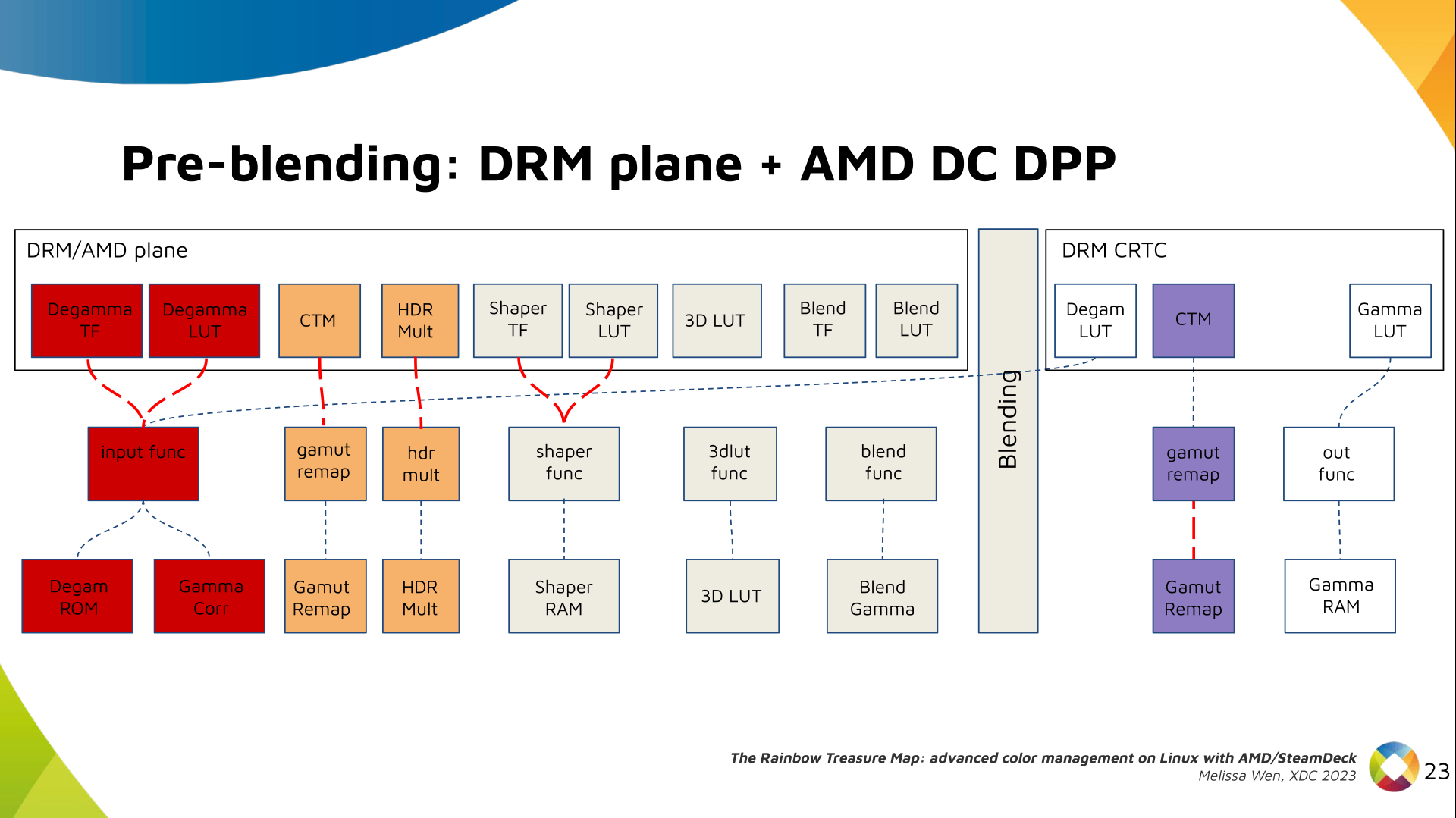
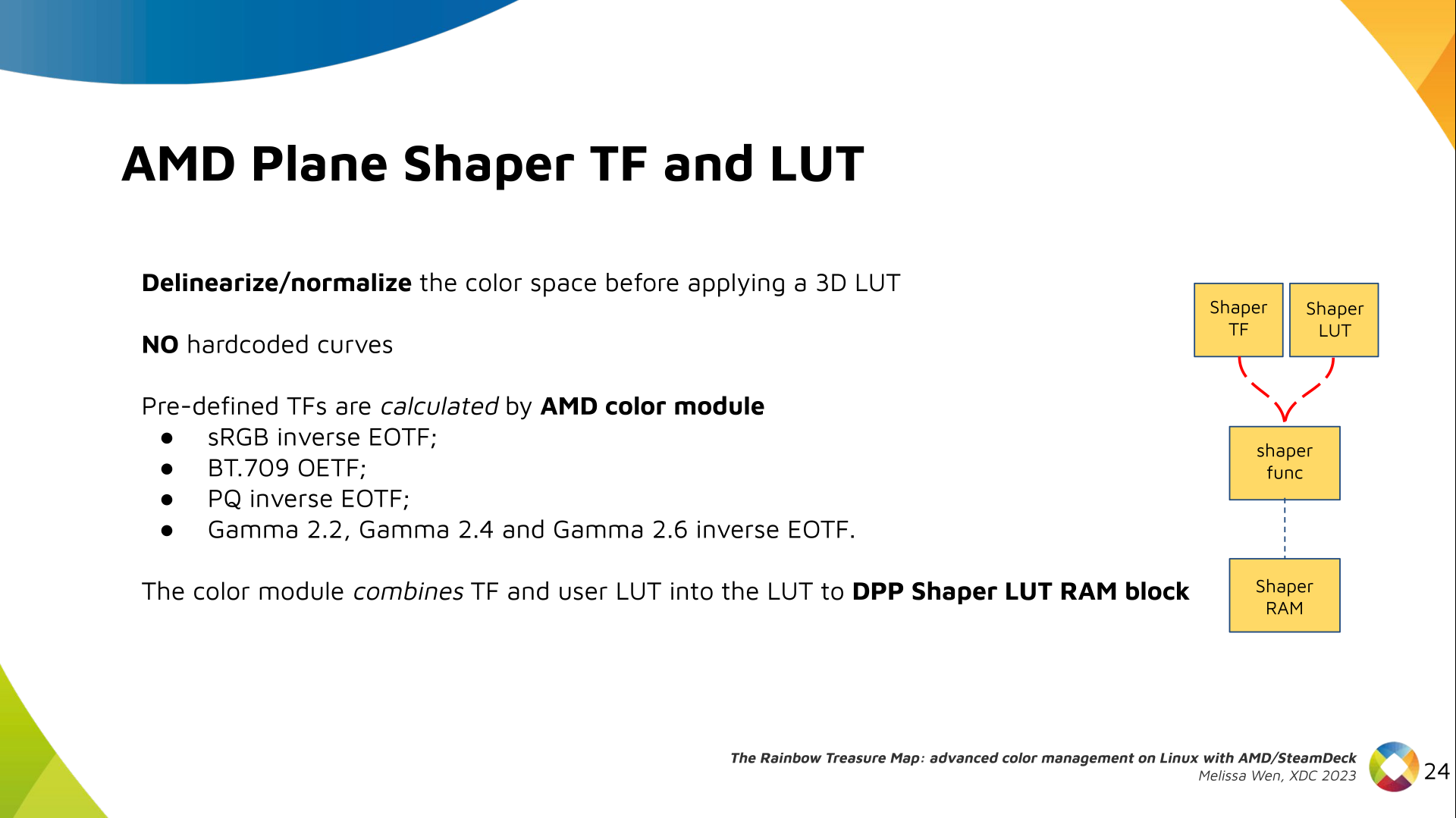
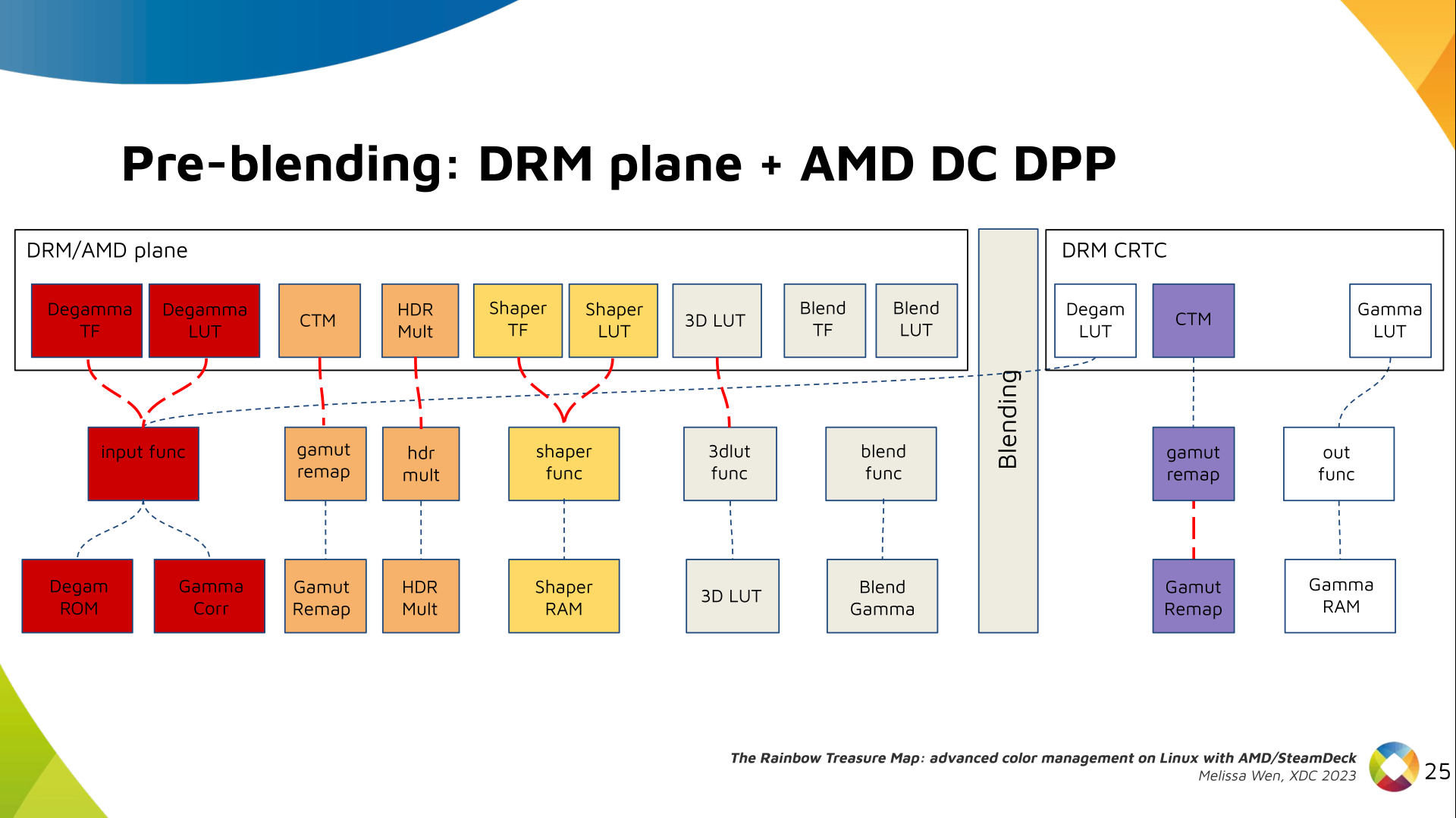
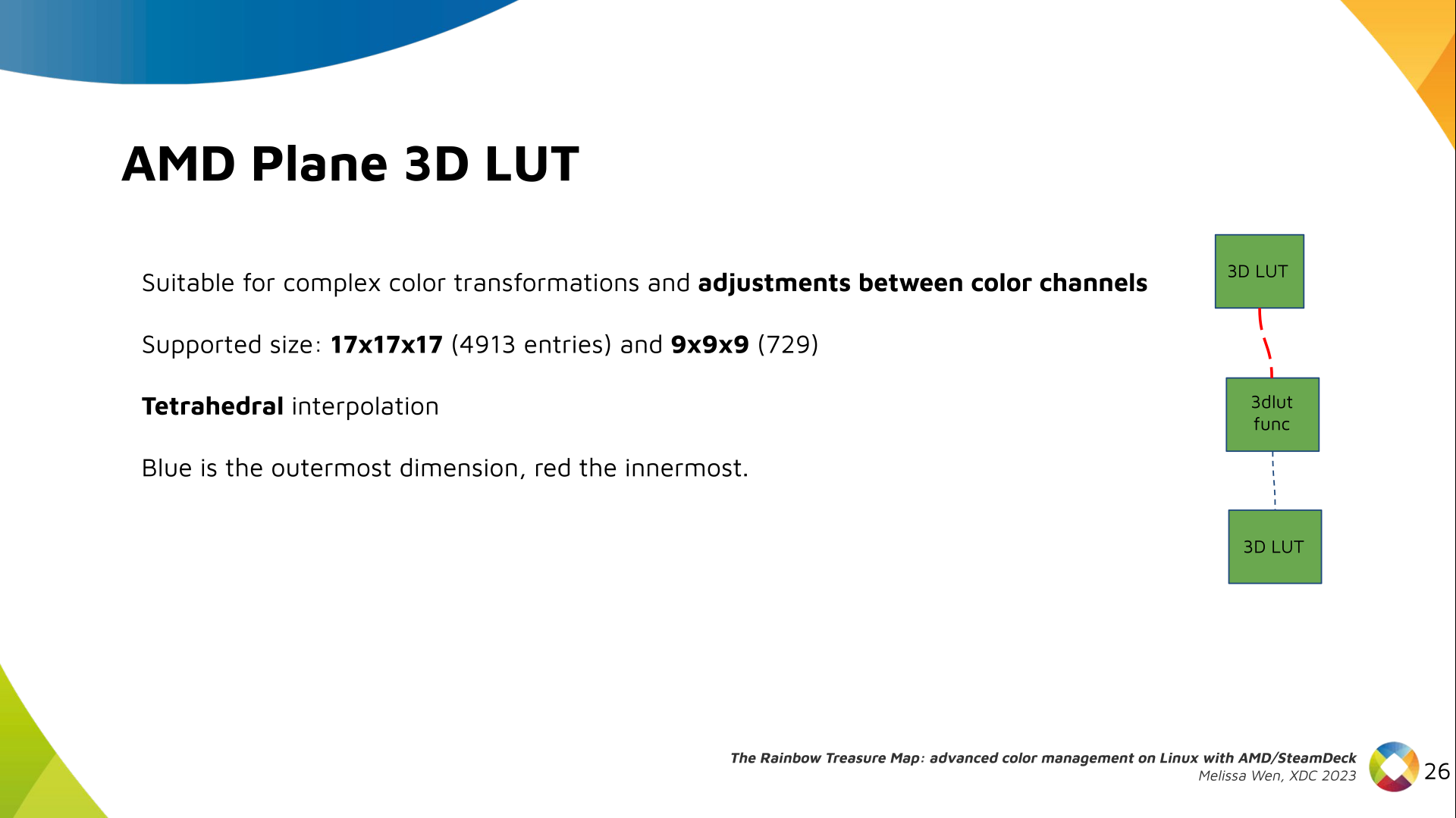
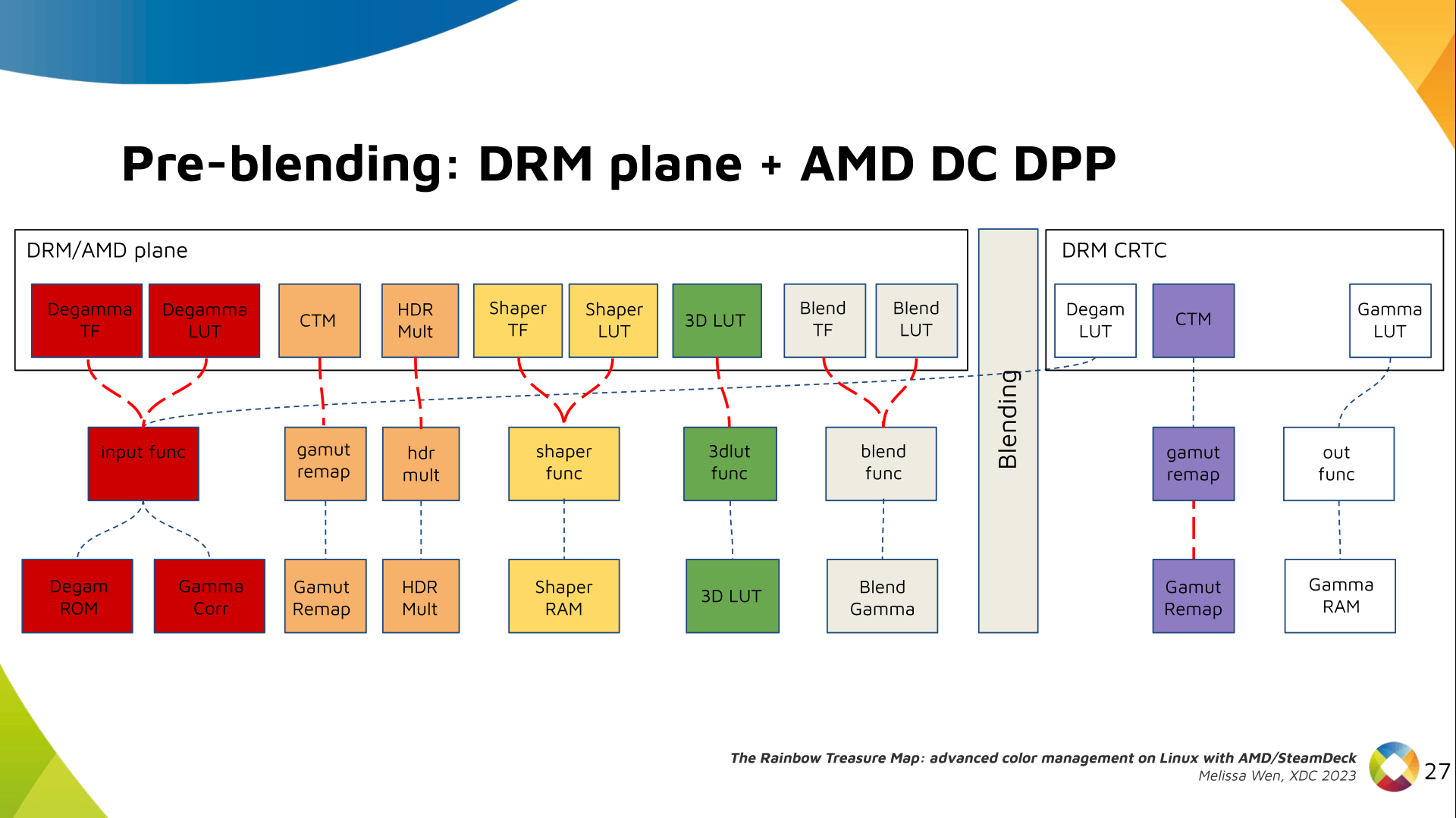
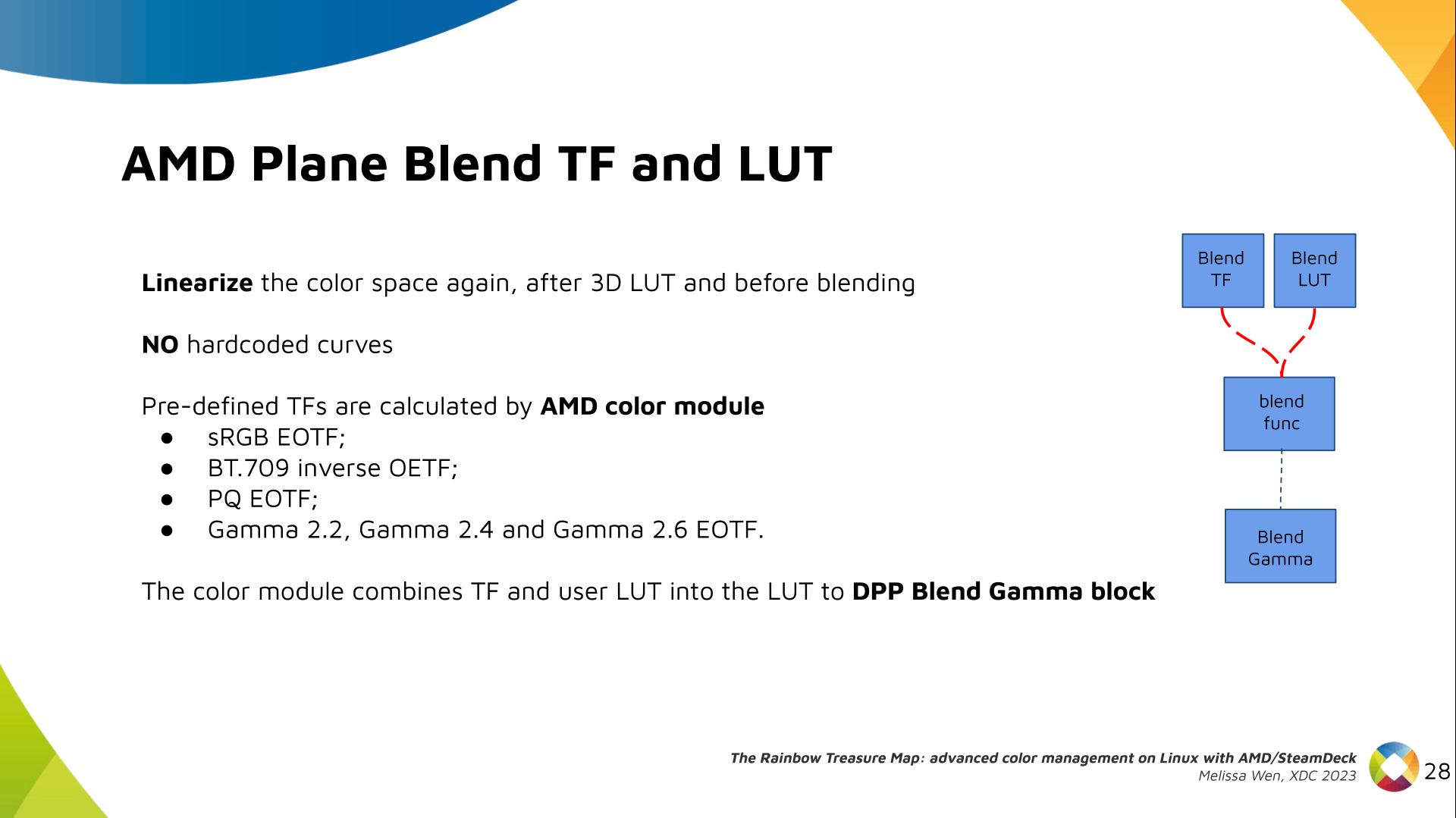

References:
  1. Slides of the talk The Rainbow Treasure Map.
  2. Youtube video of the talk The Rainbow Treasure Map.
  3. Patch series for AMD driver-specific color management properties (upstream Linux 6.8v).
  4. SteamDeck/Gamescope color management pipeline
  5. XDC 2023 website.
  6. Igalia website.

19 December 2023

Antoine Beaupr : (Re)introducing screentest

I have accidentally rewritten screentest, an old X11/GTK2 program that I was previously using to, well, test screens.

Screentest is dead It was removed from Debian in May 2023 but had already missed two releases (Debian 11 "bullseye" and 12 "bookworm") due to release critical bugs. The stated reason for removal was:
The package is orphaned and its upstream is no longer developed. It depends on gtk2, has a low popcon and no reverse dependencies.
So I had little hope to see this program back in Debian. The git repository shows little activity, the last being two years ago. Interestingly, I do not quite remember what it was testing, but I do remember it to find dead pixels, confirm native resolution, and various pixel-peeping. Here's a screenshot of one of the screentest screens: screentest screenshot showing a white-on-black checkered background, with some circles in the corners, shades of gray and colors in the middle Now, I think it's safe to assume this program is dead and buried, and anyways I'm running wayland now, surely there's something better? Well, no. Of course not. Someone would know about it and tell me before I go on a random coding spree in a fit of procrastination... riiight? At least, the Debconf video team didn't seem to know of any replacement. They actually suggested I just "invoke gstreamer directly" and "embrace the joy of shell scripting".

Screentest reborn So, I naively did exactly that and wrote a horrible shell script. Then I realized the next step was to write an command line parser and monitor geometry guessing, and thought "NOPE, THIS IS WHERE THE SHELL STOPS", and rewrote the whole thing in Python. Now, screentest lives as a ~400-line Python script, half of which is unit test data and command-line parsing.

Why screentest Some smarty pants is going to complain and ask why the heck one would need something like that (and, well, someone already did), so maybe I can lay down a list of use case:
  • testing color output, in broad terms (answering the question of "is it just me or this project really yellow?")
  • testing focus and keystone ("this looks blurry, can you find a nice sharp frame in that movie to adjust focus?")
  • test for native resolution and sharpness ("does this projector really support 4k for 30$? that sounds like bullcrap")
  • looking for dead pixels ("i have a new monitor, i hope it's intact")

What does screentest do? Screentest displays a series of "patterns" on screen. The list of patterns is actually hardcoded in the script, copy-pasted from this list from the videotestsrc gstreamer plugin, but you can pass any pattern supported by your gstreamer installation with --patterns. A list of patterns relevant to your installation is available with the gst-inspect-1.0 videotestsrc command. By default, screentest goes through all patterns. Each pattern runs indefinitely until the you close the window, then the next pattern starts. You can restrict to a subset of patterns, for example this would be a good test for dead pixels:
screentest --patterns black,white,red,green,blue
This would be a good sharpness test:
screentest --patterns pinwheel,spokes,checkers-1,checkers-2,checkers-4,checkers-8
A good generic test is the classic SMPTE color bars and is the first in the list, but you can run only that test with:
screentest --patterns smpte
(I will mention, by the way, that as a system administrator with decades of experience, it is nearly impossible to type SMPTE without first typing SMTP and re-typing it again a few times before I get it right. I fully expect this post to have numerous typos.)
Here's an example of the SMPTE pattern from Wikipedia: SMPTE color bars For multi-monitor setups, screentest also supports specifying which output to use as a native resolution, with --output. Failing that, it will try to look at the outputs and use the first it will find. If it fails to find anything, you can specify a resolution with --resolution WIDTHxHEIGHT. I have tried to make it go full screen by default, but stumbled a bug in Sway that crashes gst-launch. If your Wayland compositor supports it, you can possibly enable full screen with --sink waylandsink fullscreen=true. Otherwise it will create a new window that you will have to make fullscreen yourself. For completeness, there's also an --audio flag that will emit the classic "drone", a sine wave at 440Hz at 40% volume (the audiotestsrc gstreamer plugin. And there's a --overlay-name option to show the pattern name, in case you get lost and want to start with one of them again.

How this works Most of the work is done by gstreamer. The script merely generates a pipeline and calls gst-launch to show the output. That both limits what it can do but also makes it much easier to use than figuring out gst-launch. There might be some additional patterns that could be useful, but I think those are better left to gstreamer. I, for example, am somewhat nostalgic of the Philips circle pattern that used to play for TV stations that were off-air in my area. But that, in my opinion, would be better added to the gstreamer plugin than into a separate thing. The script shows which command is being ran, so it's a good introduction to gstreamer pipelines. Advanced users (and the video team) will possibly not need screentest and will design their own pipelines with their own tools. I've previously worked with ffmpeg pipelines (in another such procrastinated coding spree, video-proxy-magic), and I found gstreamer more intuitive, even though it might be slightly less powerful. In retrospect, I should probably have picked a new name, to avoid crashing the namespace already used by the project, which is now on GitHub. Who knows, it might come back to life after this blog post; it would not be the first time. For now, the project lives along side the rest of my scripts collection but if there's sufficient interest, I might move it to its own git repositories. Comments, feedback, contributions are as usual welcome. And naturally, if you know something better for this kind of stuff, I'm happy to learn more about your favorite tool! So now I have finally found something to test my projector, which will likely confirm what I've already known all along: that it's kind of a piece of crap and I need to get a proper one.

16 December 2023

Thomas Lange: Adding a writeable data partition to an ISO image

Some years ago a customer needed a live ISO containing a customized FAI environment (not for installing but for extended hardware stress tests), but on an USB stick with the possibility to store the logs of the tests on the USB stick. But an ISO file system (iso9660) remains read-only, even when put onto an USB stick. I had the idea to add another partition onto the USB stick after the ISO was written to it (using cp or dd). You can use fdisk with an ISO file, add a new partition, loop mount the ISO and format this partition. That's all. This worked perfect for my customer. I forgot this idea for a while but a few weeks ago I remembered it. What could be possible when my FAI (Fully Automatic Installation) image would also provide such a partition? Which things could be provided on this partition? Could I provide a FAI ISO and my users would be able to easily put their own .deb package onto it without remastering the ISO or building an ISO on their own? Now here's the shell script, that extends an ISO or an USB stick with an ext4 or exFAT partition and set the file system label to MY-DATA. https://github.com/faiproject/fai/blob/master/bin/mk-data-partition Examples how to use mk-data-partition

Add a data partition of size 1G to the Debian installer ISO using an ext4 partition
# mk-data-partition -s 1G debian-12.2.0-amd64-netinst.iso
Create the data partition using an exFAT file system on USB named /dev/sdb.
First copy (or dd) the ISO onto the USB stick. Then add the data partition
to the USB stick.
# cp faicd64-large_6.0.3.iso /dev/sdb
# mk-data-partition -F /dev/sdb
Create the data partition and copy directories A and B to it
# mk-data-partition -c debian-12.2.0-amd64-netinst.iso A B
The next FAI version will use this in different parts of an installation. A blog post about this will follow. A new idea for our Debian installer ISO Here are my ideas how the Debian installer could use such a partition if it automatically detects and mounts it (by it's file system label): The advantage of this approach is that there's no need for the user to remaster the official Debian installer ISO, which is not easy for end users. We only have to extend the installer to use files from this data partition in some portions of the installation. Additional udebs, packages or firmware could automatically be used by the installer. Companies could easily create an OEM installer of Debian. What do you think about this idea? Please send feedback to lange@debian.org

15 December 2023

Scarlett Gately Moore: KDE: Snaps, KDEneon, Debian and my future.

First I want to thank KDE for this wonderful write up on LinkedIn. https://www.linkedin.com/posts/kde_akademy-2023-over-a-million-reasons-why-activity-7139965489153208320-PNem?utm_source=share&utm_medium=member_desktop It made my heart explode with happiness as I prepped for my interview on Monday. I didn t get the job ( Just the usual we were very impressed with your experience, but we went with another candidate ). I think the cosmos is determined for me to hold out for the project even though it is only part time work, it is work and if I have learned nothing else this year, I have learned how to live on a very tight budget! It turns out many of the things we think we need, we don t. So with hard work of Kevin Ottens ( Thank you!!!! ), this should be finalized after the first of the year. This plan also allows me time for KDEneon and Debian work. I am happy with it and look forward to the coming year and the exciting things to come. My holiday plans are to help the Debian KDE team with the KF6 packaging, On-going KDEneon efforts, and continue to make sure the snaps Qt6 transition is a painless as possible. I will also be working on the qt6 kde-neon extension. In closing, despite my terrible luck with job-hunting, I am in an amazing community and I am truly grateful to each and every one of you. It has been a great year and I have added many new things to my skillset and I look forward to many more next year. As usual, it is that time of month where I have not raised enough to pay my internet bill ( phone company taking an extra 200.00 didn t help ) If you can spare any change ( any amount helps! ) please consider a donation https://gofund.me/b74e4c6f Thank you! I hope everyone has a wonderful <insert your holiday here> !!!!! ~ Scarlett

14 December 2023

Dirk Eddelbuettel: RProtoBuf 0.4.21 on CRAN: Updated Upstream Support!

An exciting new release 0.4.21 of RProtoBuf arrived on CRAN earlier today. RProtoBuf provides R with bindings for the Google Protocol Buffers ( ProtoBuf ) data encoding and serialization library used and released by Google, and deployed very widely in numerous projects as a language and operating-system agnostic protocol. ProtoBuf development, following what seemed like a multi-year lull, all of a sudden picked up again with a vengeance a little while ago. And the library releases we rely on for convenience and provided by the Linux distributions are lagging. So last summer we received an excellent, and focussed, pull request #93 offering to update the package to the newer ProtoBuf 22.0 and beyond. (Aside: When a library ditches its numbering scheme you know changes are for real . My Ubuntu 23.10 box is still at 3.21 in a different counting scheme .) But it wasn t until last weekend the issue ticket #95 by Sebastian ran into the same issue, but recognized it and contained a container recipe! So now all of a sudden we were able to build under a newer ProtoBuf which made accepting the PR #93 much easier! We added this as an additional continuous unit test, and made a few other smaller updates to documentation and style. The following section from the NEWS.Rd file has full details.

Changes in RProtoBuf version 0.4.21 (2022-12-13)
  • Package now builds with ProtoBuf >= 22.x thanks to Matteo Gianella (#93 addressing #92).
  • An Alpine 3.19-based workflow was added to test this in continuous integration thanks to a suggestion by Sebastian Meyer.
  • A large number of old-style .Call were updated (#96).
  • Several packaging, dcoumentation and testing items were updated.

Thanks to my CRANberries, there is a diff to the previous release. The RProtoBuf page has copies of the (older) package vignette, the quick overview vignette, and the pre-print of our JSS paper. Questions, comments etc should go to the GitHub issue tracker off the GitHub repo. If you like this or other open-source work I do, you can sponsor me at GitHub.

This post by Dirk Eddelbuettel originated on his Thinking inside the box blog. Please report excessive re-aggregation in third-party for-profit settings.

13 December 2023

Melissa Wen: 15 Tips for Debugging Issues in the AMD Display Kernel Driver

A self-help guide for examining and debugging the AMD display driver within the Linux kernel/DRM subsystem. It s based on my experience as an external developer working on the driver, and are shared with the goal of helping others navigate the driver code. Acknowledgments: These tips were gathered thanks to the countless help received from AMD developers during the driver development process. The list below was obtained by examining open source code, reviewing public documentation, playing with tools, asking in public forums and also with the help of my former GSoC mentor, Rodrigo Siqueira.

Pre-Debugging Steps: Before diving into an issue, it s crucial to perform two essential steps: 1) Check the latest changes: Ensure you re working with the latest AMD driver modifications located in the amd-staging-drm-next branch maintained by Alex Deucher. You may also find bug fixes for newer kernel versions on branches that have the name pattern drm-fixes-<date>. 2) Examine the issue tracker: Confirm that your issue isn t already documented and addressed in the AMD display driver issue tracker. If you find a similar issue, you can team up with others and speed up the debugging process.

Understanding the issue: Do you really need to change this? Where should you start looking for changes? 3) Is the issue in the AMD kernel driver or in the userspace?: Identifying the source of the issue is essential regardless of the GPU vendor. Sometimes this can be challenging so here are some helpful tips:
  • Record the screen: Capture the screen using a recording app while experiencing the issue. If the bug appears in the capture, it s likely a userspace issue, not the kernel display driver.
  • Analyze the dmesg log: Look for error messages related to the display driver in the dmesg log. If the error message appears before the message [drm] Display Core v... , it s not likely a display driver issue. If this message doesn t appear in your log, the display driver wasn t fully loaded and you will see a notification that something went wrong here.
4) AMD Display Manager vs. AMD Display Core: The AMD display driver consists of two components:
  • Display Manager (DM): This component interacts directly with the Linux DRM infrastructure. Occasionally, issues can arise from misinterpretations of DRM properties or features. If the issue doesn t occur on other platforms with the same AMD hardware - for example, only happens on Linux but not on Windows - it s more likely related to the AMD DM code.
  • Display Core (DC): This is the platform-agnostic part responsible for setting and programming hardware features. Modifications to the DC usually require validation on other platforms, like Windows, to avoid regressions.
5) Identify the DC HW family: Each AMD GPU has variations in its hardware architecture. Features and helpers differ between families, so determining the relevant code for your specific hardware is crucial.
  • Find GPU product information in Linux/AMD GPU documentation
  • Check the dmesg log for the Display Core version (since this commit in Linux kernel 6.3v). For example:
    • [drm] Display Core v3.2.241 initialized on DCN 2.1
    • [drm] Display Core v3.2.237 initialized on DCN 3.0.1

Investigating the relevant driver code: Keep from letting unrelated driver code to affect your investigation. 6) Narrow the code inspection down to one DC HW family: the relevant code resides in a directory named after the DC number. For example, the DCN 3.0.1 driver code is located at drivers/gpu/drm/amd/display/dc/dcn301. We all know that the AMD s shared code is huge and you can use these boundaries to rule out codes unrelated to your issue. 7) Newer families may inherit code from older ones: you can find dcn301 using code from dcn30, dcn20, dcn10 files. It s crucial to verify which hooks and helpers your driver utilizes to investigate the right portion. You can leverage ftrace for supplemental validation. To give an example, it was useful when I was updating DCN3 color mapping to correctly use their new post-blending color capabilities, such as: Additionally, you can use two different HW families to compare behaviours. If you see the issue in one but not in the other, you can compare the code and understand what has changed and if the implementation from a previous family doesn t fit well the new HW resources or design. You can also count on the help of the community on the Linux AMD issue tracker to validate your code on other hardware and/or systems. This approach helped me debug a 2-year-old issue where the cursor gamma adjustment was incorrect in DCN3 hardware, but working correctly for DCN2 family. I solved the issue in two steps, thanks for community feedback and validation: 8) Check the hardware capability screening in the driver: You can currently find a list of display hardware capabilities in the drivers/gpu/drm/amd/display/dc/dcn*/dcn*_resource.c file. More precisely in the dcn*_resource_construct() function. Using DCN301 for illustration, here is the list of its hardware caps:
	/*************************************************
	 *  Resource + asic cap harcoding                *
	 *************************************************/
	pool->base.underlay_pipe_index = NO_UNDERLAY_PIPE;
	pool->base.pipe_count = pool->base.res_cap->num_timing_generator;
	pool->base.mpcc_count = pool->base.res_cap->num_timing_generator;
	dc->caps.max_downscale_ratio = 600;
	dc->caps.i2c_speed_in_khz = 100;
	dc->caps.i2c_speed_in_khz_hdcp = 5; /*1.4 w/a enabled by default*/
	dc->caps.max_cursor_size = 256;
	dc->caps.min_horizontal_blanking_period = 80;
	dc->caps.dmdata_alloc_size = 2048;
	dc->caps.max_slave_planes = 2;
	dc->caps.max_slave_yuv_planes = 2;
	dc->caps.max_slave_rgb_planes = 2;
	dc->caps.is_apu = true;
	dc->caps.post_blend_color_processing = true;
	dc->caps.force_dp_tps4_for_cp2520 = true;
	dc->caps.extended_aux_timeout_support = true;
	dc->caps.dmcub_support = true;
	/* Color pipeline capabilities */
	dc->caps.color.dpp.dcn_arch = 1;
	dc->caps.color.dpp.input_lut_shared = 0;
	dc->caps.color.dpp.icsc = 1;
	dc->caps.color.dpp.dgam_ram = 0; // must use gamma_corr
	dc->caps.color.dpp.dgam_rom_caps.srgb = 1;
	dc->caps.color.dpp.dgam_rom_caps.bt2020 = 1;
	dc->caps.color.dpp.dgam_rom_caps.gamma2_2 = 1;
	dc->caps.color.dpp.dgam_rom_caps.pq = 1;
	dc->caps.color.dpp.dgam_rom_caps.hlg = 1;
	dc->caps.color.dpp.post_csc = 1;
	dc->caps.color.dpp.gamma_corr = 1;
	dc->caps.color.dpp.dgam_rom_for_yuv = 0;
	dc->caps.color.dpp.hw_3d_lut = 1;
	dc->caps.color.dpp.ogam_ram = 1;
	// no OGAM ROM on DCN301
	dc->caps.color.dpp.ogam_rom_caps.srgb = 0;
	dc->caps.color.dpp.ogam_rom_caps.bt2020 = 0;
	dc->caps.color.dpp.ogam_rom_caps.gamma2_2 = 0;
	dc->caps.color.dpp.ogam_rom_caps.pq = 0;
	dc->caps.color.dpp.ogam_rom_caps.hlg = 0;
	dc->caps.color.dpp.ocsc = 0;
	dc->caps.color.mpc.gamut_remap = 1;
	dc->caps.color.mpc.num_3dluts = pool->base.res_cap->num_mpc_3dlut; //2
	dc->caps.color.mpc.ogam_ram = 1;
	dc->caps.color.mpc.ogam_rom_caps.srgb = 0;
	dc->caps.color.mpc.ogam_rom_caps.bt2020 = 0;
	dc->caps.color.mpc.ogam_rom_caps.gamma2_2 = 0;
	dc->caps.color.mpc.ogam_rom_caps.pq = 0;
	dc->caps.color.mpc.ogam_rom_caps.hlg = 0;
	dc->caps.color.mpc.ocsc = 1;
	dc->caps.dp_hdmi21_pcon_support = true;
	/* read VBIOS LTTPR caps */
	if (ctx->dc_bios->funcs->get_lttpr_caps)  
		enum bp_result bp_query_result;
		uint8_t is_vbios_lttpr_enable = 0;
		bp_query_result = ctx->dc_bios->funcs->get_lttpr_caps(ctx->dc_bios, &is_vbios_lttpr_enable);
		dc->caps.vbios_lttpr_enable = (bp_query_result == BP_RESULT_OK) && !!is_vbios_lttpr_enable;
	 
	if (ctx->dc_bios->funcs->get_lttpr_interop)  
		enum bp_result bp_query_result;
		uint8_t is_vbios_interop_enabled = 0;
		bp_query_result = ctx->dc_bios->funcs->get_lttpr_interop(ctx->dc_bios, &is_vbios_interop_enabled);
		dc->caps.vbios_lttpr_aware = (bp_query_result == BP_RESULT_OK) && !!is_vbios_interop_enabled;
	 
Keep in mind that the documentation of color capabilities are available at the Linux kernel Documentation.

Understanding the development history: What has brought us to the current state? 9) Pinpoint relevant commits: Use git log and git blame to identify commits targeting the code section you re interested in. 10) Track regressions: If you re examining the amd-staging-drm-next branch, check for regressions between DC release versions. These are defined by DC_VER in the drivers/gpu/drm/amd/display/dc/dc.h file. Alternatively, find a commit with this format drm/amd/display: 3.2.221 that determines a display release. It s useful for bisecting. This information helps you understand how outdated your branch is and identify potential regressions. You can consider each DC_VER takes around one week to be bumped. Finally, check testing log of each release in the report provided on the amd-gfx mailing list, such as this one Tested-by: Daniel Wheeler:

Reducing the inspection area: Focus on what really matters. 11) Identify involved HW blocks: This helps isolate the issue. You can find more information about DCN HW blocks in the DCN Overview documentation. In summary:
  • Plane issues are closer to HUBP and DPP.
  • Blending/Stream issues are closer to MPC, OPP and OPTC. They are related to DRM CRTC subjects.
This information was useful when debugging a hardware rotation issue where the cursor plane got clipped off in the middle of the screen. Finally, the issue was addressed by two patches: 12) Issues around bandwidth (glitches) and clocks: May be affected by calculations done in these HW blocks and HW specific values. The recalculation equations are found in the DML folder. DML stands for Display Mode Library. It s in charge of all required configuration parameters supported by the hardware for multiple scenarios. See more in the AMD DC Overview kernel docs. It s a math library that optimally configures hardware to find the best balance between power efficiency and performance in a given scenario. Finding some clk variables that affect device behavior may be a sign of it. It s hard for a external developer to debug this part, since it involves information from HW specs and firmware programming that we don t have access. The best option is to provide all relevant debugging information you have and ask AMD developers to check the values from your suspicions.
  • Do a trick: If you suspect the power setup is degrading performance, try setting the amount of power supplied to the GPU to the maximum and see if it affects the system behavior with this command: sudo bash -c "echo high > /sys/class/drm/card0/device/power_dpm_force_performance_level"
I learned it when debugging glitches with hardware cursor rotation on Steam Deck. My first attempt was changing the clock calculation. In the end, Rodrigo Siqueira proposed the right solution targeting bandwidth in two steps:

Checking implicit programming and hardware limitations: Bring implicit programming to the level of consciousness and recognize hardware limitations. 13) Implicit update types: Check if the selected type for atomic update may affect your issue. The update type depends on the mode settings, since programming some modes demands more time for hardware processing. More details in the source code:
/* Surface update type is used by dc_update_surfaces_and_stream
 * The update type is determined at the very beginning of the function based
 * on parameters passed in and decides how much programming (or updating) is
 * going to be done during the call.
 *
 * UPDATE_TYPE_FAST is used for really fast updates that do not require much
 * logical calculations or hardware register programming. This update MUST be
 * ISR safe on windows. Currently fast update will only be used to flip surface
 * address.
 *
 * UPDATE_TYPE_MED is used for slower updates which require significant hw
 * re-programming however do not affect bandwidth consumption or clock
 * requirements. At present, this is the level at which front end updates
 * that do not require us to run bw_calcs happen. These are in/out transfer func
 * updates, viewport offset changes, recout size changes and pixel
depth changes.
 * This update can be done at ISR, but we want to minimize how often
this happens.
 *
 * UPDATE_TYPE_FULL is slow. Really slow. This requires us to recalculate our
 * bandwidth and clocks, possibly rearrange some pipes and reprogram
anything front
 * end related. Any time viewport dimensions, recout dimensions,
scaling ratios or
 * gamma need to be adjusted or pipe needs to be turned on (or
disconnected) we do
 * a full update. This cannot be done at ISR level and should be a rare event.
 * Unless someone is stress testing mpo enter/exit, playing with
colour or adjusting
 * underscan we don't expect to see this call at all.
 */
enum surface_update_type  
UPDATE_TYPE_FAST, /* super fast, safe to execute in isr */
UPDATE_TYPE_MED,  /* ISR safe, most of programming needed, no bw/clk change*/
UPDATE_TYPE_FULL, /* may need to shuffle resources */
 ;

Using tools: Observe the current state, validate your findings, continue improvements. 14) Use AMD tools to check hardware state and driver programming: help on understanding your driver settings and checking the behavior when changing those settings.
  • DC Visual confirmation: Check multiple planes and pipe split policy.
  • DTN logs: Check display hardware state, including rotation, size, format, underflow, blocks in use, color block values, etc.
  • UMR: Check ASIC info, register values, KMS state - links and elements (framebuffers, planes, CRTCs, connectors). Source: UMR project documentation
15) Use generic DRM/KMS tools:
  • IGT test tools: Use generic KMS tests or develop your own to isolate the issue in the kernel space. Compare results across different GPU vendors to understand their implementations and find potential solutions. Here AMD also has specific IGT tests for its GPUs that is expect to work without failures on any AMD GPU. You can check results of HW-specific tests using different display hardware families or you can compare expected differences between the generic workflow and AMD workflow.
  • drm_info: This tool summarizes the current state of a display driver (capabilities, properties and formats) per element of the DRM/KMS workflow. Output can be helpful when reporting bugs.

Don t give up! Debugging issues in the AMD display driver can be challenging, but by following these tips and leveraging available resources, you can significantly improve your chances of success. Worth mentioning: This blog post builds upon my talk, I m not an AMD expert, but presented at the 2022 XDC. It shares guidelines that helped me debug AMD display issues as an external developer of the driver. Open Source Display Driver: The Linux kernel/AMD display driver is open source, allowing you to actively contribute by addressing issues listed in the official tracker. Tackling existing issues or resolving your own can be a rewarding learning experience and a valuable contribution to the community. Additionally, the tracker serves as a valuable resource for finding similar bugs, troubleshooting tips, and suggestions from AMD developers. Finally, it s a platform for seeking help when needed. Remember, contributing to the open source community through issue resolution and collaboration is mutually beneficial for everyone involved.

12 December 2023

Raju Devidas: Nextcloud AIO install with docker-compose and nginx reverse proxy

Nextcloud AIO install with docker-compose and nginx reverse proxyNextcloud is a popular self-hosted solution for file sync and share as well as cloud apps such as document editing, chat and talk, calendar, photo gallery etc. This guide will walk you through setting up Nextcloud AIO using Docker Compose. This blog post would not be possible without immense help from Sahil Dhiman a.k.a. sahilisterThere are various ways in which the installation could be done, in our setup here are the pre-requisites.
Step 1 : The docker-compose file for nextcloud AIOThe original compose.yml file is present in nextcloud AIO&aposs git repo here . By taking a reference of that file, we have own compose.yml here.
services:
  nextcloud-aio-mastercontainer:
    image: nextcloud/all-in-one:latest
    init: true
    restart: always
    container_name: nextcloud-aio-mastercontainer # This line is not allowed to be changed as otherwise AIO will not work correctly
    volumes:
      - nextcloud_aio_mastercontainer:/mnt/docker-aio-config # This line is not allowed to be changed as otherwise the built-in backup solution will not work
      - /var/run/docker.sock:/var/run/docker.sock:ro # May be changed on macOS, Windows or docker rootless. See the applicable documentation. If adjusting, don&apost forget to also set &aposWATCHTOWER_DOCKER_SOCKET_PATH&apos!
    ports:
      - 8080:8080
    environment: # Is needed when using any of the options below
      # - AIO_DISABLE_BACKUP_SECTION=false # Setting this to true allows to hide the backup section in the AIO interface. See https://github.com/nextcloud/all-in-one#how-to-disable-the-backup-section
      - APACHE_PORT=32323 # Is needed when running behind a web server or reverse proxy (like Apache, Nginx, Cloudflare Tunnel and else). See https://github.com/nextcloud/all-in-one/blob/main/reverse-proxy.md
      - APACHE_IP_BINDING=127.0.0.1 # Should be set when running behind a web server or reverse proxy (like Apache, Nginx, Cloudflare Tunnel and else) that is running on the same host. See https://github.com/nextcloud/all-in-one/blob/main/reverse-proxy.md
      # - BORG_RETENTION_POLICY=--keep-within=7d --keep-weekly=4 --keep-monthly=6 # Allows to adjust borgs retention policy. See https://github.com/nextcloud/all-in-one#how-to-adjust-borgs-retention-policy
      # - COLLABORA_SECCOMP_DISABLED=false # Setting this to true allows to disable Collabora&aposs Seccomp feature. See https://github.com/nextcloud/all-in-one#how-to-disable-collaboras-seccomp-feature
      - NEXTCLOUD_DATADIR=/opt/docker/cloud.raju.dev/nextcloud # Allows to set the host directory for Nextcloud&aposs datadir.   Warning: do not set or adjust this value after the initial Nextcloud installation is done! See https://github.com/nextcloud/all-in-one#how-to-change-the-default-location-of-nextclouds-datadir
      # - NEXTCLOUD_MOUNT=/mnt/ # Allows the Nextcloud container to access the chosen directory on the host. See https://github.com/nextcloud/all-in-one#how-to-allow-the-nextcloud-container-to-access-directories-on-the-host
      # - NEXTCLOUD_UPLOAD_LIMIT=10G # Can be adjusted if you need more. See https://github.com/nextcloud/all-in-one#how-to-adjust-the-upload-limit-for-nextcloud
      # - NEXTCLOUD_MAX_TIME=3600 # Can be adjusted if you need more. See https://github.com/nextcloud/all-in-one#how-to-adjust-the-max-execution-time-for-nextcloud
      # - NEXTCLOUD_MEMORY_LIMIT=512M # Can be adjusted if you need more. See https://github.com/nextcloud/all-in-one#how-to-adjust-the-php-memory-limit-for-nextcloud
      # - NEXTCLOUD_TRUSTED_CACERTS_DIR=/path/to/my/cacerts # CA certificates in this directory will be trusted by the OS of the nexcloud container (Useful e.g. for LDAPS) See See https://github.com/nextcloud/all-in-one#how-to-trust-user-defined-certification-authorities-ca
      # - NEXTCLOUD_STARTUP_APPS=deck twofactor_totp tasks calendar contacts notes # Allows to modify the Nextcloud apps that are installed on starting AIO the first time. See https://github.com/nextcloud/all-in-one#how-to-change-the-nextcloud-apps-that-are-installed-on-the-first-startup
      # - NEXTCLOUD_ADDITIONAL_APKS=imagemagick # This allows to add additional packages to the Nextcloud container permanently. Default is imagemagick but can be overwritten by modifying this value. See https://github.com/nextcloud/all-in-one#how-to-add-os-packages-permanently-to-the-nextcloud-container
      # - NEXTCLOUD_ADDITIONAL_PHP_EXTENSIONS=imagick # This allows to add additional php extensions to the Nextcloud container permanently. Default is imagick but can be overwritten by modifying this value. See https://github.com/nextcloud/all-in-one#how-to-add-php-extensions-permanently-to-the-nextcloud-container
      # - NEXTCLOUD_ENABLE_DRI_DEVICE=true # This allows to enable the /dev/dri device in the Nextcloud container.   Warning: this only works if the &apos/dev/dri&apos device is present on the host! If it should not exist on your host, don&apost set this to true as otherwise the Nextcloud container will fail to start! See https://github.com/nextcloud/all-in-one#how-to-enable-hardware-transcoding-for-nextcloud
      # - NEXTCLOUD_KEEP_DISABLED_APPS=false # Setting this to true will keep Nextcloud apps that are disabled in the AIO interface and not uninstall them if they should be installed. See https://github.com/nextcloud/all-in-one#how-to-keep-disabled-apps
      # - TALK_PORT=3478 # This allows to adjust the port that the talk container is using. See https://github.com/nextcloud/all-in-one#how-to-adjust-the-talk-port
      # - WATCHTOWER_DOCKER_SOCKET_PATH=/var/run/docker.sock # Needs to be specified if the docker socket on the host is not located in the default &apos/var/run/docker.sock&apos. Otherwise mastercontainer updates will fail. For macos it needs to be &apos/var/run/docker.sock&apos
    # networks: # Is needed when you want to create the nextcloud-aio network with ipv6-support using this file, see the network config at the bottom of the file
      # - nextcloud-aio # Is needed when you want to create the nextcloud-aio network with ipv6-support using this file, see the network config at the bottom of the file
      # - SKIP_DOMAIN_VALIDATION=true
    # # Uncomment the following line when using SELinux
    # security_opt: ["label:disable"]
volumes: # If you want to store the data on a different drive, see https://github.com/nextcloud/all-in-one#how-to-store-the-filesinstallation-on-a-separate-drive
  nextcloud_aio_mastercontainer:
    name: nextcloud_aio_mastercontainer # This line is not allowed to be changed as otherwise the built-in backup solution will not work
I have not removed many of the commented options in the compose file, for a possibility of me using them in the future.If you want a smaller cleaner compose with the extra options, you can refer to
services:
  nextcloud-aio-mastercontainer:
    image: nextcloud/all-in-one:latest
    init: true
    restart: always
    container_name: nextcloud-aio-mastercontainer
    volumes:
      - nextcloud_aio_mastercontainer:/mnt/docker-aio-config
      - /var/run/docker.sock:/var/run/docker.sock:ro
    ports:
      - 8080:8080
    environment:
      - APACHE_PORT=32323
      - APACHE_IP_BINDING=127.0.0.1
      - NEXTCLOUD_DATADIR=/opt/docker/nextcloud
volumes:
  nextcloud_aio_mastercontainer:
    name: nextcloud_aio_mastercontainer
I am using a separate directory to store nextcloud data. As per nextcloud documentation you should be using a separate partition if you want to use this feature, however I did not have that option on my server, so I used a separate directory instead. Also we use a custom port on which nextcloud listens for operations, we have set it up as 32323 above, but you can use any in the permissible port range. The 8080 port is used the setup the AIO management interface. Both 8080 and the APACHE_PORT do not need to be open on the host machine, as we will be using reverse proxy setup with nginx to direct requests. once you have your preferred compose.yml file, you can start the containers using
$ docker-compose -f compose.yml up -d 
Creating network "clouddev_default" with the default driver
Creating volume "nextcloud_aio_mastercontainer" with default driver
Creating nextcloud-aio-mastercontainer ... done
once your container&aposs are running, we can do the nginx setup.

Step 2: Configuring nginx reverse proxy for our domain on host. A reference nginx configuration for nextcloud AIO is given in the nextcloud git repository here . You can modify the configuration file according to your needs and setup. Here is configuration that we are using

map $http_upgrade $connection_upgrade  
    default upgrade;
    &apos&apos close;
 
server  
    listen 80;
    #listen [::]:80;            # comment to disable IPv6
    if ($scheme = "http")  
        return 301 https://$host$request_uri;
     
    listen 443 ssl http2;      # for nginx versions below v1.25.1
    #listen [::]:443 ssl http2; # for nginx versions below v1.25.1 - comment to disable IPv6
    # listen 443 ssl;      # for nginx v1.25.1+
    # listen [::]:443 ssl; # for nginx v1.25.1+ - keep comment to disable IPv6
    # http2 on;                                 # uncomment to enable HTTP/2        - supported on nginx v1.25.1+
    # http3 on;                                 # uncomment to enable HTTP/3 / QUIC - supported on nginx v1.25.0+
    # quic_retry on;                            # uncomment to enable HTTP/3 / QUIC - supported on nginx v1.25.0+
    # add_header Alt-Svc &aposh3=":443"; ma=86400&apos; # uncomment to enable HTTP/3 / QUIC - supported on nginx v1.25.0+
    # listen 443 quic reuseport;       # uncomment to enable HTTP/3 / QUIC - supported on nginx v1.25.0+ - please remove "reuseport" if there is already another quic listener on port 443 with enabled reuseport
    # listen [::]:443 quic reuseport;  # uncomment to enable HTTP/3 / QUIC - supported on nginx v1.25.0+ - please remove "reuseport" if there is already another quic listener on port 443 with enabled reuseport - keep comment to disable IPv6
    server_name cloud.example.com;
    location /  
        proxy_pass http://127.0.0.1:32323$request_uri;
        proxy_set_header X-Forwarded-For $proxy_add_x_forwarded_for;
        proxy_set_header X-Forwarded-Port $server_port;
        proxy_set_header X-Forwarded-Scheme $scheme;
        proxy_set_header X-Forwarded-Proto $scheme;
        proxy_set_header X-Real-IP $remote_addr;
        proxy_set_header Accept-Encoding "";
        proxy_set_header Host $host;
    
        client_body_buffer_size 512k;
        proxy_read_timeout 86400s;
        client_max_body_size 0;
        # Websocket
        proxy_http_version 1.1;
        proxy_set_header Upgrade $http_upgrade;
        proxy_set_header Connection $connection_upgrade;
     
    ssl_certificate /etc/letsencrypt/live/cloud.example.com/fullchain.pem; # managed by Certbot
    ssl_certificate_key /etc/letsencrypt/live/cloud.example.com/privkey.pem; # managed by Certbot
    ssl_session_timeout 1d;
    ssl_session_cache shared:MozSSL:10m; # about 40000 sessions
    ssl_session_tickets off;
    ssl_protocols TLSv1.2 TLSv1.3;
    ssl_ciphers ECDHE-ECDSA-AES128-GCM-SHA256:ECDHE-RSA-AES128-GCM-SHA256:ECDHE-ECDSA-AES256-GCM-SHA384:ECDHE-RSA-AES256-GCM-SHA384:ECDHE-ECDSA-CHACHA20-POLY1305:ECDHE-RSA-CHACHA20-POLY1305:DHE-RSA-AES128-GCM-SHA256:DHE-RSA-AES256-GCM-SHA384:DHE-RSA-CHACHA20-POLY1305;
    ssl_prefer_server_ciphers on;
    # Optional settings:
    # OCSP stapling
    # ssl_stapling on;
    # ssl_stapling_verify on;
    # ssl_trusted_certificate /etc/letsencrypt/live/<your-nc-domain>/chain.pem;
    # replace with the IP address of your resolver
    # resolver 127.0.0.1; # needed for oscp stapling: e.g. use 94.140.15.15 for adguard / 1.1.1.1 for cloudflared or 8.8.8.8 for google - you can use the same nameserver as listed in your /etc/resolv.conf file
 
Please note that you need to have valid SSL certificates for your domain for this configuration to work. Steps on getting valid SSL certificates for your domain are beyond the scope of this article. You can give a web search on getting SSL certificates with letsencrypt and you will get several resources on that, or may write a blog post on it separately in the future.once your configuration for nginx is done, you can test the nginx configuration using
$ sudo nginx -t 
nginx: the configuration file /etc/nginx/nginx.conf syntax is ok
nginx: configuration file /etc/nginx/nginx.conf test is successful
and then reload nginx with
$ sudo nginx -s reload

Step 3: Setup of Nextcloud AIO from the browser.To setup nextcloud AIO, we need to access it using the web browser on URL of our domain.tld:8080, however we do not want to open the 8080 port publicly to do this, so to complete the setup, here is a neat hack from sahilister
ssh -L 8080:127.0.0.1:8080 username:<server-ip>
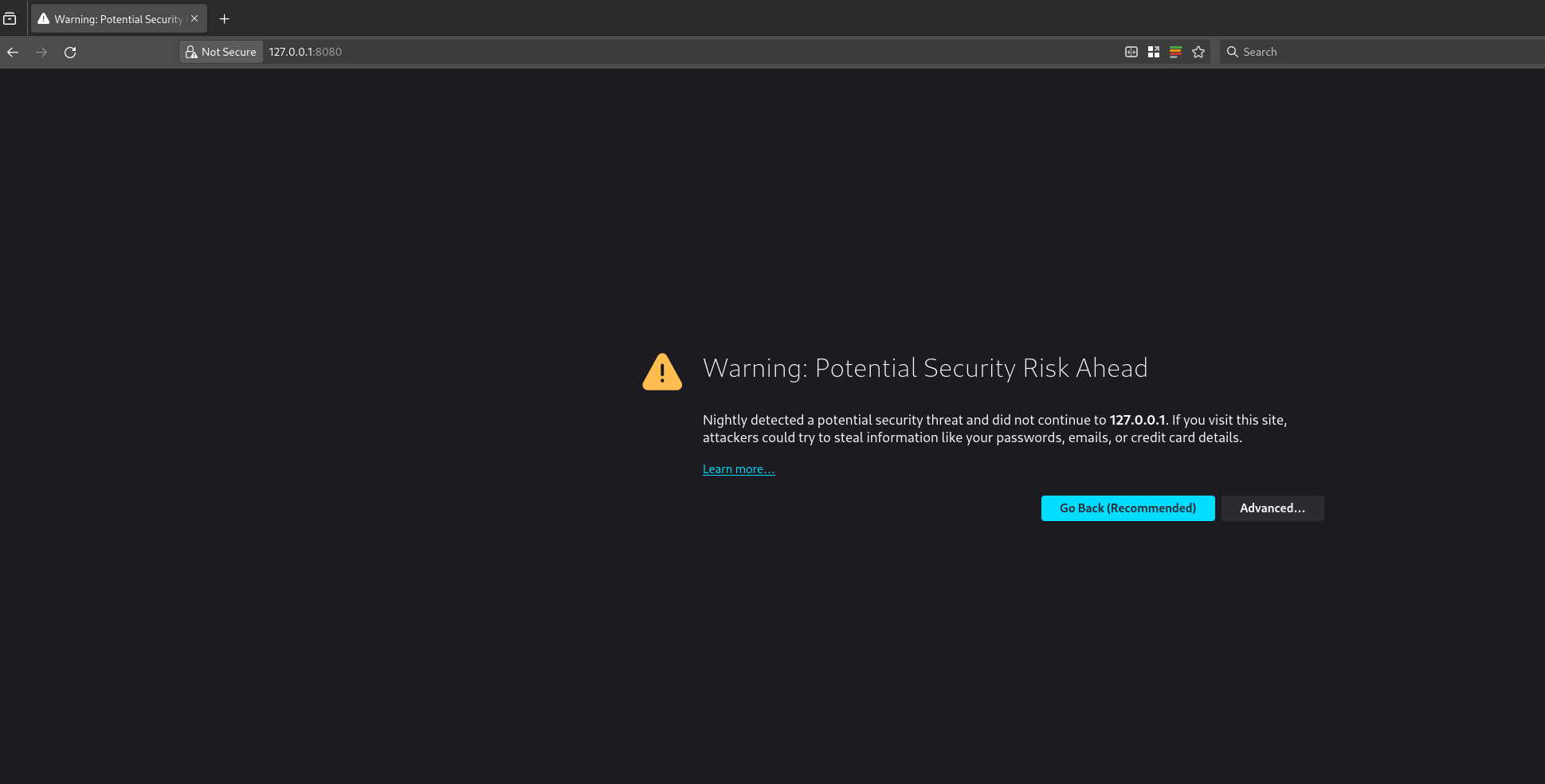
you can bind the 8080 port of your server to the 8080 of your localhost using Unix socket forwarding over SSH.The port forwarding only last for the duration of your SSH session, if the SSH session breaks, your port forwarding will to. So, once you have the port forwarded, you can open the nextcloud AIO instance in your web browser at 127.0.0.1:8080
Nextcloud AIO install with docker-compose and nginx reverse proxy
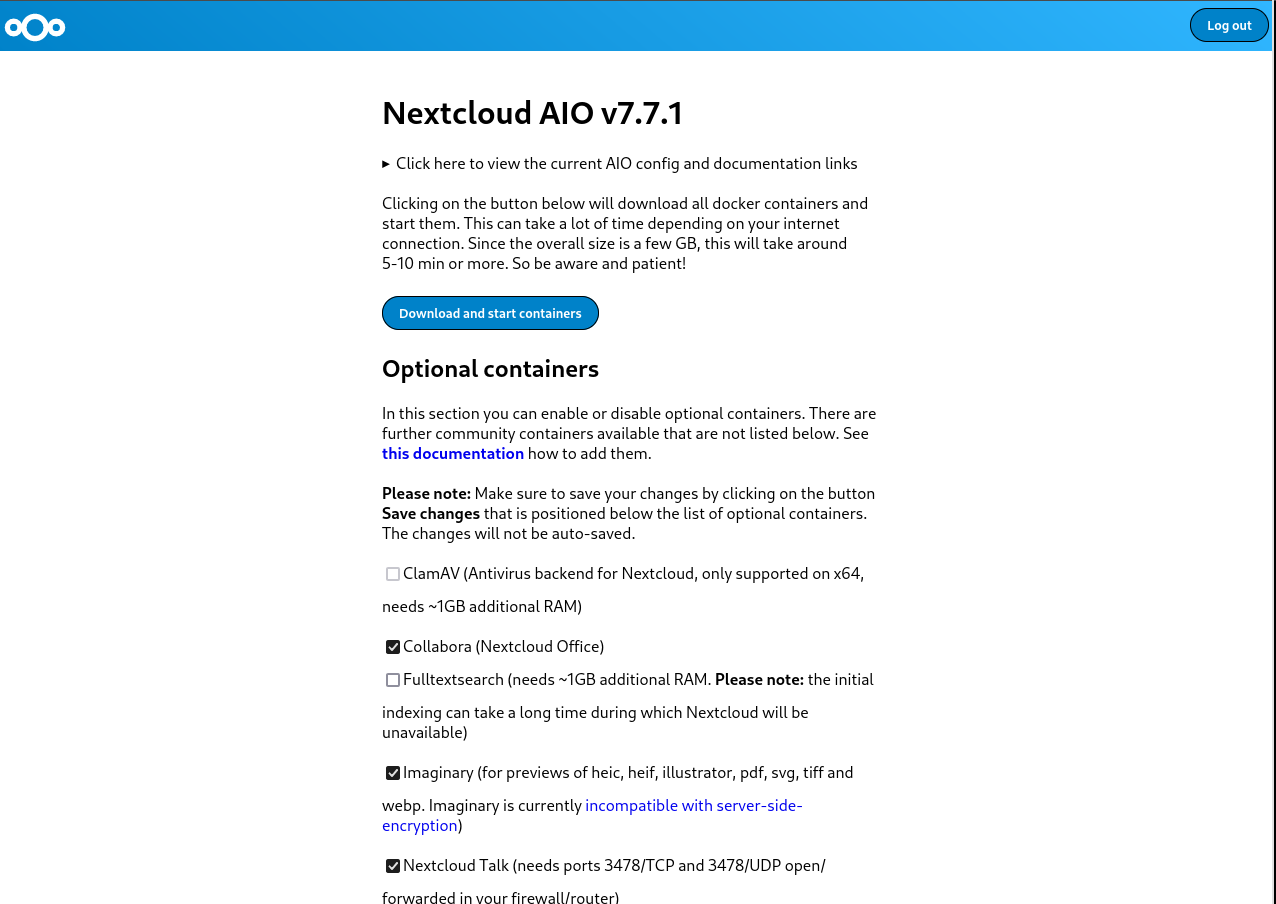
you will get this error because you are trying to access a page on localhost over HTTPS. You can click on advanced and then continue to proceed to the next page. Your data is encrypted over SSH for this session as we are binding the port over SSH. Depending on your choice of browser, the above page might look different.once you have proceeded, the nextcloud AIO interface will open and will look something like this.
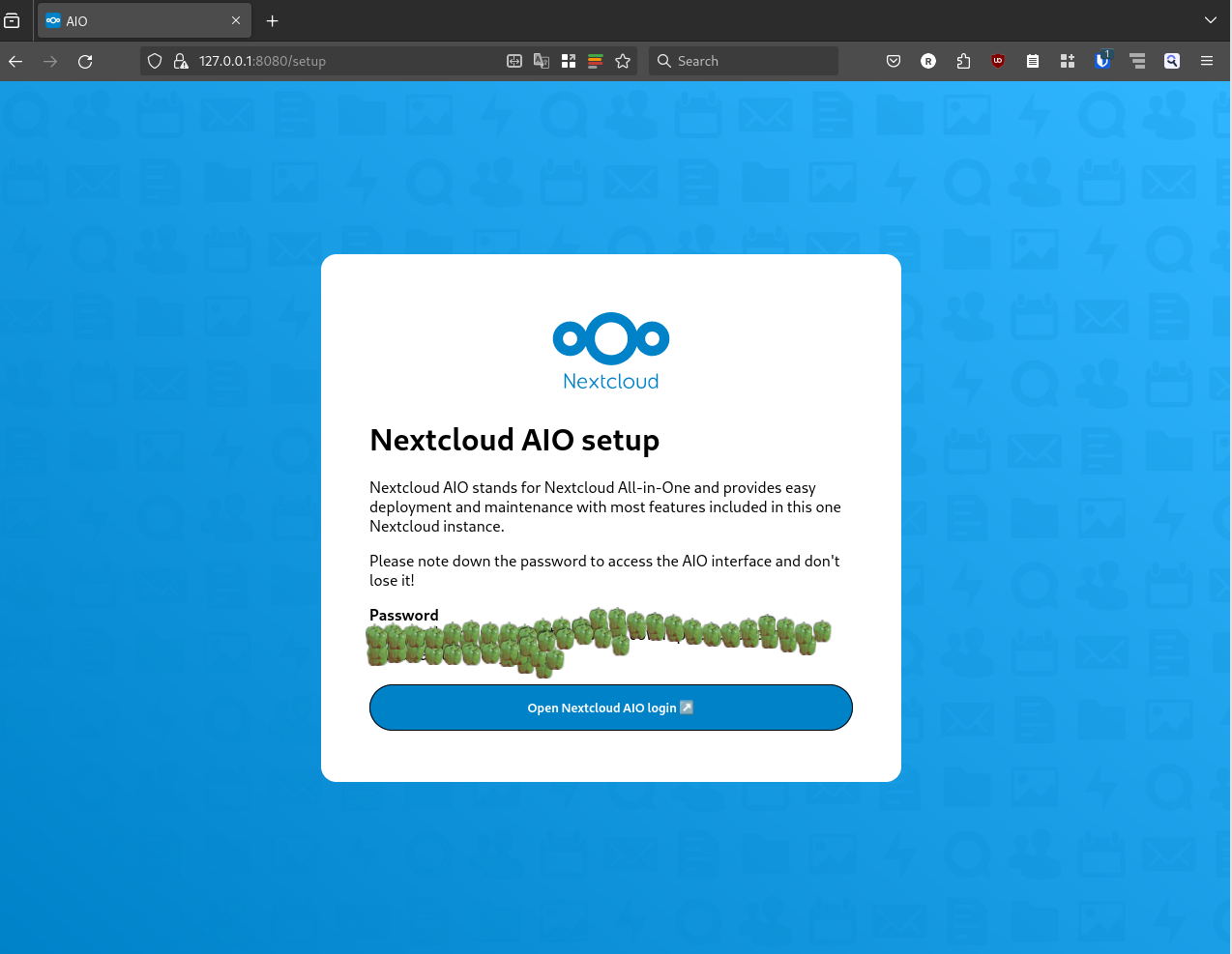
Nextcloud AIO install with docker-compose and nginx reverse proxynextcloud AIO initial screen with capsicums as password
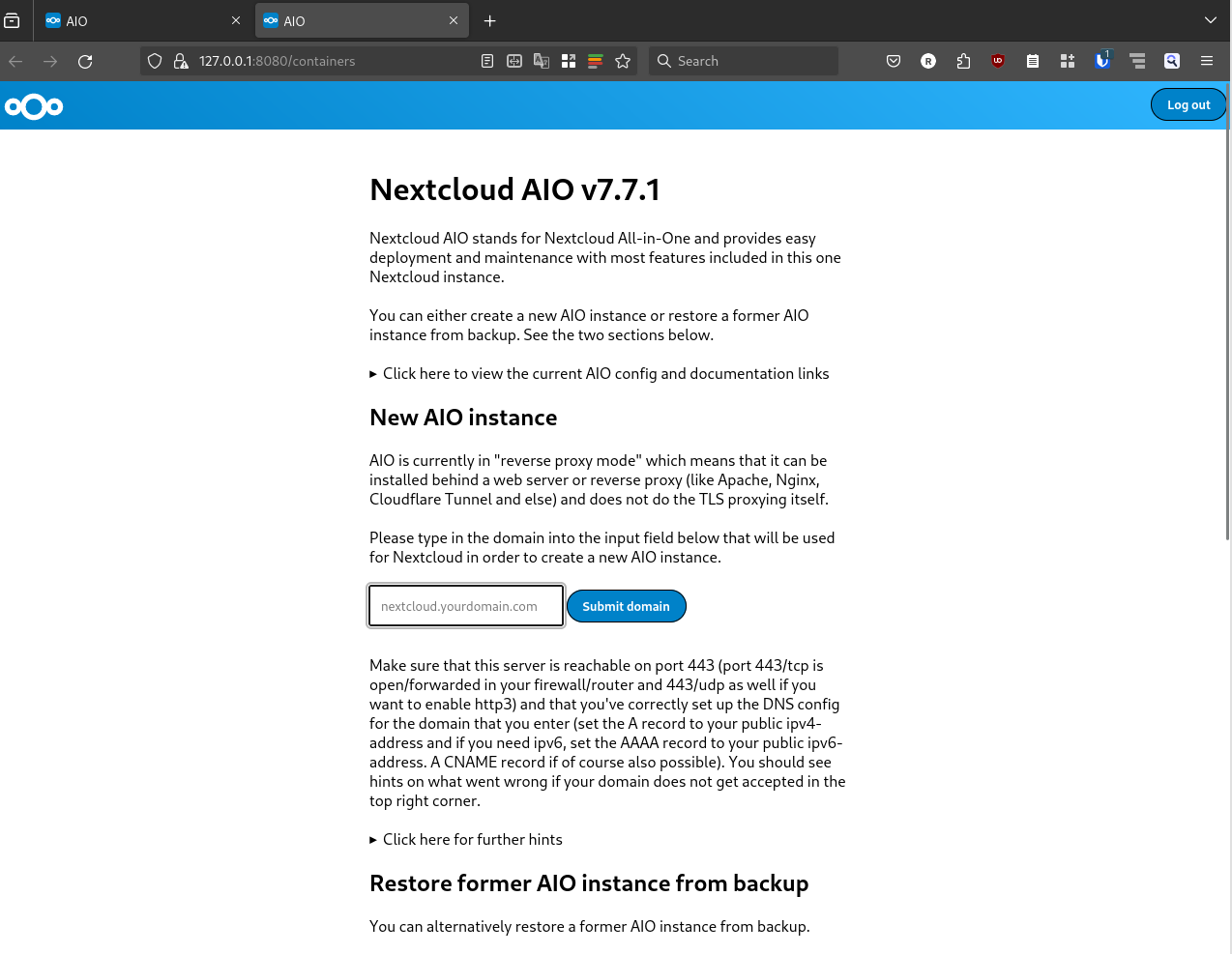
It will show an auto generated passphrase, you need to save this passphrase and make sure to not loose it. For the purposes of security, I have masked the passwords with capsicums. once you have noted down your password, you can proceed to the Nextcloud AIO login, enter your password and then login. After login you will be greeted with a screen like this.
Nextcloud AIO install with docker-compose and nginx reverse proxy
now you can put the domain that you want to use in the Submit domain field. Once the domain check is done, you will proceed to the next step and see another screen like this
Nextcloud AIO install with docker-compose and nginx reverse proxy
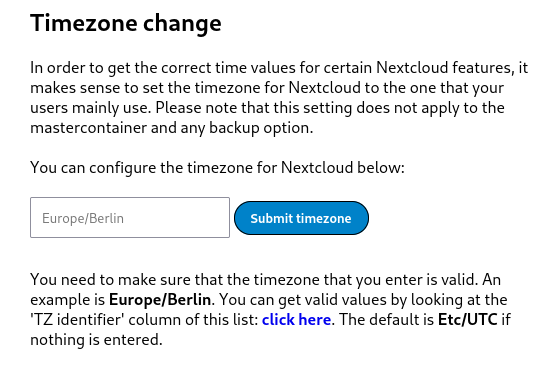
here you can select any optional containers for the features that you might want. IMPORTANT: Please make sure to also change the time zone at the bottom of the page according to the time zone you wish to operate in.
Nextcloud AIO install with docker-compose and nginx reverse proxy
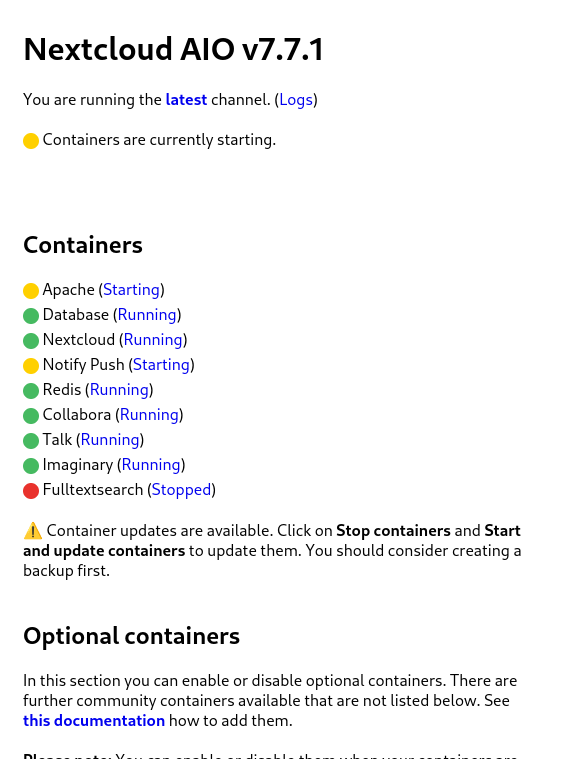
The timezone setup is also important because the data base will get initialized according to the set time zone. This could result in wrong initialization of database and you ending up in a startup loop for nextcloud. I faced this issue and could only resolve it after getting help from sahilister . Once you are done changing the timezone, and selecting any additional features you want, you can click on Download and start the containersIt will take some time for this process to finish, take a break and look at the farthest object in your room and take a sip of water. Once you are done, and the process has finished you will see a page similar to the following one.
Nextcloud AIO install with docker-compose and nginx reverse proxy
wait patiently for everything to turn green.
Nextcloud AIO install with docker-compose and nginx reverse proxy
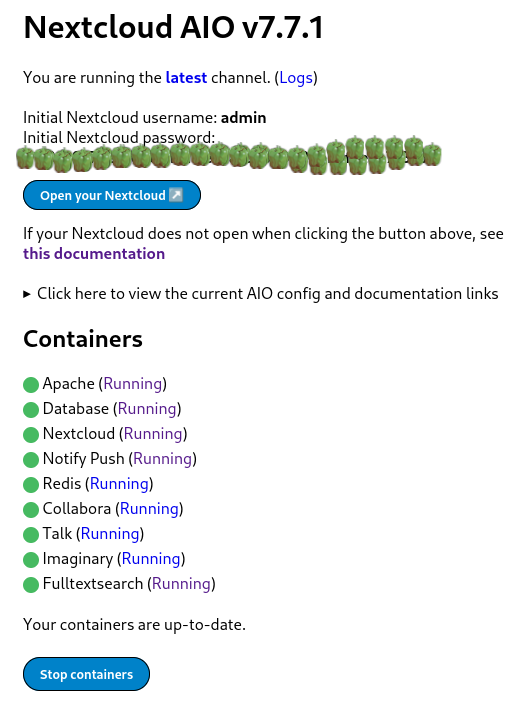
once all the containers have started properly, you can open the nextcloud login interface on your configured domain, the initial login details are auto generated as you can see from the above screenshot. Again you will see a password that you need to note down or save to enter the nextcloud interface. Capsicums will not work as passwords. I have masked the auto generated passwords using capsicums.Now you can click on Open your Nextcloud button or go to your configured domain to access the login screen.
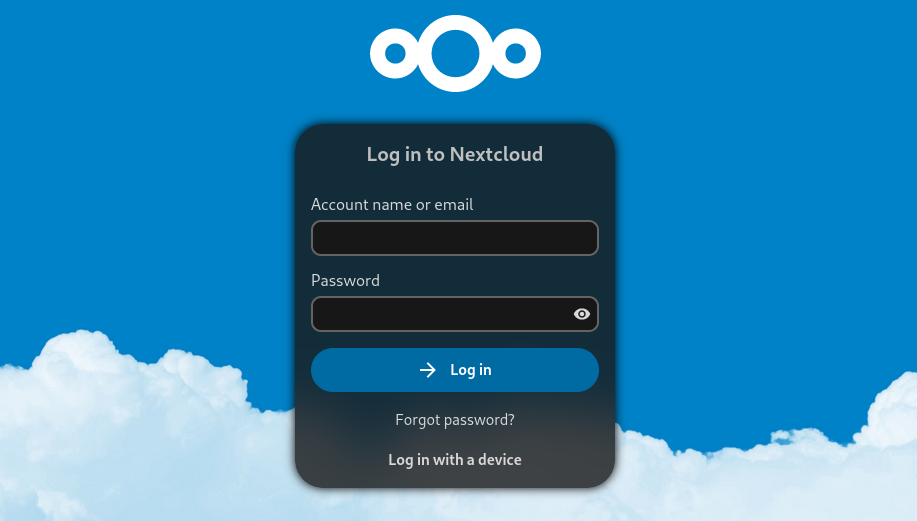
Nextcloud AIO install with docker-compose and nginx reverse proxy
You can use the login details from the previous step to login to the administrator account of your Nextcloud instance. There you have it, your very own cloud!

Additional Notes:

How to properly reset Nextcloud setup?While following the above steps, or while following steps from some other tutorial, you may have made a mistake, and want to start everything again from scratch. The instructions for it are present in the Nextcloud documentation here . Here is the TLDR for a docker-compose setup. These steps will delete all data, do not use these steps on an existing nextcloud setup unless you know what you are doing.
  • Stop your master container.
docker-compose -f compose.yml down -v
The above command will also remove the volume associated with the master container
  • Stop all the child containers that has been started by the master container.
docker stop nextcloud-aio-apache nextcloud-aio-notify-push nextcloud-aio-nextcloud nextcloud-aio-imaginary nextcloud-aio-fulltextsearch nextcloud-aio-redis nextcloud-aio-database nextcloud-aio-talk nextcloud-aio-collabora
  • Remove all the child containers that has been started by the master container
docker rm nextcloud-aio-apache nextcloud-aio-notify-push nextcloud-aio-nextcloud nextcloud-aio-imaginary nextcloud-aio-fulltextsearch nextcloud-aio-redis nextcloud-aio-database nextcloud-aio-talk nextcloud-aio-collabora
  • If you also wish to remove all images associated with nextcloud you can do it with
docker rmi $(docker images --filter "reference=nextcloud/*" -q)
  • remove all volumes associated with child containers
docker volume rm <volume-name>
  • remove the network associated with nextcloud
docker network rm nextcloud-aio

Additional references.
  1. Nextcloud Github
  2. Nextcloud reverse proxy documentation
  3. Nextcloud Administration Guide
  4. Nextcloud User Manual
  5. Nextcloud Developer&aposs manual

10 December 2023

Freexian Collaborators: Debian Contributions: Python 3.12 preparations, debian-printing, merged-/usr tranisition updates, and more! (by Utkarsh Gupta)

Contributing to Debian is part of Freexian s mission. This article covers the latest achievements of Freexian and their collaborators. All of this is made possible by organizations subscribing to our Long Term Support contracts and consulting services.

Preparing for Python 3.12 by Stefano Rivera Stefano uploaded a few packages in preparation for Python 3.12, including pycxx and cython. Cython has a major new version (Cython 3), adding support for 3.12, but also bringing changes that many packages in Debian aren t ready to build with, yet. Stefano uploaded it to Debian experimental and did an archive rebuild of affected packages, and some analysis of the result. Matthias Klose has since filed bugs for all of these issues.

debian-printing, by Thorsten Alteholz This month Thorsten invested some of the previously obtained money to build his own printlab. At the moment it only consists of a dedicated computer with an USB printer attached. Due to its 64GB RAM and an SSD, building of debian-printing packages is much faster now. Over time other printers will be added and understanding bugs should be a lot easier now. Also Thorsten again adopted two packages, namely mink and ink, and moved them to the debian-printing team.

Merged-/usr transition by Helmut Grohne, et al The dumat analysis tool has been improved in quite some aspects. Beyond fixing false negative diagnostics, it now recognizes protective diversions used for mitigating Multi-Arch: same file loss. It was found that the proposed mitigation for ineffective diversions does not work as expected. Trying to fix it up resulted in more problems, some of which remain unsolved as of this writing. Initial work on moving shared libraries in the essential set has been done. Meanwhile, the wider Debian community worked on fixing all known Multi-Arch: same file loss scenarios. This work is now being driven by Christian Hofstaedler and during the Mini DebConf in Cambridge, Chris Boot, tienne Mollier, Miguel Landaeta, Samuel Henrique, and Utkarsh Gupta sent the other half of the necessary patches.

Miscellaneous contributions
  • Stefano merged patches to support loong64 and hurd-amd64 in re2.
  • For the Cambridge mini-conf, Stefano added a web player to the DebConf video streaming frontend, as the Cambridge miniconf didn t have its own website to host the player.
  • Rapha l helped the upstream developers of hamster-time-tracker to prepare a new upstream release (the first in multiple years) and packaged that new release in Debian unstable.
  • Enrico joined Hemut in brainstorming some /usr-merge solutions.
  • Thorsten took care of RM-bugs to remove no longer needed packages from the Debian archive and closed about 50 of them.
  • Helmut ported the feature of mounting a fuse connection via /dev/fd/N from fuse3 to fuse2.
  • Helmut sent a number of patches simplifying unprivileged use of piuparts.
  • Roberto worked with Helmut to prepare the Shorewall package for the ongoing /usr-move transition.
  • Utkarsh also helped with the ongoing /usr-merge work by preparing patches for gitlab, libnfc, and net-tools.
  • Utkarsh, along with Helmut, brainstormed on fixing #961138, as this affects the whole archive and all the suites and not just R packages. Utkarsh intends to follow up on the bug in December.
  • Santiago organized a MiniDebConf in Uruguay. In total, nine people attended, including most of DDs in the surrounding area. Here s a nicely written blog by Gunnar Wolf.
  • Santiago also worked on some issues on Salsa CI, fixed with some merge requests: #462, #463, and #466.

9 December 2023

Simon Josefsson: Classic McEliece goes to IETF and OpenSSH

My earlier work on Streamlined NTRU Prime has been progressing along. The IETF document on sntrup761 in SSH has passed several process points. GnuPG s libgcrypt has added support for sntrup761. The libssh support for sntrup761 is working, but the merge request is stuck mostly due to lack of time to debug why the regression test suite sporadically errors out in non-sntrup761 related parts with the patch. The foundation for lattice-based post-quantum algorithms has some uncertainty around it, and I have felt that there is more to the post-quantum story than adding sntrup761 to implementations. Classic McEliece has been mentioned to me a couple of times, and I took some time to learn it and did a cut n paste job of the proposed ISO standard and published draft-josefsson-mceliece in the IETF to make the algorithm easily available to the IETF community. A high-quality implementation of Classic McEliece has been published as libmceliece and I ve been supporting the work of Jan Moj to package libmceliece for Debian, alas it has been stuck in the ftp-master NEW queue for manual review for over two months. The pre-dependencies librandombytes and libcpucycles are available in Debian already. All that text writing and packaging work set the scene to write some code. When I added support for sntrup761 in libssh, I became familiar with the OpenSSH code base, so it was natural to return to OpenSSH to experiment with a new SSH KEX for Classic McEliece. DJB suggested to pick mceliece6688128 and combine it with the existing X25519+sntrup761 or with plain X25519. While a three-algorithm hybrid between X25519, sntrup761 and mceliece6688128 would be a simple drop-in for those that don t want to lose the benefits offered by sntrup761, I decided to start the journey on a pure combination of X25519 with mceliece6688128. The key combiner in sntrup761x25519 is a simple SHA512 call and the only good I can say about that is that it is simple to describe and implement, and doesn t raise too many questions since it is already deployed. After procrastinating coding for months, once I sat down to work it only took a couple of hours until I had a successful Classic McEliece SSH connection. I suppose my brain had sorted everything in background before I started. To reproduce it, please try the following in a Debian testing environment (I use podman to get a clean environment).
# podman run -it --rm debian:testing-slim
apt update
apt dist-upgrade -y
apt install -y wget python3 librandombytes-dev libcpucycles-dev gcc make git autoconf libz-dev libssl-dev
cd ~
wget -q -O- https://lib.mceliece.org/libmceliece-20230612.tar.gz   tar xfz -
cd libmceliece-20230612/
./configure
make install
ldconfig
cd ..
git clone https://gitlab.com/jas/openssh-portable
cd openssh-portable
git checkout jas/mceliece
autoreconf
./configure # verify 'libmceliece support: yes'
make # CC="cc -DDEBUG_KEX=1 -DDEBUG_KEXDH=1 -DDEBUG_KEXECDH=1"
You should now have a working SSH client and server that supports Classic McEliece! Verify support by running ./ssh -Q kex and it should mention mceliece6688128x25519-sha512@openssh.com. To have it print plenty of debug outputs, you may remove the # character on the final line, but don t use such a build in production. You can test it as follows:
./ssh-keygen -A # writes to /usr/local/etc/ssh_host_...
# setup public-key based login by running the following:
./ssh-keygen -t rsa -f ~/.ssh/id_rsa -P ""
cat ~/.ssh/id_rsa.pub > ~/.ssh/authorized_keys
adduser --system sshd
mkdir /var/empty
while true; do $PWD/sshd -p 2222 -f /dev/null; done &
./ssh -v -p 2222 localhost -oKexAlgorithms=mceliece6688128x25519-sha512@openssh.com date
On the client you should see output like this:
OpenSSH_9.5p1, OpenSSL 3.0.11 19 Sep 2023
...
debug1: SSH2_MSG_KEXINIT sent
debug1: SSH2_MSG_KEXINIT received
debug1: kex: algorithm: mceliece6688128x25519-sha512@openssh.com
debug1: kex: host key algorithm: ssh-ed25519
debug1: kex: server->client cipher: chacha20-poly1305@openssh.com MAC: <implicit> compression: none
debug1: kex: client->server cipher: chacha20-poly1305@openssh.com MAC: <implicit> compression: none
debug1: expecting SSH2_MSG_KEX_ECDH_REPLY
debug1: SSH2_MSG_KEX_ECDH_REPLY received
debug1: Server host key: ssh-ed25519 SHA256:YognhWY7+399J+/V8eAQWmM3UFDLT0dkmoj3pIJ0zXs
...
debug1: Host '[localhost]:2222' is known and matches the ED25519 host key.
debug1: Found key in /root/.ssh/known_hosts:1
debug1: rekey out after 134217728 blocks
debug1: SSH2_MSG_NEWKEYS sent
debug1: expecting SSH2_MSG_NEWKEYS
debug1: SSH2_MSG_NEWKEYS received
debug1: rekey in after 134217728 blocks
...
debug1: Sending command: date
debug1: pledge: fork
debug1: permanently_set_uid: 0/0
Environment:
  USER=root
  LOGNAME=root
  HOME=/root
  PATH=/usr/bin:/bin:/usr/sbin:/sbin:/usr/local/bin
  MAIL=/var/mail/root
  SHELL=/bin/bash
  SSH_CLIENT=::1 46894 2222
  SSH_CONNECTION=::1 46894 ::1 2222
debug1: client_input_channel_req: channel 0 rtype exit-status reply 0
debug1: client_input_channel_req: channel 0 rtype eow@openssh.com reply 0
Sat Dec  9 22:22:40 UTC 2023
debug1: channel 0: free: client-session, nchannels 1
Transferred: sent 1048044, received 3500 bytes, in 0.0 seconds
Bytes per second: sent 23388935.4, received 78108.6
debug1: Exit status 0
Notice the kex: algorithm: mceliece6688128x25519-sha512@openssh.com output. How about network bandwidth usage? Below is a comparison of a complete SSH client connection such as the one above that log in and print date and logs out. Plain X25519 is around 7kb, X25519 with sntrup761 is around 9kb, and mceliece6688128 with X25519 is around 1MB. Yes, Classic McEliece has large keys, but for many environments, 1MB of data for the session establishment will barely be noticeable.
./ssh -v -p 2222 localhost -oKexAlgorithms=curve25519-sha256 date 2>&1   grep ^Transferred
Transferred: sent 3028, received 3612 bytes, in 0.0 seconds
./ssh -v -p 2222 localhost -oKexAlgorithms=sntrup761x25519-sha512@openssh.com date 2>&1   grep ^Transferred
Transferred: sent 4212, received 4596 bytes, in 0.0 seconds
./ssh -v -p 2222 localhost -oKexAlgorithms=mceliece6688128x25519-sha512@openssh.com date 2>&1   grep ^Transferred
Transferred: sent 1048044, received 3764 bytes, in 0.0 seconds
So how about session establishment time?
date; i=0; while test $i -le 100; do ./ssh -v -p 2222 localhost -oKexAlgorithms=curve25519-sha256 date > /dev/null 2>&1; i= expr $i + 1 ; done; date
Sat Dec  9 22:39:19 UTC 2023
Sat Dec  9 22:39:25 UTC 2023
# 6 seconds
date; i=0; while test $i -le 100; do ./ssh -v -p 2222 localhost -oKexAlgorithms=sntrup761x25519-sha512@openssh.com date > /dev/null 2>&1; i= expr $i + 1 ; done; date
Sat Dec  9 22:39:29 UTC 2023
Sat Dec  9 22:39:38 UTC 2023
# 9 seconds
date; i=0; while test $i -le 100; do ./ssh -v -p 2222 localhost -oKexAlgorithms=mceliece6688128x25519-sha512@openssh.com date > /dev/null 2>&1; i= expr $i + 1 ; done; date
Sat Dec  9 22:39:55 UTC 2023
Sat Dec  9 22:40:07 UTC 2023
# 12 seconds
I never noticed adding sntrup761, so I m pretty sure I wouldn t notice this increase either. This is all running on my laptop that runs Trisquel so take it with a grain of salt but at least the magnitude is clear. Future work items include: Happy post-quantum SSH ing! Update: Changing the mceliece6688128_keypair call to mceliece6688128f_keypair (i.e., using the fully compatible f-variant) results in McEliece being just as fast as sntrup761 on my machine. Update 2023-12-26: An initial IETF document draft-josefsson-ssh-mceliece-00 published.

8 December 2023

Jonathan Dowland: The scourge of Electron, the nostalgia of Pidgin

For reasons I won't go into right now, I've spent some of this year working on a refurbished Lenovo Thinkpad Yoga 260. Despite it being relatively underpowered, I love almost everything about it. Unfortunately the model I bought has 8G RAM which turned out to be more limiting than I thought it would be. You can do incredible things with 8G of RAM: incredible, wondrous things. And most of my work, whether that's wrangling containers, hacking on OpenJDK, or complex Haskell projects, are manageable. Where it falls down is driving the modern scourge: Electron, and by proxy, lots of modern IM tools: Slack (urgh), Discord (where one of my main IRC social communities moved to), WhatsApp Web1 and even Signal Desktop. For that reason, I've (temporarily) looked at alternatives, and I was pleasantly surprised to find serviceable plugins for Pidgin, the stalwart Instant Messenger multiplexer. I originally used Pidgin (then called Gaim) back in the last century, at the time to talk to ICQ, MSN Messenger and AIM (all but ICQ2 long dead). It truly is an elegant weapon from a more civilized age.
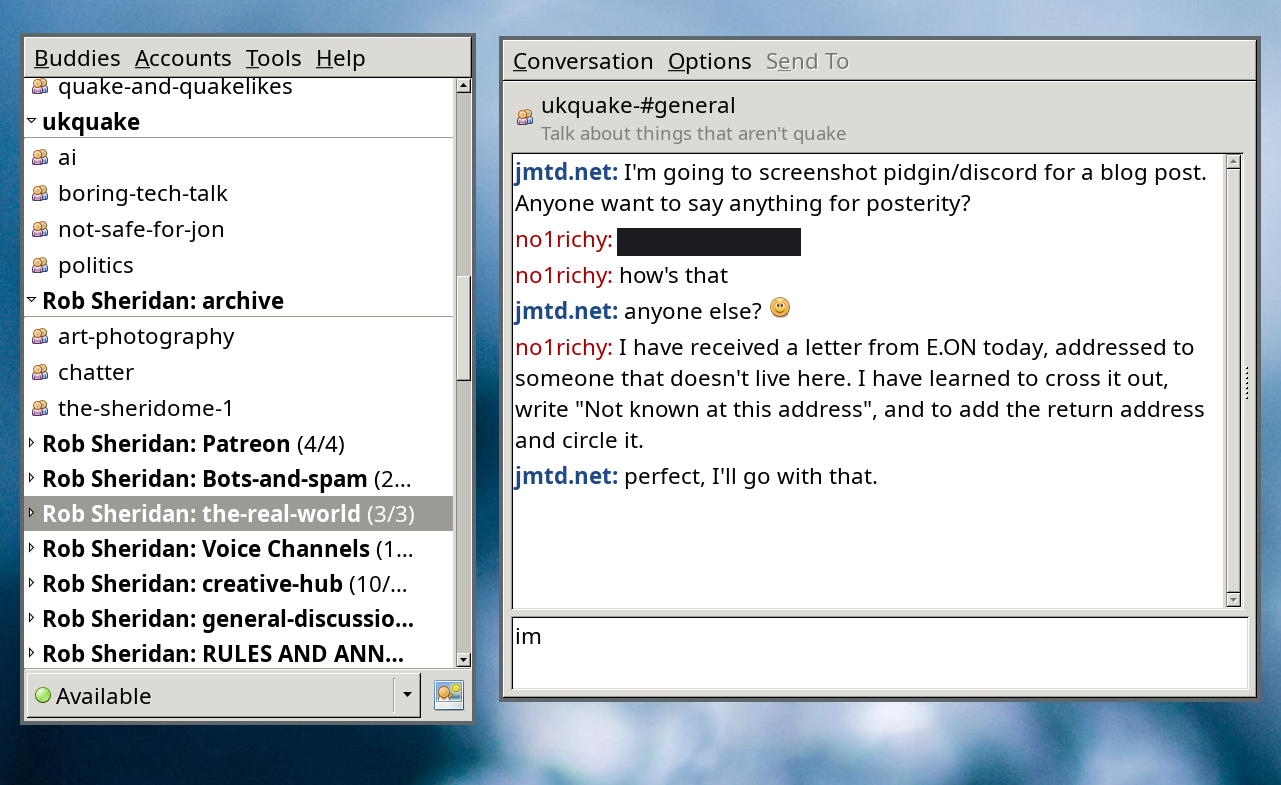
Discord from within Pidgin Discord from within Pidgin
The plugins are3: Pidgin with all of these plugins loaded runs perfectly well and consumes fractions of the RAM that each of those Electron apps did prior. A side-effect of moving these into Pidgin (in particular Discord) is a refocussing of the content. Fewer distractions around the text. The lack of auto-link embedding, and other such things, make it a cleaner, purer experience. This made me think of the Discord community I am in (I'm really only active in one). It used to be an IRC channel of people that I met through a mutual friend. Said friend recently departed Discord, due to the signal to noise ratio being too poor, and the incessant nudge to click on links, engage, engage, engage. I wonder if the experience mediated by Pidgin would be more tolerable to them?
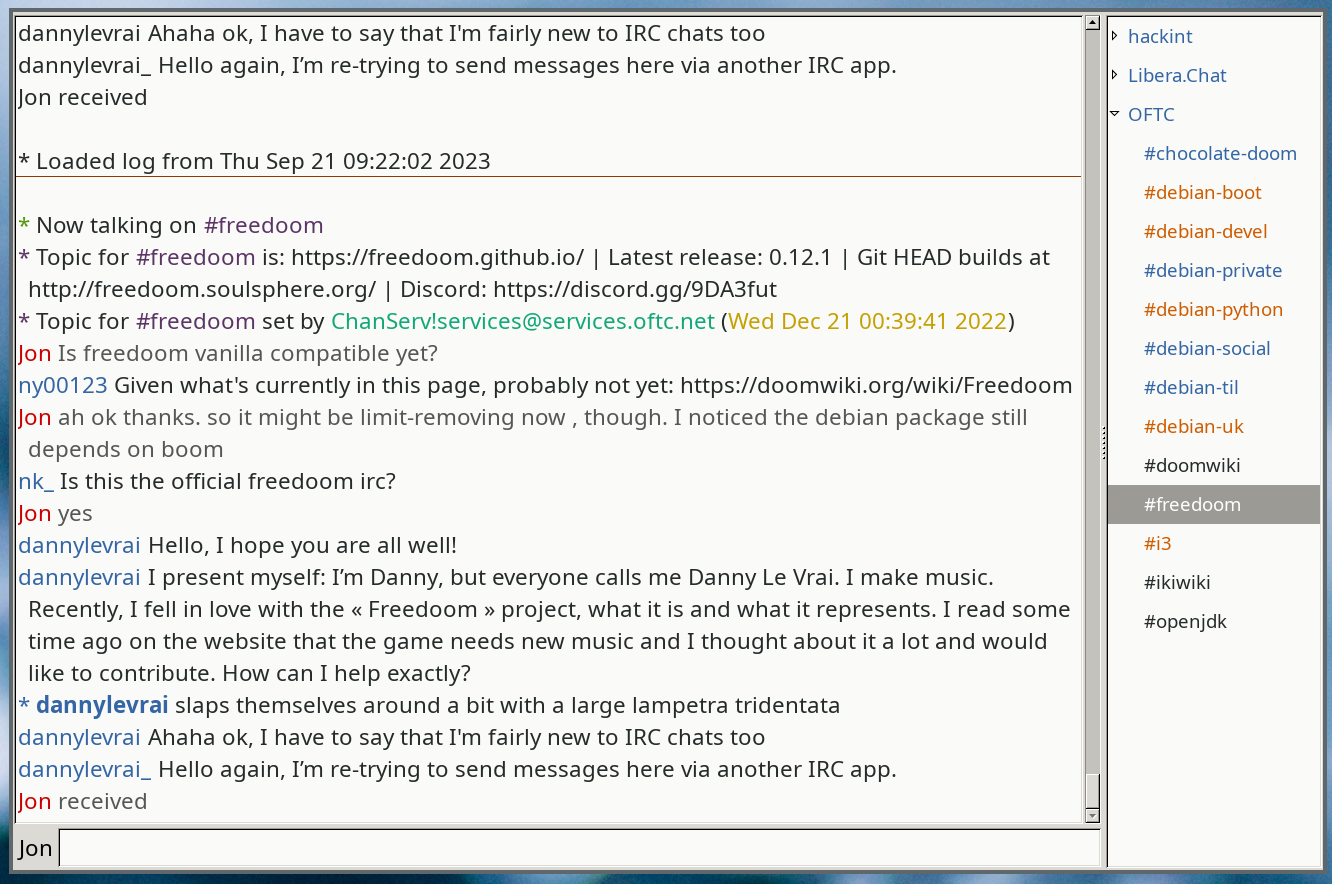
What my hexchat looks like What my hexchat looks like
I'm still active in one IRC channel (and inactive in many more). I could consider moving IRC into Pidgin as well. At the moment, my IRC client of choice is hexchat, which (like Pidgin) is still using GTK2 for the UI. There's something perversely pleasant about that.

  1. if you go to the trouble of trying to run it as an application distinct from your web browser.
  2. I'm still somewhat surprised ICQ is still going. I might try and recover my old ID.
  3. There may or may not be similar plugins for Slack, but as I (am forced to) use that for corporate stuff, I'm steering clear of them.

6 December 2023

Tim Retout: Nostalgia for my attention span

This post was possibly inspired by my daughter s homework assignment to interview an old person about technology change. Guess who s old now? Sometimes I look back at how life used to be, and remember what it was like. There are two key nostalgia points for me: before internet, and before smartphones.

Before the internet Before the internet, there were computers. There were always computers in my life, they were just less fancy, with mainly text and fewer graphics at first. These days we adapt our user interfaces to look more like DOS and call it retro , although claiming it s more efficient that way. Sometimes it is. The written word is a fundamental mode of human communication it resonates. Some of my earliest programming memories were typing lines of BASIC code into some sort of BBC Micro, usually not successfully. Most of my computer learning was largely theoretical, through Usborne books (now available online! Thanks internet for reducing the marginal cost of publishing to approximately zero) but without the benefit of a computer of my own. I went for a walk this morning, with a slight bite to the air, and bought a newspaper, like the old person I am (I m leaning in). Imagine that - a physical paper full of news. When I was an inquisitive sixth-former, TheGuardian cost 50 pence today it was 2.80. This increase far outstrips the rate of inflation, which would bring it to around 90 pence. No, this must surely reflect the drop in circulation of the physical edition, and the rise in advertisement-filled web content.

Before smartphones As the internet became mainstream, I remember dial-up, and Freeserve, and even the tail end of USENET, and IRC. This was still a time when email was a thing you had to be at your desk to check. Feature phones were very useful, but it was still possible to get lost. My university halls had a shared land-line phone on each floor. And I wrote on the internet. I remember commenting on blogs, and I think my writing was better back then; more free, less inhibited. I do find myself giving less attention to news squeezed into the small form-factor of a mobile phone. Chat messages and notification pings. I m not convinced this is great progress for humanity.

5 December 2023

Thomas Lange: FAI.me service now supports installing recommended packages

The FAI.me service for creating customized installation and cloud images has a new feature by a user requested it. You can now enable installing recommended packages for your custom package list. By default FAIme does only install the dependencies needed, but not the recommended packages. This was a very easy enhancement, only a few lines in the web interface and nearly no changes in the backend were needed. The web interface of the FAI.me service is available at https://fai-project.org/FAIme

26 November 2023

Niels Thykier: Providing online reference documentation for debputy

I do not think seasoned Debian contributors quite appreciate how much knowledge we have picked up and internalized. As an example, when I need to look up documentation for debhelper, I generally know which manpage to look in. I suspect most long time contributors would be able to a similar thing (maybe down 2-3 manpages). But new contributors does not have the luxury of years of experience. This problem is by no means unique to debhelper. One thing that debhelper does very well, is that it is hard for users to tell where a addon "starts" and debhelper "ends". It is clear you use addons, but the transition in and out of third party provided tools is generally smooth. This is a sign that things "just work(tm)". Except when it comes to documentation. Here, debhelper's static documentation does not include documentation for third party tooling. If you think from a debhelper maintainer's perspective, this seems obvious. Embedding documentation for all the third-party code would be very hard work, a layer-violation, etc.. But from a user perspective, we should not have to care "who" provides "what". As as user, I want to understand how this works and the more hoops I have to jump through to get that understanding, the more frustrated I will be with the toolstack. With this, I came to the conclusion that the best way to help users and solve the problem of finding the documentation was to provide "online documentation". It should be possible to ask debputy, "What attributes can I use in install-man?" or "What does path-metadata do?". Additionally, the lookup should work the same no matter if debputy provided the feature or some third-party plugin did. In the future, perhaps also other types of documentation such as tutorials or how-to guides. Below, I have some tentative results of my work so far. There are some improvements to be done. Notably, the commands for these documentation features are still treated a "plugin" subcommand features and should probably have its own top level "ask-me-anything" subcommand in the future.
Automatic discard rules Since the introduction of install rules, debputy has included an automatic filter mechanism that prunes out unwanted content. In 0.1.9, these filters have been named "Automatic discard rules" and you can now ask debputy to list them.
$ debputy plugin list automatic-discard-rules
+-----------------------+-------------+
  Name                    Provided By  
+-----------------------+-------------+
  python-cache-files      debputy      
  la-files                debputy      
  backup-files            debputy      
  version-control-paths   debputy      
  gnu-info-dir-file       debputy      
  debian-dir              debputy      
  doxygen-cruft-files     debputy      
+-----------------------+-------------+
For these rules, the provider can both provide a description but also an example of their usage.
$ debputy plugin show automatic-discard-rules la-files
Automatic Discard Rule: la-files
================================
Documentation: Discards any .la files beneath /usr/lib
Example
-------
    /usr/lib/libfoo.la        << Discarded (directly by the rule)
    /usr/lib/libfoo.so.1.0.0
The example is a live example. That is, the provider will provide debputy with a scenario and the expected outcome of that scenario. Here is the concrete code in debputy that registers this example:
api.automatic_discard_rule(
    "la-files",
    _debputy_prune_la_files,
    rule_reference_documentation="Discards any .la files beneath /usr/lib",
    examples=automatic_discard_rule_example(
        "usr/lib/libfoo.la",
        ("usr/lib/libfoo.so.1.0.0", False),
    ),
)
When showing the example, debputy will validate the example matches what the plugin provider intended. Lets say I was to introduce a bug in the code, so that the discard rule no longer worked. Then debputy would start to show the following:
# Output if the code or example is broken
$ debputy plugin show automatic-discard-rules la-files
[...]
Automatic Discard Rule: la-files
================================
Documentation: Discards any .la files beneath /usr/lib
Example
-------
    /usr/lib/libfoo.la        !! INCONSISTENT (code: keep, example: discard)
    /usr/lib/libfoo.so.1.0.0
debputy: warning: The example was inconsistent. Please file a bug against the plugin debputy
Obviously, it would be better if this validation could be added directly as a plugin test, so the CI pipeline would catch it. That is one my personal TODO list. :) One final remark about automatic discard rules before moving on. In 0.1.9, debputy will also list any path automatically discarded by one of these rules in the build output to make sure that the automatic discard rule feature is more discoverable.
Plugable manifest rules like the install rule In the manifest, there are several places where rules can be provided by plugins. To make life easier for users, debputy can now since 0.1.8 list all provided rules:
$ debputy plugin list plugable-manifest-rules
+-------------------------------+------------------------------+-------------+
  Rule Name                       Rule Type                      Provided By  
+-------------------------------+------------------------------+-------------+
  install                         InstallRule                    debputy      
  install-docs                    InstallRule                    debputy      
  install-examples                InstallRule                    debputy      
  install-doc                     InstallRule                    debputy      
  install-example                 InstallRule                    debputy      
  install-man                     InstallRule                    debputy      
  discard                         InstallRule                    debputy      
  move                            TransformationRule             debputy      
  remove                          TransformationRule             debputy      
  [...]                           [...]                          [...]        
  remove                          DpkgMaintscriptHelperCommand   debputy      
  rename                          DpkgMaintscriptHelperCommand   debputy      
  cross-compiling                 ManifestCondition              debputy      
  can-execute-compiled-binaries   ManifestCondition              debputy      
  run-build-time-tests            ManifestCondition              debputy      
  [...]                           [...]                          [...]        
+-------------------------------+------------------------------+-------------+
(Output trimmed a bit for space reasons) And you can then ask debputy to describe any of these rules:
$ debputy plugin show plugable-manifest-rules install
Generic install ( install )
===========================
The generic  install  rule can be used to install arbitrary paths into packages
and is *similar* to how  dh_install  from debhelper works.  It is a two "primary" uses.
  1) The classic "install into directory" similar to the standard  dh_install 
  2) The "install as" similar to  dh-exec 's  foo => bar  feature.
Attributes:
 -  source  (conditional): string
    sources  (conditional): List of string
   A path match ( source ) or a list of path matches ( sources ) defining the
   source path(s) to be installed. [...]
 -  dest-dir  (optional): string
   A path defining the destination *directory*. [...]
 -  into  (optional): string or a list of string
   A path defining the destination *directory*. [...]
 -  as  (optional): string
   A path defining the path to install the source as. [...]
 -  when  (optional): manifest condition (string or mapping of string)
   A condition as defined in [Conditional rules](https://salsa.debian.org/debian/debputy/-/blob/main/MANIFEST-FORMAT.md#Conditional rules).
This rule enforces the following restrictions:
 - The rule must use exactly one of:  source ,  sources 
 - The attribute  as  cannot be used with any of:  dest-dir ,  sources 
[...]
(Output trimmed a bit for space reasons) All the attributes and restrictions are auto-computed by debputy from information provided by the plugin. The associated documentation for each attribute is supplied by the plugin itself, The debputy API validates that all attributes are covered and the documentation does not describe non-existing fields. This ensures that you as a plugin provider never forget to document new attributes when you add them later. The debputy API for manifest rules are not quite stable yet. So currently only debputy provides rules here. However, it is my intention to lift that restriction in the future. I got the idea of supporting online validated examples when I was building this feature. However, sadly, I have not gotten around to supporting it yet.
Manifest variables like PACKAGE I also added a similar documentation feature for manifest variables such as PACKAGE . When I implemented this, I realized listing all manifest variables by default would probably be counter productive to new users. As an example, if you list all variables by default it would include DEB_HOST_MULTIARCH (the most common case) side-by-side with the the much less used DEB_BUILD_MULTIARCH and the even lessor used DEB_TARGET_MULTIARCH variable. Having them side-by-side implies they are of equal importance, which they are not. As an example, the ballpark number of unique packages for which DEB_TARGET_MULTIARCH is useful can be counted on two hands (and maybe two feet if you consider gcc-X distinct from gcc-Y). This is one of the cases, where experience makes us blind. Many of us probably have the "show me everything and I will find what I need" mentality. But that requires experience to be able to pull that off - especially if all alternatives are presented as equals. The cross-building terminology has proven to notoriously match poorly to people's expectation. Therefore, I took a deliberate choice to reduce the list of shown variables by default and in the output explicitly list what filters were active. In the current version of debputy (0.1.9), the listing of manifest-variables look something like this:
$ debputy plugin list manifest-variables
+----------------------------------+----------------------------------------+------+-------------+
  Variable (use via:   NAME  )   Value                                    Flag   Provided by  
+----------------------------------+----------------------------------------+------+-------------+
  DEB_HOST_ARCH                      amd64                                           debputy      
  [... other DEB_HOST_* vars ...]    [...]                                           debputy      
  DEB_HOST_MULTIARCH                 x86_64-linux-gnu                                debputy      
  DEB_SOURCE                         debputy                                         debputy      
  DEB_VERSION                        0.1.8                                           debputy      
  DEB_VERSION_EPOCH_UPSTREAM         0.1.8                                           debputy      
  DEB_VERSION_UPSTREAM               0.1.8                                           debputy      
  DEB_VERSION_UPSTREAM_REVISION      0.1.8                                           debputy      
  PACKAGE                            <package-name>                                  debputy      
  path:BASH_COMPLETION_DIR           /usr/share/bash-completion/completions          debputy      
+----------------------------------+----------------------------------------+------+-------------+
+-----------------------+--------+-------------------------------------------------------+
  Variable type           Value    Option                                                 
+-----------------------+--------+-------------------------------------------------------+
  Token variables         hidden   --show-token-variables OR --show-all-variables         
  Special use variables   hidden   --show-special-case-variables OR --show-all-variables  
+-----------------------+--------+-------------------------------------------------------+
I will probably tweak the concrete listing in the future. Personally, I am considering to provide short-hands variables for some of the DEB_HOST_* variables and then hide the DEB_HOST_* group from the default view as well. Maybe something like ARCH and MULTIARCH, which would default to their DEB_HOST_* counter part. This variable could then have extended documentation that high lights DEB_HOST_<X> as its source and imply that there are special cases for cross-building where you might need DEB_BUILD_<X> or DEB_TARGET_<X>. Speaking of variable documentation, you can also lookup the documentation for a given manifest variable:
$ debputy plugin show manifest-variables path:BASH_COMPLETION_DIR
Variable: path:BASH_COMPLETION_DIR
==================================
Documentation: Directory to install bash completions into
Resolved: /usr/share/bash-completion/completions
Plugin: debputy
This was my update on online reference documentation for debputy. I hope you found it useful. :)
Thanks On a closing note, I would like to thanks Jochen Sprickerhof, Andres Salomon, Paul Gevers for their recent contributions to debputy. Jochen and Paul provided a number of real world cases where debputy would crash or not work, which have now been fixed. Andres and Paul also provided corrections to the documentation.

23 November 2023

Freexian Collaborators: Debian Contributions: Preparing for Python 3.12, /usr-merge updates, invalid PEP-440 versions, and more! (by Utkarsh Gupta)

Contributing to Debian is part of Freexian s mission. This article covers the latest achievements of Freexian and their collaborators. All of this is made possible by organizations subscribing to our Long Term Support contracts and consulting services.

urllib3 s old security patch by Stefano Rivera Stefano ran into a test-suite failure in a new Debian package (python-truststore), caused by Debian s patch to urllib3 from a decade ago, making it enable TLS verification by default (remember those days!). Some analysis confirmed that this patch isn t useful any more, and could be removed. While working on the package, Stefano investigated the scope of the urllib3 2.x transition. It looks ready to start, not many packages are affected.

Preparing for Python 3.12 in dh-python by Stefano Rivera We are preparing to start the Python 3.12 transition in Debian. Two of the upstream changes that are going to cause a lot of packages to break could be worked-around in dh-python, so we did:
  • Distutils is no longer shipped in the Python stdlib. Packages need to Build-Depend on python3-setuptools to get a (compatibility shim) distutils. Until that happens, dh-python will Depend on setuptools.
  • A failure to find any tests to execute will now make the unittest runner exit 5, like pytest does. This was our change, to test-suites that have failed to be automatically discovered. It will cause many packages to fail to build, so until they explicitly skip running test suites, dh-python will ignore these failures.

/usr-merge by Helmut Grohne It has become clear that the planned changes to debhelper and systemd.pc cause more rc-bugs. Helmut researched these systematically and filed another stack of patches. At the time of this writing, the uploads would still cause about 40 rc-bugs. A new opt-in helper dh_movetousr has been developed and added to debhelper in trixie and unstable.

debian-printing, by Thorsten Alteholz This month Thorsten adopted two packages, namely rlpr and lprng, and moved them to the debian-printing team. As part of this Thorsten could close eight bugs in the BTS. Thorsten also uploaded a new upstream version of cups, which also meant that eleven bugs could be closed. As package hannah-foo2zjs still depended on the deprecated policykit-1 package, Thorsten changed the dependency list accordingly and could close one RC bug by the following upload.

Invalid PEP-440 Versions in Python Packages by Stefano Rivera Stefano investigated how many packages in Debian (typically Debian-native packages) recorded versions in their packaging metadata (egg-info directories) that weren t valid PEP-440 Python versions. pip is starting to enforce that all versions on the system are valid.

Miscellaneous contributions
  • distro-info-data updates in Debian, due to the new Ubuntu release, by Stefano.
  • DebConf 23 bookkeeping continues, but is winding down. Stefano still spends a little time on it.
  • Utkarsh continues to monitor and help with reimbursements.
  • Helmut continues to maintain architecture bootstrap and accidentally broke pam briefly
  • Anton uploaded boost1.83 and started to prepare a transition to make boost1.83 as a default boost version.
  • Rejuntada Debian UY 2023, a MiniDebConf that will be held in Montevideo, from 9 to 11 November, mainly organized by Santiago.

22 November 2023

Scarlett Gately Moore: A Season to be Thankful, Thank You!

Here in the US, we celebrate Thanksgiving tomorrow. I am thankful to be a part of such an amazing community. I have raised enough to manage another month and I can continue my job search in less dire circumstances. I am truly grateful to each and every one of you. While my focus will remain on my job hunt, I will be back next week at reduced hours to maintain my work. I have to alter my priorities to keep my hours reduced enough to focus on my job search so I will be contributing as follows: Again, thank you all ever so much for your support. Though, this didn t end up being my year, I am confident I will find my place in this career path in the near future. I could still use some funds to make land and car payment or at least partial. We purchased from friends so they won t take away my wheels or home, I just feel bad I haven t been able to make payments in awhile. Thanks for your consideration. https://gofund.me/f9f0fb53

Valhalla's Things: PDF planners 2024

Posted on November 22, 2023
A few years ago I wrote a bit of code to generate a custom printable planner, precisely to my taste. And then I showed the result to other people, and added a few variants for their own tastes. And I ve just generated the first 2024 file (yes, this year I m late with the printing and binding), and realized that it may be worth posting all the variants on this blog, in case somebody else is interested in using them. The files with -book in the name have been imposed on A4 paper for a 16 pages signature. All of the fonts have been converted to paths, for ease of printing (yes, this means that customizing the font requires running the script, sorry). A few planners in English: The same planners, in Italian: And finally a monthly planner with ephemerids for the town of Como (I mean, everybody everywhere needs one of those, right?); here the --book files are impressed for a 3 sheet (12 pages) signature. I hereby release all the PDFs linked in this blog post under the CC0 license. I ve just realized that the git repository linked above does not have licensing information, but I m not sure what s the right thing to do, since it s mostly a dump of unsupported works-for-me code, but if you need it for something (that is compatible with its unsupported status) other than running it for personal use (for which afaik there is an implicit license) let me know and I ll push decide on a license higher on the stack of things to do :D

21 November 2023

Mike Hommey: How I (kind of) killed Mercurial at Mozilla

Did you hear the news? Firefox development is moving from Mercurial to Git. While the decision is far from being mine, and I was barely involved in the small incremental changes that ultimately led to this decision, I feel I have to take at least some responsibility. And if you are one of those who would rather use Mercurial than Git, you may direct all your ire at me. But let's take a step back and review the past 25 years leading to this decision. You'll forgive me for skipping some details and any possible inaccuracies. This is already a long post, while I could have been more thorough, even I think that would have been too much. This is also not an official Mozilla position, only my personal perception and recollection as someone who was involved at times, but mostly an observer from a distance. From CVS to DVCS From its release in 1998, the Mozilla source code was kept in a CVS repository. If you're too young to know what CVS is, let's just say it's an old school version control system, with its set of problems. Back then, it was mostly ubiquitous in the Open Source world, as far as I remember. In the early 2000s, the Subversion version control system gained some traction, solving some of the problems that came with CVS. Incidentally, Subversion was created by Jim Blandy, who now works at Mozilla on completely unrelated matters. In the same period, the Linux kernel development moved from CVS to Bitkeeper, which was more suitable to the distributed nature of the Linux community. BitKeeper had its own problem, though: it was the opposite of Open Source, but for most pragmatic people, it wasn't a real concern because free access was provided. Until it became a problem: someone at OSDL developed an alternative client to BitKeeper, and licenses of BitKeeper were rescinded for OSDL members, including Linus Torvalds (they were even prohibited from purchasing one). Following this fiasco, in April 2005, two weeks from each other, both Git and Mercurial were born. The former was created by Linus Torvalds himself, while the latter was developed by Olivia Mackall, who was a Linux kernel developer back then. And because they both came out of the same community for the same needs, and the same shared experience with BitKeeper, they both were similar distributed version control systems. Interestingly enough, several other DVCSes existed: In this landscape, the major difference Git was making at the time was that it was blazing fast. Almost incredibly so, at least on Linux systems. That was less true on other platforms (especially Windows). It was a game-changer for handling large codebases in a smooth manner. Anyways, two years later, in 2007, Mozilla decided to move its source code not to Bzr, not to Git, not to Subversion (which, yes, was a contender), but to Mercurial. The decision "process" was laid down in two rather colorful blog posts. My memory is a bit fuzzy, but I don't recall that it was a particularly controversial choice. All of those DVCSes were still young, and there was no definite "winner" yet (GitHub hadn't even been founded). It made the most sense for Mozilla back then, mainly because the Git experience on Windows still wasn't there, and that mattered a lot for Mozilla, with its diverse platform support. As a contributor, I didn't think much of it, although to be fair, at the time, I was mostly consuming the source tarballs. Personal preferences Digging through my archives, I've unearthed a forgotten chapter: I did end up setting up both a Mercurial and a Git mirror of the Firefox source repository on alioth.debian.org. Alioth.debian.org was a FusionForge-based collaboration system for Debian developers, similar to SourceForge. It was the ancestor of salsa.debian.org. I used those mirrors for the Debian packaging of Firefox (cough cough Iceweasel). The Git mirror was created with hg-fast-export, and the Mercurial mirror was only a necessary step in the process. By that time, I had converted my Subversion repositories to Git, and switched off SVK. Incidentally, I started contributing to Git around that time as well. I apparently did this not too long after Mozilla switched to Mercurial. As a Linux user, I think I just wanted the speed that Mercurial was not providing. Not that Mercurial was that slow, but the difference between a couple seconds and a couple hundred milliseconds was a significant enough difference in user experience for me to prefer Git (and Firefox was not the only thing I was using version control for) Other people had also similarly created their own mirror, or with other tools. But none of them were "compatible": their commit hashes were different. Hg-git, used by the latter, was putting extra information in commit messages that would make the conversion differ, and hg-fast-export would just not be consistent with itself! My mirror is long gone, and those have not been updated in more than a decade. I did end up using Mercurial, when I got commit access to the Firefox source repository in April 2010. I still kept using Git for my Debian activities, but I now was also using Mercurial to push to the Mozilla servers. I joined Mozilla as a contractor a few months after that, and kept using Mercurial for a while, but as a, by then, long time Git user, it never really clicked for me. It turns out, the sentiment was shared by several at Mozilla. Git incursion In the early 2010s, GitHub was becoming ubiquitous, and the Git mindshare was getting large. Multiple projects at Mozilla were already entirely hosted on GitHub. As for the Firefox source code base, Mozilla back then was kind of a Wild West, and engineers being engineers, multiple people had been using Git, with their own inconvenient workflows involving a local Mercurial clone. The most popular set of scripts was moz-git-tools, to incorporate changes in a local Git repository into the local Mercurial copy, to then send to Mozilla servers. In terms of the number of people doing that, though, I don't think it was a lot of people, probably a few handfuls. On my end, I was still keeping up with Mercurial. I think at that time several engineers had their own unofficial Git mirrors on GitHub, and later on Ehsan Akhgari provided another mirror, with a twist: it also contained the full CVS history, which the canonical Mercurial repository didn't have. This was particularly interesting for engineers who needed to do some code archeology and couldn't get past the 2007 cutoff of the Mercurial repository. I think that mirror ultimately became the official-looking, but really unofficial, mozilla-central repository on GitHub. On a side note, a Mercurial repository containing the CVS history was also later set up, but that didn't lead to something officially supported on the Mercurial side. Some time around 2011~2012, I started to more seriously consider using Git for work myself, but wasn't satisfied with the workflows others had set up for themselves. I really didn't like the idea of wasting extra disk space keeping a Mercurial clone around while using a Git mirror. I wrote a Python script that would use Mercurial as a library to access a remote repository and produce a git-fast-import stream. That would allow the creation of a git repository without a local Mercurial clone. It worked quite well, but it was not able to incrementally update. Other, more complete tools existed already, some of which I mentioned above. But as time was passing and the size and depth of the Mercurial repository was growing, these tools were showing their limits and were too slow for my taste, especially for the initial clone. Boot to Git In the same time frame, Mozilla ventured in the Mobile OS sphere with Boot to Gecko, later known as Firefox OS. What does that have to do with version control? The needs of third party collaborators in the mobile space led to the creation of what is now the gecko-dev repository on GitHub. As I remember it, it was challenging to create, but once it was there, Git users could just clone it and have a working, up-to-date local copy of the Firefox source code and its history... which they could already have, but this was the first officially supported way of doing so. Coincidentally, Ehsan's unofficial mirror was having trouble (to the point of GitHub closing the repository) and was ultimately shut down in December 2013. You'll often find comments on the interwebs about how GitHub has become unreliable since the Microsoft acquisition. I can't really comment on that, but if you think GitHub is unreliable now, rest assured that it was worse in its beginning. And its sustainability as a platform also wasn't a given, being a rather new player. So on top of having this official mirror on GitHub, Mozilla also ventured in setting up its own Git server for greater control and reliability. But the canonical repository was still the Mercurial one, and while Git users now had a supported mirror to pull from, they still had to somehow interact with Mercurial repositories, most notably for the Try server. Git slowly creeping in Firefox build tooling Still in the same time frame, tooling around building Firefox was improving drastically. For obvious reasons, when version control integration was needed in the tooling, Mercurial support was always a no-brainer. The first explicit acknowledgement of a Git repository for the Firefox source code, other than the addition of the .gitignore file, was bug 774109. It added a script to install the prerequisites to build Firefox on macOS (still called OSX back then), and that would print a message inviting people to obtain a copy of the source code with either Mercurial or Git. That was a precursor to current bootstrap.py, from September 2012. Following that, as far as I can tell, the first real incursion of Git in the Firefox source tree tooling happened in bug 965120. A few days earlier, bug 952379 had added a mach clang-format command that would apply clang-format-diff to the output from hg diff. Obviously, running hg diff on a Git working tree didn't work, and bug 965120 was filed, and support for Git was added there. That was in January 2014. A year later, when the initial implementation of mach artifact was added (which ultimately led to artifact builds), Git users were an immediate thought. But while they were considered, it was not to support them, but to avoid actively breaking their workflows. Git support for mach artifact was eventually added 14 months later, in March 2016. From gecko-dev to git-cinnabar Let's step back a little here, back to the end of 2014. My user experience with Mercurial had reached a level of dissatisfaction that was enough for me to decide to take that script from a couple years prior and make it work for incremental updates. That meant finding a way to store enough information locally to be able to reconstruct whatever the incremental updates would be relying on (guess why other tools hid a local Mercurial clone under hood). I got something working rather quickly, and after talking to a few people about this side project at the Mozilla Portland All Hands and seeing their excitement, I published a git-remote-hg initial prototype on the last day of the All Hands. Within weeks, the prototype gained the ability to directly push to Mercurial repositories, and a couple months later, was renamed to git-cinnabar. At that point, as a Git user, instead of cloning the gecko-dev repository from GitHub and switching to a local Mercurial repository whenever you needed to push to a Mercurial repository (i.e. the aforementioned Try server, or, at the time, for reviews), you could just clone and push directly from/to Mercurial, all within Git. And it was fast too. You could get a full clone of mozilla-central in less than half an hour, when at the time, other similar tools would take more than 10 hours (needless to say, it's even worse now). Another couple months later (we're now at the end of April 2015), git-cinnabar became able to start off a local clone of the gecko-dev repository, rather than clone from scratch, which could be time consuming. But because git-cinnabar and the tool that was updating gecko-dev weren't producing the same commits, this setup was cumbersome and not really recommended. For instance, if you pushed something to mozilla-central with git-cinnabar from a gecko-dev clone, it would come back with a different commit hash in gecko-dev, and you'd have to deal with the divergence. Eventually, in April 2020, the scripts updating gecko-dev were switched to git-cinnabar, making the use of gecko-dev alongside git-cinnabar a more viable option. Ironically(?), the switch occurred to ease collaboration with KaiOS (you know, the mobile OS born from the ashes of Firefox OS). Well, okay, in all honesty, when the need of syncing in both directions between Git and Mercurial (we only had ever synced from Mercurial to Git) came up, I nudged Mozilla in the direction of git-cinnabar, which, in my (biased but still honest) opinion, was the more reliable option for two-way synchronization (we did have regular conversion problems with hg-git, nothing of the sort has happened since the switch). One Firefox repository to rule them all For reasons I don't know, Mozilla decided to use separate Mercurial repositories as "branches". With the switch to the rapid release process in 2011, that meant one repository for nightly (mozilla-central), one for aurora, one for beta, and one for release. And with the addition of Extended Support Releases in 2012, we now add a new ESR repository every year. Boot to Gecko also had its own branches, and so did Fennec (Firefox for Mobile, before Android). There are a lot of them. And then there are also integration branches, where developer's work lands before being merged in mozilla-central (or backed out if it breaks things), always leaving mozilla-central in a (hopefully) good state. Only one of them remains in use today, though. I can only suppose that the way Mercurial branches work was not deemed practical. It is worth noting, though, that Mercurial branches are used in some cases, to branch off a dot-release when the next major release process has already started, so it's not a matter of not knowing the feature exists or some such. In 2016, Gregory Szorc set up a new repository that would contain them all (or at least most of them), which eventually became what is now the mozilla-unified repository. This would e.g. simplify switching between branches when necessary. 7 years later, for some reason, the other "branches" still exist, but most developers are expected to be using mozilla-unified. Mozilla's CI also switched to using mozilla-unified as base repository. Honestly, I'm not sure why the separate repositories are still the main entry point for pushes, rather than going directly to mozilla-unified, but it probably comes down to switching being work, and not being a top priority. Also, it probably doesn't help that working with multiple heads in Mercurial, even (especially?) with bookmarks, can be a source of confusion. To give an example, if you aren't careful, and do a plain clone of the mozilla-unified repository, you may not end up on the latest mozilla-central changeset, but rather, e.g. one from beta, or some other branch, depending which one was last updated. Hosting is simple, right? Put your repository on a server, install hgweb or gitweb, and that's it? Maybe that works for... Mercurial itself, but that repository "only" has slightly over 50k changesets and less than 4k files. Mozilla-central has more than an order of magnitude more changesets (close to 700k) and two orders of magnitude more files (more than 700k if you count the deleted or moved files, 350k if you count the currently existing ones). And remember, there are a lot of "duplicates" of this repository. And I didn't even mention user repositories and project branches. Sure, it's a self-inflicted pain, and you'd think it could probably(?) be mitigated with shared repositories. But consider the simple case of two repositories: mozilla-central and autoland. You make autoland use mozilla-central as a shared repository. Now, you push something new to autoland, it's stored in the autoland datastore. Eventually, you merge to mozilla-central. Congratulations, it's now in both datastores, and you'd need to clean-up autoland if you wanted to avoid the duplication. Now, you'd think mozilla-unified would solve these issues, and it would... to some extent. Because that wouldn't cover user repositories and project branches briefly mentioned above, which in GitHub parlance would be considered as Forks. So you'd want a mega global datastore shared by all repositories, and repositories would need to only expose what they really contain. Does Mercurial support that? I don't think so (okay, I'll give you that: even if it doesn't, it could, but that's extra work). And since we're talking about a transition to Git, does Git support that? You may have read about how you can link to a commit from a fork and make-pretend that it comes from the main repository on GitHub? At least, it shows a warning, now. That's essentially the architectural reason why. So the actual answer is that Git doesn't support it out of the box, but GitHub has some backend magic to handle it somehow (and hopefully, other things like Gitea, Girocco, Gitlab, etc. have something similar). Now, to come back to the size of the repository. A repository is not a static file. It's a server with which you negotiate what you have against what it has that you want. Then the server bundles what you asked for based on what you said you have. Or in the opposite direction, you negotiate what you have that it doesn't, you send it, and the server incorporates what you sent it. Fortunately the latter is less frequent and requires authentication. But the former is more frequent and CPU intensive. Especially when pulling a large number of changesets, which, incidentally, cloning is. "But there is a solution for clones" you might say, which is true. That's clonebundles, which offload the CPU intensive part of cloning to a single job scheduled regularly. Guess who implemented it? Mozilla. But that only covers the cloning part. We actually had laid the ground to support offloading large incremental updates and split clones, but that never materialized. Even with all that, that still leaves you with a server that can display file contents, diffs, blames, provide zip archives of a revision, and more, all of which are CPU intensive in their own way. And these endpoints are regularly abused, and cause extra load to your servers, yes plural, because of course a single server won't handle the load for the number of users of your big repositories. And because your endpoints are abused, you have to close some of them. And I'm not mentioning the Try repository with its tens of thousands of heads, which brings its own sets of problems (and it would have even more heads if we didn't fake-merge them once in a while). Of course, all the above applies to Git (and it only gained support for something akin to clonebundles last year). So, when the Firefox OS project was stopped, there wasn't much motivation to continue supporting our own Git server, Mercurial still being the official point of entry, and git.mozilla.org was shut down in 2016. The growing difficulty of maintaining the status quo Slowly, but steadily in more recent years, as new tooling was added that needed some input from the source code manager, support for Git was more and more consistently added. But at the same time, as people left for other endeavors and weren't necessarily replaced, or more recently with layoffs, resources allocated to such tooling have been spread thin. Meanwhile, the repository growth didn't take a break, and the Try repository was becoming an increasing pain, with push times quite often exceeding 10 minutes. The ongoing work to move Try pushes to Lando will hide the problem under the rug, but the underlying problem will still exist (although the last version of Mercurial seems to have improved things). On the flip side, more and more people have been relying on Git for Firefox development, to my own surprise, as I didn't really push for that to happen. It just happened organically, by ways of git-cinnabar existing, providing a compelling experience to those who prefer Git, and, I guess, word of mouth. I was genuinely surprised when I recently heard the use of Git among moz-phab users had surpassed a third. I did, however, occasionally orient people who struggled with Mercurial and said they were more familiar with Git, towards git-cinnabar. I suspect there's a somewhat large number of people who never realized Git was a viable option. But that, on its own, can come with its own challenges: if you use git-cinnabar without being backed by gecko-dev, you'll have a hard time sharing your branches on GitHub, because you can't push to a fork of gecko-dev without pushing your entire local repository, as they have different commit histories. And switching to gecko-dev when you weren't already using it requires some extra work to rebase all your local branches from the old commit history to the new one. Clone times with git-cinnabar have also started to go a little out of hand in the past few years, but this was mitigated in a similar manner as with the Mercurial cloning problem: with static files that are refreshed regularly. Ironically, that made cloning with git-cinnabar faster than cloning with Mercurial. But generating those static files is increasingly time-consuming. As of writing, generating those for mozilla-unified takes close to 7 hours. I was predicting clone times over 10 hours "in 5 years" in a post from 4 years ago, I wasn't too far off. With exponential growth, it could still happen, although to be fair, CPUs have improved since. I will explore the performance aspect in a subsequent blog post, alongside the upcoming release of git-cinnabar 0.7.0-b1. I don't even want to check how long it now takes with hg-git or git-remote-hg (they were already taking more than a day when git-cinnabar was taking a couple hours). I suppose it's about time that I clarify that git-cinnabar has always been a side-project. It hasn't been part of my duties at Mozilla, and the extent to which Mozilla supports git-cinnabar is in the form of taskcluster workers on the community instance for both git-cinnabar CI and generating those clone bundles. Consequently, that makes the above git-cinnabar specific issues a Me problem, rather than a Mozilla problem. Taking the leap I can't talk for the people who made the proposal to move to Git, nor for the people who put a green light on it. But I can at least give my perspective. Developers have regularly asked why Mozilla was still using Mercurial, but I think it was the first time that a formal proposal was laid out. And it came from the Engineering Workflow team, responsible for issue tracking, code reviews, source control, build and more. It's easy to say "Mozilla should have chosen Git in the first place", but back in 2007, GitHub wasn't there, Bitbucket wasn't there, and all the available options were rather new (especially compared to the then 21 years-old CVS). I think Mozilla made the right choice, all things considered. Had they waited a couple years, the story might have been different. You might say that Mozilla stayed with Mercurial for so long because of the sunk cost fallacy. I don't think that's true either. But after the biggest Mercurial repository hosting service turned off Mercurial support, and the main contributor to Mercurial going their own way, it's hard to ignore that the landscape has evolved. And the problems that we regularly encounter with the Mercurial servers are not going to get any better as the repository continues to grow. As far as I know, all the Mercurial repositories bigger than Mozilla's are... not using Mercurial. Google has its own closed-source server, and Facebook has another of its own, and it's not really public either. With resources spread thin, I don't expect Mozilla to be able to continue supporting a Mercurial server indefinitely (although I guess Octobus could be contracted to give a hand, but is that sustainable?). Mozilla, being a champion of Open Source, also doesn't live in a silo. At some point, you have to meet your contributors where they are. And the Open Source world is now majoritarily using Git. I'm sure the vast majority of new hires at Mozilla in the past, say, 5 years, know Git and have had to learn Mercurial (although they arguably didn't need to). Even within Mozilla, with thousands(!) of repositories on GitHub, Firefox is now actually the exception rather than the norm. I should even actually say Desktop Firefox, because even Mobile Firefox lives on GitHub (although Fenix is moving back in together with Desktop Firefox, and the timing is such that that will probably happen before Firefox moves to Git). Heck, even Microsoft moved to Git! With a significant developer base already using Git thanks to git-cinnabar, and all the constraints and problems I mentioned previously, it actually seems natural that a transition (finally) happens. However, had git-cinnabar or something similarly viable not existed, I don't think Mozilla would be in a position to take this decision. On one hand, it probably wouldn't be in the current situation of having to support both Git and Mercurial in the tooling around Firefox, nor the resource constraints related to that. But on the other hand, it would be farther from supporting Git and being able to make the switch in order to address all the other problems. But... GitHub? I hope I made a compelling case that hosting is not as simple as it can seem, at the scale of the Firefox repository. It's also not Mozilla's main focus. Mozilla has enough on its plate with the migration of existing infrastructure that does rely on Mercurial to understandably not want to figure out the hosting part, especially with limited resources, and with the mixed experience hosting both Mercurial and git has been so far. After all, GitHub couldn't even display things like the contributors' graph on gecko-dev until recently, and hosting is literally their job! They still drop the ball on large blames (thankfully we have searchfox for those). Where does that leave us? Gitlab? For those criticizing GitHub for being proprietary, that's probably not open enough. Cloud Source Repositories? "But GitHub is Microsoft" is a complaint I've read a lot after the announcement. Do you think Google hosting would have appealed to these people? Bitbucket? I'm kind of surprised it wasn't in the list of providers that were considered, but I'm also kind of glad it wasn't (and I'll leave it at that). I think the only relatively big hosting provider that could have made the people criticizing the choice of GitHub happy is Codeberg, but I hadn't even heard of it before it was mentioned in response to Mozilla's announcement. But really, with literal thousands of Mozilla repositories already on GitHub, with literal tens of millions repositories on the platform overall, the pragmatic in me can't deny that it's an attractive option (and I can't stress enough that I wasn't remotely close to the room where the discussion about what choice to make happened). "But it's a slippery slope". I can see that being a real concern. LLVM also moved its repository to GitHub (from a (I think) self-hosted Subversion server), and ended up moving off Bugzilla and Phabricator to GitHub issues and PRs four years later. As an occasional contributor to LLVM, I hate this move. I hate the GitHub review UI with a passion. At least, right now, GitHub PRs are not a viable option for Mozilla, for their lack of support for security related PRs, and the more general shortcomings in the review UI. That doesn't mean things won't change in the future, but let's not get too far ahead of ourselves. The move to Git has just been announced, and the migration has not even begun yet. Just because Mozilla is moving the Firefox repository to GitHub doesn't mean it's locked in forever or that all the eggs are going to be thrown into one basket. If bridges need to be crossed in the future, we'll see then. So, what's next? The official announcement said we're not expecting the migration to really begin until six months from now. I'll swim against the current here, and say this: the earlier you can switch to git, the earlier you'll find out what works and what doesn't work for you, whether you already know Git or not. While there is not one unique workflow, here's what I would recommend anyone who wants to take the leap off Mercurial right now: As there is no one-size-fits-all workflow, I won't tell you how to organize yourself from there. I'll just say this: if you know the Mercurial sha1s of your previous local work, you can create branches for them with:
$ git branch <branch_name> $(git cinnabar hg2git <hg_sha1>)
At this point, you should have everything available on the Git side, and you can remove the .hg directory. Or move it into some empty directory somewhere else, just in case. But don't leave it here, it will only confuse the tooling. Artifact builds WILL be confused, though, and you'll have to ./mach configure before being able to do anything. You may also hit bug 1865299 if your working tree is older than this post. If you have any problem or question, you can ping me on #git-cinnabar or #git on Matrix. I'll put the instructions above somewhere on wiki.mozilla.org, and we can collaboratively iterate on them. Now, what the announcement didn't say is that the Git repository WILL NOT be gecko-dev, doesn't exist yet, and WON'T BE COMPATIBLE (trust me, it'll be for the better). Why did I make you do all the above, you ask? Because that won't be a problem. I'll have you covered, I promise. The upcoming release of git-cinnabar 0.7.0-b1 will have a way to smoothly switch between gecko-dev and the future repository (incidentally, that will also allow to switch from a pure git-cinnabar clone to a gecko-dev one, for the git-cinnabar users who have kept reading this far). What about git-cinnabar? With Mercurial going the way of the dodo at Mozilla, my own need for git-cinnabar will vanish. Legitimately, this begs the question whether it will still be maintained. I can't answer for sure. I don't have a crystal ball. However, the needs of the transition itself will motivate me to finish some long-standing things (like finalizing the support for pushing merges, which is currently behind an experimental flag) or implement some missing features (support for creating Mercurial branches). Git-cinnabar started as a Python script, it grew a sidekick implemented in C, which then incorporated some Rust, which then cannibalized the Python script and took its place. It is now close to 90% Rust, and 10% C (if you don't count the code from Git that is statically linked to it), and has sort of become my Rust playground (it's also, I must admit, a mess, because of its history, but it's getting better). So the day to day use with Mercurial is not my sole motivation to keep developing it. If it were, it would stay stagnant, because all the features I need are there, and the speed is not all that bad, although I know it could be better. Arguably, though, git-cinnabar has been relatively stagnant feature-wise, because all the features I need are there. So, no, I don't expect git-cinnabar to die along Mercurial use at Mozilla, but I can't really promise anything either. Final words That was a long post. But there was a lot of ground to cover. And I still skipped over a bunch of things. I hope I didn't bore you to death. If I did and you're still reading... what's wrong with you? ;) So this is the end of Mercurial at Mozilla. So long, and thanks for all the fish. But this is also the beginning of a transition that is not easy, and that will not be without hiccups, I'm sure. So fasten your seatbelts (plural), and welcome the change. To circle back to the clickbait title, did I really kill Mercurial at Mozilla? Of course not. But it's like I stumbled upon a few sparks and tossed a can of gasoline on them. I didn't start the fire, but I sure made it into a proper bonfire... and now it has turned into a wildfire. And who knows? 15 years from now, someone else might be looking back at how Mozilla picked Git at the wrong time, and that, had we waited a little longer, we would have picked some yet to come new horse. But hey, that's the tech cycle for you.

Russ Allbery: Review: Thud!

Review: Thud!, by Terry Pratchett
Series: Discworld #34
Publisher: Harper
Copyright: October 2005
Printing: November 2014
ISBN: 0-06-233498-0
Format: Mass market
Pages: 434
Thud! is the 34th Discworld novel and the seventh Watch novel. It is partly a sequel to The Fifth Elephant, partly a sequel to Night Watch, and references many of the previous Watch novels. This is not a good place to start. Dwarfs and trolls have a long history of conflict, as one might expect between a race of creatures who specialize in mining and a race of creatures whose vital organs are sometimes the targets of that mining. The first battle of Koom Valley was the place where that enmity was made concrete and given a symbol. Now that there are large dwarf and troll populations in Ankh-Morpork, the upcoming anniversary of that battle is the excuse for rising tensions. Worse, Grag Hamcrusher, a revered deep-down dwarf and a dwarf supremacist, is giving incendiary speeches about killing all trolls and appears to be tunneling under the city. Then whispers run through the city's dwarfs that Hamcrusher has been murdered by a troll. Vimes has no patience for racial tensions, or for the inspection of the Watch by one of Vetinari's excessively competent clerks, or the political pressure to add a vampire to the Watch over his prejudiced objections. He was already grumpy before the murder and is in absolutely no mood to be told by deep-down dwarfs who barely believe that humans exist that the murder of a dwarf underground is no affair of his. Meanwhile, The Battle of Koom Valley by Methodia Rascal has been stolen from the Ankh-Morpork Royal Art Museum, an impressive feat given that the painting is ten feet high and fifty feet long. It was painted in impressive detail by a madman who thought he was a chicken, and has been the spark for endless theories about clues to some great treasure or hidden knowledge, culminating in the conspiratorial book Koom Valley Codex. But the museum prides itself on allowing people to inspect and photograph the painting to their heart's content and was working on a new room to display it. It's not clear why someone would want to steal it, but Colon and Nobby are on the case. This was a good time to read this novel. Sadly, the same could be said of pretty much every year since it was written. "Thud" in the title is a reference to Hamcrusher's murder, which was supposedly done by a troll club that was found nearby, but it's also a reference to a board game that we first saw in passing in Going Postal. We find out a lot more about Thud in this book. It's an asymmetric two-player board game that simulates a stylized battle between dwarf and troll forces, with one player playing the trolls and the other playing the dwarfs. The obvious comparison is to chess, but a better comparison would be to the old Steve Jackson Games board game Ogre, which also featured asymmetric combat mechanics. (I'm sure there are many others.) This board game will become quite central to the plot of Thud! in ways that I thought were ingenious. I thought this was one of Pratchett's best-plotted books to date. There are a lot of things happening, involving essentially every member of the Watch that we've met in previous books, and they all matter and I was never confused by how they fit together. This book is full of little callbacks and apparently small things that become important later in a way that I found delightful to read, down to the children's book that Vimes reads to his son and that turns into the best scene of the book. At this point in my Discworld read-through, I can see why the Watch books are considered the best sub-series. It feels like Pratchett kicks the quality of writing up a notch when he has Vimes as a protagonist. In several books now, Pratchett has created a villain by taking some human characteristic and turning it into an external force that acts on humans. (See, for instance the Gonne in Men at Arms, or the hiver in A Hat Full of Sky.) I normally do not like this plot technique, both because I think it lets humans off the hook in a way that cheapens the story and because this type of belief has a long and bad reputation in religions where it is used to dodge personal responsibility and dehumanize one's enemies. When another of those villains turned up in this book, I was dubious. But I think Pratchett pulls off this type of villain as well here as I've seen it done. He lifts up a facet of humanity to let the reader get a better view, but somehow makes it explicit that this is concretized metaphor. This force is something people create and feed and choose and therefore are responsible for. The one sour note that I do have to complain about is that Pratchett resorts to some cheap and annoying "men are from Mars, women are from Venus" nonsense, mostly around Nobby's subplot but in a few other places (Sybil, some of Angua's internal monologue) as well. It's relatively minor, and I might let it pass without grumbling in other books, but usually Pratchett is better on gender than this. I expected better and it got under my skin. Otherwise, though, this was a quietly excellent book. It doesn't have the emotional gut punch of Night Watch, but the plotting is superb and the pacing is a significant improvement over The Fifth Elephant. The parody is of The Da Vinci Code, which is both more interesting than Pratchett's typical movie parodies and delightfully subtle. We get more of Sybil being a bad-ass, which I am always here for. There's even some lovely world-building in the form of dwarven Devices. I love how Pratchett has built Vimes up into one of the most deceptively heroic figures on Discworld, but also shows all of the support infrastructure that ensures Vimes maintain his principles. On the surface, Thud! has a lot in common with Vimes's insistently moral stance in Jingo, but here it is more obvious how Vimes's morality happens in part because his wife, his friends, and his boss create the conditions for it to thrive. Highly recommended to anyone who has gotten this far. Rating: 9 out of 10

16 November 2023

Dimitri John Ledkov: Ubuntu 23.10 significantly reduces the installed kernel footprint


Photo by Pixabay
Ubuntu systems typically have up to 3 kernels installed, before they are auto-removed by apt on classic installs. Historically the installation was optimized for metered download size only. However, kernel size growth and usage no longer warrant such optimizations. During the 23.10 Mantic Minatour cycle, I led a coordinated effort across multiple teams to implement lots of optimizations that together achieved unprecedented install footprint improvements.

Given a typical install of 3 generic kernel ABIs in the default configuration on a regular-sized VM (2 CPU cores 8GB of RAM) the following metrics are achieved in Ubuntu 23.10 versus Ubuntu 22.04 LTS:

  • 2x less disk space used (1,417MB vs 2,940MB, including initrd)

  • 3x less peak RAM usage for the initrd boot (68MB vs 204MB)

  • 0.5x increase in download size (949MB vs 600MB)

  • 2.5x faster initrd generation (4.5s vs 11.3s)

  • approximately the same total time (103s vs 98s, hardware dependent)


For minimal cloud images that do not install either linux-firmware or modules extra the numbers are:

  • 1.3x less disk space used (548MB vs 742MB)

  • 2.2x less peak RAM usage for initrd boot (27MB vs 62MB)

  • 0.4x increase in download size (207MB vs 146MB)


Hopefully, the compromise of download size, relative to the disk space & initrd savings is a win for the majority of platforms and use cases. For users on extremely expensive and metered connections, the likely best saving is to receive air-gapped updates or skip updates.

This was achieved by precompressing kernel modules & firmware files with the maximum level of Zstd compression at package build time; making actual .deb files uncompressed; assembling the initrd using split cpio archives - uncompressed for the pre-compressed files, whilst compressing only the userspace portions of the initrd; enabling in-kernel module decompression support with matching kmod; fixing bugs in all of the above, and landing all of these things in time for the feature freeze. Whilst leveraging the experience and some of the design choices implementations we have already been shipping on Ubuntu Core. Some of these changes are backported to Jammy, but only enough to support smooth upgrades to Mantic and later. Complete gains are only possible to experience on Mantic and later.

The discovered bugs in kernel module loading code likely affect systems that use LoadPin LSM with kernel space module uncompression as used on ChromeOS systems. Hopefully, Kees Cook or other ChromeOS developers pick up the kernel fixes from the stable trees. Or you know, just use Ubuntu kernels as they do get fixes and features like these first.

The team that designed and delivered these changes is large: Benjamin Drung, Andrea Righi, Juerg Haefliger, Julian Andres Klode, Steve Langasek, Michael Hudson-Doyle, Robert Kratky, Adrien Nader, Tim Gardner, Roxana Nicolescu - and myself Dimitri John Ledkov ensuring the most optimal solution is implemented, everything lands on time, and even implementing portions of the final solution.

Hi, It's me, I am a Staff Engineer at Canonical and we are hiring https://canonical.com/careers.

Lots of additional technical details and benchmarks on a huge range of diverse hardware and architectures, and bikeshedding all the things below:

For questions and comments please post to Kernel section on Ubuntu Discourse.


13 November 2023

Freexian Collaborators: Monthly report about Debian Long Term Support, October 2023 (by Roberto C. S nchez)

Like each month, have a look at the work funded by Freexian s Debian LTS offering.

Debian LTS contributors In October, 18 contributors have been paid to work on Debian LTS, their reports are available:
  • Adrian Bunk did 8.0h (out of 7.75h assigned and 10.0h from previous period), thus carrying over 9.75h to the next month.
  • Anton Gladky did 9.5h (out of 9.5h assigned and 5.5h from previous period), thus carrying over 5.5h to the next month.
  • Bastien Roucari s did 16.0h (out of 16.75h assigned and 1.0h from previous period), thus carrying over 1.75h to the next month.
  • Ben Hutchings did 8.0h (out of 17.75h assigned), thus carrying over 9.75h to the next month.
  • Chris Lamb did 17.0h (out of 17.75h assigned), thus carrying over 0.75h to the next month.
  • Emilio Pozuelo Monfort did 17.5h (out of 17.75h assigned), thus carrying over 0.25h to the next month.
  • Guilhem Moulin did 9.75h (out of 17.75h assigned), thus carrying over 8.0h to the next month.
  • Helmut Grohne did 1.5h (out of 10.0h assigned), thus carrying over 8.5h to the next month.
  • Lee Garrett did 10.75h (out of 17.75h assigned), thus carrying over 7.0h to the next month.
  • Markus Koschany did 30.0h (out of 30.0h assigned).
  • Ola Lundqvist did 4.0h (out of 0h assigned and 19.5h from previous period), thus carrying over 15.5h to the next month.
  • Roberto C. S nchez did 12.0h (out of 5.0h assigned and 7.0h from previous period).
  • Santiago Ruano Rinc n did 13.625h (out of 7.75h assigned and 8.25h from previous period), thus carrying over 2.375h to the next month.
  • Sean Whitton did 13.0h (out of 6.0h assigned and 7.0h from previous period).
  • Sylvain Beucler did 7.5h (out of 11.25h assigned and 6.5h from previous period), thus carrying over 10.25h to the next month.
  • Thorsten Alteholz did 14.0h (out of 14.0h assigned).
  • Tobias Frost did 16.0h (out of 9.25h assigned and 6.75h from previous period).
  • Utkarsh Gupta did 0.0h (out of 0.75h assigned and 17.0h from previous period), thus carrying over 17.75h to the next month.

Evolution of the situation In October, we have released 49 DLAs. Of particular note in the month of October, LTS contributor Chris Lamb issued DLA 3627-1 pertaining to Redis, the popular key-value database similar to Memcached, which was vulnerable to an authentication bypass vulnerability. Fixing this vulnerability involved dealing with a race condition that could allow another process an opportunity to establish an otherwise unauthorized connection. LTS contributor Markus Koschany was involved in the mitigation of CVE-2023-44487, which is a protocol-level vulnerability in the HTTP/2 protocol. The impacts within Debian involved multiple packages, across multiple releases, with multiple advisories being released (both DSA for stable and old-stable, and DLA for LTS). Markus reviewed patches and security updates prepared by other Debian developers, investigated reported regressions, provided patches for the aforementioned regressions, and issued several security updates as part of this. Additionally, as MariaDB 10.3 (the version originally included with Debian buster) passed end-of-life earlier this year, LTS contributor Emilio Pozuelo Monfort has begun investigating the feasibility of backporting MariaDB 10.11. The work is in early stages, with much testing and analysis remaining before a final decision can be made, as this only one of several available potential courses of action concerning MariaDB. Finally, LTS contributor Lee Garrett has invested considerable effort into the development the Functional Test Framework here. While so far only an initial version has been published, it already has several features which we intend to begin leveraging for testing of LTS packages. In particular, the FTF supports provisioning multiple VMs for the purposes of performing functional tests of network-facing services (e.g., file services, authentication, etc.). These tests are in addition to the various unit-level tests which are executed during package build time. Development work will continue on FTF and as it matures and begins to see wider use within LTS we expect to improve the quality of the updates we publish.

Thanks to our sponsors Sponsors that joined recently are in bold.

Next.

Previous.