Search Results: "otto"

21 July 2014

Andrew Pollock: [debian] Day 173: Investigation for bug #749410 and fixing my VMs

I have a couple of virt-manager virtual machines for doing DHCP-related work. I have one for the DHCP server and one for the DHCP client, and I have a private network between the two so I can simulate DHCP requests without messing up anything else. It works nicely. I got a bit carried away, and I use LVM to snapshots for the work I do, so that when I'm done I can throw away the virtual machine's disks and work with a new snapshot next time I want to do something. I have a cron job, that on a good day, fires up the virtual machines using the master logical volumes and does a dist-upgrade on a weekly basis. It seems to have varying degrees of success though. So I fired up my VMs to do some investigation of the problem for #749410 and discovered that they weren't booting, because the initramfs couldn't find the root filesystem. Upon investigation, the problem seemed to be that the logical volumes weren't getting activated. I didn't get to the bottom of why, but a manual activation of the logical volumes allowed the instances to continue booting successfully, and after doing manual dist-upgrades and kernel upgrades, they booted cleanly again. I'm not sure if I got hit by a passing bug in unstable, or what the problem was. I did burn about 2.5 hours just fixing everything up though. Then I realised that there'd been more activity on the bug since I'd last read it while I was on vacation, and half the investigation I needed to do wasn't necessary any more. Lesson learned. I haven't got to the bottom of the bug yet, but I had a fun day anyway.

16 July 2014

Vincent Sanders

It is no great secret that my colleagues at Collabora have been doing work with the Raspberry Pi Foundation.

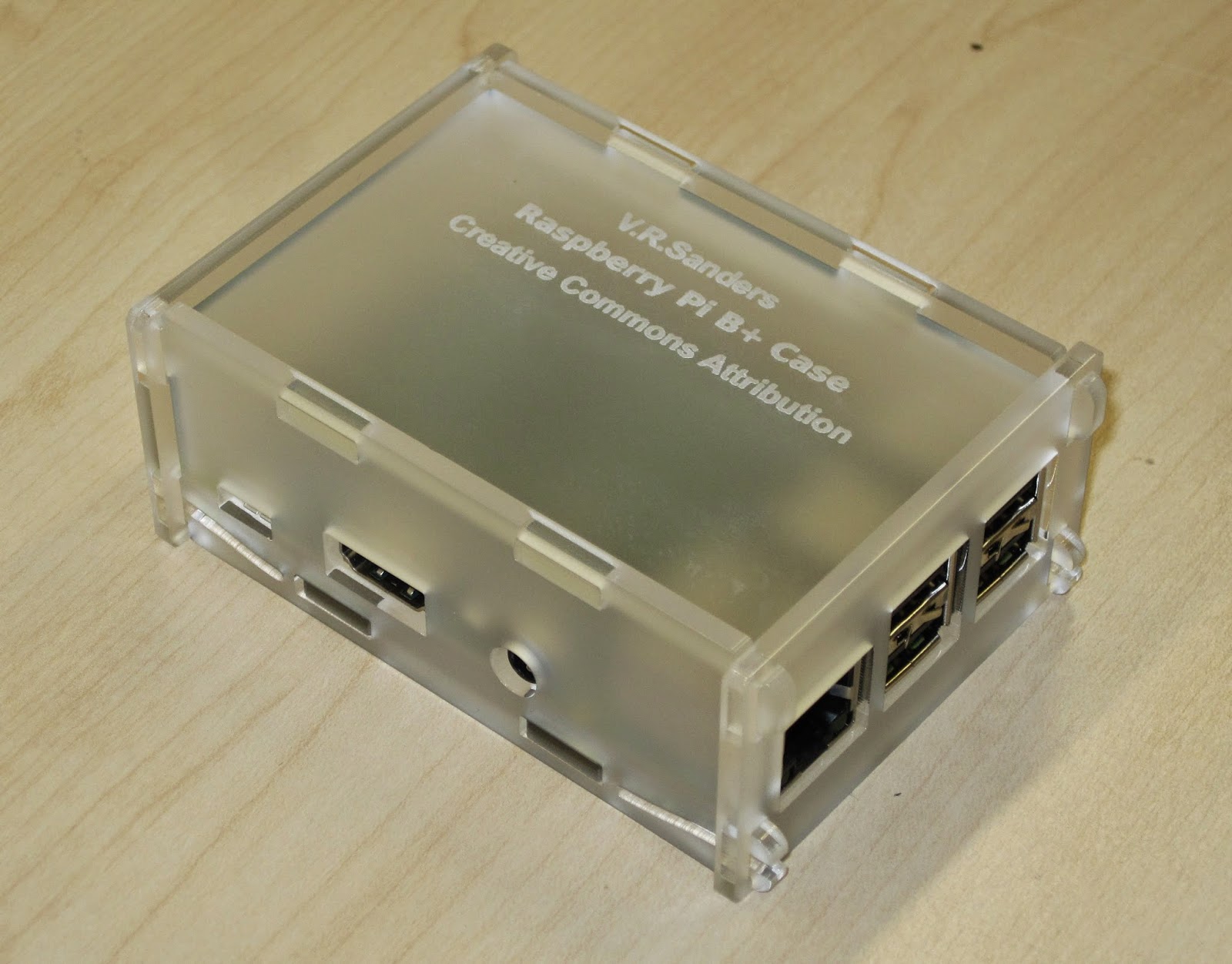
My desk is very near Marco and I often see him working with the various Pi boards. Recently he obtained one of the new B+ units for testing and I thought it looked a little sad sat naked on his desk.

To remedy this bare board problem I designed and built a laser cut a case for him and now the B+ has been publicly released I can make the design freely available.

The design is completely original though is inspired by several other plastic "clip" type designs I have seen. Originally I created and debugged the case design for my parallella though tweaking it for the Pi was pretty easy.

The design is under a CC attribution licence and I ought to say that my employer is in no way responsible for this, its all my own fault.

8 July 2014

Joey Hess: laptop death

So I was at Ocracoke island, camping with family, and I brought my laptop along as I've done probably half a dozen times before. An enormous thuderstorm came up. It rained for 8 hours and thundered for 3 of those. Some lightning cracks quite close by as we crouched in the food tent, our feet up off the increasingly wet ground "just in case". The campground flooded. Luckily we were camped in the dunes and tents mostly avoided being flooded with 2-3 inches of water. (That was just the warmup; a hurricane hit a week after we left.) My laptop was in my tent when this started, and I got soaked to the skin just running over there and throwing it up on the thermarest to keep it out of any flooding and away from any drips. It seemed ok, so best not to try to move it to the car in that downpour. Next time I checked, it turned out the top vent of the tent was slightly open and dripping. The laptop bag was damp. But inside it seemed ok. Rain had slackened to just heavy, so I ran it down to the car. Laptop appeared barely damp, but it was hard to tell as I had quite forgotten what "dry" was. Turned it on for 10 seconds to check the time. It was 7:30 and we still had to cook dinner in this mess. Transferred it to a dry bag. (By the way, in some situations, discovering you have a single dry towel you didn't know you had is the best gift in the world!) Next morning, the laptop was dead. When powered on, the fan came on full, the screen stayed black, and after a few seconds it turned itself back off. I need this for work, so it was a crash priority to get it fixed or a replacement. Before I even got home, I had logged onto Lenovo's website to check warantee status and found 2 things:
  1. They needed some number from a sticker on the bottom of my laptop. Which was no longer there.
  2. The process required some stange login on an entirely different IBM website.
At this point, I had a premonition of how the beuracracy would go. Reading Sesse's Blehnovo, I see I was right. I didn't even try. I ordered a replacement with priority shipping. When I got home, I pulled the laptop apart to try to debug it. I still don't know what's wrong with it. The SSD may be damaged; it seems to cause anything I put it into to fail to work. New laptop arrived in 2 days. Since this model is now a year old, it was a few hundred dollars cheaper this time around. And now I have an extra power supply, and a replacment keyboard, and a replacement fan etc. And I've escaped the dead USB port and broken rocker switch of the old laptop too. The only weird thing is that, while my old laptop had no problem with my Toshiba passport USB drive, this new one refuses to recognize it unless I plug it into a USB 1.0 hub. Oh well..
Update: Ocracode for this trip: OBX1.1 P6 L7 SA3d+++b+c++ U2(rearended,laptop death) T4f2b1 R2T Bb+m++++n++
F+++u++ SC+s-g6 H+f0i3 V+++s++m0 E++r+

6 July 2014

Daniel Pocock: News team jailed, phone hacking not fixed though

This week former News of the World executives were sentenced, most going to jail, for the British phone hacking scandal. Noticeably absent from the trial and much of the media attention are the phone companies. Did they know their networks could be so systematically abused? Did they care? In any case, the public has never been fully informed about how phones have been hacked. Speculation has it that phone hackers were guessing PIN numbers for remote voicemail access, typically trying birthdates and inappropriate PIN numbers like 0000 or 1234. There is more to it Those in the industry know that there are additional privacy failings in mobile networks, especially the voicemail service. It is not just in the UK either. There are various reasons for not sharing explicit details on a blog like this and comments concerning such techniques can't be accepted. Nonetheless, there are some points that do need to be made:
  • it is still possible for phones, especially voicemail, to be hacked on demand
  • an attacker does not need expensive equipment nor do they need to be within radio range (or even the same country) as their target
  • the attacker does not need to be an insider (phone company or spy agency employee)
Disable voicemail completely - the only way to be safe The bottom line is that the only way to prevent voicemail hacking is to disable the phone's voicemail service completely. Voicemail is not really necessary given that most phones support email now. For those who feel they need it, consider running the voicemail service on your own private PBX using free software like Asterisk or FreeSWITCH. Some Internet telephony service providers also offer third-party voicemail solutions that are far more secure than those default services offered by mobile networks. To disable voicemail, simply do two things:
  • send a letter to the phone company telling them you do not want any voicemail box in their network
  • in the mobile phone, select the menu option to disable all diversions, or manually disable each diversion one by one (e.g. disable forwarding when busy, disable forwarding when not answered, disable forwarding when out of range)

Russell Coker: Desktop Publishing is Wrong

When I first started using computers a word processor was a program that edited text. The most common and affordable printers were dot-matrix and people who wanted good quality printing used daisy wheel printers. Text from a word processor was sent to a printer a letter at a time. The options for fancy printing were bold and italic (for dot-matrix), underlines, and the use of spaces to justify text. It really wasn t much good if you wanted to include pictures, graphs, or tables. But if you just wanted to write some text it worked really well. When you were editing text it was typical that the entire screen (25 rows of 80 columns) would be filled with the text you were writing. Some word processors used 2 or 3 lines at the top or bottom of the screen to display status information. Some time after that desktop publishing (DTP) programs became available. Initially most people had no interest in them because of the lack of suitable printers, the early LASER printers were very expensive and the graphics mode of dot matrix printers was slow to print and gave fairly low quality. Printing graphics on a cheap dot matrix printer using the thin continuous paper usually resulted in damaging the paper a bad result that wasn t worth the effort. When LASER and Inkjet printers started to become common word processing programs started getting many more features and basically took over from desktop publishing programs. This made them slower and more cumbersome to use. For example Star Office/OpenOffice/LibreOffice has distinguished itself by remaining equally slow as it transitioned from running on an OS/2 system with 16M of RAM in the early 90 s to a Linux system with 256M of RAM in the late 90 s to a Linux system with 1G of RAM in more recent times. It s nice that with the development of PCs that have AMD64 CPUs and 4G+ of RAM we have finally managed to increase PC power faster than LibreOffice can consume it. But it would be nicer if they could optimise for the common cases. LibreOffice isn t the only culprit, it seems that every word processor that has been in continual development for that period of time has had the same feature bloat. The DTP features that made word processing programs so much slower also required more menus to control them. So instead of just having text on the screen with maybe a couple of lines for status we have a menu bar at the top followed by a couple of lines of toolbars , then a line showing how much width of the screen is used for margins. At the bottom of the screen there s a search bar and a status bar. Screen Layout By definition the operation of a DTP program will be based around the size of the paper to be used. The default for this is A4 (or Letter in the US) in a portrait layout (higher than it is wide). The cheapest (and therefore most common) monitors in use are designed for displaying wide-screen 16:9 ratio movies. So we have images of A4 paper with a width:height ratio of 0.707:1 displayed on a wide-screen monitor with a 1.777:1 ratio. This means that only about 40% of the screen space would be used if you don t zoom in (but if you zoom in then you can t see many rows of text on the screen). One of the stupid ways this is used is by companies that send around word processing documents when plain text files would do, so everyone who reads the document uses a small portion of the screen space and a large portion of the email bandwidth. Note that this problem of wasted screen space isn t specific to DTP programs. When I use the Google Keep website [1] to edit notes on my PC they take up a small fraction of the screen space (about 1/3 screen width and 80% screen height) for no good reason. Keep displays about 70 characters per line and 36 lines per page. Really every program that allows editing moderate amounts of text should allow more than 80 characters per line if the screen is large enough and as many lines as fit on the screen. One way to alleviate the screen waste on DTP programs is to use a landscape layout for the paper. This is something that all modern printers support (AFAIK the only printers you can buy nowadays are LASER and ink-jet and it s just a big image that gets sent to the printer). I tried to do this with LibreOffice but couldn t figure out how. I m sure that someone will comment and tell me I m stupid for missing it, but I think that when someone with my experience of computers can t easily figure out how to perform what should be a simple task then it s unreasonably difficult for the vast majority of computer users who just want to print a document. When trying to work out how to use landscape layout in LibreOffice I discovered the Web Layout option in the View menu which allows all the screen space to be used for text (apart from the menu bar, tool bars, etc). That also means that there are no page breaks! That means I can use LibreOffice to just write text, take advantage of the spelling and grammar correcting features, and only have screen space wasted by the tool bars and menus etc. I never worked out how to get Google Docs to use a landscape document or a single webpage view. That s especially disappointing given that the proportion of documents that are printed from Google Docs is probably much lower than most word processing or DTP programs. What I Want What I d like to have is a word processing program that s suitable for writing draft blog posts and magazine articles. For blog posts most of the formatting is done by the blog software and for magazine articles the editorial policy demands plain text in most situations, so there s no possible benefit of DTP features. The ability to edit a document on an Android phone and on a Linux PC is a good feature. While the size of a phone screen limits what can be done it does allow jotting down ideas and correcting mistakes. I previously wrote about using Google Keep on a phone for lecture notes [2]. It seems that the practical ability of Keep to edit notes on a PC is about limited to the notes for a 45 minute lecture. So while Keep works well for that task it won t do well for anything bigger unless Google make some changes. Google Docs is quite good for editing medium size documents on a phone if you use the Android app. Given the limitations of the device size and input capabilities it works really well. But it s not much good for use on a PC. I ve seen a positive review of One Note from Microsoft [3]. But apart from the fact that it s from Microsoft (with all the issues that involves) there s the issue of requiring another account. Using an Android phone requires a Gmail account (in practice for almost all possible uses if not in theory) so there s no need to get an extra account for Google Keep or Docs. What would be ideal is an Android editor that could talk to a cloud service that I run (maybe using WebDAV) and which could use the same data as a Linux-X11 application. Any suggestions?

3 July 2014

Hideki Yamane: Open Source Conference 2014 Hokkaido

Oh, time flies... (= I'm lazy)

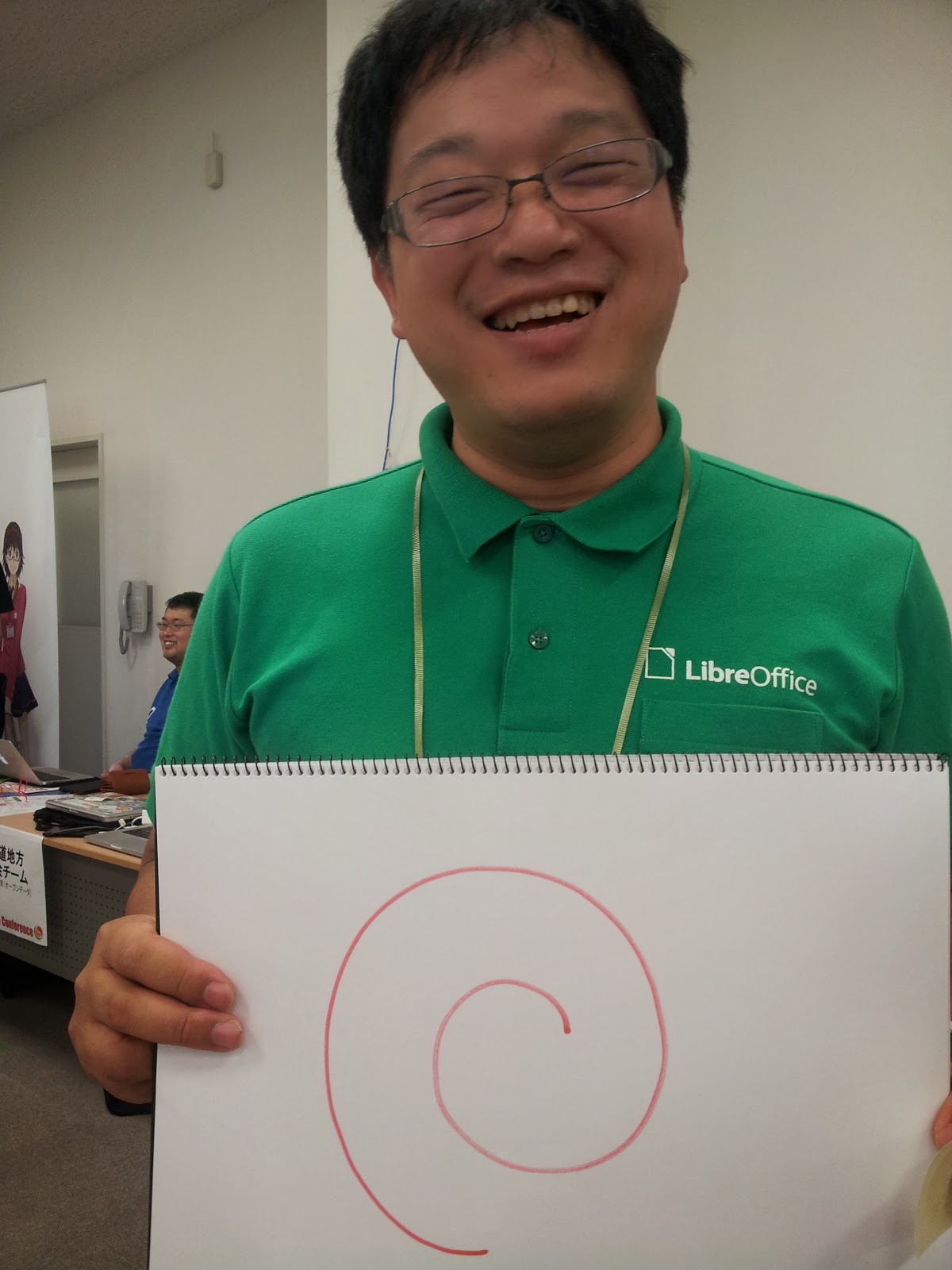
14th June, I've participated to OSC (Open Source Conference) 2014 Hokkaido in Sapporo, Hokkaido (sorry openSUSE folks, OSC does not mean openSUSE Conference ;) OSC has 10 years history in Japan, so don't blame me...)

Hokkaido is northan island of Japan (it has 4 major islands - Hokkaido, Honshu, Shikoku and Kyushu), takes 1.5 hours from Tokyo (HND-CTS) and debian-mirror.sakura.ne.jp is also there.

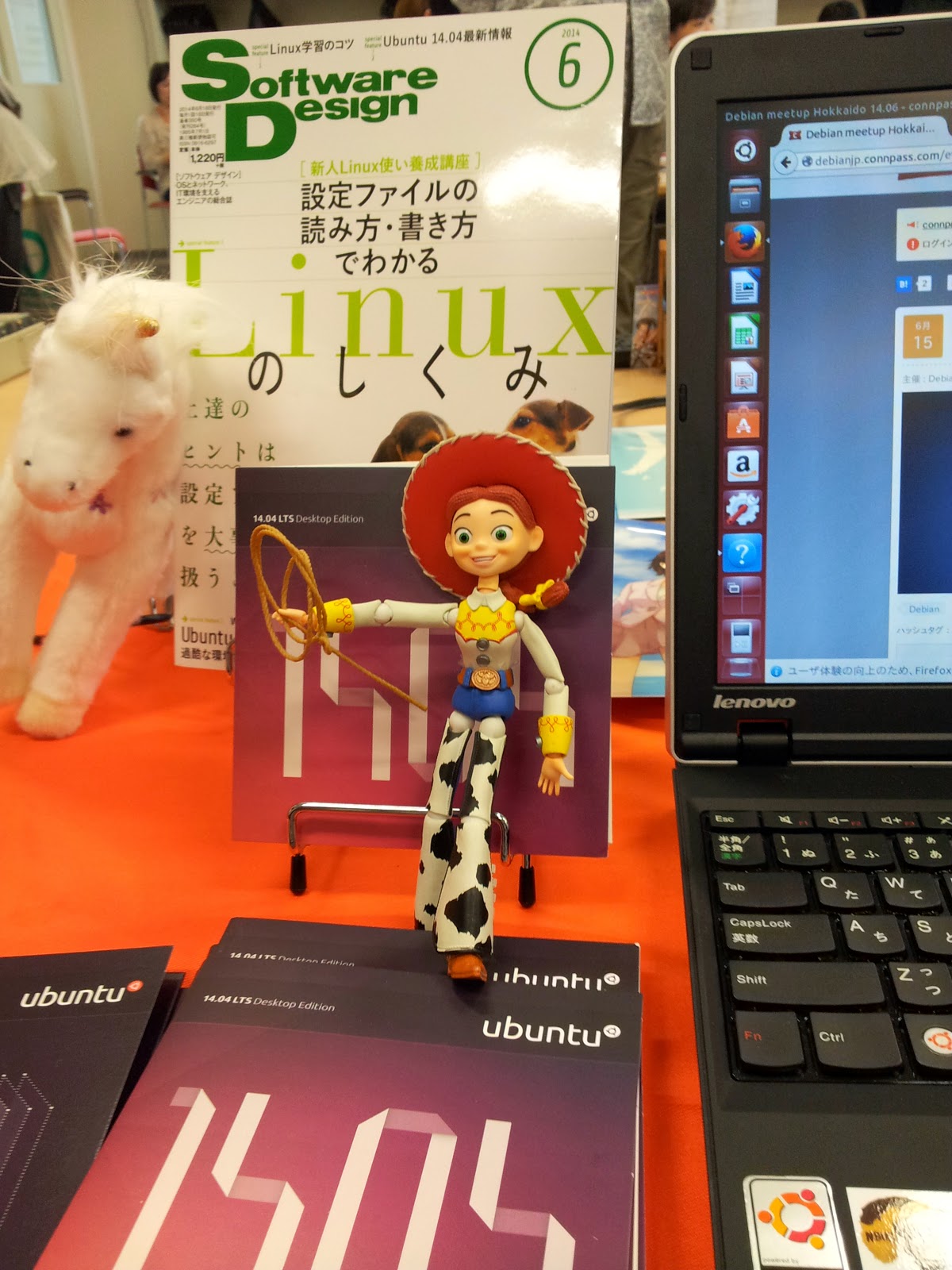
As always, we show the Debian booth with Debian lovers, Squeeze, Woody and Jessie.


And I gave talk about Debian a little,
mostly how it is developed and distribute, and shapes in Jessie at that time (PDF/odf is my page on Debian Wiki as usual).

Does Cowgirl Dream of Red Swirl? from Hideki Yamane


After that, Enjoyed food, beer (sure! :) and chatting in party.


Folks, see you in #osc15do again!

2 July 2014

Osamu Aoki: debmake -- checking source against DEP-5 copyright

It has been already more than a year after my initial uploading of the debmake package which offers semi-automatic generation of the DEP-5 copyright file.

One recent feature addition is the "debmake -k" command which audits debian/copyright contents against the latest source. If, for example, the upstream changed the license from GPL-2.0+ to 3,0+, this command will tell you this change. (In the debian/copyright, the more specific entry should be listed after the generic entry since parser uses the last definition as the valid one.)

I admit that this package had some regressions in some previous versions. It is now a stable tool to help making multiarch aware Debian packages of any types. If you had negative experiences, please try this again.

Let me quote from its documentation for the features. (Also available in the package.)
The debmake command is intended to replace functions offered historically by deb-make and dh_make commands. Its features include:
  • use of dh syntax under the new debhelper (> 9.0) package
    • extensive check of copyright for DEP-5 (debian/copyright)
    • substvar supports for binary packages (debian/control)
    • support of compiler hardening options (debian/rules)
  • keep pre-existing Debian package configuration files untouched
    • automatic generation of the missing template packaging files
    • easy verification of the debian/copyright file against the current source. (-k option)
  • easy packaging command line UI supporting
    • non-stop execution with clean results
    • direct operation on the tarball archive
    • direct operation on the source tree from VCS
    • the multiarch Debian package
    • the multi binary Debian package
    • the non-native Debian packages from the VCS snapshot
    • seamless work with debuild, pdebuild, etc.
Note
I wrote this debmake command because there was no easy command like "python setup.py bdist_deb" to create the Debian binary package. Now "debmake -d -s -b":python" -i debuild" does the job for me.
This documentation comes with detailed packaging examples, too.

1 July 2014

Neil Williams: LAVA in Debian unstable

LAVA has arrived in Debian unstable. No need for third party repositories (unless you want to), a simple apt install lava-server. What happens from that point isn t so simple. I ve made the single instance installation as straightforward as I could but there is a lot more to do to get LAVA working in a useful manner. First, a little history to explain some of the hysterical raisins which may appear later. Validation So, you ve made a change to the code, good. It compiles, yay! Before you ship it, does it pass the unit tests? Right, now you have an improved patch which does what you want and keeps the unit tests running. Validation is all about asking that awkward question: does your change work? Does it introduce side effects on other systems / services in the same code? Does it break programs which use services exported by the code? LAVA is one step along the road to system testing, starting at the bottom. Automation Well you could do all that yourself. Write the image to the device yourself, apply power yourself, connect to serial, copy test scripts to the booted image and pull the results off, somehow. Much better if this is automated maybe every commit or every push or as often as the tests can be run on the number of devices available. LAVA Linaro Automated Validation Architecture. Linaro is a not-for-profit building the future of the Linux kernel on ARM devices. Lava was built for and by Linaro, so the initial focus is clearly on validating the Linux kernel on ARM devices. There are likely to be gotchas in the code for those wanting to use LAVA for other kernels Linaro can t support lots of different kernels, but if there are changes which make it easier to use other kernels without impacting on validation of Linux, those would likely be accepted. The experience with using LAVA is all with ARM but if there is interest in extending LAVA to work with devices of other architectures, again, patches would be welcome. The development of the packaging to make LAVA suitable for Debian has also meant that LAVA will run on hardware other than x86. e.g. armv7.com. I m running a mini lab at home based around an arndale board, I ve also got a mini lab at work based on a cubie2. Requirements for such setups are described in the documentation and in previous entries on this blog (principally you will need SATA, lots of RAM and as many CPU cores as you can find. If you want to run LAVA on other architectures, go ahead and let us know if there are issues. Available versions The versions uploaded to Debian will (from now on) be production releases. The same code as is running on http://validation.linaro.org/ development builds and test builds are supported using helpers in the lava-dev package. Releases to unstable will automatically migrate into Ubuntu Unicorn. I ll continue building interim versions at the former locations on http://people.linaro.org/~neil.williams/, including builds for Ubuntu Trusty 14.04LTS as well as providing packages for Jessie until the uwsgi package can migrate. LAVA is looking to work with anyone who can prepare and maintain packages for other distributions like Fedora. Bugs LAVA is migrating from Launchpad bugs to http://bugs.linaro.org which is a bugzilla interface. Now that LAVA is also in Debian, anyone is welcome to use the Debian BTS which does not require any login or account setup. The maintainers (including me) will then forward those bugs as appropriate. Documentation The immediate task is to update the documentation in the lava-server-doc package (and the Debian wiki) to reflect the availability of LAVA from Debian unstable and how to choose which release of LAVA to use in your systems. However, there is a large amount of documentation already available click the Help link in the menu bar of any current LAVA instance. As with many projects, the docs have been written by the development team. If there are things which are unclear or if sections need to be moved around to make it easier for people new to LAVA to pick it up, please file bugs. Hardware It isn t easy to run a LAVA lab, there is a lot more to it than simply installing lava-server. LAVA would not be possible without the lab team and any other LAVA instance is going to need the same level of excellence in system administration, device support and cooperation. I ve covered a little bit of that in previous entries on this blog about my home lab but that is nothing compared to the work required to provide a working lab like the one in Cambridge. Access to that lab is restricted to people within Linaro but LAVA is also reaching out to the community and if there are tests or hardware you want to see within a LAVA instance, not necessarily in the main lab, then talk to us. Contact Bug reports are preferable but you can also find LAVA people on #linaro-lava on OFTC or contact us on the linaro-validation mailing list. Future There is a lot more work to do on LAVA yet. There are assumptions about partition layout within images (hysterical raisins) and issues with unused software being required for remote worker installations. Both are now part of the next major development work within LAVA. DebConf14 There is lot more to talk about with LAVA if you are attending DebConf14 then there will be talks on LAVA and plenty of time to answer questions.

26 June 2014

Russ Allbery: Review: A People's History of the Supreme Court

Review: A People's History of the Supreme Court, by Peter Irons
Publisher: Penguin
Copyright: 1999, 2006
Printing: 2006
ISBN: 0-14-303738-2
Format: Trade paperback
Pages: 553
I first encountered Peter Irons via his Teaching Company course, The History of the Supreme Court. I listened to that and enjoyed it, and would recommend it as an excellent overview. When I later ran across this book, I was excited: I usually prefer books to lectures on topics that can benefit from greater depth, and A People's History of the United States is one of my favorite history books. A book that talked about the Supreme Court from a similar bottom-up approach was appealing. Unfortunately, I think the title oversells this book. It is a history of the Supreme Court, and, as with Zinn's book, it carries its bias openly (if not as forcefully or compellingly as Zinn). It is a legal history concerned with individual rights, and Irons openly expresses his opinions of the merits of certain decisions. But it's not the full-throated cry for justice and for the voice of the general population that Zinn's book was, nor did I think it entirely delivered on the introductory promise to look at the people and situations underlying the case. It does provide more background and biographical sketch of the litigants in famous cases than some other histories, but those sketches are generally brief and focused on the background and relevant facts for the case. This is, in short, a history of the Supreme Court, with some attention paid to the people involved and open comfort with an authorial viewpoint, but without the eye-opening and convention-defying freshness of Zinn's refusal to point the camera at the usual suspects. It also largely duplicates Irons's course for the Teaching Company. That's only really a problem for those, like me, who listened to that course already and came to this book looking for additional material. If you haven't listened to the course, this is a reasonable medium in which to provide the same content, although you do miss the audio recordings of actual Supreme Court argument in some of the most famous cases. But after having listened or read both, I think I prefer the course. It felt a bit more focused; the book is not padded, but the additional material is also not horribly memorable. That said, as a history, I found this a solid book. Irons opens with a surprisingly detailed look at the constitutional convention and the debates over the wording of the US Constitution, focusing on those sections that will become the heart of later controversy. Some of them were known to be controversial at the time and were discussed and argued at great length, such as anything related to slavery and the role of a bill of rights. But others, including many sections at the heart of modern controversies, were barely considered. Despite being a bit off-topic for the book, I found this section very interesting and am now wanting to seek out a good, full history of the convention. Irons's history from there is primarily chronological, although he does shift the order slightly to group some major cases into themes. He doesn't quite provide the biographies of each Supreme Court justice that he discussed in the introduction, but he comes close, along with discussion of the surrounding politics of the nomination and the political climate in which they were sitting. There's a bit of an overview of the types of cases each court saw, although not as much as I would have liked. Most of the history is, as one might expect, focused on more detailed histories of the major cases. Here, I was sometimes left satisfied and sometimes left a bit annoyed. The discussion of the Japanese internment cases is excellent, as you might expect given Irons's personal role in getting them overturned. The discussion of the segregation cases is also excellent; in general, I found Section V the strongest part of this book. Irons also does a good job throughout in showing how clearly political the court was and has always been, and the degree to which many major decisions were pre-decided by politics rather than reasoned legal judgment. Where I think he fails, however, is that much of this book has little sense of narrative arc. This is admittedly difficult in a history of a body that takes on widely varying and almost random cases, but there are some clear narratives that run through judicial thinking, and I don't think Irons does a good enough job telling those stories for the readers. For example, I remembered the evolution of interpretation of the 14th Amendment from freedom of contract to the keystone of application of the Bill of Rights to the states as a compelling and coherent story from his course, and here it felt scattered and less clear. In general, I liked the earlier sections of this book better than the later, with Section V on the Warren court as the best and last strong section. Beyond that point in the history, it felt like Irons was running out of steam, and it was harder and harder to see an underlying structure to the book. He would describe a few cases, in a factual but somewhat dry manner, make a few comments on the merits of the decision that felt more superficial than earlier sections of the book, and then move on to another case that might be largely unrelated. Recent judicial history is fascinating, but I don't think this is the book for that. Irons is much stronger in the 19th and first half of the 20th centuries; beyond that, I prefer Jeffrey Toobin's The Nine, which also has far deeper and more interesting biographies of recent justices. This is not a bad history of the Supreme Court. If you're looking for one, I can recommend it. But if you're flexible about format, I recommend Irons's course more. I think it's less dry, better presented, and flows better, and I don't feel like you'll miss much in the transformation of this book into an 18 hour course. It's also remarkable to hear the actual voices of the lawyers and justices in some of the landmark cases of the middle of the 20th century. But if you specifically want a book, this does the job. Do also read The Nine, though. It's a good complement to Irons's straight history, showing much more of the inner workings, political maneuverings, and day-to-day struggles of the justices. Rating: 7 out of 10

19 June 2014

Russell Coker: Phone Car Accessories

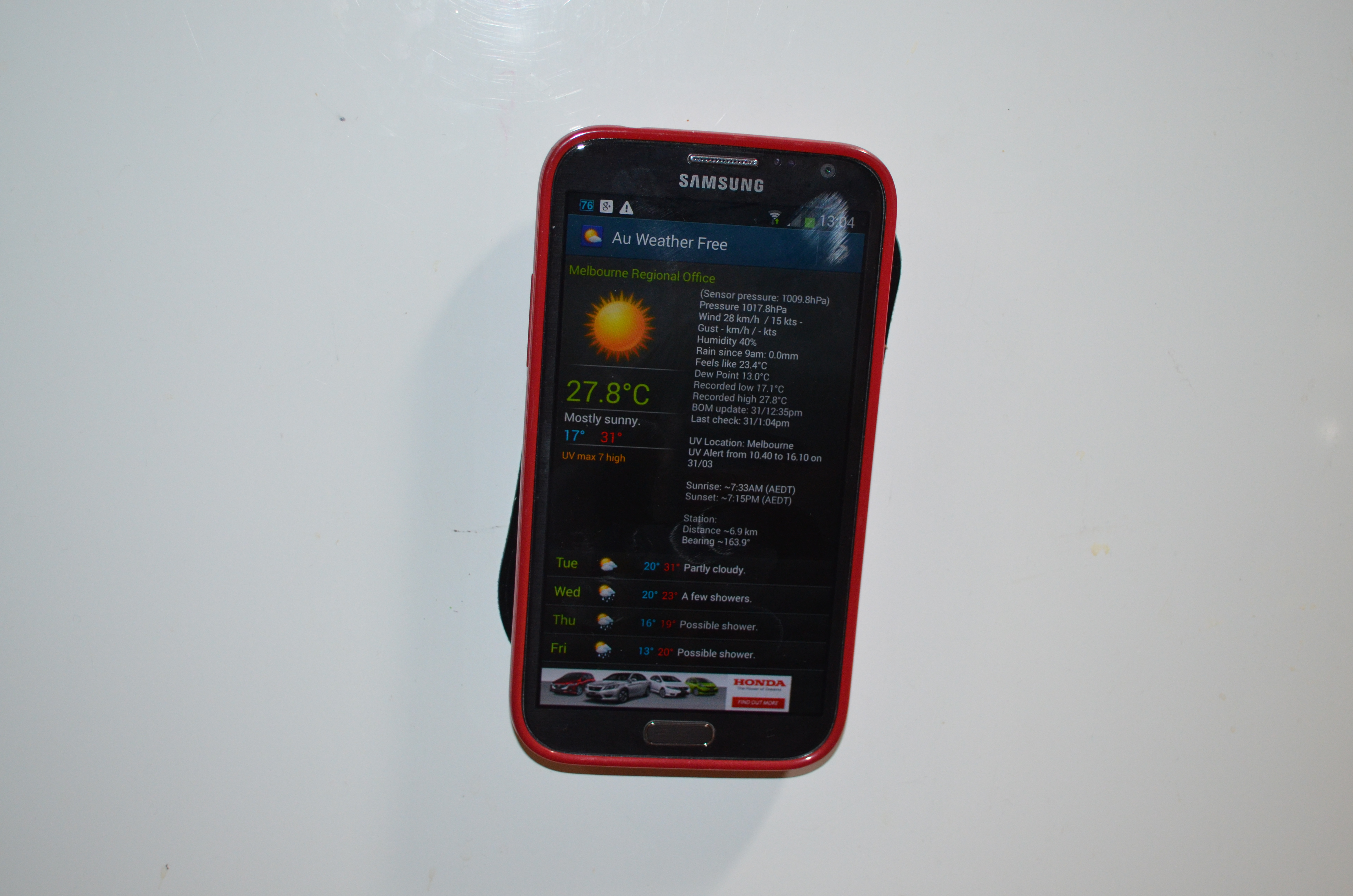
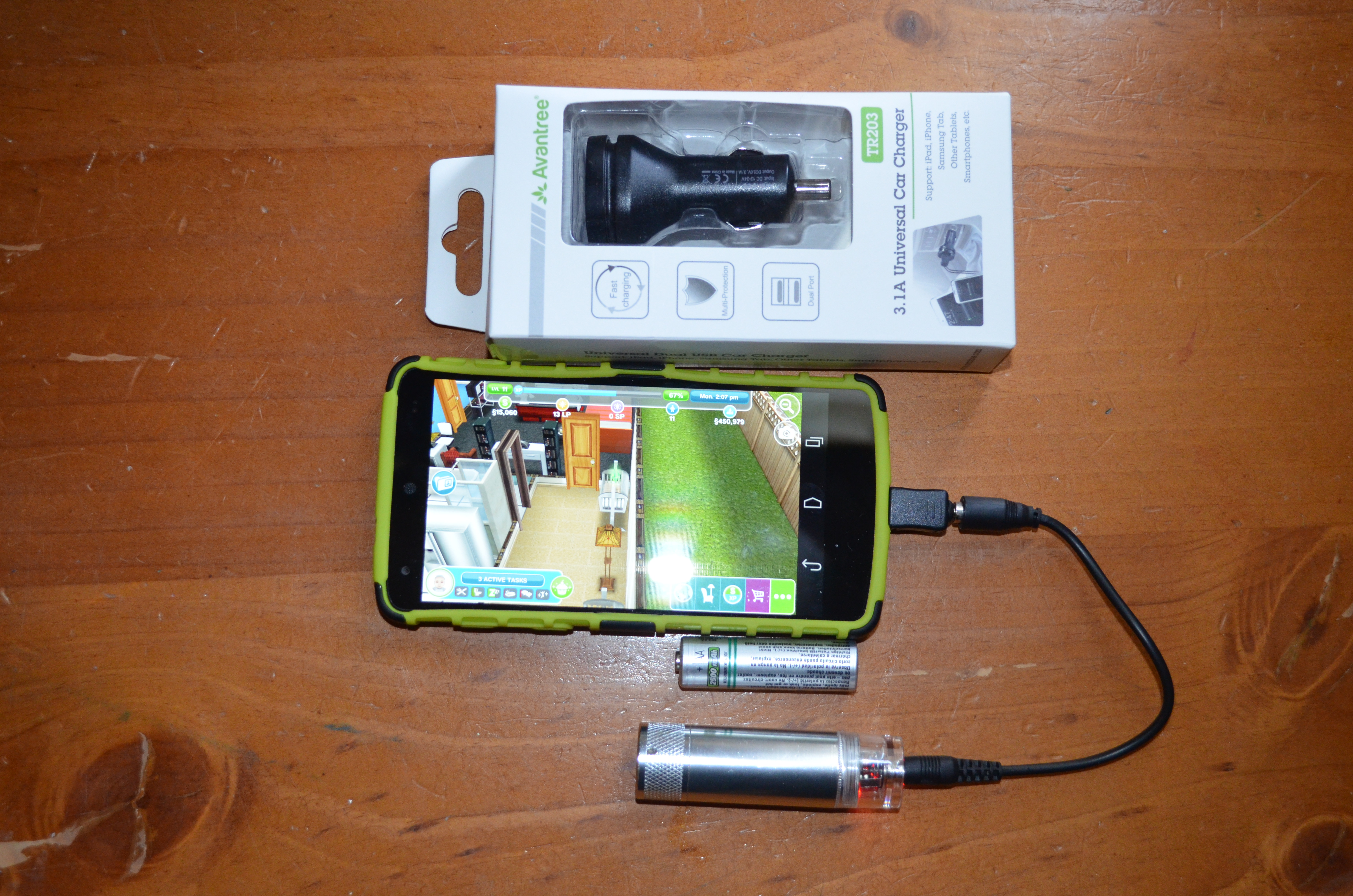
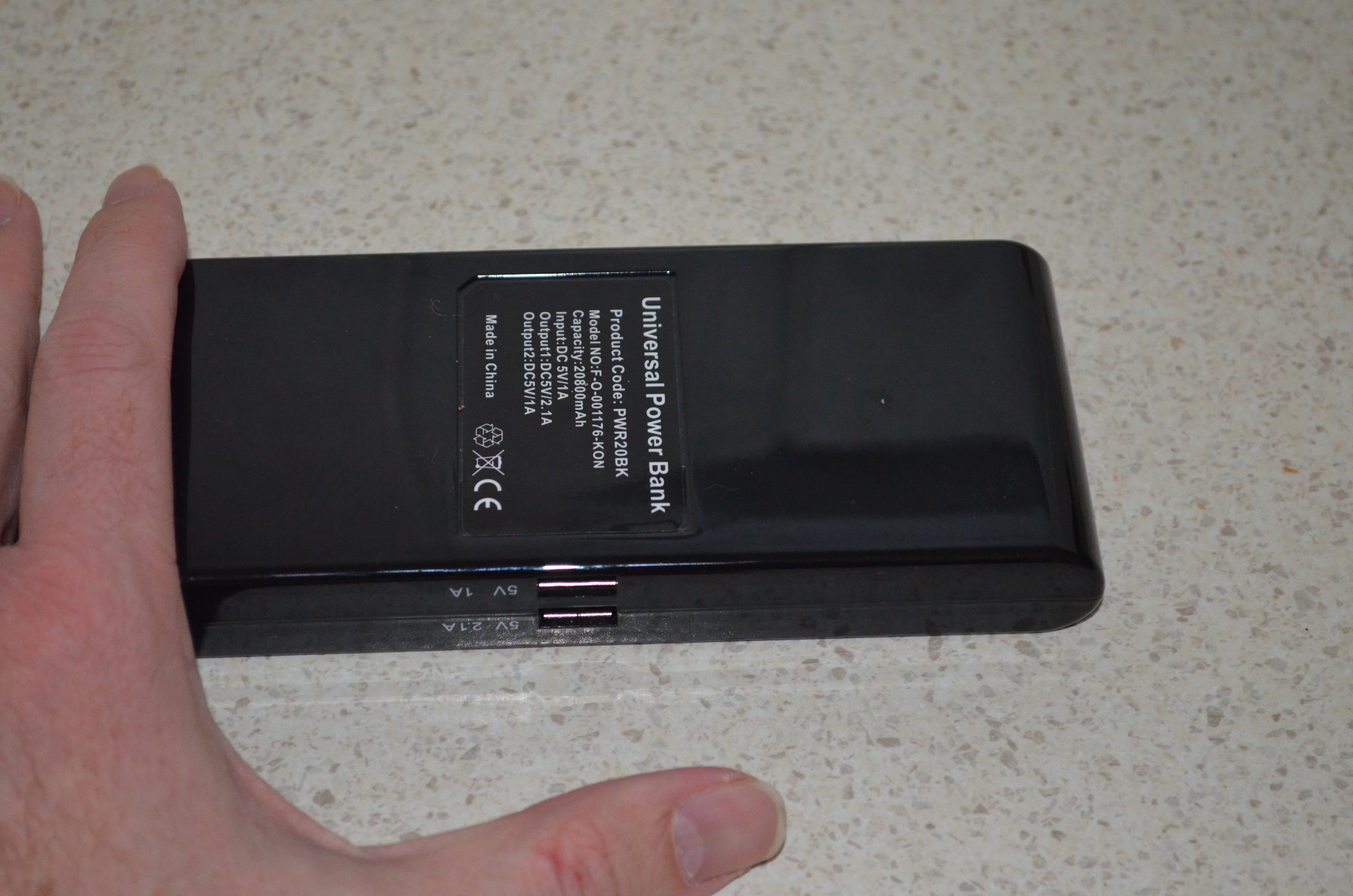
Tree Frog Dashboard Mat phone stuck to fridge I ve been given some more MobileZap products to review. The first is the Tree Frog anti-slip dashboard mat [1]. This is designed to allow a phone to stick to an angled surface of the inside of the car without slipping. The pictures on the web site show a phone stuck to a curved angular surface of a car dash. To test this I stuck my phone to my fridge, the flat metal surface of the fridge and the almost flat plastic surface of the gel case of my phone are pretty much ideal surfaces for the sticky mat to adhere to. But even so keeping my phone stuck to a vertical surface is impressive. This mat is cheap enough that it could be used for many other tasks than securing a phone in a car, for example it could be used to stick a phone to the wall of your office. It s apparently washable and can be expected to keep gripping things if washed regularly. One thing that could be improved in the mat would be to have some holes in it. When I detached my phone from the fridge some large air bubbles developed between the mat and the fridge, this would be a problem if I wanted to regularly stick my phone to a flat surface such as an office wall. When in my car it didn t work nearly as well. The pattern on the surface of the car dash which is designed to avoid glare when driving is difficult to stick to, it s a bit like trying to attach sticky-tape to unpainted wood for similar reasons. A phone will still remain in place on a 30 degree angle from the horizontal (which is significant) but the mat grips much more tightly to the phone than the dash, which is a little inconvenient as the mat stays attached to the phone when you remove it from the dash. Sorry for the boring picture, it s black and flat so there s not much scope for making it interesting. 3.1A USB Car Charger AA battery charger and 3.1A car charger Above is a picture of a 3.1A USB car charger and a AA battery charger. The car charger isn t particularly exciting, but providing 3.1A through two USB sockets is noteworthy it can charge one device at 2.1A (the maximum any device draws) or two devices for a total of up to 3.1A [2] (with protection against over-current). Previously in my car I used the 2.1A charger that shipped with my Galaxy Note 2 and an inverter to provide 240VAC as the devices I had to charge a phone from a car socket didn t provide enough current. This new device uses less space and also allows charging two phones at once. One problem with this device was finding USB cables that could handle the current, for benchmarking I used a phone that was running Ingress and acting as a Wifi access point. I discovered that the cables that Samsung ships with their recent devices (Galaxy Note 2 and Galaxy Note 10.1 tablet) seem to work best and support charging my Galaxy Note 2 or my wife s Nexus 5 while playing Ingress and running as a Wifi AP. Most of the other cables that I have in my collection won t even allow a phone to remain at the same charge level while playing Ingress. AA Emergency Phone Charger The AA phone charger is best suited for emergency use only, it takes one AA battery and has limited current capacity [3]. A NiMh rechargeable battery has a nominal Voltage of 1.2V, to provide 5V to charge a phone the Voltage has to be boosted by a factor of 4.16 which would reduce the current by a factor of 4.16 if the charger was 100% efficient. As 100% efficiency is impossible the current would be reduced even more. It seems unlikely that a AA battery would be able to sustain a current of 2A so the supply from that charger would be less than 500mA IE less than the least capable PC USB port or mains powered phone charger. A test with a Nexus 5 showed the phone charge level decreasing while being very lightly used (mostly just checking whether the charge level was increasing) when a NiMH battery was connected. A test with an alkaline battery and the same Nexus 5 showed the phone charge level increasing when lightly used but it probably wouldn t do so while playing Ingress. It seems that a single NiMH AA battery can only be used for charging a phone in a real emergency situation (IE an act of god type disaster not a need to level up in Ingress). If mains power was out then you could charge a phone while it s turned off (AFAIK all Android phones support this) and then use it once it s charged. This charger supports a wide range of phones (including LG phones from 5+ years ago and Nokia from ~10 years ago) so it could be good for charging an old phone in an emergency. Older phones need less power to charge and generally last longer between charges. With an alkaline battery the charger works a lot better, but it s still for emergency use as I generally only use rechargeable batteries. This is a device I might put in the bottom of my case when travelling, not a device that I ll use regularly. I don t think that this is a deficiency in the product, it s just a limit of what can be done with the power requirements of modern phones and the capabilities of AA batteries. If you want a battery to use while playing Ingress you definitely need something a lot larger. This charger is good for emergencies but not suitable for my main use (charging phones while playing Ingress) so I ll give it to my parents, they do a lot of hiking and camping and my father often goes fishing. Taking a few AA batteries to charge a phone would be much more convenient for such use than taking one of the larger batteries I use for Ingress. Also as the charger is relatively cheap there s less potential financial loss if you drop it in sea-water. 20800mAh Battery picture of 20800mAh USB battery Above is a picture of a 20800mAh battery pack that MobileZap sent me [4]. I haven t yet discovered what it s capacity is, during the recent Interitus anomaly it kept my Galaxy Note 2 and my wife s Nexus 5 adequately charged for 5 hours of intensive Ingress playing (we alternated between phones). Without an external battery it would be unusual for either of those phones to last for 2 hours. The battery has two ports labeled 1A and 2.1A which implies that it can supply a total of 3.1A. I am a little dubious of that implication. After the Interitus anomaly my wife and I had dinner with some friends and I let a friend charge her Samsung Galaxy S5 on the battery at the same time as my Note 2 (which claimed to be 2% charged). When I connected my friend s phone my phone instantly shut itself down due to lack of charge, so I presume that the supply on the 2.1A port is reduced when a demanding device is connected to the 1A port. The next day my wife and I went to the city again to play Ingress and attend a protest against some of the awful things that the Abbott government is doing. As an experiment I didn t charge this battery to see how it would go for two days of use charging two phones. Again there was no problem and it still claimed to be half charged when we got home. So far the only problem I ve found with this battery is that it never reports being fully charged, not even if I leave it on charge for days. That doesn t seem to be a great problem to me, if I disconnect it before it s fully charged then that won t hurt the battery life (unlike NiCd batteries that have to be fully charged every time) and even if it s not fully charged it will still charge phones for a long time. The battery is about 19cm long. I have jeans with unusually large pockets to fit large phones [5] so I can fit this battery in my pocket while a USB cable is connected to charge my phone. I also have a new winter jacket from Scottwear which has pockets that can fit the battery (and lots of other things). Anyone who doesn t have such clothing should plan to use a backpack, handbag, or some other bag this type of battery won t fit in the pockets in most clothing. MobileZap also has some other interesting Nexus 5 accessories [6].

Ian Wienand: Non-stick tortilla technique

I have never had much success with tortilla making, generally finding the fragile masa would stick to everything and tear easily. However I was listening to the Cook's Illustrated podcast where they mentioned that cooking a pizza on a stone with silicone-paper makes no difference over doing it on the stone directly. For some reason I had just never thought of cooking it with the silicone-paper on; I'd always frustrated myself trying to separate the pressed tortilla in various ways. So here's my technique:
  1. Mix the masa as on the packet; 2 cups to 2-half cups water
  2. Leave for 20 minutes or so
  3. Use plastic-wrap on the top of the tortilla press
  4. Cut a silicone-paper square for the bottom
  5. Ball the masa and press
  6. Now the plastic-wrap will peel easily off the top of the uncooked tortilla
  7. Take the silcone-paper and put the tortilla down on the pan/hotplate
  8. Give a slight press with the spatula around the edges
  9. After about 20 seconds, the silicone-paper should peel off the tortilla fairly easily.
  10. repeat!
I've tried mixing in suet, oil and copha and none of them are worth the extra calories over just plain masa in my opinion and don't help with sticking anyway. Enjoy!

24 May 2014

John Goerzen: End of a year

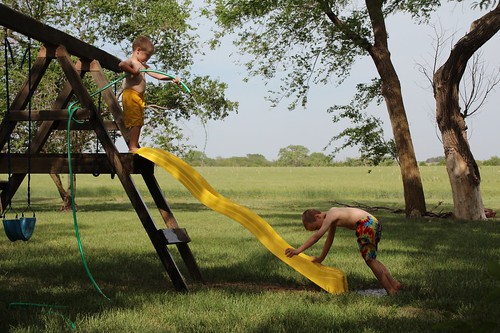
AAAAHHH! LOOK OUT! A SHARK! Such were the cries a few first graders raised Monday. Laura and I had gone to school to eat lunch with Jacob this was his last week of first grade. We stayed for recess after lunch, and Jacob and his friend told us to pretend to be a shark lurking underneath the bridges and things of the playground. I was told that adults are too old to climb up here. So Laura and I started chasing Jacob and his friend around the playground equipment. And, much to their delight, they were usually able to evade us. And, to their even greater delight, sometimes I could reach up and brush a shoe or leg. Pretty soon Laura had enough of the game, but about then other kids started to notice what was going on. Shark-taunting began ( nana-booboo! ), and pretty soon half a dozen first-graders were running away from the shark! Eventually, it was time to go in, and it had been a great time. Jacob had been proud to have Laura and me there to eat lunch with him. He got to be the first in his class to go to lunch, happily slipping into the tour guide role he loves. Sometimes he would tell us in exacting detail what would happen. Other times, I d ask something like how will we know when lunch is over, and he d get a sly smile and say, You will see! The next day was Jacob s last at school, and Oliver had also recently finished preschool. So Laura and I planned a graduation party . We came up with some ideas of things they might like to do, and let them choose. Thankfully they both agreed on a choice: water slide. My parents gave them water slides one time, and we got one out, hooked it up to the hose, and let them have fun. And boy, did they ever! IMG_3222 And after the better part of an hour running with delight on the water slide, they decided to turn another slide into a water slide. So I helped them rig up a hose on our slide, and they d slide down it, and splash into a giant mud puddle at the bottom. Or, as the case may be, just stand in the mud, enjoying it. IMG_3275 We then went out to eat at one of their favorite restaurants and even had time to play in a park. Yes, a wonderful celebration. All four of us were wearing smiles that day. It reminded me of Jacob s school year, but also of the past year it was about a year ago that Jacob and Oliver first had the chance to really meet Laura. I have many photos and stories from the past year that I ll be sharing in the next little while. What an incredible year it has been!

23 May 2014

Emanuele Rocca: A (very) brief history of Australia

This post is mostly a sum-up of the Wikipedia page History of Australia, with some content taken from History of the British Empire. Both texts are available under the Creative Commons Attribution-ShareAlike License. I do not seem to be able to learn about a new topic without taking notes: in this case I have decided to publish my work, hoping that someone will find it useful. Some very important themes such as the Gold Rush and Australian History during the World Wars have been impudently ignored.
Indigenous Australians The ancestors of Indigenous Australians are believed to have arrived in Australia 40,000 to 60,000 years ago, and possibly as early as 70,000 years ago. By 1788, the population of Australia existed as 250 individual nations, many of which were in alliance with one another, and within each nation there existed several clans, from as few as five or six to as many as 30 or 40. Each nation had its own language and a few had multiple, thus over 250 languages existed, around 200 of which are now extinct. Permanent European settlers arrived at Sydney in 1788 and came to control most of the continent by end of the 19th century. Bastions of largely unaltered Aboriginal societies survived, particularly in Northern and Western Australia into the 20th century, until finally, a group of Pintupi people of the Gibson Desert became the last people to be contacted by outsider ways in 1984.
European explorers Terra Australis (Latin for South Land) is one of the names given to a hypothetical continent which appeared on European maps between the 15th and 18th centuries. Although the landmass was drawn onto maps, Terra Australis was not based on any actual surveying of such a landmass but rather based on the hypothesis that continents in the Northern Hemisphere should be balanced by land in the south. The first documented European landing in Australia was made in 1606 by a Dutch ship led by Willem Janszoon. Hence the ancient name "Nova Hollandia". The same year, a Spanish expedition had landed in the New Hebrides and, believing them to be the fabled southern continent, named the land: "Terra Austral del Espiritu Santo". Hence the current name "Australia". Although various proposals for colonisation were made, notably by Pierre Purry from 1717 to 1744, none was officially attempted. Indigenous Australians were less able to trade with Europeans than were the peoples of India, the East Indies, China, and Japan. The Dutch East India Company concluded that there was "no good to be done there". In 1769, Lieutenant James Cook tried to locate the supposed Southern Continent. This continent was not found, and Cook decided to survey the east coast of New Holland, the only major part of that continent that had not been charted by Dutch navigators. Cook charted and took possession of the east coast of New Holland. He noted the following in his journal:
"I can land no more upon this Eastern coast of New Holland, and
 on the Western side I can make no new discovery the honour of
 which belongs to the Dutch Navigators and as such they may lay
 Claim to it as their property, but the Eastern Coast from the
 Latitude of 38 South down to this place I am confident was never
 seen or viseted by any European before us and therefore by the
 same Rule belongs to great Brittan."
Colonisation The American Revolutionary War (1775-1783) saw Great Britain lose most of its North American colonies and consider establishing replacement territories. The British colony of New South Wales was established with the arrival of the First Fleet of 11 vessels in January 1788. It consisted of over a thousand settlers, including 778 convicts (192 women and 586 men). A few days after arrival at Botany Bay the fleet moved to the more suitable Port Jackson where a settlement was established at Sydney Cove on 26 January 1788. This date later became Australia's national day, Australia Day. Between 1788 and 1868, approximately 161,700 convicts (of whom 25,000 were women) were transported to the Australian colonies of New South Wales, Van Diemen's land and Western Australia. Early colonial administrations were anxious to address the gender imbalance in the population brought about by the importation of large numbers of convict men. In 1835, the British Colonial Office issued the Proclamation of Governor Bourke, implementing the legal doctrine of terra nullius upon which British settlement was based, reinforcing the notion that the land belonged to no one prior to the British Crown taking possession of it and quashing any likelihood of treaties with Aboriginal peoples, including that signed by John Batman. Its publication meant that from then, all people found occupying land without the authority of the government would be considered illegal trespassers. A group in Britain led by Edward Gibbon Wakefield sought to start a colony based on free settlement and political and religious freedoms, rather than convict labour. The South Australia Act [1834], passed by the British Government which established the colony reflected these desires and included a promise of representative government when the population reached 50,000 people. Significantly, the Letters Patent enabling the South Australia Act 1834 included a guarantee of the rights of 'any Aboriginal Natives' and their descendants to lands they 'now actually occupied or enjoyed'. In 1836, two ships of the South Australia Land Company left to establish the first settlement on Kangaroo Island. The foundation of South Australia is now generally commemorated as Governor John Hindmarsh's Proclamation of the new Province at Glenelg, on the mainland, on 28 December 1836. By 1851 the colony was experimenting with a partially elected council.
Development of Australian democracy Traditional Aboriginal society had been governed by councils of elders and a corporate decision making process, but the first European-style governments established after 1788 were autocratic and run by appointed governors. The reformist attorney general, John Plunkett, sought to apply Enlightenment principles to governance in the colony, pursuing the establishment of equality before the law. Plunkett twice charged the colonist perpetrators of the Myall Creek massacre of Aborigines with murder, resulting in a conviction and his landmark Church Act of 1836 disestablished the Church of England and established legal equality between Anglicans, Catholics, Presbyterians and later Methodists. In 1840, the Adelaide City Council and the Sydney City Council were established. Men who possessed 1,000 pounds worth of property were able to stand for election and wealthy landowners were permitted up to four votes each in elections. Australia's first parliamentary elections were conducted for the New South Wales Legislative Council in 1843, again with voting rights (for males only) tied to property ownership or financial capacity. Voter rights were extended further in New South Wales in 1850 and elections for legislative councils were held in the colonies of Victoria, South Australia and Tasmania. Women became eligible to vote for the Parliament of South Australia in 1895. This was the first legislation in the world permitting women also to stand for election to political office and, in 1897, Catherine Helen Spence became the first female political candidate for political office, unsuccessfully standing for election as a delegate to the Federal Convention on Australian Federation. Western Australia granted voting rights to women in 1899. Early federal parliamentary reform and judicial interpretation sought to limit Aboriginal voting in practice, a situation which endured until rights activists began campaigning in the 1940s.
Road to independence Despite suspicion from some sections of the colonial community (especially in smaller colonies) about the value of nationhood, improvements in inter-colonial transport and communication, including the linking of Perth to the south eastern cities by telegraph in 1877, helped break down inter-colonial rivalries. New South Wales Premier Henry Parkes addressed a rural audience in his 1889 Tenterfield Oration, stating that the time had come to form a national executive government:
"Australia [now has] a population of three and a half millions,
 and the American people numbered only between three and four
 millions when they formed the great commonwealth of the United
 States. The numbers were about the same, and surely what the
 Americans had done by war, the Australians could bring about in
 peace, without breaking the ties that held them to the mother
 country."
Though Parkes would not live to see it, his vision would be achieved within a little over a decade, and he is remembered as the "father of federation". The Commonwealth of Australia came into being when the Federal Constitution was proclaimed by the Governor-General, Lord Hopetoun, on 1 January 1901. Australia took part in WWI. The contributions of Australian and New Zealand troops during the 1915 Gallipoli Campaign against the Ottoman Empire had a great impact on the national consciousness at home, and marked a watershed in the transition of Australia and New Zealand from colonies to nations in their own right. The countries continue to commemorate this occasion on ANZAC Day. Australia achieved independent Sovereign Nation status after World War I, under the Statute of Westminster, which defined Dominions of the British empire in the following way:
"They are autonomous Communities within the British Empire, equal
 in status, in no way subordinate one to another in any aspect of
 their domestic or external affairs, though united by a common
 allegiance to the Crown, and freely associated as members of the
 British Commonwealth of Nations."
The parliaments of Canada, Australia, New Zealand, the Union of South Africa, the Irish Free State and Newfoundland (currently part of Canada) were now independent of British legislative control, they could nullify British laws and Britain could no longer pass laws for them without their consent. The Australia Act 1986 removed any remaining links between the British Parliament and the Australian states.

18 May 2014

Benjamin Mako Hill: Installing GNU/Linux on a 2014 Lenovo Thinkpad X1 Carbon

I recently bought a new Lenovo X1 Carbon. It is the new second-generation, type 20A7 laptop, based on Intel s Haswell microarchiteture with the adaptive keyboard. It is the version released in 2014. I also ordered the Thinkpad OneLink Dock which I have returned for the OneLink Pro Dock which I have not yet received. The system is still very new, challenging, and different, but seems to support GNU/Linux reasonably well if you are willing to run a bleeding edge version and/or patch your kernel and if you are not afraid to spend an afternoon or two tweaking things. What follows are my installation notes for Debian testing (jessie) when I installed it in early May 2014. My general impressions about the laptop as a GNU/Linux system and overall are at the end of this write-up.
System Description The X1 Carbon I ordered included the 512GB SSD, the 14.0 inch WQHD (2560 1440) 260 nit touchscreen, and the maximum 8GB of memory. I believe the rest is not particularly negotiable but includes a 720p HD Camera, a 45.2Wh battery, and an Intel Dual Band Wireless 7260AC with Bluetooth 4.0. For those that are curious Here is the output of lspci on the system:
00:00.0 Host bridge: Intel Corporation Haswell-ULT DRAM Controller (rev 0b)
00:02.0 VGA compatible controller: Intel Corporation Haswell-ULT Integrated Graphics Controller (rev 0b)
00:03.0 Audio device: Intel Corporation Haswell-ULT HD Audio Controller (rev 0b)
00:14.0 USB controller: Intel Corporation Lynx Point-LP USB xHCI HC (rev 04)
00:16.0 Communication controller: Intel Corporation Lynx Point-LP HECI #0 (rev 04)
00:16.3 Serial controller: Intel Corporation Lynx Point-LP HECI KT (rev 04)
00:19.0 Ethernet controller: Intel Corporation Ethernet Connection I218-LM (rev 04)
00:1b.0 Audio device: Intel Corporation Lynx Point-LP HD Audio Controller (rev 04)
00:1c.0 PCI bridge: Intel Corporation Lynx Point-LP PCI Express Root Port 6 (rev e4)
00:1c.1 PCI bridge: Intel Corporation Lynx Point-LP PCI Express Root Port 3 (rev e4)
00:1d.0 USB controller: Intel Corporation Lynx Point-LP USB EHCI #1 (rev 04)
00:1f.0 ISA bridge: Intel Corporation Lynx Point-LP LPC Controller (rev 04)
00:1f.2 SATA controller: Intel Corporation Lynx Point-LP SATA Controller 1 [AHCI mode] (rev 04)
00:1f.3 SMBus: Intel Corporation Lynx Point-LP SMBus Controller (rev 04)
BIOS/Firmware The BIOS firmware is non-free and proprietary as it the case with all ThinkPads and nearly all laptops. According to this thread there is a bug in the default BIOS that means that suspend to RAM is broken in GNU/Linux. You can get updated BIOS at the Lenovo s ThinkPad X1 Carbon (Type 20A7, 20A8) Drivers and software page by looking in the the BIOS section. Honestly, the easiest approach is probably to download the Windows BIOS Update utility (documentation is here) which you can use to run the BIOS update from within Windows before you install GNU/Linux. If that s not an option (e.g., if you ve already installed GNU/Linux) the best method is to download the bootable CD ISO from the same page. Of course, since the X1 Carbon has no optical media, you have to find another way to boot the CD image. I struggled to get the ISO to boot from USB using the usually reliable dd method. This message suggest that the issue had to do with the El Torito wrapper:
I had to dump the eltorito image from the ISO they provide, after that I was able to dd the resulting image to a flash drive and the bios update went well, no cdrom needed.
I updated to version 1.13 of the BIOS which fixes the suspend/resume bug. By the time you read this, there may be newer versions that fix other things so check the Lenovo website.
Installing Debian I installed Debian testing using the March 19, 2014 Alpha 1 release of the Debian Installer for Jessie (currently testing). I installed in graphical mode. With the WQHD screen, everything was extremely tiny but it worked flawlessly. I downloaded the amd64 net install image from the normal place and installed the rest of the system using the built-in Ethernet port which required no firmware or extra drivers. I did the normal dd if=FILENAME.iso of=/dev/sdX method of getting the installer onto the a USB stick to boot. I turned off restricted boot in BIOS first. In general, the latest version of the Debian installation guide is always a good source of guidance on installing Debian. I used the Debian installer wizard to partition and selected Use entire disk and partition it for LVM and encrypted data which kept the UEFI partitions around. The system installed with no errors or issues and booted up normally afterward. The grub menu is hilariously narrow on the WQHD screen. If you want to use the built-in wireless and/or Bluetooth, you will need to install the non-free iwlwifi firmware package. It is very lame that we still have to do this to use hardware we have purchased.
What Works and Doesn t The following stuff works the first time I booted into the GNOME 3 desktop and logged in:
  • The WQHD 2560 1440 screen
  • The touchscreen
  • Both the TrackPoint and the touchpad
  • Built-in e1000e Ethernet using the dongle
  • The keyboard plus the adaptive row of F1-F12 keys.
  • External monitor using the full HDMI or mini-DisplayPort connectors
  • Audio (both speakers and microphone)
  • The camera/webcam
The following stuff works if you install non-free firmware:
  • Internal Wireless
  • Bluetooth 4.0
The following stuff works with qualifications:
  • Suspend to RAM Works once you have updated the firmware.
  • The adaptive keyboard The F1-F12 keys work but the button that theoretically lets you switch to different sets of function buttons (e.g., volume, brightness) does nothing.
  • Disabling the touchpad There is a BIOS option to disable the touchpad. It works in Windows and does nothing at all in GNU/Linux.
I have not tried:
  • The fingerprint reader
Disabling the touchpad As a long-term ThinkPad user, I love the TrackPoint pointing stick. If you plan on using this, the built-in touchpad is incredibly aggravating because it is very easy to brush against it while using the TrackPoint. In BIOS, there is an option to disable the touchpad. Although this works in Windows, it does absolutely nothing in GNU/Linux. Part of the issue is that, unlike the older X1 Carbon and other ThinkPads, there are no TrackPoint buttons. Instead of buttons, there are regions at the top of the touchpad which are configured, in software, to act like buttons. If you want to be able to click, the touchpad can never be truly turned off. This is not problem unique to the Haswell X1 Carbon and a number of people have been struggling with this issue on other Lenovo laptops. Essentially, what you need to do is configure your touchpad so that the buttons are where you want them and so that it ignores any input for the purposes of cursor movement. There are a few ways of doing this but this answer from an askubuntu.com question has the solution I ended up using:

Open file /usr/share/X11/xorg.conf.d/50-synaptics.conf for edit.

Find Section InputClass which the following line is Identifier Default clickpad buttons .

Edit option for SoftButtonAreas to values 64% 0 1 42% 36% 64% 1 42%, this is size of the right and middle button.

Enable option AreaBottomEdge and change value to 1, this will disable touchpad movement.

If everything done right, your class should looks like:

Section "InputClass"
     Identifier "Default clickpad buttons"
     MatchDriver "synaptics"
     Option "SoftButtonAreas" "64% 0 1 42% 36% 64% 1 42%"
     Option "AreaBottomEdge" "1"
EndSection
Essentially, the first Option line will create a middle button that is 32% of the width and 42% of the height, and a right button that is 32% of the width and 42% of the height. The synaptics manpage (man synpatics) will give you more detail on the general way this works. Of course, something does feel very wrong about editing a file in /usr/share.
Fixing the Adaptive Keyboard The most wild feature of the laptop is the adaptive keyboard strip. The strip is a back-lit LCD that looks almost like E Ink screen and acts as a touchscreen keyboard. The default mode gives you the F1-F12 keys. If you press the keys (since they aren t buttons, you just put your finger on top of them) they act like normal F-keys. You can Ctrl-Alt-F1, etc., to switch to virtual terminals out of the box. There are four modes: Function (i.e., normal F-keys), Home, Web, and Chat. The last three overlap quite a bit (e.g., they all have brightness and volume). You can play with an example on the Lenovo homepage. In Windows, switching programs will apparently change these keys so that an appropriate set of buttons is shown for the application you are using. You can also change these keys manually with a big Fn button at the far left of the adaptive keyboard strip. As I write this this, released kernels do not support the adaptive keyboard Fn button which means you cannot use anything other than the F-keys out of the box. I believe it also means that resuming from suspend to RAM breaks these keys. That said, Shuduo Sang from Canonical has released several versions of a patch to to the thinkpad_acpi kernel module which adds support for the Home mode. The other modes (web and chat) do not seem to be supported. The latest version of the patch is on on the Linux Kernel Mailing List and the relevant commits are:
330947b save and restore adaptive keyboard mode for suspend and,resume
3a9d20b support Thinkpad X1 Carbon 2nd generation's adaptive keyboard
Although this is not supported in Debian testing at the time of writing, a bug was filed in Debian and quickly fixed by Ben Hutchings in Debian kernel version 3.14.2-1 which is currently in sid/unstable. As a result, if you install the latest version kernel from Debian unstable (3.14.2-1 or later), the adaptive keyboard just works. If you aren t using Debian and if kernel you are using does not have support, you might be patching your kernel.
General Impressions As I have described in my interview with The Setup, I have been a user of ThinkPad X-series laptops for many years. This is my sixth X-series ThinkPad. Overall, I quite like the hardware! Once things mature a little bit, I think that this will be a great laptop for running GNU/Linux. That said, I ordered the laptop without realizing that the X1 Carbon had gone through a major revision! The keyboard was quite a suprise. I think that changing a system so radically without changing the model name/number is a very bad move on Lenovo s part. There are two remaining issues with the system I m still struggling with: (1) the keyboard layout is freaky and weird, and (2) the super high resolution screen breaks many things. The quality of the keyboard itself is great and worthy of the ThinkPad name. That said, there are two ways in which it is strange. The first is the adaptive keyboard strip. Overall, it works surprisingly well and I think it is a clever idea. My sense is that the strip is more annoying in Windows because it changes out from under you all the time. In GNU/Linux, only manual changing of modes is supported. This, in my opinion, is a feature. I do miss the real feedback you get from pressing keys but for F-keys and volume-keys that I don t use often this isn t too important. On the downside, I have realized several times that I had been holding down a button for several seconds and not noticed. The more annoying issue with the keyboard is the way that the other keys have moved around. Getting rid of the CapsLock is wonderful! How has this taken so long? Replacing it with a split Home and End keys is nuts. I ve remapped the Home and End to put Control back where it should be. My right Control to now Home but I still don t have an End key. The split Backspace and Delete is not a problem for me. The tilde/apostrophe is in a very bad place. There is no Insert, Print Screen/SysRq, Scroll Lock, Pause/Break or NumLock. They are all just gone. Surprisingly, I haven t missed any of them. The second issue is the 2560 1440 resolution on the 14 inch screen. I use a 27 inch external monitor with the same native resolution laptop but, by my arithmetic, the pixel density on the laptop is 210 DPI instead 109 DPI on the external monitor. The result is the scaling problem and it s a huge pain that seems mostly unsolved on any operating system. Fonts and widgets that look good on the laptop look huge on my external monitor. Stuff that looks good on my external monitor looks minuscule on the laptop. I routinely move windows between my laptop screen and my large monitor. Until I find a display system that can handle this kind of scaling effectively, this requires changing font size and zooming all the time. At the moment, I m shrinking and expanding my font size using the built in hot keys in Emacs, Gnome Terminal, and Firefox/Iceweasel. I love the high resolution screen but the current situation is crazy-making. Finally, this setup will not get you into the Church of Emacs and it s not about to find its way onto the FSF s list of endorsed hardware. For one, I paid the Windows tax. Beyond that, there is the non-free BIOS and the need for non-free firmware to use the wireless and Bluetooth. This is standard for ThinkPads but it isn t getting any easier to swallow. There are alternatives in the form of Gluglug s X60 laptops running CoreBoot, Lemote Yeelong laptops, Bunnie Huang s Novena and others that are better in these regards. I am very excited for these projects but, for a number of reasons, these just weren t an option for the laptop I use for my research computing.

15 May 2014

Michal Čihař: Rewamping UI for Weblate

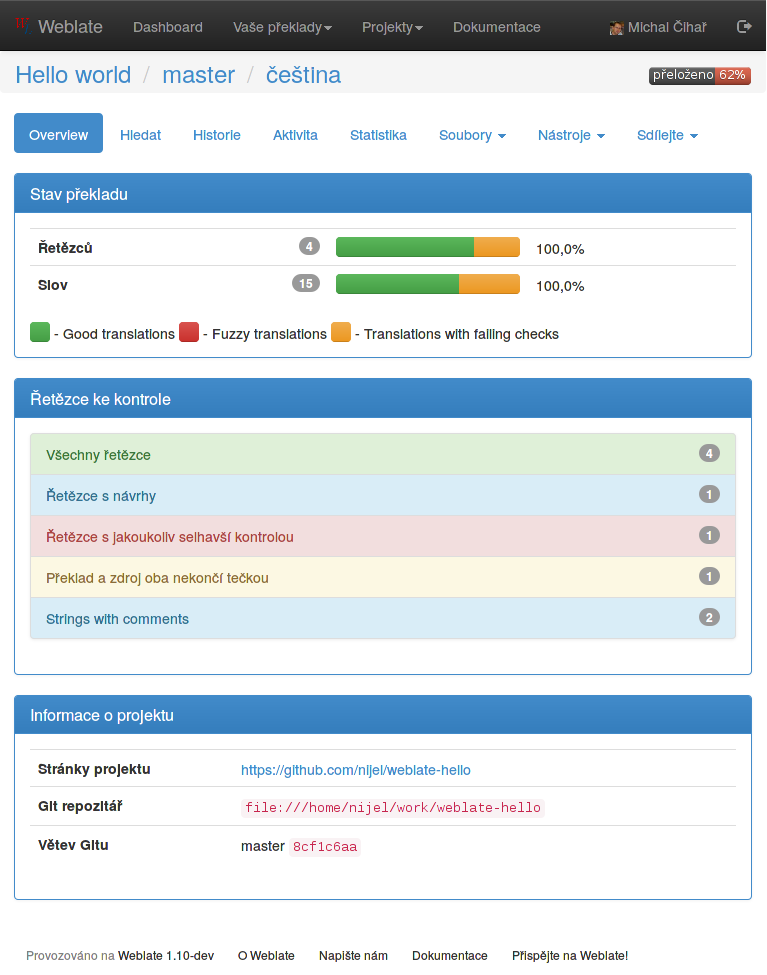
For quite some time I was pretty confident that Weblate will need some UI rewrite at some point. This is always problematic thing for me as I'm no way an UI designer and thus I always hope that somebody else will do that. I've anyway spent few hours on train home from LinuxTag to check what I could do with that. The first choice for me was to try Twitter Bootstrap as I've quite good experience with using that for UI at work, so I hoped it will work quite well for Weblate as well. The first steps went quite nicely, so I could share first screenshots on Twitter and continue to work on that. After few days, I'm quite happy with basic parts of the interface, though the most important things (eg. the page for translating) are still missing. But I think it's good time to ask for initial feedback on that. Main motivation was to unite two tab layout used on main pages, which turned out to be quite confusing as most users did not really get into bottom page of the page and thus did not find important functions available there. So all functions are accessible from top page navigation, either directly or being in menu. I've also decide to use colors a bit more to indicate the important things. So the progress bars are more visible now (and the same progress bar now indicates status of translation per words). The quality checks also got their severity, which in turn is used to highlight the most critical ones. The theme will probably change a bit (so far it's using default theme as I did not care much to change that). So let's take a look at following screenshot and let me know your thoughts: Number of applications over time You can also try that yourself, everything is developed in the bootstrap branch in our Git repository.
Filed under: English phpMyAdmin SUSE Weblate 4 comments Flattr this!

13 May 2014

Thorsten Glaser: L gen haben lange Leitern

Photo von Laternenmast mit Wahlplakaten, oben Pro NRW, unten Endlich tut mal jemand was gegen die rechte Hetzpartei! Ein Arbeitskollege fragt, ob man die nicht einfach mit einem langen Heckenschneider abmachen kann aber sie so l cherlich zu machen hat auch was

Finally, someone is doing something against this Nazi party! A coworker wondered whether it s legal to cut them off with a long tool, but making them ridiculous like this is also funny

(Explanation: the Pro NRW people put their campaign thingies (sorry, I don t speak English well) up on lamp posts very high, because they are taken down by other citizens immediately otherwise, so there s now people making fun of them for using long ladders (to put them up there, so the offended citizens need equally long ladders or tools with long arms) in leaning on the saying that lies have long legs here: ladders.)

12 May 2014

Benjamin Mako Hill: Google Has Most of My Email Because It Has All of Yours

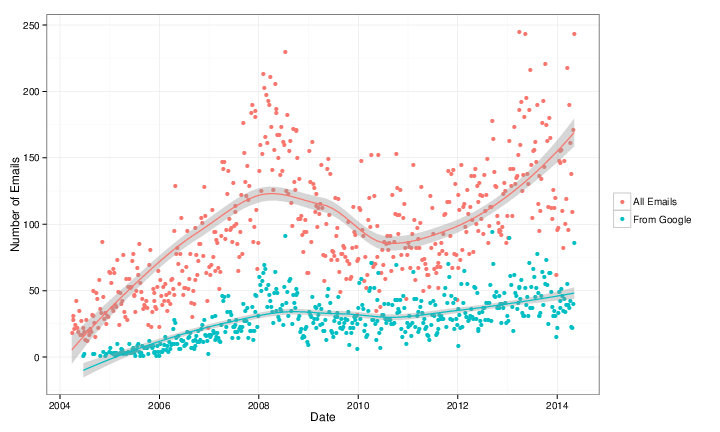
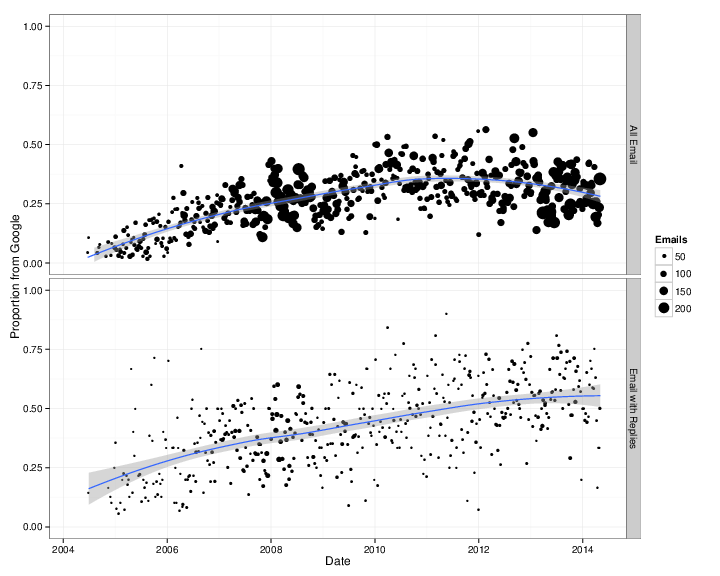
Republished by Slate. Translations available in French (Fran ais), Spanish (Espa ol), Chinese ( ) For almost 15 years, I have run my own email server which I use for all of my non-work correspondence. I do so to keep autonomy, control, and privacy over my email and so that no big company has copies of all of my personal email. A few years ago, I was surprised to find out that my friend Peter Eckersley a very privacy conscious person who is Technology Projects Director at the EFF used Gmail. I asked him why he would willingly give Google copies of all his email. Peter pointed out that if all of your friends use Gmail, Google has your email anyway. Any time I email somebody who uses Gmail and anytime they email me Google has that email. Since our conversation, I have often wondered just how much of my email Google really has. This weekend, I wrote a small program to go through all the email I have kept in my personal inbox since April 2004 (when Gmail was started) to find out. One challenge with answering the question is that many people, like Peter, use Gmail to read, compose, and send email but they configure Gmail to send email from a non-gmail.com From address. To catch these, my program looks through each message s headers that record which computers handled the message on its way to my server and to pick out messages that have traveled through google.com, gmail.com, or googlemail.com. Although I usually filter them, my personal mailbox contains emails sent through a number of mailing lists. Since these mailing lists often hide the true provenance of a message, I exclude all messages that are marked as coming from lists using the (usually invisible) Precedence header. The following graph shows the numbers of emails in my personal inbox each week in red and the subset from Google in blue. Because the number of emails I receive week-to-week tends to vary quite a bit, I ve included a LOESS smoother which shows a moving average over several weeks. Emails, total and from GMail, over timeFrom eyeballing the graph, the answer to seems to be that, although it varies, about a third of the email in my inbox comes from Google! Keep in mind that this is all of my personal email and includes automatic and computer generated mail from banks and retailers, etc. Although it is true that Google doesn t have these messages, it suggests that the proportion of my truly personal email that comes via Google is probably much higher. I would also like to know how much of the email I send goes to Google. I can do this by looking at emails in my inbox that I have replied to. This works if I am willing to assume that if I reply to an email sent from Google, it ends up back at Google. In some ways, doing this addresses the problem with the emails from retailers and banks since I am very unlikely to reply to those emails. In this sense, it also reflects a measure of more truly personal email. I ve broken down the proportions of emails I received that come from Google in the graph below for all email (top) and for emails I have replied to (bottom). In the graphs, the size of the dots represents the total number of emails counted to make that proportion. Once again, I ve included the LOESS moving average. Proportion of emails from GMail over timeThe answer is surprisingly large. Despite the fact that I spend hundreds of dollars a year and hours of work to host my own email server, Google has about half of my personal email! Last year, Google delivered 57% of the emails in my inbox that I replied to. They have delivered more than a third of all the email I ve replied to every year since 2006 and more than half since 2010. On the upside, there is some indication that the proportion is going down. So far this year, only 51% of the emails I ve replied to arrived from Google. The numbers are higher than I imagined and reflect somewhat depressing news. They show how it s complicated to think about privacy and autonomy for communication between parties. I m not sure what to do except encourage others to consider, in the wake of the Snowden revelations and everything else, whether you really want Google to have all your email. And half of mine. If you want to run the analysis on your own, you re welcome to the Python and R code I used to produce the numbers and graphs.

7 May 2014

Mario Lang: Accessible single-player texas hold'em poker for iOS

I have been looking for an App like this since I got my first iOS device in december 2011. Finally, it is here! A single-player (bot-driven) poker app for iOS, THETA Poker Pro, fully accessible and usable with VoiceOver. AppleVis has a review. It doesn't happen very often, but App programmers in the iOS Universe do indeed sometimes think about Accessibility support, and the APIs provided by Apple are useful enough to allow programmers to write very accessible apps. You can say about Apple whatever you want, currently, it is the company providing the best accessibility support on the market. Why? Because they made accessibility a first-class citizen of their platform(s). This is where policy helps. If you can dictate top-down that you support people with disabilities, things actually start to happen. If you have to ask, hope, and wait, like it is with free software, things do not really progress as fast as the users need it. Back to THETA Poker Pro: The default configuration is already very useable with VoiceOver. However, if you want the cards placed on the board announced to you, so that you do not have to discover them manually by touch, you can enable the "Card Announcement" item in the Options menu. You can also set message delay a bit slower, such that all messages are actually fully spoken and not cut off sometimes. With these two settings adjusted, and maybe "Animation" set to "Very fast", the game feels extremely nice. There is actually nothing I would want to change, which does not happen very often when I test a program for its accessibility. With these settings changed, game play is very smooth with VoiceOver, you basically just have to tap your cards to check, tap the deck to fold, or tap your chips to raise. Very simple, and these three "buttons" are on the bottom of the screen, so rather easy and quick to find. All other activity is automatically announced by VoiceOver. I have played a few hundred hands already with this App. It is a wonderful way to pass time. For instance, I don't like to go to my doctor, because I usually wait up to two or three hours. I had to pay her a visit on monday. While waiting, I played "a few" hands, and suddenly, I was already called in. When I came out again, I checked the time and was rather surprised that yes, I have waited two hours again, but this time, I didn't notice! :-) Special thanks go to the author(s) of this app. It is a good example of an App that was not specially made for the blind, but which feels like it was. Thanks, you've made my week!
A small rant OTOH, it makes me sad when I think about my beloved Linux platform and GUI accessibility. We are stuck since 2004 with a bit of desktop support + a half-working Firefox. During the D-Bus rewrite, quality of GUI accessibility has dropped so much that I had to take time off from linux gui accessibility to stay sane. It is back to where it was in 2006, yay, but we haven't made a lot of real progress in the last 8 years. Granted, firefox has improved, but to my taste, not enough. I still do all my email, shell work, programming and some other things on Linux of course, but I notice that I do more and more casual stuff on iOS, it is just sooo much more useable. I do almost all my surfing with mobile safari, because it just works. Firefox works sometimes, and some other times working with it feels so slow that I am actually getting angry. The scratch-your-own-itch philosophy combined with a very small margin group is poison for success. We'd need much more funding, and people working actively on this stuff as their day job, if we ever want to be competitive with existing solutions.

4 May 2014

Francois Marier: What's in a debian/ directory?

If you're looking to get started at packaging free software for Debian, you should start with the excellent New Maintainers' Guide or the Introduction to Debian Packaging on the Debian wiki. Once you know the basics, or if you prefer to learn by example, you may be interested in the full walkthrough which follows. We will look at the contents of three simple packages.

node-libravatar This package is a node.js library for the Libravatar service. Version 2.0.0-3 of that package contains the following files in its debian/ directory:
  • changelog
  • compat
  • control
  • copyright
  • docs
  • node-libravatar.install
  • rules
  • source/format
  • watch

debian/control
Source: node-libravatar
Priority: extra
Maintainer: Francois Marier <francois@debian.org>
Build-Depends: debhelper (>= 9)
Standards-Version: 3.9.4
Section: web
Homepage: https://github.com/fmarier/node-libravatar
Vcs-Git: git://git.debian.org/collab-maint/node-libravatar.git
Vcs-Browser: http://git.debian.org/?p=collab-maint/node-libravatar.git;a=summary
Package: node-libravatar
Architecture: all
Depends: $ shlibs:Depends , $ misc:Depends , nodejs
Description: libravatar library for NodeJS
 This library allows web application authors to make use of the free Libravatar
 service (https://www.libravatar.org). This service hosts avatar images for
 users and allows other sites to look them up using email addresses.
 .
 node-libravatar includes full support for federated avatar servers.
This is probably the most important file since it contains the bulk of the metadata about this package. Maintainer is a required field listing the maintainer of that package, which can be a person or a team. It only contains a single value though, any co-maintainers will be listed under the optional Uploaders field. Build-Depends lists the packages which are needed to build the package (e.g. a compiler), as opposed to those which are needed to install the binary package (e.g. a library it uses). Standards-Version refers to the version of the Debian Policy that this package complies with. The Homepage field refers to the upstream homepage, whereas the Vcs-* fields point to the repository where the packaging is stored. If you take a look at the node-libravatar packaging repository you will see that it contains three branches:
  • upstream is the source as it was in the tarball downloaded from upstream.
  • master is the upstream branch along with all of the Debian customizations.
  • pristine-tar is unrelated to the other two branches and is used by the pristine-tar tool to reconstitute the original upstream tarball as needed.
After these fields comes a new section which starts with a Package field. This is the definition of a binary package, not to be confused with the Source field at the top of this file, which refers to the name of the source package. In this particular example, they are both the same and there is only one of each, however this is not always the case, as we'll see later. Inside that binary package definition, lives the Architecture field which is normally one of these two:
  • all for a binary package that will work on all architectures but only needs to be built once
  • any for a binary package that will work everywhere but that will need to be built separately for each architecture
Finally, the last field worth pointing out is the Depends field which lists all of the runtime dependencies that the binary package has. This is what will be pulled in by apt-get when you apt-get install node-libravatar. The two variables will be substituted later by debhelper.

debian/changelog
node-libravatar (2.0.0-3) unstable; urgency=low
  * debian/watch: poll github directly
  * Bump Standards-Version up to 3.9.4
 -- Francois Marier <francois@debian.org>  Mon, 20 May 2013 12:07:49 +1200
node-libravatar (2.0.0-2) unstable; urgency=low
  * More precise license tag and upstream contact in debian/copyright
 -- Francois Marier <francois@debian.org>  Tue, 29 May 2012 22:51:03 +1200
node-libravatar (2.0.0-1) unstable; urgency=low
  * New upstream release
    - new non-backward-compatible API
 -- Francois Marier <francois@debian.org>  Mon, 07 May 2012 14:54:19 +1200
node-libravatar (1.1.1-1) unstable; urgency=low
  * Initial release (Closes: #661771)
 -- Francois Marier <francois@debian.org>  Fri, 02 Mar 2012 15:29:57 +1300
This may seem at first like a mundane file, but it is very important since it is the canonical source of the package version (2.0.0-3 in this case). This is the only place where you need to bump the package version when uploading a new package to the Debian archive. The first line also includes the distribution where the package will be uploaded. It is usually one of these values:
  • unstable for the vast majority of uploads
  • stable for uploads that have been approved by the release maintainers and fix serious bugs in the stable version of Debian
  • stable-security for security fixes to the stable version of Debian that cannot wait until the next stable point release and have been approved by the security team
Packages uploaded to unstable will migrate automatically to testing provided that a few conditions are met (e.g. no release-critical bugs were introduced). The length of time before that migration is influenced by the urgency field (low, medium or high) in the changelog entry. Another thing worth noting is that the first upload normally needs to close an ITP (Intent to Package) bug.

debian/rules
#!/usr/bin/make -f
# -*- makefile -*-
%:
    dh $@ 
override_dh_auto_test:
As can be gathered from the first two lines of this file, this is a Makefile. This is what controls how the package is built. There's not much to see and that's because most of its content is automatically added by debhelper. So let's look at it in action by building the package:
$ git buildpackage -us -uc
and then looking at parts of the build log (../node-libravatar_2.0.0-3_amd64.build):
 fakeroot debian/rules clean
dh clean 
   dh_testdir
   dh_auto_clean
   dh_clean
One of the first things we see is the debian/rules file being run with the clean target. To find out what that does, have a look at the dh_auto_clean which states that it will attempt to delete build residues and run something like make clean using the upstream Makefile.
 debian/rules build
dh build 
   dh_testdir
   dh_auto_configure
   dh_auto_build
Next we see the build target being invoked and looking at dh_auto_configure we see that this will essentially run ./configure and its equivalents. The dh_auto_build helper script then takes care of running make (or equivalent) on the upstream code. This should be familiar to anybody who has ever built a piece of free software from scratch and has encountered the usual method for building from source:
./configure
make
make install
Finally, we get to actually build the .deb:
 fakeroot debian/rules binary
dh binary 
   dh_testroot
   dh_prep
   dh_installdirs
   dh_auto_install
   dh_install
...
   dh_md5sums
   dh_builddeb
dpkg-deb: building package  node-libravatar' in  ../node-libravatar_2.0.0-3_all.deb'.
Here we see a number of helpers, including dh_auto_install which takes care of running make install. Going back to the debian/rules, we notice that there is manually defined target at the bottom of the file:
override_dh_auto_test:
which essentially disables dh_auto_test by replacing it with an empty set of commands. The reason for this becomes clear when we take a look at the test target of the upstream Makefile and the dependencies it has: tap, a node.js library that is not yet available in Debian. In other words, we can't run the test suite on the build machines so we need to disable it here.

debian/compat
9
This file simply specifies the version of debhelper that is required by the various helpers used in debian/rules. Version 9 is the latest at the moment.

debian/copyright
Format: http://www.debian.org/doc/packaging-manuals/copyright-format/1.0/
Upstream-Name: node-libravatar
Upstream-Contact: Francois Marier <francois@libravatar.org>
Source: https://github.com/fmarier/node-libravatar
Files: *
Copyright: 2011 Francois Marier <francois@libravatar.org>
License: Expat
Files: debian/*
Copyright: 2012 Francois Marier <francois@debian.org>
License: Expat
License: Expat
 Permission is hereby granted, free of charge, to any person obtaining a copy of this
 software and associated documentation files (the "Software"), to deal in the Software
 without restriction, including without limitation the rights to use, copy, modify,
 merge, publish, distribute, sublicense, and/or sell copies of the Software, and to
 permit persons to whom the Software is furnished to do so, subject to the following
 conditions:
 .
 The above copyright notice and this permission notice shall be included in all copies
 or substantial portions of the Software.
 .
 THE SOFTWARE IS PROVIDED "AS IS", WITHOUT WARRANTY OF ANY KIND, EXPRESS OR IMPLIED,
 INCLUDING BUT NOT LIMITED TO THE WARRANTIES OF MERCHANTABILITY, FITNESS FOR A
 PARTICULAR PURPOSE AND NONINFRINGEMENT. IN NO EVENT SHALL THE AUTHORS OR COPYRIGHT
 HOLDERS BE LIABLE FOR ANY CLAIM, DAMAGES OR OTHER LIABILITY, WHETHER IN AN ACTION OF
 CONTRACT, TORT OR OTHERWISE, ARISING FROM, OUT OF OR IN CONNECTION WITH THE SOFTWARE
 OR THE USE OR OTHER DEALINGS IN THE SOFTWARE.
This machine-readable file lists all of the different licenses encountered in this package. It requires that the maintainer audits the upstream code for any copyright statements that might be present in addition to the license of the package as a whole.

debian/docs
README.md
This file contains a list of upstream files that will be copied into the /usr/share/doc/node-libravatar/ directory by dh_installdocs.

debian/node-libravatar.install
lib/*    usr/lib/nodejs/
The install file is used by dh_install to supplement the work done by dh_auto_install which, as we have seen earlier, essentially just runs make install on the upstream Makefile. Looking at that upstream Makefile, it becomes clear that the files will need to be installed manually by the Debian package since that Makefile doesn't have an install target.

debian/watch
version=3
https://github.com/fmarier/node-libravatar/tags /fmarier/node-libravatar/archive/node-libravatar-([0-9.]+)\.tar\.gz
This is the file that allows Debian tools like the Package Tracking System to automatically detect that a new upstream version is available. What it does is simply visit the upstream page which contains all of the release tarballs and look for links which have an href matching the above regular expression. Running uscan --report --verbose will show us all of the tarballs that can be automatically discovered using this watch file:
-- Scanning for watchfiles in .
-- Found watchfile in ./debian
-- In debian/watch, processing watchfile line:
   https://github.com/fmarier/node-libravatar/tags /fmarier/node-libravatar/archive/node-libravatar-([0-9.]+)\.tar\.gz
-- Found the following matching hrefs:
     /fmarier/node-libravatar/archive/node-libravatar-2.0.0.tar.gz
     /fmarier/node-libravatar/archive/node-libravatar-1.1.1.tar.gz
     /fmarier/node-libravatar/archive/node-libravatar-1.1.0.tar.gz
     /fmarier/node-libravatar/archive/node-libravatar-1.0.1.tar.gz
     /fmarier/node-libravatar/archive/node-libravatar-1.0.0.tar.gz
Newest version on remote site is 2.0.0, local version is 2.0.0
 => Package is up to date
-- Scan finished

pylibravatar This second package is the equivalent Python library for the Libravatar service. Version 1.6-2 of that package contains similar files in its debian/ directory, but let's look at two in particular:
  • control
  • upstream/signing-key.asc

debian/control
Source: pylibravatar
Section: python
Priority: optional
Maintainer: Francois Marier <francois@debian.org>
Build-Depends: debhelper (>= 9), python-all, python3-all
Standards-Version: 3.9.5
Homepage: https://launchpad.net/pyLibravatar
...
Package: python-libravatar
Architecture: all
Depends: $ misc:Depends , $ python:Depends , python-dns, python
Description: Libravatar module for Python 2
 Module to make use of the federated Libravatar.org avatar hosting service
 from within Python applications.
...
Package: python3-libravatar
Architecture: all
Depends: $ misc:Depends , $ python3:Depends , python3-dns, python3
Description: Libravatar module for Python 3
 Module to make use of the federated Libravatar.org avatar hosting service
 from within Python applications.
...
Here is an example of a source package (pylibravatar) which builds two separate binary packages: python-libravatar and python3-libravatar. This highlights the fact that a given upstream source can be split into several binary packages in the archive when it makes sense. In this case, there is no point in Python 2 applications pulling in the Python 3 files, so the two separate packages make sense. Another common example is the use of a -doc package to separate the documentation from the rest of a package so that it doesn't need to be installed on production servers for example.

debian/upstream/signing-key.asc
-----BEGIN PGP PUBLIC KEY BLOCK-----
Version: GnuPG v1
mQINBEpQYz4BEAC7REQD1za69RUnkt6nRCFhSJmmoeJc+yEiWTKc9GOIMAwJDme1
+CMYgVn4Xzf1VQYwD/lE+mfWgyeMomLQjDM1mxx/LOM2a1WWPOk9+PvQwKfRJy92
...
UxDtZm/4yUmU6KvHvOGiDCMuIiB+MqhqJJ5wf80wXhzu8nmC+fyGt6nvu0ggMle8
sAMgXt/aQUTZE5zNCQ==
=RkTO
-----END PGP PUBLIC KEY BLOCK-----
This is simply the OpenPGP key that the upstream developer uses to sign release tarballs. Since PGP signatures are available on the upstream download page, it's possible to instruct uscan to check signatures before downloading tarballs. The way to do that is to use the pgpsigurlmange option in debian/watch:
version=3
opts=pgpsigurlmangle=s/$/.asc/ https://pypi.python.org/pypi/pyLibravatar https://pypi.python.org/packages/source/p/pyLibravatar/pyLibravatar-(.*)\.tar\.gz
which is simply a regular expression replacement string which takes the tarball URL and converts it to the URL of the matching PGP signature.

fcheck The last package we will look at is a file integrity checker. It essentially goes through all of the files in /usr/bin/ and /usr/lib/ and stores a hash of them in its database. When one of these files changes, you get an email. In particular, we will look at the following files in the debian/ directory of version 2.7.59-18:
  • dirs
  • fcheck.cron.d
  • fcheck.postrm
  • fcheck.postinst
  • patches/
  • README.Debian
  • rules
  • source/format

debian/patches This directory contains ten patches as well as a file called series which lists the patches that should be applied to the upstream source and in which order. Should you need to temporarily disable a patch, simply remove it from this file and it will no longer be applied at build time. Let's have a look at patches/04_cfg_sha256.patch:
Description: Switch to sha256 hash algorithm
Forwarded: not needed
Author: Francois Marier <francois@debian.org>
Last-Update: 2009-03-15
--- a/fcheck.cfg
+++ b/fcheck.cfg
@@ -149,8 +149,7 @@ TimeZone        = EST5EDT
 #$Signature      = /usr/bin/sum
 #$Signature      = /usr/bin/cksum
 #$Signature      = /usr/bin/md5sum
-$Signature      = /bin/cksum
-
+$Signature      = /usr/bin/sha256sum
 # Include an optional configuration file.
This is a very simple patch which changes the default configuration of fcheck to promote the use of a stronger hash function. At the top of the file is a bunch of metadata in the DEP-3 format. Why does this package contain so many customizations to the upstream code when Debian's policy is to push fixes upstream and work towards reduce the delta between upstream and Debian's code? The answer can be found in debian/control:
Homepage: http://web.archive.org/web/20050415074059/www.geocities.com/fcheck2000/
This package no longer has an upstream maintainer and its original source is gone. In other words, the Debian package is where all of the new bug fixes get done.

debian/source/format
3.0 (quilt)
This file contains what is called the source package format. What it basically says is that the patches found in debian/patches/ will be applied to the upstream source using the quilt tool at build time.

debian/fcheck.postrm
#!/bin/sh
# postrm script for fcheck
#
# see: dh_installdeb(1)
set -e
# summary of how this script can be called:
#        * <postrm>  remove'
#        * <postrm>  purge'
#        * <old-postrm>  upgrade' <new-version>
#        * <new-postrm>  failed-upgrade' <old-version>
#        * <new-postrm>  abort-install'
#        * <new-postrm>  abort-install' <old-version>
#        * <new-postrm>  abort-upgrade' <old-version>
#        * <disappearer's-postrm>  disappear' <overwriter>
#          <overwriter-version>
# for details, see http://www.debian.org/doc/debian-policy/ or
# the debian-policy package
case "$1" in
    remove upgrade failed-upgrade abort-install abort-upgrade disappear)
    ;;
    purge)
      if [ -e /var/lib/fcheck/fcheck.dbf ]; then
        echo "Purging old database file ..."
        rm -f /var/lib/fcheck/fcheck.dbf
      fi
      rm -rf /var/lib/fcheck
      rm -rf /var/log/fcheck
      rm -rf /etc/fcheck
    ;;
    *)
        echo "postrm called with unknown argument \ $1'" >&2
        exit 1
    ;;
esac
# dh_installdeb will replace this with shell code automatically
# generated by other debhelper scripts.
#DEBHELPER#
exit 0
This script is one of the many possible maintainer scripts that a package can provide if needed. This particular one, as the name suggests, will be run after the package is removed (apt-get remove fcheck) or purged (apt-get remove --purge fcheck). Looking at the case statement above, it doesn't do anything extra in the remove case, but it deletes a few files and directories when called with the purge argument.

debian/README.Debian This optional README file contains Debian-specific instructions that might be useful to users. It supplements the upstream README which is often more generic and cannot assume a particular system configuration.

debian/rules
#!/usr/bin/make -f
# -*- makefile -*-
# Sample debian/rules that uses debhelper.
# This file was originally written by Joey Hess and Craig Small.
# As a special exception, when this file is copied by dh-make into a
# dh-make output file, you may use that output file without restriction.
# This special exception was added by Craig Small in version 0.37 of dh-make.
# Uncomment this to turn on verbose mode.
#export DH_VERBOSE=1
build-arch:
build-indep:
build: build-stamp
build-stamp:
    dh_testdir
    pod2man --section=8 $(CURDIR)/debian/fcheck.pod > $(CURDIR)/fcheck.8
    touch build-stamp
clean:
    dh_testdir
    dh_testroot
    rm -f build-stamp 
    rm -f $(CURDIR)/fcheck.8
    dh_clean
install: build
    dh_testdir
    dh_testroot
    dh_prep
    dh_installdirs
    cp $(CURDIR)/fcheck $(CURDIR)/debian/fcheck/usr/sbin/fcheck
    cp $(CURDIR)/fcheck.cfg $(CURDIR)/debian/fcheck/etc/fcheck/fcheck.cfg
# Build architecture-independent files here.
binary-arch: build install
# Build architecture-independent files here.
binary-indep: build install
    dh_testdir
    dh_testroot
    dh_installdocs
    dh_installcron
    dh_installman fcheck.8
    dh_installchangelogs
    dh_installexamples
    dh_installlogcheck
    dh_link
    dh_strip
    dh_compress
    dh_fixperms
    dh_installdeb
    dh_shlibdeps
    dh_gencontrol
    dh_md5sums
    dh_builddeb
binary: binary-indep binary-arch
.PHONY: build clean binary-indep binary-arch binary install
This is an example of a old-style debian/rules file which you still encounter in packages which haven't yet upgraded to the latest version of debhelper 9, as can be shown by the contents of debian/compat:
8
It does essentially the same thing that what we've seen in the build log, but in a more verbose way.

debian/dirs
usr/sbin
etc/fcheck
This file contains a list of directories that dh_installdirs will create in the build directory. The reason why these directories need to be created is that files are copied into these directories in the install target of the debian/rules file. Note that this is different from directories which are created at the time of installation of the package. In that case, the directory (e.g. /var/log/fcheck/) must be created in the postinst script and removed in the postrm script.

debian/fcheck.cron.d
#
# Regular cron job for the fcheck package
#
30 */2  * * *   root    test -x /usr/sbin/fcheck && if ! nice ionice -c3 /usr/sbin/fcheck -asxrf /etc/fcheck/fcheck.cfg >/var/run/fcheck.out 2>&1; then mailx -s "ALERT: [fcheck]  hostname --fqdn " root </var/run/fcheck.out ; /usr/sbin/fcheck -cadsxlf /etc/fcheck/fcheck.cfg ; fi ; rm -f /var/run/fcheck.out
This file is the cronjob which drives the checks performed by this package. It will be copied to /etc/cron.d/fcheck by dh_installcron.

1 May 2014

Siri Reiter: Communication building blocks for MiniDebConf Barcelona 2014 (drafts)

Sustainable visual identity design is a design that recycles as many elements as possible with every new piece of communication. Not only is a brand strengthened every time the logo and any other identity forming visual element is used, a lot of work is also saved as well. Every logo variant is a weakening of the brand, not a strengthening. Of course design improvements can be made - always, all year 'round - preferably not right up to the next conference. I consider it a waste of time to create a sublogo for a minidebconf. The Debian logo is perfectly suitable as logo for a Debian conference. In the particular case of the Barcelona MiniDebConf 2014, I think the Debian Women logo is the proper logo to use, though, since it is a Debian Women project, contradictionary as it may sound. The same principle of recycling typography and grids. I'd like as much identity matter - and work - to be reused, as possible. There is no need to reinvent the wheel every time. A visual theme created with illustration and colour schemes is enough as identity indicator for smaller events like MiniDebConfs. In my opinion.

Logo and logotype The Debian Women logo. Event name set in the font Procipio, familiar to the Debian logo. The name is long and cannot be scaled down much. A version with the name set in two lines can be used in narrow space, like on a folder.

Theme The speech bubble is a part of the visual theme. Orange is a color I connect with Spain, sun and oranges. I suggest it used with red like the Debian logo red.

Poster The speech bubbles could be used in a varied form. I've stated a few important statements here. I'd like a shared list of statements. There must be other info on the poster as well. The white space at the bottom is for sponsor logos. The font I use in the speech bubbles in this draft is an Apple font called Flood. I'd like to find a free font with similar qualities.

T-shirt There are many possibilities. I like the idea of printing just a speech bubble in the front and give people the opportunity to write their personal statements with textile pens. Nametags could be badges to be filled out on the spot with a pen.

Next.

Previous.