Here s my (thirteenth) monthly update about the activities I ve done in the F/L/OSS world.
Debian
This was my 22nd month of contributing to Debian.
I became a DM in late March last year and a DD last Christmas! \o/
Whilst busy with my undergrad, I could still take some time out for contributing to Debian (I always do!).
Here are the following things I did in Debian this month:
Sponsored phpmyadmin, php-bacon-baconqrcode, twig, php-dasprid-enum, sql-parser, and mariadb-mysql-kbs for William.
Debian (E)LTS
Debian Long Term Support (LTS) is a project to extend the lifetime of all Debian stable releases to (at least) 5 years. Debian LTS is not handled by the Debian security team, but by a separate group of volunteers and companies interested in making it a success.
And Debian Extended LTS (ELTS) is its sister project, extending support to the Jessie release (+2 years after LTS support).
This was my thirteenth month as a Debian LTS and fourth month as a Debian ELTS paid contributor.
I was assigned 20.75 hours for LTS and 30.00 hours for ELTS and worked on the following things:
(for ELTS, I worked for 5.25 hours extra, so my total hours this month for ELTS were 35.25!)
Here is my monthly update covering what I have been doing in the free software world during October 2020 (previous month):
Opened a pull request for libIIO, a cross-platform library for interfacing with local and remote Linux Industrial I/O subsystem devices to make the build reproducible. [...]
As part of my role of being the assistant Secretary of the Open Source Initiative and a board director of Software in the Public Interest, I attended their respective monthly meetings and participated in various licensing and other discussions occurring on the internet as well as the usual internal discussions, etc., including continuing 'onboarding' of a new project to SPI.
Addressed an issue filed by Bob Tanner by updating the documentation of my django-slack library which provides a convenient wrapper between projects using the Django and the Slack chat platform. [...]
Opened a pull request against libsass-python (a straightforward binding of libsass for Python, to compile the Sass CSS extensions in Python without the conventional Ruby stack) in order to make the build reproducible. [...]
For Lintian, the static analysis tool for Debian packages, I uploaded versions 2.97.0, 2.98.0, 2.99.0 & 2.100.0 as well as updated the declares-possibly-conflicting-debhelper-compat-versions tag as we may specify the Debhelper compatibility level in debian/rules or debian/control (#972464) and dropped a reference to missing manual page [...].
Reproducible Builds
One of the original promises of open source software is that distributed peer review and transparency of process results in enhanced end-user security. However, whilst anyone may inspect the source code of free and open source software for malicious flaws, almost all software today is distributed as pre-compiled binaries. This allows nefarious third-parties to compromise systems by injecting malicious code into ostensibly secure software during the various compilation and distribution processes.
The motivation behind the Reproducible Builds effort is to ensure no flaws have been introduced during this compilation process by promising identical results are always generated from a given source, thus allowing multiple third-parties to come to a consensus on whether a build was compromised.
The project is proud to be a member project of the Software Freedom Conservancy. Conservancy acts as a corporate umbrella allowing projects to operate as non-profit initiatives without managing their own corporate structure. If you like the work of the Conservancy or the Reproducible Builds project, please consider becoming an official supporter.
This month, I:
Submitted the following patches to fix reproducibility-related toolchain issues within Debian:
perl: Please make the build mostly reproducible. (#972559)
fckit: Please make the build (mostly) reproducible. (#972378)
libgrokj2k: Please make the documentation reproducible. (#972494)
netcdf-parallel: Please make the settings file reproducible. (#972930)
dh-fortran-mod: Please make the output reproducible
version graph. (#965255)
Filed a bug against the emacs package to make the generated .el files reproducible, a regression that is causing many packages to become unreproducible. (#972861)
Helped draft a mailing list post to update dpkg-buildflags to enable reproducible=+fixfilepath by default.
Reviewed and merged functionality from Jean-Romain Garnier to add support for radare, a decompiler/reverse-engineering framework [...] and update debian/tests/control to match [...].
Frontdesk duties, responding to user/developer questions, reviewing others' packages, participating in mailing list discussions, etc.
Issued DLA 2406-1 for jackson-databind, a Java library for processing JSON, to address an external entity expansion vulnerability.
Issued DLA 2407-1 for tomcat8, the Java application server. This was to fix an issue where an excessive number of concurrent streams could have resulted in users seeing responses for unexpected resources.
Issued DLA 2410-1 and ELA 301-1 for the BlueZ suite of Bluetooth tools, utilities and daemons to prevent a double-free vulnerability.
You can find out more about the project via the following video:
Uploads
black (20.8b1-2) Non-maintainer upload to correct version handling to avoid a ModuleNotFoundError error which was affecting a number of related packages. (#970901)
Bugs filed
lintian: Please detect sed -e 's@$(CURDIR)@...@' in debian/rules. (#972629)
mdtraj: Manual pages appear to contain error messages instead of actual examples. (#972635)
gita: Missing build-depends on python3-yaml. (#972493)
git-buildpackage: Correct 'option' typo in manual page. (#972081)
So we found ourselves in the need to delete a considerable amount of files (around 500000, amounting to 1.6T) from an S3 bucket. With the list of files in hand my first shot was calling
aws s3 rm s3://BUCKET/FILE
for each file. That wasn t the best idea I have to say, since first of all, it makes 500000 requests, and then it takes a looong time. And this command does not allow to pass in multiple files.
Fortunately there is aws s3api delete-objects which takes a json input and can delete multiple files:
That did help, and with a bit of magic from bash (mapfile which can read in lines from stdin in batches) and jq, at the end it was a business of some 20min or so:
This reads 500 files a time, and reformats it using jq into the proper json format: reduce inputs is a jq filter that iterates over the input lines and does a map/reduce step. In this case we use an empty array as start and add new key/filename pairs on the go. Finally, the whole bunch is send to AWS with the above API call.
Puuuh, 500000 files and 1.6T less, in 20min.
This article documents how to install rpki-client (an RPKI relying party software, the actual validator) and gortr (which implements the RPKI to Router protocol) on Debian 10 to provide RPKI validation to routers. If you are using testing or unstable then you can just skip the part about apt pinnings.
The packages in bullseye (Debian testing) can be installed as is on Debian stable with no need to rebuild them, by configuring an appropriate pinning for apt:
cat <<END > /etc/apt/sources.list.d/bullseye.list
deb http://deb.debian.org/debian/ bullseye main
END
cat <<END > /etc/apt/preferences.d/pin-rpki
# by default do not install anything from bullseye
Package: *
Pin: release bullseye
Pin-Priority: 100
Package: gortr rpki-client rpki-trust-anchors
Pin: release bullseye
Pin-Priority: 990
END
apt update
Before starting, make sure that curl (or wget) and the web PKI certificates are installed:
apt install curl ca-certificates
If you already know about the legal issues related to the ARIN TAL then you may instruct the package to automatically install it. If you skip this step then you will be asked at installation time about it, either way is fine.
In July I finished my Bachelor s Degree in IT Security at the University of
Applied Sciences in St. Poelten. During the studies I did some elective
courses, one of which was about Data Analysis using Python, Pandas and Jupyter
Notebooks. I found it very interesting to do calculations on different data
sets and to visualize them. Towards the end of the Bachelor I had to find a
topic for my Bachelor Thesis and as a long time user of OpenPGP I thought it
would be interesting to do an analysis of the collection of OpenPGP keys that
are available on the keyservers of the SKS keyserver network.
So in June 2019 I fetched a copy of one of the key dumps of the one of the
keyservers (some keyserver publish these copies of their key database so people
who want to join the SKS keyserver network can do an initial import). At that
time the copy of the key database contained 5,499,675 keys and was around 12GB.
Using the hockeypuck keyserver
software I imported the
keys into an PostgreSQL database.
Hockeypuck uses a table called keys to store the keys and in there the column
doc stores the OpenPGP keys in JSON format (always with a data field
containing the original unparsed data).
For the thesis I split the analysis in three parts, first looking at the Public
Key packets, then analysing the User ID packets and finally studying the
Signature Packets. To analyse the respective packets I used SQL to export the
data to CSV files and then used the pandas read_csv
method
to create a dataframe of the values. In a couple of cases I did some parsing
before converting to a DataFrame to make the analysis step faster. The parsing
was done using the pgpdump python
library.
Together with my advisor I decided to submit the thesis for a journal, so we
revised and compressed the whole paper and the outcome was now
PUBLISHED
in the Journal of
Wireless Mobile Networks, Ubiquitous Computing, and Dependable Applications
(JoWUA).
I think the work gives some valuable insight in the development of the use of
OpenPGP in the last 30 years. Looking at the public key packets we were able to
compare the different public key algorithms and for example visualize how DSA
was the most used algorithm until around 2010 when it was replaced by RSA.
When looking at the less used algorithms a trend towards ECC based crytography is
visible.
What we also noticed was an increase of RSA keys with algorithm ID 3 (RSA Sign-Only),
which are deprecated. When
we took a deeper look at those keys we realized that most of those keys used a
specific User ID string in the User ID packets which allowed us to attribute
those keys to two software projects both using the Bouncy Castle Java
Cryptographic API (resp. the Spongy
Castle version for Android). We also stumbled over a tutorial on how to create
RSA keys with
Bouncycastle
which also describes how to create RSA keys with code that produces RSA
Sign-Only keys. In one of those projects, this was then
fixed.
By looking at the User ID packets we did some statistics about the most used
email providers used by OpenPGP users. One domain stood out, because it is not
the domain of an email provider: tellfinder.com is a domain used in around
45,000 keys. Tellfinder is a
Big Data analysis software and the UID of all but two of those keys is
TellFinder Page Archiver- Signing Key <support@tellfinder.com>.
We also looked at the comments used in OpenPGP User ID fields. In 2013 Daniel
Kahn Gillmor published a blog post titled OpenPGP User ID Comments considered
harmful in which he
pointed out that most of the comments in the User ID field of OpenPGP keys are
duplicating information that is already present somewhere in the User ID or the
key itself. In our dataset 3,133 comments were exactly the same as the name,
3,346 were the same as the domain and 18,246 comments were similar to the local
part of the email address
Last but not least we looked at the signature subpackets and the development of
some of the preferences (Preferred Symmetric
Algorithm, Preferred
Hash Algorithm) that are
being published using signature packets.
Analysing this huge dataset of cryptographic keys of the last 20 to 30 years
was very interesting and I learned a lot about the history of PGP resp.
OpenPGP and the evolution of cryptography overall. I think it
would be interesting to look at even more properties of OpenPGP keys and I also
think it would be valuable for the OpenPGP ecosystem if these kinds analysis
could be done regularly. An approach like Tor
Metrics could lead to interesting findings and
could also help to back decisions regarding future developments of the OpenPGP
standard.
This is part of a series of posts on compiling a custom version of Qt5 in order
to develop for both amd64 and a Raspberry Pi.
Building Qt5 takes a long time. The build server I was using had CPUs and RAM,
but was very slow on I/O. I was very frustrated by that, and I started
evaluating alternatives. I ended up setting up scripts to automatically
provision a throwaway cloud server at Hetzner.
Initial setup
I got an API key from my customer's Hetzner account.
I installed hcloud-cli, currently only in testing and unstable:
apt install hcloud-cli
Then I configured hcloud with the API key:
hcloud context create
Spin up
I wrote a quick and dirty script to spin up a new machine, which grew a bit
with little tweaks:
#!/bin/sh# Create the server
hcloud server create --name buildqt --ssh-key --start-after-create \
--type cpx51 --image debian-10 --datacenter
# Query server IPIP="$(hcloud server describe buildqt -o json jq -r .public_net.ipv4.ip)"# Update ansible host fileecho"buildqt ansible_user=root ansible_host=$IP" > hosts
# Remove old host key
ssh-keygen -f ~/.ssh/known_hosts -R "$IP"# Update login scriptecho"#!/bin/sh" > login
echo"ssh root@$IP" >> login
chmod 0755 login
I picked a datacenter in the same location as where we have other servers, to
get quicker data transfers.
I like that CLI tools have JSON output that I can cleanly pick at with
jq. Sadly, my ISP doesn't do IPv6 yet.
Since the server just got regenerated, I remove a possibly cached host key.
Provisioning the machine
One git server I need is behind HTTP authentication. Here's a quick hack to
pass the relevant .netrc credentials to ansible before provisioning:
Now everything is ready for a 16 core, 32Gb ram build on SSD storage.
Tear down
When done:
#!/bin/sh
hcloud server delete buildqt
The whole spin up plus provisioning takes around a minute, so I can do it when
I start a work day, and take it down at the end. The build machine wasn't that
expensive to begin with, and this way it will even be billed by the hour.
A first try on a CPX51 machine has just built the full Qt5 Everywhere
Enterprise including QtWebEngine and all its frills, for amd64, in under 1
hour and 40 minutes.
Often, one would want to generate smooth data from a fit over a small number of data points. For an example, take the data in the following file. It contains (fake) experimental data points that obey to Michaelis-Menten kinetics:
$$v = \frac v_m 1 + K_m/s $$
in which \(v\) is the measured rate (the y values of the data), \(s\) the concentration of substrate (the x values of the data), \(v_m\) the maximal rate and \(K_m\) the Michaelis constant. To fit this equation to the data, just use the fit-arb fit:
QSoas> l michaelis.dat
QSoas> fit-arb vm/(1+km/x)
After running the fit, the window should look like this:
Now, with the fit, we have reasonable values for \(v_m\) (vm) and \(K_m\) (km). But, for publication, one would want to generate "smooth" curve going through the lines... Saving the curve from "Data.../Save all" doesn't help, since the data has as many points as the original data and looks very "jaggy" (like on the screenshot above)... So one needs a curve with more data points.
Maybe the most natural solution is simply to use generate-buffer together with apply-formula using the formula and the values of km and vm obtained from the fit, like:
By default, generate-buffer generate 1000 evenly spaced x values, but you can change their number using the /samples option. The two above commands can be combined to just one call to generate-buffer:
QSoas> generate-buffer 0 20 3.51742/(1+3.69767/x)
This works, but it is quite cumbersome and it is not going to work well for complex formulas or the results of differential equations or kinetic systems...
This is why to each fit- command corresponds a sim- command that computes the result of the fit using a "saved parameters" file (here, michaelis.params, but you can also save it yourself) and buffers as "models" for X values:
This strategy works with every single fit ! As an added benefit, you even get the fit parameters as meta-data, which are displayed by the show command:
QSoas> show 0
Dataset generated_fit_arb.dat: 2 cols, 1000 rows, 1 segments, #0
Flags:
Meta-data:	commands =	 sim-arb vm/(1+km/x) michaelis.params 0	fit =	 arb (formula: vm/(1+km/x))	km =	 3.69767
	vm =	 3.5174
They also get saved as comments if you save the data.
Important note: the sim-arb command will be available only in the 3.0 release, although you can already enjoy it if you use the github version.
About QSoasQSoas is a powerful open source data analysis program that focuses on flexibility and powerful fitting capacities. It is released under the GNU General Public License. It is described in Fourmond, Anal. Chem., 2016, 88 (10), pp 5050 5052. Current version is 2.2. You can download its source code and compile it yourself or buy precompiled versions for MacOS and Windows there.
after reading this post I figured I might as well bite the bullet
and improve on my CDPATH-related setup, especially because it does not
work with Emacs. so i looked around for autojump-related alternatives
that do.
What I use now
I currently have this in my .shenv (sourced by .bashrc):
This allows me to quickly jump into projects from my home dir, or the
"source code" (~/src), "work" (src/tor), or wiki checkouts
(~/wikis) directories. It works well from the shell, but
unfortunately it's very static: if I want a new directory, I need to
edit my config file, restart shells, etc. It also doesn't work from my
text editor.
Shell jumpers
Those are commandline tools that can be used from a shell, generally
with built-in shell integration so that a shell alias will find the
right directory magically, usually by keeping track of the directories
visited with cd.
Some of those may or may not have integration in Emacs.
Emacs plugins not integrated with the shell
Those projects can be used to track files inside a project or find
files around directories, but do not offer the equivalent
functionality in the shell.
"builds a list of recently opened files. This list is is
automatically saved across sessions on exiting Emacs - you can then
access this list through a command or the menu"
It's a bit of a long shot, but maybe someone on Planet Debian or
elsewhere can help us reach the right people at Apple.
Starting with iOS 14, something apparently changed on the way
USB tethering (also called Personal Hotspot) is set up, which broke
it for people using Linux. The driver in use is ipheth, developped
in 2009 and
included in the Linux kernel in
2010.
The kernel driver negotiates over USB with the iOS device in
order to setup the link. The protocol used by both parties to
communicate don't really seemed documented publicly, and it seems
the protocol has evolved over time and iOS versions, and the Linux
driver hasn't been kept up to date. On macOS and Windows the driver
apparently comes with iTunes, and Apple engineers obviously know
how to communicate with iOS devices, so iOS 14 is supported just
fine.
There's an open
bug on libimobildevice (the set of userlands tools used to
communicate with iOS devices, although the update should be done in
the
kernel), with some debugging and communication logs between
Windows and an iOS device, but so far no real progress has been
done. The link is enabled, the host gets an IP from the device, can
ping the device IP and can even resolve name using the device DNS
resolver, but IP forwarding seems disabled, no packet goes farther
than the device itself.
That means a lot of people upgrading to iOS 14 will suddenly
lose USB tethering. While Wi-Fi and Bluetooth connection sharing
still works, it's still suboptimal, so it'd be nice to fix the
kernel driver and support the latest protocol used in iOS 14.
If someone knows the right contact (or the right way to contact
them) at Apple so we can have access to some kind of documentation
on the protocol and the state machine to use, please reach us
(either to the libimobile device bug or to my email address
below).
Thanks!
This month for our book club Daniel, Lars, Vince and I read Hardcoded secrets, unverified tokens, and other common JWT mistakes which wasn t quite what we d thought when it was picked. We had been expecting an analysis of JSON web tokens themselves as several us had been working in the area and had noticed various talk about problems with the standard but instead the article is more a discussion of the use of semgrep to find and fix common issues, using issues with JWT as examples.
We therefore started off with a bit of a discussion of JWT, concluding that the underlying specification was basically fine given the problem to be solved but that as with any security related technology there were plenty of potential pitfalls in implementation and that sadly many of the libraries implementing the specification make it far too easy to make mistakes such as those covered by the article through their interface design and defaults. For example interfaces that allow interchangable use of public keys and shared keys are error prone, as is is making it easy to access unauthenticated data from tokens without clearly flagging that it is unauthenticated. We agreed that the wide range of JWT implementations available and successfully interoperating with each other is a sign that JWT is getting something right in providing a specification that is clear and implementable.
Moving on to semgrep we were all very enthusiastic about the technology, language independent semantic matching with a good set of rules for a range of languages available. Those of us who work on the Linux kernel were familiar with semantic matching and patching as implemented by Coccinelle which has been used quite successfully for years to both avoiding bad patterns in code and making tree wide changes, as demonstrated by the article it is a powerful technique. We were impressed by the multi-language support and approachability of semgrep, with tools like their web editor seeming particularly helpful for people getting started with the tool, especially in conjunction with the wide range of examples available.
This was a good discussion (including the tangential discussions of quality problems we had all faced dealing with software over the years, depressing though those can be) and semgrep was a great tool to learn about, I know I m going to be using it for some of my projects.
A new RcppSimdJson release arrived on CRAN yesterday bringing along the simdjson 0.5.0 release that happened a few weeks.
RcppSimdJson wraps the fantastic and genuinely impressive simdjson library by Daniel Lemire and collaborators. Via very clever algorithmic engineering to obtain largely branch-free code, coupled with modern C++ and newer compiler instructions, it results in parsing gigabytes of JSON parsed per second which is quite mindboggling. The best-case performance is faster than CPU speed as use of parallel SIMD instructions and careful branch avoidance can lead to less than one cpu cycle per byte parsed; see the video of the talk by Daniel Lemire at QCon (also voted best talk).
Beside the upstream update, not too much happened to our package itself since 0.1.1 though Brandon did help one user to seriously speed up his JSON processing. The (this time very short) NEWS entry follows.
Here s my (twelfth) monthly update about the activities I ve done in the F/L/OSS world.
Debian
This was my 21st month of contributing to Debian.
I became a DM in late March last year and a DD last Christmas! \o/
I ve been busy with my undergraduation stuff but I still squeezed out some time for the regular Debian work.
Here are the following things I did in Debian this month:
Sponsored trace-cmd for Sudip, ruby-asset-sync for Nilesh, and mariadb-mysql-kbs for William.
RuboCop::Packaging - Helping the Debian Ruby team! \o/
This Google Summer of Code, I worked on writing a linter that could flag offenses for lines of code
that are very troublesome for Debian maintainers while trying to package and maintain Ruby libraries and applications!
Whilst the GSoC period is over, I ve been working on improving that tool and have extended that linter to now auto-correct these offenses
by itself! \o/
You can now just use the -A flag and you re done! Boom! The ultimate game-changer!
Here s a quick demo for this feature:
A few quick updates on RuboCop::Packaging:
Has 4 cops, solving 4 different issues.
3 of them support auto-correction. Just use the -A flag.
I ve also spent a considerable amount of time in raising awareness about this and in more general sense, about downstream maintenance.
As a result, I raised a bunch of PRs which got really good response. I got all of the 20 PRs merged upstream,
fixing these issues.
Debian (E)LTS
Debian Long Term Support (LTS) is a project to extend the lifetime of all Debian stable releases to (at least) 5 years. Debian LTS is not handled by the Debian security team, but by a separate group of volunteers and companies interested in making it a success.
And Debian Extended LTS (ELTS) is its sister project, extending support to the Jessie release (+2 years after LTS support).
This was my twelfth month as a Debian LTS and third month as a Debian ELTS paid contributor.
I was assigned 19.75 hours for LTS and 15.00 hours for ELTS and worked on the following things:
(for LTS, I over-worked for 11 hours last month on the survey so only had 8.75 hours this month!)
LTS CVE Fixes and Announcements:
Issued DLA 2362-1, fixing CVE-2020-11984, for uwsgi.
For Debian 9 Stretch, these problems have been fixed in version 2.0.14+20161117-3+deb9u3.
Issued DLA 2363-1, fixing CVE-2020-17446, for asyncpg.
For Debian 9 Stretch, these problems have been fixed in version 0.8.4-1+deb9u1.
Issued ELA 274-1, fixing CVE-2020-11984, for uwsgi.
For Debian 8 Jessie, these problems have been fixed in version 2.0.7-1+deb8u3.
Issued ELA 275-1, fixing CVE-2020-14363, for libx11.
For Debian 8 Jessie, these problems have been fixed in version 2:1.6.2-3+deb8u4.
Issued ELA 278-1, fixing CVE-2020-8184, for ruby-rack.
For Debian 8 Jessie, these problems have been fixed in version 1.5.2-3+deb8u4.
Also worked on updating the version of clamAV from v0.101.5 to v0.102.4.
This was a bit tricky package to work on since it involved an ABI/API change and was more or less a transition.
Super thanks to Emilio for his invaluable help and him taking over the package, finishing, and uploading it in the end.
Other (E)LTS Work:
Front-desk duty from 31-08 to 06-09 and from 28-09 onward for both LTS and ELTS.
I keep forgetting how to make presentations. I had a list of tools in
a wiki from a previous job, but that's now private and I don't see why
I shouldn't share this (even if for myself!).
So here it is. What's your favorite presentation tool?
Tips
if you have some text to present, outline keywords so that you
can present your subject without reading every word
ideally, don't read from your slides - they are there to help
people follow, not for people to read
even better: make your slides pretty with only a few words, or
don't make slides at all
I'm currently using Pandoc with PDF input (with a trip through LaTeX)
for most slides, because PDFs are more reliable and portable than web
pages. I've also used Libreoffice, Pinpoint, and S5 (through RST) in
the past. I miss Pinpoint, too bad that it died.
Some of my presentations are available in my GitLab.com account:
Other options
Another option I have seriously considered is just generate a series
of images with good resolution, hopefully matching the resolution (or
at least aspect ratio) of the output device. Then you flip through a
series of images one by one. In that case, any of those image viewers
(not an exhaustive list) would work:
Update: it turns out I already wrote a somewhat similar thing when I
did a recent presentation. If you're into rants, you might enjoy the
README file accompanying the Kubecon rant presentation. TL;DR:
"makes me want to scream" and "yet another unsolved problem space,
sigh" (refering to "display images full-screen" specifically).
Internet is split into five regional Internet registry: AFRINIC,
ARIN, APNIC, LACNIC and RIPE. Each RIR maintains an Internet Routing
Registry. An IRR allows one to publish information about the
routing of Internet number resources.1 Operators use this to
determine the owner of an IP address and to construct and maintain
routing filters. To ensure your routes are widely accepted, it is
important to keep the prefixes you announce up-to-date in an IRR.
There are two common tools to query this database: whois and
bgpq4. The first one allows you to do a query with the WHOIS
protocol:
There is no module available on Ansible Galaxy to manage these
objects. Each IRR has different ways of being updated. Some RIRs
propose an API but some don t. If we restrict ourselves to RIPE, ARIN
and APNIC, the only common method to update objects is email
updates, authenticated with a password or a GPG signature.2
Let s write a custom Ansible module for this purpose!
Prerequisites
The source file should be a set of objects to sync using the RPSL
language. This would be the same content you would send manually by
email. All objects should be managed by the same maintainer, which is
also provided as a parameter.
Signing and sending the result is not the responsibility of this
module. You need two additional tasks for this purpose:
You also need to authorize the PGP keys used to sign the updates by
creating a key-cert object and adding it as a valid authentication
method for the corresponding mntner object:
key-cert:PGPKEY-A791AAABcertif:-----BEGIN PGP PUBLIC KEY BLOCK-----certif:certif:mQGNBF8TLY8BDADEwP3a6/vRhEERBIaPUAFnr23zKCNt5YhWRZyt50mKq1RmQBBY[]certif:-----END PGP PUBLIC KEY BLOCK-----mnt-by:fr-blade-1-mntsource:RIPEmntner:fr-blade-1-mnt[]auth:PGPKEY-A791AAABmnt-by:fr-blade-1-mntsource:RIPE
Module definition
Starting from the skeleton described in the previous article, we define the module:
Getting existing objects
To grab existing objects, we use the whois command to retrieve all
the objects from the provided maintainer.
# Per-IRR variations:# - whois serverwhois='ARIN':'rr.arin.net','RIPE':'whois.ripe.net','APNIC':'whois.apnic.net'# - whois optionsoptions='ARIN':['-r'],'RIPE':['-BrG'],'APNIC':['-BrG']# - objects excluded from synchronizationexcluded=["domain"]ifirr=="ARIN":# ARIN does not return these objectsexcluded.extend(["key-cert","mntner",])# Grab existing objectsargs=["-h",whois[irr],"-s",irr,*options[irr],"-i","mnt-by",module.params['mntner']]proc=subprocess.run("whois",*args,capture_output=True)ifproc.returncode!=0:raiseAnsibleError(f"unable to query whois: args")output=proc.stdout.decode('ascii')got=extract(output,excluded)
The first part of the code setup some IRR-specific constants: the
server to query, the options to provide to the whois command and the
objects to exclude from synchronization. The second part invokes the
whois command, requesting all objects whose mnt-by field is the
provided maintainer. Here is an example of output:
The result is passed to the extract() function. It parses and
normalizes the results into a dictionary mapping object names to
objects. We store the result in the got variable.
defextract(raw,excluded):"""Extract objects."""# First step, remove comments and unwanted linesobjects="\n".join([objforobjinraw.split("\n")ifnotobj.startswith(("#","%",))])# Second step, split objectsobjects=[RPSLObject(obj.strip())forobjinre.split(r"\n\n+",objects)ifobj.strip()andnotobj.startswith(tuple(f"x:"forxinexcluded))]# Last step, put objects in a dictobjects=repr(obj):objforobjinobjectsreturnobjects
RPSLObject() is a class enabling normalization and comparison of
objects. Look at the module code for more details.
Returning updates
The module does not have a side effect. If there is a difference, we
return the updates to send by email. We choose to include all wanted
objects in the updates (contained in the source variable) and let
the IRR ignore unmodified objects. We also append the objects to be
deleted by adding a delete: attribute to each them them.
# We send all source objects and deleted objects.deleted_mark=f"'delete:':16deleted by CMDB"deleted="\n\n".join([f"got[k].raw\ndeleted_mark"forkingotifknotinwanted])result['objects']=f"source\n\ndeleted"module.exit_json(**result)
The complete code is available on GitHub. The module
supports both --diff and --check flags. It does not return
anything if no change is detected. It can work with APNIC, RIPE and
ARIN. It is not perfect: it may not detect some changes,3 it
is not able to modify objects not owned by the provided
maintainer4 and some attributes cannot be modified, requiring
to manually delete and recreate the updated object.5 However,
this module should automate 95% of your needs.
Other IRRs exist without being attached to a RIR. The most
notable one is RADb.
ARIN is phasing out this method in favor of IRR-online.
RIPE has an API available, but email updates are still
supported and not planned to be deprecated. APNIC plans to expose
an API.
For ARIN, we cannot query key-cert and mntner objects
and therefore we cannot detect changes in them. It is also not
possible to detect changes to the auth mechanisms of a mntner
object.
APNIC do not assign top-level objects to the maintainer
associated with the owner.
Changing the status of an inetnum object requires
deleting and recreating the object.
Update 2020-09-30: The post has created considerable movement, and a PR request by Fedora developers to rebase cjs onto more current gjs and libmozjs78 is being tested. I have uploaded packages of cinnamon and cjs to experimental based on these patches (400 files, about 50000 lines of code touched, not what I normally like to have in a debian patch) and would appreciate testing and feedback.
I have been more or less maintaining Cinnamon now for quite some time, but using it only sporadically due to my switch to KDE/Plasma. Currently, Cinnamon s cjs package depends on mozjs52, which also is probably going to be orphaned soon. This will precipitate a lot of changes, not the least being Cinnamon being removed from Debian/testing.
I have pinged upstream several times, without much success. So for now the future looks bleak for cinnamon in Debian. If there are interested developers (Debian or not), please get in touch with me, or directly try to update cjs to mozjs78.
This is the first post of a series in which we will provide the readers with simple tutorial approaches to reproduce the data analysis of some of our published papers. All our data analysis is performed using QSoas. Today, we will show you how to analyze the experiments we used to characterize the behaviour of an enzyme, the Nickel-Iron CO dehydrogenase IV from Carboxytothermus hydrogenoformans. The experiments we analyze here are described in much more details in the original publication, Domnik et al, Angewandte Chemie, 2017. The only things you need to know for now are the following:
the data is the evolution of the current over time given by the absorbed enzyme;
at a given point, a certain amount of CO (50 M) is injected, and its concentration decreases exponentially over time;
the enzyme has a Michaelis-Menten behaviour with respect to CO.
This means that we expect a response of the type: $$i(t) = \frac i_m 1 + \frac K_m [\mathrm CO ](t) $$ in which $$[\mathrm CO ](t) = \begin cases
0, & \text for t < t_0 \\
C_0 \exp \frac t_0 - t \tau , & \text for t\geq t_0 %>
\end cases $$
To begin this tutorial, first download the files from the github repository (direct links: data, parameter file and ruby script). Start QSoas, go to the directory where you saved the files, load the data file, and remove spikes in the data using the following commands:
QSoas> cd
QSoas> l Km-CODH-IV.dat
QSoas> R
First fitThen, to fit the above equation to the data, the simplest is to take advantage of the time-dependent parameters features of QSoas. Run simply:
QSoas> fit-arb im/(1+km/s) /with=s:1,exp
This simply launches the fit interface to fit the exact equations above. The im/(1+km/s) is simply the translation of the Michaelis-Menten equation above, and the /with=s:1,exp specifies that s is the result of the sum of 1 exponential like for the definition of above. Then, load the Km-CODH-IV.params parameter files (using the "Parameters.../Load from file" action at the bottom, or the Ctrl+L keyboard shortcut). Your window should now look like this:
To fit the data, just hit the "Fit" button ! (or Ctrl+F).
Including an offset
The fit is not bad, but not perfect. In particular, it is easy to see why: the current predicted by the fit goes to 0 at large times, but the actual current is below 0. We need therefore to include an offset to take this into consideration. Close the fit window, and re-run a fit, but now with this command:
QSoas> fit-arb im/(1+km/s)+io /with=s:1,exp
Notice the +io bit that corresponds to the addition of an offset current. Load again the base parameters, run the fit again... Your fit window show now look like:
See how the offset current is now much better taken into account. Let's talk a bit more about the parameters:
im is \(i_m\), the maximal current, around 120 nA (which matches the magnitude of the original current).
io is the offset current, around -3nA.
km is the \(K_m\), expressed in the same units as s_1, the first "injected" value of s (we used 50 because the injection is 50 M CO). That means the value of \(K_m\) determined by this fit is around 9 nM ! (but see below).
s_t_1 is the time of the injection of CO (it was in the parameter files you loaded).
Finally, s_tau_1 is the time constant of departure of CO, noted \(\tau\) in the equations above.
Taking into account mass-transport limitations
However, the fit is still unsatisfactory: the predicted curve fails to reproduce the curvature at the beginning and at the end of the decrease. This is due to issues linked to mass-transport limitations, which are discussed in details in Merrouch et al, Electrochimica Acta, 2017. In short, what you need to do is to close the fit window again, load the transport.rb Ruby file that contains the definition of the itrpt function, and re-launch the fit window using:
Load again the parameter file... but this time you'll have to play a bit more with the starting parameters for QSoas to find the right values when you fit. Here are some tips:
the curve predicted with the current parameters (use "Update" to update the display) should "look like" the data;
apart from io, no parameter should be negative;
there may be hints about the correct values in the papers...
A successful fit should look like this:
Here you are ! I hope you enjoyed analyzing our data, and that it will help you analyze yours ! Feel free to comment and ask for clarifications.
About QSoasQSoas is a powerful open source data analysis program that focuses on flexibility and powerful fitting capacities. It is released under the GNU General Public License. It is described in Fourmond, Anal. Chem., 2016, 88 (10), pp 5050 5052. Current version is 2.2. You can download its source code or buy precompiled versions for MacOS and Windows there.
-name:create a device in NetBoxnetbox_device:netbox_url:http://netbox.localnetbox_token:s3cretdata:name:to3-p14.sfo1.example.comdevice_type:QFX5110-48Sdevice_role:Compute Switchsite:SFO1
However, if NetBox is not your source of truth, you may want to
ensure it stays in sync with your configuration management
database1 by removing outdated devices or IP addresses. While it
should be possible to glue together a playbook with a query, a loop
and some filtering to delete unwanted elements, it feels clunky,
inefficient and an abuse of YAML as a programming language. A specific
Ansible module solves this issue and is likely more flexible.
The network team is not the sole tenant in NetBox. While adding new
objects or modifying existing ones should be relatively safe, deleting
unwanted objects can be risky. The module only deletes objects it did
create or modify. To identify them, it marks them with a specific tag,
cmdb. Most objects in NetBox accept tags.
Module definition
Starting from the skeleton described in the previous article, we define the module:
It contains an additional optional arguments defining the number of
workers to talk to NetBox and query the existing objects in parallel
to speedup the execution.
Abstracting synchronization
We need to synchronize different object types, but once we have a list
of objects we want in NetBox, the grunt work is always the same:
check if the objects already exist,
retrieve them and put them in a form suitable for comparison,
retrieve the extra objects we don t want anymore,
compare the two sets, and
add missing objects, update existing ones, delete extra ones.
We code these behaviours into a Synchronizer abstract class. For
each kind of object, a concrete class is built with the appropriate
class attributes to tune its behaviour and a wanted() method to
provide the objects we want.
I am not explaining the abstract class code here. Have a look at the
source if you want.
Synchronizing tags and tenants
As a starter, here is how we define the class synchronizing the tags:
classSyncTags(Synchronizer):app="extras"table="tags"key="name"defwanted(self):return"cmdb":dict(slug="cmdb",color="8bc34a",description="synced by network CMDB")
The app and table attributes defines the NetBox objects we want
to manipulate. The key attribute is used to determine how to lookup
for existing objects. In this example, we want to lookup tags using
their names.
The wanted() method is expected to return a dictionary mapping
object keys to the list of wanted attributes. Here, the keys are tag
names and we create only one tag, cmdb, with the provided slug,
color and description. This is the tag we will use to mark the objects
we create or modify.
If the tag does not exist, it is created. If it exists, the provided
attributes are updated. Other attributes are left untouched.
We also want to create a specific tenant for objects accepting such an
attribute (devices and IP addresses):
Synchronizing sites
We also need to synchronize the list of sites. This time, the
wanted() method uses the information provided in the YAML file: it
walks the devices and builds a set of datacenter names.
Thanks to the use of the only_on_create attribute, the specified
attributes are not updated if they are different. The goal of this
synchronizer is mostly to collect the references to the different
sites for other objects.
Synchronizing manufacturers, device types and device roles
The synchronization of manufacturers is pretty similar, except we do
not use the only_on_create attribute:
Synchronizing devices
A device is mostly a name with references to a role, a model, a
datacenter and a tenant. These references are declared as foreign keys
using the synchronizers defined previously.
The remove_unused attribute is a safety implemented to fail if we
have to delete more than 10 devices: this may be the indication there
is a bug somewhere, unless one of your datacenter suddenly caught
fire.
Synchronizing IP addresses
The last step is to synchronize IP addresses. We do not attach them to
a device.2 Instead, we specify the device names in the
description of the IP address:
classSyncIPs(Synchronizer):app="ipam"table="ip-addresses"key="address"foreign="tenant":SyncTenantsremove_unused=1000defwanted(self):wanted=fordetailsinself.source['ips']:ifdetails['ip']inwanted:wanted[details['ip']]['description']= \
f"details['device'] (and others)"else:wanted[details['ip']]=dict(tenant="Network",status="active",dns_name="",# information is present in DNSdescription=f"details['device']: details['interface']",role=None,vrf=None)returnwanted
There is a slight difficulty: NetBox allows duplicate IP addresses,
so a simple lookup is not enough. In case of multiple matches, we
choose the best by preferring those tagged with cmdb, then those
already attached to an interface:
defget(self,key):"""Grab IP address from NetBox."""# There may be duplicate. We need to grab the "best".results=super(Synchronizer,self).get(key)iflen(results)==0:returnNoneiflen(results)==1:returnresults[0]scores=[0]*len(results)foridx,resultinenumerate(results):if"cmdb"inresult.tags:scores[idx]+=10ifresult.interfaceisnotNone:scores[idx]+=5returnsorted(zip(scores,results),reverse=True,key=lambdak:k[0])[0][1]
Getting the current and wanted states
Each synchronizer is initialized with a reference to the Ansible
module, a reference to a pynetbox s API object, the data contained
in the provided YAML file and two empty dictionaries for the current
and expected states:
Each synchronizer has a prepare() method whose goal is to compute
the current and wanted states. It returns True in case of a
difference:
# Check what needs to be synchronizedtry:forsynchronizerinsynchronizers:result['changed'] =synchronizer.prepare()exceptAnsibleErrorase:result['msg']=e.messagemodule.fail_json(**result)
Applying changes
Back to the skeleton described in the previous article, the last step is to apply the changes if there
is a difference between these states. Each synchronizer registers the
current and wanted states in sync_args["before"][table] and
sync_args["after"][table] where table is the name of the table for
a given NetBox object type. The diff object is a bit elaborate as
it is built table by table. This enables Ansible to display the name
of each table before the diff representation:
# Compute the diffifmodule._diffandresult['changed']:result['diff']=[dict(before_header=table,after_header=table,before=yaml.safe_dump(sync_args["before"][table]),after=yaml.safe_dump(sync_args["after"][table]))fortableinsync_args["after"]ifsync_args["before"][table]!=sync_args["after"][table]]# Stop here if check mode is enabled or if no changeifmodule.check_modeornotresult['changed']:module.exit_json(**result)
Each synchronizer also exposes a synchronize() method to apply
changes and a cleanup() method to delete unwanted objects. Order is
important due to the relation between the objects.
The complete code is available on GitHub. Compared to using
netbox.netbox collection, the logic is written in
Python instead of trying to glue Ansible tasks together. I believe
this is both more flexible and easier to read, notably when trying to
delete outdated objects. While I did not test it, it should also be
faster. An alternative would have been to reuse code from the
netbox.netbox collection, as it contains similar primitives.
Unfortunately, I didn t think of it until now.
In my opinion, a good option for a source of truth is to
use YAML files in a Git repository. You get versioning for free
and people can get started with a text editor.
This limitation is mostly due to laziness: we do not
really care about this information. Our main motivation for
putting IP addresses in NetBox is to keep track of the used IP
addresses. However, if an IP address is already attached to an
interface, we leave this association untouched.
The Debian Janitor is an automated
system that commits fixes for (minor) issues in Debian packages that can be
fixed by software. It gradually started proposing merges in early
December. The first set of changes sent out ran lintian-brush on sid packages maintained in
Git. This post is part of a series about the progress of the
Janitor.
As of dpkg 1.16.2 and apt 0.8.13, Debian has full support
for multi-arch. To quote from the multi-arch implementation page:
Multiarch lets you install library packages from multiple architectures on
the same machine. This is useful in various ways, but the most common is
installing both 64 and 32- bit software on the same machine and having
dependencies correctly resolved automatically. In general you can have
libraries of more than one architecture installed together and applications
from one architecture or another installed as alternatives.
The Multi-Arch specification describes a new Multi-Arch header which can be used
to indicate how to resolve cross-architecture dependencies.
The existing Debian Multi-Arch hinter is a version of dedup.debian.net that compares binary
packages between architectures and suggests fixes to resolve
multi-arch problems. It provides hints as to what Multi-
Arch fields can be set, allowing the packages to be safely
installed in a Multi-Arch world. The full list of almost
10,000 hints generated by the hinter is available at https://dedup.debian.net/static/multiarch-hints.yaml.
Recent versions of lintian-brush now include a command called apply-multiarch-hints
that downloads and locally caches the hints and can apply
them to a package maintained in Git. For example, to apply
multi-arch hints to autosize.js:
$ debcheckout autosize.js
declared git repository at https://salsa.debian.org/js-team/autosize.js.git git clone https://salsa.debian.org/js-team/autosize.js.git autosize.js ... Cloning into 'autosize.js'... [...] $cd autosize.js
$ apply-multiarch-hints
Downloading new version of multi-arch hints. libjs-autosize: Add Multi-Arch: foreign. node-autosize: Add Multi-Arch: foreign. $ git log -p
commit 3f8d1db5af4a87e6ebb08f46ddf79f6adf4e95ae (HEAD -> master) Author: Jelmer Vernoo <jelmer@debian.org> Date: Fri Sep 18 23:37:14 2020 +0000 Apply multi-arch hints. + libjs-autosize, node-autosize: Add Multi-Arch: foreign. Changes-By: apply-multiarch-hints diff --git a/debian/changelog b/debian/changelog index e7fa120..09af4a7 100644 --- a/debian/changelog +++ b/debian/changelog @@ -1,3 +1,10 @@ +autosize.js (4.0.2~dfsg1-5) UNRELEASED; urgency=medium + + * Apply multi-arch hints. + + libjs-autosize, node-autosize: Add Multi-Arch: foreign. + + -- Jelmer Vernoo <jelmer@debian.org> Fri, 18 Sep 2020 23:37:14 -0000 + autosize.js (4.0.2~dfsg1-4) unstable; urgency=medium * Team upload diff --git a/debian/control b/debian/control index 01ca968..fbba1ae 100644 --- a/debian/control +++ b/debian/control @@ -20,6 +20,7 @@ Architecture: all Depends: $ misc:Depends Recommends: javascript-common Breaks: ruby-rails-assets-autosize (<< 4.0) +Multi-Arch: foreign Description: script to automatically adjust textarea height to fit text - NodeJS Autosize is a small, stand-alone script to automatically adjust textarea height to fit text. The autosize function accepts a single textarea element, @@ -32,6 +33,7 @@ Package: node-autosize Architecture: all Depends: $ misc:Depends , nodejs +Multi-Arch: foreign Description: script to automatically adjust textarea height to fit text - Javascript Autosize is a small, stand-alone script to automatically adjust textarea height to fit text. The autosize function accepts a single textarea element,
The Debian Janitor also has a new multiarch-fixes suite that runs apply-multiarch-hints across packages in the archive
and proposes merge requests. For example, you can see the
merge request against autosize.js here.
For more information about the Janitor's lintian-fixes efforts, see the landing page.
I have been late to adopt an on-premise cloud solution as the security of Owncloud a few years ago wasn't so stellar (cf. my comment from 2013 in Encryption files ... for synchronization across the Internet). But the follow-up product Nextcloud has matured quite nicely and we use it for collaboration both in the company and in FLOSS related work at multiple nonprofit organizations.
There is a very annoying "feature" in Nextcloud though that the designers think menu items for apps at the top need to be limited to eight or less to prevent information overload in the header. The whole item discussion is worth reading as it it an archetypical example of design prevalence vs. user choice.
And of course designers think they are right. That's a feature of the trade.
And because they know better there is no user configurable option to extend that 8 items to may be 12 or so which would prevent the annoying overflow menu we are seeing with 10 applications in use:
Luckily code can be changed and there are many comments floating around the Internet to change const minAppsDesktop = 8. In this case it is slightly complicated by the fact that the javascript code is distributed in compressed form (aka "minified") as core/js/dist/main.js and you probably don't want to build the whole beast locally to change one constant.
Basically
// show at least 2 apps in the popover if(appList.length-1- appCount >=1) appCount--
$('#more-apps a').removeClass('active') let lastShownApp for(let k =0; k < appList.length-1; k++) const name = $(appList[k]).data('id') if(k < appCount) $(appList[k]).removeClass('hidden') $('#apps li[data-id='+ name +']').addClass('in-header') lastShownApp = appList[k] else $(appList[k]).addClass('hidden') $('#apps li[data-id='+ name +']').removeClass('in-header') // move active app to last position if it is active if(appCount >0&& $(appList[k]).children('a').hasClass('active')) $(lastShownApp).addClass('hidden') $('#apps li[data-id='+ $(lastShownApp).data('id')+']').removeClass('in-header') $(appList[k]).removeClass('hidden') $('#apps li[data-id='+ name +']').addClass('in-header')
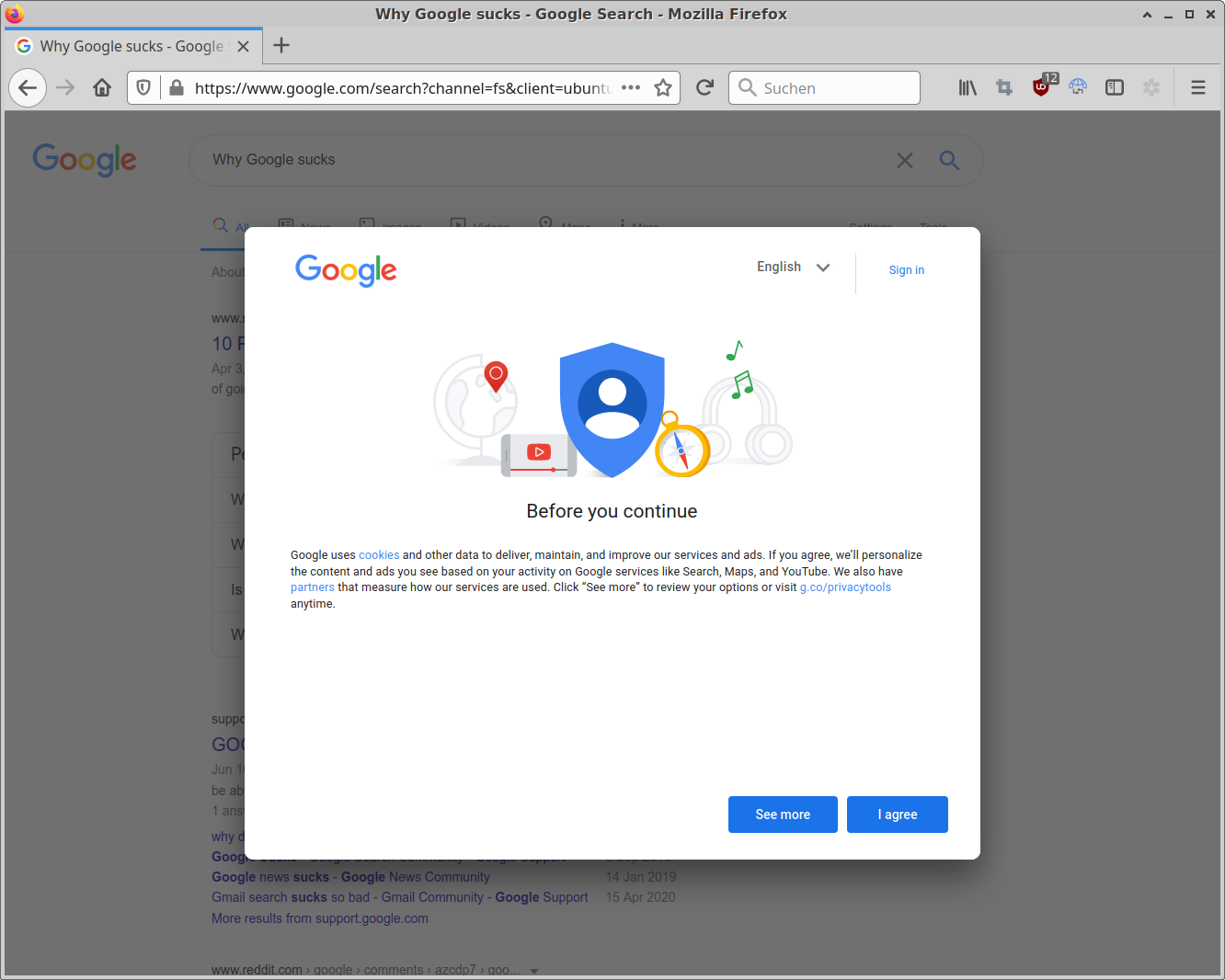
If you clear your browser cookies regularly (as you should do), Google will annoy you with a full screen cookie consent overlay these days. And - of course - there is no "no tracking consent, technically required cookies only" button. You may log in to Google to set your preference. Yeah, I'm sure this is totally following the intent of the EU Directive 2009/136/EC (the "cookie law").
Unfortunately none of the big "anti-annoyances" filter lists seem to have picked that one up yet but the friendly folks from the Computerbase Forum [German] to the rescue. User "Sepp Depp" has created the following filter set that WFM:
Add this to your uBlock Origin "My filters" tab:
! Google - remove cookie-consent-popup and restore scroll functionality
google.*##.wwYr3.aID8W.bErdLd
google.*##.aID8W.m114nf.t7xA6
google.*##div[jsname][jsaction^="dg_close"]
google.*##html:style(overflow: visible !important;)
google.*##.widget-consent-fullscreen.widget-consent


 Here is my monthly update covering what I have been doing in the free software world during October 2020 (

 So we found ourselves in the need to delete a considerable amount of files (around 500000, amounting to 1.6T) from an S3 bucket. With the list of files in hand my first shot was calling
 This article documents how to install

 It's a bit of a long shot, but maybe someone on Planet Debian or
elsewhere can help us reach the right people at Apple.
Starting with iOS 14, something apparently changed on the way
USB tethering (also called Personal Hotspot) is set up, which broke
it for people using Linux. The driver in use is ipheth, developped
in
 A new
 This
 A few quick updates on


 I have been late to adopt an on-premise cloud solution as the security of Owncloud a few years ago wasn't so stellar (cf. my comment from 2013 in
 Luckily code can be changed and there are many comments floating around the Internet to change
 Unfortunately none of the big "anti-annoyances" filter lists seem to have picked that one up yet but the friendly folks from the