I managed to spend a few hours doing Debian stuff again today, which was great.
Today I learned about blhc, which is sadly not mentioned in the wiki page on hardening, which I
always refer to. It turns out that it is mentioned in the walkthrough wiki page
linked off it though. I'd not read that page until today. Many thanks to Samuel
Bronson on IRC for pointing out the tool to me.
Initially I didn't think the tool told me anything I didn't already know, but
then I realised it was saying that the upstream Makefile wasn't passing in
$(CPPFLAGS) and $(LDFLAGS) when it invoked the compiler. Know
that I know all of that, the build warning also mentioned in the PTS made a
whole lot more sense. Definitely a case of "today I learned..."
So I made a simple patch to the upstream Makefile.in and
simpleproxy is now all appropriately hardened. I'm very happy about
that, as it was annoying me that it wasn't Lintian-clean.
I was able to use the same technique to similarly fix up sma. It's
somewhat entertaining when you maintain a package for almost 7 years, and the
upstream homepage changes from being the software author's website to what
appears to be erotic fiction advertising for London escorts... That made for
some entertaining reading this morning.
I've now managed to give all my packages a spring clean. I might do another
pass and convert them all to debhelper 9 as a way of procrastinating before I
touch isc-dhcp.
At one particular customer, increasing storage needs require that we add
a large file server which should be as fast as possible. In that
context, I'm currently evaluating using Debian GNU/kFreeBSD ("Debian,"
from now on) on ZFS. Not being hampered by a large degree of knowledge
on the subject, here's a blog post with things I've learned so far.
For context, the system on which we'll be installing will have 64 gigs
of RAM, about two dozen SAS disks connected to a RAID controller of
which I'm reasonably sure (though not 100% so) that it supports JBOD
mode, and a PCIe-attached solid state storage device of several
terabytes. If it turns out the RAID controller doesn't support JBOD
mode, I'll probably create as many RAID0 devices as possible and hand
those over to ZFS as "hard disks", instead; this wouldn't be an ideal
solution, but I don't have much of a choice of hard disk attachment,
unfortunately.
That being said, the system on which I'm testing right now is the latest
incantation of samba, an HP ProLiant ML115 server. A system with far
more modest hardware specifications, it has 2G of RAM (which isn't
really enough for ZFS), a single 160G SATA hard disk, and a dual-core
AMD processor of about half a decade ago. And oh yes, no SSD. So for
evaluating ZFS performance it's not ideal, but for evaluating Debian and
ZFS features, it will do.
Anyway, what I've found so far on samba:
partman-zfs (that is, the ZFS support in the installer) works, but
could use some improvements.
It allows me to create a system that boots off a ZFS filesystem,
but does not allow me to create nested ZFS filesystems; i.e., if I
create a ZFS filesystem for / and one for /home, the /home
filesystem won't be a child of the / filesystem, which would be
the way you'd usually set this up. Workaround: "zfs rename".
I can't set random ZFS options at filesystem creation time. I
would like to be able to do things like set the "compression"
and/or the "dedup" property for certain filesystems, but that
isn't possible from the installer. Workaround: create the
filesystem layout in partman, and when choosing the "finish
partitioning and continue" option, switch to a shell and issue
"zfs set" commands to change things. You'll miss the first few
files that way, but this shouldn't matter all that much.
Given that I've only got one hard disk in this machine, I can't test
whether partman-zfs supports many options for creating vdevs. I'll
have to see whether that's the case when the actual server arrives.
ZFS has a "sharenfs" property that's supposed to transparently and
automatically share filesystems via NFS. However, this isn't supported
in Debian, with the zfs binary issueing a warning to that extent.
Digging a bit deeper in how things work, people
have told me that setting the "sharenfs" property should simply
produce a file "/etc/zfs/exports" that I can pass on to mountd, which
should be restarted after every change to that file. I'm not sure why
the zfs binary doesn't just do that; after all, it's perfectly
possible to hand two exports configuration files to the FreeBSD
mountd binary...
Somewhat disappointingly, NFSv4 is not supported on Debian (it is on
vanilla FreeBSD, but a necessary component for NFSv4, nfsuserd,
isn't packaged). For my environment, this isn't a showstopper, but it
would've been nice had this worked.
The "sharesmb" property, which also exists, seems to be not supported
at all. But that's okay, the environment in which we're working
doesn't need SMB, only NFS.
ZFS seems to have no soft quota, only hard quota. Workaround, valid
for our environment (but not necessarily for everyone's environment):
use reservations (plus daily warning mails) in place of soft quota,
and place the ZFS quota on the level of what would've been the hard
quota on ext4 (might be a little higher than what we use on the
current fileserver).
Somebody recent got in touch offering to mail me a Cubox, in exchange for me experimenting with it and writing about it. In the past I've written book reviews in exchange for receiving free copies, and while I don't want to make a habit of it I don't see a problem providing I'm up-front and honest.
So, what is the cubox-i? It's another one of those "small computers", roughly similar to the Raspberry Pi, but with slightly different hardware, and a really neat little case design, as the name suggests it just looks like a tiny two inch cube, only spoiled by the mass of cabling attached to the back.
Me? I was cheeky and said I'd have no use for one, unless it was the fancy-model. The hardware comes in 4 different versions, which you can read about on the Cubox-i product page.
Ignoring the smaller/cheaper models the fancy version is the CuBox-i4Pro, and this differentiates itself from the Rasberry Pi:
It has built in WiFi support.
It has two USB ports, and a SATA port too.
It has a built in infrared receiver/transmitter.
The onboard NIC is 1Gb - though limited to 400Mb or so due to bus-constraints, certainly faster than the Pi.
I had two uses for this toy; the first was to be a random NAS-box hosting local backups, the second was to be a media-center. In the past I used a Rasberry PI as a media-box, but unfortunately performance was appalling, largely because of the low-spead of the USB WiFi dongle I bought.
The video playback would stall at times, even though the hardware could display full HD-output, the network constraints seemed to be a limiting factor. In the end I abandoned it and these days use it sporadically for emulation, and little else. I've been meaning to do something more interesting with it, but never quite got round to it.
By contrast the Cubox-i is wonderful at being a media-box. I've exported some shares of MP4/AVI files from my desktop host, via NFS, then downloaded a binary image of the geexbox (XBMC) distribution which I installed onto the MicroSD card via dd.
The box boots in about seven seconds, was configured to use WiFi (via "Programs Settings"), and was streaming media in less than two minutes.
There is a Debian disitribution available for download from the cubox-i wiki, but sadly it is an ancient snapshot of Jessie from December last year. It did install, but there was no WiFi out of the box. Gunnar Wolf wrote about bootstrapping an image from sources, rather than using a binary snapshot. He's kindly shared the resulting image he built, but again sadly no WiFi support, so for the moment I'm just enjoying the media-suport.
In the future I need to decide what to do:
Keep the Cubox-i as a media box, using the PI for backup-hosting.
Avoid having two devices and lose media-streaming.
I also need to look at running Pure Debian, for obvious reasons, but if I can't use WiFi the machine is no good to me. (The TV is in a different room to the office which contains our Linux hosts.)
Either way I've not been excited about new hardware for a while, not since I bought a Logitech Squeezebox, and we're both enjoying watching media on the TV.
TL;DR
I don t know much about fonts, I just use the stock ones that come with my system. From time to time I have issues with docs that others create, and use other fonts. This post is about my plans on learning a bit more and, at least, know how to solve those issues, if it s possible, while staying in the bright side (the free-software / free font side).
Long version
The context
I use Debian, LibreOffice, sometimes Inkscape, and LaTeX. One of my favorite hashtags is #iloveplaintext, I don t know much about design in general, and fonts and typography in particular. I didn t change the fonts in my desktops (only reduced the size in the laptop, to be able to read a bit more in my low resolution screen), I rarely change the font in Writer (maybe from Liberation Serif to Liberation Sans), I never changed the font in a LaTeX document or LaTeX beamer presentation (I write boring documents, I know) and when I paste from the web, it s usually because I want to read a long article so I paste as plain text in gedit and print it or save it.
So I ve never felt to learn more about fonts, it just works, and covers my needs, (or not, but I mostly could live with the issues).
Then a friend in the Pump.io network, Adri n Perales, published a blog post about Typography (in Spanish) that I liked very much, and I began to think (and remember) some of the issues that I have from time to time with fonts.
Issue #1: League Gothic: a free font that was not installed in my system
Today, again in the Pump.io network, I discover that the FSF published a poster Privacy is impossible without free software , in SVG format, but it didn t look well when I opened it with GIMP, clearly due to some missing font.
Nice that SVG format is a plain text format (XML)! So I opened the file with gedit and searched for the text string whose font was missing. It was League Gothic font, of course a free software font, but not packaged in Debian, it seems.
No problem. I downloaded the font, copied the files in /usr/share/fonts and problem solved.
Issue #2: Book Antiqua: a non-free font (must find equivalent)
A document made with Microsoft Word that one friend sends to me so I review and resend (in PDF format) to other people. It s a leaflet, and it has text in Arial, in Tahoma, and in Book Antiqua. When I open it with LibreOffice the aspect is wrong (the substitutes are not the same size so some breaking lines and so).
Book Antiqua is not free. I learned that it s an imitation of the Palatino font, and that a similar font in the free software systems is URW Palladio . In Writer (LibreOffice), I went to Tools > Options > Fonts and declared the equivalence of the two fonts, so the program would use URW Palladio as a substitute of Book Antiqua. I opened again the document and it was quite better, very similar to the original aspect.
I didn t bother in changing the text in Arial or Tahoma, since the substitutes that LibreOffice used were quite good. But I bookmarked this page: A Web Designer Guide to Linux Fonts for remembering the different fonts that I can try to emulate the Windows ones.
I also know that I can install the Microsoft Core Fonts for the web since they are packaged for Debian in the contrib archive. But I ll try to survive without them for now (until now, I didn t bother, why should I now that I have the substituting guide?). In other news, I got impressed that MS Core Fonts is #4 in Most downloads all over the time in SourceForge, with more than 450 million downloads \o/
Issue #3: Installing a new free font in Debian
So I decided to install one of the fonts that Adri n Perales recommended in his blog post, Linux Libertine . Since it is packaged for Debian, it s super easy:
# apt-get install ttf-linux-libertine
(my LibreOffice was opened, so I closed it and opened again, and the font was there ready for use).
Issue #4: Use a different font in LaTeX
Well, as always, there is not one but many ways to do that in LaTeX. My intuition tells me that if there is a LaTeX package for the font that I want to use, it s probably a nice idea to just use it.
So I searched about Linux Libertine in LaTeX and yes, there is a package (and you can find a very interesting font guide in The LaTeX font catalogue ). I installed the package texlive-fonts-extra, and then, I added two lines in my LaTeX document:
\usepackage libertine
\usepackage[T1] fontenc
Compiled, and the resultant PDF was using Libertine font instead of Computer Modern.
TODO (and/or wishlist)
When opening a document that uses a font not present in my system, I maybe wouldn t notice that a font is missing and I see a substitute (and maybe not the best one)!. It would be nice that the program tells the user This file uses the font X, and it seems it s not in your system. I ll use font Y as a substitute .
I m not sure if there is a standard way to know which package contains a certain font. I use a web search engine to try to find out, and the websites that I linked in the article.
I have to investigate and learn a bit more about free fonts equivalents to the ones that other people use, and fonts in general, so my documents are more beautiful and people gets interested to know about the tools that I use to produce them.
Well, I ve written a long blog post (thanks if you read until here!), solved some issues, and try some things, but not even capturing a snapshot to show here! It seems that I m still lazy, forgive me I hope at least this #plaintext is useful for you :) Filed under: My experiences and opinion, Uncategorized Tagged: Debian, English, Fonts, Free Software, LaTeX, libre software, LibreOffice, Moving into free software, pump.io
Ingress is an Android phone game developed by Google where you have to go to various places to capture portals which are based on landmarks or places of note. There s a sci-fi back story which I haven t cared much about (my local library has a heap of good sci-fi books I don t have time to read). But if you are interested in low quality sci-fi you can start with the Youtube channel for Ingress [1]. But the best thing to do is to download the Ingress client program from the Google play store if you have an Android phone [2].
Periodically they have special events in the game called Anomalies , which usually involve many people competing to capture a small number of special portals. Usually a portal is fairly easy to capture so a high level player can easily capture a portal in at most a few minutes, but when there is a large group of players defending a portal by replacing the resonators as quickly as they are destroyed it becomes more challenging. I m not going to try to explain this properly as I presume that readers either already know or don t care. The Wikipedia page about Ingress has more information.
On Saturday there was an Anomaly where the main city was Melbourne. My team (Enlightened) won the event in Australia but apparently the event in the US at the same time was won by the other team (Resistance).
I had hoped that our event would be similar to some of the ones I ve seen on the Ingress Report (a fictional news service on youtube) in which actors from the sci-fi videos about Ingress attended. But unfortunately it seems that the actors stay in the US.
Every player who was registered for the anomaly received a gift pack that contained three cards and a badge. The picture above shows the cards that my wife and I received along with one of our badges. The badges are green for Enlightened and blue for Resistance (the in-game colors) and have three flashing LEDs the photo has one of the LEDs lit up. The three cards have passcodes which can be redeemed for in-game items, the XMP, Power Cubes, and Resonators weren t that useful (10 not particularly rare items that I could get through 10 minutes of game playing). The Medal cards are for in-game badges showing the anomalies that we have played at, but they are bronze badges which again aren t much use as nothing less than silver will help in leveling up.
Overall it was a good experience, we won, had a good after-party (with free snacks and one free drink per person), and the badges are nice. I recommend attending if there s an event in your area, and note that you don t need to be a high level player to attend, even L6 players were able to contribute.
I was at the OpenStack Summit this week. The overwhelming majority of OpenStack deployments are Linux-based, yet the most popular laptop vendor (by a long way) at the conference was Apple. People are writing code with the intention of deploying it on Linux, but they're doing so under an entirely different OS.
But what's really interesting is the tools they're using to do so. When I looked over people's shoulders, I saw terminals and a web browser. They're not using Macs because their development tools require them, they're using Macs because of what else they get - an aesthetically pleasing OS, iTunes and what's easily the best trackpad hardware/driver combination on the market. These are people who work on the same laptop that they use at home. They'll use it when they're commuting, either for playing videos or for getting a head start so they can leave early. They use an Apple because they don't want to use different hardware for work and pleasure.
The developers I was surrounded by aren't the same developers you'd find at a technical conference 10 years ago. They grew up in an era that's become increasingly focused on user experience, and the idea of migrating to Linux because it's more tweakable is no longer appealing. People who spend their working day making use of free software (and in many cases even contributing or maintaining free software) won't run a free software OS because doing so would require them to compromise on things that they care about. Linux would give them the same terminals and web browser, but Linux's poorer multitouch handling is enough on its own to disrupt their workflow. Moving to Linux would slow them down.
But even if we fixed all those things, why would somebody migrate? The best we'd be offering is a comparable experience with the added freedom to modify more of their software. We can probably assume that this isn't a hugely compelling advantage, because otherwise it'd probably be enough to overcome some of the functional disparity. Perhaps we need to be looking at this differently.
When we've been talking about developer experience we've tended to talk about the experience of people who are writing software targeted at our desktops, not people who are incidentally using Linux to do their development. These people don't need better API documentation. They don't need a nicer IDE. They need a desktop environment that gives them access to the services that they use on a daily basis. Right now if someone opens an issue against one of their bugs, they'll get an email. They'll have to click through that in order to get to a webpage that lets them indicate that they've accepted the bug. If they know that the bug's already fixed in another branch, they'll probably need to switch to github in order to find the commit that contains the bug number that fixed it, switch back to their issue tracker and then paste that in and mark it as a duplicate. It's tedious. It's annoying. It's distracting.
If the desktop had built-in awareness of the issue tracker then they could be presented with relevant information and options without having to click through two separate applications. If git commits were locally indexed, the developer could find the relevant commit without having to move back to a web browser or open a new terminal to find the local checkout. A simple task that currently involves multiple context switches could be made significantly faster.
That's a simple example. The problem goes deeper. The use of web services for managing various parts of the development process removes the need for companies to maintain their own infrastructure, but in the process it tends to force developers to bounce between multiple websites that have different UIs and no straightforward means of sharing information. Time is lost to this. It makes developers unhappy.
A combination of improved desktop polish and spending effort on optimising developer workflows would stand a real chance of luring these developers away from OS X with the promise that they'd spend less time fighting web browsers, leaving them more time to get on with development. It would also help differentiate Linux from proprietary alternatives - Apple and Microsoft may spend significant amounts of effort on improving developer tooling, but they're mostly doing so for developers who are targeting their platforms. A desktop environment that made it easier to perform generic development would be a unique selling point.
I spoke to various people about this during the Summit, and it was heartening to hear that there are people who are already thinking about this and hoping to improve things. I'm looking forward to that, but I also hope that there'll be wider interest in figuring out how we can make things easier for developers without compromising other users. It seems like an interesting challenge.
I recently bought a new Lenovo X1 Carbon. It is the new second-generation, type 20A7 laptop, based on Intel s Haswell microarchiteture with the adaptive keyboard. It is the version released in 2014. I also ordered the Thinkpad OneLink Dock which I have returned for the OneLink Pro Dock which I have not yet received.
The system is still very new, challenging, and different, but seems to support GNU/Linux reasonably well if you are willing to run a bleeding edge version and/or patch your kernel and if you are not afraid to spend an afternoon or two tweaking things. What follows are my installation notes for Debian testing (jessie) when I installed it in early May 2014. My general impressions about the laptop as a GNU/Linux system and overall are at the end of this write-up.
System Description
The X1 Carbon I ordered included the 512GB SSD, the 14.0 inch WQHD (2560 1440) 260 nit touchscreen, and the maximum 8GB of memory. I believe the rest is not particularly negotiable but includes a 720p HD Camera, a 45.2Wh battery, and an Intel Dual Band Wireless 7260AC with Bluetooth 4.0.
For those that are curious Here is the output of lspci on the system:
BIOS/Firmware
The BIOS firmware is non-free and proprietary as it the case with all ThinkPads and nearly all laptops. According to this thread there is a bug in the default BIOS that means that suspend to RAM is broken in GNU/Linux.
You can get updated BIOS at the Lenovo s ThinkPad X1 Carbon (Type 20A7, 20A8) Drivers and software page by looking in the the BIOS section. Honestly, the easiest approach is probably to download the Windows BIOS Update utility (documentation is here) which you can use to run the BIOS update from within Windows before you install GNU/Linux.
If that s not an option (e.g., if you ve already installed GNU/Linux) the best method is to download the bootable CD ISO from the same page. Of course, since the X1 Carbon has no optical media, you have to find another way to boot the CD image. I struggled to get the ISO to boot from USB using the usually reliable dd method. This message suggest that the issue had to do with the El Torito wrapper:
I had to dump the eltorito image from the ISO they provide, after that I was able to dd the resulting image to a flash drive and the bios update went well, no cdrom needed.
I updated to version 1.13 of the BIOS which fixes the suspend/resume bug. By the time you read this, there may be newer versions that fix other things so check the Lenovo website.
Installing Debian
I installed Debian testing using the March 19, 2014 Alpha 1 release of the Debian Installer for Jessie (currently testing). I installed in graphical mode. With the WQHD screen, everything was extremely tiny but it worked flawlessly.
I downloaded the amd64 net install image from the normal place and installed the rest of the system using the built-in Ethernet port which required no firmware or extra drivers. I did the normal dd if=FILENAME.iso of=/dev/sdX method of getting the installer onto the a USB stick to boot. I turned off restricted boot in BIOS first. In general, the latest version of the Debian installation guide is always a good source of guidance on installing Debian.
I used the Debian installer wizard to partition and selected Use entire disk and partition it for LVM and encrypted data which kept the UEFI partitions around. The system installed with no errors or issues and booted up normally afterward. The grub menu is hilariously narrow on the WQHD screen.
If you want to use the built-in wireless and/or Bluetooth, you will need to install the non-free iwlwifi firmware package. It is very lame that we still have to do this to use hardware we have purchased.
What Works and Doesn t
The following stuff works the first time I booted into the GNOME 3 desktop and logged in:
The keyboard plus the adaptive row of F1-F12 keys.
External monitor using the full HDMI or mini-DisplayPort connectors
Audio (both speakers and microphone)
The camera/webcam
The following stuff works if you install non-free firmware:
Internal Wireless
Bluetooth 4.0
The following stuff works with qualifications:
Suspend to RAM Works once you have updated the firmware.
The adaptive keyboard The F1-F12 keys work but the button that theoretically lets you switch to different sets of function buttons (e.g., volume, brightness) does nothing.
Disabling the touchpad There is a BIOS option to disable the touchpad. It works in Windows and does nothing at all in GNU/Linux.
I have not tried:
The fingerprint reader
OneLink Dock
I also ordered the OneLink Dock. It s pretty cool and plugs into the side of the laptop with a wide plug that includes the the standard power plug inside a big connector for everything else. Everything on the dock worked out of the box including the:
HDMI port
USB hub
USB audio device in the dock
USB Ethernet device in the dock
One thing to note. The HDMI output on the standard OneLink has a maximum resolution of 1920 1080 which is not stated on its material on Lenovo s website. Moreover, if you plug in the OneLink cable, the laptop HDMI port is disabled. This means if you plug in the dock, you simply cannot drive an external monitor over HDMI at anything higher than 1920 1080. Instead, you will need to find a mini-DisplayPort to DisplayPort cord or adapter which will work. Of course, this will also mean that it s two connectors instead of one.
Alternatively, you can buy the OneLink Pro dock which apparently works with higher resolutions over its DisplayPort connector. I have exchanged docks but have not received the Pro version so I cannot verify this.
Disabling the touchpad
As a long-term ThinkPad user, I love the TrackPoint pointing stick. If you plan on using this, the built-in touchpad is incredibly aggravating because it is very easy to brush against it while using the TrackPoint.
In BIOS, there is an option to disable the touchpad. Although this works in Windows, it does absolutely nothing in GNU/Linux. Part of the issue is that, unlike the older X1 Carbon and other ThinkPads, there are no TrackPoint buttons. Instead of buttons, there are regions at the top of the touchpad which are configured, in software, to act like buttons. If you want to be able to click, the touchpad can never be truly turned off.
This is not problem unique to the Haswell X1 Carbon and a number of people have been struggling with this issue on other Lenovo laptops. Essentially, what you need to do is configure your touchpad so that the buttons are where you want them and so that it ignores any input for the purposes of cursor movement.
There are a few ways of doing this but this answer from an askubuntu.com question has the solution I ended up using:
Open file /usr/share/X11/xorg.conf.d/50-synaptics.conf for edit.
Find Section InputClass which the following line is Identifier Default clickpad buttons .
Edit option for SoftButtonAreas to values 64% 0 1 42% 36% 64% 1 42%, this is size of the right and middle button.
Enable option AreaBottomEdge and change value to 1, this will disable touchpad movement.
If everything done right, your class should looks like:
Essentially, the first Option line will create a middle button that is 32% of the width and 42% of the height, and a right button that is 32% of the width and 42% of the height. The synaptics manpage (man synpatics) will give you more detail on the general way this works.
Of course, something does feel very wrong about editing a file in /usr/share.
Fixing the Adaptive Keyboard
The most wild feature of the laptop is the adaptive keyboard strip. The strip is a back-lit LCD that looks almost like E Ink screen and acts as a touchscreen keyboard. The default mode gives you the F1-F12 keys. If you press the keys (since they aren t buttons, you just put your finger on top of them) they act like normal F-keys. You can Ctrl-Alt-F1, etc., to switch to virtual terminals out of the box. There are four modes: Function (i.e., normal F-keys), Home, Web, and Chat. The last three overlap quite a bit (e.g., they all have brightness and volume). You can play with an example on the Lenovo homepage.
In Windows, switching programs will apparently change these keys so that an appropriate set of buttons is shown for the application you are using. You can also change these keys manually with a big Fn button at the far left of the adaptive keyboard strip.
As I write this this, released kernels do not support the adaptive keyboard Fn button which means you cannot use anything other than the F-keys out of the box. I believe it also means that resuming from suspend to RAM breaks these keys.
That said, Shuduo Sang from Canonical has released several versions of a patch to to the thinkpad_acpi kernel module which adds support for the Home mode. The other modes (web and chat) do not seem to be supported. The latest version of the patch is on on the Linux Kernel Mailing List and the relevant commits are:
330947b save and restore adaptive keyboard mode for suspend and,resume
3a9d20b support Thinkpad X1 Carbon 2nd generation's adaptive keyboard
Although this is not supported in Debian testing at the time of writing, a bug was filed in Debian and quickly fixed by Ben Hutchings in Debian kernel version 3.14.2-1 which is currently in sid/unstable. As a result, if you install the latest version kernel from Debian unstable (3.14.2-1 or later), the adaptive keyboard just works.
If you aren t using Debian and if kernel you are using does not have support, you might be patching your kernel.
Ethernet in the OneLink Dock
This was not an issue using the latest kernel in Debian but apparently people have struggled with getting the USB Ethernet device in the OneLink dock to work. For example, this bug suggests:
Many new Thinkpad laptops have a dock (Thinkpad OneLink Dock) containing a usb ethernet chip that is supported by the ax88179 driver. However its USB ID is not included in the driver shipped with the 3.13 kernel used in Trusty. A patch to add this ID has been sent to the LKML (see https://lkml.org/lkml/2014/2/24/649 ) and it would be very convenient for all users of the dock if it could be applied to the Trusty kernel.
If your kernel does not support the USB Ethernet device in the dock, and a newer kernel doesn t fix it, the patch is straightforward.
General Impressions
As I have described in my interview with The Setup, I have been a user of ThinkPad X-series laptops for many years. This is my sixth X-series ThinkPad.
Overall, I quite like the hardware! Once things mature a little bit, I think that this will be a great laptop for running GNU/Linux. That said, I ordered the laptop without realizing that the X1 Carbon had gone through a major revision! The keyboard was quite a suprise. I think that changing a system so radically without changing the model name/number is a very bad move on Lenovo s part.
There are two remaining issues with the system I m still struggling with: (1) the keyboard layout is freaky and weird, and (2) the super high resolution screen breaks many things.
The quality of the keyboard itself is great and worthy of the ThinkPad name. That said, there are two ways in which it is strange. The first is the adaptive keyboard strip. Overall, it works surprisingly well and I think it is a clever idea. My sense is that the strip is more annoying in Windows because it changes out from under you all the time. In GNU/Linux, only manual changing of modes is supported. This, in my opinion, is a feature. I do miss the real feedback you get from pressing keys but for F-keys and volume-keys that I don t use often this isn t too important. On the downside, I have realized several times that I had been holding down a button for several seconds and not noticed.
The more annoying issue with the keyboard is the way that the other keys have moved around. Getting rid of the CapsLock is wonderful! How has this taken so long? Replacing it with a split Home and End keys is nuts. I ve remapped the Home and End to put Control back where it should be. My right Control to now Home but I still don t have an End key. The split Backspace and Delete is not a problem for me. The tilde/apostrophe is in a very bad place. There is no Insert, Print Screen/SysRq, Scroll Lock, Pause/Break or NumLock. They are all just gone. Surprisingly, I haven t missed any of them.
The second issue is the 2560 1440 resolution on the 14 inch screen. I use a 27 inch external monitor with the same native resolution laptop but, by my arithmetic, the pixel density on the laptop is 210 DPI instead 109 DPI on the external monitor. The result is the scaling problem and it s a huge pain that seems mostly unsolved on any operating system.
Fonts and widgets that look good on the laptop look huge on my external monitor. Stuff that looks good on my external monitor looks minuscule on the laptop. I routinely move windows between my laptop screen and my large monitor. Until I find a display system that can handle this kind of scaling effectively, this requires changing font size and zooming all the time. At the moment, I m shrinking and expanding my font size using the built in hot keys in Emacs, Gnome Terminal, and Firefox/Iceweasel. I love the high resolution screen but the current situation is crazy-making.
Finally, this setup will not get you into the Church of Emacs and it s not about to find its way onto the FSF s list of endorsed hardware. For one, I paid the Windows tax. Beyond that, there is the non-free BIOS and the need for non-free firmware to use the wireless and Bluetooth. This is standard for ThinkPads but it isn t getting any easier to swallow. There are alternatives in the form of Gluglug s X60 laptops running CoreBoot, Lemote Yeelong laptops, Bunnie Huang s Novena and others that are better in these regards. I am very excited for these projects but, for a number of reasons, these just weren t an option for the laptop I use for my research computing.
Recently I've been seeing lot of posts about DNSSEC on Internet and I
thought I should configure my domain to be secured by DNSSEC.
copyninja.info domain is now secured with DNSSEC you can verify
this by DNSSEC analyzer by Verisign and DNSViz online tool or by
installing DNSSEC validator addon for
your browser.
There are good amount of tutorials and guides available to enable
DNSSEC for your domain, still I want to note down steps I followed to
here for the record (of course it will be helpful for me if I forget
it ;-))
First step will be installing bind9 and dnssec-tools package, if
you use aptitude installing dnssec-tools will pull down the bind9
unless you have configured aptitude to not install the Recommends.
Next setting up the zone file for your domain, for this first make a
copy of /etc/bind/db.local as /etc/bind/db.example.com, replace
example.com with your domain name. Now you need to add your zone
records to the zone file.
Next edit the /etc/bind/named.conf.local file and add following lines
zone "example.com"
    type master;
    file "/etc/bind/db.copyninja.info";
    allow-transfer  secondary; ;
 ;
Here replace secondary with your secondary DNS servers, if you don't
have one you can ommit this but its always recommended to have
secondary DNS servers for a zone, in cases when primary fails. After
this we need to enable DNSSEC on bind, this is done by editing the
file /etc/bind/named.conf.options. Add following lines into
options section.
A more explanation on this can be found on Linux Journal article.
Now its time to create DNSSEC keys and sign your zone, more about
different DNSSEC keys and records can be found in the Linux Journal
Article on implementation.
I used zonesigner utility from dnssec-tools which does job of
signing and including KSK and ZSK keys into bind configuration which
otherwise should be done manually. Here is the command line I used for
generating keys, thanks to Jonas for this.
Here we store our keys into /etc/bind/keys directory, and use
RSASHA256 algorithm for key generation which is more stronger than
the default used RSASHA1 (atleast thats what Jonas told me). This will
create ZSK and KSK for the signing zone and creates a signed zone file
db.example.com.signed in same directory as original zone file. Now all
you need to do is replace the zone file from db.example.com to
db.example.com.signed in file directive with your named.conf.local
file.
Note that this keys expire after 30 days so you need to resign your
zone before 30 days. For resigning just run zonesigner from
/etc/bind/keys. You can setup cron job to do this periodically.
Our signed zone is ready but we are not done yet! For DNSSEC to work
others should trust your signed record for this you need to register
your public keys with registrar for your domain and this can be done
via your domain provider (in my case this is Gandi).
You need to check your domain name providers documentation on how to
do this. For Gandi users there is a nice documentation.
Debian has recently received a donation of 8 build machines from Marvell. The new machines come with Quad core MV78460 Armada XP CPU's, DDR3 DIMM slot so we can plug in more memory, and speedy sata ports. They replace the well served Marvell MV78200 based builders - ones that have been building debian armel since 2009. We are planning a more detailed announcement, but I'll provide a quick summary: The speed increase provided by MV78460 can viewed by comparing build times on selected builds since early april: Qemu build times. We can now build Qemu in 2h instead of 16h -8x faster than before! Certainly a substantial improvement, so impressive kit from Marvell! But not all packages gain this amount of speedup: webkitgtk build times. This example, webkitgtk, builds barely 3x faster. The explanation is found from debian/rules of webkitgkt:
# Parallel builds are unstable, see #714072 and #722520
# ifneq (,$(filter parallel=%,$(DEB_BUILD_OPTIONS)))
#   NUMJOBS = $(patsubst parallel=%,%,$(filter parallel=%,$(DEB_BUILD_OPTIONS)))
#   MAKEARGUMENTS += -j$(NUMJOBS)
# endif
The old builders are single-core[1], so the regardless of parallel building, you can easily max out the cpu. New builders will use only 1 of 4 cores without parallel build support in debian/rules. During this buildd cpu usage graph, we see most time only one CPU is consumed. So for fast package build times.. make sure your packages supports parallel building. For developers, abel.debian.org is porter machine with Armada XP. It has schroot's for both armel and armhf. set "DEB_BUILD_OPTIONS=parallel=4" and off you go. Finally I'd like to thank Thomas Petazzoni, Maen Suleiman, Hector Oron, Steve McIntyre, Adam Conrad and Jon Ward for making the upgrade happen. Meanwhile, we have unrelated trouble - a bunch of disks have broken within a few days apart. I take the warranty just run out... [1] only from Linux's point of view. - mv78200 has actually 2 cores, just not SMP or coherent. You could run an RTOS on the other core while you run Linux on the other.
As promised, today I would like to write a bit about the making of
The Hacker's Guide to Python. It has
been a very interesting experimentation, and I think it is worth sharing it
with you.
The inspiration
All started out at the beginning of August 2013. I was spending my summer,
as the rest of the year, hacking on OpenStack.
As years passed, I got more and more deeply involved in the various tools
that we either built or contributed to within the OpenStack community. And I
somehow got the feeling that my experience with Python, the way we used it
inside OpenStack and other applications during these last years was worth
sharing. Worth writing something bigger than a few blog posts.
The OpenStack project is doing code reviews, and therefore so did I for
almost two years. That inspired a lot of topics, like
the definitive guide to method decorators
that I wrote at the time I started the hacker's guide. Stumbling upon the
same mistakes or misunderstanding over and over is, somehow, inspiring.
I also stumbled upon Nathan Barry's blog and book
Authority which were very helpful to
get started and some sort of guideline.
All of that brought me enough ideas to start writing a book about Python
software development for people already familiar with the language.
The writing
The first thing I started to do is to list all the topics I wanted to write
about. The list turned out to have subjects that had no direct interest for
a practical guide. For example, on one hand, very few developers know in
details how metaclasses work, but on the other hand, I never had to write a
metaclass during these last years. That's the kind of subject I decided not
to write about, dropped all subjects that I felt were not going to help my
reader to be more productive. Even if they could be technically interesting.
Then, I gathered all problems I saw during the code reviews I did during
these last two years. Some of them I only recalled in the days following the
beginning of that project. But I kept adding them to the table of contents,
reorganizing stuff as needed.
After a couple of weeks, I had a pretty good overview of the contents that
there I will write about. All I had to do was to fill in the blank (that
sounds so simple now).
The entire writing of the took hundred hours spread from August to November,
during my spare time. I had to stop all my other side projects for that.
The interviews
While writing the book, I tried to parallelize every thing I could. That
included asking people for interviews to be included in the book. I already
had a pretty good list of the people I wanted to feature in the book, so I
took some time as soon as possible to ask them, and send them detailed
questions.
I discovered two categories of interviewees. Some of them were very fast to
answer ( 1 week), and others were much, much slower. A couple of them even
set up Git repositories to answer the questions, because that probably
looked like an entire project to them. :-) So I had to not lose sight and
kindly ask from time to time if everything was alright, and at some point
started to kindly set some deadline.
In the end, the quality of the answers was awesome, and I like to think that
was because I picked the right people!
The proof-reading
Once the book was finished, I somehow needed to have people proof-reading
it. This was probably the hardest part of this experiment. I needed two
different types of reviews: technical reviews, to check that the content was
correct and interesting, and language review. That one is even more
important since English is not my native language.
Finding technical reviewers seemed easy at first, as I had ton of contacts
that I identified as being able to review the book. I started by asking a
few people if they would be comfortable reading a simple chapter and giving
me feedbacks. I started to do that in September: having the writing and the
reviews done in parallel was important to me in order to minimize latency
and the book's release delay.
All people I contacted answered positively that they would be interested in
doing a technical review of a chapter. So I started to send chapters to
them. But in the end, only 20% replied back. And even after that, a large
portion stopped reviewing after a couple of chapters.
Don't get me wrong: you can't be mad at people not wanting to spend their
spare time in book edition like you do.
However, from the few people that gave their time to review a few chapters,
I got tremendous feedback, at all level. That's something that was very
important and that helped a lot getting confident. Writing a book alone for
months without having anyone taking a look upon your shoulder can make you
doubt that you are creating something worth it.
As far as English proof-reading, I went ahead and used
ODesk to recruit a professional proof-reader. I looked
for people with the right skills: a good English level (being a native
English speaker at least), be able to understand what the book was about,
and being able to work with correct delays. I had mixed results from the
people I hired, but I guess that's normal. The only error I made was not to
parallelize those reviews enough, so I probably lost a couple of months on
that.
The toolchain
While writing the book, I did a few breaks to build a toolchain. What I call
a toolchain is set of tools used to render the final PDF, EPUB and MOBI
files of the guide.
After some research, I decided to settle on
AsciiDoc, using the
DocBook output, which is then being transformed to
LaTeX, and then to PDF, or either to EPUB directly. I realy on
Calibre to convert the EPUB file to MOBI. It
took me a few hours to do what I wanted, using some magic LaTeX tricks to
have a proper render, but it was worth it and I'm particularly happy with
the result.
For the cover design, I asked my talented friend
Nicolas to do something for me, and he
designed the wonderful cover and its little snake!
The publishing
Publishing in an interesting topic people kept asking me about. This is what
I had to answer a few dozens of time:
"Who is your editor?"
"Me."
I never had any plan for asking an editor to publish this book. Nowadays,
asking an editor to publish a book feels to me like asking a major company
to publish a CD. It feels awkward.
However, don't get me wrong: there can be a few upsides of having an editor.
They will find reviewers and review your book for you. Having the book
review handled for you is probably a very good thing, considering how it was
hard to me to get that in place. It can be especially important for a
technical book.
Also, your book may end up in brick and mortar stores and be part of a
collection, both improving visibility. That may improve your book's selling,
though the editor and all the intermediaries are going to keep the largest
amount of the money anyway.
"Oh, you will publish it yourself, great. So you will print it and sell it
to people?"
"Not really."
I've heard good stories about people using Gumroad to
sell electronic contents, so after looking for competitors in that market, I
picked them. I also had the idea to sell the book with Bitcoins, so I
settled on Coinbase, because they have a nice API to
do that.
Setting up everything was quite straight-forward, especially with Gumroad.
It only took me a few hours to do so. Writing the Coinbase application took
a few hours too.
"Oh, you will sell it only as an ebook? That's too bad. You need a paper
version. Many people will want a paper version."
My initial plan was to only sell online an electronic version. On the other
hand, since I kept hearing that a printed version should exist, I decided to
give it a try. I chose to work with Lulu because I knew
people using it, and it was pretty simple to set up.
The launch
Once I had everything ready, I built the selling page and connected
everything between Mailchimp, Gumroad, Coinbase, Google Analytics, etc.
Writing the launch email was really exciting. I used Mailchimp feature to
send the launch mail in several batches, just to have some margin in case of
a sudden last minute problem. But everything went fine. Hurrah!
I distributed around 200 copies of the ebook in the first 48 hours, for
about $5000. That covered all the cost I had from the writing the book, and
even more, so I was already pretty happy with the launch.
Retrospective
In retrospect, something that I didn't do the best way possible is probably
to build a solid mailing list of people interested, and to build an
important anticipation and incentive to buy the book at launch date. My
mailing list counted around 1500 people subscribed because they were
interested in the launch of the book subscribed; in the end, probably only
10-15% of them bought the book during the launch, which is probably a bit
lower than what I could expect.
But more than a month later, I distributed in total almost 500 copies of the
book (including physical units) for more than $10000, so I tend to think
that this was a success. I still sell a few copies of the book each weeks,
but the number are small compared to the launch.
I sold less than 10 copies of the ebook using Bitcoins, and I admit I'm a
bit disappointed and surprised about that.
Physical copies represent 10% of the book distribution. It's probably a lot
lower than most people that pushed me to do it thought it would be. But it
is still higher of what I thought it would be. So I still would advise to
have a paperback version of your book. At least because it's nice to have it
in your library.
I only got positive feedbacks, a few typo notices, and absolutely no refund
demand, which I really find amazing.
The good news is also that I've been contacted with a couple of Korean and
Chinese editors to get the book translated and published in those countries.
If everything goes well, the book should be translated in the upcoming
months and be available on these markets in 2015!
If you didn't get a copy,
it's still time to do so!
pub  2048R/9C6C32C7 2014-02-16 Laura ARJONA REINA <larjona99@gmail.com>
                               Laura ARJONA REINA <larjona@fsfe.org>
                               Laura ARJONA REINA <laura.arjona@upm.es>
                               Old key 0xE20474C3 no longer valid: lost secret key. (Clave antigua 0xE20474C4 ya no es v lida: clave secreta perdida.)
Fingerprint=F29B A6D8 D1DC A30F 3E34  53DF 5CD1 FDE5 9C6C 32C7
Please act as if it does not exist. The reason is that I cannot remember the passphrase of my master GPG key. This is why I didn t signed any of the keys of people that I met in Barcelona MiniDebconf. My geek self steem is a bit undermined, but feeling sorry for myself accomplishes nothing, so I think I will not hide problems and move on.
I ll post about my new key soon.
Long version
The bad news
The bad news are many.
I generated my key in February 2014 (I generated my very first GPG Key in 2010, as an exercise, but never used it again, and in 2014 I couldn t remember the passphrase, and the paper where it was written, had got lost before). Anyway, February 2014, new GPG key. I followed the Howto in FSFE wiki in order to use my brand new FSFE SmartCard. I have to admit that I didn t understand very well how all this works, and it seems that my main mistake was to miss-understand that since I was using a smartcard, with a PIN and an Admin PIN, remembering passphrases was no longer required (only remembering the PINs). I was WRONG! PINs are for daily use with the subkeys of your card (for encryption, decryption, and signing stuff different than GPG keys), you still have the master key that is not in the card (but in a separate medium in a safe place), and for the master key we still use passphrase, and the master key is the one that allows signing keys from other people, and changing, revoking, adding subkeys, etc.
So, it seems I used a random passphrase that I didn t write down and I could not remember, due to this terrible missunderstanding.
Another bad news is that I didn t generate a revocation certificate (well in fact, I was going to generate just before signing the first key of another person, and then I realize that it was asking the passphrase, hence the problem). First I thought that it should ask the PIN and my smartcard setup was wrong or anything, but after reading and interchanging emails with other people more experienced than me, I realized that I should remember that passphrase. And I couldn t. So there are no revocation certificates :(
Another bad news is that some (awesome) people already signed my key, and it will be difficult to meet again so they sign my new key. I was thinking about applying to the Debian new member process this summer, and I have not many opportunities to meet Debian people in person, so I gathered quite a lot signs last March in MiniDebConf Barcelona. Now I m again at the starting point (well, this is perfect excuse to try to join a Debian event soon :) I don t know how I would manage to do it, but I ll try!).
The good news (Always look at the bright side of life )
The main good news is that I didn t used the GPG key for signing/encrypting important stuff: I just interchanged some encrypted mail as test with friends, and signed some mails sent to public mailing lists (for signing mails I was using the smartcard PIN so I didn t notiece the problem).
The other main good news is that my key is not compromised (well, you can never be sure, but I think so). I cannot revoke it but I m quite sure nothing important depends on that key.
Other good news is that I have read a lot about how GPG works and how the smartcard works, keys and subkeys and all this stuff, and I think now I understand everything quite better. I have learned (and also tried) tools as nasty, John The Ripper and rephrase to try to recover the passphrase. I didn t recover it, but at least I know that all those (free software) tools exist and how to use them :)
And I have learned the lesson: to be extremely careful, test that everything works (not just try one or two things, test everything) and to not leave work for later (and for example, generate the revocation certificates just right after the keys).
Next steps
I ll send a message to all the friends that signed or downloaded my old GPG key apologysing and pointing to this blog post so they learn the details about why I create a new key.
I ll take this opportunity to download and use the Tails (The Agnostic Incognito System, a Debian derivative which is a live system and is focused in protecting privacy and anonymity of the user). Tails will be my safe, network disconnected environment to generate the new keys and do the sensible tasks with them. I think this time I will create my main key 4096-bit long (since now I understand that the main key is not stored in the card) and the subkeys can be 2048-bit or 3072 to fit in the smarcard.
Well, hands on! I ll write another blog post when my new GPG keys are ready. I hope third time s the charm!
Note: Thank you to all the people that gave me advice and support (knowledge, links, moral support) about this issue. You know who you are! Filed under: My experiences and opinion, Tools Tagged: Debian, encryption, English, Free Software, gpg, libre software, Moving into free software, mswl-cases
There is a strange bug in Planet Debian I am seeing since
I joined. It is rather minor, but since it is an accessibility
bug, I'd like to mention it here. I have written to
the Planet Debian maintainers, and was told to figure it out myself.
This is a pattern, accessibility is considered wishlist, apparently.
And the affected people are supposed to fix it on their own.
It is better if I don't say anything more about that attitude.
The Bug
On Planet Debian, only some people have an alt tag for their hackergotchi,
while all the configured entries look similar.
There is no obvious difference in the configuration, but still,
only some users here have a proper alt tag for their hackergotchi. Here is a list:
These people/organisations currently displayed on Planet Debian
have a proper alt tag for their hackergotchi. All the other members have none.
In Lynx, it looks like the following:
hackergotchi for
And for those where it works, it looks like:
hackergotchi for Dirk Eddelbuettel
Strange, isn't it? If you have any idea why this might be happening,
let me know, or even better, tell Planet Debian maintainers how to fix it.
P.S.: Package planet-venus says it is a rewrite of Planet, and Planet can
be found in Debian as well. I don't see it in unstable, maybe I am blind?
Or has it been removed recently? If so, the package description
of planet-venus is wrong.
I was invited to give a talk at a local conference, OS-UPIITA. I have been invited to this conference before, and will gladly be there again. But I was recently pointed at the invitation poster they are distributing (which I reproduce here for your convenience) And I must make a couple of corrections here:
First and foremost: I don't want to trick anybody. I am not the Director of Debian Mexico. In fact, Debian Mexico does not exist. I am just a humble Debian Developer.
I accept the conference title, because that's what they requested from me. I'm trying to come up with a coherent exposition, but whoever knows me must be perfectly aware that I don't know (nor really care about) how to make money with Free Software. I have lived all of my professional life thanks to Free Software, but I'm against the entrepenurial culture. I will talk about my vision, of course, so if you want to hear me rant, you are invited to join us ;-)
I specifically asked the organizing committee by mid-April, when they gave me the talk title, to replace "Open Source" with "Free Software" in my talk. Even though the conference is called "OS UPIITA" (as it is the Open Source conference in the UPIITA unit of Instituto Polit cnico Nacional), I cannot identify with the Open Source monkier. And if we are talking about a deeply ideological issue, which is the case here, I request to use the name I can relate with. For my talk only, of course.
</rant>
But anyway, I will be very happy to be there, and believe me, am working to come up with a good talk.
OS-UPIITA friends: Please correct your online banners carrying this wrong data.
[update] OS-UPIITA changed the poster! I'm just keeping this one for the memory ;-)
[update 2] I was there, and gave the talk. And it was even a success, yay! \o/ Care to see it? Here is the presented material.
I ve done some clean-up in the Debian BTS. The result can be seen in the QA graphs:
The last remaining 6 bugs are only affecting OpenStack Essex (which is what Wheezy ships, and which unfortunately I have not enough time to support properly), and the last one is waiting for FTP masters approval after I added Python 3 support to oslo-config (OpenStack is slowly moving to Python3, and I ve tried to add support to Python3 in the packages as well each time it was possible). Also, the Icehouse packages have passed the tempest tests (a set of functional tests) which we run in our continuous integration system.
As I was doing some triaging, it is possible that some bugs have been closed a bit quickly (like for example the Ceilometer FTBFS which I couldn t reproduce, even with sbuild and cowbuilder), so it is well possible that some more QA work will be needed later on. I m also expecting a new set of patches for supporting Ceph in Nova. I m sure there s issues which we will discover later on, however, it is nice to have this result right after the first Icehouse release of OpenStack.
Next up: testing new components that I uploaded for this release: Trove (DB as a Service), Designate (DNS as a Service), Ironic (Metal as a Service, or cloud computing on bare-metal), and TripleO (OpenStack on OpenStack). I unfortunately know already that TripleO and Tuskar wont really work yet, and that it needs some patches to be sent upstream for it to support Debian correctly (let s work it out for Juno!). So please consider it as a technology preview only. Though Trove, Designate and Ironic are supposed to be in good enough shape, I didn t have the chance to test them more than just installing the packages and checking daemons are running and connected to the various components of OpenStack (eg: database, keystone and RabbitMQ). Please do test them and report bugs in the BTS.
I d like to thanks Gustavo Panizzo & Thomas Bechtold who contributed to this release, and also the folks at eNovance (Emilien, Cyril, Seb ) who provided precious help with the CI and package quality. See you in the Juno Atlanta design summit next week (as hopefully, my plane ticket issue will be soon solved).
Just saw http://sny.no/2014/04/dbts and I feel compelled to note that distributed bug trackers are not new the earliest I personally encountered was Aaron Bentley s Bugs everywhere coming up on it s 10th birthday. BE meets many of the criteria in the dbts post I read earlier today, but it hasn t taken over the world and I think this is in large part due to the propogation nature of bugs being very different to code different solutions are needed.
XXXX: With distributed code versioning we often see people going to some effort to avoid conflicts semantic conflicts are common, and representation conflicts extremely common.The idions
Take for example https://bugs.launchpad.net/ubuntu/+source/ntp/+bug/805661. Here we can look at the nature of the content:
Concurrent cannot-conflict content e.g. the discussion about the bug. In general everyone should have this in their local bug database as soon as possible, and anyone can write to it.
Observations of fact e.g. the code change that should fix the bug has landed in Ubuntu or Commit C should fix the bug .
Reports of symptoms e.g. Foo does not work for me in Ubuntu with package versions X, Y and Z .
Collaboratively edited metadata tags, title, description, and arguably even the fields like package, open/closed, importance.
Note that only one of these things the commit to fix the bug happens in the same code tree as the code; and that the commit fixing it may be delayed by many things before the fix is available to users. Also note that conceptually conflicts can happen in any of those fields except 1).
Anyhow my humble suggestion for tackling the conflicts angle is to treat all changes to a bug as events in a timeline e.g. adding a tag foo is an event to add foo , rather than an event setting the tags list to bar,foo then multiple editors adding foo do not conflict (or need special handling). Collaboratively edited fields would be likely be unsatisfying with this approach though last-writer-wins isn t a great story. OTOH the number of people that edit the collaborative fields on any given bug tend to be quite low so one could defer that to manual fixups.
Further, as a developer wanting local access to my bug database, syncing all of these things is appealing but if I m dealing with a million-bug bug database, I may actually need the ability to filter what I sync or do not sync with some care. Even if I want everything, query performance on such a database is crucial for usability (something git demonstrated convincingly in the VCS space).
Lastly, I don t think distributed bug tracking is needed it doesn t solve a deeply burning use case offline access would be a 90% solution for most people. What does need rethinking is the hugely manual process most bug systems use today. Making tools like whoopsie-daisy widely available is much more interesting (and that may require distributed underpinnings to work well and securely). Automatic collation of distinct reports and surfacing the most commonly experienced faults to developers offers a path to evidence based assessment of quality something I think we badly need.
A Git annex hook for Hubic
I've just finished the git annex hook I was writing. It create a
special remote that will use Hubic as a storage
for git annex's objects.
To use it, you will have to download it from
github. It depend on
ruby (the ruby debian package will do)
mechanize (the ruby-mechanize debian package, you can also use
gems)
dbus (the ruby-dbus package)
To use it, you first need to initialize your account.
You need an hubic account, but also a client_id and client_secret,
that you can generate in My account then
Developer. For my hook
to work, you need to use http://localhost:4090/ as the
Redirect URI (Domaine de redirection in french)
Credential will be stored in dbus's org.freedesktop.secrets service,
both gnome and kde will give you one. So run hubic-git-annex-hook --init,
it will ask for your hubic username, password, your client id
and your client secret that you just generate, and store them in the
org.freedesktop.secrets service.
Then configure git-annex to use it :
the CONTAINER is openstack concept, that contain the files.
Hubic use the container default for its synchronization application,
you should probably use another. If the CONTAINER do not exist, the
hook will create it.
You finally need to create the special remote :
If you're looking to get started at packaging free software for
Debian, you should start with the excellent
New Maintainers' Guide or
the
Introduction to Debian Packaging
on the Debian wiki.
Once you know the basics, or if you prefer to learn by example, you may be
interested in the full walkthrough which follows. We will look at the
contents of three simple packages.
node-libravatar
This package is a
node.js library for the
Libravatar service.
Version 2.0.0-3
of that package contains the following files in its debian/ directory:
changelog
compat
control
copyright
docs
node-libravatar.install
rules
source/format
watch
debian/control
Source: node-libravatar
Priority: extra
Maintainer: Francois Marier <francois@debian.org>
Build-Depends: debhelper (>= 9)
Standards-Version: 3.9.4
Section: web
Homepage: https://github.com/fmarier/node-libravatar
Vcs-Git: git://git.debian.org/collab-maint/node-libravatar.git
Vcs-Browser: http://git.debian.org/?p=collab-maint/node-libravatar.git;a=summary
Package: node-libravatar
Architecture: all
Depends: $ shlibs:Depends , $ misc:Depends , nodejs
Description: libravatar library for NodeJS
 This library allows web application authors to make use of the free Libravatar
 service (https://www.libravatar.org). This service hosts avatar images for
 users and allows other sites to look them up using email addresses.
 .
 node-libravatar includes full support for federated avatar servers.
This is probably the most important file since it contains the bulk of the
metadata about this package.
Maintainer is a required field listing the maintainer of that package,
which can be a person or a team. It only contains a single value though, any
co-maintainers will be listed under the optional Uploaders field.
Build-Depends lists the packages which are needed to build the
package (e.g. a compiler), as opposed to those which are needed to
install the binary package (e.g. a library it uses).
Standards-Version refers to the version of the
Debian Policy that this package
complies with.
The Homepage field refers to the upstream homepage, whereas the
Vcs-* fields point to the repository where the packaging is stored. If
you take a look at the
node-libravatar packaging repository
you will see that it contains three branches:
upstream is the source as it was in the tarball downloaded from
upstream.
master is the upstream branch along with all of the Debian
customizations.
pristine-tar is unrelated to the other two branches and is used by the
pristine-tar tool
to reconstitute the original upstream tarball as needed.
After these fields comes a new section which starts with a Package
field. This is the definition of a binary package, not to be confused
with the Source field at the top of this file, which refers to the name of
the source package. In this particular example, they are both the same
and there is only one of each, however this is not always the case, as we'll
see later.
Inside that binary package definition, lives the Architecture field which
is normally one of these two:
all for a binary package that will work on all architectures but only
needs to be built once
any for a binary package that will work everywhere but that will need to
be built separately for each architecture
Finally, the last field worth pointing out is the Depends field which
lists all of the runtime dependencies that the binary package has. This is
what will be pulled in by apt-get when you apt-get install
node-libravatar. The two variables will be substituted later by debhelper.
debian/changelog
node-libravatar (2.0.0-3) unstable; urgency=low
  * debian/watch: poll github directly
  * Bump Standards-Version up to 3.9.4
 -- Francois Marier <francois@debian.org>  Mon, 20 May 2013 12:07:49 +1200
node-libravatar (2.0.0-2) unstable; urgency=low
  * More precise license tag and upstream contact in debian/copyright
 -- Francois Marier <francois@debian.org>  Tue, 29 May 2012 22:51:03 +1200
node-libravatar (2.0.0-1) unstable; urgency=low
  * New upstream release
    - new non-backward-compatible API
 -- Francois Marier <francois@debian.org>  Mon, 07 May 2012 14:54:19 +1200
node-libravatar (1.1.1-1) unstable; urgency=low
  * Initial release (Closes: #661771)
 -- Francois Marier <francois@debian.org>  Fri, 02 Mar 2012 15:29:57 +1300
This may seem at first like a mundane file, but it is very important since
it is the canonical source of the package version (2.0.0-3 in this
case). This is the only place where you need to bump the package version
when uploading a new package to the Debian archive.
The first line also includes the
distribution
where the package will be uploaded. It is usually one of these values:
stable-security for security fixes to the stable version of Debian that
cannot wait until the next stable point release and have been
approved by the security team
Packages uploaded to unstable will migrate automatically to testing
provided that a few conditions are met (e.g. no release-critical bugs were
introduced). The length of time before that migration is influenced by the
urgency field (low, medium or high) in the changelog entry.
Another thing worth noting is that the first upload normally needs to close
an ITP (Intent to Package) bug.
As can be gathered from the first two lines of this file, this is a
Makefile. This
is what controls how the package is built.
There's not much to see and that's because most of its content is
automatically added by debhelper. So
let's look at it in action by building the package:
$ git buildpackage -us -uc
and then looking at parts of the build log (../node-libravatar_2.0.0-3_amd64.build):
One of the first things we see is the debian/rules file being run with the
clean target. To find out what that does, have a look at the
dh_auto_clean
which states that it will attempt to delete build residues and run something
like make clean using the upstream Makefile.
Next we see the build target being invoked and looking at
dh_auto_configure
we see that this will essentially run ./configure and its
equivalents.
The
dh_auto_build
helper script then takes care of running make (or equivalent) on the
upstream code.
This should be familiar to anybody who has ever built a piece of free
software from scratch and has encountered the usual method for building
from source:
./configure
make
make install
Finally, we get to actually build the .deb:
 fakeroot debian/rules binary
dh binary
   dh_testroot
   dh_prep
   dh_installdirs
   dh_auto_install
   dh_install
...
   dh_md5sums
   dh_builddeb
dpkg-deb: building package  node-libravatar' in  ../node-libravatar_2.0.0-3_all.deb'.
Here we see a number of helpers, including
dh_auto_install
which takes care of running make install.
Going back to the debian/rules, we notice that there is manually defined
target at the bottom of the file:
override_dh_auto_test:
which essentially disables
dh_auto_test
by replacing it with an empty set of commands.
The reason for this becomes clear when we take a look at the test target
of the upstream Makefile and the
dependencies
it has: tap, a node.js library that is
not yet available in Debian.
In other words, we can't run the test suite on the build machines so we need
to disable it here.
debian/compat
9
This file simply specifies the version of debhelper that is required by the
various helpers used in debian/rules. Version 9 is the latest at the moment.
debian/copyright
Format: http://www.debian.org/doc/packaging-manuals/copyright-format/1.0/
Upstream-Name: node-libravatar
Upstream-Contact: Francois Marier <francois@libravatar.org>
Source: https://github.com/fmarier/node-libravatar
Files: *
Copyright: 2011 Francois Marier <francois@libravatar.org>
License: Expat
Files: debian/*
Copyright: 2012 Francois Marier <francois@debian.org>
License: Expat
License: Expat
 Permission is hereby granted, free of charge, to any person obtaining a copy of this
 software and associated documentation files (the "Software"), to deal in the Software
 without restriction, including without limitation the rights to use, copy, modify,
 merge, publish, distribute, sublicense, and/or sell copies of the Software, and to
 permit persons to whom the Software is furnished to do so, subject to the following
 conditions:
 .
 The above copyright notice and this permission notice shall be included in all copies
 or substantial portions of the Software.
 .
 THE SOFTWARE IS PROVIDED "AS IS", WITHOUT WARRANTY OF ANY KIND, EXPRESS OR IMPLIED,
 INCLUDING BUT NOT LIMITED TO THE WARRANTIES OF MERCHANTABILITY, FITNESS FOR A
 PARTICULAR PURPOSE AND NONINFRINGEMENT. IN NO EVENT SHALL THE AUTHORS OR COPYRIGHT
 HOLDERS BE LIABLE FOR ANY CLAIM, DAMAGES OR OTHER LIABILITY, WHETHER IN AN ACTION OF
 CONTRACT, TORT OR OTHERWISE, ARISING FROM, OUT OF OR IN CONNECTION WITH THE SOFTWARE
 OR THE USE OR OTHER DEALINGS IN THE SOFTWARE.
This machine-readable file lists all of the different licenses encountered in this
package.
It requires that the maintainer audits the upstream code for any copyright
statements that might be present in addition to the license of the package
as a whole.
debian/docs
README.md
This file contains a list of upstream files that will be copied into the
/usr/share/doc/node-libravatar/ directory by dh_installdocs.
debian/node-libravatar.install
lib/* usr/lib/nodejs/
The install file is used by
dh_install
to supplement the work done by dh_auto_install which, as we have seen
earlier, essentially just runs make install on the upstream Makefile.
Looking at that
upstream Makefile,
it becomes clear that the files will need to be installed manually by the
Debian package since that Makefile doesn't have an install target.
This is the file that allows Debian tools like the
Package Tracking System
to automatically detect that a new upstream version is available.
What it does is simply visit the
upstream page which contains all of the
release tarballs and look
for links which have an
href
matching the above regular expression.
Running uscan --report --verbose will show us all of the tarballs that can
be automatically discovered using this watch file:
-- Scanning for watchfiles in .
-- Found watchfile in ./debian
-- In debian/watch, processing watchfile line:
   https://github.com/fmarier/node-libravatar/tags /fmarier/node-libravatar/archive/node-libravatar-([0-9.]+)\.tar\.gz
-- Found the following matching hrefs:
     /fmarier/node-libravatar/archive/node-libravatar-2.0.0.tar.gz
     /fmarier/node-libravatar/archive/node-libravatar-1.1.1.tar.gz
     /fmarier/node-libravatar/archive/node-libravatar-1.1.0.tar.gz
     /fmarier/node-libravatar/archive/node-libravatar-1.0.1.tar.gz
     /fmarier/node-libravatar/archive/node-libravatar-1.0.0.tar.gz
Newest version on remote site is 2.0.0, local version is 2.0.0
 => Package is up to date
-- Scan finished
pylibravatar
This second package is the
equivalent Python library for the Libravatar service.
Version 1.6-2
of that package contains similar files in its debian/ directory, but let's
look at two in particular:
control
upstream/signing-key.asc
debian/control
Source: pylibravatar
Section: python
Priority: optional
Maintainer: Francois Marier <francois@debian.org>
Build-Depends: debhelper (>= 9), python-all, python3-all
Standards-Version: 3.9.5
Homepage: https://launchpad.net/pyLibravatar
...
Package: python-libravatar
Architecture: all
Depends: $ misc:Depends , $ python:Depends , python-dns, python
Description: Libravatar module for Python 2
 Module to make use of the federated Libravatar.org avatar hosting service
 from within Python applications.
...
Package: python3-libravatar
Architecture: all
Depends: $ misc:Depends , $ python3:Depends , python3-dns, python3
Description: Libravatar module for Python 3
 Module to make use of the federated Libravatar.org avatar hosting service
 from within Python applications.
...
Here is an example of a source package (pylibravatar) which builds two
separate binary packages: python-libravatar and python3-libravatar.
This highlights the fact that a given upstream source can be split into
several binary packages in the archive when it makes sense. In this case,
there is no point in Python 2 applications pulling in the Python 3 files, so
the two separate packages make sense.
Another common example is the use of a -doc package to separate the
documentation from the rest of a package so that it doesn't need to be
installed on production servers for example.
debian/upstream/signing-key.asc
-----BEGIN PGP PUBLIC KEY BLOCK-----
Version: GnuPG v1
mQINBEpQYz4BEAC7REQD1za69RUnkt6nRCFhSJmmoeJc+yEiWTKc9GOIMAwJDme1
+CMYgVn4Xzf1VQYwD/lE+mfWgyeMomLQjDM1mxx/LOM2a1WWPOk9+PvQwKfRJy92
...
UxDtZm/4yUmU6KvHvOGiDCMuIiB+MqhqJJ5wf80wXhzu8nmC+fyGt6nvu0ggMle8
sAMgXt/aQUTZE5zNCQ==
=RkTO
-----END PGP PUBLIC KEY BLOCK-----
This is simply the
OpenPGP key
that the upstream developer uses to sign release tarballs.
Since PGP signatures are available on the upstream
download page, it's possible
to instruct
uscan
to check signatures before downloading tarballs.
The way to do that is to use the pgpsigurlmange option in debian/watch:
which is simply a regular expression replacement string which takes the
tarball URL and converts it to the URL of the matching PGP signature.
fcheck
The last package we will look at
is a file integrity checker. It essentially goes through all of the files in
/usr/bin/ and /usr/lib/ and stores a hash of them in its database. When
one of these files changes, you get an email.
In particular, we will look at the following files in the debian/ directory of
version 2.7.59-18:
dirs
fcheck.cron.d
fcheck.postrm
fcheck.postinst
patches/
README.Debian
rules
source/format
debian/patches
This directory contains ten patches as well as a file called series which
lists the patches that should be applied to the upstream source and in which
order. Should you need to temporarily disable a patch, simply remove it from
this file and it will no longer be applied at build time.
Let's have a look at patches/04_cfg_sha256.patch:
This is a very simple patch which changes the default configuration of
fcheck to promote the use of a stronger hash function. At the top of the
file is a bunch of metadata in the
DEP-3 format.
Why does this package contain so many customizations to the upstream code
when Debian's policy is to push fixes upstream and work towards reduce the
delta between upstream and Debian's code? The answer can be found in
debian/control:
This package no longer has an upstream maintainer and its original source is
gone. In other words, the Debian package is where all of the new bug fixes
get done.
debian/source/format
3.0 (quilt)
This file contains what is called the source package format. What it
basically says is that the patches found in debian/patches/ will be
applied to the upstream source using the
quilt tool at build time.
debian/fcheck.postrm
#!/bin/sh
# postrm script for fcheck
#
# see: dh_installdeb(1)
set -e
# summary of how this script can be called:
#        * <postrm>  remove'
#        * <postrm>  purge'
#        * <old-postrm>  upgrade' <new-version>
#        * <new-postrm>  failed-upgrade' <old-version>
#        * <new-postrm>  abort-install'
#        * <new-postrm>  abort-install' <old-version>
#        * <new-postrm>  abort-upgrade' <old-version>
#        * <disappearer's-postrm>  disappear' <overwriter>
#          <overwriter-version>
# for details, see http://www.debian.org/doc/debian-policy/ or
# the debian-policy package
case "$1" in
    remove upgrade failed-upgrade abort-install abort-upgrade disappear)
    ;;
    purge)
      if [ -e /var/lib/fcheck/fcheck.dbf ]; then
        echo "Purging old database file ..."
        rm -f /var/lib/fcheck/fcheck.dbf
      fi
      rm -rf /var/lib/fcheck
      rm -rf /var/log/fcheck
      rm -rf /etc/fcheck
    ;;
    *)
        echo "postrm called with unknown argument \ $1'" >&2
        exit 1
    ;;
esac
# dh_installdeb will replace this with shell code automatically
# generated by other debhelper scripts.
#DEBHELPER#
exit 0
This script is one of the many possible
maintainer scripts that a
package can provide if needed.
This particular one, as the name suggests, will be run after the package is
removed (apt-get remove fcheck) or purged (apt-get remove --purge
fcheck). Looking at the case statement above, it doesn't do anything extra in the
remove case, but it deletes a few files and directories when called with
the purge argument.
debian/README.Debian
This optional README file contains Debian-specific instructions that might
be useful to users. It supplements the upstream README which is
often more generic and cannot assume a particular system configuration.
debian/rules
#!/usr/bin/make -f
# -*- makefile -*-
# Sample debian/rules that uses debhelper.
# This file was originally written by Joey Hess and Craig Small.
# As a special exception, when this file is copied by dh-make into a
# dh-make output file, you may use that output file without restriction.
# This special exception was added by Craig Small in version 0.37 of dh-make.
# Uncomment this to turn on verbose mode.
#export DH_VERBOSE=1
build-arch:
build-indep:
build: build-stamp
build-stamp:
    dh_testdir
    pod2man --section=8 $(CURDIR)/debian/fcheck.pod > $(CURDIR)/fcheck.8
    touch build-stamp
clean:
    dh_testdir
    dh_testroot
    rm -f build-stamp
    rm -f $(CURDIR)/fcheck.8
    dh_clean
install: build
    dh_testdir
    dh_testroot
    dh_prep
    dh_installdirs
    cp $(CURDIR)/fcheck $(CURDIR)/debian/fcheck/usr/sbin/fcheck
    cp $(CURDIR)/fcheck.cfg $(CURDIR)/debian/fcheck/etc/fcheck/fcheck.cfg
# Build architecture-independent files here.
binary-arch: build install
# Build architecture-independent files here.
binary-indep: build install
    dh_testdir
    dh_testroot
    dh_installdocs
    dh_installcron
    dh_installman fcheck.8
    dh_installchangelogs
    dh_installexamples
    dh_installlogcheck
    dh_link
    dh_strip
    dh_compress
    dh_fixperms
    dh_installdeb
    dh_shlibdeps
    dh_gencontrol
    dh_md5sums
    dh_builddeb
binary: binary-indep binary-arch
.PHONY: build clean binary-indep binary-arch binary install
This is an example of a old-style debian/rules file which you still
encounter in packages which haven't yet upgraded to the latest version of
debhelper 9, as can be shown by the contents of debian/compat:
8
It does essentially the same thing that what we've seen in the build log,
but in a more verbose way.
debian/dirs
usr/sbin
etc/fcheck
This file contains a list of directories that
dh_installdirs
will create in the build directory.
The reason why these directories need to be created is that files are copied
into these directories
in the install target of the debian/rules file.
Note that this is different from directories which are created at the time
of installation of the package. In that case, the directory
(e.g. /var/log/fcheck/) must be
created in the postinst script
and removed in the postrm script.
debian/fcheck.cron.d
#
# Regular cron job for the fcheck package
#
30 */2  * * *   root    test -x /usr/sbin/fcheck && if ! nice ionice -c3 /usr/sbin/fcheck -asxrf /etc/fcheck/fcheck.cfg >/var/run/fcheck.out 2>&1; then mailx -s "ALERT: [fcheck]  hostname --fqdn " root </var/run/fcheck.out ; /usr/sbin/fcheck -cadsxlf /etc/fcheck/fcheck.cfg ; fi ; rm -f /var/run/fcheck.out
This file is the cronjob which drives the checks performed by this
package. It will be copied to /etc/cron.d/fcheck by dh_installcron.
The GNOME and many other infrastructures have been recently attacked by an huge amount of subscription-based spam against their Mailman istances. What the attackers were doing was simply launching a GET call against a specific REST API URL passing all the parameters it needed for a subscription request (and confirmation) to be sent out. Understanding it becomes very easy when you look at the following example taken from our apache.log:
May 3 04:14:38 restaurant apache: 81.17.17.90, 127.0.0.1 - - [03/May/2014:04:14:38 +0000] "GET /mailman/subscribe/banshee-list?email=example@me.com&fullname=&pw=123456789&pw-conf=123456789&language=en&digest=0&email-button=Subscribe HTTP/1.1" 403 313 "http://spam/index2.html" "Mozilla/5.0 (Windows NT 6.1; WOW64) AppleWebKit/537.36 (KHTML, like Gecko) Chrome/34.0.1847.131 Safari/537.36"
As you can the see attackers were sending all the relevant details needed for the subscription to go forward (and specifically the full name, the email, the digest option and the password for the target list). At first we tried to either stop the spam by banning the subnets where the requests were coming from, then when it was obvious that more subnets were being used and manual intervention was needed we tried banning their User-Agents. Again no luck, the spammers were smart enough to change it every now and then making it to match an existing browser User-Agent. (with a good percentage to have a lot of false-positives)
Now you might be wondering why such an attack caused a lot of issues and pain, well, the attackers made use of addresses found around the web for their malicius subscription requests. That means we received a lot of emails from people that have never heard about the GNOME mailing lists but received around 10k subscription requests that were seemingly being sent by themselves.
It was obvious we needed to look at a backup solution and luckily someone on our support channel suggested the freedesktop.org sysadmins recently added CAPTCHAs support to Mailman. I m now sharing the patch and providing a few more details on how to properly set it up on either DEB or RPM based distributions. Credits for the patch should be given to Debian Developer Tollef Fog Heen, who has been so kind to share it with us.
Before patching your installation make sure to install the python-recaptcha package (tested on Debian with Mailman 2.1.15) on DEB based distributions and python-recaptcha-client on RPM based distributions. (I personally tested it against Mailman release 2.1.15, RHEL 6)
The Patch
diff --git a/Mailman/Cgi/listinfo.py b/Mailman/Cgi/listinfo.py
index 4a54517..d6417ca 100644
--- a/Mailman/Cgi/listinfo.py
+++ b/Mailman/Cgi/listinfo.py
@@ -22,6 +22,7 @@

 import os
 import cgi
+import sys

 from Mailman import mm_cfg
 from Mailman import Utils
@@ -30,6 +31,8 @@ from Mailman import Errors
 from Mailman import i18n
 from Mailman.htmlformat import *
 from Mailman.Logging.Syslog import syslog
+sys.path.append("/usr/share/pyshared")
+from recaptcha.client import captcha

 # Set up i18n
 _ = i18n._
@@ -200,6 +203,9 @@ def list_listinfo(mlist, lang):
     replacements[''] = mlist.FormatFormStart('listinfo')
     replacements[''] = mlist.FormatBox('fullname', size=30)

+    # Captcha
+    replacements[''] = captcha.displayhtml(mm_cfg.RECAPTCHA_PUBLIC_KEY, use_ssl=False)
+
     # Do the expansion.
     doc.AddItem(mlist.ParseTags('listinfo.html', replacements, lang))
     print doc.Format()
diff --git a/Mailman/Cgi/subscribe.py b/Mailman/Cgi/subscribe.py
index 7b0b0e4..c1c7b8c 100644
--- a/Mailman/Cgi/subscribe.py
+++ b/Mailman/Cgi/subscribe.py
@@ -21,6 +21,8 @@ import sys
 import os
 import cgi
 import signal
+sys.path.append("/usr/share/pyshared")
+from recaptcha.client import captcha

 from Mailman import mm_cfg
 from Mailman import Utils
@@ -132,6 +130,17 @@ def process_form(mlist, doc, cgidata, lang):
     remote = os.environ.get('REMOTE_HOST',
                             os.environ.get('REMOTE_ADDR',
                                            'unidentified origin'))
+
+    # recaptcha
+    captcha_response = captcha.submit(
+        cgidata.getvalue('recaptcha_challenge_field', ""),
+        cgidata.getvalue('recaptcha_response_field', ""),
+        mm_cfg.RECPTCHA_PRIVATE_KEY,
+        remote,
+        )
+    if not captcha_response.is_valid:
+        results.append(_('Invalid captcha'))
+
     # Was an attempt made to subscribe the list to itself?
     if email == mlist.GetListEmail():
         syslog('mischief', 'Attempt to self subscribe %s: %s', email, remote)
Additional setup
Then on the /var/lib/mailman/templates/en/listinfo.html template (right below <mm-digest-question-end>) add:
      <tr>
        <td>Please fill out the following captcha</td>
        <td><mm-recaptcha-javascript></TD>
      </tr>
Make also sure to generate a public and private key at https://www.google.com/recaptcha and add the following paramaters on your mm_cfg.py file:
RECAPTCHA_PRIVATE_KEY
RECAPTCHA_PUBLIC_KEY
Loading reCAPTCHAs images from a trusted HTTPS source can be done by changing the following line:
EPEL 6 related details
A few additional details should be provided in case you are setting this up against a RHEL 6 host: (or any other machine using the EPEL 6 package python-recaptcha-client-1.0.5-3.1.el6)
Importing the recaptcha.client module will fail for some strange reason, importing it correctly can be done this way:
and then fix the imports also making sure sys.path.append( /usr/share/pyshared ) is not there:
from recaptcha import captcha
That s not all, the package still won t work as expected given the API_SSL_SERVER, API_SERVER and VERIFY_SERVER variables on captcha.py are outdated (filed as bug #1093855), substitute them with the following ones:
To compound the pain, this didn t come from a site run by people who
wouldn t be expected to know any better it s associated with a rather
popular web-oriented test framework. So it should contain at least one
person who might pipe up and say, WTF, don t do that! .
I m up to about 7 things that are wrong with this. Anyone want to weigh in
with their own enumeration of why this is shockingly bad?
 I managed to spend a few hours doing Debian stuff again today, which was great.
Today I learned about blhc, which is sadly not mentioned in the wiki page on hardening, which I
always refer to. It turns out that it is mentioned in the walkthrough wiki page
linked off it though. I'd not read that page until today. Many thanks to Samuel
Bronson on IRC for pointing out the tool to me.
Initially I didn't think the tool told me anything I didn't already know, but
then I realised it was saying that the upstream Makefile wasn't passing in
$(CPPFLAGS) and $(LDFLAGS) when it invoked the compiler. Know
that I know all of that, the build warning also mentioned in the PTS made a
whole lot more sense. Definitely a case of "today I learned..."
So I made a simple patch to the upstream Makefile.in and
simpleproxy is now all appropriately hardened. I'm very happy about
that, as it was annoying me that it wasn't Lintian-clean.
I was able to use the same technique to similarly fix up sma. It's
somewhat entertaining when you maintain a package for almost 7 years, and the
upstream homepage changes from being the software author's website to what
appears to be erotic fiction advertising for London escorts... That made for
some entertaining reading this morning.
I've now managed to give all my packages a spring clean. I might do another
pass and convert them all to debhelper 9 as a way of procrastinating before I
touch isc-dhcp.
I managed to spend a few hours doing Debian stuff again today, which was great.
Today I learned about blhc, which is sadly not mentioned in the wiki page on hardening, which I
always refer to. It turns out that it is mentioned in the walkthrough wiki page
linked off it though. I'd not read that page until today. Many thanks to Samuel
Bronson on IRC for pointing out the tool to me.
Initially I didn't think the tool told me anything I didn't already know, but
then I realised it was saying that the upstream Makefile wasn't passing in
$(CPPFLAGS) and $(LDFLAGS) when it invoked the compiler. Know
that I know all of that, the build warning also mentioned in the PTS made a
whole lot more sense. Definitely a case of "today I learned..."
So I made a simple patch to the upstream Makefile.in and
simpleproxy is now all appropriately hardened. I'm very happy about
that, as it was annoying me that it wasn't Lintian-clean.
I was able to use the same technique to similarly fix up sma. It's
somewhat entertaining when you maintain a package for almost 7 years, and the
upstream homepage changes from being the software author's website to what
appears to be erotic fiction advertising for London escorts... That made for
some entertaining reading this morning.
I've now managed to give all my packages a spring clean. I might do another
pass and convert them all to debhelper 9 as a way of procrastinating before I
touch isc-dhcp.
 At one particular customer, increasing storage needs require that we add
a large file server which should be as fast as possible. In that
context, I'm currently evaluating using Debian GNU/kFreeBSD ("Debian,"
from now on) on ZFS. Not being hampered by a large degree of knowledge
on the subject, here's a blog post with things I've learned so far.
For context, the system on which we'll be installing will have 64 gigs
of RAM, about two dozen SAS disks connected to a RAID controller of
which I'm reasonably sure (though not 100% so) that it supports JBOD
mode, and a PCIe-attached solid state storage device of several
terabytes. If it turns out the RAID controller doesn't support JBOD
mode, I'll probably create as many RAID0 devices as possible and hand
those over to ZFS as "hard disks", instead; this wouldn't be an ideal
solution, but I don't have much of a choice of hard disk attachment,
unfortunately.
That being said, the system on which I'm testing right now is the latest
incantation of samba, an HP ProLiant ML115 server. A system with far
more modest hardware specifications, it has 2G of RAM (which isn't
really enough for ZFS), a single 160G SATA hard disk, and a dual-core
AMD processor of about half a decade ago. And oh yes, no SSD. So for
evaluating ZFS performance it's not ideal, but for evaluating Debian and
ZFS features, it will do.
Anyway, what I've found so far on samba:
At one particular customer, increasing storage needs require that we add
a large file server which should be as fast as possible. In that
context, I'm currently evaluating using Debian GNU/kFreeBSD ("Debian,"
from now on) on ZFS. Not being hampered by a large degree of knowledge
on the subject, here's a blog post with things I've learned so far.
For context, the system on which we'll be installing will have 64 gigs
of RAM, about two dozen SAS disks connected to a RAID controller of
which I'm reasonably sure (though not 100% so) that it supports JBOD
mode, and a PCIe-attached solid state storage device of several
terabytes. If it turns out the RAID controller doesn't support JBOD
mode, I'll probably create as many RAID0 devices as possible and hand
those over to ZFS as "hard disks", instead; this wouldn't be an ideal
solution, but I don't have much of a choice of hard disk attachment,
unfortunately.
That being said, the system on which I'm testing right now is the latest
incantation of samba, an HP ProLiant ML115 server. A system with far
more modest hardware specifications, it has 2G of RAM (which isn't
really enough for ZFS), a single 160G SATA hard disk, and a dual-core
AMD processor of about half a decade ago. And oh yes, no SSD. So for
evaluating ZFS performance it's not ideal, but for evaluating Debian and
ZFS features, it will do.
Anyway, what I've found so far on samba:
 Somebody recent got in touch offering to mail me a Cubox, in exchange for me experimenting with it and writing about it. In the past I've written book reviews in exchange for receiving free copies, and while I don't want to make a habit of it I don't see a problem providing I'm up-front and honest.
So, what is the cubox-i? It's another one of those "small computers", roughly similar to the Raspberry Pi, but with slightly different hardware, and a really neat little case design, as the name suggests it just looks like a tiny two inch cube, only spoiled by the mass of cabling attached to the back.
Me? I was cheeky and said I'd have no use for one, unless it was the fancy-model. The hardware comes in 4 different versions, which you can read about on the
Somebody recent got in touch offering to mail me a Cubox, in exchange for me experimenting with it and writing about it. In the past I've written book reviews in exchange for receiving free copies, and while I don't want to make a habit of it I don't see a problem providing I'm up-front and honest.
So, what is the cubox-i? It's another one of those "small computers", roughly similar to the Raspberry Pi, but with slightly different hardware, and a really neat little case design, as the name suggests it just looks like a tiny two inch cube, only spoiled by the mass of cabling attached to the back.
Me? I was cheeky and said I'd have no use for one, unless it was the fancy-model. The hardware comes in 4 different versions, which you can read about on the 

 I was at the
  I recently bought a new Lenovo X1 Carbon. It is the new second-generation, type 20A7 laptop, based on
  Recently I've been seeing lot of posts about DNSSEC on Internet and I
thought I should configure my domain to be secured by DNSSEC.
copyninja.info domain is now secured with DNSSEC you can verify
this by
Recently I've been seeing lot of posts about DNSSEC on Internet and I
thought I should configure my domain to be secured by DNSSEC.
copyninja.info domain is now secured with DNSSEC you can verify
this by  Debian has recently received a donation of 8 build machines from Marvell. The new machines come with

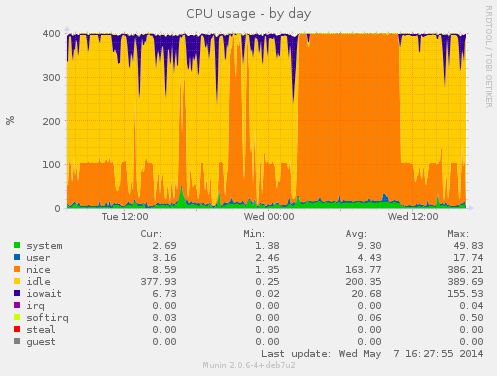 During this buildd cpu usage graph, we see most time only one CPU is consumed. So for fast package build times.. make sure your packages supports parallel building. For developers, abel.debian.org is porter machine with Armada XP. It has schroot's for both armel and armhf. set "DEB_BUILD_OPTIONS=parallel=4" and off you go. Finally I'd like to thank Thomas Petazzoni, Maen Suleiman, Hector Oron, Steve McIntyre, Adam Conrad and Jon Ward for making the upgrade happen. Meanwhile, we have unrelated trouble - a bunch of disks have broken within a few days apart. I take the warranty just run out... [1] only from Linux's point of view. - mv78200 has actually 2 cores, just not SMP or coherent. You could run an RTOS on the other core while you run Linux on the other.
 As promised, today I would like to write a bit about the making of


 There is a strange bug in Planet Debian I am seeing since
I joined. It is rather minor, but since it is an accessibility
bug, I'd like to mention it here. I have written to
the Planet Debian maintainers, and was told to figure it out myself.
This is a pattern, accessibility is considered wishlist, apparently.
And the affected people are supposed to fix it on their own.
It is better if I don't say anything more about that attitude.
There is a strange bug in Planet Debian I am seeing since
I joined. It is rather minor, but since it is an accessibility
bug, I'd like to mention it here. I have written to
the Planet Debian maintainers, and was told to figure it out myself.
This is a pattern, accessibility is considered wishlist, apparently.
And the affected people are supposed to fix it on their own.
It is better if I don't say anything more about that attitude.

 I was invited to give a talk at a local conference, OS-UPIITA. I have been invited to this conference before, and will gladly be there again. But I was recently pointed at the invitation poster they are distributing (which I reproduce here for your convenience) And I must make a couple of corrections here:
 I ve done some clean-up in the Debian BTS. The result can be seen in the QA graphs:
 The last remaining 6 bugs are only affecting OpenStack Essex (which is what Wheezy ships, and which unfortunately I have not enough time to support properly), and the last one is waiting for FTP masters approval after I added Python 3 support to oslo-config (OpenStack is slowly moving to Python3, and I ve tried to add support to Python3 in the packages as well each time it was possible). Also, the Icehouse packages have passed the tempest tests (a set of functional tests) which we run in our continuous integration system.
As I was doing some triaging, it is possible that some bugs have been closed a bit quickly (like for example the Ceilometer FTBFS which I couldn t reproduce, even with sbuild and cowbuilder), so it is well possible that some more QA work will be needed later on. I m also expecting a new set of patches for supporting Ceph in Nova. I m sure there s issues which we will discover later on, however, it is nice to have this result right after the first Icehouse release of OpenStack.
Next up: testing new components that I uploaded for this release: Trove (DB as a Service), Designate (DNS as a Service), Ironic (Metal as a Service, or cloud computing on bare-metal), and TripleO (OpenStack on OpenStack). I unfortunately know already that TripleO and Tuskar wont really work yet, and that it needs some patches to be sent upstream for it to support Debian correctly (let s work it out for Juno!). So please consider it as a technology preview only. Though Trove, Designate and Ironic are supposed to be in good enough shape, I didn t have the chance to test them more than just installing the packages and checking daemons are running and connected to the various components of OpenStack (eg: database, keystone and RabbitMQ). Please do test them and report bugs in the BTS.
I d like to thanks Gustavo Panizzo & Thomas Bechtold who contributed to this release, and also the folks at eNovance (Emilien, Cyril, Seb ) who provided precious help with the CI and package quality. See you in the Juno Atlanta design summit next week (as hopefully, my plane ticket issue will be soon solved).
The last remaining 6 bugs are only affecting OpenStack Essex (which is what Wheezy ships, and which unfortunately I have not enough time to support properly), and the last one is waiting for FTP masters approval after I added Python 3 support to oslo-config (OpenStack is slowly moving to Python3, and I ve tried to add support to Python3 in the packages as well each time it was possible). Also, the Icehouse packages have passed the tempest tests (a set of functional tests) which we run in our continuous integration system.
As I was doing some triaging, it is possible that some bugs have been closed a bit quickly (like for example the Ceilometer FTBFS which I couldn t reproduce, even with sbuild and cowbuilder), so it is well possible that some more QA work will be needed later on. I m also expecting a new set of patches for supporting Ceph in Nova. I m sure there s issues which we will discover later on, however, it is nice to have this result right after the first Icehouse release of OpenStack.
Next up: testing new components that I uploaded for this release: Trove (DB as a Service), Designate (DNS as a Service), Ironic (Metal as a Service, or cloud computing on bare-metal), and TripleO (OpenStack on OpenStack). I unfortunately know already that TripleO and Tuskar wont really work yet, and that it needs some patches to be sent upstream for it to support Debian correctly (let s work it out for Juno!). So please consider it as a technology preview only. Though Trove, Designate and Ironic are supposed to be in good enough shape, I didn t have the chance to test them more than just installing the packages and checking daemons are running and connected to the various components of OpenStack (eg: database, keystone and RabbitMQ). Please do test them and report bugs in the BTS.
I d like to thanks Gustavo Panizzo & Thomas Bechtold who contributed to this release, and also the folks at eNovance (Emilien, Cyril, Seb ) who provided precious help with the CI and package quality. See you in the Juno Atlanta design summit next week (as hopefully, my plane ticket issue will be soon solved).

 If you're looking to get started at packaging free software for
 The GNOME and many other infrastructures have been recently attacked by an huge amount of subscription-based spam against their Mailman istances. What the attackers were doing was simply launching a GET call against a specific REST API URL passing all the parameters it needed for a subscription request (and confirmation) to be sent out. Understanding it becomes very easy when you look at the following example taken from our apache.log:
 This is the entireity of a (purportedly) HTML page I just got: