Search Results: "ana"

24 August 2013

Marko Lalic: PTS Rewrite Project Status

The rewrite has already achieved some of the major goals which have been set in the beginning, as well as made some changes and improvements along the way. Some of the major points of the new system implemented so far will be presented here.

    Tasks framework
    The current PTS implementation regenerates the HTML pages for all packages a few times per day. A goal of the rewrite was to make smaller incremental updates possible so that the information displayed for each package can be much more dynamic.

    In order to allow incremental updates, it is necessary to consider the situation where updating some information should trigger an update of other information.

    This is where the tasks framework comes in. It allows developers to define a task with a list of "events" that it produces. An event can be triggered by any change to shared information or anything else the task would like to signal. Each event is identified by a simple unique string name. Events can also contain arbitrary (JSON-serializable) objects. Other than events that it produces, a task defines a list of dependencies events it depends on.

    When a single task should be executed, the tasks framework uses this information to build a dependency graph (a DAG) and executes the tasks in topological sort order, making sure each task runs only after all tasks which could raise an event it depends on have finished. It automatically makes the raised events available to the task so that it can access the extra data. Tasks for which no event was raised are skipped.

    Such execution of a task along with all its dependencies is called a Job. A Job's state is persisted to the database after each task completes its operation. This allows Jobs to be continued if there is an unexpected error causing it to terminate.

    So far, the tasks framework has already proven useful. For example, there are tasks which extract some package information to a denormalized model suited for directly displaying the data in the package page after a new package version is detected in a repository. Other examples are tasks which update standards-version warnings (after a new package version is detected) and the news generation task based on various detected changes to the packages (new source version, version removed from repository, version migrated to another repository).

    Vendor-specific customizationAnother goal of the rewrite was to make the PTS less Debian-specific. This is so that derivatives could easily deploy their own versions of the PTS. The idea is to have a number of core PTS services which alternative deployments can customize and augment.

    The simplest way vendors can customize PTS is by changing some of the local settings values. An example of this would be changing the PTS_VENDOR_NAME which leads to this name being displayed in any part of the system.

    This is fairly uninteresting since the information is always static. What is more interesting is when the vendor should provide different information based on some context, e.g. package name, received message, etc. This requirement led to the concept of the vendor app with a rules module.

    Various core parts of the PTS specify hook functions which different vendors can implement to provide customized behavior of the core component. Some examples are:
    • providing URLs to a developer information site (e.g. http://qa.debian.org/developer.php in Debian's case) based on a developer's email
    • providing a URL to a bug tracker for a particular package (based on the package type and bug category type)
    • providing additional rules to tag received package mails with keywords
    • providing additional headers to be injected in the forwarded package mails
    • providing a list of bugs which should be displayed in the bugs panel
    A settings value is set giving the full dotted path to the Python module containing the implementation of these hook functions.

    Vendor-specific featuresA step beyond customizing core features is for vendors to include their own specific functionality. The already described tasks framework allows for implementing custom data update/generation processes (optionally depending on core events). Furthermore, since a vendor-specific Django app is expected, it can contain any vendor-specific models which are managed just as the core models are (syncdb, migrations, etc. all work as expected). The last piece of the puzzle is displaying this information on the package page.

    Currently, all package information is provided in various boxes (general, bugs, links, etc.) which were named panels. The rewrite has made it possible to implement additional panels in a really elegant way.

    It is required to implement a class with some properties giving:
    • the panel's title
    • position in the page (left, center, right)
    • panel importance (higher importance panels are placed above lower importance ones in the same column)
    To generate the HTML for a package, two alternatives are allowed. The first is to provide a property which gives (explicitly marked safe) HTML output which is then included in the correct position verbatim. The second alternative, which is what should cover most needs and should be preferred, is to provide a property giving a template name and a property giving the additional context variables necessary to render this template. By using the power of Python properties, the context can be dynamically generated for each package by the panel. The PTS then makes sure to pass the correct panel's context when rendering its template and to include the rendered result in the final package page.

    Various convenience classes are implemented in the panel API, but those are better left to be read about in the panels API documentation.

    Changes from current PTSSome existing features of PTS were not simply rewritten to fit into a Django project, but also improved upon.

    One of the first such changes was reducing the number of confirmation mails sent by the email control bot to only one per received control mail (as per a wishlist PTS bug).

    Work started by Markus Wanner (see this bug) was expanded on and integrated with the new News model so that any inline GPG signatures found in the content of a news item are automatically extracted and the signers name displayed in the package page.

    The existing TODO and Probems panels have been merged into a single Action Needed panel. However, besides merging their representation in the package page, all the package issues are now represented as an ActionItem Django model which provides additional meta-data (item type, date created/updated, severity level) which could be used in the future to provide additional functionality (such as all packages with a certain issue type).

    The descriptions of the action items were also shortened from their current rendition, with the detailed description being moved to a dedicated item page. If Javascript is enabled in the user's browser, it can also be displayed in a popup.

    GUIThe graphical interface has seen some changes, however I hesitate to claim improvements. In my opinion, some of it is definitely better, more polished and more "modern" (for what it's worth).

    Still, this could benefit from more people getting involved in testing and providing feedback so that the design is polished to suit the largest number of users. For example, the padding between the panels is increased, which to me definitely looks better, however, it is possible that this introduces too much whitespace and reduces the information density below what some may expect.

    RecapOverall, I am quite pleased with where the project is currently. Most of the information provided by the current PTS has been reimplemented, with only a few smaller ones remaining. For now, since we are nearly entering the final month of GSoC, the development will switch focus from porting old features to the new PTS to adding in some new ones. Namely, user registration and account management is in the pipeline for the coming week. It entails features such as managing package subscriptions via the online interface (for multiple emails associated with the account) and sso.debian.org integration for Debian Developers.

    This post aimed to provide the most notable changes and improvements made so far to the PTS. In reality, there has been quite a lot of them and not everything is covered here. For more information, check out the PTS documentation which is updated weekly (corresponding to the weekly deployments) or the source code repository.

    The latest iteration of the PTS can always be found at http://pts.debian.net. The mail control interface bot responds to mails sent to control@pts.debian.net.

    Stay tuned for updates and be sure to check out pts.debian.net on at least a weekly basis to see new deployments in action!
    19 August 2013

    Sylvestre Ledru: Clang 3.3 and Debian

    The LLVM toolchain version 3.3 has been released a couple months ago.
    Here are now the result of the rebuild of Debian archive using this version of the compiler.
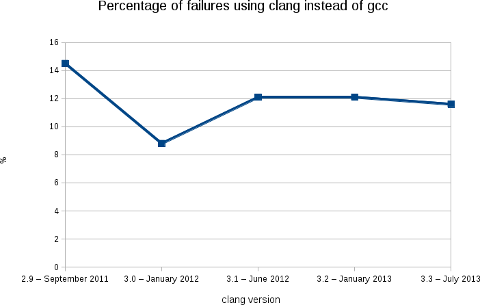
    Like the previous releases, we are at a bit less than 12% of packages failing (2188 packages on a total of 18854).
    More warnings / errors detections have been added to the software (for example: like this defect of the C++ standard or the detection of unused linker option) causing more build failures, but, in the mean time, we fixed some issues in the Debian packages... As usual, the following image shows clearly the evolution of the build failures over time.
    As stated in my blog post for the release 3.2, this rebuilds prove that Clang is ready for production in term of support of the C, C++ and Objective C languages. With the performance results showed by Chandler Carruth from Google at the last Euro LLVM summit (see this video from 5:40), I believe that it is now time to report and fix the bugs in the upstream packages. I also presented this work (video) at the Debconf 13 last week in Vaumarcus (Switzerland) and I will be also presenting this work at the Linux Plumbers Conference, New Orleans. With L o Cavaille (as part of his GSOC) and Paul Tagliamonte, we are also working on providing a better automatic rebuild infrastructure for clang-built packages (and other static analyzers). More in the next few weeks. Finally, I would like to thank folks at AWS for the Debian credit and David Suarez for helping on with the Ruby segfaults.

    Gunnar Wolf: After Debian's 20th birthday, everybody's life gets back to normality...

    As I slowly read my good friends wishing each other a good trip, telling they got home safely, and the IRC channels form thick drops of a bitter-sweet etheral substance, I cannot help feeling DebConf13 is over For me as well, from the distance. Many friends gave me warm greetings, and without being there, gave me that beautiful feeling of real community that Debian has given me for ten years already, since I met in real-life many of its developers at DebConf3 in Oslo. And yes, I have stated this far too many times I have attended every DebConf since (and worked organizing most of them). This year, over 300 people were gathered in Switzerland to enjoy the always most intense weeks of the year. This year, I was unable to attend due to calendar clashes. Even so, without the stress that organizers have, and thanks to the great work of the always-loved Video Team, I think I was able to be present at more sessions than at in any of the last few years. Oh, and for the readers of this blog who were not there Do you want to follow what was presented? You can download already the videos for all of the recorded presentations (that were, due to the planned coverage and the manageable size of the Video Team, about of the total scheduled sessions). And, as always, I was able to follow many very interesting talks and take part of a couple interesting meetings/BoF sessions. I still have a bit of catchup, partly due to the timezone difference (I was only at one of the sessions during the Swiss morning, at 02:30 local time, the pkg-ruby-extras team BoF). Anyway... Not being there, I surely was an avid consumer of the photos posted in the DebConf13 gallery, and will surely follow it for some more time as some of you upload your pending material. It was clear from the beginning that, no matter what your definition of consensus is, the chosen venue was beautiful. A beautiful place between the lake and the mountains where our sportiest guys had a very good share of morning runs, cycling sessions, competition sports of different types, outright plain fun for attendees of all sizes and all species... But, hey, wait! During a chat in the course of DebConf, a friend told me a bit worried that all this beauty and fun might make our dear and very important sponsors they are paying for a geek vacation, is it so? No, not at all. Not by a long stretch. And just looking at those same galleries makes it clear and obvious. After all, it's widely known that Debian is the operating system for the gurus. Simple: It's impossible to have all those geeks without getting amazing work done, in ways that even seem clich s (this last photo had Joey Hess explaining dpkg format version 3.0 (git) ideas, sketched after waking up at 3AM on the first sketching surface available to him). After all, Debian people are famous for their inclination to use any excuse to open their computers and hack away. We can find Debianers hacking in small spaces and also hacking out in the fields. But this time, people were able to hack indoors while enjoying the nature and hack outdoors under a tree. And, yes, one of the things that makes organizing DebConf worth it is, after eleven months having low-bandwidth meetings over IRC, having the opportunity to plan for the next days face to face, in a relaxed but work-full environment. Anyway, here at home I didn't sit idly just longing over them. How could I? We are just celebrating the Debian Project's 20th anniversary! http://gwolf.org/content/jonathan-host-and-organizer-rancho-electr-nico">Jonathan, a Debian enthusiast, student at my university, and collaborator for several free software-related collectives in Mexico City, invited me to the celebration at Rancho Electr nico (which I recently mentioned in this same blog). While I was unable to stay for the whole celebration, we had a very good time; I talked about some ways on how to contribute to Debian. Although I didn't have much of a presentation prepared for it, I feel it was successful and interesting for the attendees I just hope to start seeing some of them get into any of the ways for helping Debian soon. I also stayed as a listener and ocassional commenter for a talk on the Debian Project's history and goals, and to a presentation on a nifty electronic music programming tool called Supercollider (of course, available in Debian). Now, "regular" life should continue. For some value of "regular".

    17 August 2013

    Daniel Pocock: DebConf13: breakthroughs in OTP and WebRTC

    Saturday, 17 August was a day that saw groundbreaking new work revealed at DebConf13 and may have been a watershed moment in the emergence of WebRTC for the free software community.
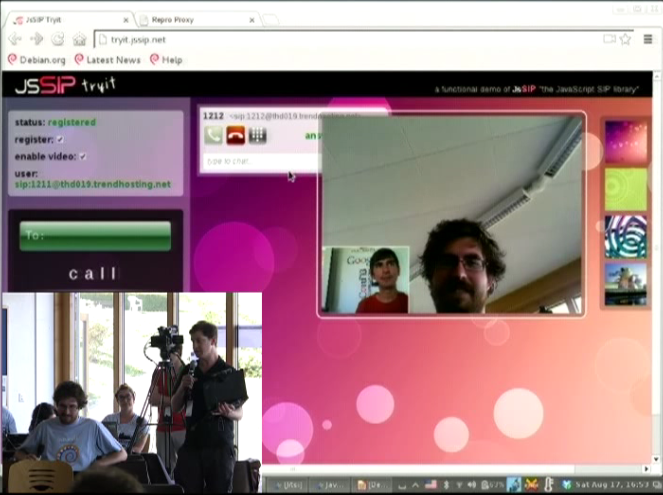
    Fabian Gr nbichler, Daniel Pocock, Catalin Constantin Usurelu, Emil Ivov, Yana Stamcheva Advancing the use of One Time Passwords with free software Google Summer of Code (GSoC) student Fabian Gr nbichler has spent the summer enhancing oath-toolkit and dynalogin to support a more diverse range of One Time Password schemes. dynalogin's original 1.0 release supports vanilla HOTP and TOTP authentication schemes. Fabian's work has extended the framework to support the more generic and powerful OCRA approach. To find out about all the benefits this brings, I would strongly encourage you to review his slides and video presentation, with a demo where it is explained thoroughly. While there are existing hardware tokens that support HOTP and TOTP using this open algorithm (Gooze has been kind enough to donate some which were on display), the mutual challenge-response schemes are yet to be widely supported in hardware and this means that Fabian's work is now at the cutting edge of development in this area. WebRTC: premium voice/video chat in modern browsers, no plugin required Another member of Debian's GSoC program, Catalin Constantin Usurelu helped organise and run one of the must-see sessions of DebConf13 (video available). In a demonstration that had all the hallmarks of a magic show, Catalin and I took random members of the audience and invited them to wave a magic wand over their web browsers and effortlessly turn them into Skype-busting softphones. As the grand finale, we took Wookey's blog and showed him how to add a WebRTC "call-me" page in less than 20 seconds, less time than it takes to hand over all your private data to the registration process of those rather uncomfortable alternatives. Anybody else seeking to duplicate this effort is encourage to review options like Drucall for Drupal or just directly use JsSIP Jitsi and the Jitsi Video-bridge The grand-finale of the DebConf13 real-time communications track was our guest speaker, Emil Ivov, founder of the Jitsi softphone project. Jitsi itself has recently been accepted into Debian and is easier than ever before to install and use. Emil's talk (video and slides available) went into some detail about the cutting edge development activities of his team, particularly the new Jitsi Video bridge Subsequent to the talk, we had some out-of-bands discussion about ways to potentially integrate Jitsi Video bridge with the open source dvswitch system used to produce streams and recordings from free software events such as DebConf and FOSDEM. It is hoped that this will provide an additional option for remote participation at free software events of all sizes. Upcoming events Emil and I have been invited to participate in the WebRTC Conference Paris 2013 in December. This will be an excellent opportunity to have further discussion about progress with WebRTC and do more to raise the compelling case for premium quality free software to meet the demanding needs of modern business communications. There are a series of talks for both technical and business-oriented audiences.
    Lars Wirzenius: Yarn, a scenario testing tool

    I write a fair number of Unix command line programs, and I want to have test suites for them. A year and a half ago I wrote a tool to make that easier: cmdtest. However, it turned out to not be a particularly good one, primarily because it doesn't make it easy to write good test code. Tests and test code should be obviously correct, so you don't need a test suite for your test suite. Earlier this year, Daniel and I started a slow, but long discussion about this. We'd talk it over during many a lunch, figuring out what we actually want. We eventually converged on an approach based on for Unix command line programs, and based on Markdown documents. We then wrote that up as a README, and then took another month refining the README before writing any code. The naming discussion only took a week.
    • We borrowed the given/when/then structure from BDD, and the idea of using that structure so that tests are specified using lightly structured text in a way that allowsnon-developers to participate.
    • This borrowed structure gives a way to express sequences of things that happen, including setup and checks. We call these sequences test scenarios, and thus this approach to testing is called scenario testing.
    • We embed the test scenarios, and the code that implements them, as code blocks in Markdown documents. This makes it easy to explain what is going on in the tests, when that's needed, right next to the tests. The Markdown files can easily be formatted as web pages or PDFs (among other formats), making it easy to share and discuss them with people who might not be comfortable accessing a git repository.
    As a concrete example, here is a real test scenario, from Obnam, for testing its new FUSE plugin:
    SCENARIO Browsing backups with FUSE plugin
    ASSUMING user is in group fuse
    GIVEN a live data directory
    AND a 0 byte file called empty
    AND a 1 byte file called one
    AND a 4096 byte file called 4k
    AND a 10485760 byte file called 10meg
    AND a hardlink to 4k called 4k-hardlink
    AND a symlink to 4k called 4k-symlink
    AND a directory called some-dir
    AND a symlink to ../4k called some-dir/other-symlink
    WHEN live data is backed up
    AND repository is fuse mounted
    THEN latest generation can be copied correctly from fuse mount
    FINALLY unmount repository
    
    Some explanations:
    • SCENARIO is the name of the scenario.
    • ASSUMING is a condition for the entire scenario: the FUSE plugin can only be tested when the user can use FUSE.
    • GIVEN is a setup step, WHEN is the step that does the thing that is being tested, and THEN checks that the right thing happened during WHEN.
    • AND is an alias for the keyword on the previous line; it makes the test scenario seem more like normal English text
    • FINALLY is for cleaning up afterwards, whether the scenario passed or not
    Test scenarios like this are obviously not directly executable. We need to provide the code that actually executs each step. For this, yarn provides an IMPLEMENTS section, of which I will show one example: the creation of the files.
    IMPLEMENTS GIVEN a (\d+) byte file called (\S+)
    dd if=/dev/zero of="$DATADIR/live/$MATCH_2" bs=1 count="$MATCH_1"
    
    (The other IMPLEMENTS sections for that Obnam test scenario are also only about a line of shell. The longest one is four lines, because it has an if statement that I like to format in a fairly verbose way. I'm skipping the others to avoid needless repetition.) The text after the keyword (GIVEN, WHEN, THEN, etc) in the test scenario is a single line of free-form text, which is matched by a regular expression in the IMPLEMENTS section. There must be exactly one matching IMPLEMENTS for each line in a test scenario. The body of IMPLEMENTS is a shell script snippet. Yarn provides a temporary directory for each scenario, and the path to that is given in the DATADIR environment variable. Yarn also cleans up the directory afterwards, unless the user running yarn requests otherwise, so tests that only change things in the temporary directory don't need any FINALLY steps. The above example uses FINALLY to unmount the FUSE filesystem at the end. The regular expressions can capture parts of the text in the scenario step, and these are provided to the shell script using environment variables: MATCH_1 etc. This is a simple, but powerful mechanism for implementing very flexible steps, which also means the number of steps can be kept down. The IMPLEMENTS sections are shared between all test scenarios. This makes it very easy to write new scenarios using already-existing steps, by choosing which ones to use, in which order, and making use of any variability in the steps that their implementations provide. Yarn is a new tool, and I expect it to mature in the coming months. It's included in the cmdtest Debian package, and is already in Debian jessie and unstable, for those who want to try it. (My personal apt repository has a .deb for wheezy as well; backports are welcome). The yarn scenario testing language itself is not set in stone, but Daniel and I both want to be careful about making changes to it. It's all meant to be very simple: an obviously correct testing tool is better than an intricate one. I've used yarn in several of my own little programs now, as has Daniel, and we've used it at work as well. Undoubtedly we'll find bugs in the implementation, and we're still feeling our way to figuring out how to write really excellent scenarios, and how to structure steps with the best possible taste. We'll also start designing a shell library that yarn provides to the IMPLEMENTS sections, for doing things that we find ourselves doing in many projects. It is already clear to me, however, that yarn is oh so much better than cmdtest could ever be. I'm even starting to express ideas for new tools as yarn test documents, so I'm clear what they should do. If and when I ever get to actually implementing the tools, I'll have a test suite for them already. See, for example, first attempts at specifying how a fast file transfer tool, fling, which is to use Linux-only system calls to reach wire speeds over wired LAN, and a tool to recompress compressed files with another compression tool. We hope yarn will prove to be useful for others as well. If you try it, and have suggestions or comments, please e-mail us.

    Russ Allbery: WebAuth 4.5.4

    WebAuth is the site-wide centralized web authentication system that we use at Stanford. This release is a bug-fix release for the central login server, mostly focused on multifactor authentication but also featuring a wide variety of random bug fixes. Going into this release, I filtered the Apache error logs on all of our production servers for a period of a month and then set out to fix every log anomaly or odd behavior pattern that I detected. The most significant bug fix is to support for requiring non-password session factors. The code handled this entirely incorrectly, resulting in the user being stuck at the password authentication prompt and never able to proceed. It also cleans up several corner cases involving REMOTE_USER authentication to sites that require a Kerberos authenticator (such as for delegated credentials). This release downgrades a mismatch of login credentials and a webkdc-proxy token (single sign-on credentials) to a log warning rather than a fatal error and just discards the non-matching single sign-on credentials. This case ideally shouldn't happen, but sometimes users share devices, and if they hit a site with forced login or session factors, it's easy for this case to arise. WebLogin now retries the WebKDC POST once and ignores SIGPIPE errors to work around problems with signals from the FastCGI process manager. It also rewrites non-ASCII characters in XML from the WebKDC to work around XML validation errors created by non-ASCII characters in Kerberos error messages, pending a better fix on the WebKDC side. Password changes no longer go through the replay detection logic, which should not apply to them. Several error messages in WebLogin are now clearer. The WebKDC now requires that the return URL in a WebAuth request be an absolute URL and not contain any non-ASCII characters. A bug in the way that errors during the authentication process were reported has been fixed and should produce better error output for the user. There are also a few other, more minor bug fixes, particularly to logging and error reporting. You can get the latest release from the official WebAuth distribution site or from my WebAuth distribution pages.

    16 August 2013

    Sylvain Le Gall: OASIS website updated

    Logo OASIS small The OASIS website has not been updated since a while. So I decide to take a shot at making more up to date. This blog post is about the pipeline I have but in place to automatically update the website. It is the first end to end 'continuous deployment' project I have achieved. Among the user visible changes:
    • an invitation to circle the OASIS G+ page, which is now the official channel for small updates in OASIS.
    • an invitation to fork the project on Github since it is now the official repository for OASIS.
    • some link to documentation for the bleeding edge version of OASIS manual and API.
    The OASIS website repository is also on Github. Feel free to fork it and send me pull request if you see any mistake. The website is still using a lot of markdown processed by pandoc. But there are some new technical features:
    • no more index.php, we use a templating system to point to latest version
    • we use a Jenkins job to generate the website daily or after any update in OASIS itself.
    Since I start using quite quite a lot Python, I have decided to use it for this project. It has a lot of nice libraries and it helps me to quickly do something about the website (and provides plenty of idea to create equivalent tools in OCaml). The daily generation: Jenkins I have a Jenkins instance running, so I decided to use it to compile once a day the new website with updated documentation and links. This Jenkins instance also monitor changes of the OASIS source code. So I can do something even more precise: regenerate the website after every OASIS changes. I use the Jenkins instance to also generate a documentation tarball for OASIS manual and API. This helps a lot to be able to display the latest manual and API documentation. This way I can quickly browse the documentation and spot errors early. Another good point about Jenkins, is that it allows to store SSH credential. So I created a build user, with its own SSH key, in the OCaml Forge and I use it to publish the website at the end of the build. Right now Jenkins do the following:
    • trigger a build of the OASIS website:
      • every day (cron)
      • when a push in OASIS website repository is detected
      • when a successful build of OASIS is achieved.
    • get documentation artifact from the latest successful build of OASIS
    • build the website
    • publish it
    Data gathering To build the website I need some data:
    • documentation tarballs containing the API (HTML from OCamldoc) and manual (Markdow)
    • list of OASIS version published
    • links to each tarball (documentation and source tarball)
    The OCaml Forge has a nice SOAP API. But one need to be logged in to access it. This is unfortunate, because I just want to access public data. The only way I found to gather my data was to scrape the OCaml Forge. Python has a very nice scraping library for that: beautifulsoup. I use beautifulsoup to parse the HTML downloaded from the Files tab of the OASIS project and extract all the relevant information. I use curl to download the documentation tarball (for released versions) and for the latest development version. Code Template Python has also a very nice library to process template: mako. Using the data I have gathered, I feed them to mako and I process all the .tmpl files in the repository to create matching files. Among the thing that I have transformed into template:
    • the index.php has been transformed into a index.mkd.tmpl, it was a hackish PHP script scraping the RSS of updates before, it is now a clean template.
    • robots.txt.tmpl, see the following section for explanation
    • documentation.mkd.tmpl in order to list all version of documentation.
    Fix documentation and indexing One of the problem of providing access to all versions of the documentation, is that people can end up reading an old version of the documentation. In order to prevent that, I use two different techniques:
    • prevent search engine to index old version.
    • warn the user that he is reading an old version.
    To prevent search engine to index the file, I have created a robots.txt that list all URL of old documentation. This should be enough to prevent search engine to index the wrong page. To warn the user that he is reading the wrong version, I have added a box "you are not viewing the latest version". This part was tricky but beautifulsoup v4 provide a nice API to edit HTML in place. I just have to find the right CSS selector to define the position where I want to insert my warning box. Code Publish The ultimate goal of the project is the 'continuous deployment'. Rather than picking what version to deploy and do the process by hand, I let Jenkins deploy every version of it. Deploying the website used to be a simple rsync. But for this project I decided to use a fancier method. I spend a few hours deciding what was the best framework to do the automatic deployment. There are two main frameworks around: capistrano (Ruby) and fabric (Python). Fabric is written in Python, so I pick this one because it was a good fit for the project. Fabric biggest feature is to be a SSH wrapper. The fabric script is quite simple and to understand it, you just have to know that local run a local command and run run a command on the target host. The fabfile.py script do the following:
    • create a local tarball using the OASIS website html/ directory
    • upload the tarball to ssh.ocamlcore.org
    • uncompress it and replace the htdocs/ directory of the oasis project
    • remove the oldest tarballs, we keep a few versions to be able to perform a rollback.
    Given this new process, the website is updated in 3 minutes automatically after a successful build of OASIS.

    15 August 2013

    Daniel Leidert: HP N54L Microserver - energy efficiency and power management

    I recently worked on activating power management functions, reduce energy consumption and noise of my little HP N54L "toy". During this process I tried to avoid the usage of /etc/rc.local and set things by udev, hdparm and friends. Below are my results. Actual resultsWith the following steps my system (N54L + 3xWD20EFRX HDD +1xWD5003AZEX HDD + LCD-mod + case fan mod + Debian Wheezy) uses 27W in idle mode. The USB W-LAN card uses another 10W. In active mode, e.g. compiling source code, the system runs (and boots) with around 57W. The highest power consumption observed is during startup phase with 88W. First things firstFor the following steps it might be necessary to have some packages installed, that maybe do not occur in this post. If I missed something, I appreciate a hint. Further the following steps might produce even better results with a custom kernel. I'm using the stock linux-image-3.2.0-4-amd64 kernel image as the time of writing and I have these packages installed: amd64-microcode, firmware-linux, firmware-linux-free, firmware-linux-nonfree and firmware-atheros (the latter for my WLAN card). ASPM and ACPIFirst I enabled PCIE ASPM in my (non-modded) BIOS and forced it together with ACPI via grub by changing GRUB_CMDLINE_LINUX_DEFAULT in /etc/default/grub so it looks like this:

    GRUB_CMDLINE_LINUX_DEFAULT="quiet splash acpi=force pcie_aspm=force nmi_watchdog=0"
    ASPM has now been enabled as lspci prooves:

    00:04.0 PCI bridge: Advanced Micro Devices, Inc. [AMD] RS780/RS880 PCI to PCI bridge (PCIE port 0) (prog-if 00 [Normal decode])
    [..]
    LnkCap: Port #1, Speed 5GT/s, Width x1, ASPM L0s L1, Latency L0 <64ns, L1 <1us
    ClockPM- Surprise- LLActRep+ BwNot+
    LnkCtl: ASPM L0s L1 Enabled; RCB 64 bytes Disabled- Retrain- CommClk+
    ExtSynch- ClockPM- AutWidDis- BWInt- AutBWInt-
    [..]
    00:06.0 PCI bridge: Advanced Micro Devices, Inc. [AMD] RS780 PCI to PCI bridge (PCIE port 2) (prog-if 00 [Normal decode])
    [..]
    LnkCap: Port #3, Speed 5GT/s, Width x1, ASPM L0s L1, Latency L0 <64ns, L1 <1us
    ClockPM- Surprise- LLActRep+ BwNot+
    LnkCtl: ASPM L0s L1 Enabled; RCB 64 bytes Disabled- Retrain- CommClk+
    ExtSynch- ClockPM- AutWidDis- BWInt- AutBWInt-
    02:00.0 USB controller: Renesas Technology Corp. uPD720201 USB 3.0 Host Controller (rev 03) (prog-if 30 [XHCI])
    [..]
    LnkCap: Port #0, Speed 5GT/s, Width x1, ASPM L0s L1, Latency L0 <4us, L1 unlimited
    ClockPM+ Surprise- LLActRep- BwNot-
    LnkCtl: ASPM L0s L1 Enabled; RCB 64 bytes Disabled- Retrain- CommClk+
    ExtSynch- ClockPM- AutWidDis- BWInt- AutBWInt-
    [..]
    03:00.0 Ethernet controller: Broadcom Corporation NetXtreme BCM5723 Gigabit Ethernet PCIe (rev 10)
    [..]
    LnkCap: Port #0, Speed 2.5GT/s, Width x1, ASPM L0s L1, Latency L0 <1us, L1 <64us
    ClockPM+ Surprise- LLActRep- BwNot-
    LnkCtl: ASPM L0s L1 Enabled; RCB 64 bytes Disabled- Retrain- CommClk+
    ExtSynch- ClockPM- AutWidDis- BWInt- AutBWInt-
    [..]
    Even so /sys/module/pcie_aspm/parameters/policy will still show as below:

    [default] performance powersave
    I'll show how to set the powersave value in /sys/module/pcie_aspm/parameters/policy in the next section.JFTR: These are my ACPI related packages installed: acpi, acpid, acpi-support and acpi-support-base. Enable powersaving via UDEVThe following rules file /etc/udev/rules.d/90-local-n54l.rules has been inspired by a blog post. It enables powersaving modes for all PCI, SCSI and USB devices and ASPM. Further the internal RADEON cards power profile is set to the low value. There is no monitor connected usually. The file contains these rules:

    SUBSYSTEM=="module", KERNEL=="pcie_aspm", ACTION=="add", TEST=="parameters/policy", ATTR parameters/policy ="powersave"

    SUBSYSTEM=="i2c", ACTION=="add", TEST=="power/control", ATTR power/control ="auto"
    SUBSYSTEM=="pci", ACTION=="add", TEST=="power/control", ATTR power/control ="auto"
    SUBSYSTEM=="usb", ACTION=="add", TEST=="power/control", ATTR power/control ="auto"
    SUBSYSTEM=="usb", ACTION=="add", TEST=="power/autosuspend", ATTR power/autosuspend ="2"
    SUBSYSTEM=="scsi", ACTION=="add", TEST=="power/control", ATTR power/control ="auto"
    SUBSYSTEM=="spi", ACTION=="add", TEST=="power/control", ATTR power/control ="auto"

    SUBSYSTEM=="drm", KERNEL=="card*", ACTION=="add", DRIVERS=="radeon", TEST=="power/control", TEST=="device/power_method", ATTR device/power_method ="profile", ATTR device/power_profile ="low"

    SUBSYSTEM=="scsi_host", KERNEL=="host*", ACTION=="add", TEST=="link_power_management_policy", ATTR link_power_management_policy ="min_power"
    Set harddrives spindown timeoutI decided to sent my system drive to standby after 20 minutes and the RAID drives after 15 minutes. This is usually ok, because the RAID isn't always used. hdparm is the right tool to realize this. Many people use the /dev/disk/by-uuid/... syntax here, to avoid having to touch the configuration file if some system configuration changes. Because I'm running a RAID, I couldn't use this syntax, although it might be possible to use /dev/disk/by-id/... instead. Well for the moment I stay with the configuration below. The relevant part of /etc/hdparm.conf is:

    [..]

    # system harddrive
    /dev/sda
    spindown_time = 240


    # below are the WD20EFRX drives
    /dev/sdb
    spindown_time = 180


    /dev/sdc
    spindown_time = 180


    /dev/sdd
    spindown_time = 180

    Idle modeWhen there is nothing to do for the system, all I hear is the (still a bit noisy) fan of the power supply, which I might replace in the future too. Either by testing a different fan or by replacing the whole power supply unit by the fanless FORTRON FSP150-50TNF or (even better) a picoPSU.The system currently shows a power consumption of around 37W in idle mode whereas the USB W-LAN card itself needs around 10W. There is a possibility to enable power savings mode for this card too. I could add this entry to /etc/udev/rules.d/90-local-n54l.rules:

    SUBSYSTEM=="net", ACTION=="add", KERNEL=="wlan*" RUN+="/usr/bin/iw dev %k set power_save on"
    But it turned out that the connection became a bit unstable after it. So I don't use this rule. More on the roadThere are a lot more options one can easily find via $search_engine. The N54L system could be brought to sleep and woken up by LAN via Wake-on-LAN (WOL). This is a feature I don't use. I've also read rumors about enabling different sleep/suspend states of the system, which seems to require to install a modded BIOS. Well, I'll post news and changes if they happen to come;)

    Michal &#268;iha&#345;: DebConf day trip

    Yesterday, we've spent nice day on a day trip of DebConf. I took the long hike, which ended up at Creux du Van, what is wonderful rocky place. The way up was through nice nature and we've met quite a lot of cows on the way: They we've finally arrived to Creux du Van: Of course we could not miss an opportunity to take a group photo: After wandering around the rocks, we took a lunch and headed to Neuch tel, where some music festival was going on: The whole day was nicely finished on a boat with a dinner. PS: More DebConf photos are available in my gallery.

    Filed under: Debian English Photography phpMyAdmin 0 comments Flattr this!

    13 August 2013

    R&#233;mi Vanicat: Git annex and Calibre

    The debconf BoF about gitify all things make we to want to report some of my git-annex use cases. The problem Calibre is a ebook manager that is available in debian. I use it to maintain my library, but also to dowload every day an epub version of a French newspaper and then put it on my kobo. Configuring git annex for this I wanted to use git-annex, so
        $ git init
        $ git annex init "some useful name"
    
    But I don't want every thing in annex, because Calibre use some text file to save some metadata, so I used:
        $ git config annex.largefiles "include=* exclude=*.opf exclude=*.json"
    
    then lets add everything
        $ git annex add *
        $ git add *
        $ git commit -m "first commit"
    
    Calibre need read and write access on the its database, so let unlock it:
        $ git annex unlock metadata.db
    
    On my other computer I only need to do
        $ git clone $user@$host:Calibre\ library
        $ cd Calibre\ library
        $ git annex init "another useful name"
        $ git annex get .
        $ git annex unlock metadata.db
    
    The problem is that every time you will git annex sync, git annex will lock again the metadata.db, so lets unlock it automatically. I use git hooks, in .git/hooks/post-commit I have
        #!/bin/bash
        git annex edit metadata.db
    
    don't forget to make this file executable
        $ chmod a+x .git/hooks/post-commit
    
    Day to day operation
        $ git annex add .
    
    Will put new file into the annex
        $ git add .
    
    Will take care of the files that should no go into annex
        $ git annex sync
    
    Will make the repositories exchange informations about all this, and make remote change local
        $ git annex get .
    
    Will make remote book locally available Merge conflict You should not run calibre on the two computer simultaneously, or without syncing before it. If you do, you will have a conflict that git-annex will automatically solve by rename both of the file. You can then either:
    • Choose one. If no books have been changed or added on one of the computer, to use the other metadata.db will not make you loose any information
    • rebuild it. calibredb restore_database won't do it, but will tell you how to do it.
    Checking the library You can use calibredb check_library to check you library is correct. If you use git for it, it will always tell you that it is not correct: there is this author ".git" it doesn't know about. Just don't care about it. Maybe this can be solved by using vcsh but apparently vcsh+git annex it not well tested yet. Automatic stuff I use mr to automatically run all this, but some config could be done (I believe) to have git annex copy --auto do what it should. There are also the git annex assistant for this kind of automatic synchronizations of contents, but I don't know if my automatic unlocking of one file will break this. It might be interesting to find someway to unlock and lock the library only when running calibre, a simple script to launch calibre will do that. Note that each time you will lock and unlock, you will have a new commit in git.

    12 August 2013

    Richard Hartmann: DebConf13 I

    DebConf! The venue here at Le Camp is pretty much perfect. Short walking distances, organic layout of the buildings, and a stunning view of the lake. I would be hard pressed to think of other venues which could be as nice... After arriving Fri/Sat night at 0330, Saturday was spent setting up the Access points: Me prior to pull-ups on the roof beams Access Point in pillow cases This little green valve caused a power outage in the server room, messing with servers, and resetting several switches to old configs. Xtaran had a lot of fun as a result of this. The valve of evil. And water. The ikiwiki BoF on sunday was rather interesting. I will try to publish some notes from this BoF and the other Git-related ones towards the end of the week. The Gitify ALL the things BoF managed to fill the room from "full-ish" over "good thing we don't need the beamer and can use the space in front of the whitescreen" over "out of chairs" over "the chairs from other rooms won't fit any more" to the final state of "people stand around near the walls and in the doors". At a total of 54 people, turnout has been... unexpectedly high.. The BoF started at 1130 and usually, slots are 45 minutes long. We extended our BoF into lunch time (I chose the slot just prior to lunch for precisely that reason) and finally finished at around 1245, i.e. 30 minutes late. After a quick show of hands on if there's interest in another BoF, I applied for and got the next slot, tomorrow at 11:30, once again in BoF room 1 and just before lunch. It's called Gitify EVEN MORE of the things and will expand on use cases and best practices. At a guess, we will focus on managing configurations and photos in default and complex situations. Sadly, neither of those BoF are taped. Afterwards, I had a chance to sit down with Lucas Nussbaum to talk over some points regarding the Debian Trademark Team. Finally, during Why Debian should (or should not) make systemd the default (it probably should not, but that's a different story), my kernel panicked. 3.9 and 3.10 have been less than ideal on my new X1 Carbon, but this was the first panic. I was not even done cussing and Ben Hutchings suddenly appeared on my side, telling me that yes, this particular module (mei) has been causing issues recently. Kernel panic As a closing note, I am really enjoying my first DebConf. Great venue, great people, great content, winebeer and cheese party tonight, and I found out that we have a fire place and fire wood...

    11 August 2013

    Michal &#268;iha&#345;: Good morning DebConf

    Yesterday evening I've arrived at DebConf 13. I was quite tired after traveling so I just had few beers and went to bed. The travel went quite well besides somebody else broke wine and my suitcase was all wet from it. Fortunately almost nothing got inside so I have some clean clothes for next week :-). As I went to bed quite early, I woke up early as well so I went to short walk to see what is nearby: Sunrise at Lake Neuch tel Castle Vaumarcus Castle Vaumarcus

    Filed under: English Debian Photography 0 comments Flattr this!

    9 August 2013

    Justus Winter: My worst week yet...

    This hasn't been my week. I had to fix two of my Hurd installations I use for development and testing. I spent countless hours waiting for some package to be rebuilt, reading scientific papers about adding stuff to the Mach kernel. Fascinating stuff like thread migration that would (among other things) allow for proper resource accounting on Mach kernels. Oh, and gcc is a sadistic bastard:
    In file included from printf-parsewc.c:2:0:
    printf-parsemb.c: In function  __parse_one_specwc :
    printf-parsemb.c:407:1: internal compiler error: Segmentation fault
    Please submit a full bug report,
    with preprocessed source if appropriate.
    See <file:///usr/share/doc/gcc-4.7/README.Bugs> for instructions.
    The bug is not reproducible, so it is likely a hardware or OS problem.
    
    A similar error came up like five hours into my libc rebuild. How nice of gcc to retry the build to figure out whether it is to blame or the environment only to throw away the successful build and abort my build process :/
    • I published my patch series addressing all sysvinit-related issues: http://lists.gnu.org/archive/html/bug-hurd/2013-08/msg00000.html
    • I since found three minor issues, so I'll roll another series shortly. But since this somewhat breaks the ABI (/hurd/init is no longer PID 1) this is waiting for a libc rebuild that I haven't managed to get done so far.
    • I updated my patch series for the sysvinit package. I'm quite pleased with it as it is and I'll propose it for inclusion with the sysvinit package shortly. Unfortunately this depends on the patched hurd package with is blocked by the libc package :/
    Next week I'll finally propose my sysvinit patch series. Oh, and implement the -d flag in our umount. I thought I had implemented all the flags used by the initscripts, but somehow I missed -d. If I get bored, I'll take a look at the network related issues, but I bet I won't get there...

    Daniel Leidert: Local link networking on Debian/Linux between server and workstation

    My network is based on wireless LAN, which is running at 54MBit/s. Transfering files between two systems therefor is not very fast. I could use wired connections, but cables would need to be pretty long to connect to the router. However the file server and the workstation are located near to each other and both have a free Gigabit LAN link. So why not connect these systems directly?Both systems run network-manager, whereas the server runs without a graphical/desktop environment. The file /etc/network/interfaces contains this entry related to the LAN devices on both systems:

    allow-hotplug eth0
    auto eth0
    To create the connection it is necessary to have the package avahi-autoipd installed. In a graphical environment is is then as easy as open the network(-manager) preferences dialog, create a new wired connection, change to the IPv4 Settings tab in its Options dialog and choose the Link local only method. Done.On the server I have no desktop environment. Therefor I wrote the necessary file /etc/NetworkManager/system-connections/LocalLink myself. The UUID value can be obtained via uuid -n 1:

    [802-3-ethernet]
    duplex=full
    mac-address=<MAC-address>

    [connection]
    id=LocalLink
    uuid=<value of: uuid -n 1>
    type=802-3-ethernet
    timestamp=0
    autoconnect=true

    [ipv6]
    method=auto

    [ipv4]
    method=link-local
    I restarted the manager via service network-manager restart on the server and the link came up too. The direct link was ready.A note: I was able to create the connection by using a patch cable because my cards are able to handle the situation. On older systems it might be necessary to use a cross-over-cable.I would really like to use bonding on the wired ethernet and the wireless devices. But the wireless connections are done via router whereas the ethernet connections are created via local link. I think, this is impossible. Any ideas/hints?

    Michal &#268;iha&#345;: Roadmap for Weblate 1.7

    Weblate 1.6 is already two weeks out without any regressions, so now it's time to think about features for 1.7. I definitely want to improve support for monolingual translation formats as they currently suffer by various metadata issues (eg. checks not working correctly). This requires quite big change in underlying database, but I think it's quite manageable. When talking about checks, I want to make them configurable per project as global configuration is quite limiting for shared sites like hosted Weblate. I will definitely need to touch registration and authentication, either by supporting latest django-registration API or to move some other solution with support for federated login. Which of these approaches will be used depends on my time, what is always the most limiting factor. This might sound as too few features, but I'd like to make releases more often, so that should fit into this plan. However if you want to push for some feature, you still have two days to fund something on Catincan!

    Filed under: English Weblate 0 comments Flattr this!

    8 August 2013

    Enrico Zini: Getting new Front Desk members (part of things to do at Debconf)

    Getting new Front Desk members (part of things to do at Debconf) We need more Front Desk members. Jonathan Wiltshire has kindly put together a job description for the current status quo. Currently we'd like a person to have been an Application Manager before joining Front Desk, but FD tasks are now more diverse than they used to be, and I'd like to spend some time thinking about it, for example here. Job Description for Front Desk Assistant Front Desk assistants are often the first point of contact for new applicants to Debian's New Member process, and are responsible for guiding them through all stages. Front Desk collates applications, assigns them to an Application Manager, checks over the completed application and hands it off to the Account Managers. Front Desk also handles membership of the collab-maint Alioth project. It is not currently involved with applications for Debian Maintainer status. You will 'meet' a wide variety of applicants, some of whom are excited to be starting their journey to Debian membership, whilst others are already established and taking the next step to full developer status. This is a mostly procedural role, but some diplomatic skills are required, particularly when applications are held up for reasons beyond your control. You must have excellent written communication, an eye for detail, and a thorough understanding of what it is to be Debian Members. Expect to spend 2-3 hours per week on this role, divided by as many days as you can manage (to ensure mail is dealt with as soon as possible). The most time-consuming part is processing the completed application. Responsibilities:
    1. To be the first point of contact at Front Desk
    2. To perform initial triage of applications
    3. To match each application with an appropriate Application Manager
    4. To ensure applicants are processed in a timely manner, which may require intervening with an application when it is not progressing satisfactorily
    5. To check completed applications for any missing detail and pass them on to the Account Managers
    6. To handle collab-maint membership business
    7. To answer any queries from applicants, Application Managers, and other stakeholders
    8. To monitor output from the NM routine jobs and fix or escalate any problems
    Front Desk staff are not expected to make a judgement call on applicants, though some discretion can be used when appropriate.

    7 August 2013

    Keith Packard: embedded cpus

    Choosing Embedded Processors for AltOS When Bdale and I started building rocketry hardware together, we had already picked out a target processor, the TI cc1111. We picked that chip almost entirely based on the digital transceiver that is built in to the chip, and not because we had any particular love for the 8051 microcontroller. At that time, I d seen people struggle with PIC processors, battle AVR to a draw and spend a lot of time trying to get various ARM processors running. So, the 8051 didn t seem all that far from normal, and the cc1111 implementation of it is pretty reasonable, including credible USB support and a built-in DMA engine. Since those early days, we ve gone on to build boards with a slightly wider range of processors:
    • TI cc1111
    • Atmel ATmega32U4
    • Atmel ATiny85
    • STMicroelectronics STM32L151/STM32L152
    • NXP LPC11U14
    Bdale thinks we should reduce the number of components we use to focus our efforts better. He s probably right, but I have to admit that I ve had way too much fun getting each of these chips running. I thought I d spend a bit of time describing our general process for selecting a new CPU.
    • Free software. I m long past the age at which I trust hardware vendors to deliver credible binary software. If you want me to use your silicon, make sure the tools required to use it are all free software.
    • Debian support required. Bdale and I do everything on Debian, so any processor we use needs to have tools that run under Debian. We re more than willing to package software for Debian, so if it s just generic Linux-compatible free software, that s fine.
    • Built-in USB. Everything we build needs to talk to a computer for configuration and data download. Don t even think of asking me to attach another chip for USB support. Ok, so the ATtiny85 doesn t qualify here, and that project does use an external chip for USB which is connected to the ATtiny85 through an LED and phototransistor. I was excited when TI came out with the CC340 chips because the MSP430 is a much nicer CPU than the 8051. But, they still haven t added USB. If I m going to add another chip for USB, it ll be a CPU anyways, at which point I ll use a stand-alone RF chip.
    • Cheap developer boards. TI sells a tiny little cc1111 developer board; STmicroelectronics and NXP both sell boards that include a programmer and a target CPU for prototyping software. And, there are a million Arduino clones with various Atmel processors on them. Cheap means I can buy them without thinking too hard; having a built-in programmer means that early OS development can be done without first having to figure out how to wire up a programmer.
    • Probably 32 bits, probably an ARM. Yeah, the cc1111 and Atmel processors were fun to bring up, but I m pretty much over the 8-bit microcontroller now. ARM processors are far more sophisticated in terms of power management and built-in device capability, plus they re a ton faster at doing any math. The ATtiny85 remains an exception here; it s smaller than any ARM I can get, and so it s still useful for projects too small for an ARM.
    • Available in small quantities from a reasonable on-line retailer like Digikey, Mouser or even Avnet Express. I d love to try out the new low-cost STM32L100 parts, but the only one available is the largest one in the 64LQFP package, and I really don t need that many pins for most products.
    CC1111 involved a lot of software hacking The 8051 processor in the CC1111 is very well documented, including the two-wire debugging interface. What was missing was a canned solution for programming and debugging the chip from Debian. However, with sufficient motivation and accurate docs, I was able to create a programmer from a USB device with a couple of GPIOs and a lot of ugly software on Linux. That sufficed to get the USB stack limping along, at which point I wrote a much faster programmer that ran on the cc1111 itself and could program another cc1111. With that, I created an assembly-level debugger that could be hooked to the existing SDCC source level debugger and had a full source-level debugging environment for the 8051. This turned out to be way better than what I could get on the Atmel processors, where I ve got a program loader and a whole lot of printf debugging. STM has been great The STM32L-Discovery board has a standard STM debugging setup for the Cortex SWD interface right on the same board as a target CPU. That made for completely self-contained development, with no jumper wires (a first for me, for sure). There s free software, stlink which can talk over the debugger USB connection to drive the SWD interface. This is sufficient to flash and debug applications using GDB. Of course, GCC supports ARM quite well; the only hard part was figuring out what to do for a C library. I settled on pdclib, which is at least easy to understand, if not highly optimized for ARM. We ve built a ton of boards with the STM32L151 and STM32L152; at this point I m pretty darn comfortable with the architecture and our tool chain. Adventures with NXP The NXP LPC11U14 is a very different beast. I m using this because:
    • It s small (5mm x 5mm)
    • It s cheap ($1.48 q100)
    The LPCXpresso board looks much like the STM32L-Discovery, with a debugger interface wired to the CPU directly on the board. However, I haven t found free software tools to drive this programmer; all I ve found are binary-only tools from NXP. No thanks. Fortunately, the LPC11U14 uses exactly the same SWD interface as the STM32L, so I was able to sever the link between the programmer and the target on the LPCXpresso board and hook the target to an ST-Link device (either the one on the STM32L-Discovery board, or the new stand-along programming dongle I bought). With that, I wrote an openocd script to talk to the LPC11U14 and was in business. What I found in the NXP processor was a bit disturbing though there s a mask ROM that contains a boot loader, which always runs when the chip starts, and a bunch of utility code, including the only documented interface to programming the flash memory. I cannot fathom why anyone thought this was a good idea I don t want a BIOS in my embedded CPU, thankyouverymuch; I d really like my code to be the first instructions executed by the CPU. And, any embedded developer is more than capable of programming flash using a register specification, and calling some random embedded code in ROM from the middle of my operating system is more than a bit scary. NXP could do two simple things to make me like their parts a whole lot more:
    • Publish the programmer source code. The programming dongle is a tool for selling your silicon, not a separate revenue stream. Publish the source under a free software license (GPL recommended, of course). We ll take it, make it better, and ensure that you get the changes back to help your other customers. It s a win-win plan.
    • Document the flash programming registers. Yeah, I could probably disassemble the mask-rom bits that are on the chip, but I have better things to do with my time. Heck, go wild and document any other hidden bits in the silicon. Again, we re embedded developers, we don t like magic hardware hidden from view any more than PC developers like the BIOS and SMM.
    Right now, I m hoping the STM32L100C6 parts become available in small quantities so I can try them out; they promise to be as cheap as the LPC11U14, but are better supported by free software and offer more complete hardware documentation. Yeah, they re a bit larger; that will probably be annoying.

    Enrico Zini: Debconf TODO-list

    Debconf TODO-list Friday evening (2013-08-09) I'll arrive at Debcamp. Here is my TODO list for Debcamp and Debconf:
    • Debtags
      • Discuss disbanding the debtags-devel mailing list, possibly merging it into debian-project.
      • Recruit debtags tag reviewers now that there's a new tag review interface.
      • Find ways of having DDs moderate their own tags.
      • Comaintainers for debtags.debian.net.
      • Tags in debian/control, try to implement the plan discussed with ftp-masters long ago.
      • Make a new package debtags-data, dependency of debtags, so that there can be frequent releases of debtags-data as a binary-indep package.
    • NM
      • Debian Contributors (addressing this issue).
      • Recruit new FD/DAM members.
      • Cleanup NM files and repositories, removing all the obsolete stuff.
      • Sync procedures with keyring-maint and DSA, to reduce or remove the need of manual maintenance to keep nm.debian.org, the keyring and LDAP in sync.
      • Marketing analysis and NM interaction (ask me about it in person, preferably when drunk).
      • I fail at handling returning DDs: that needs fixing. There should be an interface in nm.debian.org for people returning from emeritus.
      • How to stop bounce loops in nm alias addresses and still receive legitimate bounces. Alternatively, find a way to prevent germans from configuring their own mail servers :P
      • Cleanup and consolidate NM documentation.
      • Scale NM documentation down to "I want to help Debian, what should I do?" or at least point to the appropriate place that can handle that need.
    • Packages and services
      • Consolidate mailing list: what am I doing as a moderator of pkg-python and pkg-italian?
      • Consolidate services: what am I maintaning? What is really needed? Luckily there's a list.
      • Consolidate packages: find comaintainers for the important ones, reduce dependencies
      • How to deal with bugs from team Mayhem (#715997...#716001): can we define a package as "needs to be run in a controlled environment"?

    6 August 2013

    Ian Wienand: Running cloud images locally

    Fedora and Ubuntu both provide compact cloud images that are useful for spinning up small VM's quickly (much quicker than installing from a huge ISO or even net-install). Both these pages have single-click buttons to simply launch the VM's at Amazon, which is very cool. However, you may have reason to use them "offline" with a local KVM (outside of EC2 or OpenStack) for testing, or on a plane, etc. I didn't find a lot of information on this (although it is all available once you know what you're looking for). So here's my quick guide for the complete newbie. Firstly, download your image of choice and put it in /var/lib/libvirt/images. Open up virt-manager and you can create your new VM via "import existing image". You can try booting it, but the problem you'll hit is the images have no default password or way to log-in because, very sensibly, you're expected to inject that. Booting you'll see cloud-init attempting to contact 169.254.169.254 to collect the meta-data to initalize the VM; eventually it will time out and you're left at a login prompt you can't log in at. cloud-init does many things and is very flexible with lots of different plugins to initialise images in various ways. The particular one we're interested in is the No cloud plugin. This will look for data from a locally attached CD drive, which works very easily for this scenario. Now that you know that's what you're looking for, the instructions are fairly clear; I'll repeat them just for clarity. Firstly you want to create a minimal meta-data file that has a host-name and an instance-id:
    $ cat meta-data
    instance-id: iid-local01;
    local-hostname: myhost;
    
    Modifying the instance-id will signal to cloud-init that it should run again because something changed. This is also where you can put static IP address data; see the documentation. Secondly, create a user-data file that has the commands to enable password login; set a password, and inject your ssh public key so you can easily log-in:
    $ cat user-data
    #cloud-config
    password: mypassword
    ssh_pwauth: True
    chpasswd:   expire: False  
    ssh_authorized_keys:
      - ssh-rsa ... foo@foo.com (insert ~/.ssh/id_rsa.pub here)
    
    Note for new players: that #cloud-config isn't an optional comment, it's a directive. If you leave it out, you'll probably see a little something about Unhandled non-multipart userdata starting... and your changes won't apply. Insert those two into files into an iso:
    $ genisoimage -output init.iso -volid cidata -joliet -rock user-data meta-data
    
    Then copy init.iso into /var/lib/libvirtd/images as well, and connect that as a virtual-cd drive to your virtual-machine created from the image. When you boot you should see some output as it injects your key. It should get an address via DHCP and then you should be able to log-in with fedora or ubuntu users. Then you can start getting more complicated with things like static addresses, package installations, running commands, etc by reading the documentation.

    5 August 2013

    Ian Wienand: Skipping bash history for command-lines starting with space

    I was recently reading about a case where part of the evidence appears to be a deleted bash history-file. From what I gather, the accused says that the removal was a clean-up job to remove inadvertently stored passwords rather than an attempt to hide nefarious activity. What had managed to pass me by in 15 or so years of using bash but not reading man bash properly is the HISTCONTROL variable. If it is set to ignorespace then commands entered with a leading-space will not be stored in the history. Like all the best discoveries I found this only by accident on a machine where it was turned on. It's been quite useful in keeping my history pruned. However, not usually for security reasons around hiding passwords passwords on the command-line have other problems and I'm sure any security person would tell you not to use them just from a defense-in-depth perspective. That said, from a "keeping ctrl-r reversi-search useful" point-of-view it's often helpful; for example I've mostly trained my fingers to <space>rm -rf because I'm sure I'm not the only one who has deleted the wrong thing via a history-recall-combined-with-typing-to-fast scenario. So, HISTCONTROL=ignoreboth (which also ignores duplicates) is certainly a useful one to slip into your .bashrc. At least it would be one-less thing to explain to the FBI!

    Next.

    Previous.