Search Results: "tar"

6 June 2016

Carl Chenet: My Free Activities in May 2015

Follow me also on Diaspora*diaspora-banner or Twitter Trying to catch up with my blog posts about My Free Activities. This blog post will tell you about my free activities from January to May 2016. 1. Personal projects 2. Journal du hacker That s all folks! See you next month!

C.J. Adams-Collier: Some work on a VyOS image with Let s Encrypt certs

I put some packages together this weekend. It s been a while since I ve debuilt anything officially. The plan is to build a binding to the libgnutls.so.30 API. The certtool CSR (REQ) generation interface does not allow me to create a CRL with not critical attributes set on purposes. Maybe if I do it a bit closer to the metal it will be easier

Olivier Gr goire: Community bounding + 2 weeks at GSoC!

Welcome in my first and second report!
The community was really good, I talked with a lot of people from all around the world. All that projects are just awesome and I am happy to be part of this.
For this first week, I provided a list of all information I need to pull in my client (this list is subject to change a little bit):
-Call ID
-Resolution of the camera of all the people connect to the call
-Percentage of loosing frame
-Bandwidth (upload + download)
-Name of Codecs using on the conversation
-Time to contact the other person
-The security level
-Performance using by Ring (RAM + CPU)
I am trying to figure out how work the Ring project.
-Understand the external exchange by using Wireshark to catch some important packages.
-Understand the internal exchange between the daemon and clients on the D-Bus by using Bustle
I created my architecture program on the daemon and the D-Bus. [1] You can call the method launchSmartInfo(int x) from the D-Bus (by using D-Feet for example). That will call SmartInfo signal all x ms. This signal can only push an int for the moment, but he will push all the information we want on the clients. I actually work on the Ring GNU Linux client. So I learn how work the QT and GTK+. [1]github/Gasuleg/Smartlnfo-Ring: I will stop update this repository because I will push my code on the Gerrit draft of Savoir Faire Linux. It's more easy for my team to do some commentary on that platform and it's free software)

Olivier Gr goire: Community bounding + 2 weeks at GSoC!

Welcome in my first and second report!
The community was really good, I talked with a lot of people from all around the world. All that projects are just awesome and I am happy to be part of this.
For this first week, I provided a list of all information I need to pull in my client (this list is subject to change a little bit):
-Call ID
-Resolution of the camera of all the people connect to the call
-Percentage of loosing frame
-Bandwidth (upload + download)
-Name of Codecs using on the conversation
-Time to contact the other person
-The security level
-Performance using by Ring (RAM + CPU)
I am trying to figure out how work the Ring project.
-Understand the external exchange by using Wireshark to catch some important packages.
-Understand the internal exchange between the daemon and clients on the D-Bus by using Bustle
I created my architecture program on the daemon and the D-Bus. [1] You can call the method launchSmartInfo(int x) from the D-Bus (by using D-Feet for example). That will call SmartInfo signal all x ms. This signal can only push an int for the moment, but he will push all the information we want on the clients. I actually work on the Ring GNU Linux client. So I learn how work the QT and GTK+. [1][https://github.com/Gasuleg/Smartlnfo-Ring](https://github.com/Gasuleg/Smartlnfo-Ring)(I will stop update this repository because I will push my code on the Gerrit draft of Savoir Faire Linux. It's more easy for my team to do some commentary on that platform and it's free software)

Reproducible builds folks: Reprotest has a preliminary CLI and configuration file handling

Author: ceridwen This is the first draft of reprotest's interface, and I welcome comments on how to improve it. At the moment, reprotest's CLI takes two mandatory arguments, the build command to run and the build artifact file to test after running the build. If the build command or build artifact have spaces, they have to be passed as strings, e.g. "debuild -b -uc -us". For optional arguments, it has --variations, which accepts a list of possible build variations to test, one or more of 'captures_environment', 'domain_host', 'filesystem', 'home', 'kernel', 'locales', 'path', 'shell', 'time', 'timezone', 'umask', and 'user_group' (see variations for more information); --dont_vary, which makes reprotest not test any variations in the given list (the default is to run all variations); --source_root, which accepts a directory to run the build command in and defaults to the current working directory; and --verbose, which will eventually enable more detailed logging. To get help for the CLI, run reprotest -h or reprotest --help. The config file has one section, basics, and the same options as the CLI, except there's no dont_vary option, and there are build_command and artifact options. If build_command and/or artifact are set in the config file, reprotest can be run without passing those as command-line arguments. Command-line arguments always override config file options. Reprotest currently searches the working directory for the config file, but it will also eventually search the user's home directory. A sample config file is below.
[basics]
build_command = setup.py sdist
artifact = dist/reprotest-0.1.tar.gz
source_root = reprotest/
variations =
  captures_environment
  domain_host
  filesystem
  home
  host
  kernel
  locales
  path
  shell
  time
  timezone
  umask
  user_group
At the moment, the only build variations that reprotest actually tests are the environment variable variations: captures_environment, home, locales, and timezone. Over the next week, I plan to add the rest of the basic variations and accompanying tests. I also need to write tests for the CLI and the configuration file. After that, I intend to work on getting (s)chroot communication working, which will involve integrating autopkgtest code. Some of the variations require specific other packages to be installed: for instance, the locales variation currently requires the fr_CH.UTF-8 locale. Locales are a particular problem because I don't know of a way in Debian to specify that a given locale must be installed. For other packages, it's unclear to me whether I should specify them as depends or recommends: they aren't dependencies in a strict sense, but marking them as dependencies will make it easier to install a fully-functional reprotest. When reprotest runs with variations enabled that it can't test because it doesn't have the correct packages installed, I intend to have it print a warning but continue to run. tests.reproducible-builds.org also has different settings, such as different locales, for different architectures. I'm not clear on why this is. I'd prefer to avoid having to generate a giant list of variations based on architecture, but if necessary, I can do that. The prebuilder script contains variations specific to Linux, to Debian, and to pbuilder/cowbuilder. I'm not including Debian-specific variations until I get much more of the basic functionality implemented, and I'm not sure I'm going to include pbuilder-specific variations ever, because it's probably better for extensibility to other OSes, e.g. BSD, to add support for plugins or more complicated configurations. I implemented the variations by creating a function for each variation. Each function takes as input two build commands, two source trees, and two sets of environment variables and returns the same. At the moment, I'm using dictionaries for the environment variables, mutating them in-place and passing the references forward. I'm probably going to replace those at some point with an immutable mapping. While at the moment, reprotest only builds on the existing system, when I start extending it to other build environments, this will require double-dispatch, because the code that needs to be executed will depend on both the variation to be tested and the environment being built on. At the moment, I'm probably going to implement this with a dictionary with tuple keys of (build_environment, variation) or nested dictionaries. If it's necessary for code to depend on OS or architecture, too, this could end up becoming a triple or quadruple dispatch.

John Goerzen: How git-annex replaces Dropbox + encfs with untrusted providers

git-annex has been around for a long time, but I just recently stumbled across some of the work Joey has been doing to it. This post isn t about it s traditional roots in git or all the features it has for partial copies of large data sets, but rather for its live syncing capabilities like Dropbox. It takes a bit to wrap your head around, because git-annex is just a little different from everything else. It s sort of like a different-colored smell. The git-annex wiki has a lot of great information both low-level reference and a high-level 10-minute screencast showing how easy it is to set up. I found I had to sort of piece together the architecture between those levels, so I m writing this all down hoping it will benefit others that are curious. Ir you just want to use it, you don t need to know all this. But I like to understand how my tools work. Overview git-annex lets you set up a live syncing solution that requires no central provider at all, or can be used with a completely untrusted central provider. Depending on your usage pattern, this central provider could require only a few MBs of space even for repositories containing gigabytes or terabytes of data that is kept in sync. Let s take a look at the high-level architecture of the tool. Then I ll illustrate how it works with some scenarios. Three Layers Fundamentally, git-annex takes layers that are all combined in Dropbox and separates them out. There is the storage layer, which stores the literal data bytes that you are interested in. git-annex indexes the data in storage by a hash. There is metadata, which is for things like a filename-to-hash mapping and revision history. And then there is an optional layer, which is live signaling used to drive the real-time syncing. git-annex has several modes of operation, and the one that enables live syncing is called the git-annex assistant. It runs as a daemon, and is available for Linux/POSIX platforms, Windows, Mac, and Android. I ll be covering it here. The storage layer The storage layer simply is blobs of data. These blobs are indexed by a hash, and can be optionally encrypted at rest at remote backends. git-annex has a large number of storage backends; some examples include rsync, a remote machine with git-annex on it that has ssh installed, WebDAV, S3, Amazon Glacier, removable USB drive, etc. There s a huge list. One of the git-annex features is that each client knows the state of each storage repository, as well as the capability set of each storage repository. So let s say you have a workstation at home and a laptop you take with you to work or the coffee shop. You d like changes on one to be instantly recognized on another. With something like Dropbox or OwnCloud, every file in the set you want synchronized has to reside on a server in the cloud. With git-annex, it can be configured such that the server in the cloud only contains a copy of a file until every client has synced it up, at which point it gets removed. Think about it that is often what you want anyhow, so why maintain an unnecessary copy after it s synced everywhere? (This behavior is, of course, configurable.) git-annex can also avoid storing in the cloud entirely if the machines are able to reach each other directly at least some of the time. The metadata layer Metadata about your files includes a mapping from the file names to the storage location (based on hashes), change history, and information about the status of each machine that participates in the syncing. On your clients, git-annex stores this using git. This detail is very useful to some, and irrelevant to others. Some of the git-annex storage backends can support only storage (S3, for instance). Some can support both storage and metadata (rsync, ssh, local drives, etc.) You can even configure a backend to support only metadata (more on why that may be useful in a bit). When you are working with a git-backed repository for git-annex, it can hold data, metadata, or both. So, to have a working sync system, you must have a way to transport both the data and the metadata. The transport for the metadata is generally rsync or git, but it can also be XMPP in which Git changesets are basically wrapped up in XMPP presence messages. Joey says, however, that there are some known issues with XMPP servers sometimes dropping or reordering some XMPP messages, so he doesn t encourage that method currently. The live signaling layer So once you have your data and metadata, you can already do syncs via git annex sync --contents. But the real killer feature here will be automatic detection of changes, both on the local and the remote. To do that, you need some way of live signaling. git-annex supports two methods. The first requires ssh access to a remote machine where git-annex is installed. In this mode of operation, when the git-annex assistant fires up, it opens up a persistent ssh connection to the remote and runs the git-annex-shell over there, which notifies it of changes to the git metadata repository. When a change is detected, a sync is initiated. This is considered ideal. A substitute can be XMPP, and git-annex actually converts git commits into a form that can be sent over XMPP. As I mentioned above, there are some known reliability issues with this and it is not the recommended option. Encryption When it comes to encryption, you generally are concerned about all three layers. In an ideal scenario, the encryption and decryption happens entirely on the client side, so no service provider ever has any details about your data. The live signaling layer is encrypted pretty trivially; the ssh sessions are, of course, encrypted and TLS support in XMPP is pervasive these days. However, this is not end-to-end encryption; those messages are decrypted by the service provider, so a service provider could theoretically spy on metadata, which may include change times and filenames, though not the contents of files themselves. The data layer also can be encrypted very trivially. In the case of the dumb backends like S3, git-annex can use symmetric encryption or a gpg keypair and all that ever shows up on the server are arbitrarily-named buckets. You can also use a gcrypt-based git repository. This can cover both data and metadata and, if the target also has git-annex installed, the live signalling layer. Using a gcrypt-based git repository for the metadata and live signalling is the only way to accomplish live syncing with 100% client-side encryption. All of these methods are implemented in terms of gpg, and can support symmetric of public-key encryption. It should be noted here that the current release versions of git-annex need a one-character patch in order to fix live syncing with a remote using gcrypt. For those of you running jessie, I recommend the version in jessie-backports, which is presently 5.20151208. For your convenience, I have compiled an amd64 binary that can drop in over /usr/bin/git-annex if you have this version. You can download it and a gpg signature for it. Note that you only need this binary on the clients; the server can use the version from jessie-backports without issue. Putting the pieces together: some scenarios Now that I ve explained the layers, let s look at how they fit together. Scenario 1: Central server In this scenario, you might have a workstation and a laptop that sync up with each other by way of a central server that also has a full copy of the data. This is the scenario that most closely resembles Dropbox, box, or OwnCloud. Here you would basically follow the steps in the git-assistant screencast: install git-annex on a server somewhere, and point your clients to it. If you want full end-to-end encryption, I would recommend letting git-annex generate a gpg keypair for you, which you would then need to copy to both your laptop and workstation (but not the server). Every change you make locally will be synced to the server, and then from the server to your other PC. All three systems would be configured in the client transfer group. Scenario 1a: Central server without a full copy of the data In this scenario, everything is configured the same except the central server is configured with the transfer transfer group. This means that the actual data synced to it is deleted after it has been propagated to all clients. Since git-annex can verify which repository has received a copy of which data, it can easily enough delete the actual file content from the central server after it has been copied to all the clients. Many people use something like Dropbox or OwnCloud as a multi-PC syncing solution anyhow, so once the files have been synced everywhere, it makes sense to remove them from the central server. This is often a good ideal for people. There are some obvious downsides that are sometimes relevant. For instance, to add a third sync client, it must be able to initially copy down from one of the existing clients. Or, if you intend to access the data from a device such as a cell phone where you don t intend for it to have a copy of all data all the time, you won t have as convenient way to download your data. Scenario 1b: Split data/metadata central servers Imagine that you have a shell or rsync account on some remote system where you can run git-annex, but don t have much storage space. Maybe you have a cheap VPS or shell account somewhere, but it s just not big enough to hold your data. The answer to this would be to use this shell or rsync account for the metadata, but put the data elsewhere. You could, for instance, store the data in Amazon S3 or Amazon Glacier. These backends aren t capable of storing the git-annex metadata, so all you need is a shell or rsync account somewhere to sync up the metadata. (Or, as below, you might even combine a fully distributed approach with this.) Then you can have your encrypted data pushed up to S3 or some such service, which presumably will grow to whatever size you need. Scenario 2: Fully distributed Like git itself, git-annex does not actually need a central server at all. If your different clients can reach each other directly at least some of the time, that is good enough. Of course, a given client will not be able to do fully automatic live sync unless it can reach at least one other client, so changes may not propagate as quickly. You can simply set this up by making ssh connections available between your clients. git-annex assistant can automatically generate appropriate ~/.ssh/authorized_keys entries for you. Scenario 2a: Fully distributed with multiple disconnected branches You can even have a graph of connections available. For instance, you might have a couple machines at home and a couple machines at work with no ability to have a direct connection between them (due to, say, firewalls). The two machines at home could sync with each other in real-time, as could the two machines at work. git-annex also supports things like USB drives as a transport mechanism, so you could throw a USB drive in your pocket each morning, pop it in to one client at work, and poof both clients are synced up over there. Repeat when you get home in the evening, and you re synced there. The USB drive s repository can, of course, be of the transport type so data is automatically deleted from it once it s been synced everywhere. Scenario 3: Hybrid git-annex can support LAN sync even if you have a central server. If your laptop, say, travels around but is sometimes on the same LAN as your PC, git-annex can easily sync directly between the two when they are reachable, saving a round-trip to the server. You can assign a cost to each remote, and git-annex will always try to sync first to the lowest-cost path that is available. Drawbacks of git-annex There are some scenarios where git-annex with the assistant won t be as useful as one of the more traditional instant-sync systems. The first and most obvious one is if you want to access the files without the git-annex client. For instance, many of the other tools let you generate a URL that you can email to people, and then they can download files without any special client software. This is not directly possible with git-annex. You could, of course, make something like a public_html directory be managed with git-annex, but it wouldn t provide things like obfuscated URLs, password-protected sharing, time-limited sharing, etc. that you get with other systems. While you can share your repositories with others that have git-annex, you can t share individual subdirectories; for a given repository, it is all or nothing. The Android client for git-annex is a pretty interesting thing: it is mostly a small POSIX environment, providing a terminal, git, gpg, and the same web interface that you get on a standalone machine. This means that the git-annex Android client is fully functional compared to a desktop one. It also has a quick setup process for syncing off your photos/videos. On the other hand, the integration with the Android ecosystem is poor compared to most other tools. Other git-annex features git-annex has a lot to offer besides the git-annex assistant. Besides the things I ve already mentioned, any given git-annex repository including your client repository can have a partial copy of the full content. Say, for instance, that you set up a git-annex repository for your music collection, which is quite large. You want some music on your netbook, but don t have room for it all. You can tell git-annex to get or drop files from the netbook s repository without deleting them remotely. git-annex has quite a few ways to automate and configure this, including making sure that at least a certain number of copies of a file exist in your git-annex ecosystem. Conclusion I initially started looking at git-annex due to the security issues with encfs, and the difficulty with setting up ecryptfs in this way. (I had been layering encfs atop OwnCloud). git-annex certainly ticks the box for me security-wise, and obviously anything encrypted with encfs wasn t going to be shared with others anyhow. I ll be using git-annex more in the future, I m sure.

Alessio Treglia: Why children can use their imagination better than we do?

Children can use their imagination better than us because they are (still) immediately in contact with the Whole and they represent the most pristine prototype of the human being. From birth and for the first years of life, the child is the mirror of our species, who carries in himself the primary elements and the roots of evolution, without conditions or interference.

When then education begins, especially school, his imagination is restrained and limited, everything is being done to concentrate his interests only for what is real and to let him leave the world of fantasy. In the first drawing exercises to which the children are subjected at school, their imagination or the appearance of how they perceive some elements of nature are discarded; the drawing that best fit to a photographic vision of reality is rewarded, inhibiting their own imaginative potential from the very beginning, in favour of a more reassuring homologation <Read More [by Fabio Marzocca]>

5 June 2016

Ingo Juergensmann: Request for Adoption: Buildd.Net project

I've been running Buildd.Net for quite a long time. Buildd.Net is a project that focusses on the autobuilders, not the packages. It started back then when the m68k port had a small website running on kullervo, a m68k buildd. Kullervo was too loaded to deal with the increased load of that website, so together with Stephen Marenka we moved the page from kullervo to my server under the domain m68k.bluespice.org. Over time I got many requests if that page could do the same for other archs as well, so I started to hack the code to be able to deal with different archs: Buildd.Net was born. Since then many years passed by and Buildd.Net evolved into a rather complex project, being capable to deal with different archs and different releases, such as unstable, backports, non-free, etc. Sadly the wanna-build output changed over the years as well, but I didn't have the time anymore to keep up with the changes. Buildd.Net is based on:
  • some Bash scripts
  • some Python scripts
  • a PostgreSQL database
  • gnuplot for some graphs
  • some small Perl scripts
  • ... and maybe more...
As long as I was more deeply involved with the m68k autobuilders and others, I found Buildd.Net quite informative as I could get a quick overview how all of the buildds were performing. Based on the PostgreSQL database we could easily spot if a package was stuck on one of the buildds without directly watching the buildd logs. Storing the information from the buildds about the built packages in a SQL database can give you some benefit. Originally my plan was to use that kind of information for a better autobuilder setup. In the past it happened that large packages were built by buildds with, let's say, 64 MB of RAM and smaller packages were built on the buildds with 128 MB of RAM. Eventually this led to failed builds or excessive build times. Or m68k buildds like Apple Centris boxes or so suffered from slow disk I/O, while some Amiga buildds had reasonable disk speeds (consider 160 kB/s vs. 2 MB/s). As you can see there is/was a lot room for optimization of how packages can be distributed between buildds. This could have been done by analyzing the statistics and some scripting, but was never implemented because of missing skills and time on my side. The lack of time to keep up with the changes of the official wanna-build output (like new package states) is the main reason why I want to give Buildd.Net into good hands. If you are interested in this project, please contact me! I still believe that Buildd.Net can be beneficial to the Debian project. :-)
Kategorie:

Iustin Pop: Short trip to Opio en Provence

Short trip to Opio en Provence I had a short work-related trip this week to Opio en Provence. It was not a working trip, but rather a team event, which means almost a vacation! Getting there and back I dislike taking the plane for very short flights (and Z rich-Nice is indeed only around one hour), as that means you're spending 3 as much going to the airport, at the airport, waiting to take off, waiting to get off the plane, and then going from the airport to the actual destination. So I took the opportunity to drive there, since I've never driven that way, and on the map the route seemed reasonably interesting. Not that it's a shorter trip by any measure, but seemed more interesting. Leaving Z rich I went over San Bernardino pass, as I never did that before. On the north side, the pass is actually much less suited to traffic than the Gotthard pass (also on the north side), as you basically climb around 300m in a very short distance, with very sharp hairpins. There was still snow on the top, and the small lake had lots of slush/ice floating on it. As to the south side, it looked much more driveable, but I'm not sure as I made the mistake of re-joining the highway, so instead of driving reasonably nice on the empty pass road, I spent half an hour in a slow moving line. Lesson learned Entering Italy was the usual Como-Milan route, but as opposed to my other trips, this time it was around Milan on the west (A50) and then south on the A7 until it meets the A26 and then down to the coast. From here, along the E80 (Italian A10, French A8) until somewhere near Nice, and then exiting the highway system to get on the small local roads towards Opio. What I read in advance on the internet was that the coastal highway is very nice, and has better views of the sea than the actual seaside drive (which goes through towns and is much slower). I should know better than trust the internet , and I should read maps instead, which would have shown me the fact that the Alps are reaching to the sea in this region, so The road was OK, but it definitely didn't feel like a highway: maximum allowed speed was usually either 90km/h or 110km/h, and half the time you're in a short tunnel, so it's sun, tunnel/dark, sun, dark, and you're eyes get quite tired from this continuous switching. The few glimpses of the sea were nice, but the road required enough concentration (both due to traffic and the amount of curves) that one couldn't look left or right. So that was that a semi-failure; I expected a nice drive, but instead it was a challenge drive If I had even more time to spend, going back via the Rhone valley (Grenoble, Geneva, Z rich) would have been a more interesting alternative. France Going to France always feels strange for me. I learned (some) French way before German, so the French language feels much more familiar to me, even without never actually having used it on a day-to-day basis; so going to France feels like getting back to somewhere where I never lived. Somewhat similar with Italian due to the language closeness between Romanian and Italian, but not the same feeling as I didn't actually hear or learn Italian in the childhood. So I go to France, and I start partially understand what I hear, and I can somewhat talk/communicate. Very weird, while I still struggle with German in my daily life in Z rich. For example, I would hesitate before asking for directions in German, but not so in French, unrelated to my actual understanding of either language. The brain is funny The hotel We stayed at Club Med Opio-en-Provence, which was interesting. Much bigger than I thought from quick looks on the internet (this internet seems quite unreliable), but also better than I expected from a family-oriented, all-inclusive hotel. The biggest problem was the food - French P tisserie is one of my weaknesses, and I failed to resist. I mean, it was much better than I expected, and I indulged a bit too much. I'll have to pay that back on the bike or running :-P The other interesting part of the hotel was the wide range of activities. Again, this being a family hotel, I thought the organised activities would be pretty mild; but at least for our group, they weren't. The mountain bike ride included an easy single-trail section, but while easy it was single-trail and rocky, so complete beginners might have had a small surprise. Overall it was about 50 minutes, 13.5km, with 230m altitude gain, which again for sedentary people might be unusual. I probably spent during the ride one of the deserts I ate later that day ;-) The "hike" they organised for another sub-group was also interesting, involving going through old tunnels and something with broken water pipes that caused people to either get their feet wet or monkey-spidering along the walls. Fun! After the bike ride, on the same afternoon, while walking around the hotel, we found the Ecole de Trap ze volant open, which looked way to exciting not to try it. Try and fail to do things right, but nevertheless it was excellent and unexpected fun. I'll have to do that again some day when I'll be more fit! Plus that the hotel itself had a very nice location and olive garden, so short runs in the morning were very pleasant. Only one cookie though each Back home and then it was over; short, but quite good. The Provence area is nice, and I'd like to be back again someday, for a proper vacation longer and more relaxed. And do the trap ze thing again, properly this time.

Simon McVittie: Flatpak in Debian

Quite a lot has happened in xdg-app since last time I blogged about it. Most noticeably, it isn't called xdg-app any more, having been renamed to Flatpak. It is now available in Debian experimental under that name, and the xdg-app package that was briefly there has been removed. I'm currently in the process of updating Flatpak to the latest version 0.6.4. The privileged part has also spun off into a separate project, Bubblewrap, which recently had its first release (0.1.0). This is intended as a common component with which unprivileged users can start a container in a way that won't let them escalate privileges, like a more flexible version of linux-user-chroot. Bubblewrap has also been made available in Debian, maintained by Laszlo Boszormenyi (also maintainer of linux-user-chroot). Yesterday I sent a patch to update Laszlo's packaging for 0.1.0. I'm hoping to become a co-maintainer to upload that myself, since I suspect Flatpak and Bubblewrap might need to track each other quite closely. For the moment, Flatpak still uses its own internal copy of Bubblewrap, but I consider that to be a bug and I'd like to be able to fix it soon. At some point I also want to experiment with using Bubblewrap to sandbox some of the game engines that are packaged in Debian: networked games are a large attack surface, and typically consist of the sort of speed-optimized C or C++ code that is an ideal home for security vulnerabilities. I've already made some progress on jailing game engines with AppArmor, but making sensitive files completely invisible to the game engine seems even better than preventing them from being opened. Next weekend I'm going to be heading to Toronto for the GTK Hackfest, primarily to to talk to GNOME and Flatpak developers about their plans for sandboxing, portals and Flatpak. Hopefully we can make some good progress there: the more I know about the state of software security, the less happy I am with random applications all being equally privileged. Newer display technologies like Wayland and Mir represent an opportunity to plug one of the largest holes in typical application containerization, which is a major step in bringing sandboxes like Flatpak and Snap from proof-of-concept to a practical improvement in security. Other next steps for Flatpak in Debian:

Petter Reinholdtsen: A program should be able to open its own files on Linux

Many years ago, when koffice was fresh and with few users, I decided to test its presentation tool when making the slides for a talk I was giving for NUUG on Japhar, a free Java virtual machine. I wrote the first draft of the slides, saved the result and went to bed the day before I would give the talk. The next day I took a plane to the location where the meeting should take place, and on the plane I started up koffice again to polish the talk a bit, only to discover that kpresenter refused to load its own data file. I cursed a bit and started making the slides again from memory, to have something to present when I arrived. I tested that the saved files could be loaded, and the day seemed to be rescued. I continued to polish the slides until I suddenly discovered that the saved file could no longer be loaded into kpresenter. In the end I had to rewrite the slides three times, condensing the content until the talk became shorter and shorter. After the talk I was able to pinpoint the problem kpresenter wrote inline images in a way itself could not understand. Eventually that bug was fixed and kpresenter ended up being a great program to make slides. The point I'm trying to make is that we expect a program to be able to load its own data files, and it is embarrassing to its developers if it can't. Did you ever experience a program failing to load its own data files from the desktop file browser? It is not a uncommon problem. A while back I discovered that the screencast recorder gtk-recordmydesktop would save an Ogg Theora video file the KDE file browser would refuse to open. No video player claimed to understand such file. I tracked down the cause being file --mime-type returning the application/ogg MIME type, which no video player I had installed listed as a MIME type they would understand. I asked for file to change its behavour and use the MIME type video/ogg instead. I also asked several video players to add video/ogg to their desktop files, to give the file browser an idea what to do about Ogg Theora files. After a while, the desktop file browsers in Debian started to handle the output from gtk-recordmydesktop properly. But history repeats itself. A few days ago I tested the music system Rosegarden again, and I discovered that the KDE and xfce file browsers did not know what to do with the Rosegarden project files (*.rg). I've reported the rosegarden problem to BTS and a fix is commited to git and will be included in the next upload. To increase the chance of me remembering how to fix the problem next time some program fail to load its files from the file browser, here are some notes on how to fix it. The file browsers in Debian in general operates on MIME types. There are two sources for the MIME type of a given file. The output from file --mime-type mentioned above, and the content of the shared MIME type registry (under /usr/share/mime/). The file MIME type is mapped to programs supporting the MIME type, and this information is collected from the desktop files available in /usr/share/applications/. If there is one desktop file claiming support for the MIME type of the file, it is activated when asking to open a given file. If there are more, one can normally select which one to use by right-clicking on the file and selecting the wanted one using 'Open with' or similar. In general this work well. But it depend on each program picking a good MIME type (preferably a MIME type registered with IANA), file and/or the shared MIME registry recognizing the file and the desktop file to list the MIME type in its list of supported MIME types. The /usr/share/mime/packages/rosegarden.xml entry for the Shared MIME database look like this:
<?xml version="1.0" encoding="UTF-8"?>
<mime-info xmlns="http://www.freedesktop.org/standards/shared-mime-info">
  <mime-type type="audio/x-rosegarden">
    <sub-class-of type="application/x-gzip"/>
    <comment>Rosegarden project file</comment>
    <glob pattern="*.rg"/>
  </mime-type>
</mime-info>
This states that audio/x-rosegarden is a kind of application/x-gzip (it is a gzipped XML file). Note, it is much better to use an official MIME type registered with IANA than it is to make up ones own unofficial ones like the x-rosegarden type used by rosegarden. The desktop file of the rosegarden program failed to list audio/x-rosegarden in its list of supported MIME types, causing the file browsers to have no idea what to do with *.rg files:
% grep Mime /usr/share/applications/rosegarden.desktop
MimeType=audio/x-rosegarden-composition;audio/x-rosegarden-device;audio/x-rosegarden-project;audio/x-rosegarden-template;audio/midi;
X-KDE-NativeMimeType=audio/x-rosegarden-composition
%
The fix was to add "audio/x-rosegarden;" at the end of the MimeType= line. If you run into a file which fail to open the correct program when selected from the file browser, please check out the output from file --mime-type for the file, ensure the file ending and MIME type is registered somewhere under /usr/share/mime/ and check that some desktop file under /usr/share/applications/ is claiming support for this MIME type. If not, please report a bug to have it fixed. :)

4 June 2016

Jaminy Prabaharan: Weekly Report for GSoC16-Community bonding period

April 23rd to May 23rd The period of introducing ourselves to the Debian community. I have updated my debian wiki page to introduce more about myself to the Debian community. https://wiki.debian.org/SummerOfCode2016/StudentApplications/Jaminy There was a webRTC session of MiniDebconf through Jitsi on 3oth April to know more about the Debian resources. During this period I have updated my PC with the Debian latest version, Jessie and got practised with the new platform.I have also learnt some basic theories on my project such as VoIP and IMAP. I was assigned by my mentor Daniel Pocock to work on telepathy reSIProcate.

System used
  • Debian GNU/Linux 8.3 (jessie)
  • Ubuntu 14.04.4 LTS (trusty)

Telepathy-Qt

First you have to configure the telepathy-qt library properly to be able to install reSIProcate. It s important to notice that you shouldn t install telepathy-qt from apt-get because in this way it wont have the telepathy-qt4-service shared library.

$ mkdir ~/telepathy-qt-stuff
$ cd ~/telepathy-qt-stuff
$ git clone https://github.com/dpocock/telepathy-qt-debian
$ cd telepathy-qt-debian
$ git checkout jessie-build-all-shared
$ cd ..

Then you should download the tar http://http.debian.net/debian/pool/main/t/telepathy-qt/telepathy-qt_0.9.6.1.orig.tar.gz in the telepathy-qt-stuff folder and continue:

$ tar xzf telepathy-qt_0.9.6.1.orig.tar.gz
$ cd telepathy-qt_0.9.6.1
$ [ -d debian ] && echo "warning: debian/ already exists!"
$ cp -r ../telepathy-qt-debian/debian .
$ dpkg-buildpackage -rfakeroot -i.* -j13 -us -uc
$ cd ..
$ ls *.deb

Now you should see a list of libtelepathy-qt* and telepathy-qt* .deb packages. You just have to install a few more packages:

$ dpkg -i libtelepathy-qt4-2_0.9.6.1-2_amd64.deb libtelepathy-qt4-dev_0.9.6.1-2_amd64.deb libtelepathy-qt4-farstream2_0.9.6.1-2_amd64.deb

After that you have the necessary packages to install reSIProcate.

$ dpkg -l   grep telepathy-qt

Should return you something like this:

ii

libtelepathy-qt4-2:amd64

0.9.6.1-2

amd64

Telepathy framework Qt 4 library

ii

libtelepathy-qt4-dev

0.9.6.1-2

amd64

Qt 4 Telepathy library (headers and static library)

ii

libtelepathy-qt4-farstream2:amd64

0.9.6.1-2

amd64

Telepathy/Farsight integration Qt 4 library

reSIProcate

After installing telepathy-qt properly you would be able to configure reSIProcate.

Make sure you have added backports to your /etc/apt/sources.list file

$ git clone https://github.com/resiprocate/resiprocate
$ cd resiprocate
$ apt-get install libpq-dev dh-autoreconf
$ apt-get build-dep resiprocate
$ apt-get install -t jessie-backports libradcli-dev
$ ./build/debian.sh
$ make

And then you are done!

3 June 2016

Gunnar Wolf: Stop it with those short PGP key IDs!

Debian is quite probably the project that most uses a OpenPGP implementation (that is, GnuPG, or gpg) for many of its internal operations, and that places most trust in it. PGP is also very widely used, of course, in many other projects and between individuals. It is regarded as a secure way to do all sorts of crypto (mainly, encrypting/decrypting private stuff, signing public stuff, certifying other people's identities). PGP's lineage traces back to Phil Zimmerman's program, first published in 1991 By far, not a newcomer PGP is secure, as it was 25 years ago. However, some uses of it might not be so. We went through several migrations related to algorithmic weaknesses (i.e. v3 keys using MD5; SHA1 is strongly discouraged, although not yet completely broken, and it should be avoided as well) or to computational complexity (as the migration away from keys smaller than 2048 bits, strongly prefering 4096 bits). But some vulnerabilities are human usage (that is, configuration-) related. Today, Enrico Zini gave us a heads-up in the #debian-keyring IRC channel, and started a thread in the debian-private mailing list; I understand the mail to a private list was partly meant to get our collective attention, and to allow for potentially security-relevant information to be shared. I won't go into details about what is, is not, should be or should not be private, but I'll post here only what's public information already. What are short and long key IDs? I'll start by quoting Enrico's mail:

there are currently at least 3 ways to refer to a gpg key: short key ID (last 8 hex digits of fingerprint), long key ID (last 16 hex digits) and full fingerprint. The short key ID used to be popular, and since 5 years it is known that it is computationally easy to generate a gnupg key with an arbitrary short key id. A mitigation to this is using "keyid-format long" in gpg.conf, and a better thing to do, especially in scripts, is to use the full fingerprint to refer to a key, or just ship the public key for verification and skip the key servers. Note that in case of keyid collision, gpg will download and import all the matching keys, and will use all the matching keys for verifying signatures.
So... What is this about? We humans are quite bad at recognizing and remembering randomly-generated strings with no inherent patterns in them. Every GPG key can be uniquely identified by its fingerprint, a 128-bit string, usually encoded as ten blocks of four hexadecimal characters (this allows for 160 bits; I guess there's space for a checksum in it). That is, my (full) key's signature is:
AB41 C1C6 8AFD 668C A045  EBF8 673A 03E4 C1DB 921F
However, it's quite hard to recognize such a long string, let alone memorize it! So, we often do what humans do: Given that strong cryptography implies a homogenous probability distribution, people compromised on using just a portion of the key the last portion. The short key ID. Mine is then the last two blocks (shown in boldface): C1DB921F. We can also use what's known as the long key ID, that's twice as long: 64 bits. However, while I can speak my short key ID on a single breath (and maybe even expect you to remember and note it down), try doing so with the long one (shown in italics above): 673A03E4C1DB921F. Nah. Too much for our little, analog brains. This short and almost-rememberable number has then 32 bits of entropy I have less than one in 4,000,000,000 chance of generating a new key with this same short key ID. Besides, key generation is a CPU-intensive operation, so it's quite unlikely we will have a collision, right? Well, wrong. Previous successful attacks on short key IDs Already five years ago, Asheesh Laroia migrated his 1024D key to a 4096R. And, as he describes in his always-entertaining fashion, he made his computer sweat until he was able to create a new key for which the short key ID collided with the old one. It might not seem like a big deal, as he did this non-maliciously, but this easily should have spelt game over for the usage of short key IDs. After all, being able to generate a collision is usually the end for cryptographic systems. Asheesh specifically mentioned in his posting how this could be abused. But we didn't listen. Short key IDs are just too convenient! Besides, they allow us to have fun, can be a means of expression! I know of at least two keys that would qualify as vanity: Obey Arthur Liu's 0x29C0FFEE (created in 2009) and Keith Packard's 0x00000011 (created in 2012). Then we got the Evil 32 project. They developed Scallion, started (AFAICT) in 2012. Scallion automates the search for a 32-bit collision using GPUs; they claim that it takes only four seconds to find a collision. So, they went through the strong set of the public PGP Web of Trust, and created a (32-bit-)colliding key for each of the existing keys. And what happened now? What happened today? We still don't really know, but it seems we found a first potentially malicious collision that is, the first "nonacademic" case. Enrico found two keys sharing the 9F6C6333 short ID, apparently belonging to the same person (as would be the case of Asheesh, mentioned above). After contacting Gustavo, though, he does not know about the second That is, it can be clearly regarded as an impersonation attempt. Besides, what gave away this attempt are the signatures it has: Both keys are signed by what appears to be the same three keys: B29B232A, F2C850CA and 789038F2. Those three keys are not (yet?) uploaded to the keyservers, though... But we can expect them to appear at any point in the future. We don't know who is behind this, or what his purpose is. We just know this looks very evil. Now, don't panic: Gustavo's key is safe. Same for his certifiers, Marga, Agust n and Maxy. It's just a 32-bit collision. So, in principle, the only parties that could be cheated to trust the attacker are humans, right? Nope. Enrico tested on the PGP pathfinder & key statistics service, a keyserver that finds trust paths between any two arbitrary keys in the strong set. Surprise: The pathfinder works on the short key IDs, even when supplied full fingerprints. So, it turns out I have three faked trust paths into our impostor. What next? There are several things this should urge us to do. And there are surely many other important recommendations. But this is a good set of points to start with. [update] I was pointed at Daniel Kahn Gillmor's 2013 blog post, OpenPGP Key IDs are not useful. Daniel argues, in short, that cutting a fingerprint in order to get a (32- or 64-bit) short key ID is the worst of all worlds, and we should rather target either always showing full fingerprints, or not showing it at all (and leaving all the crypto-checking bits to be done by the software, as comparing 160-bit strings is not natural for us humans). [update] This post was picked up by LWN.net. A very interesting discussion continues in their comments.

Simon D saulniers: Google Summer Of Code

I am part of the group of students working with the Debian organization. You can see my profile on the Debian wiki here.

Improving distributed and secure communication using free software This the title of my project for this summer. It sounds good, but what am I going to really do? Well, since I m a student at Universit du Qu bec Montr al, I have had the opportunity to meet with the company Savoir-Faire Linux in Montreal last year and that s when I found out about their exciting project: Ring.
Ring is one of the few projects which bring communication confidentiality and freedom in the hands of the users.

OpenDHT Ring is divided in multiple components as explained here: https://ring.cx/en/about/technical. The component I work on is called OpenDHT. This is the distributed hash table which enables Ring users to communicate in a decentralized network. I have already been working on this project for a year now, so you won t see me posting reports where I say I have to find my way around in this project. In fact, I have contributed to rewriting a major part of the code for better maintainability. In the begining of last summer, I was able to be part of a research association between Savoir-Faire Linux and Universit du Qu bec Montr al. We have been working on adding two major features to OpenDHT.

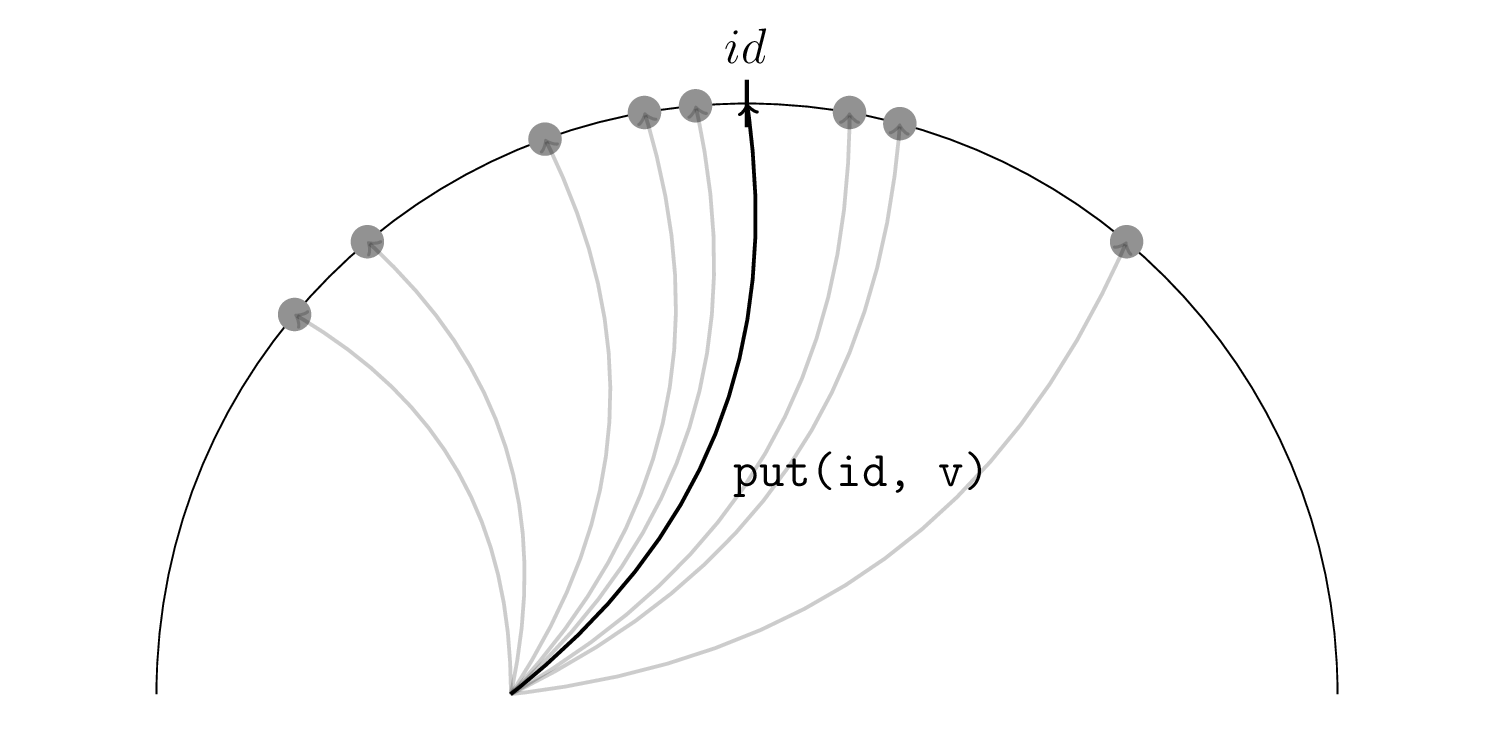
Short introduction to Distributed Hash Tables OpenDHT is based on the Kademlia design. If you know about DHTs, you are aware that they define the notion of distance using the XOR metric. This makes the tuple (H_n, xor) a metric space, where H_n is the space of identifier keys of length n. This way, you can find an identifier be the closest to a target hash than the rest of the nodes in the network.
In order to find some data that is associated with some hash h, you have to find the nodes in the network for which the distance between their hash identifier and the target hash h is minimized. The group of nodes which are the closest to the target hash (OpenDHT allows up to 8 nodes) will hold data for that hash.

Data persistence Let s say you ask a group of 8 nodes to hold some data for a hash and you want the data to hold the whole time until its expiration time as come. If the group of 8 nodes change because that for some reason those nodes leave or others just arrive and have an id that is closer to the target hash than the initial group of 8 nodes. The data would then not be found on the new group of 8 nodes. A first and simple solution was to count on the initial creator of the value to periodically announce the value to the group of 8 nodes. However, what if this node leaves? This is one of the main problem that I ve been working on solving since 2015. A first version of this was produced on September 2015. However, we experienced traffic issues and were forced to redesign the OpenDHT network requests engine. We are presently working on adding a Query feature that would enable filtering of data on remote nodes, hence substantially lowering the overall traffic produced by a response to a get request.

Indexation During the last year, I have also been working on the design of a solution for the use case of indexation. In a more technical way, this is the capability to find data by providing a map where its key is a string field and the mapped value is the value associated to that field, much like in a form. This could help find data for which you don t know the hash, but you have specific information about its content. In other words, this would be a search engine for OpenDHT. I have already created a working, but still in progress, version of this. You can find it on http://opendht.net, on the index branch. Now, Nicolas Reynaud (kaldoran) is contributing to this during the GSOC.

Roadmap As I explained on my page on the Debian Wiki, I am going to work on:
  1. Developing new functionalities in OpenDHT aiming at reducing overall generated traffic.
  2. Maintenance and optimization of the OpenDHT code in general.
  3. Optimizing data persistence solution over the distributed hash table.
  4. Merge (1) in the Ring daemon component in order to benefit from lower traffic in Ring.
  5. Make OpenDHT use TCP protocol instead of UDP. This is going to reduce code complexity and enhance robsutness of the DHT.
For further details, read my reports!

Reproducible builds folks: Reprotest repository exists and installs

Author: ceridwen I had family obligations for most of the past week, so I haven't had a chance to do more than get started on reprotest. The repository now contains a version of reprotest that can be installed with pip/setuptools (run python setup.py install in the repository directory or pip reprotest/ from its parent directory) or with debhelper (run debuild -b -uc -us in the repository, then install the resulting .deb). I've tested this works by installing into a virtualenv and onto my own system, but if anyone else wants to verify this, that would be great. At the moment, reprotest doesn't do anything, mind. I ended up importing significant amounts of code from autopkgtest into reprotest. While I may change my opinion as I read the code further, my first analysis is that much of the code responsible for processing command line arguments and config files (in lib/ and runner/) and building and communicating with the environments/virtual servers (in runner/, tools/, and virt-subproc/) can be adapted for reprotest. Once I have the chance to begin implementing functionality, I intend to discuss this in more detail.

Reproducible builds folks: Reprotest repository exists and installs

Author: ceridwen I had family obligations for most of the past week, so I haven't had a chance to do more than get started on reprotest. The repository now contains a version of reprotest that can be installed with pip/setuptools (run python setup.py install in the repository directory or pip reprotest/ from its parent directory) or with debhelper (run debuild -b -uc -us in the repository, then install the resulting .deb). I've tested this works by installing into a virtualenv and onto my own system, but if anyone else wants to verify this, that would be great. At the moment, reprotest doesn't do anything, mind. I ended up importing significant amounts of code from autopkgtest into reprotest. While I may change my opinion as I read the code further, my first analysis is that much of the code responsible for processing command line arguments and config files (in lib/ and runner/) and building and communicating with the environments/virtual servers (in runner/, tools/, and virt-subproc/) can be adapted for reprotest. Once I have the chance to begin implementing functionality, I intend to discuss this in more detail.

2 June 2016

Satyam Zode: GSoC 2016 Week 1: Reproducible Builds in Debian

This is a concise report on my previous week. I started working from 28 May as the exams ended. This report is bit late. I started work on hide=profiles flag. Till now, I did/doing following tasks: Lunar suggested me to create the specification for hide=profiles. It can be found here https://wiki.debian.org/ReproducibleBuilds/HideProfilesSpecification General purpose of addition of hide=profiles to diffoscope is because we want to provide an alternative for tool like OBS pkg-diff. We want to increase userbase of diffoscope and thus number of contributors. Hopefully, I will finish this part as soon as possible. We are still discussing, how things should be done! Right now, I am researching diff of unreproducible packages and trying to develop use cases. I will update the HideProfilesSpecification wiki with my findings. Lunar has given me a proper directions and community is very much helpful. :) My goal for an upcoming week is to search for packages which are unreproducible and generate use cases for diffoscope. This week I will also try to fix the reproducibility of Debian packages. I am loving, contributing to Debian and free software and it s a great learning experience. Many things to come in upcoming time :)

Rapha&#235;l Hertzog: My Free Software Activities in May 2016

My monthly report covers a large part of what I have been doing in the free software world. I write it for my donators (thanks to them!) but also for the wider Debian community because it can give ideas to newcomers and it s one of the best ways to find volunteers to work with me on projects that matter to me. Debian LTS Due to some departure and increased workload, I wanted to find out a few new paid contributors for Debian LTS. So I sent a mail to debian-jobs@lists.debian.org and contrary to last time (where I posted the announce only here on my blog), I had plenty of replies I ended up enrolling 6 new contributors and refusing 3 persons that did not have the required profile. All new contributors are supposed to handle at least one LTS update on their free time to get up to speed. But from the 6 new contributors only 3 managed to handle their training update in May.  During the month I spent quite some time providing guidance to the new contributors both in private mails and on the debian-lts mailing list. I also reviewed a xen update where I had (rightfully) some doubts about the work done. Packaging work fonts-cantarell. After having diagnosed the problem last month, I got annoyed enough by the lack of a fixed package that I found a way to package a newer upstream release of fonts-cantarell without requiring a fontforge update that was likely to take some time still so I prepared and uploaded 0.0.24-1. cpputest. Bug #823711 reported some license issues with some of the files. I immediately forwarded this upstream (issue 961) and fixed it in Debian by repacking the upstream tarball. Fortunately upstream has been quick to handle his and there s a new upstream release (3.8) where the problematic files have been dropped. live-boot. Kali s live images were no longer booting (stuck in the initrd) and with the help of Ben Hutchings we diagnosed this back to #823069 which I fixed in live-boot 20160511. udev. I filed #824025 to request that the rule defining the MAC-based name of USB network interfaces be isolated in its own file so that it can be easily disabled (we do that in Kali). Misc stuff. I packaged Django 1.8.13 in jessie-backports. I filed
#824165 against sbuild being broken with $apt_allow_unauthenticated = 1; in .sbuildrc. I filed a wishlist bug #824168 against apt-listchanges to suggest that it ignores news from auto-installed packages. I filed #825923 to report a regression in python-nltk (discovered in Kali first). Infrastructure work packages.debian.org. A few months ago, I wrote a patch for packages.debian.org so that it forwards emails to tracker.debian.org instead of packages.qa.debian.org. At that time, I was in touch with Rhonda and was hoping that she would apply it rather quickly (the patch is rather short). After a few more pings, she made it clear that she was not alone and that I should rather file a proper request so that someone else can also process it. So I filed #824085 and tried to find someone else to apply my patch. Most of the members of pkg_maint said that they were part of the group only due to generic webmaster involvement but that they did not want to touch that part. Fortunately, Martin Zobel Helas was more receptive to my request and helped me to deploy my changes. I committed my change and Martin pulled it in the live checkout on picconi.debian.org. This update is also a first step towards the possibility to use foo@packages.debian.org and/or teams+foo@tracker.debian.org in the Maintainer field of a package. With this we can get rid of dedicated mailing lists that just duplicate the work of the package tracker. And we no longer need to care about the fact that the Maintainer is handled differently than Uploaders since all (human) co-maintainers would then be listed in Uploaders only (and the package tracker would deal appropriately with mails sent to the Maintainer). Distro Tracker. I improved the import process to be able to force a new processing of source packages that were already imported. This was useful to let it recognize architectures which were newly added in its database (and that were ignored and thus not displayed up to now). I also made a first review of the AppStream patch submitted by Matthias Klump in #806740. Thanks See you next month for a new summary of my activities.

No comment Liked this article? Click here. My blog is Flattr-enabled.

Bits from Debian: Debian 7 Wheezy LTS now supporting armel and armhf

Debian Long Term Support (LTS) is a project created to extend the life of all Debian stable releases to (at least) 5 years. Thanks to the LTS sponsors, Debian's buildd maintainers and the Debian FTP Team are excited to announce that two new architectures, armel and armhf, are going to be supported in Debian 7 Wheezy LTS. These architectures along with i386 and amd64 will receive two additional years of extended security support. Security updates for Debian LTS are not handled by the native Debian Security Team, but instead by a separate group of volunteers and companies interested in making it a success. Wheezy's LTS period started a few weeks ago and more than thirty updates have been announced so far. If you use Debian 7 Wheezy, you do not need to change anything in your system to start receiving those updates. More information about how to use Debian Long Term Support and other important changes regarding Wheezy LTS is available at https://wiki.debian.org/LTS/Using

Bits from Debian: Debian 7 Wheezy LTS now supporting armel and armhf

Debian Long Term Support (LTS) is a project created to extend the life of all Debian stable releases to (at least) 5 years. Thanks to the LTS sponsors, Debian's buildd maintainers and the Debian FTP Team are excited to announce that two new architectures, armel and armhf, are going to be supported in Debian 7 Wheezy LTS. These architectures along with i386 and amd64 will receive two additional years of extended security support. Security updates for Debian LTS are not handled by the native Debian Security Team, but instead by a separate group of volunteers and companies interested in making it a success. Wheezy's LTS period started a few weeks ago and more than thirty updates have been announced so far. If you use Debian 7 Wheezy, you do not need to change anything in your system to start receiving those updates. More information about how to use Debian Long Term Support and other important changes regarding Wheezy LTS is available at https://wiki.debian.org/LTS/Using

Next.

Previous.