Search Results: "reg"

24 February 2013

Gregor Herrmann: RC bugs 2013/08

here's the list of RC bugs I've worked on during the last week:

Gunnar Wolf: International Open Data Day - #OpenData / #DatosAbiertos

I just got this message through my University, and the least I can do (given I'm still, although barely, in time) is to repost it here, hoping it helps to spread the activity we have on this regard in Latin America:
Saturday, February 23 is the International Day of Open Data. Following its policy of promoting free, open and unrestricted access to the results of research funded with public money, CLACSO calls research centers and individual researchers to free their public data so they are available for other researchers and, most importantly, for the community as a whole. That's the reason CLACSO invites researchers and institutions to announce in social networks, mentioning "#DatosAbiertos #OpenData", which are their freed public documents, pointing to the web pages where they can be found. The International Open Data Day is an effort to:
  • Spread the concept of Open Data
  • Debate on the why of Open Data
  • Publish analysis done using open public data
  • Find out how more local and national (not reserved) open data can be published (i.e. Brazil)
  • Call towards using open data in research
  • Find which applications have been developed to handle and visualize open data
  • Organize events for the International Open Data Day (i.e. Monterrey
  • Call towards adding data catalogs in Latin America and the Caribbeanin the Data catalogs directory, in Datacatalogs.org, and in Open data census.
For further information on how to spread research and/or archives in digital repositories and in the CLACSO Digital Repository, please mail biblioteca@clacso.edu.ar We can between all contribute for the Latin American and Caribbean open data community to grow, democratizing access to public data about our societies.
So, what do I consider worthy of adding to a list of resources I can point to?

23 February 2013

Russell Coker: Serious Begging

This evening I was driving through one of the inner suburbs of Melbourne when a man flagged me down. He said that his mother was dying and he needed a taxi ride to some hospital far away and needed to borrow $200. He was saying something about his phone, I wasn t sure if he was planning to give me his phone number so I could call him to ask for repayment or offering his phone as collateral on the loan (incidentally a well known scam is to offer a stolen phone as collateral for a loan, it s a way of selling a locked phone that doesn t have cables). I ve encountered many beggars over the years, but he was by far the most serious about it he demonstrated the level of desperation that I ve only previously seen documented in history books and reports from travelers who visited developing countries. I will never know if his mother was dying, there are lots of other reasons why someone might urgently need cash (most of which won t get much sympathy). I gave him $20 as a gift. If his story was legitimate then I gave him 10% of what he needed so he only had to find another 9 people willing to do the same. If he was lying then I can afford to lose $20. In any case I definitely wasn t going to do what he asked and withdraw hundreds of dollars from an ATM for him. Also regardless of whether he was telling the truth I didn t want to have him repay me, if he s telling the truth then I m happy to give money to him and if he s not then I m better off avoiding him in future. If I had $50 I would probably have given it to him, but $200 is too much. As I drove off I looked in my rear-vision mirror and saw him running between cars on the road trying to flag someone else down. Running through moving traffic on a Saturday night is another indication of how serious he was, generally someone who s in a good state of mind and wants a long and healthy life won t do that.

Daniel Pocock: Checking authors.txt before migrating to github

Ensuring that contributors are correctly recognised for their work is a cornerstone of the free and open source software community. Here I present a convenient script to help. When projects migrate to git (and usually Github these days), there is usually quite a lot of enthusiasm to get up and running and the authors.txt file is not looked at closely, or not at all. Github does a great job of summarising the free software contributions of each member. To do this, it needs to cross-reference their commits with their email addresses. This possibility is not unique to Github though: as git is a distributed version control system, it is quite possible that other services will seek to mirror and report on code contributions in the future. authors.txt can be tedious For a large project with a long history, there may be more than 100 committers, many of them designated by SVN user IDs that are unique to the project and not easily mapped to the user email address. If the project is hosted on Google Code SVN, then Google often makes dummy gmail.com accounts for the committers - and many people don't even use those accounts for anything else, not even as an email account. Including these accounts in a git repository is a bad idea if it is not the person's preferred email address. If they don't have that address associated with their Github account, then their commits won't be easily attributed to them at all. Often, building an accurate authors.txt can be tedious, but here are some steps to simplify it:
  • Use a script like svn-authors-extract to quickly build a template file by scanning the SVN repository.
  • Scan email list history - if necessary, download the email archive as a mailbox, and use regular expressions to extract all email addresses
  • Find out if the SVN server keeps a list of email addresses with the SVN user IDs somewhere
  • Use searches in Google, LinkedIn and various other places to try and find out where the person is now
  • Finally, use the script below to test the results
Testing the results against Github automatically How do you know which email addresses are already matched to a Github account and which need further research? I've written a convenient script to help It creates a dummy repository with one commit per committer. Upload this dummy repository as a new project on Github, view the commit log page, and all the matched user IDs will be highlighted, so the missing ones will stand out and you can quickly focus your search for missing email addresses. I've tested this with the authors.txt file I'm building for the Sipdroid/Lumicall projects. This project comes from Google Code SVN and almost all the identities are obscured by gmail.com addresses that may or may not be the real/preferred email addresses. I created a dummy project on Github called sipdroid-users and pushed the dummy commits there so I can see how many of the contributors are correctly mapped to a Github account. A full copy of the script is below, you can also find it in the sync2git repository:
#!/bin/bash
set -e
if [ $# -lt 2 ];
then
  echo "$0 <authors file> <dest repo for push>"
  exit 1
fi
AUTHORS_FILE=" pwd /$1"
DEST_REPO="$2"
if [ ! -e "$ AUTHORS_FILE " ];
then
  echo "can't find $ AUTHORS_FILE , aborting"
  exit 1
fi
TMP_REPO= mktemp -d 
TARGET_FILE="testing.txt"
cd "$ TMP_REPO "
git init .
cat "$ AUTHORS_FILE "   while read ;
do
  full_info= echo "$ REPLY "   cut -f2 -d'='   cut -b2- 
  an=" echo "$ full_info "   sed -e "s/ <.*\$//\" "
  am=" echo "$ full_info "   sed -e "s/^.*</</\" "
  cn="$an"
  cm="$am"
  echo "$REPLY" >> "$ TARGET_FILE "
  git add "$ TARGET_FILE "
  export GIT_AUTHOR_NAME="$an"
  export GIT_AUTHOR_EMAIL="$am"
  export GIT_COMMITTER_NAME="$cn"
  export GIT_COMMITTER_EMAIL="$cm"
  git commit -m "Test adding $ REPLY "
done
git remote add origin "$ DEST_REPO "
git push -u origin master

22 February 2013

Richard Hartmann: Finland I

Finland. Helsinki, Lahti, streets Arriving at Helsinki airport, we filed a claim with Lufthansa as a hard shell suitcase had a splintered corner. We were surprised that so many Finns arrived from Munich with skis, more on that later. We picked up our car and started on our way towards Koli; driving with a top speed of 100 km/h and often being limited to 80 km/h or even 60 km/h is... unusual... Finnish police/authorities seem to be obsessed with enforcing those speed limits as there are a lot of speed cameras along the way. Finnish people seem to be similarly obsessed with slot machines; there is an incredible amount of them at gas stations and a constant stream of people playing them. From an outsider's perspective, it's weird that a country as strict about one form of addiction, alcohol, and working against it vigorously, by means of taxes, would allow another form of addiction, gambling, run as freely and this allow so many slot machines. Speaking of taxes on alcohol: a single 0.33 l bottle of beer is more expensive in a Finnish supermarket than 0.5 l of beer in a German restaurant. Which also explains why supermarkets tend to have a rather large section with relatively cheap alcohol free beer. Anyway, coming back to streets: Highway intersections don't have continuous on/off ramps from which you change from one highway to another; you drive off of the highway, stop at a traffic light, and then continue onto the other highway. Weird system, but given the amount of traffic we witnessed, it's probably Good Enough (tm). Stopping for a short time in Lohti simply because it's apparently famous for winter sports competitions, we arrived at Future Freetime in Koli national park after about five to six gruelling hours of net driving through somewhat bad weather and behind slow drivers. Koli Hiking up to Ukko-Koli and its sister peaks proved to be rather exhausting as we kept on breaking through the snow cover to our knees and sometimes even our hips. Once we were up there, we realized that even though you couldn't see it in between the trees, there was fog all over the plains so we couldn't see anything. Still, it was a nice hike even if somewhat short. Note to self: Even when a trail is marked locally, if OpenStreetMap does not know about it... don't walk along it. Especially not when the going's rough already. And if there's a sign suggesting you wear snow shoes... wear snow shoes. Returning to Koli Hotel and the museum next to it, we walked over to the ski slope. The highest peak within Koli,Ukko-Koli, is 347 meters high, the local ski slope starts a good way below that. This would explain why a lot of Finns came back from Munich with their skis... Afterwards, we rented a snow mobile, without guide or supervision, and drove from Loma-Koli over lake Pielien towards Purnuniemi and in a large circle down towards lake Ryyn skyl where we turned around and went back the same way. If we thought Finnish streets don't have a lot of signs we soon realized that snow mobile tracks have even less. There are at most two or three signs pointing you in the right direction, but on the plus side, there are no posted speed limits for snow mobiles, either. In somewhat related news, snow mobiles can go at least 95 km/h. At that point, the scratched and dirty visor of your rental helmet will keep slamming down, forcing you to take one hand off the handle and thus stop accelerating to maintain stability. To round off the day, we heated up the sauna built into our little wooden hut. Running outside three times to rub myself off with snow from head to toes, I almost slipped and fell while standing still. When your feet are too hot for the snowy ground, you'll start to melt your own little pools of slippery water/snow mush within seconds. File that one under "I would never have guessed unless I had experienced it myself". Generic The MarkDown source of this blog post is not even 5 kiB in size; even in a worst case scenario, pushing this to my ikiwiki instance via git will eat up less 10 kiB of mobile data. Which is good because I have 78 MiB of international data left on this plan. This is also the reason why there are no links in this blog post: I am writing everything off line and don't want to search for the correct URLs to link to. I really wish EU regulators would start to tackle data roaming now that SMS and voice calls are being forced down into somewhat sane pricing regions by regulations. PS:
-rw-r--r-- 1 richih richih 4.6K Feb 11 22:55 11-Finland-I.mdwn
[...]
Writing objects: 100% (7/7), 2.79 KiB, done.

Gunnar Wolf: So ZTE it is

Some weeks ago I posted about the long-expected demise of my old phone. And even given I don't usually don't pay much attention to phones (and could care less about the smartphone fad), I asked for a recommendation here on what to change to. The only thing that made me look for something other than a ~US$15 phone is that I enjoy having a GPS-enabled device. So, with that in mind, I went to my carrier's offices, with a top budget of MX$2,000 (~US$150), and asked for help. After being a Telcel subscriber for ~10 years (and ~6 with the same device), even though I use prepaid cards only (and seldom pay over MX$100 a month), I expected some advice. So, when the employee told me to go to the phone exhibit they have and pick my favorite, I declined, by telling I just want the cheapest unit with a GPS. He almost immediately offered me the ZTE V791, an Android 2.3-based unit, for MX$990 (~US$75), just around half of what I expected to pay. So I got two - One for myself, one for Regina, as her previous "nice" phone died under the Bosnian rain and had one of the sturdy, reliable but utterly boring US$15 phones for over a year ;-) As a new Mexican resident, she can surely use a GPS as well! (and some other tools in it). So, two nice phones, and still (squarely!) in my projected budget! I *did* give some thought to the comments posted in my original post, but given I don't want to bite in to the tendency too much, I let price determine what we get. And after all, I do not plan to ever enable data over the phone network (if at all, I use it on wifi). A recommendation for people with similar profiles/interest than me: Maps with me allows for downloading OpenStreetMap data on a country basis (so I get all of Mexico with me). I also got Vespucci OSM Editor, to be able to do OpenStreetMap updates from the phone, but given it has some stability issues I have not used it much (and it's understandably not so disconnected-mode-friendly) Not much more to add to this. I am writing this prompted by Russell's "iPhone vs. Android" post. My point after getting these two cheap phones? Having a wide range of devices under this same OS (even if it still has long ways to go freedom-wise) makes it a choice for people like me, who don't want to save money for a couple of months in order to get the newest gadget. I hope this phone lasts with me several years as well, without changing my usage pattern!

Francois Marier: Doing a fresh Debian/Ubuntu install without having to reconfigure everything

Taking advantage of a new hard drive, I decided to reinstall my Ubuntu (Precise 12.04.2) laptop from scratch so that I could easily enable full-disk encryption (a requirement for Mozilla work laptops). Reinstalling and reconfiguring everything takes a bit of time though, so here's the procedure I followed to keep the configuration to a minimum.

Install Ubuntu/Debian on the new drive While full-disk encryption is built into the graphical installer as of Ubuntu 12.10, it's only available through the alternate install CD in 12.04 and earlier. Using that CD, install Ubuntu on the new drive, making sure you select the "Encrypted LVM" option when you get to the partitioning step. (The procedure is the same if you use a Debian CD.) To make things easy, the first user you create should match exactly the one from your previous installation.

Copy your home directory Once the OS is installed on the new drive, plug the old one back in (in an external enclosure if you need to) and mount its root partition as a read-only drive on /mnt. Then log in as root (not just using sudo, actually login using the root user) and copy your home directory on the new drive:
rm -rf /home/*
cp -a /mnt/home/* /home/
Then you should be able to log in as your regular user.

Reinstall all packages The next step is to reinstall all of the packages you had installed on the old OS. But first of all, let's avoid having to answer all of the debconf questions we've already answered in the past:
rm -rf /var/cache/debconf
cp -a /mnt/var/cache/debconf /var/cache/
and set the debconf priority to the one you usually use (medium in my case):
dpkg-reconfigure debconf
Next, make sure you have access to all of the necessary repositories:
cp -a /mnt/etc/apt/sources.list /etc/apt/
cp -a /mnt/etc/apt/sources.list.d/* /etc/apt/sources.list.d/
apt-get update

Getting and setting the list of installed packages To get a list of the packages that were installed on the old drive, use dpkg on the old install:
mount -o remount,rw /mnt
chroot /mnt
dpkg --get-selections > /packages
exit
mount -o remount,ro -r /mnt
Use that list on the new install to reinstall everything:
dpkg --set-selections < /mnt/packages
apt-get dselect-upgrade

Selectively copy configuration files over Finally, once all packages are installed, you can selectively copy the config files from the old drive (in /mnt/etc) to the new (/etc/). In particular, make sure you include these ones:
cp -a /mnt/etc/alternatives/ /mnt/etc/default/ /etc/
(I chose not to just overwrite all config files with the old ones because I wanted to get rid of any cruft that had accumulated there and suspected that there might be some slight differences due to the fresh install of the distro.)

Reboot Once that's done, you should really give that box a restart to ensure that all service are using the right config files, but otherwise, that's it. Your personal data and config are back, all of your packages are installed and configured the way they were, and everything is fully encrypted!

21 February 2013

Joey Hess: Kickstarter rewards wrap-up

I finished delivering all my Kickstarter rewards at the end of the year. This is an overview of how that went, both financially and in general.
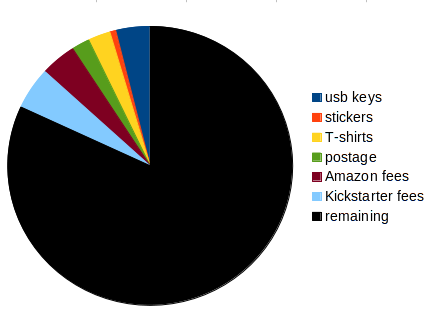
my Kickstarter pie (not including taxes)
While the Kickstarter was under way, several friends warned me that I might end up spending a lot of the money for rewards, or even shipping, and come out a loser. It's happened to some people, but I avoided it. Most of the pie went to its intended purpose.
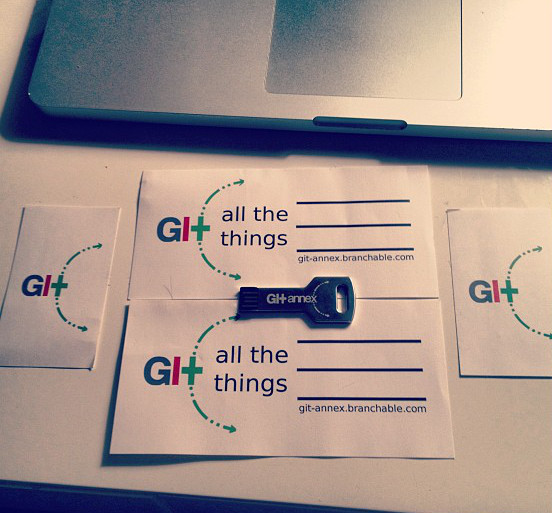
USB key arrives in Amsterdam
I kept shipping cost low by shipping everything by US postal service, including Air Mail for international shipping. This was particularly important for the stickers (which cost $1.05 to ship internationally). But I also shipped USB keys in regular mail envelopes, protected by bubble wrap, which worked very well and avoided the bother of shipping packages. The USPS will be annoyed at you for a rigid letter and add a non-machinable surcharge, but it's still a nice savings.
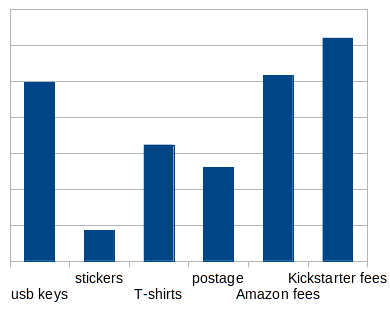
expenses
I spent more on rewards than on transaction fees, but the fees are still pretty large. Being dinged a second time by Amazon is the worst part. I have not been able to work out exactly what formula Kickstarter uses to determine its fee per pledge. It does not seem to be a simple percentage of the pledge. For example, they seem to have charged $0.25 per $10 pledge, but $25 for a $500 pledge. I wanted to solve this, but I'd have to match up all the pledges and fees manually to do it.
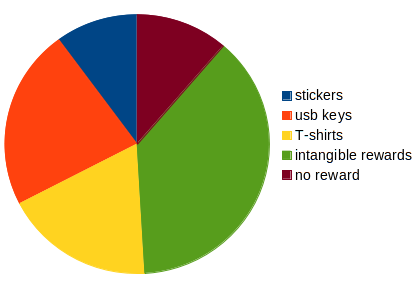
gross income by reward type
This chart is slightly innacurrate, because it puts any money pledged, beyond the amount needed to get a reward, into the "intangibles" category, despite the reward being probably responsible for that money being pledged. (The intangibles also includes people who did not ask for a reward, and several categories of rewards not involving shipping matter around.) But, the surprise for me is how large a peice the T-shirts are responsible for. It was my least favorite reward, and a low volume one, but I made out pretty well on it. However, I'd still try to avoid putting T-shirts on Kickstarter again. It's hard to do a good design (I didn't, really); they're expensive, and were by far the most annoying thing to ship. Also, I was not happy with the countries Cafe Press sourced their shirts from; I've been to Honduras and talked with people who have relatives in las machinas.
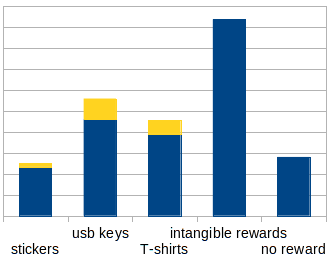
gross and net income by reward type (excluding shipping)
In contrast, the stickers had an amazing margin; they're so inexpensive to print that I printed up two kinds and included multiple with every other reward I mailed. I still have hundreds left over, too.. All the online print shops I tried have very annoying interfaces to upload artwork though. I had to do quite a bit of math to render TIFF files with appropriate DPI and margins. The USB keys were my favorite reward. I got them from USB Memory Direct, who gave me quite a nice deal. I was very happy that I was able to send them a SVG file of my artwork, so I didn't need to worry about lacking resolution for the laser engraving. And it came out looking great. The best part was when their sales guy Mike actually did a minor alteration of the artwork, to better fit on the key, when I, being overloaded with Kickstarter stuff asked him too. A bit above and beyond. There was an issue with their Chinese manufacturer's quality control of the 16 gb drives, but they were willing to send me replacement for all the ones I found problems with.
All told I spent probably 3 full days stuffing and shipping envelopes, and probably spent a week working on Kickstarter reward fullfillment. As work-related overhead goes, that's not bad. Maybe someone considering a Kickstarter will find this information useful somehow. Oh well, back to work. :)

20 February 2013

Ryan Kavanagh: Search RCS and CVS ",v" files with rcsgrep

A few years ago I was doing research comparing how large software distributions handled shared object libraries, and studied Debian, FreeBSD, and Ubuntu. Extracting data about Debian packages was easy thanks to Peter Palfrader s snapshot.debian.org service, which provides a machine-usable interface to Debian s package history. FreeBSD s data is equally accessible, albeit in a less pleasant format: their ports tree was stored in CVS until July 2012. One could easily rsync a copy of the ports tree s CVS repository to a local machine to analyze the data. This left you with a local tree full of ,v files, each corresponding to the history of a given file with at that location. I needed to extract all kinds of data from a tree full of these files, such as what revisions contained lines matching a regex, when these revisions were checked in, any tags associated with it, etc. To make things easier, it also helped to know the line numbers of the matching lines. Hence the birth of rcsgrep. rcsgrep is a Python script that makes use of Paul McGuire s fabulous pyparsing library. It allows you to search a RCS file (the ,v file format used by RCS and CVS to store revision history) using a Python regex, and the output format is customizable to allow printing only certain kinds of information, such as the revision number, the line number, the matching line, the line s author, the date it appeared, any tags associated with the line, and (useful when running over a large number of files) the file name. To make machine parsing (using AWK of course) easier, you can also specify the column separator. For example, I entered the lines The quick brown , fox jumped over , the lazy dog. Woof! into the file abc, checking in the changes after each line. The invocation ./rcsgrep -s ' ' -f rlLda '.*' abc,v, with spaces for column separation, and format options r is for revision, l for line number, L for line contents, d for date, and a for author, outputs:
1.3    1    The quick brown    2013.02.20.14.24.09    ryan
1.3    2    jumped over the    2013.02.20.14.24.09    ryan
1.3    3    lazy dog. Woof!    2013.02.20.14.24.09    ryan
1.2    1    The quick brown    2013.02.20.14.23.48    ryan
1.2    2    jumped over the    2013.02.20.14.23.48    ryan
1.1    1    The quick brown    2013.02.20.14.23.25    ryan
I m particularly proud about my grep() function in rcsfile.py, which goes through each revision, tracking additions and deletions, but only keeping the lines matching the regex in memory. In any case, rcsgrep is licensed under the ISC license and can be found on github. Addendum: I learned after the fact that O Reilly s UNIX Power Tools offers something similar by the same name, except that it is runs several processes, such as co, grep and sed, as opposed to a single Python script.

Mehdi Dogguy: DPL Game

For once, I think we are going to have a funny DPL campaign thanks to Francesca who brought to us a DPL Game :) So here is my little list of fantastic four:
(in random order)

Each one of them has super powers (lot of energy, wisdom, impartiality, ability to sort out complex situations) and can do a great DPL!

My fantastic four, please consider running for DPL!

Thorsten Glaser: GNU autotools generated files

On Planet Debian, Vincent Bernat wrote:

The drawback of this approach is that if you rebuild configure from the released tarball, you don t have the git tree and the version will be a date. Just don t do that.

Excuse me This is totally inacceptable. Regenerating files like aclocal.m4 and Makefile.in (for automake), configure (for autoconf), and the likes is one of the absolute duties of a software package. Things will break sooner or later if people do not do that. Additionally, generated files must be remakable from the distfile, so do not break this! May I suggest, constructively, an alternative? (People rightfully, I must admit complain I m just ranting too much.)
When making a release from git, write the git describe output into a file. Then, use that file instead of trying to run the git executable if .git/. is not a directory ( test -d .git/. ). Do not call git, because, in packages, it s either not installed or/and also undesired. Couldn t comment on your blog, but felt strongly enough about this I took the effort of writing a full post of my own. (But thanks for the book recommendation.)

Vincent Bernat: lldpd 0.7.1

A few weeks ago, a new version of lldpd, a 802.1AB (aka LLDP) implementation for various Unices, has been released. LLDP is an industry standard protocol designed to supplant proprietary Link-Layer protocols such as EDP or CDP. The goal of LLDP is to provide an inter-vendor compatible mechanism to deliver Link-Layer notifications to adjacent network devices. In short, LLDP allows you to know exactly on which port is a server (and reciprocally). To illustrate its use, I have made a xkcd-like strip: xkcd-like strip for the use of LLDP If you would like more information about lldpd, please have a look at its new dedicated website. This blog post is an insight of various technical changes that have affected lldpd since its latest major release one year ago. Lots of C stuff ahead!

Version & changelog UPDATED: Guillem Jover told me how he met the same goals for libbsd :
  1. Save the version from git into .dist-version and use this file if it exists. This allows one to rebuild ./configure from the published tarball without losing the version. This also handles Thorsten Glaser s critic.
  2. Include CHANGELOG in DISTCLEANFILES variable.
Since this is a better solution, I have adopted the appropriate line of codes from libbsd. The two following sections are partly technically outdated.

Automated version In configure.ac, I was previously using a static version number that I had to increase when releasing:
AC_INIT([lldpd], [0.5.7], [bernat@luffy.cx])
Since the information is present in the git tree, this seems a bit redundant (and easy to forget). Taking the version from the git tree is easy:
AC_INIT([lldpd],
        [m4_esyscmd_s([git describe --tags --always --match [0-9]* 2> /dev/null   date +%F])],
        [bernat@luffy.cx])
If the head of the git tree is tagged, you get the exact tag (0.7.1 for example). If it is not, you get the nearest one, the number of commits since it and part of the current hash (0.7.1-29-g2909519 for example). The drawback of this approach is that if you rebuild configure from the released tarball, you don t have the git tree and the version will be a date. Just don t do that.

Automated changelog Generating the changelog from git is a common practice. I had some difficulties to make it right. Here is my attempt (I am using automake):
dist_doc_DATA = README.md NEWS ChangeLog
.PHONY: $(distdir)/ChangeLog
dist-hook: $(distdir)/ChangeLog
$(distdir)/ChangeLog:
        $(AM_V_GEN)if test -d $(top_srcdir)/.git; then \
          prev=$$(git describe --tags --always --match [0-9]* 2> /dev/null) ; \
          for tag in $$(git tag   grep -E '^[0-9]+(\.[0-9]+) 1, $$'   sort -rn); do \
            if [ x"$$prev" = x ]; then prev=$$tag ; fi ; \
            if [ x"$$prev" = x"$$tag" ]; then continue; fi ; \
            echo "$$prev [$$(git log $$prev -1 --pretty=format:'%ai')]:" ; \
            echo "" ; \
            git log --pretty=' - [%h] %s (%an)' $$tag..$$prev ; \
            echo "" ; \
            prev=$$tag ; \
          done > $@ ; \
        else \
          touch $@ ; \
        fi
ChangeLog:
        touch $@
Changelog entries are grouped by version. Since it is a bit verbose, I still maintain a NEWS file with important changes.

Core

C99 I have recently read 21st Century C which has some good bits and also handles the ecosystem around C. I have definitively adopted designated initializers in my coding style. Being a GCC extension since a long time, this is not a major compatibility problem. Without designated initializers:
struct netlink_req req;
struct iovec iov;
struct sockaddr_nl peer;
struct msghdr rtnl_msg;
memset(&req, 0, sizeof(req));
memset(&iov, 0, sizeof(iov));
memset(&peer, 0, sizeof(peer));
memset(&rtnl_msg, 0, sizeof(rtnl_msg));
req.hdr.nlmsg_len = NLMSG_LENGTH(sizeof(struct rtgenmsg));
req.hdr.nlmsg_type = RTM_GETLINK;
req.hdr.nlmsg_flags = NLM_F_REQUEST   NLM_F_DUMP;
req.hdr.nlmsg_seq = 1;
req.hdr.nlmsg_pid = getpid();
req.gen.rtgen_family = AF_PACKET;
iov.iov_base = &req;
iov.iov_len = req.hdr.nlmsg_len;
peer.nl_family = AF_NETLINK;
rtnl_msg.msg_iov = &iov;
rtnl_msg.msg_iovlen = 1;
rtnl_msg.msg_name = &peer;
rtnl_msg.msg_namelen = sizeof(struct sockaddr_nl);
With designated initializers:
struct netlink_req req =  
    .hdr =  
        .nlmsg_len = NLMSG_LENGTH(sizeof(struct rtgenmsg)),
        .nlmsg_type = RTM_GETLINK,
        .nlmsg_flags = NLM_F_REQUEST   NLM_F_DUMP,
        .nlmsg_seq = 1,
        .nlmsg_pid = getpid()  ,
    .gen =   .rtgen_family = AF_PACKET  
 ;
struct iovec iov =  
    .iov_base = &req,
    .iov_len = req.hdr.nlmsg_len
 ;
struct sockaddr_nl peer =   .nl_family = AF_NETLINK  ;
struct msghdr rtnl_msg =  
    .msg_iov = &iov,
    .msg_iovlen = 1,
    .msg_name = &peer,
    .msg_namelen = sizeof(struct sockaddr_nl)
 ;

Logging Logging in lldpd was not extensive. Usually, when receiving a bug report, I asked the reporter to add some additional printf() calls to determine where the problem was. This was clearly suboptimal. Therefore, I have added many log_debug() calls with the ability to filter out some of them. For example, to debug interface discovery, one can run lldpd with lldpd -ddd -D interface. Moreover, I have added colors when logging to a terminal. This may seem pointless but it is now far easier to spot warning messages from debug ones. logging output of lldpd

libevent In lldpd 0.5.7, I was using my own select()-based event loop. It worked but I didn t want to grow a full-featured event loop inside lldpd. Therefore, I switched to libevent. The minimal required version of libevent is 2.0.5. A convenient way to check the changes in API is to use Upstream Tracker, a website tracking API and ABI changes for various libraries. This version of libevent is not available in many stable distributions. For example, Debian Squeeze or Ubuntu Lucid only have 1.4.13. I am also trying to keep compatibility with very old distributions, like RHEL 2, which does not have a packaged libevent at all. For some users, it may be a burden to compile additional libraries. Therefore, I have included libevent source code in lldpd source tree (as a git submodule) and I am only using it if no suitable system libevent is available. Have a look at m4/libevent.m4 and src/daemon/Makefile.am to see how this is done.

Client

Serialization lldpctl is a client querying lldpd to display discovered neighbors. The communication is done through an Unix socket. Each structure to be serialized over this socket should be described with a string. For example:
#define STRUCT_LLDPD_DOT3_MACPHY "(bbww)"
struct lldpd_dot3_macphy  
        u_int8_t                 autoneg_support;
        u_int8_t                 autoneg_enabled;
        u_int16_t                autoneg_advertised;
        u_int16_t                mau_type;
 ;
I did not want to use stuff like Protocol Buffers because I didn t want to copy the existing structures to other structures before serialization (and the other way after deserialization). However, the serializer in lldpd did not allow to handle reference to other structures, lists or circular references. I have written another one which works by annotating a structure with some macros:
struct lldpd_chassis  
    TAILQ_ENTRY(lldpd_chassis) c_entries;
    u_int16_t        c_index;
    u_int8_t         c_protocol;
    u_int8_t         c_id_subtype;
    char            *c_id;
    int              c_id_len;
    char            *c_name;
    char            *c_descr;
    u_int16_t        c_cap_available;
    u_int16_t        c_cap_enabled;
    u_int16_t        c_ttl;
    TAILQ_HEAD(, lldpd_mgmt) c_mgmt;
 ;
MARSHAL_BEGIN(lldpd_chassis)
MARSHAL_TQE  (lldpd_chassis, c_entries)
MARSHAL_FSTR (lldpd_chassis, c_id, c_id_len)
MARSHAL_STR  (lldpd_chassis, c_name)
MARSHAL_STR  (lldpd_chassis, c_descr)
MARSHAL_SUBTQ(lldpd_chassis, lldpd_mgmt, c_mgmt)
MARSHAL_END;
Only pointers need to be annotated. The remaining of the structure can be serialized with just memcpy()1. I think there is still room for improvement. It should be possible to add annotations inside the structure and avoid some duplication. Or maybe, using a C parser? Or using the AST output from LLVM?

Library In lldpd 0.5.7, there are two possible entry points to interact with the daemon:
  1. Through SNMP support. Only information available in LLDP-MIB are exported. Therefore, implementation-specific values are not available. Moreover, SNMP support is currently read-only.
  2. Through lldpctl. Thanks to a contribution from Andreas Hofmeister, the output can be requested to be formatted as an XML document.
Integration of lldpd into a network stack was therefore limited to one of those two channels. As an exemple, you can have a look at how Vyatta made the integration using the second solution. To provide a more robust solution, I have added a shared library, liblldpctl, with a stable and well-defined API. lldpctl is now using it. I have followed those directions2:
  • Consistent naming (all exported symbols are prefixed by lldpctl_). No pollution of the global namespace.
  • Consistent return codes (on errors, all functions returning pointers are returning NULL, all functions returning integers are returning -1).
  • Reentrant and thread-safe. No global variables.
  • One well-documented include file.
  • Reduce the use of boilerplate code. Don t segfault on NULL, accept integer input as string, provide easy iterators,
  • Asynchronous API for input/output. The library delegates reading and writing by calling user-provided functions. Those functions can yield their effects. In this case, the user has to callback the library when data is available for reading or writing. It is therefore possible to integrate the library with any existing event-loop. A thin synchronous layer is provided on top of this API.
  • Opaque types with accessor functions.
Accessing bits of information is done through atoms which are opaque containers of type lldpctl_atom_t. From an atom, you can extract some properties as integers, strings, buffers or other atoms. The list of ports is an atom. A port in this list is also an atom. The list of VLAN present on this port is an atom, as well as each VLAN in this list. The VLAN name is a NULL-terminated string living in the scope of an atom. Accessing a property is done by a handful of functions, like lldpctl_atom_get_str(), using a specific key. For example, here is how to display the list of VLAN assuming you have one port as an atom:
vlans = lldpctl_atom_get(port, lldpctl_k_port_vlans);
lldpctl_atom_foreach(vlans, vlan)  
    vid = lldpctl_atom_get_int(vlan,
                               lldpctl_k_vlan_id));
    name = lldpctl_atom_get_str(vlan,
                                lldpctl_k_vlan_name));
    if (vid && name)
        printf("VLAN %d: %s\n", vid, name);
 
lldpctl_atom_dec_ref(vlans);
Internally, an atom is typed and reference counted. The size of the API is greatly limited thanks to this concept. There are currently more than one hundred pieces of information that can be retrieved from lldpd. Ultimately, the library will also enable the full configuration of lldpd. Currently, many aspects can only be configured through command-line flags. The use of the library does not replace lldpctl which will still be available and be the primary client of the library.

CLI Having a configuration file was requested since a long time. I didn t want to include a parser in lldpd: I am trying to keep it small. It was already possible to configure lldpd through lldpctl. Locations, network policies and power policies were the three items that could be configured this way. So, the next step was to enable lldpctl to read a configuration file, parse it and send the result to lldpd. As a bonus, why not provide a full CLI accepting the same statements with inline help and completion?

Parsing & completion Because of completion, it is difficult to use a YACC generated parser. Instead, I define a tree where each node accepts a word. A node is defined with this function:
struct cmd_node *commands_new(
    struct cmd_node *,
    const char *,
    const char *,
    int(*validate)(struct cmd_env*, void *),
    int(*execute)(struct lldpctl_conn_t*, struct writer*,
        struct cmd_env*, void *),
    void *);
A node is defined by:
  • its parent,
  • an optional accepted static token,
  • an help string,
  • an optional validation function and
  • an optional function to execute if the current token is accepted.
When walking the tree, we maintain an environment which is both a key-value store and a stack of positions in the tree. The validation function can check the environment to see if we are in the right context (we want to accept the keyword foo only once, for example). The execution function can add the current token as a value in the environment but it can also pop the current position in the tree to resume walk from a previous node. As an example, see how nodes for configuration of a coordinate-based location are registered:
/* Our root node */
struct cmd_node *configure_medloc_coord = commands_new(
    configure_medlocation,
    "coordinate", "MED location coordinate configuration",
    NULL, NULL, NULL);
/* The exit node.
   The validate function will check if we have both
   latitude and longitude. */
commands_new(configure_medloc_coord,
    NEWLINE, "Configure MED location coordinates",
    cmd_check_env, cmd_medlocation_coordinate,
    "latitude,longitude");
/* Store latitude. Once stored, we pop two positions
   to go back to the "root" node. The user can only
   enter latitude once. */
commands_new(
    commands_new(
        configure_medloc_coord,
        "latitude", "Specify latitude",
        cmd_check_no_env, NULL, "latitude"),
    NULL, "Latitude as xx.yyyyN or xx.yyyyS",
    NULL, cmd_store_env_value_and_pop2, "latitude");
/* Same thing for longitude */
commands_new(
    commands_new(
        configure_medloc_coord,
        "longitude", "Specify longitude",
        cmd_check_no_env, NULL, "longitude"),
    NULL, "Longitude as xx.yyyyE or xx.yyyyW",
    NULL, cmd_store_env_value_and_pop2, "longitude");
The definition of all commands is still a bit verbose but the system is simple enough yet powerful enough to cover all needed cases.

Readline When faced with a CLI, we usually expect some perks like completion, history handling and help. The most used library to provide such features is the GNU Readline Library. Because this is a GPL library, I have first searched an alternative. There are several of them: From an API point of view, the first three libraries support the GNU Readline API. They also have a common native API. Moreover, this native API also handles tokenization. Therefore, I have developed the first version of the CLI with this API3. Unfortunately, I noticed later this library is not very common in the Linux world and is not available in RHEL. Since I have used the native API, it was not possible to fallback to the GNU Readline library. So, let s switch! Thanks to the appropriate macro from the Autoconf Archive (with small modifications), the compilation and linking differences between the libraries are taken care of. Because GNU Readline library does not come with a tokenizer, I had to write one myself. The API is also badly documented and it is difficult to know which symbol is available in which version. I have limited myself to:
  • readline(), addhistory(),
  • rl_insert_text(),
  • rl_forced_update_display(),
  • rl_bind_key()
  • rl_line_buffer and rl_point.
Unfortunately, the various libedit libraries have a noop for rl_bind_key(). Therefore, completion and online help is not available with them. I have noticed that most BSD come with GNU Readline library preinstalled, so it could be considered as a system library. Nonetheless, linking with libedit to avoid licensing issues is possible and help can be obtained by prefixing the command with help.

OS specific support

BSD support Until version 0.7, lldpd was Linux-only. The rewrite to use Netlink was the occasion to abstract interfaces and to port to other OS. The first port was for Debian GNU/kFreeBSD, then for FreeBSD, OpenBSD and NetBSD. They all share the same source code:
  • getifaddrs() to get the list of interfaces,
  • bpf(4) to attach to an interface to receive and send packets,
  • PF_ROUTE socket to be notified when a change happens.
Each BSD has its own ioctl() to retrieve VLAN, bridging and bonding bits but they are quite similar. The code was usually adapted from ifconfig.c. The BSD ports have the same functionalities than the Linux port, except for NetBSD which lacks support for LLDP-MED inventory since I didn t find a simple way to retrieve DMI related information. They also offer greater security by filtering packets sent. Moreover, OpenBSD allows to lock the filters set on the socket:
/* Install write filter (optional) */
if (ioctl(fd, BIOCSETWF, (caddr_t)&fprog) < 0)  
    rc = errno;
    log_info("privsep", "unable to setup write BPF filter for %s",
        name);
    goto end;
 
/* Lock interface */
if (ioctl(fd, BIOCLOCK, (caddr_t)&enable) < 0)  
    rc = errno;
    log_info("privsep", "unable to lock BPF interface %s",
        name);
    goto end;
 
This is a very nice feature. lldpd is using a privileged process to open the raw socket. The socket is then transmitted to an unprivileged process. Without this feature, the unprivileged process can remove the BPF filters. I have ported the ability to lock a socket filter program to Linux. However, I still have to add a write filter.

OS X support Once FreeBSD was supported, supporting OS X seemed easy. I got sponsored by xcloud.me which provided a virtual Mac server. Making lldpd work with OS X took only two days, including a full hour to guess how to get Apple Xcode without providing a credit card. To help people installing lldpd on OS X, I have also written a lldpd formula for Homebrew which seems to be the most popular package manager for OS X.

Upstart and systemd support Many distributions propose upstart and systemd as a replacement or an alternative for the classic SysV init. Like most daemons, lldpd detaches itself from the terminal and run in the background, by forking twice, once it is ready (for lldpd, this just means we have setup the control socket). While both upstart and systemd can accommodate daemons that behave like this, it is recommended to not fork. How to advertise readiness in this case? With upstart, lldpd will send itself the SIGSTOP signal. upstart will detect this, resume lldpd with SIGCONT and assume it is ready. The code to support upstart is therefore quite simple. Instead of calling daemon(), do this:
const char *upstartjob = getenv("UPSTART_JOB");
if (!(upstartjob && !strcmp(upstartjob, "lldpd")))
    return 0;
log_debug("main", "running with upstart, don't fork but stop");
raise(SIGSTOP);
The job configuration file looks like this:
# lldpd - LLDP daemon
description "LLDP daemon"
start on net-device-up IFACE=lo
stop on runlevel [06]
expect stop
respawn
script
  . /etc/default/lldpd
  exec lldpd $DAEMON_ARGS
end script
systemd provides a socket to achieve the same goal. An application is expected to write READY=1 to the socket when it is ready. With the provided library, this is just a matter of calling sd_notify("READY=1\n"). Since sd_notify() has less than 30 lines of code, I have rewritten it to avoid an external dependency. The appropriate unit file is:
[Unit]
Description=LLDP daemon
Documentation=man:lldpd(8)
[Service]
Type=notify
NotifyAccess=main
EnvironmentFile=-/etc/default/lldpd
ExecStart=/usr/sbin/lldpd $DAEMON_ARGS
Restart=on-failure
[Install]
WantedBy=multi-user.target

OS include files Linux-specific include files were a major pain in previous versions of lldpd. The problems range from missing header files (like linux/if_bonding.h) to the use of kernel-only types. Those headers have a difficult history. They were first shipped with the C library but were rarely synced and almost always outdated. They were then extracted from kernel version with almost no change and lagged behind the kernel version used by the released distribution4. Today, the problem is acknowledged and is being solved by both the distributions which extract the headers from the packaged kernel and by kernel developers with a separation of kernel-only headers from user-space API headers. However, we still need to handle legacy. A good case is linux/ethtool.h:
  • It can just be absent.
  • It can use u8, u16 types which are kernel-only types. To work around this issue, type munging can be setup.
  • It can miss some definition, like SPEED_10000. In this case, you either define the missing bits and find yourself with a long copy of the original header interleaved with #ifdef or conditionally use each symbol. The latest solution is a burden by itself but it also hinders some functionalities that can be available in the running kernel.
The easy solution to all this mess is to just include the appropriate kernel headers into the source tree of the project. Thanks to Google ripping them for its Bionic C library, we know that copying kernel headers into a program does not create a derivative work.

  1. Therefore, the use of u_int16_t and u_int8_t types is a left-over of the previous serializer where the size of all members was important.
  2. For more comprehensive guidelines, be sure to check Writing a C library.
  3. Tokenization is not the only advantage of libedit native API. The API is also cleaner, does not have a global state and has a better documentation. All the implementations are also BSD licensed.
  4. For example, in Debian Sarge, the Linux kernel was a 2.6.8 (2004) while the kernel headers were extracted from some pre-2.6 kernel.

Keith Packard: DRI3000

DRI3000 Even Better Direct Rendering This all started with the presentation that Eric Anholt and I did at the 2012 X developers conference, and subsequently wrote about in my DRI-Next posting. That discussion sketched out the goals of changing the existing DRI2-based direct rendering infrastructure. Last month, I gave a more detailed presentation at Linux.conf.au 2013 (the best free software conference in the world). That presentation was recorded, so you can watch it online. Or, you can read Nathan Willis summary at lwn.net. That presentation contained a lot more details about the specific techniques that will be used to implement the new system, in particular it included some initial indications of what kind of performance benefits the overall system might be able to produce. I sat down today and wrote down an initial protocol definition for two new extensions (because two extensions are always better than one). Together, these are designed to provide complete support for direct rendering APIs like OpenGL and offer a better alternative to DRI2. The DRI3 extension Dave Airlie and Eric Anholt refused to let me call either actual extension DRI3000, so the new direct rendering extension is called DRI3. It uses POSIX file descriptor passing to share kernel objects between the X server and the application. DRI3 is a very small extension in three requests:
  1. Open. Returns a file descriptor for a direct rendering device along with the name of the driver for a particular API (OpenGL, Video, etc).
  2. PixmapFromBuffer. Takes a kernel buffer object (Linux uses DMA-BUF) and creates a pixmap that references it. Any place a Pixmap can be used in the X protocol, you can now talk about a DMA-BUF object. This allows an application to do direct rendering, and then pass a reference to those results directly to the X server.
  3. BufferFromPixmap. This takes an existing pixmap and returns a file descriptor for the underlying kernel buffer object. This is needed for the GL Texture from Pixmap extension.
For OpenGL, the plan is to create all of the buffer objects on the client side, then pass the back buffer to the X server for display on the screen. By creating pixmaps, we avoid needing new object types in the X server and can use existing X apis that take pixmaps for these objects. The Swap extension Once you ve got direct rendered content in a Pixmap, you ll want to display it on the screen. You could simply use CopyArea from the pixmap to a window, but that isn t synchronzied to the vertical retrace signal. And, the semantics of the CopyArea operation precludes us from swapping the underlying buffers around, making it more expensive than strictly necessary. The Swap extension fills those needs. Because the DRI3 extension provides an X pixmap reference to the direct rendered content, the Swap extension doesn t need any new object types for its operation. Instead, it talks strictly about core X objects, using X pixmaps as the source of the new data and X drawables as the destination. The core of the Swap extension is one request SwapRegion. This request moves pixels from a pixmap to a drawable. It uses an X fixes Region object to specify the area of the destination being painted, and an offset within the source pixmap to align the two areas. A bunch of data are included in the reply from the SwapRegion request. First, you get a 64-bit sequence number identifying the swap itself. Then, you get a suggested geometry for the next source pixmap. Using the suggested geometry may result in performance improvements from the techniques described in the LCA talk above. The last bit of data included in the SwapRegion reply is a list of pixmaps which were used as source operands to earlier SwapRegion requests to the same drawable. Each pixmap is listed along with the 64-bit sequence number associated with an earlier SwapRegion operation which resulted in the contents which the pixmap now contains. Ok, so that sounds really confusing. Some examples are probably necessary. I m hoping you ll be able to tell that in both cases, the idle swap count tries to name the swap sequence at which time the destination drawable contained the contents currently in the pixmap. Note that even if the SwapRegion is implemented as a Copy operation, the provided source pixmap may not be included in the idle list as the copy may be delayed to meet the synchronization requirements specfied by the client. Finally, if you want to throttle rendering based upon when frames appear on the screen, Swap offers an event that can be delivered to the drawable after the operation actually takes place. Because the Swap extension needs to supply all of the OpenGL SwapBuffers semantics (including a multiplicity of OpenGL extensions related to that), I ve stolen a handful of DRI2 requests to provide the necessary bits for that:
  1. SwapGetMSC
  2. SwapWaitMSC
  3. SwapWaitSBC
These work just like the DRI2 requests of the same names. Current State of the Extensions Both of these extensions have an initial protocol specification written down and stored in git:
  1. DRI3 protocol
  2. Swap protocol

18 February 2013

Dirk Eddelbuettel: New Rcpp master class scheduled for New York

A new Rcpp master class is scheduled for March 9 in New York. The format will an updated version of the one-day workshops I have given at the University of Rochester in 2010, in San Franciso in 2011 (organised by Revolution Analytics) and at the UseR! conference in 2012. The style will be hands-on, with numerous concrete examples and solid coverage of most aspects of Rcpp and related packages. As before, about six hours of instruction, split into four sessions of around ninety minutes focussing (loosely) on motivation/intro, core parts, extensions and applications. This should leave ample time for informal discussions and Q+A---as well as for lunch and coffee breaks---for a total of eight hours in the classroom. This is being put together in New York with the help of Jared Lander, and we will have some technical assistance from RStudio in order to use their EC2 farm for exercises with Rcpp. Registrations details are available here; information about other Rcpp events is also available. Feel free to contact me or Jared at our usual email addresses with questions.

Paul Tagliamonte: GSoC Project Idea: Debian Android app

Hello, World! There are details coming out soon with regards to GSoC:2013, so all this is without any official hat of any sort on. However, I had an idea, and I was wondering if there were people interested in mentoring it. For a long time, I ve wanted a Debian android application one that will use API calls to fetch PTS info, BTS info, and intercept bug URLs to display Debian related information on the native interface. It d also be neat to set a profile (e.g. my emails) and get notifications when things happen that I care about. Anyone know how to code for android and interested in GSoC?

Enrico Zini: Thanks for the group hug!

Thanks for the group hug! Francesca started a DPL game and I've been mentioned a few times, by people I like deeply. Thank you! However I don't intend to run, and I hope I won't disappoint those who nominated me by saying so. But I don't think of it in terms of letting people down: I can't let anyone down since I never mentioned I'd like to run in the first place. Rather, I like to think that I've just received a wonderful group hug, and hey, wow, come here and let me hug you back! <3 And let me hug some more: I cannot think of a fourth DPL candidate right now and I don't want to postpone this post indefinitely. Think about it this way: you three are so good I can't think of a fourth one right now :) There are actually lots of people I admire in Debian. I tried to name a few without thinking, but I wasn't thinking so I lost count as soon as I ran out of fingers. I know however that many enjoy to stay out of the spotlight and keep their fun focused on a few specific things. I am one of those myself. Oh dear, FOSDEM was too short, can I have DebConf soon? In the meantime, let's have some fun with the DPL campaign.

Aigars Mahinovs: Istabai.lv installation

So, the price of heating my apartment has gone up significantly since last year and a lot of people have noticed the same trend. As a geek, I want not just any solutions, but geekiest solutions possible to that enter a Smart Home system. The heating in my apartment is separated from all other apartments with a separate heat meter that measures both heating water flow and the temperature difference on the incoming and outgoing pipes, so if I reduce the heating consumption I will immediately see that in lower heating bills. This particular smart home system is very simple and made in Latvia and also relatively cheap, so I decided to give this a try. The start was very simple I filled out a form on their home page and got a call the next day to verify the specifics. They already knew my building and had experience installing there, so they offered me two options: I could have two thermal sensors and a radiator controller on each of the 3 radiators in my apartment or (seeing how my apartment is relatively small and well ventilated thus reducing the efficiency of per-room control) one thermal sensor and one radiator controller installed on a new valve that they would build into the heating pipe just outside my apartment. I chose the second option as that was cheaper, simpler and involved less installation for me. Also they offered a nice discount. A plumber of my building installed the valve at some point during the day, I did not even have to be there or arrange anything special, it was all included in the main bill. Then the next day a friendly guy came by to my office and gave me three very cute boxes. The packaging was very, very Apple-like. The three devices were named mother , spy and puller basically that is a base station, a temperature sensor and a radiator regulator a wireless stepper motor. The installation was straight forward I connected the base station (something very similar to this thin in size and looks) to Ethernet and power, went to the web address specified on the sticker on the base station, completed a registration process there, entered a code from the base of the base station into the website and it just found it. After that I pressed a button on the temperature sensor (a Zippo lighter sized box with a built-in Li-Ion battery rechargeable via microUSB once a year or so) and put that on a shelf. I secured it with some double-sided tape after the cat got to it once and played some hockey while I was away. The temperature sensor immediately showed up in the Web UI and I could assign it to a room. The regulator installation was the most complex bit, but it was trivial as well all I had to do was insert some AA batteries (helpfully included in the box, should last a couple years by their estimates), then go outside to the newly installed inlet valve, put this thing on, screw the thread with my hands and then push and hold a button for 10 seconds. After that the controller came to life, connected with the base station and started spinning the valve, testing its operational range I presume. The range is very good you can see 13% signal in the screenshots that is across the whole of the apartment, trough 3 solid walls and another 5 meters out in the hallway inside another wall. As soon as that was done, the Web UI showed the controller and asked my to assign it to a room. So now I have 1 room defined with 1 temperature sensor and one controller. That is all that is needed. Temperature From the charts I have already found out that at current inside/outside temperatures my apartment cools down at around 0.3 degrees C per hour and with current radiator settings it heats up by around 1 degree C per hour. I should turn the radiators up a bit thus increasing the rate at which the system is able to heat things up. Also I should try to re-inspect all possible cold spots to see why the cooldown speed is so high. I expected it to be lower. At least now I have real data to compare things. Temperature chart At this point you can either fire up your web browser or a Android/iOS client on you mobile device to monitor and control the temperature of the apartment. But that was not enough for me I opted for the PRO upgrade which includes the ability to program a weekly cycle of desired temperatures. The programming is limited and thus simple to do there are three temperature modes: day, night and eco. The idea is that you have the night mode every night, then at some time during the day, you have the day mode (to wake up), then you switch to eco mode (when noone is home) and then in the evening you go back to day mode and later to night mode. There are separate sliders for each day of the week and temperature settings for each of the modes for every programmed room. Time zones Temperatures in zones Devices Total investment so far 210 Ls (or around 3 months worth of just heating bills). The experience of other users tells of 30-50% heating bill reduction, so this should pay for itself in 2-3 years. In addition I get a more stable and predictable temperature at home and some more geeky stuff to brag about yay! These guys have their work cut out for them I have no idea how/of they do international orders, I would definately like to see more information in the web site about how my system is working (more temperature history, valve state history, wireless signal and battery history, mobile apps are a bit wonky it feels like the mobile app does not respect the temperature set over the web and tries to reassert itself when opened and it often shows out-of-date temperature data with no indication that it is out-of-date + the mobile apps are missing charts. All in all this is a great start: easy, quite cheap and stylish home heating automation. Good work! P.S. I am pretty sure they use Linux, but it is so packaged, that there is basically no way to confirm or deny that. P.P.S. Also check out this overnight chart, there is definitely some mode switch anticipation going on :)
Overnight temperatures

17 February 2013

Gregor Herrmann: RC bugs 2013/07

here's the list of my contributions around release-critical bugs for the last week:

M nica Ram rez Arceda: The DPL Game

I love playing let's play DPL game! My fantastic four:
  • enrico zini
  • gregor herrmann
  • moray allan
  • christian perrier (*)
And I could think in more people, but rules only allow to present four candidates And I am sure there are more people that I could nominate, but it's difficult to know everybody in Debian (*) Sorry bubulle, I had this list before you wrote your post :-P In fact, I like DPLs who don't like the idea of being a leader ;-)

16 February 2013

Dirk Eddelbuettel: digest 0.6.3

digest version 0.6.3 is now on CRAN, and I'll upload the Debian package in a minute. This is a minor bug release regarding just the recently-added sha512 support. Turns out the wrong initial buffer size was used on the R side. Hannes fixed that within hours after we got the bug report; but I was a little swamped with multiple deadlines and failed to upload this right away. CRANberries provides the usual summary of changes to version 0.6.2. Our package is available via the R-Forge page leading to svn and tarball access, my digest page, the local directory here as well as via Debian and its mirrors.

Next.

Previous.