Search Results: "nate"

25 February 2011

Evgeni Golov: Desktop in a shell: mutt

Continuing my series about a desktop in a shell, today I will present you my mutt setup. I use mutt because it has no bugs and is a really good MUA for people loving consoles ;)First of all you have to know, that all my mail is forwarded to my server and sorted into Maildirs via maildrop, so I do not care about sorting on my desktop , which just fetches the mail via IMAP from the server ;)I m running mutt-patched from Debian Squeeze, so not all options may be available for you if you do not have the same patchset as I do.First, tell mutt to fetch mail from imap.die-welt.net via IMAP:
set imap_user=username
set imap_pass=password
set folder="imaps://imap.die-welt.net/INBOX"
set spoolfile="imaps://imap.die-welt.net/INBOX"
Now, enable IMAP-IDLE, list subscribed folders, reconnect to the server if needed and mark mail as read when you open it:
set imap_idle
set imap_check_subscribed
unset imap_passive
unset imap_peek
Let mutt save sent mail to the Sent directory on the IMAP server, and postponed mail to Drafts:
set record=+Sent
set postponed=+Drafts
Read mail should stay where it is:
set mbox="!"
We use IMAP-IDLE, thus check for new mail manually only every 90 seconds:
set mail_check=90
Instead timeout after 15 seconds if no user input is given:
set timeout=15
Set default mail from address to my default mail address:
set from=evgeni@golov.de
And send mail via mstmp (see below for mstmp configuration):
set sendmail="/usr/bin/msmtp"
Tell mutt which addresses I recieve mail to (danger, ugly regex!):
alternates (evgeni@(debian.org golov.(de eu)) sargentd@(die-welt sargentd).net evgeni.golov@uni-duesseldorf.de)
As mutt knows where I receive mail, let it set From accordingly:
set reverse_name
Let mutt cache some stuff and find its certificates:
set header_cache="~/.mutt/cache/headers"
set message_cachedir="~/.mutt/cache/bodies"
set certificate_file=~/.mutt/certificates
set ssl_ca_certificates_file=/etc/ssl/certs/ca-certificates.crt
Show only interesting headers in an useful order:
ignore headers *
unignore headers from to subject date cc
hdr_order from to cc subject date
Fix stupid MUAs behaviour (e.g. filenames like =?iso-8859-1?Q?file=5F=E4=5F991116=2Ezip?=):
set rfc2047_parameters
Beep on new mail, will generate a ! in the window name in screen:
set beep_new
mutt-patched has the great sidebar patch, assign ctrl-n, ctrl-p to select next, prev folder, ctrl-o to open selected folder:
bind index \Cp sidebar-prev
bind index \Cn sidebar-next
bind index \Co sidebar-open
And toggle sidebar visibility with ctrl-b:
macro index \Cb '<enter-command>toggle sidebar_visible<enter><refresh>'
macro pager \Cb '<enter-command>toggle sidebar_visible<enter><redraw-screen>'
Since 1.5.20-2, mutt patched contains my sidebar-dotted and sidebar-sorted patches.
Let mutt shorten the displayed path (e.g. debian-devel instead of INBOX.ml.debian-devel) and sort the folders (the are returned in random order when using imap_check_subscribed):
set sidebar_shortpath
set sidebar_sort
Now let s set some colors (that match the rest of my desktop ):
color sidebar_new yellow default
color normal white default
color hdrdefault brightcyan default
color signature green default
color attachment brightyellow default
color quoted green default
color quoted1 white default
color tilde blue default
And add some useful macros for marking new and old messages as read:
macro index .n "<tag-pattern>~N<enter><tag-prefix><clear-flag>N<clear-flag>*" "Catchup all new messages"
macro index .o "<tag-pattern>~O<enter><tag-prefix><clear-flag>O<clear-flag>*" "Catchup all old messages"
When forwarding mail, I like it to be forwarded as an attachment (YMMV):
set mime_forward=yes
I m using goobook in mutt to fetch my addressbook from Google. As there is no Debian package for goobook (yet), you have to install it yourself (via easy_install):
apt-get install python-argparse python-gdata python-simplejson python-keyring python-nose
easy_install goobook
Configuration is easy via ~/.goobookrc:
[DEFAULT]
# If not given here, email and password is taken from .netrc using
# machine google.com
email: me@gmail.com
password: password
And then add the following to your .muttrc:
set query_command="goobook query '%s'"
bind editor  complete-query
macro index,pager a "<pipe-message>goobook add<return>" "add the sender address to Google contacts"
That s all for mutt, but We are running mutt in a screen, so let s add the following to .screenrc to fix transparency and cut&paste (see http://wiki.mutt.org/?MuttFaq/Appearance):
 defbce on
 term screen-bce
And as mutt uses mstmp (yes, I know, mutt can handle SMTP itself ), this is my .msmtprc:
defaults
domain dorei.kerker.die-welt.net
tls on
account die-welt.net
host smtp.die-welt.net
from sargentd@die-welt.net
auth on
user username
password password
tls_starttls on
tls_certcheck off
# Set a default account
account default : die-welt.net
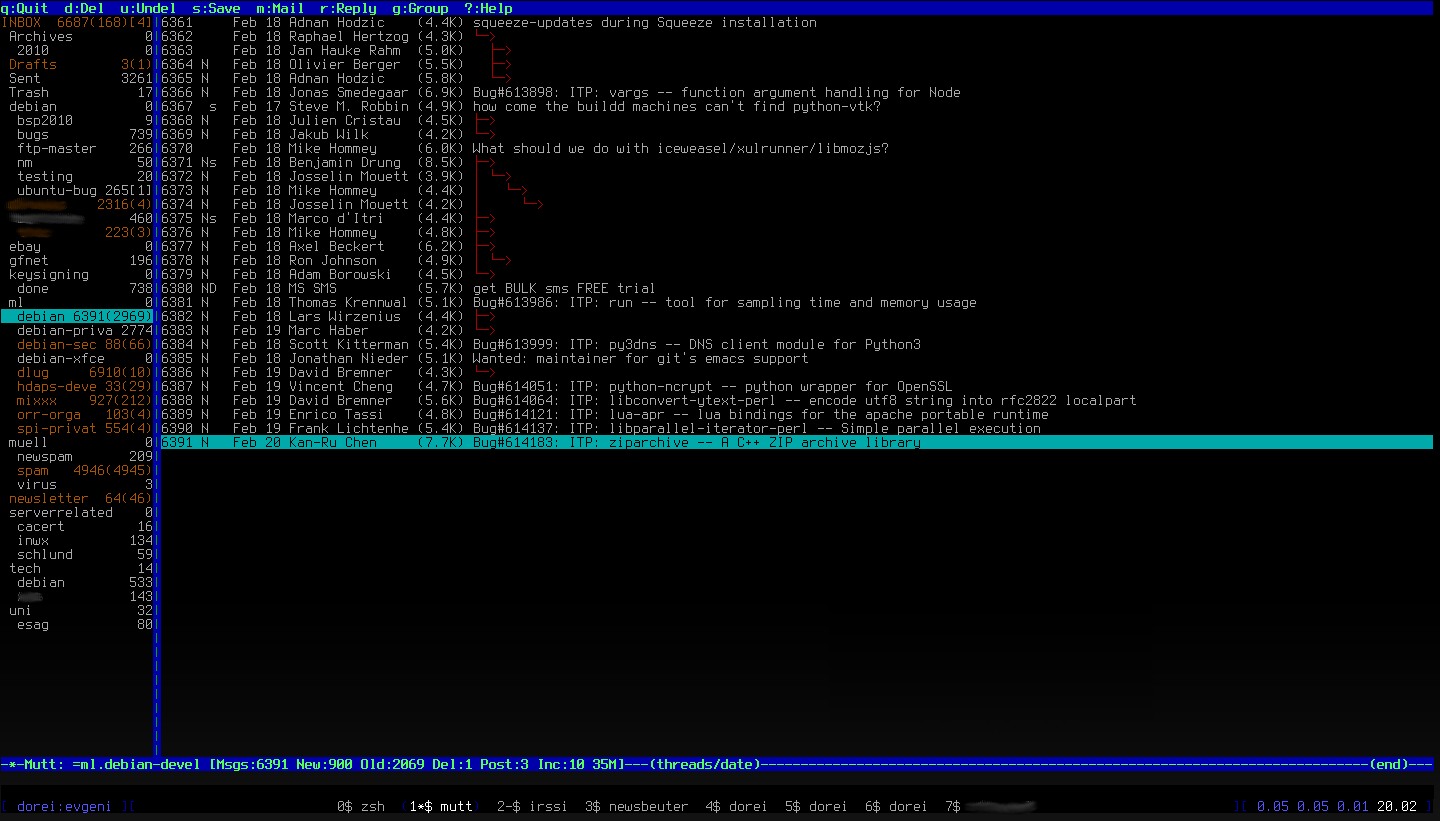
C est tout! That is my personal mutt configuration, you can download it as one file here: my .muttrc. And as everyone loves screenshots, here is one:the default view of my muttOh, the next chapter will be about irssi, but not before next Sunday (March 6th) as I ll be offline for a week, skiing in Austria :)

24 February 2011

Rapha&#235;l Hertzog: 7 mistakes to avoid when participating to Debian mailing lists

You re eager to start contributing to Debian, your first action is to subscribe to some high-profile mailing lists (like debian-devel and debian-project) to get a feel of the community. You read the mails for a few days and then you find out that you could participate to the discussions, it s a simple first step after all. True enough. That said, it s not as easy as it looks like. There are many mistakes that you should avoid:
  1. Don t fall in the trap where your mailing list participation is your sole contribution to Debian. If you want people to give credit to your messages, you should already be doing something else for Debian.
  2. Don t participate more than once a day to a given thread. There are many people subscribed, you should leave room for other people to express their point of view. You can always follow up one day after and reply to several messages at once if you believe you still have something new to add to the discussion.
  3. Don t reply to off-topic threads. Someone asked a simple question and someone else pointed out that his message was off-topic. Don t reply, or if you really need to, do it on the correct list or with a private response.
  4. Don t ask questions unless it s useful to bring the discussion forward. Development lists are not here to fill the gaps in your knowledge. We already have debian-mentors for this. Furthermore there s no better way to learn than to find yourself the answers to your questions. :-)
  5. Don t believe your opinion is so important. We re all very opinionated and discussions that consist only of contradicting opinions tend to go nowhere. Thus don t give your opinion unless you can back it up with new facts or another experience.
  6. Don t participate to all threads. There are surely some topics where you are more knowledgeable than others, participate where you add the most value and leave the others threads to the other experts (and learn by reading them).
  7. Don t hide your identity. In Debian we like to know each other. Use your real name and not some anonymous nickname. You need to be able to stand up behind your words, otherwise you re not credible.
I have myself been guilty of several of those when I started I invite you to follow my recommendations to ensure our mailing lists remain pleasant to read and an effective discussion place.
You should follow me on Identi.ca, Twitter and Facebook. Or subscribe to this blog by RSS or by email.

4 comments Liked this article? Click here. My blog is Flattr-enabled.

23 February 2011

Joachim Breitner: Goodbye server4you

My server, which is among other things hosting this weblog, is a dedicated server originally hosted by the German webhoster webperoni. It was a bargain at that time, and still a good price, and I was satisfied with webperoni s performance and reliability. Unfortunately, they were taken over by another web hosting company, best known for their server4you brand. They moved my server to a different data center and continued to run it there. Unfortunately, server4you was less reliable and less flexible than my original hoster: For example, when one sector on the hard drive turned bad, they were not able to put in a new drive in my system, let me mirror the content, and then remove the old drive. In another, even worse, instance, my second IP address, which I bought from webperoni, was given to another customer. When I finally noticed and complained, they refunded me the charges that I paid for the IP. But understandably, I wanted to get away from that hoster. The contract is automatically prolonged for one year if not canceled in time, and I missed the deadline last year. This year, I finally got around to rent a slightly better and slightly more expensive server from Hetzner, which whom I already made good experience. I would have preferred to switch when I am back from India, but server4you would not even let me prolong the contract by just two months only a whole year or nothing. So they got nothing, and I started to work on the move yesterday. At first I set off installing the new system from scratch, setting up all the various services and copying over data and configuration. But quickly, I gave up and moved the system by completely by copying programs, configuration and data from the old server. The new system has its root partition on a LVM share on software RAID, and now uses grub2 to boot. I had a hard time to get it booting, and a hard time to debug the issues without access to the physical console. I finally understood the problem by running kvm -hda /dev/sda -hdb /dev/sdb -curses from the recovery system and observing that the initial ramdisk is having problems finding the root partition. The problem was that I thought addressing partitions via file system labels is the way to go now and manually added root=LABEL=root to the Linux command line in /etc/default/grub. But then the initial ramdisk would not activate the logical volume. If I had just left it to the grub package, which inserted root=/dev/mapper/vg-root, everything would work fine. The new IP address (88.198.48.143) has not propagated throughout the Internet yet. Running the following command for a variety of ports on the old machine (80.86.81.20) makes sure nobody notices:

port=443
iptables -t nat -A POSTROUTING -p tcp --dst 88.198.48.143 --dport $port -j SNAT --to-source 80.86.81.20
iptables -t nat -A PREROUTING -p tcp --dst 80.86.81.20 --dport $port -j DNAT --to-destination 88.198.48.143:$port
The only question remaining is: What to do with the old server for the remaining six weeks? I am considering to erase the system, set up a plain Debian system and run a tor/freenet/whatelse node at full speed.

Andrew McMillan: Status: Busy

I've been very quiet on here for a few months, and the reason is (of course) because I've been doing other things. No surprise there, I guess! What I've been doing, first of all, is writing aCal, an Android CalDAV client with a lot of help from Chris Noldus. It's probably fair to say that Chris did most of the heavy lifting while I learned Java, did most of the UI & graphic design, and the low-level CalDAV synchronisation and geeky calendaring code. This is now available in the Android market for NZD$2.00 to help us fund further development and in a few days (or a couple of weeks) I'll get the source code up somewhere public (probably Gitorious) and it will be licensed GPLv3... When I get a moment - although refer to title :-) Of course on top of that I'd already committed to a second year of handling the sponsorship job for Linux.Conf.AU, so a fair amount of January was taken up with preparing for, and attending LCA in Brisbane where I took a lot of photos. LCA was, as always, a blast, and all credit to the fantastic team over in Brisbane who really came together when it seemed it was all going to fall apart after the flooding. This seems to be six long months of disasters around this part of the world, although until Tuesday I guess we thought we'd escaped the worst of it in New Zealand. After LCA I snuck home for a few days before flying off in the other direction, to UC Berkeley, for CalConnect XX where I managed to get in some great testing of the new Android CalDAV client, some excellent standards discussions, more photos and (even) a few days sightseeing. I've been home for a week from that now - just barely long enough to hug the kids, really - and today I am in the air once more, off to CeBIT in Hannover where I have been lucky to be sponsored a free booth in the Open Source Lounge by Linux New Media AG. My original travel sponsor slipped through the cracks, but I was fortunate that InternetNZ agreed to help fund me instead. If you're coming to CeBIT please do stop by the Morphoss table in the Open Source Lounge (Hall 2, F40) for a chat about DAViCal and Android - and anything else you want to talk about! I'll be there all week :-) And if I have some quiet time in that week (yeah, right!) I'll be trying to push out a new DAViCal release, which is overdue really, since the last one was two months ago.

21 February 2011

Stefano Zacchiroli: Squeeze, Debian, and the FSF

Short version: Dear FSF, thanks for your appreciation of Debian Squeeze achievements in getting rid of non-free firmware blobs. We still disagree on the overall freeness assessment of Debian, but I'm positive that steps like this one can further future collaboration, in the interest of both projects. Long version follows.
Historically, the relationships among Debian and the FSF have gone through mixed fortune (and that's quite an euphemism). On the one hand, Debian is committed to 100% Free Software, is an open project explicitly inspired by "the spirit of GNU", has been sponsored by FSF in its infancy, and properly calls itself "GNU/Linux" (or even "GNU/kFreeBSD"). On the other hand, Debian is the project who considers the GNU FDL license to be only conditionally free and which is not considered to be an entirely Free system according to FSF.
So much for the history corner. As a long time member of the Debian Project, as well as an FSF(E) fellow, I've always felt a bit sad about this state of affairs. Not because the two projects should have aligned goals; they clearly focus on different aspects of the quest for a Free (Software) world. Not even because they should agree on how to build a Free distribution: history has shown that FSF technical positions do not always get along with Debian's more "pragmatic" style, as embodied by point 5 of the Social Contract. Rather, my sadness is rooted in the belief that not getting along have encouraged duplication of efforts which could have been easily avoided (e.g. multiple distributions concurrently freeing up kernels). Furthermore, I'm more and more convinced that Debian nowadays enjoys a rather privileged position among Free Software vendors. Indeed, even though GNU/Linux distributions have reached a popularity we didn't dare to imagine 15 years ago or so, most distributions are under the direct or indirect control of commercial vendors. Those commercial vendors play a very important role in the promotion of Free Software. For instance, they are structured in ways that enable them to seal OEM deals with hardware manufacturers to sell computers with GNU/Linux pre-installed. Commercial vendors, by their own nature, are also in general better at marketing than non-commercial vendors. On the flip side however, commercial vendors are not yet relevant enough to drive proprietary drivers out of the market and, as a consequence, cannot yet afford not to support hardware which need such proprietary bits to work. Among mainstream GNU/Linux distributions[1] Debian is one of the very few vendors if not the only one that is both very relevant and, thanks to its independence, can afford taking Free Software's side: no commercial urgency can force Debian to negotiate on that. That is quite an asset to be used in the promotion of Free Software, especially to a public that is interested in and willing to understand what Free Software really is about. Such an "aware" public is on the rise as of lately, together with the general awareness increase of risks entailed by living a digital life, when that life is not under our control (think, as an example, at how often the "Facebook privacy debate" has hit mainstream medias in the last year). The "aware" public is the natural target of both Debian and the FSF. Dividing it would not serve well the cause of Free Software. With all that in mind, last August I took the chance of being on the "right" side of the Atlantic Ocean for DebConf10, to discuss possible venues of collaboration among Debian and the FSF. I sat down and discussed at length with John Sullivan, who I happen to know for his Debian involvement, in his capacities of FSF representative and operations manager. We discussed various topics, with the intention of bringing them up to the respective communities[2]. Then, inevitably, we ended up talking about the overall freeness of Debian and his exclusion from FSF listing of Free systems. (FSF is of course entitled to such judgements, pretty much as Debian is entitled to its own judgements on FSF licenses. Nevertheless those judgements contribute to dividing our public and might lead to wasteful duplication of efforts, where Free Software could better be served by collaboration.) The main ground for exclusion from that list used to be the compromises Debian has made in the past about non-free firmware blobs. But, as I pointed out back in August, those compromises would have been gone starting with Squeeze, making that argument moot. Today 6 months later I'm delighted to cheer at FSF's decision to publicly recognize the achievements Debian has delivered with Squeeze.
Thanks! It's a nice gesture that I've very much appreciated. I'm confident steps like this one will help future collaboration if, on both sides, we will be able to spot actual venues for collaboration. Needlessly to say, I still disagree with the overall FSF assessment of Debian non-freeness. Apparently, it still stands on the basis that Debian also provides a repository of nonfree software [ ] [which] is not part of the Debian system. [ ] but users would be hard-pressed to make a distinction and that people can readily learn about software available through it by browsing Debian's online package database. I respect the principle of non advertising non-free software and I even agree that it is a good principle. But unfortunately it's also a very blurry principle on which, in my opinion, Debian actually scores very well. No non-free software is offered to users by Debian; it's just for users that really want to have non-free software (or need to, in order to run a Free OS on their computers), that Debian tries to stay out of their way. For the "aware" public discussed above, I think it's much better to draw the line where software freedom ends and use that line to explain what does crossing it entails, than locking them up pretending non-free software do not exist. But fair enough: for the time being, I guess, we will need to agree to disagree on this one. Getting a little bit closer in the occasion of the Squeeze release is still an important step forward. It's up to each of us now to seek out initiatives which attract the interest of both projects and that can benefit from synergies.
[1] Sorry, I've no decent definition of "mainstream distribution" to offer, besides folklore and well-established distribution review sites. (Heck, I don't even have a decent definition of "well-established distribution review site" to offer!).
[2] which hasn't happened yet, due to the proverbial amount of available spare time.

Cyril Brulebois: Debian XSF News #6

Enough news to release another Debian XSF News issue, after less than a week. Enough writing for now, I m getting new mails in xorg-announce@.

20 February 2011

Christoph Egger: CSSH but without X

There are many ways to run some commands simultaneously on multiple hosts like cssh or dsh. They come handy for example when you are installing software updates on a set of hosts. dsh is a rather simple comandline tool allowing to execute a command over ssh on multiple hosts. However it doesn't allow any interactive input -- so you can't look at the potentially upgrading packages and press y to accept and you can't go through debconf promts or similar. This is solved by cssh which opens a XTerm for every host and a input area that is broadcastet to all of them. this is working really well -- you can execute your update on all hosts and still do individual adjustments just as needed: switch focus from the broadcasted input to one of the terminal windows and anything you type just goes there. Now cssh has a big disadvantage: it requires a running X server (and doesn't do too well with a fullscreen windowmanager). Requiring X is quite a blocker if you need to run that ssh multiplexer on a remote host, for example if the firewalling doesn't allow direct connections. Fortunately you can make tmux behave as we want -- in a simple terminal: First you need a script spawning the ssh sessions in separate tmux panes and direct input to all of them -- here called ssh-everywhere.sh (you could also write a tmux config I guess):

#/bin/sh
# ssh-everywhere.sh
for i in $HOSTS
do
  tmux splitw "ssh $i"
  tmux select-layout tiled
done
tmux set-window-option synchronize-panes on
Now start the whole thing:
tmux new 'exec sh ssh-everywhere.sh'
And be done. Update If you want to type in just one pane (on one host) you can do that as well: C-b : set-window-option synchronize-panes off and moving to the right pane (C-b + Arrow keys)

18 February 2011

Russell Coker: Sony Ericsson Xperia X10i First Experience

I have just got a new Xperia X10i for my wife. It s with Virgin who use the Optus network. Optus apparently have better coverage than Three (who we have been using for 6.5 years) and Virgin offers the best deals they have good phones on low monthly rates and do nice things like selling most phones unlocked (the Xperia is one that comes unlocked).I chose the phone for use in system administration work. A large screen should be good for reading email and running a ssh client. Hopefully I will be able to use the phone s Wifi to provide mobile net access to a laptop for any problem that can t be solved on a tiny screen. My wife doesn t do much sysadmin work nowadays, but it ll save some effort if we can both use the same model of phone. Also according to Amobil.no the Xperia X10 is the second best phone for camera-phone functionality [1], and my wife would really like to take some good pictures with her phone (she loves the LG U990 Viewty that she has right now).ScreenOne major reason for choosing this phone is that it has the biggest and highest resolution of any phone that doesn t cost a huge amount of money. It does well in this regard, the screen is very good to look at. However it is apparently not particularly sensitive and we still have the protective cover on the screen which makes the swipe to unlock operation quite difficult. My wife generally likes to keep the protective plastic on such screens for a while to prevent damage, but she may take this off sooner than on other devices.Sony FoolishnessOne reason that this phone is cheaper than any other phone with similar specs is that it s made by Sony. Sony won t provide updates to Android 2.2 or better and they have their own stupid applications installed in an intrusive manner. The main screen of the phone has a large icon for the Sony Timescape program. If you choose a background image of a person s face then the Timescape logo is in the ideal location to obscure the person s eyes. Generally it s not desired to have the person in your phone background look like Zorro. Fortunately you can delete icons from the home screen, you just have to press and hold the icon until a trash-can appears at the bottom of the screen and then drag it to the trash.Phone BookThe core phone functionality is fairly important for a mobile phone. But it seems that every modern phone has some serious failings in this regard. The Xperia comes with a phone book that is reasonably good for managing contacts and partially coalesces multiple entries with the same name which is convenient as I somehow managed to import 3 copies of each entry in my wife s phone book. The down-side is that the multiple entries are still stored, so when it comes time to update someone s phone number my wife will have to separate the entries and then delete all but one of them, adding probably a minute of effort for each one. With 60 phone book entries that s probably an hour of wasted time during the course of her phone use.They really should do a time based analysis of phone use and optimise the UI for efficiently performing common tasks. I think that an ideal design would start off by asking the user to rate the importance of phone functionality, camera, facebook, twitter, etc and then give a UI that matches the important tasks. A device that has 384M of RAM, 1G of built-in Flash storage, and an 8G micro-SD card (which Virgin provided with the phone) should be able to offer a selection of UIs.CameraThe configuration for the camera allows some settings to be changed easily and others have to be changed through the advanced settings which requires one more button press and a few extra taps on the screen. One real stupidity is to have the phone light be in the advanced settings, so if the room happens to be a little darker than expected you suddenly need to go to a lot of extra effort to turn on the light.Finally it would be really good to be able to take a quick picture. I would like to be able to be able to press a combination of buttons and have it immediately take a picture regardless of what had been running before. Not press the main menu button, the camera icon (which I made a link from the home screen), wait a second for it to load, and then press the shutter button. Ideally I would like to press a combination of hardware buttons to have it immediately take a picture even when the screen is locked. I don t want to wait for the screen unlock process, sometimes the perfect shot is only available for a second.WifiIt doesn t support ad-hoc networks. This is really annoying for me as I don t own an access point and I don t plan to buy one just for a phone. My laptop (Thinkpad T61 with Intel Corporation PRO/Wireless 3945ABG [Golan]) doesn t seem to support running as an access point, and my EeePC 701 with an Atheros AR5001 has the same problem, here is the error message:# iwconfig wlan0 mode master essid x
Error for wireless request Set Mode (8B06) :
SET failed on device wlan0 ; Invalid argument.I have a cheap Realtec USB Wifi device that claims to support being an access point but just fails when I try it. So presumably it doesn t really support it but the driver is buggy.It seems that I may need to put a custom Android installation on it to get ad-hoc working.Also it s apparently necessary to root the Xperia to get Wifi tethering to work for providing net access to a laptop. So I guess I ll hacking it soon.Internet AccessThe Virgin web site couldn t help me set up the Internet access because I ported a phone number from another Telco. I had to use the phone number supplied by Virgin to login to their web site and the site then wanted to sent (probably SMS) the settings to my phone, but of course it couldn t SMS to that number as I ve got the Three number active. Presumably they were expecting that customers would setup Internet access before porting their old number.I phoned the Virgin tech support and used the settings they suggested, but it didn t work. Then I took the phone to a Virgin store and it started working after they rebooted it with no changes to settings. Just like Windows used to be. :(Email Access Default AppThe email setup defaults to port 143 IMAP access, so even when a mail server provides access on port 993 for IMAPS and on port 995 for POP3S probably most users will not use any encryption because their phone doesn t default to it. Also one annoying feature is that when I gave it the email address test@coker.com.au it decided to use test as the user-name for IMAP by default. It seems that a very large portion of the active email accounts nowadays are on systems that handle multiple domains and thus require the domain name in authentication, and a large portion of the remainder accept domain names even when they aren t required. Besides it s a lot easier to delete a domain name when it s not needed than to type it in when it is.The default hostname for sending and receiving mail is the domain name, if the MUA configuration program had checked the MX record it would have known that smtp.sws.net.au is a better default choice for the mail server. I ve now started the practice of creating a CNAME entry named m in every domain I run, so when someone is setting up a mobile phone they just have to add m. to the start of the default hostname to use for sending and receiving mail. By doing this I can probably save an average user at least 30 seconds of typing, which is particularly important if I happen to be talking them through the process!The MUA uses IMAP commands to load the text of the message without attachments and then loads attachments on demand, this will be handy for when people attach unreasonably large files. With IMAP caching and partial loads the core functionality seems OK, and some quick tests of standard but not commonly used IMAP functions such as noticing that mail has been deleted by another client seemed to work well. The performance of loading a new mailbox with 369 message was quite poor, I m not sure how much of this is due to the network connection and how much is due to the client implementation. This is a real concern for me as I typically have about 7,000 messages in my IMAP account and 3,000 unread messages most of which are in two folders.Another problem is the fact that there seems to be no way of searching in the list of messages, sorting/grouping by subject or sender, or showing unread messages. This makes the Xperia unsuitable for the task of reading mailing lists when on public transport. I would really like to be able to sort through a folder of mailing-list mail, delete messages that I don t need to keep and flag ones that need attention when I have the resources of a desktop system when I m on a tram or in other situations where a laptop can be inconvenient.One undeniable bug I discovered (as opposed to the missing features I listed) is that when a message has a line with a URL followed by many spaces it won t load correctly in the web browser, the spaces will be treated as part of the URL. I ve changed the default signature in my email to have a description followed by a URL to avoid triggering this bug. Presumably other Android phones are bug for bug compatible. :(Moxier MailThere is a complete set of email and calendaring applications preloaded from Moxier.com. The Moxier mail client uses company.com as an example domain name (they should use example.com does no-one read the RFCs?). It s nice that they verify the SSL certificate and display the details when it s not signed.Unfortunately Moxier doesn t support anything other than Exchange, and I can t delete it either as it s part of the base set of applications from Sony.SMSThe SMS application is supposedly conversation based. This doesn t seem like a benefit to me, it s a pity that there is no option to make it act more like every other SMS implementation I ve used over the last 12 years.BatteryThe battery is described as having a capacity of 1500mAh, for comparison a AA rechargeable batteries have capacities ranging from 1800mAh to 2800mAh. My first mobile phone had a rechargeable battery that took the same space as 4*AA batteries and the phone was designed to run on AA batteries if the main battery wasn t charged. I would like to have an Android phone that had a battery pack of similar size to at least 2*AA batteries, and 4*AA would be OK too.The Xperia battery was reported as being half discharged after playing with the phone for less than an hour. Basically when doing anything with the phone that is remotely intensive I need to have it plugged in. Unless of course I m using one of the star-chart applications LightsThere are two white leds in the gaps between the keys for Settings, Main-Menu, and Back on the front. They are quite bright and annoying to look into at night.SSHSSH was one of the reasons for getting an Android phone, but it was one of the last things I worked on because everything else was so much fun. I m currently using ConnectBot, it supports storing ssh host keys, generating a key-pair from random screen touches, locking and unlocking the key-pair (with a pass-phrase) and pasting the public key to an open window. All the basic functions just work although it s rather inconvenient to enter the CTRL keys.The next thing to investigate is a small and light Bluetooth keyboard. Using an external hardware keyboard will save me from the pain of entering CTRL keys (which is even worse than the pain of entering passwords that contain digits and mixed case). It will also allow me to type a lot faster and use the entire screen for the ssh session.Current Bug SummaryWifi doesn t do ad-hoc mode or tethering.MUA doesn t correctly handle URLs in messages if many spaces follow the URL and is also unsuitable for mailing list mail.Sometimes requires a reboot to make Internet access settings take affect.Camera light can t be easily turned on and off.This isn t too bad.ConclusionMost things do what I want. Once I get a MUA working with all my email, Wifi doing what I want, and a Bluetooth keyboard it ll be a fairly ideal mobile sysadmin terminal. I ll probably order one for myself this weekend.

Vincent Sanders: Shedding

For some time now Melodie has wanted more outside storage.

The current outhouse is an 3 foot by 8 foot converted outside toilet. Due to its age (built 1884) this building is no longer watertight and is generally disintegrating at an alarming rate. One day soon it will have to be demolished. That day has not yet arrived, instead we purchased a plastic shed.

Unfortunately the only viable place for the new shed was next to the old one, this required removing a six foot section of flower bed complete with ivy, bamboo and an old sink.

Last Saturday I completed this removal and lay a concrete base ready to take the new shed. You would not think such a small area (2.8m square) would require so much material and effort to concrete over. 300Kg of 3:2:1 aggregate:sand:cement concrete mix went into the hole along with 100Kg of instant set concrete (for a rapid surface in the changable weather).

Thursday afternoon Geoff (my nice helpful neighbour) offered to assist me in the assembly of the shed. I re-arranged my work schedule (yay home working) and after three hours the shed was assembled.

This morning it occurred to me that my webcam had recorded a time-lapse movie of the construction. I uploaded it to YouTube and present it here for your amusement.

<iframe allowfullscreen="" frameborder="0" height="240" src="http://www.youtube.com/embed/brTXLO2R5D0?rel=0" title="YouTube video player" width="320"></iframe>

17 February 2011

Michal &#268;iha&#345;: Emphasis theme for phpMyAdmin 3.4

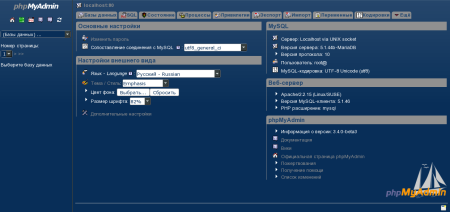
There seems to be nice increase in interest in creating themes for phpMyAdmin. Unfortunately today submitted theme came too late for phpMyAdmin theme contest. The new theme is called Emphasis: Emphasis theme It's now also available on the demo server, so don't hesitate and try it there. PS: Don't forget to vote for new default phpMyAdmin theme!
Filed under: English Phpmyadmin 0 comments Flattr this!

Rapha&#235;l Hertzog: People behind Debian: Maximilian Attems, member of the kernel team

Maximilian, along with the other members of the Debian kernel team, has the overwhelming job of maintaining the Linux kernel in Debian. It s one of the largest package and certainly one where dealing with bug reports is really difficult as most of them are hardware-specific, and thus difficult to reproduce. He s very enthusiastic and energetic, and does not fear criticizing when something doesn t please him. You ll see. My questions are in bold, the rest is by Maximilian. Who are you? My name is Maximilian Attems. I am a theoretical physicist in my last year of PhD at the Technical University of Vienna. My main research area is the early phase of a Quark-Gluon Plasma as produced in heavy ion collisions at the LHC at CERN. I am developing simulations that take weeks on the Vienna Scientific Cluster (in the TOP 500 list). The rest of the lab is much less fancy and boils down to straight intel boxes without any binary blobs or external drivers (although lately we add radeon graphics for decent free 3D). Mathematica and Maple are the rare exceptions to the many dev tools of Debian (LaTeX, editors, git, IDE s, Open MPI, ..) found at the institute, as those are unfortunately yet unmatched in Free Software for symbolic computations. The lab mostly runs a combination of Debian stable (testing starting from freeze) for desktops and oldstable/stable for servers. Debian is in use for more than 10 years. So people in the institute know some ups and downs of the project. Newcomers like my room neighbors are always surprised how functional a free Debian Desktop is. :) What s your biggest achievement within Debian? Building lots and lots of kernels together with an growing uptake of the officially released linux images. I joined the Debian kernel team shortly after Herbert Xu departed. I had been upstream Maintainer of the linux-2.6 janitor project for almost a year brewing hundreds of small cleanups with quilt in a tree named kjt for early linux-2.6. In Debian we had lots of fun in sorting out the troubles that the long 2.5 freeze had imposed: Meaning we were sitting on a huge diverging monolithic semi-good patchset. It was great fun to prepare 2.6.8 for Sarge with a huge team enthusiastic in shipping something real close to mainline (You have to imagine that back then you had no stable or longterm release nor any useful free tools like git. This involved passing patches around, hand editing them and seeing what the result does.) From the Sarge install reports a common pattern emerged that the current Debian early userspace was causing lots of boot failures. This motivated me to develop an alternative using the new upstream initramfs features. So I got involved in early userspace. Thanks to large and active development team initramfs-tools got a nice ecosystem. It still tries to be as generic and flexible as possible and thus gains many nice features. Also H. Peter Anvin (hpa) gave me the official co-maintenance of klibc. klibc saw uptake and good patches from Google in the last 2 years. I am proud that the early userspace is working out fairly well these days, meaning you can shuffle discs around and see your box boot. Later on we focused on 2.6.18 for Etch, which turned out to a be good release and picked up by several other distributions. Only very much later we would see such a sync again. With 2.6.26 for Lenny we got somehow unlucky as we just missed the new longterm release by one release. We also pushed for another update very late (during freeze) in the release cycle, which turned out to semi-work as too much things depend on linux-2.6. For Squeeze 2.6.32 got picked thanks to discussions at Portland Linux Plumbers and it turned out to be a good release picked up by many distributions and external patchsets. The long-term support is going very well. Greg KH is doing a great job in collecting various needed fixes for it. Somehow we had hoped that the Squeeze freeze would start sooner and that the freeze duration would be shorter, since we were ready for a release starting from the actual freeze on. The only real big bastard on the cool 2.6.32 sync is Red Hat. Red Hat Enterprise 6.0 is shipping the linux-2.6 2.6.32 in obfuscated form. They released their linux-2.6 as one big tarball clashing with the spirit of the GPL. One can only mildly guess from the changelog which patches get applied. This is in sharp contrast to any previous Red Hat release and has not yet generated the sharp and snide comments in press it deserves. Red Hat should really step back and not make such stupid management moves. Next to them even the semi-maintained Oracle Unbreakable 2.6.32 branch looks better: It is git fetchable. What are your plans and those of the kernel team for Debian Wheezy? Since 2.6.32 many of the used patches landed upstream or are on the way (speakup, Kbuild Debian specific targets, ..). The proper vfs based unionfs is something we d be looking forward. We haven t yet picked the next upstream release we will base Wheezy on, so currently we can happily jump to the most recent ones. There are plans for better interaction with Debian Installer thanks to generating our udebs properly in linux-2.6 source itself. Also we are looking forward to using git as tool of maintenance. We d hope that this will also allow for even better cross distribution collaboration. Concerning early userspace I plan to release an initramfs-tools with more generic userspace for the default case and finally also a klibc only for embedded or tuning cases. What do you like most in Debian? For one thing I do like the 2 year release cycle. It is not too long to have completely outdated software and on the other hand it gives enough time to really see huge progress from release to release. Also at my institute the software is is recent enough without too much admin overhead. For servers the three years support are a bit short, but on the manageable side. I do enjoy a lot the testing distribution. For my personal use it is very stable and thus I mainly run testing on my desktop and work boxes. (Occasionally mixing in things from sid for unbreaking transition or newer security fixes). Debian is independent and not a commercial entity. I think this is its main force and even more important these days. I enjoy using the Debian platform a lot at work thus in return this motivates me to contribute to Debian itself. I also like the fact that we strive for technical correctness. Is there some recurrent problem that hinders the progress of Debian? The New Maintainer process is a strange way to discourage people to contribute to Debian. It is particularly bureaucratic and a huge waste of time both for the applicant and his manager. It should be completely thrown overboard. One needs a more scalable approach for trust and credibility that also enhances the technical knowledge for coding and packaging of the applicant. NM is currently set in stone as any outside critics is automatically rejected. Young and energetic people are crucial for Debian and the long-term viability of the project, this is the reason why I d consider the New Maintainer process as Debian s biggest problem. Note from Rapha l Hertzog: I must say I do not share this point of view on the New Maintainer process, I have witnessed lots of improvements lately thanks to the addition of the Debian Maintainer status, and to the fact that a good history of contribution can easily subsume the annoying Tasks & Skills questionnaire. Another thing I miss is professional graphics input both for the desktop theme and the website. I know that effort has been done there lately and it is good to see movement there, but the end result is still lacking. Another trouble of Debian is its marketing capabilities. It should learn to better sell itself. It is the distribution users want to run and use not the rebranded copies of itself with lock-in sugar . Debian is about choice and it offers plenty of it: it is a great default Desktop. Linus Torvalds doesn t find Debian (and/or Ubuntu) a good platform to hack on the kernel. Do you know why and what can we do about this? The Fedora linux-2.6 receives contributions from several Red Hat employed upstream sub-Maintainers. Thus it typically carries huge patches which are not yet upstream. As a consequence eventual userland troubles get revealed quite quickly and are often seen there first. The cutting edge nature of Fedora rawhide is appealing for many developers. The usual Debian package division of library development files and the library itself is traditionally an entry barrier for dev on Debian. Debian got pretty easily usable these days, although we could and should again improve a lot more in this sector. Personally I think that Linus hasn t tried Debian for years. I have the feeling that the implication of the Debian Kernel team in LKML has been on the rise. Is that true and how do you explain this? Ben Hutchings is the Nr.1 contributor for 2.6.33. He also is top listed as author of patches on stable 2.6.32. Debian is not listed as organization as many send their linux-2.6 patches from their corporate or personal email address and thus it won t be attributed to Debian. There is currently no means to see how many patches get forwarded for the stable tree, but I certainly forwarded more then fifty patches. I was very happy when Greg KH personally thanked me in the 2.6.32.12 release. In the Squeeze kernel, the firmwares have been stripped and moved into separate packages in the non-free section. What should a user do to ensure his system keeps working? There is a debconf warning on linux-2.6 installation. It is quite clear that the free linux-2.6 can t depend on the firmware of the non-free archive (also there is no strict dependency there technically). On the terminal you d also see warnings by update-initramfs on the initramfs generation for drivers included in the initramfs. The debconf warning lists the filename(s) of the missing firmware(s). One can then apt-cache search for the firmware package name and install it via the non-free repository. The check runs against the current loaded modules. The match is not 100% accurate for special cases as the one where the device might be handled well by this driver without firmware, but is accurate enough to warrant the warning. The set of virtualization technologies that the official Debian kernel supports seems to change regularly. Which of the currently available options would you recommend to users who want to build on something that will last? KVM has been a smooth ride from day zero. It almost got included instantly upstream. The uptake it has is great as it sees both dev from Intel and AMD. Together with libvirt it s management is easy. Also the performance of virtio is very good. The linux containers are the thing we are looking forward for enhanced chroots in the Wheezy schedule. They are also manageable by libvirt. Xen being the bad outside boy has an incredible shrinking patchset, thus is fair to expect to see it for Wheezy and beyond. For many it may come a bit late, but for old hardware without relevant CPU it is there. Many tend to overstate the importance of the virtualization tech. I d be much more looking forward to the better Desktop support in newer linux-2.6. The Desktop is important for linux and something that is in heavy use. The much better graphics support of the radeon and nouveau drivers: The performance optimizations thanks to dcache scalability work and the neat automatic task-grouping for the CPU scheduler are very promising features for the usability of the linux desktop. Another nice to have feature is the online defrag of ext4 and its faster mkfs. Even cooler would be better scalability in ext4 (This side seems to have seen not enough effort lately). Is there someone in Debian that you admire for their contributions? Hans Peter Anvin and Ted Tso are a huge source of deep linux-2.6 knowledge and personal wisdom. I do enjoy all sorts of interactions with them. Christoph Hellwig with Matthew Wilcox and also William Irwin for setting up the Debian kernel Team. Several Debian leaders including the previous and the current one for their engagement, which very often happens behind the scene. The Debian Gnome Team work is great, also the interactions have always been always easy and a pleasure. Martin Michlmayr and previously Thiemo Seufer do an incredible job in porting Debian on funny and interesting ARM and MIPS boxes. Debian has a lot of upcoming potential on this area. I m looking forward to other young enthusiastic people in that area. Colin Watson is bridging Debian and Ubuntu, which is an immense task. Michael Prokop bases on Debian an excellent recovery boot CD: http://www.grml.org. I d be happy if any Debian Developer would work as carefully coding and working.
Thank you to Maximilian for the time spent answering my questions. I hope you enjoyed reading his answers as I did. Subscribe to my newsletter to get my monthly summary of the Debian/Ubuntu news and to not miss further interviews. You can also follow along on Identi.ca, Twitter and Facebook.

One comment Liked this article? Click here. My blog is Flattr-enabled.

16 February 2011

David Welton: Rails Application Templates

Thanks to some friends on twitter, I recently discovered RailsWizard which is a very handy way of generating new Rails applications with the "right" things included. I liked what it did a lot, so I took the generated file and saved it as a github gist: https://gist.github.com/829521
Which provides me with a very handy starting place for new Rails projects. This is a great way to get some of the housekeeping out of the way before we start: ensure we're using jQuery, add some gems that I always use like exception_notifier and will_paginate, and so on.

14 February 2011

Julien Blache: QLogic QLE73xx InfiniBand adapters, QDR, ib_qib, OFED 1.5.2 and Debian Squeeze

A few weeks ago, I ve had to look into getting a QLogic QLE7342 InfiniBand adapter working on a Debian Squeeze system, with OFED 1.5.2. This post will probably save quite some time to anyone trying to do the same; it applies to all the QLogic adapters supported by the ib_qib kernel module. Note: on the ibverbs side of things, the adapters are supported by the ipath plugin, just like older QLogic adapters (that use the ib_ipath kernel module). First of all: grab a recent version of the ofa-kernel package. The ib_qib module in ofa-kernel from OFED 1.5.2 did not work at all for me. I used the ofa-kernel snapshot from 20110203. There are two things to know about the QLogic adapters: QLogic offers a complete IB stack based on OFED and dubbed QLogic OFED+ . The complete package weighs in at over 500 MB and contains the QLogic-blessed drivers, OFED stack, libraries and, of utmost importance to us, the QLogic-specific utilities. Unfortunately, as simple as the QLogic utilities are, they don t come with source. The package also only exists for RedHat 4 and 5. So, go to the QLogic support website, select your hardware and download the QLogic OFED+ Host Software for RHEL 5 package. In the tarball, one directory contains the OFED stack and another contains all the utilities (QLogic-Tools.*). For setting the adapter speed, you ll want the iba_portconfig utility along with the initscript (shipped as iba_portconfig.sh). The desired adapter speed is set in the initscript by choosing the proper arguments to iba_portconfig (-s 1 for SDR, -s 2 for DDR, -s 4 for QDR or any combination thereof). The iba_portconfig initscript must run after the drivers have been loaded. Which brings us to loading the driver and mounting the ipathfs. This is all handled by the openibd initscript provided in ofa-kernel (under ofed_scripts/) and its companion script dedicated to QLogic adapters, truescale.cmds. This initscript will load the OFED stack and drivers; if a QLogic adapter is present, it ll mount the ipathfs in the right place. Voila, once this is done, the adapter should happily report itself ACTIVE/LinkUp.

Rapha&#235;l Hertzog: Debian Cleanup Tip #3: get rid of third-party packages

Last week, we learned how to get rid of obsolete packages. This time, we re going to learn how to bring back your computer to a state close to a pure Ubuntu/Debian installation. Thanks to the power of APT, it s easy to add new external repositories and install supplementary software. Unfortunately some of those are not very well maintained. They might contain crappy packages or they might simply not be updated. An external package which was initially working well, can become a burden on system maintenance because it will be interfering with regular updates (for example by requiring a package that should be removed in newer versions of the system). So my goal for today is to teach you how to identify the packages on your system that are not coming from Debian or Ubuntu. So that you can go through them from time to time and keep only those that you really need. Obsolete packages are a subset of those, but I ll leave them alone. We took care of them last week. Each (well-formed) APT repository comes with a Release file describing it (example). They provide some values that can be used by APT to identify packages contained in the repository. All official Debian repositories are documented with Origin=Debian (and Origin=Ubuntu for Ubuntu). You can verify the origin value associated to each repository (if any) in the output of apt-cache policy:
[...]
 500 http://ftp.debian.org/debian/ lenny/main i386 Packages
     release v=5.0.8,o=Debian,a=stable,n=lenny,l=Debian,c=main
     origin ftp.debian.org
[...]
From there on, we can simply ask aptitude to compute a list of packages which are both installed and not available in an official Debian repository:
$ aptitude search '?narrow(?installed, !?origin(Debian))!?obsolete'
or
$ aptitude search '~S ~i !~ODebian !~o'
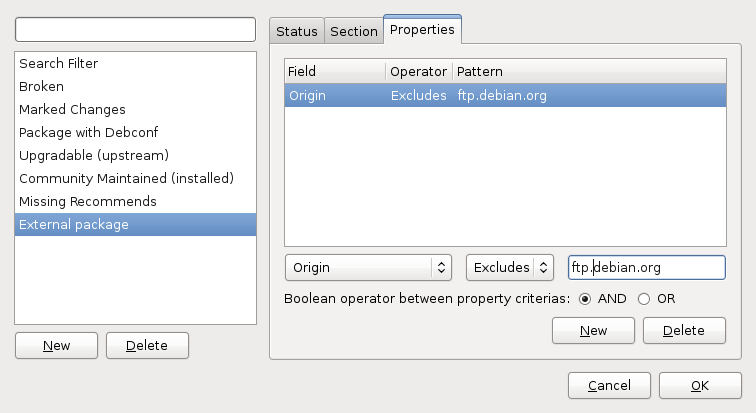
You can replace search with purge or remove if you want to get rid of all the packages listed. But you re more likely to want to remove only a subset of carefully chosen packages you re probably still using some of the software that you installed from external repositories. With synaptic, you can also browse the content of each repository. Click on the Origin button and you have a list of repositories. You can go through the non-Debian repositories and look which packages are installed and up-to-date. But you can do better, you can create a custom view. Click on the menu entry Settings > Filter . Click on New to create a new filter and name it External packages . Unselect everything in the Status tab and keep only Installed . Go in the Properties tab and here add a new entry Origin Excludes ftp.debian.org . In fact you must replace ftp.debian.org with the hostname of your Debian/Ubuntu mirror. The one that appears on the origin line in the output of apt-cache policy (see the excerpt quoted above in this article). Note that the term Origin is used to refer to two different things, a field in the release file but also the name of the host for an APT repository. It s a bit confusing if you don t pay attention. Close the filters window with OK. You now have a new listing of External packages under the Custom Filters screen. You can see which packages are installed and up-to-date and decide whether you really want to keep it. If the package is also provided by Debian/Ubuntu and you want to go back to the version provided by your distribution, you can use the Package > Force version menu entry.
Click here to subscribe to my free newsletter and get my monthly analysis on what s going on in Debian and Ubuntu. Or just follow along via the RSS feed, Identi.ca, Twitter or Facebook.

8 comments Liked this article? Click here. My blog is Flattr-enabled.

John Goerzen: Lots of Snow, Being Stuck, and Fun

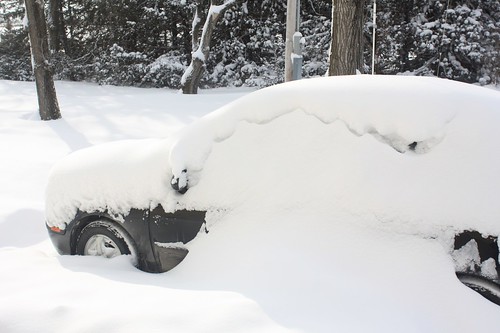
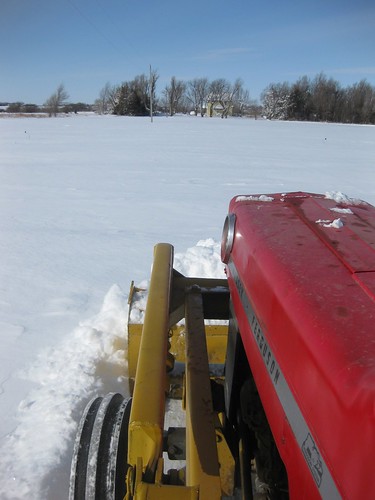
Those of you that watch my twitter know that we got dumped on with snow recently. The final estimate reported by local papers is 17 to 19 inches. IMG_5301.JPG That s my car. You might understand why I went home at 1PM Tuesday and worked from home the rest of the afternoon. The county didn t get the roads opened until 5:30PM Wednesday, so we were stuck. Terah s dad kindly opened the driveway for us though. Without that, we wouldn t have even known where it was. marla-IMG_4180.JPG Jacob and Oliver loved playing in the snow. It was a HUGE hit for them. Both of them hated to go back inside when it was time. Oliver had trouble walking, or even standing up, but that didn t stop him from begging for more every chance he got. IMG_5345.JPG On Saturday, I took Jacob outside to play. We had in mind building a snow tunnel. We went to one of the big piles of snow left by the tractor after our driveway was cleared, and I dug out a space underneath it that Jacob could crawl through. He got a little scoop (he insisted on calling it my shovel ) and helped dig too. He had a great time with it. He was very anxious to go inside, and it probably didn t help his eagerness that the cats could freely walk through it long before he could. They were around and taking a great interest in the proceedings. One of then stretched out on my back while I was stretched out pulling snow out from the pile. Finally Jacob got to go through. He had a little trouble because it wasn t tall enough for him to crawl like he usually does (though still plenty big for him to get through with lots of room to spare), but he came out beaming. I then went and got the camera and got some photos of his second trip through. IMG_5424.JPG You d think that this might be the highlight of a 4-year-old s snow excursion. And given his excitement, you might be very convinced of that. But you d be wrong. What Jacob really wanted was a snow train. So I drew some train track-sized lines in the snow with my shovel. Then I was supposed to draw a train engine. He had been planning this for hours before we even went outside, and I knew very well what was supposed to go on the engine: a snowball for a headlight. We then added passenger cars and a coal car, because apparently that s what you do with snow trains. And the result: IMG_5445.JPG When we went inside, Terah asked Jacob about his snow experience. Jacob was very happy, until she asked him if his snow train was a real train or a drawing of a train. Then he became very sad when he said it was a drawing of a train, and decided it was not what he wanted AT ALL. So today we went out again. This time I built a snow train that stands up, complete with snowballs for wheels. I asked him if it was right, and he kept saying, No, I want a REAL train. Finally I asked him what the difference between a real snow train and this one was. Apparently a real train would be on tracks, move around, make noise, and take us places. Fortunately he didn t dwell too long when I explained I couldn t build one of those. And then today s highlight was writing JACOB in the snow. He had started by drawing larger and larger J letters with his arm, and finally asked me to make one. I made footprints in the shape of a very large J, which he loved. He had me make another one, and then the rest of the letters in his name.

12 February 2011

David Welton: Book Review: Start Small, Stay Small, A Developer's Guide to Launching a Startup

<iframe frameborder="0" marginheight="0" marginwidth="0" scrolling="no" src="http://rcm.amazon.com/e/cm?lt1=_blank&amp;bc1=000000&amp;IS2=1&amp;bg1=FFFFFF&amp;fc1=000000&amp;lc1=0000FF&amp;t=dedasys-20&amp;o=1&amp;p=8&amp;l=as4&amp;m=amazon&amp;f=ifr&amp;asins=B003YH9MMI" style="width: 120px; height: 240px; float: left; margin-right: 10px;"></iframe> I tend to be a sucker for business books, to the point where I created (and later sold) a site to discuss them. Part of the motivation for creating that site was that a lot of them tend to contain one good idea, and an inordinate amount of fluff. This book does not - it's good material that could not easily be summarized because it's full of information. I think it's actually one of the more relevant books I've ever read in that, for my situation, the idea behind it really speaks to me. I work as a consultant during the days, and I like it a lot. Rather than working on the same old thing year after year, I get to meet new people, new clients, new situations, and help them out, which is motivating. However, consulting has its downsides too, in that it doesn't create a great deal of long-term value. Once you've finished up a project, it's on to the next one, or no money comes in. I'm also a bit older and more set in my ways: I did my time in the California Bay Area, and I don't relish going back and working like mad on a "Real Startup" with VC backing, crazy hours, and having the thing consume my life. The idea behind "Start Small, Stay Small" is to find and create really niche products: stuff that will earn you some extra money as a developer, but also niches that are small enough to not really be interesting to larger companies that need a lot of income to justify a forray into a particular market segment. This, then, becomes your 'competitive advantage': Microsoft, or even 37 Signals, simply isn't going to chase after a market that is worth 20,000 dollars a year. And yet for someone working on their own, if you manage to set up something that brings in that money, and mostly automate it so that it's not a second job, it's a tidy extra bit of money. Several projects like that might even be enough to live on, depending on your lifestyle. With that in mind, the authors, Rob Walling and Mike Taper, delve into the details of how to go about doing so. The whole thing is done under the assumption that you don't have a lot of time or money to throw at things that don't bring in concrete results in relatively short order. Various subjects discussed in detail include how to find a niche, how to create a sales web site, how to measure market demand, conversion rates, how to productively outsource less critical portions of your business, and much more. They also discuss what sorts of numbers to look at for various aspects of the business, and anchor the discussion with real numbers for many things, rather than just giving you a hand-wavy phrase that's not that useful in the real world. It's not a 'timeless' book as all the concrete numbers and techniques reference technologies, sites, and the market dynamics of 2011, but after all, that's part of what makes it good. Other things I didn't like so much were being sold on their for-pay "micropreneur community", and the relatively high price of the book but I think it's worth it given the real advice you get. If you don't like marketing, and think that products succeed or fail on their merits alone, of course the book will leave you cold, but of course you're wrong about that anyway!

Wouter Verhelst: Ten years of Debian

My first ever Linux installation was done in the late nineties 1998 or thereabouts but was a RedHat 4.5 installation rather than a Debian one. The reason for that was fairly simple: the Infomagick sixpack CD set that I'd bought contained RedHat, Debian, and Slackware, but the RedHat installation was the only one that could be installed directly from CD the other two required me to write floppies and boot from those to start the installation, and I wasn't very fond of that idea. It was only a few years and a few broken RedHat upgrades later that I saw the light and considered trying out this Debian thing that some of my classmates were talking about. The fact that I'd just bought my own computer (rather than having to compete for time with my siblings on my parents' computer) was a good reason to do a fresh Linux installation. I'd been planning to install Linux From Scratch, but as what was still known as the LFS HOWTO told me you'd need a working Linux installation to do that, I considered my options. Since I'd developed a strong dislike of RedHat, I wasn't interested in doing another RedHat anymore. So, I downloaded the most recent version of Debian at the time (Potato Test Cycle III), wrote it to a CD, and installed. I've probably still got the CD lying around somewhere. A few months later, I found these "Linux Gazette" packages in the archive, with the latest packaged issue being 47, but the latest upstream version being much higher. Trying to figure out what was going on, I mailed the maintainer, Adrian Bridgett, who encouraged me to take over maintenance. Thus began my life of actively contributing to Open Source software. In November 2000, I applied to become a Debian Developer. In January 2001, Martin Michlmayr was assigned to be my AM. And in early February 2001, now just over ten years ago, I'd become a Debian Developer. Yes, that was fast, and no, I probably wasn't really ready yet, at the time. Originally, I only cared much about these Linux Gazette packages. But, as time went on, I started looking around, too. A friend passed me an old Macintosh Centris 610. As I tried to install Debian on it, I found that it didn't actually run very well. This turned out to be due to it having a broken 68LC040 processor, so I bought me another m68k-based mac, one with a full 68040 processor (a Centris 650). Thus I became involved in the m68k port and buildd maintenance. As these old machines came with 80MB or 250MB SCSI hard disks of which I had none laying around, and a then-recent Debian installation had minimum requirements of about 200MB, I was in need of network storage to be able to do anything useful with the mac. NFS didn't work as expected; the RTC implementation on m68k mac hardware was reverse engineered and didn't work too well at the time, which meant that the clock would run slower if the machine was under load, and that in turn would mean that make would get confused about timestamps, since they would suddenly appear to originate from the future (in NFS, it's the server that assigns time stamps, not the client). There was a simple solution, however; Pavel Macheck had written this neat 'Network Block Device', which would let the client do its own filesystem on network storage. Only it wasn't packaged; but then, that was easy to fix. Thus I started maintaining the single piece of software that I've worked the most on, to date. A few years later, Pavel lost interest in maintaining NBD, and handed over upstream maintenance to me and maintenance of the kernel side to Paul Clements. Thus began my life in upstream work. And while I originally joined Debian with the intent of using it as a learning experience and stepping stone on my way to more "important" free software, I found that it wasn't as satisfying as was my work for Debian. Over the years, there's been this duality where I've felt like I was doing too much and not enough at the same time. Too much, because the things I was doing would eat up much of my spare time, leaving little time left for other hobbies. Not enough, because I witnessed other people doing much more for Debian than I did, and I wanted to make a difference. As the years passed by, many things have changed. Not only in Debian, but also besides it. I became an independent contractor, focusing mostly on supporting people in using Debian (although I support them with other distributions, too). The importance of a port went from 'something which these weird porter people are doing, and that we should probably help them with if it doesn't work, but is their problem really' to 'something that I really really really have to make sure works for my packages', and back for the port that I cared about most. After several years of trying, I finally managed to explain to my parents what this Debian thing is, why it matters, and what my role in the whole thing is. We did a few releases, some taking longer than I would've liked. People joined the project, and left again. Some of my friends died. My fame in the project rose, even though I wasn't aware of it initially; and thus I was rather surprised when someone asked me whether I was "the Wouter Verhelst" at a key signing party. Recently, I've started looking back, and considered the things which Debian has meant to me. Ten years ago, I was 22, still in college, and had way too much spare time on my hands. I'd recently gotten my first Internet installation, and all these online communities were very new to me. Yes, that was all probably rather late. Debian has changed my life in many ways; it has allowed me to meet various kinds of people, both online and in meatspace. I've been to Helsinki, Edinburgh, Mar del Plata, C ceres, and New York City, places that I might otherwise not have visited. Each of these trips was an incredible experience that I have fond memories of; and while the most fond ones originate from Helsinki, I cherish the memories of each of these trips as some of the best trips I've ever done. Working on Debian has forced me to learn about the inner workings of a Linux-based system, which is knowledge that has helped me tremendously professionally, too. And finally, working on Debian has given me a unique perspective on this whole FOSS community, which has helped shape my ethics and my view of the world. While I believe that I would've subscribed to most of that ideology at any rate, I'm not sure that the details of my beliefs and understanding would've been exactly the same. And while I don't agree on every position that the project subscribes to as a whole, I do believe that the philosophies that lie at the core of this project contain just the right mix of pragmatism and ideology that makes it possible for our project to thrive in a changing world of not only a growing group of people who subscribe unconditionally to the free software ideals, but also business people who care mostly about money. Over the years, somehow I moved from "one of the recent batch of new Debian Developers" to "someone who's been with the project longer than most". It still feels weird to see people shut up because you've built up a reputation in some area, and you give your gut opinion on some subject without researching it too much. I try not to let that happen too often. Today, ten years and just over a week ago, my life as a Debian Developer started, and it would change the way I looked at the world, the things I would do in my spare time, and the people I would meet. I wouldn't have it any other way. Thanks, Debian, for what's been a blast; may the next ten years be as inspiring to me and everyone as the past ten!

10 February 2011

Jan Wagner: package updates

After Debian Squeeze was released last weekend, development will speed up again.
Today I uploaded a new postfwd package which ships also the postfwd2 script, a prefork server version.
I also started to orphan packages I m not using anymore or having dead upstream. The first candidate was policyd-weight, fortunately Chris Butler took the package over.
I m happy to be the first uploader into squeeze-backports with . icinga.

9 February 2011

Jonathan Wiltshire: Point Release Security Co-ordinator

In Bits from the Security Team a few weeks ago, Thijs Kinkhorst wrote:
Since a couple of years we ve been handing off security issues of minor or
theoretical impact but for which a fix would be desirable at some point, like
certain classes of denial-of-service attacks, off to stable point updates.
We re looking for a person that wants to coordinate this: monitor the Security
Tracker for issues classified as such by the Security Team, converse with
maintainers to get such updates done and coordinate with the stable release
managers on this.
I m happy to confirm, now that it s been announced, that I am that person: point release security co-ordinator. Affected packages If your package fulfils these criteria: it is a candidate for updating in stable or oldstable, and you ll probably receive a mail from me at some point asking you to do so. You can pre-empt this mail of course, by backporting your fix to the affected versions and contacting the release team to get your fix into stable, without waiting for me. In such a case, please drop me a note with the details so I can tick your off on my hit^W candidate list. Making a stable/oldstable upload This is documented in the Developer s Reference, but to summarise:
  1. Prepare your fix, targetting stable or oldstable, and build it in an up-to-date chroot for that release
  2. Send a diff of the new package to the release team, asking for permission to upload
  3. Upload as normal, and wait for it to be included in the next point release. Meanwhile, notify the security team of your upload, if it fixes a CVE.
Tracking candidate packages I m going to start off tracking filed bugs for SPU candidates and OSPU candidates with usertags in the BTS, under my own address. In time that might be merged into an address used by the security team, but for now I m still finding a good workflow so it s much easier this way.
Comments
Point Release Security Co-ordinator is a post from: jwiltshire.org.uk Flattr

8 February 2011

Cyril Brulebois: Debian XSF News #4

Here comes the forth Debian XSF News issue! I usually try to keep the items sorted chronologically (but grouped by topic when possible), so if you re wondering about the current status of X in unstable, make sure you read the last entry.

Next.

Previous.