Republished by Slate. Translations available in French (Fran ais), Spanish (Espa ol), Chinese ( )
For almost 15 years, I have run my own email server which I use for all of my non-work correspondence. I do so to keep autonomy, control, and privacy over my email and so that no big company has copies of all of my personal email.
A few years ago, I was surprised to find out that my friend Peter Eckersley a very privacy conscious person who is Technology Projects Director at the EFF used Gmail. I asked him why he would willingly give Google copies of all his email. Peter pointed out that if all of your friends use Gmail, Google has your email anyway. Any time I email somebody who uses Gmail and anytime they email me Google has that email.
Since our conversation, I have often wondered just how much of my email Google really has. This weekend, I wrote a small program to go through all the email I have kept in my personal inbox since April 2004 (when Gmail was started) to find out.
One challenge with answering the question is that many people, like Peter, use Gmail to read, compose, and send email but they configure Gmail to send email from a non-gmail.com From address. To catch these, my program looks through each message s headers that record which computers handled the message on its way to my server and to pick out messages that have traveled through google.com, gmail.com, or googlemail.com. Although I usually filter them, my personal mailbox contains emails sent through a number of mailing lists. Since these mailing lists often hide the true provenance of a message, I exclude all messages that are marked as coming from lists using the (usually invisible) Precedence header.
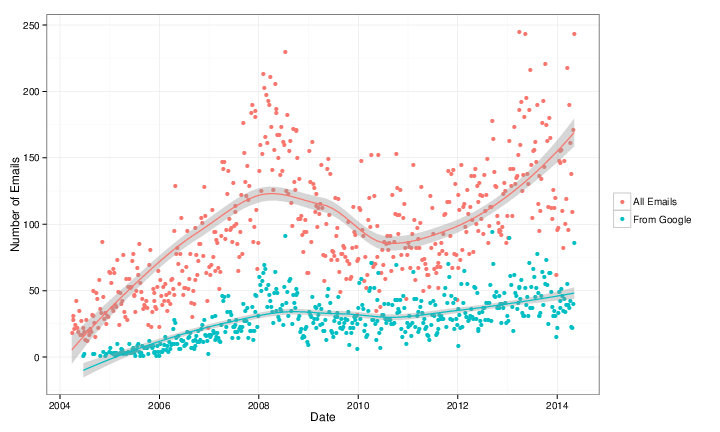
The following graph shows the numbers of emails in my personal inbox each week in red and the subset from Google in blue. Because the number of emails I receive week-to-week tends to vary quite a bit, I ve included a LOESS smoother which shows a moving average over several weeks.
From eyeballing the graph, the answer to seems to be that, although it varies, about a third of the email in my inbox comes from Google!
Keep in mind that this is all of my personal email and includes automatic and computer generated mail from banks and retailers, etc. Although it is true that Google doesn t have these messages, it suggests that the proportion of my truly personal email that comes via Google is probably much higher.
I would also like to know how much of the email I send goes to Google. I can do this by looking at emails in my inbox that I have replied to. This works if I am willing to assume that if I reply to an email sent from Google, it ends up back at Google. In some ways, doing this addresses the problem with the emails from retailers and banks since I am very unlikely to reply to those emails. In this sense, it also reflects a measure of more truly personal email.
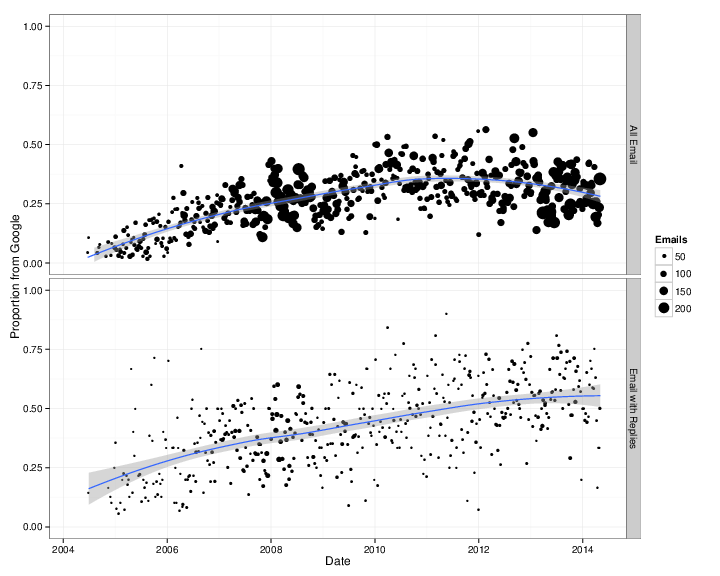
I ve broken down the proportions of emails I received that come from Google in the graph below for all email (top) and for emails I have replied to (bottom). In the graphs, the size of the dots represents the total number of emails counted to make that proportion. Once again, I ve included the LOESS moving average.
The answer is surprisingly large. Despite the fact that I spend hundreds of dollars a year and hours of work to host my own email server, Google has about half of my personal email! Last year, Google delivered 57% of the emails in my inbox that I replied to. They have delivered more than a third of all the email I ve replied to every year since 2006 and more than half since 2010. On the upside, there is some indication that the proportion is going down. So far this year, only 51% of the emails I ve replied to arrived from Google.
The numbers are higher than I imagined and reflect somewhat depressing news. They show how it s complicated to think about privacy and autonomy for communication between parties. I m not sure what to do except encourage others to consider, in the wake of the Snowden revelations and everything else, whether you really want Google to have all your email. And half of mine.
If you want to run the analysis on your own, you re welcome to the Python and R code I used to produce the numbers and graphs.
Oracle won their appeal regarding whether APIs are copyrightable. There'll be ongoing argument about whether Google's use of those APIs is fair use or not, and perhaps an appeal to the Supreme Court, but that's the new status quo. This will doubtless result in arguments over whether Oracle's implementation of Linux APIs in Solaris 10 was a violation of copyright or not (and presumably Google are currently checking whether they own any code that Oracle reimplemented), but that's not what I'm going to talk about today.
As promised, today I would like to write a bit about the making of
The Hacker's Guide to Python. It has
been a very interesting experimentation, and I think it is worth sharing it
with you.
The inspiration
All started out at the beginning of August 2013. I was spending my summer,
as the rest of the year, hacking on OpenStack.
As years passed, I got more and more deeply involved in the various tools
that we either built or contributed to within the OpenStack community. And I
somehow got the feeling that my experience with Python, the way we used it
inside OpenStack and other applications during these last years was worth
sharing. Worth writing something bigger than a few blog posts.
The OpenStack project is doing code reviews, and therefore so did I for
almost two years. That inspired a lot of topics, like
the definitive guide to method decorators
that I wrote at the time I started the hacker's guide. Stumbling upon the
same mistakes or misunderstanding over and over is, somehow, inspiring.
I also stumbled upon Nathan Barry's blog and book
Authority which were very helpful to
get started and some sort of guideline.
All of that brought me enough ideas to start writing a book about Python
software development for people already familiar with the language.
The writing
The first thing I started to do is to list all the topics I wanted to write
about. The list turned out to have subjects that had no direct interest for
a practical guide. For example, on one hand, very few developers know in
details how metaclasses work, but on the other hand, I never had to write a
metaclass during these last years. That's the kind of subject I decided not
to write about, dropped all subjects that I felt were not going to help my
reader to be more productive. Even if they could be technically interesting.
There is a strange bug in Planet Debian I am seeing since
I joined. It is rather minor, but since it is an accessibility
bug, I'd like to mention it here. I have written to
the Planet Debian maintainers, and was told to figure it out myself.
This is a pattern, accessibility is considered wishlist, apparently.
And the affected people are supposed to fix it on their own.
It is better if I don't say anything more about that attitude.
hackergotchi forAnd for those where it works, it looks like:
hackergotchi for Dirk EddelbuettelStrange, isn't it? If you have any idea why this might be happening, let me know, or even better, tell Planet Debian maintainers how to fix it. P.S.: Package planet-venus says it is a rewrite of Planet, and Planet can be found in Debian as well. I don't see it in unstable, maybe I am blind? Or has it been removed recently? If so, the package description of planet-venus is wrong.
I have been looking for an App like this since I got my first iOS device in
december 2011. Finally, it is here! A single-player (bot-driven) poker
app for iOS, THETA Poker Pro, fully accessible and usable with VoiceOver.
AppleVis has a review.
It doesn't happen very often, but App programmers in the iOS Universe
do indeed sometimes think about Accessibility support, and the APIs
provided by Apple are useful enough to allow programmers to write
very accessible apps. You can say about Apple whatever you want,
currently, it is the company providing the best accessibility support on the market.
Why? Because they made accessibility a first-class citizen of their platform(s).
This is where policy helps. If you can dictate top-down that
you support people with disabilities, things actually
start to happen. If you have to ask, hope, and wait, like it is with
free software, things do not really progress as fast as the users need it.
Back to THETA Poker Pro: The default configuration is already very useable with VoiceOver.
However, if you want the cards placed on the board announced to you, so that
you do not have to discover them manually by touch, you can enable the
"Card Announcement" item in the Options menu. You can also set message delay
a bit slower, such that all messages are actually fully spoken and not cut off sometimes.
With these two settings adjusted, and maybe "Animation" set to "Very fast",
the game feels extremely nice. There is actually nothing I would
want to change, which does not happen very often when I test
a program for its accessibility.
With these settings changed, game play is very smooth with VoiceOver, you basically
just have to tap your cards to check, tap the deck to fold, or tap
your chips to raise. Very simple, and these three "buttons" are on
the bottom of the screen, so rather easy and quick to find.
All other activity is automatically announced by VoiceOver.
I have played a few hundred hands already with this App. It is a wonderful
way to pass time. For instance, I don't like to go to my
doctor, because I usually wait up to two or three hours. I had to pay
her a visit on monday. While waiting, I played "a few" hands, and
suddenly, I was already called in. When I came out again, I checked the
time and was rather surprised that yes, I have waited two hours again,
but this time, I didn't notice! :-)
Special thanks go to the author(s) of this app.
It is a good example of an App that was not specially made for the blind,
but which feels like it was. Thanks, you've made my week!
Trying out Debian arm64 port on chroot running inside qemu-user-static.
It seems like it's getting closer to being ready.
qemu 2.0 already hit Debian unstable, so qemu-aarch64-static is already available in qemu-user-static package.
Today, debootstrap cross almost works but doesn't, because of some missing dependencies in debian-ports. hmmm...
Some of the commands I needed to do:
A new release 4.300 of Armadillo, the templated C++
library for linear algebra, was released by Conrad a few days ago.
As usual, this was rolled up in a new
RcppArmadillo
release 0.4.300.0 which is now on CRAN and in
Debian.
This release brings nice new upstream changes such as faster
find() as well as corresponding functions to find elements which
are either finite or non-finite, based on a suggestion we made. This may
need an RcppArmadillo specific
extension as R extends the IEEE logic to supported NA,
NaN and Inf on floating point variables whereas
standard C++ (and hence Armadillo)
only supports the latter two. We hope to work on this shortly.
Kevin also put in some code to make sure unsigned int vectors
and matrices are converted correctly, and I updated the short configure
script checking for complete LAPACK support to account for the R 3.0.3 or
later case.
Changes in RcppArmadillo version 0.4.300.0 (2014-05-04)Courtesy of CRANberries, there is also a diffstat report for the most recent release As always, more detailed information is on the RcppArmadillo page. Questions, comments etc should go to the rcpp-devel mailing list off the R-Forge page.
- Upgraded to Armadillo release Version 4.300 (Medieval Cornea Scraper)
- faster
find()- added
find_finite()andfind_nonfinite()for finding indices of finite and non-finite elements- expressions
X=inv(A)*B*CandX=A.i()*B*Care automatically converted to X=solve(A,B*C)- Corrected conversion to
unsigned intvectors and matrices- Configure script now checks for R version 3.0.3 or newer to enable complex divide-and-conquer SVD in case of R-supplied LAPACK
This post by Dirk Eddelbuettel originated on his Thinking inside the box blog. Please report excessive re-aggregation in third-party for-profit settings.
I was invited to give a talk at a local conference, OS-UPIITA. I have been invited to this conference before, and will gladly be there again. But I was recently pointed at the invitation poster they are distributing (which I reproduce here for your convenience) And I must make a couple of corrections here:
| Attachment | Size |
|---|---|
| osupiita_chico.jpg | 43.74 KB |
I ve done some clean-up in the Debian BTS. The result can be seen in the QA graphs:
The last remaining 6 bugs are only affecting OpenStack Essex (which is what Wheezy ships, and which unfortunately I have not enough time to support properly), and the last one is waiting for FTP masters approval after I added Python 3 support to oslo-config (OpenStack is slowly moving to Python3, and I ve tried to add support to Python3 in the packages as well each time it was possible). Also, the Icehouse packages have passed the tempest tests (a set of functional tests) which we run in our continuous integration system.
As I was doing some triaging, it is possible that some bugs have been closed a bit quickly (like for example the Ceilometer FTBFS which I couldn t reproduce, even with sbuild and cowbuilder), so it is well possible that some more QA work will be needed later on. I m also expecting a new set of patches for supporting Ceph in Nova. I m sure there s issues which we will discover later on, however, it is nice to have this result right after the first Icehouse release of OpenStack.
Next up: testing new components that I uploaded for this release: Trove (DB as a Service), Designate (DNS as a Service), Ironic (Metal as a Service, or cloud computing on bare-metal), and TripleO (OpenStack on OpenStack). I unfortunately know already that TripleO and Tuskar wont really work yet, and that it needs some patches to be sent upstream for it to support Debian correctly (let s work it out for Juno!). So please consider it as a technology preview only. Though Trove, Designate and Ironic are supposed to be in good enough shape, I didn t have the chance to test them more than just installing the packages and checking daemons are running and connected to the various components of OpenStack (eg: database, keystone and RabbitMQ). Please do test them and report bugs in the BTS.
I d like to thanks Gustavo Panizzo & Thomas Bechtold who contributed to this release, and also the folks at eNovance (Emilien, Cyril, Seb ) who provided precious help with the CI and package quality. See you in the Juno Atlanta design summit next week (as hopefully, my plane ticket issue will be soon solved).

Yesterday I received an automated alert from my kvm-hosting host-machine, informing me that one of the drives in the RAID-pair had failed.
This particular machine has been up and running since 2009, and according to my outage log this is the first downtime in three years. (The uptime was over 1000 days, which seems to confirm that pretty nicely.)
I like reliable systems, and sometimes it's worth remembering just how well they can work.
In other news I'm currently continuing to chase a new job. The companies I've approached, or which have approached me, are being a little slow in replying which is a shame, but I'm not hugely concerned .. yet.
I'm going to give things another week, or so, and then add a banner to the Debian-Administration website, and see if that results in anything interesting.
In the meantime I've got some wood, and a new mitre saw, and I will be spending the remainder of today working on my new desk. Doing physical things is always fun, and right now especially.
My account then
Developer. For my hook
to work, you need to use http://localhost:4090/ as the
Redirect URI (Domaine de redirection in french)
Credential will be stored in dbus's org.freedesktop.secrets service,
both gnome and kde will give you one. So run hubic-git-annex-hook --init,
it will ask for your hubic username, password, your client id
and your client secret that you just generate, and store them in the
org.freedesktop.secrets service.
Then configure git-annex to use it :
git config annex.hubic-hook /full/path/to/hubic-git-annex-hook $HUBIC_USERNAME $CONTAINER
the CONTAINER is openstack concept, that contain the files.
Hubic use the container default for its synchronization application,
you should probably use another. If the CONTAINER do not exist, the
hook will create it.
You finally need to create the special remote :
git annex initremote hubic type=hook hooktype=hubic encryption=none
(you could chose any other name than hubic), you can then
git annex copy --to=hubic
If you're looking to get started at packaging free software for

Debian, you should start with the excellent
New Maintainers' Guide or
the
Introduction to Debian Packaging
on the Debian wiki.
Once you know the basics, or if you prefer to learn by example, you may be
interested in the full walkthrough which follows. We will look at the
contents of three simple packages.
debian/ directory:
changelogcompatcontrolcopyrightdocsnode-libravatar.installrulessource/formatwatchSource: node-libravatar
Priority: extra
Maintainer: Francois Marier <francois@debian.org>
Build-Depends: debhelper (>= 9)
Standards-Version: 3.9.4
Section: web
Homepage: https://github.com/fmarier/node-libravatar
Vcs-Git: git://git.debian.org/collab-maint/node-libravatar.git
Vcs-Browser: http://git.debian.org/?p=collab-maint/node-libravatar.git;a=summary
Package: node-libravatar
Architecture: all
Depends: $ shlibs:Depends , $ misc:Depends , nodejs
Description: libravatar library for NodeJS
This library allows web application authors to make use of the free Libravatar
service (https://www.libravatar.org). This service hosts avatar images for
users and allows other sites to look them up using email addresses.
.
node-libravatar includes full support for federated avatar servers.
This is probably the most important file since it contains the bulk of the
metadata about this package.
Maintainer is a required field listing the maintainer of that package,
which can be a person or a team. It only contains a single value though, any
co-maintainers will be listed under the optional Uploaders field.
Build-Depends lists the packages which are needed to build the
package (e.g. a compiler), as opposed to those which are needed to
install the binary package (e.g. a library it uses).
Standards-Version refers to the version of the
Debian Policy that this package
complies with.
The Homepage field refers to the upstream homepage, whereas the
Vcs-* fields point to the repository where the packaging is stored. If
you take a look at the
node-libravatar packaging repository
you will see that it contains three branches:
upstream is the source as it was in the tarball downloaded from
upstream.master is the upstream branch along with all of the Debian
customizations.pristine-tar is unrelated to the other two branches and is used by the
pristine-tar tool
to reconstitute the original upstream tarball as needed.Package
field. This is the definition of a binary package, not to be confused
with the Source field at the top of this file, which refers to the name of
the source package. In this particular example, they are both the same
and there is only one of each, however this is not always the case, as we'll
see later.
Inside that binary package definition, lives the Architecture field which
is normally one of these two:
all for a binary package that will work on all architectures but only
needs to be built onceany for a binary package that will work everywhere but that will need to
be built separately for each architectureDepends field which
lists all of the runtime dependencies that the binary package has. This is
what will be pulled in by apt-get when you apt-get install
node-libravatar. The two variables will be substituted later by debhelper.
node-libravatar (2.0.0-3) unstable; urgency=low
* debian/watch: poll github directly
* Bump Standards-Version up to 3.9.4
-- Francois Marier <francois@debian.org> Mon, 20 May 2013 12:07:49 +1200
node-libravatar (2.0.0-2) unstable; urgency=low
* More precise license tag and upstream contact in debian/copyright
-- Francois Marier <francois@debian.org> Tue, 29 May 2012 22:51:03 +1200
node-libravatar (2.0.0-1) unstable; urgency=low
* New upstream release
- new non-backward-compatible API
-- Francois Marier <francois@debian.org> Mon, 07 May 2012 14:54:19 +1200
node-libravatar (1.1.1-1) unstable; urgency=low
* Initial release (Closes: #661771)
-- Francois Marier <francois@debian.org> Fri, 02 Mar 2012 15:29:57 +1300
This may seem at first like a mundane file, but it is very important since
it is the canonical source of the package version (2.0.0-3 in this
case). This is the only place where you need to bump the package version
when uploading a new package to the Debian archive.
The first line also includes the
distribution
where the package will be uploaded. It is usually one of these values:
unstable for the vast majority of uploadsstable for uploads that have been approved by the release maintainers
and fix serious bugs in the stable version of Debianstable-security for security fixes to the stable version of Debian that
cannot wait until the next stable point release and have been
approved by the security teamurgency field (low, medium or high) in the changelog entry.
Another thing worth noting is that the first upload normally needs to close
an ITP (Intent to Package) bug.
#!/usr/bin/make -f
# -*- makefile -*-
%:
dh $@
override_dh_auto_test:
As can be gathered from the first two lines of this file, this is a
Makefile. This
is what controls how the package is built.
There's not much to see and that's because most of its content is
automatically added by debhelper. So
let's look at it in action by building the package:
$ git buildpackage -us -uc
and then looking at parts of the build log (../node-libravatar_2.0.0-3_amd64.build):
fakeroot debian/rules clean
dh clean
dh_testdir
dh_auto_clean
dh_clean
One of the first things we see is the debian/rules file being run with the
clean target. To find out what that does, have a look at the
dh_auto_clean
which states that it will attempt to delete build residues and run something
like make clean using the upstream Makefile.
debian/rules build
dh build
dh_testdir
dh_auto_configure
dh_auto_build
Next we see the build target being invoked and looking at
dh_auto_configure
we see that this will essentially run ./configure and its
equivalents.
The
dh_auto_build
helper script then takes care of running make (or equivalent) on the
upstream code.
This should be familiar to anybody who has ever built a piece of free
software from scratch and has encountered the usual method for building
from source:
./configure
make
make install
Finally, we get to actually build the .deb:
fakeroot debian/rules binary
dh binary
dh_testroot
dh_prep
dh_installdirs
dh_auto_install
dh_install
...
dh_md5sums
dh_builddeb
dpkg-deb: building package node-libravatar' in ../node-libravatar_2.0.0-3_all.deb'.
Here we see a number of helpers, including
dh_auto_install
which takes care of running make install.
Going back to the debian/rules, we notice that there is manually defined
target at the bottom of the file:
override_dh_auto_test:
which essentially disables
dh_auto_test
by replacing it with an empty set of commands.
The reason for this becomes clear when we take a look at the test target
of the upstream Makefile and the
dependencies
it has: tap, a node.js library that is
not yet available in Debian.
In other words, we can't run the test suite on the build machines so we need
to disable it here.
9
This file simply specifies the version of debhelper that is required by the
various helpers used in debian/rules. Version 9 is the latest at the moment.
Format: http://www.debian.org/doc/packaging-manuals/copyright-format/1.0/
Upstream-Name: node-libravatar
Upstream-Contact: Francois Marier <francois@libravatar.org>
Source: https://github.com/fmarier/node-libravatar
Files: *
Copyright: 2011 Francois Marier <francois@libravatar.org>
License: Expat
Files: debian/*
Copyright: 2012 Francois Marier <francois@debian.org>
License: Expat
License: Expat
Permission is hereby granted, free of charge, to any person obtaining a copy of this
software and associated documentation files (the "Software"), to deal in the Software
without restriction, including without limitation the rights to use, copy, modify,
merge, publish, distribute, sublicense, and/or sell copies of the Software, and to
permit persons to whom the Software is furnished to do so, subject to the following
conditions:
.
The above copyright notice and this permission notice shall be included in all copies
or substantial portions of the Software.
.
THE SOFTWARE IS PROVIDED "AS IS", WITHOUT WARRANTY OF ANY KIND, EXPRESS OR IMPLIED,
INCLUDING BUT NOT LIMITED TO THE WARRANTIES OF MERCHANTABILITY, FITNESS FOR A
PARTICULAR PURPOSE AND NONINFRINGEMENT. IN NO EVENT SHALL THE AUTHORS OR COPYRIGHT
HOLDERS BE LIABLE FOR ANY CLAIM, DAMAGES OR OTHER LIABILITY, WHETHER IN AN ACTION OF
CONTRACT, TORT OR OTHERWISE, ARISING FROM, OUT OF OR IN CONNECTION WITH THE SOFTWARE
OR THE USE OR OTHER DEALINGS IN THE SOFTWARE.
This machine-readable file lists all of the different licenses encountered in this
package.
It requires that the maintainer audits the upstream code for any copyright
statements that might be present in addition to the license of the package
as a whole.
README.md
This file contains a list of upstream files that will be copied into the
/usr/share/doc/node-libravatar/ directory by dh_installdocs.
lib/* usr/lib/nodejs/
The install file is used by
dh_install
to supplement the work done by dh_auto_install which, as we have seen
earlier, essentially just runs make install on the upstream Makefile.
Looking at that
upstream Makefile,
it becomes clear that the files will need to be installed manually by the
Debian package since that Makefile doesn't have an install target.
version=3
https://github.com/fmarier/node-libravatar/tags /fmarier/node-libravatar/archive/node-libravatar-([0-9.]+)\.tar\.gz
This is the file that allows Debian tools like the
Package Tracking System
to automatically detect that a new upstream version is available.
What it does is simply visit the
upstream page which contains all of the
release tarballs and look
for links which have an
href
matching the above regular expression.
Running uscan --report --verbose will show us all of the tarballs that can
be automatically discovered using this watch file:
-- Scanning for watchfiles in .
-- Found watchfile in ./debian
-- In debian/watch, processing watchfile line:
https://github.com/fmarier/node-libravatar/tags /fmarier/node-libravatar/archive/node-libravatar-([0-9.]+)\.tar\.gz
-- Found the following matching hrefs:
/fmarier/node-libravatar/archive/node-libravatar-2.0.0.tar.gz
/fmarier/node-libravatar/archive/node-libravatar-1.1.1.tar.gz
/fmarier/node-libravatar/archive/node-libravatar-1.1.0.tar.gz
/fmarier/node-libravatar/archive/node-libravatar-1.0.1.tar.gz
/fmarier/node-libravatar/archive/node-libravatar-1.0.0.tar.gz
Newest version on remote site is 2.0.0, local version is 2.0.0
=> Package is up to date
-- Scan finished
debian/ directory, but let's
look at two in particular:
controlupstream/signing-key.ascSource: pylibravatar
Section: python
Priority: optional
Maintainer: Francois Marier <francois@debian.org>
Build-Depends: debhelper (>= 9), python-all, python3-all
Standards-Version: 3.9.5
Homepage: https://launchpad.net/pyLibravatar
...
Package: python-libravatar
Architecture: all
Depends: $ misc:Depends , $ python:Depends , python-dns, python
Description: Libravatar module for Python 2
Module to make use of the federated Libravatar.org avatar hosting service
from within Python applications.
...
Package: python3-libravatar
Architecture: all
Depends: $ misc:Depends , $ python3:Depends , python3-dns, python3
Description: Libravatar module for Python 3
Module to make use of the federated Libravatar.org avatar hosting service
from within Python applications.
...
Here is an example of a source package (pylibravatar) which builds two
separate binary packages: python-libravatar and python3-libravatar.
This highlights the fact that a given upstream source can be split into
several binary packages in the archive when it makes sense. In this case,
there is no point in Python 2 applications pulling in the Python 3 files, so
the two separate packages make sense.
Another common example is the use of a -doc package to separate the
documentation from the rest of a package so that it doesn't need to be
installed on production servers for example.
-----BEGIN PGP PUBLIC KEY BLOCK-----
Version: GnuPG v1
mQINBEpQYz4BEAC7REQD1za69RUnkt6nRCFhSJmmoeJc+yEiWTKc9GOIMAwJDme1
+CMYgVn4Xzf1VQYwD/lE+mfWgyeMomLQjDM1mxx/LOM2a1WWPOk9+PvQwKfRJy92
...
UxDtZm/4yUmU6KvHvOGiDCMuIiB+MqhqJJ5wf80wXhzu8nmC+fyGt6nvu0ggMle8
sAMgXt/aQUTZE5zNCQ==
=RkTO
-----END PGP PUBLIC KEY BLOCK-----
This is simply the
OpenPGP key
that the upstream developer uses to sign release tarballs.
Since PGP signatures are available on the upstream
download page, it's possible
to instruct
uscan
to check signatures before downloading tarballs.
The way to do that is to use the pgpsigurlmange option in debian/watch:
version=3
opts=pgpsigurlmangle=s/$/.asc/ https://pypi.python.org/pypi/pyLibravatar https://pypi.python.org/packages/source/p/pyLibravatar/pyLibravatar-(.*)\.tar\.gz
which is simply a regular expression replacement string which takes the
tarball URL and converts it to the URL of the matching PGP signature.
/usr/bin/ and /usr/lib/ and stores a hash of them in its database. When
one of these files changes, you get an email.
In particular, we will look at the following files in the debian/ directory of
version 2.7.59-18:
dirsfcheck.cron.dfcheck.postrmfcheck.postinstpatches/README.Debianrulessource/formatseries which
lists the patches that should be applied to the upstream source and in which
order. Should you need to temporarily disable a patch, simply remove it from
this file and it will no longer be applied at build time.
Let's have a look at patches/04_cfg_sha256.patch:
Description: Switch to sha256 hash algorithm
Forwarded: not needed
Author: Francois Marier <francois@debian.org>
Last-Update: 2009-03-15
--- a/fcheck.cfg
+++ b/fcheck.cfg
@@ -149,8 +149,7 @@ TimeZone = EST5EDT
#$Signature = /usr/bin/sum
#$Signature = /usr/bin/cksum
#$Signature = /usr/bin/md5sum
-$Signature = /bin/cksum
-
+$Signature = /usr/bin/sha256sum
# Include an optional configuration file.
This is a very simple patch which changes the default configuration of
fcheck to promote the use of a stronger hash function. At the top of the
file is a bunch of metadata in the
DEP-3 format.
Why does this package contain so many customizations to the upstream code
when Debian's policy is to push fixes upstream and work towards reduce the
delta between upstream and Debian's code? The answer can be found in
debian/control:
Homepage: http://web.archive.org/web/20050415074059/www.geocities.com/fcheck2000/
This package no longer has an upstream maintainer and its original source is
gone. In other words, the Debian package is where all of the new bug fixes
get done.
3.0 (quilt)
This file contains what is called the source package format. What it
basically says is that the patches found in debian/patches/ will be
applied to the upstream source using the
quilt tool at build time.
#!/bin/sh
# postrm script for fcheck
#
# see: dh_installdeb(1)
set -e
# summary of how this script can be called:
# * <postrm> remove'
# * <postrm> purge'
# * <old-postrm> upgrade' <new-version>
# * <new-postrm> failed-upgrade' <old-version>
# * <new-postrm> abort-install'
# * <new-postrm> abort-install' <old-version>
# * <new-postrm> abort-upgrade' <old-version>
# * <disappearer's-postrm> disappear' <overwriter>
# <overwriter-version>
# for details, see http://www.debian.org/doc/debian-policy/ or
# the debian-policy package
case "$1" in
remove upgrade failed-upgrade abort-install abort-upgrade disappear)
;;
purge)
if [ -e /var/lib/fcheck/fcheck.dbf ]; then
echo "Purging old database file ..."
rm -f /var/lib/fcheck/fcheck.dbf
fi
rm -rf /var/lib/fcheck
rm -rf /var/log/fcheck
rm -rf /etc/fcheck
;;
*)
echo "postrm called with unknown argument \ $1'" >&2
exit 1
;;
esac
# dh_installdeb will replace this with shell code automatically
# generated by other debhelper scripts.
#DEBHELPER#
exit 0
This script is one of the many possible
maintainer scripts that a
package can provide if needed.
This particular one, as the name suggests, will be run after the package is
removed (apt-get remove fcheck) or purged (apt-get remove --purge
fcheck). Looking at the case statement above, it doesn't do anything extra in the
remove case, but it deletes a few files and directories when called with
the purge argument.
#!/usr/bin/make -f
# -*- makefile -*-
# Sample debian/rules that uses debhelper.
# This file was originally written by Joey Hess and Craig Small.
# As a special exception, when this file is copied by dh-make into a
# dh-make output file, you may use that output file without restriction.
# This special exception was added by Craig Small in version 0.37 of dh-make.
# Uncomment this to turn on verbose mode.
#export DH_VERBOSE=1
build-arch:
build-indep:
build: build-stamp
build-stamp:
dh_testdir
pod2man --section=8 $(CURDIR)/debian/fcheck.pod > $(CURDIR)/fcheck.8
touch build-stamp
clean:
dh_testdir
dh_testroot
rm -f build-stamp
rm -f $(CURDIR)/fcheck.8
dh_clean
install: build
dh_testdir
dh_testroot
dh_prep
dh_installdirs
cp $(CURDIR)/fcheck $(CURDIR)/debian/fcheck/usr/sbin/fcheck
cp $(CURDIR)/fcheck.cfg $(CURDIR)/debian/fcheck/etc/fcheck/fcheck.cfg
# Build architecture-independent files here.
binary-arch: build install
# Build architecture-independent files here.
binary-indep: build install
dh_testdir
dh_testroot
dh_installdocs
dh_installcron
dh_installman fcheck.8
dh_installchangelogs
dh_installexamples
dh_installlogcheck
dh_link
dh_strip
dh_compress
dh_fixperms
dh_installdeb
dh_shlibdeps
dh_gencontrol
dh_md5sums
dh_builddeb
binary: binary-indep binary-arch
.PHONY: build clean binary-indep binary-arch binary install
This is an example of a old-style debian/rules file which you still
encounter in packages which haven't yet upgraded to the latest version of
debhelper 9, as can be shown by the contents of debian/compat:
8
It does essentially the same thing that what we've seen in the build log,
but in a more verbose way.
usr/sbin
etc/fcheck
This file contains a list of directories that
dh_installdirs
will create in the build directory.
The reason why these directories need to be created is that files are copied
into these directories
in the install target of the debian/rules file.
Note that this is different from directories which are created at the time
of installation of the package. In that case, the directory
(e.g. /var/log/fcheck/) must be
created in the postinst script
and removed in the postrm script.
#
# Regular cron job for the fcheck package
#
30 */2 * * * root test -x /usr/sbin/fcheck && if ! nice ionice -c3 /usr/sbin/fcheck -asxrf /etc/fcheck/fcheck.cfg >/var/run/fcheck.out 2>&1; then mailx -s "ALERT: [fcheck] hostname --fqdn " root </var/run/fcheck.out ; /usr/sbin/fcheck -cadsxlf /etc/fcheck/fcheck.cfg ; fi ; rm -f /var/run/fcheck.out
This file is the cronjob which drives the checks performed by this
package. It will be copied to /etc/cron.d/fcheck by dh_installcron.
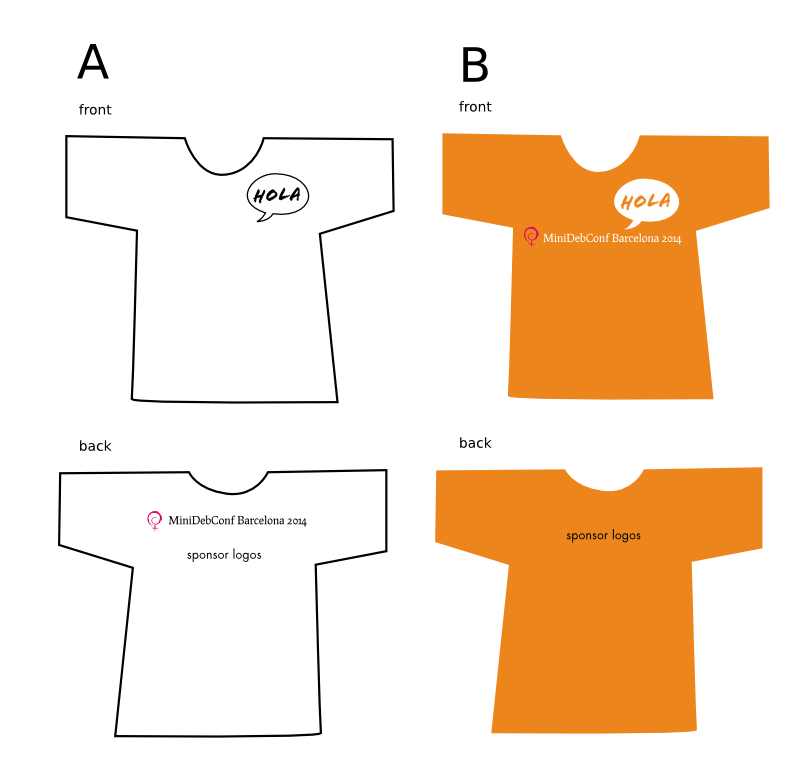
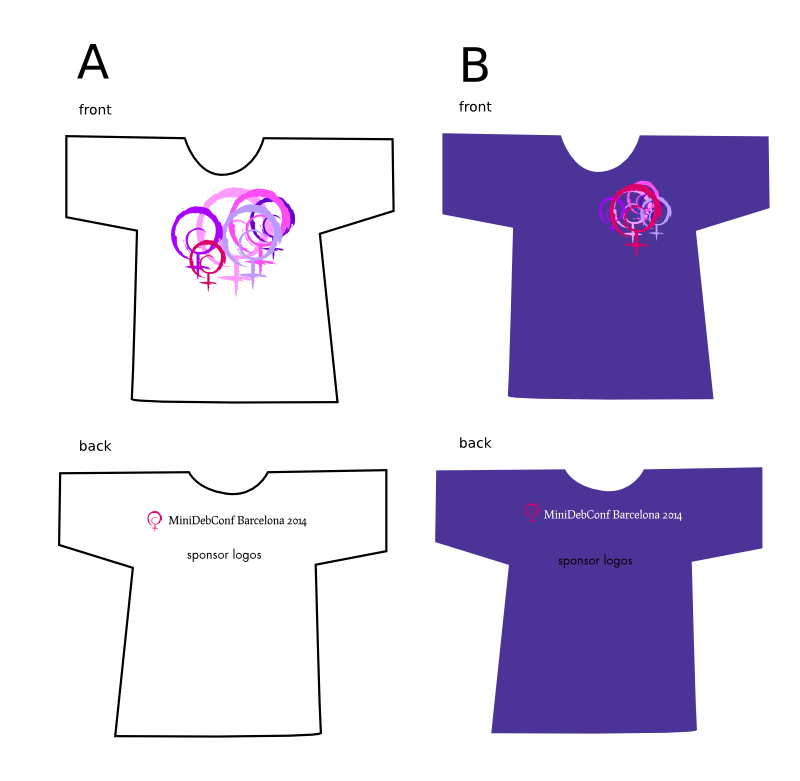
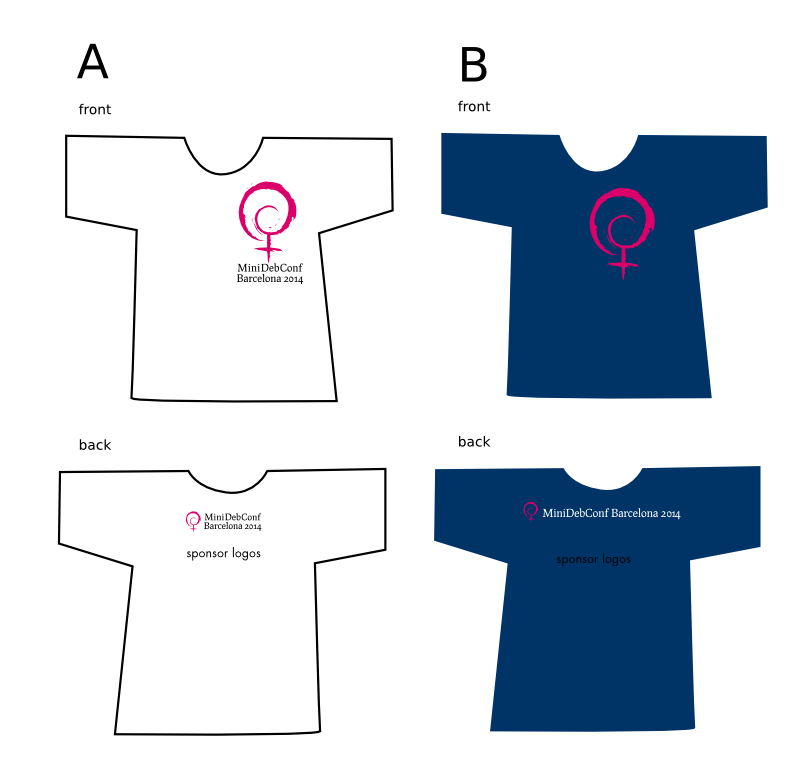
The Debian Women logo. Event name set in the font Procipio,
familiar to the Debian logo. The name is long and cannot be scaled
down much. A version with the name set in two lines can be used
in narrow space, like on a folder.
The speech bubbles could be used in a varied form. I've stated a
few important statements here. I'd like a shared list of
statements.
There must be other info on the poster as well.
The white space at the bottom is for sponsor logos.
The font I use in the speech bubbles in this draft is an Apple font
called Flood. I'd like to find a free font with similar qualities.
The statement in the speech bubble could easily be exchanged.
There are many possibilities. I like the idea of printing just
a speech bubble in the front and give people the opportunity to
write their personal statements with textile pens.
Nametags could be badges to be filled out on the spot with a pen.
Click on the image for full size version.
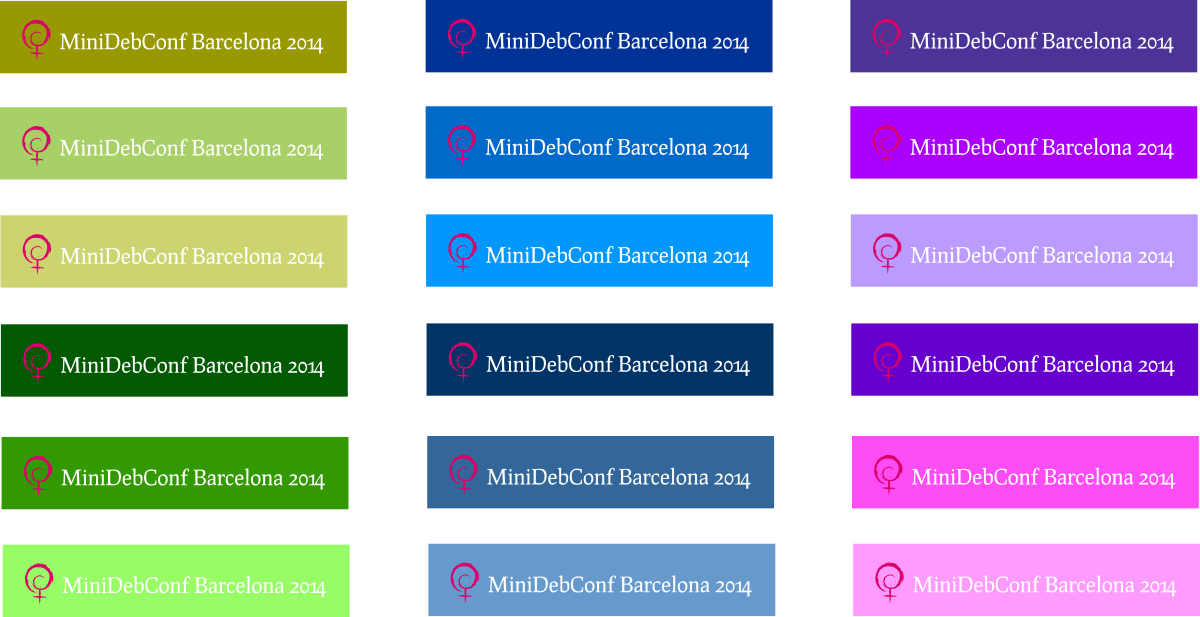
Here is an idea based on all the purple colors. Fun, uplifting,
feels like many voices. Too many colors for T-shirt print, maybe:
Here is some ideas of how to implement a minimalistic
solution that I recommend for minidebconfs:
My suggestion is that the banner (and everything else
displaying the event) has the logo of the organizers placed on
it. The font used for headlines etc is semantically of another
nature than the logo, though it could be the same. I prefer
neutral fonts, that can be reused by the next minidebconf, and I
suggest a sans serif font. A condensed font makes huge display
easier to fit.
Don't be confused by displayfonts, I aim to show you that type
alone speaks loudly, and if this typography should be recycled,
we should not choose one of them, but go with the "neutral" sans
serif.
I need suggestions of free and good sans serif fonts.
I see no danger of that. They use speech bubbles and orange.
So does the telecompany Orange (if it still exists) - and Ubuntu.
By the way, I see in this small size that my new choice of
font for the speech bubbles is too weak. It needs more work.
It's been suggested I try out a brighter orange.
The color in the middle is my original choice, the one at the
top is fine, but you can almost tell no difference, when they
are not placed closely together.
The same danger of confusion will (not) be there with any orange
from "curry" to "crocus".
I show the color in the bottom because it makes it evident how
narrow the gap between these colors is - there is very tight
room for adjustments. Yellow is too bright and cheap looking,
like a discount sign color.
I've looked into other colors, but so far I've not found any
good replacement, since I no longer have any gut feeling to
hang my hat on, except for the Debian logo color - they have
to be a good match. I know I'm free to do whatever, Jonas just
reminded me, but of all the colors in the World, thinking of
Spain, I only feel orange. Not blue, not green, not purple.
Red is already used. Yellow looks cheap. A dusty palette is not
uplifting
I could choose a pink, and that would actually be fun. But pink
is not serious. Pink can't be taken seriously. Like women can't?
OK, now it's gotta be pink!
Well, I'm not really serious now.
The serious thing to do for me now will be to watch some Spanish
movies to get a new gut feeling about Spain. A dosis of Almod var
would be suitable. Alternatively I must chat with some Spanish friends.
But maybe, just maybe, the Barcelona organizers will be just as
happy with the new orange color as I am. Life can sometimes be
that easy.
| Domain | sip-ws1.example.org |
|---|---|
| WebSocket URL Use this in JSCommunicator or JsSIP |
ws://sip-ws1.example.org |
| IP address of server | 198.51.100.50 |
sip-ws1.example.org. IN A 198.51.100.50Notice that in the ws:// URL, we do not specify a port. This means port 80 is used by default. You can also use a non-standard port if you prefer or if you dont' have root permissions. Now edit the file /etc/repro/repro.config, adding a transport definition for WebSockets (WS) and change a few other parameters from their defaults:
# Bind to 198.51.100.50 on port 80 Transport1Interface = 198.51.100.50:80 # Use WS (can also use WSS for TLS, see repro.config for full details) Transport1Type = WS # if using WSS, must also change the transport param here Transport1RecordRouteUri = sip:sip-ws1.example.org;transport=WS EnableFlowTokens = true DisableOutbound = false # Disable all authentication - just for testing DisableAuth = false # allow http admin access on all interfaces, # default is 127.0.0.1 # HttpBindAddress = 0.0.0.0Now set up a password for the web admin tool using htdigest:
# htdigest /etc/repro/users.txt repro adminAfter all that, restart the repro process
# service repro restartGo to the web interface on port 5080 (only listening on localhost by default), go to the "ADD DOMAIN" page and add sip-ws1.example.org Now restart repro again so it recognises the new domain.
# service repro restartFinally, you can test it using JSCommunicator or tryit.jssip.net Next steps
Brainfuck.
I've been playing with brainfuck for my holiday project. It seems like an easy enough language to write an interpreter and compiler.
So far I've implemented several C++ interpreters and x86_64 assembly, refreshing to read x86_64 ABI documentation to see that it's not quite the same as x86. I thought rax was going to be used as first parameter, but rdi is used instead, hmmm why did I think so.
So the Kelly report of the independent review into the events leading to the Co-operative Bank s capital shortfall was published yesterday. During the day, I was putting odd bits from it out in 140 characters with the hashtags #coops #kellylessons. Here they are in one more permanent place. How many of these lessons has your organisation whether a co-op or not learned?
Next.