Search Results: "ron"

21 July 2014

Francois Marier: Creating a modern tiling desktop environment using i3

Modern desktop environments like GNOME and KDE involving a lot of mousing around and I much prefer using the keyboard where I can. This is why I switched to the Ion tiling window manager back when I interned at Net Integration Technologies and kept using it until I noticed it had been removed from Debian. After experimenting with awesome for 2 years and briefly considering xmonad , I finally found a replacement I like in i3. Here is how I customized it and made it play nice with the GNOME and KDE applications I use every day.

Startup script As soon as I log into my desktop, my startup script starts a few programs, including: Because of a bug in gnome-settings-daemon which makes the mouse cursor disappear as soon as gnome-settings-daemon is started, I had to run the following to disable the offending gnome-settings-daemon plugin:
dconf write /org/gnome/settings-daemon/plugins/cursor/active false

Screensaver In addition, gnome-screensaver didn't automatically lock my screen, so I installed xautolock and added it to my startup script:
xautolock -time 30 -locker "gnome-screensaver-command --lock" &
to lock the screen using gnome-screensaver after 30 minutes of inactivity. I can also trigger it manually using the following shortcut defined in my ~/.i3/config:
bindsym Ctrl+Mod1+l exec xautolock -locknow

Keyboard shortcuts While keyboard shortcuts can be configured in GNOME, they don't work within i3, so I added a few more bindings to my ~/.i3/config:
# volume control
bindsym XF86AudioLowerVolume exec /usr/bin/pactl set-sink-volume @DEFAULT_SINK@ -- '-5%'
bindsym XF86AudioRaiseVolume exec /usr/bin/pactl set-sink-volume @DEFAULT_SINK@ -- '+5%'
# brightness control
bindsym XF86MonBrightnessDown exec xbacklight -steps 1 -time 0 -dec 5
bindsym XF86MonBrightnessUp exec xbacklight -steps 1 -time 0 -inc 5
bindsym XF86AudioMute exec /usr/bin/pactl set-sink-mute @DEFAULT_SINK@ toggle
# show battery stats
bindsym XF86Battery exec gnome-power-statistics
to make volume control, screen brightness and battery status buttons work as expected on my laptop. These bindings require the following packages:

Keyboard layout switcher Another thing that used to work with GNOME and had to re-create in i3 is the ability to quickly toggle between two keyboard layouts using the keyboard. To make it work, I wrote a simple shell script and assigned a keyboard shortcut to it in ~/.i3/config:
bindsym $mod+u exec /home/francois/bin/toggle-xkbmap

Suspend script Since I run lots of things in the background, I have set my laptop to avoid suspending when the lid is closed by putting the following in /etc/systemd/login.conf:
HandleLidSwitch=lock
Instead, when I want to suspend to ram, I use the following keyboard shortcut:
bindsym Ctrl+Mod1+s exec /home/francois/bin/s2ram
which executes a custom suspend script to clear the clipboards (using xsel), flush writes to disk and lock the screen before going to sleep. To avoid having to type my sudo password every time pm-suspend is invoked, I added the following line to /etc/sudoers:
francois  ALL=(ALL)  NOPASSWD:  /usr/sbin/pm-suspend

Window and workspace placement hacks While tiling window managers promise to manage windows for you so that you can focus on more important things, you will most likely want to customize window placement to fit your needs better.

Working around misbehaving applications A few applications make too many assumptions about window placement and are just plain broken in tiling mode. Here's how to automatically switch them to floating mode:
for_window [class="VidyoDesktop"] floating enable
You can get the Xorg class of the offending application by running this command:
xprop   grep WM_CLASS
before clicking on the window.

Keeping IM windows on the first workspace I run Pidgin on my first workspace and I have the following rule to keep any new window that pops up (e.g. in response to a new incoming message) on the same workspace:
assign [class="Pidgin"] 1

Automatically moving workspaces when docking Here's a neat configuration blurb which automatically moves my workspaces (and their contents) from the laptop screen (eDP1) to the external monitor (DP2) when I dock my laptop:
# bind workspaces to the right monitors
workspace 1 output DP2
workspace 2 output DP2
workspace 3 output DP2
workspace 4 output DP2
workspace 5 output DP2
workspace 6 output eDP1
You can get these output names by running:
xrandr --display :0   grep " connected"
Finally, because X sometimes fail to detect my external monitor when docking/undocking, I also wrote a script to set the displays properly and bound it to the appropriate key on my laptop:
bindsym XF86Display exec /home/francois/bin/external-monitor

Keith Packard: Glamorous Intel

Reworking Intel Glamor The original Intel driver Glamor support was based on the notion that it would be better to have the Intel driver capture any fall backs and try to make them faster than Glamor could do internally. Now that Glamor has reasonably complete acceleration, and its fall backs aren t terrible, this isn t as useful as it once was, and because this uses Glamor in a weird way, we re making the Glamor code harder to maintain. Fixing the Intel driver to not use Glamor in this way took a bit of effort; the UXA support is all tied into the overall operation of the driver. Separating out UXA functions The first task was to just identify which functions were UXA-specific by adding _uxa to their names. A couple dozen sed runs and now a bunch of the driver is looking better. Next, a pile of UXA-specific functions were actually inside the non-UXA parts of the code. Those got moved out, and a new intel_uxa.h file was created to hold all of the definitions. Finally, a few non UXA-specific functions were actually in the uxa files; those got moved over to the generic code. Removing the Glamor paths in UXA Each one of the UXA functions had a little piece of code at the top like:
if (uxa_screen->info->flags & UXA_USE_GLAMOR)  
    int ok = 0;
    if (uxa_prepare_access(pDrawable, UXA_GLAMOR_ACCESS_RW))  
        ok = glamor_fill_spans_nf(pDrawable,
                      pGC, n, ppt, pwidth, fSorted);
        uxa_finish_access(pDrawable, UXA_GLAMOR_ACCESS_RW);
     
    if (!ok)
        goto fallback;
    return;
 
Pulling those out shrank the UXA code by quite a bit. Selecting Acceleration (or not) The intel driver only supported UXA before; Glamor was really just a slightly different mode for UXA. I switched the driver from using a bit in the UXA flags to having an accel variable which could be one of three options: I added ACCEL_NONE to give us a dumb frame buffer mode. That actually supports DRI3 so that we can bring up Mesa and run it under X before we have any acceleration code ready; avoiding a dependency loop when doing new hardware. All that it requires is a kernel that offers mode setting and buffer allocation. Initializing Glamor With UXA no longer supporting Glamor, it was time to plug the Glamor support into the top of the driver. That meant changing a bunch of the entry points to select appropriate Glamor or UXA functionality, instead of just calling into UXA. So, now we ve got lots of places that look like:
        switch (intel->accel)  
#if USE_GLAMOR
        case ACCEL_GLAMOR:
                if (!intel_glamor_create_screen_resources(screen))
                        return FALSE;
                break;
#endif
#if USE_UXA
        case ACCEL_UXA:
                if (!intel_uxa_create_screen_resources(screen))
                        return FALSE;
        break;
#endif
        case ACCEL_NONE:
                if (!intel_none_create_screen_resources(screen))
                        return FALSE;
                break;
         
Using a switch means that we can easily elide code that isn t wanted in a particular build. Of course accel is an enum, so places which are missing one of the required paths will cause a compiler warning. It s not all perfectly clean yet; there are piles of UXA-only paths still. Making It Build Without UXA The final trick was to make the driver build without UXA turned on; that took several iterations before I had the symbols sorted out appropriately. I built the driver with various acceleration options and then tried to count the lines of source code. What I did was just list the source files named in the driver binary itself. This skips all of the header files and the render program source code, and ignores the fact that there are a bunch of #ifdef s in the uxa directory selecting between uxa, glamor and none.
    Accel                    Lines          Size(B)
    -----------             ------          -------
    none                      7143            73039
    glamor                    7397            76540
    uxa                      25979           283777
    sna                     118832          1303904
    none legacy              14449           152480
    glamor legacy            14703           156125
    uxa legacy               33285           350685
    sna legacy              126138          1395231
The legacy addition supports i810-class hardware, which is needed for a complete driver. Along The Way, Enable Tiling for the Front Buffer While hacking the code, I discovered that the initial frame buffer allocated for the screen was created without tiling (!) because a few parameters that depend on the GTT size were not initialized until after that frame buffer was allocated. I haven t analyzed what effect this has on performance. Page Flipping and Resize Page flipping (or just flipping) means switching the entire display from one frame buffer to another. It s generally the fastest way of updating the screen as you don t have to copy any bits. The trick with flipping is that a client hands you a random pixmap and you need to stuff that into the KMS API. With UXA, that s pretty easy as all pixmaps are managed through the UXA API which knows which underlying kernel BO is tied with each pixmap. Using Glamor, only the underlying GL driver knows the mapping. Fortunately (?), we have the EGL Image extension, which lets us take a random GL texture and turn it into a file descriptor for a DMA-BUF kernel object. So, we have this cute little dance:
fd = glamor_fd_from_pixmap(screen,
                               pixmap,
                               &stride,
                               &size);
bo = drm_intel_bo_gem_create_from_prime(intel->bufmgr, fd, size);
    close(fd);
    intel_glamor_get_pixmap(pixmap)->bo = bo;
That last bit remembers the bo in some local memory so we don t have to do this more than once for each pixmap. glamorfdfrompixmap ends up calling eglCreateImageKHR followed by gbmbo_import and then a kernel ioctl to convert a prime handle into an fd. It s all quite round-about, but it does seem to work just fine. After I d gotten Glamor mostly working, I tried a few OpenGL applications and discovered flipping wasn t working. That turned out to have an unexpected consequence all full-screen applications would run flat-out, and not be limited to frame rate. Present recovers from a failed flip queue operation by immediately performing a CopyArea; not waiting for vblank. This needs to get fixed in Present by having it re-queued the CopyArea for the right time. What I did in the intel driver was to add a bunch more checks for tiling mode, pixmap stride and other things to catch pixmaps that were going to fail before the operation was queued and forcing them to fall back to CopyArea at the right time. The second adventure was with XRandR. Glamor has an API to fix up the screen pixmap for a new frame buffer, but that pulls the size of the frame buffer out of the pixmap instead of out of the screen. XRandR leaves the pixmap size set to the old screen size during this call; fixing that just meant getting the pixmap size set correctly before calling into glamor. I think glamor should get fixed to use the screen size rather than the pixmap size. Painting Root before Mode set The X server has generally done initialization in one order:
  1. Create root pixmap
  2. Set video modes
  3. Paint root window
Recently, we ve added a -background none option to the X server which causes it to set the root window background to none and have the driver fill in that pixmap with whatever contents were on the screen before the X server started. In a pre-Glamor world, that was done by hacking the video driver to copy the frame buffer console contents to the root pixmap as it was created. The trouble here is that the root pixmap is created long before the upper layers of the X server are ready for drawing, so you can t use the core rendering paths. Instead, UXA had kludges to call directly into the acceleration functions. What we really want though is to change the order of operations:
  1. Create root pixmap
  2. Paint root window
  3. Set video mode
That way, the normal root window painting operation will take care of getting the image ready before that pixmap is ever used for scanout. I can use regular core X rendering to get the original frame buffer contents into the root window, and even if we re not using -background none and are instead painting the root with some other pattern (like the root weave), I get that presented without an intervening black flash. That turned out to be really easy just delay the call to I830EnterVT (which sets the modes) until the server is actually running. That required one additional kludge I needed to tell the DIX level RandR functions about the new modes; the mode setting operation used during server init doesn t call up into RandR as RandR lists the current configuration after the screen has been initialized, which is when the modes used to be set. Calling xf86RandR12CreateScreenResources does the trick nicely. Getting the root window bits from fbcon, setting video modes and updating the RandR/Xinerama DIX info is now all done from the BlockHandler the first time it is called. Performance I ran the current glamor version of the intel driver with the master branch of the X server and there were not any huge differences since my last Glamor performance evaluation aside from GetImage. The reason is that UXA/Glamor never called Glamor s image functions, and the UXA GetImage is pretty slow. Using Mesa s image download turns out to have a huge performance benefit:
1. UXA/Glamor from April
2. Glamor from today
       1                 2                 Operation
------------   -------------------------   -------------------------
     50700.0        56300.0 (     1.110)   ShmGetImage 10x10 square 
     12600.0        26200.0 (     2.079)   ShmGetImage 100x100 square 
      1840.0         4250.0 (     2.310)   ShmGetImage 500x500 square 
      3290.0          202.0 (     0.061)   ShmGetImage XY 10x10 square 
        36.5          170.0 (     4.658)   ShmGetImage XY 100x100 square 
         1.5           56.4 (    37.600)   ShmGetImage XY 500x500 square 
     49800.0        50200.0 (     1.008)   GetImage 10x10 square 
      5690.0        19300.0 (     3.392)   GetImage 100x100 square 
       609.0         1360.0 (     2.233)   GetImage 500x500 square 
      3100.0          206.0 (     0.066)   GetImage XY 10x10 square 
        36.4          183.0 (     5.027)   GetImage XY 100x100 square 
         1.5           55.4 (    36.933)   GetImage XY 500x500 square
Running UXA from today the situation is even more dire; I suspect that enabling tiling has made CPU reads through the GTT even worse than before?
1: UXA today
2: Glamor today
       1                 2                 Operation
------------   -------------------------   -------------------------
     43200.0        56300.0 (     1.303)   ShmGetImage 10x10 square 
      2600.0        26200.0 (    10.077)   ShmGetImage 100x100 square 
       130.0         4250.0 (    32.692)   ShmGetImage 500x500 square 
      3260.0          202.0 (     0.062)   ShmGetImage XY 10x10 square 
        36.7          170.0 (     4.632)   ShmGetImage XY 100x100 square 
         1.5           56.4 (    37.600)   ShmGetImage XY 500x500 square 
     41700.0        50200.0 (     1.204)   GetImage 10x10 square 
      2520.0        19300.0 (     7.659)   GetImage 100x100 square 
       125.0         1360.0 (    10.880)   GetImage 500x500 square 
      3150.0          206.0 (     0.065)   GetImage XY 10x10 square 
        36.1          183.0 (     5.069)   GetImage XY 100x100 square 
         1.5           55.4 (    36.933)   GetImage XY 500x500 square
Of course, this is all just x11perf, which doesn t represent real applications at all well. However, there are applications which end up doing more GetImage than would seem reasonable, and it s nice to have this kind of speed up. Status I m running this on my crash box to get some performance numbers and continue testing it. I ll switch my desktop over when I feel a bit more comfortable with how it s working. But, I think it s feature complete at this point. Where s the Code As usual, the code is in my personal repository. It s on the glamor branch.
git://people.freedesktop.org/~keithp/xf86-video-intel  glamor

Andrew Pollock: [debian] Day 173: Investigation for bug #749410 and fixing my VMs

I have a couple of virt-manager virtual machines for doing DHCP-related work. I have one for the DHCP server and one for the DHCP client, and I have a private network between the two so I can simulate DHCP requests without messing up anything else. It works nicely. I got a bit carried away, and I use LVM to snapshots for the work I do, so that when I'm done I can throw away the virtual machine's disks and work with a new snapshot next time I want to do something. I have a cron job, that on a good day, fires up the virtual machines using the master logical volumes and does a dist-upgrade on a weekly basis. It seems to have varying degrees of success though. So I fired up my VMs to do some investigation of the problem for #749410 and discovered that they weren't booting, because the initramfs couldn't find the root filesystem. Upon investigation, the problem seemed to be that the logical volumes weren't getting activated. I didn't get to the bottom of why, but a manual activation of the logical volumes allowed the instances to continue booting successfully, and after doing manual dist-upgrades and kernel upgrades, they booted cleanly again. I'm not sure if I got hit by a passing bug in unstable, or what the problem was. I did burn about 2.5 hours just fixing everything up though. Then I realised that there'd been more activity on the bug since I'd last read it while I was on vacation, and half the investigation I needed to do wasn't necessary any more. Lesson learned. I haven't got to the bottom of the bug yet, but I had a fun day anyway.

20 July 2014

John Goerzen: Beautiful Earth

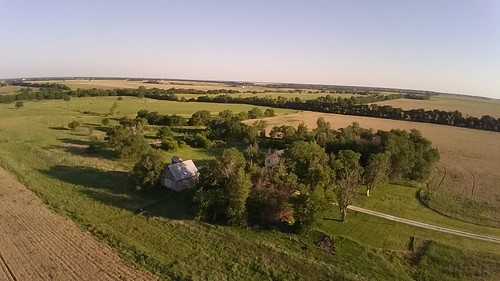
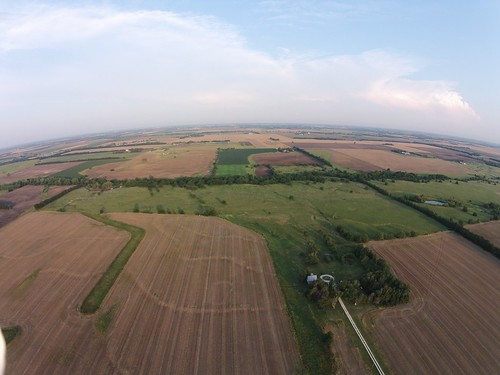
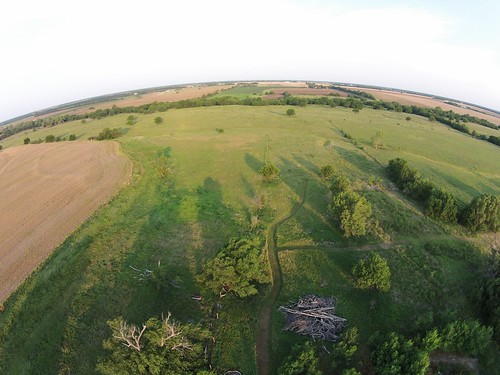
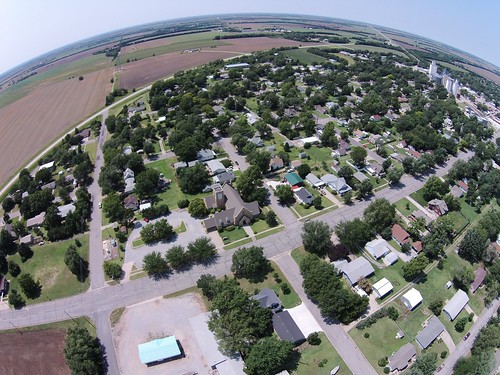
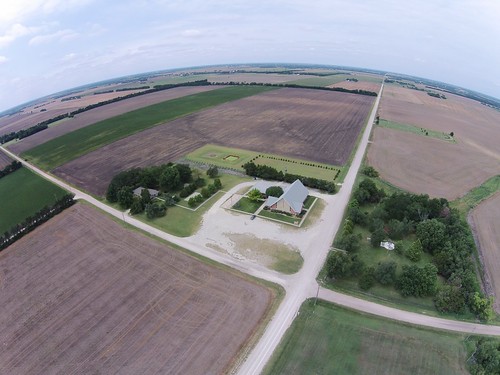
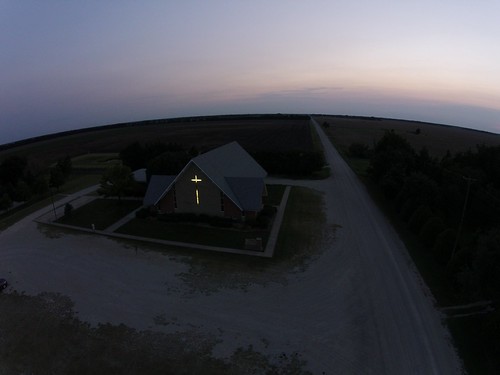
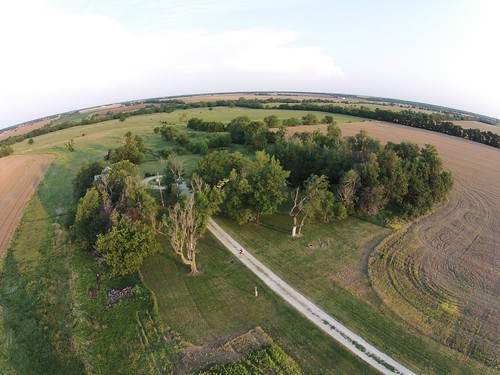
Sometimes you see something that takes your breath away, maybe even makes your eyes moist. That happened when I saw this photo one morning: Sunrise on the Prairie Photography has been one of my hobbies since I was a child, and I ve enjoyed it all these years. Recently I was inspired by the growing ease of aerial photography using model aircraft, and now can fly two short-range RC quadcopters. That photo came from the first one, and despite being a low-res 1280 720 camera, tha image of our home in the yellow glow of sunrise brought a deep feeling a beauty and peace. DJI00196 Somehow seeing our home surrounded by the beauty of the immense wheat fields and green pastures drives home how small we all are in comparison to the vastness of the earth, and how lucky we are to inhabit this beautiful planet. DJI00204 As the sun starts to come up over the pasture, the only way you can tell the height of the grass at 300ft is to see the shadow it makes on the mowed pathway Laura and I use to get down to the creek. DJI00149 This is a view of our church in a small town nearby the church itself is right in the center of the photo. Off to the right, you see the grain elevators that can be seen for miles across the Kansas prairie, and of course the fields are never all that far off in the background. Here you can see the quadcopter taking off from the driveway: And here it is flying over my home church out in the country: DJI00120 That s the country church, at the corner of two gravel roads with its lighted cross facing east that can be seen from a mile away at night. To the right is the church park, and the green area along the road farther back is the church cemetery. DJI00063 Sometimes we get in debates about environmental regulations, politics, religion, whatever. We hear stories of missiles, guns, and destruction. It is sad, this damage we humans inflict on ourselves and our earth. Our earth our home is worth saving. Its stunning beauty from all its continents is evidence enough of that. To me, this photo of a small corner of flat Kansas is proof enough that the home we all share deserves to be treated well, and saved so that generations to come can also get damp eyes viewing its beauty from a new perspective. DJI00183

18 July 2014

Osamu Aoki: Debian does not boot ...Crucial/Micron RealSSD m4/C400/P400

Today, my PC did not boot as usual to Debian. BIOS could not find my /dev/sda and was looking for the netboot image. I restarted my PC and got into the BIOS boot setting menu. Hmmm.... my first SDD (/dev/sda) was missing. My second HDD (/dev/sdb) was there. But I did not put the Grub boot-loader there. No wonder it did not boot.

I have a 32GB USB3 stick with the full Debian system. It is not a live CD image USB stick but a HDD formatted and encrypted system. Though it is not the fastest system, it is very light and usable. I plugged it in and powered it up. It booted OK but /dev/sda was still missing. While it booted, I saw "ata1: COMRESET failed (errorno=-16)" . So this ata1 SSD cannot be accessed from BIOS nor Linux. Sigh ...

Looking around the web under the USB stick system, I saw some people were talking that the loose serial ATA cable sometimes causes this message. Since my PC is a laptop, It has no flexible cable but has an on-board connector inside for the SSD.

Hoping my problem is just a bad connection problem, I crack opened the back panel of my PC. The SSD looked fine. I unplugged it from the connector and reinserted back into the connector. After repeating this several times to be sure, I closed the back panel and booted.

It boots as expected into Debian. Looks like everything is fine.
SMART Error Log Version: 1
No Errors Logged
Good.

If you have any boot problem like mine, please reinsert your SSD to the connector like I did before you panic.

Good luck.

Osamu

PS: This Crucial/Micron RealSSD m4/C400/P400 M4-CT256M4SSD2 previously had a problem. A firmware bug made it read-only. The firmware updates fixed my Debian system on this SSD. I could fix this without Win*** OS since the firmware update was on a bootable disk image file.

Mario Lang: Croudsourced accessibility: Self-made digital menus

Something straight out from the real world: Menu cards in restaurants are not nice to deal with if you are blind. It is an old problem we grow used to ignoring over time, but still something that can be quite nagging. There are a lot of psychological issues involved in this one. Of course, you can ask for the menu to be read out to you by the staff. While they usually do their best, you end up missing out on some things most of the time. First of all, depending on the current workload in the restaurant, the staff will usually try to cut some time and not read everything to you. What they usually do is to try to understand what type of meal you are interested in, and just read the choices from that category to you. While this can be considered a service in some situations (human preprocessing), there are situations were you will definitely miss a highlight on the menu that you would have liked to choose if you knew that it was there. And even if the staff decides to read the complete menu to you (which is rare), you are confronted with the 7-things-in-my-head-at-once problem. It is usually rather hard to decide amongst a list of more then 7 items, because our short-term memory is sort of limited. What the sighted restaurant goers do, is to skip back and forth between the available options, until they hit a decisive moment. True, that can take a while, but it is definitely a lot easier if you can perform "random access reads" to the list of choices yourself. However, if someone presents a substantial number of choices to you in a row, as sequential speech, you loose the random access ability. You either remember every choice from the beginning and do your choosing mentaully (if you do have extraordinary mental abilities), or you end up asking the staff to read previous items aloud again. This can work, but usually it doesn't. At some point, you do not want to bother the staff anymore, and you even start to feel stupid for asking again and again, while this is something totally normal to every sighted person, just that "they" do their "random access browsing" on their own, so "they" have no need to feel bad about how long it takes them to decide, minus the typical social pressure that arises after a a certain time for everyone, at least if you are dining in a group. In very rare cases, you happen to meet staff that is truly "awake", doing their best to not let you feel that they might be pressed on time, and really taking as much time as necessary to help you make the perfect decision. This is rare, but if it happens, it is almost a magical moment. One of these moments, where there are no "artificial" barriers between humans doing communcation. Anyway, I am drifting away. The perfect solution to this problem is to provide random access browsing of a restaurant menu with the help of digital devices. Trying to make braille menus available in all restaurants is a goal which is not realistically reachable. Menus go out of date, and need changing. And getting a physical braille copy updated and reprinted is considerably more involved as with digital media. Restaurant owners will also likely not see the benefit to rpvide a braille card for a very small circle of customers. With a digital online menu, that is a completely different story. These days, almost every blind person in at least my social circles owns an iOS (or similar) device. These devices have speech synthesis and web browsers. Of course, some restaurants especially in urban areas do already have a menu online. I have found them manually with google and friends sometimes in the past, which has already given me the ability to actually sit back, and really comfortably choose amongst the available offerings myself, without having to bother a human, and without having to feel bad about (ab)using their time. However, the case where a restaurant really has their menu online is rather rare still in the area where I am. And, it can be tedious to google for a restaurant website. Sometimes, the website itself is just marginally accessible, which makes it even more frustrating to get a relaxed dinner-experience. I have discovered a location-based solution for the restaurant-menu problem recently. Foursquare offers the ability to provide a direct link to the menu in a restaurant-entry. I figured, since all you need to do is write a single webpage where the (common) menu items are listed per restaurant, that I could begin to create restaurant menus for my favourite locations, on my own. Well, not quite, but almost. I will sometimes need help from others to get the menu digitized, but that's just a one-time piece of work I hopefully can outsource :-). Once the actual content is in my INBUX, I create a nice HTML page listing the menu in a rather speech-based browser friendly way. I have begun to do this today, with the menu of a restaurant just about 500 meters away from my apartment. Unterm goldenen Dachl now has a menu online, and the foursquare change request to publish the corresponsing URL is already pending. I don't fully understand how the Foursquare change review process works yet, but I hope the URL should be published in the upcoming days/weeks. I am using Foursquare because it is the backend of a rather popular mobile navigation App for blind people, called Blindsquare. Blindsquare lets you comfortably use Open Street Map and Foursquare data to get an overview of your surroundingds. If a food place has a menu entry listed in Foursquare, Blindsquare conveniently shows it to you and opens a browser if you tap it. So there is no need to actually search for the restaurant, you can just use the location based search of Blindsquare to discover the restaurant entry and its menu link directly from within Blindsquare. Actually, you could even find a restaurant by accident, and with a little luck, find the menu for it by location, without even knowing how the restaurant is called. Isn't that neat? Yeah, that's how it is supposed to work, that's as much independence as you can get. And, it is, as the title suggests, croudsourced accessibility. Becuase while it is nice if a restaurant owner cares to publish their menu themselves, if they haven't, you can do it yourself. Either as a user of assistive technologies, to scratch your own itch. Or as a friend of a person with a need for assistive technologies. Next time you go to lunch with your blind friend, consider making available the menu to them digitally in advance, instead of reading it. Other people will likely thank you for that, and you have actually achieved something today. And if you happne to put a menu online, make sure to submit a change request to Foursquare. Many blind people are using blindsquare these days, which makes it super-easy for them to discover the menu.

17 July 2014

Jonathan McDowell: On the state of Free VoIP

Every now and then I decide I'll try and sort out my VoIP setup. And then I give up. Today I tried again. I really didn't think I was aiming that high. I thought I'd start by making my email address work as a SIP address. Seems reasonable, right? I threw in the extra constraints of wanting some security (so TLS, not UDP) and a soft client that would work on my laptop (I have a Grandstream hardphone and would like an Android client as well, but I figure those are the easy cases while the "I have my laptop and I want to remain connected" case is a bit trickier). I had a suitable Internet connected VM, access to control my DNS fully (so I can do SRV records) and time to read whatever HOWTOs required. And oh my ghod the state of the art is appalling. Let's start with getting a SIP server up and running. I went with repro which seemed to be a reasonably well recommended SIP server to register against. And mostly getting it up and running and registering against it is fine. Until you try and make a TLS SIP call through it (to a sip5060.net test address). Problem the first; the StartCom free SSL certs are not suitable because they don't advertise TLS Client. So I switch to CACert. And then I get bitten by the whole question about whether the common name on the cert should be the server name, or the domain name on the SIP address (it's the domain name on the SIP address apparently, though that might make your SIP client complain). That gets the SIP side working. Of course RTP is harder. repro looks like it's doing the right thing. The audio never happens. I capitulate at this point, and install Lumicall on my phone. That registers correctly and I can call the sip:test.time@sip5060.net test number and hear the time. So the server is functioning, it's the client that's a problem. I try the following (Debian/testing): I'm bored at this point. Can I "dial" my debian.org SIP address from Lumicall? Of course not; I get a "Codecs incompatible" (SIP 488 Not Acceptable Here) response. I have no idea what that means. I seem to have all of the options on Lumicall enabled. Is it a NAT thing? A codec thing? Did I sacrifice the wrong colour of goat? At some point during this process I get a Skype call from some friends, which I answer. Up comes a video call with them, their newborn, perfect audio, and no hassle. I have a conversation with them that doesn't involve me cursing technology at all. And then I go back to fighting with SIP. Gunnar makes the comment about Skype creating a VoIP solution 10 years ago when none was to be found. I believe they're still the market leader. It just works. I'm running the Linux client, and they're maintaining it (a little behind the curve, but close enough), and it works for text chat, voice chat and video calls. I've spent half a day trying to get a Free equivalent working and failing. I need something that works behind NAT, because it's highly likely when I'm on the move that's going to be the case. I want something that lets my laptop be the client, because I don't want to rely on my mobile phone. I want my email address to also be my VoIP address. I want some security (hell, I'm not even insisting on SRTP, though I'd like to). And the state of the Open VoIP stack just continues to make me embarrassed. I haven't given up yet, but I'd appreciate some pointers. And Skype, if you're hiring, drop me a line. ;)

Daniel Pocock: MH17 and the elephant in the room

Just last week, air passengers were told of intrusive new checks on their electronic devices when flying. For years, passengers have also suffered bans on basic essentials like drinking water and excesses like the patting down of babies that even Jimmy Saville would find offensive. Of course, all this is being done for public safety. So if western leaders claim the safety and security of their citizens is really their number one priority, just how is it that a passenger aircraft can be flying through a war zone where two other planes were shot down this month? When it comes to aviation security, this really is the elephant in the room. The MH17 tragedy today demonstrates that terror always finds a way. It is almost like the terrorists can have their cake and eat it too: they force "free" countries to give up their freedoms and public decency and then they still knock the occasional plane out of the sky anyway. History in the making? It is 100 years since the assassination of Austrian Archduke Franz Ferdinand started World War I and just over 50 years since the Cuban missile crisis. Will this incident also achieve similar notoriety in history? The downing of MH17 may well have been a "mistake" but the casualties are real and very tragic indeed. I've flown with Malaysia Airlines many times, including the same route MH17 and feel a lot of sympathy for these people who have been affected.

Tiago Bortoletto Vaz: HOPE X ical for schedule

As Adirondack (train line MTL-NYC) is not Internet-friendly for RSS feeds I can't profit of my ~11h travelling to check this huge schedule in the way I want to, (= having a timetable view including room, description and speakers). HOPE X has just released a pdf and a xls (wtf??), but these contain only titles and room. So I've coded an ics generator to process their feed. The result file is available at http://acaia.ca/hopex.ics and should be up to date with the original RSS.

16 July 2014

Dirk Eddelbuettel: Introducing RcppParallel: Getting R and C++ to work (some more) in parallel

A common theme over the last few decades was that we could afford to simply sit back and let computer (hardware) engineers take care of increases in computing speed thanks to Moore's law. That same line of thought now frequently points out that we are getting closer and closer to the physical limits of what Moore's law can do for us. So the new best hope is (and has been) parallel processing. Even our smartphones have multiple cores, and most if not all retail PCs now possess two, four or more cores. Real computers, aka somewhat decent servers, can be had with 24, 32 or more cores as well, and all that is before we even consider GPU coprocessors or other upcoming changes. And sometimes our tasks are embarassingly simple as is the case with many data-parallel jobs: we can use higher-level operations such as those offered by the base R package parallel to spawn multiple processing tasks and gather the results. I covered all this in some detail in previous talks on High Performance Computing with R (and you can also consult the Task View on High Performance Computing with R which I edit). But sometimes we can't use data-parallel approaches. Hence we have to redo our algorithms. Which is really hard. R itself has been relying on the (fairly mature) OpenMP standard for some of its operations. Luke Tierney's (awesome) keynote in May at our (sixth) R/Finance conference mentioned some of the issues related to OpenMP. One which matters is that OpenMP works really well on Linux, and either not so well (Windows) or not at all (OS X, due the usual issue with the gcc/clang switch enforced by Applem but the good news is that the OpenMP toolchain is expected to make it to OS X is some more performant form "soon"). R is still expected to make wider use of OpenMP in future versions. Another tool which has been around for a few years, and which can be considered to be equally mature is the Intel Threaded Building Blocks library, or TBB. JJ recently started to wrap this up for use by R. The first approach resulted in a (now superseded, see below) package TBB. But hardware and OS issues bite once again, as the Intel TBB is not really building that well for the Windows toolchain used by R (and based on MinGW). (And yes, there are two more options. But Boost Threads requires linking which precludes easy use as e.g. via our BH package. And C++11 with its threads library (based on Boost Threads) is not yet as widely available as R and Rcpp which means that it is not a real deployment option yet.) Now, JJ, being as awesome as he is, went back to the drawing board and integrated a second threading toolkit: TinyThread++, a small header-only library without further dependencies. Not as feature-rich as Intel Threaded Building Blocks, but at least available everywhere. So a new package RcppParallel, so far only on GitHub, wraps around both TinyThread++ and Intel Threaded Building Blocks and offers a consistent interface available on all platforms used by R. Better still, JJ also authored several pieces demonstrating this new package for the Rcpp Gallery: All four are interesting and demonstrate different aspects of parallel computing via RcppParallel. But the last article is key. Based on a question by Jim Bullard, and then written with Jim, it shows how a particular matrix distance metric (which is missing from R) can be implemented in a serial manner in both R, and also via Rcpp. The key implementation, however, uses both Rcpp and RcppParallel and thereby achieves a truly impressive speed gain as the gains from using compiled code (via Rcpp) and from using a parallel algorithm (via RcppParallel) are multiplicative! Between JJ's and my four-core machines the gain was between 200 and 300 fold---which is rather considerable. For kicks, I also used a much bigger machine at work which came in at an even larger speed gain (but gains become clearly sublinear as the number of cores increases; there are however some tuning parameters). So these are exciting times. I am sure there will be lots more to come. For now, head over to the RcppParallel package and start playing. Further contributions to the Rcpp Gallery are not only welcome but strongly encouraged.

Jon Dowland: Mac

My job exposes me to a large variety of computing systems and I regularly use Mac, Windows and Linux desktops. My main desktop environment at home and work has been Debian GNU/Linux for over 10 years. However every now and then I take a little "holiday" and use something else for a few weeks. Often I'm spurred on by some niggle or other on the GNOME desktop, or burn-out with whatever the current contentious issue of the moment is in Debian. Usually I switched to Windows and I used it as an excuse to play some computer games. Last November I had just such an excuse to take a holiday but this time I opted to go for Mac. I had a back-log of Mac issues to investigate at work anyway. I haven't looked back. It appears I have switched for good. I've been meaning to write about this for some time, but I couldn't quite get the words right. I doubted I could express my frustrations in a constructive, helpful way, even if I think that my experiences are useful and my discoveries valuable, perhaps I would put them across in a way that seemed inciteful rather than insightful. I wasn't sure anyone cared. Certainly the GNOME community doesn't seem interested in feedback. I turns out that one person that doesn't care is me: I didn't realise just how broken the F/OSS desktop is. The straw that broke the camel's back was the file manager replacing type-ahead find with a search but (to seemlessly switch metaphor) it turns out I'd been cut a thousand times already. I'm not just on the other side of the fence, I'm several fields away. Sometimes community people write about their concerns with whether they're going in the right direction, or how to tell the difference between legitimate complaints, trolls and whiners. When I look at conferences now, the sea of Thinkpads was replaced with a sea of Apple Macs a long time ago now, and the Thinkpads haven't come back. I'd suggest: don't worry about the whiners. Worry about the leavers. What does this mean for my Debian involvement? Well, you can't help but have noticed that I've done very little this year. I've written nearly exclusively about music so far. the good news is: I still regularly use Debian, and I still intend to stay involved, just not on the desktop. I'm essentially only maintaining two packages now, lhasa and squishyball. I might pick up a few more (possibly archivemail if the situation doesn't improve) but I'm happy with a low package load; I'd like to make sure the ones I do maintain are maintained well. The sum of all my Debian efforts this year have been to get these two (or three) ship-shape. I have a bunch of other things I'd like to achieve in Debian which are not packages, and a larger package load would just distract from them. (We really are too package-oriented in Debian).

13 July 2014

Laura Arjona: New GPG Key!

Achievement unlocked: I have a new GPG key:

0xF22674467E4AF4A3

pub 4096R/7E4AF4A3 2014-07-13 [caduca: 2016-07-12]
Fingerprint = 445E 3AD0 3690 3F47 E19B 37B2 F226 7446 7E4A F4A3
uid Laura Arjona Reina <laura.arjona@upm.es>
uid Laura Arjona Reina <larjona@fsfe.org>
uid Laura Arjona Reina <larjona99@gmail.com>
sub 3072R/CC706B74 2014-07-13 [expires: 2016-07-12]
sub 3072R/7E51465F 2014-07-13 [expires: 2016-07-12]
sub 4096R/74C23D6E 2014-07-13 [expires: 2016-07-12]

The master key is 4096 bit, stored in a safe place, and 2 subkeys 3072 bit, stored in an FSFE Smartcard (I cannot store 4096 keys there).

I have carefully used the FSFE SmartCard Howto and Creating the perfect GPG keypair by Alex Cabal for strenghtening hash preferences and creating revocation certificate.

It seems everything works as intended. Passphrase is strong and this time I will not forget it. As first celebration, 1/2 lt icecream is waiting for me after dinner :)

People knowing me and around Madrid, please send me an encrypted mail as test or normal communication, and ping me to meet and sign keys :) One more step towards involvement in Debian and free software, controlling my digital life and communications, and becoming familiar with these technologies so I can teach them to my son as the natural way . Yay!
Filed under: My experiences and opinion, Tools Tagged: Contributing to libre software, Debian, encryption, English, Free Software, gpg, libre software, Moving into free software, mswl-cases

10 July 2014

Russell Coker: A Linux Conference as a Ritual

Sociological Images has an interesting post by Jay Livingston PhD about a tennis final as a ritual [1]. The main point is that you can get a much better view of the match on your TV at home with more comfort and less inconvenience, so what you get for the price of the ticket (and all the effort of getting there) is participating in the event as a spectator. It seems to me that the same idea applies to community Linux conferences (such as LCA) and some Linux users group meetings. In terms of watching a lecture there are real benefits to downloading it after the conference so that you can pause it and study related web sites or repeat sections that you didn t understand. Also wherever you might sit at home to watch a video of a conference lecture you will be a lot more comfortable than a university lecture hall. Some people don t attend conferences and users group meetings because they would rather watch a video at home. Benefits of Attending (Apart from a Ritual) One of the benefits of attending a lecture is the ability to ask questions. But that seems to mostly apply to the high status people who ask most questions. I ve previously written about speaking stacks and my observations about who asks questions vs the number that can reasonably be asked [2]. I expect that most delegates ask no questions for the entire conference. I created a SurveyMonkey survey to discover how many questions people ask [3]. I count LCA as a 3 day conference because I am only counting the days where there are presentations that have been directly approved by the papers committee, approving a mini-conf (and thus delegating the ability to approve speeches) is different. Another benefit of attending is the so-called hallway track where people talk to random other people. But that seems to be of most benefit to people who have some combination of high status in the community and good social skills. In the past I ve attended the Professional Delegates Networking Session which is an event for speakers and people who pay the Professional registration fee. Sometimes at such events there has seemed to be a great divide between speakers (who mostly knew each other before the conference) and Professional Delegates which diminishes the value of the event to anyone who couldn t achieve similar benefits without it. How to Optimise a Conference as a Ritual To get involvement of people who have the ritualistic approach one could emphasise the issue of being part of the event. For example to get people to attend the morning keynote speeches (which are sometimes poorly attended due to partying the night before) one could emphasise that anyone who doesn t attend the keynote isn t really attending the conference. Conference shirts seem to be strongly correlated with the ritual aspect of conferences, the more corporate conferences don t seem to offer branded clothing to delegates. If an item of branded schwag was given out before each keynote then that would increase the attendance by everyone who follows the ritual aspect (as well as everyone who just likes free stuff). Note that I m not suggesting that organisers of LCA or other conferences go to the effort of giving everyone schwag before the morning keynote, that would be a lot of work. Just telling people that anyone who misses the keynote isn t really attending the conference would probably do. I ve always wondered why conference organisers want people to attend the keynotes and award prizes to random delegates who attend them. Is a keynote lecture a ritual that is incomplete if the attendance isn t good enough?

9 July 2014

Junichi Uekawa: Having fun with lisp.

Having fun with lisp. I was writing lisp interpreter in C++ using boost::spirit. I am happy that my eval can do lambda. Took me a long time to figure out what was wrong with the different types. The data structure was recursive, and I needed to make a recursive type. make_recursive_variant works but it's not obvious when it doesn't.

8 July 2014

Matthew Palmer: Doing Password Complexity Wrong

I just made an account on yet another web service. On the suggestion of my password manager, I attempted to use the password W:9[$X*F . It was rejected because Password must contain at least one non-alphabet character, one lowercase letter, one uppercase letter . OK, how about Passw0rd ? Yep, that s fine. Anyone want to guess which of those two passwords is going to fall victim to a brute-force attack first? Go on, don t be shy, take a wild shot in the dark!

Joey Hess: laptop death

So I was at Ocracoke island, camping with family, and I brought my laptop along as I've done probably half a dozen times before. An enormous thuderstorm came up. It rained for 8 hours and thundered for 3 of those. Some lightning cracks quite close by as we crouched in the food tent, our feet up off the increasingly wet ground "just in case". The campground flooded. Luckily we were camped in the dunes and tents mostly avoided being flooded with 2-3 inches of water. (That was just the warmup; a hurricane hit a week after we left.) My laptop was in my tent when this started, and I got soaked to the skin just running over there and throwing it up on the thermarest to keep it out of any flooding and away from any drips. It seemed ok, so best not to try to move it to the car in that downpour. Next time I checked, it turned out the top vent of the tent was slightly open and dripping. The laptop bag was damp. But inside it seemed ok. Rain had slackened to just heavy, so I ran it down to the car. Laptop appeared barely damp, but it was hard to tell as I had quite forgotten what "dry" was. Turned it on for 10 seconds to check the time. It was 7:30 and we still had to cook dinner in this mess. Transferred it to a dry bag. (By the way, in some situations, discovering you have a single dry towel you didn't know you had is the best gift in the world!) Next morning, the laptop was dead. When powered on, the fan came on full, the screen stayed black, and after a few seconds it turned itself back off. I need this for work, so it was a crash priority to get it fixed or a replacement. Before I even got home, I had logged onto Lenovo's website to check warantee status and found 2 things:
  1. They needed some number from a sticker on the bottom of my laptop. Which was no longer there.
  2. The process required some stange login on an entirely different IBM website.
At this point, I had a premonition of how the beuracracy would go. Reading Sesse's Blehnovo, I see I was right. I didn't even try. I ordered a replacement with priority shipping. When I got home, I pulled the laptop apart to try to debug it. I still don't know what's wrong with it. The SSD may be damaged; it seems to cause anything I put it into to fail to work. New laptop arrived in 2 days. Since this model is now a year old, it was a few hundred dollars cheaper this time around. And now I have an extra power supply, and a replacment keyboard, and a replacement fan etc. And I've escaped the dead USB port and broken rocker switch of the old laptop too. The only weird thing is that, while my old laptop had no problem with my Toshiba passport USB drive, this new one refuses to recognize it unless I plug it into a USB 1.0 hub. Oh well..
Update: Ocracode for this trip: OBX1.1 P6 L7 SA3d+++b+c++ U2(rearended,laptop death) T4f2b1 R2T Bb+m++++n++
F+++u++ SC+s-g6 H+f0i3 V+++s++m0 E++r+

6 July 2014

Dominique Dumont: Status and next step on lcdproc automatic configuration upgrade with Perl and Config::Model

Back in March, I uploaded a Debian s version of lcdproc with a unique feature: user and maintainer configurations are merged during package upgrade: user customizations and developers enhancements are both preserved in the new configuration file. (See this blog for more details). This avoids tedious edition of the configuration LCDd.conf file after every upgrade of lcdproc package. At the beginning of June, a new version of lcdproc (0.5.7-1) was uploaded. This triggered another round of automatic upgrades on user s systems. According to the popcon rise of libconfig-model-lcdproc-perl, about 100 people have upgraded lcdproc on their system. Since automatic upgrade has an opt-out feature, one cannot say for sure that 100 people are actually using automatic upgrade, but I bet a fair portion are them are. So far, only one people has complained: a bug report was filed about the many dependencies brought by libconfig-model-lcdproc-perl. The next challenge for lcdproc configuration upgrade is brought by a bug reported on Ubuntu: the device file provided by imon kernel module is a moving target: The device file created by the kernel can be /dev/lcd0 or /dev/lcd1 or even /dev/lcd2. Static configuration files and moving target don t mix well. The obvious solution is to provide a udev rule so that a symbolic link is created from a fixed location (/dev/lcd-imon) to the moving target. Once the udev rule is installed, the user only has to update LCDd.conf file to use the symlink as imon device file and we re done. But, wait The whole point of automatic configuration upgrade is to spare the user this kind of trouble: the upgrade must be completely automatic. Moreover, the upgrade must work in all cases: whether udev is available (Linux) or not. If udev is not available, the value present in the configuration file must be preserved. To know whether udev is available, the upgrade tool (aka cme) will check whether the file provided by udev (/dev/lcd-imon) is present or not. This will be done by lcdproc postinst script (which is run automatically at the end of lcdproc upgrade). Which means that the new udev rule must also be
activated in the postinst script before the upgrade is done. In other words, the next version of lcdproc (0.5.7-2) will: In the lcdproc configuration model installed by libconfig-model-lcdproc-perl, the imon device parameter is enhanced so that running cme check lcdproc or cme migrate lcdproc issues a warning if /dev/lcd-imon exists and if imon driver is not configured to use it. This way, the next installation of lcdproc will deliver a fix for imon and cme will fix user s configuration file without requiring user input. The last point is admittedly bad marketing as users will not be aware of the magic performed by Config::Model Oh well In the previous section, I ve briefly mentioned that imon_device parameter is enhanced in lcdproc configuration model. If you re not already bored, let s lift the hood and see what kind of enhancements was added. Let s peek in lcdproc configuration file, LCDd.conf file which is used to generate lcdproc configuration model. You may remember that the formal description of all LCDd.conf parameters and their properties is generated from LCDd.conf to provide lcdproc configuration model. The comments in LCDd.conf follow a convention so that most properties of the parameters can be extracted from the comments. In the example below, the comments show that NewFirmware is a boolean value expressed as yes or no, the latter being the default :
# Set the firmware version (New means >= 2.0) [default: no; legal: yes, no]
NewFirmware=no
Back to the moving target. In LCDd.conf, imon device file parameter is declared this way:
# Select the output device to use
Device=/dev/lcd0
This means that device is a string where the default value is /dev/lcd0. Which is wrong once the special udev rule provided with Debian packages is activated. With this rule, the default value must be /dev/lcd-imon. To fix this problem, a special comment is added in the Debian version of LCDd.conf to tune further the properties of the device parameter:
# select the device to use
#  %
#   default~
#   compute
#     use_eval=1
#     formula="my $l = '/dev/lcd-imon'; -e $l ? $l : '/dev/lcd0';"
#     allow_override=1 -
#   warn_if:not_lcd_imon
#     code="my $l = '/dev/lcd-imon';defined $_ and -e $l and $_ ne $l ;"
#     msg="imon device does not use /dev/lcd-imon link."
#     fix="$_ = undef;"
#   warn_unless:found_device_file
#     code="defined $_ ? -e : 1"
#     msg="missing imon device file"
#     fix="$_ = undef;"
#   - % 
Device=/dev/lcd0
This special comment between % and % follows the syntax of Config::Model::Loader. A small configuration model is declared there to enhance the model generated from LCDd.conf file. Here are the main parts: In both warn_unless and warn_if parts, the fix code snippet is run when by the command cme fix lcdproc and is used to repair the warning condition. In this case, the fix consists in resetting the device configuration value so the computed value above can be used. cme fix lcdproc is triggered during package post install script installed by dh_cme_upgrade. Come to think of it, generating a configuration model from a configuration file can probably be applied to other projects: for instance, php.ini and kdmrc are also shipped with detailed comments. May be I should make a more generic model generator from the example used to generate lcdproc model Well, I will do it if people show interest. Not in the form yeah, that would be cool , but in the form, yes, I will use your work to generate a configuration model for project [...] . I ll let you fill the blank ;-)
Tagged: Config::Model, configuration, debian, lcdproc, Perl, upgrade

Russell Coker: Desktop Publishing is Wrong

When I first started using computers a word processor was a program that edited text. The most common and affordable printers were dot-matrix and people who wanted good quality printing used daisy wheel printers. Text from a word processor was sent to a printer a letter at a time. The options for fancy printing were bold and italic (for dot-matrix), underlines, and the use of spaces to justify text. It really wasn t much good if you wanted to include pictures, graphs, or tables. But if you just wanted to write some text it worked really well. When you were editing text it was typical that the entire screen (25 rows of 80 columns) would be filled with the text you were writing. Some word processors used 2 or 3 lines at the top or bottom of the screen to display status information. Some time after that desktop publishing (DTP) programs became available. Initially most people had no interest in them because of the lack of suitable printers, the early LASER printers were very expensive and the graphics mode of dot matrix printers was slow to print and gave fairly low quality. Printing graphics on a cheap dot matrix printer using the thin continuous paper usually resulted in damaging the paper a bad result that wasn t worth the effort. When LASER and Inkjet printers started to become common word processing programs started getting many more features and basically took over from desktop publishing programs. This made them slower and more cumbersome to use. For example Star Office/OpenOffice/LibreOffice has distinguished itself by remaining equally slow as it transitioned from running on an OS/2 system with 16M of RAM in the early 90 s to a Linux system with 256M of RAM in the late 90 s to a Linux system with 1G of RAM in more recent times. It s nice that with the development of PCs that have AMD64 CPUs and 4G+ of RAM we have finally managed to increase PC power faster than LibreOffice can consume it. But it would be nicer if they could optimise for the common cases. LibreOffice isn t the only culprit, it seems that every word processor that has been in continual development for that period of time has had the same feature bloat. The DTP features that made word processing programs so much slower also required more menus to control them. So instead of just having text on the screen with maybe a couple of lines for status we have a menu bar at the top followed by a couple of lines of toolbars , then a line showing how much width of the screen is used for margins. At the bottom of the screen there s a search bar and a status bar. Screen Layout By definition the operation of a DTP program will be based around the size of the paper to be used. The default for this is A4 (or Letter in the US) in a portrait layout (higher than it is wide). The cheapest (and therefore most common) monitors in use are designed for displaying wide-screen 16:9 ratio movies. So we have images of A4 paper with a width:height ratio of 0.707:1 displayed on a wide-screen monitor with a 1.777:1 ratio. This means that only about 40% of the screen space would be used if you don t zoom in (but if you zoom in then you can t see many rows of text on the screen). One of the stupid ways this is used is by companies that send around word processing documents when plain text files would do, so everyone who reads the document uses a small portion of the screen space and a large portion of the email bandwidth. Note that this problem of wasted screen space isn t specific to DTP programs. When I use the Google Keep website [1] to edit notes on my PC they take up a small fraction of the screen space (about 1/3 screen width and 80% screen height) for no good reason. Keep displays about 70 characters per line and 36 lines per page. Really every program that allows editing moderate amounts of text should allow more than 80 characters per line if the screen is large enough and as many lines as fit on the screen. One way to alleviate the screen waste on DTP programs is to use a landscape layout for the paper. This is something that all modern printers support (AFAIK the only printers you can buy nowadays are LASER and ink-jet and it s just a big image that gets sent to the printer). I tried to do this with LibreOffice but couldn t figure out how. I m sure that someone will comment and tell me I m stupid for missing it, but I think that when someone with my experience of computers can t easily figure out how to perform what should be a simple task then it s unreasonably difficult for the vast majority of computer users who just want to print a document. When trying to work out how to use landscape layout in LibreOffice I discovered the Web Layout option in the View menu which allows all the screen space to be used for text (apart from the menu bar, tool bars, etc). That also means that there are no page breaks! That means I can use LibreOffice to just write text, take advantage of the spelling and grammar correcting features, and only have screen space wasted by the tool bars and menus etc. I never worked out how to get Google Docs to use a landscape document or a single webpage view. That s especially disappointing given that the proportion of documents that are printed from Google Docs is probably much lower than most word processing or DTP programs. What I Want What I d like to have is a word processing program that s suitable for writing draft blog posts and magazine articles. For blog posts most of the formatting is done by the blog software and for magazine articles the editorial policy demands plain text in most situations, so there s no possible benefit of DTP features. The ability to edit a document on an Android phone and on a Linux PC is a good feature. While the size of a phone screen limits what can be done it does allow jotting down ideas and correcting mistakes. I previously wrote about using Google Keep on a phone for lecture notes [2]. It seems that the practical ability of Keep to edit notes on a PC is about limited to the notes for a 45 minute lecture. So while Keep works well for that task it won t do well for anything bigger unless Google make some changes. Google Docs is quite good for editing medium size documents on a phone if you use the Android app. Given the limitations of the device size and input capabilities it works really well. But it s not much good for use on a PC. I ve seen a positive review of One Note from Microsoft [3]. But apart from the fact that it s from Microsoft (with all the issues that involves) there s the issue of requiring another account. Using an Android phone requires a Gmail account (in practice for almost all possible uses if not in theory) so there s no need to get an extra account for Google Keep or Docs. What would be ideal is an Android editor that could talk to a cloud service that I run (maybe using WebDAV) and which could use the same data as a Linux-X11 application. Any suggestions?

Matthew Palmer: Witness the security of this fully DNSSEC-enabled zone!

After dealing with the client side of the DNSSEC puzzle last week, I thought it behooved me to also go about getting DNSSEC going on the domains I run DNS for. Like the resolver configuration, the server side work is straightforward enough once you know how, but boy howdy are there some landmines to be aware of. One thing that made my job a little less ordinary is that I use and love tinydns. It s an amazingly small and simple authoritative DNS server, strong in the Unix tradition of do one thing and do it well . Unfortunately, DNSSEC is anything but small and simple and so tinydns doesn t support DNSSEC out of the box. However, Peter Conrad has produced a patch for tinydns to do DNSSEC, and that does the trick very nicely. A brief aside about tinydns and DNSSEC, if I may Poor key security is probably the single biggest compromise vector for crypto. So you want to keep your keys secure. A great way to keep keys secure is to not put them on machines that run public-facing network services (like DNS servers). So, you want to keep your keys away from your public DNS servers. A really great way of doing that would be to have all of your DNS records somewhere out of the way, and when they change regenerate the zone file, re-sign it, and push it out to all your DNS servers. That happens to be exactly how tinydns works. I happen to think that tinydns fits very nicely into a DNSSEC-enabled world. Anyway, back to the story. Once I d patched the tinydns source and built updated packages, it was time to start DNSSEC-enabling zones. This breaks down into a few simple steps:
  1. Generate a key for each zone. This will produce a private key (which, as the name suggests, you should keep to yourself), a public key in a DNSKEY DNS record, and a DS DNS record. More on those in a minute. One thing to be wary of, if you re like me and don t want or need separate Key Signing and Zone Signing keys. You must generate a Key Signing key this is a key with a flags value of 257. Doing this wrong will result in all sorts of odd-ball problems. I wanted to just sign zones, so I generated a Zone Signing key, which has a flags value of 256. Big mistake. Also, the DS record is a hash of everything in the DNSKEY record, so don t just think you can change the 256 to a 257 and everything will still work. It won t.
  2. Add the key records to the zone data. For tinydns, this is just a matter of copying the zone records from the generated key into the zone file itself, and adding an extra pseudo record (it s all covered in the tinydnssec howto).
  3. Publish the zone data. Reload your BIND config, run tinydns-sign and tinydns-data then rsync, or do whatever it is PowerDNS people do (kick the database until replication starts working again?).
  4. Test everything. I found the Verisign Labs DNSSEC Debugger to be very helpful. You want ticks everywhere except for where it s looking for DS records for your zone in the higher-level zone. If there are any other freak-outs, you ll want to fix those because broken DNSSEC will take your domain off the Internet in no time.
  5. Tell the world about your DNSSEC keys. This is simply a matter of giving your DS record to your domain registrar, for them to add it to the zone data for your domain s parent. Wherever you d normally go to edit the nameservers or contact details for your domain, you probably want to do to the same place and look for something about DS or Domain Signer records. Copy and paste the details from the DS record in your zone into there, submit, and wait a minute or two for the records to get published.
  6. Test again. Before you pat yourself on the back, make sure you ve got a full board of green ticks in the DNSSEC Debugger. if anything s wrong, you want to rollback immediately, because broken DNSSEC means that anyone using a DNSSEC-enabled resolver just lost the ability to see your domain.
That s it! There s a lot of complicated crypto going on behind the scenes, and DNSSEC seems to revel in the number of acronyms and concepts that it introduces, but the actual execution of DNSSEC-enabling your domains is quite straightforward.

5 July 2014

John Goerzen: The Heights of Coronado

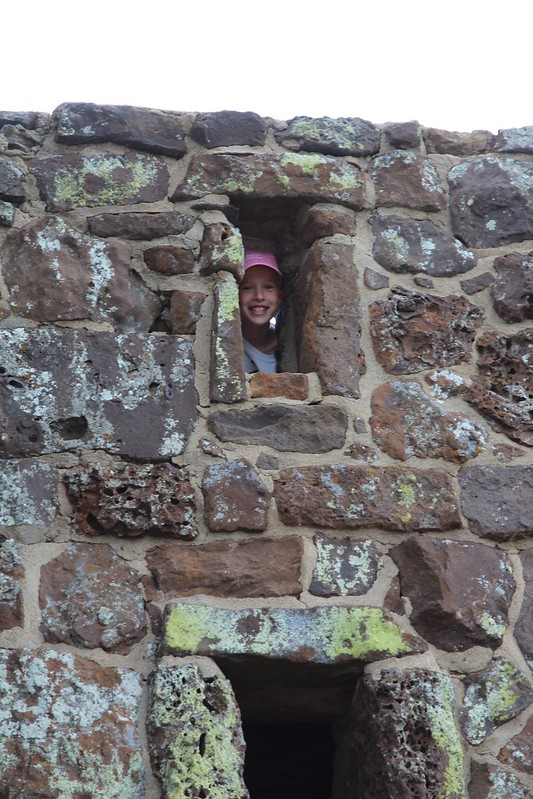
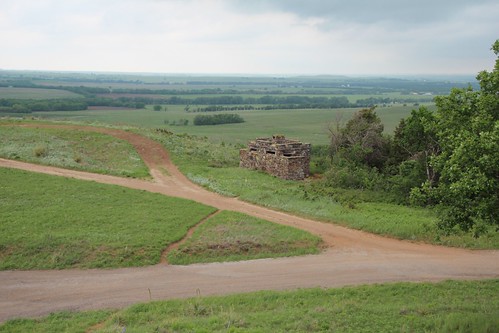
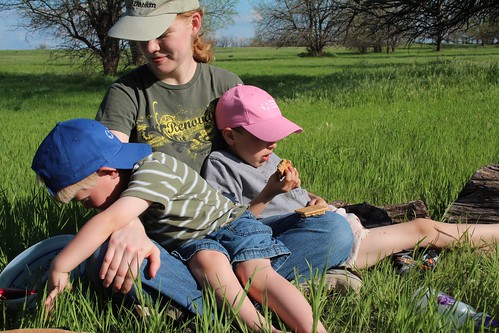
Near the beautiful Swedish town of Lindsborg, Kansas, there stands a hill known as Coronado Heights. It lies in the midst of the Smoky Hills, named for the smoke-like mist that sometimes hangs in them. We Kansans smile our usual smile when we tell the story of how Francisco V squez de Coronado famously gave up his search for gold after reaching this point in Kansas. Anyhow, it was just over a year ago that Laura, Jacob, Oliver, and I went to Coronado Heights at the start of summer, 2013 our first full day together as a family. Atop Coronado Heights sits a castle , an old WPA project from the 1930s: IMG_9803 IMG_9824 The view from up there is pretty nice: IMG_9806 And, of course, Jacob and Oliver wanted to explore the grounds. IMG_9813 As exciting as the castle was, simple rocks and sand seemed to be just as entertaining. IMG_9835 After Coronado Heights, we went to a nearby lake for a picnic. After that, Jacob and Oliver wanted to play at the edge of the water. They loved to throw rocks in and observe the splash. Of course, it pretty soon descended (or, if you are a boy, ascended ) into a game of splash your brother. And then to splash Dad and Laura . 2013-05-27 15 Fun was had by all. What a wonderful day! Writing the story reminds me of a little while before that the first time all four of us enjoyed dinner and smores at a fire by our creek. IMG_9756 Jacob and Oliver insisted on sitting or, well, flopping on Laura s lap to eat. It made me smile. (And yes, she is wearing a Debian hat.)

Next.

Previous.