Search Results: "ina"

4 September 2016

Steinar H. Gunderson: Multitrack audio in Nageru 1.4.0

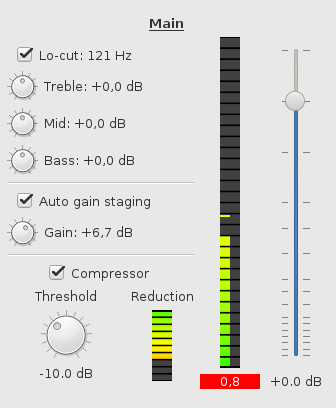
Even though the Chess Olympiad takes some attention right now, development on Nageru (my live video mixer) has continued steadily throughout since the 1.3.0 release. I wanted to take a little time to talk about the upcoming 1.4.0 release, and why things are as they are; writing down things often make them a bit clearer. Every major release of Nageru has had a specific primary focus: 1.0.0 was about just getting everything to work, 1.1.0 was about NVIDIA support for more oomph, 1.2.0 was about stabilization and polish (and added support for Blackmagic's PCI cards as a nice little bonus), and 1.3.0 was about x264 integration. For 1.4.0, I wanted to work on multitrack audio and mixing. Audio has always been a clear focus for Nageru, and for good reason; video is 90% about audio, and it's sorely neglected in most amateur productions (not to mention that processing tools are nearly non-existant in most free or cheap software video mixers). Right from the get-go, it's had a chain with proper leveling, compressors and most importantly visual monitoring, so that you know when things are not as they should be. However, it was also written with an assumption that there would be a single audio input source (one of the cameras), and that's going to change. Single-input is less of a showstopper than one'd think at first; you can work around it by buying a mixer, plug everything into that and then feed that signal into the computer. However, there are a few downsides: If you want camera audio, you'll need to pull more cable from each camera (or have SDI de-embedders). Your mixer is likely to require an extra power supply, and that means yet more cable (any decent USB video card can power over USB, so why shouldn't your audio?). You'll need to buy and transport yet another device. And so on. (If you already have a PA mixer, of course you can use it, but just reusing the PA mix as a stream mix rarely gives the best results, and mixing on an aux bus gives very little flexibility.) So for 1.4.0, I wanted something to get essentially the processing equivalent of a mid-range mixer. But even though my education is in DSP, my experience with mixers is rather limited, so I did the only reasonable thing and went over to a friend who's also an (award-winning) audio engineer. (It turns out that everything on a mixer is the way it is for a pretty good reason, tuned through 50+ years of collective audio experience. If you just try to make up something on your own without understanding what's going on, you have a 0.001% chance of stumbling upon some genius new way of doing things by accident, and a significantly larger chance than that of messing things up.) After some back and forth, we figured out a reasonable set of basic tools that would be useful in the right hands, and not too confusing for a beginner. So let's have a look at the new controls you get: Nageru expanded audio control view There's one set of these controls for each bus. (This is the expanded view; there's also a compact view that has only the meters and the fader, which is what you'll typically want to use during the run itself the expanded view is for setup and tweaking.) A bus in Nageru is a pair of channels (left/right), sourced from a video capture or ALSA card. The channel mapping is flexible; my USB sound card has 18 channels, for instance, and you can use that to make several buses. Each bus has a name (here I named it very creatively Main , but in a real setting you might want something like Blue microphone or Speaker PC ), which is just for convenience; it doesn't mean much. The most important parts of the mix are given the most screen estate, so even though the way through the signal chain is left-to-right top-to-bottom, I'll go over it in the opposite direction. By far the most important part is the audio level, so the fader naturally is very prominent. (Note that the scale is nonlinear; you want more resolution in the most important area.) Changing a fader with the mouse or keyboard is possible, and probably most people will be doing that, but Nageru will also support USB faders. These usually speak MIDI, for historical reasons, and there are some UI challenges when they're all so different, but you can get really small ones if you want to get that tactile feel without blowing up your budget or getting a bigger backpack. Then there's the meter to the left of that. Nageru already has R128 level meters in the mastering section (not shown here, but generally unchanged from 1.3.0), and those are kept as-is, but for each bus, you don't want to know loudness; you want to know recording levels, so you want a peak meter, not a loudness meter. In particular, you don't want the bus to send clipped data to the master (which would happen if you set it too high); Nageru can handle this situation pretty well (unlike most digital mixers, it mixes in full 32-bit floating-point so there's no internal clipping, and there's a limiter on the master by default), but it's still not a good place to be in, so you can see that being marked in red in this example. The meter doubles as an input peak check during setup; if you turn off all the effects and set the fader to neutral, you can see if the input hits peak or not, and then adjust it down. (Also, you can see here that I only have audio in the left channel; I'd better check my connections, or perhaps just use mono, by setting the right channel on the bus mapping to the same input as the left one.) The compressor (now moved from the mastering section to each bus) should be well-known for those using 1.3.0, but in this view, it also has a reduction meter, so that you can see whether it kicks in or not. Most casual users would want to just leave the gain staging and compressor settings alone, but a skilled audio engineer will know how to adjust these to each speaker's antics (some speak at a pretty even volume and thus can get a bit of headroom, while some are much more variable and need tighter settings). Finally (or, well, first), there's the EQ section. The lo-cut is again well-known from 1.3.0 (the cutoff frequency is the same across all buses), but there's now also a simple three-band EQ per bus. Simply ask the speaker to talk normally for a bit, and tweak the controls until it sounds good. People have different voices and different ways of holding the microphone, and if you have a reasonable ear, you can use the EQ to your advantage to make them sound a little more even on the stream. Either that, or just put it in neutral, and the entire EQ code will be bypassed. The code is making pretty good progress; all the DSP stuff is done (save for some optimizations I want to do in zita-resampler, now that the discussion flow is started again), and in theory, one could use it already as-is. However, there's a fair amount of gnarly support code that still needs to be written: In particular, I need to do some refactoring to support ALSA hotplug (you don't want your entire stream to go down just because an USB soundcard dropped out for a split second), and similarly some serialization of saving/loading bus mappings. It's not exactly rocket science, but all the code still needs to be written, and there are a number of corner cases to think of. If you want to peek, the code is in the multichannel_audio branch, but beware; I rebase/squash it pretty frequently, so if you pull from it, expect frequent git breakage.

3 September 2016

Antonio Terceiro: testing build reprodubility with debrepro

Earlier today I was handling a reproducibility bug and decided I had to try a reproducibility test by myself. I tried reprotest, but I was being hit by a disorderfs issue and I was not sure whether the problem was with reprotest or not (at this point I cannot reproduce that anymore). So I decided to hack a simple script to that, and it works. I even included it in devscripts after writing a manpage. Of course reprotest is more complete, extensible, and supports arbitrary virtualization backends for doing the more dangerous/destructive variations (such as changing the hostname and other things that require root) but for quick tests debrepro does the job. Usage examples:

$ debrepro                                 # builds current directory
$ debrepro /path/to/sourcepackage          # builds package there
$ gbp-buildpackage --git-builder=debrepro  # can be used with vcs wrappers as well

debrepro will do two builds with a few variations between them, including $USER, $PATH, timezone, locale, umask, current time, and will even build under disorderfs if available. Build path variation is also performed because by definition the builds are done in different directories. If diffoscope is installed, it will be used for deep comparison of non-matching binaries. If you are interested and don t want to build devscripts from source or wait for the next release, you can just grab the script, save it as debrepro somewhere on your $PATH and make it executable.

Thorsten Alteholz: Openzwave in Debian

It was a real surprise when I saw activity on #791965, which is my ITP bug to package openzwave. As Ralph wrote, the legal status of the Z-Wave standard has been changed. According to a press release of Sigma Designs, the Z-Wave standard is now put into the public domain. As even the specification of the Z-Wave S2 security application framework is available now, the openzwave community is finally able to create a really compatible application which might also pass the Z-Wave certification. Thus there is new hope that there will be an openzwave package in Debian.

Iustin Pop: Nationalpark Bike Marathon 2016

Nationalpark Bike Marathon 2016 report: gravity rules! "Marathon" is a bit of a misnomer, since I did the short route, not the medium nor the long one. But hey, it's the official name! Setup This race has four possible lengths: "Valader" which is full round-trip Scuol-Scuol (137km/4'026m), "Jauer" (Fuldera-Scuol, 103km/2'934m), "Livignasco" (Livigno-Scuol, 66km/1'871m) and "Put r" (S-chanf to Scuol, 47Km/1'051m). After many debates, I settled on the Livignasco route, as that was what I was reasonably confident to be able to do. The only problem was that this route (and all the longer ones, of course) were going over Pass Chaschauna, which is a quite hard climb. My bike shop person, who did the full length a number of times, just said when hearing the route I was planning: "Chaschauna is a bitch " Bad language, proper characterisation. The route choice also impacts the logistics: except for the full route, the question is where to sleep the night before? One can sleep either at the start place, or sleep in Scuol itself and take the official shuttle to the start place, but this means waking up much earlier. I decided to sleep in Livigno, as with a 7:45 start this would allow me to sleep until ~6:30, have a quick breakfast and be in time for the race. Problem #1 So on Friday (26th) I drove to Scuol, picked up my start number, and then drove over to Livigno and checked in to the hotel. Speaking of picking up the start number, I saw this at the start area: While picking up my start number: the race is so fast that an STI is needed as pacer?? An STI needed as pacer? How fast are these people, I wondered? Day of the race My plan to have a relaxing sleep until relatively late failed. I went to sleep with difficulties: late dinner due to my late arrival in Livigno, and then I was stressed enough about not missing the race that at 05:05 I already woke up, and was checking the clock every five minutes. Finally at 05:30 I gave up and got out of bed, with only about 6 hours of sleep. Problem #2. The other problem was that I na vely thought the hotel will have breakfast from 07:00 or even 07:30. Hah, as if this was Switzerland. The hotel had breakfast from 08:00, no reason to hurry, right? So I had a poor man's breakfast in the room, some energy bars and an ice tea. Problem #3. At least I had time to grab this picture from the hotel room: Good morning Livigno! Not bad. On to the race! But before that, remember to fill my hydration pack with 3L of water, and put it in my not-so-light backpack. Of course I had tools and some spare parts with me, what if something happens? Problem #4, over-planning. The race The setup at the start was pretty easy. Wait near the start until 07:45, then go. For me, not too in front, of course: Ready for the start! Pass Chaschauna About 3 kilometres of easy/flat road, and then it starts. Pass Chaschauna, killing your legs softly Already climbing  on foot! But not everybody. But at least the pictures were nice! The climb is hard, but the view is worth it! Still climbing So high already! Good legs :) Looking back: it's been a loong way up I can see the top!  and the remaining steep meters to climb :( The climb is difficult. It was around 22% for most of the time, and very few people were able to bike up. Not only the absolute meters were the problem, but also the fact that the ground was quite loose, and pushing the bike, or rather climbing up while pushing the bike, was difficult to do in bike shoes with cleats. Proper hiking shoes would have been much more adequate. Maybe this is why despite the effort, some people biked as much as possible? I was careful not to over-exert myself and walked almost all the way up. Hence the pictures But at last, reached the top of the pass, and was very happy to be done with it. The GPX file from my Garmin says it took only 4 minutes (1.2km) after the race start to actually start climbing (it was not obvious we were climbing so early), and then 1h:20m/8Km to get from 1'817m altitude to the highest point at 2'658m. 8Km in 1h:20m, faster than walking pace but quite slower than running pace (on flat terrain, of course). At the top of the pass I was quite happy: Finally at the top! Clipping in and Go! Smilling and happy! And then the descent started: I wonder how steep it will be going down This was an easy section :/ All the way leading to the race I kept thinking only about climbing Chaschauna, and not about going down on it. It was quite an experience, which I won't forget soon. The trail was already well travelled, which means that besides the loose ground in form of large clumps of dried earth, there was a layer of fine, somewhat moist earth, about 3-5 centimetres deep, which made the downhill "interesting". Coupled with what was a much steeper trail than going up I saw most of the time ~33% it's no surprise that many, or even most, of the people were walking their bikes down. The GPX track says that the trail goes 319m down in 1Km (so a 31.9% over one entire kilometre), then another 130m over the next 1.4Km (9.28%), and then (not sure if this is the pass per se or after) another longer segment of ~260m over 3Km (8.56%). The first steep segment needs lots of skill and concentration, the others are normal gradients. But at least things go fast. What took uphill took ~40 minutes for the last 450m up, downhill it took only 15 minutes! Falling I was able, thanks to recent training, to bike down the trail, or at least I thought so. So on the steep segment I was struggling to bike down and keep control of my bike, putting one leg down on some sections but in general being "on the bike", being hit by the dirt I was throwing in the air despite the mud-guards, being careful but at the same time enjoying this difficult section. That is, right up to the point where I got, I think, too comfortable. After the second-to-last curve, the rear wheel slides, I lose balance and fall in the (thankfully soft) dirt a bit more forcefully than I should have, the bike also sliding along in the dirt. No damage to myself, just some trivial scratches; the bike seems a bit shaken (fork was turned 180 , full of dirt, etc.). I get again on the bike and I continue down; however, something seems off: the rear brake level doesn't have a return anymore, I have to push it to go back. Still usable, but strange. So I continue the other two segment of this descent, and over these ~4-5Km I feel the brake issue going worse and worse: it's actually hard to push the brake lever back, and even pressing it doesn't seem to have much effect. And then the realisation dawns on my: I have hydraulic brakes, and the worsening thing leads me to think my brake hose has been punctured (by what? I fell in loose dirt) and I'm losing the brake fluid with every press. Now, on flat road, biking with only the front brake is tricky but doable. On an MTB course, having only one brake is not a smart thing . Not easy, not smart, and definitely dangerous. It also felt very strange to not have both brakes, and then I realised how much I work with the brakes in unison. I knew that there are repair posts in the race, but I didn't know if they can fix such things (and doing a brake fluid refill how complicated is it, how much time does it take?). Anyway, I resolved to try and continue if the terrain allows until I reach the first repair post, and stop if it gets too steep. It would be pretty sad to have to abort the race after only 10Km, right? The terrain did cooperate: up and down, so I was able to bleed speed easily, and even though through forest, the visibility was good enough that I could plan ahead. It was strangely lonely at this time: I was going slowly and thus not reaching from behind anyone, but also not being reached by riders from behind. I did enjoy it a bit, the quietness of the forest, just interrupted by the squeaking of my front brake And then I finally see the sign for "Repair: 1Km". Yaaay! maybe I don't have to quit the race. And then, about 100m further on, another sign: "Danger! Steep descent". Uh-oh tantalisingly close Let's go slow. And yes, here I was overtaken by 3-4 other cyclists. This was the single moment in the race where I did have a moment of real fear: at one point, I was going down with the remaining brake as pressed as I could without compromising stability, and I was still gaining speed. Not smart, and as I was debating how to fall to stop my descent, the terrain started to get less steep, and I finally reached the repair station, at kilometre 21. Difficult repairs There was another person being serviced for a flat rear tire, so I wait in line and discuss with him my problem. Upon hearing I only had the front brake, he said: "Wow, how did you manage to descend this last segment?" "Well, slowly ". My turn came up, I explain my problem and my theory, and the repair guy gives me one look, the bike one look, but doesn't look at the brake hose. Instead, he looks once at the brake lever, sees that another cable guide on my handle bar was bent during the fall and actually was mechanically interfering with the brake lever, unbends that thing, and says "here you go". I was stunned. 15 seconds of looking at the problem without stress, and the problem was solved. I could have done this myself if I took the time to look and think, and not hurry. And I could have enjoyed all the downhill on the pass, with two functioning brakes. Some lessons have to be learned the hard way, and this was one. I got off easy though, as I didn't have a real accident while biking with only one brake. And they say you get wiser as you get older Anyway, brake repaired, I stopped at the Sanit r tent to have my scratches disinfected, and onwards. The following few kilometres until S-chanf I enjoyed very much. S-chanf And then, 2 hours 10 minutes into the race, I exit the forest trail, reach S-chanf, and start climbing and descending and climbing and descending. In the sun, which now (after 10 AM) is not that light anymore. The initial climb at S-chanf, while not much, took away my remaining short-term reserves. The route is 50m ascent, then down and then another 50m ascent, and after a bit of flat another 75m ascent I was getting tired, despite eating energy bars and drinking water (and juice at stops). This goes one for an entire hour, during which I cover about 23Km, so not a bad speed everything considered. But getting more and more tired. There were also some very nice segments, along the river, in the shade of the forest. Some fast downhill, some fast flat. I got overtaken by quite a few real racers, that were going so fast I couldn't keep up with them as in I didn't dare ride that fast even when I had the energy. Clearly they were from the longer segments, and boy were they fast! A number of couples (or pairs?) one woman one man, a number of bigger groups, all going as if they had E-bikes or super-powers, not just biking along tired like me Last climb And then, the last big climb: half an hour of going about 300m up (absolute values, so cumulative number would probably be higher), in the sun, over about 6Km, so only 5% average gradient. But I was tired and even resorted to walking on some portions At least I could take some pictures again: Much later, climbing again. Or have pictures taken: A bit of a smile left. Yes, that's a smile, not a grimace! Nice views: Look, nice castle! Stopping for a picture, and not because I was *dead tired* :) At one point, in a bit of a shade, I stop to catch my breath. Somebody else stopped as well and, seeing as I was checking my GPS, asks: I got overtaken by a lot of cyclists here, although many of them were from S-chanf route (based on the number colour). Sad The thing is, besides the climbing and the sun, this and the previous part was a very nice route: through small towns, high above the valley, beautiful landscapes, etc. Just enjoying it was hard, since I wasn't a) trained well enough and b) prepared well enough. Last segment, last downhill In any case, after that hard half hour, it's flat (or rather said, average gradient zero): Flat route, good pavement. Can catch my breath, and take a another picture. Good road, good views, but I'm on the last virtual bar of my battery, so the remaining 15Km I do in 40 minutes, also "eating" the last ascent meters still about 300 left, I think, but up/down/up/down, so you could reuse kinetic energy to gain potential one. The only question I had now was, the route was at this moment about 400m higher (in absolute altitude) than the finish point, so when do we lose that altitude? The answer was a very very nice answer: in the last 5Km, for an average gradient of 8%, just perfect. I was tired however, so I couldn't really enjoy or go fast here, but it was a good feeling. Finish! And then, entering Scuol, not really believing I'm near the finish, that I will be able to actually stop and relax. My finish picture doesn't do justice to how happy I was at that moment: At the finish, happy happy happy! However, after passing the finish line, it was a bit weird. I just stop now? What next? So weird to just walk, not push pedals, and not go up. Or down. The funny thing here was that I thought I didn't use much of my water (hydration pack) during the race. But soon after finishing, I drank the equivalent of about two glasses (let's say 0.5L) and it was over. So I did manage to drink 2.5L during the race, plus the sport drinks at the stops. Time for stats: my Garmin says 67.07Km, 4h:29m, average speed 15.0kph (hah), 1'615m elevation gain. Official numbers say 66Km, 1'871m elevation, and thus 14.22kph. Ranking-wise: Sigh, could have done better. I was aiming for somewhere around last 33%, not last 25% :-P First classed was ~66% faster than me Going to the train station was hard as in difficult to move my legs. Took one nice picture of Scuol though, so was able to think a bit: After the race: Scuol is not so bad And then the long way back to Livigno. Took me 4 h to bike to Scuol, and about 3 hours to go back via public transport. At least I ate a sandwich in the meantime. Then reached Livigno, which was also looking nice: Took me almost as long by public transport as by bike, but finally back in Livigno. Also nice! Then got on my bike, which at this point was magically light and easy to ride (it seems I was at least partially recovered), rode to the hotel, packed my stuff, and drove home. On the highway I had my first real meal for that day, but I was quite tired so didn't feel like the achievement it should have been Lessons The biggest takeaway from this race was the huge learning experience I got. The race was itself awesome, but the learning even more so. First, for this particular race, it's much better to sleep in Scuol and (if not doing the whole route) take the shuttle to the actual start. Yes, one has to wake up earlier, but you have assured breakfast via the organisers (++++!), and after the race you don't have to get even more tired by taking the train and the bus and Second, I need better logistics: I don't need to carry that heavy load (spare tube, pump, tools, jacket in case it's cold) when the race is well organised. The water in the hydration pack was useful, but carrying it up Chaschauna was a pain. Not sure what I'll do next; it's possible to survive only on water/drinks from the food posts (basically 2.5-2.8L is equivalent to only 4 750ml bottles, and there were I think about 6 stops?), but the hydration pack is so easy to use Keeping one's head cool and not stress about things also would help: had I looked at my brake lever in peace, I could have solved it myself, and not ride ~10Km with only one brake. Also, losing some weight (as in losing fat, not having a lighter bike) would definitely help. I could stand to lose 5Kg easily, probably 10Kg, and that would bring me more in line with other people in the race (at least looking at the pictures). And hey, my Watts/Kg would improve magically! And last but most important, I need better training. Training on how to use my energy, training longer rides so that my body gets used to it and doesn't bonk after 3 hours, training training training. Which I like, but the problem is time to do it Also, in case anybody wonders: yes, I do recommend this race! It was definitely fun, and the route itself is very nice, nicer than the pictures here show. Closing words: gravity rules. Up or down, it's hard and punishing. Still: Ride on!

2 September 2016

Julian Andres Klode: apt 1.3 RC4 Tweaking apt update

Did that ever happen to you: You run apt update, it fetches a Release file, then starts fetching DEP-11 metadata, then any pdiff index stuff, and then applies them; all after another? Or this: You don t see any update progress until very near the end? Worry no more: I tweaked things a bit in 1.3~rc4 (git commit). Prior to 1.3~rc4, acquiring the files for an update worked like this: We create some object for the Release file, once a release file is done we queue any next object (DEP-11 icons, .diff/Index files, etc). There is no prioritizing, so usually we fetch the 5MB+ DEP-11 icons and components files first, and only then start working on other indices which might use Pdiff. In 1.3~rc4 I changed the queues to be priority queues: Release files and .diff/Index files have the highest priority (once we have them all, we know how much to fetch). The second level of priority goes to the .pdiff files which are later on passed to the rred process to patch an existing Packages, Sources, or Contents file. The third priority level is taken by all other index targets. Actually, I implemented the priority queues back in Jun. There was just one tiny problem: Pipelining. We might be inserting elements into our fetching queues in order of priority, but with pipelining enabled, stuff of lower priority might already have their HTTP request sent before we even get to queue the higher priority stuff. Today I had an epiphany: We fill the pipeline up to a number of items (the depth, currently 10). So, let s just fill the pipeline with items that have the same (or higher) priority than the maximum priority of the already-queued ones; and pretend it is full when we only have lower priority items. And that works fine: First the Release and .diff/Index stuff is fetched, which means we can start showing accurate progress info from there one. Next, the pdiff files are fetched, meaning that we can apply them in parallel to any targets downloading later in parallel (think DEP-11 icon tarballs). This has a great effect on performance: For the 01 Sep 2016 03:35:23 UTC -> 02 Sep 2016 09:25:37 update of Debian unstable and testing with Contents and appstream for amd64 and i386, update time reduced from 37 seconds to 24-28 seconds. In other news I recently cleaned up the apt packaging which renamed /usr/share/bug/apt/script to /usr/share/bug/apt. That broke on overlayfs, because dpkg could not rename the old apt directory to a backup name during unpack (only directories purely on the upper layer can be renamed). I reverted that now, so all future updates should be fine. David re-added the Breaks against apt-utils I recently removed by accident during the cleanup, so no more errors about overriding dump solvers. He also added support for fingerprints in gpgv s GOODSIG output, which apparently might come at some point. I Also fixed a few CMake issues, fixed the test suite for gpgv 2.1.15, allow building with a system-wide gtest library (we really ought to add back a pre-built one in Debian), and modified debian/rules to pass -O to make. I wish debhelper would do the latter automatically (there s a bug for that). Finally, we fixed some uninitialized variables in the base256 code, out-of-bound reads in the Sources file parser, off-by-one errors in the tagfile comment stripping code[1], and some memcpy() with length 0. Most of these will be cherry-picked into the 1.2 (xenial) and 1.0.9.8 (jessie) branches (releases 1.2.15 and 1.0.9.8.4). If you forked off your version of apt at another point, you might want to do the same. [1] those were actually causing the failures and segfaults in the unit tests on hurd-i386 buildds. I always thought it was a hurd-specific issue PS. Building for Fedora on OBS has a weird socket fd #3 that does not get closed during the test suite despite us setting CLOEXEC on it. Join us in #debian-apt on oftc if you have ideas.
Filed under: Debian, Ubuntu

1 September 2016

Thadeu Lima de Souza Cascardo: GNU libc and Linux

Some time ago, I built a static program that I wanted to run on an Android tablet. What was my surprise when I saw a message saying "FATAL: kernel too old". After some investigation, it turns out that GNU libc may assume some Linux features are present during build time. This means that given a minimum Linux version, that built libc might only work on that version or newer. Since 2014, GNU libc itself requires 2.6.32 as the minimum. Previously, it was 2.6.16, changed in 2012. Debian, as of 2015, builds it with a required minimum Linux version of 3.2. To give an idea about the history of these kernel releases, we have: So, at least for GNU libc upstream, it would appear that not many devices would stop being supported, though the situation would not be as good for binary versions of Debian. However, I have a small list of devices that might show otherwise. Many Android devices have been shipped with Linux 3.4, but I encountered at least one using Linux 3.0. So, even though many new devices ship with newer versions of Linux, it's still possible to find some new and older devices using versions older than 3.2, and even versions older than 2.6.32 may be found. Another interesting note is that, without a few patches, it's not possible to build Linux 2.6.32 with GCC 5 and newer. For that and many other reasons, it's important that we update. For bug fixes, and so we can make progress and use better software are some of the other reasons. So, it's imperative that we have devices support upstream. Otherwise, the task of doing updates with forward porting becomes daunting. And that's the current state for many devices, which is why I have been trying to use new software with older versions of Linux. But as time passes, I realize how hard a task this is, as most new software these days, even a building block like GNU libc, requires ever new versions of Linux. For now, most gadgets I have support Linux 3.4 or newer. But not long ahead, that support will be dropped as well. And that means there will be no more updates for those devices. It's a consequence of both targeting time-to-market and programmed obsolescence as business practices. Upstream support is no priority, and maintenance is only that required until the next model is available on the stores. This is one more reason why we need to have more operating systems available for those devices. Systems that are designed to last more than a couple of years. As I said, upstream support is imperative, but as a step forward, I still believe we can provide the GNU experience to lots of devices out there.

Jamie McClelland: Trusted Mobile Device: How hard could it be?

I bought a new phone. After my experiences with signal and the helpful comments readers gave regarding the ability to run android and signal without Google Play using microg I thought I would give it a shot. Since microg reports that signature spoofing is required and comes out-of-the-box with omnirom I thought I'd aim for installing omnirom's version of Android 6 (marshmallow) after years of using cyanomgenmod's version of Android. The Nexus line of phones seemed well-supported by omnirom in particular (and the alternative ROM community in general) so I bought a Nexus 5x. I carefully followed the directions for installing omnirom however when it came time to boot into omnirom, I just got the boot sequence animation over and over again. Frustrated, I decided to go back to cyanogenmod and see if I could use one of the microg recommended methods for getting signature spoofing to work. The easiest seemed to be Needle by moosd but alas no such luck with Marshmallow. Someone else forked the code and might fix it one day. I then spent too much time trying to understand what xposed is before I gave up understanding it and just tried to install it (woops, looks like the installer page is out of date so instead I followed sketchy instructions from a forum thread). Well, to make a long story short it resulted in a boot loop. So, I decided to return to omnirom. After reading some vague references to omnirom and supersu, I decided to flash both of them together and voila, it worked! Next, I decided to enable full disk encryption. Not so fast. After clicking through the screens and hitting the final confirmation, my phone rebooted and spent the next 5 hours showing me the omnirom boot animation. Somehow, powering down and starting again resulted in a working machine, but no disk encryption. After much web searching, guessing and trial and error, I fixed the problem by clicking on the SuperSU option to "Full unroot" the device (I pressed "no" when prompted to attempt to restore stock image). Then I rebooted and followed the directions to encrypt the device. And it worked! Hooray! I had to reboot and re-flash the supersu to regain su privileges. All was great. The first root action I decided to take was to install the cryptfs program from f-droid because using the same password to decrypt your device as you use to unlock the screen seems either tedious or insecure. That process didn't work so well. I got a message saying: use this command from a root shell before you reboot: vdc cryptfs changepw <password>. I followed the advice, carefully typing in my 12 character password which includes numbers and letters. Then, I happily did what I expected to be my last reboot when, to my horror, I was prompted to decrypt my disk with ... a numeric-only keypad. That wasn't going to work. At this point I had already spent 5 days and about 8 hours on this project. Sigh. So, I started over. Guess what? It only took me 25 minutes but, it seems that cryptfs is broken. Even with a numeric password it fails. Ok, I guess I need a long pin to unlock my phone. This time it only took my 15 minutes to wipe and re-install everything. There are only two positive things I can think of: p.s. I haven't even tried to install microg yet... which was the whole point.

31 August 2016

Enrico Zini: Links for September 2016

A Few Useful Mental Tools from Richard Feynman [archive]
These tricks show Feynman taking the method of thought he learned in pure science and applying it to the more mundane topics most of us have to deal with every day.
Pasta [archive]
A comprehensive introduction to pasta, to keep at hand in case I meet someone who has little familiarity with it.
MPTP: One Designer Drug and Serendipity [archive]
Abstract: Through an unlikely series of coincidences and fortunate accidents, the development of Parkinson s disease in several illicit drug users was traced to their use of a meperidine analog contaminated with 1-methyl-4-phenyl-1,2,3,6-tetrahydropyridine (MPTP). The discovery of a chemical capable of producing animal models of the disease has revitalized research efforts and resulted in important new information. The serendipitous finding also prompted consideration of what changes seem advisable if designer drugs are to be dealt with more efficaciously.
The Debunking Handbook: now freely available for download
The Debunking Handbook, a guide to debunking misinformation, is now freely available to download. Although there is a great deal of psychological research on misinformation, there's no summary of the literature that offers practical guidelines on the most effective ways of reducing the influence of myths.
Faulty neon light jams radio appliances [archive]
An apparent interference source began plaguing wireless vehicle key fobs, cell phones, and other wireless electronics. Key fob owners found they could not open or start their vehicles remotely until their vehicles were towed at least a block away, nor were they able to call for help on their cell phones when problems occurred
Calvin & Muad'Dib
Calvin & Hobbes with text taken from Frank Herbert's Dune. It's been around since 2013 and I consistently found it moving and deep.
When Birds Attack - Bike Helmet Hacks [archive]
Australian magpies attacking cyclists has propted several creative adaptations, including attaching an afro wig to the bike helmet.

Chris Lamb: Free software activities in August 2016

Here is my monthly update covering what I have been doing in the free software world (previously):

Reproducible builds

Whilst anyone can inspect the source code of free software for malicious flaws, most Linux distributions provide binary (or "compiled") packages to end users. The motivation behind the Reproducible Builds effort is to allow verification that no flaws have been introduced either maliciously and accidentally during this compilation process by promising identical binary packages are always generated from a given source.

Diffoscope diffoscope is our "diff on steroids" that will not only recursively unpack archives but will transform binary formats into human-readable forms in order to compare them:
  • Added a command-line interface to the try.diffoscope.org web service.
  • Added a JSON comparator.
  • In the HTML output, highlight lines when hovering to make it easier to visually track.
  • Ensure that we pass str types to our Difference class, otherwise we can't be sure we can render them later.
  • Testsuite improvements:
    • Generate test coverage reports.
    • Add tests for Haskell and GitIndex comparators.
    • Completely refactored all of the comparator tests, extracting out commonly-used routines.
    • Confirm rendering of text and HTML presenters when checking non-existing files.
    • Dropped a squashfs test as it was simply too unreliable and/or has too many requirements to satisfy.
  • A large number of miscellaneous cleanups, including:
    • Reworking the comparator setup/preference internals by dynamically importing classes via a single list.
    • Split exceptions out into dedicated diffoscope.exc module.
    • Tidying the PROVIDERS dict in diffoscope/__init__.py.
    • Use html.escape over xml.sax.saxutils.escape, cgi.escape, etc.
    • Removing hard-coding of manual page targets names in debian/rules.
    • Specify all string format arguments as logging function parameters, not using interpolation.
    • Tidying imports, correcting indentation levels and drop unnecessary whitespace.

disorderfs disorderfs is our FUSE filesystem that deliberately introduces nondeterminism in system calls such as readdir(3).
  • Added a testsuite to prevent regressions. (f124965)
  • Added a --sort-dirents=yes no option for forcing deterministic ordering. (2aae325)

Other
  • Improved strip-nondeterminism, our tool to remove specific nondeterministic information after a build:
    • Match more styles of Java .properties files.
    • Remove hyphen from "non-determinism" and "non-deterministic" throughout package for consistency.
  • Improvements to our testing infrastucture:
    • Improve the top-level navigation so that we can always get back to "home" of a package.
    • Give expandable elements cursor: pointer CSS styling to highlight they are clickable.
    • Drop various trailing underlined whitespaces after links.
    • Explicitly log that build was successful or not.
    • Various code-quality improvements, including prefering str.format over concatentation.
  • Miscellaneous updates to our filter-packages internal tool:
    • Add --random=N and --url options.
    • Add support for --show=comments.
    • Correct ordering so that --show-version runs after --filter-ftbfs.
    • Rename --show-ftbfs to --filter-ftbfs and --show-version to --show=version.
  • Created a proof-of-concept reproducible-utils package to contain commonly-used snippets aimed at developers wishing to make their packages reproducible.


I also submitted 92 patches to fix specific reproducibility issues in advi, amora-server, apt-cacher-ng, ara, argyll, audiotools, bam, bedtools, binutils-m68hc1x, botan1.10, broccoli, congress, cookiecutter, dacs, dapl, dateutils, ddd, dicom3tools, dispcalgui, dnssec-trigger, echoping, eekboek, emacspeak, eyed3, fdroidserver, flashrom, fntsample, forkstat, gkrellm, gkrellm, gnunet-gtk, handbrake, hardinfo, ircd-irc2, ircd-ircu, jack-audio-connection-kit, jpy, kxmlgui, libbson, libdc0, libdevel-cover-perl, libfm, libpam-ldap, libquvi, librep, lilyterm, mozvoikko, mp4h, mp4v2, myghty, n2n, nagios-nrpe, nikwi, nmh, nsnake, openhackware, pd-pdstring, phpab, phpdox, phpldapadmin, pixelmed-codec, pleiades, pybit, pygtksourceview, pyicu, python-attrs, python-gflags, quvi, radare2, rc, rest2web, roaraudio, rt-extension-customfieldsonupdate, ruby-compass, ruby-pg, sheepdog, tf5, ttf-tiresias, ttf-tiresias, tuxpaint, tuxpaint-config, twitter-bootstrap3, udpcast, uhub, valknut, varnish, vips, vit, wims, winswitch, wmweather+ & xshisen.

Debian GNU/Linux
Debian LTS

This month I have been paid to work 15 hours on Debian Long Term Support (LTS). In that time I did the following:
  • "Frontdesk" duties, triaging CVEs, etc.
  • Authored the patch & issued DLA 596-1 for extplorer, a web-based file manager, fixing an archive traversal exploit.
  • Issued DLA 598-1 for suckless-tools, fixing a segmentation fault in the slock screen locking tool.
  • Issued DLA 599-1 for cracklib2, a pro-active password checker library, fixing a stack-based buffer overflow when parsing large GECOS fields.
  • Improved the find-work internal tool adding optional colour highlighting and migrating it to Python 3.
  • Wrote an lts-missing-uploads tool to find mistakes where there was no correponding package in the archive after an announcement.
  • Added optional colour highlighting to the lts-cve-triage tool.

Uploads
  • redis 2:3.2.3-1 New upstream release, move to the DEP-5 debian/copyright format, ensure that we are running as root in LSB initscripts and add a README.Source regarding our local copies of redis.conf and sentinel.conf.
  • python-django:
    • 1:1.10-1 New upstream release.
    • 1:1.10-2 Fix test failures due to mishandled upstream translation updates.

  • gunicorn:
    • 19.6.0-2 Reload logrotate in the postrotate action to avoid processes writing to the old files and move to DEP-5 debian/copyright format.
    • 19.6.0-3 Drop our /usr/sbin/gunicorn ,3 -debian and related Debian-specific machinery to be more like upstream.
    • 19.6.0-4 Drop "template" systemd .service files and point towards examples and documentation instead.

  • adminer:
    • 4.2.5-1 Take over package maintenance, completely overhauling the packaging with a new upstream version, move to virtual-mysql-server to support MariaDB, updating package names of dependencies and fix the outdated Apache configuration.
    • 4.2.5-2 Correct the php5 package names.


FTP Team As a Debian FTP assistant I ACCEPTed 90 packages: android-platform-external-jsilver, android-platform-frameworks-data-binding, camlpdf, consolation, dfwinreg, diffoscope, django-restricted-resource, django-testproject, django-testscenarios, gitlab-ci-multi-runner, gnome-shell-extension-taskbar, golang-github-flynn-archive-go-shlex, golang-github-jamesclonk-vultr, golang-github-weppos-dnsimple-go, golang-golang-x-time, google-android-ndk-installer, haskell-expiring-cache-map, haskell-hclip, haskell-hdbc-session, haskell-microlens-ghc, haskell-names-th, haskell-persistable-record, haskell-should-not-typecheck, haskell-soap, haskell-soap-tls, haskell-th-reify-compat, haskell-with-location, haskell-wreq, kbtin, libclipboard-perl, libgtk3-simplelist-perl, libjs-jquery-selectize.js, liblemon, libplack-middleware-header-perl, libreoffice, libreswan, libtest-deep-json-perl, libtest-timer-perl, linux, linux-signed, live-tasks, llvm-toolchain-3.8, llvm-toolchain-snapshot, lua-luv, lua-torch-image, lua-torch-nn, magic-wormhole, mini-buildd, ncbi-vdb, node-ast-util, node-es6-module-transpiler, node-es6-promise, node-inline-source-map, node-number-is-nan, node-object-assign, nvidia-graphics-drivers, openhft-chronicle-bytes, openhft-chronicle-core, openhft-chronicle-network, openhft-chronicle-threads, openhft-chronicle-wire, pycodestyle, python-aptly, python-atomicwrites, python-click-log, python-django-casclient, python-git-os-job, python-hypothesis, python-nosehtmloutput, python-overpy, python-parsel, python-prov, python-py, python-schema, python-tackerclient, python-tornado, pyvo, r-cran-cairo, r-cran-mi, r-cran-rcppgsl, r-cran-sem, ruby-curses, ruby-fog-rackspace, ruby-mixlib-archive, ruby-tzinfo-data, salt-formula-swift, scapy3k, self-destructing-cookies, trollius-redis & websploit.

30 August 2016

Daniel Stender: My work for Debian in August

Here's again a little list of my humble off-time contributions I'm happy to add to the large amount of work we're completing all together each month. Then there is one more "new in Debian" (meaning: "new in unstable") announcement. First, the uploads (a few of them are from July): New packages: Sponsored uploads: Requested resp. suggested for packaging: New in Debian: Lasagne (deep learning framework) Now that the mathematical expression compiler Theano is available in Debian, deep learning frameworks resp. toolkits which have been build on top of it can become available within Debian, too (like Blocks, mentioned before). Theano is an own general computing engine which has been developed with a focus on machine learning resp. neural networks, which features an own declarative tensor language. The toolkits which have build upon it vary in the way how much they abstract the bare features of Theano, if they are "thick" or "thin" so to say. When the abstraction gets higher you gain more end user convenience up to the level that you have the architectural components of neural networks available for combination like in a lego box, while the more complicated things which are going on "under the hood" (like how the networks are actually implemented) are hidden. The downside is, thick abstraction layers usually makes it difficult to implement novel features like custom layers or loss functions. So more experienced users and specialists might to seek out for the lower abstraction toolkits, where you have to think more in terms of Theano. I've got an initial package of Keras in experimental (1.0.7-1), it runs (only a Python 3 package is available so far) but needs some more work (e.g. building the documentation with mkdocs). Keras is a minimalistic, high modular DNN library inspired by Torch1. It has a clean, rather easy API for experimenting and fast prototyping. It can also run on top of Google's TensorFlow, and we're going to have it ready for that, too. Lasagne follows a different approach. It's, like Keras and Blocks, a Python library to create and train multi-layered artificial neural networks in/on Theano for applications like image recognition resp. classification, speech recognition, image caption generation or other purposes like style transfers from paintings to pictures2. It abstracts Theano as little as possible, and could be seen rather like an extension or an add-on than an abstraction3. Therefore, knowledge on how things are working in Theano would be needed to make full use out of this piece of software. With the new Debian package (0.1+git20160728.8b66737-1)4, the whole required software stack (the corresponding Theano package, NumPy, SciPy, a BLAS implementation, and the nividia-cuda-toolkit and NVIDIA kernel driver to carry out computations on the GPU5) could be installed most conveniently just by a single apt-get install python ,3 -lasagne command6. If wanted with the documentation package lasagne-doc for offline use (no running around on remote airports seeking for a WIFI spot), either in the Python 2 or the Python 3 branch, or both flavours altogether7. While others have to spend a whole weekend gathering, compiling and installing the needed libraries you can grab yourself a fresh cup of coffee. These are the advantages of a fully integrated system (sublime message, as always: desktop users switch to Linux!). When the installation of packages has completed, the MNIST example of Lasagne could be used for a quick check if the whole library stack works properly8:
$ THEANO_FLAGS=device=gpu,floatX=float32 python /usr/share/doc/python-lasagne/examples/mnist.py mlp 5
Using gpu device 0: GeForce 940M (CNMeM is disabled, cuDNN 5005)
Loading data...
Downloading train-images-idx3-ubyte.gz
Downloading train-labels-idx1-ubyte.gz
Downloading t10k-images-idx3-ubyte.gz
Downloading t10k-labels-idx1-ubyte.gz
Building model and compiling functions...
Starting training...
Epoch 1 of 5 took 2.488s
  training loss:        1.217167
  validation loss:      0.407390
  validation accuracy:      88.79 %
Epoch 2 of 5 took 2.460s
  training loss:        0.568058
  validation loss:      0.306875
  validation accuracy:      91.31 %
The example on how to train a neural network on the MNIST database of handwritten digits is refined (it also provides --help) and explained in detail in the Tutorial section of the documentation in /usr/share/doc/lasagne-doc/html/. Very good starting points are also the IPython notebooks that are available from the tutorials by Eben Olson9 and Geoffrey French on the PyData London 201610. There you have Theano basics, examples for employing convolutional neural networks (CNN) and recurrent neural networks (RNN) for a range of different purposes, how to use pre-trained networks for image recognition, etc.

  1. For a quick comparison of Keras and Lasagne with other toolkits, see Alex Rubinsteyn's PyData NYC 2015 presentation on using LSTM (long short term memory) networks on varying length sequence data like Grimm's fairy tales (https://www.youtube.com/watch?v=E92jDCmJNek 27:30 sq.)
  2. https://github.com/Lasagne/Recipes/tree/master/examples/styletransfer
  3. Great introduction to Theano and Lasagne by Eben Olson on the PyData NYC 2015: https://www.youtube.com/watch?v=dtGhSE1PFh0
  4. The package is "freelancing" currently being in collab-maint, to set up a deep learning packaging team within Debian is in the stage of discussion.
  5. Only available for amd64 and ppc64el.
  6. You would need "testing" as package source in /etc/apt/sources.list to install it from the archive at the present time (I have that for years, but if Debian Testing could be advised as productive system is going to be discussed elsewhere), but it's coming up for Debian 9. The cuda-toolkit and pycuda are in the non-free section of the archive, thus non-free (mostly used in combination with contrib) must be added to main. Plus, it's a mere suggestion of the Theano packages to keep Theano in main, so --install-suggests is needed to pull it automatically with the same command, or this must be given explicitly.
  7. For dealing with Theano in Debian, see this previous blog posting
  8. Like suggested in the guideline From Zero to Lasagne on Ubuntu 14.04. cuDNN isn't available as official Debian package yet, but could be downloaded as a .deb package after registration at https://developer.nvidia.com/cudnn. It integrates well out of the box.
  9. https://github.com/ebenolson/pydata2015
  10. https://github.com/Britefury/deep-learning-tutorial-pydata2016, video: https://www.youtube.com/watch?v=DlNR1MrK4qE

Dirk Eddelbuettel: RProtoBuf 0.4.5: now with protobuf v2 and v3!

A few short weeks after the 0.4.4 release of RProtoBuf, we are happy to announce a new version 0.4.5 which appeared on CRAN earlier today. RProtoBuf provides R bindings for the Google Protocol Buffers ("Protobuf") data encoding library used and released by Google, and deployed as a language and operating-system agnostic protocol by numerous projects. This release brings support to the recently-release 'version 3' Protocol Buffers standard, used e.g. by the (very exciting) gRPC project (which was just released as version 1.0). RProtoBuf continues to supportv 'version 2' but now also cleanly support 'version 3'.
Changes in RProtoBuf version 0.4.5 (2016-08-29)
  • Support for version 3 of the Protcol Buffers API
  • Added 'syntax = "proto2";' to all proto files (PR #17)
  • Updated Travis CI script to test against both versions 2 and 3 using custom-built .deb packages of version 3 (PR #16)
  • Improved build system with support for custom CXXFLAGS (Craig Radcliffe in PR #15)
CRANberries also provides a diff to the previous release. The RProtoBuf page has an older package vignette, a 'quick' overview vignette, a unit test summary vignette, and the pre-print for the JSS paper. Questions, comments etc should go to the GitHub issue tracker off the GitHub repo.

This post by Dirk Eddelbuettel originated on his Thinking inside the box blog. Please report excessive re-aggregation in third-party for-profit settings.

28 August 2016

Reproducible builds folks: Reproducible builds: week 70 in Stretch cycle

What happened in the Reproducible Builds effort between Sunday August 21 and Saturday August 27 2016: GSoC and Outreachy updates Packages reviewed and fixed, and bugs filed Reviews of unreproducible packages 10 package reviews have been added and 6 have been updated this week, adding to our knowledge about identified issues. A large number of issue types have been updated: Weekly QA work 29 FTBFS bugs have been reported by: diffoscope development Holger also created another test job for diffoscope on jenkins.debian.net, so that now also all commits to branches other than master are being tested. strip-nondeterminism development strip-nondeterminism 0.023-1 was uploaded by Chris Lamb:
 * Support Android .apk files with the JAR normalizer.
 * handlers/png.pm: Drop unused Archive::Zip import
 * Remove hyphen from non-determinism and non-deterministic.
 * javaproperties.pm: Match more styles of .properties and loosen filename matching.
 * Improve tests:
   - Make fixture runner generic to all normalizer types.
   - Replace (single) pearregistry test with a fixture.
   - Set a canonical time for fixture tests.
   - Add gzip testcase fixture.
   - Replace t/javadoc.t with fixture
   - Replace t/ar.t with a fixture.
   - t/javaproperties: move pom.properties and version.properties tests to fixtures
   - t/fixtures.t: move to using subtests
   - t/fixtures.t: Explicitly test that we can find a normalizer
   - t/fixtures.t: Don't run normalizer if we didn't find one.
strip-nondeterminism 0.023-2 uploaded by Mattia Rizzolo to allow stderr in autopkgtest. disorderfs development tests.reproducible-builds.org Debian: Somewhat related to reproducible builds there has been a first Debian jenkins team maintainance meeting on the #debian-qa IRC channel, to discuss current issues with the setup and to start the work of migrating jenkins.debian.net to jenkins.debian.org. The next meeting will take place on September 28th 2016 at 19 UTC. Misc. This week's edition was written by Chris Lamb and Holger Levsen and reviewed by a bunch of Reproducible Builds folks on IRC.

Dirk Eddelbuettel: rfoaas 1.1.0

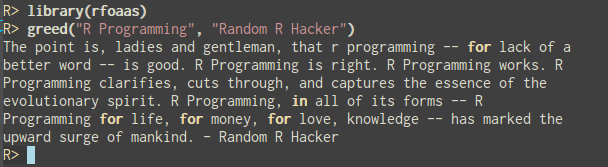
rfoaas greed example FOAAS upstream came out with release 1.1.0 earlier last week. Tyler Hunt was kind enough to provide an almost immediate pull request adding support for the extended capabilties. Following yesterday's upload we now have version 1.1.0 of rfoaas on CRAN. It brings six more accessors: maybe(), blackadder(), horse(), deraadt(), problem(), cocksplat() and too(). As usual, CRANberries provides a diff to the previous CRAN release. Questions, comments etc should go to the GitHub issue tracker. More background information is on the project page as well as on the github repo

This post by Dirk Eddelbuettel originated on his Thinking inside the box blog. Please report excessive re-aggregation in third-party for-profit settings.

27 August 2016

Arturo Borrero Gonz lez: Why conntrackd in Debian is better with systemd


There has been some discussion [0] around my decision to drop sysvinit support in the conntrackd package in Debian [1] (version 1:1.4.4-2).

The rationale I used for such a movement was sent to the debian-devel [2] mailing list, and here it is:


Lots of people have talked to me with both support and disagreement with the change.

Before reading the rest of this blogpost, please note that I'm not interested in the 'systemd vs sysvinit' war, and starting now I will focus mainly on the subject of building a firewall cluster with netfilter technology and the reasons why I think sysvinit here is irrelevant.

I started working with firewall clusters by the time of Debian Squeeze. By then, I used only sysvinit, because it was the Debian default init system and because I did not dive so much in the internals of the firewall cluster itself.

By then, the conntrackd debian package included support for sysvinit by means of two files (the two files that I dropped in 1:1.4.4-2) :


Using both files, you could start/stop conntrackd, and nothing more (for example, a proper status check was not implemented).

The conntrackd daemon is used in HA firewall clusters to replicate connection states between nodes of the cluster, so flow states are known in all nodes and they can properly perform stateful firewalling.

When you build HA clusters, there are 2 basic states of the cluster you may check and adjust: failover and failback.

With conntrackd, the failover situation is straight forward: the other node has the state information already from the dying node.
The failback situation is different: depending on the configuration of both the cluster and conntrackd, the new node may ask for a complete synchronisation to the other node when it become alive again (at boot time, for example) . This is the case if you are building a multi-master firewall cluster (i.e: both nodes are seeing traffic and filtering at the same time).

Asking for a complete synchronisation is done by means of a new instance of conntrackd, which communicates using a UNIX socket to the main conntrackd daemon (the one which is actually communicating with the other node). A failback boot procedure may look like this:

  1. system boots
  2. firewall ruleset loading
  3. networking up
  4. conntrackd up (main sync daemon: using 'conntrackd -d'; UNIX socket is opened)
  5. request sync with other node (using conntrackd -n' which uses the UNIX socket opened in step 4)

In both sysvinit and systemd cases, the step 5 may be implemented using another dummy service which performs the required operations and that depends on the main service representing the step 4.

The point here is that steps 4 and 5 suffer a very bad race condition: the conntrackd daemon may open the UNIX socket (step 4) *after* the we try to use it (step 5).

As you could probably imagine, this is the worst possible scenario: as one of the nodes of the cluster is missing important flow state information the stateful firewall will drop packets and all the network monitoring alarms will start to ring... Ironically, just after a failback operation, when all of our cluster is supposed to be up an running.

To avoid the race conditions, some typical hacks could be implemented:


After a bit of research, I found that the last point could be implemented very easily using libsystemd, so the daemon inform of its internal state to systemd [4].

The solution is elegant, simple and offers more direct benefits:

So the clear winner for conntrackd is to go with systemd, using an unit service file of Type=notify. Using sysvinit is prone to the described race condition. No serious firewall cluster with this architecture would use sysvinit.

It's obvious to me that systemd is a better technology than sysvinit. The sysvinit approach has been OK for a while, and for me it was fascinating when I started developing init scripts and learning how things worked.
But now we have systemd. It's the default in Debian. It's far better.

Conclusions: yes, I will probably reintroduce sysvinit files just to avoid any flamewar.


[0] https://lists.debian.org/debian-devel/2016/08/msg00448.html
[1] https://tracker.debian.org/pkg/conntrack-tools
[2] https://lists.debian.org/debian-devel/2016/08/msg00456.html
[3] https://sources.debian.net/src/systemd/231-4/debian/systemd.NEWS/
[4] http://git.netfilter.org/conntrack-tools/tree/src/systemd.c

Dirk Eddelbuettel: RcppCNPy 0.2.5

A maintenance release of the RcppCNPy package is now on CRAN. RcppCNPy provides R with read and write access to NumPy files thanks to the cnpy library by Carl Rogers. This release just updates a few package internals such as the vignette, the DESCRIPTION and the README.md file as well as under Travis script used for continuous integration.
Changes in version 0.2.5 (2016-08-26)
  • Synchronized code with the cnpy repository
  • Updated vignette
  • Expanded DESCRIPTION
CRANberries also provides a diffstat report for the latest release. As always, feedback is welcome and the best place to start a discussion may be the GitHub issue tickets page.

This post by Dirk Eddelbuettel originated on his Thinking inside the box blog. Please report excessive re-aggregation in third-party for-profit settings.

26 August 2016

Norbert Preining: ESSLLI 2016 Course: Algebraic Specification and Verification with CafeOBJ

During this year s ESSLLI (European Summer School in Logic, Language and Information) I was teaching a course on Algebraic Specification and Verification with CafeOBJ. Now that the course is over I can relax a bit and enjoy the beauty of the surrounding North Tyrol.
ESSLLI-2016-logo-darkblue-small For those who couldn t attend the ESSLLI or the course, here are the course materials: Thanks to the participants for the interesting questions and participation. What follows is the original description of the course. Abstract Ensuring correctness of complex systems like computer programs or communication protocols is gaining ever increasing importance. For correctness it does not suffice to consider the finished system, but correctness already on the level of specification is necessary, that is, before the actual implementation starts. To this aim, algebraic specification and verification languages have been conceived. They are aiming at a mathematically correct description of the properties and behavior of the systems under discussion, and in addition often allow to prove (verify) correctness within the same system. This course will give an introduction to algebraic specification, its history, logic roots, and actuality with respect to current developments. Paired with the theoretical background we give an introduction to CafeOBJ, a programming language that allows both specification and verification to be carried out together. The course should enable students to understand the theoretical background of algebraic specification, as well as enable them to read and write basic specifications in CafeOBJ. Description CafeOBJ is a specification language based on three-way extensions to many-sorted equational logic: the underlying logic is order-sorted, not just many-sorted; it admits unidirectional transitions, as well as equations; it also accommodates hidden sorts, on top of ordinary, visible sorts. A subset of CafeOBJ is executable, where the operational semantics is given by a conditional order-sorted term rewriting system. The language system CafeOBJ has been under constant development at the institute of the lecturers since the late 80ies. It is closely related to other algebraic specification languages in the OBJ family, including Maude. The CafeOBJ language and the range of verification methods and tools it supports including its support for inductive theorem proving, verification of behavioral specifications, deductive invariant proof, and reachability analysis of concurrent systems has played a key role in both extending and bringing algebraic specification techniques into contact with many software engineering applications. The following topics will be discussed: To make the lectures not too heavy , we will structure each lecture into two parts: A first part providing an introduction of some theoretical concept, or framework, and a second part dealing with actual programming and implementation. Especially for the second part of each lecture students are encouraged to use their laptops to try out code and experiment.

Michal &#268;iha&#345;: CI coverage from Windows, Linux and OSX

Once I got CI working on multiple platforms the obvious next step was to be able to aggregate coverage reports across them. This should not be that hard, right? Well I've spent couple of hours on that during last few days. On Linux and OSX it was pretty much straightforward. Both GCC and Clang do support coverage, so it's just matter of configuring them properly and collect the coverage reports. I've used own solution for that in past and that was really far from working well (somehow I never managed to get coverage fully uploaded to Codecov). Fortunately there exists CMake script called CMake-codecov which does all needed work and works out of the box on GCC and Clang (even on OSX). Well it works on Travis only once you update the compilers and install llvm-cov tool. The Windows part on AppVeyor was much harder for me. This can be heavily accounted to lack of my experience with Windows and especially development on Windows in past ten years (probably even more). First challenge was to find something what can generate code coverage there. After lot of googling I've settled down on OpenCppCoverage what seems to be the only free solution I was able to find. The good thing is that it can generate coverage in Cobertura format that Codecov undestands. There are also bad things that I've learned. First of all it's quite hard to integrate this with CTest. There is no support for wrapping test calls in custom commands, so I've misused the memory checks for that purpose. I've written small python script which pretends the valgrind interface and does call OpenCppCoverage in the background. Now I had around 800 coverage files (one for each test case) and we need to deal with them somehow. The Codeconv command line client doesn't deal wit this out of the box so the obvious choice was to merge them before upload. There even seems to be script doing that, but unfortunately trying that on our coverage data make it nowhere near completion within hour, so that's not really good choice. Second thing I've tried was merging binary coverage in OpenCppCoverage and then exporting to Cobertura format. Obviously Gammu is special project as all I got from this attempt was crashing OpenCppCoverage (it did merge some of the coverages, but it failed in the end without indicating any error). In the end I've settled down to uploading files in chunks to Codecov. This seems to work quite okay, though is a bit slow, mostly due to way how Codecov bash uploader prepares data to upload (but this will be hopefully fixed soon). Anyway the goal has been reached, both Windows and Linux code shows in coverage reports.

Filed under: Debian English Gammu 0 comments

Dirk Eddelbuettel: RcppArmadillo 0.7.400.2.0

armadillo image Another Armadillo 7.* release -- now at 7.400. We skipped the 7.300.* serie release as it came too soon after our most recent CRAN release. Releasing RcppArmadillo 0.7.400.2.0 now keeps us at the (roughly monthly) cadence which works as a good compromise between getting updates out at Conrad's sometimes frantic pace, while keeping CRAN (and Debian) uploads to about once per month. So we may continue the pattern of helping Conrad with thorough regression tests by building against all (by now 253 (!!)) CRAN dependencies, but keeping release at the GitHub repo and only uploading to CRAN at most once a month. Armadillo is a powerful and expressive C++ template library for linear algebra aiming towards a good balance between speed and ease of use with a syntax deliberately close to a Matlab. The new upstream release adds new more helper functions. Detailed changes in this release relative to the previous CRAN release are as follows:
Changes in RcppArmadillo version 0.7.400.2.0 (2016-08-24)
  • Upgraded to Armadillo release 7.400.2 (Feral Winter Deluxe)
    • added expmat_sym(), logmat_sympd(), sqrtmat_sympd()
    • added .replace()
Changes in RcppArmadillo version 0.7.300.1.0 (2016-07-30)
  • Upgraded to Armadillo release 7.300.1
    • added index_min() and index_max() standalone functions
    • expanded .subvec() to accept size() arguments
    • more robust handling of non-square matrices by lu()
Courtesy of CRANberries, there is a diffstat report. More detailed information is on the RcppArmadillo page. Questions, comments etc should go to the rcpp-devel mailing list off the R-Forge page.

This post by Dirk Eddelbuettel originated on his Thinking inside the box blog. Please report excessive re-aggregation in third-party for-profit settings.

25 August 2016

Norbert Preining: Gaming: Deus Ex Go

Long flights and lazy afternoons relaxing from teaching, I tried out another game on my Android device, Deus Ex Go. It is a turn based game in the style of the Deus Ex series (long years ago I was beta tester for the Deus Ex version of LGP). A turn based game where you have to pass through a series of levels, each one consisting of an hexagonal grid with an entry and exit point, and some nasty villains or machines trying to kill you. Deus-ex-go Without any explanations given you are thrown into the game and it takes a few iterations until you understand what kind of attacks you are facing, but once you have figured that out, it is a more or less simple game of combination how to manage to get to the exit. I played through the around 50 levels of the story mode and I think it was only in the last five that I once or twice had to actually try and think hard to find a solution. I found the game quite amusing at the beginning, but soon it became repetitive. But since you can play through the whole story mode in probably one long afternoon, that is not so much of a problem. More a problem is the apparently incredible battery usage of this game. Playing without checking for some time leaves you soon with a near empty battery. Graphically well done, with more or less interesting gameplay, it still does not stand up to Monument Valley.

Francois Marier: Debugging gnome-session problems on Ubuntu 14.04

After upgrading an Ubuntu 14.04 ("trusty") machine to the latest 16.04 Hardware Enablement packages, I ran into login problems. I could log into my user account and see the GNOME desktop for a split second before getting thrown back into the LightDM login manager. The solution I found was to install this missing package:
apt install libwayland-egl1-mesa-lts-xenial

Looking for clues in the logs The first place I looked was the log file for the login manager (/var/log/lightdm/lightdm.log) where I found the following:
DEBUG: Session pid=12743: Running command /usr/sbin/lightdm-session gnome-session --session=gnome
DEBUG: Creating shared data directory /var/lib/lightdm-data/username
DEBUG: Session pid=12743: Logging to .xsession-errors
This told me that the login manager runs the gnome-session command and gets it to create a session of type gnome. That command line is defined in /usr/share/xsessions/gnome.desktop (look for Exec=):
[Desktop Entry]
Name=GNOME
Comment=This session logs you into GNOME
Exec=gnome-session --session=gnome
TryExec=gnome-shell
X-LightDM-DesktopName=GNOME
I couldn't see anything unexpected there, but it did point to another log file (~/.xsession-errors) which contained the following:
Script for ibus started at run_im.
Script for auto started at run_im.
Script for default started at run_im.
init: Le processus gnome-session (GNOME) main (11946) s'est achev  avec l' tat 1
init: D connect  du bus D-Bus notifi 
init: Le processus logrotate main (11831) a  t  tu  par le signal TERM
init: Le processus update-notifier-crash (/var/crash/_usr_bin_unattended-upgrade.0.crash) main (11908) a  t  tu  par le signal TERM
Seaching for French error messages isn't as useful as searching for English ones, so I took a look at /var/log/syslog and found this:
gnome-session[4134]: WARNING: App 'gnome-shell.desktop' exited with code 127
gnome-session[4134]: WARNING: App 'gnome-shell.desktop' respawning too quickly
gnome-session[4134]: CRITICAL: We failed, but the fail whale is dead. Sorry....
It looks like gnome-session is executing gnome-shell and that this last command is terminating prematurely. This would explain why gnome-session exits immediately after login.

Increasing the amount of logging In order to get more verbose debugging information out of gnome-session, I created a new type of session (GNOME debug) by copying the regular GNOME session:
cp /usr/share/xsessions/gnome.desktop /usr/share/xsessions/gnome-debug.desktop
and then adding --debug to the command line inside gnome-debug.desktop:
[Desktop Entry]
Name=GNOME debug
Comment=This session logs you into GNOME debug
Exec=gnome-session --debug --session=gnome
TryExec=gnome-shell
X-LightDM-DesktopName=GNOME debug
After restarting LightDM (service lightdm restart), I clicked the GNOME logo next to the password field and chose GNOME debug before trying to login again. This time, I had a lot more information in ~/.xsession-errors:
gnome-session[12878]: DEBUG(+): GsmAutostartApp: starting gnome-shell.desktop: command=/usr/bin/gnome-shell startup-id=10d41f1f5c81914ec61471971137183000000128780000
gnome-session[12878]: DEBUG(+): GsmAutostartApp: started pid:13121
...
/usr/bin/gnome-shell: error while loading shared libraries: libwayland-egl.so.1: cannot open shared object file: No such file or directory
gnome-session[12878]: DEBUG(+): GsmAutostartApp: (pid:13121) done (status:127)
gnome-session[12878]: WARNING: App 'gnome-shell.desktop' exited with code 127
which suggests that gnome-shell won't start because of a missing library.

Finding the missing library To find the missing library, I used the apt-file command:
apt-file update
apt-file search libwayland-egl.so.1
and found that this file is provided by the following packages:
  • libhybris
  • libwayland-egl1-mesa
  • libwayland-egl1-mesa-dbg
  • libwayland-egl1-mesa-lts-utopic
  • libwayland-egl1-mesa-lts-vivid
  • libwayland-egl1-mesa-lts-wily
  • libwayland-egl1-mesa-lts-xenial
Since I installed the LTS Enablement stack, the package I needed to install to fix this was libwayland-egl1-mesa-lts-xenial. I filed a bug for this on Launchpad.

Next.

Previous.