Matthew Garrett: More doorbell adventures
 Back in my last post on this topic, I'd got shell on my doorbell but hadn't figured out why the HTTP callbacks weren't always firing. I still haven't, but I have learned some more things.
Doorbird sell a chime, a network connected device that is signalled by the doorbell when someone pushes a button. It costs about $150, which seems excessive, but would solve my problem (ie, that if someone pushes the doorbell and I'm not paying attention to my phone, I miss it entirely). But given a shell on the doorbell, how hard could it be to figure out how to mimic the behaviour of one?
Configuration for the doorbell is all stored under /mnt/flash, and there's a bunch of files prefixed 1000eyes that contain config (1000eyes is the German company that seems to be behind Doorbird). One of these was called 1000eyes.peripherals, which seemed like a good starting point. The initial contents were "Peripherals":[] , so it seemed likely that it was intended to be JSON. Unfortunately, since I had no access to any of the peripherals, I had no idea what the format was. I threw the main application into Ghidra and found a function that had debug statements referencing "initPeripherals and read a bunch of JSON keys out of the file, so I could simply look at the keys it referenced and write out a file based on that. I did so, and it didn't work - the app stubbornly refused to believe that there were any defined peripherals. The check that was failing was pcVar4 = strstr(local_50[0],PTR_s_"type":"_0007c980);, which made no sense, since I very definitely had a type key in there. And then I read it more closely. strstr() wasn't being asked to look for "type":, it was being asked to look for "type":". I'd left a space between the : and the opening " in the value, which meant it wasn't matching. The rest of the function seems to call an actual JSON parser, so I have no idea why it doesn't just use that for this part as well, but deleting the space and restarting the service meant it now believed I had a peripheral attached.
The mobile app that's used for configuring the doorbell now showed a device in the peripherals tab, but it had a weird corrupted name. Tapping it resulted in an error telling me that the device was unavailable, and on the doorbell itself generated a log message showing it was trying to reach a device with the hostname bha-04f0212c5cca and (unsurprisingly) failing. The hostname was being generated from the MAC address field in the peripherals file and was presumably supposed to be resolved using mDNS, but for now I just threw a static entry in /etc/hosts pointing at my Home Assistant device. That was enough to show that when I opened the app the doorbell was trying to call a CGI script called peripherals.cgi on my fake chime. When that failed, it called out to the cloud API to ask it to ask the chime[1] instead. Since the cloud was completely unaware of my fake device, this didn't work either. I hacked together a simple server using Python's HTTPServer and was able to return data (another block of JSON). This got me to the point where the app would now let me get to the chime config, but would then immediately exit. adb logcat showed a traceback in the app caused by a failed assertion due to a missing key in the JSON, so I ran the app through jadx, found the assertion and from there figured out what keys I needed. Once that was done, the app opened the config page just fine.
Unfortunately, though, I couldn't edit the config. Whenever I hit "save" the app would tell me that the peripheral wasn't responding. This was strange, since the doorbell wasn't even trying to hit my fake chime. It turned out that the app was making a CGI call to the doorbell, and the thread handling that call was segfaulting just after reading the peripheral config file. This suggested that the format of my JSON was probably wrong and that the doorbell was not handling that gracefully, but trying to figure out what the format should actually be didn't seem easy and none of my attempts improved things.
So, new approach. Rather than writing the config myself, why not let the doorbell do it? I should be able to use the genuine pairing process if I could mimic the chime sufficiently well. Hitting the "add" button in the app asked me for the username and password for the chime, so I typed in something random in the expected format (six characters followed by four zeroes) and a sufficiently long password and hit ok. A few seconds later it told me it couldn't find the device, which wasn't unexpected. What was a little more unexpected was that the log on the doorbell was showing it trying to hit another bha-prefixed hostname (and, obviously, failing). The hostname contains the MAC address, but I hadn't told the doorbell the MAC address of the chime, just its username. Some more digging showed that the doorbell was calling out to the cloud API, giving it the 6 character prefix from the username and getting a MAC address back. Doing the same myself revealed that there was a straightforward mapping from the prefix to the mac address - changing the final character from "a" to "b" incremented the MAC by one. It's actually just a base 26 encoding of the MAC, with aaaaaa translating to 00408C000000.
That explained how the hostname was being generated, and in return I was able to work backwards to figure out which username I should use to generate the hostname I was already using. Attempting to add it now resulted in the doorbell making another CGI call to my fake chime in order to query its feature set, and by mocking that up as well I was able to send back a file containing X-Intercom-Type, X-Intercom-TypeId and X-Intercom-Class fields that made the doorbell happy. I now had a valid JSON file, which cleared up a couple of mysteries. The corrupt name was because the name field isn't supposed to be ASCII - it's base64 encoded UTF16-BE. And the reason I hadn't been able to figure out the JSON format correctly was because it looked something like this:
"Peripherals":[] "prefix": "type":"DoorChime","name":"AEQAbwBvAHIAYwBoAGkAbQBlACAAVABlAHMAdA==","mac":"04f0212c5cca","user":"username","password":"password" ]
Note that there's a total of one [ in this file, but two ]s? Awesome. Anyway, I could now modify the config in the app and hit save, and the doorbell would then call out to my fake chime to push config to it. Weirdly, the association between the chime and a specific button on the doorbell is only stored on the chime, not on the doorbell. Further, hitting the doorbell didn't result in any more HTTP traffic to my fake chime. However, it did result in some broadcast UDP traffic being generated. Searching for the port number led me to the Doorbird LAN API and a complete description of the format and encryption mechanism in use. Argon2I is used to turn the first five characters of the chime's password (which is also stored on the doorbell itself) into a 256-bit key, and this is used with ChaCha20 to decrypt the payload. The payload then contains a six character field describing the device sending the event, and then another field describing the event itself. Some more scrappy Python and I could pick up these packets and decrypt them, which showed that they were being sent whenever any event occurred on the doorbell. This explained why there was no storage of the button/chime association on the doorbell itself - the doorbell sends packets for all events, and the chime is responsible for deciding whether to act on them or not.
On closer examination, it turns out that these packets aren't just sent if there's a configured chime. One is sent for each configured user, avoiding the need for a cloud round trip if your phone is on the same network as the doorbell at the time. There was literally no need for me to mimic the chime at all, suitable events were already being sent.
Still. There's a fair amount of WTFery here, ranging from the strstr() based JSON parsing, the invalid JSON, the symmetric encryption that uses device passwords as the key (requiring the doorbell to be aware of the chime's password) and the use of only the first five characters of the password as input to the KDF. It doesn't give me a great deal of confidence in the rest of the device's security, so I'm going to keep playing.
[1] This seems to be to handle the case where the chime isn't on the same network as the doorbell
 Like many I use
  I have uploaded most of my Machine Learning lecture to YouTube.
The slides are in English, but the audio is in German.
Some very basic contents (e.g., a demo of standard k-means clustering) were left out from this advanced class,
and instead only a link to recordings from an earlier class were given. In this class, I wanted to focus
on the improved (accelerated) algorithms instead. These are not included here (yet).
I believe there are some contents covered in this class you will find nowhere else (yet).
The first unit is pretty long (I did not split it further yet). The later units are shorter recordings.
ML F1: Principles in Machine Learning
I have uploaded most of my Machine Learning lecture to YouTube.
The slides are in English, but the audio is in German.
Some very basic contents (e.g., a demo of standard k-means clustering) were left out from this advanced class,
and instead only a link to recordings from an earlier class were given. In this class, I wanted to focus
on the improved (accelerated) algorithms instead. These are not included here (yet).
I believe there are some contents covered in this class you will find nowhere else (yet).
The first unit is pretty long (I did not split it further yet). The later units are shorter recordings.
ML F1: Principles in Machine Learning


 First email from my new machine.
I didn't have my desktop Debian machine for a long time and now I have one set up.
I rewrote my procmail/formail recipe, especially the part where I wrote complex shell script to generate my folder rules.
I rewrote that 4 lines of shell script in 200 lines of Go, with unit tests.
The part that took the longest time was finding out how to write unit tests in Go, and
how to properly use go.mod to be able to import packages from subdirectories.
I guess that's part of the fun.
First email from my new machine.
I didn't have my desktop Debian machine for a long time and now I have one set up.
I rewrote my procmail/formail recipe, especially the part where I wrote complex shell script to generate my folder rules.
I rewrote that 4 lines of shell script in 200 lines of Go, with unit tests.
The part that took the longest time was finding out how to write unit tests in Go, and
how to properly use go.mod to be able to import packages from subdirectories.
I guess that's part of the fun.
 One could think that nowadays having a machine with software raid doing dual boot should be easy, but... my experience showed that it is not that easy.Having a Windows machine do software raid is easy (I still don't understand why it doesn't really work like it should, but that is because I'm used to Linux software raid), and having software raid on Linux is also really easy. But doing so on a BIOS booted machine, on mbr disks (as Windows doesn't allow GPT on BIOS) is quite a pain.The problem is how Windows does all this, with it's dynamic disks. What happens with this is that you get from a partitioning like this:/dev/sda1 * 2048 206847 204800 100M 7 HPFS/NTFS/exFAT /dev/sda2 206848 312580095 312373248 149G 7 HPFS/NTFS/exFAT /dev/sda3 312580096 313165823 585728 286M 83 Linux /dev/sda4 313165824 957698047 644532224 307,3G fd Linux raid autodetect To something like this:/dev/sda1 63 2047 1985 992,5K 42 SFS /dev/sda2 * 2048 206847 204800 100M 42 SFS /dev/sda3 206848 312580095 312373248 149G 42 SFS /dev/sda4 312580096 976769006 664188911 316,7G 42 SFS These are the physical partitions as seen by fdisk, logical partitions are still like before, of course, so there is no problem in accesing them under Linux or windows, but what happens here is that Windows is using the first sectors for its dynamic disks stuff, so... you cannot use those to write grub info there :-(So... the solution I found here was to install Debian's mbr and make it boot grub, but then... where do I store grub's info?, well, to do this I'm using a btrfs /boot which is on partition 3, as btrfs has room for embedding grub's info, and I setup the software raid with ext4 on partition 4, like you can see on my first partition dump. Of course, you can have just btrfs with its own software raid, then you don't need the fourth partition or anything.There are however some caveats on doing all this, what I found was that I had to install grub manually using grub-install --no-floppy on /dev/sda3 and /dev/sdb3, as Debian's grub refused to give me the option to install there, also... several warnings came as a result, but things work ok anyway.One more warning, I did all this on Buster, but it looks like for Grub 2.04 which is included on Bullseye, things have gotten a bit bigger, so at least on my partitions there was no room for it, so I had to leave the old Buster's grub around for now, if anybody has any ideas on how to solve this... they are welcome.
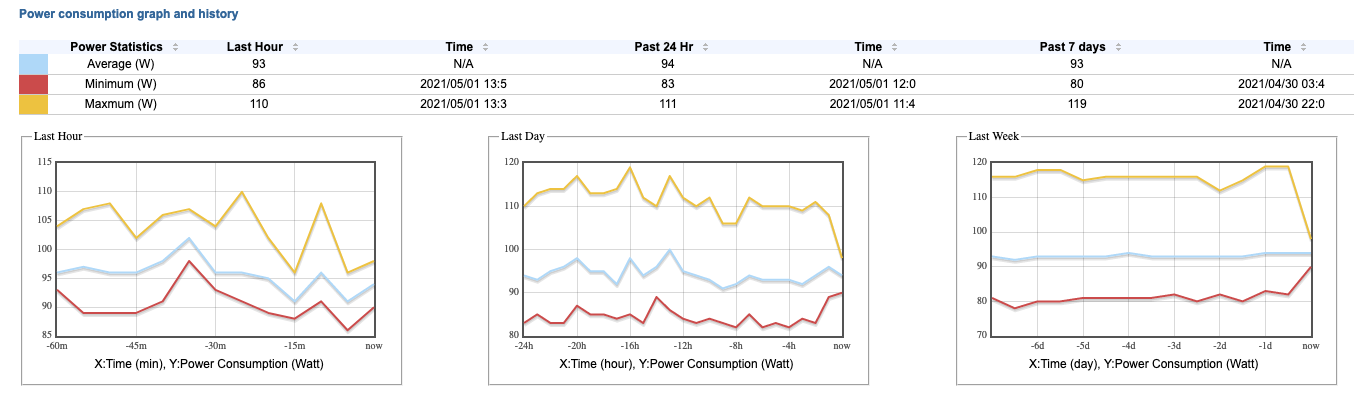 screenshot showing power consumption of server


 Here is my monthly update covering what I have been doing in the free software world during April 2021 (