Search Results: "sf"

1 July 2008

Axel Beckert: Conkeror in the Debian NEW queue

I already mentioned a few times in the blog that I’m working on a Debian package of the Conkeror web browser. And now, after a lot of fine-tuning (and I still further new ideas how to improve the package ;-) Conkeror is finally in the NEW queue and hopefully will hit unstable in a few days. (Update Thursday, 03-Jul-2008, 18:13 CEST: The package has been accepted by Jörg and should be included on most architectures in tonight’s updates.) Those who could hardly await it can fetch Conkeror .debs from http://noone.org/debian/. The conkeror package itself is a non-architecture specific package (but needs xulrunner-1.9 to be available), and its small C-written helper program spawn-process-helper is available as package conkeror-spawn-process-helper for i386, amd64, sparc, alpha, powerpc, kfreebsd-i386 and kfreebsd-amd64. There are no backported packages for Etch available, though, since I don’t know of anyone yet, who has successfully backported xulrunner-1.9 to Etch. Interestingly the interest in Conkeror seems to have risen in the Debian community independently of its Debian packaging. Luca Capello, who sponsored the upload of my Conkeror package, pointed me to two blog post on Planet Debian, written by people being fed up with Firefox 3 already and are looking for a more lean, but still Gecko based web browser: Decklin Foster is fed up with Firefox’ -eh- Iceweasel’s arrogance and MJ Ray is fed up with Firefox 3 and its SSL problems. Since my previously favourited Gecko based web browser Kazehakase never became really stable but instead became slow and leaking memory (and therefore not much better than Firefox 2), I can imagine that it’s no more an candidate for people seaking for a lean and fast web browser. Conkeror has some “strange” concepts of which the primary one is that it looks and feels like Emacs: Footnotes *) I just noticed that there is now also muttator, making Thunderbird look and behave like vim (and probably also mutt), too. Wonder into which e-mail client the Emacs community will convert Thunderbird. GNUS? RMAIL? VM? Wanderslust? What will it be called? Wunderbird? Thunderslust? (SCNRE ;-)

30 June 2008

Russell Coker: The History of MS

Jeff Bailey writes about the last 26 years of Microsoft [1]. He gives Microsoft credit for “saving us from the TRS 80″, however CP/M-86 was also an option for the OS on the IBM PC [2]. If MS hadn’t produced MS-DOS for a lower price then CP/M would have been used (in those days CP/M and MS-DOS had the same features and essentially the same design). He notes the use of the Terminate and Stay Resident (TSR) [3] programs. As far as I recall the TSR operation was undocumented and was discovered by disassembling DOS (something that the modern MS EULAs forbid). Intel designed the 8086 and 80286 CPUs to permit code written for an 8086 to run unchanged in “protected mode” on an 80286 (as noted in the Wikipedia page about the 80286 [4]). Basically all that you needed to do to write a DOS program with the potential of being run directly in protected mode (or easily ported) was to allocate memory by requesting it from the OS (not just assuming that every address above your heap was available to write on) and by addressing memory only by the segment register returned from the OS when allocating memory (IE not assuming that incrementing a segment register is equivalent to adding 16 to the offset). There were some programs written in such a manner which could run on both DOS and text-mode OS/2 (both 1.x and 2.x), I believe that such programs were linked differently. The term Fat Binary [5] is often used to refer to an executable which has binary code for multiple CPUs (EG PPC and M68K CPUs on the Macintosh), I believe that a similar concept was used for DOS / OS/2 programs but the main code of the application was shared. Also compilers which produce object code which doesn’t do nasty things could have their object code linked to run in protected mode. Some people produced a set of libraries that allowed linking Borland Turbo Pascal code to run as OS/2 16bit text-mode applications. The fact that OS/2 (the protected-mode preemptively multi-tasking DOS) didn’t succeed in the market was largely due to MS. I never used Windows/386 (a version of Windows 2.x) but used Windows 3.0 a lot. Windows 3.0 ran in three modes, “Real Mode” (8086), “Standard Mode” (80286), and “Enhanced Mode” (80386). Real Mode was used for 8086 and 8088 CPUs, for 80286 systems if you needed to run one DOS program (there was no memory for running more than one), and for creating or adjusting the swap-file size for an 80386 system (if your 80386 system didn’t have enough swap you had to shut everything down, start Real Mode, adjust the swap file, and then start it again in Enhanced Mode). Standard Mode was the best mode for running Windows programs (apart from the badly written ones which only ran on Real Mode), but due to the bad practices implemented by almost everyone who wrote DOS programs MS didn’t even try to run DOS programs in 286 protected mode and thus Standard Mode didn’t support DOS programs. Enhanced Mode allowed multitasking DOS programs but as hardly anyone had an 80386 class system at that time it didn’t get much use. It was just before the release of Windows 3.1 that I decided to never again use Windows unless I was paid to do so. I was at a MS presentation about Windows 3.1 and after the marketing stuff they had a technical Q/A session. The questions were generally about how to work around bugs in MS software (mainly Windows 3.0) and the MS people had a very detailed list of work-arounds. Someone asked “why don’t you just fix those bugs” and we were told “it’s easier to teach you how to work around them than to fix them“. I left the presentation before it finished, went straight home and deleted Windows from my computer. I am not going to use software written by people with such a poor attitude if given a choice. After that I ran the DOS multi-tasker DesqView [6] until OS/2 2.0 was released. Desqview allowed multitasking well written DOS programs in real mode, Quarterdeck was the first company to discover that almost 64K of address space could be used above the 1MB boundary from real-mode on a 80286 (a significant benefit when you were limited to 640K of RAM), as well as multitasking less well behaved DOS programs with more memory use on an 80386 or better CPU. OS/2 [7] 2.x was described as “A Better DOS than DOS, a Better Windows than Windows”. That claim seemed accurate to me. I could run DOS VM86 sessions under OS/2 which could do things that even Desqview couldn’t manage (such as having a non-graphical DOS session with 716K of base memory in one window and a graphical DOS session in another). I could also run combinations of Windows programs that could not run under MS Windows (such as badly written windows programs that needed Real Mode as well as programs that needed the amount of memory that only Standard or Enhanced mode could provide). Back to Bill Gates, I recently read a blog post Eight Years of Wrongness [5] which described how Steve Ballmer has failed MS stockholders by his poor management. It seems that he paid more attention to fighting Linux, implementing Digital Restrictions Management (DRM), and generally trying to avoid compatibility with other software than to actually making money. While this could be seen as a tribute to Bill Gates (Steve Ballmer couldn’t do the job as well), I think that Bill would have made the same mistakes for the same reasons. MS has always had a history of treating it’s customers as the enemy. Jeff suggests that we should learn from MS that the freedom to tinker is important as is access to our data. These are good points but another important point is that we need to develop software that does what users want and acts primarily in the best interests of the users. Overall I think that free software is quite well written in regard to acting on behalf of the users. The issue we have is in determining who the “user” is, whether it’s a developer, sys-admin, or someone who wants to just play games and do some word-processing.

29 June 2008

Eddy Petrișor: when printouts don't help to revoke a GPG key

It's official, I am revoking my gpg key because after my laptop returned from service[1] I realized is a bad idea to change the passphrase just before a long break away from a routine that would help the brain to cement the new passphrase. In other words, I forgot the passphrase.

So, let's get the revocation certificate printout and revoke that gpg and generate a new one. All is good and fine until you realize that I (capital i) and l (low case L ) look very much the same on paper. Oops!

So, what do you do? How many I/l -s are there in the certificate? Let's find out...


0 eddy@bounty ~/tmp/revoke $ cat template
-----BEGIN PGP PUBLIC KEY BLOCK-----
Version: GnuPG v1.4.6 (GNU/Linux)
Comment: A revocation certificate should follow

iEkEIBECAAkFAkbYOQUCHQIACgkQY8Chqv3NRNquGgCgxdMDrhycNcoJsaeeg7hk
8vVJZzsAnRicsfjcZnUtmLIsys6KK48FbJ4h
=I5o9
-----END PGP PUBLIC KEY BLOCK-----


Well, I'm not going to count, I'll remove the header and footer and see from there...

0 eddy@bounty ~/tmp/revoke $ cat template.in tr -d '[a-zA-HJ-Z0-9=]'
II
I
I


Ok, so we have 16 possible combinations, not that many.

0 eddy@bounty ~/tmp/revoke $ for i in l I ; do for j in l I ; do for k in l I ; do for l in l I ; do cat template.in sed -e "s#I#$i#" -e "s#I#$j#" -e "s#I#$k#" -e "s#I#$l#" > $i$j$k$l.mid ; done ; done ; done ; done
0 eddy@bounty ~/tmp/revoke $ md5sum *.mid
eab3a5e312bc0314ac2b3d4536bda2f6 IIII.mid
63a9dd10e381b8ff5c758ab3467a5c45 IIIl.mid
63a9dd10e381b8ff5c758ab3467a5c45 IIlI.mid
919d8494c9990c68f50bc9df61f269bc IIll.mid
63a9dd10e381b8ff5c758ab3467a5c45 IlII.mid
919d8494c9990c68f50bc9df61f269bc IlIl.mid
919d8494c9990c68f50bc9df61f269bc IllI.mid
919d8494c9990c68f50bc9df61f269bc Illl.mid
63a9dd10e381b8ff5c758ab3467a5c45 lIII.mid
919d8494c9990c68f50bc9df61f269bc lIIl.mid
919d8494c9990c68f50bc9df61f269bc lIlI.mid
919d8494c9990c68f50bc9df61f269bc lIll.mid
919d8494c9990c68f50bc9df61f269bc llII.mid
919d8494c9990c68f50bc9df61f269bc llIl.mid
919d8494c9990c68f50bc9df61f269bc lllI.mid
919d8494c9990c68f50bc9df61f269bc llll.mid


Oops, that's not ok... I guess I've been replacing some of the characters more than once.

Take 2:
0 eddy@bounty ~/tmp/revoke $ for i in l I ; do for j in l I ; do for k in l I ; do for l in l I ; do cat template.in tr 'Il' '-' sed -e "s#-#$i#" -e "s#-#$j#" -e "s#-#$k#" -e "s#-#$l#" > $i$j$k$l.mid ; done ; done ; done ; done
0 eddy@bounty ~/tmp/revoke $ md5sum *.mid
eab3a5e312bc0314ac2b3d4536bda2f6 IIII.mid
eab3a5e312bc0314ac2b3d4536bda2f6 IIIl.mid
eab3a5e312bc0314ac2b3d4536bda2f6 IIlI.mid
eab3a5e312bc0314ac2b3d4536bda2f6 IIll.mid
7150fa775c83c276223a30d373671333 IlII.mid
7150fa775c83c276223a30d373671333 IlIl.mid
7150fa775c83c276223a30d373671333 IllI.mid
7150fa775c83c276223a30d373671333 Illl.mid
63a9dd10e381b8ff5c758ab3467a5c45 lIII.mid
63a9dd10e381b8ff5c758ab3467a5c45 lIIl.mid
63a9dd10e381b8ff5c758ab3467a5c45 lIlI.mid
63a9dd10e381b8ff5c758ab3467a5c45 lIll.mid
919d8494c9990c68f50bc9df61f269bc llII.mid
919d8494c9990c68f50bc9df61f269bc llIl.mid
919d8494c9990c68f50bc9df61f269bc lllI.mid
919d8494c9990c68f50bc9df61f269bc llll.mid


Oops, that's not good either. Doh, sed works on lines.

Take 3:

Make a one line out of the template and try again:

0 eddy@bounty ~/tmp/revoke $ cat template.in
iEkEIBECAAkFAkbYOQUCHQIACgkQY8Chqv3NRNquGgCgxdMDrhycNcoJsaeeg7hk8vVJZzsAnRicsfjcZnUtmLIsys6KK48FbJ4h=I5o9

0 eddy@bounty ~/tmp/revoke $ for i in l I ; do for j in l I ; do for k in l I ; do for l in l I ; do cat template.in tr 'I' '-' tr 'l' '-' sed -e "s#-#$i#" -e "s#-#$j#" -e "s#-#$k#" -e "s#-#$l#" > $i$j$k$l.mid ; done ; done ; done ; done
0 eddy@bounty ~/tmp/revoke $ md5sum *.mid
66ab0a0bed219db8499debabb9a41c0b IIII.mid
e02c1751c4491ce5db1ebe9e64d8eadc IIIl.mid
c96a33f821d3fba84f655aa986084320 IIlI.mid
998c5c4219a5afdd77f82c9fc9818f6f IIll.mid
e08fe6c5380765d12c4f5e4090a7d9c6 IlII.mid
24241b58c231900b02ebb0410183983e IlIl.mid
72040a77e7cca9a91abf2bb0d51c00dd IllI.mid
a02e8645f3593f5c3549b49adef04bc2 Illl.mid
99a1a47c853ed760ef1f58cba7b75916 lIII.mid
c48bf75f30be46ec576a46a1d5664a93 lIIl.mid
717e9dfdc0d3fba973ba66ccb57d69dc lIlI.mid
3e9a2c937fd269d85c09b449b4da17de lIll.mid
4d283333d1d62086328dbc72425a645d llII.mid
542a7c00e99aad5137975581e57a92c9 llIl.mid
ef0e0a2daad7a933b620331a86455c23 lllI.mid
bdf852887308830475a506f8daad9624 llll.mid


That's better. Now let's put those lines back in place:

0 eddy@bounty ~/tmp/revoke $ for I in *.mid ; do cat $I sed -e 's#\(eeg7hk\)#\1-#' -e 's#\(K48FbJ4h\)#\1-#' tr '-' '\n' > $I.good ; done


And revoke that key...

0 eddy@bounty ~/tmp/revoke $ for I in *.mid.good ; do echo "$I:" && (cat header $I footer) > template && gpg --import -a template ; done
IIII.mid.good:
gpg: CRC error; 73689A - 239A3D
gpg: read_block: read error: invalid keyring
gpg: import from template' failed: invalid keyring
gpg: Total number processed: 0
IIIl.mid.good:
gpg: CRC error; 73689A - 979A3D
gpg: read_block: read error: invalid keyring
gpg: import from template' failed: invalid keyring
gpg: Total number processed: 0
IIlI.mid.good:
gpg: key FDCD44DA: "Eddy Petri or
" revocation certificate imported
gpg: Total number processed: 1
gpg: new key revocations: 1
gpg: public key 67D8E867 is 987014 seconds newer than the signature
gpg: public key 67D8E867 is 987029 seconds newer than the signature
gpg: 3 marginal(s) needed, 1 complete(s) needed, PGP trust model
gpg: depth: 0 valid: 2 signed: 139 trust: 0-, 0q, 0n, 0m, 0f, 2u
gpg: depth: 1 valid: 139 signed: 667 trust: 138-, 0q, 0n, 1m, 0f, 0u
gpg: next trustdb check due at 2008-10-09
IIll.mid.good:
gpg: CRC error; 239A3D - 979A3D
gpg: read_block: read error: invalid keyring
gpg: import from template' failed: invalid keyring
gpg: Total number processed: 0


Cool!


[1] I know is almost a half a year, but I've been busy and hoping

28 June 2008

Martin F. Krafft: Shortcomings of the Nokia E51

I put the Nokia E51, which I had previously acquired, onto Ebay last night, and it sold within minutes. Even though I made a 50 loss on the whole affair, this made me very happy! The phone is crap in so many ways that it made me quite angry. I now consider those 50 the investment I had to make to bring you this post: First of all, the reason why I bought the phone was because it sports wireless LAN as well as Voice-over-IP. Since I ve recently gotten into VoIP, I was looking for reasonable VoIP phones and even though the Siemens C450IP DECT phone works very well, it only does so at home, or where I find a switch port for it. So my theory was to get this Wifi+VoIP phone and be able to use my VoIP infrastructure from anywhere around the world. Penny has the Nokia E65 and loves it, so I went for the E51, a newer model that promised to address some of the issues she had with hers. All of the following is based on the E51 with the 100.34.20 firmware dated 29 September 2007, which runs the (crippled) Symbian S60r3 operating system.

Good things Let s start with the few good things up front: the E51 comes with a regular USB jack, allowing you to plug it into any computer and use it as mass storage device without the need for any Nokia-specific cables. I also liked the remote lock functionality: in the event of a stolen phone, you could send it a pre-defined passphrase that would cause the phone to lock itself. Also, the phone could be configured to lock itself (like a screensaver) after a given amount of idle time. Other than that, I could not find anything outstanding, so let s turn to the downsides, of which there are many more:

VoIP/SIP shortcomings I had previously dismissed the E series phones for good reasons, but both the E65 and the E51 improved their SIP clients a fair bit, and with the SIP VoIP settings utility, it was even possible to configure STUN. But unfortunately, the SIP client, while a nice toy, ended up being unusable in production. Here are some of the reasons: I got VoIP working at home and in some other places, but definitely not everywhere. It may be that some of those networks blocked the SIP port (5060/udp), or that the phone didn t feel well on the day, but in the majority of cases, I could not get the SIP client to connect. And there was no way to find out what was going on, as the client would just claim that registration failed without any additional information. It was also hard to retry, often requiring the phone to be restarted. Whenever if failed, the client would helpfully tell me that it could not establish a connection to the connection network . To get the phone to log on to the SIP server automatically, I had to define a home network for the SIP profile. Changing the access point for that network required a phone reboot to get SIP working again. It was possible to define multiple SIP profiles with different access points and add them all to the one, global VoIP profile, and theoretically get auto-login to work across multiple Wifi networks; unfortunately, I cannot say that this worked, there were always some problems requiring me to change defaults and shift things around. Also, after I had defined a few of those profiles and needed to make a change to the SIP settings (move the SIP port to 53/udp), I had to modify all profiles in turn; it was not possible to share settings. On the other hand, NAT traversal settings and timeouts, which can only be configured with the aforementioned SIP VoIP settings utility, applied to a VoIP profile and thus to all SIP profiles, without exception. I found it mildly annoying that I couldn t use # and * as part of the number/SIP address to call, nor was it possible to dial single-digit extensions the phone will ask you to associate a quick dial number with the key, even if quick dial has been explicitly disabled). I could also not dial a SIP address ad-hoc if I wanted to call sip:someone@sip.somewhere.org, I had to define a contact and add the Internet phone address. One can define Internet calls to be the default call type, thus routing all calls via VoIP if available. Unfortunately, once I dialed a number, the event was hardwired to the call type: I could not redial a number used previously for a VoIP call when all I had available was GSM coverage.

Gripes with the IMAP client The IMAP client, while an interesting addition to my day, turned out to be pretty unusable. The first mistake I made was to tell it to synchronise all messages in some of my larger mailboxes, which caused the phone to take tens of seconds until it switched a folder, and a few seconds just to scroll to the next screen in any given folder. I found that once any mailbox accumulates more than 100 messages, the client turns useless (Nokia s default is to synchronise 30 messages). I could tell the client to synchronise every hour, but only if I locked it to an access point, the home network . If I roamed to a different Wifi network, I could no longer connect to the IMAP server, as this access point would not be found. The phone would not let me use a different access point unless I changed the home access point, but changing that turned off the automatic mail sycnhronisation. If I say mail synchronisation, I mean header synchronisation. Even though there is an option for Headers only , it only applies to POP3; it is impossible to have the phone download message bodies automatically, only manually and then only per-message or per-folder, not for all folders at once. The IMAP client could delete messages, but it could not move a message to a different folder, nor create or delete folders. And even though I could turn off the message tone the phone would play when it received new email, it insisted on vibrating nevertheless. The only other IMAP client I found for Symbian phones is ProfiMail, which looked interesting and much more powerful, but which would randomly crash on me while browsing or operating on larger mailboxes.

Connection hickups While the an application was running that was using the network, the Wifi connection stayed open, but I could not make it stay open between sessions. The phone would obtains an IP, do what I asked it to, and then immediately close the connection. From a power management perspective, this makes sense, but not from the usability angle. I could not make the phone connect to a Wifi network that advertised both, WPA and WPA2 and had to disable WPA at home to let it connect. At times, it was not possible to reuse an existing connection. I haven t been able to figure out the details, but it seemed to me that whenever an application like the IMAP client was locked to an access point, it would be unable to make a connection to the IMAP server, even if e.g. the VoIP client was connected to the server by way of exactly the same access point. The phone would just say that a connection was already active and that I should close it and try again . I had a really hard time working with SSL-enabled websites and IMAP servers, because even though the phone presented me with the server certificate and offered the choice of accepting it permanently, it didn t and would ask the question again and again (which made the phone pretty unusable if the IMAP client was running in the background). Only after I had found out how to import the CACert root certificates, did this problem become irrelevant.

Other pet-peeves The phone came with a lot of smaller issues that made me ask the question of whether its designed ever had to use it too often. Possibly the most annoying aspect of the phone was its speed. It s a lot faster than the E61, but it still takes on the order of seconds to update screens or display simple text messages. Speaking of text messages, I am a little spoiled by the Sony Ericsson K610i (to which I now return), which would offer the contacts with whom I d recently interacted instead of presenting me with the full list, like the E51 does. I could filter the full list, but only by typing the start of the name substring matching was not implemented. It was impossible to receive text files via bluetooth and have them put onto the filesystem. On receipt, the phone just said text file saved , and it took me a while to figure out that it had stored them into the notepad, from where it could not be exported. To get my SSH identity onto the filesystem for PuTTY to use required me to access the phone via USB. The phone could receive vCards with new contacts, but it only offered to import the first contact, even though the standard allows for an arbitrary number of contacts per file. What s even worse though is that the phone silently failed to import contacts with non-ASCII characters in their name, such as or they just didn t show up even though the phone gave every indication of a successful import; creating such contacts on the phone worked, on the other hand. Each time I started the phone, the Nokia greeting screen would show up, accompanied with the Nokia tune, which could not be disabled. Enough said. The last problem I feel worth mentioning is hardly a Nokia or Symbian problem: battery life. With Wifi turned on, the phone would last about 24 hours on standby, which makes it pretty unusable for roaming Wifi or even VoIP usage.

Summing up I am happy to have sold the phone and look forward to returning to my Sony Ericsson K610i. After checking out the E61/E71 a bit, playing with the E65, and trying the E51 out for several weeks, I can conclude that Nokia has a long way to go before they can offer a usable smartphone with Wifi/VoIP capability. It would be a good step forward if they would open-source the Symbian operating system, but until that s done, I am going to look at the OpenMoko FreeRunner next. The E51 once again made it perfectly clear for me that proprietary software is no alternative for my use case. NP: Fat Freddy s Drop: Live at the Matterhorn

26 June 2008

Martin F. Krafft: Euro 2008 rage

As some of you may know, the Euro 2008 football championships are on in Austria and Switzerland at the moment. I am not a football fan at all, although I won t mind watching a game between two skilled and fairplaying teams (which is becoming a rarity, I heard). But I don t care much about it, unless it negatively affects those who don t care (which includes myself). For instance, last night, after Germany beat Turkey in the semi-finals, a group of hooligans roamed about in Dresden and vandalised Turkish food shops and hurt the people working there (German only). I can kind of understand fans getting overly excited and driving their cars madly through the city, honking the horns at frequencies directly proportional to their cumulative personality disorders (or inversely proportional to their penis size), but violence in reaction to winning? Fuck you, you low pieces of shit. ! Update: there seems to be no information on whether the attackers were German. A foreigner living in Berlin has written in to complain that my blog post casts a negative light onto Germany in terms of hostility towards foreigners, which he disputes. Germany has had to fight that image for decades, and my blog post puts fresh petrol on the fire. I do not intend that. I leave it up to each individual to make up their own mind, and to me, a group of hooligans is in no way representative of an entire nation. End update Quite clearly, there are people on the street who should be locked up. I won t go there though, at least not in this post. Instead, let s talk more about football and its effects, because encouraging this sort of violence is only one of many consequences, which we are forced to tolerate in the interest of the public. Everyone wants football, right? What follows are somewhat related, but otherwise incoherent rants. Enjoy, or stop reading. I m not a misanthrope, I think. There are many other aspects of this football event which make me want to throw up. One of them is the (sight of the) average organism who participates in the craze. Look at them! Monkeys are more intelligent than that! Has evolution taken a 180 degree turn? Of course, you can t blame the individuals, as their brains have been flooded and effectively shut off, so they don t make any trouble when they trott along the path to dumbification. It s the big companies and the media industry, blinded by short sight, do everything in their power to speed up this decline, fueling the consumerism of the stupified morons making up our the populace, just for the paycheck at the end of the day. The UEFA is primarily a huge money-making machine, and if you want more information on that I suggest that you look a bit into the distribution of media rights for the event. Another instance, which has a little more relevance to the normal person on the street is their ticket distribution: people have to pay hundreds of Euros to UEFA a year before the event for a chance to be given a ticket for any random day. The ticket is made out in their name and cannot be transferred. If you can t make the game, you can return the ticket to get you money back after the event. If you don t get a ticket, you ll also get your money back a year later. Interest-free loans, anyone? But hey, I actually don t care about most of that. Let those who want to consume consume, let those who can t entertain themselves watch television, let the UEFA and media people get rich by making people stupid, and let me go about my daily business. We held a small barbeque party some days ago, and I went out to buy a few kegs of beer from a local brewery. That was my first confrontation with the football circus, as the brewery happens to be about half a kilometre from the stadium where a match was on that night. It took me at least 40 minutes until I had argued successfully with five police officers and could pick up the kegs. Swap brewery for any of the other shops in the area, who did not receive any compensation whatsoever, and you ll note how the football circus takes priority over everyone s everyday life, even if you don t give a single flying food for the sport. I love Zurich, and just like most people, taking a stroll along the lakeside, between Bellevue and the Chinese Garden on a sunny afternoon is one of the more delightful ways to spend time in the city and enjoy its beauty unless they are putting up massive public viewing areas everywhere (and make shitloads of noise in doing so), and even dump elevated VIP platforms into the lake to add noise in the view to the noise in the ear. The official entities of Switzerland surely pushed for the event, as it drives tourism and brings money into the country. But were the people actually considered? Could we have done anything against this craze? I bet noone ever asked. I find it very sad how much garbage these fan monkeys produce. Switzerland is well-organised, and there are plenty of garbage cans around, many of which have been put in place specifically for the event, but it s already too much to ask of these low organisms to put the shit left from their consumption into those bins. And I won t even go near the question of how much energy this entire event wastes. Yay entertainment! Yay stupification of the populace! If you have football to celebrate, you don t have to consider the environment, or poverty, or other such annoying issues. Sunday night, the circus will come to an end, and what ll be left is a few days of cleaning and tearing down all the structures. Then this place will finally retun back to normal, and there ll be a little less idiots on the street, at least in the places I frequent. NP: Dimmer: There My Dear

Stefano Zacchiroli: firefox 3 un-ranting

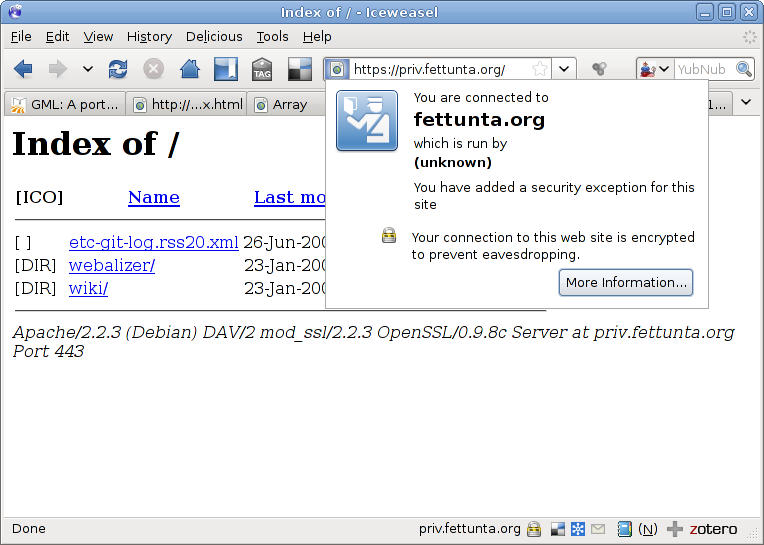
Gunnar, have a look at this: iceweasel-ssl.png. So your example using the Penta website was just a bad one, and I personally agree with the "INVALID" resolution of your bug report. In fact, showing a partially encrypted connection as an insecure one is an overall advantage for (l)user securities, as with the browser interfaces we are used to use, we don't know which parts are actually sent encrypted and which are not. As you can see in the example above a fully encrypted connection is properly reported as such by Firefox 3.0. FWIW: I'm overall satisfied with Firefox 3.0, especially about the new URL bar Wouther is disliking. Yes it is a bit slower than before, but even on my 4-year old laptop it is perfectly usable. The HTML title shown there? Well, it is rather handy when I start typing bugs.debian.org and then I've to discriminate among tons of almost identical bug report URLs ... Is the about:config hand-holding dialog worst than the pop-up the first time you "have provided unencrypted information" in a random form? It is not, we have probably just forgot about the first time we unchecked the corresponding checkbox. All in all, the only "feature" of the new Firefox I found incredibly stupid is the SSL certificate exception mechanism. Installing the untrusted certificate is what? ... 5 click-away from the initial page? That is just dumb. (And as it is well-known that habits form anyhow, getting the habits harder to form is just a way to piss-off users.)

25 June 2008

Andrew Pollock: [life] We've just discovered racquetball

We recently joined The Club of Mountain View, because it just happens to be around the corner, and we both want to try and get back into some semblance of shape. The Club has pretty reasonable facilities. It has a large cardio room, a large weights room, a group exercise room where they do a number of classes, and a spinning room. It also has three racquetball/handball courts, as well as an indoor basketball court. Pretty much all of the facilities are included in the monthly membership, so Sarah went and booked a racquetball court this evening, and we had a bit of a whack. We didn't have a clue how to play, so it was just basically half an hour of belting the ball around, and I have to say, I really liked it. I haven't played squash since high school, but didn't enjoy it, because I was more used to tennis, and constantly misjudged where the racquet head was, hence missing the ball. I never really liked the characteristic of a squash ball either. I really like tennis, but I have habit of getting carried away and belting the tripe out of the tennis ball, either sending it completely out of the court (over the fence) and far away, or at the very best well and truly past the back line of the court and into the fence. Racquetball seems perfect for me. I can belt the living daylights out of the ball. It can't get lost. The racquet is short and reasonably large. There's a very satisfying thwack sound to boot. In short: I like it.

David Moreno Garza: YAPC::NA 2008

So I attended the conference last week in Chicago, IL. I was just been procrastinating to write about this.

As a (almost) complete outsider of the Perl community, I have countered thoughts about the whole event:

After all, it was quite a nice and new experience. I'm not totally sure I'll attend YAPC::NA 2009 in Pittsburgh, PA, we'll see.

Biella Coleman: The Cultural Significance of Free Software

When it comes to research and writing, anthropologists are notorious for being slow as molasses. It takes, on average, 9 years to finish grad school and then another 3-6 years before you write and publish your first book. Such is the sometimes frustrating pace of academia. But sometimes it is worth the wait as this new book, Two Bits, the Cultural Significance of Free Software by the anthropologist of science and technology Chris Kelty, makes clear. I am pretty intimate with the details of the book as ck was one of my dissertation committee members. I have read earlier versions and was fortunate enough to teach the final version to a small group of graduate students last spring. While there have been previous books on the subject of open source or peer-to-peer production more generally, this is the first book to delve deep, analytically and historically, into the cultural significance of free software. And the best part is that ck managed (I am not sure how but he did) to convince Duke University Press to release the whole book under a CC license. So download it to your heart’s delight and if you find it useful, do order a treeware copy (as you can’t beat that for easy and comfortable reading). For the developers out there, I would suggest starting with the introduction, which provides an initial overview of some of the main themes he develops and then I would dig into part two where the historical chapters reside and then loop back to the theoretical chapters in part one or continue to part three. Trust me, these will fascinate and surprise even those geeks with a relatively deep historical sense of this world. In fact, my very favorite academic piece on free software exists in these pages: and is the chapter on the history of the actual conflict between James Gosling and Richard Stallman that led to the creation of the GNU General Public License. Here is a small excerpt to whet your appetite:
In brief the controversy was this: in 1983 James Gosling decided to sell his version of EMACS a version written in C for UNIX called GOSMACS to a commercial software vendor called Unipress. GOSMACS, the second most famous implementation of EMACS (after Stallman s itself ), was written when Gosling was a graduate student at Carnegie Mellon University. For years, Gosling had distributed GOSMACS by himself and had run a mailing list on Usenet, on which he answered queries and discussed extensions. Gosling had explicitly asked people not to redistribute the program, but to come back to him (or send interested parties to him directly) for new versions, making GOSMACS more of a benevolent dictatorship than a commune. Gosling maintained his authority, but graciously accepted revisions and bug-fixes and extensions from users, incorporating them into new releases. Stallman s system, by contrast, allowed users to distribute their extensions themselves, as well as have them included in the official EMACS. By 1983, Gosling had decided he was unable to effectively maintain and support GOSMACS a task he considered the proper role of a corporation.
[ . . .]
Indeed, the general irony of this complicated situation was certainly not as evident as it might have been given the emotional tone of the debates: Stallman was using code from Gosling based on permission Gosling had given to Labalme, but Labalme had written code for Gosling which Gosling had commercialized without telling Labalme conceivably, but not likely, the same code. Furthermore, all of them were creating software that had been originally conceived in large part by Stallman (but based on ideas and work on TECO, an editor written twenty years before EMACS), who was now busy rewriting the very software Gosling had rewritten for UNIX. The once proud hacker ethic that Labalme mentions would thus amount not so much to an explicit belief in sharing so much as a fast-and-loose practice of making contributions and fixes without documenting them, giving oral permission to use and reuse, and losing records that may or may not have existed hardly a noble enterprise.
[. . .]
The story is a lively one, punctuated with some great e-mail “moments,” and gives you a play-by-play sense of how it is that free software become so entangled with the law and how the unwritten norms that guided sharing were violated to then become transformed, explicit, and written. The other chapter that will also fascinate those who want a deeper sense of this history is on UNIX and its role in creating the technical and collaborative conditions necessary to secure the explosion of free software years later. The story of the norms of sharing source code is, not by accident, writes Kelty, also the history of the UNIX operating system. This connection has been made by others but not shown in any historical detail as it is done in this book. For those interested in more anthropological issues, the first few chapters is where this type of more conceptual theorizing is at. Chris Kelty introduces the master trope of his book: the recursive public which is an idea that feeds into a longer academic debate, inaugurated by Jurgen Habermas, on the role of publicity, dialogue, and circulation of ideas and texts in cementing a democratic sphere. Many others, such as Charles Taylor, Michael Warner, and Nancy Fraser have since refigured and rehashed the meaning publics and public debate but there have been few ethnographies on the topic. It is here where Chris Kelty intervenes most forcefully to conceptualize publics in explicitly ethnographic terms and in an arena technology and the Internet which is often left undertheorized by cultural theorists. There is a lot more in the book (the third section examines some of the various political modulations of free software, such as Connexions and Creative Commons) but instead of saying any more, I will just leave you with his definition of a recursive public and again urge you to check out the book for yourself!
A recursive public is a public that is vitally concerned with the material and practical maintenance and modification of the technical, legal, practical, and conceptual means of its own existence as a public; it is a collective independent of other forms of constituted power and is capable of speaking to existing forms of power through the production of actually existing alternatives.

24 June 2008

Uwe Hermann: DIY secure pseudo-DDNS setup using ssh

Here's a quick HOWTO for setting up your own secure pseudo-dynamic DNS (DDNS) server. It's not a "real" DDNS service, i.e. you won't be able to use standard DNS tools or protocols to talk to the server, but it covers 98% of all functionality I expect from a service such as DynDNS or similar ones: It tells me the IP address of a certain box which doesn't have a static IP address (e.g. my home-server). Requirements You'll need: Setup On the homeserver: On the publicserver: The script Finally, here's the content of the updateip script:
  #!/bin/sh
  # Update IP address.
  echo $SSH_CLIENT   cut -d " " -f 1 > /home/user/homeserverip.txt
So to summarize: the homeserver's user simply executes the updateip script on the remote publicserver, which in turn abuses the $SSH_CLIENT environment variable which contains the public IP the ssh connection was coming from (which is exactly what we're looking for). We store that IP in the homeserverip.txt file, which will always contain the latest-known IP address of the homeserver (because of the cronjob). Getting the current homeserver IP address You can now retrieve the current IP address of your homeserver easily from anywhere (i.e. from your laptop when you're in another, possibly hostile network) in order to connect to your homeserver:
  $ ssh -x user@publicserver cat /home/user/homeserverip.txt
To make this a bit more convenient you can add a shell alias (e.g. into ~/.bashrc):
  alias homeserverip='ssh -x user@publicserver cat /home/user/homeserverip.txt'
Or, to conveniently login to your homeserver as user:
  alias homeserverlogin='ssh -x user@ ssh -x user@publicserver cat /home/user/homeserverip.txt '
Conclusion, advantages This may not be the most elegant solution, and it has a number of drawbacks when compared to services such as DynDNS, but it's sufficient for me and it also has some advantages: Personally I'm currently using this mechanism for two things, more might follow: So far it works pretty nicely. Update 2008-06-24: Various fixes and simplifications. SSH key must be password-less. Don't run cronjob once per minute, that's overkill.

22 June 2008

Christian Perrier: 100% for debconf: only French and German?

Yesterday, I looked at the status of debconf translations for the three top languages in the current ranking. French and German will make it definitely. I can fairly easily NMU packages which are slow, if needed (but for most that won't be needed, except maybe udev where Marco is.....somewhere). Of course, being the nasty person I am, I'll arrange so that French makes it before German..:-) However, Portuguese will not, IMHO. There are way too many missing translations so even though they're 96% or so, I don't think I can successfully push enough packages at the same time. Apparently, the Portuguese team has been neglecting the *needed updates* for translations they already sent in the past. Sorry, guys, you'll stay hosed around 96-99% probably. Unless some miracle happens.

Martin F. Krafft: Samsung Q-series laptops and Linux

Dear lazyweb: I ve been a satisfied IBM Thinkpad X40 user for about three years, and the fact that the X40 is still one of the most commonly seen laptops at geek conferences speaks for the machine. However, as my baby s end-of-warranty approaches, I am toying with the thought of a new laptop, with which I d also like to address some of the issues I have with the X40, namely that it supports at most 1024x768 pixels on the screen, is limited to 1.8 harddrives (which to my knowledge come in 40Gb and 60Gb variants only and are quite slow), and whose Pentium M 1.4GHz processor often reaches its limits, even though I rarely do very computationally-intensive stuff. On the other hand, I get a good 4 hours of battery run-time out of the machine. The Lenovo Thinkpad X61 would be a logical successor, but it has not won me over: it looks and feels a bit clunkier, has under 3 hours of battery time, and the screen is still limited to 1024x768 pixels. There s the Lenovo Thinkpad X300, which comes with a 64Gb solid-state disk which will weigh even less on the battery, but the the machine is still too expensive, it s first generation (meaning it ll have more problems than a second generation issue), and the options for extending the storage capacity seem limited. While visiting Penny in London, we passed by a number of electronics stores, and the Samsung Q45 and Q70 models attracted our attention. We would love to hear any feedback from owners out there (and maybe you could send us the output of lspci -vv, lsusb -vv and the file /var/log/dmesg, please?). After Lenovo has switched the Thinkpad power adapter plug format, I have very little reason not to look elsewhere The ultra-mobile Q45 (which would be a Thinkpad X-series competitor) comes with an Intel Core Solo, Duo, or Duo 2 processor, clocked at 1.6GHz, an Intel graphics card and the 3945BG wireless chipset (or its 4xxx successor), uses a 2.5 harddrive, and its 12.1 screen can display a resolution of 1280x800 pixels. It weight just under 2kg. We ve seen models with 3Gb of RAM and a 320Gb harddrive for a little over 1000 . The business class Q70 (a Thinkpad T-series competitor) has an Intel Core 2 Duo processor clocked between 1.8GHz and 2.4GHz, and its 13.1 display can also display 1280x800 pixels. It seems like it will require a bit of effort to find one with an Intel graphics card, though I am not going to get a laptop with anything else, mainly because of Intel s excellent dedication to open source. The devices are over 2kg in weight, and a 3Gb RAM, 320Gb harddrive version costs about 1400 . Does anyone have experience with these laptops and could speak for or against them? Also, what other laptops (not desktop replacements or lap warmers) might be worth looking at? You can leave a comment, or write to me. Thanks! NP: Oceansize: Frames

20 June 2008

Edd Dumbill: Secure LDAP replication

Ever the sucker for punishment, I decided to pick three difficult things and stick them all together: LDAP, SSL and replication. Here's how to make it go on Debian and Ubuntu. The problem You want LDAP replication to happen over the internet, and you want it to happen securely. The caveat I'm not going to tell you how to set up your LDAP from scratch here: I'm assuming you've reached a solution you're happy with and want to replicate it. The solution We're going to set up a replicating slave LDAP server, which communicates with the master over the internet via an SSL-protected connection. Enabling replication First up, the master LDAP server needs to be configured to permit replication.  The key lines to add to your slapd.conf include:
moduleload syncprov
index entryCSN,entryUUID eq
overlay syncprov
syncprov-checkpoint 100 10
syncprov-sessionlog 200
These load up the synchronization module, add indices which make sync go faster, and enable sync. For more detail see the OpenLDAP site. Next you need to add a replicator user to your LDAP database, give your replicator user access to passwords as well as general read access. To create the replicator user, I made this simple LDIF file and fed it to ldapadd.
dn: cn=replicator,dc=mydomain,dc=com
objectClass: simpleSecurityObject
objectClass: organizationalRole
cn: replicator
description: LDAP replicator
userPassword: TOPSEKRIT
Once this user is in your LDAP database, you should give it read access to passwords (I assume you've already given read access to authenticated users.) I have this in my slapd.conf:
access to attrs=userPassword,sambaNTPassword,sambaLMPassword
...
   by dn="cn=replicator,dc=mydomain,dc=com" read
To check that this works, try using ldapsearch to check that the passwords are returned:
ldapsearch -x -D cn=replicator,dc=mydomain,dc=com \
  -W   grep -i password
Enter the replicator password when prompted, and you should see the encrypted passwords from your LDAP database. Securing access Now you've got replication enabled on the master, you will want to ensure it is available on the internet only via TLS or SSL. Here's what I added to slapd.conf to enable this:
TLSCertificateFile      /etc/ssl/certs/ldapserver_crt.pem
TLSCertificateKeyFile   /etc/ssl/private/ldapserver_key.pem
TLSCACertificateFile    /etc/ssl/certs/myCA.pem
TLSVerifyClient         demand
As you will guess from the configuration, the first two lines set the SSL key and certificate the master uses (see "A little twist" below for an important note on key permissions.) The third line tells slapd where to find my site-local certificate authority (CA), and the fourth line says slapd must require any connecting client to have a valid SSL certificate signed by the site-local CA. This is important, as it provides a second layer of access control: a replicating client must connect using a certificate you signed, plus the replicator password. Before this enables TLS access, we must tell slapd which network interfaces to listen on. To do this, edit the SLAPD_SERVICES variable in /etc/default/slapd. Here's my configuration:
SLAPD_SERVICES="ldap://127.0.0.1/ ldap://192.168.0.1/ ldaps:///"
This enables regular LDAP on the loopback and intranet network interfaces, and LDAP/SSL on all interfaces, including the public internet. So, with slapd restarted we are at this situation: connections are now possible from the internet, as long as they are made over SSL with a certificate signed by our site-local CA. (In fact, you can make much finer-grained access restrictions in your configuration than I have done. Using LDAPS rather than TLS over regular LDAP is a rather broad precaution. As explained on the OpenLDAP site, the ssf= parameter can be used to require a certain level of secure connectivity on a per-user or client basis.) Setting up the replicating server
Your slave server should have the same configuration as the master, except you can leave out the bits enabling replication. Firstly, you'll need add to slapd.conf the replication configuration:
syncrepl rid=123
        provider=ldaps://ldapmaster.mydomain.com/
        type=refreshAndPersist
        searchbase="dc=mydomain,dc=com"
        filter="(objectClass=*)"
        scope=sub
        attrs="*"
        schemachecking=off
        bindmethod=simple
        binddn="cn=replicator,dc=mydomain,dc=com"
        credentials=TOPSEKRIT
Most of this I took as boilerplate from the OpenLDAP documentation. Items to note include: And here's the /etc/default/slapd configuration:
SLAPD_SERVICES="ldap://127.0.0.1/"
The slave slapd exists only in this case to serve the local machine. Finally, there's the tricky bit! You need to configure slapd to connect to the master server using a certificate. I'll assume you've created and signed a key and certificate pair for your slave server (see my post Low-tech SSL certificate maintenance for more on this.) Awkwardly, the TLS configuration in slapd.conf is for the server only. Replication works as a client, and thus needs separate configuration. Furthermore, you cannot configure this globally on your machine, as the SSL certificate is a per-user only parameter (see man ldap.conf for more information on this.) Instead, we must set it in slapd's environment. Add these two lines to the end of /etc/default/slapd:
export LDAPTLS_CERT=/etc/ssl/certs/slapd.crt
export LDAPTLS_KEY=/etc/ssl/private/slapd.key
This file is sourced as a shell script by slapd's init script. Amend the path to your certificate and keys as required. Use /etc/init.d/slapd restart and you should be good to go. Finally, we want the slave server to be certain it's talking to the real master. So we also configure client connections to verify the SSL certificate of the peer, in ldap.conf again:
TLS_CACERT      /etc/ssl/certs/myCA.crt
TLS_REQCERT     demand
A little twist One gotcha to notice with both client and server is that slapd runs as the openldap user by default on Debian. Also by default SSL keys are readable only by the ssl-cert group. You'll need add the openldap user to this group, otherwise it won't be able to access /etc/ssl/private. Related articles on this site: Join the conversation about this post

19 June 2008

Martin F. Krafft: IPv6 with Debian

Even though I ve dealt with IPv6 for almost a decade, have delivered presentations, and given multi-day courses on IPv6 security aspects, I ve never actually added IPv6 to my own server/home network infrastructure because it seemed that Linux and/or Debian just weren t ready for it. This seems to have changed (although there are still a number of problems) and in less than a day, I put a few of my machines online. In the following, I d like to share with you how I did it.

Kernel versions and stateful connection tracking Unfortunately, I have to start off with some bad news: even though Debian etch, our current stable release, which uses a Linux kernel version 2.6.18, speaks IPv6, I cannot recommend it for deployment, as the 2.6.18 kernel does not support proper stateful connection tracking for IPv6, and thus makes it impossible to firewall hosts in a sensible manner (I always add local packet filters to all my hosts, and if only to guard against the situation when a user installs a malicious programme to listen on a high port). Of course, it is possible to configure a packet filter statelessly in an acceptable manner once you know the use case, so do with this information what you wish; I prefer to stay general for now. For me, a remedy is almost around the corner: the 2.6.24 kernel seems to support stateful connection tracking for IPv6, and it s even available for etch as it will be included in the upcoming etch-and-a-half release. I simply ended up using the kernel packages pre-release, and so far have not had a problem with it. To do so, add the following line to your /etc/apt/sources.list, making sure to use a close archive mirror:
deb http://ftp.xx.debian.org/debian etch-proposed-updates main

I then just upgraded the system and pulled in all proposed updates. As that may have let in software that won t be part of etch-and-a-half, or even lenny, you may want to pin the archive and only upgrade the kernel packages, by adding to /etc/apt/preferences (replacing amd64 with your architecture):
Package: *
Pin: release a=proposed-updates
Pin-Priority: -1
Package: linux-image-2.6.24-etchnhalf.1-amd64
Pin: release a=proposed-updates
Pin-Priority: 600

Alternatively, you could use the 2.6.24 linux kernel packages on backports.org.

Xen and IPv6 One drawback of switching to 2.6.24 is that you cannot run a dom0 on that machine any longer, so by practical extension, you cannot connect it to the IPv6 network with a packet filter in place. Supposedly, running 2.6.24 instances on a 2.6.18 dom0 is reported to work, however.

Configuring the packet filter The first thing I did was to configure the packet filter on each host appropriately. Unfortunately, this is harder than it should be, because to quote one of the netfilter developers when ip6tables was conceived, someone had a big bad brainfart : rather than adding IPv6 rules to your existing iptables ruleset, you have to create a new ruleset, duplicate all chains, networks, hosts, and individual rules, and maintain the two in parallel. Even though there are efforts of unification on the way, I speculate it ll take another couple of years until PF_INET6 will be fused into PF_INET and one will be able to do sensible cross-address-family packet filtering with Linux. Since I ve recently started to look (again) at pyroman, maybe the most logical way forward would be to extend it to write both, IPv4 and IPv6 rulesets from its knowledge about the hosts and networks you configured. Anyway, we want to get stuff working now! Thus, let s configure ourselves a packet filter. (Almost) all IPv6-related filtering must be configured via ip6tables (read on further down about IPv6 in IPv4 tunneling, the reason I said almost ). The following is a simple default ruleset to start with, which I put into /etc/network/ip6tables to load with ip6tables-restore:
*filter
:INPUT REJECT [0:0]
:FORWARD REJECT [0:0]
:OUTPUT ACCEPT [0:0]
:in-new - [0:0]
### INPUT chain
# allow all loopback traffic
-A INPUT -i lo -j ACCEPT
# RT0 processing is disabled since 2.6.20.9
#-A INPUT -m rt --rt-type 0 -j REJECT
# allow all ICMP traffic
-A INPUT -p icmpv6 -j ACCEPT
# packets belonging to an establish connection or related to one can pass
-A INPUT -m state --state RELATED,ESTABLISHED -j ACCEPT
# packets that are out-of-sequence are silently dropped
-A INPUT -m state --state INVALID -j DROP
# new connections unknown to the kernel are handled in a separate chain
-A INPUT -m state --state NEW -j in-new
# pass SYN packets for SSH
-A in-new -p tcp -m tcp --dport 22 --syn -j ACCEPT
# log everything else
-A INPUT -m limit --limit 3/min --limit-burst 10 -j LOG --log-prefix "[INPUT6]: "
### OUTPUT chain
# RT0 processing is disabled since 2.6.20.9
#-A OUTPUT -m rt --rt-type 0 -j REJECT
# allow outgoing traffic, explicitly (despite chain policy)
-A OUTPUT -j ACCEPT
### FORWARD chain
# RT0 processing is disabled since 2.6.20.9
#-A FORWARD -m rt --rt-type 0 -j REJECT
# disallow forwarded traffic, explicitly (despite chain policy)
-A FORWARD -j REJECT
COMMIT

Note that this recipe is pretty much unusable on pre-2.6.20 kernels due to their broken implementation of stateful connection tracking. The ruleset should be fairly obvious, but you might wonder about my use of REJECT and allowing all ICMP after all, you ve heard for the past 30 years that ICMP is a bad hacker protocol , and Internet security is no domain for being nice to people, so to prevent any information disclosure, you should DROP connections, not let people know that they re simply not allowed. Well, to hell with all that! I don t see a single reason or attack vector that is foiled by DROP or disallowing ICMP. In fact, it s just security by obscurity, and might inconvenient at the same time. ICMP is also much more important with IPv6 than with IPv4 (it replaces ARP, for instance), and it s actually useful to be able to ping hosts, or get back informational messages on why something failed. Finally, rejecting traffic rather than dropping it doesn t suggest to a hacker that something s hidden here. Then there is RFC 4890, which almost made me puke. This document is part of the reason why I say: let s fix problems in the kernel, rather than shielding them with unreadable and unmanageable rulesets!

Getting connected If you already have an IPv6 address, you re basically ready to go, but may want to read further down on how to connect your local network to the IPv6 Internet as well. If you are searching for a provider, have a look at the list of providers with native IPv6 connectivity over at sixxs.net. If you are reading up to here, I assume you are connected to the Net with IPv4. There are two ways for you to move towards IPv6: 6to4 or by way of a tunnel provider. A Kiwi website explains how to setting up 6to4 connectivity, and thus I will concentrate only on the tunnel approach. Even though everyone can set up 6to4 in a breeze without any accounts or waiting, there are a number of security considerations, it s pretty ugly to debug (due in part to asymmetric routing), and makes your life unnecessarily difficult when all you have is a dynamic IP that changes from time to time. If you are stuck behind a NAT gateway, you cannot use 6to4 either. Thus, I prefer the tunnel approach. With the tunnel approach, IPv6 packets are wrapped up in IPv4 packets on your host, and sent to the IPv4 address of your tunnel provider, who has native IPv6 connectivity. The tunnel provider unwraps your packet and shoves the contained IPv6 packet onto the backbone. The IPv6 address you used as source address is routed to the tunnel provider, so any replies arrive at their machines, where they re again wrapped into IPv4 packets and sent to your (publicly-accessible) IPv4 address. Those IPv4 packets specify payload type 41 ( ipv6 ), which is why we need those -p ipv6 -j ACCEPT rules in the iptables ruleset. There are a few tunnel providers out there. I chose SixXS and have not regretted my choice. I shall thus assume that you do the same: sign up for an account right now, so that you have it by the time you finished reading this document! SixXS works on a credit system: tunnels and subnets cost credits, which you can accumulate by maintaining your tunnels properly. This ensures that everyone can play around, but to do more advanced stuff, you need to first display competence with the basic concepts. Your first step with SixXS will be to request a tunnel. SixXS offers three types of tunnels:
  • static tunnels, for those with static IPs,
  • heartbeat tunnels, for those with dynamic IPs, and
  • AYIYA tunnels, for those behind NAT gateways.
Each of these tunnels have advantages and disadvantages, as everything does: the first two types of tunnels use IP protocol 41 packets to encapsulate the IPv6 packets. As such, there are security considerations involving the impersonation by spoofing, and all upstream firewalls must let protocol 41 pass. AYIYA addresses these problems by using signed packets, but that solution comes with extra computation overhead and smaller MTUs. I suggest to use the first type of tunnel that fits your situation. Debian s aiccu package can take care of heartbeat and AYIYA tunnels for you, and it can even set up static ones. During registration, you will also need to choose a PoP , which stands for Point of Presence . If your country only has a single PoP, that s the one you will end up using (unless you have a good reason for another one), but if there are more options, I strongly suggest that you go through the list of PoPs and select the one with the best roundtrip time and lowest latency from your location! Note that you must answer ping requests (ICMP echo-request) from the PoP you chose, or else the tunnel will not be created. Once your tunnel request gets approved, you ll get a /64 prefix, in which you only use two addresses: the PoP will configure the :1 address and you need to configure your host to use the :2 address on the tunnel interface. You ll also be told the IPv4 address of your PoP endpoint . Joey Hess taught me that aiccu can set up the interface for you, using the data it queries from the SixXS registration (TIC) server. I tried it, and it works. However, I prefer the pure ifupdown approach, as it makes things explicit and allows me to use the hooks for stuff like loading the packet filter. So in my /etc/network/interfaces, you can find:
auto sixxs
iface sixxs inet6 v4tunnel
  endpoint 194.1.163.40
  address 2001:41e0:ff00:3b::2
  netmask 64
  gateway 2001:41e0:ff00:3b::1
  ttl 64
  pre-up ip6tables-restore < /etc/network/ip6tables
  up ip link set mtu 1480 dev $IFACE
  up invoke-rc.d aiccu start
  down invoke-rc.d aiccu stop

Make sure to read about MTU values of the tunnel and adjust the 1480 value in the above to your tunnel settings and ISP connectivity. Also set ipv6_interface sixxs in /etc/aiccu.conf, if you are using aiccu, or else aiccu will bring up a duplicate/additional interface. If you tell it to use the same interface, it will actually execute all the same commands (which will fail), but won t report any errors. A future version will have a switch to prevent it from configuring the interface. Unfortunately, this will probably not work. The reason is that your regular IP packet filter (iptables, without the 6) doesn t let those encapsulating IPv4 packets pass, unless we tell it to; we probably want to do this early on in the chain, and also limit it to our tunnel peer, so:
iptables -I INPUT -p ipv6 -s 194.1.163.40/32 -j ACCEPT

For AYIYA, you need to open port 5072, either for UDP, TCP, or SCTP, depending on how you configured it. Also have a look at this FAQ entry on what a firewall needs to pass. If it still doesn t work, you have an upstream packet filter that needs some of those holes poked. Good luck. In most situations, the FORWARD chain does not get such a rule, since the tunnel terminates at the gateway, which routes to a native IPv6 network, or another tunnel. Allowing tunnels through a gateway is almost always a bad thing, as it would allow undetected and untraceable traffic from compromised boxes in the local network. The OUTPUT chain also does not need such a rule, if you have configured stateful filtering properly. Now bring up the interface and verify the connection:
# ifup sixxs
# ping6 -nc1 2001:41e0:ff00:3b::1
PING 2001:41e0:ff00:3b::1(2001:41e0:ff00:3b::1) 56 data bytes
64 bytes from 2001:41e0:ff00:3b::1: icmp_seq=1 ttl=64 time=74.0 ms
[...]
# ping6 -nc1 ipv6.aerasec.de
PING ipv6.aerasec.de(2001:a60:9002:1::184:1) 56 data bytes
64 bytes from 2001:a60:9002:1::184:1: icmp_seq=1 ttl=55 time=91.5 ms
[...]

Welcome to the Internet of the future!

Setting up an IPv6-capable gateway Your IPv6 connection works, but it s limited to a single address, and you do not get to specify the reverse DNS PTR record for it. Since the concept of NAT is mostly absent from IPv6 (thanks! thanks! thanks!), you will not be able to connect any other hosts to the IPv6 network. If your local network has a few hosts behind a gateway, you will need to request a subnet from SixXS and configure your gateway (which has the tunnel connection) appropriately. Don t worry, this is not really very difficult. First, request a subnet for your tunnel from your PoP via your SixXS homepage. Once approved, you will get a /48 prefix for your own use: 2^80 1.2 heptillion addresses which are yours to assign to every dust particle in your office or home, if you so desire. The way I set it up is to add the first of these addresses to your internal interface on the gateway, by adding the following two lines to the interface s stanza in /etc/network/interfaces; you will need the iproute package installed (which you should be using for everything network-related anyway):
up ip -6 addr add 2001:41e0:ff12::1/64 dev $IFACE
down ip -6 addr del 2001:41e0:ff12::1/64 dev $IFACE

Instead of bringing the interface down and up, just run ip -6 addr add 2001:41e0:ff12::1/64 dev eth0. Note the use of the /64 prefix instead of the /48 that got assigned, leaving only 20 pentillion addresses. Oh no! The reason for this is buried in the specs: basically, /48 is a site prefix, but individual networks should not be larger than /64, which is the prefix length of links in the IPv6 domain. Now is also a good time to enable IPv6 forwarding, e.g. like so:
# echo net.ipv6.conf.all.forwarding = 1 >> /etc/sysctl.conf
# sysctl -p /etc/sysctl.conf

Obviously, you will also need to change the policy on the ip6tables FORWARD chain. For now, let s just set it to accept. You should later create a proper ruleset, though!
# ip6tables -I FORWARD -j ACCEPT

Bringing IPv6 to your local network The final step is to spread the love to your local network. Refrain from selecting addresses from your subnet and assigning them to the local hosts, or wondering how to configure the DHCP server, because IPv6 does it differently: your gateway will advertise its routes (which includes a default route) to your network, and each host will pick an address based on its MAC address (unless it already has an EUI-64 address assigned. This all happens automagically, at least with current Debian and Windows machines. On the gateway, you need to install radvd and simply tell it which prefix to use on which interface. My /etc/radvd looks like this, and I won t explain it:
interface eth0
 
  AdvSendAdvert on;
  prefix 2001:41e0:ff12::/64
   
   ;
 ;

Note again how we advertise a /64 network rather than the /48 we own . You cannot advertise smaller networks if you want automatic configuration to work, and you should not use networks larger than /64 in any case. If 2^64 addresses are not enough for you, I trust you ll be able to figure out how to advertise another of your 65536 /64 prefixes in the /48 subnet to appropriate hosts. Restart radvd and run over to another host to witness how it automagically gets connected to the IPv6 network by scanning /var/log/kern.log and watching the output of ip -6 addr and ip -6 route. Try ping6ing from there! Find the dancing turtle! It should all work. If you don t like the automagic aspect of this, look into stateful configuration, using DHCPv6, as provided by dibbler-server and ?wide-dhcpv6-server.

Resolving names Take note of the IPv6 address of each host. There s a way to determine it given the host s MAC address, but this is easier (ipv6calc is also useful). You might want to let your local DNS server know by adding AAAA records in parallel to the existing A records, and possibly even adding PTR entries. If you re serious about IPv6, you can tell SixXS to delegate reverse lookups for the IPv6 addresses to your DNS servers, but you ought to refrain from polluting the DNS namespace. Note that bind9-host provides an improved host tool, which fetches all kinds of information about names, not just the one single information configured as default:
% host pulse.madduck.net
pulse.madduck.net has address 130.60.75.74
pulse.madduck.net has IPv6 address 2001:41e0:ff1a::1
pulse.madduck.net mail is handled by 99 b.mx.madduck.net.
pulse.madduck.net mail is handled by 10 a.mx.madduck.net.
% host 2001:41e0:ff1a::1
1.0.0.0.0.0.0.0.0.0.0.0.0.0.0.0.0.0.0.0.a.1.f.f.0.e.1.4.1.0.0.2.ip6.arpa
domain name pointer pulse.madduck.net.

Oh, and if you re really that curious about how IPv6 addresses are computed from MAC addresses, read RFC 2464. Basically, given a prefix 2001:41e0:ff1a:: and a MAC address aa:bb:cc:dd:ee:ff, the resulting IPv6 address is obtained by:
  1. inserting ff:fe into the middle of the MAC address to yield aa:bb:cc:ff:fe:dd:ee:ff;
  2. flipping the second lowest bit of the first octet to yield a8:bb:cc:ff:fe:dd:ee:ff;
  3. removing the odd colons to yield a8bb:ccff:fedd:eeff, the EUI-64;
  4. concatenating the prefix and this result to get 2001:41e0:ff1a::a8bb:ccff:fedd:eeff.
If you find your (Windows) IPv6 addresses changing all the time, you might be faced by privacy features .

Remaining issues Even though my IPv6 connectivity works, I have two remaining issues.

Sending larger amounts of data to the network I am experiencing a curious issue where outgoing ssh IPv6 connections time out and outgoing data transfers hiccup. I have yet to find out what s going on.

Mapping names to laptops Laptops generally have two interfaces, one with a cable, and the other wireless. Both of these interfaces will have separate MAC addresses, and by extension, the laptop will have different IPv6 addresses depending on how it is connected to the local network. I want to be able to connect to laptops without knowing the medium they use to connect to the network. Unfortunately, there seems to be no feasible way. The solutions I see are:
  • override the MAC address of one interface with that of the other, which is going to cause bgi problems in the case when the laptop (accidentally) gets connected to the same network twice;
  • add both IPv6 addresses as AAAA records to the laptop s DNS name, which will cause random delays when connecting as the resolver may return the currently inactive address first;
  • set up mobile IPv6, e.g. by following this Mobile IPv6 how-to, which would allow accessing the laptop uniformly, no matter where in the world it is. Unfortunately, Debian s support for Mobile IPv6 is severly lacking at time of writing. Also, Yves-Alexis Perez notes that this how-to is horribly outdated and promised to tend to it Real Soon Now .
The second solution works for me for now, but I am interested in the third. In response to this document, Andreas Henriksson has suggested the replace the stateless configuration (radvd) with stateful configuration, using DHCPv6. I have yet to investigate this option. Jeroen Massar suggests to unite cable and wireless into a bridged interface, which seems like a very good idea.

Credits Thanks to Bernhard Schmidt, William Boughton, and Jeroen Massar, and everyone on #ipv6/irc.freenode.org for their help over the past few weeks, and all those who fed back comments in response to this document!

Manoj Srivastava: Manoj: Theming XTerms

Or configuring LS COLORS After successfully Theming Emacs, I decoded to turn my efforts to providing more copacetic colors in other aspects of my working environment. I ll write more about my effort to write my own color theme for fvwm when it is closer to being done. For now, I ll concentrate on ANSI Colors in XTerms, and how one may theme those. The old Tektronics (or ANSI) terminals had 8 colors, namely, black, red, green, yellow, blue, magenta, cyan, and white. These colors had a normal, and a bright mode. The default set of colors is OK, but is not optimal, since they have to work on both dark and light backgrounds; however, I use mostly dark background colors. ls colors Given that, I set to design my own colors, using fully laturated colors, with a base luminosity of 70, and equally spaced in chroma and used the same saturation and chroma, but a luminosity of 80, for the bright set. This results in a pleasant pastely set of colors, which are e4asy on the eyes, when used on very dark backgrounds. The configuration can be seen in XTerm. I set the colors for rxvt as well as xterm. Now, the most noticeable effect of these changes is if using the color option for ls, therefore the next thing to do was to configure the colors used by ls using a utility dedicated for that task, namely, dircolors. By trial and error, I modified the default configuration provided by dircolors and ended up with dir colors, with the results as you see.

18 June 2008

Daniel Kahn Gillmor: transient &quot;obsolete packages&quot; with apt

On the testing and unstable systems that i run, i occasionally get a disturbing "there are N newly obsolete packages" message. For example
[0 root@squeak ~]# aptitude update
Hit http://cmrg.fifthhorseman.net unstable Release.gpg
 [...]
Get:42 http://ftp.us.debian.org unstable/main [2077kB]                          
Fetched 15.2MB in 57s (262kB/s)                                                 
Reading package lists... Done
Updating debtags database...... Done
Current status: 3 updates [+3], 1136 new [-21212].
There are 1804 newly obsolete packages.
[255 root@squeak ~]# 
Usually, i can fix this with another aptitude update. Does this mean i've hit a mirror at an inopportune time? Or do i have apt mis-configured somehow? Other people have documented this before, and casual conversation with friends lets me know it's not just me. If this is due to some inconsistency at the mirrors (particularly for suites with rolling updates?), is there some way to engineer the mirror transfers so that this doesn't happen? For example (i have no idea how this stuff is done, so i'm just making this up):
  1. rsync the pool/ without --delete to all mirrors,
  2. rsync the Packages and Release, and DiffIndex files to all mirrors,
  3. rsync the pool/ with --delete
Or should apt itself deal with these circumstances differently? It seems like signed apt ought to be able to detect when something like this is amiss. I'm reluctant to consider the situation acceptable, because i'd like to be able to trust apt in general. In particular, i can imagine apt eventually becoming more assertive about suggesting removal of newly obsolete and unsupported packages. If it is wrong about what's obsolete and unsupported, this could be dangerous.

Edd Dumbill: Low-tech SSL certificate maintenance

I maintain a bunch of SSL certificates, mostly signed by my own site authority. Too many not to automate, but not enough to warrant heavy machinery. Here's how I do it. The configuration files Each certificate needs a config to describe what's in it. I create each of these and name it with a .cnf suffix. Here's an example:
[ req ]
prompt                  = no
distinguished_name      = server_distinguished_name
[ server_distinguished_name ]
commonName              = server.usefulinc.com
stateOrProvinceName     = England
countryName             = GB
emailAddress            = edd@usefulinc.com
organizationName        = Useful Information Company
organizationalUnitName  = Hosting
[ req_extensions ]
subjectAltName=edd@usefulinc.com
issuerAltName=issuer:copy
nsCertType            = server
[ x509_extensions ]
subjectAltName=edd@usefulinc.com
issuerAltName=issuer:copy
nsCertType            = server
Let's say this config is server.cnf. I then just type make server.pem to generate the corresponding certificate and key, signed by my local certificate authority. As I don't want to attend the startup of every service, I ensure the key is password-less. The Makefile rules Here are the makefile steps I use to generate and sign keys.
.SUFFIXES: .pem .cnf
.cnf.pem:
        OPENSSL_CONF=$< openssl req -newkey rsa:1024 -keyout tempkey.pem -keyform PEM -out tempreq.pem -outform PEM
        openssl rsa <tempkey.pem >  basename $< .cnf _key.pem
        chmod 400  basename $< .cnf _key.pem
        OPENSSL_CONF=./usefulCA/openssl.cnf openssl ca -in tempreq.pem -out  basename $< .cnf _crt.pem
        rm -f tempkey.pem tempreq.pem
        cat  basename $< .cnf _key.pem  basename $< .cnf _crt.pem > $@
        chmod 400 $@
        ln -sf $@  openssl x509 -noout -hash < $@ .0
The resultant files are: Some notes on these steps: my site-local certificate authority is in the directory usefulCA, along with an OpenSSL config which describes my preferences. This config was created by copying and making appropriate adjustments to the default /etc/ssl/openssl.cnf which ships with Debian. For generating certificate signing requests to ship to a commercial certificate authority, it's a bit simpler. I save the config files with a .reqcnf suffix instead, and use this rule:
.SUFFIXES: .pem .cnf .reqcnf .csr
.reqcnf.csr:
        OPENSSL_CONF=$< openssl req -newkey rsa:1024 -keyout  basename $< .reqcnf .key -keyform PEM -out  basename $< .reqcnf .csr -outform PEM
And finally, a rule I use to sign incoming certificate requests from other systems:
.csr.pem:
        OPENSSL_CONF=./usefulCA/openssl.cnf openssl ca -in $< -out  basename $< .csr _crt.pem
I offer these without warranty in the hope they might be useful to somebody. They're not much more than a transcription of a how-to into a makefile, but it's just enough technology to ensure creating certificates isn't a big nuisance. Further reading Notes Why do I bother with a site-local CA, rather than just self-sign? It lets me bypass the annoyance of SSL warnings on clients once I've installed my own CA certificate, and gives me a coarse grained level of access control: for instance, only clients with certificates signed by my CA are allowed to access the site's LDAP server. My personal next step with this is to integrate the certificate production process with my emerging Puppet recipes for managing local infrastructure.Join the conversation about this post

17 June 2008

Daniel Silverstone: Scary licence questions follow

I have, at several points over the past few years, been interested in finding out quite how the GPL applies when one has runtime dynamic linking in the mix. As such, I would like to set a little scenario up and then solicit responses from you as to how things might go. I have yet to receive any useful answers which consider all the aspects. Several people have basically said oooh, hard.. erm therefore you can t do it , and the FSF have told someone I know who asked essentially this question, erm consult your lawyer ; and it took them four months to say that. So, with all that in mind, here we go Setting the scene
  1. There exists a company SuperMegaCorp...
  2. ...who have a software product called FantasticUsefulApp...
  3. ...which is released to the public in a proprietary/pay-for kind of way...
  4. ...but has a BSD licenced set of header files for third parties to write plugins distributed with it.
  5. There exists a useful GPLv2+ed library HandyStuffs...
  6. ...which is authored by a freedom loving software engineer called Fred.
  7. A pragmatic, yet freedom loving software engineer called Pete...
  8. ...who does not know Fred...
  9. ...writes a plugin for FantasticUsefulApp which we shall call IncrediblyCoolPlugin...
  10. ...which incorporates parts of the HandyStuffs codebase...
  11. ...and is GPLv2+ed by Pete...
  12. ...who then releases it to the wider world on his website.
Next, the following happens
  1. Seeing that Pete has written IncrediblyCoolPlugin for their FantasticUsefulApp...
  2. ...a user of the app called Uhura downloads it in binary form and drops it straight into the plugin folder.
  3. Uhura then starts FantasticUsefulApp which proceeds to dynamically link itself to IncrediblyCoolPlugin for the duration of Uhura's use of the app.
So here is question one Is anyone violating any of the GPLv2 s terms (or the GPLv3 s terms) by doing this at any point? If so, who is violating which terms, and how can that be fixed without losing functionality? Extending the scenario
  1. Uhura loves FantasticUsefulApp a lot. She also really loves IncrediblyCoolPlugin and wishes that each time she made a new installation of the app it would come with the plugin.
  2. Uhura writes to SuperMegaCorp and asks them to include IncrediblyCoolPlugin with FantasticUsefulApp.
  3. Liking the idea, and mindful to place the source code to IncrediblyCoolPlugin on their distribution media, SuperMegaCorp proceed to distribute the plugin along with their app in one easy to install bundle.
Here is question two Is anyone violating any of the GPLv2 s terms (or the GPLv3 s terms) by doing the above? If so, who is violating which terms, and how can that be fixed without losing functionality? (For this question, consider the bundling of the plugin and the app together as functionality it is preferable to retain.) An alternative way to extend the scenario
  1. Concerned about the possibilities of upsetting freedom lovers, SuperMegaCorp decline to distribute IncrediblyCoolPlugin with their app...
  2. ...however instead they distribute a plugin which connects to Pete's website and downloads IncrediblyCoolPlugin the first time FantasticUsefulApp loads, installing it for the user automatically.
And question three Is anyone violating any of the GPLv2 s terms (or the GPLv3 s terms) by doing the above? If so, who is violating which terms, and how can that be fixed without losing functionality? If anyone has any useful ideas on this, please either email them to me, or blog about it and email me a link. I intend to post a precis of the answers in a future entry.

Enrico Zini: Joys of schroot

Joys of schroot Schroot is good! Try schroot. You have LVM set up and some free extents in a vg? Try this:
# Create a new logical volume for a sid chroot
lvcreate -n schroot-sid -L1G YOUR-VG-NAME
mke2fs -j /dev/YOUR-VG-NAME/schroot-sid
# Debootstrap sid into it
mount /dev/YOUR-VG-NAME/schroot-sid /mnt
debootstrap --keyring=/etc/apt/trusted.gpg sid /mnt http://ftp.uk.debian.org/debian
umount /mnt
Then apt-get install schroot and put this in your /etc/schroot/schroot.conf:
[sid]
type=lvm-snapshot
device=/dev/YOUR-VG-NAME/schroot-sid
description=Debian sid
priority=5
users=YOUR-USER-NAME
root-users=YOUR-USER-NAME
source-root-users=root
aliases=unstable
lvm-snapshot-options=--size 2G
Now, schroot -c sid will make a LVM snapshot of /dev/YOUR-VG-NAME/schroot-sid, mount it, set it up as a nice working system, and chroot into it running a shell. Have a look around: resolv.conf is set up, your home directory is bind mounted, /proc and /sys are mounted. When you exit the chroot, the LVM snapshot disappears, and /dev/YOUR-VG-NAME/schroot-sid is unchanged. If you want to modify /dev/YOUR-VG-NAME/schroot-sid, you just schroot -c sid-source. In my laptop, I did this:
# schroot -c sid-source
(sid)# echo APT::Install-Recommends "false";' > /etc/apt/apt.conf.d/50enrico
(sid)# apt-get install build-essential, pbuilder, devscripts, fakeroot
(sid)# apt-get clean
At this point, to build a debian package like if I were using pbuilder, I do this:
pkgdir$ schroot -c sid
(sid)pkgdir$ su -c /usr/lib/pbuilder/pbuilder-satisfydepends
(sid)pkgdir$ debuild -us -uc
You can repeat this whole process with lenny and etch, for example, and if you are on an amd64 system, you can also do sid32, lenny32 and etch32. If you don't want to redownload packages all the time, install approx and configure the -source chroots to use it. This also allows you to easily switch all systems from one mirror to another if, for example, you are traveling abroad. If you want to do the same as pbuilder update, you can do this:
# schroot -c sid-source
(sid)# apt-get update
(sid)# apt-get dist-upgrade
(sid)# apt-get autoremove
(sid)# apt-get clean
You can use schroot -c sid-source for all sorts of permanent maintenance works. You can also create persistent named snapshots:
$ schroot -b -c sid -n playground
This will only disappear when you do:
$ schroot -c playground -e
And you can enter the schroot as many time as you want with:
$ schroot -r -c playground
You can also enter a temporary snapshot as many times as you want, by using the random name that schroot generated for it (you can see it, for example, when running df or mount). You fear that lvm snapshots are a little fragile and a little slow at the moment? It's not a problem: your home is bind-mounted inside the chroot, so you can do all the work in your normal home filesystem, without stressing the snapshot. This is good not only to build packages. For example, now that svk is broken in sid and lenny, I just did schroot -b -c etch -n svk, installed svk on it, and then every time I need svk, I can do schroot -r -c svk and have it ready.

16 June 2008

Martin F. Krafft: Setting up an encrypted Debian system

Even though the Debian installer can set up encrypted partitions, it is optimised for systems with a single data partition, unless you want to enter multiple passphrases when the system boots. The installer configures a LUKS volume using cryptsetup, but it provides no mechanism for the use of key files, only interactive passphrases. I like partitioning my disks and use different filesystems for /tmp, /home, /var, and /usr/local for a number of reasons. I don t like entering more passphrases than necessary. If you can identify with that, the following is for you.
Several people have pointed out to me that one can simply create a single encrypted physical volume with the Debian installer and place logical volumes for the various filesystems in there. You still need a separate /boot partition, in any case. Kapil Hari Paranjape has described the approach. This method is much cleaner and to be preferred. It s quite likely that it also improves the speed since only a single kcryptd process takes care of all of the decryption and encryption needs. I shall try it on my next installation and report on whether the Debian installer supports it. In the mean time, the following is left as reference the approach is still fully functional.

Installing the system The first step to setting up an encrypted Debian system is to perform a normal Debian system installation. When you are asked to partition your harddrive and create filesystems, set up all partitions as encrypted volumes (I suggest to go with the installer defaults and use dm-crypt and AES with the default settings, simply because I have no reason to doubt the installer dveeloper team s choices). Make sure to erase the disks in the process the installer has an option for that. Set up the swap partition as an encrypted volume too, but don t worry too much about the settings at this point; we will recreate the swap partition later. Unless you want to boot off an external medium, such as a USB stick, you will need to create an unencrypted partition for /boot. I will return to this topic, which has security implications, further down. The installer will ask you for passphrases for each of the volumes you create. I suggest you pick a secure passphrase for the root volume (/), but simple passphrases for all the other ones (such as a ), since we will reconfigure them to use key files instead.

Using key files A key file is like a passphrase stored in a file on disk; as opposed to what you know , it s a what you have security asset. Thus, you need to store the file somewhere. When I boot up my system, I unlock the root partition with a passphrase entered interactively, which makes the root filesystem available. I store key files for all other volumes in /etc/keys. Obviously, I need to tell cryptsetup to use those. The first step is to create a key file for each partition and to add it as a decryption key to the LUKS volume. You can do all of the following without unmounting the filesystems. See the following example for hda6, which will prompt for the simple passphrase we entered above to unlock the key ring when adding the key file:
umask 077
mkdir /etc/keys
dd if=/dev/urandom of=/etc/keys/hda6.luks bs=4k count=1
cryptsetup luksAddKey /dev/hda6 /etc/keys/hda6.luks
cryptsetup luksKillSlot /dev/hda6 0 --key-file /etc/keys/hda6.luks

The last command wipes the simple passphrase from the key ring and thus makes it unusable. Now we need to tell cryptsetup to use the key file by editing /etc/crypttab and ensuring a line such as the following exists:
hda6_crypt /dev/hda6 /etc/keys/hda6.luks luks

This tells cryptsetup to create the cryptographic volume hda6_crypt from the base device /dev/hda6, using the key file we created above, and letting it know that it s dealing with a LUKS volume. Repeat this for every partition except your root and swap partitions.

Encrypting the swap partition If you are using an encrypted Debian system, you likely have some security requirements to meet. If that s the case, you must also use an encrypted swap partition. The swap partition can be encrypted in two ways:
  • it can be recreated on every boot, using a random passphrase, or
  • it can be created like the other encrypted volumes with a persistent passphrase
If you want to use suspend-to-disk, you cannot use the first approach as it would overwrite your memory footprint stored in the swap partition. Furthermore, you cannot use a key file like the other partitions, since the root filesystem is not (and must not) be mounted by the time the resume process starts and needs to read the decrypted swap partition. The way I solved this is by telling cryptsetup to compute the passphrase of the swap partition from the decryption key of the volume holding the root filesystem; the cryptsetup package implements this with /lib/cryptsetup/scripts/decrypt_derived. Thus, to set up the swap partition, I do the following, assuming hda2 is the partition holding the encrypted swap and the root filesystem is in hda5_crypt:
swapoff /dev/mapper/hda2_crypt
cryptsetup luksClose hda2_crypt
dd if=/dev/urandom of=/dev/hda2
/lib/cryptsetup/scripts/decrypt_derived hda5_crypt \
    cryptsetup luksFormat /dev/hda2 --key-file -
/lib/cryptsetup/scripts/decrypt_derived hda5_crypt \
    cryptsetup luksOpen /dev/hda2 hda2_crypt --key-file -
mkswap /dev/mapper/hda2_crypt

To tell the system about this swap partition, we need to add it to /etc/crypttab and /etc/fstab; make sure, those files contain lines like the following:
/etc/crypttab:
  hda2_crypt /dev/hda2 hda5_crypt luks,keyscript=/lib/cryptsetup/scripts/decrypt_derived
/etc/fstab:
  /dev/mapper/hda2_crypt swap swap sw 0 0

With this in place, as soon as you configure the system for suspend-to-disk, the swap partition will be automatically set up alongside the root filesystem very early during the boot sequence. To figure out which swap partition to make available at that point, cryptsetup checks the following:
  • a line like RESUME=/dev/mapper/hda2_crypt in /etc/initramfs-tools/conf.d/resume
  • a resume device setting in /etc/uswsusp.conf (see uswsusp.conf(5))
  • an entry in /etc/suspend.conf
  • a resume=/dev/mapper/hda2_crypt in the kernel command line
You can inspect /usr/share/initramfs-tools/hooks/cryptroot if you want to know more about this.

Using UUIDs Even though the above is all you have to do, you might want to consider replacing the device paths in /etc/crypttab with persistent ones. One motivation might be the ability to boot off your drive via a USB adapter, which might cause it to appear as /dev/sda instead of /dev/hda. udev is installed by default on Debian systems and it makes persistent links to partitions available under /dev/disk/by-uuid, using the UUID of the content structure (e.g. the LUKS header). It uses /lib/udev/vol_id to determine those link names. If you replace the entries in /etc/crypttab, make sure to update the initramfs (update-initramfs -u -k all) and consider to use the same approach for the /boot filesystem in /etc/fstab; you ll note that all other filesystems use persistent device paths thanks to the dm-crypt layer. If you ever end up booting off the disk through a USB adapter, you might face the problem where the usb_storage subsystem takes too long to activate, so that the cryptsetup script does not find the devices in time. You can either solve this by adding the rootdelay=x parameter or break=mount to the kernel command line. The first will cause the scripts to wait x seconds before trying to configure and mount the root filesystem; the second would give you a shell that you can exit as soon as the kernel spouted its device initialisation messages at you. If you got this far, you might even want to take it further and replace hda5_crypt with cr_root or the like to abstract those silly partition numbers away even further. This is easier than it sounds, but does require several steps. Do not do this if you re not comfortable reviving your system in case it fails to come back up!
  1. replace the old names with the new names in /etc/crypttab for all volumes except the root volume. If you are using a derived passphrase for the swap partition, make sure to put the new name for the root volume into the third column of the swap partition s configuration line.
  2. modify /etc/fstab accordingly, leave the root filesystem s device path alone.
  3. call update-initramfs -u
  4. modify your bootloader to ask the kernel to boot off the new root volume.
  5. replace the root volume s old name with the new one in /etc/fstab.
  6. reboot, and add break=mount to the kernel command line.
  7. at the busybox prompt, edit (vi) /conf/conf.d/cryptroot and change the first field of the root volume s line to the new name.
  8. exit the shell and watch the boot process complete.
  9. finally, replace the root volume s old name with the new one in /etc/crypttab.
If the system fails to boot up again, you can use the backup initial ramdisk, which update-initramfs left in /boot.

Security implications Apart from the usual security implications related to cryptosystems, passphrases, mathematics, user stupidity, and so on, the approach I outlined will leave you with a pretty well-secured system. Obviously, you should make sure to lock your screen whenever you leave the system unattended or the entire encryption is basically useless. There are two attack vectors on your system, both involving physical access to the machine: Other than that, you should be careful when travelling to totalitarian countries, like the Excited States of America, China, and probably the UK. First off, encryption arouses suspicion, and second, border agents might ask you to decrypt the partitions for them to copy or scan, and refusal to do so might get your turned away at the border. When travelling to those countries, make sure to hide your data properly.

Speed implications Obviously, having your entire system encrypted (including swap) will slow it down. I don t have any quantitative information on that, but after several years of using full-disk encryption on my laptop (an X40, which isn t very powerful), I can say that it remains usable, if you don t rely on disk-intensive operations, such as compiling kernels and the like.

Alternative approaches Several alternative approaches exist, all involving an additional device:
  • if you don t like to type in the passphrase for the root filesystem, you could store it on a USB key (or the like); cryptsetup provides /lib/cryptsetup/scripts/passdev, which can be used to deal with such a situation. You can find more information in cryptsetup s README.Debian file.
  • if you don t like the unencrypted /boot partition, you could boot the system off a USB key, which you can keep separate from the system except for when booting and upgrading the kernel. All you need to do for that is install the bootloader and kernel onto the device and configure it to use the proper encryption volume on the harddisk as root filesystem.
  • cryptsetup also comes with support for PKCS#15 smartcards (opensc and openct).
I have chosen neither of these approaches, because the extra security does not make up for the inconvenience, and the danger of an unbootable system in case of loss of forgetting of the additional device.

Next.

Previous.