Search Results: "spa"

20 January 2014

Enrico Zini: terminal-emulators

Quest for a terminal emulator The requirements I need a terminal emulator. This is a checklist of the features that I need: My experience is that getting all of this to work is not being as easy as it seems, so I'm creating this page to track progress. gnome-terminal I've been happily using this for years, and it did everything I needed, until some months ago it started to open new tabs in the terminal's working directory instead of the last tab's working directory. This is a big point of frustration for me. It also started opening https urls with Firefox, although the preferred browser was Chromium. There seemed to be no way to control it: I looked for firefox or iceweasel in all gconf and dconf settings and found nothing. The browser issue was fixed by accident when I used Xfce4's settings application to change the browser from Chromium to Firefox and then back to Chromium. update, thanks to Mathieu Parent, Josh Triplett, Peter De Wachter, Julien Cristau, and Charles Plessy: It is also possible to restore the "new tab opened inside the same directory of the last tab I was in" behaviour, by enabling "run command as a login shell" so that /etc/profile.d/vte.sh is run (thanks Mathieu Parent for the link). That in turn spawned extra cleanup work in my .bashrc/.bash_profile/.profile setup, which has been randomly evolving since even before my first Debian "buzz" system. I found that it was setting PROMPT_COMMAND to something else to set the terminal title, conflicting with what vte.sh wants to do. With regards to loading /etc/profile.d/vte.sh by default, Peter De Watcher sent pointers to relevant bugs: here, here, and here. An alternative strategy is to work using the prompt rather than PROMPT_COMMAND; an example is in Josh Triplett's .bashrc from git://joshtriplett.org/git/home. Josh Triplett also said:
To fix the browser launched for URLs, you either need to use a desktop environment following GNOME's mechanism for setting the default browser, or edit ~/.local/share/applications/mimeapps.list and make sure x-scheme-handler/http, x-scheme-handler/https, and x-scheme-handler/ftp are set to your preferred browser's desktop file basename under [Added Associations].
All my issues with gnome-terminal are now gone and I'm only too happy to go back to it. rxvt-unicode-256color urxvt took some work. This is where I got with configuration:
URxvt.font: xft:Monospace-10:antialias=true
URxvt.foreground: #aaaaaa
URxvt.background: black
URxvt.scrollBar_right: true
URxvt.cursorBlink: true
URxvt.perl-ext-common: default,matcher,tabbedex
URxvt.url-launcher: /usr/bin/x-www-browser
URxvt.matcher.button: 1
URxvt.perl-lib: /home/enrico/.urxvt/perl
URxvt.color0: black
URxvt.color1: #aa0000
URxvt.color2: #00aa00umask
URxvt.color3: #aa5500
URxvt.color4: #0000aa
URxvt.color5: #aa00aa
URxvt.color6: #00aaaa
URxvt.color7: #aaaaaa
URxvt.color8: #555555
URxvt.color9: #ff5555
URxvt.color10: #55ff55
URxvt.color11: #ffff55
URxvt.color12: #5555ff
URxvt.color13: #ff55ff
URxvt.color14: #55ffff
URxvt.color15: #ffffff
I got all of the tab behaviour that I need by "customizing" the tab script (yuck github :( ). Missing sakura Configuration is in .config/sakura/sakura.conf and these bits help:
colorset1_fore=rgb(170,170,170)
colorset1_back=rgb(0,0,0)
colorset1_opacity=99
colorset2_fore=rgb(0,0,0)
colorset2_back=rgb(254,254,254)
colorset2_opacity=99
font=Monospace 10
show_always_first_tab=No
scrollbar=false
fullscreen_key=F11
palette=linux
Missing lxterminal Configuration is in .config/lxterminal/lxterminal.conf and this is relevant to me:
[general]
fontname=DejaVu Sans Mono 10
fgcolor=#aaaaaaaaaaaa
disallowbold=false
cursorblinks=true
tabpos=top
hidescrollbar=false
hidemenubar=true
hideclosebutton=true
disablef10=true
disablealt=true
Also, to open a url directly you control+click it. Missing terminator Configuration is in .config/terminator/config and this is relevant to me:
[global_config]
  use_custom_url_handler = True
  custom_url_handler = x-www-browser
  inactive_color_offset = 1.0
[keybindings]
  close_term = None
  close_window = None
  copy = None
  cycle_next = None
  cycle_prev = None
  go_down = None
  go_next = None
  go_prev = None
  go_up = None
  group_all = None
  group_tab = None
  hide_window = None
  move_tab_left = None
  move_tab_right = None
  new_tab = None
  new_terminator = None
  new_window = None
  next_tab = None
  paste = None
  prev_tab = None
  reset_clear = None
  reset = None
  resize_down = None
  resize_left = None
  resize_right = None
  resize_up = None
  rotate_ccw = None
  rotate_cw = None
  scaled_zoom = None
  search = None
  split_horiz = None
  split_vert = None
  switch_to_tab_1 = <Alt>F1
  switch_to_tab_2 = <Alt>F2
  switch_to_tab_3 = <Alt>F3
  switch_to_tab_4 = <Alt>F4
  switch_to_tab_5 = <Alt>F5
  switch_to_tab_6 = <Alt>F6
  switch_to_tab_7 = <Alt>F7
  switch_to_tab_8 = <Alt>F8
  switch_to_tab_9 = <Alt>F9
  switch_to_tab_10 = <Alt>F10
  toggle_scrollbar = None
  toggle_zoom = None
  ungroup_all = None
  ungroup_tab = None
[profiles]
  <span class="createlink">default</span>
    palette = "#000000:#aa0000:#00aa00:#aa5500:#0000aa:#aa00aa:#00aaaa:#aaaaaa:#555555:#ff5555:#55ff55:#ffff55:#5555ff:#ff55ff:#55ffff:#ffffff"
    copy_on_selection = True
    icon_bell = False
    background_image = None
    show_titlebar = False
Missing update: Richard Hartmann pointed out that terminator's upstream maintainer now changed after the old one didn't have time any more, and it should have a release with a ton of improvements anytime soon. xfce4-terminal Configuration is in .config/xfce4/terminal, and this is relevant to me: terminalrc:
[Configuration]
FontName=Monospace 10
MiscAlwaysShowTabs=FALSE
MiscBell=FALSE
MiscBordersDefault=TRUE
MiscCursorBlinks=FALSE
MiscCursorShape=TERMINAL_CURSOR_SHAPE_BLOCK
MiscDefaultGeometry=80x24
MiscInheritGeometry=FALSE
MiscMenubarDefault=FALSE
MiscMouseAutohide=FALSE
MiscToolbarDefault=FALSE
MiscConfirmClose=TRUE
MiscCycleTabs=TRUE
MiscTabCloseButtons=TRUE
MiscTabCloseMiddleClick=TRUE
MiscTabPosition=GTK_POS_TOP
MiscHighlightUrls=TRUE
ShortcutsNoMenukey=TRUE
ShortcutsNoMnemonics=TRUE
ColorForeground=#aaaaaaaaaaaa
accels.scm:
(gtk_accel_path "<Actions>/terminal-window/goto-tab-1" "<Alt>F1")
(gtk_accel_path "<Actions>/terminal-window/goto-tab-2" "<Alt>F2")
(gtk_accel_path "<Actions>/terminal-window/goto-tab-3" "<Alt>F3")
(gtk_accel_path "<Actions>/terminal-window/goto-tab-4" "<Alt>F4")
(gtk_accel_path "<Actions>/terminal-window/goto-tab-5" "<Alt>F5")
(gtk_accel_path "<Actions>/terminal-window/goto-tab-6" "<Alt>F6")
(gtk_accel_path "<Actions>/terminal-window/goto-tab-7" "<Alt>F7")
(gtk_accel_path "<Actions>/terminal-window/goto-tab-8" "<Alt>F8")
(gtk_accel_path "<Actions>/terminal-window/goto-tab-9" "<Alt>F9")
(gtk_accel_path "<Actions>/terminal-window/goto-tab-10" "<Alt>F10")
(gtk_accel_path "<Actions>/terminal-window/goto-tab-11" "<Alt>F11")
(gtk_accel_path "<Actions>/terminal-window/goto-tab-12" "<Alt>F12")
update: Yves-Alexis Perez points out that to disable the F1 for help in the terminal, you need to remove the accelerator. I tried this and this and didn't have success, but I confess I did not dig too much into it. Although xfce4-terminal -e does not work as I expect, xfce4-terminal registers a wrapper for x-terminal-emulator that does the right thing with respect to -e (also thanks Yves-Alexis Perez). Missing roxterm Configuration is in .config/roxterm.sourceforge.net/ split in several files corresponding to profiles. This is a reasonable starting point for me: Profiles/Default:
[roxterm profile]
colour_scheme=Default
disable_menu_access=1
disable_menu_shortcuts=1
disable_tab_menu_shortcuts=0
tab_close_btn=0
hide_menubar=1
always_show_tabs=0
Colours/Default:
[roxterm colour scheme]
0=#000000000000
1=#aaaa00000000
2=#0000aaaa0000
3=#aaaa55550000
4=#00000000aaaa
5=#aaaa0000aaaa
6=#0000aaaaaaaa
7=#aaaaaaaaaaaa
8=#555555555555
9=#ffff55555555
10=#5555ffff5555
11=#ffffffff5555
12=#55555555ffff
13=#ffff5555ffff
14=#5555ffffffff
15=#ffffffffffff
palette_size=16
foreground=#aaaaaaaaaaaa
background=#000000000000
cursor=#cccccccccccc
bold=
dim=
Shortcuts/Default:
[roxterm shortcuts scheme]
File/New Window=
File/New Tab=
File/Close Window=
File/Close Tab=
Tabs/Previous Tab=
Tabs/Next Tab=
Edit/Copy=
Edit/Paste=
View/Zoom In=<Control>plus
View/Zoom Out=<Control>minus
View/Normal Size=<Control>0
View/Full Screen=F11
View/Scroll Up One Line=
View/Scroll Down One Line=
Help/Help=
Edit/Copy & Paste=
Search/Find...=
Search/Find Next=
Search/Find Previous=
File/New Window With Profile/Default=
File/New Tab With Profile/Default=
Tabs/Select_Tab_0=<Alt>F1
Tabs/Select_Tab_1=<Alt>F2
Tabs/Select_Tab_2=<Alt>F3
Tabs/Select_Tab_3=<Alt>F4
Tabs/Select_Tab_4=<Alt>F5
Tabs/Select_Tab_5=<Alt>F6
Tabs/Select_Tab_6=<Alt>F7
Tabs/Select_Tab_7=<Alt>F8
Tabs/Select_Tab_8=<Alt>F9
Tabs/Select_Tab_9=<Alt>F9
Tabs/Select_Tab_10=<Alt>F10
Tabs/Select_Tab_11=<Alt>F11
Tabs/Select_Tab_12=<Alt>F12
Global:
[roxterm options]
edit_shortcuts=0
prefer_dark_theme=1
colour_scheme=Default
warn_close=1
Missing Nothing of my initial requirements seems to be missing, really, so I'm sticking to it for a while to see what happens. The first itch to scratch is that when the menubar is hidden, the popup menu becomes the entire menubar contents, which does not fit the general use case to have a contextual menu with the most common shortcuts. I'll just declare it useless and get myself used to some new hotkey for starting a new terminal. update: after fixing my issues with gnome-terminal I've switched back to gnome-terminal: its interface feels less clunky as I'm already used to it. Other references Guillem Jover made a similar analysis in 2009, it can be found here. Thomas Koch mentioned that termit should be able to do all I need, and is scriptable in Lua. I like the sound of that, and it's definitely one I should look next time I find myself shopping for terminal emulators.

Dirk Eddelbuettel: RProtoBuf 0.4.0: A whole lot of goodies and Windoze support

A new major release 0.4.0 of RProtoBuf, is now on CRAN. RProtoBuf provides GNU R bindings for the Google Protocol Buffers ("Protobuf") data encoding library used and released by Google, and deployed as a language and operating-system agnostic protocol by numerous projects. With this release, we are welcoming Jeroen Ooms to the team. Jeroen had already worked on some RProtoBuf extensions in the context of his OpenCPU project; we have now integrated those Protocol Buffers functions. And Jeroen pushed all the right buttons to finally get RProtoBuf built on everybody's least-favourite operating system by provding a static library for use by win-builder and CRAN. Murray once again did a lot of work on internals. His use of the LLVM tool llvm-format was particular helpful to make our coding style a little more consistent. The complete NEWS file entry for this release follows:
Changes in RProtoBuf version 0.4.0 (2014-01-14)
  • Changes to support CRAN builds for MS Windows.
  • Added functions serialize_pb, unserialize_pb, and can_serialize_pb plus documentation from Jeroen Ooms RProtoBufUtils package.
  • New dir inst/python with some Python examples.
  • Added Jeroen Ooms as author.
  • Vignettes have been converted to the R 3.0.0 or later use of external vignette builders, no longer need a Makefile
  • Added missing methods to dollar completion list for Message, Descriptor, EnumValueDescriptor, and FileDescriptor classes.
  • Add missing export for .DollarNames EnumValueDescriptor to allow completion on that class.
  • Add more than 15 additional pages to the main Intro vignette documenting better all of the S4 classes implemented by RProtoBuf, updating the type mapping tables to take into account 64-bit support, and documenting advanced features such as Extensions.
  • Added better error checking in EnumDescriptors to catch the case when wrong types are provided.
  • Updated the FileDescriptor name() method to accept a boolean for full paths just like the generic name() method.
  • Correct a bug that incorrectly dispatched as.character() when as.list() was called on Descriptor objects.
  • Update FileDescriptor $ dispatch to work properly for the names of fields defined in the FileDescriptor, instead of just returning NULL even for types returned by $ completion.
  • Added a reservation for extension fields in the example tutorial.Person schema.
  • Support setting int32 fields with character representations and raise an R-level stop() error if the provided string can not be parsed as a 32-bit integer, rather than crashing the R instance.
  • Update the project TODO file.
  • Add better documentation and tests for all of the above.
  • Corrected the handling of uint32 and fixed32 types in protocol buffers to ensure that they work with numbers as large as 2^32 - 1, which is larger than an integer can hold in R since R does not have an unsigned integer class. These values are stored as doubles internally now to avoid losing precision.
  • Added unit tests to verify behavior of RProtoBuf with extreme values for uint32 types.
  • Removed old exception handling code and instead rely on the more modern Rcpp::stop method maintained in Rcpp.
  • Add better error messages when setting a repeated field of messages to inform the user which element index was of the wrong type and what the expected type was.
  • Add an optional 'partial' argument to readASCII allowing uninitialized message fragments to be read in.
  • (internal) Added const qualifiers in more places throughout the C++ code for type safety.
  • (internal) Standardize coding conventions of the C++ files and run them through clang-format for consistency. A STYLE file has been submitted to R-Forge with details about the coding standards and how they are enforced with Emacs and clang-format.
  • Applied changes suggested by Kevin Ushey to the S4 class handling to support both the currently released Rcpp as well as the currently pending next version.
CRANberries also provides a diff to the previous release 0.3.2. More information is at the RProtoBuf page which has a draft package vignette, a 'quick' overview vignette and a unit test summary vignette. Questions, comments etc should go to the rprotobuf mailing list off the RProtoBuf page at R-Forge.

This post by Dirk Eddelbuettel originated on his Thinking inside the box blog. Please report excessive re-aggregation in third-party for-profit settings.

19 January 2014

Daniel Pocock: Debian solving Drupal's third-party library challenge

The tremendously successful Drupal community observes stringent requirements about many things, in particular, licensing and the prohibition of bundling third-party JavaScript. While these policies may seem onerous at first glance, it turns out there is another project with a written guarantee to provide third-party code in a form that meets the expectations of Drupal and does so in a way that completely automates all that tedious effort into one-click oblivion. I'm talking about the Debian GNU/Linux operating system. Drupal's libraries module The libraries module for Drupal appeared as an initial attempt to help track third-party JavaScript. The module has been available in Debian for almost a year and has recently been provided in the wheezy-backports distribution for people running the stable version of Debian. The library provides a standard way for other modules to reference third-party JavaScript but it still leaves the web master with some manual work to go out and download all the necessary JavaScript and copy it into the right place. This is where Debian comes to the rescue. Using the module in practice I've recently uploaded JSCommunicator to Debian and wanted to provide a convenient way for people to get it in Drupal. Therefore, in addition to providing the JSCommunicator packages, I created an extra package, drupal7-mod-jscommunicator. JSCommunicator itself depends on other JavaScript, specifically, the JsSIP library. I repeated the same process for JsSIP. This gives us the following collection of four related packages:
Third-party library Library itself Drupal module, packaged
JSCommunicator libjs-jscommunicator drupal7-mod-jscommunicator
JsSIP libjs-jssip drupal7-mod-jssip
If you explore the package details in Debian's package catalog you will notice that each package depends on the other packages it requires. Debian's package management utility, apt-get, can transitively resolve all the relationships between this set of packages. In fact, on a newly built server, you can simply run the command:
apt-get install drupal7-mod-jscommunicator
and the apt-get utility will install Apache, MySQL, Drupal itself, the libraries module, all the related JavaScript libraries and the final Drupal module of JSCommunicator itself. It really is that easy. Here is an example of the output displayed by the command on a freshly built server:
# apt-get -d install drupal7-mod-jscommunicator
Reading package lists... Done
Building dependency tree       
Reading state information... Done
The following extra packages will be installed:
  apache2 apache2-bin apache2-data curl dbconfig-common drupal7
  drupal7-mod-jssip drupal7-mod-libraries fontconfig-config fonts-dejavu-core
  javascript-common libaio1 libapache2-mod-php5 libapr1 libaprutil1
  libaprutil1-dbd-sqlite3 libaprutil1-ldap libarchive-extract-perl libc6
  libcurl3 libdbd-mysql-perl libdbi-perl libedit2 libfontconfig1 libgcrypt11
  libgd3 libhtml-template-perl libjbig0 libjpeg8 libjs-jssip libjson-c2
  liblocale-gettext-perl liblog-message-simple-perl liblua5.1-0
  libmodule-pluggable-perl libmysqlclient18 libonig2 libperl4-corelibs-perl
  libpng12-0 libpod-latex-perl libqdbm14 librtmp0 libssh2-1 libterm-ui-perl
  libtext-charwidth-perl libtext-iconv-perl libtext-soundex-perl libtiff5
  libuuid-perl libvpx1 libxml2 libxpm4 locales mysql-client mysql-client-5.5
  mysql-common mysql-server mysql-server-5.5 mysql-server-core-5.5 perl
  perl-base perl-modules php5 php5-cli php5-common php5-gd php5-json
  php5-mysql php5-readline ssl-cert wwwconfig-common
Suggested packages:
  apache2-doc apache2-suexec-pristine apache2-suexec-custom apache2-utils
  php-pear glibc-doc libclone-perl libmldbm-perl libnet-daemon-perl
  libplrpc-perl libsql-statement-perl rng-tools libgd-tools
  libipc-sharedcache-perl libterm-readkey-perl tinyca perl-doc
  libterm-readline-gnu-perl libterm-readline-perl-perl make libb-lint-perl
  libcpanplus-dist-build-perl libcpanplus-perl libfile-checktree-perl
  liblog-message-perl libobject-accessor-perl php5-user-cache
  openssl-blacklist postgresql-client
The following NEW packages will be installed:
  apache2 apache2-bin apache2-data curl dbconfig-common drupal7
  drupal7-mod-jscommunicator drupal7-mod-jssip drupal7-mod-libraries
  fontconfig-config fonts-dejavu-core javascript-common libaio1
  libapache2-mod-php5 libapr1 libaprutil1 libaprutil1-dbd-sqlite3
  libaprutil1-ldap libarchive-extract-perl libcurl3 libdbd-mysql-perl
  libdbi-perl libfontconfig1 libgd3 libhtml-template-perl libjbig0 libjpeg8
  libjs-jssip libjson-c2 liblog-message-simple-perl liblua5.1-0
  libmodule-pluggable-perl libmysqlclient18 libonig2 libperl4-corelibs-perl
  libpng12-0 libpod-latex-perl libqdbm14 librtmp0 libssh2-1 libterm-ui-perl
  libtext-soundex-perl libtiff5 libvpx1 libxpm4 mysql-client mysql-client-5.5
  mysql-common mysql-server mysql-server-5.5 mysql-server-core-5.5 php5
  php5-cli php5-common php5-gd php5-json php5-mysql php5-readline ssl-cert
  wwwconfig-common
The following packages will be upgraded:
  libc6 libedit2 libgcrypt11 liblocale-gettext-perl libtext-charwidth-perl
  libtext-iconv-perl libuuid-perl libxml2 locales perl perl-base perl-modules
12 upgraded, 60 newly installed, 0 to remove and 222 not upgraded.
Need to get 37.2 MB of archives.
After this operation, 152 MB of additional disk space will be used.
Do you want to continue [Y/n]? 
Libraries API in Drupal 8 Contrary to an earlier version of this blog, the libraries module is not joining the core in Drupal 8 however its use has been strongly encouraged for any new modules submitted through the Drupal community approval process. This means there will be further opportunity for Drupal users to consolidate on their use of Debian to completely automate the management of all third-party libraries and modules throughout their Drupal system(s).

Matthias Klumpp: Tanglu Beta2 now available!

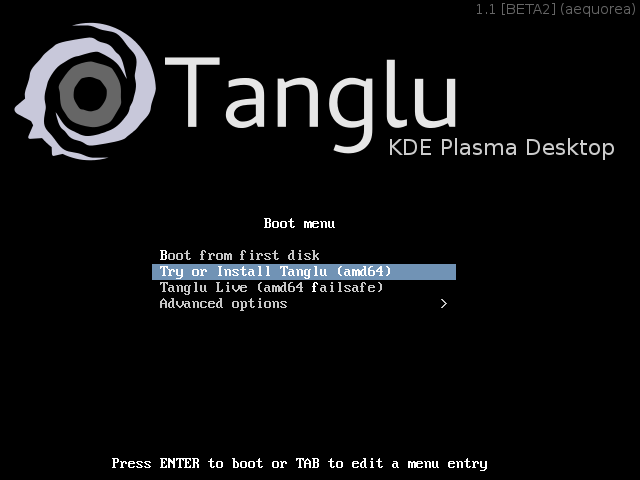
While writing this post, I recognize that we might need a news-blog for tanglu logo pureTanglu :-) Since yesterday, we have an (installable!) Beta2 release of Tanglu! Compared to the previous snapshot, it comes with a huge amount of improvements and bugfixes: Known issues: You can download the release from one of these mirrors: Mirror1 Mirror2 Mirror3 Additionally, there is now a release schedule for Tanglu Aequorea, and we will do a vote on the name for the next release soon (proposed names). As a note to Debian: systemd is working pretty well for Tanglu so far ;-) I am pretty happy with this Beta2 release, because Tanglu is shaping out to be the distribution we imagined in the beginning. Have fun! And as bonus, here are some images from Beta2: tanglu-beta2-kde0 tanglu-beta2-kde1 tanglu-beta2-kde2 tanglu-beta2-gnome2tanglu-beta2-gnome1
18 January 2014

James Bromberger: Linux.conf.au 2014: LCA TV

The radio silence here on my blog has been not from lack of activity, but the inverse. Linux.conf.au chewed up the few remaining spare cycles I have had recently (after family and work), but not from organising the conference (been there, got the T-Shirt and the bag). So, let s do a run through of what has happened LCA2014 Perth has come and gone in pretty smooth fashion. A remarkable effort from the likes of the Perth crew of Luke, Paul, Euan, Leon, Jason, Michael, and a slew of volunteers who stepped up not to mention our interstate firends of Steve and Erin, Matthew, James I, Tim the Streaming guy and others, and our pro organisers at Manhattan Events. It was a reasonably smooth ride: the UWA campus was beautiful, the leacture theatres were workable, and the Octogon Theatre was at its best when filled with just shy of 500 like minded people and an accomplished person gracing the stage. What was impressive (to me, at least) was the effort of the AV team (which I was on the extreme edges of); videos of keynotes hit the Linux Australia mirror within hours of the event. Recording and live streaming of all keynotes and sessions happend almost flawlessly. Leon had built a reasonably robust video capture management system (eventstreamer on github) to ensure that people fresh to DVswitch had nothing break so bad it didn t automatically fix itself and all of this was monitored from the Operations Room (called the TAVNOC, which would have been the AV NOC, but somehow a loose reference to the UWA Tavern the Tav crept in there). Some 167 videos were made and uploaded most of this was also mirrored on campus before th end of the conference so attendees could load up their laptops with plenty of content for the return trip home. Euan s quick Blender work meant there was a nice intro and outro graphic, and Leon s scripting ensured that Zookeepr, the LCA conference manegment software, was the source of truth in getting all videos processed and tagged correctly. I was scheduled (and did give) a presentation at LCA 2014 about Debian on Amazon Web Services (on Thursday), and attended as many of the sessions as possible, but my good friend Michael Davies (LCA 2004 chair, and chair of the LCA Papers Committee for a good many years) had another role for this year. We wanted to capture some of the hallway track of Linux.conf.au that is missed in all the videos of presentations. And thus was born LCA TV. LCA TV consisted of the video equipment for an additional stream mixer host, cameras, cables and switches, hooking into the same streaming framework as the rest of the sessions. We took over a corner of the registration room (UWA Undercroft), brought in a few stage lights, a couch, coffee table, seat, some extra mics, and aimed to fill the session gaps with informal chats with some of the people at Linux.conf.au speakers, attendees, volunteers alike. And come they did. One or two interviews didn t succeed (this was an experiment), but in the end, we ve got over 20 interviews with some interesting people. These streamed out live to the people watching LCA from afar; those unable to make it to Perth in early January; but they were recorded too and we can start to watch them (see below) I was also lucky enough to mix the video for the three keynotes as well as the opening and closing, with very capable crew around the Octogon Theatre. As the curtain came down, and the 2014 crew took to the stage to be congratulated by the attendees, I couldn t help but feel a little bit proud and a touch nostalgic memories from 11 years earlier when LCA 2003 came to a close in the very same venue. So, before we head into the viewing season for LCA TV, let me thank all the volunteers who organised, the AV volunteers, the Registration volunteers, the UWA team who helped with Octogon, Networking, awesome CB Radios hooked up to the UWA repeated that worked all the way to the airport. Thanks to the Speakers who submitted proposals. The Speakers who were accepted, made the journey and took to the stage. The people who attended. The sponsors who help make this happen. All of the above helps share the knowledge, and ultimately, move the community forward. But my thanks to Luke and Paul for agreeing to stand there in the middle of all this madness and hive of semi structured activity that just worked. Please remember this was experimental; the noise was the buzz of the conference going on around us. There was pretty much only one person on the AV kit my thanks to Andrew Cooks who I ll dub as our sound editor, vision director, floor manager, and anything else. So who did we interview? One or two talks did not work, so appologies to those that are missing. Here s the playlist to start you off! Enjoy.
17 January 2014

Michael Stapelberg: debmirror 6x speed-up, or how to fill a 1 GBps Rackspace link

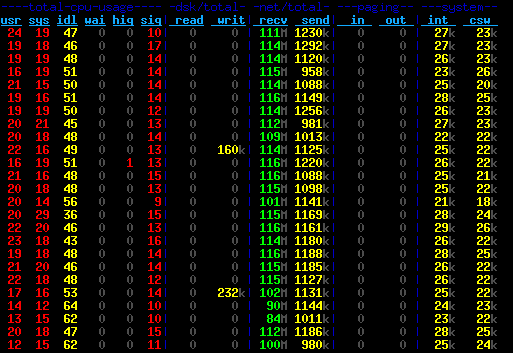
As explained in more detail in my my last blog post, Rackspace is providing hosting for Debian Code Search. For those of you who don t know, Rackspace is a cloud company that provides (among other services) a public cloud based on OpenStack. That means you can easily (and programmatically, if you want) bring up virtual servers, block storage volumes, configure the network between them, etc. As part of my initial performance experiments, I was running debmirror to clone a full Debian source mirror, and I noticed this took about one hour. Given that the peak network and storage write rates I have observed in my benchmarks are much higher, I wondered why it took so long. About 43 GB (that s how big the Debian sid sources are) in 60 minutes means 12 MB/s download rate, which is a bit more than a sustained 100 MBit/s connection. Luckily, at least the Rackspace servers I looked at are connected with 1 GBit/s to the internet, so more should be possible. Note that these are the old Rackspace servers. There is a new generation of servers, which I have not yet tried, that apparently offer even higher performance. After a brief look at the debmirror source code, I concluded that it can only use a single mirror and downloads files sequentially. There is some obvious potential for improvement here, and the fact that I could come up with a proof of concept written in Go to determine the files to download in a couple of minutes encouraged me to spend my saturday on this problem :-). About 7 hours later, my prototype had gone through various iterations and the code could sustain about 115 MB/s incoming bandwidth for most of the time. Here is a screenshot of dstat measuring the performance: Another 3 hours later, the most obvious bugs were weeded out and the code successfully cloned an entire mirror for the first time. I verified the correctness by running debmirror afterwards, and no files were downloaded that had not actually arrived on the mirror in the meantime. Features
  1. Parallel downloading from multiple mirrors.
    Of course, it is not guaranteed that the mirrors are consistent, but that is a solvable problem: whenever a non-200 HTTP response is encountered, the file is put back into the queue and gets rescheduled onto any mirror. Eventually, it will be rescheduled onto the mirror from which the sources.gz was downloaded, and that mirror has to have it.
  2. HTTP keep-alive and pipelining.
    debmirror also does HTTP keep-alive (I read that in the source, did not verify it), but it downloads files sequentially, i.e. it downloads one file, then sends the request for the next file. This means that after one file was received, no data is being received until another round-trip finished. For a lot of small files (think of .dsc and .debian.tar.gz files or small orig tarballs) that really adds up.
    Therefore, I use HTTP pipelining: I send 99 requests and then just receive all the responses at full speed. The magic number 99 comes from the fact that this is the smallest common denominator that all mirrors I have tested allow. nginx by default allows 100 requests.
  3. Request ordering.
    Instead of sending requests at random, I sort the download queue by size and make sure that the first request on each connection is for a big file. The intention is that TCP will adapt to that quickly and use a bigger window size as soon as possible instead of ramping up slower later on. Note that I have not actually measured the window sizes, so this is just a hunch.
    Another nice side-effect of the ordering is that the amount of data that is being sent through each connection is roughly equal. This means we don t waste TCP connections by sending 99 requests for small files only.
  4. (Goroutines).
    I m a bit hesitant to even write about it, so let s make it quick: Perl (and thus debmirror) is typically single-threaded, whereas Goroutines scale nicely on multi-core systems. I don t think it makes a big difference on the machines I am running this on as they have only two cores and are not maxed out on CPU usage at all. But maybe this will be more important for saturating 10 GBit/s? :-)
  5. (Mirror selection).
    It s not a feature of the code, but certainly relevant: of course I selected mirrors that are connected to the internet with at least a Gigabit link, serve files reasonably fast and have low latency to Rackspace s Chicago presence.
    Interestingly, while I used to think that universities have access to big uplinks and beefy machines, none of the mirrors that I use are located at a university. In fact, every mirror ending in .edu that I tried was really slow most of them providing something like 2-4 MB/s.
Results With the latest iteration of the code, I can clone an entire Debian source mirror with 43 GB of data in about 11.5 minutes, which corresponds to a 63 MB/s download rate:
GOMAXPROCS=20 ./dcs-debmirror -num_workers=20
68,24s user 384,90s system 66% cpu 11:25,97 total
It should be noted that the download rate is very low in the first couple of seconds since the sources.gz file is downloaded from a single mirror, then unpacked and analyzed. The peak download rate is about 115 MB/s (= 920 MBit/s) which is reasonably close at what you can achieve with a Gigabit link, I think. If the entire uplink was available to me at all time, the Rackspace hardware would be able to saturate that easily, both in terms of reading from the network and in terms of writing to block storage. I tested this on an SSD volume, but I see about 113 MB/s throughput with the internal hard disk, so I think that should work, too. There is another dstat screenshot of the final version (writing to disk). Perhaps even more interesting to some readers is the time for an incremental update:
GOMAXPROCS=20 ./dcs-debmirror -tcp_conns=20
2013/10/13 11:09:55 Downloading 307 files (447 MB total)
 
2013/10/13 11:10:04 All 307 files downloaded in 9.105605931s. Download rate is 49.186567 MB/s
4,91s user 3,99s system 67% cpu 13,205 total
The wall clock time is higher than the time reported by the code because the code does not count the time for downloading and parsing the sources.gz file. The entire program is about 400 lines (not SLOC) of Go code. It s part of the Debian Code Search source. If you re interested, you can read dcs-debmirror.go in your browser. Conclusions The outcome of this experiment is that I now know (and have shown!) that there are significantly more efficient ways of cloning a Debian mirror than what debmirror does. Furthermore, I have a good grasp on what kind of performance the Rackspace cloud offers and I am fairly happy with the numbers :-). My code is useful to me in context of Debian Code Search, but unless you need a sid-only source-only mirror, it will not be useful to you directly. Of course you can take the ideas that I implemented and implement them elsewhere personally, I don t plan to do that. If you have hardware, bandwidth and a use-case for 10 GBit/s+ mirroring, I d like to hear about it! :-)

Chris Lamb: Captain Phillips: Pontius Pirate

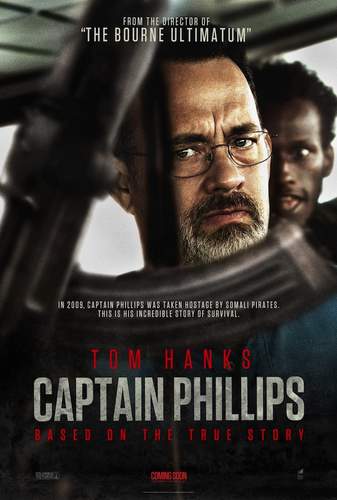
https://chris-lamb.co.uk/wp-content/2014/phillips_b.jpg Somalia's chief exports appear to be morally-ambiguous Salon articles about piracy and sophomoric evidence against libertarianism. However, it is the former topic that Captain Phillips concerns itself with, inspired by the hijacking of the Maersk Alabama container ship in 2009. What is truth? In the end, Captain Phillips does not rise above Pontius Pilate in providing an answer, but it certainly tries using more refined instruments than irony or leaden sarcasm. This motif pervades the film. Obviously, it is based on a "true story" and brings aboard that baggage, but it also permeates the plot in a much deeper sense. For example, Phillips and the US Navy lie almost compulsively to the pirates, whilst the pirates only really lie once (where they put Phillips in greater danger). Notice further that Phillips only starts to tell the truth when he thinks all hope is lost. These telling observations become even more fascinating when you realise that they must be based on the testimony of the, well, liars. Clearly, deception is a weapon to be monopolised and there are few limits on what good guys can or should lie about if they believe they can save lives.

https://chris-lamb.co.uk/wp-content/2014/phillips_c.jpg

Even Phillip's nickname ("Irish") is a falsehood he straight-up admits he is an American citizen.

Futhermore, there is an utterly disarming epilogue where Phillips is being treated for shock by clinical efficient medical staff. Not only will this scuttle any "blanket around the shoulders" clich but is probably a highly accurate portrayal of what actually happens post-trauma. This echoes the kind of truth Werner Herzog aims for in his filmmaking as well his guilt-inducing duality between uncomfortable lingering and compulsive viewing. Lastly, a starter for a meta-discussion: can a film based on real-world events even be "spoilered"? Hearing headlines on the radio before you read your newspaper hardly robs you of a literary journey... Captain Phillips does have some quotidian problems. Firstly, the only tool for ratcheting up tension is for the Somalians to launch verbal broadsides at the Americans, with each compromise somehow escalating the situation. This technique is effective but well before the climatic rescue scene where it is really needed it has been subject to the most extreme diminishing returns. (I cannot be the first to notice the "Africans festooned with guns shouting incomphensively" trope I hope it is based on a Babel-esque mechanism of disorientation from miscommunication rather than anything more unsavoury.)
https://chris-lamb.co.uk/wp-content/2014/phillips_a.jpg

The racist idea that Africans prefer an AK-47 rotated about the Z-axis is socially constructed.

Secondly, the US Navy acts like a teacher with an Ofsted inspector observing quietly from the corner of the classroom; far too well-behaved it suspends belief, with no post-kill gloating or even the tiniest of post-arrest congratulations. Whilst nobody wants to see the Navy overreact badly to other military branches getting all the glory, nobody wants to see a suspiciously bland recruitment vehicle either. Paradoxically, this hermetic treatment made me unduly fascinated by them as if they were part of some military "uncanny valley". Two quick observations:
https://chris-lamb.co.uk/wp-content/2014/phillips_d.jpg

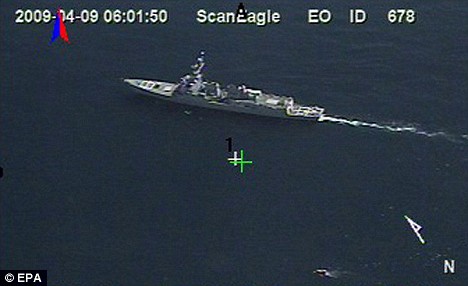
The drone footage: I'd love to write an essay about how Call of Duty might have influenced (or even be) cinema.

Finally, despite the title, the film is actually about two captains; the skillful liar Phillips and ... well, that's the real problem. Whilst Captain Muse is certainly no caricatured Hook, we are offered little depth beyond a "You're not just a fisherman" faux-revelation that leads nowhere. I was left inventing reasons for his akrasia so that he made any sense whatsoever. One could charitably argue that the film attempts to stay objective on Muse, but the inability for the film to take any obvious ethical stance actually seems to confuse and then compromise the narrative. What deeper truth is actually being revealed? Is this film or documentary? Worse still, the moral vacuum is invariably filled by the viewer's existing political outlook: are Somali pirates victims of circumstance who are forced into (alas, regrettable) swashbuckling adventures to pacify plank-threatening warlords? Or are they violent and dangerous criminals who habour an irrational resentment against the West, flimsily represented by material goods in shipping containers? Your improvised answer to this Rorschach test will always sit more haphazardly in the film than any pre-constructed treatment ever could. 6/10

Chris Lamb: Review: Captain Phillips (2013)

https://chris-lamb.co.uk/wp-content/2014/phillips_b.jpg Somalia's chief exports appear to be morally-ambiguous Salon articles about piracy and sophomoric evidence against libertarianism. However, it is the former topic that Captain Phillips concerns itself with, inspired by the hijacking of the Maersk Alabama container ship in 2009. What is truth? In the end, Captain Phillips does not rise above Pontius Pilate in providing an answer, but it certainly tries using more refined instruments than irony or leaden sarcasm. This motif pervades the film. Obviously, it is based on a "true story" and brings aboard all that well-travelled baggage, but it also permeates the plot in a much deeper sense. For example, Phillips and the US Navy lie almost compulsively to the pirates, whilst the pirates only really lie once where they put Phillips in greater danger. Notice further that Phillips only starts to tell the truth when he thinks all hope is lost. These telling observations become even more fascinating when you realise that they must be based on the testimony of the, well, liars. Clearly, deception is a weapon to be monopolised and there are few limits on what good guys can or should lie about if they believe they can save lives.

https://chris-lamb.co.uk/wp-content/2014/phillips_c.jpg

Even Phillip's nickname ("Irish") is a falsehood he straight-up admits he is an American citizen.

Lastly, there is an utterly disarming epilogue where Phillips is being treated for shock by clinical efficient medical staff. Not only will it scuttle any "blanket around the shoulders" clich but is probably a highly accurate portrayal of what actually happens post-trauma. This echoes the kind of truth Werner Herzog often aims for in his filmmaking as well his guilt-inducing duality between uncomfortable lingering and compulsive viewing. Another angle worthy of discussion: can a film based on real-world events even be "spoilered"? Hearing headlines on the before you read the newspaper hardly robs you of a literary journey... Captain Phillips does have some quotidian problems. Firstly, the only tool for ratcheting up tension is for the Somalians to launch verbal broadsides at the Americans, with each compromise somehow escalating the situation further. This technique is genuinely effective but well before the climatic rescue scene where it is really needed it has been subject to the most extreme diminishing returns. (I cannot be the first to notice the "Africans festooned with guns shouting incomphensively" trope I hope it is based on a Babel-esque mechanism of disorientation and miscommunication rather than anything, frankly, unsavoury.)
https://chris-lamb.co.uk/wp-content/2014/phillips_a.jpg

The racist idea that Africans prefer a AK-47 rotated about the Z-axis is socially constructed.

Secondly, the US Navy acts like a teacher with an Ofsted inspector observing quietly from the corner of the classroom; far too well-behaved it suspends belief, with no post-kill gloating or even the tiniest of post-arrest congratulations. Whilst nobody wants to see the Navy overreact badly to other military branches getting all the glory, nobody wants to see a suspiciously bland recruitment vehicle either. Paradoxically, this hermetic treatment made me unduly fascinated by them, as if they were part of some military "uncanny valley". Two quick observations:
https://chris-lamb.co.uk/wp-content/2014/phillips_d.jpg

The drone footage: I'd love to read (or write) an essay about how Call of Duty might have influenced cinema.

Finally, despite the title, the film is actually about two captains; the skillful liar Phillips and ... well, that's the real problem. Whilst Captain Muse is certainly no caricatured Hook, we are offered little depth beyond a "You're not just a fisherman" faux-revelation that leads nowhere. I was left inventing reasons for his akrasia so that he made any sense whatsoever. One could charitably argue that the film attempts to stay objective on Muse, but the inability for the film to take any obvious ethical stance actually seems to confuse and then compromise the narrative. What deeper truth is actually being revealed? Is this film or documentary? Worse still, the moral vacuum is invariably filled by the viewer's existing political outlook: are Somali pirates victims of circumstance who are forced into (alas, regrettable) swashbuckling adventures to pacify plank-threatening warlords? Or are they violent and dangerous criminals who habour an irrational resentment against the West, flimsily represented by material goods in shipping containers? Your improvised answer to this Rorschach test will always sit more haphazardly in the film than any pre-constructed treatment ever could. 6/10

16 January 2014

Daniel Pocock: Get ready to try Debian SIP

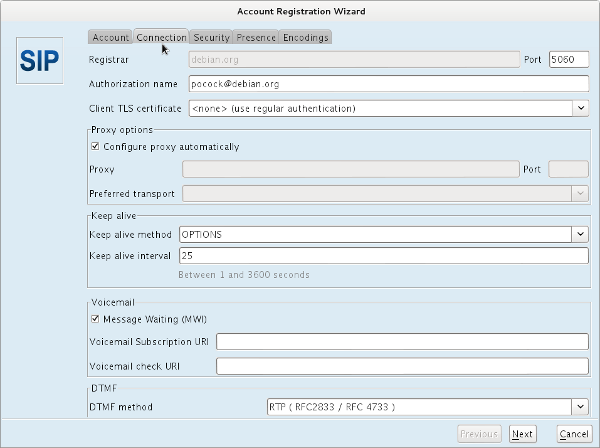
Before going on to talk about SIP, there is one really important thing that must be emphasized: XMPP/Jabber is also in the roadmap. Some of the infrastructure that has already been deployed (the new RTC passwords in ud-ldap, the TURN server and the RADIUS server) is good for both SIP and XMPP use cases. All to be revealed on Sunday As mentioned in my recent blog about the Debian.org NAPTR record, more details will be coming in my talk at mini-DebConf Paris this weekend. Today I'm just going to describe some things to install for those who want a head start. Jitsi Jitsi has been around for many years (originally as SIP Communicator) and it is probably the most advanced desktop softphone in the free software world. Jitsi packages are in jessie and sid - why not install them now. If you don't want to pull in dependencies from jessie on your wheezy system, you can also download from upstream and run it standalone. WebRTC browsers I've prepared a JSCommunicator implementation based on the jscommunicator-web-phone package. To use it, you need the latest version of Iceweasel/Firefox or Chromium. As HTML5 WebRTC / RTCPeerConnection is an evolving standard, using a recent browser is essential. Jitsi configuration for sip:debian.org It is not open for users just yet, but this is how you will configure it when it is available. More details to come...
AttachmentSize
step-4-setup-connection-scaled.png59.66 KB

15 January 2014

Jon Dowland: Whitley Bay Ice Rink

Recently, North Tyneside Council circulated the beginnings of a regional development plan. This consisted of a detailed map of the borough, complete with various areas marked out as sites for potential housing development. Included amongst the sites for potential development was Whitley Bay Ice Rink and the surrounding leisure facilities: a football pitch, a cricket pitch, and more. Whitley Bay Ice Rink has been a fixture in the cultural history of the region and it would be a terrible shame if it were to close. Many people seemed to agree: a petition calling for the site to be excluded from the plan received over 7,000 signatures. Residents were also able to write comments on the plan itself. The specific paragraph for the Ice Rink had attracted over 100 comments when I looked at it on the last day that comments were open. I hurredly put together one of my own:
Whitley Bay Ice Rink is about to celebrate it s 60th birthday as both a key part of the history and culture of the borough and a unique leisure facility in the wider area. Sadly the Rink has seemed, historically, to be somewhat neglected, rather like the other large cultural landmark in the region - Whitley Bay s Spanish City and Dome. I argue you should no sooner consider closing or redeveloping the Rink site than the Dome itself. Rather, both should be cherished and invested in, particularly if (as rumoured) the current owners are keen to retire or pass it on. In recognising the need to increase the amount of housing in the area, one should consider what facilities will be available to the new residents within the region. Removing facilities to provide housing is slaying the golden goose. Whitley Bay Ice Rink is one of the few rinks left in the country and the nearest permanent ice rink within 30 miles. Ice skating has become a fond and lasting memory for many of the adults who have grown up in the region, many of whom enjoy or look forward to their own children experiencing it. I look forward to taking my niece and nephew there, when they are old enough, as well as my own future children. It is a traditional spot for School trips; the sports teams operating from the rink have a proud history and fearsome reputation. It s an attraction for the large numbers of University students that travel to the two nearest Universities. The borough is blighted with rotting seaside hotels which (following the recent development of the Idols site) should be converted into attractive flat or maisonette housing as a priority.

14 January 2014

Daniel Pocock: Blog comments working again

Blog comments have been problematic on this site for some months now. I finally had a look into the problem last night and identified the cause of the problem and implemented a workaround which other Drupal Blogspam module users are welcome to copy. Thanks to Steve Kemp for providing the Blogspam service. Anything but thanks to those who provide the spam.

11 January 2014

Johannes Schauer: Why do I need superuser privileges when I just want to write to a regular file

I have written a number of scripts to create Debian foreign architecture (mostly armel and armhf) rootfs images for SD cards or NAND flashing. I started with putting Debian on my Openmoko gta01 and gta02 and continued with devices like the qi nanonote, a marvel kirkwood based device, the Always Innovating Touchbook (close to the Beagleboard), the Notion Ink Adam and most recently the Golden Delicious gta04. Once it has been manufactured, I will surely also get my hands dirty with the Neo900 whose creators are currently looking for potential donors/customers to increase the size of the first batch and get the price per unit further down. Creating a Debian rootfs disk image for all these devices basically follows the same steps:
  1. create an disk image file, partition it, format the partitions and mount the / partition into a directory
  2. use debootstrap or multistrap to extract a selection of armel or armhf packages into the directory
  3. copy over /usr/bin/qemu-arm-static for qemu user mode emulation
  4. chroot into the directory to execute package maintainer scripts with dpkg --configure -a
  5. copy the disk image onto the sd card
It was not long until I started wondering why I had to run all of the above steps with superuser privileges even though everything except the final step (which I will not cover here) was in principle nothing else than writing some magic bytes to files I had write access to (the disk image file) in some more or less fancy ways. So I tried using fakeroot+fakechroot and after some initial troubles I managed to build a foreign architecture rootfs without needing root priviliges for steps two, three and four. I wrote about my solution which still included some workarounds in another article here. These workarounds were soon not needed anymore as upstream fixed the outstanding issues. As a result I wrote the polystrap tool which combines multistrap, fakeroot, fakechroot and qemu user mode emulation. Recently I managed to integrate proot support in a separate branch of polystrap. Last year I got the LEGO ev3 robot for christmas and since it runs Linux I also wanted to put Debian on it by following the instructions given by the ev3dev project. Even though ev3dev calls itself a "distribution" it only deviates from pure Debian by its kernel, some configuration options and its initial package selection. Otherwise it's vanilla Debian. The project also supplies some multistrap based scripts which create the rootfs and then partition and populate an SD card. All of this is of course done as the superuser. While the creation of the file/directory structure of the foreign Debian armel rootfs can by now easily be done without superuser priviliges by running multistrap under fakeroot/fakechroot/proot, creating the SD card image still seems to be a bit more tricky. While it is no problem to write a partition table to a regular file, it turned out to be tricky to mount these partition because tools like kpartx and losetup require superuser permissions. Tools like mkfs.ext3 and fuse-ext2 which otherwise would be able to work on a regular file without superuser privileges do not seem to allow to specify the required offsets that the partitions have within the disk image. With fuseloop there exists a tool which allows to "loop-mount" parts of a file in userspace to a new file and thus allows tools like mkfs.ext3 and fuse-ext2 to work as they normally do. But fuseloop is not packaged for Debian yet and thus also not in the current Debian stable. An obvious workaround would be to create and fill each partition in a separate file and concatenate them together. But why do I have to write my data twice just because I do not want to become the superuser? Even worse: because parted refuses to write a partition table to a file which is too small to hold the specified partitions, one spends twice the disk space of the final image: the image with the partition table plus the image with the main partition's content. So lets summarize: a bootable foreign architecture SD card disk image is nothing else than a regular file representing the contents of the SD card as a block device. This disk image is created in my home directory and given enough free disk space there is nothing stopping me from writing any possible permutation of bits to that file. Obviously I'm interested in a permutation representing a valid partition table and file systems with sensible content. Why do I need superuser privileges to generate such a sensible permutation of bits? Gladly it seems that the (at least in my opinion) hardest part of faking chroot and executing foreign architecture package maintainer scripts is already possible without superuser privileges by using fakeroot and fakechroot or proot together with qemu user mode emulation. But then there is still the blocker of creating the disk image itself through some user mode loop mounting of a filesystem occupying a virtual "partition" in the disk image. Why has all this only become available so very recently and still requires a number of workarounds to fully work in userspace? There exists a surprising amount of scripts which wrap debootstrap/multistrap. Most of them require superuser privileges. Does everybody just accept that they have to put a sudo in front of every invocation and hope for the best? While this might be okay for well tested code like debootstrap and multistrap the countless wrapper scripts might accidentally (be it a bug in the code or a typo in the given command line arguments) write to your primary hard disk instead of your SD card. Such behavior can easily be mitigated by not executing any such script with superuser privileges in the first place. Operations like loop mounting affect the whole system. Why do I have to touch anything outside of my home directory (/dev/loop in this case) to populate a file in it with some meaningful bits? Virtualization is no option because every virtualization solution again requires root privileges. One might argue that a number of solutions just require some initial setup by root to then later be used by a regular user (for example /etc/fstab configuration or the schroot approach). But then again: why do I have to write anything outside of my home directory (even if it is only once) to be able to write something meaningful to a file in it? The latter approach also does not work if one cannot become root in the first place or is limited by a virtualized environment. Imagine you are trying to build a Debian rootfs on a machine where you just have a regular user account. Or a situation I was recently in: I had a virtual server which denied me operations like loop mounting. Given all these downsides, why is it still so common to just assume that one is able and willing to use sudo and be done with it in most cases? I really wonder why technologies like fakeroot and fakechroot have only been developed this late. Has this problem not been around since the earliest days of Linux/Unix? Am I missing something and rambling around for nothing? Is this idea a lost cause or something that is worth spending time and energy on to extend and fix the required tools?

9 January 2014

Jo Shields: Here Ye, Here Ye

Valve Software s Steam is the number one digital game distribution service, with more than 65 million registered accounts. Steam runs on Windows, Mac OS, and Linux x86/amd64 computers, and provides access to several thousand games, at varying price points an enormous growth from less than a dozen games for Windows only about a decade ago. Valve s latest endeavour has been to bring their storefront into the living room, with a three-pronged attack: a new game controller, a programme of licensed x86 consoles to plug into the family TV, and an OS to run on the Steam Machines to tie it all together. December saw the first public release of their SteamOS which, as it turns out, is basically just a preconfigured desktop Linux. Specifically, it s a Debian Wheezy derivative, comprising a subset of 502 source packages from Wheezy; 8 of Valve s own source packages; and 51 source packages which have been either patched compared to Wheezy, backported from post-Wheezy, or both. For example, the compiler used by default is gcc-4.7 (rather than Wheezy s 4.6) and the libc version postdates Wheezy too. Valve s official instructions and installer release concerned quite a few people who had planned to try SteamOS on an older PC, by mandating a large (500GB) hard disk and a PC with UEFI firmware. Very quickly a number of instructions started appearing from people trying to fix what people felt were real issues specifically provision for BIOS-based computers, and installation from optical media. After being assured that redistribution of derivatives of SteamOS were entirely authorized (and, in fact, encouraged) I decided to produce my own variant, calling upon my own experience with debian-installer modification from past and present jobs, as well as calling upon the skills and experience of the UK Debian community as needed. The end result is Ye Olde SteamOSe. SteamOS on VMware Workstation 10 This weekend saw the third release of Ye Olde SteamOSe, a derivative designed to greatly widen the pool of computers capable of running Valve s OS. And unlike the first two releases, the public response this time has been crazy. Like, totally crazy. Combined score across several subreddits totals about 1700. 7 pages of Google search results. Hundreds of tweets. Mentions in dozens of blogs around the world. Coverage on the Linux Action Show. Unilaterally added to Softpedia s list of distributions. Almost 2000 views of a video installation walkthrough I posted on YouTube. Crazy. Sadly the idea to try and track visitors to the page didn t occur to me until long after the initial rush subsided, but 1000 visitors on Tuesday for a news story which landed on Sunday is still pretty hot in my book. It s also interesting to observe the demographics of site visitors the #1 referrer on Tuesday was Dutch PC site Tweakers.net, and StumbleUpon outranks reddit for referrals. About 66% of visitors interested in installing my Debian Wheezy derivative derivative came using Windows (20% using Linux), which suggests there s a lot of potential Linux users out amongst the Windows gamer masses. So what s the purpose of this self-congratulatory blog post? Just dick-waving? Well, there s an element of that (I m only human), but I think it might be nice to alert the audience on Planet Debian/Ubuntu, many of whom are not big gamers, to the next big thing in embedded Linux except this time a real GNU/X.org/sysVinit distribution, not some NIH thing like Android. So now you know!

8 January 2014

Gunnar Wolf: [review] Packt's Instant Haml

Packt Publishing sent me Krzysztof Niki ski's Instant Haml to do a short blog review... Thing is, and those who read me know, I cannot write short reviews ;-) So lets see how this goes. Packt's Instant series First, as for the format this book follows and the series it fits in: They are very short books. I was the tech reviewer for their Instant Debian Build a Web Server , and when I opened it for the first time, I thought I had received only the first chapter. This series' motto is Short Fast Focused so, yes, the books are ~50 pages long, with ample margins and many big screenshots. I told the editors I was quite unsure about the value this kind of publications add, as they are very similar to online tutorials, but given they have so many books in this series (printed and electronic), there must be a market for them. They surely know their business better than me! There is one other detail regarding the publisher I'll stick in this section, although it is not specific to their Instant series: I do most of my reading in my Kindle. Packt seems to have chosen to specify a very small font for their texts. Besides the two books mentioned, I also have their Object Oriented JavaScript book. For all of the other books I read, I use the smallest font setting. Packt books in mobi format (what they present as Amazon format in their web site) are basically illegible without bumping up the font size through the roof. As I understand it, publishers should use industry-wide default sizes, and let the reader adjust their reading experience. Yes, books of technical nature (such as Packt's) often benefit from having more displayed information than what an ebook reader normally shows... But that's for me to decide! And no, this is not a Kindle-specific glitch: I also get a similar experience when opening it from Calibre. And as for the book... I am a long-time Haml convert/fan; I packaged its Ruby implementation for Debian (and should update it soon :-/ as new versions have appeared), the corresponding Emacs Lisp mode, and I use it for basically all of my static HTML sites and Ruby-based Web systems. Haml is a great templating language, meant to make dynamic HTML generation leaner and easier. It is a clean and elegant technology, and can clearly sell itself. And the project webpage has very good documentation, ranging from a short tutorial and a full API documentation for people to contribute to the project. The first part of this book, of course, covers the "why is Haml so great?" part, presenting the basic equivalences with HTML. In my opinion, the book could be structured a bit differently and would generate a stronger following. Why? Because, even given that Haml is greatly benefited from its Ruby integration and has many hooks to be tightly integrated in a Rails workflow, it can also be used by people who don't want to do Ruby. I have some static websites that are just a bunch of Haml files, compiled by a very simple Makefile and calling the haml command from the shell. I think there would be some value in presenting this invocation before learning how to call it from the Gems environment (i.e. bundle install). Using Haml as a standalone tool is only presented almost as an appendix ("Using HAML outside of Rails" section). Even more so if the author presents four different static-site solutions (probably more non-programmer-friendly than my trusty Makefile). Oh, and this little section uses the (old? obsolete?) uppercase HAML notation for the project's name instead of the now-standard Haml. Dirty screenshots About the screenshots presented in this first section (and I refer mainly to the scaffolding examples), they are meant to show how easy things are, but have an important stylistic mistake: Terminals with transparency might look cool (I hate using them, but then again I'm a very boring person when it comes to my computer habits ;-) ), but transparencies have no place in a book (be it printed or e-book), as the images appear very uncrisp. In the Kindle, they just seemed dirty Now that I'm browsing the PDF from my desktop, I see that the screenshot in "Step 1" has a photo of Earth from space behind the terminal, and even worse, in "Step 2" it is shown over a Web page detailing the installation! These elements are just distracting, and the text would be much cleaerer if it were presented typeset just as a regular code fragment. Opening many of those screenshots in the Kindle was plain useless. Editor integration It is perfectly clear from this text that the author strongly prefers Sublime Text, sometimes uses TextMate, and has just heard reports that Haml has some support in Vim, Rubymine, Emacs and Coda. Of course, devoting a full page (as it is for the first case) for each editor would be out of proportion for this size of book... I just felt the imbalance too big, specially given that most editors will sport approximately the same feature set. Text redundancy If the Instant series is about making short books, I would expect them to be loaded with easy to follow content (as they are), but free of repetition. I felt, however, a large chunk of step 1 of the "Quick start" chapter to be repeated with the the first section of the "Top 6 features" chapter. Yes, the second one adds some depth, but very little. Still, in the later parts of this "Top 6 features" chapter, a more thorough explanation could be used for the Filters, Multiline attributes/code/strings and helpers and extensions sections. It seems the author was on a hurry trying to get it finished, as it is barely explained Explaining a bit more deeply would surely benefit readers. Wrapping up Reading my review, I'm mostly talking about negative issues. IMO, the book is not excellent, but it is clearly not bad. Specially given it fits very well the format for which it was designed. There are many items that could be fixed, and I hope some of them can be fixed (i.e. the screenshots) before the book goes to print If I understand Packt's page correctly, it is currently only available as ebook, contrary to most of the Instant series' titles.

7 January 2014

Vincent Sanders: Healthy discontent is the prelude to progress

Back in the mists of Internet time (2002) when spirits were brave, the stakes were high, men were real men, women were real women and small furry creatures from Alpha Centauri were real small furry creatures from Alpha Centauri there were few hosting options for a budding open source project.

Despite the meteoric rise of many dot com companies in the early noughties a project either had to go it alone by running everything themselves or pick from a small selection of companies that had not yet worked out how to turn free hosting into money.

One such company, arguably the first, was VA Research with their SourceForge system. Many projects used their platform including a small niche web browser called NetSurf. For years the service was great, there were rough edges but nothing awful.

Netsurf issue tracker in the new SourceForge interface
Over time the NetSurf projects requirements grew beyond what SourceForge could provide and service after service was migrated away eventually all that was left was the bug tracking system. This remained the state of affairs until mid 2013 when SourceForge forced a migration to their new platform which made them unsuitable for the projects use case.

Aside from the issue trackers questionable user interface SourceForge had started aggressively placing advertising throughout their platform. Some of the placements so inadvisable that projects started taking the decision to leave.

While I appreciate that SourceForge had to make money to provide a service they appear to have sown discontent within a large part of their user base without understanding that there are a number of alternatives solutions with a much less onerous funding model.

NetSurf used this as an opportunity to move the remaining issue tracking service to our own infrastructure. Rob Kendrick proceeded to evaluate several solutions and in December 2013 I finally found the time to migrate an XML dump of the old data from SourceForge into MantisBT.

Migrating data from one database into another via incompatible formats took me back to my roots. My early career started with programming tasks moving historical business data from ancient large systems which were about to be scrapped to modern Sparc based systems. Later I would be in a role where financial data needed to be retrieved from obsolete proprietary systems and moved into databases on x86 servers.

My experience in this field was not really stretched as it turns out that modern systems can process a few tens of megabytes in seconds rather than the days for a run in my youth! So some ugly perl scripts and a few hours later I had a nice shiny SQL database filled with NetSurfs bugs and MantisBT instance configured to use them.

NetSurf MantisBT instance showing most recently updated open bugs
Then came the hard bit, triaging all the open bugs, fixing up all the bugs submitted as an anonymous user but with email addresses in, removing duplicates and checking every open bug was still valid took almost two weeks of tedious drudge.

I set up an initial bug workflow within the system that the project developers are still fine tuning to better suit their needs but overall Mantis is proving a very flexible tool. The main deficiencies center around configuration for the projects useage, especially removing unused fields from filters and making the workflow more intuitive..

The resulting system is now getting bug reports submitted again where the sourceforge system had had three in the six months since the forced migration.

The issue tracker is once more a useful tool for the developers allowing us to focus on areas actually causing problems for our users and allowing us to see progress we are making fixing issues.

Overall this was a successful migration and provides a platform the NetSurf project can control where we can offer guarantees to our users about their personal information usage and having a clean rapid interface with no advertisements.

Dirk Eddelbuettel: RcppArmadillo 0.400

A new major release 4.000 of Armadillo came out out yesterday morning. This is a new stable release by Conrad with a new major number, and it brings a few nice changes as detailed below. I rolled up RcppArmadillo version 0.400 yesterday morning, and following a little bit of discussion this version is now on CRAN and in Debian. The complete list of changes is below.
Changes in RcppArmadillo version 0.4.000 (2014-01-05)
  • Upgraded to Armadillo release Version 4.000 (Feral Steamroller)
    • added eigen decompositions of sparse matrices: eigs_sym() and eigs_gen() [ but this requires linking against ARPACK which RcppArmadillo as a pure-template package does not do, and R is not linked against ARPACK either. ]
    • added eigen decomposition for pair of matrices: eig_pair()
    • added simpler forms of eig_gen()
    • added condition number of matrices: cond()
    • expanded find() to handle cubes
    • expanded subcube views to access elements specified in a vector
    • template argument for running_stat_vec expanded to accept vector types
    • more robust fast inverse of 4x4 matrices
    • faster divide-and-conquer decompositions are now used by default for eig_sym(), pinv(), princomp(), rank(), svd(), svd_econ()
    • the form inv(sympd(X)) no longer assumes that X is positive definite; use inv_sympd() instead
    • added MEX connector for interfacing Octave/Matlab with Armadillo matrices (contributed by George Yammine)
Courtesy of CRANberries, there is also a diffstat report for the most recent release As always, more detailed information is on the RcppArmadillo page. Questions, comments etc should go to the rcpp-devel mailing list off the R-Forge page.

This post by Dirk Eddelbuettel originated on his Thinking inside the box blog. Please report excessive re-aggregation in third-party for-profit settings.

6 January 2014

Aurelien Jarno: Debian QEMU images updated

Following the release of Debian Wheezy, I have (finally) updated my set of Debian QEMU images for both Squeeze (6.0.8) and Wheezy (7.3). The following images are now available: Each of these directories contains a GPG signed README.txt file with the md5sums all files, detailed instructions how to run these images and especially the minimum QEMU version to use. The requirements to run the default desktop environment have increased a lot between Squeeze and Wheezy. An accelerated graphics card is now needed to be able to use Gnome (unless you use the fallback mode), which is not something provided by QEMU (actually there is now a QXL para-virtualized video card, but the driver is only in unstable). In addition GDM now needs more than 128MiB to start, while this is the default amount of memory provided for virtual machines. I have therefore decided to switch the default desktop environment on the Wheezy images to Xfce and the display manager to LightDM. Both Gnome and GDM are still installed on the images, and the original default can easily be restored using the following commands: Beside this the new images only contain minor changes. The filesystems have been tweaked to not run fsck after a certain amount of days, and locales-all and openssh-server are now installed in all images. For MIPS and MIPSEL, 64-bit kernels are now also installed and provided, so that it is possible to choose between a 32-bit or a 64-bit kernel (see the README.txt for more details). There is no Debian Wheezy SPARC image available, as QEMU does not fully support SPARC64 yet (it is actually possible to run it, but then the VM crashes often), and Debian Wheezy now only supports 64-bit kernels. I will also invest time to build an S390X image, but so far I haven t been successful on that. The following images are still available at the same location, though they haven t been updated:

Julien Danjou: Databases integration testing strategies with Python

The Ceilometer project supports various database backend that can be used as storage. Among them are MongoDB, SQLite MySQL, PostgreSQL, HBase, DB2 All Ceilometer's code is unit tested, but when dealing with external storage services, one cannot be sure that the code is really working. You could be inserting data with an incorrect SQL statement, or in the wrong table. Only having the real database storage running and being used can tell you that.
Over the months, we developed integration testing on top of our unit testing to validate that our storage drivers are able to deal with real world databases. That is not really different from generic integration testing. Integration testing is about plugging all the pieces of your software all together and running. In what I call "database integration testing", the pieces will be both your software and the database system that you are going to rely on. The only difference here is that one of the module is not coming from the application itself but is an external project. The type of database that you use (RDBMS, NoSQL ) does not matter. Taking a step back, what I will describe here could also apply to a lot of other different software modules, even something that would not be a database sytem at all. Writing tests for integration Presumably, your Python application has unit tests. In order to test against a database back-end, you need to write a few specific classes of tests that will use the database subsystem for real. For example:
import unittest
import os
import sqlalchemy

class TestDB(unittest.TestCase):
def setUp(self):
url = os.getenv("DB_TEST_URL")
if not url:
self.skipTest("No database URL set")
self.engine = sqlalchemy.create_engine(url)

This code will try to fetch the database URL to use from an environment variable, and then will rely on SQLAlchemy to create a database connection.
import unittest
import os
import sqlalchemy

import myapp

class TestDB(unittest.TestCase):
def setUp(self):
url = os.getenv("DB_TEST_URL")
if not url:
self.skipTest("No database URL set")
self.engine = sqlalchemy.create_engine(url)

def test_foobar(self):
self.assertTrue(myapp.store_integer(self.engine, 42))

You can then add as many tests as you want using the connection stored in self.engine. If no test database URL is, the tests will be skipped; however that decision is up to you. You may want to have these tests always run and fail if they can't be run. In the setUp() method, you may also need to do more work, like create a database and delete a database.
import unittest
import os
import sqlalchemy

class TestDB(unittest.TestCase):
def setUp(self):
url = os.getenv("DB_TEST_URL")
if not url:
self.skipTest("No database URL set")
self.engine = sqlalchemy.create_engine(url)
self.connection = self.engine.connect()
self.connection.execute("CREATE DATABASE testdb")

def tearDown(self):
self.connection.execute("DROP DATABASE testdb")

This will make sure that the database you need is clean and ready to be used to testing. Launching modules, a.k.a. databases
The main problem we encountered when building integration testing with databases, is to find a way to start them. Most users are used to start them system-wide with some sort of init script, but when running sandboxed tests, that is not really a good option. Browsing the documentation of each storage allowed us to find a way to start them in foreground and control them "interactively" via a shell script. The following is a script that you can use to run Python tests using nose and is heavily inspired by the one we wrote for Ceilometer.
#!/bin/bash
set -e

clean_exit()
local error_code="$?"
kill -9 $(jobs -p) >/dev/null 2>&1 true
rm -rf "PGSQL_DATA"
return $error_code


check_for_cmd ()
if ! which "$1" >/dev/null 2>&1
then
echo "Could not find $1 command" 1>&2
exit 1
fi


wait_for_line ()
while read line
do
echo "$line" grep -q "$1" && break
done < "$2"
# Read the fifo for ever otherwise process would block
cat "$2" >/dev/null &


check_for_cmd mongod

trap "clean_exit" EXIT

# Start PostgreSQL process for tests
PGSQL_DATA= mktemp -d /tmp/PGSQL-XXXXX
PGSQL_PATH= pg_config --bindir
PGSQL_PATH /initdb $ PGSQL_DATA
mkfifo $ PGSQL_DATA /out
$ PGSQL_PATH /postgres -F -k $ PGSQL_DATA -D $ PGSQL_DATA &> $ PGSQL_DATA /out &
# Wait for PostgreSQL to start listening to connections
wait_for_line "database system is ready to accept connections" $ PGSQL_DATA /out
export DB_TEST_URL="postgresql:///?host=$ PGSQL_DATA &dbname=template1"

# Run the tests
nosetests

If you use tox to automatize your test run, you can use this scripts (I call it run-test.sh) in your tox.ini file.
[testenv]
commands = toxinidir /run-tests.sh posargs

Most databases are able to be run in some sort of standalone mode where you can connect to them using a either a Unix domain socket, or a fixed port. Here are the snippet used in Ceilometer to run with MongoDB and MySQL:
# Start MongoDB process for tests
MONGO_DATA=$(mktemp -d /tmp/MONGODB-XXXXX)
MONGO_PORT=29000
mkfifo $ MONGO_DATA /out
mongod --maxConns 32 --nojournal --noprealloc --smallfiles --quiet --noauth --port $ MONGO_PORT --dbpath "$ MONGO_DATA " --bind_ip localhost &>$ MONGO_DATA /out &
# Wait for Mongo to start listening to connections
wait_for_line "waiting for connections on port $ MONGO_PORT " $ MONGO_DATA /out
export DB_TEST_URL="mongodb://localhost:$ MONGO_PORT /testdb"

# Start MySQL process for tests
MYSQL_DATA=$(mktemp -d /tmp/MYSQL-XXXXX)
mkfifo $ MYSQL_DATA /out
mysqld --datadir=$ MYSQL_DATA --pid-file=$ MYSQL_DATA /mysql.pid --socket=$ MYSQL_DATA /mysql.socket --skip-networking --skip-grant-tables &> $ MYSQL_DATA /out &
# Wait for MySQL to start listening to connections
wait_for_line "mysqld: ready for connections." $ MYSQL_DATA /out
export DB_TEST_URL="mysql://root@localhost/testdb?unix_socket=$ MYSQL_DATA /mysql.socket&charset=utf8"

The mechanism is always the same. We create a fifo with mkfifo, and then run the database daemon with the output redirected to that fifo. We then read from it until we find a line stating the the database is ready to be used. At that point, we can continue and start running the tests. You have to read continuously from the fifo, otherwise the process writing to it will block. We redirect the output to /dev/null, but you could also redirect it to a different log file, or not at all. One step further: using parallelism and scenarios The described approach is quite simple, as it only support one database type. When using an abstraction layer, such as SQLAlchemy, it would be a good idea to run all these tests against different RDBMS, such as MySQL and PostgreSQL for example. The snippet above allows to run both RDBMS in parallel, but the classic approach of unit tests does not allow that. Using one scenario for each database backend would be a great idea. To that end, you can use the testscenarios library.
import unittest
import os
import sqlalchemy
import testscenarios

load_tests = testscenarios.load_tests_apply_scenarios

class TestDB(unittest.TestCase):
scenarios = [
('mysql', dict(database_connection=os.getenv("MYSQL_TEST_URL")),
('postgresql', dict(database_connection=os.getenv("PGSQL_TEST_URL")),
]

def setUp(self):
if not self.database_connection:
self.skipTest("No database URL set")
self.engine = sqlalchemy.create_engine(self.database_connection)
self.connection = self.engine.connect()
self.connection.execute("CREATE DATABASE testdb")

def tearDown(self):
self.connection.execute("DROP DATABASE testdb")

$ python -m subunit.run test_scenario   subunit2pyunit
test_scenario.TestDB.test_foobar(mysql)
test_scenario.TestDB.test_foobar(mysql) ... ok
test_scenario.TestDB.test_foobar(postgresql)
test_scenario.TestDB.test_foobar(postgresql) ... ok

---------------------------------------------------------
Ran 2 tests in 0.061s

OK

To speed up tests run, you could also run the test in parallel. It can be intesting as you'll be able to spread the workload among a lot of different CPUs. However, note that it can require a different database for each test or a locking mechanism to be in place. It's likely that your tests won't be able to work altogether at the same time on only one database. (Both usage of scenarios and parallelism in testing will be covered in The Hacker's Guide to Python, in case you wonder.)
The Hacker's Guide to Python
A book I'm writing that will be launched soon, talking about designing Python applications, state of the art, and various Python tips. If you want to be the first to hear about the launch, subscribe now.

Steve Kemp: A beginning is a very delicate time.

Recently I wrote about docker, after a brief diversion into using runit for service management, I then wrote about it some more. I'm currently setting up a new PXE-boot environment which uses docker for serving DHCP and TFTPD, which is my first "real" usage of any note. It is fun, although I now discover I'm not alone in using docker for this purpose. Otherwise life is good, and my blog-spam detection service recently broke through the 11 million-rejected-comment barrier. The Wordpress Plugin is seeing a fair amount of use, which is encouraging - but more reviews would be nice ;) I could write about work, I've not done that since changing job, but I'm waiting for something disruptive to happen first.. ObQuote: Dune. (film)

5 January 2014

Jonathan Carter: Happy 2014!

So, it s 2014 and I still haven t migrated away from WordPress to using something fancy written in Python. But who cares? Life is great and I ve made good progress in lots of other areas :) I m getting fitter by the day, last year I joined a running club and I now play squash too, which is working so much better than just going to the gym. Also finally making progress with learning how to play guitar, another ancient goal of mine that had slow progress for a while. It helps that I now live on my own and can make noise whenever I want to. I m also going for lessons every Wednesday and have some plans to convert my spare room in to a music room. I ve also gotten into beer brewing. I attended Beerschool via Beerlab, my first batch of American Pale Ale is just about ready for bottling and I ll probably do that next weekend. What else? Well, this year I definitely want to be more focused in my free software contributions than in 2013. I want to get my Debian contributions flowing well again with the aim of becoming a Debian Maintainer. Also planning to go to Debconf in Portland, Oregon in August. Then there s LTSP which is working towards LTSP 6, which will see a huge shift in proper support for local processing and less on thin client support. Not sure how far my involvement will stretch there but I m certainly very interested and will do my best to make the LTSP hackfest later in the year. The next 2-3 months will need the most focus on Edubuntu. The 14.04 LTS release will be a big release and the single-sign-on directory infrastructure that will be released along with it will mark a big milestone for the project. Well, to anyone still reading my blog, have a great 2014!
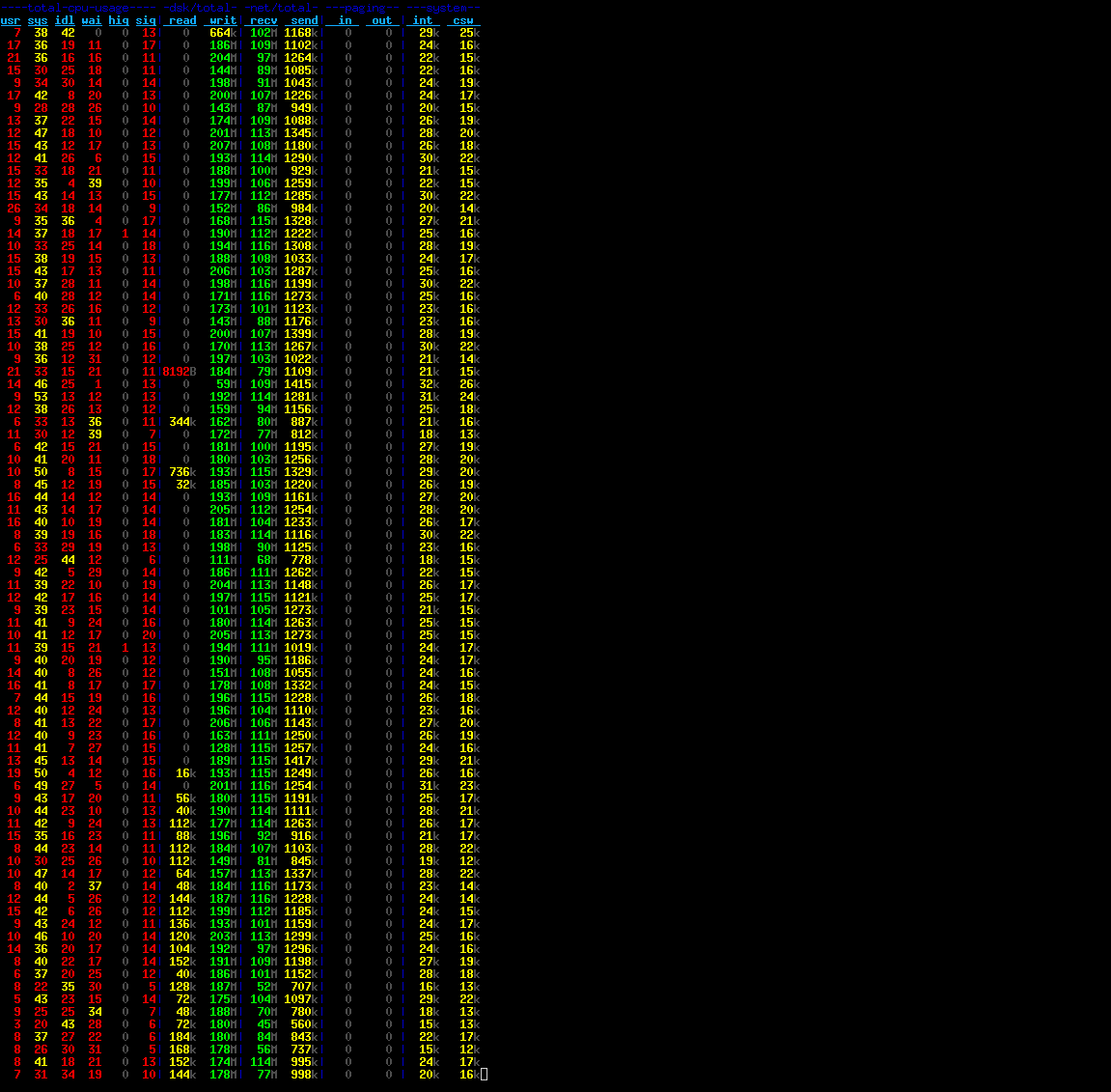
Next.

Previous.