Search Results: "mak"

2 February 2016

Sune Vuorela: Compilers and error messages

So. I typo ed up some template code the other day. And once again I learned the importance of using several c++ compilers. Here is a very reduced version of my code:
#include <utility>
template <typename T> auto foo(const T& t) -> decltype(x.first)

return t.first;

int main()

foo(std::make_pair(1,2));
return 0;
And let s start with the compiler I was testing with first. MSVC (2013 and 2015)
main.cpp(8): error C2672: foo : no matching overloaded function found
main.cpp(8): error C2893: Failed to specialize function template unknown-type foo(const T &)
It is not completely clear from that error message what s going on, so let s try some other compilers: GCC (4.9-5.3)
2 : error: x was not declared in this scope
template <typename T> auto foo(const T& t) -> decltype(x.first)
That s pretty clear. More compilers: Clang (3.3-3.7)
2 : error: use of undeclared identifier x
template <typename T> auto foo(const T& t) -> decltype(x.first)
ICC (13)
example.cpp(2): error: identifier x is undefined
template <typename T> auto foo(const T& t) -> decltype(x.first)
(Yes. I mistyped the variable name used for decltype. Replacing the x with t makes it build). Thanks to http://gcc.godbolt.org/ and http://webcompiler.cloudapp.net/ for testing with various compilers.

Dirk Eddelbuettel: Like peanut butter and jelly: x13binary and seasonal

This post was written by Dirk Eddelbuettel and Christoph Sax and will be posted on both author's respective blogs. The seasonal package by Christoph Sax brings a very featureful and expressive interface for working with seasonal data to the R environment. It uses the standard tool of the trade: X-13ARIMA-SEATS. This powerful program is provided by the statisticians of the US Census Bureau based on their earlier work (named X-11 and X-12-ARIMA) as well as the TRAMO/SEATS program by the Bank of Spain. X-13ARIMA-SEATS is probably the best known tool for de-seasonalization of timeseries, and used by statistical offices around the world. Sadly, it also has a steep learning curve. One interacts with a basic command-line tool which users have to download, install and properly reference (by environment variables or related means). Each model specification has to be prepared in a special 'spec' file that uses its own, cumbersome syntax. As seasonal provides all the required functionality to use X-13ARIMA-SEATS from R --- see the very nice seasonal demo site --- it still required the user to manually deal with the X-13ARIMA-SEATS installation. So we decided to do something about this. A pair of GitHub repositories provide both the underlying binary in a per-operating system form (see x13prebuilt) as well as a ready-to- use R package (see x13binary) which uses the former to provide binaries for R. And the latter is now on CRAN as package x13binary ready to be used on Windows, OS-X or Linux. And the seasonal package (in version 1.2.0 -- now on CRAN -- or later) automatically makes use of it. Installing seasaonal and x13binary in R is now as easy as:

install.packages("seasonal")
which opens the door for effortless deployment of powerful deasonalization. By default, the principal function of the package employs a number of automated techniques that work well in most circumstances. For example, the following code produces a seasonal adjustment of the latest data of US retail sales (by the Census Bureau) downloaded from Quandl:
library(seasonal) 
library(Quandl)   ## not needed for seasonal but has some niceties for Quandl data
rs <- Quandl(code="USCENSUS/BI_MARTS_44000_SM", type="ts")/1e3
m1 <- seas(rs)
plot(m1, main = "Retail Trade: U.S. Total Sales", ylab = "USD (in Billions)")
This tests for log-transformation, performs an automated ARIMA model search, applies outlier detection, tests and adjusts for trading day and easter effects, and invokes the SEATS method to perform seasonal adjustment. And this is how the adjusted series looks like:
Of course, you can access all available options of X-13ARIMA-SEATS as well. Here is an example where we adjust the latest data for Chinese exports (as tallied by the US FED), taking into account the different effects of Chinese New Year before, during and after the holiday:
xp <- Quandl(code="FRED/VALEXPCNM052N", type="ts")/1e9
m2 <- seas(window(xp, start = 2000),
          xreg = cbind(genhol(cny, start = -7, end = -1, center = "calendar"), 
                       genhol(cny, start = 0, end = 7, center = "calendar"), 
                       genhol(cny, start = 8, end = 21, center = "calendar")
          ),
          regression.aictest = c("td", "user"),
          regression.usertype = "holiday")
plot(m2, main = "Goods, Value of Exports for China", ylab = "USD (in Billions)")
which generates the following chart demonstrating a recent flattening in export activity measured in USD.
We hope this simple examples illustrates both how powerful a tool X-13ARIMA-SEATS is, but also just how easy it is to use X-13ARIMA-SEATS from R now that we provide the x13binary package automating its installation.

This post by Dirk Eddelbuettel originated on his Thinking inside the box blog. Please report excessive re-aggregation in third-party for-profit settings.

Norbert Preining: Gaming: The Talos Principle Road to Gehenna

After finishing the Talos Principle I immediately started to play the extension Road to Gehenna, but was derailed near completion by the incredible Portal Stories: Mel. Now that I finally managed to escape from the test chambers my attention returned to the Road to Gehenna. As with the pair Portal 2 and Portal Stories: Mel, the challenges are going up considerably from the original Talos Principle to the Road to Gehenna. Checking the hours of game play it took me about 24h through all the riddles in Road to Gehenna, but I have to admit, I had some riddles where I needed to cheat. road-to-gehenna.jpg The Road to Gehenna does not bring much new game play elements, but loads of new riddles. And the best of all, playable on Linux! And as with the original game, the graphics are really well done, while still be playable on my Vaio Pro laptop with Intel integrated graphic card a plus that is rare in the world of computer games where everyone is expected to have a high-end nVidia or Radeon card. Ok, there is not much action going on where quick graphic computations are necessary, still the impression of the game is great.
gehenna1 The riddles contain the well known elements (connectors, boxes, jammer, etc), but the settings are often spectacular, sometimes very small and narrow, just a few moves if done in the right order, sometimes like wide open fields with lots of space to explore. Transportation between various islands suspended in the air is with vents, giving you a lot of nice flight time!
gehenna2 If one searches a lot, or uses a bit of cheating, one can find good old friends from the Portal series, burried in the sand in one of the world. This is not the only easter egg hidden in the game, there are actually a lot, some of which I have not seen but only read about afterwards. Guess I need to replay the whole game.
gehenna3 Coming back to the riddles, I really believe that the makers have been ingenious in using the few items at hand to create challenging and surprising riddles. As it is so often, many of the riddles look completely impossible at first glance, and often even after staring at them for tens and tens of minutes. Until (and if) one has the the a-ha effect and understands the trick. This often still needs a lot of handwork and trial-error rounds, but all in all the game is well balanced. What is a bit a pain similar to the original game are collecting the stars to reach the hidden world and free the admin. There the developers overdid it in my opinion, with some rather absurd and complicated stars.
gehenna4 The end of the game, ascension of the messengers, is rather unspectacular. A short discussion on who remains and then a big closing scene with the messenger being beamed up a la Starship Enterprise, and a closing black screen. But well, the fun was with the riddles.
gehenna5 All in all an extension that is well worth the investment if one enjoyed the original Talos, and is looking for rather challenging riddles. Now that I have finished all the Portal and Talos titles, I am hard thinking of what is next looking into Braid Enjoy!

Russell Coker: Compatibility and a Linux Community Server

Compatibility/interoperability is a good thing. It s generally good for systems on the Internet to be capable of communicating with as many systems as possible. Unfortunately it s not always possible as new features sometimes break compatibility with older systems. Sometimes you have systems that are simply broken, for example all the systems with firewalls that block ICMP so that connections hang when the packet size gets too big. Sometimes to take advantage of new features you have to potentially trigger issues with broken systems. I recently added support for IPv6 to the Linux Users of Victoria server. I think that adding IPv6 support is a good thing due to the lack of IPv4 addresses even though there are hardly any systems that are unable to access IPv4. One of the benefits of this for club members is that it s a platform they can use for testing IPv6 connectivity with a friendly sysadmin to help them diagnose problems. I recently notified a member by email that the callback that their mail server used as an anti-spam measure didn t work with IPv6 and was causing mail to be incorrectly rejected. It s obviously a benefit for that user to have the problem with a small local server than with something like Gmail. In spite of the fact that at least one user had problems and others potentially had problems I think it s clear that adding IPv6 support was the correct thing to do. SSL Issues Ben wrote a good post about SSL security [1] which links to a test suite for SSL servers [2]. I tested the LUV web site and got A-. This blog post describes how to setup PFS (Perfect Forward Secrecy) [3], after following it s advice I got a score of B! From the comments on this blog post about RC4 etc [4] it seems that the only way to have PFS and not be vulnerable to other issues is to require TLS 1.2. So the issue is what systems can t use TLS 1.2. TLS 1.2 Support in Browsers This Wikipedia page has information on SSL support in various web browsers [5]. If we require TLS 1.2 we break support of the following browsers: The default Android browser before Android 5.0. Admittedly that browser always sucked badly and probably has lots of other security issues and there are alternate browsers. One problem is that many people who install better browsers on Android devices (such as Chrome) will still have their OS configured to use the default browser for URLs opened by other programs (EG email and IM). Chrome versions before 30 didn t support it. But version 30 was released in 2013 and Google does a good job of forcing upgrades. A Debian/Wheezy system I run is now displaying warnings from the google-chrome package saying that Wheezy is too old and won t be supported for long! Firefox before version 27 didn t support it (the Wikipedia page is unclear about versions 27-31). 27 was released in 2014. Debian/Wheezy has version 38, Debian/Squeeze has Iceweasel 3.5.16 which doesn t support it. I think it is reasonable to assume that anyone who s still using Squeeze is using it for a server given it s age and the fact that LTS is based on packages related to being a server. IE version 11 supports it and runs on Windows 7+ (all supported versions of Windows). IE 10 doesn t support it and runs on Windows 7 and Windows 8. Are the free upgrades from Windows 7 to Windows 10 going to solve this problem? Do we want to support Windows 7 systems that haven t been upgraded to the latest IE? Do we want to support versions of Windows that MS doesn t support? Windows mobile doesn t have enough users to care about. Opera supports it from version 17. This is noteworthy because Opera used to be good for devices running older versions of Android that aren t supported by Chrome. Safari supported it from iOS version 5, I think that s a solved problem given the way Apple makes it easy for users to upgrade and strongly encourages them to do so. Log Analysis For many servers the correct thing to do before even discussing the issue is to look at the logs and see how many people use the various browsers. One problem with that approach on a Linux community site is that the people who visit the site most often will be more likely to use recent Linux browsers but older Windows systems will be more common among people visiting the site for the first time. Another issue is that there isn t an easy way of determining who is a serious user, unlike for example a shopping site where one could search for log entries about sales. I did a quick search of the Apache logs and found many entries about browsers that purport to be IE6 and other versions of IE before 11. But most of those log entries were from other countries, while some people from other countries visit the club web site it s not very common. Most access from outside Australia would be from bots, and the bots probably fake their user agent. Should We Do It? Is breaking support for Debian/Squeeze, the built in Android browser on Android <5.0, and Windows 7 and 8 systems that haven t upgraded IE as a web browsing platform a reasonable trade-off for implementing the best SSL security features? For the LUV server as a stand-alone issue the answer would be no as the only really secret data there is accessed via ssh. For a general web infrastructure issue it seems that the answer might be yes. I think that it benefits the community to allow members to test against server configurations that will become more popular in the future. After implementing changes in the server I can advise club members (and general community members) about how to configure their servers for similar results. Does this outweigh the problems caused by some potential users of ancient systems? I m blogging about this because I think that the issues of configuration of community servers have a greater scope than my local LUG. I welcome comments about these issues, as well as about the SSL compatibility issues.

1 February 2016

Lunar: Reproducible builds: week 40 in Stretch cycle

What happened in the reproducible builds effort between January 24th and January 30th:

Media coverage Holger Levsen was interviewed by the FOSDEM team to introduce his talk on Sunday 31st.

Toolchain fixes Jonas Smedegaard uploaded d-shlibs/0.63 which makes the order of dependencies generated by d-devlibdeps stable accross locales. Original patch by Reiner Herrmann.

Packages fixed The following 53 packages have become reproducible due to changes in their build dependencies: appstream-glib, aptitude, arbtt, btrfs-tools, cinnamon-settings-daemon, cppcheck, debian-security-support, easytag, gitit, gnash, gnome-control-center, gnome-keyring, gnome-shell, gnome-software, graphite2, gtk+2.0, gupnp, gvfs, gyp, hgview, htmlcxx, i3status, imms, irker, jmapviewer, katarakt, kmod, lastpass-cli, libaccounts-glib, libam7xxx, libldm, libopenobex, libsecret, linthesia, mate-session-manager, mpris-remote, network-manager, paprefs, php-opencloud, pisa, pyacidobasic, python-pymzml, python-pyscss, qtquick1-opensource-src, rdkit, ruby-rails-html-sanitizer, shellex, slony1-2, spacezero, spamprobe, sugar-toolkit-gtk3, tachyon, tgt. The following packages became reproducible after getting fixed: Some uploads fixed some reproducibility issues, but not all of them:
  • gnubg/1.05.000-4 by Russ Allbery.
  • grcompiler/4.2-6 by Hideki Yamane.
  • sdlgfx/2.0.25-5 fix by Felix Geyer, uploaded by Gianfranco Costamagna.
Patches submitted which have not made their way to the archive yet:
  • #812876 on glib2.0 by Lunar: ensure that functions are sorted using the C locale when giotypefuncs.c is generated.

diffoscope development diffoscope 48 was released on January 26th. It fixes several issues introduced by the retrieval of extra symbols from Debian debug packages. It also restores compatibility with older versions of binutils which does not support readelf --decompress.

strip-nondeterminism development strip-nondeterminism 0.015-1 was uploaded on January 27th. It fixes handling of signed JAR files which are now going to be ignored to keep the signatures intact.

Package reviews 54 reviews have been removed, 36 added and 17 updated in the previous week. 30 new FTBFS bugs have been submitted by Chris Lamb, Michael Tautschnig, Mattia Rizzolo, Tobias Frost.

Misc. Alexander Couzens and Bryan Newbold have been busy fixing more issues in OpenWrt. Version 1.6.3 of FreeBSD's package manager pkg(8) now supports SOURCE_DATE_EPOCH. Ross Karchner did a lightning talk about reproducible builds at his work place and shared the slides.

Rapha&#235;l Hertzog: My Free Software Activities in January 2016

My monthly report covers a large part of what I have been doing in the free software world. I write it for my donators (thanks to them!) but also for the wider Debian community because it can give ideas to newcomers and it s one of the best ways to find volunteers to work with me on projects that matter to me. Debian LTS I did not ask for any paid hours this month and won t be requesting paid hours for the next 5 months as I have a big project to handle with a deadline in June. That said I still did a few LTS related tasks: Distro Tracker Due to many nights spent on playing Splatoon (I m at level 33, rank B+, anyone else playing it?), I did not do much work on Distro Tracker. After having received the bug report #809211, I investigated the reasons why SQLite was no longer working satisfactorily in Django 1.9 and I opened the upstream ticket 26063 and I had a long discussion with two upstream developers to find out the best fix. The next point release (1.9.2) will fix that annoying regression. I also merged a couple of contributions (two patches from Christophe Siraut, one adding descriptions to keywords, cf #754413, one making it more obvious that chevrons in action items are actionable to show more data, a patch from Balasankar C in #810226 fixing a bad URL in an action item). I fixed a small bug in the unsubscribe command of the mail bot, it was not properly recognizing source packages. I updated the task notifying of new upstream versions to use the data generated by UDD (instead of the data generated by Christoph Berg s mole-based implementation which was suffering from a few bugs). Debian Packaging Testing experimental sbuild. While following the work of Johannes Schauer on sbuild, I installed the version from experimental to support his work and give him some feedback. In the process I uncovered #810248. Python sponsorship. I reviewed and uploaded many packages for Daniel Stender who keeps doing great work maintaining prospector and all its recursive dependencies: pylint-common, python-requirements-detector, sphinx-argparse, pylint-django, prospector. He also prepared an upload of python-bcrypt which I requested last month for Django. Django packaging. I uploaded Django 1.8.8 to jessie-backports.
My stable updates for Django 1.7.11 was not handled before the release of Debian 8.3 even though it was filed more than 1.5 months before. Misc stuff. My stable update for debian-handbook has been accepted fairly shortly after my last monthly report (thank you Adam!) so I uploaded the package once acked by a release manager. I also sponsor a backports upload of zim prepared by Joerg Desch. Kali related work Kernel work. The switch to Linux 4.3 in Kali resulted in a few bug reports that I investigated with the help of #debian-kernel and where I reported my findings back so that the Debian kernel could also benefit from the fixes I uploaded to Kali: first we included a patch for a regression in the vmwgfx video driver used by VMWare virtual machines (which broke the gdm login screen), then we fixed the input-modules udeb to fix support of some Logitech keyboards in debian-installer (see #796096). Misc work. I made a non-maintainer upload of python-maxminddb to fix #805689 which had been removed from stretch and that we needed in Kali. I also had to NMU libmaxminddb since it was no longer available on armel and we actually support armel in Kali. During that NMU, it occurred to me that dh-exec could offer a feature of optional install , that is installing a file that exists but not failing if it doesn t exist. I filed this as #811064 and it stirred up quite some debate. Thanks See you next month for a new summary of my activities.

No comment Liked this article? Click here. My blog is Flattr-enabled.

Michal &#268;iha&#345;: Canon MF8540Cdn on Debian Linux

I've recently bought this beast and of course want to run it on Linux. Vendor does provide Linux drivers which even come with source, so that looked quite okay in the beginning. However it turned out not to be that easy. First attempt was to install the 64-bit drivers and all I got from the printer is almost blank page with:
**** Unable to open the initial device, quitting.
Okay, that's not much helpful. Meanwhile I did install i386 system where it worked just fine. I started to smell some problems and looked at the source. It turned out to be almost complete, there was just single i386 binary, which is obviously needed by the driver. Once realizing this, it was quite easy to make it work on 64 bit system as well:
dpkg --add-architecture i386
apt install libxml2:i386 libstdc++6:i386
Not that I'd be happy to run binary blob on my system, but at least printing now works. Scanning from the device is easy - all you need to configure access to email and Samba and it works pretty without problems.

Filed under: Debian English 0 comments

Michal &#268;iha&#345;: Canon MF8640Cdn on Debian Linux

I've recently bought this beast and of course want to run it on Linux. Vendor does provide Linux drivers which even come with source, so that looked quite okay in the beginning. However it turned out not to be that easy. First attempt was to install the 64-bit drivers and all I got from the printer is almost blank page with:
**** Unable to open the initial device, quitting.
Okay, that's not much helpful. Meanwhile I did install i386 system where it worked just fine. I started to smell some problems and looked at the source. It turned out to be almost complete, there was just single i386 binary, which is obviously needed by the driver. Once realizing this, it was quite easy to make it work on 64 bit system as well:
dpkg --add-architecture i386
apt install libxml2:i386 libstdc++6:i386
Not that I'd be happy to run binary blob on my system, but at least printing now works. Scanning from the device is easy - all you need to configure access to email and Samba and it works pretty without problems.

Filed under: Debian English 0 comments

Russ Allbery: Review: Oathblood

Review: Oathblood, by Mercedes Lackey
Series: Vows and Honor #3
Publisher: DAW
Copyright: April 1998
ISBN: 0-88677-773-9
Format: Mass market
Pages: 394
I have this story collection listed as the third book in the Vows and Honor series, but as mentioned in the review of The Oathbound, it's more complicated than that. This book has the first Tarma and Kethry story, which is not found in The Oathbound, and two of the better stories from that volume. This is probably the place to start for the series; you're not missing that much from the rest of that book. However, the last three stories ("Wings of Fire," "Spring Plowing at Forst Reach," and "Oathblood") have significant spoilers for Oathbreakers. Therefore, if you care about both avoiding spoilers and reading this series, my recommended reading order is to ignore The Oathbound entirely, read Oathblood up to but not including "Wings of Fire," read Oathbreakers, and then come back here for the last two stories. "Sword-sworn": This is the very first Tarma and Kethry story and hence where this series actually begins. As Lackey notes in her introduction, it's a pretty stock "rape and revenge" story, which is not something I particularly enjoy. Marion Zimmer Bradley liked it well enough to accept it anyway, and I can sort of see why: the dynamic between the two characters sparkles in a few places, and the Shin'a'in world-building isn't bad. The plot, though, is very predictable and not very notable. There isn't much here that you'd be surprised by if you'd read references to these events in later stories. And there's no explanation of a few things one might be curious about, such as where Need came from. (6) "Turnabout": This is one of the two stories also found in The Oathbound. Merchants are plagued by bandits who manage to see through ruses and always catch their guards by surprise (with a particularly nasty bit of rape and murder in one case Tarma and Kethry stories have quite a lot of that). That's enough to get the duo to take the job of luring out the bandits and dealing with them, using a nice bit of magical disguise. This story is also a song on one of the Vows and Honor albums from Firebird (which I also have). It was one of my favorites of Lackey's songs, so I want to like the story (and used to like it a great deal). Unfortunately, the very nasty bit of revenge that the supposed heroes take at the end of the story completely destroyed my enjoyment of it on re-reading. It's essentially a glorification of prison rape, which is a trope that I no longer have any patience for. (4) "The Making of a Legend": In order to explain the differences between the song based on "Turnabout" and the actual story, Lackey invented a bard, Leslac, who loves writing songs about Tarma and Kethry and regularly gets the details wrong, mostly by advertising them as moral crusaders for women instead of mercenaries who want to get paid, much to their deep annoyance. This is his debut in an actual story, featuring an incident that's delightfully contrary to Leslac's expectations. It's a slight story, but I thought it was fun. (6) "Keys": Another story from The Oathbound, this is a locked-room mystery with a bit of magical sleuthing. Kethry attempts to prove that a woman did not murder her husband while Tarma serves as her champion in a (rather broken) version of trial by combat. I think the version here is better than the edited version in The Oathbound, and it's a fairly enjoyable bit of sleuthing. (7) "A Woman's Weapon": I would call this the typical Tarma and Kethry story (except that, for a change, it's missing the rape): they stumble across some sort of serious injustice and put things to right with some hard thinking and a bit of poetic justice. In this case, it's a tannery that's poisoning the land, and a master tanner who can't put a stop to his rival. Competent although not particularly memorable. (6) "The Talisman": A rather depressing little story about a mage who wants shortcuts and a magic talisman that isn't what it appears to be. Not one of my favorites, in part because it has some common Tarma and Kethry problems: unnecessary death, a feeling that the world is very dangerous and that mistakes are fatal, and narrative presentation of the people who die from their stupidity as deserving it. I couldn't shake the feeling that there was probably some better way of resolving this if people had just communicated a bit better. (5) "A Tale of Heroes": Back to the rape, unfortunately, plus a bit of very convenient match-making that I found extremely dubious. For all that Lackey's introduction paints this as a story of empowering people to follow their own paths, the chambermaid of this story didn't seem to have many more choices in her life after meeting Tarma and Kethry than before, even if her physical situation was better. I did like the touch of Tarma and Kethry not being the heroes and victors in the significant magical problem they stumble across, though, and it's a warm-hearted story if you ignore the effects of trauma as much as the story ignores them. (6) "Friendly Fire": An amusing short story about the power of bad luck and Murphy's Law. It hit one of my pet peeves at one point, where Lackey tries to distort the words of someone with a cold and just makes the dialogue irritating to read, but otherwise a lot of fun. (7) "Wings of Fire": I love the Hawkbrothers, so it's always fun when they show up. The villain of this piece is way over the top and leaves much to be desired, but the guest-starring Hawkbrother mostly makes up for it. Once again, Tarma and Kethry get out of a tight spot by thinking harder instead of by having more power, although the villain makes that rather easy via overconfidence. Once again, though, the poetic justice that Lackey's protagonists enjoy leaves a bad taste in my mouth, although it's not quite as bad here as some other stories. (6) "Spring Planting at Forst Reach": On one level, this is a rather prosaic story about training horses (based on Lackey's experience and reading, so a bit better than typical fantasy horse stories). But it's set at Forst Reach, Vanyel's home, some years after Vanyel. I like those people and their gruff approach to life, and it meshes well with Tarma and Kethry's approach. If you enjoy the two showing off their skills and wowing people with new ideas, you'll have fun with this. (7) "Oathblood": As you might guess from the matching title, this novella is the heart of the book and about a quarter of its length. We get to see Kethry's kids, see more of their life in their second (post-Oathbreakers) career, and then get a rather good adventure story of resourceful and thoughtful youngsters, with a nice touch of immature but deeply-meant loyalty. I didn't enjoy it as much as I would have without one of the tactics the kids use to get out of trouble, but my dislike for reading about other people's bowel troubles is partly a personal quirk. This is a pretty typical Lackey story of resourcefulness and courage; if you like this series in general, you'll probably enjoy this one. (7) Rating: 7 out of 10

31 January 2016

Sean Whitton: Clean forks for GitHub pull requests

As I understand it, having a GitHub profile as a portfolio has become an essential element in applying for entry-level computer programming jobs insightfully, a friend of mine draws a comparison with the rise of unpaid internships in other fields. Something about GitHub that gets in the way of maintaining a presentable portfolio is that forks of other people s repositories made just to submit a pull request can crowd out repositories showcasing one s work. Sometimes pull requests can take months to be responded to by upstream maintainers, leaving unimpressive repositories sitting around on one s profile for all that time. The following Python script, clean-github-pr.py, forks a repository and then sets various attributes of it to make it as obvious as GitHub allows that it s just a temporary fork made in order to submit a pull request. Invoke it like this:
$ clean-github-pr.py upstream-owner/repo-to-fork
You will need the PyGitHub python library, which on a Debian Stretch system can be installed with apt-get install python-github.
#!/usr/bin/python
# clean-github-pr --- Create tidy repositories for pull requests
#
# Copyright (C) 2016  Sean Whitton
#
# clean-github-pr is free software: you can redistribute it and/or modify
# it under the terms of the GNU General Public License as published by
# the Free Software Foundation, either version 3 of the License, or
# (at your option) any later version.
#
# clean-github-pr is distributed in the hope that it will be useful,
# but WITHOUT ANY WARRANTY; without even the implied warranty of
# MERCHANTABILITY or FITNESS FOR A PARTICULAR PURPOSE.  See the
# GNU General Public License for more details.
#
# You should have received a copy of the GNU General Public License
# along with clean-github-pr.  If not, see <http://www.gnu.org/licenses/>.
import github
import sys
import time
import tempfile
import shutil
import subprocess
import os
CREDS_FILE = os.getenv("HOME") + "/.cache/clean-github-pr-creds"
def main():
    # check arguments
    if len(sys.argv) != 2:
        print sys.argv[0] + ": usage: " + sys.argv[0] + " USER/REPO"
        sys.exit(1)
    # check creds file
    try:
        f = open(CREDS_FILE, 'r')
    except IOError:
        print sys.argv[0] + ": please put your github username and password, separated by a colon, in the file ~/.cache/clean-github-pr-creds"
        sys.exit(1)
    # just to be sure
    os.chmod(CREDS_FILE, 0600)
    # make the fork
    creds = f.readline()
    username = creds.split(":")[0]
    pword = creds.split(":")[1].strip()
    g = github.Github(username, pword)
    u = g.get_user()
    source = sys.argv[1]
    fork = sys.argv[1].split("/")[1]
    print "forking repo " + source
    u.create_fork(g.get_repo(source))
    while True:
        try:
            r = u.get_repo(fork)
        except github.UnknownObjectException:
            print "still waiting"
            time.sleep(5)
        else:
            break
    # set up & push github branch
    user_work_dir = os.getcwd()
    work_area = tempfile.mkdtemp()
    os.chdir(work_area)
    subprocess.call(["git", "clone", "https://github.com/" + username + "/" + fork])
    os.chdir(work_area + "/" + fork)
    subprocess.call(["git", "checkout", "--orphan", "github"])
    subprocess.call(["git", "rm", "-rf", "."])
    with open("README.md", 'w') as f:
        f.write("This repository is just a fork made in order to submit a pull request; please ignore.")
    subprocess.call(["git", "add", "README.md"])
    subprocess.call(["git", "commit", "-m", "fork for a pull request; please ignore"])
    subprocess.call(["git", "push", "origin", "github"])
    os.chdir(user_work_dir)
    shutil.rmtree(work_area)
    # set clean repository settings
    r.edit(fork,
           has_wiki=False,
           description="Fork for a pull request; please ignore",
           homepage="",
           has_issues=False,
           has_downloads=False,
           default_branch="github")
if __name__ == "__main__":
    main()
If you have any suggestions for clean-github-pr.py, please send me a patch or a pull request against the version in my dotfiles repository.

Daniel Silverstone: The Beer'o'Meter project

As some of you may know, I have been working on a small hardware project called the Beer'o'Meter whose purpose is to allow us to extend Ye Olde Vic's beer board to indicate the approximate fullness of each cask. For some time now, we've been operating an electronic beer board at the Vic which you may see tweeted out from time to time. The pumpotron has become very popular with the visitors to the pub, especially that it can be viewed online in a basic textual form. Of course, as many of you who visit pubs know only too well. That a beer is "on" is no indication of whether or not you need to get there sharpish to have a pint, or if you can take your time and have a curry first. As a result, some of us have noticed a particular beer on, come to the pub after dinner, and then been very sad that if only we'd come 30 minutes previously, we'd have had a chance at the very beer we were excited about. Combine this kind of sadness with a two week break at Christmas, and I started to develop a Beer'o'Meter to extend the pumpotron with an indication of how much of a given beer had already been served. Recently my boards came back from Elecrow along with various bits and bobs, and I have spent some time today building one up for test purposes. As always, it's important to start with some prep work to collect all the necessary components. I like to use cake cases as you may have noticed on the posting yesterday about the oscilloscope I built. Component prep for the Beer'o'Meter Naturally, after prep comes the various stages of assembly. You start with the lowest-height components, so here's the board after I fitted the ceramic capacitors: Step 1, ceramic capacitors And here's after I fitted the lying-down electrolytic decoupling capacitor for the 3.3 volt line: Step 2, capacitors which lie down Next I should have fitted the six transitors from the middle cake case, but I discovered that I'd used the wrong pinout for them. Even after weeks of verification by myself and others, I'd made a mistake. My good friend Vincent Sanders recently posted about how creativity is allowing yourself to make mistakes and here I had made a doozy I hadn't spotted until I tried to assemble the board. Fortunately TO-92 transistors have nice long legs and I have a pair of tweezers and some electrical tape. As such I soon had six transistors doing the river dance: Transistors doing the river-dance With that done, I noticed that the transistors now stood taller than the pins (previously I had been intending to fit the transistors before the pins) so I had to shuffle things around and fit all my 0.1" pins and sockets next: Step 3, pins and sockets Then I could fit my dancing transistors: Step 4, transistors We're almost finished now, just one more capacitor to provide some input decoupling on the 9v power supply: Finished -- decoupling fitted Of course, it wouldn't be complete without the ESP8266Huzzah I acquired from AdaFruit though I have to say that I'm unlikely to use these again, but rather I might design in the surface-mount version of the module instead. Fitted with the module And since this is the very first Beer'o'Meter to be made, I had to go and put a 1 on the serial-number space on the back of the board. I then tried to sign my name in the box, made a hash of it, so scribbled in the gap :-) The back of the finished module Finally I got to fit all six of my flow meters ready for some testing. I may post again about testing the unit, but for now, here's a big spider of a flow meter for beer: The Beer'o'Meter spider This has been quite a learning experience for me, and I hope in the future to be able to share more of my hardware projects, perhaps from an earlier stage. I have plans for a DAC board, and perhaps some other things.

Martin-&#201;ric Racine: Stupid Design: Facebook's Selling Something feature

Over these past few months, I've been going through my personal belongings to reduce them to the bare essentials more-or-less following the rule "If I cannot remember that I had it, I probably don't need it" with an explicit goal to make it easier for me to relocate in the near future.Part of that iterative process has involved selling surplus items via Facebook groups. While I initially rejoiced at the invention of the new Selling Something feature, the more I use it, the more I end up cursing at the lack of thought that went into designing that feature:For instance, in the feature's most recent implementation, it has become possible to post the same ad in several groups. Great idea, right? Actually, no. What this option does is post individual copies of that exact same ad in each group. Managed to sell a particular item? You'll have to sort through each and every duplicate post in each group to mark the item as sold. Need to edit the ad to lower the price or add requested information about the item? Same thing: go through each individual copy of the ad in each group. Seriously, Facebook? Who the fuck designed that senseless implementation?!Here's a better implementation: centrally manage all items via the user's account preferences, and let the user tick checkboxes besides each item to decide which groups will see that particular item. Ditto whenever editing the ad's content or marking an item as sold; do everything via the user's account preferences. Rather than making the content group-centric, make it user-centric.You're welcome.

Chris Lamb: Free software activities in January 2016

Here is my monthly update covering a large part of what I have been doing in the free software world (previously):
Debian
  • Had a talk proposal accepted (Reproducible Builds - fulfilling the original promise of free software) at FOSSASIA 16.
My work in the Reproducible Builds project was also covered in more depth in Lunar's weekly reports (#35, #36, #37, #38, #39)
LTS

This month I have been paid to work 18 hours on Debian Long Term Support (LTS). In that time I did the following:
  • Sevend days of "frontdesk" duties, triaging CVEs, etc.
  • Issued DLA 386-1 for cacti to patch an SQL injection vulnerability.
  • Issued DLA 388-1 for dwarfutils fixing a NULL deference issue.
  • Issued DLA 391-1 for prosody correcting the use of a weak pseudo-random number generator.
  • Issued DLA 404-1 for nginx to prevent against an invalid pointer deference.

Uploads
  • redis (2:3.0.7-1) New upstream stable release, also ensure that test processes are cleaned up and replacing an existing reproducibility patch with a SOURCE_DATE_EPOCH solution.
  • python-django (1.9.1-1) New upstream release.
  • disque (1.0~rc1-4) Make the build reproducible via SOURCE_DATE_EPOCH, ensure that test processes are cleaned up and that the nocheck flag is correctly honoured.
  • gunicorn (19.4.5-1) New upstream release.
  • redis (2:3.2~rc3-1) New upstream RC release (to experimental).


RC bugs


I also filed 100 FTBFS bugs against apache-log4j2, awscli, binutils, brian, ccbuild, coala, commons-beanutils, commons-vfs, composer, cyrus-sasl2, debiandoc-sgml-doc-pt-br, dfvfs, dillo, django-compat, dulwich, git-annex, grpc, hdf-eos5, hovercraft, ideviceinstaller, ircp-tray, isomd5sum, javamail, jhdf, jsonpickle, kivy, klog, libcloud, libcommons-jexl2-java, libdata-objectdriver-perl, libdbd-sqlite3-perl, libpam-krb5, libproc-waitstat-perl, libslf4j-java, libvmime, linuxdcpp, lsh-utils, mailutils, mdp, menulibre, mercurial, mimeo, molds, mugshot, nose, obex-data-server, obexfs, obexftp, orafce, p4vasp, pa-test, pgespresso, pgpool2, pgsql-asn1oid, php-doctrine-cache-bundle, php-net-ldap2, plv8, pngtools, postgresql-mysql-fdw, pyfftw, pylint-common, pylint-django, pylint-django, python-ase, python-axiom, python-biopython, python-dcos, python-falcon, python-instagram, python-markdown, python-pysam, python-requests-toolbelt, python-ruffus, pytsk, pyviennacl, ros-class-loader, ros-ros-comm, ros-roscpp-core, roxterm, ruby-celluloid-extras, ruby-celluloid-fsm, ruby-celluloid-supervision, ruby-eye, ruby-net-scp, ruby-net-ssh, ruby-sidekiq, ruby-sidekiq-cron, ruby-sinatra-contrib, seaview, smc, spatial4j-0.4, swift-plugin-s3, tilecache, typecatcher, ucommon, undertaker, urdfdom, ussp-push, xserver-xorg-video-intel & yt.

FTP Team

As a Debian FTP assistant I ACCEPTed 201 packages: abi-tracker, android-platform-build, android-platform-frameworks-native, android-platform-libcore, android-platform-system-core, animate.css, apitrace, argon2, autosize.js, bagel, betamax, bittorrent, bls-standalone, btfs, caja-dropbox, cegui-mk2, complexity, corebird, courier-authlib, cpopen, ctop, dh-haskell, django-python3-ldap, e2fsprogs1.41, emacs-async, epl, fast5, fastkml, flask-restful, flask-silk, gcc-6, gitlab, golang-github-kolo-xmlrpc, golang-github-kr-fs, golang-github-pkg-sftp, golang-github-prometheus-common, google-auth-library-php, h5py, haskell-aeson-compat, haskell-userid, heroes, hugo, ioprocess, iptables, ivy-debian-helper, ivyplusplus, jquery-timer.js, klaus, kpatch, lazarus, libatteanx-store-sparql-perl, libbrowserlauncher-java, libcgi-test-perl, libdata-sah-normalize-perl, libfsntfs, libjs-fuzzaldrin-plus, libjung-free-java, libmongoc, libmygpo-qt, libnet-nessus-rest-perl, liborcus, libperinci-sub-util-propertymodule-perl, libpodofo, librep, libsodium, libx11-xcb-perl, linux, linux-grsec-base, list.js, lombok, lua-mediator, luajit, maven-script-interpreter, midicsv, mimeo, miniasm, mlpack, mom, mosquitto-auth-plugin, moxie.js, msgpuck, nanopolish, neovim, netcdf, network-manager-applet, network-manager-ssh, node-esprima-fb, node-mocks-http, node-schlock, nomacs, ns3, openalpr, openimageio, openmpi, openms, orafce, pbsim, pd-iemutils, pd-nusmuk, pd-puremapping, pd-purest-json, pg-partman, pg-rage-terminator, pgfincore, pgmemcache, pgsql-asn1oid, php-defaults, php-jwt, php-mf2, php-redis, pkg-info-el, plr, pnmixer, postgresql-multicorn, postgresql-mysql-fdw, powa-archivist, previsat, pylint-flask, pyotherside, python-caldav, python-cookies, python-dcos, python-flaky, python-flickrapi, python-frozendict, python-genty, python-git, python-greenlet, python-instagram, python-ironic-inspector-client, python-manilaclient, python-neutronclient, python-openstackclient, python-openstackdocstheme, python-prometheus-client, python-pymzml, python-pysolr, python-reno, python-requests-toolbelt, python-scales, python-socketio-client, qdox2, qgis, r-cran-biasedurn, rebar.js, repmgr, rfcdiff, rhythmbox-plugin-alternative-toolbar, ripe-atlas-cousteau, ripe-atlas-sagan, ripe-atlas-tools, ros-image-common, ruby-acts-as-list, ruby-allocations, ruby-appraiser, ruby-appraiser-reek, ruby-appraiser-rubocop, ruby-babosa, ruby-combustion, ruby-did-you-mean, ruby-fixwhich, ruby-fog-xenserver, ruby-hamster, ruby-jeweler, ruby-mime-types-data, ruby-monkey-lib, ruby-net-telnet, ruby-omniauth-azure-oauth2, ruby-omniauth-cas3, ruby-puppet-forge, ruby-racc, ruby-reek, ruby-rubinius-debugger, ruby-rubysl, ruby-rubysl-test-unit, ruby-sidekiq-cron, ruby-threach, ruby-wavefile, ruby-websocket-driver, ruby-xmlhash, rustc, s-nail, scrm, select2.js, senlin, skytools3, slurm-llnl, sphinx-argparse, sptk, sunpy, swauth, swift, tdiary, three.js, tiny-initramfs, tlsh, ublock-origin, vagrant-cachier, xapian-core, xmltooling, & yp-tools. I additionally REJECTed 29 packages.

Jamie McClelland: Networking in 2016

So many options, so little time. Many years ago I handled all my network connections via /etc/network/interfaces. Then, I was in desperate need of a Internet connection and all I had was a borrowed USB cell phone modem. My friends running NetworkManager just plugged the stick in and were online. I was left with the task of figuring out how to manually configure this piece of hardware without being online. I ended up borrowing my friend's computer. Then, when I got home, I installed NetworkManager. Once I had NetworkManager installed, I decided it was easier to find, connect to and manage passwords of wireless networks using a graphical tool rather than digging through the copious output of commands run from my terminal and trying to keep track of the passwords. So long wireless. Then I had to help a colleague get on our Virtual Private Network. Wow. There's a NetworkManager GUI for that too. If I'm going to support my colleauge with this tool... I guess I should use it as well. I also managed to write a dispatcher script in /etc/NetworkManager/dispatcher.d that calls su -c "/usr/bin/smbnetfs /media/smbnetfs" -l jamie when it receives and action of "vpn-up" and umount /media/smbnetfs 2>/dev/null on "vpn-down." Now I can mount the samba share by simply connecting to the VPN via NetworkManager. My cable connections are almost always configured using DHCP. Almost everything else is in NetworkManager, why not move enp1s0f2 as well? What's left? My final piece is my bridge. I still run and manage my own KVM guests and I have a bridge to handle that traffic. I first decided to move this functionality to systemd.network because systemd can not only handle the bridge, but can also handle IP Forwarding, DHCP service, and best of all, IP Masquerading. Well, almost... not IP Masquerading after all, at least not yet. Without IP masquerading, I figured I'd go with NetworkManager. Having all networking in the same place gives me an illusion of control at best and at worst makes it easier to debug. So, I setup a crufty script in /etc/NetworkManager/dispatcher.d that configures masquerading via iptables everytime either my wireless or wired network goes up or down, which I'm not crazy about. Maybe when #787480 is fixed I'll got back to systemd. I also edited /etc/sysctl.conf to enable #net.ipv4.ip_forward=1. Then I changed it back and added my own file in /etc/sysctl.d to do the same thing. Then I deleted that file and added sysctl net.ipv4.ip_forward=1 and sysctl net.ipv4.ip_forward=0 to my crufty dispatcher script. I decided to do without DHCP - I can manually configure the few KVM instances that I run. Now /etc/network/interfaces is so lonely.

30 January 2016

Simon McVittie: GNOME Developer Experience hackfest: xdg-app + Debian

Over the last few days I've been at the GNOME Developer Experience hackfest in Brussels, looking into xdg-app and how best to use it in Debian and Debian derivatives. xdg-app is basically a way to run "non-core" software on Linux distributions, analogous to apps on Android and iOS. It doesn't replace distributions like Debian or packaging systems, but it adds a layer above them. It's mostly aimed towards third-party apps obtained from somewhere that isn't your distribution vendor, aiming to address a few long-standing problems in that space: To address the first point, each application uses a specified "runtime", which is available as /usr inside its sandbox. This can be used to run application bundles with multiple, potentially incompatible sets of dependencies within the same desktop environment. A runtime can be updated within its branch - for instance, if an application uses the "GNOME 3.18" runtime (consisting of a basic Linux system, the GNOME 3.18 libraries, other related libraries like Mesa, and their recursive dependencies like libjpeg), it can expect to see minor-version updates from GNOME 3.18.x (including any security updates that might be necessary for the bundled libraries), but not a jump to GNOME 3.20. To address the second issue, the plan is for application bundles to be available as a single file, containing metadata (such as the runtime to use), the app itself, and any dependencies that are not available in the runtime (which the app vendor is responsible for updating if necessary). However, the primary way to distribute and upgrade runtimes and applications is to package them as OSTree repositories, which provide a git-like content-addressed filesystem, with efficient updates using binary deltas. The resulting files are hard-linked into place. To address the last point, application bundles run partially isolated from the wider system, using containerization techniques such as namespaces to prevent direct access to system resources. Resources from outside the sandbox can be accessed via "portal" services, which are responsible for access control; for example, the Documents portal (the only one, so far) displays an "Open" dialog outside the sandbox, then allows the application to access only the selected file. xdg-app for Debian One thing I've been doing at this hackfest is improving the existing Debian/Ubuntu packaging for xdg-app (and its dependencies ostree and libgsystem), aiming to get it into a state where I can upload it to Debian experimental. Because xdg-app aims to be a general freedesktop project, I'm currently intending to make it part of the "Utopia" packaging team alongside projects like D-Bus and polkit, but I'm open to suggestions if people want to co-maintain it elsewhere. In the process of updating xdg-app, I sent various patches to Alex, mostly fixing build and test issues, which are in the new 0.4.8 release. I'd appreciate co-maintainers and further testing for this stuff, particularly ostree: ostree is primarily a whole-OS deployment technology, which isn't a use-case that I've tested, and in particular ostree-grub2 probably doesn't work yet. Source code: Binaries (no trust path, so only use these if you have a test VM): The "Hello, World" of xdg-apps Another thing I set out to do here was to make a runtime and an app out of Debian packages. Most of the test applications in and around GNOME use the "freedesktop" or "GNOME" runtimes, which consist of a Yocto base system and lots of RPMs, are rebuilt from first principles on-demand, and are extensive and capable enough that they make it somewhat non-obvious what's in an app or a runtime. So, here's a step-by-step route through xdg-app, first using typical GNOME instructions, but then using the simplest GUI app I could find - xvt, a small xterm clone. I'm using a Debian testing (stretch) x86_64 virtual machine for all this. xdg-app currently requires systemd-logind to put users and apps in cgroups, either with systemd as pid 1 (systemd-sysv) or systemd-shim and cgmanager; I used the default systemd-sysv. In principle it could work with plain cgmanager, but nobody has contributed that support yet. Demonstrating an existing xdg-app Debian's kernel is currently patched to be able to allow unprivileged users to create user namespaces, but make it runtime-configurable, because there have been various security issues in that feature, making it a security risk for a typical machine (and particularly a server). Hopefully unprivileged user namespaces will soon be secure enough that we can enable them by default, but for now, we have to do one of three things to let xdg-app use them: First, we'll need a runtime. The standard xdg-app tutorial would tell you to download the "GNOME Platform" version 3.18. To do that, you'd add a remote, which is a bit like a git remote, and a bit like an apt repository:
$ wget http://sdk.gnome.org/keys/gnome-sdk.gpg
$ xdg-app remote-add --user --gpg-import=gnome-sdk.gpg gnome \
    http://sdk.gnome.org/repo/
(I'm ignoring considerations like trust paths and security here, for brevity; in real life, you'd want to obtain the signing key via https and/or have a trust path to it, just like you would for a secure-apt signing key.) You can list what's available in a remote:
$ xdg-app remote-ls --user gnome
...
org.freedesktop.Platform
...
org.freedesktop.Platform.Locale.cy
...
org.freedesktop.Sdk
...
org.gnome.Platform
...
The Platform runtimes are what we want here: they are collections of runtime libraries with which you can run an application. The Sdk runtimes add development tools, header files, etc. to be able to compile apps that will be compatible with the Platform. For now, all we want is the GNOME 3.18 platform:
$ xdg-app install --user gnome org.gnome.Platform 3.18
Next, we can install an app that uses it, from Alex Larsson's nightly builds of a subset of GNOME. The server they're on doesn't have a great deal of bandwidth, so be nice :-)
$ wget http://209.132.179.2/keys/nightly.gpg
$ xdg-app remote-add --user --gpg-import=nightly.gpg nightly \
    http://209.132.179.2/repo/
$ xdg-app install --user nightly org.mypaint.MypaintDevel
We now have one app, and the runtime it needs:
$ xdg-app list
org.mypaint.MypaintDevel
$ xdg-app run org.mypaint.MypaintDevel
[you see a GUI window]
Digression: what's in a runtime? Behind the scenes, xdg-app runtimes and apps are both OSTree trees. This means the ostree tool, from the package of the same name, can be used to inspect them.
$ sudo apt install ostree
$ ostree refs --repo ~/.local/share/xdg-app/repo
gnome:runtime/org.gnome.Platform/x86_64/3.18
nightly:app/org.mypaint.MypaintDevel/x86_64/master
A "ref" has roughly the same meaning as in git: something like a branch or a tag. ostree can list the directory tree that it represents:
$ ostree ls --repo ~/.local/share/xdg-app/repo \
    runtime/org.gnome.Platform/x86_64/3.18
d00755 0 0      0 /
-00644 0 0    493 /metadata
d00755 0 0      0 /files
$ ostree ls --repo ~/.local/share/xdg-app/repo \
    runtime/org.gnome.Platform/x86_64/3.18 /files
d00755 0 0      0 /files
l00777 0 0      0 /files/local -> ../var/usrlocal
l00777 0 0      0 /files/sbin -> bin
d00755 0 0      0 /files/bin
d00755 0 0      0 /files/cache
d00755 0 0      0 /files/etc
d00755 0 0      0 /files/games
d00755 0 0      0 /files/include
d00755 0 0      0 /files/lib
d00755 0 0      0 /files/lib64
d00755 0 0      0 /files/libexec
d00755 0 0      0 /files/share
d00755 0 0      0 /files/src
You can see that /files in a runtime is basically a copy of /usr. This is not coincidental: the runtime's /files gets mounted at /usr inside the xdg-app container. There is also some metadata, which is in the ini-like syntax seen in .desktop files:
$ ostree cat --repo ~/.local/share/xdg-app/repo \
    runtime/org.gnome.Platform/x86_64/3.18 /metadata
[Runtime]
name=org.gnome.Platform/x86_64/3.16
runtime=org.gnome.Platform/x86_64/3.16
sdk=org.gnome.Sdk/x86_64/3.16
[Extension org.freedesktop.Platform.GL]
version=1.2
directory=lib/GL
[Extension org.freedesktop.Platform.Timezones]
version=1.2
directory=share/zoneinfo
[Extension org.gnome.Platform.Locale]
directory=share/runtime/locale
subdirectories=true
[Environment]
GI_TYPELIB_PATH=/app/lib/girepository-1.0
GST_PLUGIN_PATH=/app/lib/gstreamer-1.0
LD_LIBRARY_PATH=/app/lib:/usr/lib/GL
Looking at an app, the situation is fairly similar:
$ ostree ls --repo ~/.local/share/xdg-app/repo \
    app/org.mypaint.MypaintDevel/x86_64/master
d00755 0 0      0 /
-00644 0 0    258 /metadata
d00755 0 0      0 /export
d00755 0 0      0 /files
This time, /files maps to what will become /app for the application, which was compiled with --prefix=/app:
$ ostree ls --repo ~/.local/share/xdg-app/repo \
    app/org.mypaint.MypaintDevel/x86_64/master /files
d00755 0 0      0 /files
-00644 0 0   4599 /files/manifest.json
d00755 0 0      0 /files/bin
d00755 0 0      0 /files/lib
d00755 0 0      0 /files/share
There is also a /export directory, which is made visible to the host system so that the contained app can appear as a "first-class citizen" in menus:
$ ostree ls --repo ~/.local/share/xdg-app/repo \
    app/org.mypaint.MypaintDevel/x86_64/master /export
d00755 0 0      0 /export
d00755 0 0      0 /export/share
user@debian:~$ ostree ls --repo ~/.local/share/xdg-app/repo \
    app/org.mypaint.MypaintDevel/x86_64/master /export/share
d00755 0 0      0 /export/share
d00755 0 0      0 /export/share/app-info
d00755 0 0      0 /export/share/applications
d00755 0 0      0 /export/share/icons
user@debian:~$ ostree ls --repo ~/.local/share/xdg-app/repo \
    app/org.mypaint.MypaintDevel/x86_64/master /export/share/applications
d00755 0 0      0 /export/share/applications
-00644 0 0    715 /export/share/applications/org.mypaint.MypaintDevel.desktop
$ ostree cat --repo ~/.local/share/xdg-app/repo \
    app/org.mypaint.MypaintDevel/x86_64/master \
    /export/share/applications/org.mypaint.MypaintDevel.desktop
[Desktop Entry]
Version=1.0
Name=(Nightly) MyPaint
TryExec=mypaint
Exec=mypaint %f
Comment=Painting program for digital artists
...
Comment[zh_HK]= 
GenericName=Raster Graphics Editor
GenericName[fr]= diteur d'Image Matricielle
MimeType=image/openraster;image/png;image/jpeg;
Type=Application
Icon=org.mypaint.MypaintDevel
StartupNotify=true
Categories=Graphics;GTK;2DGraphics;RasterGraphics;
Terminal=false
Again, there's some metadata:
$ ostree cat --repo ~/.local/share/xdg-app/repo \
    app/org.mypaint.MypaintDevel/x86_64/master /metadata
[Application]
name=org.mypaint.MypaintDevel
runtime=org.gnome.Platform/x86_64/3.18
sdk=org.gnome.Sdk/x86_64/3.18
command=mypaint
[Context]
shared=ipc;
sockets=x11;pulseaudio;
filesystems=host;
[Extension org.mypaint.MypaintDevel.Debug]
directory=lib/debug
Building a runtime, probably the wrong way The way in which the reference/demo runtimes and containers are generated is... involved. As far as I can tell, there's a base OS built using Yocto, and the actual GNOME bits come from RPMs. However, we don't need to go that far to get a working runtime. In preparing this runtime I'm probably completely ignoring some best-practices and tools - but it works, so it's good enough. First we'll need a repository:
$ sudo install -d -o$(id -nu) /srv/xdg-apps
$ ostree init --repo /srv/xdg-apps
I'm just keeping this local for this demonstration, but you could rsync it to a web server's exported directory or something - a lot like a git repository, it's just a collection of files. We want everything in /usr because that's what xdg-app expects, hence usrmerge:
$ sudo mount -t tmpfs -o mode=0755 tmpfs /mnt
$ sudo debootstrap --arch=amd64 --include=libx11-6,usrmerge \
    --variant=minbase stretch /mnt http://192.168.122.1:3142/debian
$ sudo mkdir /mnt/runtime
$ sudo mv /mnt/usr /mnt/runtime/files
This obviously has a lot of stuff in it that we don't need - most obviously init, apt and dpkg - but it's Good Enough . We will also need some metadata. This is sufficient:
$ sudo sh -c 'cat > /mnt/runtime/metadata'
[Runtime]
name=org.debian.Debootstrap/x86_64/8.20160130
runtime=org.debian.Debootstrap/x86_64/8.20160130
That's a runtime. We can commit it to ostree, and generate xdg-app metadata:
$ ostree commit --repo /srv/xdg-apps \
    --branch runtime/org.debian.Debootstrap/x86_64/8.20160130 \
    /mnt/runtime
$ fakeroot ostree commit --repo /srv/xdg-apps \
    --branch runtime/org.debian.Debootstrap/x86_64/8.20160130
$ fakeroot xdg-app build-update-repo /srv/xdg-apps
(I'm not sure why ostree and xdg-app report "Operation not permitted" when we aren't root or fakeroot - feedback welcome.) build-update-repo would presumably also be the right place to GPG-sign your repository, if you were doing that. We can add that as another xdg-app remote:
$ xdg-app remote-add --user --no-gpg-verify local file:///srv/xdg-apps
$ xdg-app remote-ls --user local
org.debian.Debootstrap
Building an app, probably the wrong way The right way to build an app is to build a "SDK" runtime - similar to that platform runtime, but with development files and tools - and recompile the app and any missing libraries with ./configure --prefix=/app && make && make install. I'm not going to do that, because simplicity is nice, and I'm reasonably sure xvt doesn't actually hard-code /usr into the binary:
$ install -d xvt-app/files/bin
$ sudo apt-get --download-only install xvt
$ dpkg-deb --fsys-tarfile /var/cache/apt/archives/xvt_2.1-20.1_amd64.deb \
      tar -xvf - ./usr/bin/xvt
./usr/
./usr/bin/
./usr/bin/xvt
...
$ mv usr xvt-app/files
Again, we'll need metadata, and it's much simpler than the more production-quality GNOME nightly builds:
$ cat > xvt-app/metadata
[Application]
name=org.debian.packages.xvt
runtime=org.debian.Debootstrap/x86_64/8.20160130
command=xvt
[Context]
sockets=x11;
$ fakeroot ostree commit --repo /srv/xdg-apps \
    --branch app/org.debian.packages.xvt/x86_64/2.1-20.1 xvt-app
$ fakeroot xdg-app build-update-repo /srv/xdg-apps
Updating appstream branch
No appstream data for runtime/org.debian.Debootstrap/x86_64/8.20160130
No appstream data for app/org.debian.packages.xvt/x86_64/2.1-20.1
Updating summary
$ xdg-app remote-ls --user local
org.debian.Debootstrap
org.debian.packages.xvt
The obligatory screenshot OK, good, now we can install it:
$ xdg-app install --user local org.debian.Debootstrap 8.20160130
$ xdg-app install --user local org.debian.packages.xvt 2.1-20.1
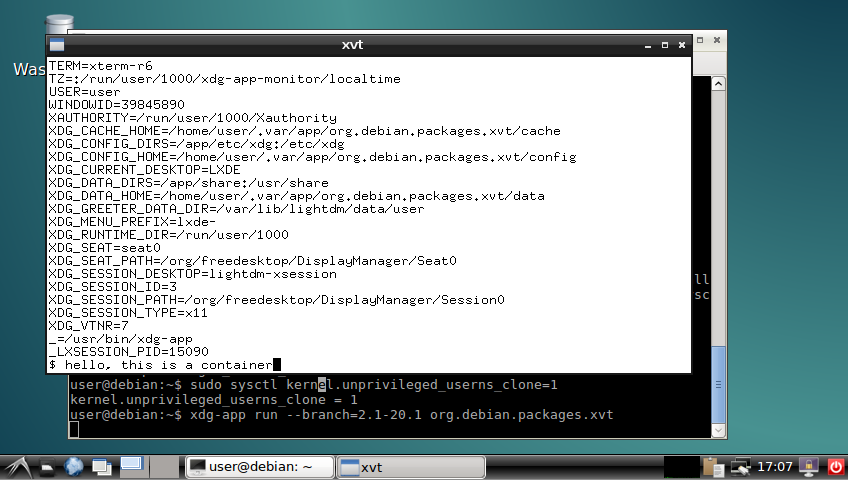
$ xdg-app run --branch=2.1-20.1 org.debian.packages.xvt
xvt in a container and you can play around with the shell in the xvt and see what you can and can't do in the container. I'm sure there were better ways to do most of this, but I think there's value in having such a simplistic demo to go alongside the various GNOMEish apps.
Acknowledgements: Thanks to all those!

Lunar: Only allow outgoing connections through Tor

Using Tor helps take back control of what data one decides to share online. It also helps in avoiding surveillance from the local network (think of someone listening to the public Wi-Fi) or the Internet access provider. But it is easy to make mistakes: Tor Browser, the easiest and most common way to use Tor, is just a web browser. Extra special care is required to make other applications use Tor, and it is easy to forget to change settings, let alone actual attackers. That's why using Tails is often recommended as everything is preconfigured and it requires traffic to go through Tor by various means. Qubes or Whonix also have interesting properties, but require reinstalling systems and changing habits. Meanwhile, securing the network on an already installed system can help you feel better. A potential solution to prevent connections from leaking out without going through Tor is simply to prevent all connections from leaving the computer, except the ones going to the Tor network. This can quite easily be implemented by setting up an outgoing firewall. Using the default settings, a Tor client can potentially connect to any of the 2,000 Guard relays. While there are ways to get such a list and turn it into firewall rules, we are going to use an easier solution. Because the list of Tor relays is public, censors have often used it to prevent people from connecting to the Tor network. The Tor project came up with bridges as a work-around. Bridges are entry nodes in the Tor network. For public bridges, users can only get a few bridge addresses at a time, preventing an adversary from easily blocking them at all once. When configured to use a set of bridges, Tor will only connect to their addresses. This will make our firewall much shorter. The instructions that follow should work on Debian Jessie and later versions. Adapting them to other systems should not be too hard either. We assume that Tor Browser is already installed. As we will want other applications to use Tor than just the browser, we also want to install a system-wide instance:
# apt install tor
Next, visit bridges.torproject.org to request a set of bridges: BridgeDB landing page You then need to select the type of bridges. Tor standard protocol is easy to identify as such. The Tor project has developed pluggable transports to easily disguise the traffic, but using them is outside the scope for this documentation. So lets stay with the default type of bridges: BridgeDB bridge type selection After solving a CAPTCHA, you'll get a list of addresses and fingerprints for a couple of bridges like the following one: Example bridge list from BridgeDB (blurred to protect the actual bridges To tell Tor to use these bridges, edit /etc/tor/torrc, and at the end, add something like:
UseBridges 1
Bridge 109.XXX.XXX.XXX:4XXX 2244XXXXXXXXXXXXXXXXXXXXXXXXXXXXXXXXXXXX
Bridge 37.XXX.XXX.XXX:1XXXX 9CF0XXXXXXXXXXXXXXXXXXXXXXXXXXXXXXXXXXXX
Bridge 171.XXX.XXX.XXX:4XXX 7705XXXXXXXXXXXXXXXXXXXXXXXXXXXXXXXXXXXX
Replace the actual addresses and fingerprints by those you got earlier. Now reload the daemon and make sure that it still connects to the network:
# service tor reload
# tail -f /var/log/tor/log
Tor Browser also needs to be told to use these bridges. Open the onion menu close to the location bar, and select Tor Network Settings . Tor Browser  onion menu In there, tick My Internet Service Provider (ISP) blocks connections to the Tor network and paste the list of bridges below Enter custom bridges: Tor Browser Network Settings Before we restrict outgoing connections to only use the Tor network, lets configure APT to use Tor as well so we can continue installing and upgrading packages in the future:
# apt install apt-transport-tor
The following command will reconfigure APT to use Tor to access the currently configured package repositories. It basically takes care of replacing every http:// by tor+http://:
# sed -e 's/^[^#]*\(deb\(-src\)\?\W\+\)http/\1tor+http/' -i /etc/apt/sources.list /etc/apt/sources.list.d/*.list
Lets see if it still works:
# apt update
One last thing: sometimes, we still need to bypass our restrictions and access the network directly. Some websites sadly deny access to Tor users, or we might need to login through a captive portal before being able to use a random network. To make it practical, we are going to create a new user account. This will enable us to use the desktop user switching capabilities to start a new browser or sudo for command line applications. In this example, the user is going to be named passthrough:
# adduser passthrough
Make sure to set a proper password! Now lets configure the firewall. Here we are going to use ferm which makes it fairly easy to do low-level firewall rule in a readable manner:
# apt install ferm
We want the firewall to be started at boot time. Now edit its configuration in /etc/ferm/ferm.conf. At the end, add:
# Let's block everything for both IPv4 and IPv6, except to localhost,
# already established connections and the special 'passthrough' user.
domain (ip ip6) chain OUTPUT  
    policy DROP;
    outerface lo ACCEPT;
    proto icmp ACCEPT;
    mod state state (ESTABLISHED RELATED) ACCEPT;
    mod owner uid-owner "passthrough" ACCEPT;
 
# Now for IPv4, we want to restrict output to configured Tor bridges
domain ip chain OUTPUT  
    # Don't break network autoconfiguration
    mod owner uid-owner 0 proto udp dport bootps ACCEPT;
    # Allow bridges defined in torrc by getting them directly
    # from the configuration file.
    @include "sed -n -e 's/^Bridge \([^ ]* \)\?\([0-9.]*\):\([0-9]*\).*/daddr \2 proto tcp dport \3 ACCEPT;/p' /etc/tor/torrc  ";
 
# Let's REJECT everything else so we get notice instead of timeouts
domain (ip ip6) chain OUTPUT REJECT;
Reload the firewall through:
# service ferm reload
Lets do some tests:
# ping check.torproject.org
  ping: unknown host check.torproject.org
# tor-resolve check.torproject.org
  38.229.72.22
# ping 38.229.72.22
  From 192.168.7.234 icmp_seq=1 Destination Port Unreachable
# curl https://check.torproject.org/
  curl: (6) Could not resolve host: check.torproject.org
# curl -I https://38.229.72.22/
  curl: (7) Failed to connect to 38.229.72.22 port 443: Connection refused
# curl --socks5 127.0.0.1:9050 https://check.torproject.org/
  curl: (6) Could not resolve host: check.torproject.org
# curl --silent --socks5-hostname 127.0.0.1:9050 https://check.torproject.org/   grep Congratulations
  Congratulations. This browser is configured to use Tor.
# sudo -u passthrough ping -c 1 check.torproject.org
  64 bytes from sergii.torproject.org (38.229.72.22): icmp_seq=1 ttl=54 time=148 ms
# sudo -u passthrough curl --silent https://check.torproject.org/   grep Sorry
  Sorry. You are not using Tor.
One last thing to complete the setup: for command line applications like SSH, torsocks does wonders. Just prefix your usual commands by torsocks and they should work:
# apt install torsocks
# torsocks curl --silent https://check.torproject.org/   grep Congratulations
  Congratulations. This browser is configured to use Tor.
All set! In case you ever need to turn it all off, just ask ferm to reconfigure the firewall:
# service ferm stop
But don't forget to turn it back on later!
# service ferm start
Ideally, we would have a way to automatically configure a different set of bridges for each network we connect to make it more difficult to trace the computer from network to network. But there's quite some more work to be done on various levels before that can be done in an integrated manner (torshiftchange and tordyguards are promising options). Meanwhile, be aware that you might want to keep a fresh set of bridges handy to configure them after leaving for a trip. Another downside of the setup currently is that it doesn't allow for network time synchronization. That might make the system fingerprintable by using its clock drift. To use obfs4 bridges which helps defeating censored networks, you will need two extra steps. First, install the required software:
# apt install obfs4proxy
Then add the following extra line to /etc/tor/torrc:
ClientTransportPlugin obfs2,obfs3,obfs4,scramblesuit exec /usr/bin/obfs4proxy
You can then request obfs4 bridges from BridgeDB. These changes are only required for the system-wide Tor daemon, as Tor Browser comes with obs4proxy preconfigured. Kudos to Micah for proofreading this article.

Neil McGovern: On ZFS in Debian

shutterstock_366995438I m currently over at FOSDEM, and have been asked by a couple of people about the state of ZFS and Debian. So, I thought I d give a quick post to explain what Debian s current plan is (which has come together with a lot of discussion with the FTP Masters and others around what we should do). TLDR: It s going in contrib, as a source only dkms module. Longer version: Debian has always prided itself in providing the unequivocally correct solution to our users and downstream distributions. This also includes licenses we make sure that Debian will contain 100% free software. This means that if you install Debian, you are guaranteed freedoms offered under the DFSG and our social contract. Now, this is where ZFS on Linux gets tricky. ZFS is licensed under the CDDL, and the Linux kernel under the GPLv2-only. The project views that both of these are free software licenses, but they re incompatible with each other. This incompatibility means that there is risk to producing a combined work with Linux and a CDDL module. (Note: there is arguments about if a kernel module, once loaded, is a combined work with the kernel. I m not touching that with a barge pole, as I Am Not A Lawyer.) Now, does this mean that Debian would get sued by distributing ZFS natively compiled into the kernel? Well, maybe, but I think it s a bit unlikely. This doesn t mean it s the right choice for Debian to take as a project though! It brings us back to our promise to our users, and our commercial and non-commercial downstream distributions. If a commercial downstream distribution took the next release of stable, and used our binaries, they may well get sued if they have enough money to make it worthwhile. Additionally, Debian has always taken its commitment to upstream licenses very seriously. If there s a doubt, it doesn t go in official Debian. It should be noted that ZFS is something that is important to a lot of Debian users, who all want to be able to use ZFS in a manner that makes it easier for them to install. Thus, the position that we ve arrived at is that we can ship ZFS as a source only, DKMS module. This means it will be built on the target machines, and we re not distributing binaries. There s also a warning in the README.Debian file explaining that care should be taken if you do things with the resultant binary as we can t promise it complies with the licenses. Finally, I should point out that this isn t my decision in the end. The contents of the archive is a decision for the FTP-Masters, as it s delegated. However, what I have been able to do is coordinate many conflicting views, and I hope that ZFS will be accepted into the archive soon!

Lars Wirzenius: Obnam 1.19.1 released (backup software)

I have just released version 1.19.1 of Obnam, the backup program. See the website at http://obnam.org for details on what the program does. The new version is available from git (see http://git.liw.fi) and as Debian packages from http://code.liw.fi/debian, and uploaded to Debian, and soon in unstable. The NEWS file extract below gives the highlights of what's new in this version. Basically, it fixes a bug. NOTE: Obnam has an EXPERIMENTAL repository format under development, called green-albatross. It is NOT meant for real use. It is likely to change in incompatible ways without warning. Do not use it unless you're willing to lose your backup. Version 1.19.1, released 2016-01-30 Bug fix:

Mike Hommey: Enabling TLS on this blog

Long overdue, I finally enabled TLS on this blog. It went almost like a breeze. I used simp_le to get the certificate from Let s Encrypt, along Mozilla s Web Server Configuration generator. SSL Labs now reports a rating of A+. I just had a few issues: I m glad that there are tools helping to get a proper configuration of SSL. It is sad, though, that the defaults are not better and that we still need to tweak at all. Setting where the certificate and the private key files are should, in 2016, be the only thing to do to have a secure web server.

29 January 2016

Jan Wagner: Oxidized - silly attempt at (Really Awesome New Cisco confIg Differ)

Since ages I wanted have replaced this freaking backup solution of our Network Equipment based on some hacky shell scripts and expect uploading the configs on a TFTP server. Years ago I stumbled upon RANCID (Really Awesome New Cisco confIg Differ) but had no time to implement it. Now I returned to my idea to get rid of all our old crap.
I don't know where, I think it was at DENOG2, I saw RANCID coupled with a VCS, where the NOC was notified about configuration (and inventory) changes by mailing the configuration diff and the history was indeed in the VCS.
The good old RANCID seems not to support to write into a VCS out of the box. But for the rescue there is rancid-git, a fork that promises git extensions and support for colorized emails. So far so good. While I was searching for a VCS capable RANCID, somewhere under a stone I found Oxidized, a 'silly attempt at rancid'. Looking at it, it seems more sophisticated, so I thought this might be the right attempt. Unfortunately there is no Debian package available, but I found an ITP created by Jonas. Anyway, for just looking into it, I thought the Docker path for a testbed might be a good idea, as no Debian package ist available (yet). For oxidized configuration is only a configfile needed and as nodes source a rancid compatible router.db file can be used (beside SQLite and http backend). A migration into a production environment seems pretty easy. So I gave it a go. I assume Docker is installed already. There seems to be a Docker image on Docker Hub, that looks official, but it seems not maintained (actually). An issue is open for automated building the image.

Creating Oxidized container image The official documentation describes the procedure. I used a slightly different approach.
docking-station:~# mkdir -p /srv/docker/oxidized/  
docking-station:~# git clone https://github.com/ytti/oxidized \  
 /srv/docker/oxidized/oxidized.git
docking-station:~# docker build -q -t oxidized/oxidized:latest \  
 /srv/docker/oxidized/oxidized.git
I thought it might be a good idea to also tag the image with the actual version of the gem.
docking-station:~# docker tag oxidized/oxidized:latest \  
 oxidized/oxidized:0.11.0
docking-station:~# docker images   grep oxidized  
oxidized/oxidized   latest    35a325792078  15 seconds ago  496.1 MB  
oxidized/oxidized   0.11.0    35a325792078  15 seconds ago  496.1 MB  
Create initial default configuration like described in the documentation.
docking-station:~# mkir -p /srv/docker/oxidized/.config/  
docking-station:~# docker run -e CONFIG_RELOAD_INTERVAL=600 \  
 -v /srv/docker/oxidized/.config/:/root/.config/oxidized \
 -p 8888:8888/tcp -t oxidized/oxidized:latest oxidized

Adjusting configuration After this I adjusted the default configuration for writing a log, the nodes config into a bare git, having nodes secrets in router.db and some hooks for debugging.

Creating node configuration
docking-station:~# echo "7204vxr.lab.cyconet.org:cisco:admin:password:enable" >> \  
 /srv/docker/oxidized/.config/router.db
docking-station:~# echo "ccr1036.lab.cyconet.org:routeros:admin:password" >> \  
 /srv/docker/oxidized/.config/router.db

Starting the oxidized beast
docking-station:~# docker run -e CONFIG_RELOAD_INTERVAL=600 \  
 -v /srv/docker/oxidized/.config/:/root/.config/oxidized \
 -p 8888:8888/tcp -t oxidized/oxidized:latest oxidized
Puma 2.16.0 starting...  
* Min threads: 0, max threads: 16
* Environment: development
* Listening on tcp://127.0.0.1:8888
If you want to have the container get started with the docker daemon automatically, you can start the container with --restart always and docker will take care of it. If I wanted to make it running permanent, I would use a systemd unitfile.

Reload configuration immediately If you don't want to wait to automatically reload of the configuration, you can trigger it.
docking-station:~# curl -s http://localhost:8888/reload?format=json \  
 -O /dev/null
docking-station:~# tail -2 /srv/docker/oxidized/.config/log/oxidized.log  
I, [2016-01-29T16:50:46.971904 #1]  INFO -- : Oxidized starting, running as pid 1  
I, [2016-01-29T16:50:47.073307 #1]  INFO -- : Loaded 2 nodes  

Writing nodes configuration
docking-station:/srv/docker/oxidized/.config/oxidized.git# git shortlog  
Oxidizied (2):  
      update 7204vxr.lab.cyconet.org
      update ccr1036.lab.cyconet.org
Writing the nodes configurations into a local bare git repository is neat but far from perfect. It would be cool to have all the stuff in a central VCS. So I'm pushing it every 5 minutes into one with a cron job.
docking-station:~# cat /etc/cron.d/doxidized  
# m h dom mon dow user  command                                                 
*/5 * * * *    root    $(/srv/docker/oxidized/bin/oxidized_cron_git_push.sh)
docking-station:~# cat /srv/docker/oxidized/bin/oxidized_cron_git_push.sh  
#!/bin/bash
DOCKER_OXIDIZED_BASE="/srv/docker/oxidized/"  
OXIDIZED_GIT_DIR=".config/oxidized.git"
cd $ DOCKER_OXIDIZED_BASE /$ OXIDIZED_GIT_DIR   
git push origin master --quiet  
Now having all the nodes configurations in a source code hosting system, we can browse the configurations, changes, history and even establish notifications for changes. Mission accomplished! Now I can test the coverage of our equipment. The last thing that would make me super happy, a oxidized Debian package!

Next.

Previous.