Search Results: "ean"

8 February 2014

Enrico Zini: original-sin

Original sin I feel that I was somewhat born innocent, an animal with sound, primal instincts. But if I remained that way, I wouldn't be able to function in a complex society, so I got education. Education taught me what is expected from me in order to be accepted by my peers[1]. Education taught me more than that: it also taught me to enjoy what a complex society can give me: art, science, history, philosophy, adding depth of meaning and correlations to my perceptions and memories. Education wasn't perfect, though. Some of my educators obsessed about some of the expectations, and gave me rules to follow that aren't really needed to interact with a society. Sit down for hours in silence without complaining. Don't talk back to figures of authority, even when they are abusing me. Don't ever feel that my efforts in a task have been enough, because there is always something more that I could have done. Do what people expect me to do, regardless of what I wish to do. Do what I need to do, not what I want to do. So I grew up with a set of arbitrary expectations that weren't needed to function in a society, and weren't in any way meeting any of my needs, yet I still felt them as a part of me, putting every effort into meeting them that I would put in making myself happy. I like to call this set of learned arbitrary, unneeded expectations "neurosis". I like this as an interpretation of the "original sin" myth: in order to go from an innocent animal to a member of a complex society, I acquired a set of neuroses that make me behave in a meaningless way. Or, rephrased going along with the myth, that rob me of my innocence. In some environments like BDSM, many have a name for an unnegotiated practice forced on a person: they call it "abuse". It made sense to accept that I have been abused many times while being educated, because my educators also had their own baggage of parasite expectations, of neuroses. And since I don't currently know how I can ever be sure that I freed myself from all my neuroses, I feel like I should accept that it is possible that I do and will abuse others; by accepting it as a possibility, I hope at least to be able to realise as soon as possible that I am doing it, and try to stop. I have now realised that my life is far simpler and more rewarding when expectations are negotiated between all the parties involved. I have recently spent a substantial amount of my energy in recognising and renegotiating many of the expectations and the neuroses that I had learnt while growing up, and, who knows, perhaps this effort will continue throughout my life. So there you go, an agnostic atheist freeing himself of his original sin, and regaining his paradise lost one step at a time, alive, on earth. And enjoying every moment of it. [1] I suspect that is why people educated in a high class society tend to be accepted more easily by a high class society: they conform to the right set of expectations. But I digress.

Mario Lang: Uploading Into and Downloading From The Universe

Have you ever wondered how new ideas, concepts, artworks etc. get into the Superconscious Collective of the universe, so that they then can be downloaded by exactly the right person who is meant to do something with them? yep, I, too, think that many of these ideas, concepts etc. come from the Great Unknown, where the seeds of limitless ideas and possibilities reside. But a lot of them also come from our own minds, from people who upload these things into the Superconscious Collective of our universe. Such ideas and concepts can be uploaded in several ways. Some of them are simply uploaded by a person who sources them, connects to the Superconscious Collective of the universe and streams them up. Others are maybe even uploaded by somebody virtually typing an article with their fingertips into the spread out hands or soles of the feet of their loved one, playfully teasing him/her and thereby streaming information into him/her, which s/he then again uploads, mainly subconsciously, into the Superconscious Collective of the universe. Once uploaded, all these limitless ideas and concepts become available to everyone and every living being, on Earth and throughout the whole universe. The thing is, that most people on Earth don't know how to consciously access information from there. Some do unconsciously and it again shows up in them as entirely new concepts and ideas, which they then spice with the flavor of their own essence and then stream them out into the world, be it as music, as software, as hardware, as artwork, as science and in limitless other ways. But it is also accessed by living beings throughout the whole universe, who also add their own ideas and concepts to the Great Superconscious Collective . Wanna know how to access this limitless information, ideas, concepts and/or possibilities from the Superconscious Collective? Just breathe, relax, expand ... expand and get into your biggest, greatest, awesomest being of you. Become all that you are, connected to everything. Now, consciously plug into the Great Superconscious Collective, the Great Cosmic Internet. Allow the ideas, information, possibilities stream into you and through you and look which ones you resonate with. Call them, feel them, let them land in you, and ask them what they want you to do with them, as you are the one who can express them in the highest possible way, otherwise they wouldn't have come to you in the first place. Then do one small thing to make them real in the world and watch them unfold. Or do whatever feels right for you to do, and create the most amazing new thing in the world.

Sam Hartman: Debian: Init Interfaces Our Users *and* Free Software

Recently, I ve been watching the Debian Schadenfreude related to init systems. For those who do not know, Debian is trying to decide whether Systemd or Upstart will be used to start software on Debian. There are two other options, although I think Systemd and Upstart are the main contenders. Currently the Technical Committee is considering the issue, although there s some very real chance that the entire project will get dragged through this swamp with the general resolution process. This is one of those discussions that proves that Debian truly is a community: if we didn t have something really strong holding us together we d never put up with something this painful. Between the accusations that our users now know the persecution European pagans faced at the hands of Christians as the Systemd priests drive all before them, a heated discussion of how the Debian voting system interacts with this issue, two failed calls for votes, a discussion of conflicts of interests, and a last-minute discussion of whether the matter had been appropriately brought before the Technical committee (and if so, under what authority), there s certainly schadenfreude to go around if you re into that sort of thing. However, through all this, the Technical Committee has been doing great work understanding the issues; it has been a pleasure to watch their hard work from the side lines. I d like to focus on one key question they ve found: how tightly can other software depend on the init system. Each init system offers some nice features. Upstart has an event triggering model. Systemd manages login sessions and at least in my opinion has a really nice service file format. Can I take advantage of these in my software. If I do, then users of my software might need to use a particular init system. Ian Jackson argues that we should give our users the choice of what init system to run. He reminds us that Debian is a community that supports diversity and diverse goals. We support multiple desktop systems, web browsers, etc. Wherever we can, we support people working on their goals and give developers the opportunity to make it work. When developers succeed, we give our users the opportunity to choose from among the options that have been developed. I think of Ian s argument as an appeal to part of our Social Contract. Clause 4 of the social contract begins:
Our priorities are our users and free software.
We will be guided by the needs of our users and the free software community. We will place their interests first in our priorities. We will support the needs of our users for operation in many different kinds of computing environments.
Ian is right that our users will be served by choice in init systems. However, this trade off needs to be balanced against the needs of the free software community. Diversity is an important goal but it should not come at the price of stagnation and innovation. If I want to avoid using init scripts because they don t provide restart on failure, because they are hard to write correctly, and because they don t provide access to modern security isolation techniques, I should be able to do that. If Systemd service files provide a superior solution, I should be able to work toward using them. If the desire for init system diversity shuts down my ability to find like-minded people who want to take advantage of improvements in init systems and work towards that goal, then we ve significantly damaged Debian as a forum for technical cooperation. Early in my work as a Debian Developer, Anthony Towns taught me an interesting principle. Those who do the work get significant influence over how and what gets done. Ian s right that we need to enable people to work towards choice in init systems. Those like-minded people need to be given a chance to find each other and pursue their goal. However the cost of success should be on the shoulders of those who value choice in init systems. It should not come at the cost of preventing people from depending on improvements in init systems. The best proposal I ve seen for balancing this is to enumerate stable interfaces that people want to use. Things like the logind interface or my favorite the service file interface. It needs to be possible to make another implementation of the interface. The interface needs to be stable enough that a dedicated team could have a chance of catching up with an implementation. At some point during the release cycle such interfaces would need to be frozen. However, I don t think it is reasonable to mandate that there are multiple implementations of the interface, only that there could be. The point is to give people a chance to work towards diversity in init systems, not to force it down peoples throats kicking and screaming until they leave the project or ignore our processes. Steve Langasek and Colin Watson seem to be working towards this. It s possible there s another approach besides interfaces. My main concern is the same as Ian s: maintain Debian as a forum for people to pursue their goals and work together. I suspect we see the conflict in these goals differently. I hope that we as a project can explore this conflict and figure out where we have common ground. I commit to exploring how we can work towards init choice in my frameworks; I ask those who prioritize init choice to commit to explore how we can take advantage of new features in their framework.

John Goerzen: Migrated from Hetzner to OVH hosting

Since August 2011, my sites such as complete.org have been running on a Xen-backed virtual private server (VPS) at Hetzner Online, based in Germany. I had what they called their VQ19 package, which included 2GB RAM, 80GB HDD, 100Mb NIC and 4TB transfer. Unlike many other VPS hosts, I never had performance problems. However, I did sometimes have hardware problems with the host, and it could take hours to resolve. Their tech support only works business hours German time, which was also a problem. Meanwhile, OVH, a large European hosting company, recently opened a datacenter in Canada. Although they no longer offer their value-line Kimsufi dedicated servers there starting at $11.50/mo they do offer their midrange SoYouStart servers there. $50/mo gets a person a 4-core 3.2GHz Xeon server with 32GB RAM, 2x2TB SATA HDD, 200Mbps bandwidth. Not bad at all! The Kimsufi options are still good for lower-end needs as well. I signed up for one of the SoYouStart servers. I ve been pleased with my choice to migrate, and at the possibilities that having hardware like that at my disposal open up, but it is not without its downside. The primary downside is lack of any kind of KVM console. If the server doesn t boot, I can t see the Grub error message (or whatever) behind it. They do provide hardware support and automatic technician dispatching when the server isn t pingable, but they state they have no KVM access at all. They support many OS flavors, and have a premade image for them, but there is no using a custom ISO to install; if you want ZFS on Linux, for instance, you can t very easily build it into root. My server was promised within 72 hours, but delivered much quicker: within about 1. I had two times they said they had to replace a motherboard within the first day; once they did it in 30 minutes, and the other took them 2.5 hours for some reason. They do have phone support, which answers almost immediately, but the people there are not the people actually in the datacenter. It was frustrating with a server down for hours and nobody really commenting on what was going on. The server performs quite well, and after the initial issues, I ve been happy. I was initially planning an all-ZFS installation. SoYouStart does offer a rescue environment, but it doesn t support ZFS, so I figured I better stick with an ext4 root at least. The default Debian install uses RAID1 on md-raid, with a 20GB root partition and the rest of the 2TB drive in /home, and then a swap partition on each drive (mysteriously NOT in the RAID!) So I broke the mirror on /home and converted those into the two legs of a mirrored vdev for a zpool. I run all of the real work inside KVM VMs, so that should minimize the number of times I have to do anything to the root filesystem that could cause trouble. SoYouStart includes 100GB of space on a separate FTP server for backup purposes. I have scripts that upload nightly tarballs of the root filesystem, plus full zfs send streams of everything else. Every hour, it uploads an incremental zfs send stream as well. This all works quite nicely; even if the machine is a complete loss, I d never lose more than an hour s work, and could restore it completely from a rescue environment. Very nice! I ll write more in a few days about the ZFS setup I m using, and some KVM discoveries as well.

6 February 2014

Neil Williams: iMX53 in the home lab

The iMX53 Quick Start Board has been a mainstay of the Debian armhf port and has been part of LAVA until recently. It s a natural choice for seeing how LAVA and Debian can work together more closely. So, in the first steps to getting my home lab running, I set about restoring two of these boards to LAVA support. I will be looking into each of the possible boot methods with these boards, but the way to start is with a LAVA master image on an SD card. With the pause in iMX53 development within LAVA, this raises a couple of issues: LAVA master image on iMX53 The LAVA master image is more recent and can fix these problems. See lava-image-creation preparing a master image
$ git clone git://git.linaro.org/lava/lava-master-image-scripts.git
$ cd lava-master-image-scripts

Use patch -p1 to apply this patch (apologies for the line wrapping in the blog):
diff --git a/lava-create-master b/lava-create-master
index 2e1d0e8..a1e6131 100755
--- a/lava-create-master
+++ b/lava-create-master
@@ -366,7 +366,7 @@ make_master()  
         verbose " * Building vanilla image with linaro-media-create..."
         if ! linaro-media-create \
             --dev $LMC_DEV \
-            --rootfs ext4 \
+            --rootfs ext3 \
             --image-file $CACHE_DIR/pristine-images/$dev-vanilla.img \
             --image-size 1G \
             --align-boot-part \
$ sudo ./lava-create-master imx53 Without the patch applied, I simply removed the SD card, mounted the third partition on my main machine and created a tarball of the contents:
$ sudo mount /dev/mmcblk0p3 /mnt/
$ pushd /mnt
$ sudo tar -czf /tmp/imx53-rootfs.tgz ./*
$ popd
$ sudo umount /mnt/
Reformat p3 to ext3 (or ext2 if you prefer)
$ sudo mkfs.ext3 /dev/mmcblk0p3
Put the rootfs back onto the replacement ext3 partition.
$ sudo mount /dev/mmcblk0p3 /mnt/
$ pushd /mnt
$ sudo tar -xzvf /tmp/imx53-rootfs.tgz
$ popd
$ sudo sync
$ sudo umount /mnt/
The bootscript is buggy, so run:
> run loaduimage
> run mmcboot
Then fix bootscript or you won t be able to reboot: Simplest way may be to set u-boot to ignore boot.scr
> setenv script
> saveenv
> reset
Device configuration in LAVA I found screen to be a bit awkward as a serial connection, (use Ctrl-A : quit) to quit. I tried autologin for the lucid image but that was not needed for the master image which uses the linaro overlay. The PDU commands are for my own setup. The daemon (the machine running the pdu daemon scripts), hostname (the hostname or IP of the PDU itself) and the port numbers will change between labs. Again, the blog has changed the line endings.
device_type = mx53loco
hostname = imx53-01
connection_command = telnet hobbes 4002
#login_prompt = lucid-desktop login:
#password_prompt = Password:
#username = lucid
#password = lucid
hard_reset_command = /usr/bin/pduclient --daemon localhost --hostname pdu --command reboot --port 05
power_off_cmd = /usr/bin/pduclient --daemon localhost --hostname pdu --command off --port 05
power_on_cmd = /usr/bin/pduclient --daemon localhost --hostname pdu --command on --port 05
testboot_offset = 3
Critical testboot_offset is currently undocumented. Without it, you will see:
 ** Partition 4 not valid on device 0 **
You can trace this back in a LAVA test log to:
  setenv bootcmd "fatload mmc 0:4 0x70000000 uImage; fatload mmc 0:4 0x72000000 uInitrd; fatload mmc 0:4 0x71ff0000 board.dtb; bootm 0x70000000 0x72000000 0x71ff0000"
The correct line needs to use mmc 0:5 in each case.
This is what testboot_offset modifies the default is 2.
  setenv bootcmd "fatload mmc 0:4 0x70000000 uImage; fatload mmc 0:5 0x72000000 uInitrd; fatload mmc 0:5 0x71ff0000 board.dtb; bootm 0x70000000 0x72000000 0x71ff0000"
Hacking session in LAVA A hacking session in LAVA is a way of getting an SSH login directly into a deployed test image, as root. It s a test image, so look around, trash stuff, build stuff, reboot the board When you are done, use stop-hacking and the test completes, leaving the master image unchanged, ready for the next rootfs to go onto the test image you were using. This will be improved in later blog entries but as a starter and so that you can play with the SATA drive with a recent installation, this is the JSON for a LAVA job which gives you an SSH session inside the LAVA test image on an iMX53. The test image comes from Linaro releases 12.01. I haven t set up a proxy yet, so to save time, I downloaded it once and used a local file:// URL in the testjob. Note the rootfstype parameter without this, LAVA will helpfully format the partition onto which the rootfs is installed to ext4, with predictable results. (This bug is currently being fixed in LAVA so that LAVA uses the same filesystem as the downloaded image. All part of making LAVA less presumptive.) The smoke-tests-basic testdef is gratuitous and can be removed but this particular run won t be quick it took over an hour to get into the hacking session, but future topics here will improve that so the extra few minutes for the smoke-tests is not a big win. Change the value for GATEWAY to something sane for your network, change the value for PUB_KEY to your SSH public key. Change the image location to something which works for your setup.
 
 "health_check": false,
 "job_name": "iMX53-hacking",
 "logging_level": "DEBUG",
 "device_type": "mx53loco",
 "timeout": 900,
 "actions": [
 
 "command": "deploy_linaro_image",
 "parameters": 
 "image": "file:///home/linaro/lava/mx53loco-ubuntu-desktop.img.gz",
 "rootfstype": "ext3"
 
 ,
 
 "command": "lava_test_shell",
 "parameters": 
 "testdef_repos": [
 
 "git-repo": "git://git.linaro.org/qa/test-definitions.git",
 "testdef": "ubuntu/smoke-tests-basic.yaml"
 ,
 
 "git-repo": "http://git.linaro.org/git/lava-team/hacking-session.git",
 "parameters": 
 "GATEWAY": "10.15.0.1",
 "PUB_KEY": "...."
 ,
 "testdef": "hacking-session-debian.yaml"
 
 ],
 "timeout": 18000
 
 ,
 
 "command": "submit_results_on_host",
 "parameters": 
 "server": "http://sylvester.codehelp/RPC2/",
 "stream": "/anonymous/codehelp/"
 
 
 ]
 
(Use http://jsonlint.com to reformat.) I was part of the way through running debootstrap on the SATA drive when ser2net timed out because I hadn t changed the values at that time. Configuring set2net for LAVA ser2net can run on any machine capable of providing the serial connections, including a dedicated device. Decide on a port range to use on the machine running ser2net. If the device has more than one network interface, ensure that ser2net only offers connections on the relevant interface by prefixing the port with the IP address or hostname. telnet is generally the easiest ser2net state to use with LAVA.
#  ::::
#     TCP port
#            Name   or  number of the TCP/IP port to accept con-
#            nections from for this device.  A port number may
#            be of the form [host,]port, such as 127.0.0.1,2000
#            or localhost,2000.  If this is specified, it will
#            only bind to the IP address specified. Otherwise
#            it will bind to all the ports on the machine.
# 10.15.0.1,4000:telnet:600:/dev/ttyUSB0:115200 8DATABITS NONE 1STOPBIT banner
Clear the timeout or long running jobs will fail.
10.15.0.1,4000:telnet:0:/dev/ttyUSB0:115200 8DATABITS NONE 1STOPBIT banner
10.15.0.1,4001:telnet:0:/dev/ttyUSB1:115200 8DATABITS NONE 1STOPBIT banner
I ve tried relatively carefully to preserve the instructions here from my notes. However, if you do try this yourself and there are problems, let me know and I ll update. I m also planning on putting all of the config files, patches, JSON examples and other code into a git repo fairly soon to make things easier.

Thorsten Glaser: KISS

Just saw this in my INBOX:

    B. The default init system for jessie will be a single /etc/rc script
 

I d certainly vote that


In unrelated news, jupp 2.8 for DOS runs on cable3, which means it ll still run on an original 8088/8086 Update 10.02.2014: The unobfuscated version of cable3 is called 8086tiny under the MIT licence. Thanks to the author for doing that (and not just dumping the IOCCC code) and to RT from the mksh(1) IRC channel for finding it on the net!

Johannes Schauer: botch updates

My last update about ongoing development of botch, the bootstrap/build ordering tool chain, was three months ago with the announcement of bootstrap.debian.net. Since then a number of things happened, so I thought an update was due.

New graphs for port metrics By default, a dependency graph is created by arbitrarily choosing an installation set for binary package installation or source package compilation. Installation set vertices and source vertices are connected according to this arbitrary selection. Niels Thykier approached me at Debconf13 about the possibility of using this graph to create a metric which would be able to tell for each source package, how many other source packages would become uncompilable or how many binary packages would become uninstallable, if that source package was removed from the archive. This could help deciding about the importance of packages. More about this can be found at the thread on debian-devel. For botch, this meant that two new graph graphs can now be generated. Instead of picking an arbitrary installation set for compiling a source package or installing a binary package, botch can now create a minimum graph which is created by letting dose3 calculate strong dependencies and a maximum graph by using the dependency closure.

Build profile syntax in dpkg With dpkg 1.17.2 we now have experimental build profile support in unstable. The syntax which ended up being added was:
Build-Depends: large (>= 1.0), small <!profile.stage1>
But until packages with that syntax can hit the archive, a few more tools need to understand the syntax. The patch we have for sbuild is very simple because sbuild relies on libdpkg for dependency parsing. We have a patch for apt too, but we have to rebase it for the current apt version and have to adapt it so that it works exactly like the functionality dpkg implements. But before we can do that we have to decide how to handle mixed positive and negative qualifiers or whether to remove this feature altogether because it causes too much confusion. The relevant thread on debian-dpkg starts here.

Update to latest dose3 git Botch heavily depends on libdose3 and unfortunately requires features which are only available in the current git HEAD. The latest version packaged in Debian is 3.1.3 from October 2012. Unfortunately the current dose3 git HEAD also relies on unreleased features from libcudf. On top of that, the GraphML output of the latest ocamlgraph version (1.8.3) is also broken and only fixed in the git. For now everything is set up as git submodules but this is the major blocker preventing any packaging of botch as a Debian package. Hopefully new releases will be done soon for all involved components.

Writing and reading GraphML Botch is a collection of several utilities which are connected together in a shell script. The advantage of this is, that one does not need to understand or hack the OCaml code to use botch for different purposes. In theory it also allows to insert 3rd party tools into a pipe to further modify the data. Until recently this ability was seriously hampered by the fact that many botch tools communicated with each other through marshaled OCaml binary files which prevent everything which is not written in OCaml from modifying them. The data that was passed around like this were the dependency graphs and I initially implemented it like that because I didnt want to write a GraphML parser. I now ended up writing an xmlm based GraphML parser so as of now, botch only reads and writes ASCII text files in XML (for the graphs) and in rfc822 packages format (for Packages and Sources files) which can both easily be modified by 3rd party tools. The ./tools directory contains many Python scripts using the networkx module to modify GraphML and the apt_pkg module to modify rfc822 files.

Splitting of tools To further increase the ability to modify program execution without having to know OCaml, I split up some big tools into multiple smaller ones. Some of the smaller tools are now even written in Python which is probably much more hackable for the general crowd. I converted those tools to Python which did not need any dose3 functionality and which were simple enough so that writing them didnt take much time. I could convert more tools but that might introduce bugs and takes time which I currently dont have much of (who does?).

Gzip instead of bz2 Since around January 14, snapshot.debian.org doesnt offer bzip2 compressed Packages and Sources files anymore but uses xz instead. This is awesome for must purposes but unfortunately I had to discover that there exist no OCaml bindings for libxz. Thus, botch is now using gzip instead of bz2 until either myself or anybody else finds some time to write a libxz OCaml binding.

Self hosting Fedora Paul Wise made me aware of Harald Hoyer's attempts to bootstrap Fedora. I reproduced his steps for the Debian dependency graph and it turns out that they are a little bit bigger. I'm exchanging emails with Harald Hoyer because it might not be too hard to use botch for rpm based distributions as well because dose3 supports rpm. The article also made me aware of the tred tool which is part of graphviz and allows to calculate the transitive reduction of a graph. This can help making horrible situations much better.

Dose3 bugs I planned to generate such simplified graphs for the neighborhood of each source package on bootstrap.debian.net but then binutils stopped building binutils-gold and instead provided binutils-gold while libc6-dev breaks binutils-gold (<< 2.20.1-11). This unfortunately triggered a dose3 bug and thus bootstrap.debian.net will not generate any new results until this is fixed in dose3. Another dose3 bug affects packages which Conflicts/Replaces/Provides:bar while bar is fully virtual and are Multi-Arch:same. Binaries of different architecture with this property can currently not be co-installed with dose3. Unfortunately linux-libc-dev has this property and thus botch cannot be used to analyze cross builds until that bug is fixed in dose3. I hope I get some free time soon to be able to look at these dose3 issues myself.

More documentation Since I started to like the current set of tools and how they work together I ended up writing over 2600 words of documentation in the past few days. You can start setting up and running botch by reading the first steps and get more detailed information by reading about the 28 tools that botch makes use of as of now. All existing articles, thesis and talks are linked from the wiki home.

Steve Kemp: External Comments, updated

The simple external-comments code is now complete enough for me to stop poking it on a daily basis: All in all I'm pretty happy with the way it works, and the server-code. The client-side Javascript is less good, but I'm probably done poking that too. In an ideal world the client-side code should be a jQuery plugin, but I've not worked out how to make a static method (the JSONP callback) be a member of a jQuery plugin-object. So without that I have to re-pass the options around too many places, rather than making them a member of "this". Meh, pull requests welcome for adding new storage back-ends (redis and sqlite are supported by default), and similarly for cleanups. Links:

Andrew Pollock: [life] Day 10, Playgroup again

I was bracing myself for a rough night, but Zoe slept through until almost 6am. Today was playgroup again, so we just took a slow start to the day and headed out on the bike a bit after 9am. There was a mix of new faces and people from last week. I packed a lunchbox this time instead of relying on the snack collection in my "Dad Bag" backpack. We worked on trying to approach other girls to get them to play. Unfortunately they're all that little bit younger and more shy, so we haven't had a huge success. Zoe's been pretty happy just playing with the various toys and playing with me. Parachute time was a big hit again. I think there were about 25 adults there (I was the only Dad this week), with many with multiple children. The youngest baby I saw was a 7 week old. Zoe had been asking me what a honeydew was, so after Playgroup we dropped by the Hawthorne Garage and grabbed half a honeydew and a couple of tomatoes and I made some fritters for lunch with leftover corned beef from dinner the other night. Zoe wasn't too impressed with them. I think she didn't like the diced tomato. She declared that the honeydew was just like rockmelon. We read a story in the hammock and she went down pretty easily for nap after that. I'd just started doing the dishes when my mate Steve gave me a call. He was in the area, and he dropped in. That worked out well, because I'd been meaning to pick his brain about my little electronics project. We geeked it up for a bit. Zoe's mini lab coat arrived in the mail, and when she finally woke up after 3pm, I asked her if she wanted to go out to Bunnings to get a pair of kids-sized safety glasses, but she said she wanted to do something "fun" instead. When I asked her what she wanted to do, she initially wanted to go to Wet and Wild, but that's an all day outing and we're going next Wednesday, so she settled on going to Colmslie pool again instead. So we quickly got organised and jumped on the bike and biked over to the pool. We started out in the kid's play area, which had a couple of small slides and some fountains and whatnot, and then we gravitated over to the 50 metre pool, where Zoe practised her diving for a bit and generally quite confidently navigated the 1.5m deep end of the pool. It was good, because at least I could just stand up instead of tread water while she practised diving in off the blocks. We had a post-swim ice cream and biked home, and then I whipped up dinner and it was bathtime and bedtime. I'm going to have to start tracking my weekly kilometres with Zoe on the bike, because I think it'll be a reasonable distance.

5 February 2014

Andrew Shadura: Clearlooks-Ph nix update

Once upon a time, GTK+ 3.0 was released. That release brought at least one Bad Thing : incompatibility with GTK+ 2.x themes. At the same time, previously popular Clearlooks theme hasn t been ported. Many people didn t like that, but only one decided to DTRT to do the Right Thing. Jean-Philippe Fleury wrote Clearlooks-Ph nix (originally, Clearwaita), a GTK+ 3 theme which was supposed to have a look and feel as close as possible to the original Clearlooks. He based his work on an engine of a new GTK+ default, Adwaita theme. Quite soon, however, GTK+ 3 theme API has changed, and it became easily possible to rewrite the theme without using any additional theming engines, with just plain GTK+ stuff involved. Then GTK+ 3.6 came and broke the API once more. Jean-Philippe fixed stuff to work with newer GTK+ again, and everyone was happy again. But Empire striked back: GTK+ 3.8 brought more disruptive changes, rendering menus as ugly as never before. Unfortunately, Jean-Philippe was unable to cope with changes alone, he set up a mailing list to collectively develop Clearlooks-Ph nix, but that didn t help, and no fix has been released during more than half a year. As a maintainer and a user of Clearlooks-Ph nix, I had to do something with this, as more and more things needed recent GTK+ 3 to work. After spending some time studying CSS code and playing with its knobs, I found a solution which proved to be quite simple, and uploaded an updated package. Unfortunately, the changes aren t in the upstream package yet. Now, with GTK+ 3.10, stuff is not quite working again. Some changes in GTK+ internals lead to menu bars not being coloured properly. At the moment of this writing, an updated package is already available in unstable.

Andrew Pollock: [life] Day 9, Kindergarten and cleaning

Another busy day today. I saw my girlfriend off in the morning, and then got stuck into cleaning the bathrooms. I ducked out to Jaycar to have another attempt at getting components. Got home, did some more cleaning, and had my chiropractic adjustment. Then I had my exit interview for work via video conference, and did some administrivia while I still had my work computer. Then the guy from Pack & Send came to take all the work equipment away. Now I feel very disconnected. Had some lunch, did more cleaning. Mum and Dad came around to go with me for pick up today, so they could see the new Kindergarten. Zoe was again fast asleep at pick up, and the kids who were awake were all in the other room eating birthday cake, so we let Zoe wake up as gently as possible and then collected Megan and squeezed everyone into the car and headed home. Zoe and Megan had a great time playing with each other again, and Megan's Dad picked her up at about 4:30pm and I started on dinner. We all had dinner and then Mum and Dad headed off, and I gave Zoe a bath and put her to bed. She was a bit emotional at bedtime, so it took a while to get her settled. Here's hoping she sleeps okay tonight.

4 February 2014

Russell Coker: Clothing and Phone Cameras

In 2012 I wrote about my jeans from Rivers that fit the largest available phones (and the smaller tablets) in their pockets [1]. Those jeans are still working well for me, I can add the fact that they don t wear out quickly to the list of positive attributes. Recently my sister asked for advice on getting a new phone, she was considering the Samsung Galaxy Note 2 (the phone I m using now) because it apparently takes better pictures than the Nexus 4 she s using. I ve used both those phones and I hadn t noticed a difference in picture quality, but there is some variation in manufacturing and it could be that I ve got a below average Note 2 and a better than average Nexus 4 so I ll assume for the sake of discussion that my sister would actually get an improvement in picture quality by using a Note 2. If you have a phone that doesn t have the picture quality you desire then one option is to buy a phone with a better camera, but you will be limited by issues of physics. A thin phone has a short focal length which means that the lens has to be small and therefore the amount of light that gets to the sensor is small. The Nokia Lumia 1020 has some of the best camera hardware that you ll find in a phone, but it s still only 14.5mm thick where the camera is and that will limit the quality a lot. Any compact camera should be able to beat all phone cameras in terms of picture quality in most areas. The Samsung Galaxy Camera [2] is also worth considering, it has more features than a typical compact camera and good GUI that allows novice photographers to take advantage of it. Also being able to blog your photos directly from the camera could be a useful feature. But the big down-side of a compact camera is that it s not that compact. Most people won t find it convenient to carry a compact camera with them at all times and therefore they might miss a good opportunity to take a photo. The Galaxy Note series of phones also suffer in this regard because they are larger than most phones. If your phone won t fit in your pocket and you have it in your backpack when on the move or on a bench at home then you will probably miss some good photos. As I was at a Rivers store recently I tested my Note 2 in the pockets of women s jeans. Rivers scored very poorly in this regard, one pair of women s jeans had fake pockets (this is just wrong for working clothes) and of the rest only one pair could fit a Note 2. The pair that fit a Note 2 didn t completely enclose the phone, one corner was sticking out, this would probably give a risk of having the phone fall out of the pocket and cause some discomfort to the wearer. I have a pair of shorts with similar size pockets and find it very annoying with the Note 2 in the pocket (for about 10 months of the year I wear jeans so this isn t a big deal). Rivers jeans only count as geeky jeans for male geeks. It s disappointing that with about a dozen different styles of women s jeans there didn t seem to be a single one with pockets of comparable size to the men s jeans. I had to recommend that my sister not get a phone from the Galaxy Note series if taking pictures is a priority due to the apparent difficulty in getting it to fit in a pocket and the probability that she would miss good photos due to this. In past discussions of phone size there have been mentions of the possibility of getting clothing altered. Does anyone have a good experience in getting clothes altered to have bigger pockets or in the case of women s clothing to have fake pockets replaced with real ones?

3 February 2014

Evgeni Golov: Monitoring your Puppet nodes using PuppetDB

When you run Puppet, it is very important to monitor whether all nodes have an uptodate catalog and did not miss the last year of changes because of a typo in a manifest or a broken cron-script. The most common solution to this is a script that checks /var/lib/puppet/state/last_run_summary.yaml on each node. While this is nice and easy in a small setup, it can get a bit messy in a bigger environment as you have to do an NRPE call for every node (or integrate the check as a local check into check_mk). Given a slightly bigger Puppet environment, I guess you already have PuppetDB running. Bonuspoints if you already let it save the reports of the nodes via reports = store,puppetdb. Given a central knowledgebase about your Puppet environment one could ask PuppetDB about the last node runs, right? I did not find any such script on the web, so I wrote my own: check_puppetdb_nodes. The script requires a recent (1.5) PuppetDB and a couple of Perl modules (JSON, LWP, Date::Parse, Nagios::Plugin) installed. When run, the script will contact the PuppetDB via HTTP on localhost:8080 (obviously configurable via -H and -p, HTTPS is available via -s) and ask for a list of nodes from the /nodes endpoint of the API. PuppetDB will answer with a list of all nodes, their catalog timestamps and whether the node is deactivated. Based on this result, check_puppetdb_nodes will check the last catalog run of all not deactivated nodes and issue a WARNING notification if there was none in the last 2 hours (-w) or a CRITICAL notification if there was none for 24 hours (-c). As a fresh catalog does not mean that the node was able to apply it, check_puppetdb_nodes will also query the /event-counts endpoint for each node and verify that the node did not report any failures in the last run (for this feature to work, you need reports stored in PuppetDB). You can modify the thresholds for the number of failures that trigger a WARNING/CRITICAL with -W and -C, but I think 1 is quite a reasonable default for a CRITICAL in this case. Using check_puppetdb_nodes you can monitor the health of ALL your Puppet nodes with a singe NRPE call. Or even with zero, if your monitoring host can access PuppetDB directly.

Kees Cook: compiler hardening in Ubuntu and Debian

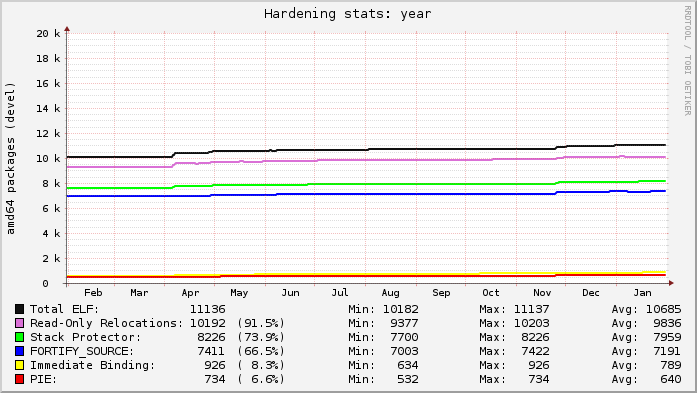
Back in 2006, the compiler in Ubuntu was patched to enable most build-time security-hardening features (relro, stack protector, fortify source). I wasn t able to convince Debian to do the same, so Debian went the route of other distributions, adding security hardening flags during package builds only. I remain disappointed in this approach, because it means that someone who builds software without using the packaging tools on a non-Ubuntu system won t get those hardening features. Think of a sysadmin trying the latest nginx, or a vendor like Valve building games for distribution. On Ubuntu, when you do that ./configure && make you ll get the features automatically. Debian, at the time, didn t have a good way forward even for package builds since it lacked a concept of global package build flags . Happily, a solution (via dh) was developed about 2 years ago, and Debian package maintainers have been working to adopt it ever since. So, while I don t think any distro can match Ubuntu s method of security hardening compiler defaults, it is valuable to see the results of global package build flags in Debian on the package archive. I ve had an on-going graph of the state of build hardening on both Ubuntu and Debian for a while, but only recently did I put together a comparison of a default install. Very few people have all the packages in the archive installed, so it s a bit silly to only look at the archive statistics. But let s start there, just to describe what s being measured. Here s today s snapshot of Ubuntu s development archive for the past year (you can see development opening after a release every 6 months with an influx of new packages):
Here s today s snapshot of Debian s unstable archive for the past year (at the start of May you can see the archive unfreezing after the Wheezy release; the gaps were my analysis tool failing):
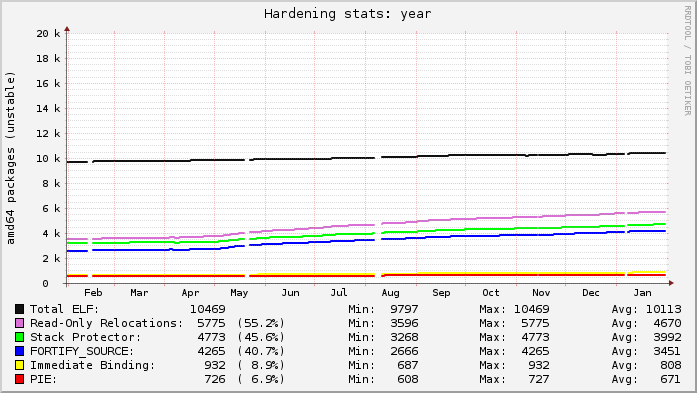
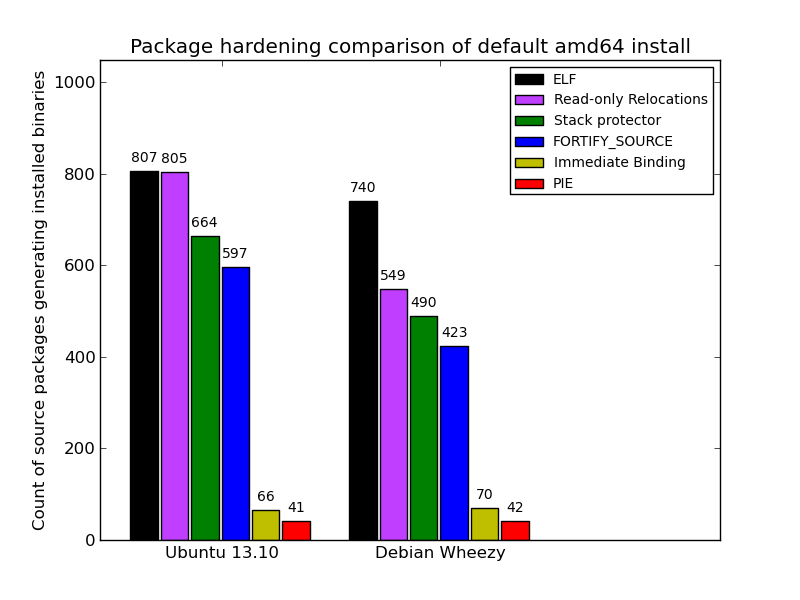
Ubuntu s lines are relatively flat because everything that can be built with hardening already is. Debian s graph is on a slow upward trend as more packages get migrated to dh to gain knowledge of the global flags. Each line in the graphs represents the count of source packages that contain binary packages that have at least 1 hit for a given category. ELF is just that: a source package that ultimately produces at least 1 binary package with at least 1 ELF binary in it (i.e. produces a compiled output). The Read-only Relocations ( relro ) hardening feature is almost always done for an ELF, excepting uncommon situations. As a result, the count of ELF and relro are close on Ubuntu. In fact, examining relro is a good indication of whether or not a source package got built with hardening of any kind. So, in Ubuntu, 91.5% of the archive is built with hardening, with Debian at 55.2%. The stack protector and fortify source features depend on characteristics of the source itself, and may not always be present in package s binaries even when hardening is enabled for the build (e.g. no functions got selected for stack protection, or no fortified glibc functions were used). Really these lines mostly indicate the count of packages that have a sufficiently high level of complexity that would trigger such protections. The PIE and immediate binding ( bind_now ) features are specifically enabled by a package maintainer. PIE can have a noticeable performance impact on CPU-register-starved architectures like i386 (ia32), so it is neither patched on in Ubuntu, nor part of the default flags in Debian. (And bind_now doesn t make much sense without PIE, so they usually go together.) It s worth noting, however, that it probably should be the default on amd64 (x86_64), which has plenty of available registers. Here is a comparison of default installed packages between the most recent stable releases of Ubuntu (13.10) and Debian (Wheezy). It s clear that what the average user gets with a default fresh install is better than what the archive-to-archive comparison shows. Debian s showing is better (74% built with hardening), though it is still clearly lagging behind Ubuntu (99%):

2014, Kees Cook. This work is licensed under a Creative Commons Attribution-ShareAlike 3.0 License.
Creative Commons License

2 February 2014

Gunnar Wolf: CuBox-i4Pro

CuBox-i4Pro
Somewhere back in August or September, I pre-ordered a CuBox-i A nicely finished, completely hackable, and reasonably powerful ARM system, nicely packaged and meant to be used to hack on. A sweet deal! There are four models (you can see the different models' specs here) I went for the top one, and bought a CuBox-i4Pro. That means, I have a US$130 nice little box, with 4 ARM7 cores, 2GB RAM, WiFi, and... well, all of its basic goodies and features. For some more details, look at the CuBox-i block diagram. I got it delivered by early January, and (with no real ARM experience on my side) I finally got to a point where I can, I believe, contribute something to its adoption/usage: How to get a basic Debian system installed and running in it. The ARM world is quite different to the x86 one: Compatibility is much harder, the computing platform does not self-describe properly, and a kernel must first understand how a specific subarchitecture is before being able to boot on it. Somewhere in the CuBox forums (or was it the IRC channel?) I learnt that the upstream Linux kernel does not yet boot on the i.MX6 chip (although support is rumored to be merged for the 3.14 release), so I am using both a kernel and an uBoot bootloader not built for (or by) Debian people. Besides that, the result I will describe is a kosher Debian install. Yes, I know that my orthodox friends and family will say that 99% kosher is taref... But remember I'm never ever that dogmatic. (yeah, right!) Note that there is a prebuilt image you can run if you are so inclined: In the CuBox-i forums and wiki, you will find links to a pre-installed Debian image you can use... But I cannot advise to do so. First, it is IMO quite bloated (you need a 4GB card for a very basic Debian install? Seriously?) Second, it has a whole desktop environment (LXDE, if I recall correctly) and a whole set of packages I will probably not use in this little box. Third, there is a preinstalled user, and that's a no-no (user: debian, password: debian). But, most importantly, fourth: It is a nightly build of the Testing (Jessie) suite... Built back in December. So no, as a Debian Developer, it's not something we should recommend our users to run! So, in the end and after quite a bit of frustration due to my lack of knowledge, here goes the list of steps I followed:
Using the CuBox
On the i2 and i4 models, you can use it either with a USB keyboard and a HDMI monitor, or by a serial consoles (smaller models do not have a serial console). I don't have a HDMI monitor handy (only a projector), so I prefer to use the serial terminal. Important details to avoid frustration: The USB keyboard has to be connected to the lower USB port, or it will be ignored during the boot process. And make sure your serial terminal is configured not to use hardware flow control. Minicom is configured by default to use hardware flow control, so it was not sending any characters to the CuBox. ^A-O gets you to the Minicom configuration, select Serial port setup, and disable it.
Set up the SD card
I created a 2GB partition, but much less can suffice; I'd leave it at least to 1GB to do the base install, although it can be less once the system is set up (more on this later). Partition and format using your usual tools (fdisk+mke2fs, or gparted, or whatever suits your style).
Install the bootloader
I followed up the instructions on this CuBox-i forums thread to get the SPL and uBoot bootloader running. In short, from this Google Drive folder, download the SPL-U-Boot.img.xz file, uncompress it (xz --decompress SPL-U-Boot.img.xz), and write it to the SD card just after the partition map: As root,
# dd if=SPL-U-Boot.img of=/dev/mmcblk0 bs=1024 seek=1.
Actually, to be honest: As I wanted something basic to be able to debug from, I downloaded (from the same Google Drive) the busybox.img.gz file. That's a bit easier to install from: xz --decompress busybox.img.xz, and just dump it into the SD from the beginning (as it does already include a partition table):
# dd if=busybox.img of=/dev/mmcblk0
This card is already bootable and minimal, and allows to debug some bits from the CuBox-i itself (as we will see shortly).
After this step, I created a second partition, as I said earlier. So, my mmcblk0p1 partition holds Busybox, and the second will hold Debian. We are still working from the x86 system, so we mount the SD card in /media/mmcblk0p2
Installing the base system
Without debian-installer to do the heavy lifting, I went for debootstrap. As I ran it from my PC, debootstrap's role will be for this first stage only to download and do a very initial pre-unpacking of the files: Bootstrapping a foreign architecture implies, right, using the --foreign switch:
debootstrap --foreign --arch=armhf wheezy /media/mmcblk0p2 http://http.debian.net/debian
You can add some packages you often use by specifying --include=foo,bar,baz
So, take note notes: This board is capable of running the armhf architecture (HF for Hardware Float). It can also run armel, but I understand it is way slower.
First boot (with busybox)
So, once debootstrap finishes, you are good to go to the real hardware! Unmount the SD card, put it in the little guy, plug your favorite console in (I'm using the serial port), and plug the power in! You should immediately see something like:
  1. U-Boot SPL 2013.10-rc4-gd05c5c7-dirty (Jan 12 2014 - 02:18:28)
  2. Boot Device: SD1
  3. reading u-boot.img
  4. Load image from RAW...
  5. U-Boot 2013.10-rc4-gd05c5c7-dirty (Jan 12 2014 - 02:18:28)
  6. CPU: Freescale i.MX6Q rev1.2 at 792 MHz
  7. Reset cause: POR
  8. Board: MX6-CuBox-i
  9. DRAM: 2 GiB
  10. MMC: FSL_SDHC: 0
  11. In: serial
  12. Out: vga
  13. Err: vga
  14. Net: phydev = 0x0
  15. Phy not found
  16. PHY reset timed out
  17. FEC
  18. (Re)start USB...
  19. USB0: USB EHCI 1.00
  20. scanning bus 0 for devices... 1 USB Device(s) found
  21. scanning usb for storage devices... 0 Storage Device(s) found
  22. scanning usb for ethernet devices... 0 Ethernet Device(s) found
  23. Hit any key to stop autoboot: 3

Let it boot (that means, don't stop autoboot), and you will soon see a familiar #, showing you are root in the busybox environment. Great! Now, mount the Debian partition:
# mount /dev/mmcblk0p2 /mnt
Finishing debootstrap's task
With everything in place, it's time for debootstrap to work. Chroot into the Debian partition:
# chroot /mnt
And ask Debootstrap to finish what it started:
# debootstrap --second-stage
Be patient, as this step takes quite a bit to be finished.
Some extra touches...
After this is done, your Debian system is almost ready to be booted into. Why almost? Because it still does not have any users, does not know its own name nor knows I want to use it via a serial terminal. Three very simple tasks to fix. First two:
  1. # passwd
  2. Enter new UNIX password:
  3. Retype new UNIX password:
  4. passwd: password updated successfully
  5. # echo cubox-i.gwolf.org > /etc/hostname

For the second one, add a line to /etc/inittab specifying the details of the serial console. You can just do this:
# echo 'T0:23:respawn:/sbin/getty -L ttymxc0 115200 vt100' >> /etc/inittab
Boot into Debian!
So, ready to boot Debian? Ok, first exit the chroot shell, to go back to the Busybox shell, unmount the Debian partition, and set the root partition read-only:
  1. # exit
  2. # umount /mnt
  3. # mount / -o remount,ro

Disconnect and connect power, and now, do interrupt the boot process when you see the Hit any key to stop automount prompt. To see the configuration of uboot, you can type printenv We will only modify the parameters given to the kernel:
  1. CuBox-i U-Boot > setenv root /dev/mmcblk0p2 rootfstype=ext3 ro rootwait
  2. CuBox-i U-Boot > boot

So, the kernel will load, and a minimal Debian system will be initialized. In my case, I get the following output:
  1. ** File not found /boot/busyEnv.txt **
  2. 4703740 bytes read in 390 ms (11.5 MiB/s)
  3. ## Booting kernel from Legacy Image at 10000000 ...
  4. Image Name: Linux-3.0.35-8
  5. Image Type: ARM Linux Kernel Image (uncompressed)
  6. Data Size: 4703676 Bytes = 4.5 MiB
  7. Load Address: 10008000
  8. Entry Point: 10008000
  9. Verifying Checksum ... OK
  10. Loading Kernel Image ... OK
  11. Starting kernel ...
  12. Unable to get enet.0 clock
  13. pwm-backlight pwm-backlight.0: unable to request PWM for backlight
  14. pwm-backlight pwm-backlight.1: unable to request PWM for backlight
  15. _regulator_get: get() with no identifier
  16. mxc_sdc_fb mxc_sdc_fb.2: NO mxc display driver found!
  17. INIT: version 2.88 booting
  18. [info] Using makefile-style concurrent boot in runlevel S.
  19. [....] Starting the hotplug events dispatcher: udevd. ok
  20. [....] Synthesizing the initial hotplug events...done.
  21. [....] Waiting for /dev to be fully populated...done.
  22. [....] Activating swap...done.
  23. [....] Cleaning up temporary files... /tmp. ok
  24. [....] Activating lvm and md swap...done.
  25. [....] Checking file systems...fsck from util-linux 2.20.1
  26. done.
  27. [....] Mounting local filesystems...done.
  28. [....] Activating swapfile swap...done.
  29. [....] Cleaning up temporary files.... ok
  30. [....] Setting kernel variables ...done.
  31. [....] Configuring network interfaces...done.
  32. [....] Cleaning up temporary files.... ok
  33. [....] Setting up X socket directories... /tmp/.X11-unix /tmp/.ICE-unix. ok
  34. INIT: Entering runlevel: 2
  35. [info] Using makefile-style concurrent boot in runlevel 2.
  36. [....] Starting enhanced syslogd: rsyslogd. ok
  37. [....] Starting periodic command scheduler: cron. ok
  38. Debian GNU/Linux 7 cubox-i.gwolf.org ttymxc0
  39. cubox-i login:

And that's it, the system is live and ready for my commands!
So, how big is this minimal Debian installed system? I cheated a bit on this, as I had already added emacs and screen to the system, so yours will be a small bit smaller. But anyway Lets clear our cache of downloaded packages, and see the disk usage information:
  1. root@cubox-i:~# apt-get clean
  2. root@cubox-i:~# df -h
  3. Filesystem Size Used Avail Use% Mounted on
  4. rootfs 1008M 347M 611M 37% /
  5. /dev/root 1008M 347M 611M 37% /
  6. devtmpfs 881M 0 881M 0% /dev
  7. tmpfs 177M 132K 177M 1% /run
  8. tmpfs 5.0M 0 5.0M 0% /run/lock
  9. tmpfs 353M 0 353M 0% /run/shm

So, instead of a 4GB install, we have a 350MB one. Great improvement! Now, lets get it to do something useful, in a most Debianic way!

Vasudev Kamath: Moving weblog from Jekyll to Pelican

Its been a while and I was not actively blogging. I wanted to start blogging again but I was for some reason not happy with Jekyll static site generator which was powering my previous site. So I took this chance to explore other static site generators and redesign my blog. I explored a bit of Pelican, Nikola and Frog. I didn't feel comfortable with Nikola. Frog is a static site generator written using *Racket* and since I'm learning Scheme using racket I was leaning towards using it but at the last moment I decided to settle with Pelican. The main reason for not using Frog was that I just wanted to get my site up rather than waiting for me to complete learning racket and use Frog. My feeling about Pelican is that its a nice tool and is simple and gives all basic things like generating RSS/ATOM feeds and nice theming support. In case of Jekyll I had to write custom page for creating RSS feed and had pain in creating my first theme (yeah I'm not a designer). But now things might have changed in Jekyll land but anyway I don't care anymore. New design uses pelican-bootstrap3 theme and there is no comment facility available. If you want to comment or suggesting things on my post consider writing mail to me :-). So what happened to older entries? Moving the old entries from Jekyll format to Pelican was real PITA so I just renamed my old site to blog-archive. So this is a from scratch site and will contain only new entries. So how do you like my new blog design? :-)

1 February 2014

Charles Plessy: European consultation on copyrights.

I eventually answered to the Public Consultation on the review of the EU copyright rules. As a coincidence, the radio was playing European Super State, from Killing Joke. One can see in the consultation the picture of an Internet shaped to better control the diffusion and copy of non-free works, and monitor for possible infractions. It is therefore important to answer and remind primacy of the presumption of innocence, and the importance of the respect of privacy. Nevertheless, I also asked for reducing exceptions of copyrights, because to give a temporary access to non-free works at zero cost has the consequence of reducing the incentive for creating alternatives that can be copied, modified and redistributed freely.

30 January 2014

Rudy Godoy: What have we done?

Couple of weeks ago I was in the situation of having to setup up a new laptop. I decided to go with wheezy s DVD installer. So far so good. I didn t expect (somewhere in the lies-I-tell-myself dept.) to have GNOME as the default Debian desktop. However after install I ve figured it was the new GNOME3 everybody was talking about. Before that I ve seen it in Ubuntu systems used by my classmates. I thought yeah, OK GNOME3, I think that s fine for them as a Linux desktop. Turns out that I ve started using the Debian desktop aka GNOME3 and noticed that it was not as bloated as the Ubuntu desktop I ve seen before looked, so I sticked with it, (I thought for a while). Turns out that I did like this new so called GNOME3, the non-window based but an application-based system (that is something that sticks in my head). I liked the way it makes sense as a desktop system, like when you look for applications, documents, connect to networks, use pluggable devices or just configure stuff every time with less and less effort. Good practices and concepts learned from Mac OS X-like environments and for sure taking advantage of the new features the Linux kernel and user-space environment got over the years. So, like one month later I stick with it and it makes sense for me to keep it. I had no chance to try the latest XFCE or KDE, my default choices before this experience. Kudos GNOME team, even after the depictions you guys had on GNOME Shell; as I learned. This whole situation got me into some pondering about the past of the Linux user experience and how we in the community lead people into joining. I remember that when I guy asked: how do I configure this new monitor/VGA card/network card/Etc? the answer was in the lines of: what is the exact chipset model and specific whole product code number that your device has? Putting myself in the shoes of such people or today s people I d say: what are you talking about? what it is a chipset? I mean, like it was too technical that only one guy with more than average knowledge could grasp. From a product perspective this is similar for a car manufacturer tell to a customer to look for the exact layout or design your car s engine has, so that they are able to tell whether is the 82 s model A or 83 s model C. Simplicity on naming and identification was not in the mindset of most of us. This is funny because as technology advances it also becomes more transparent to the customer. So, for instance, today s kids can become really power users of any new technology as if they had, indeed, many pre-set chipsets in their brain. But when going into the details we had to grasp few years ago they have some hard time figuring out the complexity of the product that presents itself on this clean and simple interface. New times, interesting times. Always good to look back. No, I m not getting old.

Andrew Pollock: [life] Day 3, Playgroup

Today was our first expedition to the local Playgroup at the Bulimba Senior Citizen's Centre, an easy 5 minute bike ride from our place. I told Zoe we were going to Playgroup when Sarah dropped her around this morning, and she got very excited and jumped up and down. When Sarah asked her if she knew what Playgroup was, she said "no!" while continuing to jump up and down excitedly. We all laughed. I must have put this on my calendar when I was in Sydney last week, because I had it down for 8:30am, and we rocked up and there wasn't anyone there. A lady arrived to set up for a music class, and she said that the Playgroup didn't usually start until much later, so I figured I'd had a timezone fail and we went for a little bike ride around Bulimba while we waited. The lady who was running the Playgroup arrived at about 9:15am, and so we helped with the set up. Basically lots of toys, a couple of slides and some basic craft stuff. Heaps of the little IKEA round plastic stools. Parents (almost exclusively mothers) started trickling in from 9:30am. I've got a total name overload. We need name tags. Most of the girls seemed to be about 2 and a half, and a lot of the mothers had very young second children. Apparently a mother's group had joined en masse because they all had second children who were crawling, and so meeting in a park wasn't practical any more. Structurally, the first hour or so was just a free for all, and the last half an hour was some songs, a story and some playing under and on a parachute. All in all it was a good morning's activity, and at $20 for the term, nice and cheap. Apparently you're supposed to join Playgroup Queensland as well, for $40, but that takes care of liability insurance and whatnot. If only their website used SSL. Zoe mostly just wanted to play with me. We did a lot of role playing with some dolls, and she checked out the various toys. She loved that there was a stage, and took it upon herself to give an impromptu dance performance for a bit. We also did a little craft activity. She seemed more interested in helping flap the parachute than going under it, but enjoyed having a ride on it when the time came. I've just finished reading How Not to F*** Them Up by Oliver James. It was quite an interesting read, although not particularly applicable for my situation, as it more dealt with the first three years. It was interesting observing a whole bunch of different mothering techniques in action, both in dealing with their toddler children, and how they responded to their second infants. After Playgroup, we biked over to the local toy shop around the corner from home, and grabbed some birthday presents for the birthday party on Saturday and came home for lunch. Chicken quesadillas and some mango (I hadn't realised how much I've missed Queensland mangoes until we moved back, and I'm glad Zoe loves them as well). I got her down for a nap earlier today, and after she woke up, I asked Zoe if she wanted to write on the birthday cards we'd bought for the twins' birthday presents. She said she didn't know how to write her name (which isn't true) and wanted to paint them instead, so we compromised and used some sponge letters to stamp "Z O E" on the cards in paint. Zoe said that Eva's favourite colour was purple and Layla's was pink (or it may have been the other way around), so we stamped one with purple paint and mixed red and white to make something that looked more orange than pink and stamped the other one. Then Zoe wanted to glue the two paper plates together that we'd been using to hold the paint, so we did that, and then she wanted to "hand paint" a cardboard tube, which seemed to involve me directly squirting various colours into her hands and then her "painting" the tube with what was in her hands. The tube quickly ended up a brown/grey colour. All in all, it was a fabulous mess, and fortunately no walls or doors copped any paint on the way to the bathroom to clean up. After that, we cleaned up Zoe's room a bit, which resulted in her going off and playing with her Magna Doodle with Smudge for a bit, and then we played Doctor with her doctor set and then we did some baking. It was a good afternoon, and she only asked to watch TV once, when she first woke up from her nap, and we managed to successfully divert to other much more fun stuff.

29 January 2014

Emanuele Rocca: Antifeatures and Antibugs

Software Engineering distinguishes between software features and software bugs. It is usually understood that features are positive, expected characteristics of a computer program. Features make users happy by allowing them to do something useful, interesting, or fun. Something good, anyways. Bugs are instead undesirable and annoying. You're sitting there at your computer writing a long email and the software crashes right before your email is sent. Bad stuff. Features are generally implemented by programmers on purpose, whereas bugs are purely unintentional. They are mistakes. You don't make a mistake on purpose. We might at this point be inclined to think that: i) what is good for users is done on purpose by software manufacturers; ii) what is bad for users was not meant to be. It happened by mistake. Here is a handy table to visualize this idea:
On purpose By mistake
Good Feature
Bad Bug
It seems to make a lot of sense. But you might have noticed that two cells of the table are empty. Right! In a great talk titled When Free Software isn't better, Benjamin Mako Hill mentions the concept of antifeatures, and how they relate to Free Software. Antifeatures are features that make the software do something users will hate. Something they will hate so much they would pay to have those features removed, if that's an option. Microsoft Windows 7 is used in the talk to provide some examples of software antifeatures: the Starter Edition does not allow users to change their background image. Also, it limits the amount of usable memory on the computer to 2GBs, regardless of how much memory the system actually has. Two antifeatures engineered to afflict users to the point that they will purchase a more expensive version of the software, if they have the means to do that. I have another nice example. The Spotify music streaming service plays advertisements between songs every now and then. To make sure users are annoyed as much as possible, Spotify automatically pauses an advertisement if it detects that the volume is being lowered. A poor Spotify user even tried to report the bug on The Spotify Community forum, only to find out that what she naively considered as a software error was "intentional behavior". A spectacular antifeature indeed. Whenever a piece of technology does something you most definitely do not want it to do, such as allowing the NSA to take complete control of your Apple iPhone, including turning on its microphone and camera against your will, that's an antifeature.
On purpose By mistake
Good Feature
Bad Antifeature Bug
Both bugs and antifeatures are bad for users. The difference between them is that antifeatures are engineered. Time and money are spent to make sure the goal is reached. A testing methodology is followed. "Are we really sure customers cannot change their wallpaper even if they try very very hard?" Engineering processes, of course, can fail. If the poor devils at Microsoft who implemented those harassments would have made a mistake that allows users to somehow change their wallpaper on Windows Starter... Well, I would call that a glorious antibug.
On purpose By mistake
Good Feature Antibug
Bad Antifeature Bug
There is no place for antifeatures in Free and Open Source Software. Free Software gives users control over what their software does. Imagine Mozilla adding a feature to Firefox that sets your speakers volume to 11 and starts playing a random song from the black metal artist Burzum every time you add a bookmark, unless you pay for Mozilla Firefox Premium Edition. The source code for Firefox is available under a free license. People who are not into Burzum's music would immediately remove this neat antifeature. I have spent many years of my life advocating Free and Open Source Software, perhaps using the wrong arguments. Mako's talk made me think about all this (thanks mate!). All these years I've been preaching about the technical superiority of Free Software, despite evidence of thousands of bugs and usability issues in the very programs I am using, and contributing to develop. Free Software is not better than Proprietary Software per se. Sometimes it is, sometimes it's not. But it gives you control, and freedom. When it annoys you, when it doesn't do what you expect and want, you can be sure it's not on purpose. And we can fix it together.

Next.

Previous.