Search Results: "spa"

6 February 2014

Steve Kemp: External Comments, updated

The simple external-comments code is now complete enough for me to stop poking it on a daily basis: All in all I'm pretty happy with the way it works, and the server-code. The client-side Javascript is less good, but I'm probably done poking that too. In an ideal world the client-side code should be a jQuery plugin, but I've not worked out how to make a static method (the JSONP callback) be a member of a jQuery plugin-object. So without that I have to re-pass the options around too many places, rather than making them a member of "this". Meh, pull requests welcome for adding new storage back-ends (redis and sqlite are supported by default), and similarly for cleanups. Links:

5 February 2014

Wouter Verhelst: "Nuclear precision weapons"

Now that the madness is mostly over, I have some time to catch up on reading my newspaper. Last week, one article in De Standaard talks about the nuclear weapons on Belgian soil which officially didn't exist (until wikileaks proved otherwise) and which are now apparently going to be modernized. The newer model would be "nuclear precision weapons". Ignoring the question of whether today's world still requires nuclear bombs (this may or may not be true, I don't care), I question the logic which leads to that phrase. A nuclear weapon is a weapon of mass destruction. By definition, a weapon of mass destruction causes collateral damage. By definition, a precision weapon is a weapon that does not cause collateral damage or, at the very lease, where every effort is made to limit the amount of collateral damage. Even the very first nuclear bombs were capable of destroying entire cities. Today's nuclear weapons, even the smaller ones, are far more powerful than those. Don't get me wrong: I'm not a peace activist. In fact, I have been contracted by companies who produce military equipment, and don't feel bad about that. But to claim that it is possible to create "nuclear precision weapons" is to deceive oneself. A nuclear weapon is not very precise.

3 February 2014

Wouter Verhelst: Waking up

Today is the monday after FOSDEM 2014, and I'm slowly waking up. Being in charge of the video team, and after having spent a whole week preparing followed by a whole weekend stressing about, today is a day of slowly waking up from hibernation and returning gear to various rental companies. At FOSDEM 2013, we had recorded five rooms. Even though we did lose a few talks, I felt pretty good about the whole thing, and I think we did pretty well then. It had been my plan to increase the number of rooms to be recorded from 5 to a reasonably higher number say, 10 or so but someone convinced me to do all of them. I'll readily admit I was afraid. Scratch that, I was terrified. Petrified, that we wouldn't be able to pull it off. For previous editions, we'd kept the number conservative, since video work is a high-risk business: if something goes wrong with volunteers work (say, the heralding volunteer doesn't show up), you find a replacement, or you have a staff member introduce a speaker, and the show will go on. Not so with video work: if something minor goes wrong, you will most likely lose content. If something minor goes wrong in one devroom, I'll deal with it. If something minor goes wrong in 20% of devrooms, that's 4 to 5 devrooms, and I can't deal with it. Moreover, finding enough volunteers to manage the video for five rooms was a challenge last year; I couldn't even begin to imagine how to do so for 22 of them. We did work out a way that didn't seem too far-fetched, and that might work: why not look for volunteers from the devrooms themselves? But then, they couldn't be expected to have the required experience, so we'd have to do a lot of handholding. The week before FOSDEM, four of us sat down in an office in Mechelen, and started preparing. We had a lot to do; and when you do, more jobs keep being added to the pile; TODO lists tend to grow longer, not shorter. Installing servers, testing cameras, setting twinpact dipswitches, configuring laptops. Changing a few tests in the config management system, and having to go over the laptops again. Buying extra gear. Buying yet more extra gear, several times. Buying cardboard boxes when it appeared that the plastic foldable ones we'd ordered wouldn't make it in time, and unloading the pallet of them when it did, after all, so we could load them into the van with all of the other gear. Laminating instruction sheets. Receiving shipments of rented gear. Calling another supplier last minute when one of our other suppliers had contacted us to let us know one of their cameras that they'd promised us had broken down, and couldn't be repaired in time. Calling that last-minute supplier again when we found out that some of the cameras we'd rented could do HDV only (and not DV), and we needed to find more than the ones we'd already asked for. Discovering that his cameras were of the same problematic model and so also couldn't be used. The feeling of relief when he called me a few hours later and told me he'd managed to scrounge up enough cameras to help us out after all. And then it was time to go to the ULB and start setting up everything. On friday, we had a little bit of help, but did have to do most of it ourselves. After setting up everything in every room and testing as much as possible within the time constraints that we had, we picked up the most expensive bits of the gear, brought it down to a safe place, and went home. On saturday and sunday, for me it was mostly a matter of handing out gear to various devrooms, running around to fix various issues, and then in the evening receiving boxes back, using a checklist to ensure everything expected was in the box (and that things not needed would remain in the room, or be sent back). It was exhausting, to the extent that on saturday afternoon, I had to take a bit of time off so I could go and rest. I think it's safe to say that something like this hasn't been done before. FOSDEM is a huge conference; most conferences with multiple rooms don't have more somewhere between 5 and 10 of them. The fact that we have so many more, and the fact that we record all of them, puts FOSDEM video work in a class of its own, to the extent that the professional cameramen I talked to in order to get the right cameras would incredulously ask "what do you need that for?" when I gave them the numbers we needed. As such, I didn't expect, nor was aiming for, perfection. Unfortunately, with video work it is close to impossible to attain perfection; I have told multiple people during the event that I would be happy if we reached 85% of talks recorded at acceptable quality; and though it is much too soon to say for certain, my gut feeling tells m that we've probably achieved that. One thing we hadn't planned for was streaming. During the past three years, FOSDEM enlisted the help and sponsorship of flumotion to get streaming going. Unfortunately, that did not work out this year; and since we already had far too much on our plates with everything else, we decided to forego streaming and focus on recording, only. A few days before the event, however, Steinar Gunderson took it upon himself to fix that. While we couldn't support him a great deal, we could give him access to the secondary laptops (which weren't otherwise doing much anyway) on which he could then do his thing. This was mostly transparent to us; we did communicate to some extent (e.g., when a machine that had been down had fixed and was working again), but he mostly did his thing while we did ours. Full details, for those who want it, in the linked blog post. Today, then, I spent most of my time handling hardware: waiting for other members of FOSDEM to drive the van up to my office; waiting for the laptop rental company to retrieve most of the laptops; waiting for two of the camera rental companies to retrieve their cameras and tripods; driving over to the final camera rental company to return their cameras and tripods; and finally, driving up to the ULB to retrieve the last laptops who had been copying files all night. As I write this, some video files have already been uploaded to the FOSDEM video archive. However, these are extremely low-quality renditions of video snippets that need to be reviewed; they are not ready yet for public consumption. When those files exist, expect an announcement through the main FOSDEM website.

Dirk Eddelbuettel: Rcpp 0.11.0

A new major release 0.11.0 of Rcpp is now on the CRAN network for GNU R and binaries for Debian have been uploaded as well. Before you read on, please note that this release will most likely require a reinstallation of all your packages using Rcpp as it now works without a user-facing shared library. The biggest change in this version is that it is now effectively headers-only. Before you wonder, there is still compiled code provided by Rcpp for use by packages. But this uses the function registration mechanism of GNU R instead via instantiation at package startup. This does make package building easier, will remove the need to query GNU R for the Rcpp library file in src/Makevars when compiling, and should generally avoid building issues such as the dreaded fails on paths with spaces still annoying users of a certain OS. There are a number of other fixes, upgrades and other extensions detailed in NEWS file extract below, in the ChangeLog file in the package and on the Rcpp Changelog page as well as in a release announcement I'll post later.
Changes in Rcpp version 0.11.0 (2014-02-02)
  • Changes in Rcpp API:
    • Functions provided/used by Rcpp are now registered with R and instantiated by client package alleviating the need for explicit linking against libRcpp which is therefore no longer created.
    • Updated the Rcpp.package.skeleton() function accordingly.
    • New class StretchyList for pair lists with fast addition of elements at the front and back. This abstracts the 3 functions NewList, GrowList and Insert used in various packages and in parsers in R.
    • The function dnt, pnt, qnt sugar functions were incorrectly expanding to the no-degree-of-freedoms variant.
    • Unit tests for pnt were added.
    • The sugar table function did not handle NAs and NaNs properly for numeric vectors. Fixed and tests added.
    • The internal coercion mechanism mapping numerics to strings has been updated to better match R (specifically with Inf, -Inf, and NaN.)
    • Applied two bug fixes to Vector sort() and RObject definition spotted and corrected by Kevin Ushey
    • New checkUserInterrupt() function that provides a C++ friendly implementation of R_CheckUserInterrupt.
  • Changes in Rcpp attributes:
    • Embedded R code chunks in sourceCpp are now executed within the working directory of the C++ source file.
    • Embedded R code chunks in sourceCpp can now be disabled.
  • Changes in Rcpp documentation:
    • The Rcpp-FAQ and Rcpp-package vignettes have been updated and expanded.
    • Vignettes are now typeset with grey background for code boxes.
    • The bibtex reference file has been update to reflexct current package versions.
  • Changes in Rcpp unit tests:
    • The file tests/doRUnit.R was rewritten following the pattern deployed in RProtoBuf which is due to Murray Stokely
    • The function test() was rewritten; it provides an easy entry point to running unit tests of the installed package
Thanks to CRANberries, you can also look at a diff to the previous release 0.10.6. As always, even fuller details are on the Rcpp Changelog page and the Rcpp page which also leads to the downloads, the browseable doxygen docs and zip files of doxygen output for the standard formats. A local directory has source and documentation too. Questions, comments etc should go to the rcpp-devel mailing list off the R-Forge page

This post by Dirk Eddelbuettel originated on his Thinking inside the box blog. Please report excessive re-aggregation in third-party for-profit settings.

Andrew Pollock: [geek] Yep, I'm still a geek

I did some soldering tonight, and it felt good. I haven't really done much soldering since I built my cat water bowl monitor, and that's going back to the last decade. My apartment building has an intercom-triggered release to the common front door, and the latch has been sticking a bit lately. It stuck today when Megan's Dad came to pick her up, and it stuck when Sarah came to pick up Zoe. It's annoying to have to trek all the way downstairs to let them in and then walk back up again. I decided I'd try and look into what the problem was today after everyone left. A visual inspection of the latch showed nothing obvious, and no one else was home to push the door unlock button for me while I was at the front door, so I decided to have a look at how it worked from within my apartment. I pulled the intercom phone off the wall and identified the two wires that got shorted when you pressed the unlock button, and shorted them by hand with a wire, and sure enough, I could hear the door solenoid releasing. I was thinking to myself, "if only there was a way to trigger this with my phone". I have a RaspberryPi and an Arduino board at my disposal, but I didn't really want to risk frying either of them. Then I remembered that I had a BoArduino that I'd bought at the Maker Faire years ago, but never assembled. I figured it'd make a good sacrificial lamb. So I rummaged around and found it, and busted out the 240v soldering iron I bought recently, but haven't used yet, and set about slapping it together. Man, it was fun. I had it half built before yoga, and finished it off when I got home. It even worked first go. I felt such a sense of accomplishment. The problem is, my general electronics fu is so weak, I'm not sure where to go from here, and my multimeter needs a new battery. I think the voltage on the wire for the intercom is higher than the BoArduino likes. I'd naively thought I could just connect the two wires of interest, one to ground and the other to one of the digital I/O pins, and have the BoArduino act as a switch, but that's not working. If I wire it one way, it unlocks the door instantly, even with the board powered off, and if I wire it the other way, it seems to half power up the board just using the power of the intercom system. So I'm obviously doing something wrong. My plan is to just have the BoArduino simulate pressing the button for 5 seconds at a time, every 10 seconds or so. Then I can be downstairs wiggling the latch to see what's up with it. Or I could just place a maintenance request with the Body Corporate. At least I had fun assembling the BoArduino, and now I have a spare one. It was nice to be able to go from problem to idea to execution in one night, even if the execution failed.

2 February 2014

Gunnar Wolf: CuBox-i4Pro

CuBox-i4Pro
Somewhere back in August or September, I pre-ordered a CuBox-i A nicely finished, completely hackable, and reasonably powerful ARM system, nicely packaged and meant to be used to hack on. A sweet deal! There are four models (you can see the different models' specs here) I went for the top one, and bought a CuBox-i4Pro. That means, I have a US$130 nice little box, with 4 ARM7 cores, 2GB RAM, WiFi, and... well, all of its basic goodies and features. For some more details, look at the CuBox-i block diagram. I got it delivered by early January, and (with no real ARM experience on my side) I finally got to a point where I can, I believe, contribute something to its adoption/usage: How to get a basic Debian system installed and running in it. The ARM world is quite different to the x86 one: Compatibility is much harder, the computing platform does not self-describe properly, and a kernel must first understand how a specific subarchitecture is before being able to boot on it. Somewhere in the CuBox forums (or was it the IRC channel?) I learnt that the upstream Linux kernel does not yet boot on the i.MX6 chip (although support is rumored to be merged for the 3.14 release), so I am using both a kernel and an uBoot bootloader not built for (or by) Debian people. Besides that, the result I will describe is a kosher Debian install. Yes, I know that my orthodox friends and family will say that 99% kosher is taref... But remember I'm never ever that dogmatic. (yeah, right!) Note that there is a prebuilt image you can run if you are so inclined: In the CuBox-i forums and wiki, you will find links to a pre-installed Debian image you can use... But I cannot advise to do so. First, it is IMO quite bloated (you need a 4GB card for a very basic Debian install? Seriously?) Second, it has a whole desktop environment (LXDE, if I recall correctly) and a whole set of packages I will probably not use in this little box. Third, there is a preinstalled user, and that's a no-no (user: debian, password: debian). But, most importantly, fourth: It is a nightly build of the Testing (Jessie) suite... Built back in December. So no, as a Debian Developer, it's not something we should recommend our users to run! So, in the end and after quite a bit of frustration due to my lack of knowledge, here goes the list of steps I followed:
Using the CuBox
On the i2 and i4 models, you can use it either with a USB keyboard and a HDMI monitor, or by a serial consoles (smaller models do not have a serial console). I don't have a HDMI monitor handy (only a projector), so I prefer to use the serial terminal. Important details to avoid frustration: The USB keyboard has to be connected to the lower USB port, or it will be ignored during the boot process. And make sure your serial terminal is configured not to use hardware flow control. Minicom is configured by default to use hardware flow control, so it was not sending any characters to the CuBox. ^A-O gets you to the Minicom configuration, select Serial port setup, and disable it.
Set up the SD card
I created a 2GB partition, but much less can suffice; I'd leave it at least to 1GB to do the base install, although it can be less once the system is set up (more on this later). Partition and format using your usual tools (fdisk+mke2fs, or gparted, or whatever suits your style).
Install the bootloader
I followed up the instructions on this CuBox-i forums thread to get the SPL and uBoot bootloader running. In short, from this Google Drive folder, download the SPL-U-Boot.img.xz file, uncompress it (xz --decompress SPL-U-Boot.img.xz), and write it to the SD card just after the partition map: As root,
# dd if=SPL-U-Boot.img of=/dev/mmcblk0 bs=1024 seek=1.
Actually, to be honest: As I wanted something basic to be able to debug from, I downloaded (from the same Google Drive) the busybox.img.gz file. That's a bit easier to install from: xz --decompress busybox.img.xz, and just dump it into the SD from the beginning (as it does already include a partition table):
# dd if=busybox.img of=/dev/mmcblk0
This card is already bootable and minimal, and allows to debug some bits from the CuBox-i itself (as we will see shortly).
After this step, I created a second partition, as I said earlier. So, my mmcblk0p1 partition holds Busybox, and the second will hold Debian. We are still working from the x86 system, so we mount the SD card in /media/mmcblk0p2
Installing the base system
Without debian-installer to do the heavy lifting, I went for debootstrap. As I ran it from my PC, debootstrap's role will be for this first stage only to download and do a very initial pre-unpacking of the files: Bootstrapping a foreign architecture implies, right, using the --foreign switch:
debootstrap --foreign --arch=armhf wheezy /media/mmcblk0p2 http://http.debian.net/debian
You can add some packages you often use by specifying --include=foo,bar,baz
So, take note notes: This board is capable of running the armhf architecture (HF for Hardware Float). It can also run armel, but I understand it is way slower.
First boot (with busybox)
So, once debootstrap finishes, you are good to go to the real hardware! Unmount the SD card, put it in the little guy, plug your favorite console in (I'm using the serial port), and plug the power in! You should immediately see something like:
  1. U-Boot SPL 2013.10-rc4-gd05c5c7-dirty (Jan 12 2014 - 02:18:28)
  2. Boot Device: SD1
  3. reading u-boot.img
  4. Load image from RAW...
  5. U-Boot 2013.10-rc4-gd05c5c7-dirty (Jan 12 2014 - 02:18:28)
  6. CPU: Freescale i.MX6Q rev1.2 at 792 MHz
  7. Reset cause: POR
  8. Board: MX6-CuBox-i
  9. DRAM: 2 GiB
  10. MMC: FSL_SDHC: 0
  11. In: serial
  12. Out: vga
  13. Err: vga
  14. Net: phydev = 0x0
  15. Phy not found
  16. PHY reset timed out
  17. FEC
  18. (Re)start USB...
  19. USB0: USB EHCI 1.00
  20. scanning bus 0 for devices... 1 USB Device(s) found
  21. scanning usb for storage devices... 0 Storage Device(s) found
  22. scanning usb for ethernet devices... 0 Ethernet Device(s) found
  23. Hit any key to stop autoboot: 3

Let it boot (that means, don't stop autoboot), and you will soon see a familiar #, showing you are root in the busybox environment. Great! Now, mount the Debian partition:
# mount /dev/mmcblk0p2 /mnt
Finishing debootstrap's task
With everything in place, it's time for debootstrap to work. Chroot into the Debian partition:
# chroot /mnt
And ask Debootstrap to finish what it started:
# debootstrap --second-stage
Be patient, as this step takes quite a bit to be finished.
Some extra touches...
After this is done, your Debian system is almost ready to be booted into. Why almost? Because it still does not have any users, does not know its own name nor knows I want to use it via a serial terminal. Three very simple tasks to fix. First two:
  1. # passwd
  2. Enter new UNIX password:
  3. Retype new UNIX password:
  4. passwd: password updated successfully
  5. # echo cubox-i.gwolf.org > /etc/hostname

For the second one, add a line to /etc/inittab specifying the details of the serial console. You can just do this:
# echo 'T0:23:respawn:/sbin/getty -L ttymxc0 115200 vt100' >> /etc/inittab
Boot into Debian!
So, ready to boot Debian? Ok, first exit the chroot shell, to go back to the Busybox shell, unmount the Debian partition, and set the root partition read-only:
  1. # exit
  2. # umount /mnt
  3. # mount / -o remount,ro

Disconnect and connect power, and now, do interrupt the boot process when you see the Hit any key to stop automount prompt. To see the configuration of uboot, you can type printenv We will only modify the parameters given to the kernel:
  1. CuBox-i U-Boot > setenv root /dev/mmcblk0p2 rootfstype=ext3 ro rootwait
  2. CuBox-i U-Boot > boot

So, the kernel will load, and a minimal Debian system will be initialized. In my case, I get the following output:
  1. ** File not found /boot/busyEnv.txt **
  2. 4703740 bytes read in 390 ms (11.5 MiB/s)
  3. ## Booting kernel from Legacy Image at 10000000 ...
  4. Image Name: Linux-3.0.35-8
  5. Image Type: ARM Linux Kernel Image (uncompressed)
  6. Data Size: 4703676 Bytes = 4.5 MiB
  7. Load Address: 10008000
  8. Entry Point: 10008000
  9. Verifying Checksum ... OK
  10. Loading Kernel Image ... OK
  11. Starting kernel ...
  12. Unable to get enet.0 clock
  13. pwm-backlight pwm-backlight.0: unable to request PWM for backlight
  14. pwm-backlight pwm-backlight.1: unable to request PWM for backlight
  15. _regulator_get: get() with no identifier
  16. mxc_sdc_fb mxc_sdc_fb.2: NO mxc display driver found!
  17. INIT: version 2.88 booting
  18. [info] Using makefile-style concurrent boot in runlevel S.
  19. [....] Starting the hotplug events dispatcher: udevd. ok
  20. [....] Synthesizing the initial hotplug events...done.
  21. [....] Waiting for /dev to be fully populated...done.
  22. [....] Activating swap...done.
  23. [....] Cleaning up temporary files... /tmp. ok
  24. [....] Activating lvm and md swap...done.
  25. [....] Checking file systems...fsck from util-linux 2.20.1
  26. done.
  27. [....] Mounting local filesystems...done.
  28. [....] Activating swapfile swap...done.
  29. [....] Cleaning up temporary files.... ok
  30. [....] Setting kernel variables ...done.
  31. [....] Configuring network interfaces...done.
  32. [....] Cleaning up temporary files.... ok
  33. [....] Setting up X socket directories... /tmp/.X11-unix /tmp/.ICE-unix. ok
  34. INIT: Entering runlevel: 2
  35. [info] Using makefile-style concurrent boot in runlevel 2.
  36. [....] Starting enhanced syslogd: rsyslogd. ok
  37. [....] Starting periodic command scheduler: cron. ok
  38. Debian GNU/Linux 7 cubox-i.gwolf.org ttymxc0
  39. cubox-i login:

And that's it, the system is live and ready for my commands!
So, how big is this minimal Debian installed system? I cheated a bit on this, as I had already added emacs and screen to the system, so yours will be a small bit smaller. But anyway Lets clear our cache of downloaded packages, and see the disk usage information:
  1. root@cubox-i:~# apt-get clean
  2. root@cubox-i:~# df -h
  3. Filesystem Size Used Avail Use% Mounted on
  4. rootfs 1008M 347M 611M 37% /
  5. /dev/root 1008M 347M 611M 37% /
  6. devtmpfs 881M 0 881M 0% /dev
  7. tmpfs 177M 132K 177M 1% /run
  8. tmpfs 5.0M 0 5.0M 0% /run/lock
  9. tmpfs 353M 0 353M 0% /run/shm

So, instead of a 4GB install, we have a 350MB one. Great improvement! Now, lets get it to do something useful, in a most Debianic way!

31 January 2014

Daniel Pocock: If you thought systemd proponents were bad....

Just imagine for a moment if something like the iPhone App Store approval process was applied to every application for a domain name. Delays and unexplained rejections killing many great ideas before they even get off the ground. In the worse cases, like that of Greg Hughes, the great firewall of the app store has been used to quash ideas that it appears Apple may have been planning to compete with or copy. If domain applicants had to go through such a process or if other core technologies fell into a rut like that then it would throw Charles Darwin's long established theory of evolution out the window and society would end up eating each other. Once companies had established their position and were happily making money they would do everything possible to stomp out any innovation that may undermine them. This is exactly the kind of non-evolution that has plagued the telecoms sector for many years now. You don't have to look past the price of a simple SMS to see the truth of this situation. Your 160 bytes can cost anywhere between $US0.10 - $US0.50 throughout the western world, even on a network that is otherwise charging maybe $10 per 1MiB (the equivalent of 6,000 text messages) when roaming. One of the compelling features of free software is that it empowers innovation and efficiency. Telecoms executives may argue that by charging you these extortionate fees, they are keeping spam out of your phone. Think again: technologies like XMPP and SIP are doing that even more effectively and without any price to pay. Software for managing buddy lists and algorithms for spam detection put those telecoms executives out of a job. If SIP, XMPP or both become dominant, evolution may succeed yet. Despite having these great technologies available for messaging and multimedia communications and despite having a range of free software success stories in products such as Firefox or whole distributions like Fedora, Debian and its derivatives like Ubuntu, non-free communications solutions like Skype and Viber continue to run rampant in the voice and video domain. As it turns out, this is a very dangerous area for the free software community to neglect. How many people know somebody who tried running Linux but went back to a proprietary solution so they could use a non-free softphone? In these cases, it is not the phone software itself that appeals to the user: it is the people that software lets them communicate with, their friends, family, professional community and beyond. For people who don't truly perceive the benefits of free software or those who don't have the confidence or experience to defend those benefits, the power of Metcalfe's law hits them like a tsunami and violently sweeps away all the rest of the free software they had started to use. While Skype is currently available for some distributions of Linux, it is not free software: amongst other things, there is no published source code and no independent review of the code has been possible. Leveraging the power of Metcalfe's law, the publisher of that software gains significant power over those who choose to install it. Any day now, they could even use it to offer users a one-click "free trial" upgrade to some "Windows Lite" or install other components that obstruct effective upgrades to newer versions of the free operating system. To make an analogy, the potential for dirty tricks in this area is far more scary than the things systemd proponents have been accused of. For those with an interest in solving these problems or at least giving free real-time communications software a try, On the init system issue itself Note: the reference to systemd is not itself an opinion for or against any particular init system in Debian nor is it a suggestion that any one side is badder than any other.

Andrew Pollock: [life] Day 4, Brazilian jiu jitsu, Science Friday and the Lunar New Year

I want Zoe to do one "extra curricular" activity per term this year. Something dance-related, something gymnastics-related and maybe some other form of sport (I'm thinking soccer). My girlfriend and I were wandering through Westfield Carindale on Saturday, and we happened upon a guy from Infinity Martial Arts touting his wares. I thought I'd suss it out, and they had an introductory offer where the sign-up fee and uniform fee were significantly reduced, and they had a pretty flexible timetable. They were just starting up their East Brisbane location, and the close proximity to home along with the reduced price sealed the deal. Long-term, I'd like for Zoe to learn Tae Kwon Do, for self-defense, but BJJ seemed as good as anything to get her introduced to the idea of martial arts. The class for 2-4 year olds was billed as "Fun and Fitness 4 Kids" so it's really a combination of listening to the instructor, some basic gymnastics-style stuff and a little bit of martial arts. We biked over this morning (going up Hawthorne Road is a slog) and got there in about 15 minutes via the direct route. It's in the upstairs of a gym in the middle of an industrial area, but it was pretty easily accessible by bike. They're still waiting on some of the equipment, so the space was a little spartan. It was just Zoe and I and a mother of two not quite 2 year old twin girls taking a trial class. First up, we got her uniform, and she looked so cute. There were pants and a jacket and a belt. I'm going to have to video the instructor tying up the belt next week so I can learn how to do it the right way. The class started with the kids standing on these flat coloured circles ("mushrooms") and effectively playing "Simon Says" ("instructor says") without being caught out. It was a pretty sneaky way of doing a bunch of warm up exercises like rotating the knees and ankles. Zoe did very well, but there were a few that she just point blank refused to do. Next the instructor set up a bunch of "stations" around the room. The first station involved me crouching in a fetal position with a football and Zoe had to try and tip me over to get the football. That was a load of fun. The next station was a few steps and foam-filled vinyl ramp, and Zoe just had to do a somersault down that. The next station was pretty much the same but taller, and Zoe had to do a "sausage roll" on her side down that. The next station was just a small exercise ball and Zoe had to do some "donkey kicks" on it. The final station involved me waving a couple of cut-off pool noodles at arm's length, and Zoe had to run in covering her head and give me a bear hug. We did a few rotations of these stations. It was heaps of fun. Next, the instructor got a whole bunch of ball pit balls of different colours, and scattered them over the floor, and put a basket at each end of the room. The kids were then instructed to retrieve specific colours as fast as possible. Zoe started out trying to get as many as possible in her arms before returning to the basket, but the idea was to do it one ball at a time. A lot of running back and forth. Finally, we did some actual BJJ (I think). It was called the "sleeping crocodile hold" or something like that. I had to lie on my back, and Zoe had to sneak up to me from my side and grapple me with one arm behind my head and the other around my waist and a knee in my side. I have no interest in Zoe learning mixed martial arts, but this class was so much fun. I was feeling a bit tired this morning before we headed out, but by the end of it I was so pumped. It was just the right combination of daddy/daughter rough and tumble, with a bit of gymnastics and following instruction. I'm pretty certain Zoe enjoyed it. I liked that the instructor stopped for a water break between each activity, so the kids were kept well hydrated throughout. We took the "scenic route" home, because we had no particular time constraints. It was more like 25 minutes and involved the Norman Park Greenway. I was so glad we went that way. It was a beautiful ride that I didn't know existed. Very indirect, it involved going through Woolloongabba, Coorparoo and Norman Park, around the back of Coorparoo State High School along the side of Norman Creek. It was semi-wetland conditions.The only part that was a bit annoying was where Norman Avenue met Wynnum Road. It was quite steep and the green light didn't last very long. I had wanted to do story time at Bulimba Library at 10:30am on Fridays, but I'd rather bike home via the Norman Park Greenway instead, because it's a nice ride. I've since decided that I'll just use the story time at the library during wet weather, when we'd be driving to BJJ anyway, and be able to make it to the library in time after class. I've also got to figure out where I'm going to fit doing some Science into the schedule. Fridays are going to be busy I think. I managed to get Zoe down for a nap by a bit after 12:30pm today. She was pretty knackered after the class (as was I from biking home) so I let her watch a bit of TV while I prepared lunch. She was funny, she saw how sweaty I was when we got home, and suggested I take a shower while she watch some TV. I was a bit unprepared for my first Science Friday, though. I'd been considering going to the Sir Thomas Brisbane Planetarium after BJJ, but I discovered it's closed until February 7 for maintenance and an upgrade, so that cunning plan was thwarted. I used her nap time to order 365 Science Experiments and 50 Dangerous Things (you Should Let Your Children Do). I should get plenty of inspiration out of those two. After she woke up, we did the old "vinegar and sodium bicarbonate" trick as our science experiment. I've finally got a use for my Google Labs Founders' Award lab coat. I need to try and find some child-sized safety glasses. The adult ones barely stay on her little nose. After that, we went for a walk to our local toy store to see if they sold child-sized safety glasses (they didn't) and then Zoe watched a little bit of TV and then we walked to the CityCat to go to Teneriffe to catch a bus to Chinatown. I couldn't have timed it better if I tried. Just as we got to Chinatown, they started doing a thing with the Chinese dragons, and I hoisted Zoe up on my shoulders so she could watch. I wasn't sure how she was going to take it, with all the noise from the drums and the dragons themselves, but she was enthralled. We watched other acts and then my girlfriend joined us, and we went to a Chinese restaurant for dinner. I bought Zoe these training chopsticks a while ago, and she's taken to them like a duck to water. I brought them with us so she could use them at the restaurant, and she ate the biggest dinner I've ever seen her eat. After dinner, we caught the tail end of a procession and had some ice cream. We were starting to leave, and there was another dragon, and Zoe was brave enough to go and touch it on her own, for good luck. We then made our way back to the bus. By the time the bus arrived and got us back to Teneriffe, and a CityCat finally arrived, it was very late, but Zoe was pretty good the whole time. It was probably the latest night she's ever had with me while we've been out on the go, and she only got a bit ratty once we were home. It didn't help that she'd forgotten that she'd put Cowie in a cupboard this morning and we burned some more time tracking her down. Today was a fantastic (and very full) day. I enjoyed it a lot, and I think Zoe did too. Fortunately, Fridays won't always be this full on.

30 January 2014

Rudy Godoy: What have we done?

Couple of weeks ago I was in the situation of having to setup up a new laptop. I decided to go with wheezy s DVD installer. So far so good. I didn t expect (somewhere in the lies-I-tell-myself dept.) to have GNOME as the default Debian desktop. However after install I ve figured it was the new GNOME3 everybody was talking about. Before that I ve seen it in Ubuntu systems used by my classmates. I thought yeah, OK GNOME3, I think that s fine for them as a Linux desktop. Turns out that I ve started using the Debian desktop aka GNOME3 and noticed that it was not as bloated as the Ubuntu desktop I ve seen before looked, so I sticked with it, (I thought for a while). Turns out that I did like this new so called GNOME3, the non-window based but an application-based system (that is something that sticks in my head). I liked the way it makes sense as a desktop system, like when you look for applications, documents, connect to networks, use pluggable devices or just configure stuff every time with less and less effort. Good practices and concepts learned from Mac OS X-like environments and for sure taking advantage of the new features the Linux kernel and user-space environment got over the years. So, like one month later I stick with it and it makes sense for me to keep it. I had no chance to try the latest XFCE or KDE, my default choices before this experience. Kudos GNOME team, even after the depictions you guys had on GNOME Shell; as I learned. This whole situation got me into some pondering about the past of the Linux user experience and how we in the community lead people into joining. I remember that when I guy asked: how do I configure this new monitor/VGA card/network card/Etc? the answer was in the lines of: what is the exact chipset model and specific whole product code number that your device has? Putting myself in the shoes of such people or today s people I d say: what are you talking about? what it is a chipset? I mean, like it was too technical that only one guy with more than average knowledge could grasp. From a product perspective this is similar for a car manufacturer tell to a customer to look for the exact layout or design your car s engine has, so that they are able to tell whether is the 82 s model A or 83 s model C. Simplicity on naming and identification was not in the mindset of most of us. This is funny because as technology advances it also becomes more transparent to the customer. So, for instance, today s kids can become really power users of any new technology as if they had, indeed, many pre-set chipsets in their brain. But when going into the details we had to grasp few years ago they have some hard time figuring out the complexity of the product that presents itself on this clean and simple interface. New times, interesting times. Always good to look back. No, I m not getting old.

27 January 2014

Kees Cook: -fstack-protector-strong

There will be a new option in gcc 4.9 named -fstack-protector-strong , which offers an improved version of -fstack-protector without going all the way to -fstack-protector-all . The stack protector feature itself adds a known canary to the stack during function preamble, and checks it when the function returns. If it changed, there was a stack overflow, and the program aborts. This is fine, but figuring out when to include it is the reason behind the various options. Since traditionally stack overflows happen with string-based manipulations, the default (-fstack-protector), only includes the canary code when a function defines an 8 (--param=ssp-buffer-size=N, N=8 by default) or more byte local character array. This means just a few functions get the checking, but they re probably the most likely to need it, so it s an okay balance. Various distributions ended up lowering their default --param=ssp-buffer-size option down to 4, since there were still cases of functions that should have been protected but the conservative gcc upstream default of 8 wasn t covering them. However, even with the increased function coverage, there are rare cases when a stack overflow happens on other kinds of stack variables. To handle this more paranoid concern, -fstack-protector-all was defined to add the canary to all functions. This results in substantial use of stack space for saving the canary on deep stack users, and measurable (though surprisingly still relatively low) performance hit due to all the saving/checking. For a long time, Chrome OS used this, since we re paranoid. :) In the interest of gaining back some of the lost performance and not hitting our Chrome OS build images with such a giant stack-protector hammer, Han Shen from the Chrome OS compiler team created the new option -fstack-protector-strong, which enables the canary in many more conditions: This meant we were covering all the more paranoid conditions that might lead to a stack overflow. Chrome OS has been using this option instead of -fstack-protector-all for about 10 months now. As a quick demonstration of the options, you can see this example program under various conditions. It tries to show off an example of shoving serialized data into a non-character variable, like might happen in some network address manipulations or streaming data parsing. Since I m using memcpy here for clarity, the builds will need to turn off FORTIFY_SOURCE, which would also notice the overflow.
#include <stdio.h>
#include <stdlib.h>
#include <string.h>
struct no_chars  
    unsigned int len;
    unsigned int data;
 ;
int main(int argc, char * argv[])
 
    struct no_chars info =    ;
    if (argc < 3)  
        fprintf(stderr, "Usage: %s LENGTH DATA...\n", argv[0]);
        return 1;
     
    info.len = atoi(argv[1]);
    memcpy(&info.data, argv[2], info.len);
    return 0;
 
Built with everything disabled, this faults trying to return to an invalid VMA: Built with FORTIFY_SOURCE enabled, we see the expected catch of the overflow in memcpy: So, we ll leave FORTIFY_SOURCE disabled for our comparisons. With pre-4.9 gcc, we can see that -fstack-protector does not get triggered to protect this function: However, using -fstack-protector-all does trigger the protection, as expected: And finally, using the gcc snapshot of 4.9, here is -fstack-protector-strong doing its job: For Linux 3.14, I ve added support for -fstack-protector-strong via the new CONFIG_CC_STACKPROTECTOR_STRONG option. The old CONFIG_CC_STACKPROTECTOR will be available as CONFIG_CC_STACKPROTECTOR_REGULAR. When comparing the results on builds via size and objdump -d analysis, here s what I found with gcc 4.9: A normal x86_64 defconfig build, without stack protector had a kernel text size of 11430641 bytes with 36110 function bodies. Adding CONFIG_CC_STACKPROTECTOR_REGULAR increased the kernel text size to 11468490 (a +0.33% change), with 1015 of 36110 functions stack-protected (2.81%). Using CONFIG_CC_STACKPROTECTOR_STRONG increased the kernel text size to 11692790 (+2.24%), with 7401 of 36110 functions stack-protected (20.5%). And 20% is a far-cry from 100% if support for -fstack-protector-all was added back to the kernel. The next bit of work will be figuring out the best way to detect the version of gcc in use when doing Debian package builds, and using -fstack-protector-strong instead of -fstack-protector. For Ubuntu, it s much simpler because it ll just be the compiler default.

2014, Kees Cook. This work is licensed under a Creative Commons Attribution-ShareAlike 3.0 License.
Creative Commons License

Richard Hartmann: You at FOSDEM?

Behind the scenes, all the pieces are falling together to make this FOSDEM the best ever. As every year ;) Part of making things even more awesome is a great effort: To tape ALL the things. As in, literally, every single talk, discussion, and lightning talk; devrooms included. We have the extra equipment, we have the extra storage space, but we don't have all the extra manpower, yet. Why not sign up as a volunteer? There's a self-checkout system where you simply sign up for tasks. Heralding and video-taping are especially simple to do if you plan to attend the respective track/devroom, anyway. If you prefer talking over listening, cloak room and infodesk are available asa well; they are a lot more social and people always tell us it's great fun. Finally, if your schedule is full to the brim, you can help us with build-up and teardown. As an aside, there's a little experiment with IPv6 in the works.

26 January 2014

Neil Williams: Home server rack

The uses of this particular rack I ll cover in future entries this is about how I made the rack itself, with help from friends (Steve McIntyre & Andy Simpkins). A common theme is making allowances for using dev kit boards ready-to-rack ARM servers are not here yet. My aim was to have 4, possibly 6 ARM dev kit boards running services from home, so there was no need for a standard 42U rack, a 9U rack is enough. Hence:
Wall Mounted 9U 450mm deep 19 inch rack enclosure glass door To run various other services around the house (firewall, file server etc.), a microserver was also necessary:
HP 704941-421 ProLiant Micro Server (AMD Turion II Neo N54L 2.2GHz, 2GB RAM, 250GB HDD, 2 Core, 7th Generation) I chose to mount that on a bookcase beneath the wall mounted rack as it kept all the cables at the bottom of the rack itself. The microserver needed a second gigabit network card fitted to cope with being a firewall as well, if you do the same, ensure you find a suitable card with a low profile bracket. Some are described as being low profile but do not package the low profile bracket, only a low profile card and a full height bracket.
Intel EXPI9301CTBLK PRO1000 Network Card note the low profile bracket in the pack. The first of the dev kit requirements is the lack of boards which can be racked, so shelves are going to be needed, leading on to something to stop the boards wandering across the shelf when the cables are adjusted velcro pads in my case. Second requirement is that dev kit boards are notorious for not rebooting cleanly. Nothing to do with the image being run, the board just doesn t cut power or doesn t come back after cutting power. Sometimes this is down to early revisions of the board, sometimes the board pulls enough power through the USB serial converter to remain alive, whatever the cause, it won t reboot without user involvement. So a PDU becomes necessary remotely controllable. New units tend to be expensive and/or only suitable for larger racks, I managed to find an older 8 port APC unit, something like: (Don t be surprised if that becomes a dead link search for APC Smart Slot Master Switch Power Distribution Unit). Talking of power, I m looking to use SATA drives with these boards and the boards themselves come with a variety of wall wart plugs or USB cables, so a number of IEC sockets are needed not the usual plugs:
Power cable IEC C14 plug 13A socket 25 cm or, for devices which genuinely need 2A to boot (use the 1A for attached SATA or leave empty):

Black Universal 3.1A 15W 5V Dual USB Rapid Mains Charger Plug Check the power output rating of the USB plugs used to connect to the mains as well many are 1A or less. Keep the right plug for the right board.
Power is going to also be a problem if, like me, you want to run SATA drives off boards which support SATA. The lack of a standard case means that ATX power is awkward, so check out some cheap SATA enclosures to get a SATA connector with USB power. I am using these enclosures (prices seem to have risen since I obtained them):

Startech 2.5 inch eSATA USB External Hard Drive Enclosure for SATA HDD Along with these:
eSATA to SATA Serial External Shielded Cable 1m because the iMx53 boards have SATA connectors but the enclosure exports eSATA. Whilst this might seem awkward, the merit of having both eSATA and simple USB power on one enclosure is not to be under-estimated. (Avoid the stiffer black cables space will get tight inside the rack.) Naturally, a 2.5 inch SATA drive is going to be needed for each enclosure, I m using HDD but SSD is also an option. Also, consider simple 2 or 3 way fused adaptors so that the board and the SATA drive can be powered from a single PDU port, this makes rebooting much simpler if the board needs a power supply with integrated plug instead of over USB. Now to the networking (2 x 8 port was cheaper than 1 x 16):
Netgear GS108 8-port Gigabit Ethernet Unmanaged Switch Don t forget the cat5 cables too you ll want lots of short cables, 1m or shorter inside the rack and a few longer ones going to the microserver and wall socket. I used 8x1m. Naturally, on the floor below your rack you are going to put a UPS, so the PDU power then needs to be converted to draw from the UPS via IEC plugs instead of standard mains. I decided to use a 6 gang extension 1m cable with an IEC plug it was the only bit of wiring I had to do and even those are available ready-made if you want to do it that way. Depending on the board, you may need your own serial to USB converters, you ll certainly need some powered USB hubs. I m using a wall mounted 9U rack, so I also needed a masonry drill and 4 heavy duty masonry M8 bolts. The rack comes with a mounting plate which needs to be bolted to the wall but nothing else is included. This step is much easier with someone else to take the weight of the rack as it is guided into the brackets on the mounting plate the bracket may need a little persuasion to allow for the bolt heads to not get in the way during mounting. Once mounted, the holes in the back of the rack allow for plenty of room, it s just getting to that point. The rack has side panels which latch out easily, providing easy maintenance. The glass door can be easily reversed to open from the opposite side. However, the key in the glass door is largely useless. The expectation is that the units in the rack are attached at the front but the dev boards on shelves are not going to be protected by a key in the front door. The key therefore ends up being little more than a handle for the glass door. OK. If you ve got this far, it s a case of putting things together:
Economy Cage Nut Tool 19 inch racking for cagenut extraction Yes, you really do want one. Fine, do without the premium one, but the economy one will save you a lot of (physical) pain. At this stage, it becomes clear that the normal 19 inch server rack shelves don t leave a lot of room at the back of the rack for the cables and there are a lot of cables. Each board has power, USB serial connection and network. The SATA has power too. The PDU has a power lead and you ll need network switches too. The network switches need power and an uplink cable. I positioned the supports in the rack as far forward as possible and attached the shelves to give enough room for the PDU on the base of the rack, the network switches resting on top and the extension bar (with the heavier, stiffer cables) at the back. (I need to bring my shelves another 1 or 2 positions further forward as there is barely enough room for one cable between the shelf and the back of the rack and that makes moving boards around harder than it needs to be.) The PDU defaults to enabling all ports at startup, so connect to it over telnet and turn off the ports before connecting things and sorting out the network interface to what the rest of the lab needs. (I m using a 10. range and the PDU was originally set to use 192.168.1.) That s about it as far as the hardware setup is concerned. Just time to label up each board, note down which PDU port does which device, which serial to USB converter is on which device on the microserver and check the power my initial problem with one board was traced to the inability of the board to power SATA off the on-board USB port even when using the provided 2A power supply. That meant adding a standard mains adaptor to feed both the SATA power and the board power off the one PDU port there is little point powering off the board but not the SATA, or vice versa. I haven t totalled up the expenditure but the biggest expenses were the microserver and the wall mounted rack but don t underestimate how much it will cost to buy 6 IEC plugs, various USB serial converters and how much you may spend on peripheral items. There is quite a lot of room on the 2 shelves for more boards, what will limit the deployment in this rack is space for the cables, especially power. The shorter the power cables, the easier it will be to maintain the devices in the rack. It might be worth looking at a 12U rack, if only to give plenty of space for cables. Once I ve got the software working, I ll describe what this rack will be doing it s got something to do with Debian, ARM, Linux and tests but you ve probably already guessed that much

Dirk Eddelbuettel: RcppEigen 0.3.2.0.2

A new maintenance release of RcppEigen is now on CRAN. And just like yesterday's RcppClassic upload and today's RcppZiggurat upload, the timing was motivated chiefly by some minor caretaking for an upcoming Rcpp release -- hopefully soon, and with more details to follow. But this release also contains some minor cleanups. The NEWS file entry shown below lists all changes.
Changes in RcppEigen version 0.3.2.0.2 (2014-01-26)
  • Converted three unused unit test files to RUnit and removed Suggests: of testthat
  • Add declaration to import a symbol from Rcpp to NAMESPACE to ensure proper instantiation with the upcoming Rcpp version
  • Retire SHLIB.maker function
Courtesy of CRANberries, there are diffstat reports for the most recent release relative to the preceding version. Questions, comments etc about RcppEigen should go to the rcpp-devel mailing list off the R-Forge page.

This post by Dirk Eddelbuettel originated on his Thinking inside the box blog. Please report excessive re-aggregation in third-party for-profit settings.

Dirk Eddelbuettel: RcppZiggurat 0.1.2

A new maintenance release of RcppZiggurat is now on CRAN. And just like yesterday's RcppClassic upload, this is motivated chiefly by some minor caretaking for an upcoming Rcpp release -- hopefully soon, and with more details to follow. This release also contains some small extensions and work-in-progress. By using R's uniform generator, we can fall back to R's seeding of the RNG -- but going through the R data structures has a performance hit. Similarly, and somewhat surprisingly, the default generators in both Boost and the C++11 library are not all that speedy. The NEWS file entry shown below lists all changes.
Changes in version 0.1.2 (2013-12-28)
  • Add a new generator deploying R's unif_rand which faciliates use of Ziggurat as the user-supplied generator for N(0,1)
  • Update a 'local' demo comparing normal distribution RNGs from Boost, C++11 and Armadillo none of which are particularly speedy
  • Add declaration to import a symbol from Rcpp to NAMESPACE to ensure proper instantiation with the upcoming Rcpp version
Courtesy of CRANberries, there are diffstat reports for the most recent release relative to the preceding version. More detailed information is on the RcppZiggurat page. Questions, comments etc should go to the rcpp-devel mailing list off the R-Forge page.

This post by Dirk Eddelbuettel originated on his Thinking inside the box blog. Please report excessive re-aggregation in third-party for-profit settings.

Justus Winter: On portability of init systems

There is one thing in the current init system debate that irritates me. It is about the portability of init systems. The new init systems are evaluated by how portable they are. This is one of the arguments that is most often brought against systemd, which is understandable given the polarizing attitude of one of systemd's authors. In this context, the currently used sysvinit is considered portable. But in my book, it is not portable at all. But why can we use sysvinit to boot Debian/ kFreeBSD,Hurd ? Debian/kFreeBSD uses linprocfs for /proc to provide a familiar Linux-like environment for the userspace tools available in Debian (say, pgrep). linprocfs was originally written by the FreeBSD folks to support running Linux binaries using the Linux Binary Compatibility layer. Debian/Hurd uses procfs to provide /poc. This procfs translator is written mainly to provide a Linux-compatible /proc filesystem for the same reason linprocfs is used by Debian/kFreeBSD. So sysvinit works on those system not because it is portable, but because the environment has been made Linux-like enough for sysvinit. We (most likely anyone not using Linux) often do this, because it is the easiest way to run popular software developed (mainly) for Linux. This is often the path of the least resistance, as opposed to getting the upstream project to support the native way of doing things on platform X. During gsoc last year I had to patch our procfs to finally be able to safely shut down Debian/Hurd systems using sysvinit. The problem was, that sysvinit at certain runlevel transitions (like shutting down, or I guess, switching to single user mode), sysvinit assumes that it is okay to stop and kill (almost) all processes on the system (that's what killall5 does). This might be okay on monolithic systems, but on (multiserver) microkernel systems like the Hurd, where your root filesystem and your network driver and stack are running as userspace processes, it is clearly not. I wonder how Linux systems using a FUSE-based root filesystem get away with this. This highlights that not only sysvinit depends on a Linux-specific kernel interface (/proc), but it also hard-codes assumptions about the system architecture. Amusingly, systemd get's this right (ok, I'm not sure if it does, but it could get this right...). systemd organizes processes in cgroups, one for each service it starts and one for each login session or something like that. It can (could?) kill only those processes in it was responsible for, leaving all essential translators (system servers) alone. In fact, even my tiny cgroupfs prototype can keep track of translators that are started by the root filesystem translator.

24 January 2014

Daniel Pocock: DruCall updated, Lumicall talk at FOSDEM next weekend

The latest version of DruCall is now pushed to the Drupal Git Repository. As described previously, this version uses JSCommunicator (which is based on the popular JsSIP) as the underlying phone framework. I would be very grateful if somebody from the Drupal community could kindly help my projects escape from the sandbox. Try the new Drucall, free calls to mobiles running Lumicall As a demo of the power of SIP and DruCall, you can make free calls to mobiles running Lumicall. It will also dial any number registered in ENUM. Lumicall, the open alternative to Viber, FOSDEM 2014 I'll be giving a talk about the Lumicall project at FOSDEM 2014. The talk is at 13:00 on Sunday, 2 February in the Embedded and Mobile devroom. As space is usually limited in the devrooms and FOSDEM is a completely free event without any advance registration, please arrive early (maybe even 1 or 2 talks before mine) to get a seat.

23 January 2014

John Goerzen: Why and how to run ZFS on Linux

I m writing a bit about ZFS these days, and I thought I d write a bit about why I am using it, why it might or might not be interesting for you, and what you might do about it. ZFS Features and Background ZFS is not just a filesystem in the traditional sense, though you can use it that way. It is an integrated storage stack, which can completely replace the need for LVM, md-raid, and even hardware RAID controllers. This permits quite a bit of flexibility and optimization not present when building a stack involving those components. For instance, if a drive in a RAID fails, it needs only rebuild the parts that have actual data stored on them. Let s look at some of the features of ZFS: Although it is often considered a server filesystem, ZFS has been used in plenty of other situations for some time now, with ports to FreeBSD, Linux, and MacOS. I find it particularly useful: The added level of security in having cheap snapshots available is almost worth it by itself. ZFS drawbacks Compared to other Linux filesystems, there are a few drawbacks of ZFS: Converting to ZFS I have written up an extensive HOWTO on converting an existing system to use ZFS. It covers workarounds for all the boot-time bugs I have encountered as well as documenting all steps needed to make it happen. It works quite well. Additional Hints If setting up zvols to be used by VirtualBox or some such system, you might be interested in managing zvol ownership and permissions with udev.

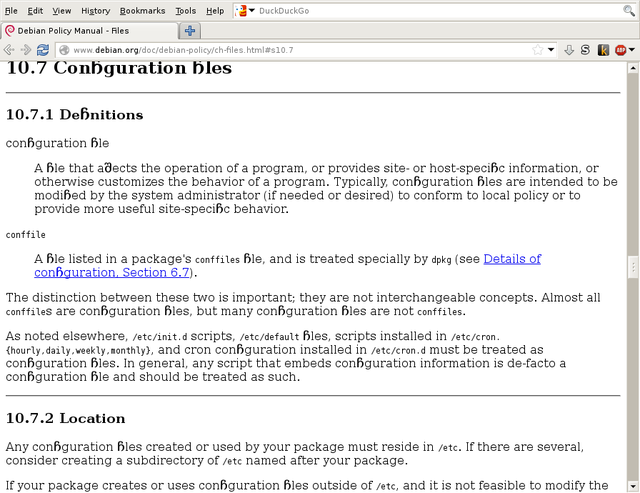
Gunnar Wolf: Ligatured iceweasel

Ligatured iceweasel
I am not (yet?) reporting this as a bug as this happened with a several days old session open, and just while I was upgrading my Sid system, after a long time without doing so (probably since before the vacations started... In December 2013). But I cannot avoid sharing this interesting screenshot. Of course, this does not happen in other browsers. And AFAICT it only happens while reading the Debian Policy (either online or locally, even recoding it to UTF-8). Funniest thing, the Debian policy specifies no Javascript, no stylesheets at all... (Hey, and FWIW... Why is the online copy of the Debian policy still in iso-8859-1 It's not 1995 anymore...) [update] Of course, it's the default font, not only the Debian policy. Just as an example, the following text:
  1. <html><body><p>Ufffiii flat different!</p></body></html>
Yields the following output: [update 2] And, of course, after finishing the update process... I got a new version of Iceweasel. Restarted it, and everything is back to normal :-

22 January 2014

Erich Schubert: The init wars

The init wars have recently caught a lot of media attention (e.g. heise, prolinux, phoronix). However, one detail that is often overlooked: Debian is debating over the default, while all of them are already supported to a large extend, actually. Most likely, at least two of them will be made mandatory to support IMHO.
The discussion seems to be quite heated, with lots of people trying to evangelize for their preferred system. This actually only highlights that we need to support more than one, as Debian has always been about choice. This may mean some extra work for the debian-installer developers, because choosing the init system at install time (instead of switching later) will be much easier. More often than not, when switching from one init system to another you will have to perform a hard reset.
If you want to learn about the options, please go to the formal discussion page, which does a good job at presenting the positions in a neutral way.
Here is my subjective view of the init systems:
  • SysV init is the current default, and thus deserves to be mentioned first. It is slow, because it is based on a huge series of shell scripts. It can often be fragile, but at the same time it is very transparent. For a UNIX system administrator, SysV init is probably the preferred choice. You only reboot your servers every year anyway.
  • upstart seems to be a typical Canonical project. It solves a great deal of problems, but apparently isn't good enough at it for everybody, and they fail at including anyone in their efforts. Other examples of these fails include Unity and Mir, where they also announced the project as-is, instead of trying to get other supporters on board early (AFAICT). The key problem to widespread upstart acceptance seems to be the Canonical Contributor License Agreement that many would-be contributors are unwilling to accept. The only alternative would be to fork upstart completely, to make it independent of Canonical. (Note that upstart nevertheless is GPL, which is why it can be used by Debian just fine. The CLA only makes getting patches and enhancements included in the official version hard.)
  • systemd is the rising star in the init world. It probably has the best set of features, and it has started to incorporate/replace a number of existing projects such as ConsoleKit. I.e. it not only manages services, but also user sessions. It can be loosely tied to the GNOME project which has started to rely on it more and more (much to the unhappyness of Canonical, who used to be a key player for GNOME; note that officially, GNOME chose to not depend on systemd, yet I see this as the only reliable combination to get a complete GNOME system running, and since "systemd can eventually replace gnome-session" I foresee this tie to become closer). As the main drawback, systemd as is will (apparently) only work with the Linux kernel, whereas Debian has to also support kFreeBSD, NetBSD, Hurd and the OpenSolaris kernels (some aren't officially supported by Debian, but by separate projects).
So my take: I believe the only reasonable default is systemd. It has the most active development community and widest set of features. But as it cannot support all architectures, we need mandatory support for an alternative init system, probably SysV. Getting both working reliably will be a pain, in particular since more and more projects (e.g. GNOME) tie themselves closely to systemd, and would then become Linux-only or require major patches.
I have tried only systemd on a number of machines, and unfortunately I cannot report it as "prime time ready" yet. You do have the occasional upgrade problems and incompatibilities, as it is quite invasive. From screensavers activating during movies to double suspends, to being unable to shutdown my system when logged in (systemd would treat the login manager as separate session, and not being the sole user it would not allow me to shut down), I have seen quite a lot of annoyances happen. This is an obvious consequence of the active development on systemd. This means that we should make the decision early, because we will need a lot of time to resolve all these bugs for the release.
There are more disruptions coming on the way. Nobody seems to have talked about kDBUS yet, the integration of an IPC mechanism like DBUS into the Linux kernel. It IMHO has a good chance of making it into the Linux kernel rather soon, and I wouldn't be surprised if it became mandatory for systemd soon after. Which then implies that only a recent kernel (say, mid-2014) version might be fully supported by systemd soon.
I would also like to see less GNOME influence in systemd. I have pretty much given up on the GNOME community, which is moving into a UI direction that I hate: they seem to only care about tablet and mobile phones for dumb users, and slowly turn GNOME into an android UI; selling black background as major UI improvements. I feel that the key GNOME development community does not care about developers and desktop users like me anymore (but dream of being the next Android), and therefore I have abandoned GNOME and switched to XFCE.
I don't give upstart much of a chance. Of course there are some Debian developers already involved in its development (employed by Canonical), so this will cause some frustration. But so far, upstart is largely an Ubuntu-only solution. And just like Mir, I don't see much future in it; instead I foresee Ubuntu going systemd within a few years, because it will want to get all the latest GNOME features. Ubuntu relies on GNOME, and apparently GNOME already has chosen systemd over upstart (even though this is "officially" denied).
Sticking with SysV is obviously the easiest choice, but it does not make a lot of sense to me technically. It's okay for servers, but more and more desktop applications will start to rely on systemd. For legacy reasons, I would however like to retain good SysV support for at least 5-10 more years.

But what is the real problem? After all, this is a long overdue decision.
  • There is too much advocacy and evangelism, from either side. The CTTE isn't really left alone to do a technical decision, but instead the main factors have become of political nature, unfortunately. You have all kinds of companies (such as Spotify) weigh in on the debate, too.
  • The tone has become quite aggressive and emotional, unfortunately. I can already foresee some comments on this blog post "you are a liar, because GNOME is now spelled Gnome!!1!".
  • Media attention. This upcoming decision has been picked up by various Linux media already, increasing the pressure on everybody.
  • Last but not least, the impact will be major. Debian is one of the largest distributions, last but not least used by Ubuntu and Steam, amongst others. Debian preferring one over the other will be a slap in somebodys face, unfortunately.
So how to solve it? Let the CTTE do their discussions, and stop flooding them with mails trying to influence them. There has been so much influencing going on, it may even backfire. I'm confident they will find a reasonable decision, or they'll decide to poll all the DDs. If you want to influence the outcome provide patches to anything that doesn't yet fully support your init system of choice! I'm sure there are hundreds of packages which do neither have upstart nor systemd support yet (as is, I currently have 27 init.d scripts launched by systemd, for example). IMHO, nothing is more convincing than have things just work, and of course, contributing code. We are in open source development, and the one thing that gets you sympathy in the community is to contribute code to someone elses project. For example, contribute full integrated power-management support into XFCE, if you include power management functionality.
As is, I have apparently 7 packages installed with upstart support, and 25 with systemd support. So either, everybody is crazy about systemd, or they have the better record of getting their scripts accepted upstream. (Note that this straw poll is biased - with systemd, the benefits of not using "legacy" init.d script may just be larger).

20 January 2014

Thorsten Glaser: FOSDEM preparations done.

I ve produced several pin-on buttons to take with me to FOSDEM for giving away (as long as there are any left): Several pin-on buttons I made First row (nice projects), from left to right: MidnightBSD; Glenda, the Plan 9 bunny; Teckids e.V. Second row (The MirOS Project): mksh; the Shilouette D mon; the Triforce (Live+Install CDs for i386 and sparc, with MirGrml); the m (alternative logo, vector) Third row (things originating from tarent): Freedroidz (now a Teckids project); OSIAM (Identity and Access Management); tarent (tarent AG, tarent GmbH), who sponsored production of these buttons Hm jupp needs a button able logo!
FOSDEM meetup

Next.

Previous.