Search Results: "nate"

6 June 2011

Vincent Bernat: Ready for World IPv6 day?

On June 8, 2011, will be World IPv6 Day. Major web companies like Google, Yahoo! and Facebook will serve their content through IPv6. While some of them already provide IPv6 content, you either need to use a special URL or get your connection from some selected providers, known to provide working IPv6 connection (the selection is done through DNS).

What s World IPv6 Day about? World IPv6 Day is mostly about major content providers and network operators. End users are not expected to take any special actions. The content will be provided for one day on IPv6 and IPv4 without any special trick to circumvent broken IPv6 setup. If you have an IPv4 only connectivity, all will continue to work (this day is not about switching Internet to IPv6 only). If you have a working IPv6 connectivity of any kind, you will use it to access content. However, if you have a broken IPv6 connectivity, you will find yourself isolated during one day until you solve the problem. You can check your connectivity and determine if you will run into trouble on World IPv6 Day. The main point of this day is to check if IPv6 native content can be provided to anybody without leaving out a large part of the users (the ones with a broken connectivity) which is reason why we don t already have IPv6 native content everywhere. Google explains it this way:
We continuously conduct detailed measurements on the quality of IPv6 connectivity, and our latest results show that making Google services generally available over IPv6 at this time would lead to connection problems and increased latency for a small number of users. User experience is very important to us, and we do not want to impact users on networks that do not yet fully support IPv6. We will continue to re-evaluate the situation as the IPv6 Internet evolves.
While content provider are invited to provide IPv6 content, network operator are expected to troubleshoot their customers problem (and they cannot withdraw themselves from this operation since the main change is done by content providers). If they can enable IPv6 connectivity, that would be great too but this is not mandatory. UPDATED: It s a shame but Microsoft s participation to World IPv6 day is a fix to prefer IPv4 over IPv6. Moreover, this fix will be reverted a few days later. Let s hope that network operators don t follow the lead by not setting up DNS hijacking to remove AAAA record.

What can I do? Even if you are neither a network operator nor a major player in web content publishing, it is expected that World IPv6 Day will also be the playground for most IPv6 related things.

As a user Check if your ISP provides native IPv6 connectivity. This can be an opt-in option. For example, in France, Free allows its users to enable native IPv6 connectivity if they choose the appropriate option. That s easy to do and you get IPv6 in a matter of minutes. If your ISP does not provide native IPv6 connectivity, you can try to bug them about this. This is unlikely to work. You can also get IPv6 through a tunnel broker like SixXS (create an account and apt-get install aiccu) or Hurricane Electric. Wikipedia has a list of IPv6 tunnel brokers. Don t rely on any other transition mechanism, they are unreliable.

As a service provider If you host yourself some services, like your web page or your own mail server, you can enable IPv6 connectivity for those as well. Get an IPv6 connectivity for your services, either native or through a tunnel broker. Then, enable IPv6 on each service you provide. Check that they are listening on IPv6 with ss -6l. All the tips below are meant for very simple setup. Ensure that net.ipv6.bindv6only is set to 0. Here is what I have done:
  • Enable SSH access through IPv6. With the default configuration of OpenSSH, this is already done. Check your ListenAddress directive if you have one.
  • Serve Web content through IPv6. I am using Nginx as a web server and you can mix IPv4 and IPv6 in the same virtual host. Setting up IPv6 is easy. Ensure that IPv6 support is compiled in (nginx -V) use listen [::]:80 instead of listen 80. Apache is equally easy to configure and should even work out of the box since the Listen 80 directive will listen to both IPv4 and IPv6 by default. lighttpd also supports IPv6. An easy way to get started is to use server.use-ipv6 = "enable".
  • Enable IPv6 in Postfix, Dovecot, BIND. For all of those, this works out of the box. Nowadays, most daemons will work fine with IPv6 without any special configuration since they will listen to :: by default which means any IPv4 or IPv6 address as long as net.ipv6.bindv6only is set to 0. Unfortunately, there is still some daemons that do not support IPv6.
  • Add appropriate AAAA record to your DNS because providing IPv6 services is of little use if your users (including you) cannot access them without typing the appropriate IP address. You may also want to provide a NS record reachable through IPv6.
  • Update your monitoring to use IPv6 as well. If you advertise IPv6 service and only IPv4 is working, most IPv6 client will be unable to access them.
  • Adapt your firewall. In Linux, Netfilter handles IPv4 and IPv6 separately. You need to ensure you setup a correct firewall for IPv6 as you have done with IPv4.
Here is a minimal firewall that you can adapt:
 1
 2
 3
 4
 5
 6
 7
 8
 9
10
11
12
13
14
15
16
17
18
19
20
21
22
23
24
ip6tables -A INPUT -m state --state ESTABLISHED,RELATED -j ACCEPT
ip6tables -A OUTPUT -m state --state ESTABLISHED,RELATED -j ACCEPT
for chain in INPUT OUTPUT; do
  ip6tables -A $chain -m rt --rt-type 0 -j DROP
  ip6tables -A $chain -p icmpv6 --icmpv6-type neighbor-solicitation \
     -m hl --hl-eq 255 -j ACCEPT
  ip6tables -A $chain -p icmpv6 --icmpv6-type neighbor-advertisement \
     -m hl --hl-eq 255 -j ACCEPT
  ip6tables -A $chain -m state --state NEW \
     -p icmpv6 --icmpv6-type echo-request -j ACCEPT
done
ip6tables -A INPUT -i lo -j ACCEPT
ip6tables -A OUTPUT -o lo -j ACCEPT
# Put your rules here!
ip6tables -N REJECT_ALL
ip6tables -A REJECT_ALL -p tcp -j REJECT --reject-with tcp-reset
ip6tables -A REJECT_ALL -p udp -j REJECT --reject-with icmp6-adm-prohibited
ip6tables -A REJECT_ALL -j DROP
for chain in INPUT OUTPUT FORWARD; do
    ip6tables -A $chain -j LOG --log-prefix "$chain-reject: "
    ip6tables -A $chain -j REJECT_ALL
done

Debian status There is still a long way for full IPv6 support of all applications in Debian but it is a release goal since Etch. This is not an easy task since adding IPv6 support on some software can be really difficult. DSA also enabled IPv6 support on many servers used by the Debian project including the main web server, the main mirror, the security mirror and the name servers. You should be able to use Debian with an IPv6 only access.

5 June 2011

Russell Coker: Rallying for a Carbon Tax 5th June

It s not that common to have a rally in favor of creating a new tax, but today I attended the Melbourne rally in favor of a carbon tax [1], it was the second such event this year. The rally was held in front of the state library, there is a reasonable size park there and it s a great place for a few hundred people, and a few thousand can squeeze in there without any problem. But according to the best estimates 10,000 people attended and the venue was obviously a bad choice as all available space was used and the crowd was so great that it wasn t much fun to be there. This was a great contrast to the previous rally in favor of a carbon tax which had maybe about 8,000 people attend and a much larger area [2]. The state library is a great place to hold a small or medium size rally where people can see it, but if you are going to get 10,000 people you need a bigger venue as the exits were partially blocked by road work I m sure that the local government wouldn t have given a permit if so many people were expected. Usually the city center is very quiet on a Sunday afternoon, but this afternoon everything was packed. An extra 10,000 people really makes a difference although admittedly sunny weather would have helped. Australia wide there were apparently about 100,000 people attending similar rallies, that s 0.5% of the population of the country! The aim of the rally was to advocate a large enough tax on coal, oil, and other energy sources that emit CO2 to provide an economic incentive to minimise use and use alternate energy sources where possible. Currently billions of dollars are being given to polluting industries, instead those industries should be taxed and the money raised given to compensate needy people. looking north Looking North towards where I entered. looking east Two pictures from slightly different angles that are roughly East from where I was standing in the center of the crowd. looking east through the bandlooking south Pictures looking east through the band when people were starting to leave and looking south towards the exit I chose while on the way out.

3 June 2011

Raphaël Hertzog: My Debian activities in May 2011

This is my monthly summary of my Debian related activities. If you re among the people who made a donation to support my work, then you can learn how I spent your money. Otherwise it s just an interesting status update on my various projects. I have been Doing some work towards Debian Rolling At the start of the month, the discussions about Debian rolling were still very active on debian-devel. Declaring that testing would be rolling did not make it (as I hoped), the argument that some RC bugs last for far too long in that distribution carried the discussion and thus the most consensual proposition ended up being the one of Josselin Mouette were rolling would be testing plus a few selected cherry-picked packages from unstable. I believe it s a workable solution if we only care about a subset of architectures. Otherwise the same reasons that keep the fixed packages out of testing would probably also apply for rolling. Given this, I did setup britney (the software that controls testing) on my laptop to investigate how we can create rolling. It turns out britney is a very specialized software with very few configuration knobs. At the same time Joachim Breitner made a proposition that immediately grabbed my attention. He suggests to use SAT solvers to find out the set of packages that should migrate from unstable to testing. I thought that rolling would be a good testbed for this new implementation of britney (which he calls SAT-britney) so I jumped right in this project. I was not at all familiar with this science field, so I looked up quite some documentation: I learned that all SAT solvers expect the problem to be presented in CNF form, and that DIMACS was the file format of choice to represent those boolean constraints. Several SAT solvers are available in Debian and picosat appears to be one of the best. Then I started some early coding/prototyping to play with the concept. You can find the result in this git repository, you can grab a copy with git clone git://git.debian.org/~hertzog/sat-britney.git. There s not much yet, except some Python code to generate a SAT problem that can be fed to a SAT solver. But I really look forward to this project. Representing Debian during Solutions Linux During the second week, I spent 3 days in Paris to help manage the Debian booth at Solutions Linux. We have responded to lots of queries but most visitors already knew Debian, and many of them use it at work and/or at home. We tried to recruit those people as new members for Debian France, the local association. We also sold all our remaining goodies. The Ubuntu people were interviewed by France 3 (an important TV channel) and we took this opportunity (with the consent of the Ubuntu guys) to show our Debian t-shirts in the background: you can watch the video here (in French), you can see me with Carl Chenet at 1:21. We have also been interviewed by Intelli n TV: here and here (both in French). I m not very good at this exercise. :-) Improving dpkg triggers The third week was a vacation week, in theory I should have stayed away from my computer but I really wanted to take this opportunity to improve the state of dpkg triggers in Debian. I already covered my work in another article: Trying to make dpkg triggers more useful and less painful. The result is not merged yet, I just asked a question to all package maintainers who are using triggers to be able to decide whether I ll merge it as is, or if I can make the new behavior the default one. Supporting users after Alioth s migration When I came back from my vacation, many services provided by Alioth.debian.org were non-functional after a migration to a new setup that involves two machines instead of one. Given that I used to be an Alioth admin, I know that in those periods you tend to be get bogged down on many user support requests. So I re-joined #alioth on IRC and tried to help a bit. I did investigate some of the reported problems and prepared fixes (updated scripts, configuration files, etc.) for some of the issues. I also created a list of remaining issues that should have lasted only a few days but that s still active because there are still regressions left. The most important things still missing are: Improving the 3.0 (quilt) source format I have made some proposals to change the way the new source format would work. The goals are to be less painful for packagers who are using a VCS, and to avoid unexpected changes slipping through a new patch generated by dpkg-source. It seems that the proposals are relatively consensual so I ll implement them at some point. Missing in action on my blog I did a lots of stuff for Debian between travel and vacation, and in the remaining time, I did not manage to write many articles for my blog. In fact, besides the article on my triggers work mentioned above I only published one interview: People behind Debian: Steve Langasek, release wizard. I ll try to do better this month! Thanks Many thanks to the people who gave me 151.61 in May. See you next month for a new summary of my activities.

One comment Liked this article? Click here. My blog is Flattr-enabled.

2 June 2011

Joachim Breitner: Satire on Gender Issues at IIT Bombay

IIT Bombay, like most likely most Indian educational instituates, has some rules and regulations about the interaction between boys and girls that, at least to the uninitiated eye of a foreigner who was brought up in a liberal society, seem arbitrary and archaic. At IIT Bombay, for example, there may be no visits in hostels by students of the other gender (yes, there are separate boys and girls hostels) between 10pm and 7am, and during the day any such visit has to be registered at the reception security guard. And when there was need for more room for girls and they reassigned one wing of a boys hostel to the adjacent girls hostel, they closed the connection by bricking it and split the lawn by a fence. With barbed wire on top. I took this as a theme for a satirical inspection of these policies which comes to the conclusion that IIT Bombay is a very progressive institute that puts these rules in place as affirmative action towards same-gender relationships. After some discussion with the editors the text got actually published in the institutes bi-monthly newspaper Raintree , unfortunately only now, two weeks after I left India. You can read the text on the bottom of page 8 in the 6MB PDF file. I cannot predict how it will be received, but at least Utkarsh Raut, who illustrated the text, clearly got the message right. Thanks for the nice and very fitting drawing!

1 June 2011

Vincent Bernat: GNOME Power Manager without GNOME desktop

When I installed my new laptop, I decided to switch from sleepd to GNOME Power Manager (GPM). The rationale behind this decision was to get screen dimming for free while keeping other features because GPM uses UPower which uses pm-suspend and pm-powersave behind the scene. This means that it is easy to execute scripts on suspend or when the AC is unplugged by putting them in /etc/pm. I don t use a full GNOME desktop. My desktop is running FVWM which is just a window manager. However, I already use some parts of the GNOME environment:

What s working It happens that most of the features just do not work. However, suspend when closing the lid works fine. The icon in the systray works fine too (but there is a small bug). The screen dimming feature on idle also works (but there are annoying bugs with it). The visual feedback when pressing brightness keys works too.

What s not working It seems that I am not the only one to have problem with GPM: there are currently 115 bugs opened in the Debian BTS. If you want to get some debug output from gnome-power-manager, run it with --verbose flag. --debug flag does nothing (and supersedes --verbose).

Nothing happens when pressing the power button I have configured GPM to ask me what to do when I press the power button. But when I press the button, nothing happens. Looking at the source, here is the snippet of code that is executed:
1
2
3
4
5
6
7
if (policy == GPM_ACTION_POLICY_INTERACTIVE)  
    GpmSession *session;
    egg_debug ("logout, reason: %s", reason);
    session = gpm_session_new ();
    gpm_session_logout (session);
    g_object_unref (session);
 
In fact, this is not GPM that will ask you the question, but GNOME session manager because GPM triggers logout. If you don t run a full GNOME session, nothing will happen. My workaround is just to set the action to Suspend .

Does not sleep when idle GPM is configured to go to sleep after 2 hours on AC or 30 minutes on battery. This does not work for me because idle detection is delegated to external programs. There are four variables used by GPM to determine if we are idle:
  • session_idle which is the idle hint from ConsoleKit,
  • idle_inhibited which is set when another program asks to disable idle detection (a video player which does not want the screen to be dimmed),
  • suspend_inhibited which means a program do not want we going to sleep (a music player for example)
  • x_idle which tells if X is idle or not (someone is moving the mouse or typing on the keyboard).
To allow GPM to suspend when we are idle, x_idle and session_idle must be true while suspend_inhibited and idle_inhibited must be false. For screen dimming purpose, you just need to have x_idle set to true and idle_inhibited set to false. Currently, only GNOME Screensaver seems to tell ConsoleKit if the session is idle or not. XScreenSaver does not contain anything about this. I am using xautolock with xlock and I am pretty sure they won t tell GPM if I am idle. You can use dbus-send to circumvent this problem:
 1
 2
 3
 4
 5
 6
 7
 8
 9
10
11
$ dbus-send --system --dest=org.freedesktop.ConsoleKit \
>   --type=method_call --print-reply --reply-timeout=2000 \
>   /org/freedesktop/ConsoleKit/Manager \
>   org.freedesktop.ConsoleKit.Manager.GetCurrentSession
method return sender=:1.6 -> dest=:1.106 reply_serial=2
   object path "/org/freedesktop/ConsoleKit/Session1"
$ dbus-send --system --dest=org.freedesktop.ConsoleKit \
>   --type=method_call --print-reply --reply-timeout=2000 \
>   /org/freedesktop/ConsoleKit/Session1 \
>   org.freedesktop.ConsoleKit.Session.SetIdleHint boolean:true          
method return sender=:1.6 -> dest=:1.108 reply_serial=2
While I understand what is the rationale behind those choices (no code duplicate and allowing external programs to hinder power management), it lacks some fallback in case you don t use GNOME Screensaver (which is the key component here). I first though this was bug #594706 but this is not the case. I have opened (and closed) bug #628755. UPDATED: Jump to the conclusion for an updated solution for this problem.

Brightness is not restored to the previous value after idle When GPM undims the screen, it does not restore the previous value. It seems to be bug #617310 which is marked as fixed in upstream. I did not investigate it.

Wrong number of batteries reported I only have one battery but after one suspend/resume cycle, GPM thinks I have two. Maybe this is a bug of UPower. Maybe this is bug #606434. I did not investigate it. Maybe there is an happy interaction with bug #456280.

Inability to set configure actions when the UPS runs out of battery This is bug #390602. In addition to laptop batteries, UPower also supports UPS. In this case, GPM displays a special icon to tell if the UPS is fully charged. However, there is no possibility to execute special actions when the UPS is unplugged, like hibernate after 10 minutes or something like this. This seems to be a problem with the interface because looking with gconftool-2, we can spot variables like low_ups or critical_ups which allow to set actions when the UPS is almost out of battery. Moreover, the UPS icon only displays after one suspend/resume cycle but I am too lazy to report and debug this issue. Since, the icon disappear if I restart GPM, I am confident that the bug is in GPM.

Conclusion The conclusion is that GPM is not really that buggy but it really needs to be run in a full-blown GNOME desktop. The main problem is not really GPM. New technologies like UPower and ConsoleKit get pushed by freedesktop.org initiative, they get implemented by GNOME (and, I suppose, KDE) because they have tons of people following the appropriate mailing lists and any alternative just gets crushed by all those unpublicized changes. UPDATED: I got several helpful comments about this problem. There are two possible solutions:
  1. Use xfce4-power-manager. It handles brightness control in a better way and don t need an external program to tell when the current session is idle. It still needs a session manager to ask what to do when using the power button. The drawback to this solution is that you start to pull another desktop environment into your environment. You had some parts of GNOME and now you have some parts of XFCE. This solution was proposed by Sylvain Collilieux.
  2. Use gnome-session, gnome-screensaver and keep gnome-power-manager. As pointed by Julien Valroff, gnome-screensaver needs gnome-session to detect idleness. However, gnome-session starts a whole GNOME desktop. Again, there are two solutions. The first one is to replace gnome-session by something lighter implementing the bare minimum to make gnome-screensaver happy. Another suggestion is to configure gnome-session to start your favorite environment.
I start mine from ~/.xsession and here is what I have added at the top of it:
 1
 2
 3
 4
 5
 6
 7
 8
 9
10
11
12
13
14
15
16
17
# If not done, restart ourself with gnome-session
if [ -z "$SESSION_MANAGER" ]; then
    [ -d ~/.config/autostart ]   mkdir ~/.config/autostart
    rm -f ~/.config/autostart/*
    cat <<EOF > ~/.config/autostart/xsession.desktop
[Desktop Entry]
Name=Xsession
Comment=Start .xsession
Exec=$(readlink -f $0)
Type=Application
X-GNOME-Autostart-enabled=true
EOF
    exec gnome-session --autostart=$HOME/.config/autostart
fi
# Otherwise, keep starting stuff
# [...]
exec fvwm-crystal

31 May 2011

Jordi Mallach: Quinze de maig

Two weeks ago, I was lucky to celebrate my 33th birthday with my closest friends in l'Alqueria. When asked to wish something before blowing the candles on Victor's delicious apple cake, I thought I have basically everything I'd want, but it'd be cool if some real changes happened in this world. Not long after, big demonstrations asking for Real Democracy Now happened throughout the Spanish state, and today, that Sunday seems to be an eternity away. Huge assemblies, thousands of strangers working together, more demonstrations, an election campaign eclipsed by #15m, hundreds of well thought, plausible claims published, the movement crossing the Spanish borders and leaking into France and Greece, the feeling that this is the good one, the basis for a fresh start that can make our lives better, our society a fair one and the possibility to stand in front of the fuckers who have made our lives a lot harder, to tell them it's not going to work like that anymore. All of this in 15 days. Unfortunately, revolution came when I'm in a crucial month to finish my studies and swamped with other little things, so I've been unable to be in the Valencian camp site for more than 3 days. Hopefully when I'm done on the 22nd people will still be taking the square, because Mako and Mika will be visiting then. Yay!

Gunnar Wolf: Invitation Free Software in Mexico: Reflections and Opportunities

I was invited to be part of one of the panels to be present this Thursday (June 2) in a forum that promises to be interesting. The forum is organized by the Science and Technology comission of the Senate of the Republic (of Mexico ;-) ), Universidad Aut noma Metropolitana and Mozilla M xico. The day will be opened by Sen. Francisco Javier Castell n Fonseca and Richard Stallman; starting at 10:00, we will have thematic panels on: The full program (as well as details of interest of those that can physically attend) is attached to this post. I am looking forward to this forum. Not only it is a good opportunity to get our work known in one of those places where it matters, but it's also being organized by several interesting people I'm sure will have something interesting to contribute. And of course, we lacked time to build a better, more complete and more coherent proposal but there is a good probability we will have further such contacts. You might find interesting to read on the list we have been discussing; subscription seems to be open (although access to the archives is not Maybe it will be later on? In any case, I'm saving a mbox ;-) )
AttachmentSize
Activity program352.37 KB

Jamie McClelland: Puppet Without Masters

Puppet labs's use of the term puppetmaster is rather clever (in contrast to other un-necessarily offensive uses of "master" in the software world). While I appreciate the clever name, I'm less impressed with the concept. At May First/People Link we've spent the last several years (including the last couple months in earnest) working to transition management of our 90-some servers from a collection of hand-written bash scripts to puppet. Over the years, we've worked hard to keep our servers as secure as possible. We have a team of about a half dozen people who all have root access on all servers. It's all key-based access. To help mitigate a disaster if one person's keys were compromised, we've implemented monkeysphere on all servers, allowing us to easily revoke access. After spending so much time thinking through our root-access strategy and fully implementing the monkeysphere to reduce our exposure to a single point of vulnerability, I was disappointed by puppet's use of a puppet master. For those less familiar with puppet, it goes something like this: One server (or god forbid multiple servers), run an externally accessible daemon. Each and every server on your network runs a daemon as root that periodically communicates with the puppet master, receives new instructions, and then (again, as root) executes these instructions. In other words, if your puppet master is compromised, I'm not sure exactly what you would need to do, short of rebuilding every server in your network. To make matters worse, it seems as though some users generate and store all server ssh keys (private and public) on the puppet master and then push the private keys to their respective nodes. That means an intruder doesn't need to write to the puppet master, just reading these keys would be enough to compromise all servers in your network. There must be a better way. Puppet without masters After some web-searching, I found a promising thread on the puppet list asking what's lost without a puppet master. This thread lead to a couple other blogs by people who have worked out a system for using puppet without a master. It turns out that there are two distinct points of centralization with puppet. One is the puppet master (as described above). In addition, there is a concept called storeconfigs - which allows each node in the network to store information in a central database. For example, one server can store a request for an account to be setup on a backup server. The next time the backup server runs, it checks the storeconfigs, finds the request, and creates the user. It's possible to run puppet with storeconfigs but without running a puppet master (that avoids the hassle of running the puppet daemons, while providing the convenience of centralization). For our purposes, however, we decided to forego both the puppet master and storeconfigs. We did not want any form of centralization that would provide an additional point of vulnerability. As is common with puppet, we are storing our puppet recipes in a git repository. And, we are publishing to a single, canonical git repository on the Internet. On each node, we have two git repositories - one is a bare repo (that we can push to) and the other is a checked out repo (in /etc/puppet) that is read by puppet. The bare repo has a post-update hook the changes into the /etc/puppet directory, pulls in the changes from the bare repository, and runs puppet against the newly checked out files. Therefore, we can apply new puppet recipes to any server on the network with
git push <server>
No daemons: neither a master daemon nor a puppet daemon running on the node using up memory or providing a potential security hole. The git push happens over an ssh connection - since all system administrators already have root-level ssh access on every server - there is no need to grant any additional access above what we already have. Pushing works great - but with 90 nodes we don't want to have to push to 90 servers everytime we want a change made. That's where the canonical git repository comes in. A cron job runs a script on each node once an hour that runs git remote update from /etc/puppet. The script then checks the time stamp on the most recent gpg-signed tag and compares it with the time stamp of the current commit. If the most recent gpg-signed tag is newer, it verifies that the tag came from a list of authorized gpg keys (the very same gpg keys used by the monkeysphere to grant root level ssh access). If the gpg signature of the tag can be properly verified, then the changes are merged and puppet is run on the new recipes. What about privacy? One of the benefits of a puppet master setup is that nodes get configuration details on a need-to-know basis. The puppet master doesn't share the entire puppet repo - only the compiled manifest for the node with which it's communicating. Our solution to this problem was to go screaming in the other direction. As you might notice from our support wiki and ticket system, we generally favor transparency. Since we are publishing our entire puppet git repo publicly, there seems little point in trying to hide one node's configuration details from another node. That also means each node carries around about 4Mb of extra weight in the form of disk space for the git repo. That seems like a small price to pay for the resource savings of not running a puppetd process all the time. More differences As I've read the puppet lists, faqs and documentation, I've found yet more ways our use of puppet diverges from the norm. The first is a little thing really - most people seem to store all their node configurations in a single nodes.pp file. I'm not sure why. Fortunately, puppet's include syntax allows globbing, so we've created a directory and gave each server it's own .pp file. This arrangement makes it much easier to parse the configuration with tools other than puppet (like, Q. How many servers do we have? A. ls wc -l). Backup and Nagios monitoring without storeconfigs More significantly - there are some things we can't do since we are not using storeconfigs. While many puppet users add a variable, like $nagios = true before including their sshd class (which then causes the sshd class to store a configuration for the nagios server to monitor ssh on the node in question), we were forced to come up with alternatives. My first solution was to simply list all the servers that needed to be monitored in the server node configuration file for the nagios server. Ditto for the backup servers. This approach, however, proved cumbersome and error prone. When adding a new node, I now have to edit three files instead of one. And, how can I easily tell if all nodes have their nagios and/or backup configurations set? The solution was rather simple - there's more than one way to store a config for another node. Our nagios server is called jojobe.mayfirst.org and our backup server is luisa.mayfirst.org. A typical node.pp file looks like this:
node pietri.mayfirst.org  
  # node config goes here
 
if ( $fqdn == "jojobe.mayfirst.org )  
  nagios_montior   "pietri":  
 
if ( $fqdn == "luisa.mayfirst.org )  
  backup_access   "pietri":  
 
This way all configuration related to pietri stays in a single file. Host keys and granting access between servers storeconfigs is commonly used to distribute host ssh keys. Every node that is added to puppet has it's ssh host key stored centrally and then re-distributed to every other node. That way, you can ssh from node to node without ever getting the ssh fingerprint verification. Avoiding that prompt is particularly important when backing up from one server to another via automated scripts. storeconfigs can additionally be used to copy user's public ssh keys - thus granting user access between servers. Our solution to this problem: monkeysphere. Rather than maintaining our own private data store of keys, we publish (and sign) our ssh keys via the web of trust. In addition to server keys, each one of our servers' root user has an ssh-enabled gpg key (also publicly signed by us). By configuring each server to trust our system administrators' gpg keys for verifying other keys, we can both avoid the ssh fingerprint manual verification step and we can grant a root user on one server access to another server by simply dropping root@$server.mayfirst.org into an authorizeduserids file on the target server. There's no question - the setup was rather tedious (we're using runit to maintain an ssh-agent for each root user), however, now that's in place (and configured via puppet), it's a breeze to add new servers. The only extra step we have to take is to confirm and sign each new server's keys. This "extra" step not only allows our servers to verify each other, but also allows our users to verify the servers as well, so it's hardly an extra step at all. Shared modules There's a vibrant community of third party module developers for puppet. Rather than figure out the intricacies of having puppet configure sshd, for example, you can install a contributed sshd module and then you simply add:
include sshd
And you get a default sshd setup. Many of these modules are fairly well developed, offering the ability to easily customize your setup in a number of different ways. Unfortunately, most of the modules assume you are using storeconfigs and if you are not, they will either fail to work right or you will get noisy errors. At first, this seemed like a problem. However, as I built our puppet recipes, I found myself increasingly frustrated with the third party modules that we could use. Configuring servers is hard - and requires constant debugging and trouble shooting. puppet already provides a layer of abstraction between you and the server you are setting up. Given the benefits of puppet, I'm willing to spend the time learning the puppet syntax and asking the rest of our system administrators to do the same. This layer of abstraction is further compounded by our use of git to store the configurations (not a problem if you are git hero - but most of us are already struggling to get a handle on using git). Again, all seems worth it for the pay off. Now enter the puppet module. In addition to learning puppet syntax (and struggling with git) you now need to understand how the third party module works. With software programming, I typically don't need or want to learn how a library or class does what it does - that's the beauty of object-oriented programming: it hides the complexity. But when it comes to configuring the servers that I will be responsible for debugging and maintaining, I really need to know exactly what is happening. To further compound the problem, I found myself wading through third party module code designed to work on Debian, Ubuntu, CentOS, Redhat, gentoo... and more. We run entirely on Debian - we don't need any of this extra code. And, once I got rid of all the other operating systems, I was still left with a complex module that allows you to configure software in ways we'll never need. In the end, we tore out most of these third party modules and replaced them with file and exec puppet resources that did exactly what we needed them to do. Our code base is now much smaller and simpler. Not just a whiner I have a lot more to whine about (like why native resources for things like nagios that are so easily handled with the file resource?). However - the remarkable thing about puppet is that it's flexible. Despite some fairly substantial problems with the "typical" use of puppet, the program provides enough flexibility for us to use it in a way that fully meets our needs. After having built my own bash-based set of configuration scripts and deeply exploring puppet, I have a great appreciation for the difficulty of building system configuration software (we considered and rejected cf-engine and chef as not being any better). And, if you are still not convinced that puppet will work fo you ... you might consider a package I learned about after going down the puppet route: slack.

30 May 2011

Christoph Egger: Maintaining kFreeBSD buildds since one month

At April 30, I took over maintenance of of Debian's kFreeBSD autobuilders. Means getting something like 4,5k e-Mails this month (gladly no need to sign all those 4k successful builds any more!), filling nearly 30 RC Bugs (quite a lot of which got fixed just within hours after filling, wow!), investigating some of the more strange build failures and such stuff. In general it turned out to be quite some fun. Quite interesting which libraries turn out to be rather central to the Archive. I wouldn't have guessed that a uninstallable libmtp would prevent a reasonable fraction of the builds to fail -- including packages like subversion. Packages builds failing because the disk space is exhausted may be something most of us have already witnessed, especially those here that use one of these small notebook hard drives. Build failures caused by a lack of RAM might certainly be imaginable as well, especially on highly parallel builds. But have you ever seen gcc fail because the virtual address space was exhausted on 32 bit architectures? Also there's a interesting lot of packages with misspelled build dependencies which sbuild can't find and therefore can't build the package. Maybe having a lintian check for some of these problems would be a good idea? I'm also regularly seeing build failures that look easy enough to fix -- like some glob in a *.install for some python package matching lib.linux*. I try to fix some of these as I see them but my time is unfortunately limited as well. Someone interested in quick&easy noticed about these kind of issues? I could put URLs to build-logs on identi.ca or somewhere on IRC. There are also some really strange failures like llvm, which builds flawlessly on my local kFreeBSD boxes all the time, inside and outside schroot but hangs all the time in the same testcase when building on any of the autobuilders (any hints welcome!) or perl failing on kfreebsd-amd64 selectively but all the time.

Jamie McClelland: Testing x509 Certificates

Navigating the openssl suite of subcommands is time consuming. Here's my list of frequently used commands for easy reference: Examining the certificates being offered by a host (replace imap with any service, -starttls imap can be eliminated if you are checking a service that provides tls from the start):
openssl s_client -starttls imap -showcerts -connect chavez.mayfirst.org:imap
Examine a certificate signing request:
openssl req -in /path/to/file.csr -text -verify -noout
Examine a x509 certificate:
openssl x509  -noout -text -purpose -in path/to/file.crt

27 May 2011

Matt Zimmerman: Why I m excited about joining Singly

This summer, I ll be taking a bit of time off, moving back to San Francisco and starting a new job. I can t wait to get back to work. Here s why. Me and my data
I have a singular relationship with my data. I have a copy of every email I ve sent since I first got an Internet email address in 1994 (82,000 messages and counting). I have even older files downloaded from BBSes, and passed between friends on floppy disks. Chat logs, text messages, voicemail I hold onto them all. Anything which is relevant to me personally, I tend to save. This must seem banal to people who are first getting online today. In the age of Gmail and Flickr, it s easy to assume that all of your data will be preserved indefinitely, with little or no effort on your part. But for me, it has been hard work over the years, because I ve done it myself. I ve carried my data with me to countless new computers, operating systems, storage technologies, file formats and cities over the years. Everywhere I ve lived, I ve brought it with me. Physically. Really? Why do I do this? Why have I gone to such trouble for a collection of bits? Especially now, why is most of my data still at home?
One pragmatic answer is that I can simply do more with my data when I have a copy. I can work with it using any software I want, including software that I write myself. I don t have to worry about whether I can transfer it from one web service to another. I m never stuck using yesterday s services because my data is never trapped in them. My personal data is always available to me me, always raw, ready and waiting for the next wave of software to come along. When it does, I can load my data into it and keep going. The fact that Facebook and Google disagree over sharing their users data doesn t bother me in the least. Another reason is that I want to be in control of it. I decide who to share my data with, and when. Some of it, I prefer not to share at all, with any person or company, and I have that choice. Even if a powerful government wants to access my data, I am afforded certain protection under the law, at least in the countries where I ve lived. If I turned over my data to service providers, my choices and protection would likely be much more limited. I have a deeper emotional attachment to my data as well. Enfolded within that vast pattern of bits is some part of my self. By sharing my personal data with other people, I show them something of who I am. Increasingly, my personal data is part of my identity. This is more than just a state of mind: it s been shown that even our non-identifying personal data can reveal who we are. In other words, it s not just my data it s me data . Singly I m joining Singly because I want to take this concept much further, and combine people, data and software into a different shape with people at the center. Today, we are creating vastly greater amounts of personal data, and it s stored in many more places. We leave our trail on the Internet in the form of activity streams, messages and content, spread across different web sites, each with their own inscrutable terms of service and (if we re lucky) their own API. These disconnected silos prevent us from using all of this information effectively. Meanwhile, we want and need to connect with each other in more ways than ever before. We need applications which can connect us, through our personal data, to the services we need. Singly is building the technology to make this possible. It will be designed with the deepest respect for the relationship that we have with our personal data, and with a vision for truly personal computing. Singly is This opportunity is a great fit for my interests and experience. Singly aims to be the commercial part of a vibrant open source community, and I m looking forward to building on what I ve learned in Debian, Canonical and Ubuntu to help make it a success. I ll have lots more to say about it as time goes on. Meanwhile, if you re interested in following what we re doing, here s where:

26 May 2011

Tanguy Ortolo: PGP signatures with trust and verification level

Identity checks and trust Saint Peter's key, detail from a stone statue The OpenPGP web of trust is composed of keys linked to each other by two things: With these two pieces of information, GnuPG is able to determine whether or not the key of someone you never met can trusted to belong to its alleged owner. Signatures Signing a key is usually a binary action: either you sign it or you do not sign it. Thus your signature on a key will give other people a rough identity check information and no trust information at all. In fact, the OpenPGP standard does allow to publish precise identity check and trust information on signatures, but unfortunately this is now enabled with GnuPG by default. These features are called certification level and trust signatures.Certification level To indicate how careful you verified someone's identity, run GnuPG with the option --ask-cert-level, or add ask-cert-level to your configuration file .gnupg/gpg.conf. When you make a signature with this option, GnuPG will ask you how carefully you verified the key owner's identity. According to the manpage gpg(1), the available levels are: Trust level You can also indicate how much you trust someone, sign his key with the command tsign instead of sign. GnuPG will then ask you three questions:
  1. how far you trust him to verify other people's keys: marginally or fully (I personally only fully trust people that were trained or challenged by myself or by people I trust even more)
  2. how far you allow him to make trust signatures on your behalf: usually answer 1; answering 3 would allow him to issue trust signature with level 2, thus allowing other people to issue trust signatures on your behalf (this features exists to implement pyramidal certification systems, but can be interesting for signing your own keys when you have several);
  3. if you wish to restrict this signature to a domain: I have no idea of what this means so I give none.
Conclusion Although certification level and trust signatures are not very widely used, thanks to GnuPG's default settings, it allows to publish more information about your signatures, adding value to the web of trust at no cost, which I believe is a good think. Thus I think it is worth doing it. If you want to use these features with the caff wrapper, remember that it has its own GnuPG configuration .caff/gnupghome/gpg.conf. In addition it does not implement trust signatures natively: to use them, you have to abort the automatic signing, which gives you a GnuPG prompt, where you are then able to tsign, then exit to return to caff that will consider your trust signatures. Credits

25 May 2011

Matthew Garrett: Trials and tribulations with EFI

I wrote about some EFI implementation issues I'd seen on Macs a while back. Shortly afterwards we started seeing approximately identical bugs on some Intel reference platforms, and fixing it actually became more of a priority.

The fundamental problem is the same. We take the EFI memory map, identify the virtual addresses of the regions that will be required for runtime (mapping them into virtual address space if needed) and then call the firmware's SetVirtualAddressMap() implementation in order to let the firmware convert all its pointers. Sadly it seems that some firmware implementations call into sections of boot services code to do this, which is unfortunate because we've already taken that back to use as RAM. So, given that this is clearly against the spec, how does it ever work?

The tediously dull version is that Linux typically calls SetVirtualAddressMap() in the kernel, and everyone else does it in their bootloaders. The bootloader hasn't set up NX bits or anything, so it just happens to work there. We could just do it in the bootloader in Linux, but that makes doing things like kernel address space randomisation trickier, so it's not the favoured approach. So, instead, we can probably just reserve those ranges until after we've switched to virtual mode, and make sure the pages are executable. This ought to land in 2.6.40, or whatever it ends up being called.

(The alternative approach, of just never transitioning to physical mode, turns out to mysteriously fail on various machines. Calls to SetVariable() just give errors. We just don't know)

That still leaves the problem of SetVariable() on the test Mac trying to access a random address. That one turned out to be easier. There's 2MB of flash at the top of physical address space, and this was being presented as being broken into four separate EFI regions. While physically contiguous, Linux was mapping these to discontiguous virtual addresses. Apple's firmware appeared to assume that a pointer into one region could just be incremented into another. So because it's still easier to change the kernel than change Apple, 2.6.39 merges these regions to ensure they're contiguous.

Remaining problems include some machines seemingly not booting if they have 4GB of RAM or more and this Apple failing to communicate with its panel over the eDP auxchannel. Anyone got any idea how to dump the bios compatibility module out of a running EFI session?

( Comments Comment on this)

24 May 2011

Russell Coker: Are Assholes Essential to a Free Software Project?

What do Assholes do? Rusty just wrote a post titled If you didn t run code written by assholes, your machine wouldn t boot [1] about some of the anti-social tendencies demonstrated by programmers, including some that are implied to be fairly important. His post seems to imply that there are really great programmers who are anti-social and that we should just put up with it because of their great code. One of the problems with his post is that he doesn t define asshole . Holocaust deniers and all other Nazi supporters seem to clearly by assholes by any definition. People who have silly ideas about medicine and tell others seem to be merely misguided (although my dictionary gives stupid or irritating or ridiculous in the definition of asshole so technically they can meet the criteria). In the comments Rusty states that nuttiness is relative . While that is correct it doesn t seem to have much bearing on whether someone is an asshole. For example I know some very nice people who are utterly convinced by creationism. Is Anyone Essential to Free Software? Most projects have one person or several people in leadership positions, usually there seems to be a combination of project management and lead-programmer positions. Such people are obviously quite important to a project. But we have seen examples of people dying, being employed by Microsoft, retiring, relicensing the source in a bad way, and just losing interest without the project ceasing. It seems clear that in most cases when a project which has a significant amount of use has significant bugs and no maintainer then someone will step in. The cases where no-one takes over the project are often resolved by someone creating a competing project. If no-one takes over an abandoned Free Software project then it s a strong indication that the project wasn t particularly important anyway. I have no doubt that if any bug or missing feature made Linux systems stop booting then someone would fix it quite quickly. In a more general sense it seems that every time someone takes a position in a project that is of wide interest they are displacing someone else who might have done the job. When you volunteer to do significant work for a project you may be displacing someone who is more skillful than you this isn t necessarily a bad thing as there are plenty of other projects to work on, some of which require more skill. Growing More Programmers It seems to me that a large part of becoming a great programmer is facing great challenges. People who could be described as optimistic or arrogant will tend to take on more challenging tasks and therefore learn more. I m sure that there are a lot of people out there who have the potential to be great programmers apart from not taking on the challenging work, this seems to be an unfortunate waste of talent. Given a large enough population if someone leaves a senior position there should be someone else who can obtain the skills needed to take over. One advantage of this for Free Software development is that even if the best person to take on the challenge isn t living in the most convenient continent that won t be an obstacle, while with proprietary software development projects the teams are small and it s common that no-one else is capable of stepping up to a lead position. Another advantage is that when the lead developer leaves there are generally many candidates to replace them, all of whom can start work and be judged on the work that they do. I think that the best claims that can be made regarding essential people are not in regard to technical skill alone but to a combination of technical and people skills. Getting a group of programmers to work together is really hard but it s something that needs to be done for any significant project. Also the larger projects tend not to stand alone, being able to get changes included in other projects requires some skill. Ben Collins-Sussman and Brian Fitzpatrick gave an insightful talk at Google IO 2008 titled How to Protect Your Open Source Project From Poisonous People [2]. The first half of their talk is mostly about people who are misguided or difficult rather than what most people would consider poisonous and the second half is more about people who are actively poisonous and need to be removed. They advocate a community based on Politeness, Respect, Trust, and Humility. They describe in detail how the methods they advocate result in the members of their community being more productive, it seems obvious that those principles will lead to better career growth for people within the community and more friendly people wanting to join. When is being an Asshole OK? I once worked for a company that apparently had a team consisting solely of assholes. Apparently one asshole got promoted to management and after some internal transfers they ended up with all the assholes in the company on one team. I guess that when someone has negative interactions with everyone they won t notice the difference if they are put in a team where everyone is difficult. For a corporate environment that lacks a no jerks hiring policy this is probably a good way of improving productivity overall. I am not aware of any significant Free Software project that was comprised of mostly jerks although I have seen a few with dysfunctional environments that encourage the worst behavior from their members. The smaller Free Software projects have less need for people who can relate to other people. There are many useful Free Software projects which have only one developer, in most cases anyone can take the source code and use it without dealing with the author. But even for a single-developer project an asshole can cause some serious problems. One example I know of concerns a developer who had unclear licenses and started making legal threats in response to a request for a clear license. Another example is of a developer who released code that was designed to not work when one particular user compiled it and redistributed the binaries. Both of them caused some significant amounts of time to be wasted by people who were unfortunate enough to develop systems that interacted with the code in question, and even more time was wasted when some misguided people defended them in the inevitable flame-wars. Even for a project with only one developer it s still better for everyone if that developer isn t an asshole. One comment I ve seen related to this issue suggesting that some types of asshole behavior shouldn t be a problem an example that was cited is a colleague who cheats on a romantic partner. Jeremy Clyman (who is currently doing a Ph.D in Psychology) has written an interesting article about this for Psychology Today [3]. He reviews the movie The Dilemma which deals with someone catching their colleague s wife cheating. Jeremy analyses the psychological issues involved and how they can (among other things) impact the ability for such people to work. I once worked in an office where two married employees were very open about having an affair and we were all apparently expected to lie on their behalf if necessary, it really affected the quality of the working environment. Extreme Assholes There are lots of people involved in Free Software development who are difficult and many who are to some extent assholes. But some of them take being an asshole to the extreme, such as Holocaust deniers (an example which Rusty used). In the comments on his post the Westboro Baptist Church is also mentioned. It is possible to entirely disagree with someone on a contentious issue such as abortion but still be able to get along with them. But when someone supports a hate-based organisation such as the WBC or supports Nazis in any way then there will be many people who just can t tolerate them and no-one should be expected to tolerate such people. I have seen two instances where Free Software developers advocated pro-Nazi positions (one had an archive of neo-Nazi propaganda and the other claimed that Nazis were not responsible for the Holocaust). Neither of the pro-Nazi programmers was evicted for defending Nazis, but both of them ended up leaving the community in adverse ways after causing other damage in the mean time. I don t think it takes any great ability to predict the future to determine that someone who defends Nazis will eventually end up doing something that requires expulsion and drive away users and developers in the mean-time. There is no possibility that someone can support the Nazi or WBC ideology only when not associated with your project, it will affect all aspects of their life. When a Holocaust denier is allowed to be a member of a community it also sends out a message that members of the groups which were persecuted by Nazis aren t particularly welcome in the community. Helping Minor Assholes There are a lot of people who don t have malevolent aims but who unintentionally cause some difficulty (it seems that the truly malicious are a tiny minority). I don t think that excusing the bad things that they do on the basis of writing good code helps them in the long term. Many of the suggestions that Ben Collins-Sussman and Brian Fitzpatrick make seem likely to help people who don t want to be assholes and direct them towards positive involvement in the community. One trend that seems apparent is the non-linear response to certain types of bad behavior. There is often little difference in severity between something that gets almost no attention and something that results in a large and extremely hostile reaction. If someone persists in acting like an asshole for long enough it seems to be inevitable that they will eventually exceed some threshold for what is tolerated and get a very significant negative response. It would be good if things didn t need to get to that stage. I think that the most unfortunate aspect of Rusty s blog post is that most people will probably interpret it as encouragement to write better code as a way of getting a free pass for being an asshole. I know that this isn t what Rusty intended, but most people on the Internet don t know Rusty as well as I do. Conclusion Ben Collins-Sussman and Brian Fitzpatrick seem to have some of the best ideas for how to deal with these issues when you control a project, but most of us aren t in that position. Everyone can advocate better behavior. Extreme assholes need to be removed quickly and without a great debate about their contributions, freedom of speech, or other issues. Since considering this issue I ve been wondering about when one should avoid the lesser assholes and asshole-positive environments. People tend to adapt to their environment, so if you associate with assholes a lot then there s a good chance you will start to become like them. Is

23 May 2011

Ben Hutchings: Testing new hardware support for Debian 6.0.2

The Debian kernel team regularly backports driver updates to the Linux kernel in stable releases to add support for new hardware, and I've prepared several updates intended for point release 6.0.2. Since the kernel team does not have a large collection of hardware on which to test driver changes, we would appreciate test reports from users. It is important to test not just that new devices are supported properly, but that there are no regressions in support for older devices. Changes I have updated these drivers to the versions found in Linux 2.6.38, modulo driver API changes: I have also cherry-picked some small changes: There are more drivers that I think should be added or updated (see #624794) but they will probably have to wait for release 6.0.3. Packages The source package and binary packages for i386 and amd64 are available on people.debian.org. They can be verified by the checksums in the signed changes file. The current packages are version 2.6.32-35~test1, but there may be further test versions before an official stable update. How to test For network drivers, I suggest the following regression tests:
  1. If the driver tries to load firmware (only required for some chips), does this work once the firmware file(s) are installed?
  2. Can you receive and transmit VLAN-tagged frames after creating a VLAN interface?
  3. Does the interface work after suspend and resume?
  4. Does the interface work after removing the cable for 10 seconds and reinserting it?
  5. Does multicast configuration work? (IPv6 autoconfiguration or mDNS will cover this.)
  6. Can the interface send and receive TCP/IP across a LAN at the same speed, before and after these changes? (Use e.g. netperf to test this, but don't forget to remove the netperf package after use.)
  7. Are any warnings or errors logged by the kernel during the preceding tests?
For storage drivers, unfortunately I don't have a good idea of what tests would be suitable. In any case, please don't test on disks storing valuable data! Please send test reports to the bug reports linked above, stating the driver name, the PCI ID for the device you tested (from lspci -n) and any other device identification that the kernel log (for example, r8169 logs the 'XID' of the device).

22 May 2011

Simon Josefsson: OpenWRT with Huawei E367 and TP-Link TL-WR1043ND

The ability to connect a 3G modem to a wireless router to form a Internet connected ad-hoc network of machines is very powerful. I ve done this many times and have written about it before (e.g., see my OpenWRT writeup page) but I recently did it with modern hardware again. Here I will use the TP-Link TL-WR1043ND wireless router (available here for around $50) together with the Huawei E367 3G UMTS/HSDPA modem. Other wireless routers and modem should work fine. The software is OpenWRT 10.03 although I hope to redo this with LibreWRT eventually. My writeup is mostly focused around what is happening around the prompt, so it is mostly a cut n'paste terminal session with a comment interlined.
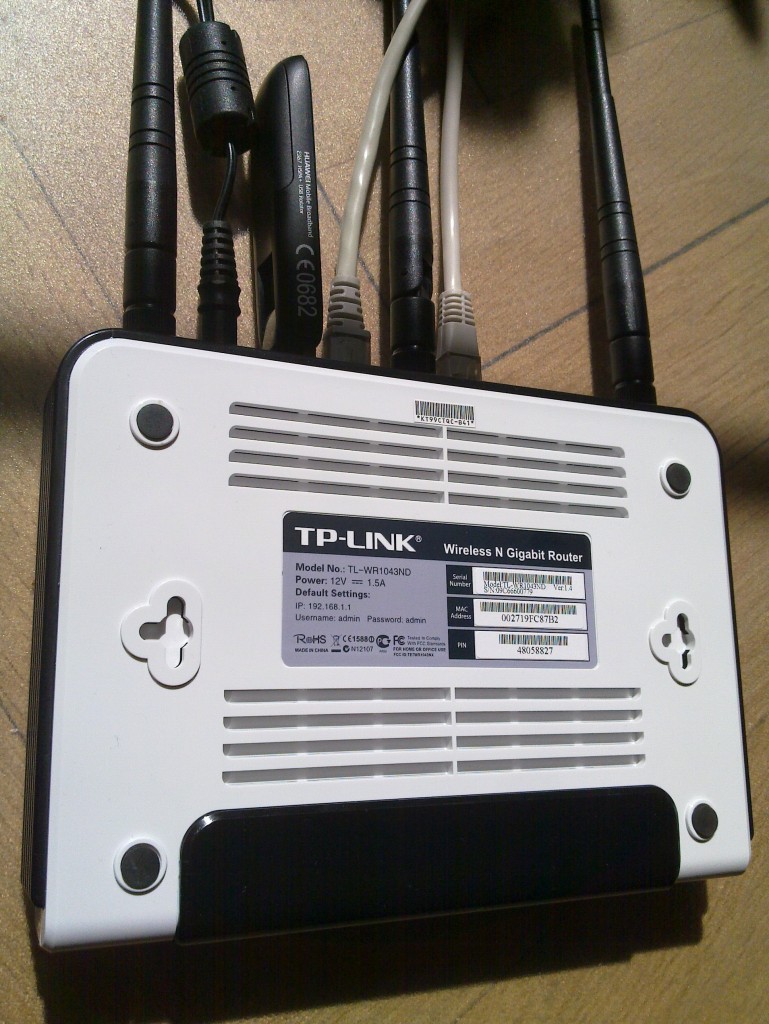
TL-WR1043ND and Huawei 367

Router and modem


The first step is to flash the firmware with OpenWRT. The OpenWRT wiki page for the TL-WR1043ND covers this in detail, and for any other hardware you should find what you need in the OpenWRT wiki. If you have already installed OpenWRT on the TL-WR1043ND, and want to wipe it out and start from scratch (like I did for this writeup) here is how to do it:
root@choco:~# cd /tmp
root@choco:/tmp# wget http://downloads.openwrt.org/backfire/10.03/ar71xx/openwrt-ar71xx-tl-wr1043nd-v1-squashfs-sysupgrade.bin
Connecting to downloads.openwrt.org (78.24.191.177:80)
openwrt-ar71xx-tl-wr 100%  *******************************   2688k 00:00:00 ETA
root@choco:/tmp# md5sum openwrt-ar71xx-tl-wr1043nd-v1-squashfs-sysupgrade.bin
9927973ba5da65d0d52e255397452b87  openwrt-ar71xx-tl-wr1043nd-v1-squashfs-sysupgrade.bin
root@choco:/tmp# mtd -r write /tmp/openwrt-ar71xx-tl-wr1043nd-v1-squashfs-sysupgrade.bin firmware
Unlocking firmware ...
Writing from /tmp/openwrt-ar71xx-tl-wr1043nd-v1-squashfs-sysupgrade.bin to firmware ...
Rebooting ...
The device will reboot automatically when it is done. After say 30 seconds, try to connect to it using the default IPv4 address 192.168.1.1. I have connected the WAN port to the Internet and connect to the router over local network connected to the router s LAN1 input. Let s configure OpenWRT, I m calling the host choco and giving it the IPv4 address 192.168.1.46. I ll also set a good root password to disable telnet, and add some SSH keys to simplify remote login.
jas@latte:~$ telnet 192.168.1.1
Trying 192.168.1.1...
Connected to 192.168.1.1.
Escape character is '^]'.
 === IMPORTANT ============================
  Use 'passwd' to set your login password
  this will disable telnet and enable SSH
 ------------------------------------------
BusyBox v1.15.3 (2010-04-06 03:14:11 CEST) built-in shell (ash)
Enter 'help' for a list of built-in commands.
  _______                     ________        __
          .-----.-----.-----.          .----.    _
     -      _     -__                   _    _ 
  _______    __ _____ __ __ ________ __    ____ 
           __  W I R E L E S S   F R E E D O M
 Backfire (10.03, r20728) --------------------------
  * 1/3 shot Kahlua    In a shot glass, layer Kahlua
  * 1/3 shot Bailey's  on the bottom, then Bailey's,
  * 1/3 shot Vodka     then Vodka.
 ---------------------------------------------------
root@OpenWrt:/# passwd
Changing password for root
New password:
Retype password:
Password for root changed by root
root@OpenWrt:/# sed -i -e 's/OpenWrt/choco/' /etc/config/system
root@OpenWrt:/# sed -i -e 's/192.168.1.1/192.168.1.46/' /etc/config/network
root@OpenWrt:/# cat>/etc/dropbear/authorized_keys
ssh-rsa AAAAB3NzaC1yc2...
^D
root@OpenWrt:/# dropbearkey -y -f /etc/dropbear/dropbear_rsa_host_key
Public key portion is:
ssh-rsa AAAA... root@OpenWrt
Fingerprint: md5 45:fd:62...
root@OpenWrt:/#
You could reboot the machine here to switch from telnet to SSH, but I ll install a bunch of packages while I m at it. Run opkg update to update the package list, and then install the wireless modules for the TL-WR1043ND.
root@OpenWrt:/# opkg update
Downloading http://downloads.openwrt.org/backfire/10.03/ar71xx/packages/Packages.gz.
Inflating http://downloads.openwrt.org/backfire/10.03/ar71xx/packages/Packages.gz.
Updated list of available packages in /var/opkg-lists/packages.
root@OpenWrt:/# opkg install kmod-ath9k wpad-mini
...
Configuring iw.
Configuring kmod-crypto-core.
Configuring kmod-crypto-arc4.
Configuring kmod-crypto-aes.
Configuring wireless-tools.
Configuring kmod-cfg80211.
Configuring kmod-mac80211.
Configuring kmod-ath.
Configuring kmod-ath9k.
Configuring crda.
Configuring wpad-mini.
root@OpenWrt:/#
Next I ll install some packages that will are needed for the modem.
root@OpenWrt:/# opkg install comgt kmod-usb-serial kmod-usb2 kmod-usb-uhci kmod-usb-ohci usb-modeswitch
...
Configuring kmod-nls-base.
Configuring kmod-usb-core.
Configuring chat.
Configuring kmod-usb-ohci.
Configuring kmod-usb2.
Configuring comgt.
Configuring usb-modeswitch.
Configuring kmod-usb-serial.
Configuring kmod-usb-uhci.
root@OpenWrt:/#
Now let s reboot the machine and try to get things to really work.
root@OpenWrt:/# sync
root@OpenWrt:/# reboot
Use SSH to connect to the router, and don t forget the use its new IPv4 address! 3G modems are notoriously known for not acting as a modem directly. Instead they often simulate a CD-ROM that will install device driver software, for inferior operating systems. Fortunately the usb_modeswitch tool fixes the hardware for us. My Huawei E367 start up with the USB vendor/product IDs 0x12d1:0 1446, you normally find this out by looking in /proc/bus/usb/devices. Here is the output on my device:
root@choco:~# cat /proc/bus/usb/devices
...
T:  Bus=01 Lev=01 Prnt=01 Port=00 Cnt=01 Dev#=  2 Spd=480 MxCh= 0
D:  Ver= 2.00 Cls=00(>ifc ) Sub=00 Prot=00 MxPS=64 #Cfgs=  1
P:  Vendor=12d1 ProdID=1446 Rev= 0.00
S:  Manufacturer=Huawei Technologies
S:  Product=HUAWEI Mobile
C:* #Ifs= 2 Cfg#= 1 Atr=c0 MxPwr=500mA
I:* If#= 0 Alt= 0 #EPs= 2 Cls=08(stor.) Sub=06 Prot=50 Driver=(none)
E:  Ad=81(I) Atr=02(Bulk) MxPS= 512 Ivl=0ms
E:  Ad=01(O) Atr=02(Bulk) MxPS= 512 Ivl=0ms
I:* If#= 1 Alt= 0 #EPs= 2 Cls=08(stor.) Sub=06 Prot=50 Driver=(none)
E:  Ad=02(O) Atr=02(Bulk) MxPS= 512 Ivl=0ms
E:  Ad=82(I) Atr=02(Bulk) MxPS= 512 Ivl=0ms
root@choco:~#
This means I have to go find a usb-modeswitch configuration for this device. Fortunately, I found it on my Debian Squeeze box in /etc/usb_modeswitch.d/12d1:1446 (from the usb-modeswitch-data package). There was a slight problem with the file, it didn t specify the correct USB vendor/product ID of the device after it has been switched . My Huawei E367 switches to 12d1:1506, so I add 1506 to the TargetProductList list. Here is the final configuration:
root@choco:~# cat>/etc/usb-modeswitch.conf
EnableLogging=1
DefaultVendor= 0x12d1
DefaultProduct=0x1446
TargetVendor=  0x12d1
TargetProductList="1001,1406,140b,140c,1412,141b,14ac,1506"
CheckSuccess=20
MessageContent="55534243123456780000000000000011062000000100000000000000000000"
root@choco:~#
Now you should be able to run usb_modeswitch to perform the switch :
root@choco:~# usb_modeswitch 
Looking for target devices ...
 No devices in target mode or class found
Looking for default devices ...
 Found default devices (1)
Accessing device 002 on bus 001 ...
Using endpoints 0x01 (out) and 0x81 (in)
Inquiring device details; driver will be detached ...
Looking for active driver ...
 No driver found. Either detached before or never attached
SCSI inquiry data (for identification)
-------------------------
  Vendor String: HUAWEI
   Model String: Mass Storage
Revision String: 2.31
-------------------------
USB description data (for identification)
-------------------------
Manufacturer: Huawei Technologies
     Product: HUAWEI Mobile
  Serial No.: not provided
-------------------------
Setting up communication with interface 0 ...
Trying to send the message to endpoint 0x01 ...
 OK, message successfully sent
Checking for mode switch (max. 20 times, once per second) ...
 Waiting for original device to vanish ...
 Original device can't be accessed anymore. Good.
 Searching for target devices ...
 Searching for target devices ...
 Searching for target devices ...
 Searching for target devices ...
 Searching for target devices ...
 Found correct target device
Mode switch succeeded. Bye.
root@choco:~#
The /proc/bus/usb/devices file will now contain information about the real device:
root@choco:~# cat /proc/bus/usb/devices
...
T:  Bus=01 Lev=01 Prnt=01 Port=00 Cnt=01 Dev#=  3 Spd=480 MxCh= 0
D:  Ver= 2.00 Cls=ef(misc ) Sub=02 Prot=01 MxPS=64 #Cfgs=  1
P:  Vendor=12d1 ProdID=1506 Rev= 0.00
S:  Manufacturer=Huawei Technologies
S:  Product=HUAWEI Mobile
C:* #Ifs= 7 Cfg#= 1 Atr=c0 MxPwr=500mA
A:  FirstIf#= 1 IfCount= 2 Cls=02(comm.) Sub=00 Prot=00
I:* If#= 0 Alt= 0 #EPs= 3 Cls=ff(vend.) Sub=01 Prot=01 Driver=(none)
E:  Ad=81(I) Atr=03(Int.) MxPS=  64 Ivl=2ms
E:  Ad=82(I) Atr=02(Bulk) MxPS= 512 Ivl=0ms
E:  Ad=01(O) Atr=02(Bulk) MxPS= 512 Ivl=4ms
I:* If#= 1 Alt= 0 #EPs= 1 Cls=ff(vend.) Sub=01 Prot=09 Driver=(none)
E:  Ad=83(I) Atr=03(Int.) MxPS=  64 Ivl=2ms
I:* If#= 2 Alt= 0 #EPs= 2 Cls=ff(vend.) Sub=01 Prot=08 Driver=(none)
E:  Ad=84(I) Atr=02(Bulk) MxPS= 512 Ivl=0ms
E:  Ad=02(O) Atr=02(Bulk) MxPS= 512 Ivl=4ms
I:* If#= 3 Alt= 0 #EPs= 2 Cls=ff(vend.) Sub=01 Prot=03 Driver=(none)
E:  Ad=85(I) Atr=02(Bulk) MxPS= 512 Ivl=0ms
E:  Ad=03(O) Atr=02(Bulk) MxPS= 512 Ivl=4ms
I:* If#= 4 Alt= 0 #EPs= 2 Cls=ff(vend.) Sub=01 Prot=02 Driver=(none)
E:  Ad=86(I) Atr=02(Bulk) MxPS= 512 Ivl=0ms
E:  Ad=04(O) Atr=02(Bulk) MxPS= 512 Ivl=4ms
I:* If#= 5 Alt= 0 #EPs= 2 Cls=08(stor.) Sub=06 Prot=50 Driver=(none)
E:  Ad=87(I) Atr=02(Bulk) MxPS= 512 Ivl=0ms
E:  Ad=05(O) Atr=02(Bulk) MxPS= 512 Ivl=0ms
I:* If#= 6 Alt= 0 #EPs= 2 Cls=08(stor.) Sub=06 Prot=50 Driver=(none)
E:  Ad=06(O) Atr=02(Bulk) MxPS= 512 Ivl=0ms
E:  Ad=88(I) Atr=02(Bulk) MxPS= 512 Ivl=0ms
root@choco:~#
Let s put that command in /etc/rc.local so that it will be run on every boot.
root@choco:~# cat /etc/rc.local
# Put your custom commands here that should be executed once
# the system init finished. By default this file does nothing.
/usr/bin/usb_modeswitch
exit 0
root@choco:~#
We are not quite ready, the usbserial module needs to be told which USB vendor/product to use. The /etc/modules.d/60-usb-serial file is used during boot to set the right parameters. You can also run rmmod followed by insmod with the proper parameters to avoid a reboot. You can use the gcom info tool to find some information about the modem. Normally you use /dev/ttyUSB0 but for some reason it does not work for me and instead I had to use /dev/ttyUSB3.
root@choco:~# cat>/etc/modules.d/60-usb-serial
usbserial vendor=0x12d1 product=0x1506 maxSize=4096
root@choco:~# rmmod usbserial
root@choco:~# insmod usbserial vendor=0x12d1 product=0x1506 maxSize=4096
root@choco:~# gcom -d /dev/ttyUSB3 info
##### Wireless WAN Modem Configuration #####
Product text:
====
Manufacturer: huawei
Model: E367
Revision: 11.807.05.00.00
IMEI: 353613040739180
+GCAP: +CGSM,+DS,+ES
OK
====
Manufacturer:           huawei
IMEI and Serial Number: 353613040739180
Manufacturer's Revision:
11.807.05.00.
Hardware Revision:      NOT
Network Locked:         ERROR:
Customisation:          NOT SUPPORT
Band settings:          (NOT)
APN:                    ERROR:
##### END #####
root@choco:~#
Let s configure network and wireless. The configurations files are /etc/config/network and /etc/config/wireless. Edit them using your favorite editor, or vi. I m setting up a PSK2 encrypted WLAN and I have a WDS to connect two wireless routers. Note that you need to use the correct PIN for your SIM card (here I m using 8328) and set the APN correctly (I m using bredband.tre.se ). Reboot after making these changes.
root@choco:~# cat /etc/config/network
config 'interface' 'loopback'
       option 'ifname'   'lo'
       option 'proto'    'static'
       option 'ipaddr'   '127.0.0.1'
       option 'netmask'  '255.0.0.0'
config 'interface' 'lan'
        option 'ifname'   'eth0.1'
        option 'type'     'bridge'
        option 'proto'    'static'
        option 'ipaddr'   '192.168.1.46'
        option 'netmask'  '255.255.255.0'
#config 'interface' 'wan'
#        option 'ifname' 'eth0.2'
#        option 'proto' 'dhcp'
config 'switch'
	option 'name' 'rtl8366rb'
        option 'reset' '1'
        option 'enable_vlan' '1'
config 'switch_vlan'
        option 'device' 'rtl8366rb'
        option 'vlan' '1'
        option 'ports' '1 2 3 4 5t'
config 'switch_vlan'
        option 'device' 'rtl8366rb'
        option 'vlan' '2'
        option 'ports' '0 5t'
config interface wan
        option ifname   ppp0
        option proto    3g
        option device   /dev/ttyUSB0
        option apn      bredband.tre.se
        option pincode  8328
root@choco:~# cat /etc/config/wireless
config wifi-device  radio0
	option type     mac80211
	option channel  5
	option macaddr	00:27:19:fc:87:b2
	option hwmode	11ng
	option htmode	HT20
	list ht_capab	SHORT-GI-40
	list ht_capab	DSSS_CCK-40
config wifi-iface
	option device   radio0
	option network  lan
	option mode     ap
	option ssid     Grisslan
	option encryption psk2
	option key	  notforyoutosee
config wifi-iface
        option device     radio0
        option network    lan
        option mode       wds
        option bssid      00:1F:C6:60:D3:11
        option ssid       GrisslanWDS
        option encryption psk2
        option key        thisisalsosecret
root@choco:~# reboot
root@choco:~#
Once the machine have rebooted, you can bring up the 3G connection by using ifup wan . Look at the log by using logread and tail the log in the background by doing logread -f & .
root@choco:~# ifup wan
Trying to set PIN
PIN set successfully
root@choco:~# logread  tail -20
May 21 13:41:20 choco local2.info chat[2419]: send (ATD*99***1#^M)
May 21 13:41:20 choco local2.info chat[2419]: expect (CONNECT)
May 21 13:41:20 choco local2.info chat[2419]: ^M
May 21 13:41:20 choco local2.info chat[2419]: ATD*99***1#^M^M
May 21 13:41:20 choco local2.info chat[2419]: CONNECT
May 21 13:41:20 choco local2.info chat[2419]:  -- got it
May 21 13:41:20 choco local2.info chat[2419]: send ( ^M)
May 21 13:41:20 choco daemon.info pppd[2412]: Serial connection established.
May 21 13:41:20 choco daemon.info pppd[2412]: Using interface ppp0
May 21 13:41:20 choco daemon.notice pppd[2412]: Connect: ppp0 <--> /dev/ttyUSB0
May 21 13:41:24 choco daemon.warn pppd[2412]: Could not determine remote IP address: defaulting to 10.64.64.64
May 21 13:41:24 choco daemon.notice pppd[2412]: local  IP address 95.209.96.115
May 21 13:41:24 choco daemon.notice pppd[2412]: remote IP address 10.64.64.64
May 21 13:41:24 choco daemon.notice pppd[2412]: primary   DNS address 80.251.201.177
May 21 13:41:24 choco daemon.notice pppd[2412]: secondary DNS address 80.251.201.178
May 21 13:41:24 choco daemon.info dnsmasq[1028]: reading /tmp/resolv.conf.auto
May 21 13:41:24 choco daemon.info dnsmasq[1028]: using nameserver 80.251.201.178#53
May 21 13:41:24 choco daemon.info dnsmasq[1028]: using nameserver 80.251.201.177#53
May 21 13:41:24 choco daemon.info dnsmasq[1028]: using local addresses only for domain lan
May 21 13:41:25 choco user.notice rdate: Synced with ptbtime1.ptb.de
root@choco:~#
Hooray! Or almost so usually the first time you connect, I often get incorrect DNS servers from the server. It shows up like this in the log:
May 21 12:25:04 choco daemon.notice pppd[1157]: primary   DNS address 10.11.12.13
May 21 12:25:04 choco daemon.notice pppd[1157]: secondary DNS address 10.11.12.14
The exact reason why this happens is beyond me. There are patches floating around for pppd, but I haven t tried them. A common workaround is to hardcode static DNS servers (like Google DNS or OpenDNS). I have come up with my own workaround, based on the observation that when the problem has occurred it will not happen again if I disconnect and reconnect. Thus I have written a small script which is invoked whenever an interface is brought up (typically the WAN interface).
# Written by Simon Josefsson May 2011.
root@choco:~# cat> /etc/hotplug.d/iface/01-reconnect-if-dns-is-broken
case "$ ACTION:-ifup " in
    ifup)
	    if grep -q 10.11.12.13 /tmp/resolv.conf.auto; then
		(sleep 30 && ifdown wan && ifup wan) &
	    fi
	    ;;
esac
root@choco:~# chmod +x /etc/hotplug.d/iface/01-reconnect-if-dns-is-broken
root@choco:~#
That s it! If you found this writeup useful, please flattr it.

17 May 2011

Julien Danjou: Python sets comparisons

This week I lost some time playing with Python's sets. After digging into Python source code, I finally discovered there is what seems to be little bug. Anyway, it has been "fixed" in Python 3, fortunately. I did not find if it was reported somewhere, but since it's fixed, it's not a big deal.

Python 2.7.1+ (default, Apr 20 2011, 10:53:33) 
[GCC 4.5.2] on linux2
Type "help", "copyright", "credits" or "license" for more information.
>>> class A(object):
...     def __eq__(self, other):
...             return True
... 
>>> A() == A()
True
>>> [A()] == [A()]
True
>>> set([A()]) == set([A()])
False
This clearly did not make any sense to me. I've then tested under Python 3.2:
Python 3.2.1a0 (default, May  4 2011, 19:59:25) 
[GCC 4.6.1 20110428 (prerelease)] on linux2
Type "help", "copyright", "credits" or "license" for more information.
>>> class A(object):
...     def __eq__(self, other):
...             return True
... 
>>> set([A()]) == set([A()])
Traceback (most recent call last):
  File "<stdin>", line 1, in <module>
TypeError: unhashable type: 'A'
At least, raising an error is saner. It actually helped me to understand what I needed to do to have my sets working correctly with Python 2:
Python 2.7.1+ (default, Apr 20 2011, 10:53:33) 
[GCC 4.5.2] on linux2
Type "help", "copyright", "credits" or "license" for more information.
>>> class A(object):
...     def __eq__(self, other):
...             return True
...     def __hash__(self):
...             return 123456789
... 
>>> set([A()]) == set([A()])
True
Flattr this

Vincent Bernat: Debian on Thinkpad Edge 11"

This has been several months since I didn t use much my laptop, an Asus S5N: it was crippled by a short battery life and was hit by several bugs, most of them targeting the i855GME graphic chipset thanks to the use of GEM and KMS in the latest Xorg. I did not want to invest too much in a laptop and I have found a rebate from Lenovo for Thinkpad Edge series. Voil , I have a Thinkpad Edge 11 .

Hardware Thinkpad Edge is a entry-level notebook from Lenovo. In France, it is available for around 500 , thanks to the usual parity between dollar and euro. Thinkpad Edge 11" enclosure

Hardware configuration Lenovo do not sell directly in France. Therefore, you cannot configure your laptop as you want. There is two or three configurations available. This can be a bit frustrating if you want something specific. Thinkpad Edge 11" parts Here is the configuration that I bought:
  • Intel Core i3 380UM at 1.33 GHz CPU.
  • 11.6 LED screen, with a resolution of 1366x768.
  • 4 GB RAM.
  • 320 GB hard drive.
  • Wireless network (Centrino Wireless-N) and bluetooth.
  • Broadband modem (WWAN)
It s a small laptop but it is not as light as it should be (1.5 kg or 3.3 pounds). Apart from the power supply, you don t get any extra. My Asus was shipped with a wireless mouse, a transport bag, a sleeve, an USB key and a CD burner. On one side, you get two USB ports and on the other side, one USB port, an HDMI port, a network outlet and a speaker jack. The VGA connector is placed on the rear. Thinkpad Edge 11"

BIOS First step: checking BIOS settings. WiMAX can be disabled as well as any other component that you may not need. The keyboard can be configured so that function keys are available directly instead of having to use the Fn key. There is an option called Computrace from AbsoluteSoftware which seems targeted at find back your laptop in case it gets stolen or just let the FBI know where you are. I have disabled it.

Debian installation Debian can be installed from an USB stick. This is really easy now. You grab the ISO image you want to use (I take the one for AMD64 in testing because I will run unstable) and to copy it on the USB stick:
1
# dd if=debian-testing-amd64-netinst.iso of=/dev/sdb
The previous way of making the USB stick bootable, installing a kernel, an initrd and the ISO image is deprecated (and does not work). Moreover, using testing to install Debian allows me to use a 2.6.37 kernel and circumvent some problems that may have happen with an older kernel. During the installation, I choose a guided partitioning using encrypted LVM. I choose to have several partitions but I keep /usr in the root partition since having a separate /usr is less and less supported, especially with piece of software like udev. The partitioning tool in Debian installer do not allow to resize volumes, you need to destroy them and recreate them as well as their content. However, this is still faster than writing a patch for this. When the installation is finished, the laptop boots on a 2.6.38 kernel, asks for the passphrase to decrypt the LUKS volume and display the login prompt a few seconds later.

Software configuration Most of the hardware seems to be supported. No obscure commands to run to get a working network. Therefore, I start by setting up my usual environment.

Setting up the desktop First, I change /etc/apt/sources.list to get unstable:
deb http://ftp.fr.debian.org/debian/ unstable main
deb-src http://ftp.fr.debian.org/debian/ unstable main
deb http://ftp.fr.debian.org/debian/ experimental main contrib non-free
I also want that everything that is installed from experimental to be upgraded if an update is available in experimental. This is done by creating a file /etc/apt/preferences.d/experimental:
Package: *
Pin: release experimental
Pin-Priority: 101
Then, I install the following packages:
  • zsh, my favourite shell with my hand-made maturating configuration. I should put it on GitHub one day.
  • mg, is the editor that I use to quickly edit a configuration file. I don t like vi. I have used jed for a long time but its default configuration can be cumbersome and it misses some emacs keybinding.
  • emacs, my work environment. I use it as a text editor and mail reader (with Gnus). I don t use it as a browser nor as a terminal. As for zsh, I have my configuration files ready to be copied anywhere.
  • fvwm, my window manager since quite some time. I use fvwm-crystal on top of it. My configuration is described in another post. I also use conky.
  • rxvt-unicode, a terminal. It has a very good terminal emulation and some fancy features like transparency (using compositing or not). It is light and fast and allows to search in the backbuffer. It can use a client/server system that will close all your windows when the server crashes. This almost never happens.
  • unison, a synchronisation tool that allows me to keep the same files on my different computers.
  • gdm3 is the only display manager that is able to talk correctly to ConsoleKit and get the rights set correctly without adding yourself to a lot of groups.
Nowadays, I use the kernel from Debian and I do not have to run my own configuration for it. The glory days where I had to recompile the kernel before plugging a new USB toy have passed. I remove rpcbind and nfs-common. I use ferm to setup a simple firewall. Here is my ferm.conf:
domain (ip ip6)  
  table filter  
chain INPUT  
    policy DROP;
    mod state state INVALID DROP;
    mod state state (ESTABLISHED RELATED) ACCEPT;
    interface lo ACCEPT;
    proto tcp dport ssh ACCEPT;
    
chain OUTPUT  
    policy ACCEPT;
    mod state state (ESTABLISHED RELATED) ACCEPT;
    
chain FORWARD  
    policy DROP;


unison will then sync my configuration files and my documents. After this step, my environment is ready.

Hardware configuration This is usually the most troublesome part. However, looking at the output of lspci and lsusb, everything seems pretty easy to get supported. Here is lspci output:
00:00.0 Host bridge: Intel Corporation Core Processor DRAM Controller (rev 02)
00:02.0 VGA compatible controller: Intel Corporation Core Processor Integrated Graphics Controller (rev 02)
00:16.0 Communication controller: Intel Corporation 5 Series/3400 Series Chipset HECI Controller (rev 06)
00:1a.0 USB Controller: Intel Corporation 5 Series/3400 Series Chipset USB2 Enhanced Host Controller (rev 06)
00:1b.0 Audio device: Intel Corporation 5 Series/3400 Series Chipset High Definition Audio (rev 06)
00:1c.0 PCI bridge: Intel Corporation 5 Series/3400 Series Chipset PCI Express Root Port 1 (rev 06)
00:1c.1 PCI bridge: Intel Corporation 5 Series/3400 Series Chipset PCI Express Root Port 2 (rev 06)
00:1c.5 PCI bridge: Intel Corporation 5 Series/3400 Series Chipset PCI Express Root Port 6 (rev 06)
00:1d.0 USB Controller: Intel Corporation 5 Series/3400 Series Chipset USB2 Enhanced Host Controller (rev 06)
00:1e.0 PCI bridge: Intel Corporation 82801 Mobile PCI Bridge (rev a6)
00:1f.0 ISA bridge: Intel Corporation Mobile 5 Series Chipset LPC Interface Controller (rev 06)
00:1f.2 SATA controller: Intel Corporation 5 Series/3400 Series Chipset 4 port SATA AHCI Controller (rev 06)
00:1f.3 SMBus: Intel Corporation 5 Series/3400 Series Chipset SMBus Controller (rev 06)
00:1f.6 Signal processing controller: Intel Corporation 5 Series/3400 Series Chipset Thermal Subsystem (rev 06)
03:00.0 Network controller: Intel Corporation Centrino Wireless-N 1000
09:00.0 Ethernet controller: Realtek Semiconductor Co., Ltd. RTL8111/8168B PCI Express Gigabit Ethernet controller (rev 03)
ff:00.0 Host bridge: Intel Corporation Core Processor QuickPath Architecture Generic Non-core Registers (rev 02)
ff:00.1 Host bridge: Intel Corporation Core Processor QuickPath Architecture System Address Decoder (rev 02)
ff:02.0 Host bridge: Intel Corporation Core Processor QPI Link 0 (rev 02)
ff:02.1 Host bridge: Intel Corporation Core Processor QPI Physical 0 (rev 02)
ff:02.2 Host bridge: Intel Corporation Core Processor Reserved (rev 02)
ff:02.3 Host bridge: Intel Corporation Core Processor Reserved (rev 02)
And lsusb output (I disabled the broadband modem in the BIOS and therefore, it does not appear here):
Bus 001 Device 001: ID 1d6b:0002 Linux Foundation 2.0 root hub
Bus 002 Device 001: ID 1d6b:0002 Linux Foundation 2.0 root hub
Bus 001 Device 002: ID 8087:0020 Intel Corp. Integrated Rate Matching Hub
Bus 002 Device 002: ID 8087:0020 Intel Corp. Integrated Rate Matching Hub
Bus 001 Device 003: ID 0bda:0158 Realtek Semiconductor Corp. USB 2.0 multicard reader
Bus 001 Device 004: ID 0a5c:217f Broadcom Corp. Bluetooth Controller
Bus 002 Device 003: ID 5986:01a7 Acer, Inc Lenovo Integrated Webcam
There is a dedicated page for the Thinkpad Edge 11 on ThinkWiki. This wiki is one of the best source of information when you get a Thinkpad. The kernel as shipped by Debian kernel team contains every module that you may need. One of them, thinkpad_acpi will handle most of the perks under the hood. I do not use a complete desktop like Gnome. I usually prefer to use command line tools and put them in .xsession for persistence. There is usually some graphical utility to do the same thing. There are however some configuration steps that are now far easier to do with a graphical tool. Since I use X all the time, I just rely on those tools when necessary.

BIOS upgrade From lshw output, I see that I already have the latest BIOS available. No need to update then. In case you need to update, yours, ThinkWiki has a documentation to upgrade. You can find memdisk image in syslinux package.

Graphic card The graphic card is integrated into the CPU. Intel usually ships graphic cards well supported by open source drivers. ThinkWiki tells us:
A very recent Linux distribution with kernel 2.6.33 and Intel Xorg driver 2.11 or newer is recommended. Note that XVideo (Xv) playback at certain frame sizes does not work properly unless you have at least version 2.12 of the Intel Xorg driver.
With Debian Wheezy, you get version 2.15. Therefore, configuring the graphic card is just a matter of installing xserver-xorg-video-intel and that s all. No /etc/X11/xorg.conf needed. HDMI and VGA outputs are detected without configuring anything. They can be enabled with xrandr. I did not try if it was possible to use both of them at the same time.
Screen 0: minimum 320 x 200, current 1366 x 768, maximum 8192 x 8192
LVDS1 connected 1366x768+0+0 (normal left inverted right x axis y axis) 256mm x 144mm
   1366x768       60.0*+   50.0  
   1360x768       59.8     60.0  
   1024x768       60.0  
   800x600        60.3     56.2  
   640x480        59.9  
VGA1 disconnected (normal left inverted right x axis y axis)
HDMI1 disconnected (normal left inverted right x axis y axis)
DP1 disconnected (normal left inverted right x axis y axis)
Compositing works without any problem. I use only transparency and therefore, I don t know what the speed is on a desktop with all effects turned on. Regarding video acceleration, XVideo is supported but the graphic card also features hardware decoding with i965-va-driver package. Here is the output of vainfo:
libva: libva version 0.32.0
libva: va_getDriverName() returns 0
libva: Trying to open /usr/lib/dri/i965_drv_video.so
libva: va_openDriver() returns 0
vainfo: VA API version: 0.32
vainfo: Driver version: i965 Driver 0.1
vainfo: Supported profile and entrypoints
  VAProfileMPEG2Simple            : VAEntrypointVLD
  VAProfileMPEG2Main              : VAEntrypointVLD
  VAProfileH264Baseline           : VAEntrypointVLD
  VAProfileH264Main               : VAEntrypointVLD
  VAProfileH264High               : VAEntrypointVLD
With Debian, VLC can make use of this if you put ffmpeg-hw=1 in your ~/.config/vlc/vlcrc. We are then greeted by this:
[0x2629040] avcodec decoder: Using VA API version 0.32 for hardware decoding.

Network The network card works out of the box. ThinkWiki tells us that there can be stability problems with 2.6.36 kernel. During the installation, a 2.6.37 was used without any problem. I am now running a 2.6.38 and never got a glitch. It is likely that the described problem was solved with 2.6.37.

UltraNav UltraNav is the combination of the usual touchpad and the trackpoint which is a small joystick in the center of the keyboard and is well known to Thinkpad users since most of them have one. The trackpoint is a great input device. Nowadays, all input devices are configured with the help of xinput command. Here is the output of xinput list:
  Virtual core pointer                      id=2    [master pointer  (3)]
      Virtual core XTEST pointer                id=4    [slave  pointer  (2)]
      SynPS/2 Synaptics TouchPad                id=11   [slave  pointer  (2)]
      TPPS/2 IBM TrackPoint                     id=12   [slave  pointer  (2)]
  Virtual core keyboard                     id=3    [master keyboard (2)]
  Virtual core XTEST keyboard               id=5    [slave  keyboard (3)]
  Power Button                              id=6    [slave  keyboard (3)]
  Video Bus                                 id=7    [slave  keyboard (3)]
  Power Button                              id=8    [slave  keyboard (3)]
  Integrated Camera                         id=9    [slave  keyboard (3)]
  AT Translated Set 2 keyboard              id=10   [slave  keyboard (3)]
  ThinkPad Extra Buttons                    id=13   [slave  keyboard (3)]
The command xinput list-props will give you additional information on each input device listed above. You can then configure any settings using xinput set-prop. For example, if you want to enable scrolling by using the edges of the touchpad and enable palm detection, you can use the following commands:
1
2
$ xinput set-int-prop "SynPS/2 Synaptics TouchPad" 'Synaptics Edge Scrolling' 8 1 1 0
$ xinput set-int-prop "SynPS/2 Synaptics TouchPad" 'Synaptics Palm Detection' 8 1
If you want to disable the touchpad and only use the trackpoint, use the following command:
1
$ xinput set-int-prop "SynPS/2 Synaptics TouchPad" 'Synaptics Off' 8 1
Each property has a type and a size. There is no place for guessing since every property is listed in man 4 synaptics. The same applies for the trackpoint but the correct manual page is man 4 evdev. For example, if you want to enable scrolling using the middle button, use:
1
2
$ xinput set-int-prop "TPPS/2 IBM TrackPoint" "Evdev Wheel Emulation" 8 1
$ xinput set-int-prop "TPPS/2 IBM TrackPoint" "Evdev Wheel Emulation Button" 8 2
All those commands can be tossed in ~/.xsession.

Keyboard hot keys Thinkpad laptops usually have a lot of hot keys. This is not the case of the Thinkpad Edge which only features a few of them:
  • volume control
  • brightness control
  • webcam and external screen toggle
  • wireless toggle
  • multimedia keys
All those keys trigger an event in one of the keyboard listed in xinput list. Therefore, your window manager or any other application can intercept them and act upon. You can use evtest to check which key triggers which event on which keyboard. The acpid daemon listen on those keyboards and can also trigger some actions. For example, it will run ibm-wireless.sh when you hit the wireless toggle. By default, this will enable or disable your wireless card. But you can configure the script to use a multistate toggle and disable or enable the bluetooth card as well.

Sound card As for the network card, the sound card works out of the box. I use PulseAudio because it allows per-application volume control and per-application sound card selection. It comes handy if you have some bluetooth headset. To make PulseAudio the default application for most applications, I put this in my ~/.asoundrc:
pcm.!default  
  type pulse
 
ctl.!default  
  type pulse
 

Wireless card A firmware is needed to make this card work. On Debian, you need to install firmware-iwlwifi package. Then, iwlagn module needs to be loaded. You can check with rfkill list that the wireless card has not been disabled. iw list will then give the status:
Wiphy phy0
Band 1:
    Capabilities: 0x872
        HT20/HT40
        Static SM Power Save
        RX Greenfield
        RX HT20 SGI
        RX HT40 SGI
        No RX STBC
        Max AMSDU length: 3839 bytes
        No DSSS/CCK HT40
    Maximum RX AMPDU length 65535 bytes (exponent: 0x003)
    Minimum RX AMPDU time spacing: 4 usec (0x05)
    HT RX MCS rate indexes supported: 0-15, 32
    TX unequal modulation not supported
    HT TX Max spatial streams: 1
    HT TX MCS rate indexes supported may differ
    Frequencies:
        * 2412 MHz [1] (14.0 dBm)
        * 2417 MHz [2] (14.0 dBm)
        * 2422 MHz [3] (14.0 dBm)
        * 2427 MHz [4] (14.0 dBm)
        * 2432 MHz [5] (14.0 dBm)
        * 2437 MHz [6] (14.0 dBm)
        * 2442 MHz [7] (14.0 dBm)
        * 2447 MHz [8] (14.0 dBm)
        * 2452 MHz [9] (14.0 dBm)
        * 2457 MHz [10] (14.0 dBm)
        * 2462 MHz [11] (14.0 dBm)
        * 2467 MHz [12] (14.0 dBm) (passive scanning, no IBSS)
        * 2472 MHz [13] (14.0 dBm) (passive scanning, no IBSS)
    Bitrates (non-HT):
        * 1.0 Mbps
        * 2.0 Mbps (short preamble supported)
        * 5.5 Mbps (short preamble supported)
        * 11.0 Mbps (short preamble supported)
        * 6.0 Mbps
        * 9.0 Mbps
        * 12.0 Mbps
        * 18.0 Mbps
        * 24.0 Mbps
        * 36.0 Mbps
        * 48.0 Mbps
        * 54.0 Mbps
max # scan SSIDs: 20
Supported interface modes:
     * IBSS
     * managed
     * monitor
I don t know why, but 802.11a channels have been disabled. I don t have interest in them and therefore I did not search why this happens.
iwlagn 0000:03:00.0: Detected Intel(R) Centrino(R) Wireless-N 1000 BGN, REV=0x6C
iwlagn 0000:03:00.0: device EEPROM VER=0x15d, CALIB=0x6
iwlagn 0000:03:00.0: Device SKU: 0X9
iwlagn 0000:03:00.0: Valid Tx ant: 0X1, Valid Rx ant: 0X3
iwlagn 0000:03:00.0: Tunable channels: 13 802.11bg, 0 802.11a channels
iwlagn 0000:03:00.0: irq 44 for MSI/MSI-X
iwlagn 0000:03:00.0: loaded firmware version 128.50.3.1 build 13488
Wireless is one of the thing that make me use graphical applications like Network Manager. Command line tools are too low level to quickly connect to some random wireless network. There was a large debate in debian-devel@ldo to determine if Network Manager was ready to replace ifup and ifdown commands, even for servers. It seems that this is not something impossible and therefore, I think it has become flexible enough to ensure most of the configuration tasks I need.

Bluetooth The bluetooth chipset is hosted on the USB bus. hci_usb module will take care of it. It supports AD2P and can be used to listen to music with a compatible headset. hciconfig will tell us if the chipset is working. Again, bluetooth is easier to configure with a graphical tool. BlueZ, the bluetooth stack in Linux, uses DBus to communicate with other applications. The command line tools have been deprecated and therefore, you need to fight with some DBus binding to pair your computer to your headset. gnome-bluetooth package comes with an applet which allows you to quickly pair to any device. If you install pulseaudio-module-bluetooth package, any bluetooth headset should work out of the box.

Broadband (WWAN) To configure the broadband modem, the most difficult thing to do is to grab the appropriate firmware. ThinkWiki comes with various instructions to get it. I did not keep my Windows installation and therefore, I grabbed the Qualcomm Gobi 2000 Wireless WAN driver and I unpacked it with some Windows host with msiexec as instructed (I did have to execute the installation program first, otherwise, msiexec tells that the file is invalid). I choosed the default firmware since my laptop is unlocked. ThinkWiki page explains which firmware to choose in which situation. The package gobi-loader needs to be installed. The firmware files amss.mbn, apps.mbn and UQCN.mbn should be placed in /lib/firmware/gobi. They will be loaded by udev. To avoid to reboot, I used this command:
1
# /lib/udev/gobi_loader -2000 /dev/ttyUSB0 /lib/firmware/gobi
To configure the 3G connection, I just used Network Manager. Ensure with rfkill list that your WWAN card is not blocked. I did not test the GPS part that needs to be enabled on Windows.

Webcam Nowadays, USB webcam are UVC device and there is a driver to support this class of devices. Check that the uvcvideo module is correctly loaded and you should have something like this in your dmesg:
uvcvideo: Found UVC 1.00 device Integrated Camera (5986:01a7)
cheese is a small application that can be used to check if the webcam operates as expected.

Card reader Nothing to do. This works out of the box.

Suspend to memory and disk Install the uswsusp package which will also pull pm-utils. You will get pm-suspend and pm-hibernate commands. pm-suspend will enable suspend to memory. On resume, the system takes a whole minute to become operational. I get the following message:
r8169 0000:09:00.0: eth0: unable to apply firmware patch
PM: resume of devices complete after 60786.035 msecs
PM: Finishing wakeup.
Installing firmware-realtek package solves this issue. It should also be solved by a future kernel. I also have this message when I come back from sleep:
[drm:i915_hangcheck_ring_idle] *ERROR* Hangcheck timer elapsed... render ring idle [waiting on 9297, at 9297], missed IRQ?
The X server is then slow as hell. The message can be fixed by using i915.semaphores=1 as a kernel parameter but the X server is still slow. It seems that running powertop restores the original speed. This is a known problem. On sleep, the battery loses 2% every 6 hours. This allows you to keep your laptop on sleep for several days if needed. pm-hibernate enable suspend to disk. The suspend part works well but on resume, the kernel freezes after reading back the image into memory. There are some documentation to debug this problem but I prefer to wait for 2.6.39 which may just solves this issue.

Power management Let s see on how we could enhance battery life. First, cpufrequtils package will slow down the processor when it is not used by using the ondemand governor. The frequency will drop from 1.33 GHz to 666 MHz. Several tools are then available:
  • pm-utils package comes with scripts to enable some powersaving features. Those scripts are run on ACPI events (for example, when you unplug the AC adapater). There is no way to put the laptop to sleep after two hours of inactivity for example. You need something like sleepd to handle this part. I have found nothing that could dim the screen on inactivity.
  • laptop-mode-tools is also a set of script to be run on ACPI events. It is therefore somewhat superseded by pm-utils.
  • gnome-power-manager is a daemon that makes use of upowerd. Despite its name, you can run it outside of the Gnome environment. It will put your laptop to sleep on inactivity and will dim the screen when needed. All other functionalities are handled to upowerd. This seems the way to go on today Linux desktops.
Behing the scene, upowerd will call at some point pm-powersave from pm-utils. This allows to run scripts when unplugging the AC adapter. There are some scripts shipped in /usr/lib/pm-utils/power.d. You can add your own in /etc/pm/power.d. Some scripts are configurable. For example, if you create /etc/pm/config.d/local and put SATA_ALPM_ENABLE=true in it, this will enable SATA ALPM mode on battery. You can check what needs to be done with powertop or go to a website like Less Watts to get some tips on what to configure to get a better battery life. Without adding any script, I get 5 hours of battery life with the laptop doing almost nothing. Lenovo tells that you should get 6 hours of battery life. I think that on moderate workloads, you should get 4 hours.

Conclusion This Lenovo Edge has a good value for money. It features a great keyboard for a laptop of its size. It could be lighter and thinner. Its battery life is pretty good. Almost everything works out of the box with GNU/Linux. I hope that 2.6.39 kernel will solve the remaining issues like the suspend on disk issue.

16 May 2011

John Sullivan: Send bricks to Nintendo

Brick Nintendo before they brick you! Connectivity can be a force for autonomy and freedom, or it can be used for control and subjugation. The Nintendo 3DS is an example of the latter. Okay, yeah, I just said a cute video game console is a threat to personal freedom. Hear me out. If you haven't read the highlights of Nintendo's Terms of Service for the 3DS yet, you should do that. On one hand, it's "just" a games console. On the other hand, it's a computer, marketed to children, which monitors your location (based on proximity to wifi access points), uploads your photos and messages to Nintendo's servers (giving them a license to re-use that information in various ways), and tracks your activity. Now that's entertainment. If you wanted your Nintendo computer to stop doing those things, you could try to install some 3rd-party "homebrew" software on it. Except then, according to the Terms, Nintendo would "brick" your device render it inoperable, when the modified software is detected. Would you accept Ford disabling your car because you had a mechanic friend fix a problem using some aftermarket parts? Microsoft breaking your computer hardware because you installed Firefox? The ability to stop your electronics from spying on you is an important freedom to defend, even if you don't ever plan on purchasing a Nintendo device. Such terms, and the Digital Restrictions Management software that enforces them, are a problem in all areas of digital life. It's the same fundamental strategy as Apple controlling what you can install on the iPhone or iPad, or Sony sending police officers to a programmer's house because he showed other people how to modify their own computers to make them able to run non-Sony-approved software. If we don't set a strong precedent against this behavior, it will become more prevalent. If we lose the ability to install what we like on our computers, then we lose the ability to use those computers in any way that isn't pre-approved by a corporation. We lose it not only because we ourselves can't install some software maybe we hate changing anything on our computers at all but because the people who write the software we rely on lose that freedom, which ends up impacting even the most non-technical of computer users. Companies like to portray anyone arguing for this freedom as criminals just wanting to illegally copy software. But that's obviously not true -- a person who follows all laws, even the most absurd, might still want to install something to stop Nintendo from receiving copies of her photos or reporting on her location. Companies use the threat of illegal copying to justify massive infringements on real personal freedoms. People often say, "well, just don't buy it then". I agree don't buy it. But don't think this is merely a consumer issue. Terms like Nintendo's are backed by the force of criminal law the Digital Millennium Copyright Act in the US for example which can put you in jail for helping people to modify their own computers. So this is more than a mere preference issue, it's also one of law and ethics. It's not a free market when one side has coercive state resources in play to prop up its arbitrary business model. To help send this message, I just donated to send 5 bricks to Nintendo. I hope you'll send one or five too. The campaign has a goal of sending 200 bricks by the end of today (Monday, May 16th). Nintendo clearly wants to get into the brick-making business, so surely they'll appreciate the extra inventory. (Disclosure: While I do work for the Free Software Foundation and am paid partly to run the Defective by Design campaign, I really did donate, and support this campaign personally.)

15 May 2011

Kai Wasserb ch: Chronicle 4.6-2 fixes another UTF-8 encoding issue

Today I was playing with some RDF information, initially triggered by my entry about Josephine. While at it I decided to add some information explicitly to the head tag, including
<meta property="cc:attributionName" content="Kai Wasserb ch" />
<meta property="dc:creator" content="Kai Wasserb ch" />
Obviously I wanted to add those two tags to my templates, so Chronicle adds that to all files. Unfortunately this resulted in an encoding error of the " ". Some digging in the source of chronicle showed, that HTML::Template-new() was called without ensuring, that the tempalte files were parsed as UTF-8 encoded. The solution was to add a filter. The just uploaded version 4.6-2 contains the required patch and if you don't use the Debian packages you won't be left out for long, as Steve already applied the fix upstream.

Next.

Previous.