Uwe Hermann: Physical memory attacks via Firewire/DMA - Part 1: Overview and Mitigation
This is part 1 of a series on articles about the Firewire security issues mentioned below.
For many years now, attacks via Firewire / i.LINK / IEEE 1394 have been a known security issue. Basically, if you gain physical access to a PC or laptop which has Firewire ports (or PCMCIA/Cardbus/ExpressCard, more on that later) you can
- read arbitrary RAM contents from the victim's system,
- overwrite arbitrary RAM contents with whatever you want,
- and perform many, many severe attacks based on the two issues above. Examples include grabbing a full RAM dump via Firewire (takes only a few minutes), grabbing ssh-agent keys, grabbing screen contents, modifying screen contents, bypassing login/password screens, and many, many more...
- Pacsec 2004: 0wned by an iPod (PDF)
- 21C3: Hacking with Fire / Feuriges Hacken - Spa mit Firewire (PDF)
- Cansecwest 2005: Firewire: all your memory are belong to us (PDF)
- pyfw-20041111.tar.gz: Mac OS X Firewire bindings for Python, various demos
- http://c0re.23.nu/c0de/pyfw/: Other versions of the above code
- pyfw_linux.tar.gz: Linux Firewire bindings for Python (can be used with above demo code on Linux)
- ipod-linux-pyfw.tar.bz2: Instructions (+ disk image) on how to turn your iPod into a Firewire attack tool
- pythonraw1394-1.0.tar.gz: Python bindings for libraw1394 (Linux). Tools: businfo, romtool, 1394memimage
- winlockpwn: Python script which can circumvent a locked Windows XP screen (an arbitrary password will log you in)
- bioskbsnarf: Grabs/shows the BIOS keyboard buffer via Firewire (which often contains your BIOS password)
- 2007: OpenChaos: hacking in physically addressable memory (no extra slides)
- Easterhegg 2008: FireWire Hacking: paper (PDF), slides (PDF)
- More papers here...
- http://0null.net/software/SEAT1394/: tools and libraries for pyhsical memory access via Firewire/DMA: 1394csrtool, liblinear, libphysical, debug-sshkey, dump-memory, remote-ps, show-stack, snarf-sshkey, test-all-pagedirs, dmashell, ...
$ modprobe ohci1394 phys_dma=0I have personally tested this on some boxes and I can confirm that it renders the currently published tools useless. As for the new "juju" Firewire stack, I'm not so sure. A few quick tests showed that the currently available tools don't work with the new stack, but you shouldn't feel too secure! AFAIK the new stack does support (or will support soon) physical DMA for Firewire, so it's probably just a matter of adapting the tools a bit (I'll do some testing/research on this later, as time permits). Mitigation: Mac OS On Mac OS you might also be able to completely remove Firewire support from the kernel (but I don't know if/how that can be done, not sure if you can easily recompile Mac OS kernels, and/or if you even have buildable source code and toolchains for that). However, you can at least remove the Firewire support in the default Mac OS installation by unloading AppleFWOHCI.kext:
$ sudo kextunload /System/Library/Extensions/IOFireWireFamily.kext/Contents/PlugIns/AppleFWOHCI.kextThanks to a Daniel Reutter for letting me abuse his MacBook via Firewire and for finding the above kextunload command line. We have successfully tested that after unloading AppleFWOHCI.kext the current tools won't work anymore. The tests were done on a Mac OS X Tiger (I think) with all recent security updates applied. Please leave a comment if you can test other versions of Mac OS X... Mitigation: Windows As for Windows, well, I guess you're screwed. While Windows XP does implement sort of "protection" in that it only allows physical DMA access via Firewire to devices which "deserve it", e.g. iPods (or any other Firewire mass storage device, I guess) this can be easily defeated by having your attack PC/laptop pretend to be an iPod (see the romtool Python script by Adam Boileau). The only remaining option I know of (short of removing/destroying Firewire ports or preventing physical access alltogether) is to disable the Firewire ports/drivers in the device manager (untested by me so far). If you do that, remember to also disable all PCMCIA/Cardbus/ExpressCard controllers, of course (see above). So far I've tested Windows XP SP2/SP3 successfully with Adam Boileau's tools. I haven't yet been able to test Windows 95/98/Vista, if you can verify one of them, please leave a comment. Mitigation: OpenBSD/FreeBSD/NetBSD/OpenSolaris/... On OpenBSD you're likely not vulnerable as OpenBSD doesn't have any Firewire drivers at all, as far as I know ;-) As for FreeBSD, NetBSD, OpenSolaris, and other OSes I don't have any information. I might be able to test one or two of them in the nearer future, but please leave a comment if you have some information about whether they are vulnerable and/or how you can secure your system... Conclusion That's it for now. I hope you now have a good overview of these issues and how to protect. I can only urge you to take this problem seriously! Three or four minutes of leaving your laptop unattended are fully sufficient for an attacker to get a full forensic image of all your RAM contents for later analysis. This is at least as critical as the Cold Boot attacks, if not worse. I will follow-up with more articles about some more interesting details on these Firewire issues, how to use the above tools, and I'll report on some of the stuff I was able to find in RAM dumps gathered via Firewire...

 I

 Somehow (thankfully) I've managed to avoid much to do with backups in my
career as a sysadmin. It's always been someone else's responsibility, that's
been fine by me.
For some reason, I've been more paranoid lately, and with all of the crazy
shit I've been doing to daedalus, I wanted to have a backup, just
in case. Maybe it's old age.
So a while ago, I went and had a stab at setting up

 The versioned depends on tk8.5 has been removed in 1:1.5.6.3-1~bpo40+4, but still, this isn't enough:
 First complete day after a full day travelling and I'm just about over the jet lag. Progress so far:

 When I gave a
 I had to move a mailing list from
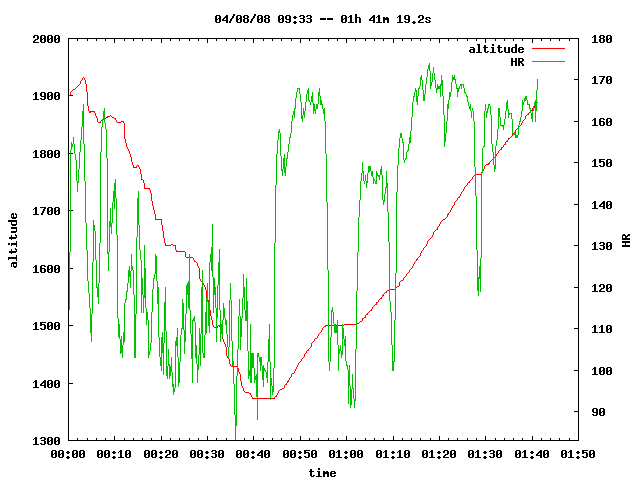
 I’m the happy owner of a nice geeky toy: a Suunto X6HR watch, that includes an altimeter and an heart rate monitor, which I use mainly for moutain biking and hiking.
During outings, the watch can log the altitude and heart rate every 2, 10 or 60 seconds, and the data can be transfered to a PC using a serial interface. The problem is that Suunto only provides software for Windows. I got tired of using virtualbox to connect to the watch (qemu doesn’t work, Suunto Activity Manager apparently does strange things with the serial port), so I reverse-engineered the protocol (using
 Via
 I've enjoyed reading Sarah Hatter's (from