Search Results: "pa"

7 July 2021

Dirk Eddelbuettel: ttdo 0.0.7: Small tinytest update

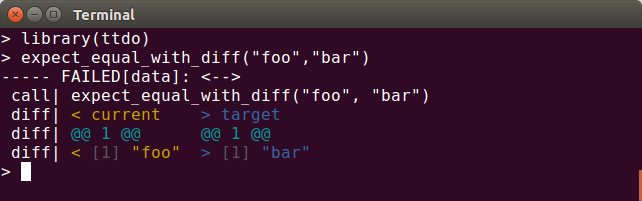
A new minor release of our ttdo package arrived on CRAN today. The ttdo package extends the most excellent (and very minimal / zero depends) unit testing package tinytest by Mark van der Loo with the very clever and well-done diffobj package by Brodie Gaslam to give us test results with visual diffs (as shown in the screenshot here) which seemingly is so compelling an idea that another package decided to copied it more recently: ttdo screenshot This release is mostly procedural to accomodate changes in tinytest 1.3.1 released today, and brought to us via a pull request by Mark himself. Other than that we also updated the CI runner to use r-ci and accomodated new CRAN check for a superfluous LazyData: field in a package without a data/ directory. This release also gets another #ThankYouCRAN mark as it was once again fully automated and intervention-free (once the new tinytest release hit CRAN). As usual, the NEWS entry follows.

Changes in ttdo version 0.0.7 (2021-07-06)
  • The CI setup was updated to use run.sh from r-ci (Dirk).
  • The package was updated for an API extension in tinytest 1.3.1 or later (Mark van der Look in #7)
  • The unused LazyData field was removed from DESCRIPTION (Dirk)

CRANberries provides the usual summary of changes to the previous version. Please use the GitHub repo and its issues for any questions. If you like this or other open-source work I do, you can now sponsor me at GitHub.

This post by Dirk Eddelbuettel originated on his Thinking inside the box blog. Please report excessive re-aggregation in third-party for-profit settings.

5 July 2021

B lint R czey: Hello zstd compressed .debs in Ubuntu!

When Julian Andres Klode and I added initial Zstandard compression support to Ubuntu s APT and dpkg in Ubuntu 18.04 LTS we planned getting the changes accepted to Debian quickly and making Ubuntu 18.10 the first release where the new compression could speed up package installations and upgrades. Well, it took slightly longer than that. Since then many other packages have been updated to support zstd compressed packages and read-only compression has been back-ported to the 16.04 Xenial LTS release, too, on Ubuntu s side. In Debian, zstd support is available now in APT, debootstrap and reprepro (thanks Dimitri!). It is still under review for inclusion in Debian s dpkg (BTS bug 892664). Given that there is sufficient archive-wide support for zstd, Ubuntu is switching to zstd compressed packages in Ubuntu 21.10, the current development release. Please welcome hello/2.10-2ubuntu3, the first zstd-compressed Ubuntu package that will be followed by many other built with dpkg (>= 1.20.9ubuntu2), and enjoy the speed!

Petter Reinholdtsen: Six complete translations of The Debian Administrator's Handbook for Buster

I am happy observe that the The Debian Administrator's Handbook is available in six languages now. I am not sure which one of these are completely proof read, but the complete book is available in these languages: This is the list of languages more than 70% complete, in other words with not too much left to do: I wonder how long it will take to bring these to 100%. Then there is the list of languages about halfway done: Several are on to a good start: Finally, there are the ones just getting started: If you want to help provide a Debian instruction book in your own language, visit Weblate to contribute to the translations. As usual, if you use Bitcoin and want to show your support of my activities, please send Bitcoin donations to my address 15oWEoG9dUPovwmUL9KWAnYRtNJEkP1u1b.

Michael Prokop: Debian bullseye: changes in util-linux #newinbullseye

Continuing with #newinbullseye. One package that isn t new but its tools are used by many of us is util-linux, providing many essential system utilities. There is util-linux v2.33.1 in Debian/buster and util-linux v2.36.1 in Debian/bullseye, and as usual there are many new features and options available. I don t want to replicate the release notes provided by upstream, instead make sure to check out the Release highlights sections in the following release notes: Tools that have been taken over from / moved to other packages Debian s util-linux source package provides new binary packages: eject (and eject-udeb) and bsdextrautils. The util-linux implementation of /usr/bin/eject is used now, replacing the one previously provided by the eject source package. Overall, from a util-linux perspective the following shifts took place: Deprecated / removed tools Tools that are no longer shipped as of Debian/bullseye: New tools Debian s bsdutils package (which is provided by the util-linux source package) provides a new tool from util-linux: The new tools lsirq + irqtop (to monitor kernel interrupts) sadly didn t make it into util-linux s packaging of Debian/bullseye (as without per-CPU data they do not seem mature at this time). The new hardlink tool (to consolidate duplicate files via hardlinks) won t be shipped, as there s an existing hardlink package already. New features/options agetty + getty:
--show-issue    display issue file and exit
blkdiscard:
--force         disable all checking
blkid:
-D, --no-part-details      don't print info from partition table
blkzone:
Commands:
open         Open a range of zones.
close        Close a range of zones.
finish       Set a range of zones to Full.
Options:
-f, --force            enforce on block devices used by the system
cfdisk:
--lock[=<mode>]      use exclusive device lock (yes, no or nonblock)
dmesg:
--noescape             don't escape unprintable character
-W, --follow-new       wait and print only new messages
fdisk:
-x, --list-details          like --list but with more details
-n, --noauto-pt             don't create default partition table on empty devices
--lock[=<mode>]             use exclusive device lock (yes, no or nonblock)
fstrim:
-I, --listed-in <list>   trim filesystems listed in specified files
--quiet-unsupported      suppress error messages if trim unsupported
lsblk:
Options:
-E, --dedup <column> de-duplicate output by <column> 
                     (for example 'lsblk --dedup WWN' to de-duplicate devices by WWN number, e.g. multi-path devices)
-M, --merge          group parents of sub-trees (usable for RAIDs, Multi-path)
                     see http://karelzak.blogspot.com/2018/11/lsblk-merge.html
New output columns:
FSVER         filesystem version
PARTTYPENAME  partition type name
DAX           dax-capable device
lscpu:
Options:
-B, --bytes             print sizes in bytes rather than in human readable format
-C, --caches[=<list>]   info about caches in extended readable format
    --output-all        print all available columns for -e, -p or -C
Available output columns for -C:
        ALL-SIZE  size of all system caches
           LEVEL  cache level
            NAME  cache name
        ONE-SIZE  size of one cache
            TYPE  cache type
            WAYS  ways of associativity
    ALLOC-POLICY  allocation policy
    WRITE-POLICY  write policy
        PHY-LINE  number of physical cache line per cache t
            SETS  number of sets in the cache; set lines has the same cache index
   COHERENCY-SIZE  minimum amount of data in bytes transferred from memory to cache         
lslogins:
--lastlog <path>     set an alternate path for lastlog
lsns:
-t, --type time      namespace type time is also supported now (next to mnt, net, ipc, user, pid, uts, cgroup)
mkswap:
--lock[=<mode>]      use exclusive device lock (yes, no or nonblock)
more:
Options:
-n, --lines <number>  the number of lines per screenful
New long options (in addition to the listed equivalent short options):
  --silent       - equivalent to -d
  --logical      - equivalent to -f
  --no-pause     - equivalent to -l
  --print-over   - equivalent to -c
  --clean-print  - equivalent to -p
  --squeeze      - equivalent to -s
  --plain        - equivalent to -u
mount:
Options:
--target-prefix <path>  specifies path use for all mountpoints
Source:
ID=<id>                 specifies device by udev hardware ID
mountpoint:
--nofollow     do not follow symlink
nsenter:
-T, --time[=<file>]    enter time namespace
script:
-I, --log-in <file>           log stdin to file
-O, --log-out <file>          log stdout to file (default)
-B, --log-io <file>           log stdin and stdout to file
-T, --log-timing <file>       log timing information to file
-m, --logging-format <name>   force to 'classic' or 'advanced' format
-E, --echo <when>             echo input (auto, always or never)
sfdisk:
--disk-id <dev> [<str>]           print or change disk label ID (UUID)
--relocate <oper> <dev>           move partition header
--move-use-fsync                  use fsync after each write when move data
--lock[=<mode>]                   use exclusive device lock (yes, no or nonblock)
unshare:
-T, --time[=<file>]       unshare time namespace
--map-user=<uid> <name>   map current user to uid (implies --user)
--map-group=<gid> <name>  map current group to gid (implies --user)
-c, --map-current-user    map current user to itself (implies --user)
--keep-caps               retain capabilities granted in user namespaces
-R, --root=<dir>          run the command with root directory set to <dir>
-w, --wd=<dir>            change working directory to <dir>
-S, --setuid <uid>        set uid in entered namespace
-G, --setgid <gid>        set gid in entered namespace
--monotonic <offset>      set clock monotonic offset (seconds) in time namespaces
--boottime <offset>       set clock boottime offset (seconds) in time namespaces
wipefs:
--lock[=<mode>] use exclusive device lock (yes, no or nonblock)

Jonathan Dowland: Photos and WhatsApp

I woke up this morning to a lovely little gallery of pictures of our children that my wife had sent me via WhatsApp. This has become the most common way we interact with family photos. We regularly send and receive photos to and from our families via WhatsApp, which re-compresses them for transit and temporary storage across their network. The original photos, wherever they are, will be in a very high quality (as you get on most modern cameras) and will be backed up in perfect fidelity to either Apple or Google s photo storage solutions. But all of that seems moot, when the most frequent way we engage with the pictures is via a method which compresses so aggressively that you can clearly see the artefacts, even thumbnailed on a phone screen. I still don t feel particularly happy with the solution in place for backing up the photos (or even: getting them off the phone). Both Apple and Google make it less than convenient to get them out of their respective walled gardens. I ve been evaluating the nextCloud app and a Nextcloud instance on my home NAS as a possible alternative.
Russell Coker: Servers and Lockdown

OS security features and server class systems are things that surely belong together. If a program is important enough to buy expensive servers to run it then it s important enough that you want to have all the OS security features enabled. For such an important program you will also want to have all possible monitoring systems running so you can predict hardware failures etc. Therefore you would expect that you could buy a server, setup the vendor s management software, configure your Linux kernel with security features such as lockdown (a LSM that restricts access to /dev/mem, the iopl() system call, and other dangerous things [1]), and have it run nicely! You will be disappointed if you try doing that on a HP or Dell server though. HP Problems
[370742.622525] Lockdown: hpasmlited: raw io port access is restricted; see man kernel_lockdown.7
The above message is logged when trying to INSTALL (not even run) the hp-health package from the official HP repository (as documented in my previous blog post about the HP ML-110 Gen9 [2]) with lockdown=integrity (the less restrictive lockdown option). Now the HP package in question is in their repository for Debian/Stretch (released in 2017) and the Lockdown LSM was documented by LWN as being released in 2019, so not supporting a Debian/Bullseye feature in Debian/Stretch packages isn t inherently a bad thing apart from the fact that they haven t released a new version of that package since. The Stretch package that I am testing now was released in 2019. Also it s been regarded as best practice to have device drivers for this sort of thing since long before 2017.
# hplog -v
ERROR: Could not open /dev/cpqhealth/cdt.
Please make sure the Health Monitor is started.
Attempting to run the hplog -v command (to view the HP hardware log) gives the above error. Strace reveals that it could and did open /dev/cpqhealth/cdt but had problems talking to something (presumably the Health Monitor daemon) over a Unix domain socket. It would be nice if they could at least get the error message right! Dell Problems
[   13.811165] Lockdown: smbios-sys-info: /dev/mem,kmem,port is restricted; see man kernel_lockdown.7
[   13.820935] Lockdown: smbios-sys-info: raw io port access is restricted; see man kernel_lockdown.7
[   18.118118] Lockdown: dchcfg: raw io port access is restricted; see man kernel_lockdown.7
[   18.127621] Lockdown: dchcfg: /dev/mem,kmem,port is restricted; see man kernel_lockdown.7
[   19.371391] Lockdown: dsm_sa_datamgrd: raw io port access is restricted; see man kernel_lockdown.7
[   19.382147] Lockdown: dsm_sa_datamgrd: /dev/mem,kmem,port is restricted; see man kernel_lockdown.7
Above is a sample of the messages when booting a Dell PowerEdge R710 with lockdown=integrity with the srvadmin-omacore package installed from the official Dell repository I describe in my blog post about the Dell PowerEdge R710 [3]. Now that repository is for Ubuntu/Xenial which was released in 2015, but again it was best practice to have device drivers for this many years ago. Also the newest Debian based releases that Dell apparently supports are Ubuntu/Xenial and Debian/Jessie which were both released in 2015.
# omreport system esmlog
Error! No Embedded System Management (ESM) log found on this system.
Above is the result when I try to view the ESM log (the Dell hardware log). How Long Should Server Support Last? The Wikipedia List of Dell PowerEdge Servers shows that the R710 is a Generation 11 system. Generation 11 was first released in 2010 and Generation 12 was first released in 2012. Generation 13 was the latest hardware Dell sold in 2015 when they apparently ceased providing newer OS support for Generation 11. Dell currently sells Generation 15 systems and provides more recent support for Generation 14 and Generation 15. I think it s reasonable to debate whether Dell should support servers for 4 generations. But given that a major selling point of server class systems is that they have long term support I think it would make sense to give better support for this and not drop support when it s only 2 versions from the latest release! The support for Dell Generation 11 hardware only seems to have lasted for 3 years after Generation 12 was first released. Also it appears that software support for Dell Generation 13 ceased before Generation 14 was released, that sucks for the people who bought Generation 13 when they were new! HP is currently selling Gen 10 servers which were first released at the end of 2017. So it appears that HP stopped properly supporting Gen 9 servers as soon as Gen 10 servers were released! One thing to note about these support times, when the new generation of hardware was officially released the previous generation was still on sale. So while HP Gen 10 servers officially came out in 2017 that doesn t necessarily mean that someone who wanted to buy a ML-110 Gen10 could actually have done so. For comparison Red Hat Enterprise Linux has been supported for 4-6 years for every release they made since 2005 and Ubuntu has always had a 5 year LTS support for servers. How To Do It Properly The correct way of interfacing with hardware is via a device driver that is supported in the kernel.org tree. That means it goes through the usual kernel source code quality checks which are really good at finding bugs and gives users an assurance that the code won t cause security problems. Generally nothing about the code from Dell or HP gives me confidence that it should be directly accessing /dev/kmem or raw IO ports without risk of problems. Once a driver is in the kernel.org tree it will usually stay there forever and not require further effort from the people who submit it. Then it just works for everyone and tends to work with any other kernel features that people use, like LSMs. If they released the source code to the management programs then it would save them even more effort as they could be maintained by the community.

4 July 2021

Pavit Kaur: Tutorial: Integrating OmniAuth with Sinatra Application

As part of my GSoC project, my first task includes that user could login into their account on debci using their Debian Salsa account (collaborative development server for Debian based on the GitLab software). The task is officially completed using OmniAuth library and while implementing it, I found that the documentation of OmniAuth is quite a mix-match and more focused on using it with Rails app and this gives me a idea to write a tutorial for people looking to integrate OmniAuth with Sinatra application. So here it is. Now, depending on the provider, Omniauth requires specific strategy which are generally released individually as RubyGems. For this tutorial, I would be using omniauth-gitlab which I used for Debian Salsa in my project, omniauth-twitter and a developer strategy which could be used for project in development mode and comes with omniauth gem itself. For simplicity purposes, I have included all routes and OmniAuth configurations in a single file app.rb. Let s start.

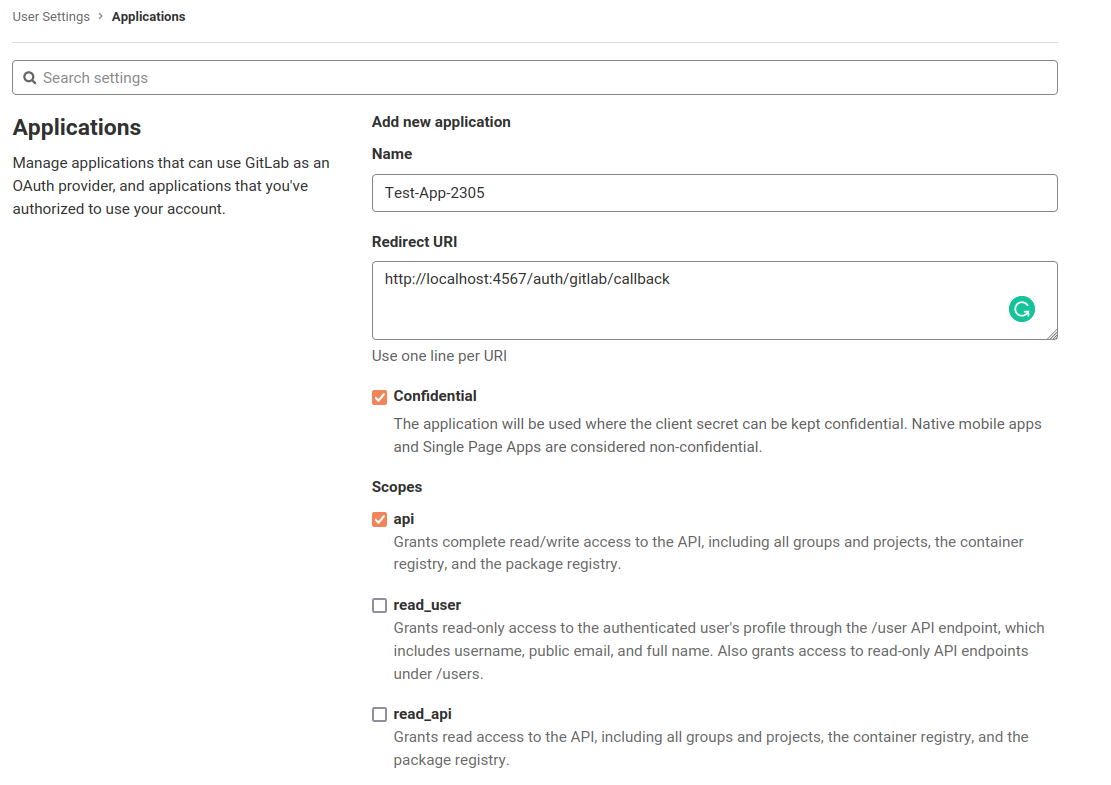
Register your application This can be easily done just head over to provider (Twitter, Salsa) website and find the option to create a new application and fill in the form. In the callback URL field, you need to append /auth/:provider/callback to whichever URL you used in the website field. tutorial-register-app The client-id and client-secret is obtained from the console which is used in further step to set up OmniAuth.

Gems At the top of the file, we require the necessary gems of for our project
require 'sinatra'
require 'omniauth'
require 'omniauth-gitlab'
require 'omniauth-twitter'

Enable sessions In order for OmniAuth to work and to store the logged in user across requests, sessions need to be activated and if activated, you have one session hash per user session.
configure do
    set :sessions, true
end

Set up OmniAuth configurations OmniAuth::Builder Rack middleware build up your list of OmniAuth strategies for use in your application:
use OmniAuth::Builder do
    if development?
      provider :developer,
               fields: [:name],
               uid_field: :name
    end
    provider :gitlab, #client-id , #client-secret,
             scope: "read_user",
             client_options:  
               site: 'https://salsa.debian.org/api/v4/'
              
    provider :twitter, #client-id , #client-secret,
end
Here, few things to note could be the extra options used with providers, as
In developer:
fields : to specify the form fields for login in developer mode and by default it has name and email.
uid_field: to specify that which field s value could be obtained as uid and by default it is email.
In gitlab:
scope: to limit the scope of application, by default, the api scope is requested and must be allowed in GitLab s application configuration.
client_options: to specify the server being used as client based on Gitlab software.
Note: In case you want to have a different callback url other than the default /auth/:provider/callback, it can be specified using redirect_url option in case of gitlab provider and accordingly update it in your Application Configuration at provider s console.

Extra configurations To redirect to auth/failure route in case of failure even in developer mode, following could be added:
OmniAuth.config.on_failure = proc do  env 
    OmniAuth::FailureEndpoint.new(env).redirect_to_failure
end
By default, OmniAuth will log to STDOUT but you can configure this. If you don t want OmniAuth to log to STDOUT, following could be used:
OmniAuth.config.logger.level = Logger::UNKNOWN

Setting up routes

Login route Starting with GET /login route, where you can specify the options available to login:
get '/login' do
    <<~HTML
    <form method='post' action='/auth/gitlab'>
    <input type="hidden" name="authenticity_token" value='# request.env["rack.session"]["csrf"] '>
    <button type='submit'>Login with Salsa</button>
    </form>
    <form method='post' action='/auth/twitter'>
    <input type="hidden" name="authenticity_token" value='# request.env["rack.session"]["csrf"] '>
    <button type='submit'>Login with Twitter</button>
    </form>
    <form method='post' action='/auth/developer'>
    <input type="hidden" name="authenticity_token" value='# request.env["rack.session"]["csrf"] '>
    <button type='submit'>Login with Developer</button>
    </form>
  HTML
end
The auth/:provider path is created and configured automatically by OmniAuth, so you just need to send the request to that paths and auth process will start.
As per the OmniAuth version 2.0, OmniAuth now defaults to only POST as allowed request_phase methods and authenticity_token is required to validate your requests so make sure to take care of this.
Callback routes: On success from authentication, Omniauth will return the hash of information to the auth/:provider/callback in the Rack environment under the key omniauth.auth so this is what you can use in your desired way like creating a entry to your database and storing the current user in session params.
get '/auth/:provider/callback' do
    erb "
    <h1>Hello # request.env['omniauth.auth']['info']['name'] </h1>"
end
post '/auth/developer/callback' do
    erb "
    <h1>Hello # request.env['omniauth.auth']['info']['name'] </h1>"
end
Here, POST request method is used for developer strategy and GET request method for twitter and gitlab as that is how their working is defined in their respective strategies.
Failure route: If user authentication fails on the provider side, OmniAuth will catch the response and then redirect the request to the path /auth/failure, passing a corresponding error message in a parameter named message.
get '/auth/failure' do
    halt(403, erb("<h2>Authentication Failed</h2><h4>Reason: </h4><pre># params[:message] </pre>"))
end

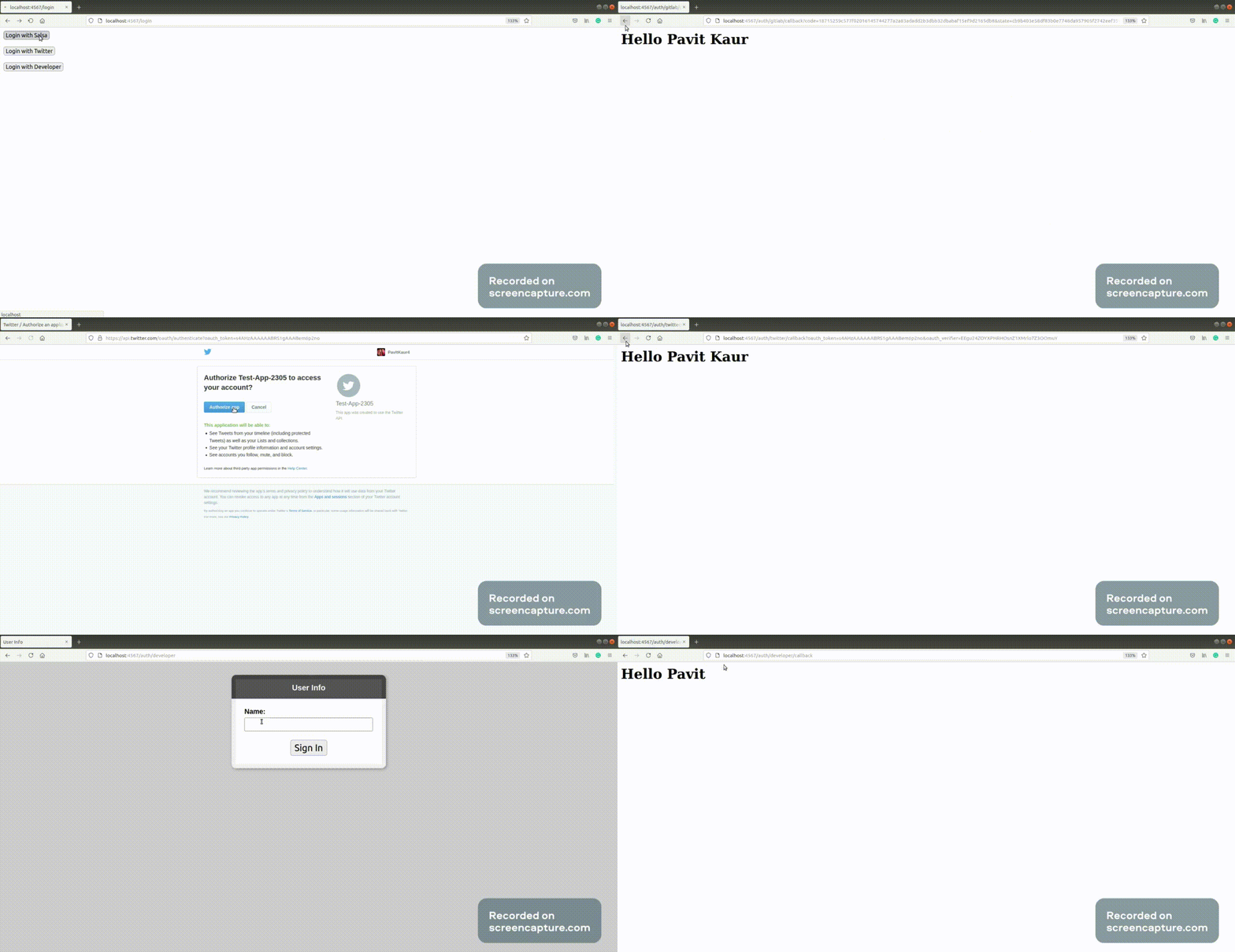
Final result That s it, our application is all set to be tested. And this is how it will be working. Tutorial Here, I have already logged into my respective accounts so page for entring credentials does not show up but if the user has not logged into his account, he would be first asked to log in. For complete code, you can check out: OmniAuth with Sinatra Tutorial So this completes the tutorial. I hope it helps others who are looking to integrate their Ruby Applications with OmniAuth. If you have any feedback, feel free to let me know. See you next time!

3 July 2021

Fran ois Marier: Zoom WebRTC links

Most people connect to Zoom via a proprietary client which has been on the receiving end of a number of security and privacy issues over the past year, with some experts even describing it as malware. It's not widely known however that Zoom offers a half-decent WebRTC client which means cross-platform one-click access to a Zoom room or webinar without needing to install any software. Given a Zoom link such as https://companyname.zoom.us/j/123456789?pwd=letmein, you can use https://zoom.us/wc/join/123456789?pwd=letmein to connect in your browser. Notice that the pool of Zoom room IDs is global and you can just drop the companyname from the URL. In my experience however, Jitsi has much better performance than Zoom's WebRTC client. For instance, I've never been able to use Zoom successfully on a Raspberry Pi 4 (8GB), but Jitsi works quite well. If you have a say in the choice of conference platform, go with Jitsi instead.

Junichi Uekawa: Created a web page for recording game play.

Created a web page for recording game play. For mixing video and audio from HDMI input and grabbing audio from mic. Basically just configuring the two audio and video tracks. here it is.

2 July 2021

Ben Hutchings: Debian LTS work, June 2021

In June I was assigned 14 hours of work by Freexian's Debian LTS initiative and carried over 2 hours from earlier months. I worked 13.25 hours and will carry over the remainder. I finished bringing the linux (Linux 4.9) package up to date, uploaded it, and issued DLA-2689-1. I also updated the linux-4.19 package based on the version in stable point release 10.10, and issued DLA-2690-1. Finally, I backported my recent security fixes for klibc, uploaded it and issued DLA-2695-1.

1 July 2021

Vincent Bernat: Upgrading my desktop PC

I built my current desktop PC in 2014. A second SSD was added in 2015. The motherboard and the power supply were replaced after a fault1 in 2016. The memory was upgraded in 2018. A discrete AMD GPU was installed in 2019 to drive two 4K screens. An NVMe disk was added earlier this year to further increase storage performance. This is a testament to the durability of a desktop PC compared to a laptop: it s evolutive and you can keep it a long time. While fine for most usage, the CPU started to become a bottleneck during video conferences.2 So, it was set for an upgrade. The table below summarizes the change. This update cost me about 800 .
Before After
CPU Intel i5-4670K @ 3.4 GHz AMD Ryzen 5 5600X @ 3.7 GHz
CPU fan Zalman CNPS9900 Noctua NH-U12S
Motherboard Asus Z97-PRO Gamer Asus TUF Gaming B550-PLUS
RAM 2 8 GB + 2 4 GB DDR3 @ 1.6 GHz 2 16 GB DDR4 @ 3.6 GHz
GPU Asus Radeon PH RX 550 4G M7
Disks 500 GB Crucial P2 NVMe
256 GB Samsung SSD 850
256 GB Samsung SSD 840
PSU be quiet! Pure Power CM L8 @ 530 W
Case Antec P100
According to some benchmark, the new CPU should be 4 faster when all cores are used and 1.5 faster for a single-threaded workload. Compiling an arbitrary3 kernel provides a 3 speedup. Before:
$ lscpu -e
CPU NODE SOCKET CORE L1d:L1i:L2:L3 ONLINE    MAXMHZ   MINMHZ
  0    0      0    0 0:0:0:0          yes 3800.0000 800.0000
  1    0      0    1 1:1:1:0          yes 3800.0000 800.0000
  2    0      0    2 2:2:2:0          yes 3800.0000 800.0000
  3    0      0    3 3:3:3:0          yes 3800.0000 800.0000
$ CCACHE_DISABLE=1 =time -f '  %E' make -j$(nproc)
[ ]
  OBJCOPY arch/x86/boot/vmlinux.bin
  AS      arch/x86/boot/header.o
  LD      arch/x86/boot/setup.elf
  OBJCOPY arch/x86/boot/setup.bin
  BUILD   arch/x86/boot/bzImage
Kernel: arch/x86/boot/bzImage is ready  (#1)
  4:54.32
After:
$ lscpu -e
CPU NODE SOCKET CORE L1d:L1i:L2:L3 ONLINE    MAXMHZ    MINMHZ
  0    0      0    0 0:0:0:0          yes 5210.3511 2200.0000
  1    0      0    1 1:1:1:0          yes 4650.2920 2200.0000
  2    0      0    2 2:2:2:0          yes 5210.3511 2200.0000
  3    0      0    3 3:3:3:0          yes 5073.0459 2200.0000
  4    0      0    4 4:4:4:0          yes 4932.1279 2200.0000
  5    0      0    5 5:5:5:0          yes 4791.2100 2200.0000
  6    0      0    0 0:0:0:0          yes 5210.3511 2200.0000
  7    0      0    1 1:1:1:0          yes 4650.2920 2200.0000
  8    0      0    2 2:2:2:0          yes 5210.3511 2200.0000
  9    0      0    3 3:3:3:0          yes 5073.0459 2200.0000
 10    0      0    4 4:4:4:0          yes 4932.1279 2200.0000
 11    0      0    5 5:5:5:0          yes 4791.2100 2200.0000
$ CCACHE_DISABLE=1 =time -f '  %E' make -j$(nproc)
[ ]
  OBJCOPY arch/x86/boot/vmlinux.bin
  AS      arch/x86/boot/header.o
  LD      arch/x86/boot/setup.elf
  OBJCOPY arch/x86/boot/setup.bin
  BUILD   arch/x86/boot/bzImage
Kernel: arch/x86/boot/bzImage is ready  (#1)
  1:40.18
Here we go for another seven years!

  1. The original power supply was from an older configuration. It suddenly became unable to reliably start the PC. The motherboard got replaced as it was the first suspect: without load, the power supply was working correctly.
  2. On Linux, many programs are unable to leverage hardware acceleration. This is a pity. On a laptop, this can also draws the battery pretty fast.
  3. The kernel is configured with make defconfig on commit 15fae3410f1d.

Paul Wise: FLOSS Activities June 2021

Focus This month I didn't have any particular focus. I just worked on issues in my info bubble.

Changes

Issues

Review
  • Spam: reported 3 Debian bug reports and 135 Debian mailing list posts
  • Debian wiki: RecentChanges for the month
  • Debian BTS usertags: changes for the month
  • Debian screenshots:
    • approved php-horde endless-sky claws-mail memtester
    • rejected python-gdal/weboob-qt (unrelated software)

Administration
  • Debian: restart bacula director
  • Debian wiki: approve accounts

Communication
  • This month I left freenode, an IRC network I had been on for at least 16 years, for reasons that you probably all read about. I think the biggest lesson I take from this situation and ones happening around the same time is that proper governance in peer production projects is absolutely critical.
  • Respond to queries from Debian users and contributors on the mailing lists and IRC

Sponsors The purple-discord/flower work was sponsored by my employers. All other work was done on a volunteer basis.

30 June 2021

Aigars Mahinovs: Keeping it as simple as possible

You know that you've had the same server too long when they discontinue the entire class of servers you were using and you need to migrate to a new instance. And you know you've not done anything with that server (and the blog running on it) for too long when you have no idea how that thing is actually working. Its a good opportunity to start over from scratch, and a good motivation to the new thing as simply as humanly possible, or even simpler. So I am switching to a statically generated blog as well. Not sure what took me so long, but thank good the tooling has really improved since the last time I looked. It was as simple as picking Nikola, finding its import_feed plugin, changing the BLOG_RSS_LIMIT in my Django Mezzanine blog to a thousand (to export all posts via RSS/ATOM feed), fixing some bugs in the import_feed plugin, waiting a few minutes for the full feed to generate and to be imported, adjusting the config of the resulting site, posting that to git and writing a simple shell script to pull that repo periodically and call nikola build on it, as well as config to serve ther result via ngnix. Done. After that creating a new blog post is just nikola new_post and editing it in vim and pushing to git. I prefer Markdown, but it supports all kinds of formats. And the old posts are just stored as HTML. Really simple. I think I will spend more time fighting with Google to allow me to forward email from my domain to my GMail postbox without it refusing all of it as spam.

Anton Gladky: 2021/06, FLOSS activity

LTS This is my fourth month of working for LTS. I was assigned 12 hrs and worked all of them.

Released DLAs
  1. DLA 2672-1 imagemagick_6.9.7.4+dfsg-11+deb9u13
    • CVE-2020-27751 A flaw was found in MagickCore/quantum-export.c. An attacker who submits a crafted file that is processed by ImageMagick could trigger undefined behavior in the form of values outside the range of type unsigned long long as well as a shift exponent that is too large for 64-bit type. This would most likely lead to an impact to application availability, but could potentially cause other problems related to undefined behavior.
    • CVE-2021-20243 A flaw was found in MagickCore/resize.c. An attacker who submits a crafted file that is processed by ImageMagick could trigger undefined behavior in the form of math division by zero.
    • CVE-2021-20245 A flaw was found in coders/webp.c. An attacker who submits a crafted file that is processed by ImageMagick could trigger undefined behavior in the form of math division by zero.
    • CVE-2021-20309 A division by zero in WaveImage() of MagickCore/visual-effects.c may trigger undefined behavior via a crafted image file submitted to an application using ImageMagick.
    • CVE-2021-20312 An integer overflow in WriteTHUMBNAILImage of coders/thumbnail.c may trigger undefined behavior via a crafted image file that is submitted by an attacker and processed by an application using ImageMagick.
    • CVE-2021-20313 A potential cipher leak when the calculate signatures in TransformSignature is possible.
  2. DLA 2677-1 libwebp_0.5.2-1+deb9u1
    • CVE-2018-25009 An out-of-bounds read was found in function WebPMuxCreateInternal. The highest threat from this vulnerability is to data confidentiality and to the service availability.
    • CVE-2018-25010 An out-of-bounds read was found in function ApplyFilter. The highest threat from this vulnerability is to data confidentiality and to the service availability.
    • CVE-2018-25011 A heap-based buffer overflow was found in PutLE16(). The highest threat from this vulnerability is to data confidentiality and integrity as well as system availability.
    • CVE-2018-25012 An out-of-bounds read was found in function WebPMuxCreateInternal. The highest threat from this vulnerability is to data confidentiality and to the service availability.
    • CVE-2018-25013 An out-of-bounds read was found in function ShiftBytes. The highest threat from this vulnerability is to data confidentiality and to the service availability.
    • CVE-2018-25014 An unitialized variable is used in function ReadSymbol. The highest threat from this vulnerability is to data confidentiality and integrity as well as system availability.
    • CVE-2020-36328 A heap-based buffer overflow in function WebPDecodeRGBInto is possible due to an invalid check for buffer size. The highest threat from this vulnerability is to data confidentiality and integrity as well as system availability.
    • CVE-2020-36329 A use-after-free was found due to a thread being killed too early. The highest threat from this vulnerability is to data confidentiality and integrity as well as system availability.
    • CVE-2020-36330 An out-of-bounds read was found in function ChunkVerifyAndAssign. The highest threat from this vulnerability is to data confidentiality and to the service availability.
    • CVE-2020-36331 An out-of-bounds read was found in function ChunkAssignData. The highest threat from this vulnerability is to data confidentiality and to the service availability.
    CVE-2020-36332 was marked as ignored for stretch due to too disruptive patch for older versions of libwebp.
  3. DLA-2687-1 prosody_0.9.12-2+deb9u3
    • CVE-2021-32917 The proxy65 component allows open access by default, even if neither of the users has an XMPP account on the local server, allowing unrestricted use of the server s bandwidth.
    • CVE-2021-32921 Authentication module does not use a constant-time algorithm for comparing certain secret strings when running under Lua 5.2 or later. This can potentially be used in a timing attack to reveal the contents of secret strings to an attacker.
  4. DLA-2687-2 prosody_0.9.12-2+deb9u4 Upload prosody_0.9.12-2+deb9u3 introduced a regression in the mod_auth_internal_hashed module. Big thanks to Andre Bianchi for the reporting an issue and for testing the update. CVE-2021-32918, CVE-2021-32920, were marked as ignored for stretch: the affected code is not existing in that version of prosody.

LTS-Meeting I attended the Debian LTS team Jitsi-meeting.

Debian Science Team

openpiv-python I started to package python-openpiv. The software implements PIV (Particle Image Velocimetry) method to compare two images and obtain velocity field.

Other FLOSS activities

Admesh Admesh is the first package which I adopted over 10 years ago! Upstream is not active for a very long time, so I created a github-repo back in 2013. The software helps to manipulate STL-files. STL is the file format for meshes, mostly developed for CAD programs. This month I decided to clean the build system. It was switched to cmake. CI was updated, now it compiles the sources under Linux/Windows environment, runs tests, AddressSanitizer and UndefinedBehaviourSanitizer were employed. Work is ongoing.

Russell Coker: Links June 2021

MIT Technology Review has an interesting article about Google Project Zero shutting down a western intelligence operation [1]. There s an Internet trend of people eating rotten meat they call high meat (rotten meat) [2]. This is up there with people setting themselves on fire and nut shot videos. A young female who was making popular Twitter posts about motorbikes turned out to be a 50yo man using deep fake technology [3]. He has long hair IRL and just needed to replace his face. After coming out of the closet he has continued making such videos and remains popular. FYHTECH has an informative blog post about using sgdisk to backup and restore GPT partition tables [4]. This is in the Debian package gdisk along with several other tools for managing partition tables. One interesting thing to note is that you can backup a partition table and restore to a smaller device (with a bunch of warnings that you can ignore if you know what you are doing). This is the only way I ve discovered to cleanly truncate a GPT partitioned disk, which is sometimes necessary when running VMs. Insightful blog post about PCIe bifurcation and how PCIe lanes are assigned to sockets [5]. This explains why many motherboards have sockets with unused PCIe lanes, EG *8 sockets that are wired for *4. The PCIe slots all go back to the CPU which has a limited number of *16 PCIe connections that are bifurcated to make the larger number of PCIe slots on the motherboard. New Republic has an interesting article on the infamous transphobe Jordan Peterson s battle with tranquiliser dependency [6]. Wired has an interesting article about the hack of RSA infrastructure related to the SecureID keys 10 years ago [7]. Apparently some 10 year NDAs had delayed it. There are many posts about the situation with Freenode, I think that this one best captures the problems in the shortest amount of text [8]. You could spend a few hours reading about it as I have just done, but just reading this gives you the basics that you need to know to avoid Freenode. That blog post has links to articles about Andrew Lee s involvement with Mt Gox and claims to be the heir to the throne of Korea (which is not a monarchy). Nicholas Wade wrote an insightful and informative article about the origin of Covid19, which leads to the conclusion that it was made in a Chinese laboratory [9]. I first saw this in David Brin s Facebook feed. I would be hesitant to share this sort of thing if it wasn t reviewed by a reliable source, I think David Brin has the skill to analyse this sort of article and the contacts to allow him to seek verification of any scientific issues that are outside his field. I believe that this article is reliable and it s conclusion is most likely to be correct. Interesting Wired article about an art project using display computers at Apple stores to photograph people [10]. Ends with a visit from the FBI.

Enrico Zini: Systemd containers with unittest

This is part of a series of posts on ideas for an ansible-like provisioning system, implemented in Transilience. Unit testing some parts of Transilience, like the apt and systemd actions, or remote Mitogen connections, can really use a containerized system for testing. To have that, I reused my work on nspawn-runner. to build a simple and very fast system of ephemeral containers, with minimal dependencies, based on systemd-nspawn and btrfs snapshots: Setup To be able to use systemd-nspawn --ephemeral, the chroots needs to be btrfs subvolumes. If you are not running on a btrfs filesystem, you can create one to run the tests, even on a file:
fallocate -l 1.5G testfile
/usr/sbin/mkfs.btrfs testfile
sudo mount -o loop testfile test_chroots/
I created a script to setup the test environment, here is an extract:
mkdir -p test_chroots
cat << EOF > "test_chroots/CACHEDIR.TAG"
Signature: 8a477f597d28d172789f06886806bc55
# chroots used for testing transilience, can be regenerated with make-test-chroot
EOF
btrfs subvolume create test_chroots/buster
eatmydata debootstrap --variant=minbase --include=python3,dbus,systemd buster test_chroots/buster
CACHEDIR.TAG is a nice trick to tell backup software not to bother backing up the contents of this directory, since it can be easily regenerated. eatmydata is optional, and it speeds up debootstrap quite a bit. Running unittest with sudo Here's a simple helper to drop root as soon as possible, and regain it only when needed. Note that it needs $SUDO_UID and $SUDO_GID, that are set by sudo, to know which user to drop into:
class ProcessPrivs:
    """
    Drop root privileges and regain them only when needed
    """
    def __init__(self):
        self.orig_uid, self.orig_euid, self.orig_suid = os.getresuid()
        self.orig_gid, self.orig_egid, self.orig_sgid = os.getresgid()
        if "SUDO_UID" not in os.environ:
            raise RuntimeError("Tests need to be run under sudo")
        self.user_uid = int(os.environ["SUDO_UID"])
        self.user_gid = int(os.environ["SUDO_GID"])
        self.dropped = False
    def drop(self):
        """
        Drop root privileges
        """
        if self.dropped:
            return
        os.setresgid(self.user_gid, self.user_gid, 0)
        os.setresuid(self.user_uid, self.user_uid, 0)
        self.dropped = True
    def regain(self):
        """
        Regain root privileges
        """
        if not self.dropped:
            return
        os.setresuid(self.orig_suid, self.orig_suid, self.user_uid)
        os.setresgid(self.orig_sgid, self.orig_sgid, self.user_gid)
        self.dropped = False
    @contextlib.contextmanager
    def root(self):
        """
        Regain root privileges for the duration of this context manager
        """
        if not self.dropped:
            yield
        else:
            self.regain()
            try:
                yield
            finally:
                self.drop()
    @contextlib.contextmanager
    def user(self):
        """
        Drop root privileges for the duration of this context manager
        """
        if self.dropped:
            yield
        else:
            self.drop()
            try:
                yield
            finally:
                self.regain()
privs = ProcessPrivs()
privs.drop()
As soon as this module is loaded, root privileges are dropped, and can be regained for as little as possible using a handy context manager:
   with privs.root():
       subprocess.run(["systemd-run", ...], check=True, capture_output=True)
Using the chroot from test cases The infrastructure to setup and spin down ephemeral machine is relatively simple, once one has worked out the nspawn incantations:
class Chroot:
    """
    Manage an ephemeral chroot
    """
    running_chroots: Dict[str, "Chroot"] =  
    def __init__(self, name: str, chroot_dir: Optional[str] = None):
        self.name = name
        if chroot_dir is None:
            self.chroot_dir = self.get_chroot_dir(name)
        else:
            self.chroot_dir = chroot_dir
        self.machine_name = f"transilience- uuid.uuid4() "
    def start(self):
        """
        Start nspawn on this given chroot.
        The systemd-nspawn command is run contained into its own unit using
        systemd-run
        """
        unit_config = [
            'KillMode=mixed',
            'Type=notify',
            'RestartForceExitStatus=133',
            'SuccessExitStatus=133',
            'Slice=machine.slice',
            'Delegate=yes',
            'TasksMax=16384',
            'WatchdogSec=3min',
        ]
        cmd = ["systemd-run"]
        for c in unit_config:
            cmd.append(f"--property= c ")
        cmd.extend((
            "systemd-nspawn",
            "--quiet",
            "--ephemeral",
            f"--directory= self.chroot_dir ",
            f"--machine= self.machine_name ",
            "--boot",
            "--notify-ready=yes"))
        log.info("%s: starting machine using image %s", self.machine_name, self.chroot_dir)
        log.debug("%s: running %s", self.machine_name, " ".join(shlex.quote(c) for c in cmd))
        with privs.root():
            subprocess.run(cmd, check=True, capture_output=True)
        log.debug("%s: started", self.machine_name)
        self.running_chroots[self.machine_name] = self
    def stop(self):
        """
        Stop the running ephemeral containers
        """
        cmd = ["machinectl", "terminate", self.machine_name]
        log.debug("%s: running %s", self.machine_name, " ".join(shlex.quote(c) for c in cmd))
        with privs.root():
            subprocess.run(cmd, check=True, capture_output=True)
        log.debug("%s: stopped", self.machine_name)
        del self.running_chroots[self.machine_name]
    @classmethod
    def create(cls, chroot_name: str) -> "Chroot":
        """
        Start an ephemeral machine from the given master chroot
        """
        res = cls(chroot_name)
        res.start()
        return res
    @classmethod
    def get_chroot_dir(cls, chroot_name: str):
        """
        Locate a master chroot under test_chroots/
        """
        chroot_dir = os.path.abspath(os.path.join(os.path.dirname(__file__), "..", "test_chroots", chroot_name))
        if not os.path.isdir(chroot_dir):
            raise RuntimeError(f" chroot_dir  does not exists or is not a chroot directory")
        return chroot_dir
# We need to use atextit, because unittest won't run
# tearDown/tearDownClass/tearDownModule methods in case of KeyboardInterrupt
# and we need to make sure to terminate the nspawn containers at exit
@atexit.register
def cleanup():
    # Use a list to prevent changing running_chroots during iteration
    for chroot in list(Chroot.running_chroots.values()):
        chroot.stop()
And here's a TestCase mixin that starts a containerized systems and opens a Mitogen connection to it:
class ChrootTestMixin:
    """
    Mixin to run tests over a setns connection to an ephemeral systemd-nspawn
    container running one of the test chroots
    """
    chroot_name = "buster"
    @classmethod
    def setUpClass(cls):
        super().setUpClass()
        import mitogen
        from transilience.system import Mitogen
        cls.broker = mitogen.master.Broker()
        cls.router = mitogen.master.Router(cls.broker)
        cls.chroot = Chroot.create(cls.chroot_name)
        with privs.root():
            cls.system = Mitogen(
                    cls.chroot.name, "setns", kind="machinectl",
                    python_path="/usr/bin/python3",
                    container=cls.chroot.machine_name, router=cls.router)
    @classmethod
    def tearDownClass(cls):
        super().tearDownClass()
        cls.system.close()
        cls.broker.shutdown()
        cls.chroot.stop()
Running tests Once the tests are set up, everything goes on as normal, except one needs to run nose2 with sudo:
sudo nose2-3
Spin up time for containers is pretty fast, and the tests drop root as soon as possible, and only regain it for as little as needed. Also, dependencies for all this are minimal and available on most systems, and the setup instructions seem pretty straightforward

29 June 2021

Louis-Philippe V ronneau: New Winter Bicycle

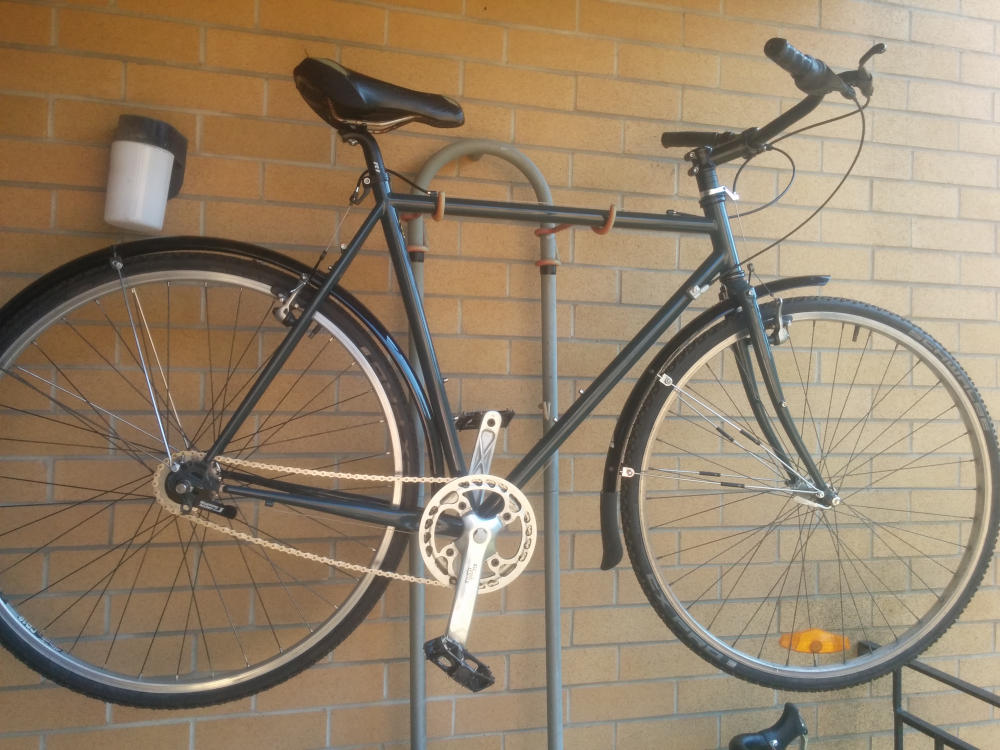
Although I'm about 5 months early and we're in the middle of a terrible heat wave where I live, I've just finished building my new winter bicycle! I've been riding all year round for about 8 years now and the winters in Montreal are harsh enough that a second winter-ready bicycle is required to have a fun and safe cold season. I'm saying "new bicycle" because a few months ago I totaled the frame of my previous winter bike. As you can see in the picture below (please disregard the salt crust), I broke the seat tube at the lug. I didn't notice it at first and while riding I kept hearing a "bang bang" sound coming from the frame when going over bumps. To my horror, I eventually realised the sound was coming from the seat tube hitting the bottom bracket shell! A large crack in my old bike frame I'm sad to see this Lejeune French frame go, but it was probably built in the 70's or the early 80's: it had a good life. Another great example of how a high quality steel frame can last a lifetime. Sparing no expense, I decided to replace it by a brand new Surly Cross-Check frameset. Surly is known for making great bike frames and the Cross-Check is a very versatile model. I'll finally be able to fit my Schwalbe Marathon Winter Plus tires at the front and the back with full length mud guards!!! Hard to ask for more. A picture of my new winter bike with CX Pro tires Summer has just started and I'm already looking forward to winter :)


Ritesh Raj Sarraf: Plant Territorial Behavior

This blog post is about my observations of some of the plants in my home garden. While still a n00b on the subject, these notes are my observations and experiences over days, weeks and months. Thankfully, with the capability to take frequent pictures, it has been easy to do an assessment and generate a report of some of these amazing behaviors of plants, in an easy timeline order; all thanks to the EXIF data embedded. This has very helpfully allowed me to record my, otherwise minor observations, into great detail; and make some sense out of it by correlating the data over time. It is an emotional experience. You see, plants are amazing. When I sow a sapling, water it, feed it, watch it grow, prune it, medicate it, and what not; I build up affection towards it. Though, at the same time, to me it is a strict relationship, not too attached; as in it doesn t hurt to uproot a plant if there is a good reason. But still, I find some sort of association to it. With plants around, it feels I have a lot of lives around me. All prospering, communicating, sharing. And communicate they do. What is needed is just the right language to observe and absorb their signals and decipher what they are trying to say.
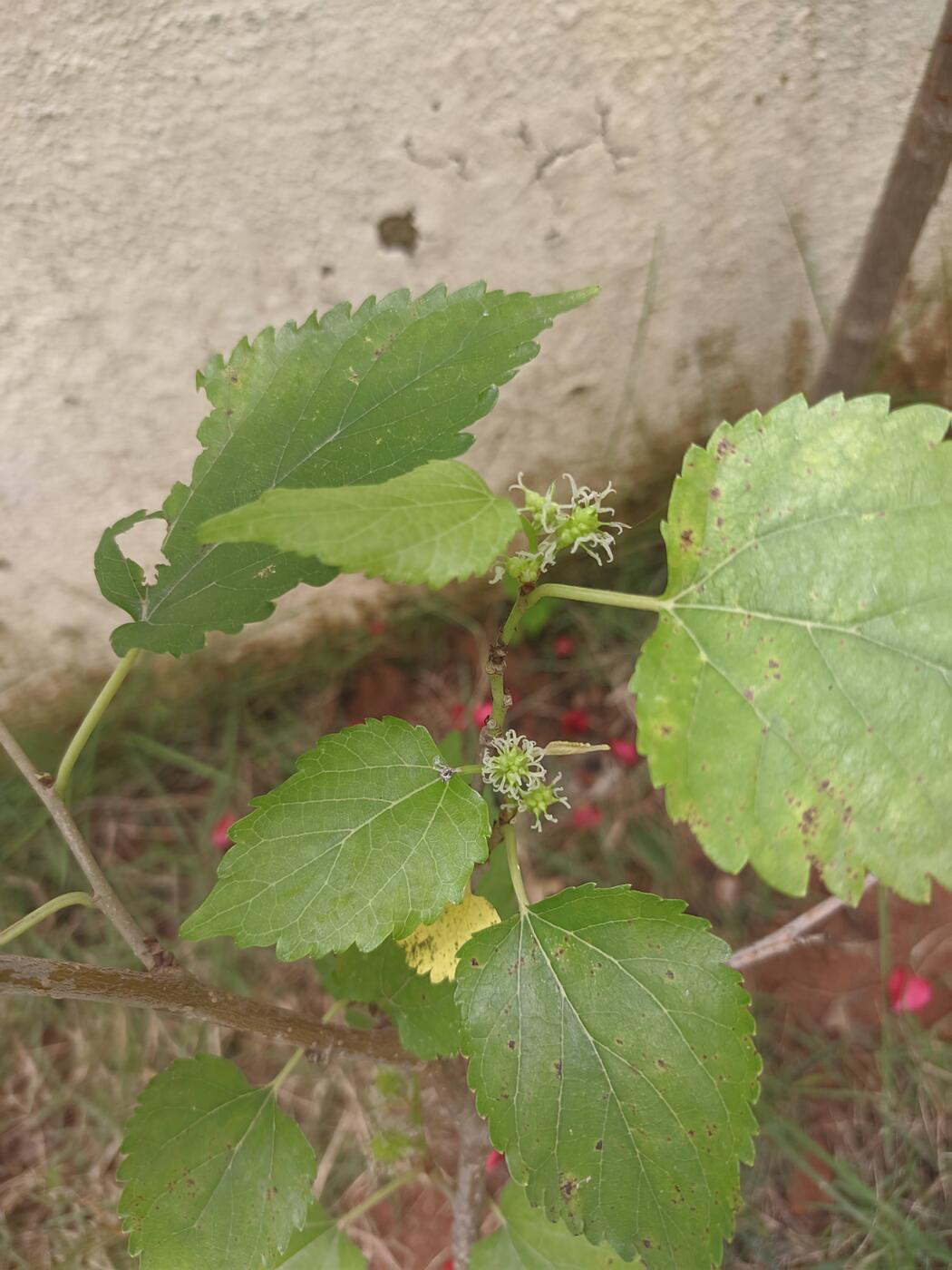
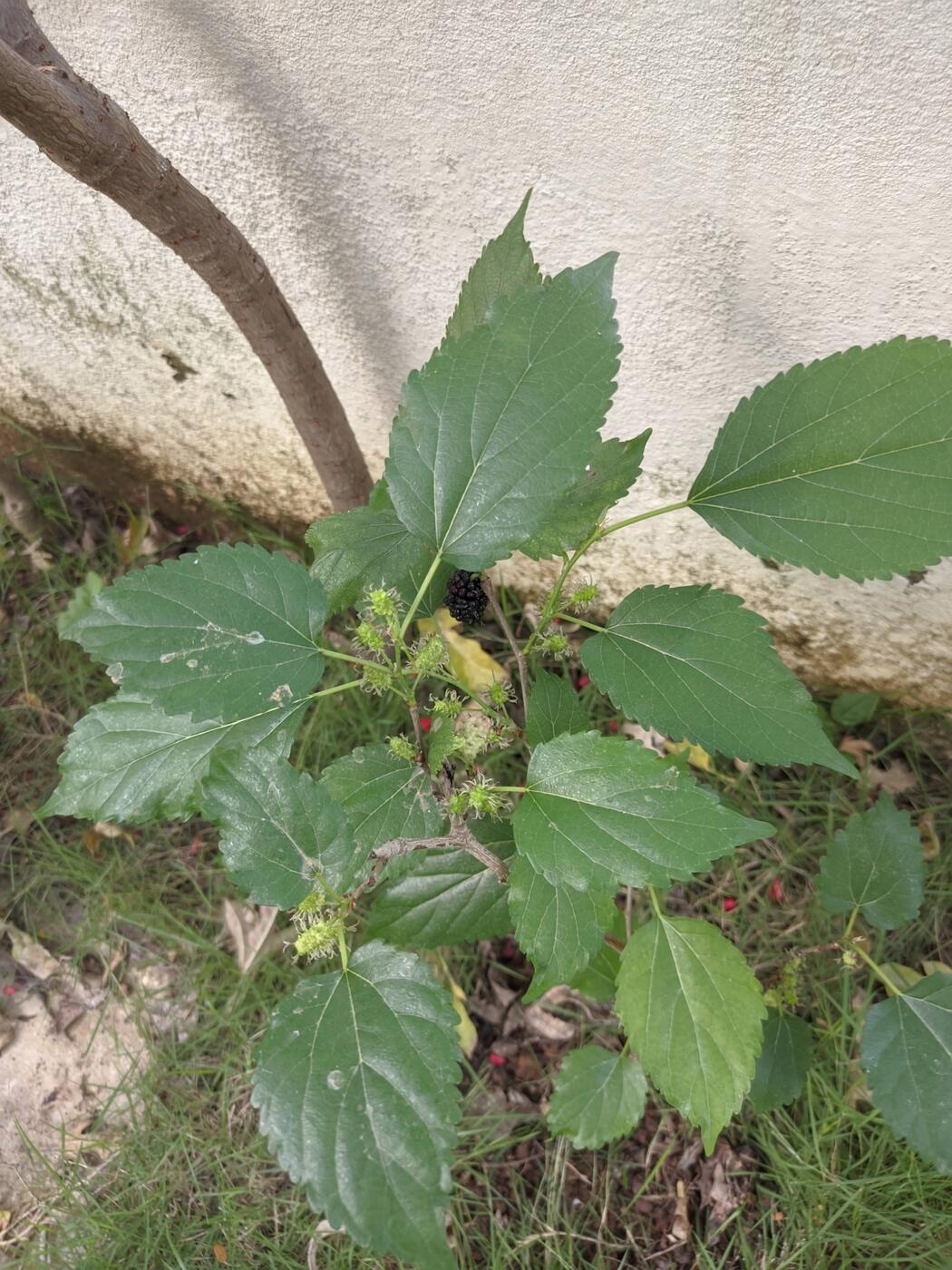
Devastation How in this world, when you are caring for your plants, can it transform:

From This
Healthy Mulberry Plant
Healthy Bael Plant
Healthy Bael Plant

To This
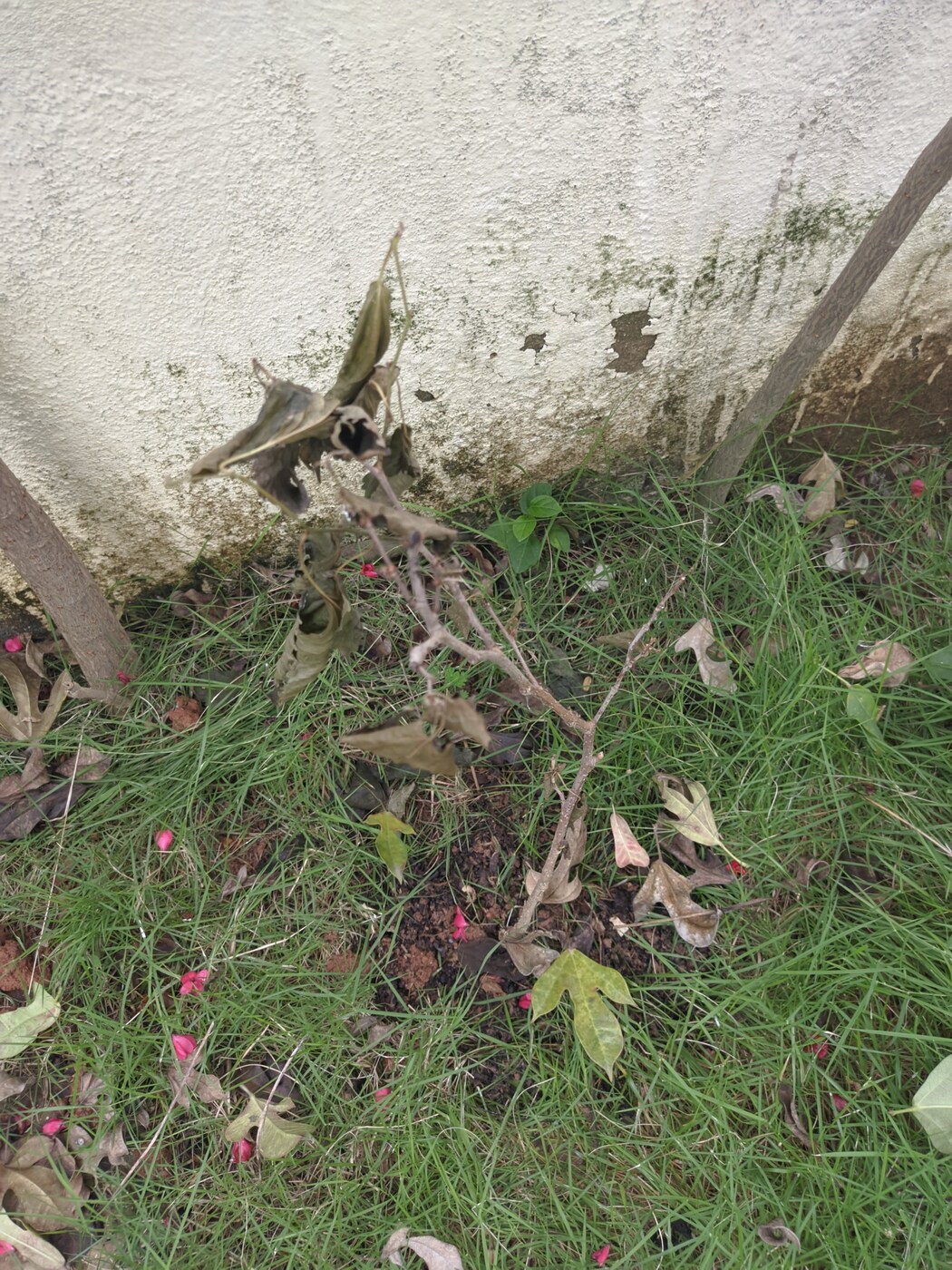
Dead Mulberry Plant
Dead Mulberry Plant
Very Sick Bael Plant
With emotions involved, this can be an unpleasant experience. Bael is a dear plant to me. The plant as a whole has religious values (Shiva). As well, its fruits have lots of health benefits, especially for the intestines. Its leaves have a lot of medicinal properties. When I planted the Bael, there were a lot of emotions that went along. On the other hand, the Mulberry is something I put in with a lot of enthusiasm. Mulberries are now rare to find, especially in urban locations. For one, they have a very short shelf life; But more than that, the way lifestyles are heading towards, I was always worried if my children would ever have a day to see and taste these fruits. The mulberry that I planted, yielded twice; once very soon when I had planted and second, before it died. Infact, it died while during its second yield phase. It was quite saddening to see that happen. It made me wonder why it happened. I had been caring for the plants fairly well. Watering them timely, feeding them the right amount of nutrients. They were getting a good amount of sun. But still their health was deteriorating. And then the demise of the Mulberry. Many thoughts hit my mind. I consulted the claimed experts in the domain, the maali, the gardener. I got a very vague answer; there must be termites in the soil. It didn t make much sense to me. I mean if there are termites they d hit day one. They won t sleep for months and just wake up one fine day and start attacking the roots of particular plants; not all. I wasn t convinced with the termite theory; But still, give the expert the blind hand, I went with his word. When my mulberry was dead, I dug its roots. Looking for proof, to see if there were any termites, I uprooted it. But I couldn t find any trace of termites. And the plant next to it was perfectly healthy and blossoming. So I was convinced that it wasn t the termite but something else. But else what ? I still didn t have an answer to that.

Thinking The Corona pandemic had embraced and there was a lot to worry, and worry not any, if you change the perspective. With plants around in my home, and our close engagement with them, and the helplessness that I felt after seeking help from the experts, it was time again; to build up some knowledge on the subject. But how ? How do you go about a subject you have not much clue about ? A subject which has always been around in the surrounding but very seldom have I dedicated focused thought to it. To be honest, the initial thought of diving on the subject made me clueless. I had no idea where to begin with. But, so, as has been my past history, I chose to take it as a curiosity. I gathered some books, skimmed through a couple of pages. Majority of the books I got hold of were about DIYs and How to do Home Gardening types. It was a decent introduction to a novice but my topic of curiosity was different. Thankfully, with the Internet, and YouTube in particular, a lot of good stuff is available as documentary videos. While going through some, I came across a video which mentioned about carnivore plants. Like, for example, this one.
Carnivore Plant
Carnivore Plant
This got me thinking that there could be a possibility of something similar, that did the fate to my Mulberry plant. But who did it ? And how to dive further on this suspicion ? And most of all, if that thought of possibility was actually the reality. Or was I just hitting in the dark ?

Beginning To put some perspective, here s how it started. When we moved into our home, the gardener put in a couple of plants stock, as part of the property handover. Now, I don t exactly recollect the name of the plants that came in stock, neither English nor Hindi; But at my neighbor s place, the plant is still there. Here are some of the pictures of this beauty. But don t just go by the looks as looks can be deceiving
Dominating Plant
Dominating Plant
Dominating Plant
Dominating Plant
Dominating Plant
Dominating Plant
We hadn t put any serious thought about the plants we were offered by the gardener. After all, we never had ever thought of any mishap either.

Plants we planted Apart from what was offered by the builder/gardener as part of the property handover, in over the next 6 months of we moving in, I planted 3 tree type plants.
  1. Mulberry
  2. Bael
  3. Rudraksha
The Mulberry, as I have described so far, died a tragic death. Bael, on the other hand, fought hard. But very little did we know that the plant was struggling the fight. Our impression was that we must have been given a bad breed of the plant. Or maybe the termite theory had some truth. For the Rudraksha plant, the growth was slow. This was the very first time I had seen a Rudraksha plant, so I had no clue of what its growth rate could be, and what to expect out of it. I wasn t sure if the local climate suited the plant. A quick search showed no objections to the plant in the local climate, but that was it. So my theory has been to put in the plant, and observe. Here s what my Rudraksha plant looked like during the initial days/weeks of its settlement
Rudraksha Plant
Rudraksha Plant

The Hint Days passed and so on. Not much had progressed in gathering information. The plant s health was usual; deteriorating at a slow pace. On day, thinking of the documentaries I had been watching, it hit my mind about the plant behavior.
  • Plants can be Carnivores.
  • Plants can be Aggressive.
  • Plants can be Invaders.
  • Plants can be Territorial.
There are many plants where their aggression can be witnessed with bare human eyes. Like creepers. Some of them are good at spreading tentacles, grabbing onto other plants' stems and branches and spread above it. This was my hint from the documentaries. That s one of the many ways plants set their dominance. That is what hit my mind that if plants are aggressive on the out, underneath the soil, they should be having similar behavior. I mean, what we see as humans is just a part of the actual plant. More than half of the actual plant is usually underneath the soil, in most plants. So there s a high chance to get more information out, if you dig the soil and look the roots.

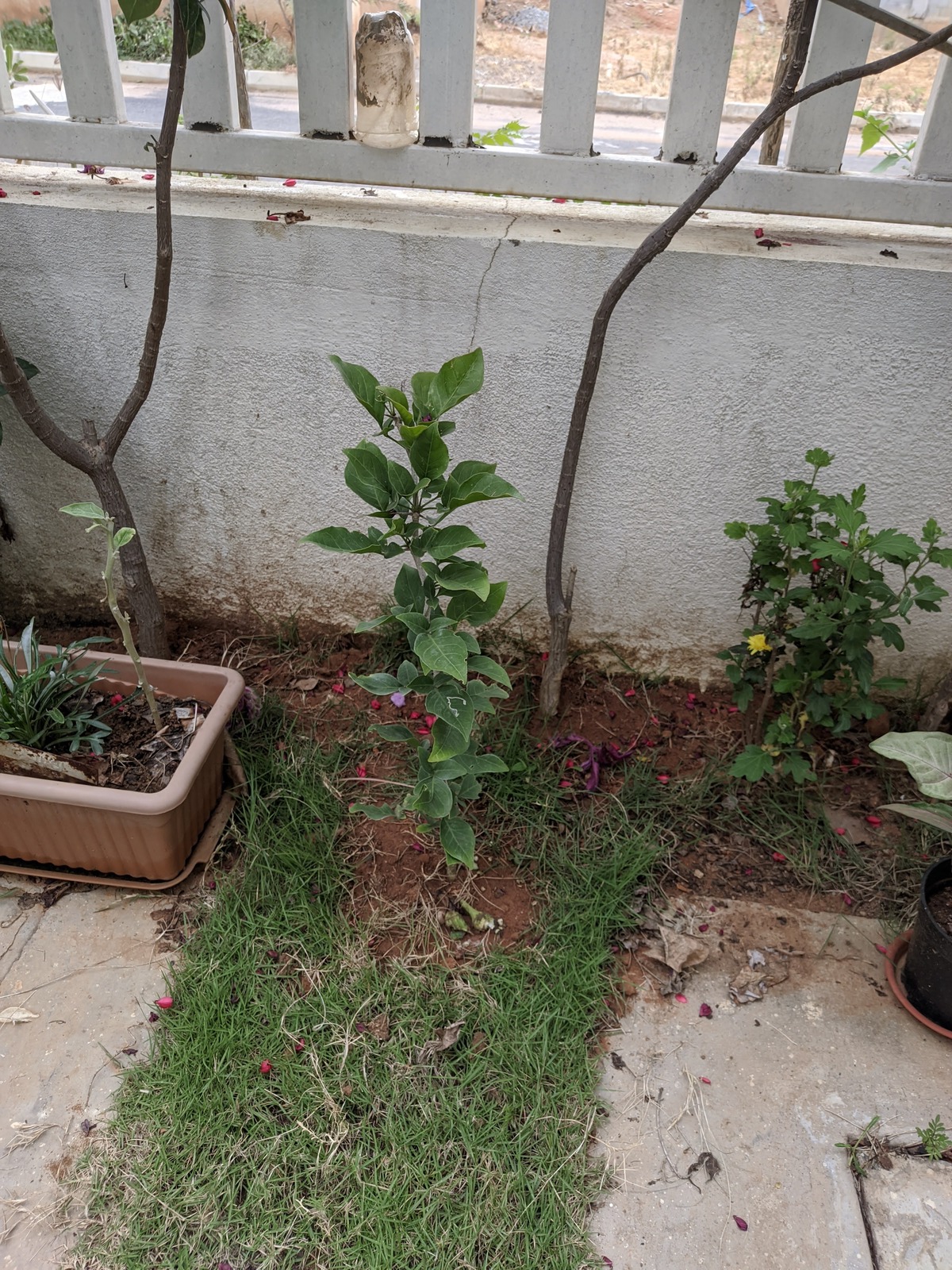
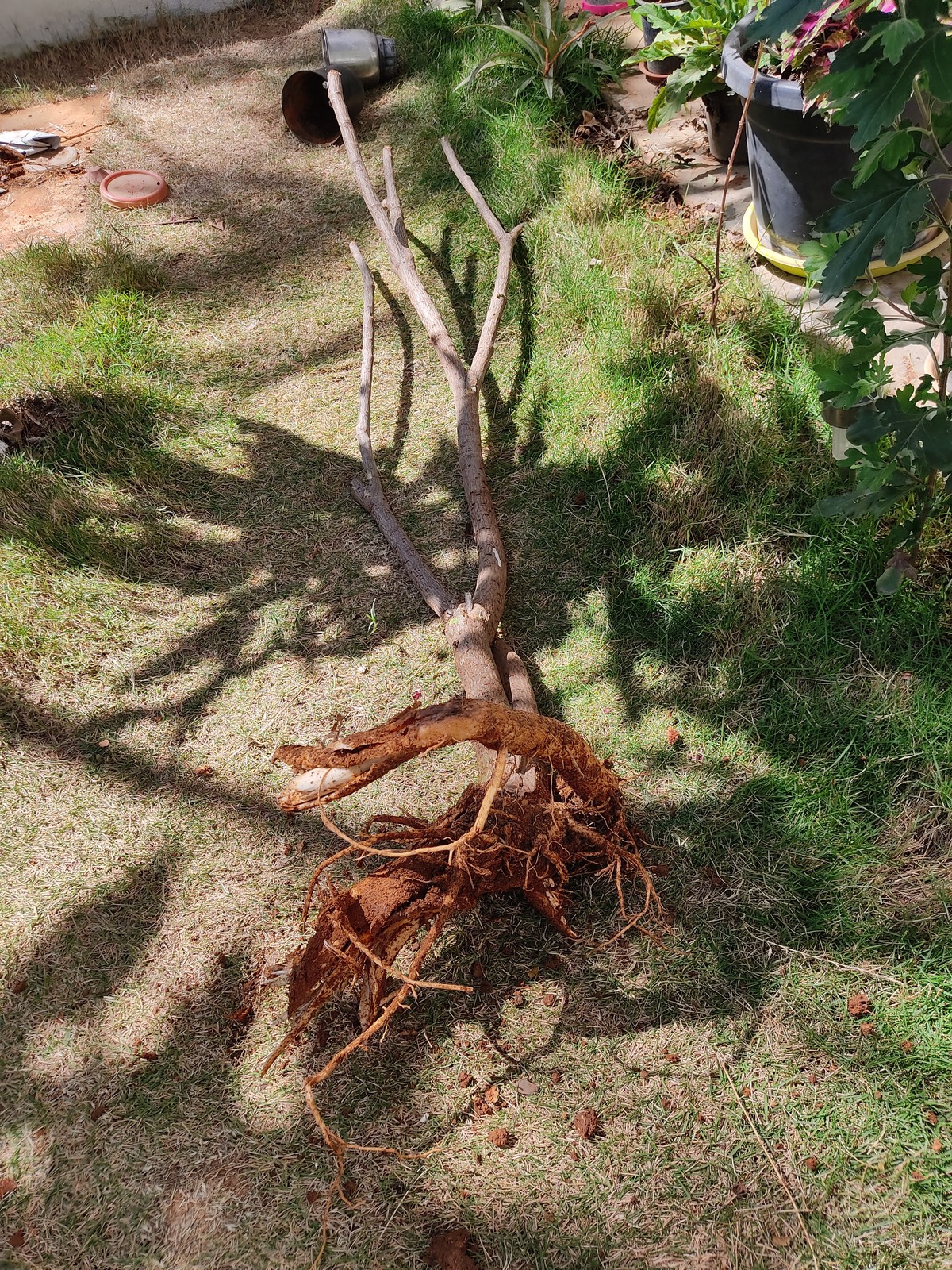
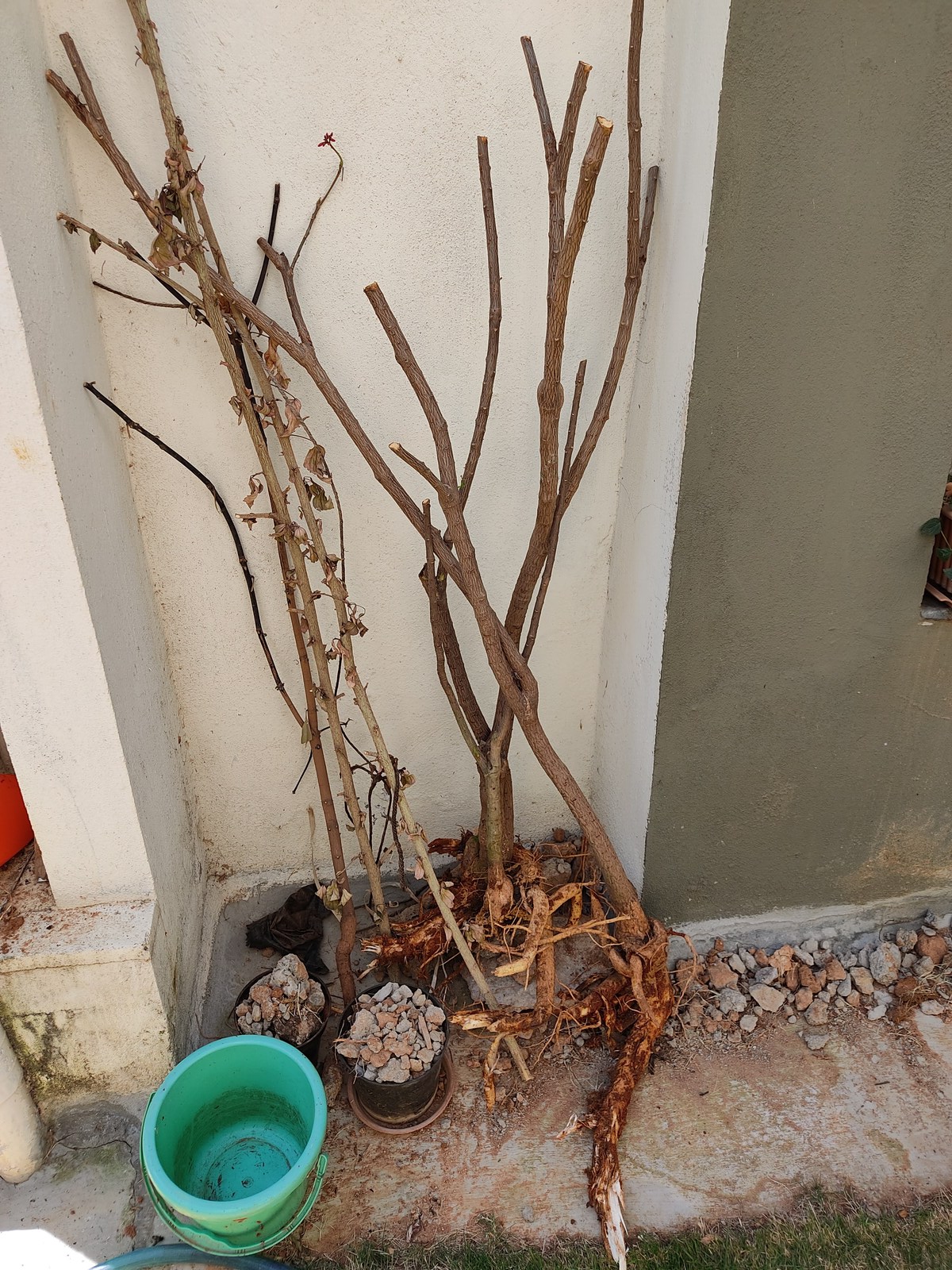
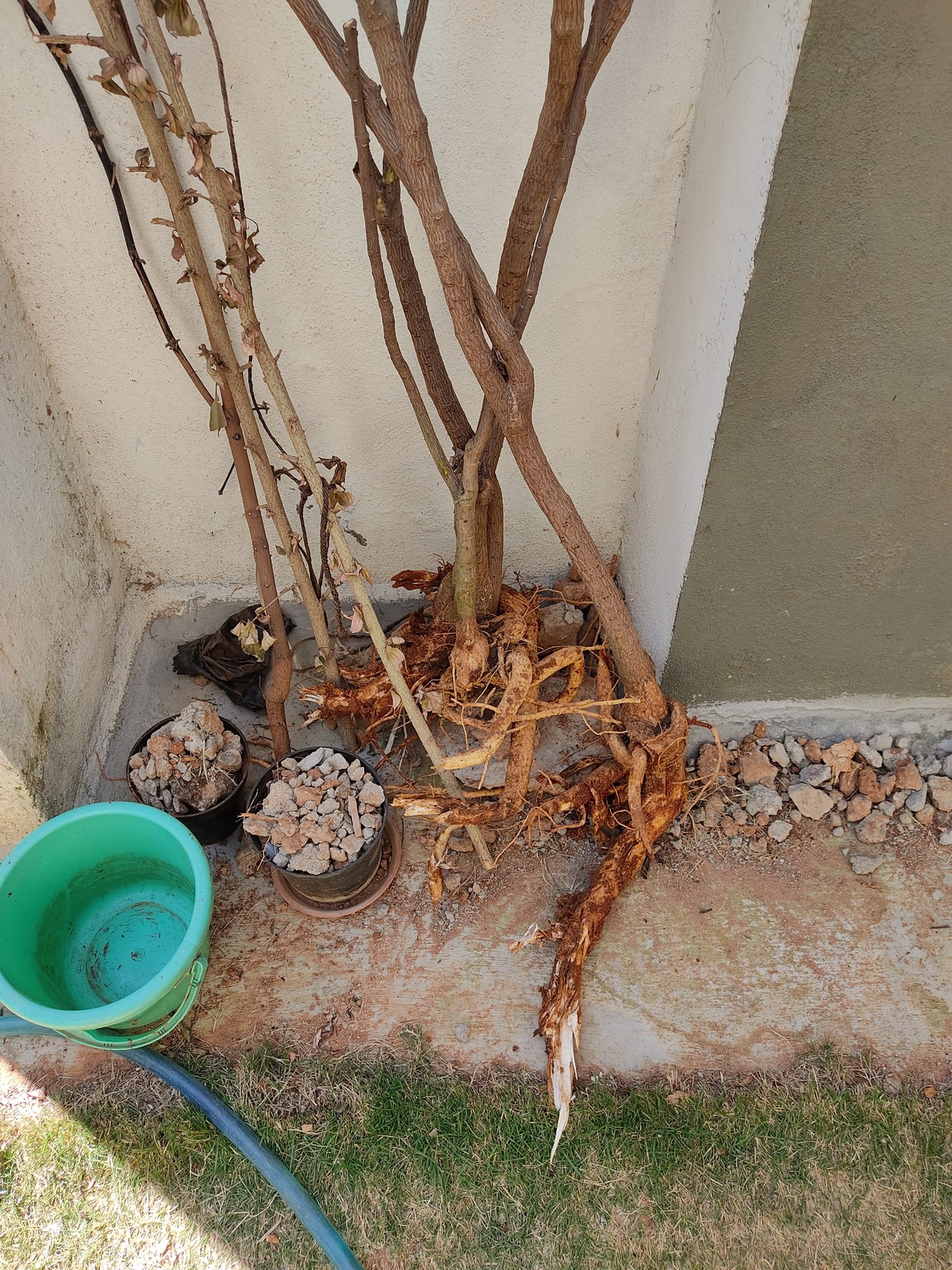
The Digging As I mentioned earlier, I do establish bindings, emotions and attachments. But not much usually comes in the way to curiosity. To dig further on the theory that the problem was elsewhere, with within the plants ecosystem, we needed to pick on another subject - the plant. And the plant we chose was the plant which was planted in the initial offering to us, when we moved into our home. It was the same plant breed which was neighboring all our newly planted trees: Rudraksha, Mulberry and Bael. If you look closely into the pictures above of these plants, you ll notice the stem of another plant, the Territorial Dominator, is close-by to these 3 plants. That s because the gardener put in a good number of them to get his action item complete. So we chose to dig and uproot one of those plant to start with. Now, while they may look gentle on the outside, with nice red colored tiny flowers, these plants were giants underneath. Their roots were huge. It took some sweat shredding to single-handedly remove them.
Dominating Plant Uprooted

Today is brighter

Bael I ll let the pictures do the initial talking today.
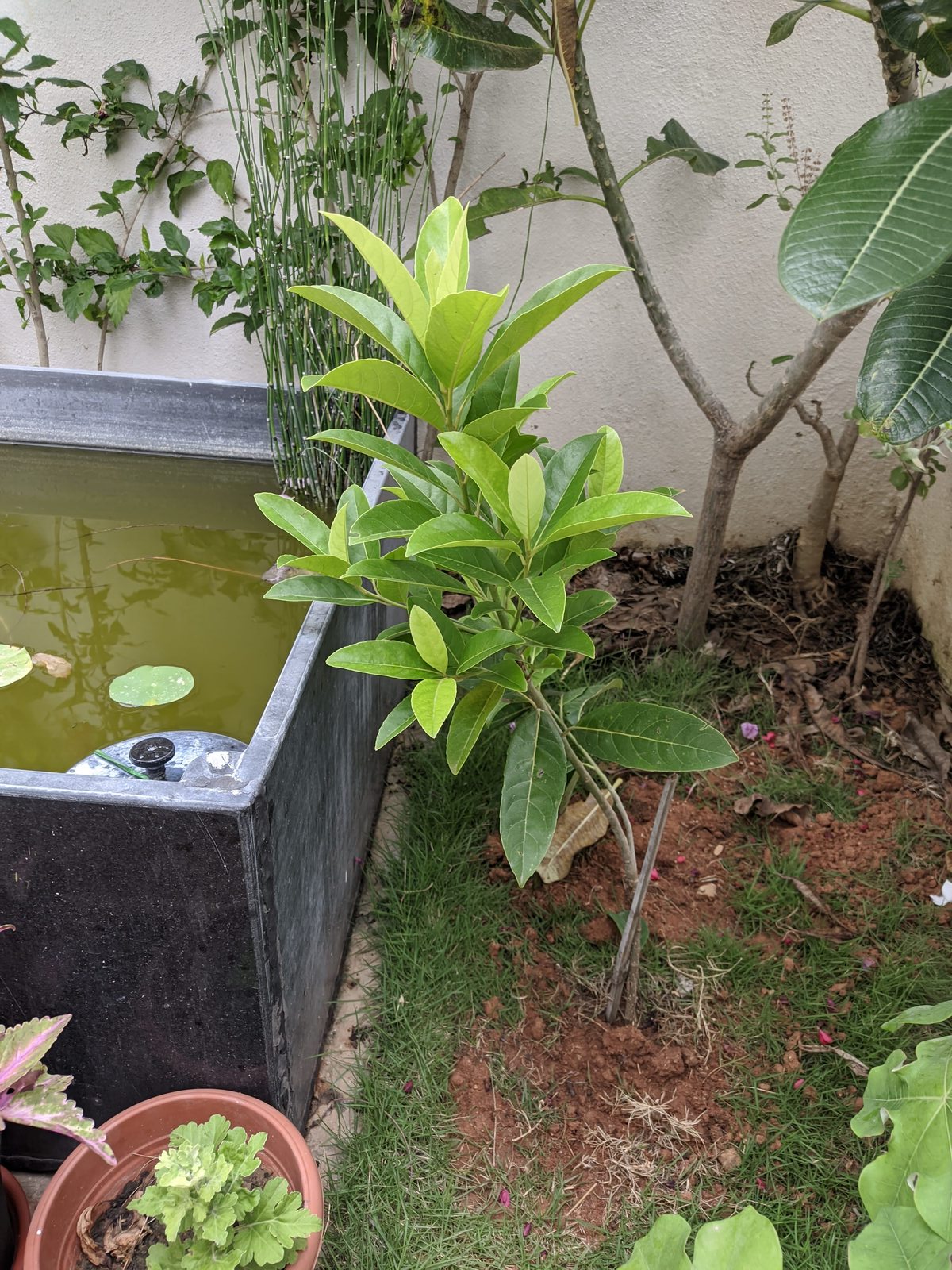
Healthy Bael
Healthy Bael
Healthy Bael
Healthy Bael
Healthy Bael
Healthy Bael
Healthy Bael
Healthy Bael
Healthy Bael
Healthy Bael
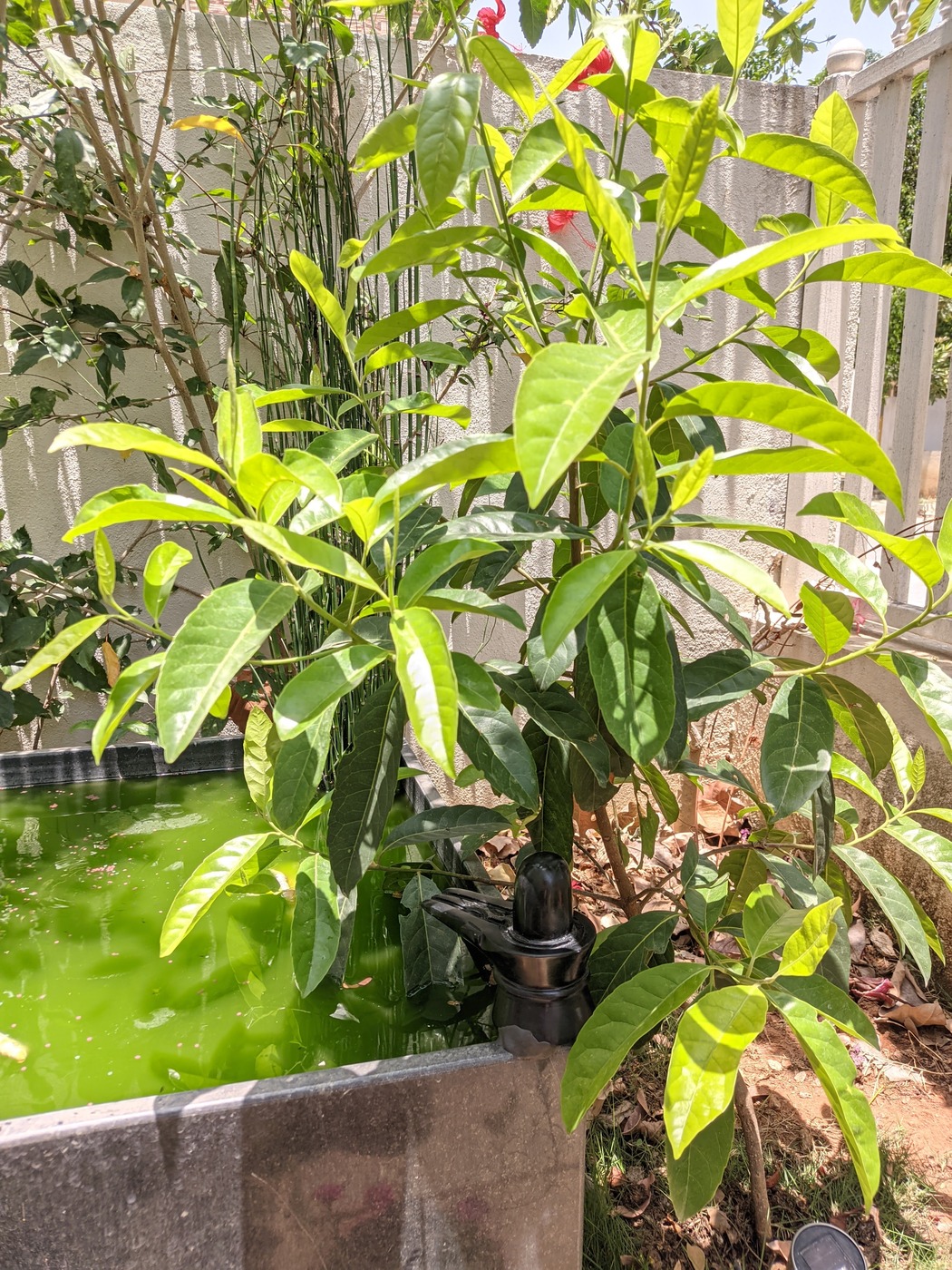
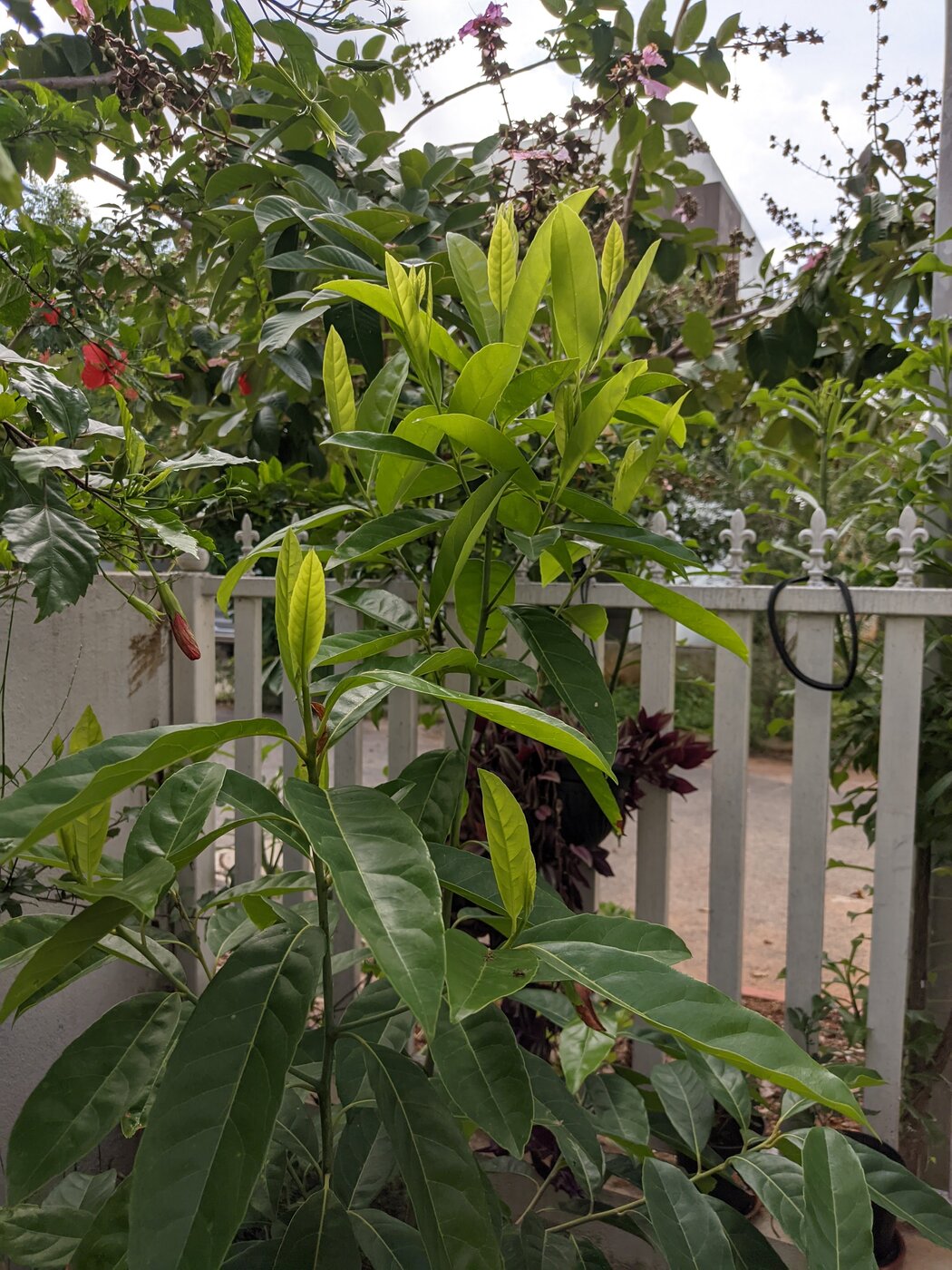
The above ones are pictures of the same Bael plant, which had struggled to live, for almost 14 months. Back then, this plant was starved of its resources. It was dying a slow death out of starvation. After we uprooted the other dominant species, the Bael has recovered and has regained its charm. In the pictures above of the Bael plant, you can clearly mark out the difference in its stem. The dark colored one is from its months of struggle, while the bright green is from now where it is well nourished and regained its health.

Mulberry As for the Mulberry, I couldn t save it. But I later managed to get another one. But it turns out I didn t take good, full length pictures of the new mulberry when I planted. The only picture I have is this:
Second Mulberry Plant
I recollect when I brought it home, it was around 1 - 1.5 feet in length. This is where I have it today: Majestically standing, 12 feet and counting
Second Mulberry Plant 7 feet tall

Rudraksha Then:
Rudraksha Plant
Rudraksha Plant
And now: I feel quite happy about
Rudraksha Plant
Rudraksha Plant
Rudraksha Plant
Rudraksha Plant
Rudraksha Plant
Rudraksha Plant
All these plants are on the very same soil with the very same care taker. What has changed is my experience and learning.

Plant Co-Existence Plant co-existence is a difficult topic. My knowledge on plants is very limited in general, and co-existence is something tricky, unexplored, at times invisible (when underneath the soil). So it is a difficult topic. So far, what I ve learnt is purely observations, experiences and hints from the documentaries. There surely are many many plants that co-exist very well. A good example is my Bael plant itself, which is healthily co-sharing its space with 2 other Croton plants. Same goes for the Rudraksha, which has a close-by neighbor in an Adenium and an Allamanda. The plant world is mesmerizing. How they behave, communicate and many many more signs. There s so much to observe, learn, explore and document. I hope to have more such observations and experiences to share

Enrico Zini: Building a Transilience playbook in a zipapp

This is part of a series of posts on ideas for an ansible-like provisioning system, implemented in Transilience. Mitogen is a great library, but scarily complicated, and I've been wondering how hard it would be to make alternative connection methods for Transilience. Here's a wild idea: can I package a whole Transilience playbook, plus dependencies, in a zipapp, then send the zipapp to the machine to be provisioned, and run it locally? It turns out I can. Creating the zipapp This is somewhat hackish, but until I can rely on Python 3.9's improved importlib.resources module, I cannot think of a better way:
    def zipapp(self, target: str, interpreter=None):
        """
        Bundle this playbook into a self-contained zipapp
        """
        import zipapp
        import jinja2
        import transilience
        if interpreter is None:
            interpreter = sys.executable
        if getattr(transilience.__loader__, "archive", None):
            # Recursively iterating module directories requires Python 3.9+
            raise NotImplementedError("Cannot currently create a zipapp from a zipapp")
        with tempfile.TemporaryDirectory() as workdir:
            # Copy transilience
            shutil.copytree(os.path.dirname(__file__), os.path.join(workdir, "transilience"))
            # Copy jinja2
            shutil.copytree(os.path.dirname(jinja2.__file__), os.path.join(workdir, "jinja2"))
            # Copy argv[0] as __main__.py
            shutil.copy(sys.argv[0], os.path.join(workdir, "__main__.py"))
            # Copy argv[0]/roles
            role_dir = os.path.join(os.path.dirname(sys.argv[0]), "roles")
            if os.path.isdir(role_dir):
                shutil.copytree(role_dir, os.path.join(workdir, "roles"))
            # Turn everything into a zipapp
            zipapp.create_archive(workdir, target, interpreter=interpreter, compressed=True)
Since the zipapp contains not just the playbook, the roles, and the roles' assets, but also Transilience and Jinja2, it can run on any system that has a Python 3.7+ interpreter, and nothing else! I added it to the standard set of playbook command line options, so any Transilience playbook can turn itself into a self-contained zipapp:
$ ./provision --help
usage: provision [-h] [-v] [--debug] [-C] [--local LOCAL]
                 [--ansible-to-python role   --ansible-to-ast role   --zipapp file.pyz]
[...]
  --zipapp file.pyz     bundle this playbook in a self-contained executable
                        python zipapp
Loading assets from the zipapp I had to create ZipFile varieties of some bits of infrastructure in Transilience, to load templates, files, and Ansible yaml files from zip files. You can see above a way to detect if a module is loaded from a zipfile: check if the module's __loader__ attribute has an archive attribute. Here's a Jinja2 template loader that looks into a zip:
class ZipLoader(jinja2.BaseLoader):
    def __init__(self, archive: zipfile.ZipFile, root: str):
        self.zipfile = archive
        self.root = root
    def get_source(self, environment: jinja2.Environment, template: str):
        path = os.path.join(self.root, template)
        with self.zipfile.open(path, "r") as fd:
            source = fd.read().decode()
        return source, None, lambda: True
I also created a FileAsset abstract interface to represent a local file, and had Role.lookup_file return an appropriate instance:
    def lookup_file(self, path: str) -> str:
        """
        Resolve a pathname inside the place where the role assets are stored.
        Returns a pathname to the file
        """
        if self.role_assets_zipfile is not None:
            return ZipFileAsset(self.role_assets_zipfile, os.path.join(self.role_assets_root, path))
        else:
            return LocalFileAsset(os.path.join(self.role_assets_root, path))
An interesting side effect of having smarter local file accessors is that I can cache the contents of small files and transmit them to the remote host together with the other action parameters, saving a potential network round trip for each builtin.copy action that has a small source. The result The result is kind of fun:
$ time ./provision --zipapp test.pyz
real    0m0.203s
user    0m0.174s
sys 0m0.029s
$ time scp test.pyz root@test:
test.pyz                                                                                                         100%  528KB 388.9KB/s   00:01
real    0m1.576s
user    0m0.010s
sys 0m0.007s
And on the remote:
# time ./test.pyz --local=test
2021-06-29 18:05:41,546 test: [connected 0.000s]
[...]
2021-06-29 18:12:31,555 test: 88 total actions in 0.00ms: 87 unchanged, 0 changed, 1 skipped, 0 failed, 0 not executed.
real    0m0.979s
user    0m0.783s
sys 0m0.172s
Compare with a Mitogen run:
$ time PYTHONPATH=../transilience/ ./provision
2021-06-29 18:13:44 test: [connected 0.427s]
[...]
2021-06-29 18:13:46 test: 88 total actions in 2.50s: 87 unchanged, 0 changed, 1 skipped, 0 failed, 0 not executed.
real    0m2.697s
user    0m0.856s
sys 0m0.042s
From a single test run, not a good benchmark, it's 0.203 + 1.576 + 0.979 = 2.758s with the zipapp and 2.697s with Mitogen. Even if I've been lucky, it's a similar order of magnitude. What can I use this for? This was mostly a fun hack. It could however be the basis for a Fabric-based connector, or a clusterssh-based connector, or for bundling a Transilience playbook into an installation image, or to add a provisioning script to the boot partition of a Raspberry Pi. It looks like an interesting trick to have up one's sleeve. One could even build an Ansible-based connector(!) in which a simple Ansible playbook, with no facts gathering, is used to build the zipapp, push it to remote systems and run it. That would be the wackiest way of speeding up Ansible, ever! Next: using Systemd containers with unittest, for Transilience's test suite.

Antoine Beaupr : Another syncmaildir crash

So I had another major email crash with my syncmaildir setup. This time I was at least able to confirm the issue, and I still haven't lost mail thanks to backups and sheer luck (again).

The crash It is not really worth going over the crash in details, it's fairly similar to the last one: something bad happened and smd started destroying everything. The hint is that it takes a long time to do what usually takes seconds. It helps that I now have a second monitor showing logs. I still lost much more mail than the last time. I used to have "301 723 messages", according to notmuch. But then when I ran smd-pull by hand, it was telling me:
95K emails scanned
Oops. You can see notmuch happily noticing the destroyed files on the server:
jun 28 16:33:40 marcos notmuch[28532]: No new mail. Removed 65498 messages. Detected 1699 file renames.
jun 28 16:36:05 marcos notmuch[29746]: No new mail. Removed 68883 messages. Detected 2488 file renames.
jun 28 16:41:40 marcos notmuch[31972]: No new mail. Removed 118295 messages. Detected 3657 file renames.
The final count ended up being 81 042 messages, according to notmuch. A whopping 220 000 mails deleted. The interesting bit, this time around, is that I caught smd in the act of running two processes in parallel:
jun 28 16:30:09 curie systemd[2845]: Finished pull emails with syncmaildir. 
jun 28 16:30:09 curie systemd[2845]: Starting push emails with syncmaildir... 
jun 28 16:30:09 curie systemd[2845]: Starting pull emails with syncmaildir... 
So clearly that is the source of the bug.

Recovery Emergency stop on curie:
notmuch dump > notmuch.dump
systemctl --user --now disable smd-pull.service smd-pull.timer smd-push.service smd-push.timer notmuch-new.service notmuch-new.timer
On marcos (the server), guessed the number of messages delivered since the last backup to be 71, just looking at timestamps in the mail log. Made a list:
grep postfix/local /var/log/mail.log   tail -71 > lost-mail
Found postfix queue IDs:
sed 's/.*\]://;s/:.*//' lost-mail > qids
Turn those into message IDs, find those that are missing from the disk (had previously ran notmuch new just to be sure it's up to date):
while read qid ; do 
    grep "$qid: message-id" /var/log/mail.log
done < qids    sed 's/.*message-id=<//;s/>//'   while read msgid; do
    sudo -u anarcat notmuch count --exclude=false id:$msgid   grep -q 0 && echo $msgid
done
Copy this back on curie as missing-msgids and:
$ wc -l missing-msgids 
48 missing-msgids
$ while read msgid ; do notmuch count --exclude=false id:$msgid   grep -q 0 && echo $msgid ; done < missing-msgids
mailman.189.1624881611.23397.nodes-reseaulibre.ca@reseaulibre.ca
AnwMy7rdSpK-N-vt4AiOag@ismtpd0148p1mdw1.sendgrid.net
only two mails missing! whoohoo! Copy those back onto marcos as really-missing-msgids, and look at the full mail logs to see what they are:
~anarcat/src/koumbit-scripts/mail/postfix-trace --from-file really-missing-msgids2
I actually remembered deleting those, so no mail lost! Rebuild the list of msgids that were lost, on marcos:
while read qid ; do grep "$qid: message-id" /var/log/mail.log; done < qids    sed 's/.*message-id=<//;s/>//'
Copy that on curie as lost-mail-msgids, then copy the files over in a test dir:
while read msgid ; do
    notmuch search --output=files --exclude=false "id:$msgid"
done < lost-mail-msgids   sed 's#/home/anarcat/Maildir/##'   rsync -v  --files-from=- /home/anarcat/Maildir/ shell.anarc.at:restore/Maildir-angela/
If that looks about right, on marcos:
find restore/Maildir-angela/ -type f   wc -l
... should match the number of missing mails, roughly. Copy if in the real spool:
while read msgid ; do
    notmuch search --output=files --exclude=false "id:$msgid"
done < lost-mail-msgids   sed 's#/home/anarcat/Maildir/##'   rsync -v  --files-from=- /home/anarcat/Maildir/ shell.anarc.at:Maildir/
Then on the server, notmuch new should find the new emails, and we shouldn't have any lost mail anymore:
while read qid ; do grep "$qid: message-id" /var/log/mail.log; done < qids    sed 's/.*message-id=<//;s/>//'   while read msgid; do sudo -u anarcat notmuch count --exclude=false id:$msgid   grep -q 0 && echo $msgid ; done
Then, crucial moment, try to pull the new mails from the backups on curie:
anarcat@curie:~(main)$ smd-pull  -n  --show-tags -v
Found lockfile of a dead instance. Ignored.
Phase 0: handshake
Phase 1: changes detection
    5K emails scanned
   10K emails scanned
   15K emails scanned
   20K emails scanned
   25K emails scanned
   30K emails scanned
   35K emails scanned
   40K emails scanned
   45K emails scanned
   50K emails scanned
Phase 2: synchronization
Phase 3: agreement
default: smd-client@localhost: TAGS: stats::new-mails(49687), del-mails(0), bytes-received(215752279), xdelta-received(3703852)
"smd-pull  -n  --show-tags -v" took 3 mins 39 secs
This brought me back to the state after the backup plus the mails delivered during the day, which means I had to catchup with all my holiday's read emails (1440 mails!) but thankfully I made a dump of the notmuch database on curie at the start of the procedure, so this actually restored a sane state:
pv notmuch.dump   notmuch restore
Phew!

Workaround I have filed this as a bug in upstream issue 18. Considering I filed 11 issues and only 3 of those were closed, I'm not holding my breath. I nevertheless filed PR 19 in the hope that this will fix my particular issue, but I'm not even sure this is the right fix...

Fix At this point, I'm really ready to give up on SMD. It's really, really nice to be able to sync mail over SSH because I don't need to store my IMAP password on disk. But surely there are more reliable syncing mechanisms. I do not remember ever losing that much mail before. At worst, offlineimap would duplicate emails like mad, but never destroy my entire mail spool that way. As mentioned before, there are other programs that sync mail. I'm looking at:
  • offlineimap3: requires IMAP, used the py2 version in the past, might just still work, first sync painful (IIRC), ways to tunnel over SSH, see comment below
  • isync/mbsync: might be faster, I remember having trouble switching from offlineimap to this, has support for TLS client certs, running over SSH, and generally has good words from multiple Debian and notmuch people
  • getmail: just downloads email, might not be enough
  • nncp: treat the local spool as another mail server, might not be compatible with my "multiple clients" setup
  • doveadm-sync: requires dovecot on both ends, but supports using SSH to sync, will try this next, may have performance problems, see comment below
  • interimap: syncs two IMAP servers, apparently faster than doveadm and offlineimap
  • mail-sync: notify support, happens over any piped transport (e.g. ssh), diff/patch system, requires binary on both ends, mentions UUCP in the manpage, seems awfully complicated to setup, mentions rsmtp which is a nice name for rsendmail

Next.

Previous.