Search Results: "cas"

20 September 2013

Enrico Zini: Explanation of umarell

Explanation of umarell
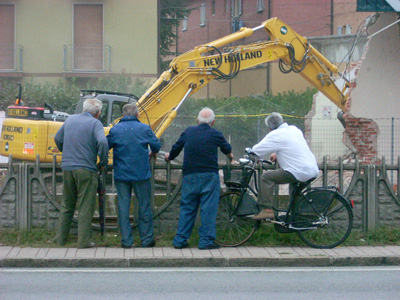
Umarell /uma'r l/ (oo-mah-rell), n; pl. Umarells. People in a community who offer all sorts of comments to those who are trying to get some work done, but who are not doing any work themselves.
Etymology and further details Umarell is a word that entered Italian slang in Bologna and is spreading to nearby towns, occasionally even across Italy. It comes from the Bolognese for "cute/odd little man". "Umarells" are those people, usually retired men, who spend time watching construction works, often holding their hands behind their back, occasionally commenting on what is going on, sometimes trying to tell the workers what to do. It's easy to find examples on the internet; the word was popularised by a blog collecting photos, which has even been published into a book. With some Italian Debian friends, we realised that umarell is the perfect word to describe those people in a community, who offer all sorts of comments to those who are trying to get some work done, but who are not doing any work themselves. I think that it is a word that fits perfectly, and since I'm likely going to use it blissfully anywhere, here is a page that temporarily explains what it means until the Oxford English Dictionary picks it up.

Russell Coker: Qi Phone Charging

I have just bought a wireless phone charging system based on the Qi Inductive Power Standard. I bought a charging device which connects to a standard micro-USB cable and receivers for the Samsung Galaxy Note 2 and Samsung Galaxy S3 phones I own. Both those phones have contacts in the back of their case that are designed for wireless charging so you can install a charging device inside them. The charging devices make the case fit a little tight, and the charging device is stuck to the phone battery with contact adhesive, this makes it impractical to change the battery on a phone with such a device and makes it a little more difficult to swap out a battery case. One nice feature of the Nexus 4 is that it has Qi charging built in, that saved me $19 and was also more convenient. I believe that the main advantage of a wireless charger is to avoid the risk of damage to the phone if it s dropped while connected to a USB charger. This allows the phone to be charged in situations where you might need to quickly or regularly unplug it to go somewhere. One example of how I might use it is when working at an office so I could charge my phone while at my desk and then quickly take it with me if I had to go to a meeting (sadly I have worked in many offices where they have so many meetings). Another example is for sysadmin work where I have to frequently visit devices to fix them. The wireless charging mat that I bought from Kogan connects to a standard micro-USB plug, the good thing about this is that it s easy to find cables and it can take power from any PC. The bad thing about this is that the resistance of the USB cable is a factor that limits the power that a phone can receive, when using wireless charging you have the limit of the cable resistance as well as some power loss from the wireless transmission. After any extended period of charging the charging mat feels warm to the touch and the phone that s been resting on it feels warmer than usual. The warmth is an indication of energy loss which means longer charging times, a longer charging time isn t necessarily a problem as the convenience of wireless charging can allow longer charging times, but if you want to charge your phone in a hurry before you go somewhere then wireless isn t a good choice. In the past I ve discovered that the battery in a Samsung Galaxy S3 can t be charged if the phone is at 46C [1]. 46C might seem extremely hot to people in some parts of the world (EG northern Europe and Canada) but the temperature in even southern parts of mainland Australia can get that hot and it can be hotter in central and northern parts, so phone temperature can be a real issue. Currently my house is at 21C according to a digital thermometer, the Galaxy S3 and the Note 2 are being charged from USB and report temperatures of 27C and 23C respectively. While the thermometer in my house and those in the phones probably aren t really accurate it seems reasonable to assume that the battery of a relatively idle smart-phone that s being charged will be a few degrees warmer than the ambient temperature. The Qi charger makes things a lot worse as it even feels warm to the touch. So maybe a phone on a Qi charger would be 8 degrees warmer than the ambient temperature or more. That implies that in Australian summer weather a Qi charger won t be useful outside or in any building that lacks air-conditioning. So I think we can give up on the idea of using Qi devices to charge phones at a BBQ. Picture of Qi charger on top of Samsung Galaxy Note 2 The final problem I have is that the Qi device is quite small, I took the above picture with my phone face-down because no part of the charger is visible in normal use. With that size I can t just dump a phone like a Note 2 on top of the charging mat and expect it to work. I have to carefully place it so that it balances and so that the wireless receptor inside the phone matches the transmitter in the mat, if the phone isn t placed correctly then the Qi mat won t detect it and won t supply full power to the transmitter. Conclusion I m fairly disappointed in this device. The waste heat makes it unsuitable for Australian summer conditions and slows charging. The difficulty of correctly placing the phone reduces the convenience which is one of the major features. The price was $19 for each charging card for the Note 2 and the S3 and $29 for the charging mat to give a total of $67. I think it s worth the money for me to cover the risk of one of my phones having it s USB port damaged. Using a Qi charger on occasion will decrease the probability of such damage and allow the phone to be used after receiving certain types of damage. The prices of those phones nowadays are $389 for a Galaxy S3 (Kogan price), $250 for a Nexus 4 (when it was on sale in the Google store), and probably about $500 for a Galaxy Note 2 (last time Kogan offered them). So by paying $67 for Qi charging I believe that I m getting some degree of damage insurance for just over $1100 worth of phones. It seems likely that the Nexus 5 will ship with Qi charging support and that the Galaxy Note 3 will also support an optional Qi charging card (which will probably also be $19 or some similar price) so the charging mat should be useful for a long time. While I m disappointed I don t regret buying the device. But I would be hesitant to recommend it to other people and definitely wouldn t recommend it to someone who doesn t have a significant interest and investment in smart phones.

18 September 2013

Raphael Geissert: A bashism a week: testing strings

The bashism of this week deals again with tests. How do you compare two strings to tell which one goes before or after the other in the alphabet in a shell script?
(also know as lexicographic comparison)

If you are familiar with perl and the relationship between its comparison operators and that of shell scripts, you would probably write the test as follows:


$ test bar '<' foo
$ test foo '>' bar


And yes, that would work, but not with all shells. I'm afraid to tell you that the < and > comparison operators are not required by the POSIX:2001 specification and are, therefore, bashisms.

What does this have to do with perl? well, the shell way is the inverse of the perl way.
What? In Perl you test the equality of two numbers with '==', in shell you use '-eq'; in perl the equality of strings is 'eq', in shell it is '='. In shell scripts you can compare two numbers with -gt (test 1 -gt 0) while in perl the equivalent comparison is with > (1 > 0).

So in this case the perl way is "bar lt foo" and based on the above the shell way should be "bar < foo". However, care must be taken when using such operators in shell scripts. Since < and > are used for redirections in shell scripts, one must quote them even when using bash. An alternative is to use the [[ special test function of bash which alters the shell syntax.

This time I didn't write a function to portably (or "somewhat portably") replace such comparisons. Feel free to share your solution in the comments, with bonus points if you come up with a solution without using external commands.

Francois Marier: Presenting from a separate user account

While I suspect that professional speakers have separate presentation laptops that they use only to give talks, I don't do this often enough to justify the hassle and cost of a separate machine. However, I do use a separate user account to present from. It allows me to focus on my presentation and not stress out about running into configuration problems or exposing private information. But mostly, I think it's about removing anything that could be distracting for the audience. The great thing of having a separate user for this is that you can do whatever you want in your normal account and still know that the other account is ready to go and configured for presenting on a big screen.

Basics The user account I use when giving talks is called presenter and it has the same password as my main user account, just to keep things simple. However, it doesn't need to belong to any of the UNIX groups that my main user account belongs to. In terms of configuration, it looks like this:
  • power management and screen saver are turned off
  • all sound effects are turned off
  • window manager set to the default one (as opposed to a weird tiling one)
  • desktop notifications are turned off
Of course, this user account only has the software I need while presenting. You won't find an instant messaging, IRC or Twitter client running on there. The desktop only has the icons I need for the presentation: slides and backup videos (in case the network is down and/or prevents me from doing a live demo).

Web browsers While I usually have my presentations in PDF format (for maximum compatibility, you never know when you'll have to borrow someone else's laptop), I use web browsers (different ones to show that my demos work with all of them) all the time for demos. Each browser:
  • clears everything (cookies, history, cache, etc.) at the end of the session
  • has the site I want to demo as the homepage
  • only contains add-ons or extensions I need for the demos
  • has the minimal number of toolbars and doesn't have any bookmarks
  • has search suggestions turned off
  • never asks to remember passwords

Terminal and editors Some of my demos may feature coding demos and running scripts, which is why I have my terminal and editor set to:
  • a large font size
  • a color scheme with lots of contrast
It's all about making sure that the audience can see everything and follow along easily. Also, if you have the sl package installed system-wide, you'll probably want to put the following in your ~/.bashrc:
alias sl="ls"
alias LS="ls"

Rehearsal It's very important to rehearse the whole presentation using this account to make sure that you have everything you need and that you are comfortable with the configuration (for example, the large font size). If you have access to a projector or a digital TV, try connecting your laptop to it. This will ensure that you know how to change the resolution of the external monitor and to turn mirroring ON and OFF ahead of time (especially important if you never use the default window manager or desktop environment). I keep a shortcut to the display settings in the sidebar.

Localization Another thing I like to do is to set my operating system and browser locales to the one where I am giving a talk, assuming that it is a western language I can understand to some extent. It probably doesn't make a big difference, but I think it's a nice touch and a few people have commented on this in the past. My theory is that it might be less distracting to the audience if they are shown the browser UI and menus they see every day. I'd love to have other people's thoughts on this point though. Also, pay attention to the timezone since it could be another source of distraction as audience members try to guess what timezone your computer is set to.

Anything else? If you also use a separate account for your presentations, I'd be curious to know whether there are other things you've customised. If there's anything I missed, please leave a comment!

17 September 2013

Julien Danjou: Python 3.4 single dispatch, a step into generic functions

I love to say that Python is a nice subset of Lisp, and I discover that it's getting even more true as time passes. Recently, I've stumbled upon the PEP 443 that describes a way to dispatch generic functions, in a way that looks like what CLOS, the Common Lisp Object System, provides. What are generic functions If you come from the Lisp world, this won't be something new to you. The Lisp object system provides a really good way to define and handle method dispatching. It's a base of the Common Lisp object system. For my own pleasure to see Lisp code in a Python post, I'll show you how generic methods work in Lisp first. To begin, let's define a few very simple classes.
(defclass snare-drum ()
())

(defclass cymbal ()
())

(defclass stick ()
())

(defclass brushes ()
())

This defines a few classes: snare-drum, symbal, stick and brushes, without any parent class nor attribute. These classes compose a drum kit, and we can combine them to play sound. So we define a play method that takes two arguments, and returns a sound (as a string).
(defgeneric play (instrument accessory)
(:documentation "Play sound with instrument and accessory."))

This only defines a generic method: it has no body, and cannot be called with any instance yet. At this stage, we only inform the object system that the method is generic and can be then implemented with various type of arguments. We'll start by implementing versions of this method that knows how to play with the snare-drum.
(defmethod play ((instrument snare-drum) (accessory stick))
"POC!")

(defmethod play ((instrument snare-drum) (accessory brushes))
"SHHHH!")

Now we just defined concrete methods with code. They also takes two arguments: instrument which is an instance of snare-drum and accessory that is an instance of stick or brushes. At this stage, you should note the first difference with object system as built into language like Python: the method isn't tied to any class in particular. The methods are generic, and any class can implement them, or not. Let's try it.
* (play (make-instance 'snare-drum) (make-instance 'stick))
"POC!"

* (play (make-instance 'snare-drum) (make-instance 'brushes))
"SHHHH!"

* (play (make-instance 'cymbal) (make-instance 'stick))
debugger invoked on a SIMPLE-ERROR in thread
#<THREAD "main thread" RUNNING 1002ADAF23 >:
There is no applicable method for the generic function
#<STANDARD-GENERIC-FUNCTION PLAY (2)>
when called with arguments
(#<CYMBAL 1002B801D3 > #<STICK 1002B82763 >).

Type HELP for debugger help, or (SB-EXT:EXIT) to exit from SBCL.

restarts (invokable by number or by possibly-abbreviated name):
0: [RETRY] Retry calling the generic function.
1: [ABORT] Exit debugger, returning to top level.

((:METHOD NO-APPLICABLE-METHOD (T)) #<STANDARD-GENERIC-FUNCTION PLAY (2)> #<CYMBAL 1002B801D3 > #<STICK 1002B82763 >) [fast-method]

As you see, the function called depends on the class of the arguments. The object systems dispatch the function calls to the right function for us, depending on the arguments classes. If we call play with instances that are not know to the object system, an error will be thrown. Inheritance is also supported and the equivalent (but more powerful and less error prone) equivalent of Python's super() is available via (call-next-method).
(defclass snare-drum () ())
(defclass cymbal () ())

(defclass accessory () ())
(defclass stick (accessory) ())
(defclass brushes (accessory) ())

(defmethod play ((c cymbal) (a accessory))
"BIIING!")

(defmethod play ((c cymbal) (b brushes))
(concatenate 'string "SSHHHH!" (call-next-method)))

In this example, we define the stick and brushes classes as subclass of the accessory class. The play method defined will return the sound BIIING! regardless of the accessory instance that is used to play the cymbal. Except in the case where it's a brushes instance; only the most precise method is always called. The (call-next-method) function is used to call the closest parent method, in this case that would be the method returning _"BIIING!".
* (play (make-instance 'cymbal) (make-instance 'stick))
"BIIING!"

* (play (make-instance 'cymbal) (make-instance 'brushes))
"SSHHHH!BIIING!"

Note that CLOS is also able to dispatch on object instances themself by using the eql specializer. But if you're really curious about all features CLOS provides, I suggest you read the brief guide to CLOS by Jeff Dalton as a starter. Python implementation Python implements a simpler equivalence of this workflow with the singledispatch function. It will be provided with Python 3.4 as part of the functools module. Here's a rough equivalence of the above Lisp program.
import functools

class SnareDrum(object): pass
class Cymbal(object): pass
class Stick(object): pass
class Brushes(object): pass

@functools.singledispatch
def play(instrument, accessory):
raise NotImplementedError("Cannot play these")

@play.register(SnareDrum)
def _(instrument, accessory):
if isinstance(accessory, Stick):
return "POC!"
if isinstance(accessory, Brushes):
return "SHHHH!"
raise NotImplementedError("Cannot play these")

We define our four classes, and a base play function that raises NotImplementedError, indicating that by default we don't know what to do. We can then write specialized version of this function with a first instrument, the SnareDrum. We then check for the accessory type that we get, and return the appropriate sound or raise NotImplementedError again if we don't know what to do with it. If we run it, it works as expected:
>>> play(SnareDrum(), Stick())
'POC!'
>>> play(SnareDrum(), Brushes())
'SHHHH!'
>>> play(Cymbal(), Brushes())
Traceback (most recent call last):
File "<stdin>", line 1, in <module>
File "/home/jd/Source/cpython/Lib/functools.py", line 562, in wrapper
return dispatch(args[0].__class__)(*args, **kw)
File "/home/jd/sd.py", line 10, in play
raise NotImplementedError("Cannot play these")
NotImplementedError: Cannot play these
>>> play(SnareDrum(), Cymbal())
Traceback (most recent call last):
File "<stdin>", line 1, in <module>
File "/home/jd/Source/cpython/Lib/functools.py", line 562, in wrapper
return dispatch(args[0].__class__)(*args, **kw)
File "/home/jd/sd.py", line 18, in _
raise NotImplementedError("Cannot play these")
NotImplementedError: Cannot play these

The singledispatch module looks through the classes of the first argument passed to the play function, and calls the right version of it. The first defined version of the play function is always run for the object class, so if our instrument is a class that we did not register for, this base function will be called. For whose eager to try and use it, the singledispatch function is provided Python 2.6 to 3.3 through the Python Package Index. Limitations First, as you noticed in the Lisp version, CLOS provides a multiple dispatcher that can dispatch on the type of any of the argument defined in the method prototype, not only the first one. Unfortunately, Python dispatcher is named singledispatch for this good reason: it only knows to dispatch on the first argument. Guido van Rossum wrote a short article about the subject that he called multimethod a few years ago. Then, there's no way to call the parent function directly. There's no equivalent of the (call-next-method) from Lisp nor the super() function that allows to do that in Python class system. This means you will have to use various trick to bypass this limitation. So while I am really glad that Python is going toward that direction, as it's a really powerful way to enhance an object system, it really lacks a lot of more advanced features that CLOS provides out of the box. Though, improving this could be an interesting challenge. Especially to bring more CLOS power to Hy. :-)
The Hacker Guide to Python
A book I'm writing that will be launched soon, talking about designing Python applications, state of the art, and various Python tips. If you want to be the first to hear about the launch, subscribe now.

Cyril Brulebois: Fixing bugs

It s a somewhat strange feeling to spend time fixing things that broke instead of implementing new things, but it s not like I m a creative guy anyway For those last two points, the long term plan is: Hopefully getting this done this week (famous last words, eh?).

16 September 2013

Gunnar Wolf: My favorite (or rather, one among my favorite) non-original work Leo Masliah #encirc13

It seems I'm catching up with the pace of this course I'm following and that is compelling me to go back to posting on my blog, Arte y cultura en circulaci n: crear y compartir en tiempos digitales . This week's lesson is (again, in Spanish) Las fronteras del remix (the boundaries of remixes). An interesting text, open to everybody (regardless of whether you are signed up for the course or, I hope, whether time has passed since the course took place). And this week's homework is to find "our favorite" non-original work (I picked one among my favorite works And, yes, this is partly because I am part of the "club" of deniers of true originality: We cannot create anything without being part of a surrounding culture, without a common heritage and language with which we speak to our audience) and to find something about it, anything considered important or significative as to its antecedents. What do I like about this work, what grabs my attention. Do I consider it to be a true new creative work? Why? I am taking as an example Leo Masliah, an Uruguayan writer and musician (writer and interpreter). I have followed and enjoyed Masliah's work since 1996, and although by far I'm most familiar with his musical works, I have two books (a novel and a series of short stories). Among his facets, I most enjoy the acid, nihilistic/dadaistic streaks. I chose three of his songs to talk about I am linking to anonline resource where possible, but uploading the three songs to this blog to make his work better known, so that people understand what I talk about, and with my best intentions. Of course, if there is any request to remove the material, I will do it right away. I hope this can be seen as fair/academic use, although this blog is somewhat widely read.
La recuperaci n del unicornio
This song was in the first Masliah cassette I came across, Although musically it is an original work, the lyrics are a clear, almost line-by-line reply to the ever-repeated Unicornio song, by Silvio Rodr guez. This song (which I'm sure that every Spanish speaker reading this lines knows, like it or not It defines for me a good deal of Rodr guez hyper-sweetness and clicheness) has been analyzed over and over looking for a meaning. Silvio recorded this song in 1981, and by 1987 Masliah published this answer, mocking each of the lines.
So, this song can be seen as an original creation, as it contains no literal copy neither of the music nor of the lyrics of the original, but it cannot be understood without being familiar with Silvio's lost unicornio. It would just be an almost-dadaistic rant. But every person that has tasted Silvio Rodr guez cloying song will surely laugh with this one.
No necesitamos otro h roe Balderrama
I find this to be a very unique piece. It bonds together Argentinian folklore and USA pop.
Masliah sings the famous Argentinian song Zamba de Balderrama, (Castilla / Leguizam n), a song lamenting that the very popular bar and artist stage Balderrama, in Salta (North-Western corner of Argentina), seemed to be on the brink of closing. Of course, when Mart n, Constanza, Regina and me went to Balderrama in July 2010, the danger of closing this place had long been averted. And basically every Argentinian knows this song by heart.
The interesting part is that Masliah sings this song (as he presents it as the closing piece for one of his concerts) being short on time, and decides to present two acts together: Zamba de Balderrama and We don't need another hero, by Tina Turner, from the Mad Max soundtrack. So, of course, even if it's obvious that Masliah had to stretch bits to make them fit together, he achieved a very funny, interesting and unique blend of two completely unrelated works. He derives from one as well as from the other, but creates something unique and new.
Donna Lee
I was thinking what to write for this assignment , and had already chosen the two other songs. Yesterday, we were visiting our friends Octavio and Claudia, in Guanajuato, and I heard for the first time the original(?) version of Donna Lee, by Miles Davis (although often credited to Charlie Parker). That led me to remember Masliah's interpretation, in his Cl sicos album. This album is basically made up with similar excercises: Taking an instrumental piece, with Masliah singing over it. Some of the lyrics follow the story (i.e. the children stories), others just talk nonsense to illustrate a point (i.e. "La voz del medio", "the middle voice") follows the non-protagonist score trying not to grab much attention to the lyrics but to highlight the often ignored melody)... Donna Lee is just a fun excercise on following the melody asking what was in the head of the author that led him to invent such a strange, hard music.
Masliah is a great music performer, although often it seems he tries to hide it (i.e. by abusing the dissonances, ex-profeso singing off-key, etc), and a very funny and crazy author. Most of his works have a deep satirical tone, and it's common to find either simple winks or complete "borrowings" in a clear remix fashion, but nobody will doubt on the originality of his works.
AttachmentSize
07-Donna Lee.MP31.79 MB
16 No necesitamos otro h roe - Balderrama.mp33.49 MB
Leo Masl ah-La Recuperaci n Del Unicornio.mp31.87 MB

Petter Reinholdtsen: Third and probably last beta release of Debian Edu Wheezy

The third wheezy based beta release of Debian Edu was wrapped up today. This is the release announcement from Holger Levsen:
Hi, it is my pleasure to announce the third beta release (beta 2 for short) of Debian Edu / Skolelinux based on Debian Wheezy! Please test these images extensivly, if no new problems are found we plan to do this final Debian Edu Wheezy release this coming weekend. We are not aware of any major problems or blockers in beta2, if you find something, please notify us immediately! (More about the remaining steps for the Edu Wheezy release in another mail to the edu list tonight or tomorrow...) Noteworthy changes and software updates for Debian Edu 7.1+edu0~b2 compared to beta1:
  • The KDE proxy setup has been adjusted to use the provided wpad.dat. This also gets Chromium to use this proxy.
  • Install kdepim-groupware with KDE desktops to make sure korganizer understand ical/dav sources.
  • Increased default maximum size of /var/spool/squid and /skole/backup on the main server.
  • A source DVD image containing all source packages is now available as well.
  • Updates for chromium (29.0.1547.57-1~deb7u1), imagemagick (6.7.7.10-5+deb7u2), php5 (5.4.4-14+deb7u4), libmodplug (0.8.8.4-3+deb7u1+git20130828), tiff (4.0.2-6+deb7u2), linux-image (3.2.0-4-486_3.2.46-1+deb7u1).
Where to get it: To download the multiarch netinstall CD release you can use The SHA1SUM of this image is: 3a1c89f4666df80eebcd46c5bf5fedb866f9472f To download the multiarch USB stick ISO release you can use The SHA1SUM of this image is: 702d1718548f401c74bfa6df9f032cc3ee16597e The Source DVD image has the filename debian-edu-7.1+edu0~b2-source-DVD.iso and the SHA1SUM 089eed8b3f962db47aae1f6a9685e9bb2fa30ca5 and is available the same way as the other isos. How to report bugs For information how to report bugs please see
http://wiki.debian.org/DebianEdu/HowTo/ReportBugs About Debian Edu and Skolelinux Debian Edu, also known as Skolelinux, is a Linux distribution based on Debian providing an out-of-the box environment of a completely configured school network. Immediately after installation a school server running all services needed for a school network is set up just waiting for users and machines being added via GOsa , a comfortable Web-UI. A netbooting environment is prepared using PXE, so after initial installation of the main server from CD or USB stick all other machines can be installed via the network. The provided school server provides LDAP database and Kerberos authentication service, centralized home directories, DHCP server, web proxy and many other services. The desktop contains more than 60 educational software packages and more are available from the Debian archive, and schools can choose between KDE, Gnome, LXDE and Xfce desktop environment. This is the seventh test release based on Debian Wheezy. Basically this is an updated and slightly improved version compared to the Squeeze release. Notes for upgrades from Alpha Prereleases Alpha based installations should reinstall or downgrade the versions of gosa and libpam-mklocaluser to the ones used in this beta release. Both alpha and beta0 based installations should reinstall or deal with gosa.conf manually; there are two options: (1) Keep gosa.conf and edit this file as outlined on the mailing list. (2) Accept the new version of gosa.conf and replace both contained admin password placeholders with the password hashes found in the old one (backup copy!). In both cases all users need to change their password to make sure a password is set for CIFS access to their home directory. cheers,
Holger

Debian Med

DebConf 13 report (by Andreas Tille) General impression unofficial  Scenic Hacklab I'm beginning my DebConf report in an unofficial "Scenic Hacklab" right at the edge of the lake in Yverdon. This is the right place to memorise the last days. When I started from this place cycling to Le Camp 12 days ago I was full of great expectations and what should I say - the reality has even beaten these. Once it comes about comparing DebConfs even if it is an unfair comparison due all the differences my secret long term favourite was Helsinki very closely followed by Argentina and also very closely followed by all the other great DebConfs I joined (and I joined all in Europe). Would Le Camp be able to beat it? The short answer is: Yes, it is now my favourite DebConf while I think I do not suffer from the last-Debconf-was-the-best-DebConf-syndrome (and I realised there are others thinking the same). As you might probably know I'm a bit addicted to swimming. While Helsinki had admittedly the better conditions I was at least able to fix the distance issue using my bicycle. (Hey, those Le Camp photographers did a great job in hiding the fact that you can not actually touch the lake right from the meadow of Le Camp.) Being able to have my bicycle at DebConf scored some extra points. However, the really great view of the lake, the inspiring "Scenic Hacklab" which was my favourite place has bumped DebConf13 at first place in my personal ranking. So it comes quite natural to say: "Kudos to the great organisation team!" They did a Swiss-like precise work and perfectly succeeded in hiding any problems (I assume there were some as always) from the attendees so everything went smooth, nice and shiny for the attendees. The local team was even precise in setting up great weather conditions for DebConf. sunrise over  the lake While saying thanks to the local team I would like to also explicitly thank Luca Capello who has quite some share that this DebConf was possible at all (while I have to decrease my DebConf score one point because he was not really there - Luca to bad that you were not able to come full time!) Also thanks to Gunnar and Gannef who helped remotely (another score down because I were missing them this year as well). Even if it was my favourite DebConf I was not able to work down my todo list fully (which was not only uploading one package per day which I at least statistically fullfilled). But that's probably a general feature of todo lists anyway. One item was definitely done: Doing my daily swimming BoF. I actually was able to do the other parts of the triathlon which was skipped by Christian and have done in summary about 150km cycling with 3500m elevation and estimated 7-8km swimming (0m elevation ;-)). Considering the great view at sunrise over the lake I was not hating my "Senile bed escape" disease too much (I was every day waking up at sunset) - it was simply a great experience. I will never forget seeing water drips glimmering like gold inside the morning sun while seeing the Alps panorama in the distant. I hope I was able to help all interested swimmers with the DebConf Beach Map which was just a by-product of my activities in DebCamp. Speaking about OSM: I was astonished that the area was way less covered than I expected. Thanks to several DebConf attendees the situation became better and the map does not only show random trees in the wild but also the tracks leading to these. (Remark: It was no DebConf attendee who is responsible for plastering the map with single trees.) While I had my mapping focus basically close to the edge of the lake I was also able to even map my very own street. :-) I clearly remember one specific mapping tour when I was invited by the DPL: He convinced me to join him on a bicycle tour and since I was afraid to get fired I joined him instead to keep on hacking. Also Sorina was brave enough to join us on the tour and she did quite well. (Sorina, do you remember the agreement about your work on the installer? ;-)) Lucas described the tour as: going uphill on only asphalted roads. Sorina and me were witnessing the mighty DPL powers when we left the wood around Le Camp to reach the described road: The asphalt was just put onto the road - no doubt that it was done on the immediate demand of mighty DPL. :-) DebCamp time was flying like nose dive and a lot of known (and unknown) faces arrived at Le Camp. What I really liked a lot this year was that several really young children has pulled down the average age of DebConf attendees. I clearly remember all the discussion one year ago what to do about children. As always the issue was solved in a typical Debian way: Just do it and bring your children - they had obviously a great time as well. I think the youngest child was 2 months and the oldest "child" above 20. ;-) Actually Baptiste Perrier did great in making the C&W party a success and had obviously a nice time. (I wished my son would have been able to come as well but he needs to write his bachelor s thesis in physics. :-() It was nice to see the kids using all playing facilities and communicating with geeks. Also I would like to point out that even the very young attendees had their share at the success of DebConf: Just think of the three "bell ringing assistants" who helped me ringing the bells for lunch and dinner. I've got this cool job from Didier in the beginning of DebCamp. I must say having some real bells ringing is by far nicer than just the "lunch / dinner starts in 10 minutes" from IRC bot. The only thing I did not understand was that people did not considered ringing the bells at 8:00 for breakfast as a good idea. Regarding the food in general I would also like to send kudos to the kitchen: It was tasty, freshly prepared, regional food with a good change rate. I really liked this. Extra points for having the chance to sit outside when eating. Talks But lets have a look into the conference programme. I'd really recommend watching the videos of the talks Bits from the DPL (video) and Debian Cosmology (video). I considered both talks as entertaining and interesting. I also really hope that the effort Enrico Zini started in Debian Contributors (video) will be successful. I had some talks and BoFs myself starting with Why running a Blend (video) and I admit that (as usual) the number of attendees was quite low even if I think there is some proof (see below) that it is interesting for way more people who should consider working more "blendish" in their team. Do you know how to recruit one developer per year and relax the man power problem in your team? Feel free to watch the video. We have confirmation that ten DDs of our team have considered to join Debian only because Debian Med exists. Admittedly biology and medicine are really leaf topics inside the Debian universe. So if even this topic that has a very tiny share of the Debian users is able to attract this level of attention - how many more people could we win for multimedia, games, GIS and others? So if you feel you are quite overworked with your packaging and you have no time this is most probably wrong. The amount of time is basically a matter of priorities you set for your tasks. Try to put some higher priority onto using the just existing Blends tools I explained in my talk to attract more users and developers to your team and by doing so spread the workload over more people. It works, the prove was given in my main talk. So before you start working on a specific package you should wonder who else could have an even stronger interest to get this work done and provide him with some additional motivation and help to get the common goal done. The interesting thing is that my BoF about How to attract new developers for your team (video) - which was a simple report about some by-product of the Blends work - made it into the main talk room and got way more attention. For me this is the proof that the Blends concept itself is probably badly perceived as something like "a few outsiders are doing damn specific stuff which is not really interesting for anybody else" instead of what is really is: Smoothing the way from specific upstream applications to the end user via Debian. Once you see the video of this BoF you can observe how my friend Asheesh Laroia became more and more excited about the Blends concept and admitted what I said above: We should have more Blends for different fields. Funnily enough Asheesh asked me in his excitement to talk more about Blends. This would have been a really good suggestion ten years ago. At DebConf 3 in Oslo I had my very first talk about Blends (at this time under the name "Debian Internal Projects"). I continuously kept on talking about this (MiniDebConf Peking 2005, DebConf 5, Helsinki (video), DebConf 7, Edinburgh (video), DebConf 8, Mar del Plata (video), DebConf 9, C ceres (video), MiniDebConf Berlin 2010 (video in German), MiniDebConf Paris 2010 (not video recorded), DebConf 11, Banja Luka (video) ... and these are only (Mini)DebConfs my talks page is full of this topic) and every new year I try different ways to communicate the idea to my fellow Debianistas. I'm wondering how I could invent a title + abstract avoiding the term Blends, put "Git", "release" and "systemd versus upstart" in and being able to inform about Blends reasonably by not becoming to off topic with the abstract. I also registered the Debian Science round table. I admit we were lacking some input from remote via IRC which used to be quite helpful in the past. The attendees agreed upon the handling of citations in debian/upstream files which was invented by Debian Med team to create even stronger bounds to our upstream developers by giving their work extra reward and providing users with even better documentation (see my summary in Wiki). As usual I suggested to create some Debian Science offsprings like "Debian Astronomy", "Debian Electronics", "Debian Mathematics", "Debian Physics" etc. who could perfectly leave the Debian Science umbrella to get a more fine grained structure and a more focused team to enhance the contact to our users. Unfortunately there is nobody who volunteers to take over the lead for such Blends. I have given a short summary about this BoF on the Debian Science mailing list. In the Debian Med meeting I have given some status report. No other long term team members were attending DebConf and so I gave some kind of introduction for newcomers and interested people. I touched also the DebiChem topic which maintains some packages that are used by biologists frequently and so we have a good connection to this team. Finally I had registered three BoFs in Blends I'm actually not (or not yet) active part of. My motivation was to turn the ideas I have explained in my main talk into specific application inside these teams and helping them to implement the Blends framework. In the first BoF about Debian GIS I have shown the usual team metrics graphs to demonstrate, that the one packaging team Pkg-OSM is in danger to become MIA. There are only three persons doing actual uploads. Two of them were at DebConf but did not joined the BoF because they do not consider their contribution to Pkg-OSM as a major part of their general Debian work. I will contact the main contributor David Paleino about his opinion to move the packages step by step into maintenance of Debian GIS packaging team to try to overcome the split of two teams that are sharing a good amount of interest. At least if I might become an Uploader for one of the packages currently maintained by Pkg-OSM I will move this to pkg-grass-devel (which is the name of the packaging team of Debian GIS for historical reasons). The attendees of the BoF have considered this plan as sensible. Moreover I talked about my experiences with OSGeo Live - an Ubuntu derivative that tries to provide a full tool chain to work on GIS and OSM problems ... basically the same goal as Debian GIS has just provided by the OSGeo project. I'm lurking on OSGeo mailing list when I asked explicitly I've got the answer that they are working together with Debian GIS and are using common repository (which is IMHO the optimal way of cooperation). However, it seems that several protagonists of OSGeo Live are underestimating the resources provided by Debian. For instance there was a question about Java packaging issues but people were not aware about the existence of the debian-java mailing list. I was able to give an example how the Debian Med team managed to strengthen its ties to BioLinux that is also an Ubuntu derivative for biologists. At our first Debian Med sprint in 2011 we invited developers from BioLinux and reached a state where they are using the very same VCS on Alioth where we are maintaining our packages. At DebConf I was able to upload two packages where BioLinux developers did certain changes for enhancing the user experience. My "work" was just bumping the version number in changelog and so we did profit from the work of the BioLinux developers as well as they are profiting from our work. I plan to dive a bit more into Debian GIS and try to strengthen the connection to OSGeo Live a bit. The next BoF was the Debian Multimedia meeting. It was nice that the current leader of Ubuntu Studio Kaj Ailomaa joined the meeting. When I was explaining my ideas about cooperation with derivatives I repeated my detailed explanation about the relation with BioLinux. It seems every topic you could cover inside Debian has its related derivative. So to me it seems to be quite natural to work together with the developers of the derivative to join forces. I actually consider a Blend a derivative done the right way = inside Debian. The final work for the derivers that might be left for them is doing some shiny customising of backgrounds or something like this - but all the hard work could and should be done in common with the relevant Debian team. My dream is to raise such relevant teams inside Debian ... the Blends. Finally the last BoF of this series was the Debian Games meeting. As always I presented the team metrics graphs and the Debian Games team members who attended the BoF were quite interested. So it seems to be some unknown fact that team metrics are done for several teams in side Debian and so I repeat the link to it for those who are not yet aware of it. As a result of the BoF Debian Games team members agreed to put some more effort into maintaining their Blends tasks. Moreover Miriam Ruiz wants to put some effort into reviving Debian Jr. Regarding Debian Jr. there was an interesting talk about DouDouLinux - in case you might want to watch the video I'd recommend skipping the first 30min and rather watch the nice live demo. There was also an ad hoc BoF about Debian Jr scheduled to bring together all people interested into this cute project and Per Anderson volunteered to take over the lead. I have given a summary about this specific BoF at the Debian Jr list. For some other talks that I'd regard as remarkable for some reasons: I'd regard the talk "Debian-LAN" by Andreas Mundt as some hidden pearl because it did not got a lot of attention but after having seen the video I was quite impressed - specifically because it is also relevant for the Blends topic. Memories I also liked "Paths into Debian" by Moray Allan (and I was only able to enjoy the latter talks thanks to the great work of the video team!) because it also scratched the same topic I was concerned about in my mentoring talk. Related to this was in my opinion also "Women in Debian 2013" were we tried to find out reasons for the lack of woman compared to other projects and how to overcome this issue. Geert hovering  over the grass Besides the talks I will probably never forget two specific moments that make DebConf so special. One of these moments is recorded on an image that clearly needs no words - just see Geert hovering over the grass. Another strong moment in my personal record was in the DebConf Newbies BoF "First time at DebConf" that unfortunately was not recorded but at least for this statement it would have been very great if we would have some reference better than personal memory. Aarsh Shah a GSoC student from India suddenly raised up and said: "Four months ago I was not even aware that Free Software exists. Now I'm here with so many people who are totally equal. If I will tell my mother at home that I was standing in the same queue where the Debian Project Leader was queuing up for food she will never believe me." He was totally excited about things we are regarding as normal. IMHO we should memorise moments like this that might be part of the key to success in cultures, where Debian is widely unknown and very rarely in use. Amongst these not scheduled great moments the scheduled day trip was also a great thing. I had a really hard time to decide what tour I might join but ended up in the "long distance walking (or should I say running) group". Inspired by the "running Bubulle" who was flashing between the walking groups we went uphill with 5.4km/h which was a nice exercise. Our destination the large cliff was an exciting landscape and I guess we all enjoyed the dinner organised by the "Trout cabal". ;-) say goodby to  friends So I had a hard time to leave Le Camp and tried hard to make sure my memories will remain as long as possible. Keeping some signs attached to my bicycle, conserving the "Scenic Hacklab" sign for my private "scenic hacklab @ home" was one part. I also have cut some branches of the Buxus sempervirens in Le Camp and have put them in my garden at home (where I create some hedgerow from places where I spent some great time). These will probably build a great part of the hedgerow ... Thanks for reading this longish report. Looking forward to see you all in Germany 2015 (or earlier) Andreas. Scenic Hacklab  @ home

15 September 2013

Ben Hutchings: The terrible state of EFI variable storage

EFI includes support for storing persistent 'variables': it implements a key-value store where keys are (UUID, string) and values are arbitrary blobs. (There are also some flags that restrict when the variables can be accessed.) The physical storage medium is normally flash. The Linux efivars module provides access to variable storage, both through a specific interface in sysfs and through the somewhat abstracted pstore interface. An EFI implementation reads the boot order and (if applicable) Secure Boot configuration from specific EFI variables. An operating system can add arbitrary variables, using its own UUID(s). On Linux, the efibootmgr utility is used to read and write the boot order and the pstore interface is used within the kernel to dump kernel log messages or other information when particular events occur. Since efivars is needed to set the boot order on EFI systems, it's a critical part of installation. But it wasn't being loaded on Debian systems until efibootmgr was run. This doesn't work so well when using a rescue system, as the installation kernel and installed kernel may be different (Debian bug 703363). In future (Debian package version 3.2.41-1) this will be loaded automatically on EFI systems. But now comes a new problem: bugs in the implementation of variable storage can prevent a system from booting, and even worse, they may prevent manual recovery without special equipment (the system is 'bricked'). Matthew Garrett recently talked about this and mentioned that some Samsung laptops are bricked if the variable storage becomes more than 50% full. efivars now has some extra checks to avoid triggering this (both in mainline and in stable branches). This isn't the end of the story, unfortunately. Remember that nothing can be overwritten in flash without erasing a relatively large block, and that writes may fail after a few thousand erase cycles (number depending on the type of flash used). Therefore, deleting a variable usually does not free storage immediately, and overwriting a variable usually reduces the amount of free storage. In the case of the Samsung laptops, unused storage is apparently reclaimed at the next reboot. However, while testing the backported efivars changes I found that my EFI-booting system (Asus P8Z68-V LX motherboard) does not reclaim unused storage until it's very nearly full. Since the firmware itself increments a counter variable on every boot, using 36 more bytes of storage, I was able to observe the available space dropping to under 100 bytes, and then after another boot jumping to about 42K (out of 64K). This means that well over 50% of storage was unused, yet efivars would refuse to write any variables because the firmware didn't reclaim it. This would prevent (re)installation of Linux, as the boot configuration could not be written. On the assumption that both behaviours are common, I've settled on a compromise that I hope minimises overall risk: But it's essential that we find a way to identify and work safely with both behaviours. Not only do I want to eliminate the possibility of bricking or installaton failure, but I want to make EFI-backed pstore safe to enable. Crash logs are often hard to obtain and pstore can help to solve that problem. Updated 2013-09-15: The free space check has been revised (in Linux 3.2.48, 3.5.7.17, 3.8.13.5, 3.9.7 and 3.10) based on advice from Samsung. The kernel leaves at least 5K (rather than 50%) of the EFI variable store free. If it is about to breach this limit, it attempts to write a dummy variable that is larger than the free space, which will either fail or trigger garbage collection. The normal variable can then be written if garbage collection freed up enough space. This check can be disabled using the kernel parameter efi_no_storage_paranoia, but there should be no need to do so.

Dirk Eddelbuettel: RProtoBuf 0.3.1

Two months to the day after the previous 0.3.0 release of RProtoBuf, we are happy to announce a maintenance release 0.3.1 which has now arrived on CRAN. RProtoBuf provides GNU R bindings for the Google Protobuf data encoding library used and released by Google. Once again, Murray lead this release and added a number improvements. The NEWS file entry follows:
Changes in RProtoBuf version 0.3.1 (2013-09-13)
  • Added support for setting and getting 64-bit integer types as character strings of decimal integers to work around R's lack of native 64-bit integer types.
  • Added better error handling, documentation, and tests to the extensions support (getExtension and setExtension).
  • Add support to P for returning extension descriptors.
  • Improved error messages to include field names when invalid fields are specified to protocol buffer messages with new, update, etc.
  • Improved configure to detect and pass -std=c++0x if it is available to enable long long 64-bit integer support in Rcpp.
  • Improved configure in the case when pkg-config is not available or does not know about the google protocol buffer includes.
  • Replaced newly deprecated Rcpp macros with a simplified macro functionality to avoid warnings on the latest development version of Rcpp.
CRANberries also provides a diff to the previous release 0.3.0. More information is at the RProtoBuf page which has a draft package vignette, a 'quick' overview vignette and a unit test summary vignette. Questions, comments etc should go to the rprotobuf mailing list off the RProtoBuf page at R-Forge.

14 September 2013

Niels Thykier: autodie 2.21

A couple of days ago, the upstream maintainer of autodie, Paul Jamieson Fenwick (PJF), released autodie 2.21. It includes all of the performance improvements I had proposed in Optimizing autodie (plus a few extra ones authored after I wrote the post) and a small fix to one of the tests (due to changes in Carp). As mentioned in my earlier post, these improvements gives about a factor 4 load time improvement in most cases. For the sake of it, I have decided to use Lintian as an example of how good this improvement is. First off, Lintian loads uses autodie in about 75 unique files in the current git master branch.
$ grep -lr 'use autodie' lib/ checks/ collection/ frontend/lintian   wc -l
75
As a simple benchmark, lets consider the following Perl one-liner:
$ /usr/bin/time -f "%es %Us %Ss" perl -Mautodie \
  -e 'print $autodie::VERSION, " => ";' \
  -e 'eval join("\n", map  "package X$_; use autodie;"  (1..74));'
A quick-n-dirty comparison gives:
2.20 => 0.91s 0.90s 0.01s
2.21 => 0.15s 0.15s 0.00s
# NB: the times are "wall, user and sys" in that order, in case you
# are too lazy to read time(1).  :) 
So, 2.21 is now closer to a factor 6 rather than the original factor 4. I have to admit that the timings seem to be very machine dependent as my laptop shows a factor 7 improvement (from ~1.39 to ~0.22s). With at least 370 tests cases running in the Lintian testsuite, I can look forward to a reduction in user time on about 4 minutes.

13 September 2013

Daniel Pocock: Calendar and Contact data with free software in the Smartphone era

Since the rise of smartphones, first Blackberry, then iPhone and now Android, the world at large has had a convenient option to fall back on for management of contact and calendar data. The data itself seems somewhat trivial: many of us software developers have worked with a plethora of obscenely more obscure schemas. It is unlikely that most people would ever have to perform an operation on their address book that requires a statistical toolkit like the R project or any of the other advanced tools we now have for data processing. In terms of data, addresses and phone numbers can appear quite boring. So why hasn't the free software community mastered it and cloud providers are currently running rampant hoovering up the data of billions of users? Ruling out LDAP One problem that people have faced is the existence of different standards. LDAP has quite a high profile and appears to be supported by default in many desktop applications. For this reason, it tends to grab people's attention but after a close look, many people find it is not the right solution. LDAP tends to work well for organisations where the data is centrally managed and in situations where fine-grained access control is not required. LDAP servers often need a capable UNIX administer to manage effectively. To top it off, LDAP itself does not provide an effective solution for two-way synchronization of data with remote and mobile users. The emergence of SyncML, CalDAV, GroupDAV and CardDAV Addressing this final problem (two-way mobile/portable device sync) has brought on the development of further standards. Initially, SyncML (now known as Open Mobile Alliance Data Synchronization and Device Management) grabbed significant attention, partly because it had been included in some of the first generation of smartphones from once-prominent vendors like Nokia. Open source server solutions for SyncML did not gain traction though. The most prominent is Funambol, however, it is not packaged in any major Linux distribution and it requires some basic Java knowledge to maintain it effectively. Like LDAP it appears to be most comfortable in enterprise use cases and doesn't appeal to the people who run a private mail and web server. SyncML has further suffered with the lack of support in more recent generations of smartphones. WebDAV was formalised in 1999 and there are now various derivative standards such as CalDAV and CardDAV which use WebDAV as a foundation. However, standards didn't arrive at this place directly: CalDAV only appeared as RFC 4791 in 2007 and CardDAV as RFC 6352 in 2011. In the meantime, some vendors experiemented with an alternative called GroupDAV. GroupDAV is largely obsolete now and GroupDAV v2 is a subset of CalDAV and CardDAV. Finally gaining traction The good news is, CardDAV and CalDAV are gaining traction, in no small part due to support from Apple and the highly proprietary iPhone. Some free software enthusiasts may find that surprising. It appears to be a strategic move from Apple, using open standards to compete with the dominance of Microsoft Exchange in large corporate networks. Both protocols are supported natively in iPhones and Mac OS X. More exciting, Apple releases their Contacts Server and Calendar Server as open source software, making it easier to look under the hood and observe any deviations from the standards. Apple's adoption of CardDAV and CalDAV has been accompanied by a similar effort in free software, however, support is more patchy. The Mozilla Lightning calendar plug-in for Thunderbird (known as the iceowl-extension plugin for icedove on Debian) has supported CalDAV for some time. In contrast, Thunderbird's address book lacks native support for CardDAV and has other limitations (discussed in detail below). Limited CardDAV support in Thunderbird can be achieved using the third-party SOGo Connector, which is not just for ScalableOGo server. The Evolution PIM appears to support both CardDAV and CalDAV relatively smoothly and appears to be more functional and easier to get started with. Free software servers are also emerging. DAViCal, despite the name, supports both CardDAV and CalDAV. It is a good solution for people who have an existing mail server and don't want to transition to an all-in-one groupware suite. Packages available in Debian make it easy to deploy and get started. It is a PHP solution, using a PostgreSQL database underneath. For people who do want a groupware suite, CardDAV and CalDAV are supported in products like ScalableOGo and Zimbra. For people who don't want a server at all and just want to sync between a desktop and a mobile device, there are options like Calypso. Mobile support: the missing link A number of people have blogged about using the Android apps CardDAV-Sync and CalDAV-Sync to complete the picture. I've tested these myself and verified that they work. However, there is one vital thing missing: the source code. Nobody knows what is inside these apps except the developer. That makes it impossible for other developers to troubleshoot them and improve them and it also makes it impossible to be certain that they do not leak information. An alternative is the aCal app for Android. Despite the name, aCal can synchronize the address book as well as the calendar. However, in my tests against DAViCal, I found that the addressbook can only be synced once and that on subsequent syncs, it fails to discover any new server-side contacts. aCal source code is available on gitorious.
aCal appears to be a compelling solution for Android users, hopefully the contact sync will be fixed soon. It only syncs once after installation and then fails to detect any new contacts. Thunderbird's limitations It has already been mentioned that the Thunderbird address book can be synchronized to a CardDAV server by adding the SOGo Connector plugin. However, this is not a perfect solution. The plugin itself is fine: the SOGo web site describes the connector (as opposed to the SOGo Integrator plugin) as a portable solution: in other words, it is vendor neutral, compatible with any standards-compliant server. The first limitation is that it is necessary to duplicate the setup process for both the calendar sync and the address book sync. This is just a question of convenience.
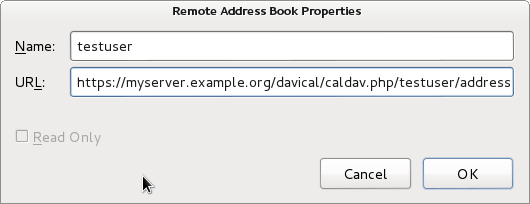
The SOGo Connector plugin configuration window is very trivial. I recommend using read-only mode to avoid the problems with multiple email addresses or telephone numbers. More serious limitations exist in the address book itself: if the CardDAV server has more than 2 email addresses, they will not appear in the Thunderbird address book. Changing an email address on the client side will result in loss of those additional email addresses on the server-side. The Mozilla team initially committed to rewrite the address book from the ground up but it is not clear whether that work is still in progress. DAViCal confusion I had been using DAViCal for quite some time as a CalDAV server before I recently decided to try and use it for CardDAV as well. As a calendar server, it had been working fine. I have a small number of users with some private calendars and also some shared calendars. When I installed the SOGo Connector plugin and went to setup the client-side configuration, it asked me for the server URL. Having used CalDAV already, I simply tried copying the existing CalDAV URL, which is of the form https://myserver.example.org/davical/caldav.php/daniel/home The URL was accepted and I could create address book entries on the client side. No errors appeared. I then tried setting up the same URL as an address book in Evolution. This time, I found I was able to create contacts and sync them to the server and access them from another copy of Evolution. It appeared DAViCal was working fine and I felt that Thunderbird or the SOGo Connector was somehow broken, because the Evolution clients were syncing but Thunderbird was not. The lack of any errors from the Thunderbird GUI further undermined my confidence in the SOGo Connector. Nonetheless, I decided to dig a little deeper, looking through the DAViCal source code. This brought me to the realisation that each URL could be flagged as either a calendar resource or an address book resource. This had not been obvious to me before. Evolution had effectively been storing the contact entries into a calendar URL and DAViCal had been happily accepting them. SOGo Connector, querying the URL, appears to have received both calendar and contact records from DAViCal and given up.
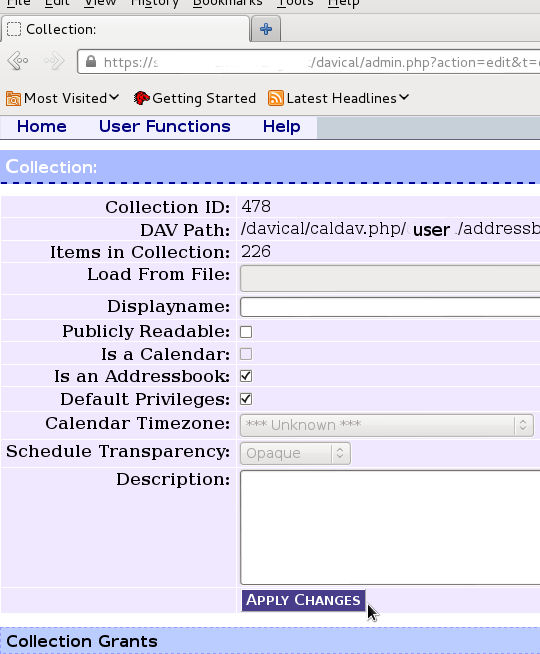
Here is where I configured the extra resource for an address book store under my user account in DAViCal In the DAViCal web management console, I created an extra resource for my user ID and set the appropriate checkbox to mark the resource as an address book. Then I put this resource URL into all the clients and found that they were all able to sync with each other. DAViCal's maintainer has explained that this is a limitation in the CardDAV/CalDAV protocols: technically, it is valid for the client to store the wrong type of objects in each URL. Clients need to be more resilient when they stumble across objects they don't expect in a particular resource. Conclusion A complete free software based contact-management solution can be easily deployed using any of the servers mentioned above, particularly if Evolution is the preferred client software. Using Thunderbird as a client, it can also work, but attention is needed to avoid data loss on sync. Thunderbird could also be used in a read-only mode to access address books maintained with Evolution. Mobile support is still patchy on Android. The closed source solution (CardDAV-Sync and CalDAV-Sync) appears to work and a promising open source close, aCal, appears to be "nearly there". Some people would obviously prefer to use a standalone contact/calendar server, while others may prefer an all-in-one groupware suite. Both approaches appear to be feasible, but the standalone contact/calendar server appears to offer a more compelling way to start quickly and have minimal administrative overhead, particularly due to the fact that DAViCal is available in a supported package.
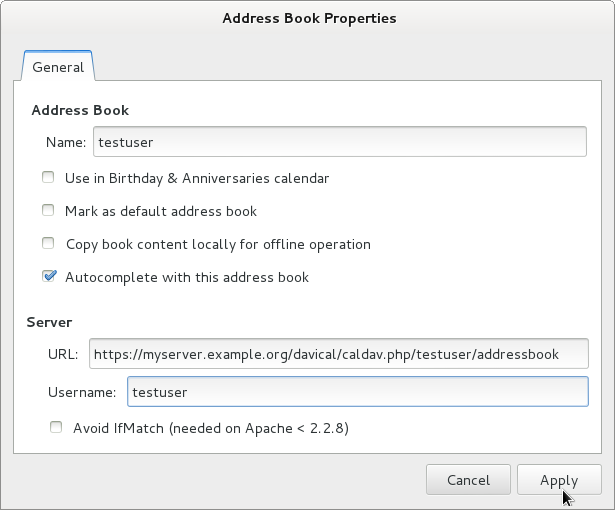
This is the contact server configuration window in Evolution. It offers slightly more options than SOGo Connector in Thunderbird and appears to be a more finished solution overall.

11 September 2013

Bastian Venthur: What are the most popular .vimrc options?

Hi always wondered what the most popular options are, you usually find in .vimrc files. So I downloaded 155 .vimrc files from the net (mostly from dotfiles.org and github.com), and wrote a little script which counts the number of times an option has been set. Since most options come in normal- and shortcut form, I mapped the shortcuts to the long version whenever I recognized them. So without further ado, here are the most popular .vimrc options (without values!). The number specifies the number of times this option has been set. The most popular option is on the bottom:
10 tselect
10 dictionary
10 runtimepath
11 mousehide
11 t_vb
11 foldlevel
11 foldopen
12 suffixes
12 matchtime
12 fileencoding
13 modelines
13 wrap
14 sidescrolloff
14 clipboard
14 lines
14 novisualbell
15 linebreak
15 cursorline
15 fileformats
15 columns
15 cindent
16 undolevels
16 shiftround
16 lazyredraw
16 completeopt
18 modeline
18 whichwrap
18 comments
18 wildignore
19 list
19 autowrite
19 foldcolumn
19 grepprg
19 titlestring
20 autoread
20 title
21 foldenable
21 cmdheight
22 pastetoggle
23 formatoptions
23 fileencodings
24 tags
24 directory
25 ttyfast
26 termencoding
26 complete
27 nohlsearch
27 noerrorbells
27 visualbell
28 shortmess
30 showmode
31 wildmode
32 t_Co
32 listchars
32 backupdir
34 hidden
34 backup
35 smarttab
35 foldmethod
36 viminfo
36 textwidth
37 scrolloff
37 nobackup
41 nowrap
44 encoding
47 guifont
51 guioptions
53 smartcase
54 wildmenu
57 smartindent
60 mouse
63 background
64 softtabstop
66 history
70 showmatch
72 ignorecase
74 showcmd
74 laststatus
79 number
82 hlsearch
91 statusline
94 expandtab
94 ruler
96 autoindent
96 backspace
99 tabstop
109 incsearch
114 shiftwidth
124 nocompatible Out of 155 .vimrcs
Fun fact: nocompatible is the most popular, but also most useless one. The fact that you have an .vimrc automatically implies the nocompatible mode in vim.

10 September 2013

Gergely Nagy: How to monitor a directory of logfiles?

One feature of syslog-ng PE is support for wildcard file sources, meaning you can give it a wildcard, like /var/log/apache/*.log, and it will automatically notice new files being created or old ones disappearing. This is a very useful feature which has been missing from the open source edition, and one that is being worked on, but is far from complete, and will not make it into syslog-ng 3.5. However, at least on GNU/Linux, there is a way to implement something similar, although in a fairly crude manner. Yet, it works surprisingly well in most cases. You only need to abuse a few things...The trick itself is pretty easy, and is based on the same underlying kernel feature that syslog-ng PE uses under the hood: inotify(7). What we will do, is use incron to monitor a directory, and create syslog-ng config file snippets whenever a file creation event occurs. We also set up syslog-ng to include these snippets, and reload the configuration after each event received. This way, we immediately notice newly created logfiles without the need to poll the directory, and with config snippets created on the fly, we do not modify the main syslog-ng configuration file, either.To do this, we first need to create an appropriate syslog-ng configuration:
@version: 3.5
destination d_all_logs  
  file("/var/log/all.log");
 ;
include "/etc/syslog-ng/conf.d/notify-*.conf";
The config itself is a dummy: it has no sources, no logpaths, just a destination, which we will use in the snippets. Next, we create the script that will create these for us! It takes a single command-line argument: the filename of the newly created logfile.
#! /bin/sh set -e CONFDIR="/etc/syslog-ng/conf.d" SNGCTL=/usr/sbin/syslog-ng-ctl id="$(uuidgen tr '-' '_')" conffn="$ CONFDIR /notify-$ id .conf" fn="$1" cat >$ conffn <<EOF source s_$ id file("$ fn "); ; log source(s_$ id ); destination(d_all_logs); ; EOF $ SNGCTL reload
This creates the config snippet with a unique filename and source name, adds a new logpath that binds it to the d_all_logs destination defined in the main configuration file, and reloads the configuration afterwards.Now, all we need is to tell incron to call this script. Assuming we saved it as /usr/local/sbin/syslog-ng-wildcard-notify, this is how the incrontab entry would look like:
/var/log/remote.d/*.log  IN_CREATE,IN_MOVED_TO /usr/local/sbin/syslog-ng-wildcard-notify $@/$#
And that's about it! Now whenever a new file gets dropped into the directory, syslog-ng will get notified. There is a downside, however: when a file gets deleted, the configuration is not removed. That part is not so simple, though: we want syslog-ng to finish reading the file before reloading the config, so that makes it a bit trickier. But if we don't care about that, we could just add an IN_DELETE event, and write another script that looks up which snippet is responsible for the file, delete it and reload. Doing that is left as an exercise for the reader!

Craig Small: Odd WordPress pingbacks

I m getting some odd log messages for the apache module modsecurity. Essentially its xml parser is breaking when random places are sending pingbacks. The requests go to xmlrpc.php and the response headers are ok, but the body is binary. The message in the modsecurity log looks like:
Message: XML parser error: XML: Failed parsing document.
After a bit of guessing and sending messages to and fro, I can now see that it is a gziped response. So I m not sure if it is modsecurity not realising that the response is gziped or wordpress not marking it correctly. In any case I can regularly get very similar binary strings using gzip and the usual xml response. So that s half the mystery solved. Most of the requests are spammers so I m not too worried. I think it also impacts legitimate pingbacks because I ve not had any, even from the usual automatic places.

9 September 2013

Kurt Roeckx: State of encryption

With all the articles about the NSA going around it seems to be hard to follow what is still safe. After reading various things it boils down to:
I don't think this should really surprise anybody. There is also speculation that maybe the NSA has better algorithms for reducing the complexity of public key cryptography or that maybe RC4 might be broken. Those things clearly are possible, but it's not clear. Nobody has suggested that AES has any problems, and I think that's still safe to use. One of the question becomes what does properly done encryption mean. There are various factors to this and many applications using various protocols. SSL/TLS is the most used, so I'm going to concentrate on the parts in that. Bit sizes As far as I understand it, 80 bit of security is around what is currently the upper practical limit of a brute force attack. In 2003 NIST said to stop using 80 bit by 2015, in 2005 they said to stop using it by 2010. When using something like SSL/TLS you using various things each having it's own size. So it's important to known which is the weakest part. Public key encryption (RSA, DSA, DH) doesn't offer the same amount of security per bit than symmetric keys. The equivalent sizes I find are:
Symmetric Public
80 1024
112 2048
128 3072
256 15360
There are other sources that have other numbers, but they're similar So this basically means you really should stop using 80 bit symmetric and 1024 bit public keys and that your public key really should be at least 2048 bit, and should maybe even consider going to 3072 bit. There seems to be a push to moving Diffie-Hellman (DH) to provide Perfect Forward Secrecy (PFS). There are many variants to this. We want to use ephemeral (temporary) keys. But it basically boils down to 2 variants:
With DHE you first negotiate a temporary DH key for this session (hopefully) using a random number on both sides, and then using that DH key to exchange a normal symmetric key for the session. This temporary DH key is what provides the PFS, assuming that this temporary key is thrown away. The drawback of this is that creating a sessions takes a lot more CPU time. The standard DH has the same security as other public key encryption. So we really also want to stop using 1024 keys for that. With ECDHE the key size needs to be the double of the symmetric size. This is also faster than DHE, so people want to move to this. There are various curves that can be used for this, and some of them are generated the the NSA and people have no trust in them. Some people even don't trust any of the curves. Most people seem to think that ECDH is the way forward, but then limit the curves they support. There are also hashes used for various things including signatures and MACs. Depending on how it's used the properties of the hash are important. They have 2 important properties collision resistance and preimage resistance. For a collision attack the upper limit is a little more than the output size over 2. But there are attacks that are known to give worst results. I found those numbers:
MD5 2^20
SHA-1 2^60
SHA-2 No known attack (so SHA-256 would have 1.2 * 2^128)
For preimage attacks I found:
MD5 2^123
SHA-1 No known attack (2^160)
SHA-256 No known attack (2^256)
So I think that MD5 is still safe when a collision attack isn't possible, but should really be avoided for anything else and SHA-1 should probably be considered the same. So you want to avoid them in things like certificates. SSL/TLS also use MD5 / SHA-1, but as part of a HMAC. I understand that those are not vulnerable to the collision attack but preimage resistance is important then and so are still considered safe. Randomness A lot of the algorithms depend on good random numbers. That is that the attacker can't guess what a (likely) random number you've selected. There have been many cases of bad RNG that then resulted in things getting broken. It's hard to tell from the output of most random number generators that they are secure or not. One important thing is that the RNGs gets seeded with random information (entropy) to begin with. If it gets no random information, very limited amount of possible inputs or information that is guessable as input it can appear to give random numbers, but they end up being predictable There have been many cases where this was broken. Ciphers There are various encryption algorithms. But since the public key algorithms take a lot of time we usually want to limit the amount we do with them and do most with a symmetric key encryption. There are basically 2 types of symmetric ciphers: stream and block ciphers. For block ciphers there are various ways of combining the blocks. The most popular was CBC. But in combination with TLS 1.0 it was vulnerable to the BEAST attack, but there is a workaround for this. An other mode is GCM but it's not yet widely deployed. This resulted in the stream cipher RC4 suddenly getting popular again. Some ciphers have known weaknesses. For instance triple DES has 3*56=168 bits, but only provides for 2*56=112 bits of security. Other attacks make this even less. The algorithms them self might be secure, but they might be attacked by other mechanism known as sidechannel attacks. The most important of that is timing attacks. If the algorithm has branches they might result in different amount of time taking in each branch. This might result in an attacker finding out some information about the secret key that is being used. It's important that the difference should be reduced as much as possible. This is usually not a problem if it's implemented in hardware. SSL/TLS Session A typical SSL/TLS session uses those things:
Important aspects of using certificates:
The client sends it's list of supported ciphers to the server and the server will then pick one. This is usually the first from that list that is supported by the server, but it might also be the order that is configured on the server that is used. Current status in software If you go looking at all of those things, you find problems in most if not all software. Some of that is to be compatible with old clients or servers, but most of it is not. If you want to test web servers for various of those properties you can do that at ssllabs. Based on that there are stats available at SSL-pulse. Apache only supports 1024 bit DHE keys and they don't want to apply a patch to support other bit size. Apache 2.2 doesn't offer ECDHE but 2.4 does. I don't know of any good site has lists which browser supports which ciphers, but you can test your own browser here. It lacks information about EC curves that your client offers. You can of course as look at this with wireshark. Mozilla currently has a proposal to change it's list of supported ciphers here. They currently don't have TLS 1.1 or 1.2 enabled yet, but as far as I understand the NSS library should support it. They should now have support for GCM, but they still have an open bug for a constant time patch. In general Mozilla seems to be moving very slowly with adopting things. Last I heard Apple still didn't patch Safari for the BEAST attack. For XMPP see client to server, server to server, clients.

For TOR see here.

7 September 2013

Daniel Pocock: Evacuating Australia

With the news that Australia's 100mbit (and potentially gigabit) fibre to the home is to be abolished and replaced with a cheap 25mbps service using Europe's ADSL hand-me-downs (which will be obsolete in 5 years when the deployment is finished), I've had quite a few emails from people asking just how easy it is to move abroad.
The acoustic modem has a nice retro look Word has got out that I've been spending some time in Switzerland enjoying the world-beating rate of IPv6 deployment. That is not the only reason to leave Australia of course, nor is it the only criteria for people choosing which country will give them a better deal than either of the two non-choices we had in Australia's elections. A free $20,000 for leaving Australia The first good news is that any recent graduate with a big bad ugly HECS bill is only obliged to pay this extra tax when they earn a salary from an Australian employer and file an Australian tax return. Australians who live abroad are not automatically obliged to file tax returns and are not slogged with this extra tax for having attended university. If somebody just graduated and has this hanging over their head, or if they've just started working and seen how much is being deducted on the payslip, moving abroad could make a lot of sense financially. If you have any moral qualms about this, just reflect on the fact that while the Government intimidates students with the feeling that they have to "pay" for fulfilling an education that makes them into a productive member of society, thousands of would-be athletes are given money with no obligation to repay it. The easiest route: a second passport One in four Australians has a parent born abroad. Most of those people qualify for a passport from their parent's country of birth. In some cases this also applies to people with grandparents born abroad. With the European Union now spanning 28 countries and guaranteeing the rights of any citizen from any country to live, work and study in any of the other 27 countries, a passport from any of the EU countries gives a lot of choices, including places where I have lived myself such as the UK, Ireland, France and Switzerland. Europe's citizen-friendly immigration In other words, an Australian with an Italian parent can go up to the Italian embassy in Canberra, collect an Italian passport and immediately fly into London and start working there with no bureaucratic delays, invasive and degrading medical checks or other Government interference in their life.
London's nightlife is popular for Australians. The UK started rolling out their high speed 21CN many years before Australia started the NBN. The rights also transfer automatically to all family members (spouse and children) - an Australian with a second passport is not restricted to living in Australia simply because they are married to somebody who does not have a second passport. As long as they arrive together at a European airport, they can simply show a marriage/birth certificate (in any language) and cross the border immediately, enjoy the same rights as a citizen, including work, study, healthcare and better broadband. No paperwork is necessary, no cottage industry for otherwise unemployable immigration agents, these are basic human rights for those living in Europe.
Eiffel tower: potentially part of the wireless network for France's new 4G internet, potentially two to four times the fixed-line speed planned for Australia's crippled broadband Uncle Sam wants more Australians Although it is not widely known, the US has a fast lane for immigration from Australia. The regular programs for skilled visas in the US are usually exhausted every year, whereas 10,000 "E3" class visas for Australians are never fully taken in any year. Surely it's not that easy to go to the US? It is. To qualify, an Australian only needs a university degree and a suitable job offer. Although the visa is for 2 years, it can be renewed and Australians who meet and marry an American have in various cases have gained full residence or citizenship. Anything is possible, you could even end up becoming a NASA Astronaut.
San Francisco, home to leading technology professionals and innovators from many countries. Some US cities such as Austin and Kansas City have let Google install fibre to the home, San Francisco could follow Working holiday schemes are not just for Britain Most Australians know somebody who went to London on a "working holiday" visa. These visas are not just for the UK and Australia has similar reciprocal programs with many other countries too. These rules for these schemes are rooted in the industrial age concept of workers with punch cards. Participants are typically limited to work 20 hours per week. Of particular interest for those in IT, such rules are hard to quantify for freelancers, web designers or creative people who earn their living charging fees per-project or undertaking management work without specified working hours. Although the visas are limited to 4 years, I've heard of Australians benefiting from the open borders of mainland Europe, spending 4 years in one country and then obtaining another 4 year visa for an adjacent country and travelling freely back and forth, building up a business and lifestyle of their own design. Singapore and Hong Kong Singapore and Hong Kong have become enormously popular destinations for Australians, particularly those with special skills in IT, finance, engineering and international business.
Singapore is respected as one of the cleanest and most orderly cities in Asia while embracing significant diversity in dining, shopping, leisure and lifestyle possibilities. They have recently boosted speeds to help people get a full 100MBit over fibre. A SIM card with high speed broadband charges SGD 7 (about $5) for 1 Gigabyte. These are not necessarily destinations that a graduate can easily move to. People are measured by their salary and the Government simply assumes that anybody earning a high salary is going to make a valuable contribution to society and they are given a visa in 1 or 2 weeks. Usually 3-5 years employment experience is required before making a move to one of these countries. The Not Ordinarily Resident (NOR) scheme gives some hints about the minimum salary level that ex-pats aim for, many earn significantly more with bonuses, stock programs and properly engineered tax-free offshore pension arrangements. These countries offer particularly low taxes (around 10%) and great technology. They have some rough edges too: like Europe, spouses are automatically given a visa too, but in contrast, their visa does not permit them to work unless they also work in a profession that is highly paid. Visas are issued quickly but they are also canceled very quickly if the job is terminated or the company goes bust. There have been various stories of people paying the typical 2-month deposit on an appartment in Singapore and then finding that it is forfeited when their job and visa are canceled and they have 4 weeks to leave. The bottom line is that people moving to these locations usually have a wide professional network and confidence to change their job quickly if necessary. Freestyle immigration and the visa run Not too long ago I was at a house party in Prague, Czech Republic, which is like a Paris of eastern Europe. Somebody introduced me to some Americans who I was told had similar interests in technology. They were operating an offshore web site and living very well. They had spent 10 years in Prague living on tourist visas. Authorities seemed quite happy for them to remain as long as they left every 3 months and spent 1 night abroad, a typical visa run. That could be as simple as a train journey to Vienna, Austria and an overnight stay.
Making a visa run in comfort and style with European railways. The Railjet train pictured includes free wifi, a lot cheaper than the $20 billion Tony Abbott plans to spend rolling out yesterday's technology in Australia When European countries abolished border controls, this system became much more convoluted for those who depend on the visa run. However, it remains common in many Asian and Latin American countries and many ex-pats live this way. Officials in many of these medium sized economies recognise the value of people bringing in money from offshore business (such as web sites) and using it to pay rent, food and local services. To make this effective, the ex-pats typically need to have an international private health insurance policy (high quality offshore policies can be found quickly with a search engine) and not aspire to work in a normal 9-5 job. Conclusion Young Australians might not want to just consider travel, it may even become unavoidable. The reality is, by 2020, one in three Australians will be a retired baby boomer and one way or another, whichever Government is in office will be unable to avoid taxing those of working age to pay for the health care and pension promises made to older generations. Serious expenditure on public infrastructure such as broadband or high speed rail appears to remain a pipe dream. Moving abroad, however, is just so much fun. Look at the way multinational companies make countries compete to attract their new factories and other projects: why should any individual citizen be any less demanding in choosing where they work, play and get the best value for whatever taxes they have to pay? Some people raise questions of patriotism or responsibility to the nation. Think again. The 200,000 Australians who live abroad or travel extensively make a significant contribution to Australia's international profile, engage in new trade initiatives, bring skills back to Australia and generally represent what our country is really about much better than some of those who are paid to do so.

Uwe Hermann: Using mdadm to recover from a dead disk in a Linux RAID-1 array

2.5
Yes, it's that time of the year again. A disk in my desktop-replacement laptop with 2 disks and a RAID-1 has died. Time for recovery. This laptop has been running 24/7 for the last 3 years or such, so it's not too surprising that a disk dies. Surprisingly though, for the first time in a long series of dead disks, smartctl -a does indeed show errors for this disk. Here's a short snippet of those:
  $ smartctl -a /dev/sda
  [...]
  Error 1341 occurred at disk power-on lifetime: 17614 hours (733 days + 22 hours)
   When the command that caused the error occurred, the device was active or idle.
   After command completion occurred, registers were:
   ER ST SC SN CL CH DH
   -- -- -- -- -- -- --
   40 41 02 1f c0 9c 40  Error: UNC at LBA = 0x009cc01f = 10272799
   Commands leading to the command that caused the error were:
   CR FR SC SN CL CH DH DC   Powered_Up_Time  Command/Feature_Name
   -- -- -- -- -- -- -- --  ----------------  --------------------
   60 f8 08 20 c0 9c 40 00  41d+01:51:50.974  READ FPDMA QUEUED
   60 08 00 18 c0 9c 40 00  41d+01:51:50.972  READ FPDMA QUEUED
   ef 10 02 00 00 00 a0 00  41d+01:51:50.972  SET FEATURES [Reserved for Serial ATA]
   ec 00 00 00 00 00 a0 00  41d+01:51:50.971  IDENTIFY DEVICE
   ef 03 45 00 00 00 a0 00  41d+01:51:50.971  SET FEATURES [Set transfer mode]
  SMART Self-test log structure revision number 1
  Num  Test_Description    Status                  Remaining  LifeTime(hours)  LBA_of_first_error
  # 1  Short offline       Completed: read failure       90%     20511         156170102
  [...]
The status of the degraded RAID array looks like this:
  $ cat /proc/mdstat
  Personalities : [raid1] 
  md1 : active raid1 sdb7[1]
       409845696 blocks [2/1] [_U]
  md0 : active raid1 sda6[0] sdb6[1]
       291776 blocks [2/2] [UU]
The [_U] means that one of two disks has failed, it should normally be [UU]. There are two RAID-1s actually, a small md0 (sda6 + sdb6) for /boot and the main md1 (sda7 + sdb7) which holds the OS and my data. Apparently (at first at least), only sda7 was faulty and got kicked out of the array:
  $ dmesg   grep kick
  md: kicking non-fresh sda7 from array!
Anyway, so I ordered a replacement disk, removed the dead disk (I checked the serial number and brand before, so I don't accidentally remove the wrong one), inserted the new disk and rebooted. Note: In order for this to work you have to have (previously) installed the bootloader (usually GRUB) onto both disks, otherwise you won't be able to boot from either of them (which you'll want to do if one of them dies, of course). In my case, sda was now dead, so I put sdb into its place (physically, by using the other SATA connector/port) and the new replacement disk would become the new sdb. After the reboot, the new disk needs to be partitioned like the other RAID disk. This can be done easily by copying the partition layout of the "good" disk (now sda after the reboot) onto the empty disk (sdb):
  $ sfdisk -d /dev/sda   sfdisk /dev/sdb
Specifically, the RAID disks/partitions need to have the type/ID "fd" ("Linux raid autodetect"), check if that is the case. Then, you can add the new disk to the RAIDs:
  $ mdadm /dev/md0 --add /dev/sdb6
  $ mdadm /dev/md1 --add /dev/sdb7
After a few hours the RAID will be re-synced properly and all is good again. You can check the progress via:
  $ watch -n 1 cat /proc/mdstat
You should probably not reboot during the resync (though I'm not 100% sure if that would be an issue in practice; please leave a comment if you know). Also, don't forget to install GRUB on the new disk so you can still boot when the next disk dies:
  $ grub-mkdevicemap
  $ grub-install /dev/sdb
And it might be a good idea to use S.M.A.R.T. to check the new disk, just in case. I did a quick run for the new disk via:
  $ smartctl -t short /dev/sdb # Wait a few minutes after this.
  $ smartctl -a /dev/sdb
  [...]
  SMART Self-test log structure revision number 1
  Num  Test_Description    Status                  Remaining  LifeTime(hours)  LBA_of_first_error
  # 1  Short offline       Completed without error       00%        22         -
  [...]
Looks good. So far.

Ben Armstrong: Wifi roaming on the move redux

It has been nearly six years with a netbook and five since I last wrote about wifi roaming from the bus to stay on irc without a costly celluar link during the daily commute. Since then, some readers have asked me to share my refinements to the method in a followup post. So here it is. The software On the server: On the client: Putting it together: on the client Make sure if you have a wireless manager installed (such as NetworkManager) it is configured to skip your wireless interface, disabled entirely, or if possible, removed. Set up /etc/wpa_supplicant/wpa_supplicant.conf and /etc/network/interfaces for roaming, as per the instructions in /usr/share/doc/wpasupplicant/README.modes.gz. Don t forget to add yourself to the netdev group if you are not in it already. In /etc/wpa_supplicant/wpa_supplicant.conf, list common names of open networks. Normally the catch-all network that associates with any essid, i.e. the first stanza below, works well. However, occasionally the strongest signal is neither one of the common networks nor an easily accessible network (e.g. web portals), so having a list of common open networks helps to quickly select from among those instead. The more you travel, the more of these will discover and add. Just use reconfigure from wpa_cli to reload your edited list each time you add a new one.
ctrl_interface=DIR=/var/run/wpa_supplicant GROUP=netdev
network= 
        key_mgmt=NONE
 
network= 
        ssid="default"
        key_mgmt=NONE
 
network= 
        ssid="linksys"
        key_mgmt=NONE
 
...
Since you ll be using ssh repeatedly to connect and it has to be fast, make sure your server is set up to accept your key and use ssh-add so that you only have to enter your ssh key password once. You can tweak isc-dhcp-client to make connections faster. In /etc/dhcp/dhclient.conf, use:
backoff-cutoff 1;
initial-interval 1;
Here are a few scripts I wrote to facilitate quick roaming from one open AP to another and reconnect to irssi running in screen, to break a connection and try the next one, and to recover from occasional lockups (more about that later). ~/bin/screen_reconnect This is a script to reconnect continuously via ssh to a screen session:
#!/bin/sh
reset
while ! ssh -t 10.9.8.7 'screen -UDr' 2>/dev/null ; do echo -n "." ; sleep .1 ; done
Just substitute the IP of your own server here. Using an IP instead of domain name makes the connection faster because a DNS lookup is not required. ~/bin/wifi_reassociate This script closes any open ssh sessions and informs wpa_supplicant to attempt to connect again.
#/bin/sh
/sbin/wpa_cli rea
killall ssh >/dev/null 2>&1
~/bin/wifi_killall This optional, somewhat ugly script addresses an issue I hope you never have. On my ASUS Eee PC 1001PX, occasionally scanning stops. When this happens, and I have never figured out why, apparently ACPI events are blocked. At this point wifi becomes unusable and ACPI sleep is inhibited. By trial and error I found that if you bring down the interface, kill all network-related processes, and bring it up again, ACPI events are unblocked and wifi is usable once more (and any pending request to sleep will finally happen). The script requires sudo, and to use the openbox key binding, gksudo.
#/bin/sh
sudo ifdown wlan0
# in case any of these are hung
sudo killall dhclient3
sudo killall wpa_cli
sudo killall wpa_action
sudo killall wpa_supplicant
# in case any of these are *really* hung
sleep 1
sudo killall -9 dhclient3
sudo killall -9 wpa_cli
sudo killall -9 wpa_action
sudo killall -9 wpa_supplicant
sudo dhclient -r
sudo ifup wlan0
Openbox Since certain actions need to be performed repeatedly and quickly, it is useful to have hotkeys bound in your window manager to the scripts. In ~/.config/openbox/rc.xml, key bindings for <alt>-r to reassociate and <alt>-d to disconnect a hung connection would look like:
  
<keyboard>
  <!-- My keybindings -->
  <keybind key="A-R">
    <action name="Execute">
        <execute>/home/synrg/bin/wifi_reassociate</execute>
    </action>
  </keybind>
  <keybind key="A-D">
    <action name="Execute">
        <execute>gksudo /home/synrg/bin/wifi_killall</execute>
    </action>
  </keybind>
</keyboard>
Putting it together: on the server There is very little to do here. Just start screen, and start irssi in screen. Running screen on the client as well as the server means you should either bind the screen meta keys to a different key sequence on each system, or else learn to press meta twice to pass through meta to the server screen as needed. I use the latter approach. Alternatively, you could use a tabbed terminal on the client, or separate terminals per client process instead of screen. This is a matter of personal taste. Ready to roam Here is a typical setup for roaming on the bus: In a terminal (I use urxvt), first ssh-add, then start screen with these three processes running in separate virtual terminals: March of the dots Most of the commute, just enjoy watching the dots march by, waiting for a new connection. If you estimate a connection is unusable, press <alt>-r to reassociate immediately, giving the next network a chance. If the connection is already firmly established, this might not work on the first try. If the dots don t resume immediately, wait a bit and press it again. This might take a few tries. Changing selected networks on the fly Use wpa_cli when you need to do some fine-tuning of network selections on the fly. While normally you can just watch the march of the dots until a connection is acquired, sometimes you can improve your chances of connecting to a good network by manually controlling the selected candidate networks here. For example, by watching the speed of the bus relative to known good APs, you can predict which networks are more likely to succeed. Rather than connect to any arbitrary network, you might select a specific one by id, and then later when it goes out of range, revert to the original configuration, e.g.
> select_network 5
...
> reconfigure
You can use tab-completion in wpa_cli to type these commands quickly or else just abbreviate the commands. Another common scenario is when you pass through a business area with many captive portal hotspots. These rarely make good choices because they either require a password not known to you or else you can t click through I agree in time before the bus moves on. In this case, you might just disable the catch-all stanza and let the common open network stanzas you listed ( default , linksys , etc.) do the work:
> disable_network 1
Become a type ahead wizard While running, a continuous stream of periods fills the screen, which provides you with a highly visible cue that no available APs are in range. When the movement stops, you know a connection is being attempted. While waiting to connect, you can type ahead any comments you want to make in the current irssi window (taking care to remember which one you are in!) While having periods interspersed in what you type may be disorienting at first, you get used to it. There is a point when a connection is first established and ssh is accepting input, but anything you type can no longer be seen while you re typing. Depending on whether the connection was completely successful or not, what you type now may or may not finally be sent. For best results, only type ahead before the dots stop moving. Eventually you can become skilled enough at this to type ahead a comment in one channel, switch channels with /win # and continue typing ahead in the new channel, all buffered until the next few seconds (or even fraction of a second) of connection time. Fine-tune antenna direction with wavemon When the bus has come to a standstill, you may find wavemon useful to pull in a weak signal. Because wavemon has continuously updated signal level and link quality bars, you can use it to fine-tune the antenna position. Just turn your laptop until the bars are at their maximum. Captive portals I have not figured out how to do any automation for this, so it really is a crapshoot, as it is likely the bus has moved on by the time you ve managed to manually navigate the login through a captive portal. But in rush hour, you may have the luxury of time to connect to these as you pass them. I have recently learned about the CoovaFX Firefox plugin which automates logins to captive portals. I m going to give it a try to see if it helps. Update: I can t recommend this plugin, as it is not compatible with Iceweasel >= 23.0. Also, the standard it is based on, WISPr, appears to have an uncertain future. That, coupled with the fact that the plugin appears to not be open source means I m still looking for alternatives. Summary If all of this sounds a bit nuts to you, well, it probably is. But after half a decade enjoying free access to irc from the bus, it all seems perfectly natural to me! If you try this method and like it, please let me know in the comments. Likewise, if you have any improvements to the process or scripts, please share them!
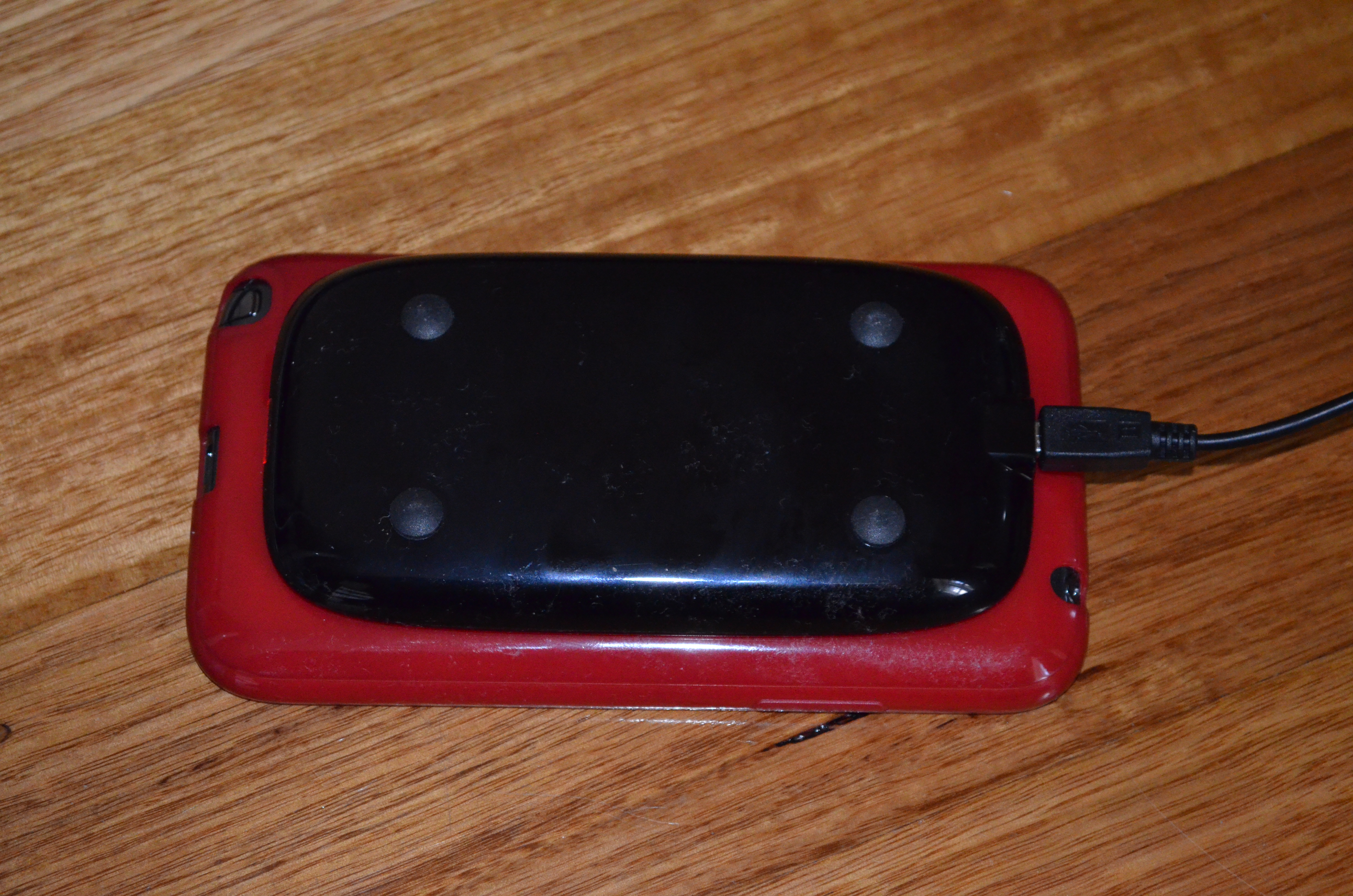
Next.

Previous.