Search Results: "willi"

21 September 2014

Joachim Breitner: Using my Kobo eBook reader as an external eInk monitor

I have an office with a nice large window, but more often than not I have to close the shades to be able to see something on my screen. Even worse: There were so many nice and sunny days where I would have loved to take my laptop outside and work there, but it (a Thinkpad T430s) is simply not usable in bright sun. I have seen those nice eInk based eBook readers, who are clearer the brighter they are. That s what I want for my laptop, and I am willing to sacrifice color and a bit of usability due to latency for being able to work in the bright daylight! So while I was in Portland for DebConf14 (where I guess I felt a bit more like tinkering than otherwise) I bought a Kobo Aura HD. I chose this device because it has a resolution similar to my laptop (1440 1080) and I have seen reports from people running their own software on it, including completely separate systems such as Debian or Android. This week, I was able to play around with it. It was indeed simple to tinker with: You can simply copy a tarball to it which is then extracted over the root file system. There are plenty of instructions online, but I found it easier to take them as inspiration and do it my way with basic Linux knowledge that s possible. This way, I extended the system boot script with a hook to a file on the internal SD card, and this file then runs the telnetd daemon that comes with the device s busybox installation. Then I just have to make the device go online and telnet onto it. From there it is a pretty normal Linux system, albeit without an X server, using the framebuffer directly. I even found an existing project providing a VNC client implementation for this and other devices, and pretty soon I could see my laptop screen on the Kobo. Black and white worked fine, but colors and greyscales, including all anti-aliased fonts, were quite broken. After some analysis I concluded that it was confusing the bit pattern of the pixels. Luckily kvncclient shares that code with koreader, which worked fine on my device, so I could copy some files and settings from there et voil : I now have an eInk monitor for my laptop. As a matter of fact, I am writing this text with my Kobo sitting on top of the folded-back laptop screen! I did some minor adjustments to my laptop: All this is still very manual (going online with the kobo, finding its IP address, logging in via telnet, killing the Kobo's normal main program, starting x11vnc, finding my ip address, starting the vnc client, doing the adjustments mentioned above), so I need to automate it a bit. Unfortunately, there is no canonical way to extend the Kobo by your own application: The Kobo developers made their device quite open, but stopped short from actually encouraging extensions, so people have created many weird ways to start programs on the Kobo dedicated start menus, background programs observing when the regular Kobo app opens a specific file, complete replacements for the system. I am considering to simply run an SSH server on the device and drive the whole process from the laptop. I ll keep you up-to-date. A dream for the future would be to turn the kobo into a USB monitor and simply connect it to any computer, where it then shows up as a new external monitor. I wonder if there is a standard for USB monitors, and if it is simple enough (but I doubt it). A word about the kobo development scene: It seems to be quite active and healthy, and a number of interesting applications are provided for it. But unfortunately it all happens on a web forum, and they use it not only for discussion, but also as a wiki, a release page, a bug tracker, a feature request list and as a support line often on one single thread with dozens of posts. This makes it quite hard to find relevant information and decide whether it is still up-to-date. Unfortunately, you cannot really do without it. The PDF viewer that comes with the kobo is barely okish (e.g. no crop functionality), so installing, say, koreader is a must if you read more PDFs than actual ebooks. And then you have to deal with the how-to-start-it problem. That reminds me: I need to find a decent RSS reader for the kobo, or possibly a good RSS-to-epub converter that I can run automatically. Any suggestions? PS and related to this project: Thanks to Kathey!

12 September 2014

Dariusz Dwornikowski: profanity and libstrophe status in Debian

profanity is a great console based XMPP client written in ncurses and C by James Booth. The code has a great quality, upstream is super collaborative, and willing, so packaging should be pretty straightforward. This post will show that this was not the case here. profanity First obstacle was that profanity depended on libstrophe, an XMPP library, which was not in Debian. As it occurred libstrophe's upstream was not responsive, so any changes that were needed to prepare libstrophe for high quality packaging could not be met.
  1. First of all libstrophe's build system (automake and friends) built only a static library.
  2. The second problem was that libstrophe did not tag releases on github, this was needed to make Debian watch file work.
  3. A third, smaller problem was the presence of debian/ directory in upstream's source. It can be neglected most of the time, since you can tell git-import-orig to delete it.
To solve those 3 problems I created a pull request fixing the build system to build also a shared library, deleting debian/ directory and politely asking for tagging releases. You can see my pull request here dated on April 26th. There was no answer for the libstrophe's upstream but I has some support from profanity's developers and other users wanting to make those changes. Finally metajack (libstrophe upstream) gave us right to the repo and we could merge the pull request on August 6th. The lesson learned - be patient and know autotools (a great tutorial is here). With profanity there were less changes to do. The most important one was that it linked to OpenSSL and due to the license incompatibility with GPL it could not go into Debian. Fortunately upstream added the OpenSSL exception, and profanity could be finally packaged. Now both profanity and libstrophe are in NEW queue and hopefully they will be accepted by ftp masters. When they are, there is plenty to do with them in the future, upstream closed some bugs, new upstream versions are tagged.

2 September 2014

Raphaël Hertzog: My Free Software Activities in August 2014

This is my monthly summary of my free software related activities. If you re among the people who made a donation to support my work (65.55 , thanks everybody!), then you can learn how I spent your money. Otherwise it s just an interesting status update on my various projects. Distro Tracker Even though I was officially in vacation during 3 of the 4 weeks of August, I spent many nights working on Distro Tracker. I m pleased to have managed to bring back Python 3 compatibility over all the (tested) code base. The full test suite now passes with Python 3.4 and Django 1.6 (or 1.7). From now on, I ll run tox on all code submitted to make sure that we won t regress on this point. tox also runs flake8 for me so that I can easily detect when the submitted code doesn t respect the PEP8 coding style. It also catches other interesting mistakes (like unused variable or too complex functions). Getting the code to pass flake8 was also a major effort, it resulted in a huge commit (89 files changed, 1763 insertions, 1176 deletions). Thanks to the extensive test suite, all those refactoring only resulted in two regressions that I fixed rather quickly. Some statistics: 51 commits over the last month, 41 by me, 3 by Andrew Starr-Bochicchio, 3 by Christophe Siraut, 3 by Joseph Herlant and 1 by Simon Kainz. Thanks to all of them! Their contributions ported some features that were already available on the old PTS. The new PTS is now warning of upcoming auto-removals, is displaying problems with uptream URLs, includes a short package description in the page title, and provides a link to screenshots (if they exist on screenshots.debian.net). We still have plenty of bugs to handle, so you can help too: check out https://tracker.debian.org/docs/contributing.html. I always leave easy bugs for others to handle, so grab one and get started! I ll review your patch with pleasure. :-) Tryton After my last batch of contributions to Tryton s French Chart of Accounts (#4108, #4109, #4110, #4111) C dric Krier granted me commit rights to the account_fr mercurial module. Debconf 14 I wasn t able to attend this year but thanks to awesome work of the video team, I watched some videos (and I still have a bunch that I want to see). Some of them were put online the day after they had been recorded. Really amazing work! Django 1.7 After the initial bug reports, I got some feedback of maintainers who feared that it would be difficult to get their packages working with Django 1.7. I helped them as best as I can by providing some patches (for horizon, for django-restricted-resource, for django-testscenarios). Since I expected many maintainers to be not very pro-active, I rebuilt all packages with Django 1.7 to detect at least those that would fail to build. I tagged as confirmed all the corresponding bug reports. Looking at https://bugs.debian.org/cgi-bin/pkgreport.cgi?users=python-django@packages.debian.org;tag=django17, one can see that some progress has been made with 25 packages fixed. Still there are at least 25 others that are still problematic in sid and 35 that have not been investigated at all (except for the automatic rebuild that passed). Again your help is more than welcome! It s easy to install python-django 1.7 from experimental and they try to use/rebuild the packages from the above list. Dpkg translation With the freeze approaching, I wanted to ensure that dpkg was fully translated in French. I thus pinged debian-l10n-french@lists.debian.org and merged some translations that were done by volunteers. Unfortunately it looks like nobody really stepped up to maintain it in the long run so I did myself the required update when dpkg 1.17.12 got uploaded. Is there anyone willing to manage dpkg s French translation? With the latest changes in 1.17.13, we have again a few untranslated strings:
$ for i in $(find . -name fr.po); do echo $i; msgfmt -c -o /dev/null --statistics $i; done
./po/fr.po
1083 translated messages, 4 fuzzy translations, 1 untranslated message.
./dselect/po/fr.po
268 translated messages, 3 fuzzy translations.
./scripts/po/fr.po
545 translated messages.
./man/po/fr.po
2277 translated messages, 8 fuzzy translations, 3 untranslated messages.
Misc stuff I made an xsane QA upload (it s currently orphaned) to drop the (build-)dependency on liblcms1 and avoid getting it removed from Debian testing (see #745524). For the record, how-can-i-help warned me of this after one dist-upgrade. With the Django 1.7 work and the need to open up an experimental branch, I decided to switch python-django s packaging to git even though the current team policy is to use subversion. This triggered (once more) the discussion about a possible switch to git and I was pleased to see more enthusiasm this time around. Barry Warsaw tested a few workflows, shared his feeling and pushed toward a live discussion of the switch during Debconf. It looks like it might happen for good this time. I contributed my share in the discussions on the mailing list. Thanks See you next month for a new summary of my activities.

2 comments Liked this article? Click here. My blog is Flattr-enabled.

31 August 2014

Lucas Nussbaum: Debian trivia

After an intensive evening of brainstorming by the 5th floor cabal, I am happy to release the very first version of the Debian Trivia, modeled after the famous TCP/IP Drinking Game. Only the questions are listed here maybe they should go (with the answers) into a package? Anyone willing to co-maintain? Any suggestions for additional questions?

29 August 2014

Robert Collins: Test processes as servers

Since its very early days subunit has had a single model you run a process, it outputs test results. This works great, except when it doesn t. On the up side, you have a one way pipeline there s no interactivity needed, which makes it very very easy to write a subunit backend that e.g. testr can use. On the downside, there s no interactivity, which means that anytime you want to do something with those tests, a new process is needed and thats sometimes quite expensive particularly in test suites with 10 s of thousands of tests.Now, for use in the development edit-execute loop, this is arguably ok, because one needs to load the new tests into memory anyway; but wouldn t it be nice if tools like testr that run tests for you didn t have to decide upfront exactly how they were going to run. If instead they could get things running straight away and then give progressively larger and larger units of work to be run, without forcing a new process (and thus new discovery directory walking and importing) ? Secondly, testr has an inconsistent interface if testr is letting a user debug things to testr through to child workers in a chain, it needs to use something structured (e.g. subunit) and route stdin to the actual worker, but the final testr needs to unwrap everything this is needlessly complex. Lastly, for some languages at least, its possibly to dynamically pick up new code at runtime so a simple inotify loop and we could avoid new-process (and more importantly complete-enumeration) *entirely*, leading to very fast edit-test cycles. So, in this blog post I m really running this idea up the flagpole, and trying to sketch out the interface and hopefully get feedback on it. Taking subunit.run as an example process to do this to:
  1. There should be an option to change from one-shot to server mode
  2. In server mode, it will listen for commands somewhere (lets say stdin)
  3. On startup it might eager load the available tests
  4. One command would be list-tests which would enumerate all the tests to its output channel (which is stdout today so lets stay with that for now)
  5. Another would be run-tests, which would take a set of test ids, and then filter-and-run just those ids from the available tests, output, as it does today, going to stdout. Passing somewhat large sets of test ids in may be desirable, because some test runners perform fixture optimisations (e.g. bringing up DB servers or web servers) and test-at-a-time is pretty much worst case for that sort of environment.
  6. Another would be be std-in a command providing a packet of stdin used for interacting with debuggers
So that seems pretty approachable to me we don t even need an async loop in there, as long as we re willing to patch select etc (for the stdin handling in some environments like Twisted). If we don t want to monkey patch like that, we ll need to make stdin a socketpair, and have an event loop running to shepard bytes from the real stdin to the one we let the rest of Python have. What about that nirvana above? If we assume inotify support, then list_tests (and run_tests) can just consult a changed-file list and reload those modules before continuing. Reloading them just-in-time would be likely to create havoc I think reloading only when synchronised with test completion makes a great deal of sense. Would such a test server make sense in other languages? What about e.g. testtools.run vs subunit.run such a server wouldn t want to use subunit, but perhaps a regular CLI UI would be nice

26 August 2014

Neil Williams: vmdebootstrap images for ARMMP on BBB

After patches from Petter to add foreign architecture support and picking up some scripting from freedombox, I ve just built a Debian unstable image using the ARMMP kernel on Beaglebone-black. A few changes to vmdebootstrap will need to go into the next version (0.3), including an example customise script to setup the u-boot support. With the changes, the command would be:
sudo ./vmdebootstrap --owner  whoami  --verbose --size 2G --mirror http://mirror.bytemark.co.uk/debian --log beaglebone-black.log --log-level debug --arch armhf --foreign /usr/bin/qemu-arm-static --no-extlinux --no-kernel --package u-boot --package linux-image-armmp --distribution sid --enable-dhcp --configure-apt --serial-console-command '/sbin/getty -L ttyO0 115200 vt100' --customize examples/beagleboneblack-customise.sh --bootsize 50m --boottype vfat --image bbb.img
Some of those commands are new but there are a few important elements: With this in place, a simple dd to an SD card and the BBB boots directly into Debian ARMMP. The examples are now in my branch and include an initial cubieboard script which is unfinished. The current image is available for download. (222Mb). I hope to upload the new vmdebootstrap soon let me know if you do try the version in the branch.

23 August 2014

Daniel Pocock: Want to be selected for Google Summer of Code 2015?

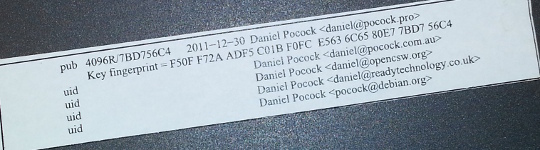
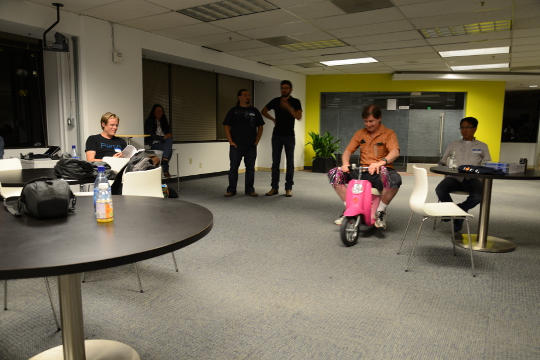
I've mentored a number of students in 2013 and 2014 for Debian and Ganglia and most of the companies I've worked with have run internships and graduate programs from time to time. GSoC 2014 has just finished and with all the excitement, many students are already asking what they can do to prepare and be selected in 2015. My own observation is that the more time the organization has to get to know the student, the more confident they can be selecting that student. Furthermore, the more time that the student has spent getting to know the free software community, the more easily they can complete GSoC. Here I present a list of things that students can do to maximize their chance of selection and career opportunities at the same time. These tips are useful for people applying for GSoC itself and related programs such as GNOME's Outreach Program for Women or graduate placements in companies. Disclaimers There is no guarantee that Google will run the program again in 2015 or any future year. There is no guarantee that any organization or mentor (including myself) will be involved until the official list of organizations is published by Google. Do not follow the advice of web sites that invite you to send pizza or anything else of value to prospective mentors. Following the steps in this page doesn't guarantee selection. That said, people who do follow these steps are much more likely to be considered and interviewed than somebody who hasn't done any of the things in this list. Understand what free software really is You may hear terms like free software and open source software used interchangeably. They don't mean exactly the same thing and many people use the term free software for the wrong things. Not all open source projects meet the definition of free software. Those that don't, usually as a result of deficiencies in their licenses, are fundamentally incompatible with the majority of software that does use genuinely free licenses. Google Summer of Code is about both writing and publishing your code and it is also about community. It is fundamental that you know the basics of licensing and how to choose a free license that empowers the community to collaborate on your code well after GSoC has finished. Please review the definition of free software early on and come back and review it from time to time. The The GNU Project / Free Software Foundation have excellent resources to help you understand what a free software license is and how it works to maximize community collaboration. Don't look for shortcuts There is no shortcut to GSoC selection and there is no shortcut to GSoC completion. The student stipend (USD $5,500 in 2014) is not paid to students unless they complete a minimum amount of valid code. This means that even if a student did find some shortcut to selection, it is unlikely they would be paid without completing meaningful work. If you are the right candidate for GSoC, you will not need a shortcut anyway. Are you the sort of person who can't leave a coding problem until you really feel it is fixed, even if you keep going all night? Have you ever woken up in the night with a dream about writing code still in your head? Do you become irritated by tedious or repetitive tasks and often think of ways to write code to eliminate such tasks? Does your family get cross with you because you take your laptop to Christmas dinner or some other significant occasion and start coding? If some of these statements summarize the way you think or feel you are probably a natural fit for GSoC. An opportunity money can't buy The GSoC stipend will not make you rich. It is intended to make sure you have enough money to survive through the summer and focus on your project. Professional developers make this much money in a week in leading business centers like New York, London and Singapore. When you get to that stage in 3-5 years, you will not even be thinking about exactly how much you made during internships. GSoC gives you an edge over other internships because it involves publicly promoting your work. Many companies still try to hide the potential of their best recruits for fear they will be poached or that they will be able to demand higher salaries. Everything you complete in GSoC is intended to be published and you get full credit for it. Imagine a young musician getting the opportunity to perform on the main stage at a rock festival. This is how the free software community works. It is a meritocracy and there is nobody to hold you back. Having a portfolio of free software that you have created or collaborated on and a wide network of professional contacts that you develop before, during and after GSoC will continue to pay you back for years to come. While other graduates are being screened through group interviews and testing days run by employers, people with a track record in a free software project often find they go straight to the final interview round. Register your domain name and make a permanent email address Free software is all about community and collaboration. Register your own domain name as this will become a focal point for your work and for people to get to know you as you become part of the community. This is sound advice for anybody working in IT, not just programmers. It gives the impression that you are confident and have a long term interest in a technology career. Choosing the provider: as a minimum, you want a provider that offers DNS management, static web site hosting, email forwarding and XMPP services all linked to your domain. You do not need to choose the provider that is linked to your internet connection at home and that is often not the best choice anyway. The XMPP foundation maintains a list of providers known to support XMPP. Create an email address within your domain name. The most basic domain hosting providers will let you forward the email address to a webmail or university email account of your choice. Configure your webmail to send replies using your personalized email address in the From header. Update your ~/.gitconfig file to use your personalized email address in your Git commits. Create a web site and blog Start writing a blog. Host it using your domain name. Some people blog every day, other people just blog once every two or three months. Create links from your web site to your other profiles, such as a Github profile page. This helps reinforce the pages/profiles that are genuinely related to you and avoid confusion with the pages of other developers. Many mentors are keen to see their students writing a weekly report on a blog during GSoC so starting a blog now gives you a head start. Mentors look at blogs during the selection process to try and gain insight into which topics a student is most suitable for. Create a profile on Github Github is one of the most widely used software development web sites. Github makes it quick and easy for you to publish your work and collaborate on the work of other people. Create an account today and get in the habbit of forking other projects, improving them, committing your changes and pushing the work back into your Github account. Github will quickly build a profile of your commits and this allows mentors to see and understand your interests and your strengths. In your Github profile, add a link to your web site/blog and make sure the email address you are using for Git commits (in the ~/.gitconfig file) is based on your personal domain. Start using PGP Pretty Good Privacy (PGP) is the industry standard in protecting your identity online. All serious free software projects use PGP to sign tags in Git, to sign official emails and to sign official release files. The most common way to start using PGP is with the GnuPG (GNU Privacy Guard) utility. It is installed by the package manager on most Linux systems. When you create your own PGP key, use the email address involving your domain name. This is the most permanent and stable solution. Print your key fingerprint using the gpg-key2ps command, it is in the signing-party package on most Linux systems. Keep copies of the fingerprint slips with you. This is what my own PGP fingerprint slip looks like. You can also print the key fingerprint on a business card for a more professional look. Using PGP, it is recommend that you sign any important messages you send but you do not have to encrypt the messages you send, especially if some of the people you send messages to (like family and friends) do not yet have the PGP software to decrypt them. If using the Thunderbird (Icedove) email client from Mozilla, you can easily send signed messages and validate the messages you receive using the Enigmail plugin. Get your PGP key signed Once you have a PGP key, you will need to find other developers to sign it. For people I mentor personally in GSoC, I'm keen to see that you try and find another Debian Developer in your area to sign your key as early as possible. Free software events Try and find all the free software events in your area in the months between now and the end of the next Google Summer of Code season. Aim to attend at least two of them before GSoC. Look closely at the schedules and find out about the individual speakers, the companies and the free software projects that are participating. For events that span more than one day, find out about the dinners, pub nights and other social parts of the event. Try and identify people who will attend the event who have been GSoC mentors or who intend to be. Contact them before the event, if you are keen to work on something in their domain they may be able to make time to discuss it with you in person. Take your PGP fingerprint slips. Even if you don't participate in a formal key-signing party at the event, you will still find some developers to sign your PGP key individually. You must take a photo ID document (such as your passport) for the other developer to check the name on your fingerprint but you do not give them a copy of the ID document. Events come in all shapes and sizes. FOSDEM is an example of one of the bigger events in Europe, linux.conf.au is a similarly large event in Australia. There are many, many more local events such as the Debian France mini-DebConf in Lyon, 2015. Many events are either free or free for students but please check carefully if there is a requirement to register before attending. On your blog, discuss which events you are attending and which sessions interest you. Write a blog during or after the event too, including photos. Quantcast generously hosted the Ganglia community meeting in San Francisco, October 2013. We had a wild time in their offices with mini-scooters, burgers, beers and the Ganglia book. That's me on the pink mini-scooter and Bernard Li, one of the other Ganglia GSoC 2014 admins is on the right. Install Linux GSoC is fundamentally about free software. Linux is to free software what a tree is to the forest. Using Linux every day on your personal computer dramatically increases your ability to interact with the free software community and increases the number of potential GSoC projects that you can participate in. This is not to say that people using Mac OS or Windows are unwelcome. I have worked with some great developers who were not Linux users. Linux gives you an edge though and the best time to gain that edge is now, while you are a student and well before you apply for GSoC. If you must run Windows for some applications used in your course, it will run just fine in a virtual machine using Virtual Box, a free software solution for desktop virtualization. Use Linux as the primary operating system. Here are links to download ISO DVD (and CD) images for some of the main Linux distributions: If you are nervous about getting started with Linux, install it on a spare PC or in a virtual machine before you install it on your main PC or laptop. Linux is much less demanding on the hardware than Windows so you can easily run it on a machine that is 5-10 years old. Having just 4GB of RAM and 20GB of hard disk is usually more than enough for a basic graphical desktop environment although having better hardware makes it faster. Your experiences installing and running Linux, especially if it requires some special effort to make it work with some of your hardware, make interesting topics for your blog. Decide which technologies you know best Personally, I have mentored students working with C, C++, Java, Python and JavaScript/HTML5. In a GSoC program, you will typically do most of your work in just one of these languages. From the outset, decide which language you will focus on and do everything you can to improve your competence with that language. For example, if you have already used Java in most of your course, plan on using Java in GSoC and make sure you read Effective Java (2nd Edition) by Joshua Bloch. Decide which themes appeal to you Find a topic that has long-term appeal for you. Maybe the topic relates to your course or maybe you already know what type of company you would like to work in. Here is a list of some topics and some of the relevant software projects:


  • System administration, servers and networking: consider projects involving monitoring, automation, packaging. Ganglia is a great community to get involved with and you will encounter the Ganglia software in many large companies and academic/research networks. Contributing to a Linux distribution like Debian or Fedora packaging is another great way to get into system administration.
  • Desktop and user interface: consider projects involving window managers and desktop tools or adding to the user interface of just about any other software.
  • Big data and data science: this can apply to just about any other theme. For example, data science techniques are frequently used now to improve system administration.
  • Business and accounting: consider accounting, CRM and ERP software.
  • Finance and trading: consider projects like R, market data software like OpenMAMA and connectivity software (Apache Camel)
  • Real-time communication (RTC), VoIP, webcam and chat: look at the JSCommunicator or the Jitsi project
  • Web (JavaScript, HTML5): look at the JSCommunicator
Before the GSoC application process begins, you should aim to learn as much as possible about the theme you prefer and also gain practical experience using the software relating to that theme. For example, if you are attracted to the business and accounting theme, install the PostBooks suite and get to know it. Maybe you know somebody who runs a small business: help them to upgrade to PostBooks and use it to prepare some reports. Make something Make some small project, less than two week's work, to demonstrate your skills. It is important to make something that somebody will use for a practical purpose, this will help you gain experience communicating with other users through Github. For an example, see the servlet Juliana Louback created for fixing phone numbers in December 2013. It has since been used as part of the Lumicall web site and Juliana was selected for a GSoC 2014 project with Debian. There is no better way to demonstrate to a prospective mentor that you are ready for GSoC than by completing and publishing some small project like this yourself. If you don't have any immediate project ideas, many developers will also be able to give you tips on small projects like this that you can attempt, just come and ask us on one of the mailing lists. Ideally, the project will be something that you would use anyway even if you do not end up participating in GSoC. Such projects are the most motivating and rewarding and usually end up becoming an example of your best work. To continue the example of somebody with a preference for business and accounting software, a small project you might create is a plugin or extension for PostBooks. Getting to know prospective mentors Many web sites provide useful information about the developers who contribute to free software projects. Some of these developers may be willing to be a GSoC mentor. For example, look through some of the following: Getting on the mentor's shortlist Once you have identified projects that are interesting to you and developers who work on those projects, it is important to get yourself on the developer's shortlist. Basically, the shortlist is a list of all students who the developer believes can complete the project. If I feel that a student is unlikely to complete a project or if I don't have enough information to judge a student's probability of success, that student will not be on my shortlist. If I don't have any student on my shortlist, then a project will not go ahead at all. If there are multiple students on the shortlist, then I will be looking more closely at each of them to try and work out who is the best match. One way to get a developer's attention is to look at bug reports they have created. Github makes it easy to see complaints or bug reports they have made about their own projects or other projects they depend on. Another way to do this is to search through their code for strings like FIXME and TODO. Projects with standalone bug trackers like the Debian bug tracker also provide an easy way to search for bug reports that a specific person has created or commented on. Once you find some relevant bug reports, email the developer. Ask if anybody else is working on those issues. Try and start with an issue that is particularly easy and where the solution is interesting for you. This will help you learn to compile and test the program before you try to fix any more complicated bugs. It may even be something you can work on as part of your academic program. Find successful projects from the previous year Contact organizations and ask them which GSoC projects were most successful. In many organizations, you can find the past students' project plans and their final reports published on the web. Read through the plans submitted by the students who were chosen. Then read through the final reports by the same students and see how they compare to the original plans. Start building your project proposal now Don't wait for the application period to begin. Start writing a project proposal now. When writing a proposal, it is important to include several things:
  • Think big: what is the goal at the end of the project? Does your work help the greater good in some way, such as increasing the market share of Linux on the desktop?
  • Details: what are specific challenges? What tools will you use?
  • Time management: what will you do each week? Are there weeks where you will not work on GSoC due to vacation or other events? These things are permitted but they must be in your plan if you know them in advance. If an accident or death in the family cut a week out of your GSoC project, which work would you skip and would your project still be useful without that? Having two weeks of flexible time in your plan makes it more resilient against interruptions.
  • Communication: are you on mailing lists, IRC and XMPP chat? Will you make a weekly report on your blog?
  • Users: who will benefit from your work?
  • Testing: who will test and validate your work throughout the project? Ideally, this should involve more than just the mentor.
If your project plan is good enough, could you put it on Kickstarter or another crowdfunding site? This is a good test of whether or not a project is going to be supported by a GSoC mentor. Learn about packaging and distributing software Packaging is a vital part of the free software lifecycle. It is very easy to upload a project to Github but it takes more effort to have it become an official package in systems like Debian, Fedora and Ubuntu. Packaging and the communities around Linux distributions help you reach out to users of your software and get valuable feedback and new contributors. This boosts the impact of your work. To start with, you may want to help the maintainer of an existing package. Debian packaging teams are existing communities that work in a team and welcome new contributors. The Debian Mentors initiative is another great starting place. In the Fedora world, the place to start may be in one of the Special Interest Groups (SIGs). Think from the mentor's perspective After the application deadline, mentors have just 2 or 3 weeks to choose the students. This is actually not a lot of time to be certain if a particular student is capable of completing a project. If the student has a published history of free software activity, the mentor feels a lot more confident about choosing the student. Some mentors have more than one good student while other mentors receive no applications from capable students. In this situation, it is very common for mentors to send each other details of students who may be suitable. Once again, if a student has a good Github profile and a blog, it is much easier for mentors to try and match that student with another project. GSoC logo generic Conclusion Getting into the world of software engineering is much like joining any other profession or even joining a new hobby or sporting activity. If you run, you probably have various types of shoe and a running watch and you may even spend a couple of nights at the track each week. If you enjoy playing a musical instrument, you probably have a collection of sheet music, accessories for your instrument and you may even aspire to build a recording studio in your garage (or you probably know somebody else who already did that). The things listed on this page will not just help you walk the walk and talk the talk of a software developer, they will put you on a track to being one of the leaders. If you look over the profiles of other software developers on the Internet, you will find they are doing most of the things on this page already. Even if you are not selected for GSoC at all or decide not to apply, working through the steps on this page will help you clarify your own ideas about your career and help you make new friends in the software engineering community.

16 August 2014

Daniel Pocock: WebRTC: what works, what doesn't

With the release of the latest rtc.debian.org portal update, there are numerous improvements but there are still some known problems too. The good news is that if you have a web browser, you can probably make successful WebRTC calls from one developer to another without any need to install or configure anything else. The bad news is that not every permutation of browser and client will work. Here I list some of the limitations so people won't waste time on them. The SIP proxy supports any SIP client Just about any SIP client can connect to the proxy server and register. This does not mean that every client will be able to call each other. Generally speaking, modern WebRTC clients will be able to call each other. Standalone softphones or deskphones will call each other. Calling from a normal softphone or deskphone to a WebRTC browser, or vice-versa, will not work though. Some softphones, like Jitsi, have implemented most of the protocols to communicate with WebRTC but they are yet to put the finishing touches on it. Chat should just work for any combination of clients The new WebRTC frontend supports SIP chat messaging. There is no presence or buddy list support yet. You can even use a tool like sipsak to accept or send SIP chats from a script. Chat works for any client new or old. Although a WebRTC user can't call a softphone user, for example, they can send chats to each other. WebRTC support in Iceweasel 24 on wheezy systems is very limited On a wheezy system, the most recent Iceweasel update is version 24.7. This version supports most of WebRTC but does not support TURN relay servers to help you out of a NAT network. If you call between two wheezy machines on the same NAT network it will work. If the call has to traverse a NAT boundary it will not work. Wheezy users need to either download a newer Firefox version or use Chromium. JsSIP doesn't handle ICE elegantly Internet Connectivity Establishment (ICE, RFC 5245) is meant to prevent calls from being answered with missing audio or video streams. ICE is a mandatory part of WebRTC. When correctly implemented, the JavaScript application will exchange ICE candidates and run the connectivity checks before alerting anybody that a call is ringing. If the checks fail (for example, with Iceweasel 24 and NAT), the caller should be told the call can't be made and the callee shouldn't be disturbed at all. JsSIP is not operating in this manner though. It alerts the callee before telling the browser to start the connectivity checks. Then it even waits for the callee to answer. Only then does it tell the browser to start checking connectivity. This is not a fault with the ICE standard or the browser, it is an implementation problem. Therefore, until this is fully fixed, people may still see some calls that appear to answer but don't have any media stream. After this is fixed, such calls really will be a thing of the past. Debian RTC testing is more than just a pipe dream Although these glitches are not ideal for end users, there is a clear roadmap to resolve them. There are also a growing collection of workarounds to minimize the inconvenience. For example, JSCommunicator has a hack to detect when somebody is using Iceweasel 24 and just refuse to make the call. See the option require_relay_candidate in the config.js settings file. This also ensures that it will refuse to make a call if the TURN server is offline. Better to give the user a clear error than a call without any audio or video stream. require_relay_candidate is enabled on freephonebox.net because it makes life easier for end users. It is not enabled on rtc.debian.org because some DDs may be willing to tolerate this issue when testing on a local LAN. To find out more about practical integration of WebRTC into free software solutions, consider coming to my talk at xTupleCon in October.

1 August 2014

Raphaël Hertzog: My Free Software Activities in July 2014

This is my monthly summary of my free software related activities. If you re among the people who made a donation to support my work (548.59 , thanks everybody!), then you can learn how I spent your money. Otherwise it s just an interesting status update on my various projects. Distro Tracker Now that tracker.debian.org is live, people reported bugs (on the new tracker.debian.org pseudo-package that I requested) faster than I could fix them. Still I spent many, many hours on this project, reviewing submitted patches (thanks to Christophe Siraut, Joseph Herlant, Dimitri John Ledkov, Vincent Bernat, James McCoy, Andrew Starr-Bochicchio who all submitted some patches!), fixing bugs, making sure the code works with Django 1.7, and started the same with Python 3. I added a tox.ini so that I can easily run the test suite in all 4 supported environments (created by tox as virtualenv with the combinations of Django 1.6/1.7 and Python 2.7/3.4). Over the month, the git repository has seen 73 commits, we fixed 16 bugs and other issues that were only reported over IRC in #debian-qa. With the help of Enrico Zini and Martin Zobel, we enabled the possibility to login via sso.debian.org (Debian s official SSO) so that Debian developers don t even have to explicitly create their account. As usual more help is needed and I ll gladly answer your questions and review your patches. Misc packaging work Publican. I pushed a new upstream release of publican and dropped a useless build-dependency that was plagued by a difficult to fix RC bug (#749357 for the curious, I tried to investigate but it needs major work for make 4.x compatibility). GNOME 3.12. With gnome-shell 3.12 hitting unstable, I had to update gnome-shell-timer (and filed an upstream ticket at the same time), a GNOME Shell extension to start some run-down counters. Django 1.7. I packaged python-django 1.7 release candidate 1 in experimental (found a small bug, submitted a ticket with a patch that got quickly merged) and filed 85 bugs against all the reverse dependencies to ask their maintainers to test their package with Django 1.7 (that we want to upload before the freeze obviously). We identified a pain point in upgrade for packages using South and tried to discuss it with upstream, but after closer investigation, none of the packages are really affected. But the problem can hit administrators of non-packaged Django applications. Misc stuff. I filed a few bugs (#754282 against git-import-orig uscan, #756319 against wnpp to see if someone would be willing to package loomio), reviewed an updated package for django-ratelimit in #755611, made a non-maintainer upload of mairix (without prior notice) to update the package to a new upstream release and bring it to modern packaging norms (Mako failed to make an upload in 4 years so I just went ahead and did what I would have done if it were mine). Kali work resulting in Debian contributions Kali wants to switch from being based on stable to being based on testing so I did try to setup britney to manage a new kali-rolling repository and encountered some problems that I reported to debian-release. Niels Thykier has been very helpful and even managed to improve britney thanks to the very specific problem that the kali setup triggered. Since we use reprepro, I did write some Python wrapper to transform the HeidiResult file in a set of reprepro commands but at the same time I filed #756399 to request proper support of heidi files in reprepro. While analyzing britney s excuses file, I also noticed that the Kali mirrors contains many source packages that are useless because they only concern architectures that we don t host (and I filed #756523 against reprepro). While trying to build a live image of kali-rolling, I noticed that libdb5.1 and db5.1-util were still marked as priority standard when in fact Debian already switched to db5.3 and thus should only be optional (I filed #756623 against ftp.debian.org). When doing some upgrade tests from kali (wheezy based) to kali-rolling (jessie based) I noticed some problems that were also affecting Debian Jessie. I filed #756629 against libfile-fcntllock-perl (with a patch), and also #756618 against texlive-base (missing Replaces header). I also pinged Colin Watson on #734946 because I got a spurious base-passwd prompt during upgrade (that was triggered because schroot copied my unstable s /etc/passwd file in the kali chroot and the package noticed a difference on the shell of all system users). Thanks See you next month for a new summary of my activities.

One comment Liked this article? Click here. My blog is Flattr-enabled.

22 July 2014

Tim Retout: Cowbuilder and Tor

You've installed apt-transport-tor to help prevent targeted attacks on your system. Great! Now you want to build Debian packages using cowbuilder, and you notice these are still using plain HTTP. If you're willing to fetch the first few packages without using apt-transport-tor, this is as easy as: Now any future builds should fetch build-dependencies over Tor. Unfortunately, creating a base.cow from scratch is more problematic. Neither 'debootstrap' nor 'cdebootstrap' actually rely on apt acquire methods to download files - they look at the URL scheme themselves to work out where to fetch from. I think it's a design point that they shouldn't need apt, anyway, so that you can debootstrap on non-Debian systems. I don't have a good solution beyond using some other means to route these requests over Tor.

Neil Williams: Validating ARMMP device tree blobs

I ve done various bits with ARMMP and LAVA on this blog already, usually waiting until I ve got all the issues ironed out before writing it up. However, this time I m just going to do a dump of where it s at, how it works and what can be done. I m aware that LAVA can seem mysterious at first, the package description has improved enormously recently, thanks to exposure in Debian: LAVA is a continuous integration system for deploying operating systems onto physical and virtual hardware for running tests. Tests can be simple boot testing, bootloader testing and system level testing, although extra hardware may be required for some system tests. Results are tracked over time and data can be exported for further analysis. The LAVA documentation has a glossary of terms like result bundle and all the documentation is also available in the lava-server-doc package. The goal is to validate the dtbs built for the Debian ARMMP kernel. One of the most accessible ways to get the ARMMP kernel onto a board for testing is tftp using the Debian daily DI builds. Actually using the DI initrd can come later, once I ve got a complete preseed config so that the entire install can be automated. (There are some things to sort out in LAVA too before a full install can be deployed and booted but those are at an early stage.) It s enough at first to download the vmlinuz which is common to all ARMMP deployments, supply the relevant dtb, partner those with a minimal initrd and see if the board boots. The first change comes when this process is compared to how boards are commonly tested in LAVA with a zImage or uImage and all/most of the modules already built in. Packaged kernels won t necessarily raise a network interface or see the filesystem without modules, so the first step is to extend a minimal initramfs to include the armmp modules.
apt install pax u-boot-tools
The minimal initramfs I selected is one often used within LAVA:
wget http://images.armcloud.us/lava/common/linaro-image-minimal-initramfs-genericarmv7a.cpio.gz.u-boot
It has a u-boot header added, as most devices using this would be using u-boot and this makes it easier to debug boot failures as the initramfs doesn t need to have the header added, it can simply be downloaded to a local directory and passed to the board as a tftp location. To modify it, the u-boot header needs to be removed. Rather than assuming the size, the u-boot tools can (indirectly) show the size:
$ ls -l linaro-image-minimal-initramfs-genericarmv7a.cpio.gz.u-boot
-rw-r--r-- 1 neil neil  5179571 Nov 26  2013 linaro-image-minimal-initramfs-genericarmv7a.cpio.gz.u-boot
$ mkimage -l linaro-image-minimal-initramfs-genericarmv7a.cpio.gz.u-boot 
Image Name:   linaro-image-minimal-initramfs-g
Created:      Tue Nov 26 22:30:49 2013
Image Type:   ARM Linux RAMDisk Image (gzip compressed)
Data Size:    5179507 Bytes = 5058.11 kB = 4.94 MB
Load Address: 00000000
Entry Point:  00000000
Referencing http://www.omappedia.com/wiki/Development_With_Ubuntu, the header size is the file size minus the data size listed by mkimage.
5179571 - 5179507 == 64
So, create a second file without the header:
dd if=linaro-image-minimal-initramfs-genericarmv7a.cpio.gz.u-boot of=linaro-image-minimal-initramfs-genericarmv7a.cpio.gz skip=64 bs=1
decompress it
gunzip linaro-image-minimal-initramfs-genericarmv7a.cpio.gz
Now for the additions
dget http://ftp.uk.debian.org/debian/pool/main/l/linux/linux-image-3.14-1-armmp_3.14.12-1_armhf.deb
(Yes, this process will need to be repeated when this package is rebuilt, so I ll want to script this at some point.)
dpkg -x linux-image-3.14-1-armmp_3.14.12-1_armhf.deb kernel-dir
cd kernel-dir
Pulling in the modules we need for most needs, comes thanks to a script written by the Xen folks. The set is basically disk, net, filesystems and LVM.
find lib -type d -o -type f -name modules.\*  -o -type f -name \*.ko  \( -path \*/kernel/lib/\* -o  -path \*/kernel/crypto/\* -o  -path \*/kernel/fs/mbcache.ko -o  -path \*/kernel/fs/ext\* -o  -path \*/kernel/fs/jbd\* -o  -path \*/kernel/drivers/net/\* -o  -path \*/kernel/drivers/ata/\* -o  -path \*/kernel/drivers/scsi/\* -o -path \*/kernel/drivers/md/\* \)   pax -x sv4cpio -s '%lib%/lib%' -d -w >../cpio
gzip -9f cpio
original Xen script (GPL-3+) I found it a bit confusing that i is used for extract by cpio, but that s how it is. Extract the minimal initramfs to a new directory:
sudo cpio -id < ../linaro-image-minimal-initramfs-genericarmv7a.cpio
Extract the new cpio into the same location. (Yes, I could do this the other way around and pipe the output of find into the already extracted location but that's for when I get a script to do this):
sudo cpio --no-absolute-filenames -id < ../ramfs/cpio
CPIO Manual Use newc format, the new (SVR4) portable format, which supports file systems having more than 65536 i-nodes. (4294967295 bytes)
(41M)
find .   cpio -H newc -o > ../armmp-image.cpio
... and add the u-boot header back:
mkimage -A arm -T ramdisk -C none -d armmp-image.cpio.gz debian-armmp-initrd.cpio.gz.u-boot
Now what? Now send the combination to LAVA and test it. Results bundle for a local LAVA test job using this technique. (18k) submission JSON - uses file:// references, so would need modification before being submitted to LAVA elsewhere. complete log of the test job (72k) Those familiar with LAVA will spot that I haven't optimised this job, it boots the ARMMP kernel into a minimal initramfs and then expects to find apt and other tools. Actual tests providing useful results would use available tools, add more tools or specify a richer rootfs. The tests themselves are very quick (the job described above took 3 minutes to run) and don't need to be run particularly often, just once per board type per upload of the ARMMP kernel. LAVA can easily run those jobs in parallel and submission can be automated using authentication tokens and the lava-tool CLI. lava-tool can be installed without lava-server, so can be used in hooks for automated submissions. Extensions That's just one DTB and one board. I have a range of boards available locally: * iMX6Q Wandboard (used for this test)
* iMX.53 Quick Start Board (needs updated u-boot)
* Beaglebone Black
* Cubie2
* CubieTruck
* arndale (no dtb?)
* pandaboard Other devices available could involve ARMv7 devices hosted at www.armv7.com and validation.linaro.org - as part of a thank you to the Debian community for providing the OS which is (now) running all of the LAVA infrastructure. That doesn't cover all of the current DTBs (and includes many devices which have no DTBs) so there is plenty of scope for others to get involved. Hopefully, the above will help get people started with a suitable kernel+dtb+initrd and I'd encourage anyone interested to install lava-server and have a go at running test jobs based on those so that we start to build data about as many of the variants as possible. (If anyone in DI fancies producing a suitable initrd with modules alongside the DI initrd for armhf builds, or if anyone comes up with a patch for DI to do that, it would help enormously.) This will at least help Debian answer the question of what the Debian ARMMP package can actually support. For help on LAVA, do read through the documentation and then come to us at #linaro-lava or the linaro-validation mailing list or file bugs in Debian: reportbug lava-server. , so you can ask me. I'm giving one talk on the LAVA software and there will be a BoF on validation and CI in Debian.

16 July 2014

Juliana Louback: Become an Open-source Contributor Video Conference

A couple weeks ago I was contacted by Yehuda Korotkin through one of the Debian mailing lists. Yehuda is a tech professor at one of Israel s leading colleges for women. He proposed a video conference to present the open source community to his class and explain how they can contribute to open source projects. I volunteered to participate and last Monday (July 14th 2014) we had our virtual meeting, which I hope was the first of many. Shauna G. also participated from Boston, making it a Israel - USA - Brazil meetup. Pretty impressive, eh? The conference was hosted on Google Hangouts, the video is available for viewing here. Run time is around 2.5 hours so to save you time I ve kindly posted a summary of the conference! To be frank, I look ghastly half the time so I d much prefer that you read this post. First there was a Q&A period which was more of a discussion panel, followed by a hands-on session where the girls made their first contribution to an open source project. Here s the gist of it: Q&A Hands on For the practical part of our conference, Yehuda s students contributed to Jscommunicator s Issue #5 which requests i18n support for major languages. JSCommunicator is a SIP communication tool developed in HTML and JavaScript, currently supporting audio/video calls and SIP SIMPLE instant messaging. First we set up Github in their local machines and forked the Jscommunicator repo. We learned the basic git commands needed to push changes to their remote repositories and to create a pull requests. This is explained in further detail here. At the end of the conference with nearly an hour overtime due to my tendency to be overly verbose, Yehuda s class made their first contribution with a Hebrew translation for Jscommunicator! All in all, it was great to virtually meet Yehuda and his epic students who all seemed very clever engineers. I m looking forward to our next meetup once I gain some time-management skills.

1 July 2014

Neil Williams: LAVA in Debian unstable

LAVA has arrived in Debian unstable. No need for third party repositories (unless you want to), a simple apt install lava-server. What happens from that point isn t so simple. I ve made the single instance installation as straightforward as I could but there is a lot more to do to get LAVA working in a useful manner. First, a little history to explain some of the hysterical raisins which may appear later. Validation So, you ve made a change to the code, good. It compiles, yay! Before you ship it, does it pass the unit tests? Right, now you have an improved patch which does what you want and keeps the unit tests running. Validation is all about asking that awkward question: does your change work? Does it introduce side effects on other systems / services in the same code? Does it break programs which use services exported by the code? LAVA is one step along the road to system testing, starting at the bottom. Automation Well you could do all that yourself. Write the image to the device yourself, apply power yourself, connect to serial, copy test scripts to the booted image and pull the results off, somehow. Much better if this is automated maybe every commit or every push or as often as the tests can be run on the number of devices available. LAVA Linaro Automated Validation Architecture. Linaro is a not-for-profit building the future of the Linux kernel on ARM devices. Lava was built for and by Linaro, so the initial focus is clearly on validating the Linux kernel on ARM devices. There are likely to be gotchas in the code for those wanting to use LAVA for other kernels Linaro can t support lots of different kernels, but if there are changes which make it easier to use other kernels without impacting on validation of Linux, those would likely be accepted. The experience with using LAVA is all with ARM but if there is interest in extending LAVA to work with devices of other architectures, again, patches would be welcome. The development of the packaging to make LAVA suitable for Debian has also meant that LAVA will run on hardware other than x86. e.g. armv7.com. I m running a mini lab at home based around an arndale board, I ve also got a mini lab at work based on a cubie2. Requirements for such setups are described in the documentation and in previous entries on this blog (principally you will need SATA, lots of RAM and as many CPU cores as you can find. If you want to run LAVA on other architectures, go ahead and let us know if there are issues. Available versions The versions uploaded to Debian will (from now on) be production releases. The same code as is running on http://validation.linaro.org/ development builds and test builds are supported using helpers in the lava-dev package. Releases to unstable will automatically migrate into Ubuntu Unicorn. I ll continue building interim versions at the former locations on http://people.linaro.org/~neil.williams/, including builds for Ubuntu Trusty 14.04LTS as well as providing packages for Jessie until the uwsgi package can migrate. LAVA is looking to work with anyone who can prepare and maintain packages for other distributions like Fedora. Bugs LAVA is migrating from Launchpad bugs to http://bugs.linaro.org which is a bugzilla interface. Now that LAVA is also in Debian, anyone is welcome to use the Debian BTS which does not require any login or account setup. The maintainers (including me) will then forward those bugs as appropriate. Documentation The immediate task is to update the documentation in the lava-server-doc package (and the Debian wiki) to reflect the availability of LAVA from Debian unstable and how to choose which release of LAVA to use in your systems. However, there is a large amount of documentation already available click the Help link in the menu bar of any current LAVA instance. As with many projects, the docs have been written by the development team. If there are things which are unclear or if sections need to be moved around to make it easier for people new to LAVA to pick it up, please file bugs. Hardware It isn t easy to run a LAVA lab, there is a lot more to it than simply installing lava-server. LAVA would not be possible without the lab team and any other LAVA instance is going to need the same level of excellence in system administration, device support and cooperation. I ve covered a little bit of that in previous entries on this blog about my home lab but that is nothing compared to the work required to provide a working lab like the one in Cambridge. Access to that lab is restricted to people within Linaro but LAVA is also reaching out to the community and if there are tests or hardware you want to see within a LAVA instance, not necessarily in the main lab, then talk to us. Contact Bug reports are preferable but you can also find LAVA people on #linaro-lava on OFTC or contact us on the linaro-validation mailing list. Future There is a lot more work to do on LAVA yet. There are assumptions about partition layout within images (hysterical raisins) and issues with unused software being required for remote worker installations. Both are now part of the next major development work within LAVA. DebConf14 There is lot more to talk about with LAVA if you are attending DebConf14 then there will be talks on LAVA and plenty of time to answer questions.

11 June 2014

Daniel Pocock: Protest or Uber marketing stunt?

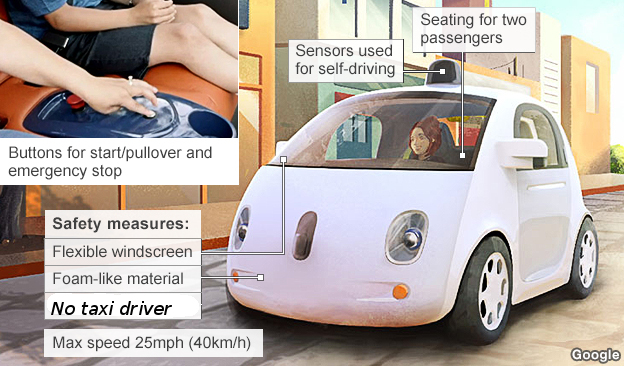
London's taxi "strike" today has been so successful that Uber claims to have had an 850% increase in new customer registrations this week. Well, that is a big success if you believe the strike may have been a guerrilla marketing tactic organised by Uber itself. No sympathy Personally, I have no sympathy for the taxi drivers. There is no city I have ever visited where I haven't encountered at least one taxi driver who tried to overcharge me. Honest drivers who give their customers value for money have less to fear from new technology than those who are unscrupulous. When I broke a leg a few years ago and was getting about on crutches for 6 weeks we decided to go out for dinner one night. This was the first time I went anywhere after having a long stint in hospital followed by a period of time I was confined to the house. The taxi driver deliberately skipped two turns leading directly to the restaurant, went another 1km past it and then followed a small street that winds back and forth and eventually demanded I pay him double what the fare should have been. This is exactly the type of abusive and despicable practice that is being eradicated by Uber's live GPS mapping technology. Although not every driver behaves so shamefully, this type of abuse of the weak or vulnerable is replicated in one way or another the world over. For example, in Melbourne, Australia, wheelchair taxis that have worked out they can make more money collecting families with suitcases at the airport leave genuine wheelchair users without a ride. Will Google be targeted next week? Google has just announced a step-change in plans to build their own self driving cars. Will Google offices around the world, including London be targetted by these crude blockades too? Political protest or anti-competitive mischief? Why were taxi drivers not arrested for their protest today? Given that the roads are the place where taxis and their competitors do business, can this blockade really be considered a political protest or is it an anti-competitive practice in blatant disregard of the law? Weapons of mass destruction Before even having breakfast you could probably find 10,000 cyclists in central London willing to sign a petition declaring taxis are a weapon of mass destruction. Once again, while there are honest drivers, there is a more than trivial number of taxi drivers who are a genuine danger to the lives of cyclists, scooters, motorcycles and occasionally pedestrians. I have personally experienced one of these thugs ramming my bicycle from behind (his hard-nosed insurer eventually paid up but without admitting liability). The police who attended the incident even told me they had seen so many accidents like this they wouldn't dare cycle themselves. The web is full of examples that appear to show malicious and criminal behavior by taxi drivers, thanks to Youtube and helmet cams: Will hotels protest about AirBNB? Now the taxi drivers have had their chance to cause mayhem, will hotel operators be next? What could they do though? Will they seek out AirBNB apartments and try to obstruct them somehow? Making mischief outside somebody's home is not a good way to make a point. Chances are, they would be prosecuted or served with restraining orders. So why do the taxi drivers get to jam up whole cities and get away with it? The Uber taxi meter loophole Will the courts decide that the Uber app is a taxi meter? This is actually a tough question. Even if courts rule against apps that perform live metering, Uber could simply remove all metering functions from the app itself and perform the metering calculations in the cloud. The app would just send start and finish locations to the cloud and the cloud would send a message back to the phone confirming the charge. The phone is then nothing more than a communication and positioning device. Remember the elevator man? When the automobile was first invented, laws were made requiring every car to be accompanied through public streets by a man carrying a flag. That job, like many others, no longer exists. elevator attendant In the good old days, every elevator had a man or woman who would sit on a stool and press buttons to operate the doors and motors. Some up-market department stores and hotels still have an elevator man to add a touch of nostalgia. The vast majority, however, have eliminated these jobs thanks to automatic elevators. Now, even aircraft can land automatically on a ship at sea. Look at all those people manning the deck in the video and contemplate how many of them might potentially be out of a job too in 50 years time as Terminator-style automated battleships patrol the seas. Technology, like the Terminator, is not going to stop.

10 June 2014

Gunnar Wolf: Tor: I'm shutting down my relay only after four days

Some days ago, I bit the bullet and accepted the Tor Challenge. Sadly, after only four days of having a Tor relay node happily sitting at home (and, of course, giving a nice function to this little friend). The inconveniences were too many. I understand anonimity can be used for many nefarious things, but I was surprised and saddened to see the amount of blocking services. Most notorious to me were the Freenode IRC network, friendly home to many free software projects, and the different Wikimedia projects, which ban editting from IP addresses idenitfied as Tor relays. I'm saddened to say that, while I could perfectly survive (and even be a bit proud about supporting a project I believe in) by jumping through some hoops (i.e. by setting up a SOCKS over ssh tunnel to my office to do my Wikipedia edits while at home), after only four days, I decided to shut down my relay. And the main reason... Was something I'm not going to fight against. And it's not even from a nice, friendly free software project. One thing I am not willing to part with is the one tool that keeps my wife well in contact with her friends and family back in Argentina. Yes, I know I could set up one or many different flavors of SIP or Jabber-based VoIP for her But it's also her parents, brother, sisters, and friends who use Skype. So, Skype's banning of Tor relay nodes made me decide to shut down my relay. Sigh... And for somebody obsessed with graphing stuff, this is the graph of the short lifespan of the "Lobazal" Tor node: [update] I will do another blog post. Good news: My Tor node is alive again! Just no longer as an exit relay, as properly pointed out by many, but as a Tor bridge.


AttachmentSize
tor-challenge-1.png23.97 KB
tor1.png27.84 KB
tor2.png18.3 KB

7 June 2014

Steve Kemp: setuid/setgid binaries in Debian's Wheezy release?

If anybody has access to a complete mirror of the Debian Wheezy release, and was willing to share a list of all setuid/setgid binaries that would be greatly appreciated. It doesn't seem to be something you can find online, so you need to manually unpack each .deb file and look at the permissions. I don't have access to a (complete) local mirror, and so I cannot easily build such a thing, unless I go to ebay and buy a random DVD-archive. This list would be useful for folk wanting to direct their audits ..

18 May 2014

Benjamin Mako Hill: Installing GNU/Linux on a 2014 Lenovo Thinkpad X1 Carbon

I recently bought a new Lenovo X1 Carbon. It is the new second-generation, type 20A7 laptop, based on Intel s Haswell microarchiteture with the adaptive keyboard. It is the version released in 2014. I also ordered the Thinkpad OneLink Dock which I have returned for the OneLink Pro Dock which I have not yet received. The system is still very new, challenging, and different, but seems to support GNU/Linux reasonably well if you are willing to run a bleeding edge version and/or patch your kernel and if you are not afraid to spend an afternoon or two tweaking things. What follows are my installation notes for Debian testing (jessie) when I installed it in early May 2014. My general impressions about the laptop as a GNU/Linux system and overall are at the end of this write-up.
System Description The X1 Carbon I ordered included the 512GB SSD, the 14.0 inch WQHD (2560 1440) 260 nit touchscreen, and the maximum 8GB of memory. I believe the rest is not particularly negotiable but includes a 720p HD Camera, a 45.2Wh battery, and an Intel Dual Band Wireless 7260AC with Bluetooth 4.0. For those that are curious Here is the output of lspci on the system:
00:00.0 Host bridge: Intel Corporation Haswell-ULT DRAM Controller (rev 0b)
00:02.0 VGA compatible controller: Intel Corporation Haswell-ULT Integrated Graphics Controller (rev 0b)
00:03.0 Audio device: Intel Corporation Haswell-ULT HD Audio Controller (rev 0b)
00:14.0 USB controller: Intel Corporation Lynx Point-LP USB xHCI HC (rev 04)
00:16.0 Communication controller: Intel Corporation Lynx Point-LP HECI #0 (rev 04)
00:16.3 Serial controller: Intel Corporation Lynx Point-LP HECI KT (rev 04)
00:19.0 Ethernet controller: Intel Corporation Ethernet Connection I218-LM (rev 04)
00:1b.0 Audio device: Intel Corporation Lynx Point-LP HD Audio Controller (rev 04)
00:1c.0 PCI bridge: Intel Corporation Lynx Point-LP PCI Express Root Port 6 (rev e4)
00:1c.1 PCI bridge: Intel Corporation Lynx Point-LP PCI Express Root Port 3 (rev e4)
00:1d.0 USB controller: Intel Corporation Lynx Point-LP USB EHCI #1 (rev 04)
00:1f.0 ISA bridge: Intel Corporation Lynx Point-LP LPC Controller (rev 04)
00:1f.2 SATA controller: Intel Corporation Lynx Point-LP SATA Controller 1 [AHCI mode] (rev 04)
00:1f.3 SMBus: Intel Corporation Lynx Point-LP SMBus Controller (rev 04)
BIOS/Firmware The BIOS firmware is non-free and proprietary as it the case with all ThinkPads and nearly all laptops. According to this thread there is a bug in the default BIOS that means that suspend to RAM is broken in GNU/Linux. You can get updated BIOS at the Lenovo s ThinkPad X1 Carbon (Type 20A7, 20A8) Drivers and software page by looking in the the BIOS section. Honestly, the easiest approach is probably to download the Windows BIOS Update utility (documentation is here) which you can use to run the BIOS update from within Windows before you install GNU/Linux. If that s not an option (e.g., if you ve already installed GNU/Linux) the best method is to download the bootable CD ISO from the same page. Of course, since the X1 Carbon has no optical media, you have to find another way to boot the CD image. I struggled to get the ISO to boot from USB using the usually reliable dd method. This message suggest that the issue had to do with the El Torito wrapper:
I had to dump the eltorito image from the ISO they provide, after that I was able to dd the resulting image to a flash drive and the bios update went well, no cdrom needed.
I updated to version 1.13 of the BIOS which fixes the suspend/resume bug. By the time you read this, there may be newer versions that fix other things so check the Lenovo website.
Installing Debian I installed Debian testing using the March 19, 2014 Alpha 1 release of the Debian Installer for Jessie (currently testing). I installed in graphical mode. With the WQHD screen, everything was extremely tiny but it worked flawlessly. I downloaded the amd64 net install image from the normal place and installed the rest of the system using the built-in Ethernet port which required no firmware or extra drivers. I did the normal dd if=FILENAME.iso of=/dev/sdX method of getting the installer onto the a USB stick to boot. I turned off restricted boot in BIOS first. In general, the latest version of the Debian installation guide is always a good source of guidance on installing Debian. I used the Debian installer wizard to partition and selected Use entire disk and partition it for LVM and encrypted data which kept the UEFI partitions around. The system installed with no errors or issues and booted up normally afterward. The grub menu is hilariously narrow on the WQHD screen. If you want to use the built-in wireless and/or Bluetooth, you will need to install the non-free iwlwifi firmware package. It is very lame that we still have to do this to use hardware we have purchased.
What Works and Doesn t The following stuff works the first time I booted into the GNOME 3 desktop and logged in:
  • The WQHD 2560 1440 screen
  • The touchscreen
  • Both the TrackPoint and the touchpad
  • Built-in e1000e Ethernet using the dongle
  • The keyboard plus the adaptive row of F1-F12 keys.
  • External monitor using the full HDMI or mini-DisplayPort connectors
  • Audio (both speakers and microphone)
  • The camera/webcam
The following stuff works if you install non-free firmware:
  • Internal Wireless
  • Bluetooth 4.0
The following stuff works with qualifications:
  • Suspend to RAM Works once you have updated the firmware.
  • The adaptive keyboard The F1-F12 keys work but the button that theoretically lets you switch to different sets of function buttons (e.g., volume, brightness) does nothing.
  • Disabling the touchpad There is a BIOS option to disable the touchpad. It works in Windows and does nothing at all in GNU/Linux.
I have not tried:
  • The fingerprint reader
Disabling the touchpad As a long-term ThinkPad user, I love the TrackPoint pointing stick. If you plan on using this, the built-in touchpad is incredibly aggravating because it is very easy to brush against it while using the TrackPoint. In BIOS, there is an option to disable the touchpad. Although this works in Windows, it does absolutely nothing in GNU/Linux. Part of the issue is that, unlike the older X1 Carbon and other ThinkPads, there are no TrackPoint buttons. Instead of buttons, there are regions at the top of the touchpad which are configured, in software, to act like buttons. If you want to be able to click, the touchpad can never be truly turned off. This is not problem unique to the Haswell X1 Carbon and a number of people have been struggling with this issue on other Lenovo laptops. Essentially, what you need to do is configure your touchpad so that the buttons are where you want them and so that it ignores any input for the purposes of cursor movement. There are a few ways of doing this but this answer from an askubuntu.com question has the solution I ended up using:

Open file /usr/share/X11/xorg.conf.d/50-synaptics.conf for edit.

Find Section InputClass which the following line is Identifier Default clickpad buttons .

Edit option for SoftButtonAreas to values 64% 0 1 42% 36% 64% 1 42%, this is size of the right and middle button.

Enable option AreaBottomEdge and change value to 1, this will disable touchpad movement.

If everything done right, your class should looks like:

Section "InputClass"
     Identifier "Default clickpad buttons"
     MatchDriver "synaptics"
     Option "SoftButtonAreas" "64% 0 1 42% 36% 64% 1 42%"
     Option "AreaBottomEdge" "1"
EndSection
Essentially, the first Option line will create a middle button that is 32% of the width and 42% of the height, and a right button that is 32% of the width and 42% of the height. The synaptics manpage (man synpatics) will give you more detail on the general way this works. Of course, something does feel very wrong about editing a file in /usr/share.
Fixing the Adaptive Keyboard The most wild feature of the laptop is the adaptive keyboard strip. The strip is a back-lit LCD that looks almost like E Ink screen and acts as a touchscreen keyboard. The default mode gives you the F1-F12 keys. If you press the keys (since they aren t buttons, you just put your finger on top of them) they act like normal F-keys. You can Ctrl-Alt-F1, etc., to switch to virtual terminals out of the box. There are four modes: Function (i.e., normal F-keys), Home, Web, and Chat. The last three overlap quite a bit (e.g., they all have brightness and volume). You can play with an example on the Lenovo homepage. In Windows, switching programs will apparently change these keys so that an appropriate set of buttons is shown for the application you are using. You can also change these keys manually with a big Fn button at the far left of the adaptive keyboard strip. As I write this this, released kernels do not support the adaptive keyboard Fn button which means you cannot use anything other than the F-keys out of the box. I believe it also means that resuming from suspend to RAM breaks these keys. That said, Shuduo Sang from Canonical has released several versions of a patch to to the thinkpad_acpi kernel module which adds support for the Home mode. The other modes (web and chat) do not seem to be supported. The latest version of the patch is on on the Linux Kernel Mailing List and the relevant commits are:
330947b save and restore adaptive keyboard mode for suspend and,resume
3a9d20b support Thinkpad X1 Carbon 2nd generation's adaptive keyboard
Although this is not supported in Debian testing at the time of writing, a bug was filed in Debian and quickly fixed by Ben Hutchings in Debian kernel version 3.14.2-1 which is currently in sid/unstable. As a result, if you install the latest version kernel from Debian unstable (3.14.2-1 or later), the adaptive keyboard just works. If you aren t using Debian and if kernel you are using does not have support, you might be patching your kernel.
General Impressions As I have described in my interview with The Setup, I have been a user of ThinkPad X-series laptops for many years. This is my sixth X-series ThinkPad. Overall, I quite like the hardware! Once things mature a little bit, I think that this will be a great laptop for running GNU/Linux. That said, I ordered the laptop without realizing that the X1 Carbon had gone through a major revision! The keyboard was quite a suprise. I think that changing a system so radically without changing the model name/number is a very bad move on Lenovo s part. There are two remaining issues with the system I m still struggling with: (1) the keyboard layout is freaky and weird, and (2) the super high resolution screen breaks many things. The quality of the keyboard itself is great and worthy of the ThinkPad name. That said, there are two ways in which it is strange. The first is the adaptive keyboard strip. Overall, it works surprisingly well and I think it is a clever idea. My sense is that the strip is more annoying in Windows because it changes out from under you all the time. In GNU/Linux, only manual changing of modes is supported. This, in my opinion, is a feature. I do miss the real feedback you get from pressing keys but for F-keys and volume-keys that I don t use often this isn t too important. On the downside, I have realized several times that I had been holding down a button for several seconds and not noticed. The more annoying issue with the keyboard is the way that the other keys have moved around. Getting rid of the CapsLock is wonderful! How has this taken so long? Replacing it with a split Home and End keys is nuts. I ve remapped the Home and End to put Control back where it should be. My right Control to now Home but I still don t have an End key. The split Backspace and Delete is not a problem for me. The tilde/apostrophe is in a very bad place. There is no Insert, Print Screen/SysRq, Scroll Lock, Pause/Break or NumLock. They are all just gone. Surprisingly, I haven t missed any of them. The second issue is the 2560 1440 resolution on the 14 inch screen. I use a 27 inch external monitor with the same native resolution laptop but, by my arithmetic, the pixel density on the laptop is 210 DPI instead 109 DPI on the external monitor. The result is the scaling problem and it s a huge pain that seems mostly unsolved on any operating system. Fonts and widgets that look good on the laptop look huge on my external monitor. Stuff that looks good on my external monitor looks minuscule on the laptop. I routinely move windows between my laptop screen and my large monitor. Until I find a display system that can handle this kind of scaling effectively, this requires changing font size and zooming all the time. At the moment, I m shrinking and expanding my font size using the built in hot keys in Emacs, Gnome Terminal, and Firefox/Iceweasel. I love the high resolution screen but the current situation is crazy-making. Finally, this setup will not get you into the Church of Emacs and it s not about to find its way onto the FSF s list of endorsed hardware. For one, I paid the Windows tax. Beyond that, there is the non-free BIOS and the need for non-free firmware to use the wireless and Bluetooth. This is standard for ThinkPads but it isn t getting any easier to swallow. There are alternatives in the form of Gluglug s X60 laptops running CoreBoot, Lemote Yeelong laptops, Bunnie Huang s Novena and others that are better in these regards. I am very excited for these projects but, for a number of reasons, these just weren t an option for the laptop I use for my research computing.

14 May 2014

Francesca Ciceri: A month with Mozilla

Random thoughts of a new contributor I've started to contribute to Mozilla - and particularly to the Firefox Desktop QA team - at the end of March, in order to apply for the OPW with Mozilla as Bug Wrangler.
While being already part of the Free Software world as contributor clearly helps, it's always difficult to find your way at first in such a big project, no matter how helpful the people you're working with are. It's about trying to understand how the project is organized and who works on what, what is expected from you as contributor and the specific style of interaction and contribution accepted in the project. So, here's a couple of thought about it: the necessary disclaimer is that I'm a long-time Debian contributor meaning that, inevitably, Debian is my reference model. Also, everything I'm writing here regards only the specific part of the project I've been working in: Desktop QA and Bugmastering. Documentation The first thing that I noticed is the huge amount of documentation. Everything is very well documented and while this is definitely a plus in my book, it's sometimes difficult to keep track of all this resources. AFAICT, there are basically three main sources of documentation:
  1. the wiki
  2. the Mozilla Developer Network
  3. the site of the QA team
Some of the documents on these three different places are sometimes similar, making them redundant and it's difficult to remember where you read what. At least for me. My workaround has been to bookmark pages as a mad woman, and also to make a list on my wikipage of the pages I found more useful.
My top five of useful pages? Here we go!
  1. a bug's life: lifecycle of bugs in BMO
  2. Tyler's BMO survival guide (parts 1, 2 and 3)
  3. Tyler's Triage Guidelines
  4. on reducing testcases
  5. bug verification walkthrough
And speaking of triage, special shout-out for the most useful addon ever for Mozilla triagers/testers: Nightly Tester Tools. Community interaction For someone coming from Debian, where everything is done via public mailing lists and/or IRC chans, Mozilla was a bit of a cultural shock. The mailing lists are not very much used, at least in the QA community (or I'm not subscribed to the right ones ;)). As for IRC, while there are many channels, they are not very active: meetings and important discussions are held using a proprietary videoconference software (Vidyo), and are mostly restricted to employees (but other people can join if they have a guest URL). On the other hand, every time I asked for help - even the most stupid question - on IRC, I got a useful reply. And thanks to the folks on #testdays and #qa (especially petruta and Aleksej) I was able to speed up the learning process and understand how things work in the project. So, while I'd like to see more public meetings, it's also true that the community is working well on interaction among contributors. Community outreach This is where I think Debian could borrow a couple of ideas. Mozilla basically got me hooked thanks to their Bugdays: every Monday and Wednesday are - respectively - dedicated to Triage and Verification of bugs. The events are open to everyone, the wikipages for the events provide a good tutorial explaining the workflow in detail, and if you have any doubts there are always people willing to help you on the dedicated IRC chan. Every bug worked on during these events is also tagged: so that later it's possible to check how successful the day was in terms of participation. Bugzilla and the triaging/verification workflow About Bugzilla I can only say that I like it. I like how flexible is for search queries, I like the possibility to have custom tags on the whiteboard (as the [bugday-xxxxxx] one) and the smart way to interact among people in the bug without making the bug go stale (ie, mostly the needinfo feature). But beside the software used as BTS, I must admit that I really like the workflow and the whole concept of triaging in Mozilla. The granularity of rights (everyone, canconfirm, editbugs) and the clear procedure for a permission upgrade; the presence of a team constantly working on cleaning the incoming bugs, regardless of the product/component, to make easier for the developers the filtering and the resolution as well; the attention to details of the verification process: each bug marked as Resolved Fixed need to be Verified, to be sure that it's been actually fixed... All these things are really impressive. This, obviously, is something that can be done inside an upstream project where there are people doing paid work, and where the products are not too many. I cannot see how this kind of QA process can be applied to bugs against an entire OS.
But there are some things we (as in Debian) could take inspiration from. Organizing regular Bugdays, for instance. Creating a team of triagers to help both with incoming and with very old bugs. And this, again, is a kind of work that can be done by everyone, not only coding contributors: meaning that an additional effect would be to increase the diversity in the contributors pool. As a side note: I'll start my OPW internship next Monday, and will spend three months playing with bugs and learning how to be a Bug Wrangler! \o/\o/

12 May 2014

Benjamin Mako Hill: Google Has Most of My Email Because It Has All of Yours

Republished by Slate. Translations available in French (Fran ais), Spanish (Espa ol), Chinese ( ) For almost 15 years, I have run my own email server which I use for all of my non-work correspondence. I do so to keep autonomy, control, and privacy over my email and so that no big company has copies of all of my personal email. A few years ago, I was surprised to find out that my friend Peter Eckersley a very privacy conscious person who is Technology Projects Director at the EFF used Gmail. I asked him why he would willingly give Google copies of all his email. Peter pointed out that if all of your friends use Gmail, Google has your email anyway. Any time I email somebody who uses Gmail and anytime they email me Google has that email. Since our conversation, I have often wondered just how much of my email Google really has. This weekend, I wrote a small program to go through all the email I have kept in my personal inbox since April 2004 (when Gmail was started) to find out. One challenge with answering the question is that many people, like Peter, use Gmail to read, compose, and send email but they configure Gmail to send email from a non-gmail.com From address. To catch these, my program looks through each message s headers that record which computers handled the message on its way to my server and to pick out messages that have traveled through google.com, gmail.com, or googlemail.com. Although I usually filter them, my personal mailbox contains emails sent through a number of mailing lists. Since these mailing lists often hide the true provenance of a message, I exclude all messages that are marked as coming from lists using the (usually invisible) Precedence header. The following graph shows the numbers of emails in my personal inbox each week in red and the subset from Google in blue. Because the number of emails I receive week-to-week tends to vary quite a bit, I ve included a LOESS smoother which shows a moving average over several weeks. Emails, total and from GMail, over timeFrom eyeballing the graph, the answer to seems to be that, although it varies, about a third of the email in my inbox comes from Google! Keep in mind that this is all of my personal email and includes automatic and computer generated mail from banks and retailers, etc. Although it is true that Google doesn t have these messages, it suggests that the proportion of my truly personal email that comes via Google is probably much higher. I would also like to know how much of the email I send goes to Google. I can do this by looking at emails in my inbox that I have replied to. This works if I am willing to assume that if I reply to an email sent from Google, it ends up back at Google. In some ways, doing this addresses the problem with the emails from retailers and banks since I am very unlikely to reply to those emails. In this sense, it also reflects a measure of more truly personal email. I ve broken down the proportions of emails I received that come from Google in the graph below for all email (top) and for emails I have replied to (bottom). In the graphs, the size of the dots represents the total number of emails counted to make that proportion. Once again, I ve included the LOESS moving average. Proportion of emails from GMail over timeThe answer is surprisingly large. Despite the fact that I spend hundreds of dollars a year and hours of work to host my own email server, Google has about half of my personal email! Last year, Google delivered 57% of the emails in my inbox that I replied to. They have delivered more than a third of all the email I ve replied to every year since 2006 and more than half since 2010. On the upside, there is some indication that the proportion is going down. So far this year, only 51% of the emails I ve replied to arrived from Google. The numbers are higher than I imagined and reflect somewhat depressing news. They show how it s complicated to think about privacy and autonomy for communication between parties. I m not sure what to do except encourage others to consider, in the wake of the Snowden revelations and everything else, whether you really want Google to have all your email. And half of mine. If you want to run the analysis on your own, you re welcome to the Python and R code I used to produce the numbers and graphs.

9 May 2014

Rhonda D'Vine: Rhonda's Free Hugging Guidelines

Recently I was wearing my Free Hugs shirt to different Free Software meetings, and I came up with the idea if we are advocating the Free in Software specificly, why not come up with Free Hugging Guidelines, too. So here they are, from now on considered to be named the RFHG.
  1. Free Redistribution Your hugs may not restrict any party from passing on the hugs they received from you.
  2. Source Code The hugs must be possible to be perceived and understandable in complete. You are not allowed to use any special techniques that can not be perceived.
  3. Derived Works Your hugs must be allowed to be modified, and must allow the modified forms of your hugs to be distributed under the same terms as they received them.
  4. Integrity of The Author's Source Code While you are allowed to pass on the hugs in modified form, you are not allowed to modify the DNA of the original person you received the hugs from. Genetic modification is out of the scope of the RFHG.
  5. No Discrimination Against Persons or Groups While we acknowledge that you might not feel willing to hug everyone, you must apply rules that do not distinquish by rules which would violate The Universal Declaration of Human Rights. Furthermore, you have the right to not hug a person if you are not in the mood for it. Please refrain from wearing any Free Hugs markers at those times though.
  6. No Discrimination Against Fields of Endeavor The hugs can not be restricted to be used in a specific field of endeavor. For example, you may not restrict the hugs from being passed on only in times of sorrow.
  7. Distribution of Hugs The rights attached to the hugs must apply to all to whom the hugs are redistributed without the need for execution of an additional license by those parties.
  8. Hugs Must Not Be Specific to Rhonda The rights attached to the hugs must not depend on the hugs being related to Rhonda. If the hugs are extracted from Rhonda and used or distributed without Rhonda nearby but otherwise within the terms of the hug's permissions, all parties to whom the hugs are distributed should have the same rights as those that are granted in conjunction with Rhonda.
  9. Hugs Must Not Contaminate Other People If you are contagious (e.g. got the flu, or worse) you have to apply appropriate counter measures to not transfer your illness with your hugs.
  10. Example Hugs This Group Hug modification and of course the Free Hugs Campaign are great examples of what we consider Free.
One last note: If you feel like it you don't have to wait until I wear my Free Hugs shirt again. I am fine with receiving (or giving) hugs like almost always. Surprise me. I at least know then that you read the RFHG. :) Like always, enjoy!

/personal permanent link Comments: 3 Flattr this

Next.

Previous.